
PLANET Technology Corp Product Guide 2001 Vo IP
- Slides: 31
PLANET Technology Corp. Product Guide 2001 Vo. IP Products Your Voice over Internet By Product Department SG 2001_VIP. ppt Page 1
The Vo. IP Products • • Product Range Product Position About the Telephony Gateway Deeper Look at the how it works SG 2001_VIP. ppt Page 2
Product Range • Enterprise Solutions • Choice for SOHO Users SG 2001_VIP. ppt Page 3
Enterprise Solution • VIP-000 – 2 -slot Internet Telephony Gateway – Modules • VIP-FXO: Foreign Exchange Office • VIP-FXS: Foreign Exchange Station • ISDN Line Module • VIP-SGK – Remote Authentication System – Handle up to 48 Internet Telephony Gateway SG 2001_VIP. ppt Page 4
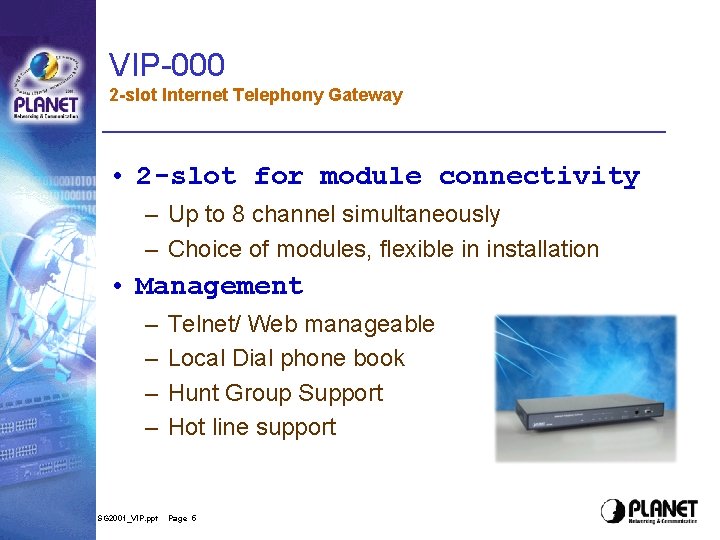
VIP-000 2 -slot Internet Telephony Gateway • 2 -slot for module connectivity – Up to 8 channel simultaneously – Choice of modules, flexible in installation • Management – – SG 2001_VIP. ppt Telnet/ Web manageable Local Dial phone book Hunt Group Support Hot line support Page 5
SOHO Solutions • VIP-200 – 2 -port Internet Telephony Gateway – 2 -port FXS interface for direct analog devices • VIP-400 – 4 -port Internet Telephony Gateway – 2 -port FXS interface for analog devices – 2 -port FXO interface for PBX/ PSTN SG 2001_VIP. ppt Page 6
Product Positioning • VIP-000 is suitable for Small to Middle sized enterprise – 8 lines can direct connect to local PBX sharing all your phone users • VIP-200 is suitable for Small Home Users or Remote Branches – One phone set/ One Fax machine • VIP-400 is suitable for Small offices & branches – Phone set and Fax machine – PBX and PSTN SG 2001_VIP. ppt Page 7
About the Telephony Gateway • • • Concept about VIP-xxx Benefits Key Features About FXO and FXS Applications – Installation – How to make calls – How to receive calls SG 2001_VIP. ppt Page 8
Concepts of the Gateway • The VIP-xxx is a device that convert/revert your analog voice into/from digital data • Transfer you voice data through Internet • Requirements – The Internet Telephony Gateway – Ethernet Networks and Router(s) to the Internet – Your existing telephone system • Standards, H. 323 – The standard provides a foundation for audio, video, and data communications across IP-based networks, including the Internet SG 2001_VIP. ppt Page 9
The Benefits • Lower the PSTN cost, especially the International call • Plug and Call • Cooperate with existing phone system • Cooperate with the TCP/IP networks and widely used OS, the Windows System • Do not have to change the behavior of having a call SG 2001_VIP. ppt Page 10
Key Features • Up to 8 Analog port for up to 8 channel in one time • Choice of FXO or FXS modules for flexible installation • 10/100 Mbps UTP port for LAN installation • Support ITU 729 A/B, G 723. 1 G. 711 for most popular ITG services in the market • H. 323 protocol stack compliant for Internet Telephony Applications like Net. Meeting, Web Phone, etc. SG 2001_VIP. ppt Page 11
Key Features –ctd. • Gate. Keeper Support for advanced management • HTTP engine for web-browser management • Flexible Dial Plan for speed dialing • Voice Processing – – SG 2001_VIP. ppt Voice Activity Detection (VAD) Comfort Noise Generation (CNG) Hybrid Echo Cancellation (HEC) Voice /FAX detection (T. 38 fax support) Page 12
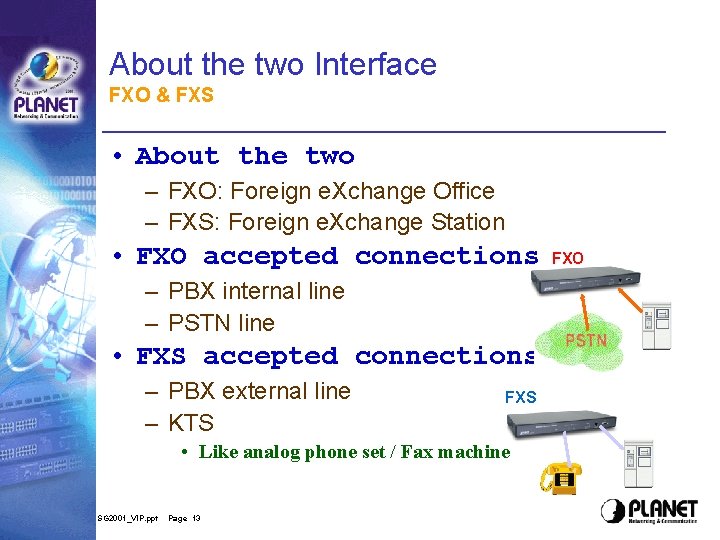
About the two Interface FXO & FXS • About the two – FXO: Foreign e. Xchange Office – FXS: Foreign e. Xchange Station • FXO accepted connections – PBX internal line – PSTN line • FXS accepted connections – PBX external line – KTS FXS • Like analog phone set / Fax machine SG 2001_VIP. ppt Page 13 FXO
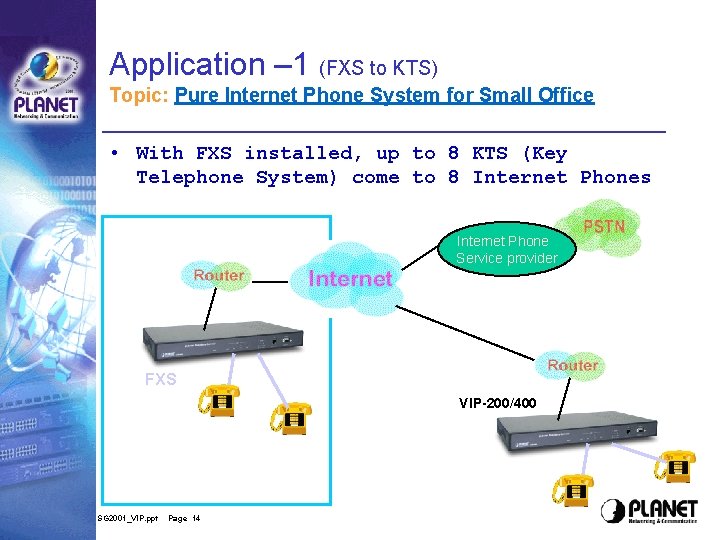
Application – 1 (FXS to KTS) Topic: Pure Internet Phone System for Small Office • With FXS installed, up to 8 KTS (Key Telephone System) come to 8 Internet Phones Internet Phone Service provider FXS VIP-200/400 SG 2001_VIP. ppt Page 14
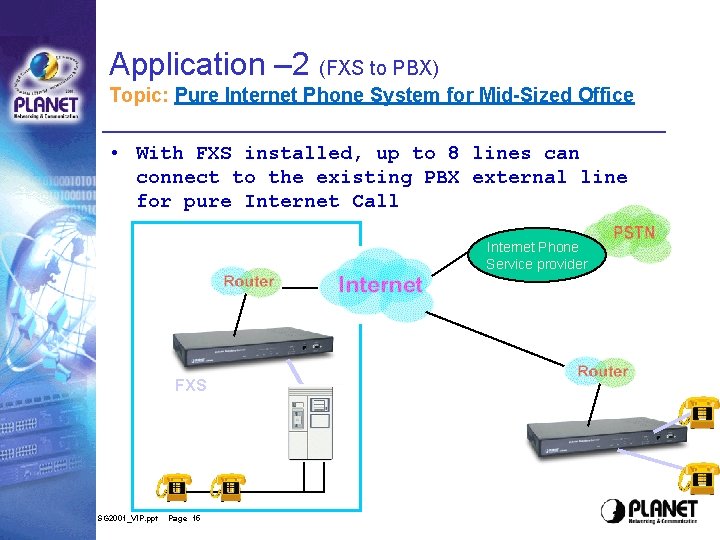
Application – 2 (FXS to PBX) Topic: Pure Internet Phone System for Mid-Sized Office • With FXS installed, up to 8 lines can connect to the existing PBX external line for pure Internet Call Internet Phone Service provider FXS SG 2001_VIP. ppt Page 15
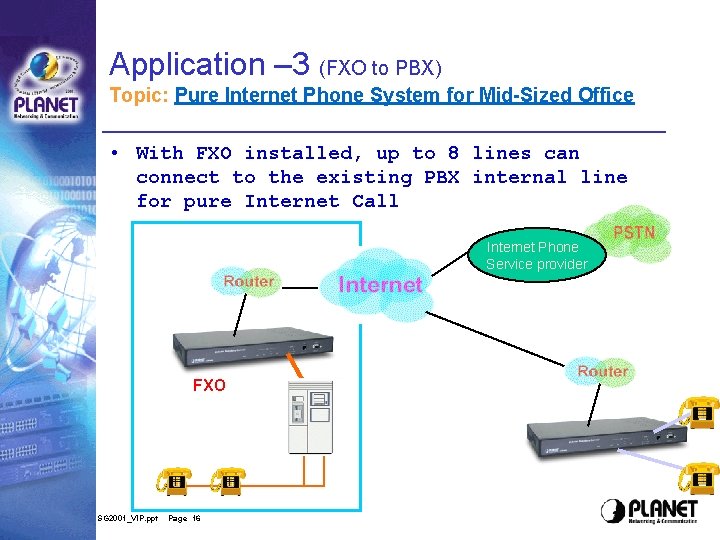
Application – 3 (FXO to PBX) Topic: Pure Internet Phone System for Mid-Sized Office • With FXO installed, up to 8 lines can connect to the existing PBX internal line for pure Internet Call Internet Phone Service provider FXO SG 2001_VIP. ppt Page 16
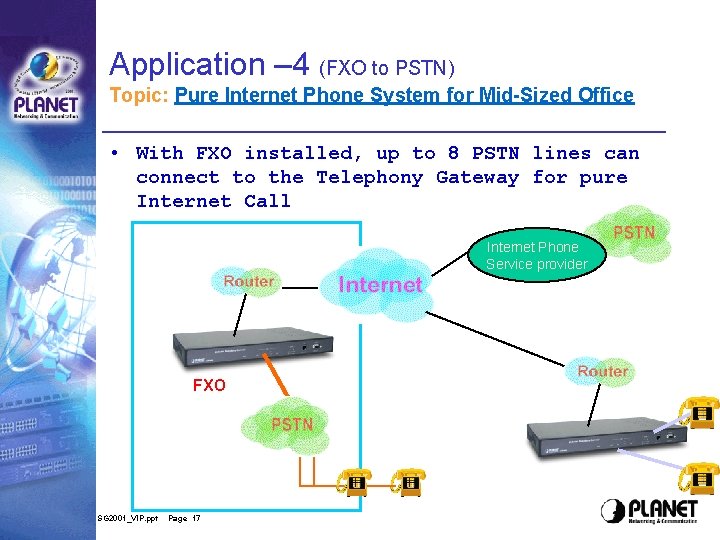
Application – 4 (FXO to PSTN) Topic: Pure Internet Phone System for Mid-Sized Office • With FXO installed, up to 8 PSTN lines can connect to the Telephony Gateway for pure Internet Call Internet Phone Service provider FXO SG 2001_VIP. ppt Page 17
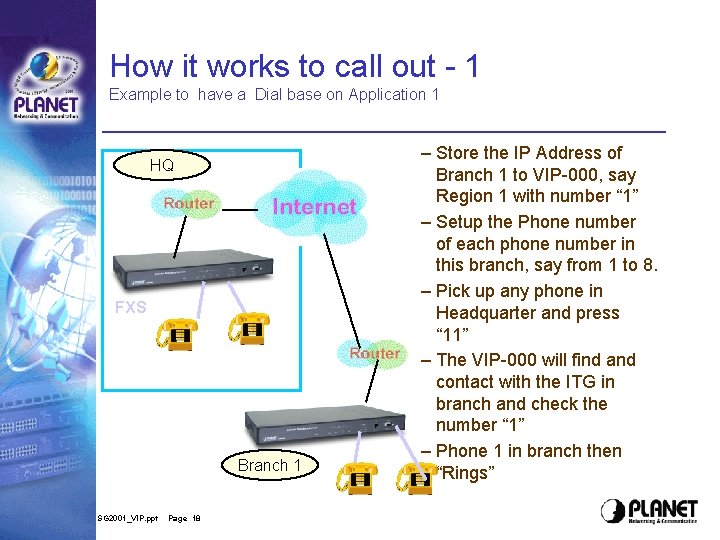
How it works to call out - 1 Example to have a Dial base on Application 1 HQ FXS Branch 1 SG 2001_VIP. ppt Page 18 – Store the IP Address of Branch 1 to VIP-000, say Region 1 with number “ 1” – Setup the Phone number of each phone number in this branch, say from 1 to 8. – Pick up any phone in Headquarter and press “ 11” – The VIP-000 will find and contact with the ITG in branch and check the number “ 1” – Phone 1 in branch then “Rings”
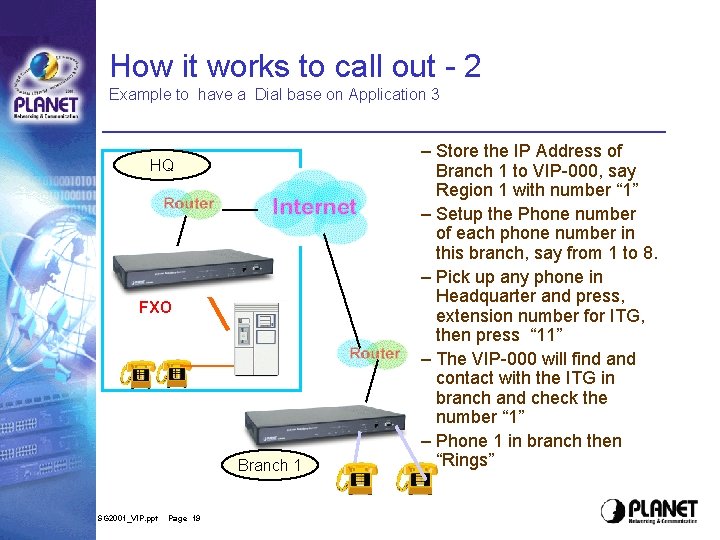
How it works to call out - 2 Example to have a Dial base on Application 3 HQ FXO Branch 1 SG 2001_VIP. ppt Page 19 – Store the IP Address of Branch 1 to VIP-000, say Region 1 with number “ 1” – Setup the Phone number of each phone number in this branch, say from 1 to 8. – Pick up any phone in Headquarter and press, extension number for ITG, then press “ 11” – The VIP-000 will find and contact with the ITG in branch and check the number “ 1” – Phone 1 in branch then “Rings”
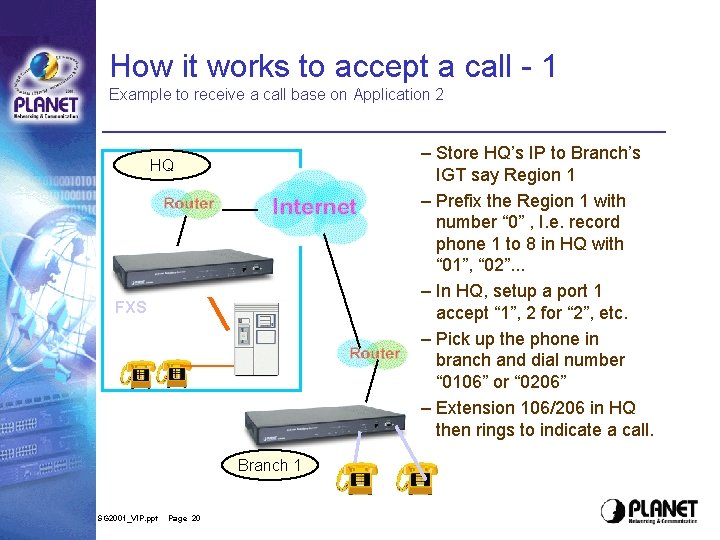
How it works to accept a call - 1 Example to receive a call base on Application 2 – Store HQ’s IP to Branch’s IGT say Region 1 – Prefix the Region 1 with number “ 0” , I. e. record phone 1 to 8 in HQ with “ 01”, “ 02”. . . – In HQ, setup a port 1 accept “ 1”, 2 for “ 2”, etc. – Pick up the phone in branch and dial number “ 0106” or “ 0206” – Extension 106/206 in HQ then rings to indicate a call. HQ FXS Branch 1 SG 2001_VIP. ppt Page 20
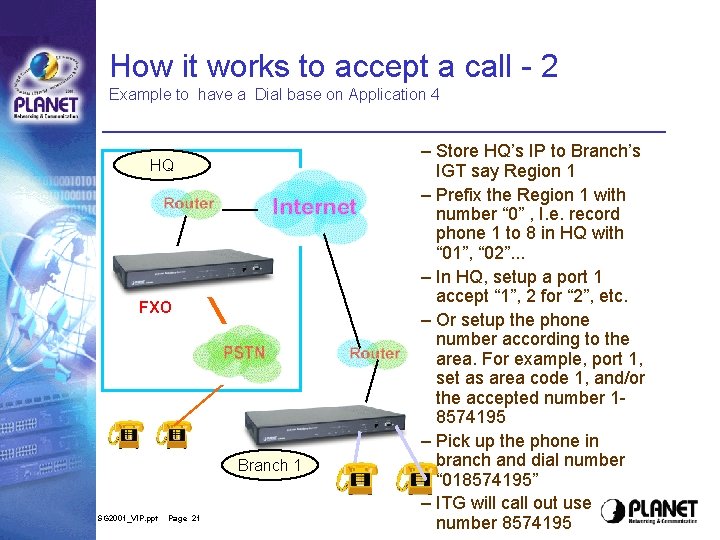
How it works to accept a call - 2 Example to have a Dial base on Application 4 HQ FXO Branch 1 SG 2001_VIP. ppt Page 21 – Store HQ’s IP to Branch’s IGT say Region 1 – Prefix the Region 1 with number “ 0” , I. e. record phone 1 to 8 in HQ with “ 01”, “ 02”. . . – In HQ, setup a port 1 accept “ 1”, 2 for “ 2”, etc. – Or setup the phone number according to the area. For example, port 1, set as area code 1, and/or the accepted number 18574195 – Pick up the phone in branch and dial number “ 018574195” – ITG will call out use number 8574195
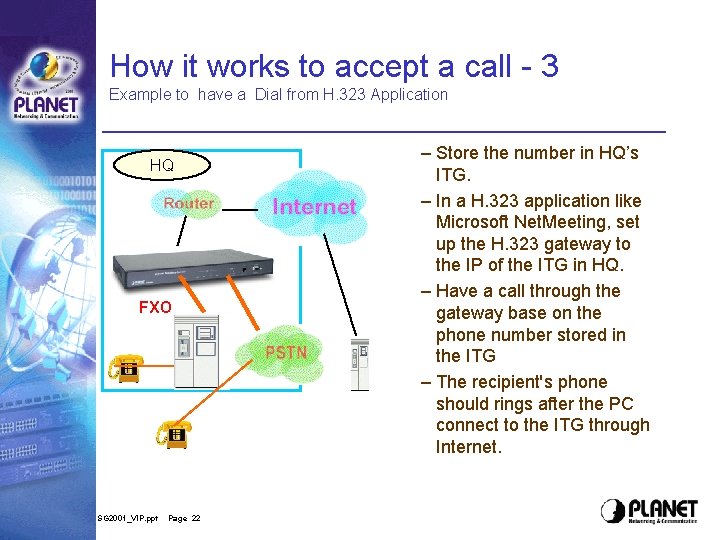
How it works to accept a call - 3 Example to have a Dial from H. 323 Application HQ FXO SG 2001_VIP. ppt Page 22 – Store the number in HQ’s ITG. – In a H. 323 application like Microsoft Net. Meeting, set up the H. 323 gateway to the IP of the ITG in HQ. – Have a call through the gateway base on the phone number stored in the ITG – The recipient's phone should rings after the PC connect to the ITG through Internet.
Have a deeper look Some Information for understanding the Gateway • Voice Construction and transmission • Voice quality Issue – – – Voice Codec Delay Jitter Echo Packet loss • Some advanced setting for VIPxxx SG 2001_VIP. ppt Page 23
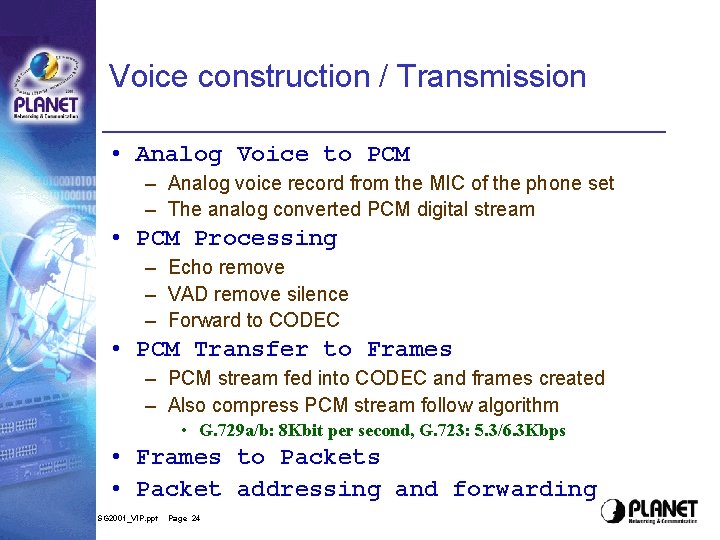
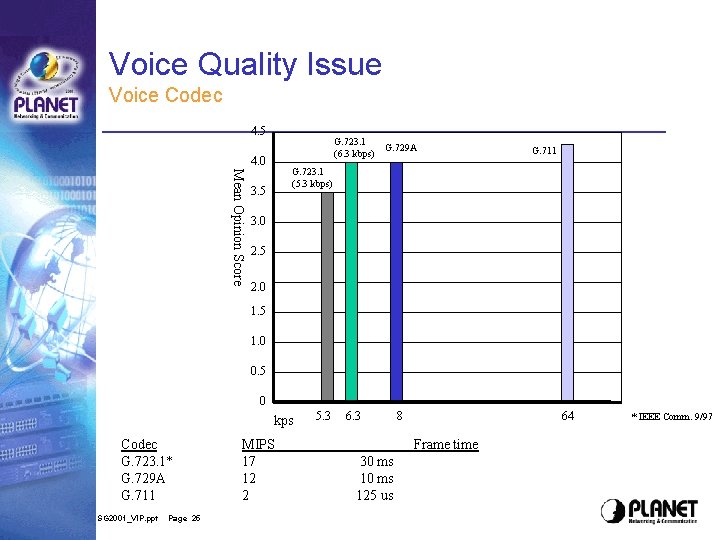
Voice construction / Transmission • Analog Voice to PCM – Analog voice record from the MIC of the phone set – The analog converted PCM digital stream • PCM Processing – Echo remove – VAD remove silence – Forward to CODEC • PCM Transfer to Frames – PCM stream fed into CODEC and frames created – Also compress PCM stream follow algorithm • G. 729 a/b: 8 Kbit per second, G. 723: 5. 3/6. 3 Kbps • Frames to Packets • Packet addressing and forwarding SG 2001_VIP. ppt Page 24
Voice Quality Issue Voice Codec 4. 5 4. 0 Mean Opinion Score G. 723. 1 (6. 3 kbps) G. 729 A 6. 3 8 G. 711 G. 723. 1 (5. 3 kbps) 3. 5 3. 0 2. 5 2. 0 1. 5 1. 0 0. 5 0 kps Codec G. 723. 1* G. 729 A G. 711 SG 2001_VIP. ppt Page 25 MIPS 17 12 2 5. 3 64 Frame time 30 ms 125 us * IEEE Comm. 9/97
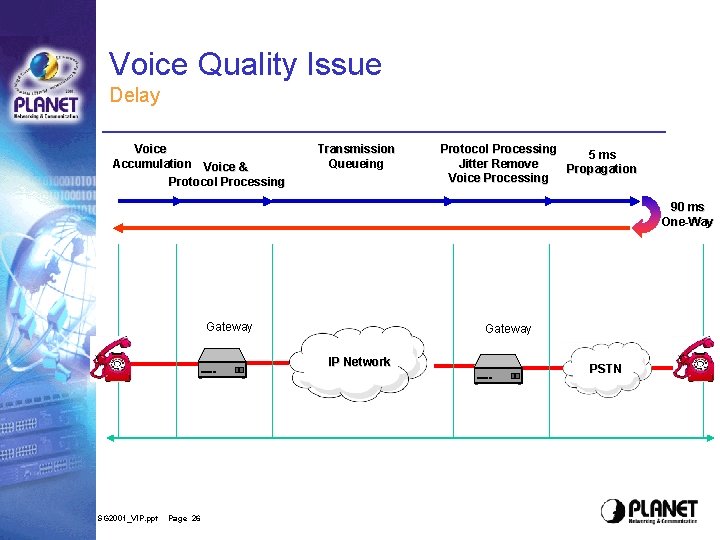
Voice Quality Issue Delay Voice Accumulation Voice & Protocol Processing Transmission Queueing Protocol Processing 5 ms Jitter Remove Propagation Voice Processing 90 ms One-Way Gateway IP Network SG 2001_VIP. ppt Page 26 PSTN
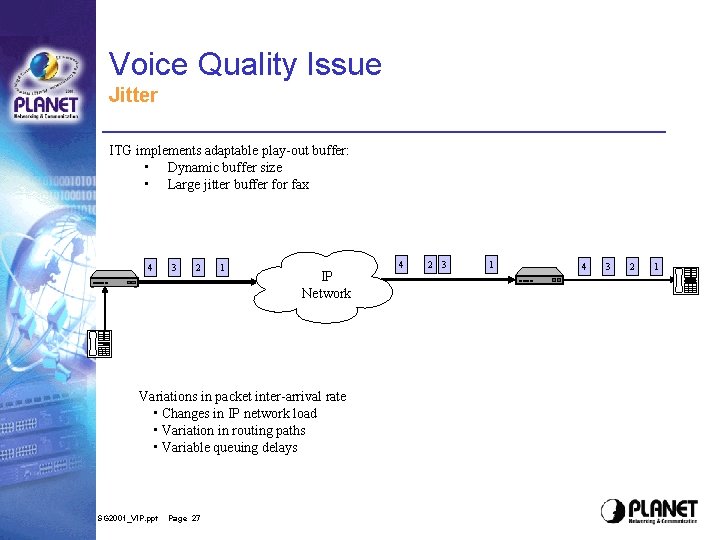
Voice Quality Issue Jitter ITG implements adaptable play-out buffer: • Dynamic buffer size • Large jitter buffer for fax 4 3 2 1 IP Network Variations in packet inter-arrival rate • Changes in IP network load • Variation in routing paths • Variable queuing delays SG 2001_VIP. ppt Page 27 4 2 3 1 4 3 2 1
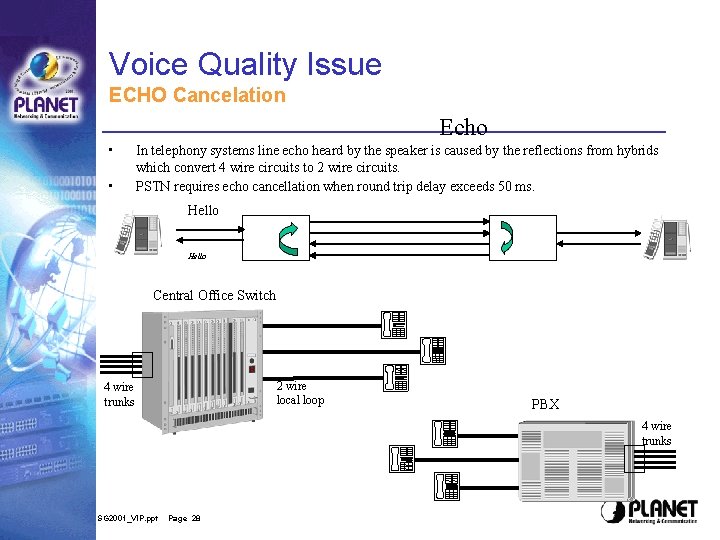
Voice Quality Issue ECHO Cancelation Echo • • In telephony systems line echo heard by the speaker is caused by the reflections from hybrids which convert 4 wire circuits to 2 wire circuits. PSTN requires echo cancellation when round trip delay exceeds 50 ms. Hello Central Office Switch 2 wire local loop 4 wire trunks PBX 4 wire trunks SG 2001_VIP. ppt Page 28
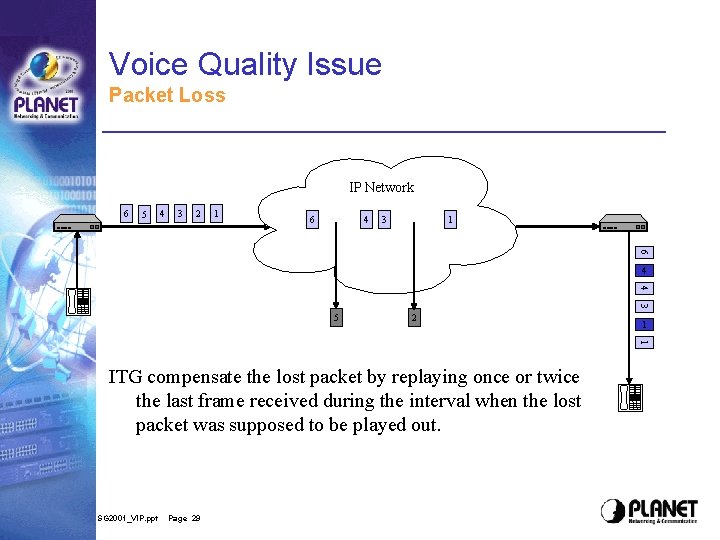
Voice Quality Issue Packet Loss IP Network 6 5 4 3 2 1 6 4 3 1 6 4 4 3 5 2 1 1 ITG compensate the lost packet by replaying once or twice the last frame received during the interval when the lost packet was supposed to be played out. SG 2001_VIP. ppt Page 29
Some Advanced Setting of VIP-xxx • PLAR (Private Line Auto-Ring down) – Set tcid n dial_in plar Destination • Ring Frequency – Tel set ring_freq n – Tel show ring_freq • Coding – Show coding n – Set coding n parameters • Future Product enhancement – Impendance adjustable – Dynamic DNS SG 2001_VIP. ppt Page 30
Thank you! SG 2001_VIP. ppt Page 31