
Pipelining Appendix A CS A 448 1 What
- Slides: 66
Pipelining Appendix A CS A 448 1
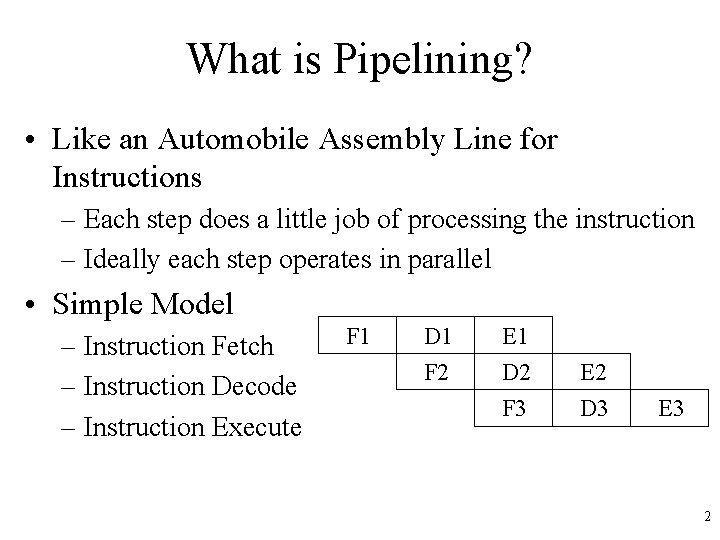
What is Pipelining? • Like an Automobile Assembly Line for Instructions – Each step does a little job of processing the instruction – Ideally each step operates in parallel • Simple Model – Instruction Fetch – Instruction Decode – Instruction Execute F 1 D 1 E 1 F 2 D 2 E 2 F 3 D 3 E 3 2
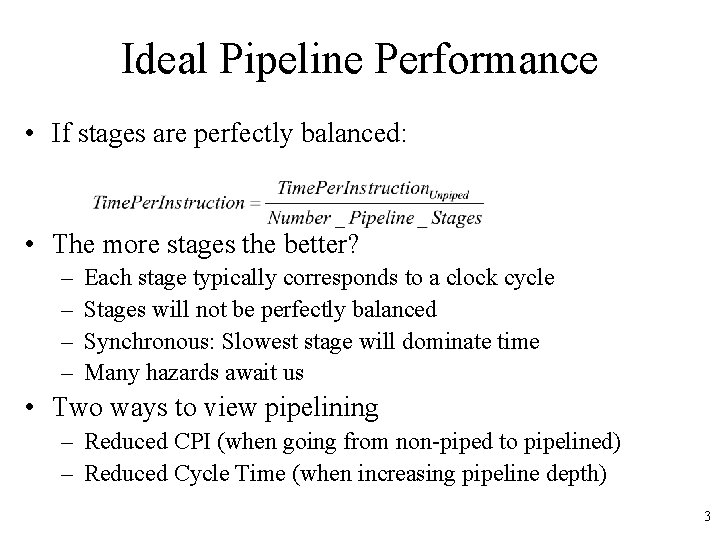
Ideal Pipeline Performance • If stages are perfectly balanced: • The more stages the better? – – Each stage typically corresponds to a clock cycle Stages will not be perfectly balanced Synchronous: Slowest stage will dominate time Many hazards await us • Two ways to view pipelining – Reduced CPI (when going from non-piped to pipelined) – Reduced Cycle Time (when increasing pipeline depth) 3
Ideal Pipeline Performance • Implemented completely in hardware – Exploits parallelism in a sequential instruction stream • Invisible to the programmer! – Not so for other forms of parallelism we will see – Not invisible to programmer looking to optimize – Compiler must become aware of pipelining issues • All modern machines use pipelines – Widely used in 80’s – Multiple pipelines in 90’s 4
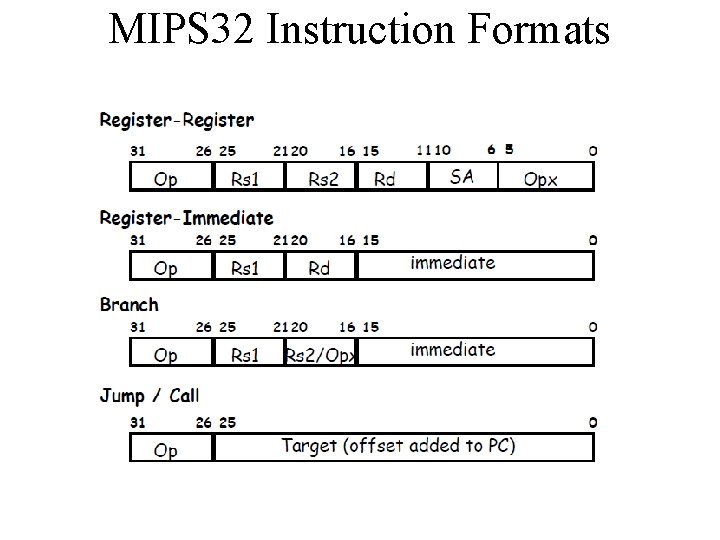
MIPS 32 Instruction Formats
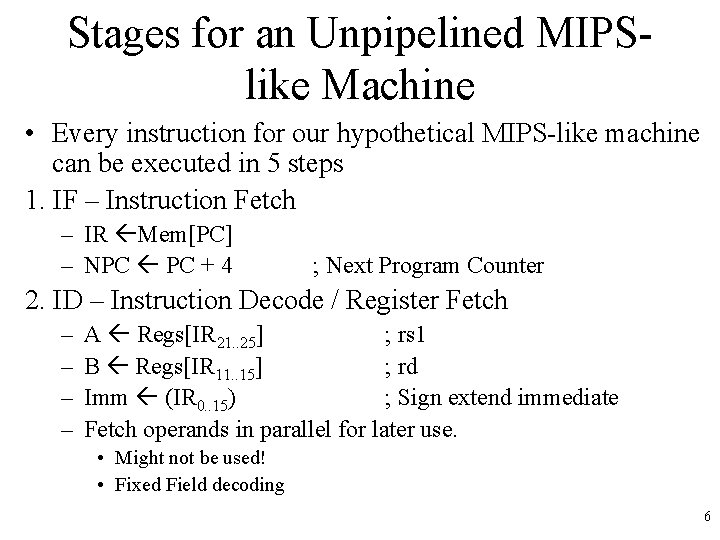
Stages for an Unpipelined MIPSlike Machine • Every instruction for our hypothetical MIPS-like machine can be executed in 5 steps 1. IF – Instruction Fetch – IR Mem[PC] – NPC PC + 4 ; Next Program Counter 2. ID – Instruction Decode / Register Fetch – – A Regs[IR 21. . 25] ; rs 1 B Regs[IR 11. . 15] ; rd Imm (IR 0. . 15) ; Sign extend immediate Fetch operands in parallel for later use. • Might not be used! • Fixed Field decoding 6
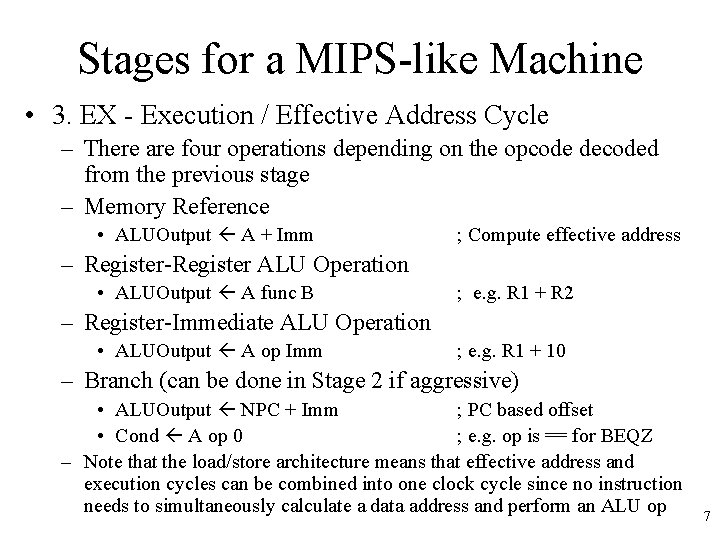
Stages for a MIPS-like Machine • 3. EX - Execution / Effective Address Cycle – There are four operations depending on the opcode decoded from the previous stage – Memory Reference • ALUOutput A + Imm ; Compute effective address – Register-Register ALU Operation • ALUOutput A func B ; e. g. R 1 + R 2 – Register-Immediate ALU Operation • ALUOutput A op Imm ; e. g. R 1 + 10 – Branch (can be done in Stage 2 if aggressive) • ALUOutput NPC + Imm ; PC based offset • Cond A op 0 ; e. g. op is == for BEQZ – Note that the load/store architecture means that effective address and execution cycles can be combined into one clock cycle since no instruction needs to simultaneously calculate a data address and perform an ALU op 7
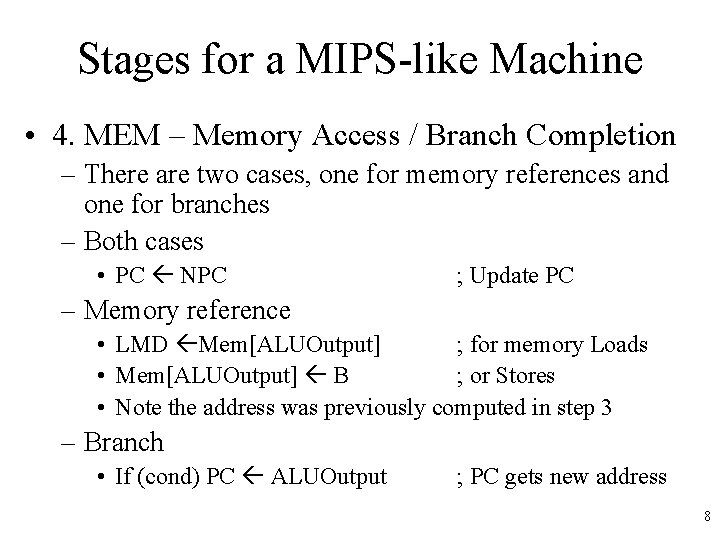
Stages for a MIPS-like Machine • 4. MEM – Memory Access / Branch Completion – There are two cases, one for memory references and one for branches – Both cases • PC NPC ; Update PC – Memory reference • LMD Mem[ALUOutput] ; for memory Loads • Mem[ALUOutput] B ; or Stores • Note the address was previously computed in step 3 – Branch • If (cond) PC ALUOutput ; PC gets new address 8
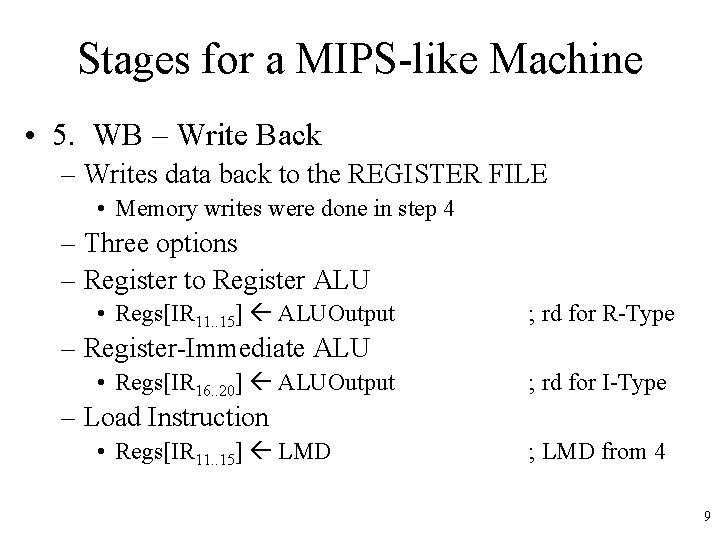
Stages for a MIPS-like Machine • 5. WB – Write Back – Writes data back to the REGISTER FILE • Memory writes were done in step 4 – Three options – Register to Register ALU • Regs[IR 11. . 15] ALUOutput ; rd for R-Type – Register-Immediate ALU • Regs[IR 16. . 20] ALUOutput ; rd for I-Type – Load Instruction • Regs[IR 11. . 15] LMD ; LMD from 4 9
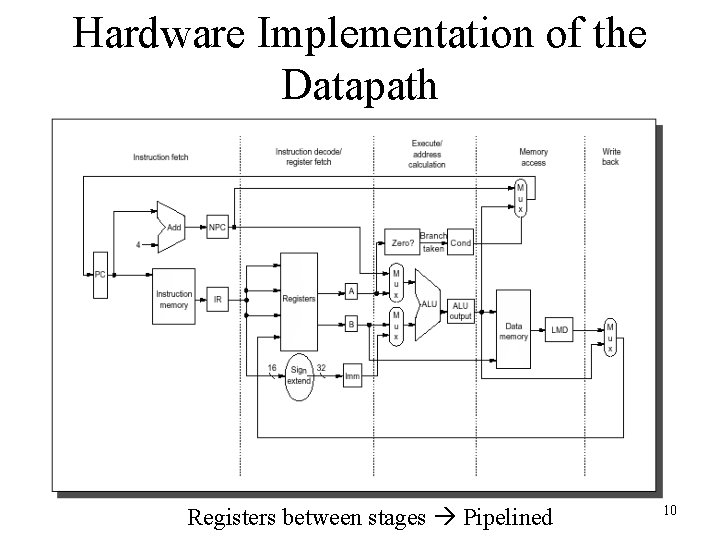
Hardware Implementation of the Datapath Registers between stages Pipelined 10
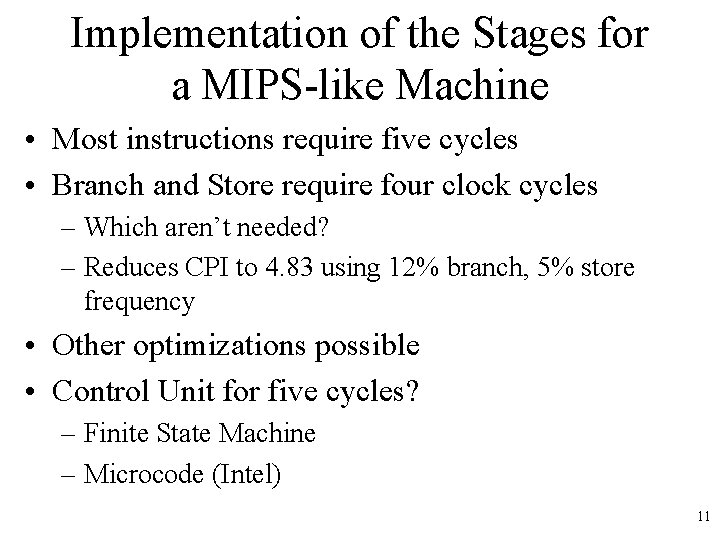
Implementation of the Stages for a MIPS-like Machine • Most instructions require five cycles • Branch and Store require four clock cycles – Which aren’t needed? – Reduces CPI to 4. 83 using 12% branch, 5% store frequency • Other optimizations possible • Control Unit for five cycles? – Finite State Machine – Microcode (Intel) 11
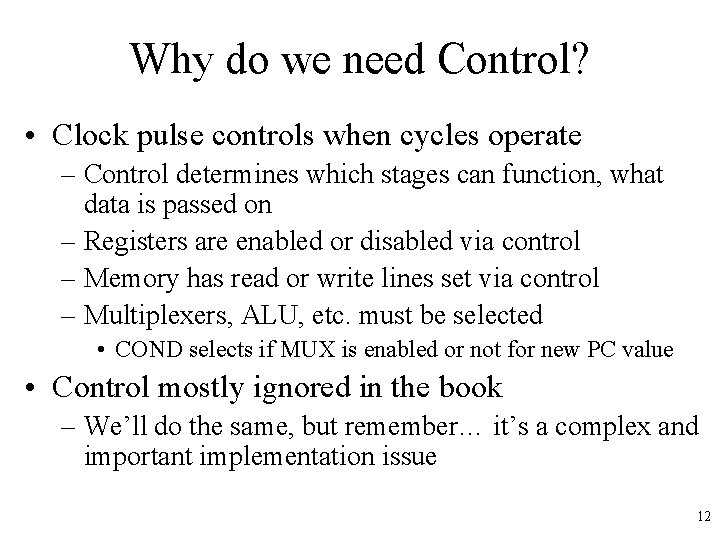
Why do we need Control? • Clock pulse controls when cycles operate – Control determines which stages can function, what data is passed on – Registers are enabled or disabled via control – Memory has read or write lines set via control – Multiplexers, ALU, etc. must be selected • COND selects if MUX is enabled or not for new PC value • Control mostly ignored in the book – We’ll do the same, but remember… it’s a complex and important implementation issue 12
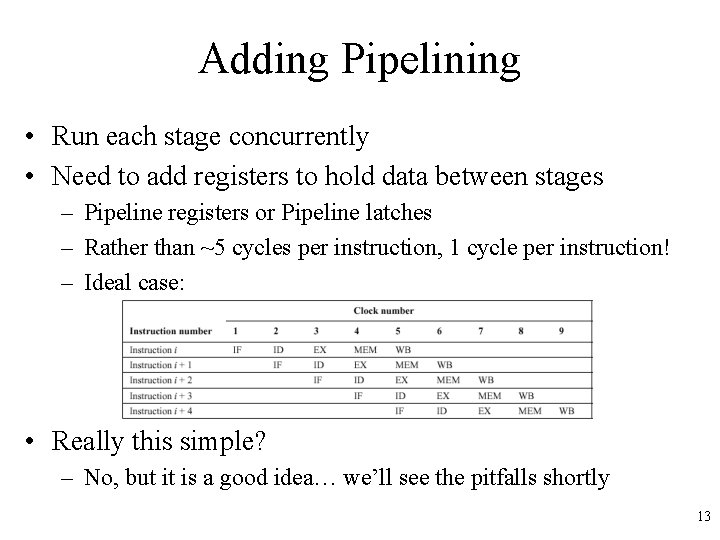
Adding Pipelining • Run each stage concurrently • Need to add registers to hold data between stages – Pipeline registers or Pipeline latches – Rather than ~5 cycles per instruction, 1 cycle per instruction! – Ideal case: • Really this simple? – No, but it is a good idea… we’ll see the pitfalls shortly 13
Important Pipeline Characteristics • Latency – Time required for an instruction to propagate through the pipeline – Based on the Number of Stages * Cycle Time – Dominant if there are lots of exceptions / hazards, i. e. we have to constantly be re-filling the pipeline • Throughput – The rate at which instructions can start and finish – Dominant if there are few exceptions and hazards, i. e. the pipeline stays mostly full • Note we need an increased memory bandwidth over the non-pipelined processor 14
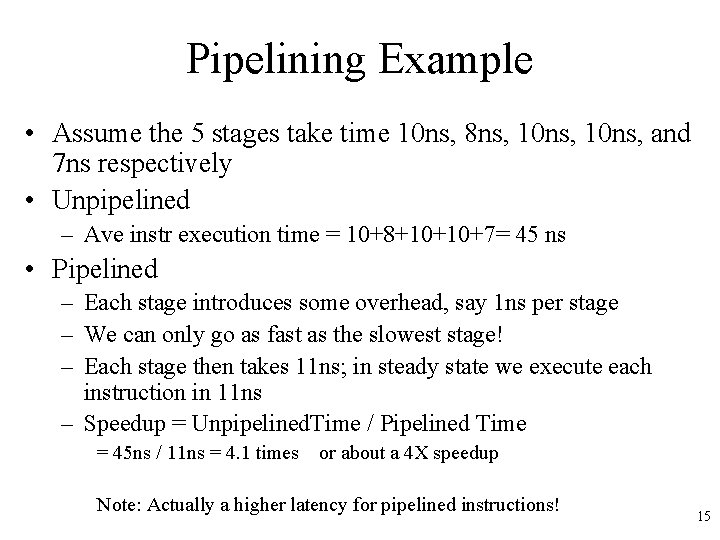
Pipelining Example • Assume the 5 stages take time 10 ns, 8 ns, 10 ns, and 7 ns respectively • Unpipelined – Ave instr execution time = 10+8+10+10+7= 45 ns • Pipelined – Each stage introduces some overhead, say 1 ns per stage – We can only go as fast as the slowest stage! – Each stage then takes 11 ns; in steady state we execute each instruction in 11 ns – Speedup = Unpipelined. Time / Pipelined Time = 45 ns / 11 ns = 4. 1 times or about a 4 X speedup Note: Actually a higher latency for pipelined instructions! 15
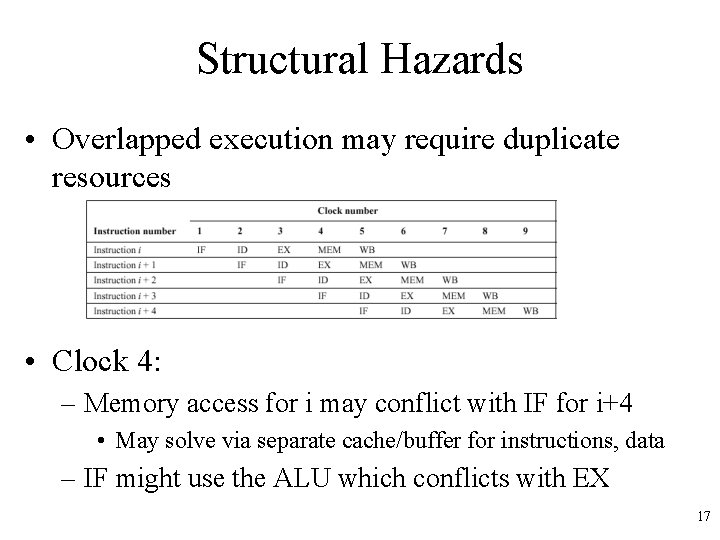
Pipelining Hazards • Unfortunately, the picture presented so far is a bit too good to be true… we have problems with hazards • Structural – Resource conflicts when the hardware can’t support all combinations of overlapped stages – e. g. Might use ALU to add 4 to PC and execute op • Data – An instruction depends on the results of some previous instruction that is still being processed in the pipeline – e. g. R 1 = R 2 + R 3; R 4 = R 1 + R 6; problem here? • Control – Branches and other instructions that change the PC – If we branch, we may have the wrong instructions in the pipeline 16
Structural Hazards • Overlapped execution may require duplicate resources • Clock 4: – Memory access for i may conflict with IF for i+4 • May solve via separate cache/buffer for instructions, data – IF might use the ALU which conflicts with EX 17
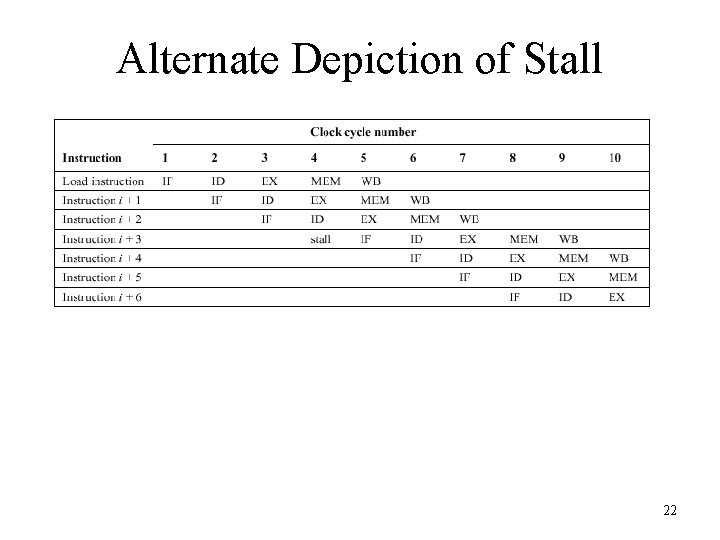
Dealing with Hazards • One solution: Stall – Let the instructions later in the stage continue, and stall the earlier instruction • Need to do in this order, since if we stalled the later instructions, they would become a bottleneck and nothing else could move out of the pipeline – Once the problem is cleared, the stall is cleared – Often called a pipeline bubble since it floats through the pipeline but does no useful work • Stalls increase the CPI from its ideal value of 1 18
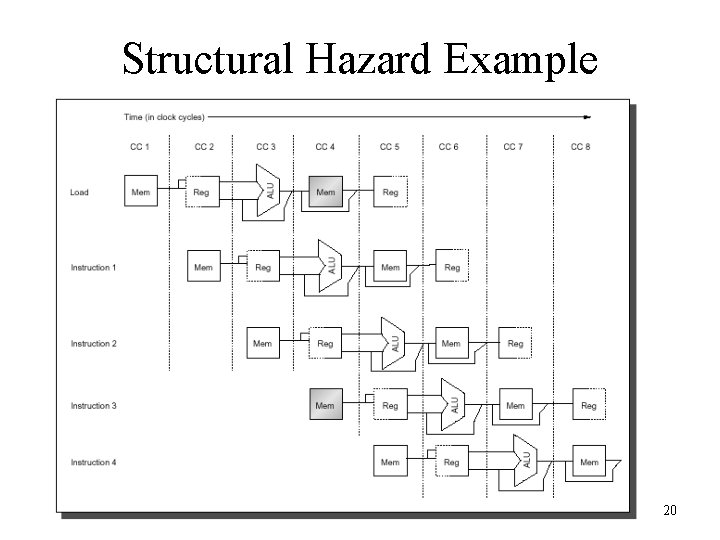
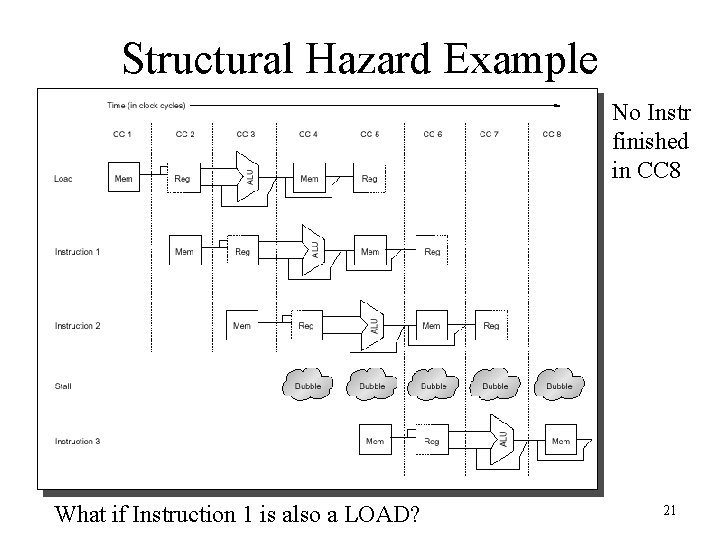
Structural Hazard Example • Consider a CPU with a single memory pipeline for data and instructions – If an instruction contains a data memory reference, it will conflict with the instruction fetch – We will introduce a bubble while the latter instruction waits for the first instruction to finish 19
Structural Hazard Example 20
Structural Hazard Example No Instr finished in CC 8 What if Instruction 1 is also a LOAD? 21
Alternate Depiction of Stall 22
Avoiding Structural Hazards • How can we avoid structural hazards? – Issue of cost for the designer – E. g. allow multiple access paths to memory • Separate access to instructions from data – Build multiple ALU or other functional units • Don’t forget the cost/performance tradeoff and Amdahl’s law – If we don’t encounter structural hazards often, it might not be worth the expense to design hardware to address it, instead just handle it with a stall or other method 23
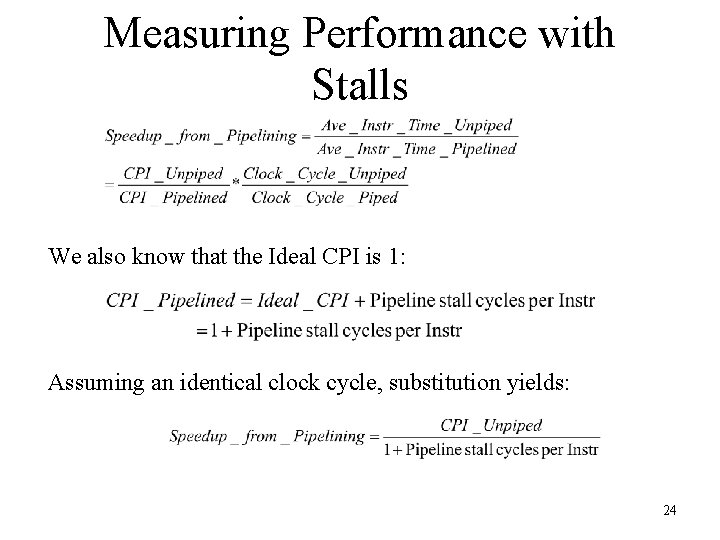
Measuring Performance with Stalls We also know that the Ideal CPI is 1: Assuming an identical clock cycle, substitution yields: 24
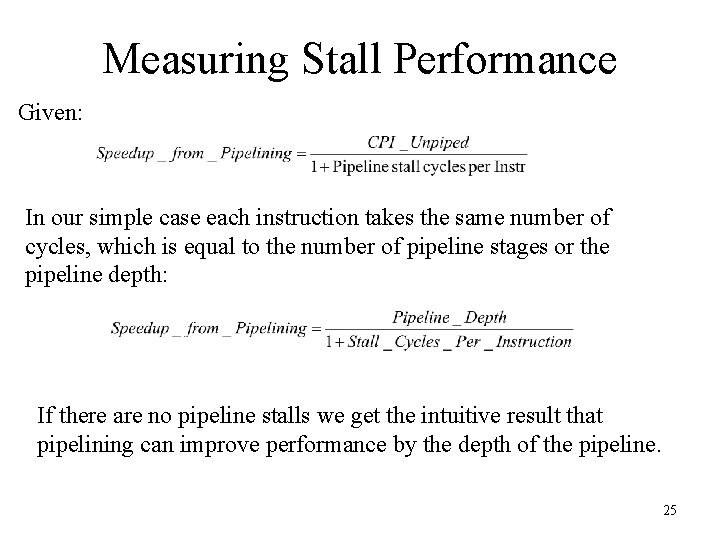
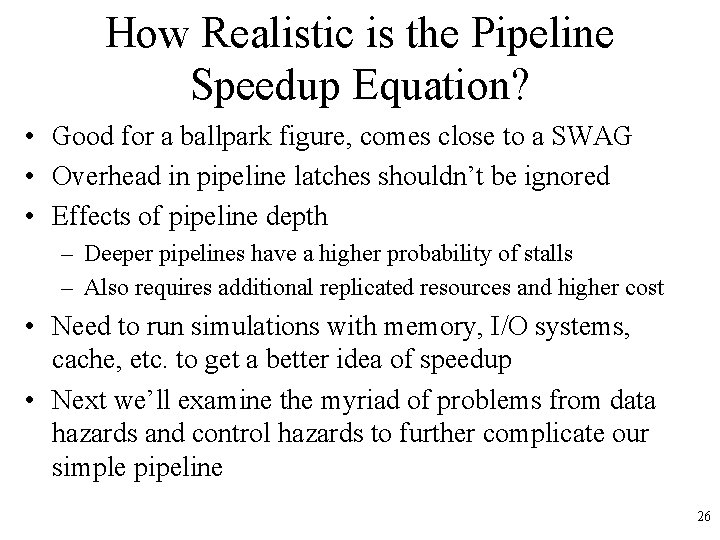
Measuring Stall Performance Given: In our simple case each instruction takes the same number of cycles, which is equal to the number of pipeline stages or the pipeline depth: If there are no pipeline stalls we get the intuitive result that pipelining can improve performance by the depth of the pipeline. 25
How Realistic is the Pipeline Speedup Equation? • Good for a ballpark figure, comes close to a SWAG • Overhead in pipeline latches shouldn’t be ignored • Effects of pipeline depth – Deeper pipelines have a higher probability of stalls – Also requires additional replicated resources and higher cost • Need to run simulations with memory, I/O systems, cache, etc. to get a better idea of speedup • Next we’ll examine the myriad of problems from data hazards and control hazards to further complicate our simple pipeline 26
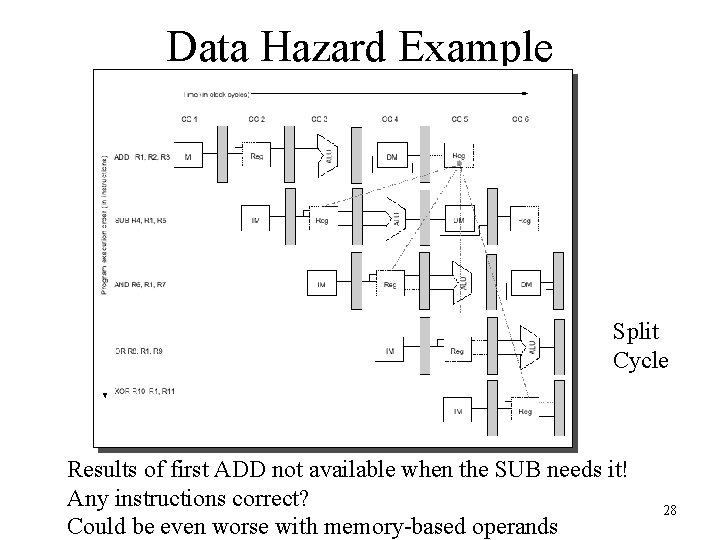
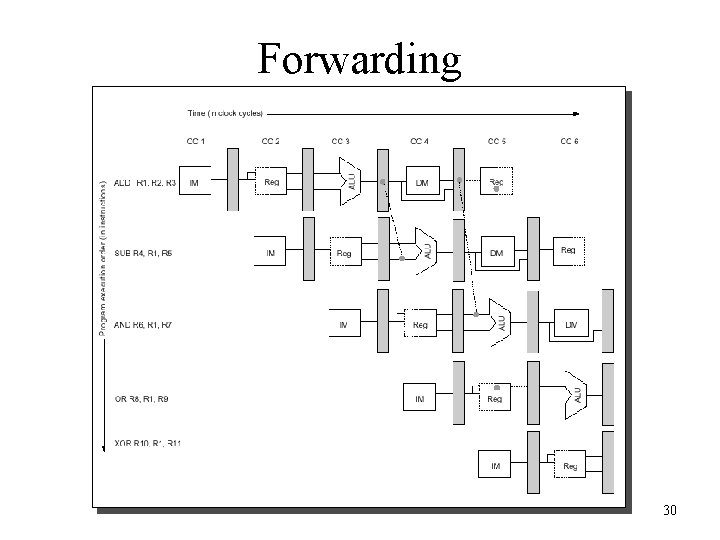
Data Hazards • Data hazards occur when the pipeline changes the order of read/write accesses to operands that differs from the normal sequential order • Example: – ADD R 1, R 2, R 3 – SUB R 4, R 1, R 5 – AND R 6, R 1, R 7 – OR R 8, R 1, R 9 – XOR R 10, R 11 • Looks pretty innocent, what is the problem? 27
Data Hazard Example Split Cycle Results of first ADD not available when the SUB needs it! Any instructions correct? Could be even worse with memory-based operands 28
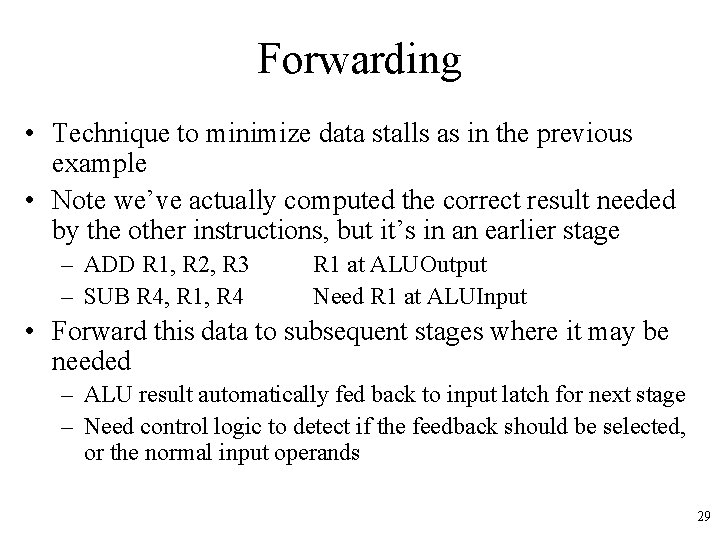
Forwarding • Technique to minimize data stalls as in the previous example • Note we’ve actually computed the correct result needed by the other instructions, but it’s in an earlier stage – ADD R 1, R 2, R 3 – SUB R 4, R 1, R 4 R 1 at ALUOutput Need R 1 at ALUInput • Forward this data to subsequent stages where it may be needed – ALU result automatically fed back to input latch for next stage – Need control logic to detect if the feedback should be selected, or the normal input operands 29
Forwarding 30
Scoreboarding • One way to implement the control needed forwarding • Scoreboard stores the state of the pipeline – What stage each instruction is in – Status of each destination register, source register – Can determine if there is a hazard and know which stage needs to be forwarded to what other stage • Controls via multiplexer selection • If state of the pipeline is incomplete – Stalls and get pipeline bubbles 31
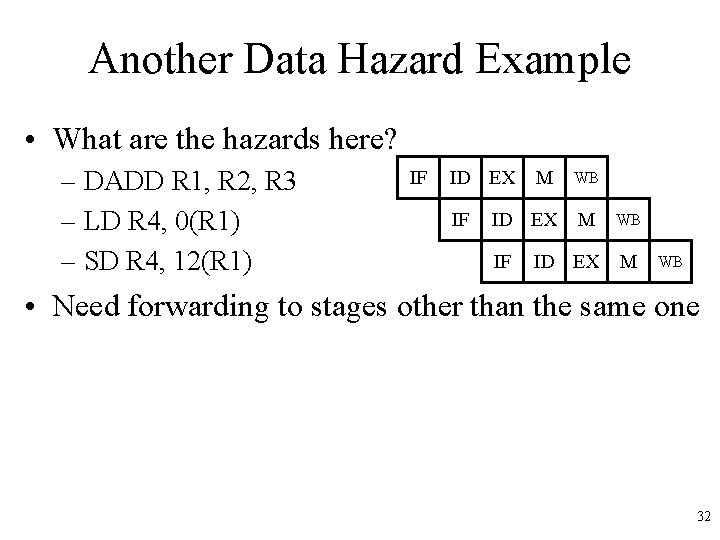
Another Data Hazard Example • What are the hazards here? – DADD R 1, R 2, R 3 – LD R 4, 0(R 1) – SD R 4, 12(R 1) IF ID EX M IF WB ID EX M WB • Need forwarding to stages other than the same one 32
Data Hazard Classification • Three types of data hazards • Instruction i comes before instruction j – RAW : Read After Write • j tries to read a source before i writes it, so j incorrectly gets the old value. Solve via forwarding. – WAW : Write After Write • j tries to write an operand before it is written by i, so we end up writing values in the wrong order • Only occurs if we have writes in multiple stages – Not a problem with single cycle integer instructions – We’ll see this when we do floating point 33
Data Hazard Classification • WAR : Write After Read – j tries to write a destination before it is read by i, so i incorrectly gets the new value – For this to happen we need a pipeline that writes results early in the pipeline, and then other instruction read a source later in the pipeline – Can this happen in our simple MIPS-like machine? – This problem led to a flaw in the VAX • RAR : Read After Read – Is this a hazard? 34
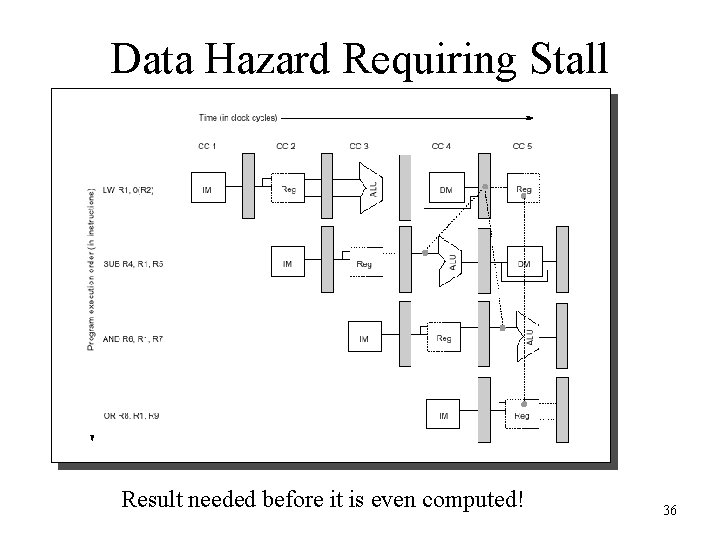
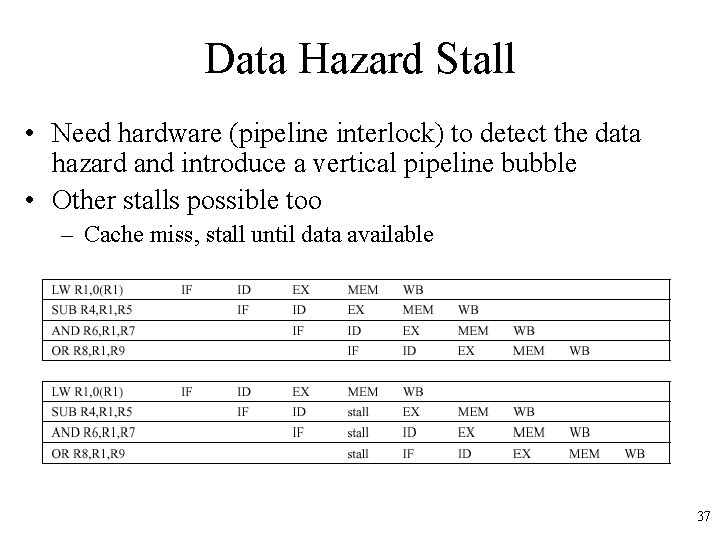
Forwarding is not Infallible • Unfortunately, forwarding does not handle all cases, e. g. : – LW R 1, 0(R 2) – SUB R 4, R 1, R 5 – AND R 6, R 1, R 7 – OR R 8, R 1, R 9 • Load of R 1 not available until MEM, but we need it for the second instruction in ALU 35
Data Hazard Requiring Stall Result needed before it is even computed! 36
Data Hazard Stall • Need hardware (pipeline interlock) to detect the data hazard and introduce a vertical pipeline bubble • Other stalls possible too – Cache miss, stall until data available 37
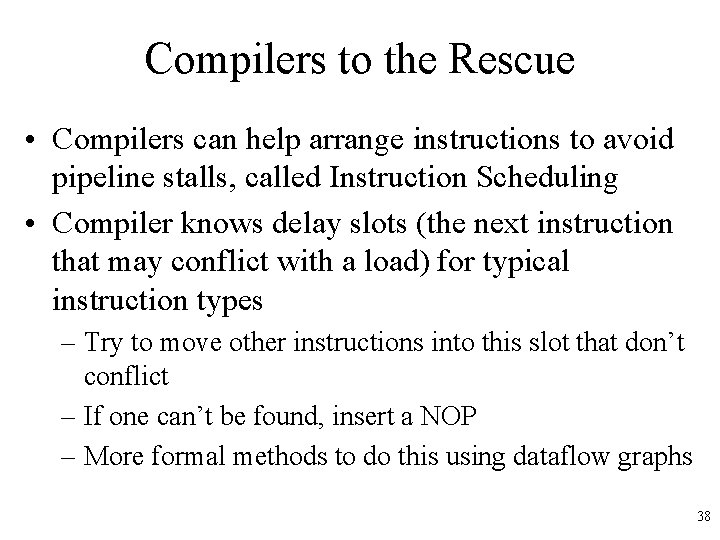
Compilers to the Rescue • Compilers can help arrange instructions to avoid pipeline stalls, called Instruction Scheduling • Compiler knows delay slots (the next instruction that may conflict with a load) for typical instruction types – Try to move other instructions into this slot that don’t conflict – If one can’t be found, insert a NOP – More formal methods to do this using dataflow graphs 38
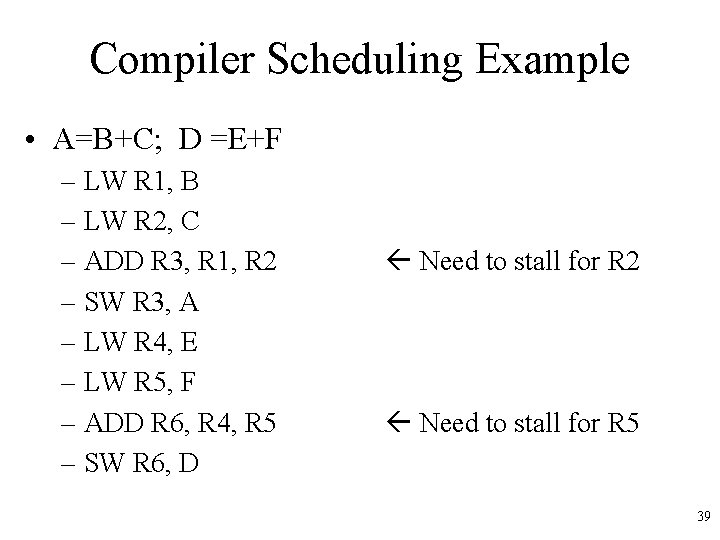
Compiler Scheduling Example • A=B+C; D =E+F – LW R 1, B – LW R 2, C – ADD R 3, R 1, R 2 – SW R 3, A – LW R 4, E – LW R 5, F – ADD R 6, R 4, R 5 – SW R 6, D Need to stall for R 2 Need to stall for R 5 39
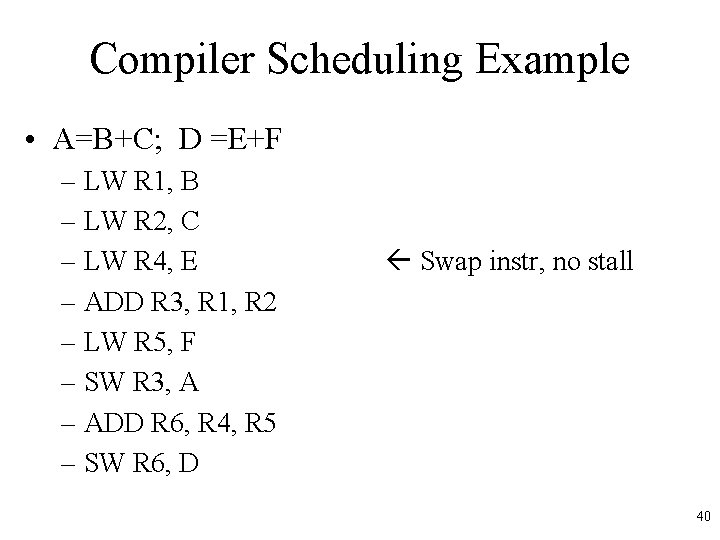
Compiler Scheduling Example • A=B+C; D =E+F – LW R 1, B – LW R 2, C – LW R 4, E – ADD R 3, R 1, R 2 – LW R 5, F – SW R 3, A – ADD R 6, R 4, R 5 – SW R 6, D Swap instr, no stall 40
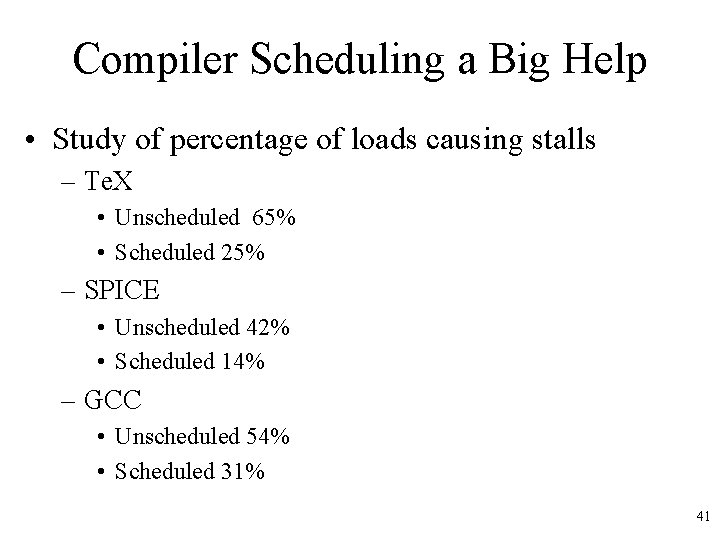
Compiler Scheduling a Big Help • Study of percentage of loads causing stalls – Te. X • Unscheduled 65% • Scheduled 25% – SPICE • Unscheduled 42% • Scheduled 14% – GCC • Unscheduled 54% • Scheduled 31% 41
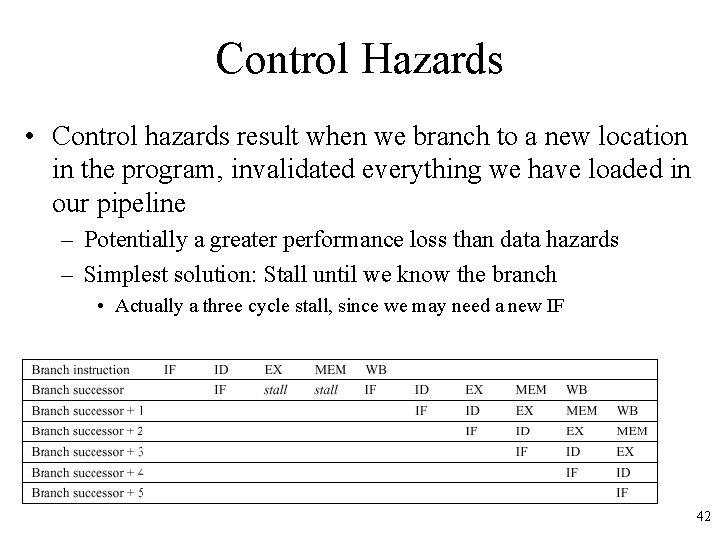
Control Hazards • Control hazards result when we branch to a new location in the program, invalidated everything we have loaded in our pipeline – Potentially a greater performance loss than data hazards – Simplest solution: Stall until we know the branch • Actually a three cycle stall, since we may need a new IF 42
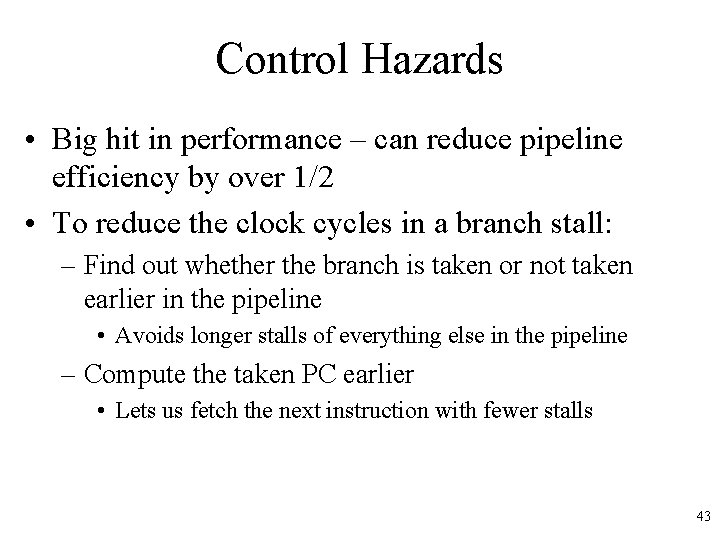
Control Hazards • Big hit in performance – can reduce pipeline efficiency by over 1/2 • To reduce the clock cycles in a branch stall: – Find out whether the branch is taken or not taken earlier in the pipeline • Avoids longer stalls of everything else in the pipeline – Compute the taken PC earlier • Lets us fetch the next instruction with fewer stalls 43
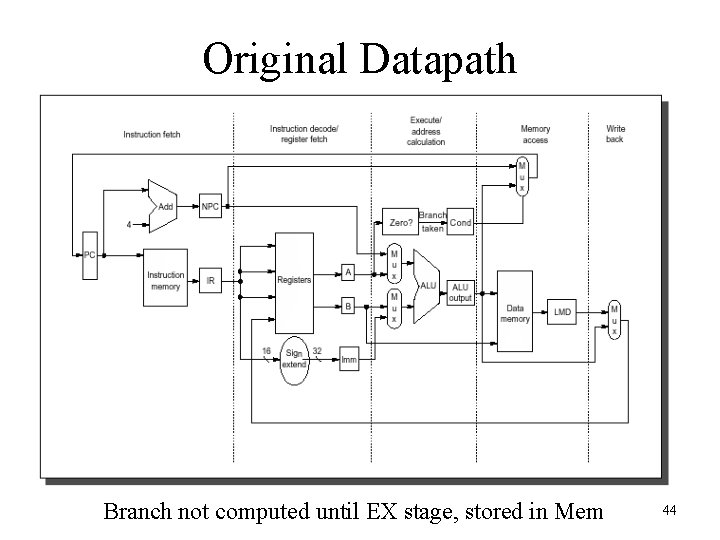
Original Datapath Branch not computed until EX stage, stored in Mem 44
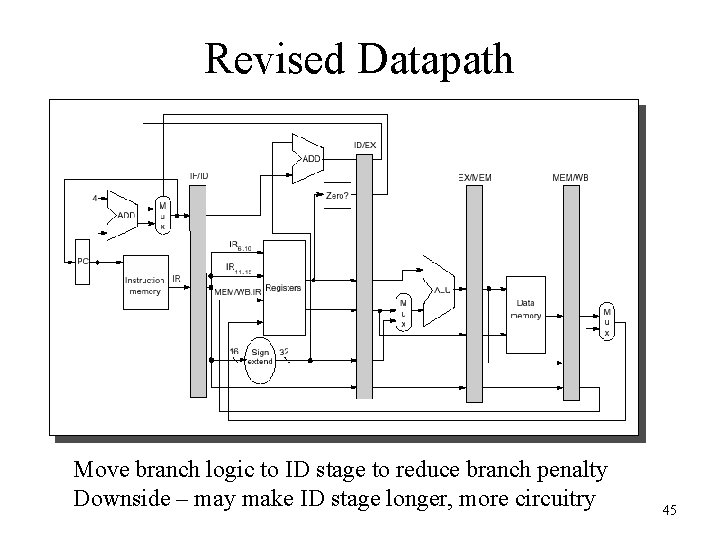
Revised Datapath Move branch logic to ID stage to reduce branch penalty Downside – may make ID stage longer, more circuitry 45
Software-Based Branch Reduction Penalty • Design ISA to reduce branch penalty – BNEZ, BEQZ, allows condition code to be known during the ID stage • Branch Prediction – Compute likelihood of branching vs. not branching, automatically fetch the most likely target – Can be difficult; we need to know branch target in advance 46
Branch Behavior • How often are branches taken? • One study: – 17% – 3% branches jumps or calls • Taken vs. Not varies with instruction use – If-then statement taken about 50% of the time – Branches in loops taken 90% of the time – Flag test branches taken very rarely • Overall, 67% of conditional branches taken on average – This is bad, because taking the branch results in the pipeline stall for our typical case where we are fetching subsequent instructions in the pipeline 47
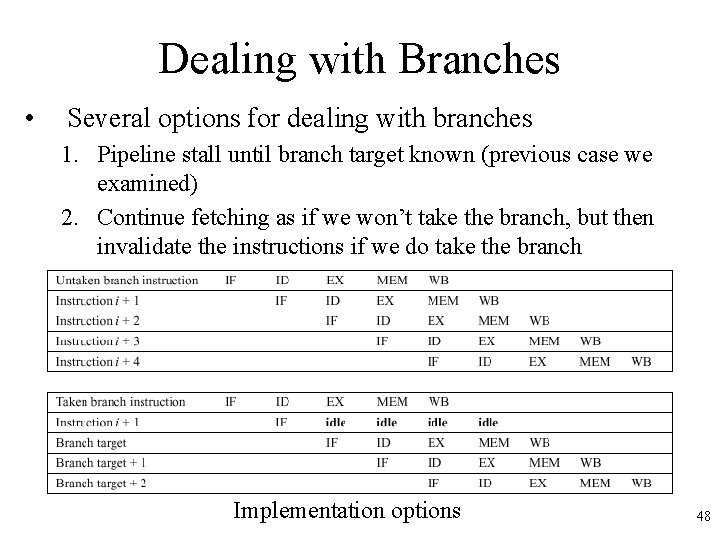
Dealing with Branches • Several options for dealing with branches 1. Pipeline stall until branch target known (previous case we examined) 2. Continue fetching as if we won’t take the branch, but then invalidate the instructions if we do take the branch Implementation options 48
Dealing with Branches 3. Always fetch the branch target – After all, most branches are taken – Can’t do in our simple architecture because we don’t know the target in advance of the branch outcome – Other architectures could precompute the target before the outcome • Later we will see how we can store a lookup table to do this and even better branch prediction 49
Delayed Branch Option 4. Delayed Branch - Perform instruction scheduling into branch delay slots (instructions after a branch) • • • Always execute instructions following a branch regardless of whether or not we take it Compiler will find some instructions we’ll always execute, regardless of whether or not we take the branch, and put in there Put a NOP if we can’t find anything 50
Delayed Branch with One Delay Slot Instruction in delay slot always executed Another branch instruction not allowed to be in the delay slot 51
Example: Delay Slot Scheduling B) and C) execute code that may or may not be used, but better than a NOP Form of branch prediction – compiler predicts based on context 52
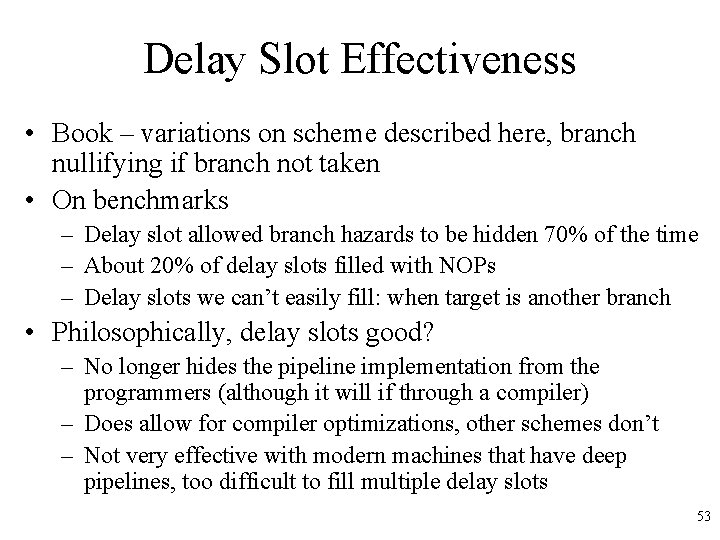
Delay Slot Effectiveness • Book – variations on scheme described here, branch nullifying if branch not taken • On benchmarks – Delay slot allowed branch hazards to be hidden 70% of the time – About 20% of delay slots filled with NOPs – Delay slots we can’t easily fill: when target is another branch • Philosophically, delay slots good? – No longer hides the pipeline implementation from the programmers (although it will if through a compiler) – Does allow for compiler optimizations, other schemes don’t – Not very effective with modern machines that have deep pipelines, too difficult to fill multiple delay slots 53
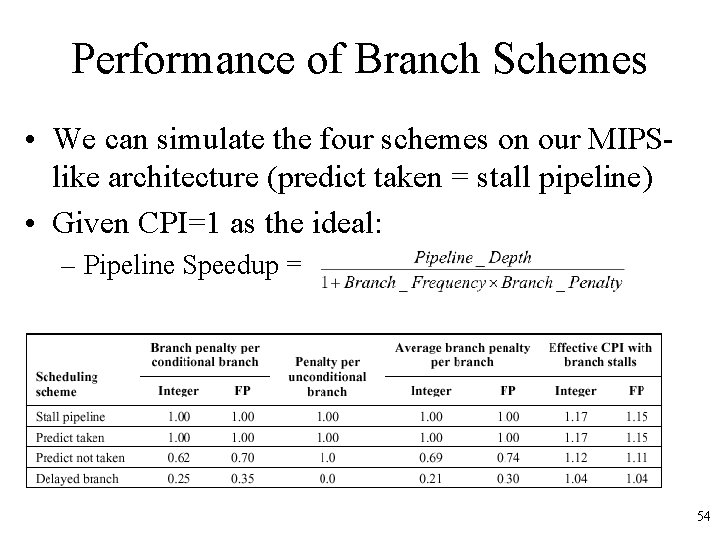
Performance of Branch Schemes • We can simulate the four schemes on our MIPSlike architecture (predict taken = stall pipeline) • Given CPI=1 as the ideal: – Pipeline Speedup = – Results: Delayed branch slightly better 54
Exceptions • An exception is when the normal execution order of instructions is changed. This has many names: – Interrupt – Fault – Exception • Examples: – – – – I/O device request Invoking OS service Page Fault Malfunction Undefined instruction Overflow/Arithmetic Anomaly Etc! 55
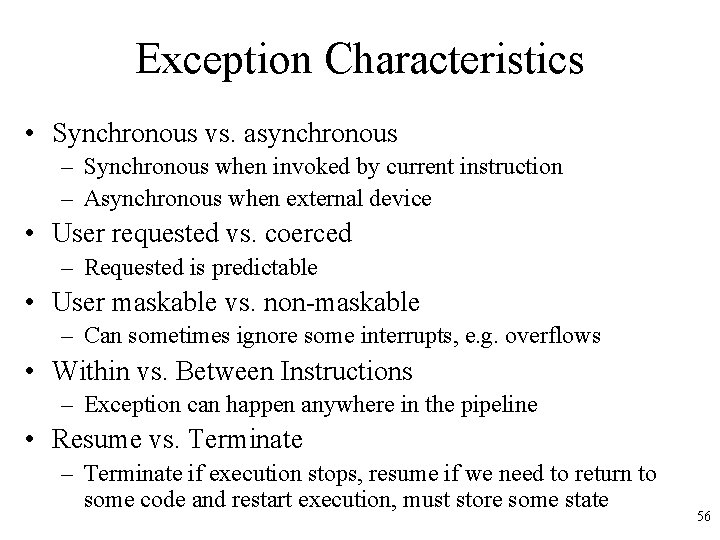
Exception Characteristics • Synchronous vs. asynchronous – Synchronous when invoked by current instruction – Asynchronous when external device • User requested vs. coerced – Requested is predictable • User maskable vs. non-maskable – Can sometimes ignore some interrupts, e. g. overflows • Within vs. Between Instructions – Exception can happen anywhere in the pipeline • Resume vs. Terminate – Terminate if execution stops, resume if we need to return to some code and restart execution, must store some state 56
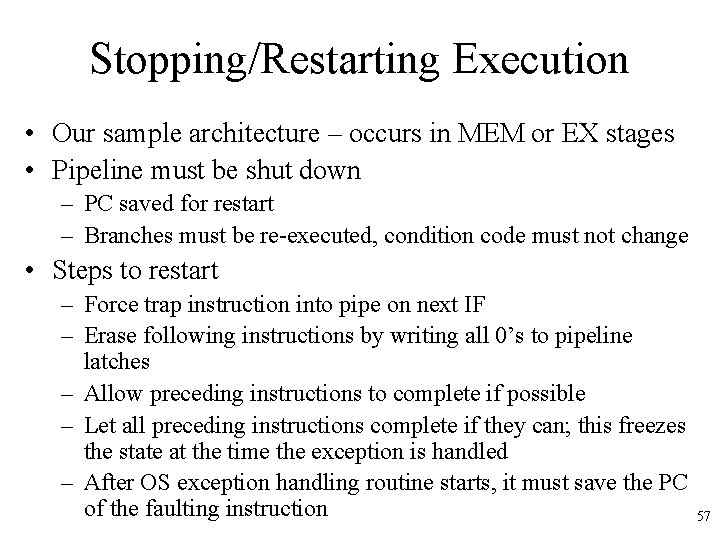
Stopping/Restarting Execution • Our sample architecture – occurs in MEM or EX stages • Pipeline must be shut down – PC saved for restart – Branches must be re-executed, condition code must not change • Steps to restart – Force trap instruction into pipe on next IF – Erase following instructions by writing all 0’s to pipeline latches – Allow preceding instructions to complete if possible – Let all preceding instructions complete if they can; this freezes the state at the time the exception is handled – After OS exception handling routine starts, it must save the PC of the faulting instruction 57
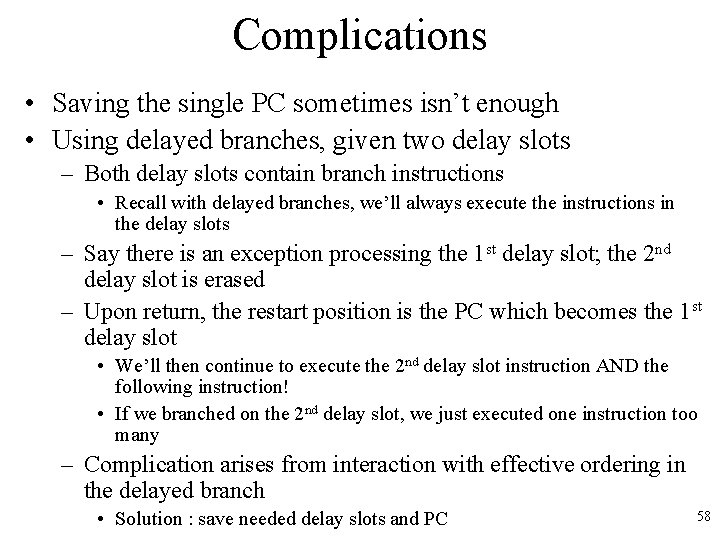
Complications • Saving the single PC sometimes isn’t enough • Using delayed branches, given two delay slots – Both delay slots contain branch instructions • Recall with delayed branches, we’ll always execute the instructions in the delay slots – Say there is an exception processing the 1 st delay slot; the 2 nd delay slot is erased – Upon return, the restart position is the PC which becomes the 1 st delay slot • We’ll then continue to execute the 2 nd delay slot instruction AND the following instruction! • If we branched on the 2 nd delay slot, we just executed one instruction too many – Complication arises from interaction with effective ordering in the delayed branch • Solution : save needed delay slots and PC 58
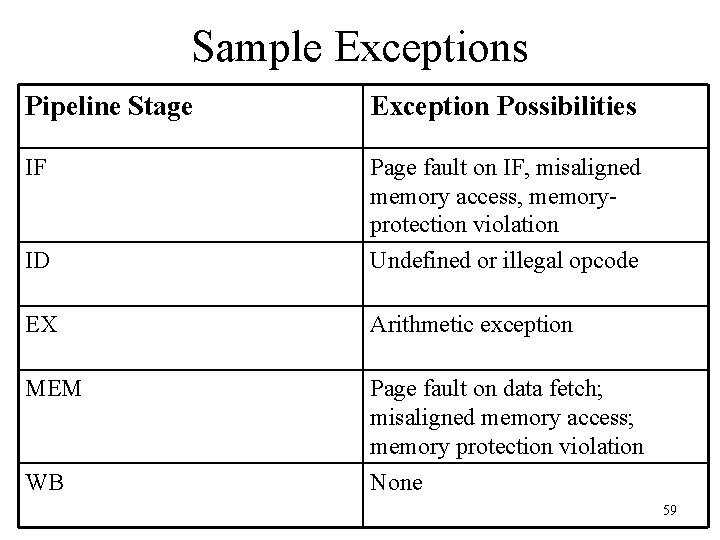
Sample Exceptions Pipeline Stage Exception Possibilities IF Page fault on IF, misaligned memory access, memoryprotection violation ID Undefined or illegal opcode EX Arithmetic exception MEM Page fault on data fetch; misaligned memory access; memory protection violation WB None 59
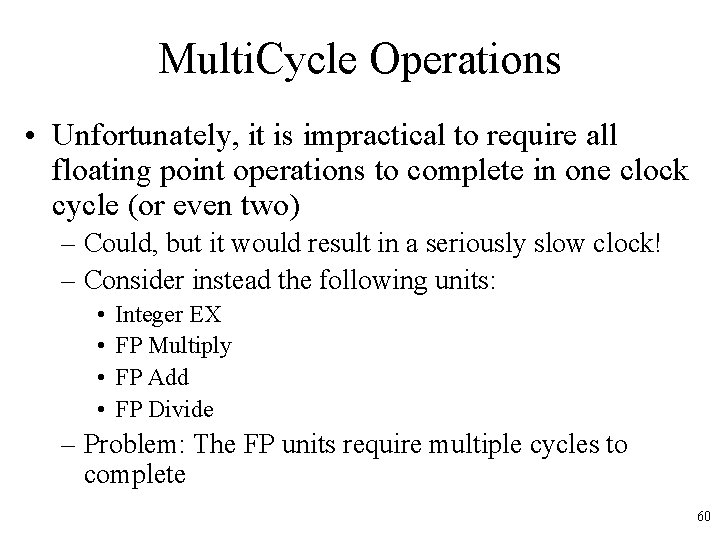
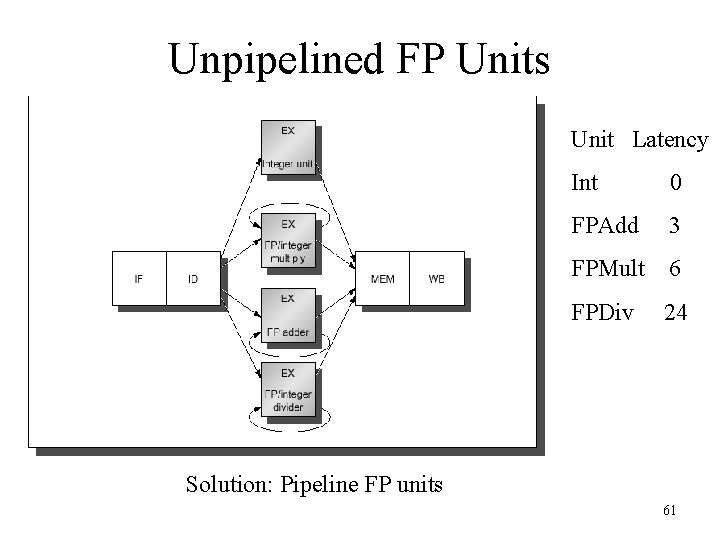
Multi. Cycle Operations • Unfortunately, it is impractical to require all floating point operations to complete in one clock cycle (or even two) – Could, but it would result in a seriously slow clock! – Consider instead the following units: • • Integer EX FP Multiply FP Add FP Divide – Problem: The FP units require multiple cycles to complete 60
Unpipelined FP Units Unit Latency Int 0 FPAdd 3 FPMult 6 FPDiv 24 Solution: Pipeline FP units 61
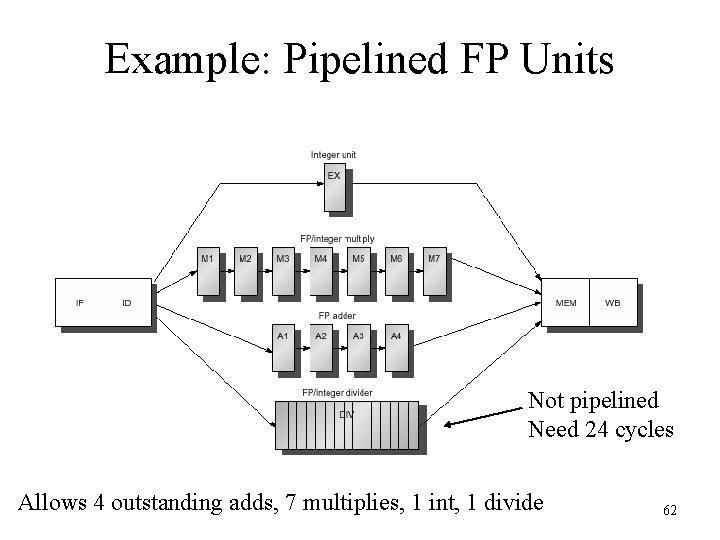
Example: Pipelined FP Units Not pipelined Need 24 cycles Allows 4 outstanding adds, 7 multiplies, 1 int, 1 divide 62
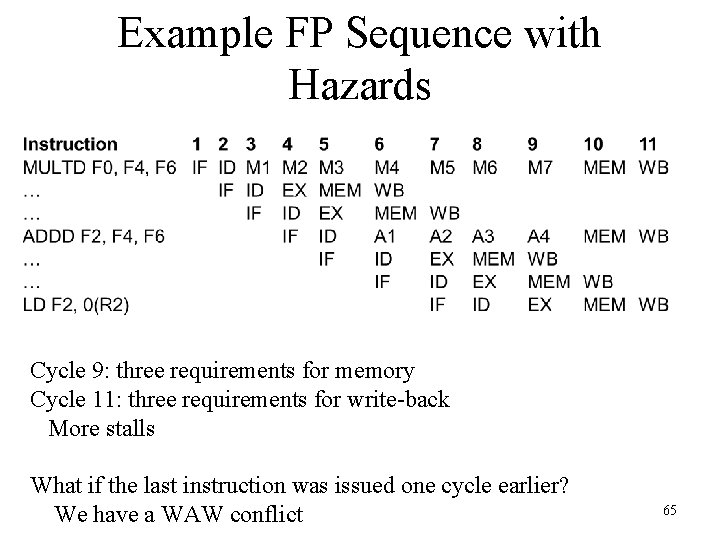
New Hazard Problems! • Structural hazards with divide unit not fully pipelined • WAW hazards now possible since instructions can reach WB stage at different times – At least WAR hazards not possible, since reads still occur early in the ID stage • Instructions can complete in a different order than issued, causing more problems with exception handling • Longer latency increases frequency of stalls for RAW hazards • How would you tell if the efforts here are worth it? 63
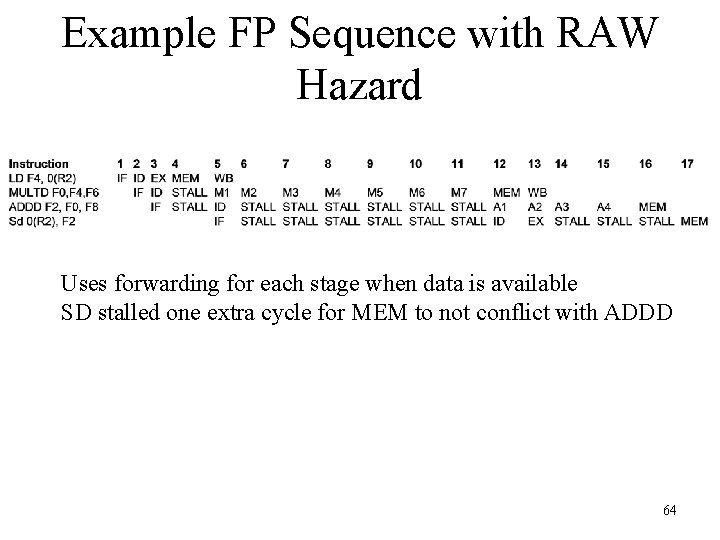
Example FP Sequence with RAW Hazard Uses forwarding for each stage when data is available SD stalled one extra cycle for MEM to not conflict with ADDD 64
Example FP Sequence with Hazards Cycle 9: three requirements for memory Cycle 11: three requirements for write-back More stalls What if the last instruction was issued one cycle earlier? We have a WAW conflict 65
FP Pipelining Performance • Given all the new problems, is it worth it? – Overall answer is yes • Latency varies from 46 -59% of functional units on the benchmarks – Fortunately, divides are rare – As before, compiler scheduling can help a lot 66