
PICASA FREE SOFTWARE FOR YOUR PHOTOS VIEW ORGANISE
- Slides: 14
PICASA FREE • SOFTWARE FOR YOUR PHOTOS VIEW, ORGANISE, AND FIND YOUR IMAGES • EDIT ( D ‘ EVELOP’ ) THEM • PRINT • BACKUP • SHARE • BE CREATIVE
SO, HOW DO YOU GET PICASA? Type: • http: //picasa. google. co. uk in your browser • Click on the Download Picasa 3 button • Save the Picasa 3 -setup. exe file to your desktop • Double click on the Picasa 3 -setup. exe to install it • After installation, you should see a new program icon on your desktop – Picasa 3
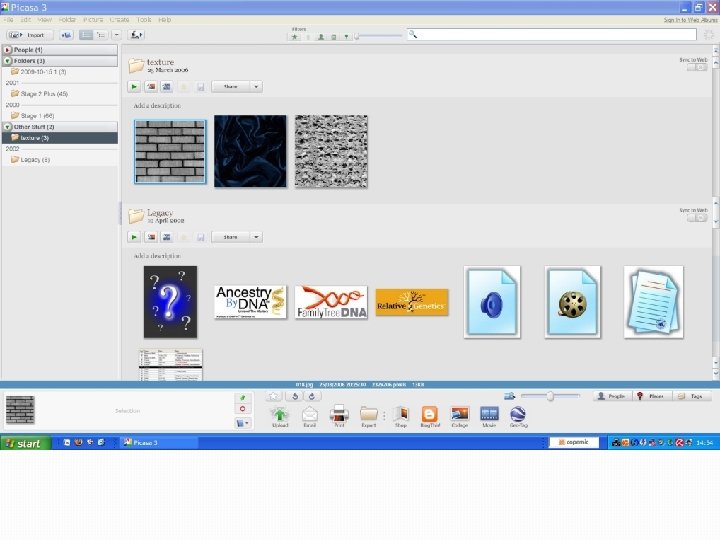
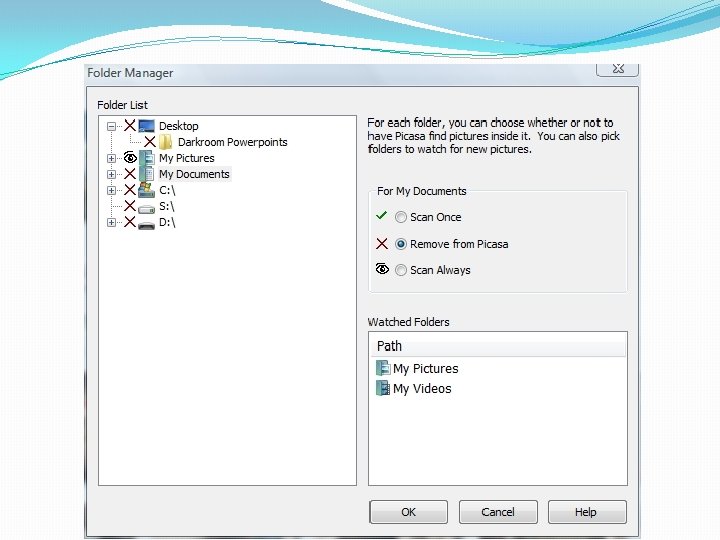
WHAT IS PICASA? • At heart, it’s a Photo Organiser • It doesn’t physically move your photos from your Pictures folder on the hard disk to Picasa • It doesn’t copy them • Your photos are not “IN” Picasa • It’s a database that indexes your photos – a catalogue, if you like.
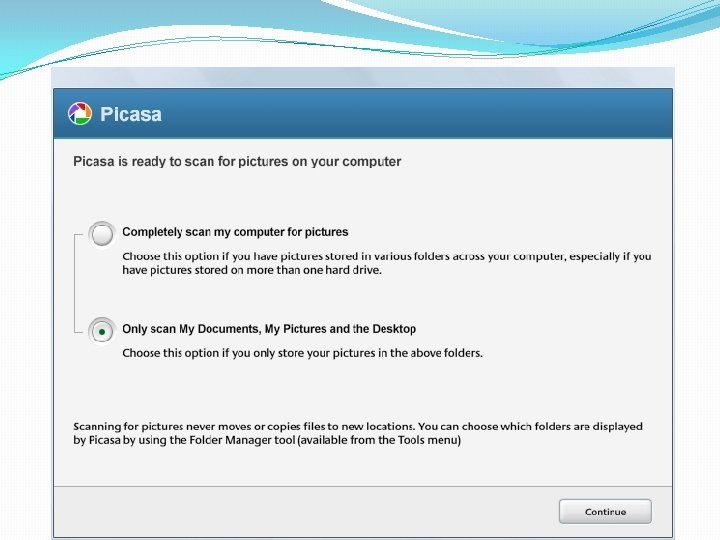
• It simply looks at the existing folders on your computer and displays the photos it finds. • You tell it the file types you want it to find – and the folders you want it to search.
• When using editing tools in Picasa, your original files are not touched. The edits you make are only viewable in Picasa …. . • …. . until you decide to save your changes. It then creates a new version of the photo (with the edits applied). Your original is protected.
HOWEVER! IT’S WORTH KNOWING THE DIFFERENCE BETWEEN FOLDERS AND PICASA ALBUMS • Folders in Picasa represent the actual folders on your computer. • If you delete a photo showing in a Picasa folder, or the entire folder, the photo (or folder) is also deleted from the computer!
ALBUMS exist only in Picasa • A Picasa Album lets you create a virtual group of photos taken from different folders that are on your computer. It’s an organisational tool. • You can see the photos in the Picasa album but the files haven’t moved from their Windows folders. • When you delete (or move) a photo from an album, you are only deleting the virtual one. The original remains in its original folder on your computer.
A REMINDER • If you delete a folder – or a photo in a folder – from Picasa, you will be deleting the actual folder that exists on your computer!! • DON’T HIT DELETE! • If you no longer want to see the folder in Picasa, use the REMOVE FROM PICASA command. (the original folder is not deleted, merely the view of it in Picasa). • Deleting an album only deletes the ‘virtual’ collection of photos you have made in Picasa.
SHARING YOUR PHOTOS WITH WEB ALBUMS 1. SIGN UP Sign in with your Google Account at http: //picasaweb. google. com. If you don’t have an account, create one. 2. UPLOAD Choose your photos and click Upload. 3. VIEW When you sign in at http: //picasaweb. com you’ll be taken to your Picasa web albums. Click on an album to see the photos.
VISIBILITY – WHO GETS TO SEE YOUR ALBUMS? • PUBLIC Viewable to anyone who knows the address http: //picasaweb. google. com/{username}. • UNLISTED Limits who can see your album. An authorisation key is added to the address and only those with the exact address can view. • SIGN-IN REQUIRED TO VIEW Highest level of privacy. You specify who has permission and they must sign in to their Google Account to verify their identity.
PICASA WEB ALBUMS • Picasa provides you with a Gigabyte of storage space for your Web Albums. • It is intended for us to be able to share our photos with others. • Best not to think of it as your main area for storage or backup. In other words, I wouldn’t delete the originals from the hard disk!