
Physical Layer Propagation UTP and Optical Fiber Chapter
Physical Layer Propagation: UTP and Optical Fiber Chapter 3
Orientation • Chapter 2 – Data link, internet, transport, and application layers – Characterized by message exchanges • Chapter 3 – Physical layer (Layer 1) – There are no messages—bits are sent individually – Concerned with transmission media, plugs, signaling methods, propagation effects – Chapter 3: Signaling, UTP, optical fiber, and topologies – Wireless transmission is covered in Chapter 5 2
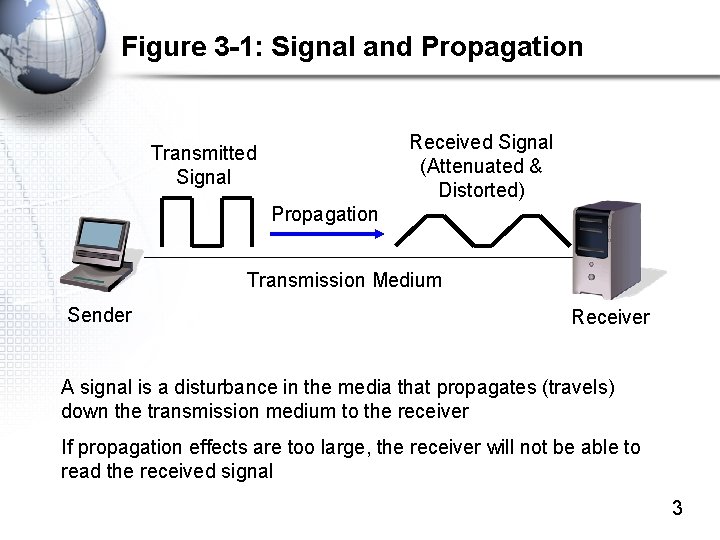
Figure 3 -1: Signal and Propagation Received Signal (Attenuated & Distorted) Transmitted Signal Propagation Transmission Medium Sender Receiver A signal is a disturbance in the media that propagates (travels) down the transmission medium to the receiver If propagation effects are too large, the receiver will not be able to read the received signal 3
Data Representation
Binary-Encoded Data • Computers store and process data in binary representations – Binary means “two” – There are only ones and zeros – Called bits 1101010110001110101100111 5
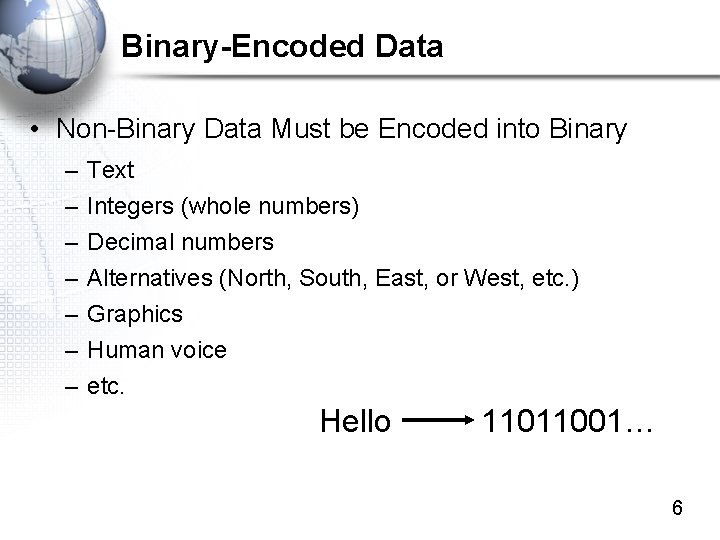
Binary-Encoded Data • Non-Binary Data Must be Encoded into Binary – – – – Text Integers (whole numbers) Decimal numbers Alternatives (North, South, East, or West, etc. ) Graphics Human voice etc. Hello 11011001… 6
Binary-Encoded Data • Some data are inherently binary – 48 -bit Ethernet addresses – 32 -bit IP addresses – Need no further encoding 7
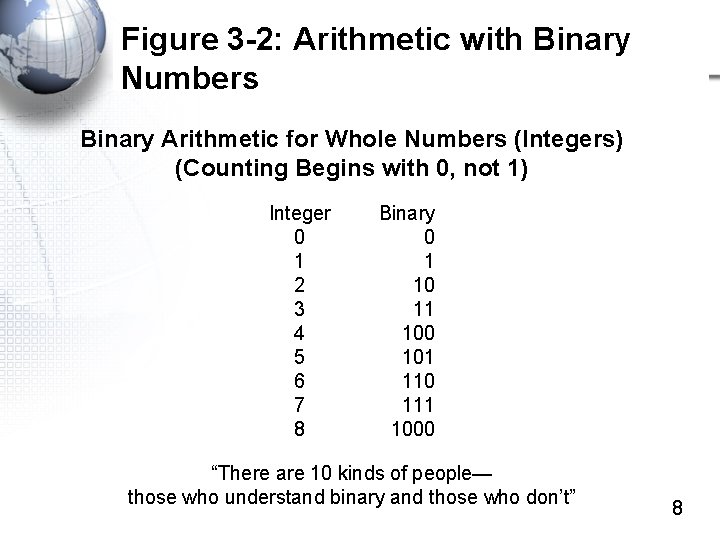
Figure 3 -2: Arithmetic with Binary Numbers Binary Arithmetic for Whole Numbers (Integers) (Counting Begins with 0, not 1) Integer 0 1 2 3 4 5 6 7 8 Binary 0 1 10 11 100 101 110 111 1000 “There are 10 kinds of people— those who understand binary and those who don’t” 8
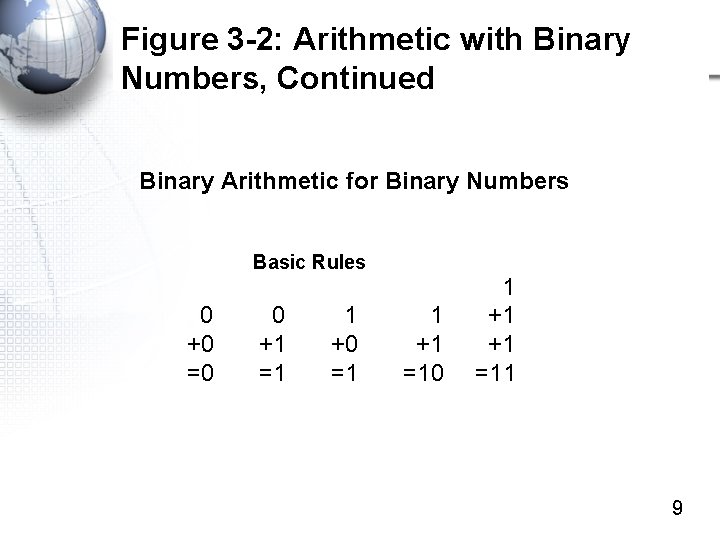
Figure 3 -2: Arithmetic with Binary Numbers, Continued Binary Arithmetic for Binary Numbers Basic Rules 0 +0 =0 0 +1 =1 1 +0 =1 1 +1 =10 1 +1 =11 9
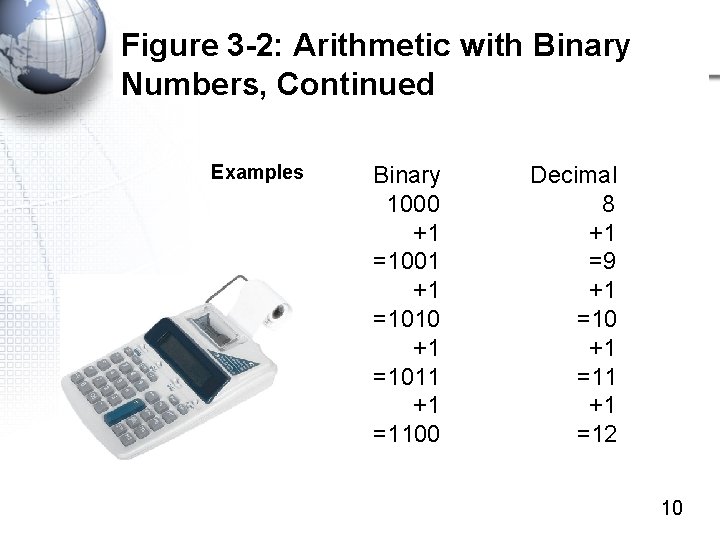
Figure 3 -2: Arithmetic with Binary Numbers, Continued Examples Binary Decimal 1000 8 +1 +1 =1001 =9 +1 +1 =1010 =10 +1 +1 =1011 =11 +1 =1100 =12 10
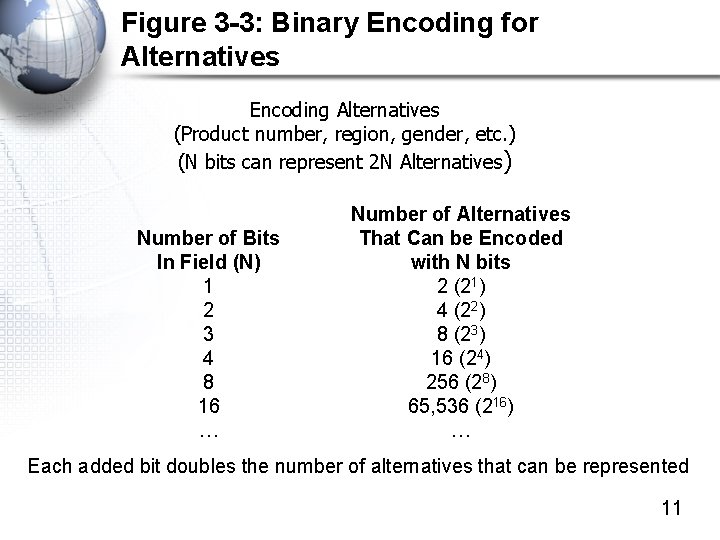
Figure 3 -3: Binary Encoding for Alternatives Encoding Alternatives (Product number, region, gender, etc. ) (N bits can represent 2 N Alternatives) Number of Bits In Field (N) 1 2 3 4 8 16 … Number of Alternatives That Can be Encoded with N bits 2 (21) 4 (22) 8 (23) 16 (24) 256 (28) 65, 536 (216) … Each added bit doubles the number of alternatives that can be represented 11
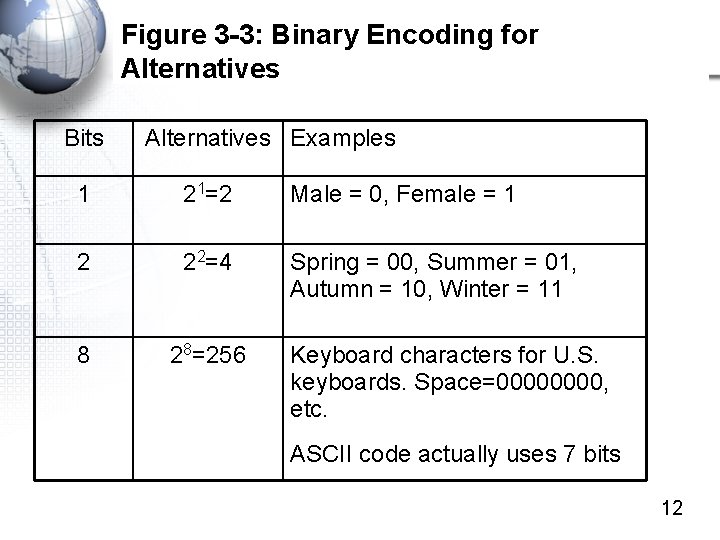
Figure 3 -3: Binary Encoding for Alternatives Bits Alternatives Examples 1 21=2 Male = 0, Female = 1 2 22=4 Spring = 00, Summer = 01, Autumn = 10, Winter = 11 8 28=256 Keyboard characters for U. S. keyboards. Space=0000, etc. ASCII code actually uses 7 bits 12
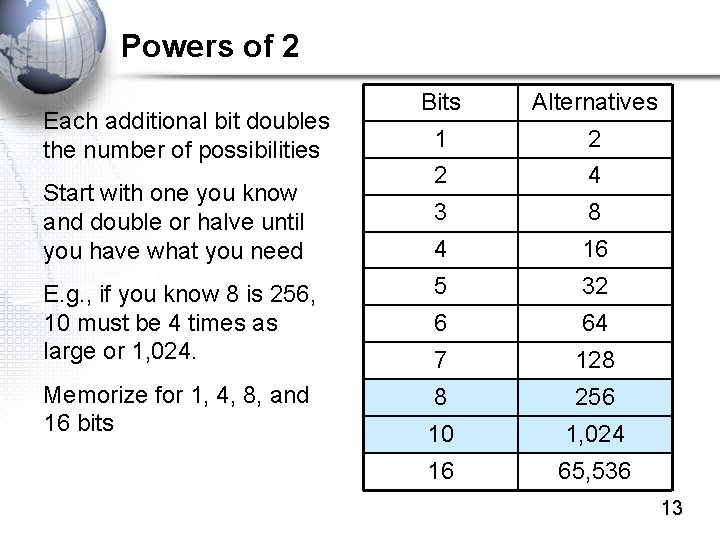
Powers of 2 Bits Alternatives 1 2 2 4 3 8 4 16 E. g. , if you know 8 is 256, 10 must be 4 times as large or 1, 024. 5 32 6 64 7 128 Memorize for 1, 4, 8, and 16 bits 8 256 10 1, 024 16 65, 536 Each additional bit doubles the number of possibilities Start with one you know and double or halve until you have what you need 13
Figure 3 -3: Binary Encoding for Alternatives • Quiz – How many flavors of ice cream can you represent in half a byte of storage? – How many bits do you need to represent 64 flavors of ice cream? – How many bits do you need to represent 6 sales districts? 14
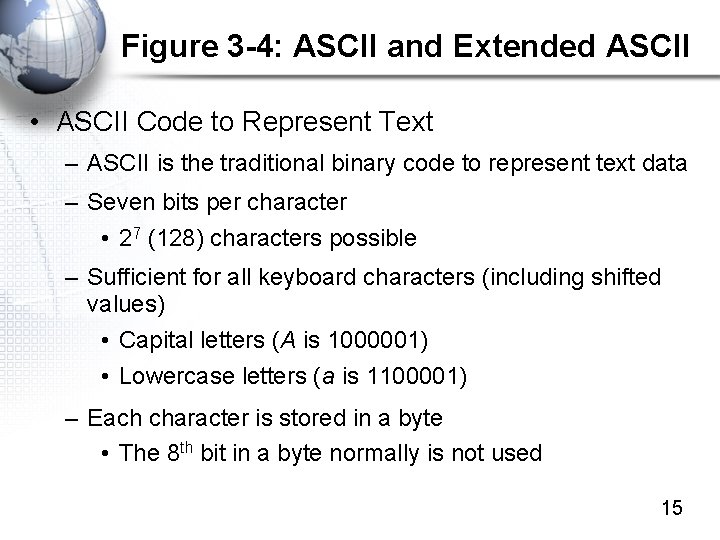
Figure 3 -4: ASCII and Extended ASCII • ASCII Code to Represent Text – ASCII is the traditional binary code to represent text data – Seven bits per character • 27 (128) characters possible – Sufficient for all keyboard characters (including shifted values) • Capital letters (A is 1000001) • Lowercase letters (a is 1100001) – Each character is stored in a byte • The 8 th bit in a byte normally is not used 15
Figure 3 -4: ASCII and Extended ASCII, Continued • Extended ASCII – Used on PCs – Uses a full 8 bits per character – 28 (256) characters possible – Extra characters can represent formatting in word processing, etc. • Converters – Text-to-ASCII and Text-to-Extended ASCII Converters are Readily Available on the Internet 16
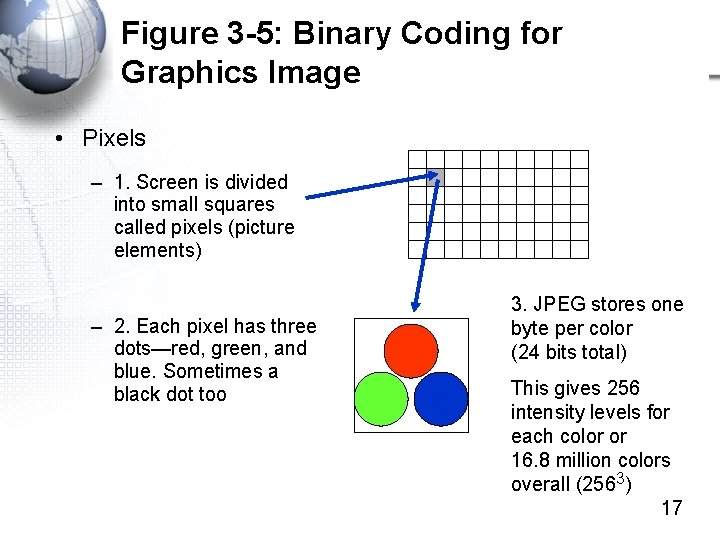
Figure 3 -5: Binary Coding for Graphics Image • Pixels – 1. Screen is divided into small squares called pixels (picture elements) – 2. Each pixel has three dots—red, green, and blue. Sometimes a black dot too 3. JPEG stores one byte per color (24 bits total) This gives 256 intensity levels for each color or 16. 8 million colors overall (2563) 17
Signaling
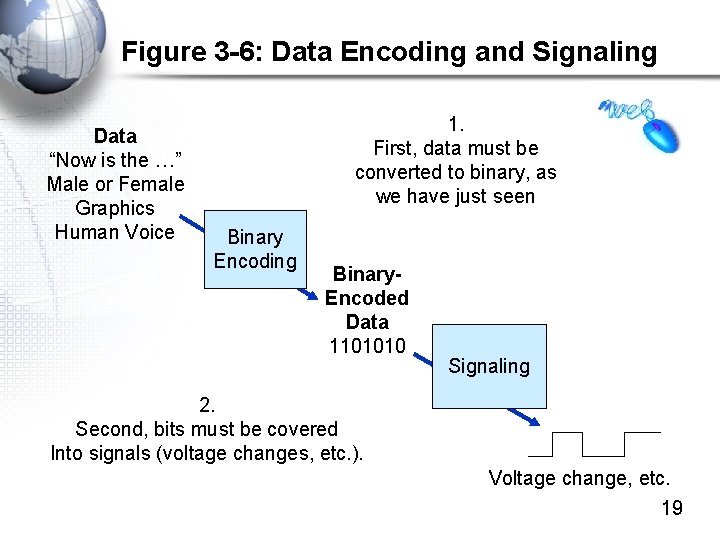
Figure 3 -6: Data Encoding and Signaling Data “Now is the …” Male or Female Graphics Human Voice 1. First, data must be converted to binary, as we have just seen Binary Encoding Binary. Encoded Data 1101010 Signaling 2. Second, bits must be covered Into signals (voltage changes, etc. ). Voltage change, etc. 19
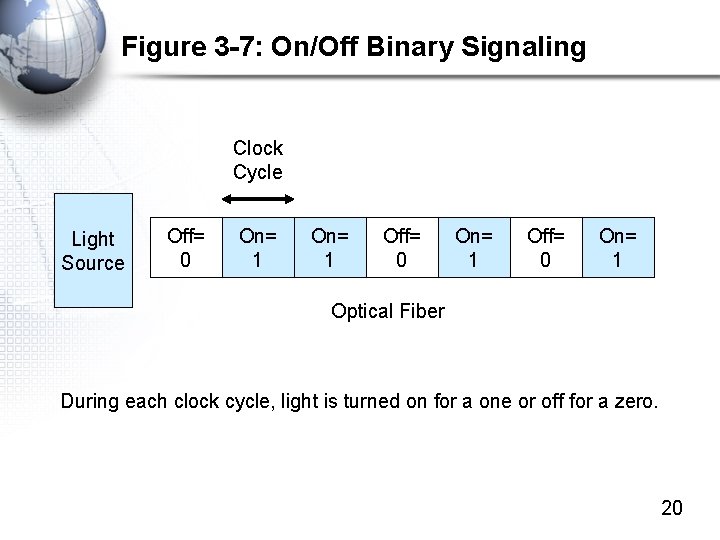
Figure 3 -7: On/Off Binary Signaling Clock Cycle Light Source Off= 0 On= 1 Optical Fiber During each clock cycle, light is turned on for a one or off for a zero. 20
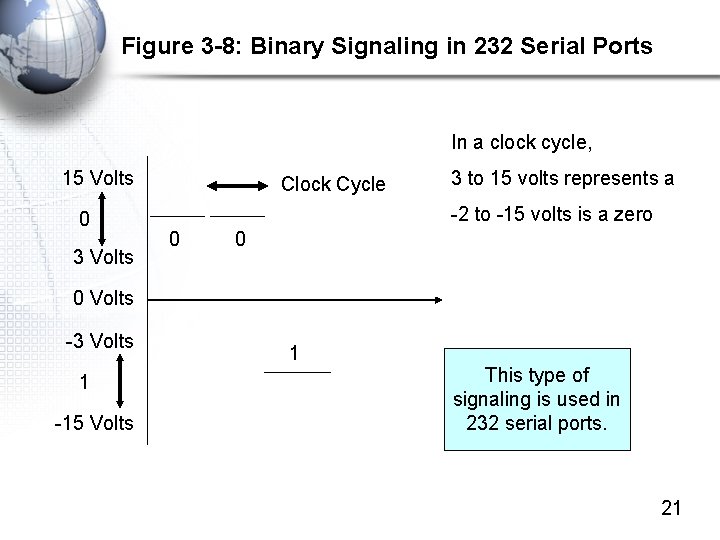
Figure 3 -8: Binary Signaling in 232 Serial Ports In a clock cycle, 15 Volts 0 3 Volts Clock Cycle 3 to 15 volts represents a -2 to -15 volts is a zero 0 0 0 Volts -3 Volts 1 -15 Volts 1 This type of signaling is used in 232 serial ports. 21
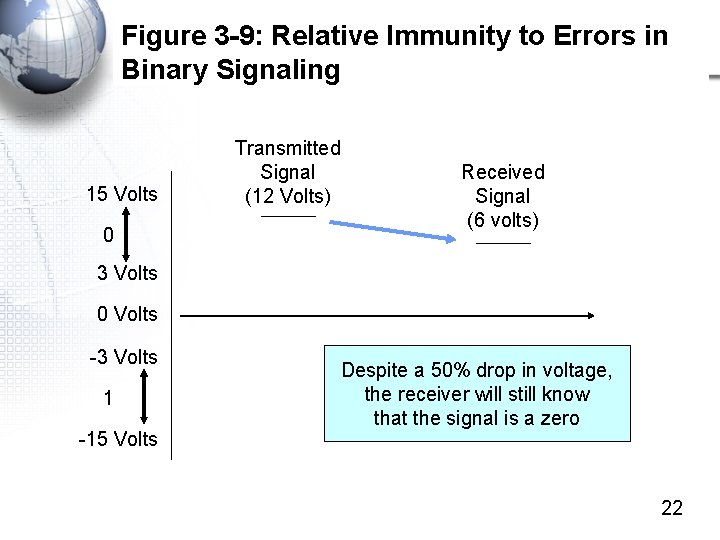
Figure 3 -9: Relative Immunity to Errors in Binary Signaling 15 Volts 0 Transmitted Signal (12 Volts) Received Signal (6 volts) 3 Volts 0 Volts -3 Volts 1 -15 Volts Despite a 50% drop in voltage, the receiver will still know that the signal is a zero 22
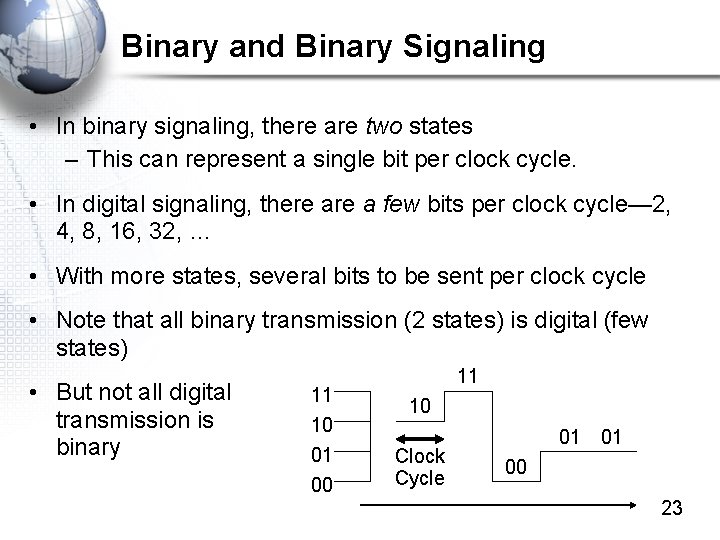
Binary and Binary Signaling • In binary signaling, there are two states – This can represent a single bit per clock cycle. • In digital signaling, there a few bits per clock cycle— 2, 4, 8, 16, 32, … • With more states, several bits to be sent per clock cycle • Note that all binary transmission (2 states) is digital (few states) • But not all digital transmission is binary 11 10 01 00 11 10 Clock Cycle 01 01 00 23
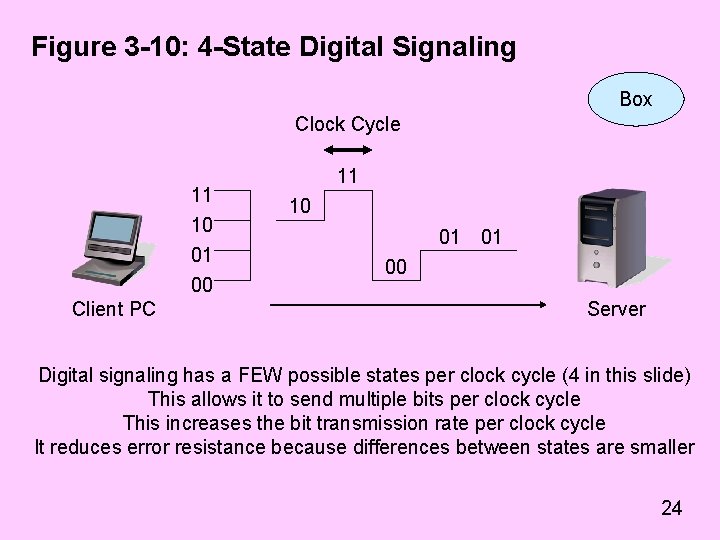
Figure 3 -10: 4 -State Digital Signaling Box Clock Cycle 11 10 01 00 Client PC 11 10 01 01 00 Server Digital signaling has a FEW possible states per clock cycle (4 in this slide) This allows it to send multiple bits per clock cycle This increases the bit transmission rate per clock cycle It reduces error resistance because differences between states are smaller 24
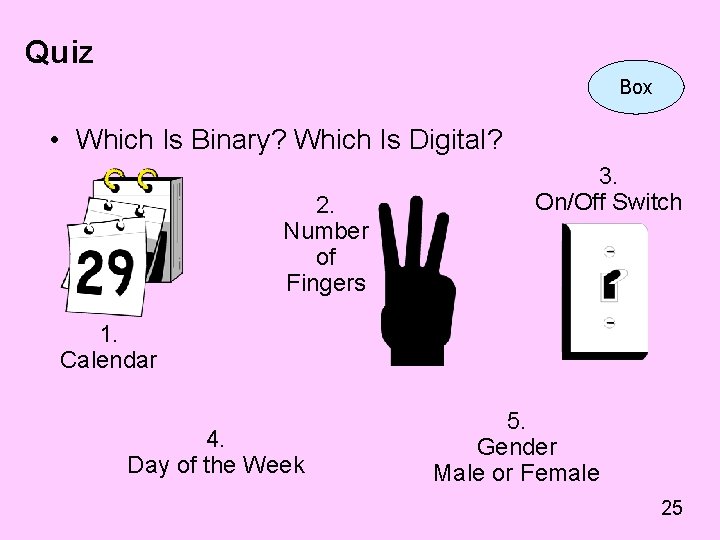
Quiz Box • Which Is Binary? Which Is Digital? 2. Number of Fingers 3. On/Off Switch 1. Calendar 4. Day of the Week 5. Gender Male or Female 25
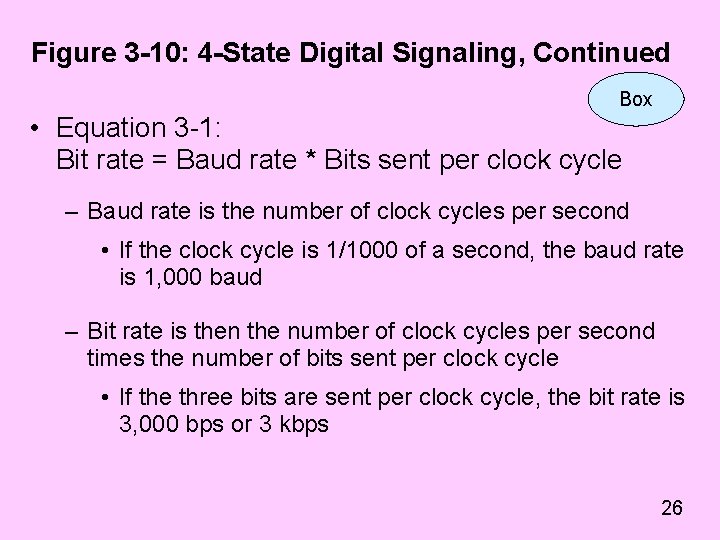
Figure 3 -10: 4 -State Digital Signaling, Continued Box • Equation 3 -1: Bit rate = Baud rate * Bits sent per clock cycle – Baud rate is the number of clock cycles per second • If the clock cycle is 1/1000 of a second, the baud rate is 1, 000 baud – Bit rate is then the number of clock cycles per second times the number of bits sent per clock cycle • If the three bits are sent per clock cycle, the bit rate is 3, 000 bps or 3 kbps 26
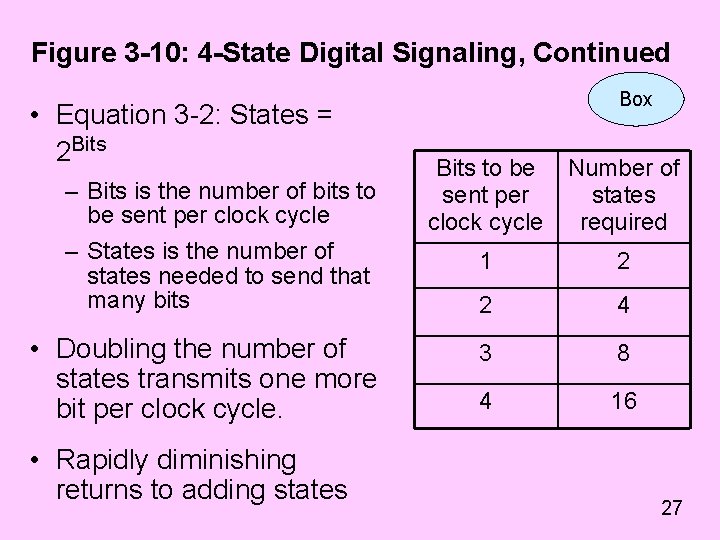
Figure 3 -10: 4 -State Digital Signaling, Continued • Equation 3 -2: States = 2 Bits – Bits is the number of bits to be sent per clock cycle – States is the number of states needed to send that many bits • Doubling the number of states transmits one more bit per clock cycle. • Rapidly diminishing returns to adding states Box Bits to be sent per clock cycle Number of states required 1 2 2 4 3 8 4 16 27
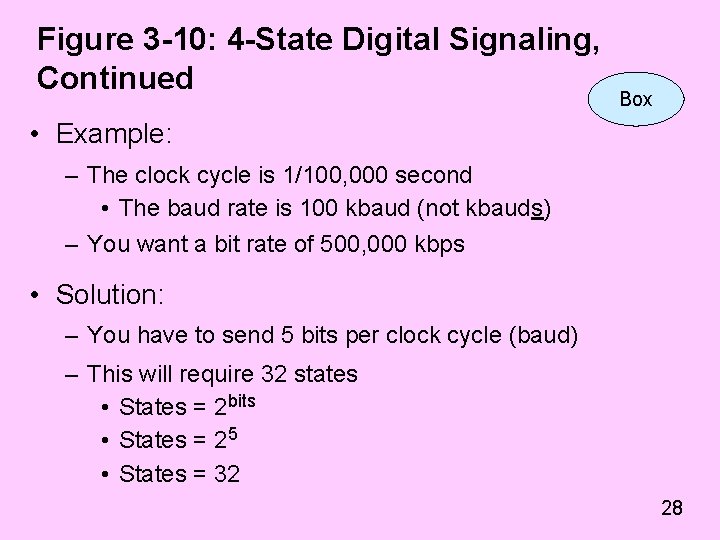
Figure 3 -10: 4 -State Digital Signaling, Continued Box • Example: – The clock cycle is 1/100, 000 second • The baud rate is 100 kbaud (not kbauds) – You want a bit rate of 500, 000 kbps • Solution: – You have to send 5 bits per clock cycle (baud) – This will require 32 states • States = 2 bits • States = 25 • States = 32 28
Figure 3 -10: 4 -State Digital Signaling, Continued Box • Example: – Suppose there a system has 8 states – Suppose that the clock cycle is 1/10, 000 second – How fast can the system transmit? • Solution: – With four states, 3 information bits can be sent per clock cycle (8=2 X) [Equation 3 -2] X=3 – With a clock cycle of 1/10, 000, baud rate is 10, 000 baud – The bit rate will be 30 kbps (3 bits/clock cycle times 10, 000 clock cycles per second). [Equation 3 -1] 29
UTP Propagation Unshielded Twisted Pair wiring
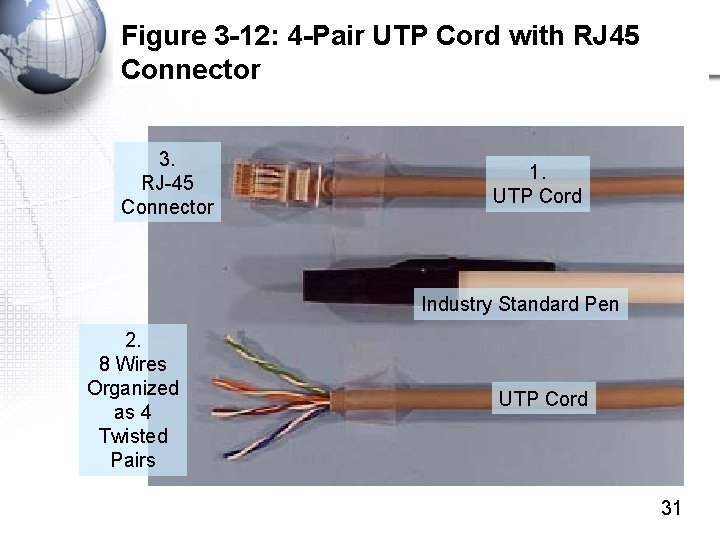
Figure 3 -12: 4 -Pair UTP Cord with RJ 45 Connector 3. RJ-45 Connector 1. UTP Cord Industry Standard Pen 2. 8 Wires Organized as 4 Twisted Pairs UTP Cord 31
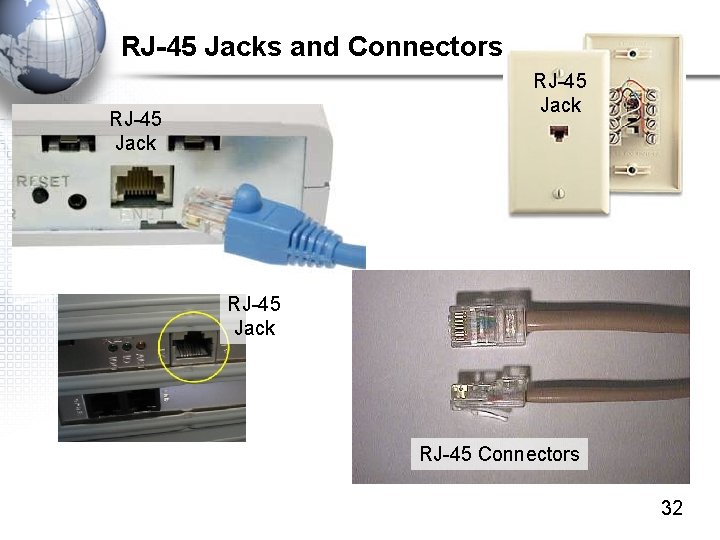
RJ-45 Jacks and Connectors RJ-45 Jack RJ-45 Connectors 32
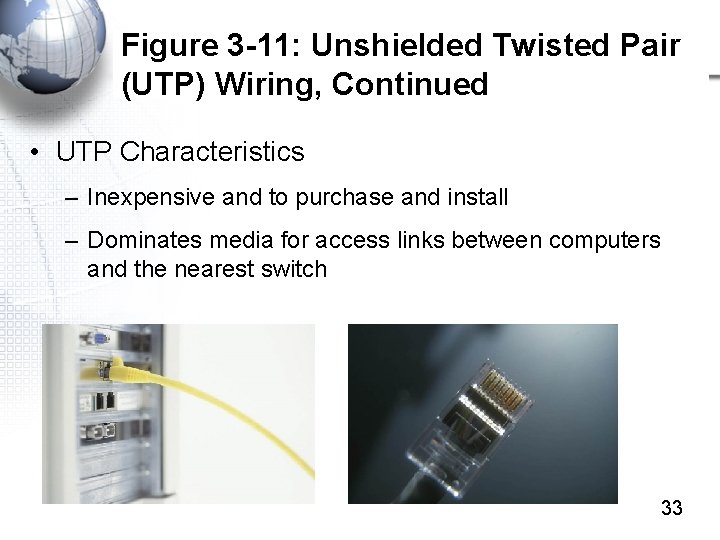
Figure 3 -11: Unshielded Twisted Pair (UTP) Wiring, Continued • UTP Characteristics – Inexpensive and to purchase and install – Dominates media for access links between computers and the nearest switch 33
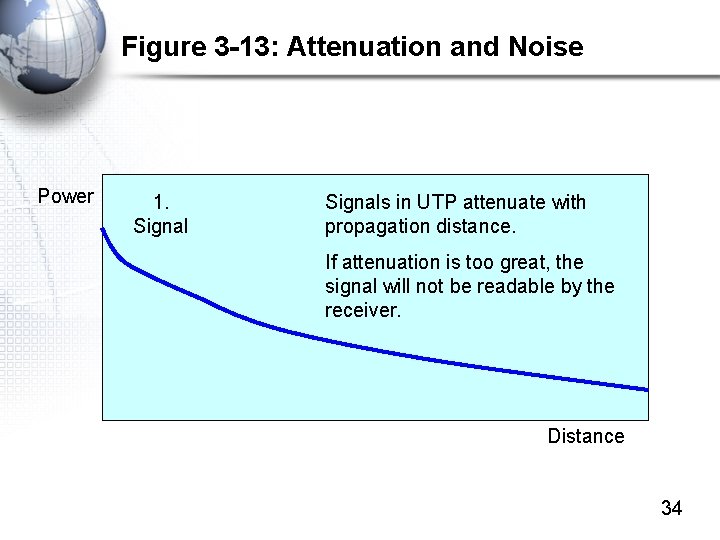
Figure 3 -13: Attenuation and Noise Power 1. Signals in UTP attenuate with propagation distance. If attenuation is too great, the signal will not be readable by the receiver. Distance 34
Figure 3 -14: Decibels • Attenuation is Sometimes Expressed in Decibels (d. B) • The equation for decibels is – d. B = 10 log 10(P 2/P 1) – Where P 1 is the initial power and P 2 is the final power after transmission – If P 2 is smaller than P 1, then the answer will be negative 35
Figure 3 -14: Decibels, Continued • Example – Over a transmission link, power drops to 37% of its original value – P 2/P 1 = 37/100 =. 37 (37%/100%) – LOG 10(0. 37) = -0. 4318 – 10*LOG 10(0. 37) = -4. 3 d. B (negative, reflecting power reduction through attenuation) – In calculations, the Excel LOG 10 function can be used 36
Figure 3 -14: Decibels, Continued • There are two useful approximations • 3 d. B loss is a reduction to very nearly 1/2 the original power – 6 d. B loss is a decrease to 1/4 the original power – 9 d. B loss is a decrease to 1/8 the original power –… • 10 d. B loss is a reduction to very nearly 1/10 the original power – 20 d. B loss is a decrease to 1/100 the original power –… 37
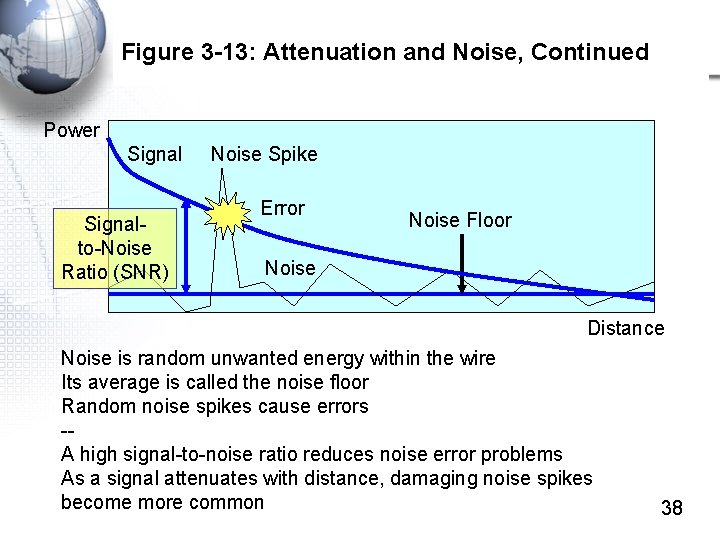
Figure 3 -13: Attenuation and Noise, Continued Power Signalto-Noise Ratio (SNR) Noise Spike Error Noise Floor Noise Distance Noise is random unwanted energy within the wire Its average is called the noise floor Random noise spikes cause errors -A high signal-to-noise ratio reduces noise error problems As a signal attenuates with distance, damaging noise spikes become more common 38
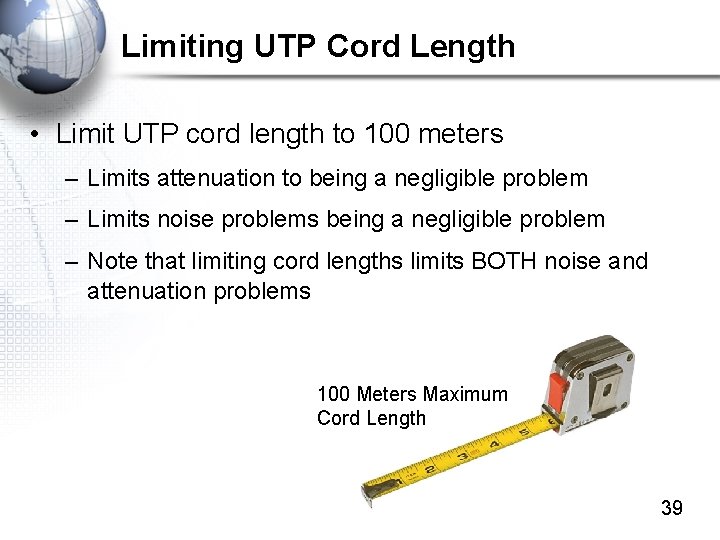
Limiting UTP Cord Length • Limit UTP cord length to 100 meters – Limits attenuation to being a negligible problem – Limits noise problems being a negligible problem – Note that limiting cord lengths limits BOTH noise and attenuation problems 100 Meters Maximum Cord Length 39
Figure 3 -11: Unshielded Twisted Pair (UTP) Wiring, Continued • Electromagnetic Interference (EMI) (Fig. 3 -15) – Electromagnetic interference is electromagnetic energy from outside sources that adds to the signal • From fluorescent lights, electrical motors, microwave ovens, etc. – The problem is that UTP cords are like long radio antennas. • They pick up EMI energy nicely • When they carry signals, they also send EMI energy out from themselves 40
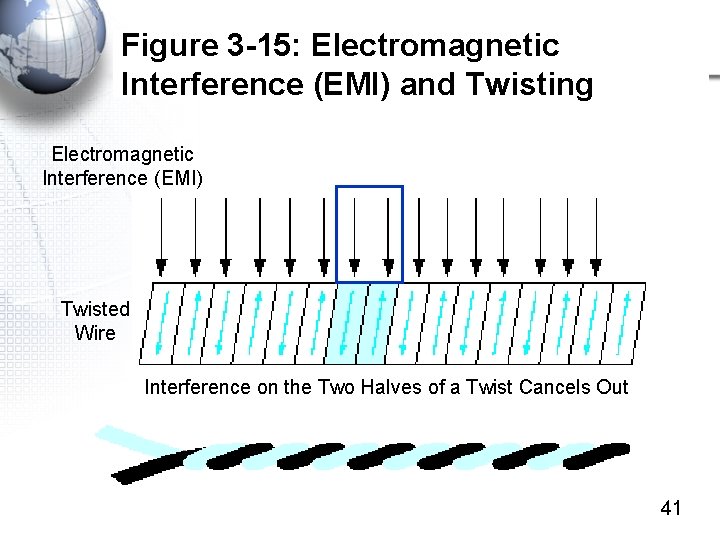
Figure 3 -15: Electromagnetic Interference (EMI) and Twisting Electromagnetic Interference (EMI) Twisted Wire Interference on the Two Halves of a Twist Cancels Out 41
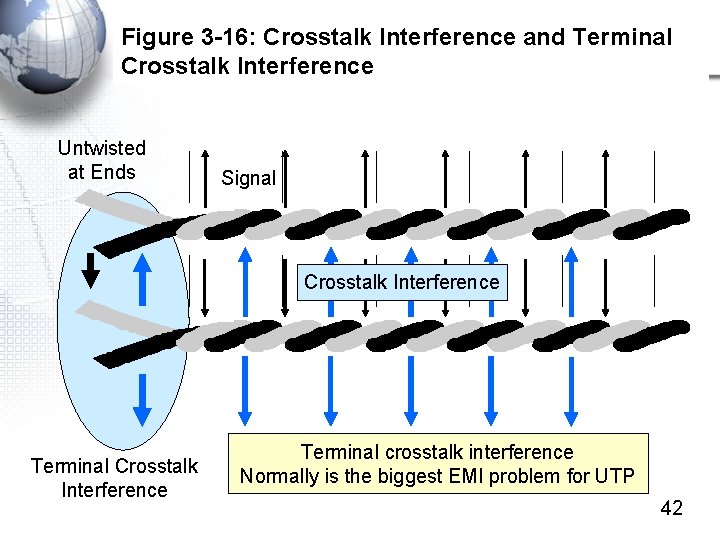
Figure 3 -16: Crosstalk Interference and Terminal Crosstalk Interference Untwisted at Ends Signal Crosstalk Interference Terminal crosstalk interference Normally is the biggest EMI problem for UTP 42
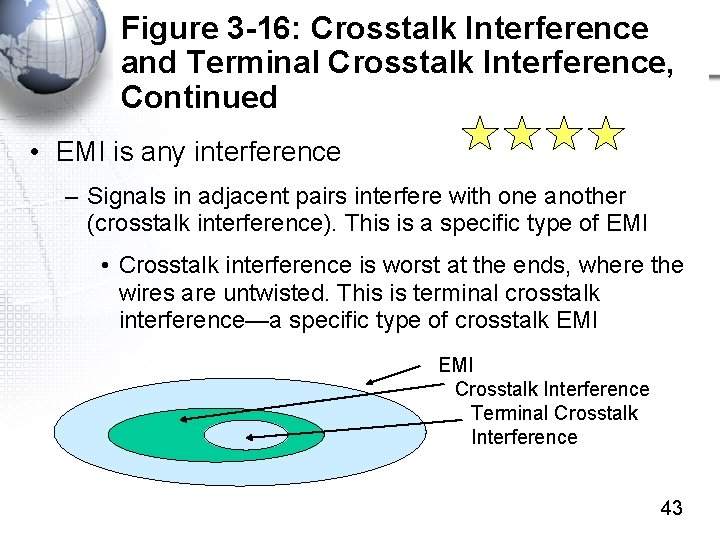
Figure 3 -16: Crosstalk Interference and Terminal Crosstalk Interference, Continued • EMI is any interference – Signals in adjacent pairs interfere with one another (crosstalk interference). This is a specific type of EMI • Crosstalk interference is worst at the ends, where the wires are untwisted. This is terminal crosstalk interference—a specific type of crosstalk EMI Crosstalk Interference Terminal Crosstalk Interference 43
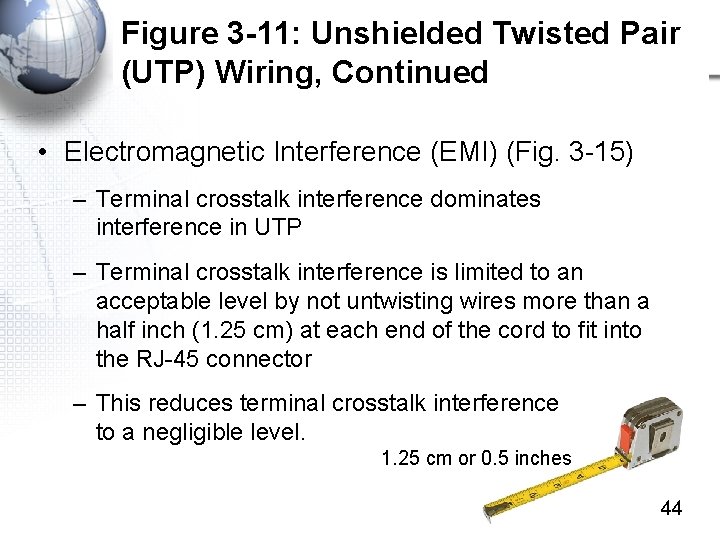
Figure 3 -11: Unshielded Twisted Pair (UTP) Wiring, Continued • Electromagnetic Interference (EMI) (Fig. 3 -15) – Terminal crosstalk interference dominates interference in UTP – Terminal crosstalk interference is limited to an acceptable level by not untwisting wires more than a half inch (1. 25 cm) at each end of the cord to fit into the RJ-45 connector – This reduces terminal crosstalk interference to a negligible level. 1. 25 cm or 0. 5 inches 44
UTP Limitations • Limit cords to 100 meters – Limits BOTH noise AND attenuation problems to an acceptable level • Do not untwist wires more than 1. 25 cm (a half inch) when placing them in RJ-45 connectors – Limits terminal crosstalk interference to an acceptable level • Neither completely eliminates the problems but they usually reduce the problems to negligible levels 45
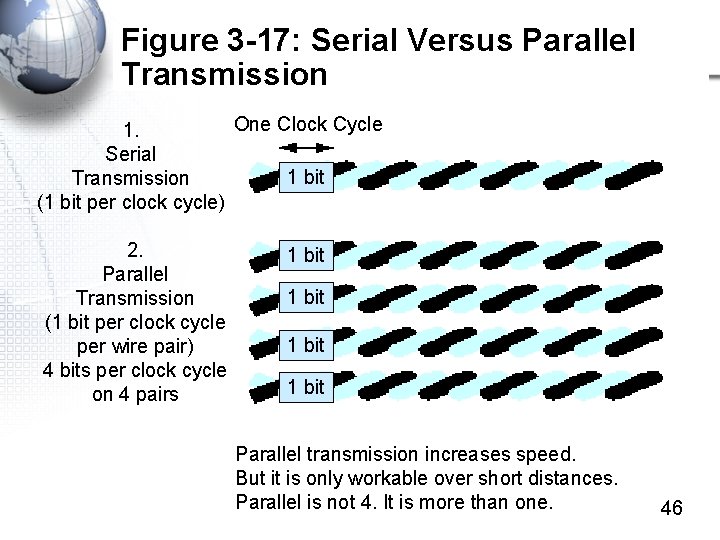
Figure 3 -17: Serial Versus Parallel Transmission One Clock Cycle 1. Serial 1 bit Transmission (1 bit per clock cycle) 2. Parallel Transmission (1 bit per clock cycle per wire pair) 4 bits per clock cycle on 4 pairs 1 bit Parallel transmission increases speed. But it is only workable over short distances. Parallel is not 4. It is more than one. 46
Figure 3 -18: Wire Quality Standards • Wiring Quality Standards – Rated by Category (Cat) Numbers • Category Standards are Set by ANSI/TIA/EIA and ISO/IEC – In the United States, the TIA/EIA/ANSI-568 governs UTP and optical fiber standards – In Europe and many other parts of the world, the standard is ISO/IEC 11801 – The two sets of standards are close but not identical 47
Figure 3 -18: Wire Quality Standards • UTP Categories 3 and 4 – Early data wiring, which could only handle Ethernet speeds up to 10 Mbps • UTP Categories 5 and 5 e – Most wiring installed today is Category 5 e (enhanced) – Cat 5 e and Cat 5 can handle Ethernet up to 1 Gbps – Most wiring sold today is Cat 5 e 48
Figure 3 -18: Wire Quality Standards • UTP Category 6 Errors – Relatively new – No better than Cat 5 or Cat 5 e at 1 Gbps – Developed for higher Ethernet speeds of 10 Gbps • But can only span 55 meters at that speed • Book says cannot be used. This is an error. • Category 6 A (Augmented) – Able to carry Ethernet signals at 10 Gbps up 100 meters – The book said 55 meters, but this is an error 49
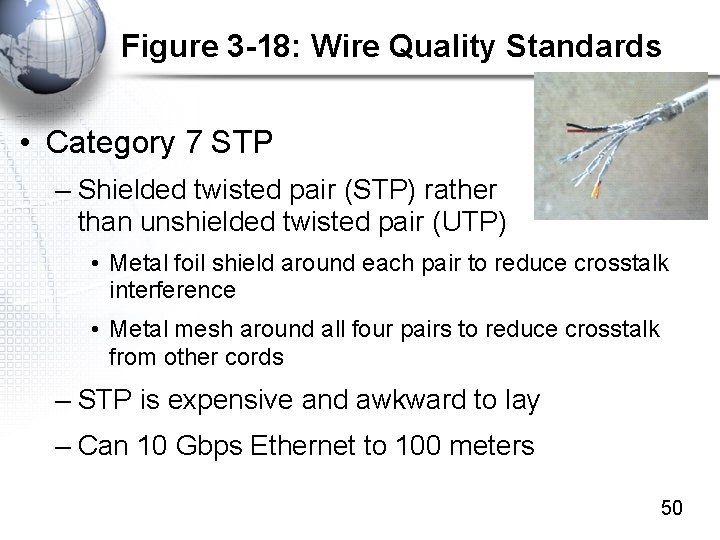
Figure 3 -18: Wire Quality Standards • Category 7 STP – Shielded twisted pair (STP) rather than unshielded twisted pair (UTP) • Metal foil shield around each pair to reduce crosstalk interference • Metal mesh around all four pairs to reduce crosstalk from other cords – STP is expensive and awkward to lay – Can 10 Gbps Ethernet to 100 meters 50
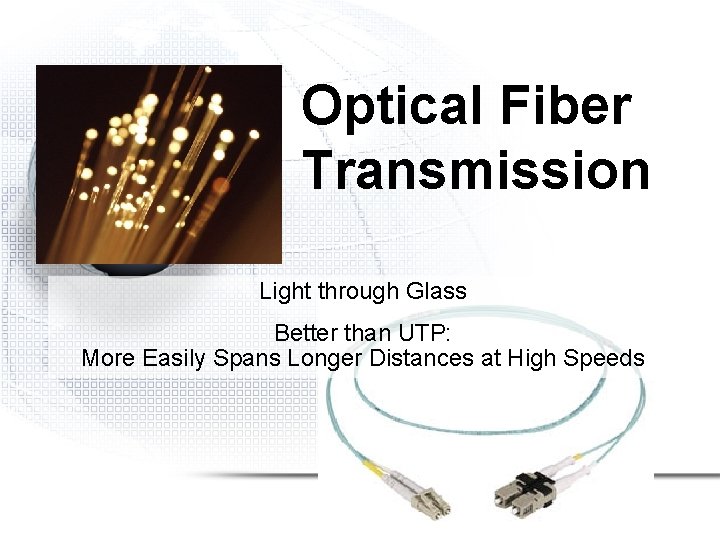
Optical Fiber Transmission Light through Glass Better than UTP: More Easily Spans Longer Distances at High Speeds
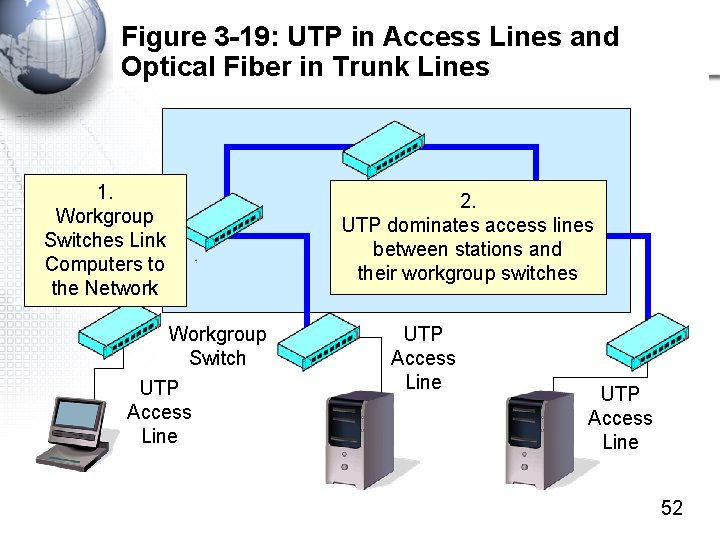
Figure 3 -19: UTP in Access Lines and Optical Fiber in Trunk Lines 1. Workgroup Switches Link Computers to the Network Workgroup Switch UTP Access Line 2. UTP dominates access lines between stations and their workgroup switches UTP Access Line 52
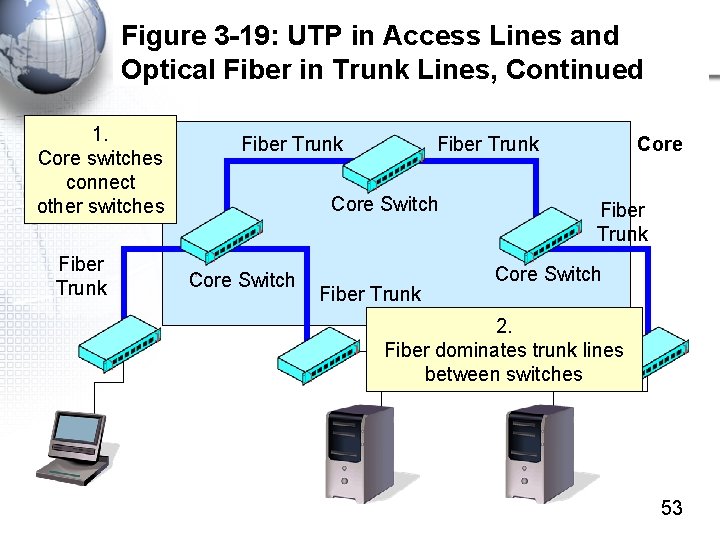
Figure 3 -19: UTP in Access Lines and Optical Fiber in Trunk Lines, Continued 1. Core switches connect other switches Fiber Trunk Core Switch Fiber Trunk Core Switch 2. Fiber dominates trunk lines between switches 53
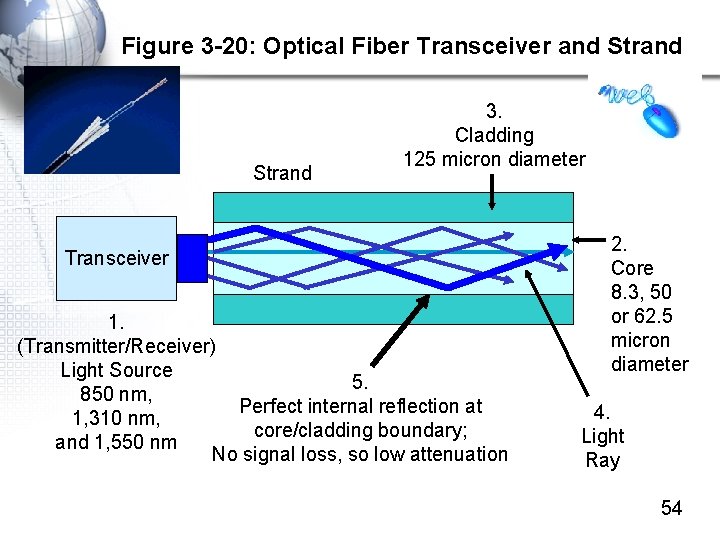
Figure 3 -20: Optical Fiber Transceiver and Strand 3. Cladding 125 micron diameter Transceiver 1. (Transmitter/Receiver) Light Source 5. 850 nm, Perfect internal reflection at 1, 310 nm, core/cladding boundary; and 1, 550 nm No signal loss, so low attenuation 2. Core 8. 3, 50 or 62. 5 micron diameter 4. Light Ray 54
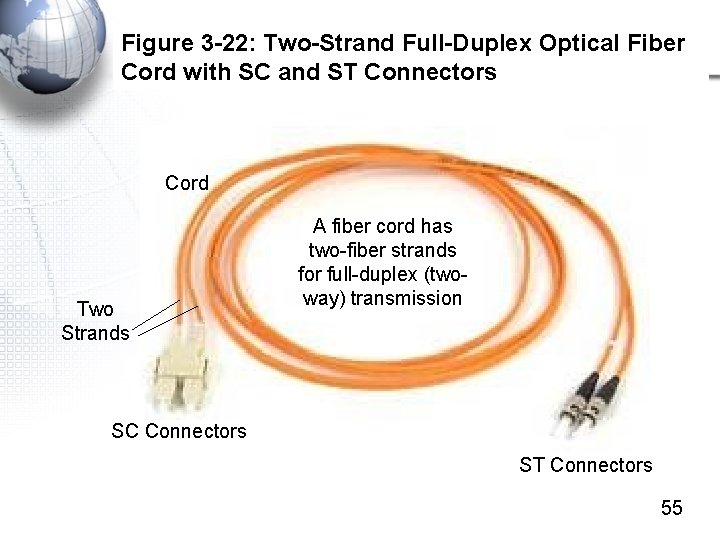
Figure 3 -22: Two-Strand Full-Duplex Optical Fiber Cord with SC and ST Connectors Cord Two Strands A fiber cord has two-fiber strands for full-duplex (twoway) transmission SC Connectors ST Connectors 55
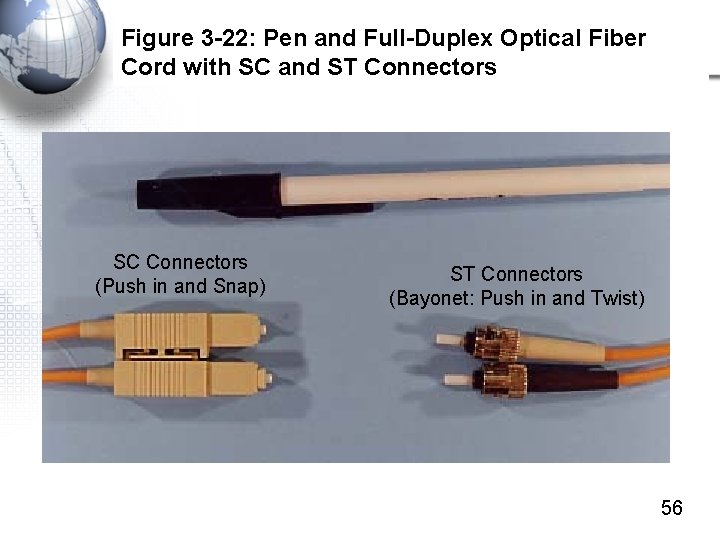
Figure 3 -22: Pen and Full-Duplex Optical Fiber Cord with SC and ST Connectors SC Connectors (Push in and Snap) ST Connectors (Bayonet: Push in and Twist) 56
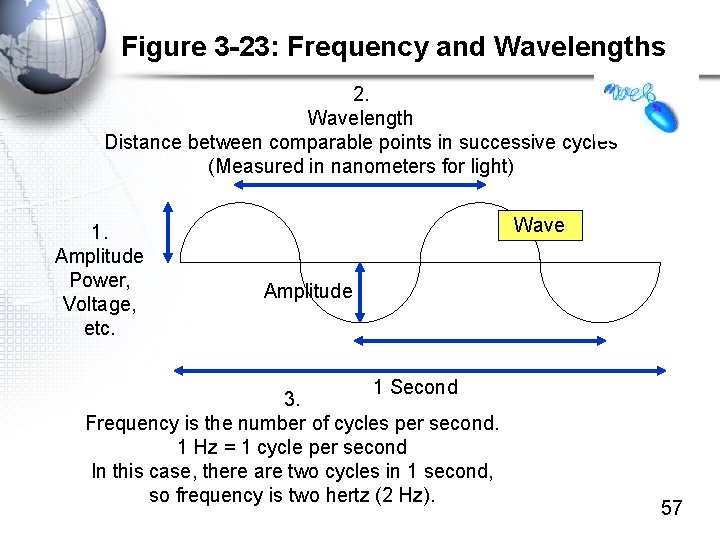
Figure 3 -23: Frequency and Wavelengths 2. Wavelength Distance between comparable points in successive cycles (Measured in nanometers for light) 1. Amplitude Power, Voltage, etc. Wave Amplitude 1 Second 3. Frequency is the number of cycles per second. 1 Hz = 1 cycle per second In this case, there are two cycles in 1 second, so frequency is two hertz (2 Hz). 57
Light Wavelengths • Light signals are measured by wavelength • Light wavelengths measured in nanometers (nm) • There are three fiber wavelength “windows” with good propagation characteristics – 850 nm – 1310 nm – 1550 nm • Shorter wavelength allows cheaper transceivers • Longer-wavelength light travels farther 58
Figure 3 -24: Carrier Fiber and LAN Fiber • LAN Fiber – Uses multimode fiber, which has a “thick” core diameter of 50 or 62. 5 microns • Less expensive than single-mode fiber (later) • 62. 5 micron fiber is more common in the US but does not carry signals as far as 50 micron fiber – Also uses inexpensive 850 nm transceivers – Multimode fiber with 850 nm signaling cannot span the kilometer distances needed by carriers, but can span the 200 -300 meters needed in LAN fiber cords 59
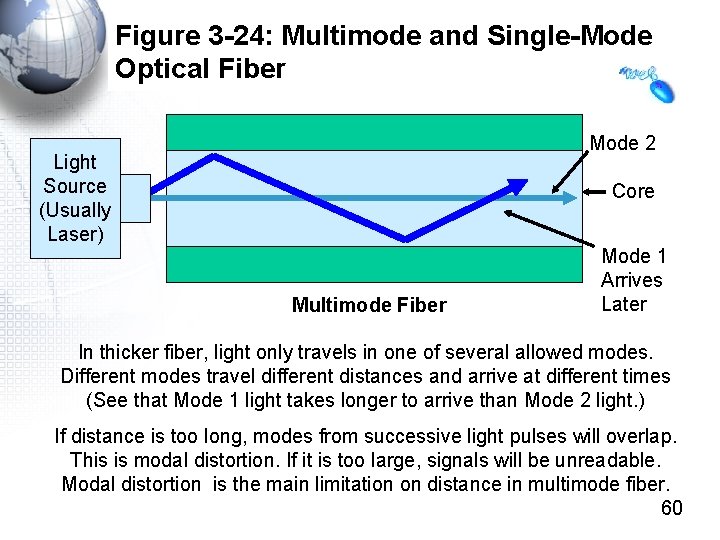
Figure 3 -24: Multimode and Single-Mode Optical Fiber Mode 2 Light Source (Usually Laser) Core Multimode Fiber Mode 1 Arrives Later In thicker fiber, light only travels in one of several allowed modes. Different modes travel different distances and arrive at different times (See that Mode 1 light takes longer to arrive than Mode 2 light. ) If distance is too long, modes from successive light pulses will overlap. This is modal distortion. If it is too large, signals will be unreadable. Modal distortion is the main limitation on distance in multimode fiber. 60
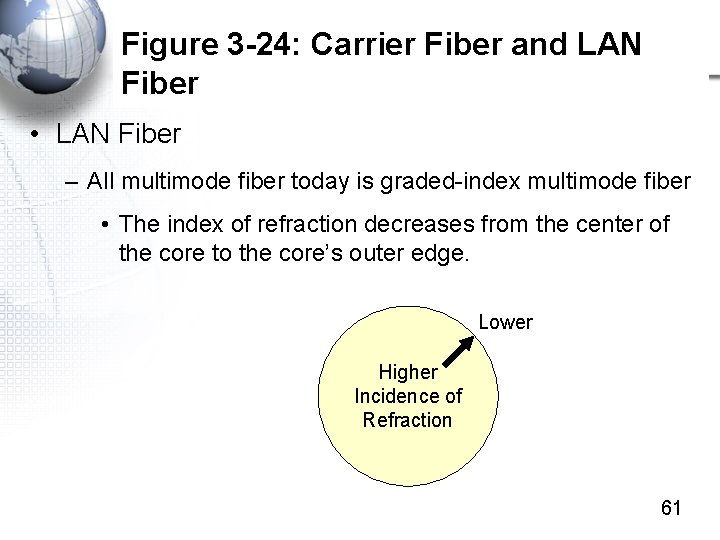
Figure 3 -24: Carrier Fiber and LAN Fiber • LAN Fiber – All multimode fiber today is graded-index multimode fiber • The index of refraction decreases from the center of the core to the core’s outer edge. Lower Higher Incidence of Refraction 61
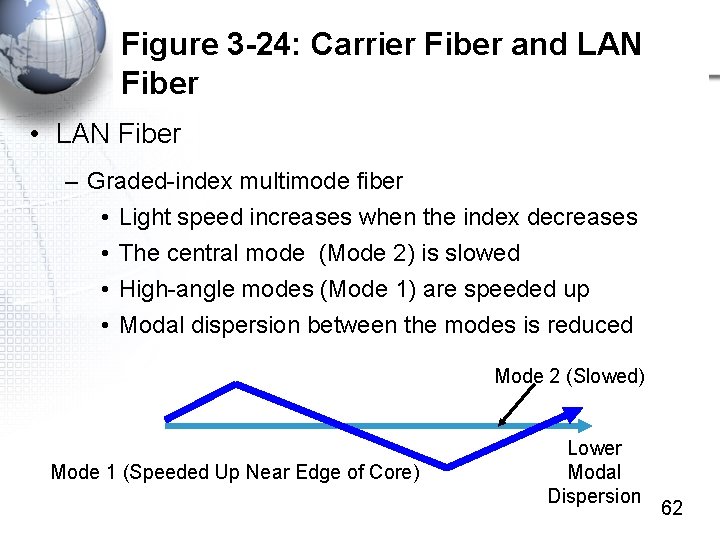
Figure 3 -24: Carrier Fiber and LAN Fiber • LAN Fiber – Graded-index multimode fiber • Light speed increases when the index decreases • The central mode (Mode 2) is slowed • High-angle modes (Mode 1) are speeded up • Modal dispersion between the modes is reduced Mode 2 (Slowed) Mode 1 (Speeded Up Near Edge of Core) Lower Modal Dispersion 62
Figure 3 -24: Carrier Fiber and LAN Fiber • LAN Fiber – UTP quality is measured by category number. – Multimode Fiber Quality • Measured as modal bandwidth (MHz. km or MHz-km) • More modal bandwidth is better • Increases the speed–distance product – With greater mobile bandwidth, can go faster, farther, or some combination of the two 63
Figure 3 -24: Carrier Fiber and LAN Fiber • LAN Fiber – Example: 1000 BASE-SX Ethernet • Uses inexpensive 850 nm light • With 62. 5 micron fiber and 160 MHz-km modal bandwidth, maximum distance is 220 m • With 62. 5 micron fiber and 200 MHz-km bandwidth, maximum distance is 275 m • Some vendors with higher-than-standard modal bandwidth can carry traffic farther 64
Figure 3 -24: Carrier Fiber and LAN Fiber • LANs and WAN carriers use different types of fiber • Carrier Fiber – Carrier fiber must span long distances – This requires expensive long-wavelength laser light sources (1, 310 and 1, 550 nm) – It also requires expensive “single-mode” fiber with a very narrow core (8. 3 microns) 65
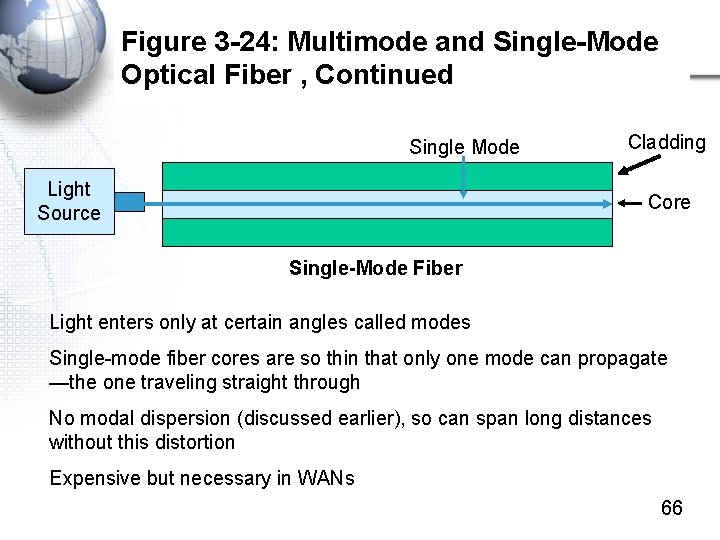
Figure 3 -24: Multimode and Single-Mode Optical Fiber , Continued Single Mode Light Source Cladding Core Single-Mode Fiber Light enters only at certain angles called modes Single-mode fiber cores are so thin that only one mode can propagate —the one traveling straight through No modal dispersion (discussed earlier), so can span long distances without this distortion Expensive but necessary in WANs 66
Figure 3 -24: Carrier Fiber and LAN Fiber • Carrier Fiber – Main propagation effect for single-mode fiber is attenuation, which is very low • For 850 nm light, attenuation is around 2. 5 d. B/km • At 1, 310 nm, attenuation is lower—about 0. 8 d. B/km • At 1, 550 nm, attenuation falls even lower—about 0. 2 d. B/km – Longer wavelengths carry farther but cost more – Carrier fiber uses wavelengths of 1, 310 or 1, 550 nm 67
Figure 3 -24: Carrier Fiber and LAN Fiber • Noise and Electromagnetic Interference (EMI) Are Not Problems for Either LAN or Carrier Fiber – Noise from moving electrons cannot interfere with light signals – EMI would have to be light signals • Wrapping the cladding in an opaque covering prevents light from coming in 68
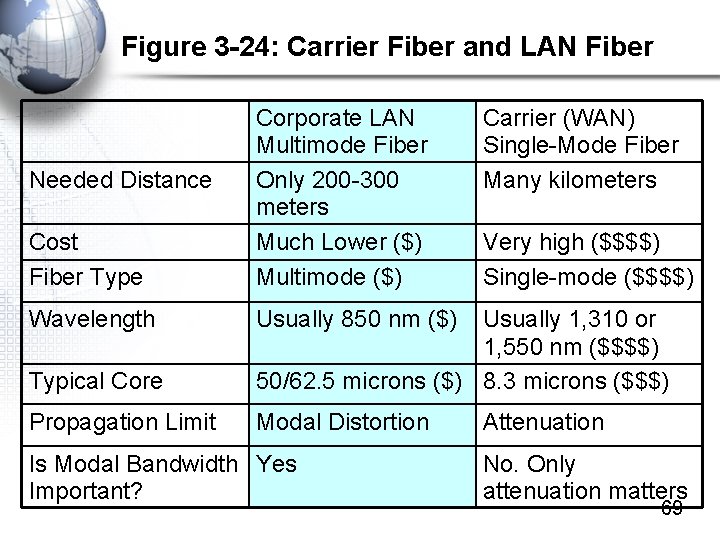
Figure 3 -24: Carrier Fiber and LAN Fiber Cost Fiber Type Corporate LAN Multimode Fiber Only 200 -300 meters Much Lower ($) Multimode ($) Wavelength Usually 850 nm ($) Needed Distance Carrier (WAN) Single-Mode Fiber Many kilometers Very high ($$$$) Single-mode ($$$$) Typical Core Usually 1, 310 or 1, 550 nm ($$$$) 50/62. 5 microns ($) 8. 3 microns ($$$) Propagation Limit Modal Distortion Is Modal Bandwidth Yes Important? Attenuation No. Only attenuation matters 69

Topology
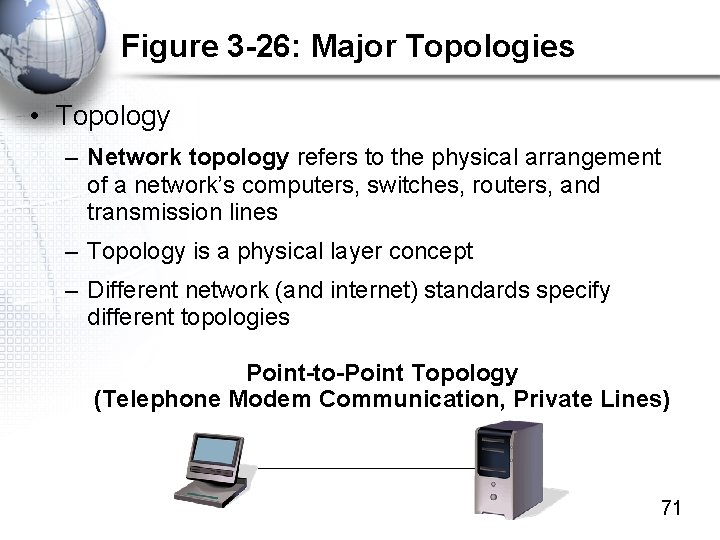
Figure 3 -26: Major Topologies • Topology – Network topology refers to the physical arrangement of a network’s computers, switches, routers, and transmission lines – Topology is a physical layer concept – Different network (and internet) standards specify different topologies Point-to-Point Topology (Telephone Modem Communication, Private Lines) 71
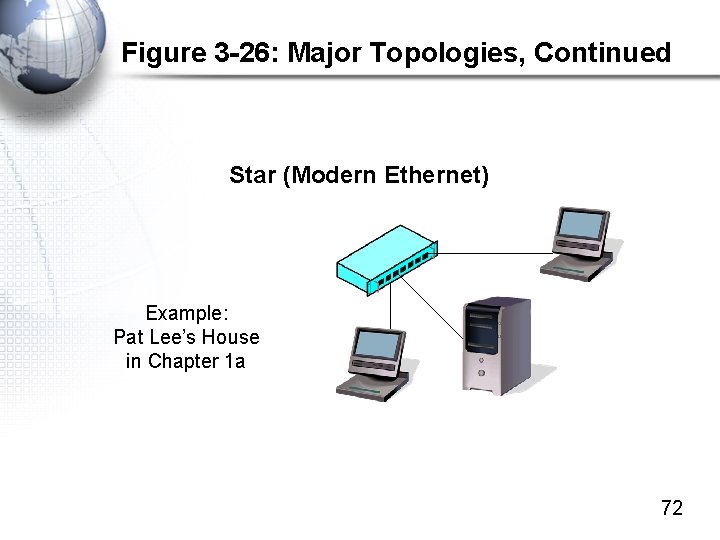
Figure 3 -26: Major Topologies, Continued Star (Modern Ethernet) Example: Pat Lee’s House in Chapter 1 a 72
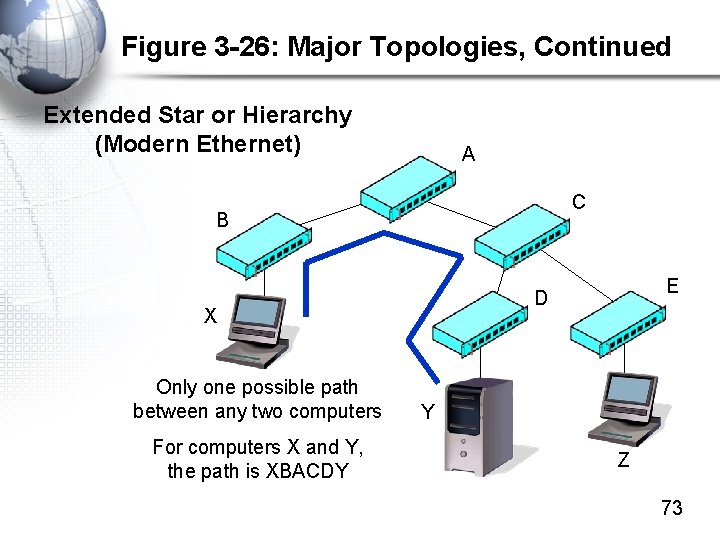
Figure 3 -26: Major Topologies, Continued Extended Star or Hierarchy (Modern Ethernet) A C B X Only one possible path between any two computers For computers X and Y, the path is XBACDY E D Y Z 73
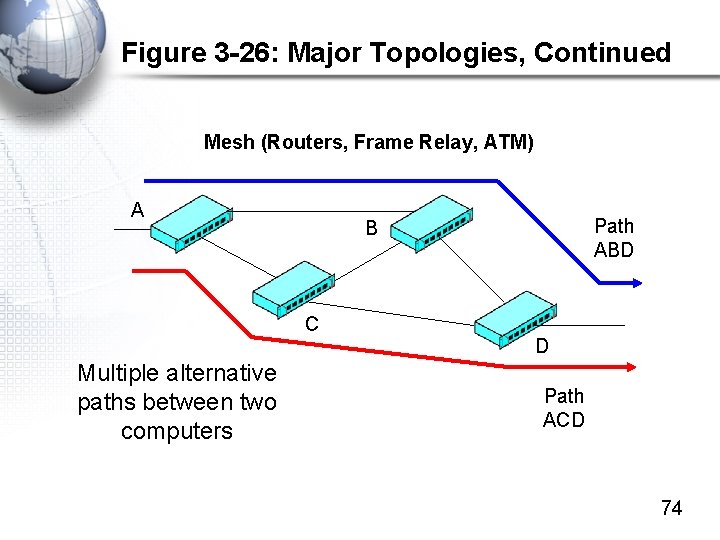
Figure 3 -26: Major Topologies, Continued Mesh (Routers, Frame Relay, ATM) A C Multiple alternative paths between two computers Path ABD B D Path ACD 74
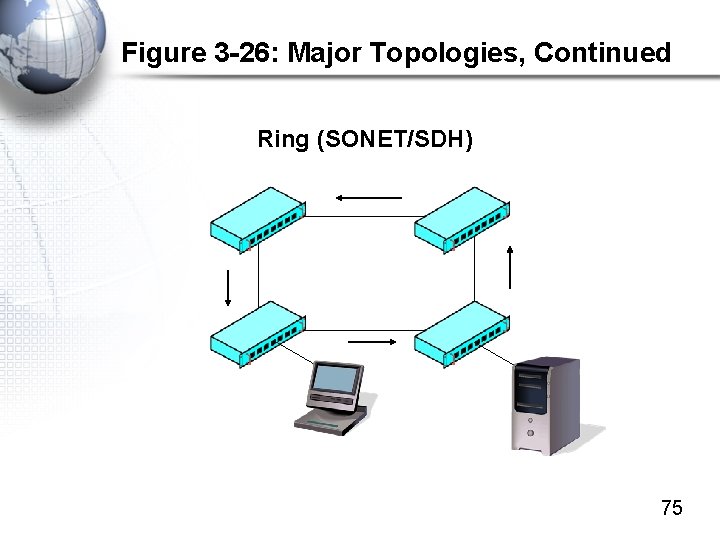
Figure 3 -26: Major Topologies, Continued Ring (SONET/SDH) 75
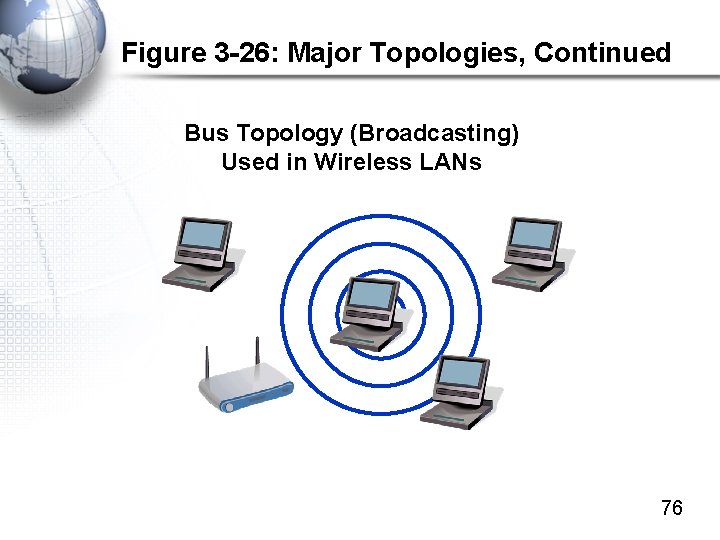
Figure 3 -26: Major Topologies, Continued Bus Topology (Broadcasting) Used in Wireless LANs 76
- Slides: 76