
Physical Database Design and Referential Integrity University of
Physical Database Design and Referential Integrity University of California, Berkeley School of Information Management and Systems SIMS 257: Database Management IS 257 – Fall 2005 -09 -28 SLIDE 1
Lecture Outline • Review – Physical Database Design • • Access Methods Indexes and What to index Parallel storage systems (RAID) Integrity constraints IS 257 – Fall 2005 -09 -28 SLIDE 2
Lecture Outline • Review – Physical Database Design • • Access Methods Indexes and What to index Parallel storage systems (RAID) Integrity constraints IS 257 – Fall 2005 -09 -28 SLIDE 3
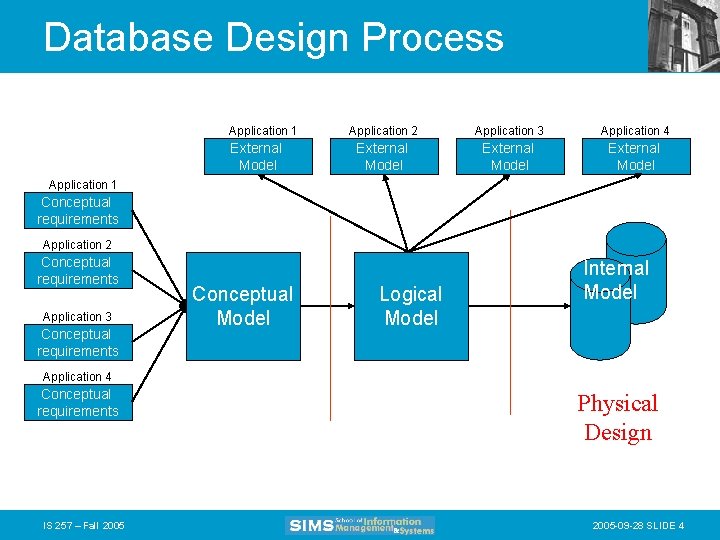
Database Design Process Application 1 External Model Application 2 Application 3 Application 4 External Model Application 1 Conceptual requirements Application 2 Conceptual requirements Application 3 Conceptual requirements Conceptual Model Logical Model Internal Model Application 4 Conceptual requirements IS 257 – Fall 2005 Physical Design 2005 -09 -28 SLIDE 4
Physical Database Design • Many physical database design decisions are implicit in the technology adopted – Also, organizations may have standards or an “information architecture” that specifies operating systems, DBMS, and data access languages -- thus constraining the range of possible physical implementations. • We will be concerned with some of the possible physical implementation issues IS 257 – Fall 2005 -09 -28 SLIDE 5
Physical Database Design • The primary goal of physical database design is data processing efficiency • We will concentrate on choices often available to optimize performance of database services • Physical Database Design requires information gathered during earlier stages of the design process IS 257 – Fall 2005 -09 -28 SLIDE 6
Physical Design Information • Information needed for physical file and database design includes: – Normalized relations plus size estimates for them – Definitions of each attribute – Descriptions of where and when data are used • entered, retrieved, deleted, updated, and how often – Expectations and requirements for response time, and data security, backup, recovery, retention and integrity – Descriptions of the technologies used to implement the database IS 257 – Fall 2005 -09 -28 SLIDE 7
Physical Design Decisions • There are several critical decisions that will affect the integrity and performance of the system. – Storage Format – Physical record composition – Data arrangement – Indexes – Query optimization and performance tuning IS 257 – Fall 2005 -09 -28 SLIDE 8
Storage Format • Choosing the storage format of each field (attribute). The DBMS provides some set of data types that can be used for the physical storage of fields in the database • Data Type (format) is chosen to minimize storage space and maximize data integrity IS 257 – Fall 2005 -09 -28 SLIDE 9
Objectives of data type selection • • • Minimize storage space Represent all possible values Improve data integrity Support all data manipulations The correct data type should, in minimal space, represent every possible value (but eliminated illegal values) for the associated attribute and can support the required data manipulations (e. g. numerical or string operations) IS 257 – Fall 2005 -09 -28 SLIDE 10
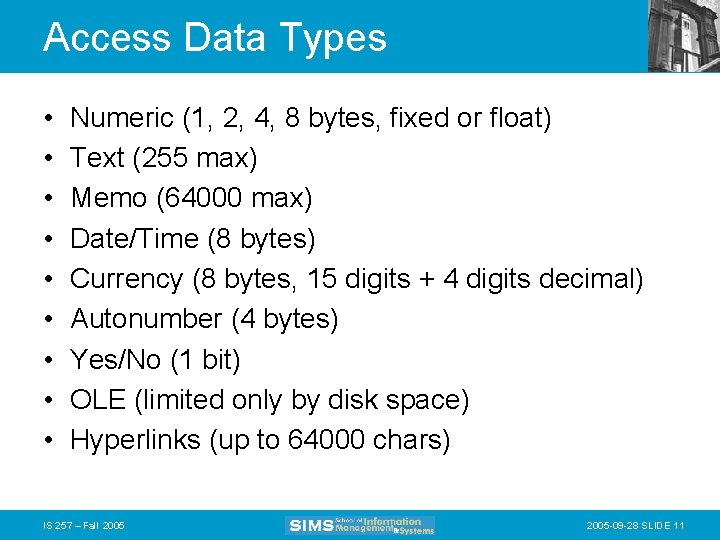
Access Data Types • • • Numeric (1, 2, 4, 8 bytes, fixed or float) Text (255 max) Memo (64000 max) Date/Time (8 bytes) Currency (8 bytes, 15 digits + 4 digits decimal) Autonumber (4 bytes) Yes/No (1 bit) OLE (limited only by disk space) Hyperlinks (up to 64000 chars) IS 257 – Fall 2005 -09 -28 SLIDE 11
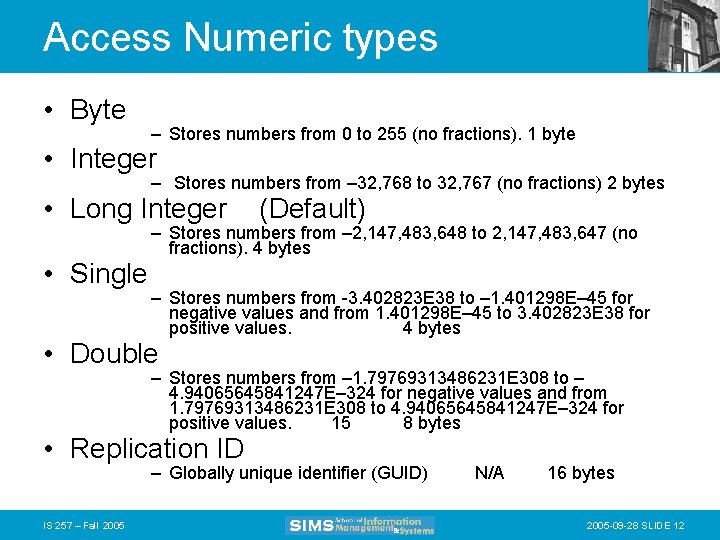
Access Numeric types • Byte – Stores numbers from 0 to 255 (no fractions). 1 byte • Integer – Stores numbers from – 32, 768 to 32, 767 (no fractions) 2 bytes • Long Integer • Single (Default) – Stores numbers from – 2, 147, 483, 648 to 2, 147, 483, 647 (no fractions). 4 bytes – Stores numbers from -3. 402823 E 38 to – 1. 401298 E– 45 for negative values and from 1. 401298 E– 45 to 3. 402823 E 38 for positive values. 4 bytes • Double – Stores numbers from – 1. 79769313486231 E 308 to – 4. 94065645841247 E– 324 for negative values and from 1. 79769313486231 E 308 to 4. 94065645841247 E– 324 for positive values. 15 8 bytes • Replication ID – Globally unique identifier (GUID) IS 257 – Fall 2005 N/A 16 bytes 2005 -09 -28 SLIDE 12

Controlling Data Integrity • • • Default values Range control Null value control Referential integrity Handling missing data IS 257 – Fall 2005 -09 -28 SLIDE 13
Designing Physical Records • A physical record is a group of fields stored in adjacent memory locations and retrieved together as a unit • Fixed Length and variable fields IS 257 – Fall 2005 -09 -28 SLIDE 14
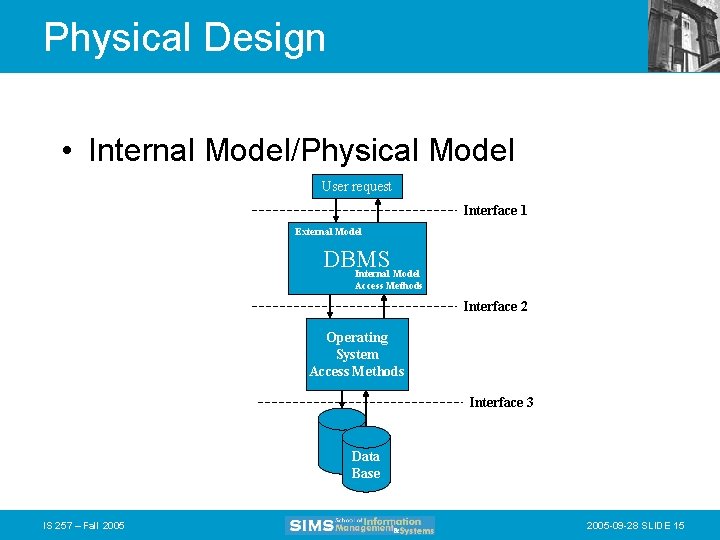
Physical Design • Internal Model/Physical Model User request Interface 1 External Model DBMS Internal Model Access Methods Interface 2 Operating System Access Methods Interface 3 Data Base IS 257 – Fall 2005 -09 -28 SLIDE 15
Physical Design • Interface 1: User request to the DBMS. The user presents a query, the DBMS determines which physical DBs are needed to resolve the query • Interface 2: The DBMS uses an internal model access method to access the data stored in a logical database. • Interface 3: The internal model access methods and OS access methods access the physical records of the database. IS 257 – Fall 2005 -09 -28 SLIDE 16
Physical File Design • A Physical file is a portion of secondary storage (disk space) allocated for the purpose of storing physical records • Pointers - a field of data that can be used to locate a related field or record of data • Access Methods - An operating system algorithm for storing and locating data in secondary storage • Pages - The amount of data read or written in one disk input or output operation IS 257 – Fall 2005 -09 -28 SLIDE 17
Lecture Outline • Review – Physical Database Design – Access Methods • Indexes and What to index • Parallel storage systems (RAID) • Integrity constraints IS 257 – Fall 2005 -09 -28 SLIDE 18
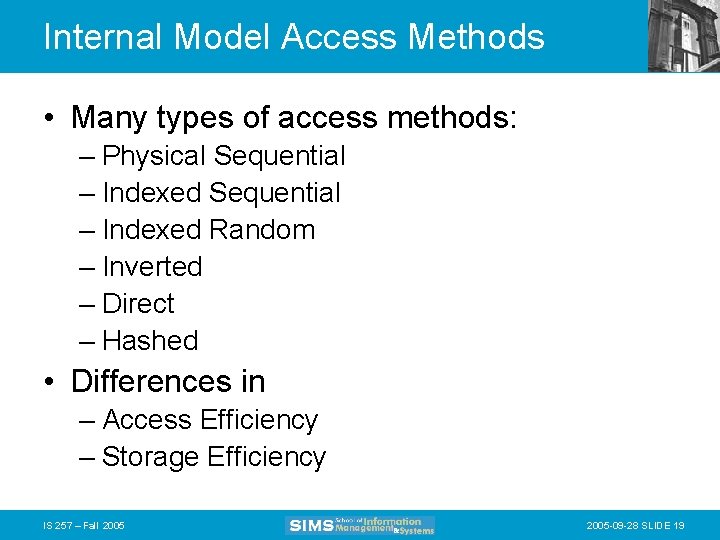
Internal Model Access Methods • Many types of access methods: – Physical Sequential – Indexed Random – Inverted – Direct – Hashed • Differences in – Access Efficiency – Storage Efficiency IS 257 – Fall 2005 -09 -28 SLIDE 19
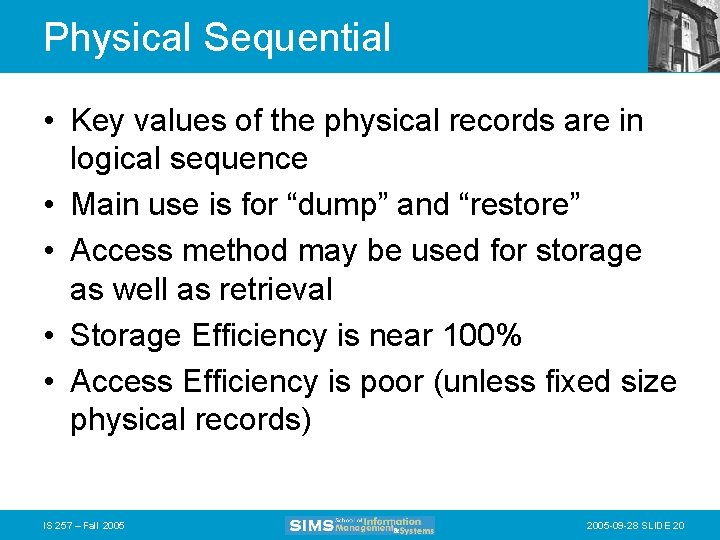
Physical Sequential • Key values of the physical records are in logical sequence • Main use is for “dump” and “restore” • Access method may be used for storage as well as retrieval • Storage Efficiency is near 100% • Access Efficiency is poor (unless fixed size physical records) IS 257 – Fall 2005 -09 -28 SLIDE 20
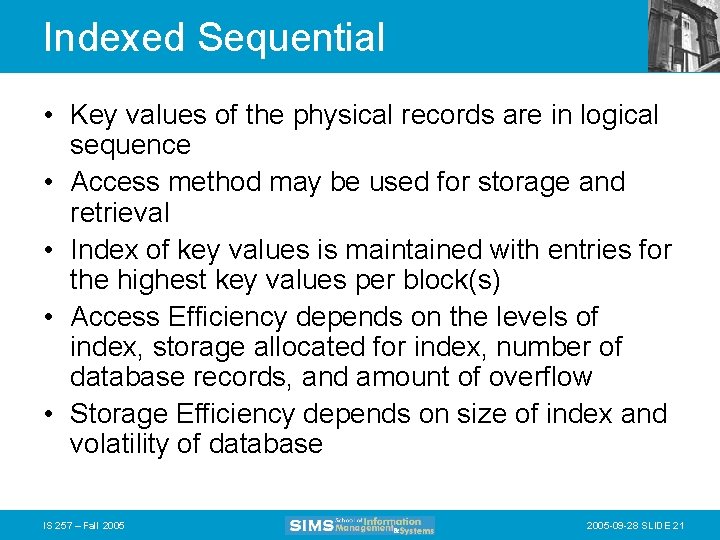
Indexed Sequential • Key values of the physical records are in logical sequence • Access method may be used for storage and retrieval • Index of key values is maintained with entries for the highest key values per block(s) • Access Efficiency depends on the levels of index, storage allocated for index, number of database records, and amount of overflow • Storage Efficiency depends on size of index and volatility of database IS 257 – Fall 2005 -09 -28 SLIDE 21
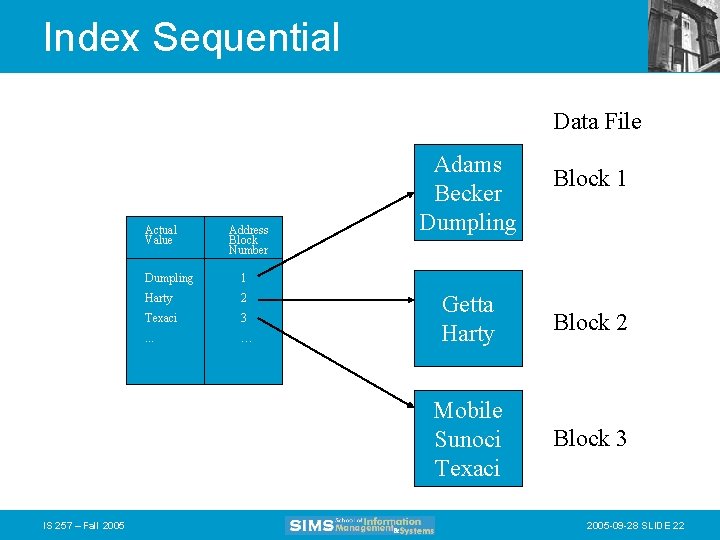
Index Sequential Data File Actual Value IS 257 – Fall 2005 Address Block Number Dumpling 1 Harty 2 Texaci 3 . . . … Adams Becker Dumpling Block 1 Getta Harty Block 2 Mobile Sunoci Texaci Block 3 2005 -09 -28 SLIDE 22
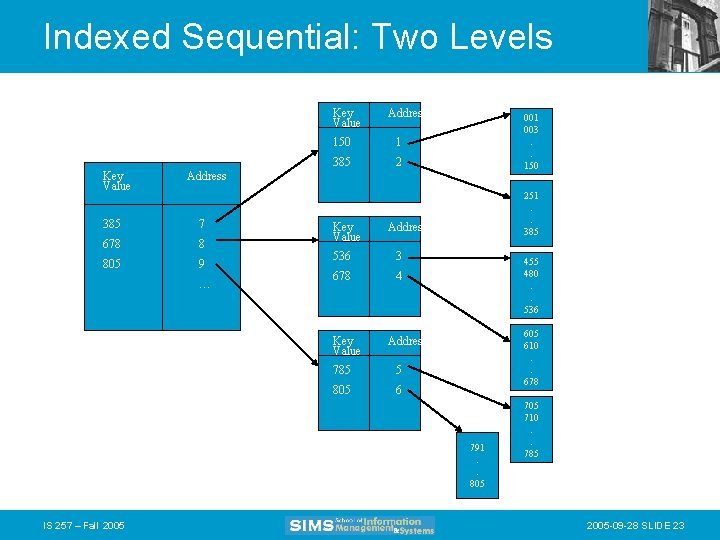
Indexed Sequential: Two Levels Key Value Address 150 1 385 2 001 003. . 150 Address 385 7 678 8 805 9 … Key Value Address 536 3 678 4 Key Value 251. . 385 455 480. . 536 605 610. . 678 Address 785 5 805 6 791. . 805 IS 257 – Fall 2005 710. . 785 2005 -09 -28 SLIDE 23
Indexed Random • Key values of the physical records are not necessarily in logical sequence • Index may be stored and accessed with Indexed Sequential Access Method • Index has an entry for every data base record. These are in ascending order. The index keys are in logical sequence. Database records are not necessarily in ascending sequence. • Access method may be used for storage and retrieval IS 257 – Fall 2005 -09 -28 SLIDE 24
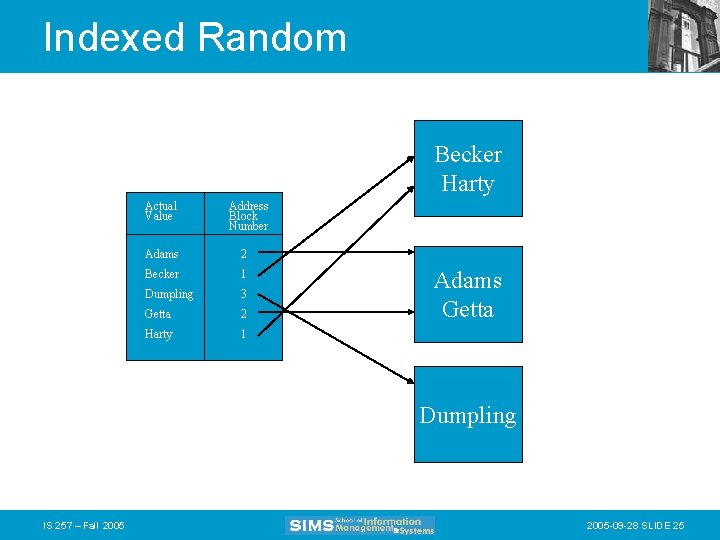
Indexed Random Becker Harty Actual Value Address Block Number Adams 2 Becker 1 Dumpling 3 Getta 2 Harty 1 Adams Getta Dumpling IS 257 – Fall 2005 -09 -28 SLIDE 25
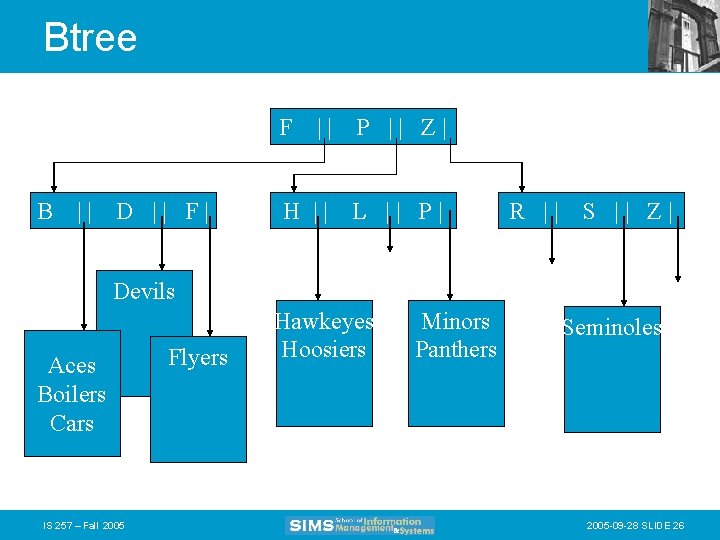
Btree F B || D || F| || P || Z| H || L || P| R || S || Z| Devils Aces Boilers Cars IS 257 – Fall 2005 Flyers Hawkeyes Hoosiers Minors Panthers Seminoles 2005 -09 -28 SLIDE 26
Inverted • Key values of the physical records are not necessarily in logical sequence • Access Method is better used for retrieval • An index for every field to be inverted may be built • Access efficiency depends on number of database records, levels of index, and storage allocated for index IS 257 – Fall 2005 -09 -28 SLIDE 27
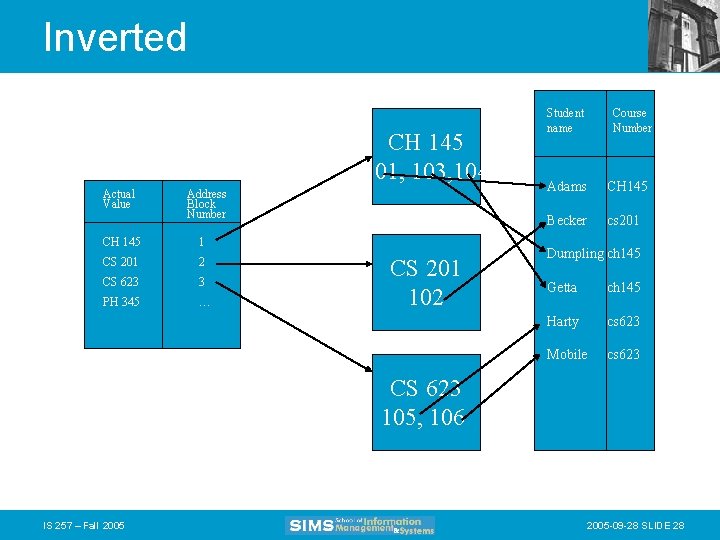
Inverted CH 145 101, 103, 104 Actual Value Address Block Number CH 145 1 CS 201 2 CS 623 3 PH 345 … CS 201 102 Student name Course Number Adams CH 145 Becker cs 201 Dumpling ch 145 Getta ch 145 Harty cs 623 Mobile cs 623 CS 623 105, 106 IS 257 – Fall 2005 -09 -28 SLIDE 28
Direct • Key values of the physical records are not necessarily in logical sequence • There is a one-to-one correspondence between a record key and the physical address of the record • May be used for storage and retrieval • Access efficiency always 1 • Storage efficiency depends on density of keys • No duplicate keys permitted IS 257 – Fall 2005 -09 -28 SLIDE 29
Hashing • Key values of the physical records are not necessarily in logical sequence • Many key values may share the same physical address (block) • May be used for storage and retrieval • Access efficiency depends on distribution of keys, algorithm for key transformation and space allocated • Storage efficiency depends on distibution of keys and algorithm used for key transformation IS 257 – Fall 2005 -09 -28 SLIDE 30
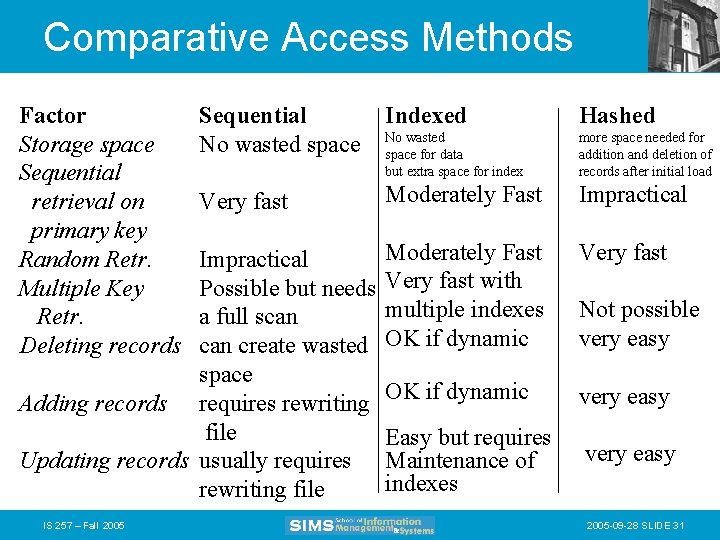
Comparative Access Methods Factor Storage space Sequential retrieval on primary key Random Retr. Multiple Key Retr. Deleting records Sequential No wasted space Indexed Hashed No wasted space for data but extra space for index more space needed for addition and deletion of records after initial load Very fast Moderately Fast Impractical Moderately Fast Very fast with multiple indexes OK if dynamic Very fast OK if dynamic very easy Easy but requires Maintenance of indexes very easy Impractical Possible but needs a full scan create wasted space Adding records requires rewriting file Updating records usually requires rewriting file IS 257 – Fall 2005 Not possible very easy 2005 -09 -28 SLIDE 31
Late addition – Bitmap index • Uses a single bit to represent whether or not a particular record has a specific value IS 257 – Fall 2005 -09 -28 SLIDE 32
Lecture Outline • Review – Physical Database Design – Access Methods • Indexes and What to index • Parallel storage systems (RAID) • Integrity constraints IS 257 – Fall 2005 -09 -28 SLIDE 33
Indexes • Most database applications require: – locating rows in tables that match some condition (e. g. SELECT operations) – Joining one table with another based on common values of attributes in each table • Indexes can greatly speed up these processes and avoid having to do sequential scanning of database tables to resolve queries IS 257 – Fall 2005 -09 -28 SLIDE 34
Type of Keys • Primary keys -- as we have seen before -uniquely identify a single row in a relational table • Secondary keys -- are search keys that may occur multiple times in a table • Bitmap Indexes – Table of bits where each row represents a distinct key value and each column is a bit – 0 or 1 for each record IS 257 – Fall 2005 -09 -28 SLIDE 35
Primary Key Indexes • In Access -- this will be created automatically when a field is selected as primary key – in the table design view select an attribute row (or rows) and clock on the key symbol in the toolbar. – The index is created automatically as one with (No Duplicates) • In SQL – CREATE UNIQUE INDEX indexname ON tablename(attribute); IS 257 – Fall 2005 -09 -28 SLIDE 36
Secondary Key Indexes • In Access -- Secondary key indexes can be created on any field. – In the table design view, select the attribute to be indexed – In the “Indexed” box on the General field description information at the bottom of the window, select “Yes (Duplicates OK)” • In SQL – CREATE INDEX indxname on tablename(attribute); IS 257 – Fall 2005 -09 -28 SLIDE 37
When to Index • Tradeoff between time and space: – Indexes permit faster processing for searching – But they take up space for the index – They also slow processing for insertions, deletions, and updates, because both the table and the index must be modified • Thus they SHOULD be used for databases where search is the main mode of interaction • The might be skipped if high rates of updating and insertions are expected IS 257 – Fall 2005 -09 -28 SLIDE 38
When to Use Indexes • Rules of thumb – Indexes are most useful on larger tables – Specify a unique index for the primary key of each table – Indexes are most useful for attributes used as search criteria or for joining tables – Indexes are useful if sorting is often done on the attribute – Most useful when there are many different values for an attribute – Some DBMS limit the number of indexes and the size of the index key values – Some indexes will not retrieve NULL values IS 257 – Fall 2005 -09 -28 SLIDE 39
Lecture Outline • Review – Physical Database Design • • Access Methods Indexes and What to index Parallel storage systems (RAID) Integrity constraints IS 257 – Fall 2005 -09 -28 SLIDE 40
Parallel Processing with RAID • In reading pages from secondary storage, there are often situations where the DBMS must retrieve multiple pages of data from storage -- and may often encounter – rotational delay – seek positioning delay • in getting each page from the disk IS 257 – Fall 2005 -09 -28 SLIDE 41
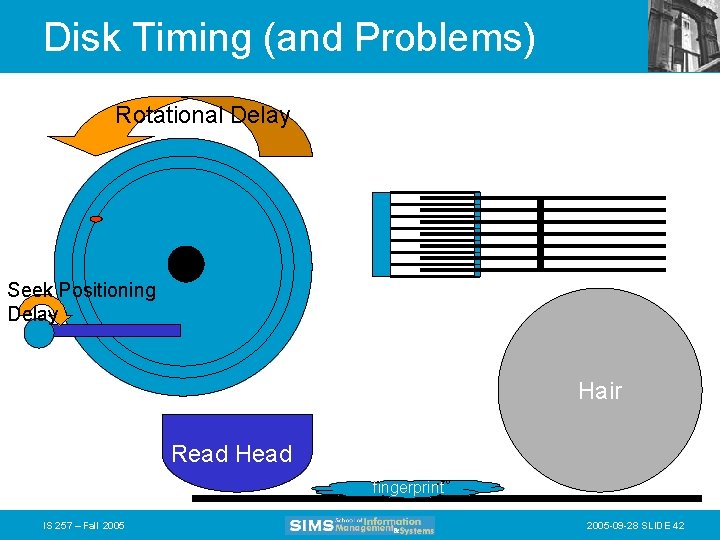
Disk Timing (and Problems) Rotational Delay Seek Positioning Delay Hair Read Head fingerprint IS 257 – Fall 2005 -09 -28 SLIDE 42
RAID • Provides parallel disks (and software) so that multiple pages can be retrieved simultaneously • RAID stands for “Redundant Arrays of Inexpensive Disks” – invented by Randy Katz and Dave Patterson here at Berkeley • Some manufacturers have renamed the “inexpensive” part (for obvious reasons) IS 257 – Fall 2005 -09 -28 SLIDE 43
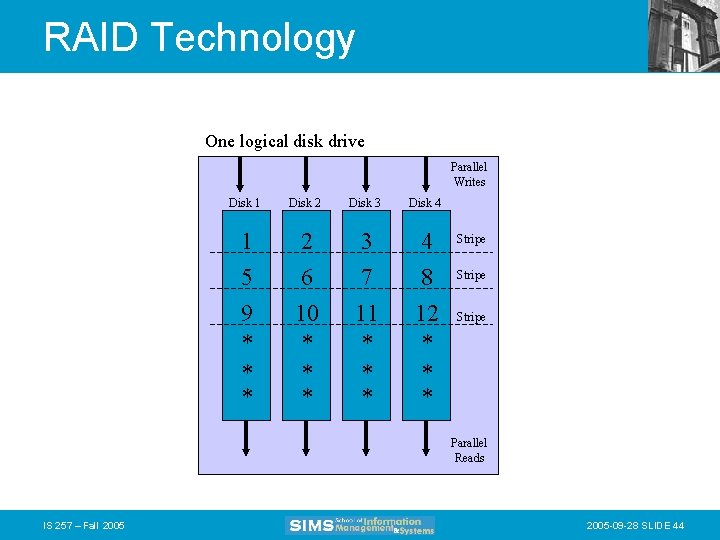
RAID Technology One logical disk drive Parallel Writes Disk 1 Disk 2 Disk 3 Disk 4 1 5 9 * * * 2 6 10 * * * 3 7 11 * * * 4 8 12 * * * Stripe Parallel Reads IS 257 – Fall 2005 -09 -28 SLIDE 44
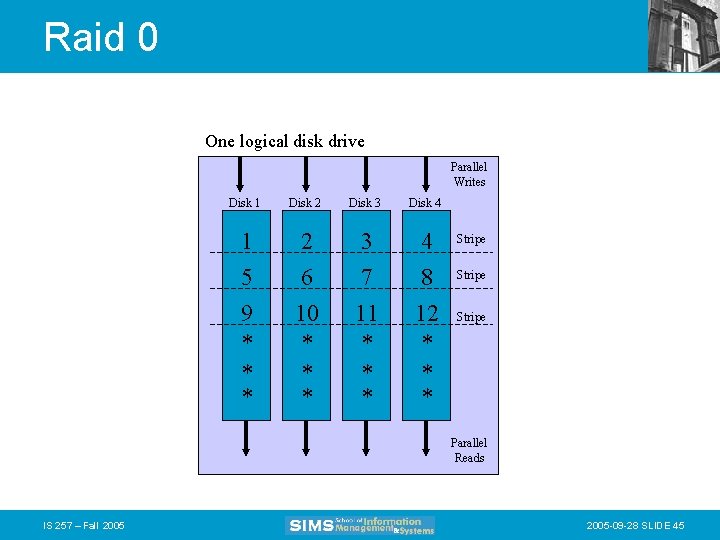
Raid 0 One logical disk drive Parallel Writes Disk 1 Disk 2 Disk 3 Disk 4 1 5 9 * * * 2 6 10 * * * 3 7 11 * * * 4 8 12 * * * Stripe Parallel Reads IS 257 – Fall 2005 -09 -28 SLIDE 45
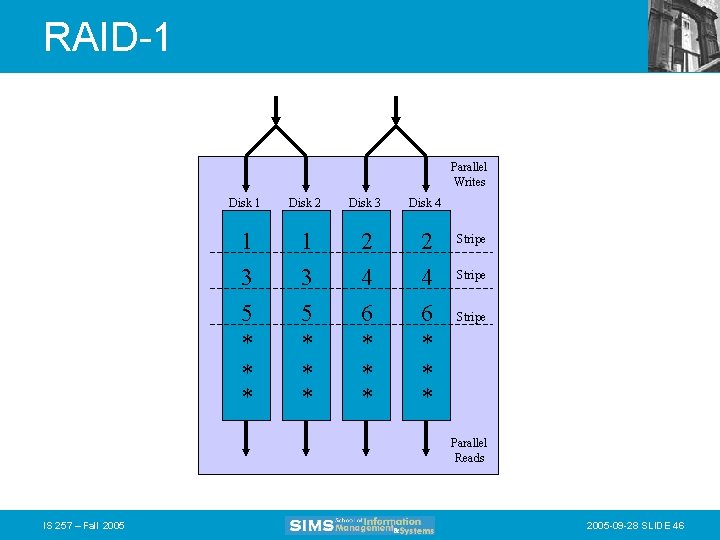
RAID-1 Parallel Writes Disk 1 Disk 2 Disk 3 Disk 4 1 3 5 * * * 2 4 6 * * * Stripe Parallel Reads IS 257 – Fall 2005 -09 -28 SLIDE 46
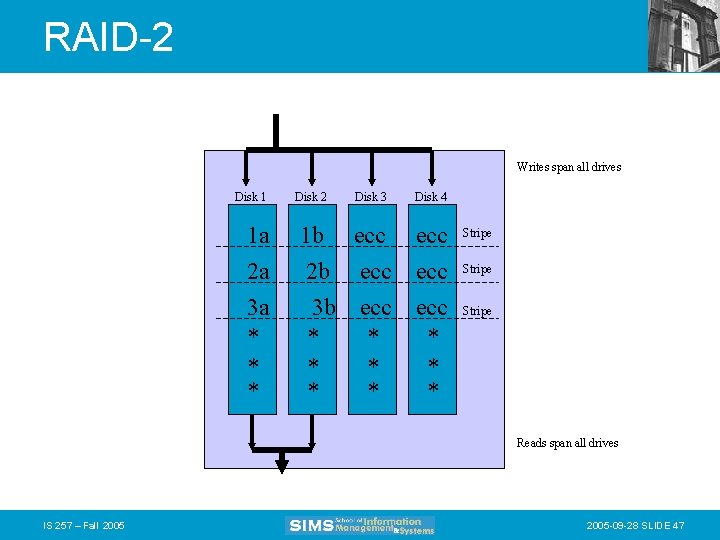
RAID-2 Writes span all drives Disk 1 1 a 2 a 3 a * * * Disk 2 Disk 3 1 b ecc 2 b ecc 3 b ecc * * * Disk 4 ecc ecc * * * Stripe Reads span all drives IS 257 – Fall 2005 -09 -28 SLIDE 47
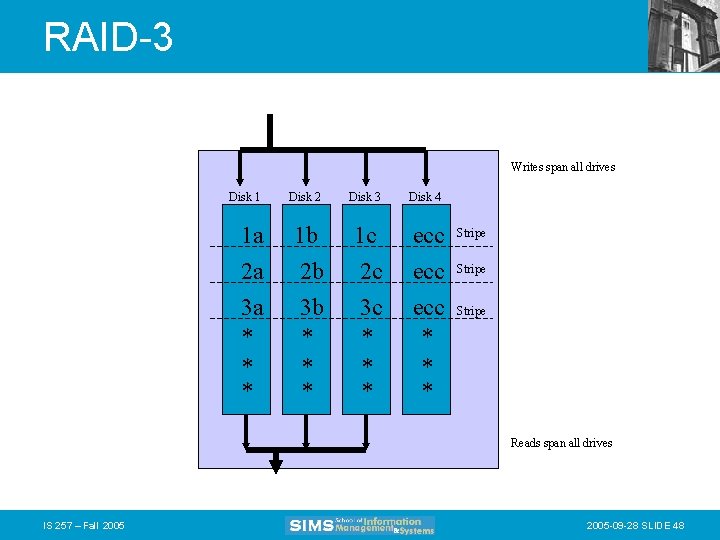
RAID-3 Writes span all drives Disk 1 Disk 2 Disk 3 Disk 4 1 a 2 a 3 a * * * 1 b 2 b 3 b * * * 1 c 2 c 3 c * * * ecc ecc * * * Stripe Reads span all drives IS 257 – Fall 2005 -09 -28 SLIDE 48
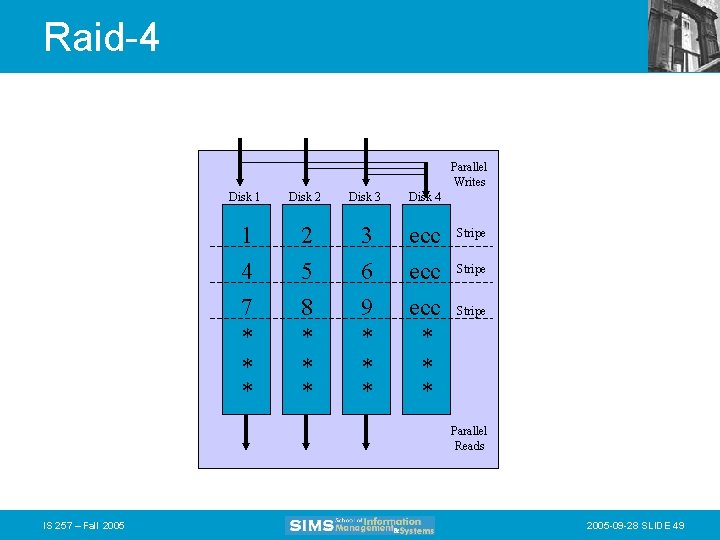
Raid-4 Parallel Writes Disk 1 Disk 2 Disk 3 Disk 4 1 4 7 * * * 2 5 8 * * * 3 6 9 * * * ecc ecc * * * Stripe Parallel Reads IS 257 – Fall 2005 -09 -28 SLIDE 49
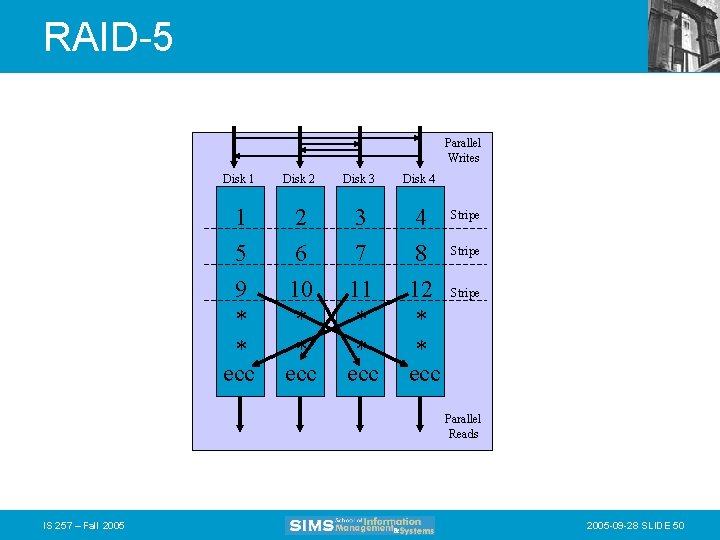
RAID-5 Parallel Writes Disk 1 Disk 2 1 5 9 * * ecc 2 6 10 * * ecc Disk 3 3 7 11 * * ecc Disk 4 4 8 12 * * ecc Stripe Parallel Reads IS 257 – Fall 2005 -09 -28 SLIDE 50
Lecture Outline • Review – Physical Database Design • • Access Methods Indexes and What to index Parallel storage systems (RAID) Integrity constraints IS 257 – Fall 2005 -09 -28 SLIDE 51
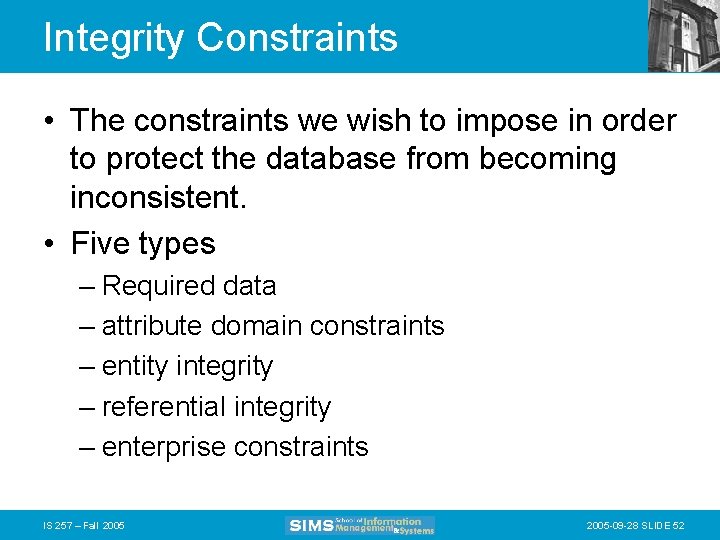
Integrity Constraints • The constraints we wish to impose in order to protect the database from becoming inconsistent. • Five types – Required data – attribute domain constraints – entity integrity – referential integrity – enterprise constraints IS 257 – Fall 2005 -09 -28 SLIDE 52
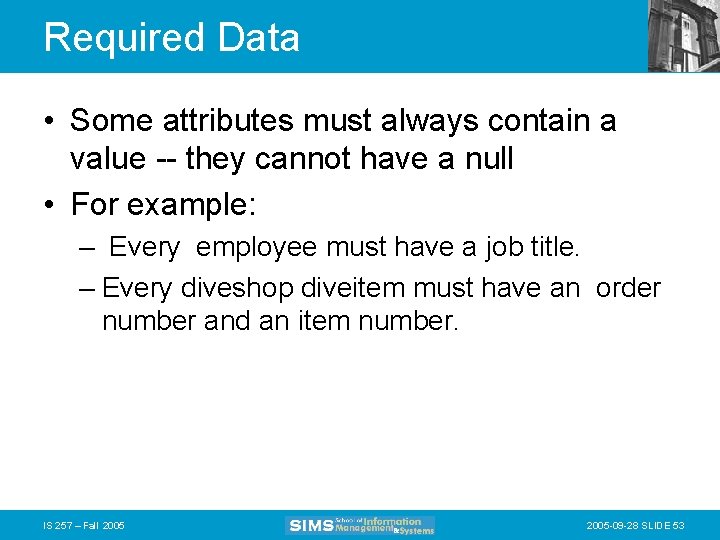
Required Data • Some attributes must always contain a value -- they cannot have a null • For example: – Every employee must have a job title. – Every diveshop diveitem must have an order number and an item number. IS 257 – Fall 2005 -09 -28 SLIDE 53
Attribute Domain Constraints • Every attribute has a domain, that is a set of values that are legal for it to use. • For example: – The domain of sex in the employee relation is “M” or “F” • Domain ranges can be used to validate input to the database. IS 257 – Fall 2005 -09 -28 SLIDE 54
Entity Integrity • The primary key of any entity cannot be NULL. IS 257 – Fall 2005 -09 -28 SLIDE 55
Referential Integrity • A “foreign key” links each occurrence in a relation representing a child entity to the occurrence of the parent entity containing the matching candidate key. • Referential Integrity means that if the foreign key contains a value, that value must refer to an existing occurrence in the parent entity. • For example: – Since the Order ID in the diveitem relation refers to a particular diveords item, that item must exist for referential integrity to be satisfied. IS 257 – Fall 2005 -09 -28 SLIDE 56
Referential Integrity • Referential integrity options are declared when tables are defined (in most systems) • There are many issues having to do with how particular referential integrity constraints are to be implemented to deal with insertions and deletions of data from the parent and child tables. IS 257 – Fall 2005 -09 -28 SLIDE 57
Insertion rules • A row should not be inserted in the referencing (child) table unless there already exists a matching entry in the referenced table. • Inserting into the parent table should not cause referential integrity problems. • Sometimes a special NULL value may be used to create child entries without a parent or with a “dummy” parent. IS 257 – Fall 2005 -09 -28 SLIDE 58
Deletion rules • A row should not be deleted from the referenced table (parent) if there are matching rows in the referencing table (child). • Three ways to handle this – Restrict -- disallow the delete – Nullify -- reset the foreign keys in the child to some NULL or dummy value – Cascade -- Delete all rows in the child where there is a foreign key matching the key in the parent row being deleted IS 257 – Fall 2005 -09 -28 SLIDE 59
Referential Integrity • This can be implemented using external programs that access the database • newer databases implement executable rules or built-in integrity constraints (e. g. Access) IS 257 – Fall 2005 -09 -28 SLIDE 60
Enterprise Constraints • These are business rule that may affect the database and the data in it – for example, if a manager is only permitted to manage 10 employees then it would violate an enterprise constraint to manage more IS 257 – Fall 2005 -09 -28 SLIDE 61
Next Week • Relational Databases – Relational operations and operators • Introduction to SQL IS 257 – Fall 2005 -09 -28 SLIDE 62
- Slides: 62