
PHP Basics John Beckett CPTE 212 Based largely
PHP Basics John Beckett CPTE 212 Based largely on https: //www. w 3 schools. com/php/
More about Variables • Loosely Typed Language – The type of a variable (how it is stored in the computer) depends on what data you put into it. – If you add a string and a numeric value, PHP will attempt to make the string into a number • Which can mean fatal errors you had not anticipated! • Variable scopes: – Local (can’t access from outside the function) • Normally deleted when the function completes – Global (can’t access within a function unless declared within the function as global) – Static (keep the value between function invocations)
Variables • A variable can have a short name (like x and y) or a more descriptive name (age, carname, total_volume). • Rules for PHP variables: • A variable starts with the $ sign, followed by the name of the variable • A variable name must start with a letter or the underscore character • A variable name cannot start with a number • A variable name can only contain alpha-numeric characters and underscores (A-z, 0 -9, and _ ) • Variable names are case-sensitive ($age and $AGE are two different variables) From https: //www. w 3 schools. com/php_variables. asp
echo and print statements echo print • Does not return a • Returns a value of value 1 so you can use it in expressions • May have multiple parameters (rare) • Slightly faster than print
PHP Data Types • • • String Integer -2, 147, 483, 648 … 2, 147, 483, 647 Float (a. k. a. “double”) Boolean = true or false Array – multiple values, may be indexed or keyed (associative) • Object – data as well as information on how to process it • Null – empty • Resource – reference to functions & resources such as a database call
Using Strings • strlen(var) – How long is that string? • trim(var) – Trim blanks from beginning/end • strpos(string, fragment) – search for a fragment within a string. – First character position in a string is 0, not 1 • str_replace(whattoreplace, whattoputin, stri ng)
Numbers • Integers – No decimal point – Base 10 unless otherwise specified – 0 x prefix for hexadecimal – 0 prefix for octal (beware!) • is_int(), is_integer(), is_long() – Is it an integer? • Float – Has decimal point • is_nan() – impossible math operation like /0 • is_numeric() – Is a number
Convenience with Math • • • pi() gives you pi (float 3. 1415926535898) abs() = absolute value sqrt() = square root round() = rounds float to nearest integer rand() = pseudo-random number (can specify min and max numbers)
Constants • Use the define() function to create an identifier for a simple value • Since isn’t a variable, it has no $ sign • Constants are global across entire script • define(“taxrate”, 0. 0925) call with something like $x = taxtrate; • (Bad example here: should get tax rate from a database. Same goes for your company name! I don’t know an example when a constant would make sense. ) • You could make a constant array
PHP Operators • • Arithmetic Assignment Comparison Increment/Decrement Logical String Array Conditional assignment
Arithmetic Operators • • • + Addition - Subtraction * Multiplication / Division % Modulus ** Exponentiation – Other languages might use ^
Assignment Operators • x = y The left variable gets set to the value of the expression on the right • Note that you’ll always see a variable ($ prefix) on the left • Note that this statement has nothing to do with equality. E. g. if ($x = $y) …will always return “true” since it succeeded in copying the value in $y to $x.
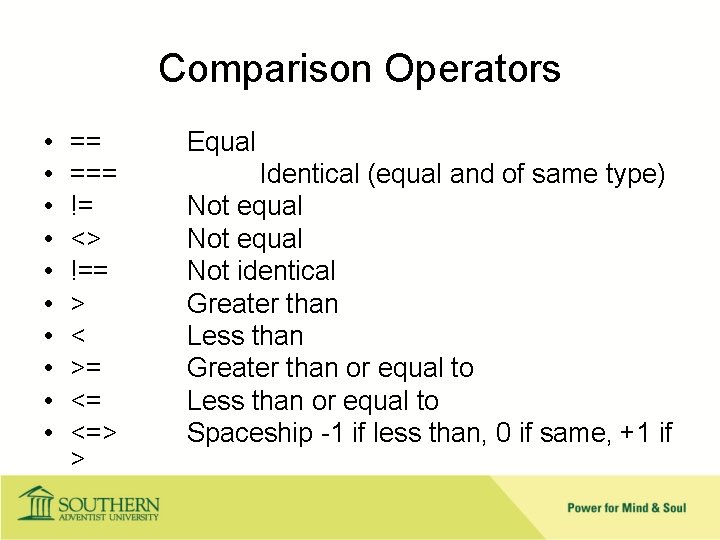
Comparison Operators • • • == === != <> !== > < >= <= <=> > Equal Identical (equal and of same type) Not equal Not identical Greater than Less than Greater than or equal to Less than or equal to Spaceship -1 if less than, 0 if same, +1 if
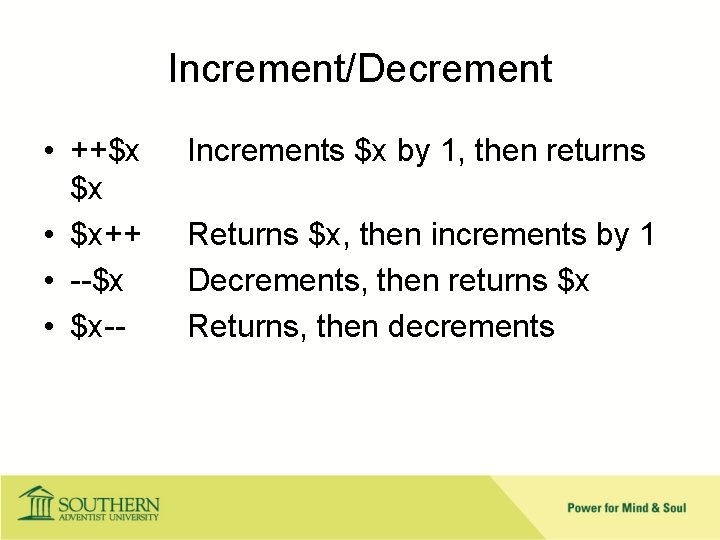
Increment/Decrement • ++$x $x • $x++ • --$x • $x-- Increments $x by 1, then returns Returns $x, then increments by 1 Decrements, then returns $x Returns, then decrements
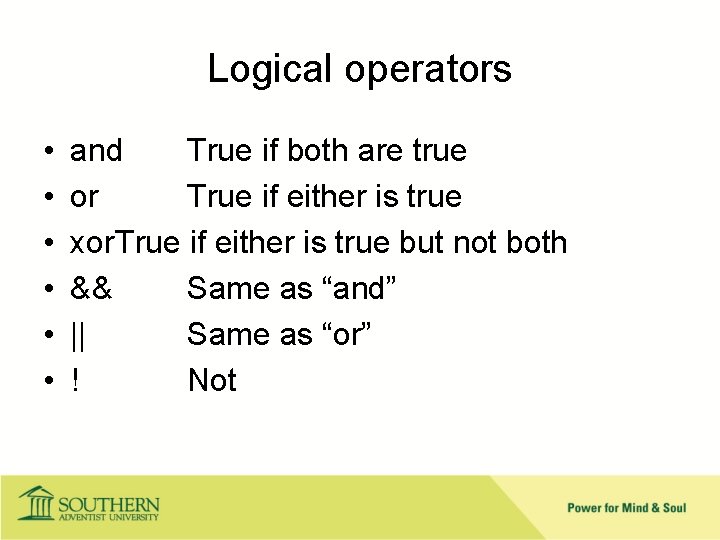
Logical operators • • • and True if both are true or True if either is true xor. True if either is true but not both && Same as “and” || Same as “or” ! Not
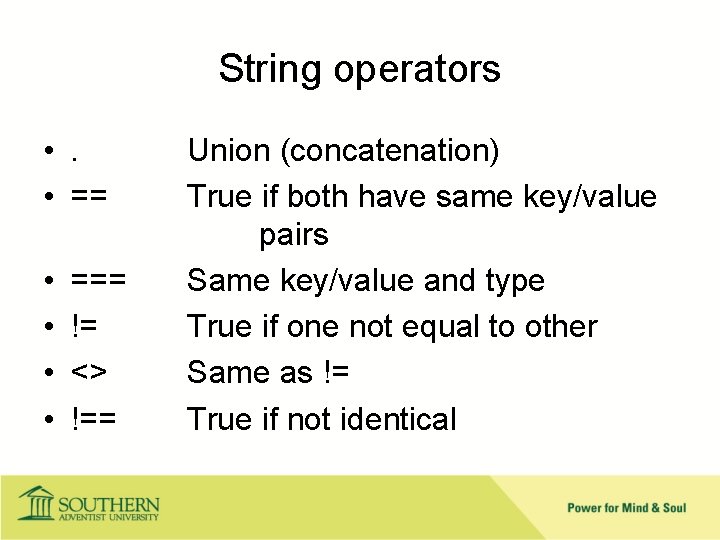
String operators • . • == • • === != <> !== Union (concatenation) True if both have same key/value pairs Same key/value and type True if one not equal to other Same as != True if not identical
if() statement • if(condition) { code to be executed if condition is true } else { code to be executed if condition is false }
elseif if (condition) { code to be executed if this condition is true; } elseif (condition) { code to be executed if first condition is false and this condition is true; } else { code to be executed if all conditions are false; } https: //www. w 3 schools. com/php_if_else. asp
switch (n) { case label 1: code to be executed if n=label 1; break; case label 2: code to be executed if n=label 2; break; case label 3: code to be executed if n=label 3; break; . . . default: code to be executed if n is different from all labels; } https: //www. w 3 schools. com/php_switch. asp
Loops • while() – loops through a block of code as long as the specified condition is true • do. . . while() – loops through a block of code once, and then repeats the loop as long as the specified condition is true • for(initial, terminate, increment) – loops through a block of code a specified number of times • foreach – loops through a block of code for each element in an array
foreach() • foreach ($array as $value) Grabs values in an array and processes one at a time • foreach($array as $key => $value) Grabs values and keys from an array
Break and Continue • break is used to break out of a case in a switch() statement • continue is used to escape from a loop
Functions • PHP has over 1000 built-in functions https: //www. w 3 schools. com/php_ref_ overview. asp • User-defined functions – Only executed when called functionname() { code to be executed; }
Function arguments • Positional • Loosely typed unless you specify ‘strict’ • Default argument may be specified • Use “return” to return values Some other languages have you use the function name as if it was a variable
Arguments by reference • If an argument is preceded by &, the function is given access to the variable itself rather than a copy. • DANGER: This means a variable can be changed by a function • HELPFUL: Use only if you want a function to have multiple outputs • Saves a little bit of memory Not worth it if your program is unreliable!
PHP Arrays • Easy to make an indexed array: – – $cars = array("Volvo", "BMW", "Toyota"); $cars[0]=“Volvo”; $cars[1]=“BMW”; $cars[2]=“Toyota”; • Also make associative arrays: – $age = array("Peter"=>"35", "Ben"=>"37", "Joe"=>"43"); – $age['Peter'] = "35"; $age['Ben'] = "37"; $age['Joe'] = "43"; – You can then print $age[‘Ben’] and get 37.
![Multidimensional arrays • echo $cars[0][0]. ": In stock: ". $cars[0][1]. ", sold: ". $cars[0][2].](http://slidetodoc.com/presentation_image_h2/5f9e521b3c6cb415cf97ffd61e0a040e/image-27.jpg "Multidimensional arrays • echo $cars[0][0]. \": In stock: \". $cars[0][1]. \", sold: \". $cars[0][2].")
Multidimensional arrays • echo $cars[0][0]. ": In stock: ". $cars[0][1]. ", sold: ". $cars[0][2]. ". "; echo $cars[1][0]. ": In stock: ". $cars[1][1]. ", sold: ". $cars[1][2]. ". "; echo $cars[2][0]. ": In stock: ". $cars[2][1]. ", sold: ". $cars[2][2]. ". "; echo $cars[3][0]. ": In stock: ". $cars[3][1]. ", sold: ". $cars[3][2]. ". "; • If associative, a multidimensional array can function somewhat like an in-memory database
Sort functions for arrays • sort() - sort arrays in ascending order • rsort() - sort arrays in descending order • asort() - sort associative arrays in ascending order, according to the value • ksort() - sort associative arrays in ascending order, according to the key • arsort() - sort associative arrays in descending order, according to the value • krsort() - sort associative arrays in descending order, according to the key • E. g. Simple statement: $sort(cars);
Superglobals • $GLOBALS – way to pass variable around your script • $_SERVER – Info from PHP on the server • $_POST – Form data (only from POST) • $_GET – Form data (only from GET) • $_REQUEST – Form data (both GET and POST) • $_FILES • $_ENV • $_COOKIE • $_SESSION
- Slides: 29