
Photomask Creation Types of Photomasks used here at
- Slides: 37
Photomask Creation
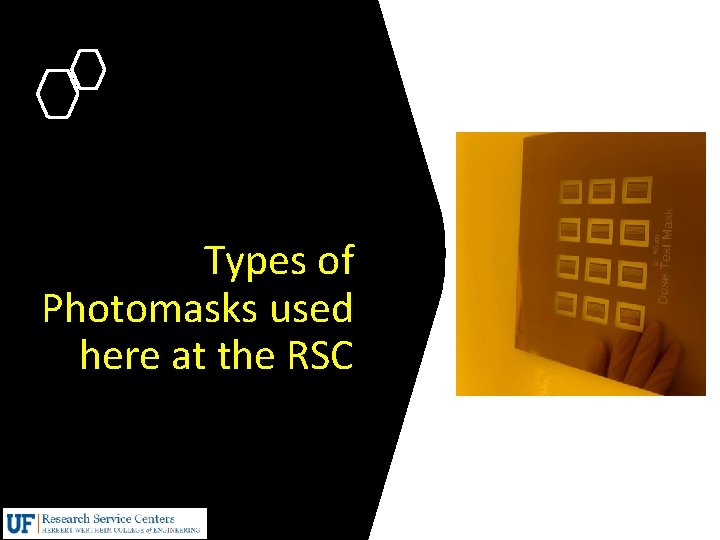
Types of Photomasks used here at the RSC
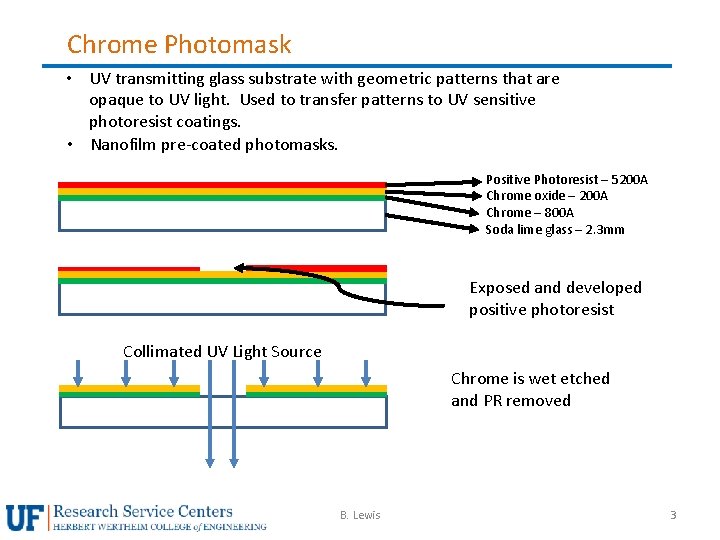
Chrome Photomask • UV transmitting glass substrate with geometric patterns that are opaque to UV light. Used to transfer patterns to UV sensitive photoresist coatings. • Nanofilm pre-coated photomasks. Positive Photoresist – 5200 A Chrome oxide – 200 A Chrome – 800 A Soda lime glass – 2. 3 mm Exposed and developed positive photoresist Collimated UV Light Source Chrome is wet etched and PR removed B. Lewis 3
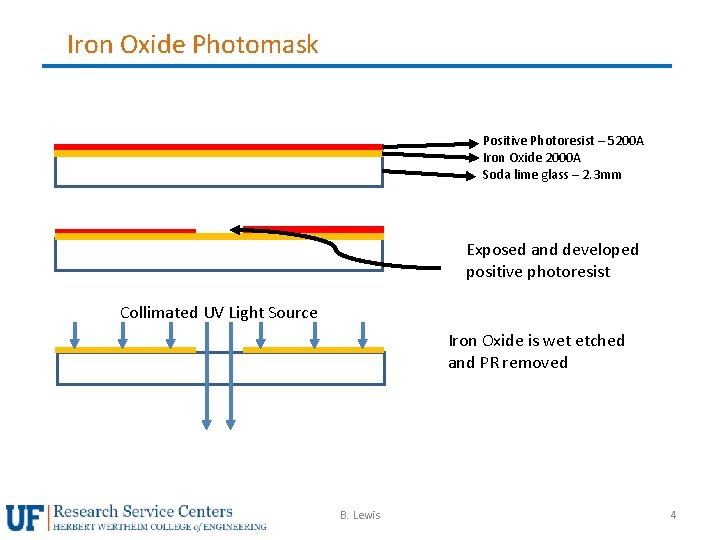
Iron Oxide Photomask Positive Photoresist – 5200 A Iron Oxide 2000 A Soda lime glass – 2. 3 mm Exposed and developed positive photoresist Collimated UV Light Source Iron Oxide is wet etched and PR removed B. Lewis 4
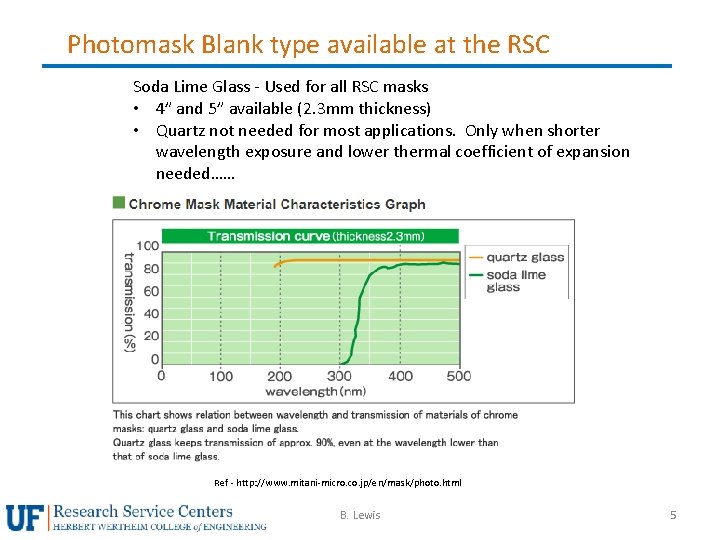
Photomask Blank type available at the RSC Soda Lime Glass - Used for all RSC masks • 4” and 5” available (2. 3 mm thickness) • Quartz not needed for most applications. Only when shorter wavelength exposure and lower thermal coefficient of expansion needed…… Ref - http: //www. mitani-micro. co. jp/en/mask/photo. html B. Lewis 5
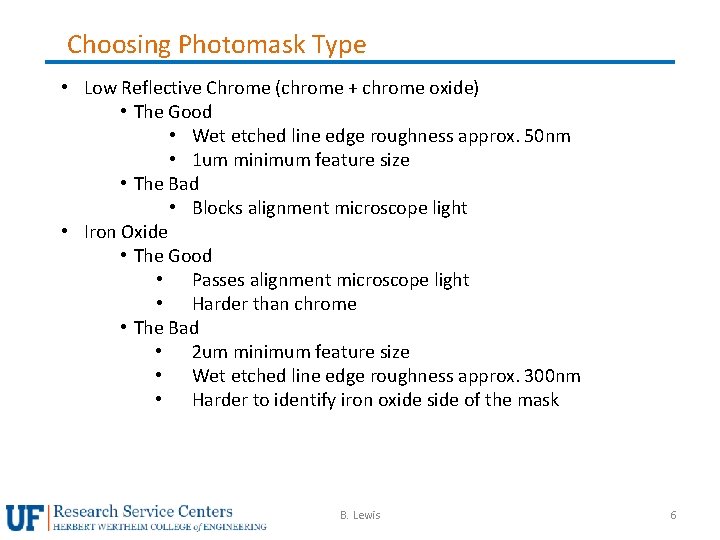
Choosing Photomask Type • Low Reflective Chrome (chrome + chrome oxide) • The Good • Wet etched line edge roughness approx. 50 nm • 1 um minimum feature size • The Bad • Blocks alignment microscope light • Iron Oxide • The Good • Passes alignment microscope light • Harder than chrome • The Bad • 2 um minimum feature size • Wet etched line edge roughness approx. 300 nm • Harder to identify iron oxide side of the mask B. Lewis 6
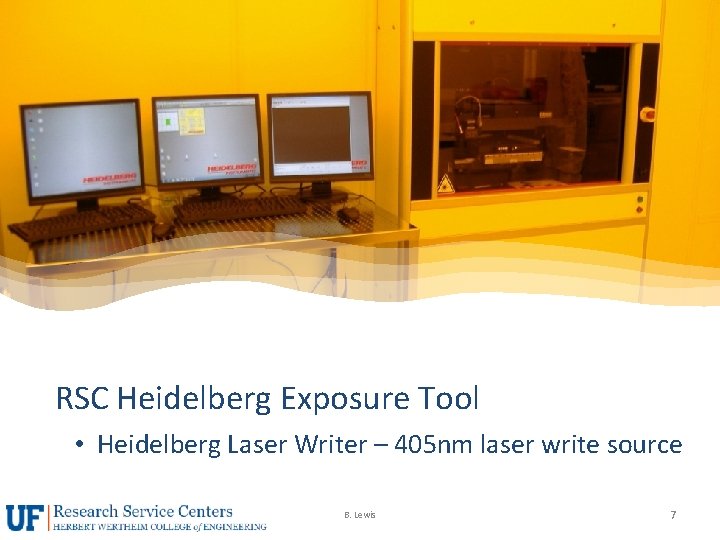
RSC Heidelberg Exposure Tool • Heidelberg Laser Writer – 405 nm laser write source B. Lewis 7
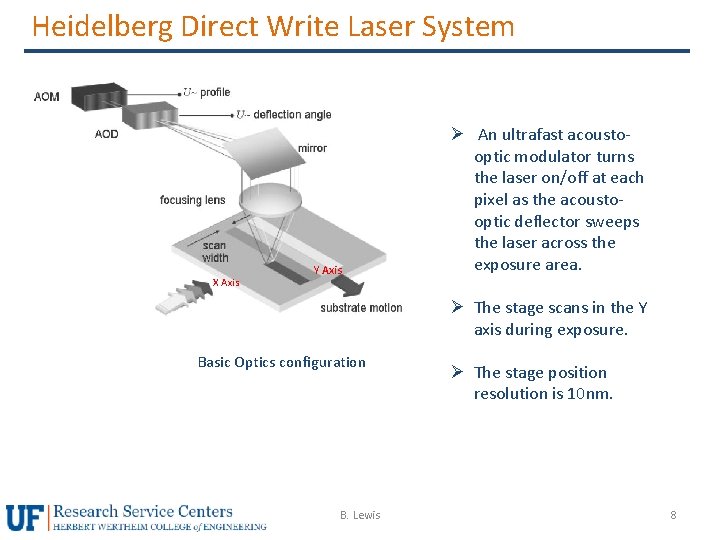
Heidelberg Direct Write Laser System X Axis Y Axis Ø An ultrafast acoustooptic modulator turns the laser on/off at each pixel as the acoustooptic deflector sweeps the laser across the exposure area. Ø The stage scans in the Y axis during exposure. Basic Optics configuration B. Lewis Ø The stage position resolution is 10 nm. 8
Heidelberg Direct Write Laser System • Can expose flat substrate • Repeatable and accurate • Very good focus control via autofocus system • 20 mm head for ≥ 5 um features - DOF=60 um • 4 mm head for ≥ 1 um features – DOF=1. 6 um • Very good overlay/alignment (100 nm for 4 mm mode) • Design changes on the fly B. Lewis 9
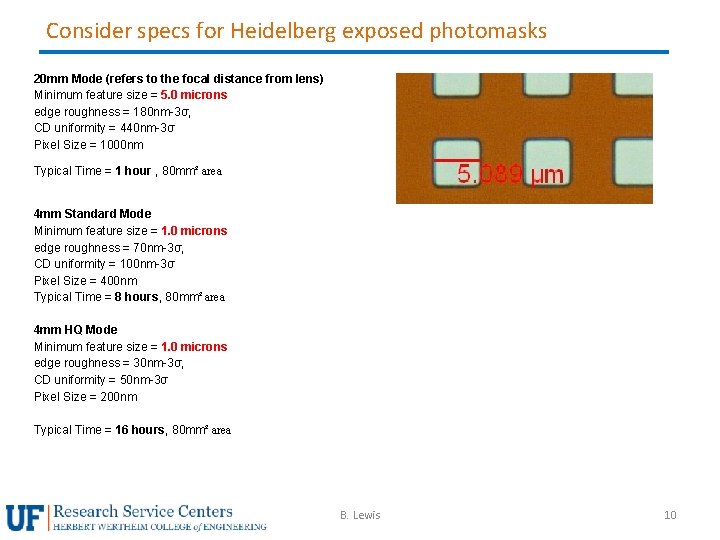
Consider specs for Heidelberg exposed photomasks 20 mm Mode (refers to the focal distance from lens) Minimum feature size = 5. 0 microns edge roughness = 180 nm-3σ, CD uniformity = 440 nm-3σ Pixel Size = 1000 nm Typical Time = 1 hour , 80 mm² area 4 mm Standard Mode Minimum feature size = 1. 0 microns edge roughness = 70 nm-3σ, CD uniformity = 100 nm-3σ Pixel Size = 400 nm Typical Time = 8 hours, 80 mm² area 4 mm HQ Mode Minimum feature size = 1. 0 microns edge roughness = 30 nm-3σ, CD uniformity = 50 nm-3σ Pixel Size = 200 nm Typical Time = 16 hours, 80 mm² area B. Lewis 10
CAD Software for Pattern Creation B. Lewis 11
CAD file formats • GDSII strongly encouraged - The RSC provides use of “Layout Editor” software. Shareware version also available • Klayout is another option – open source • Autocad • may also be used but not recommended. If you insist…. . rules must be followed. • Save all files as “Auto. CAD revision R 12/LT 2 DXF format. • . dwg files are NOT supported. • Do not open a. dxf file in a GDSII software such as “Layout Editor” or Ledit” and save it as a GDSII file. • Set units to microns • Use only the following entities: CIRCLE, POLYLINE / LWPOLYLINE and TEXT. LWPOLYLINE is preferred since it’s 2 D. • Send the file to Bill Lewis to be converted to GSDII with Linkcad 7 software. • Read Section 5. 2 of “NRF Heidelberg DWL 66 fs SOP” for entire list of rules…… B. Lewis 12
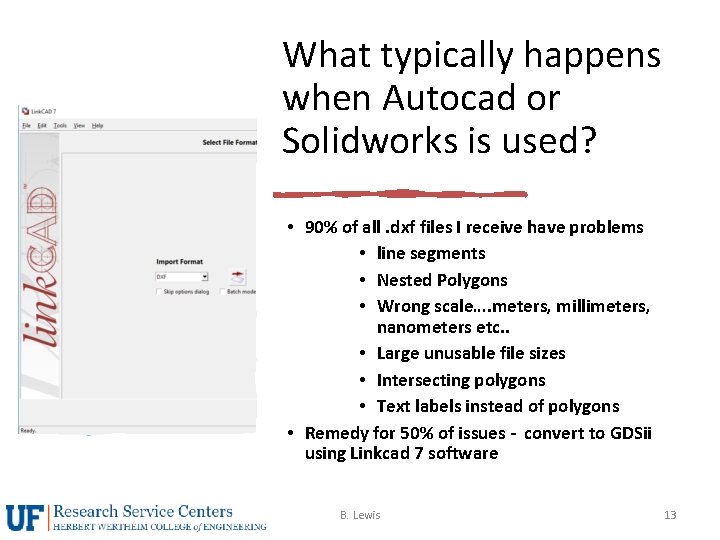
What typically happens when Autocad or Solidworks is used? • 90% of all. dxf files I receive have problems • line segments • Nested Polygons • Wrong scale…. meters, millimeters, nanometers etc. . • Large unusable file sizes • Intersecting polygons • Text labels instead of polygons • Remedy for 50% of issues - convert to GDSii using Linkcad 7 software B. Lewis 13
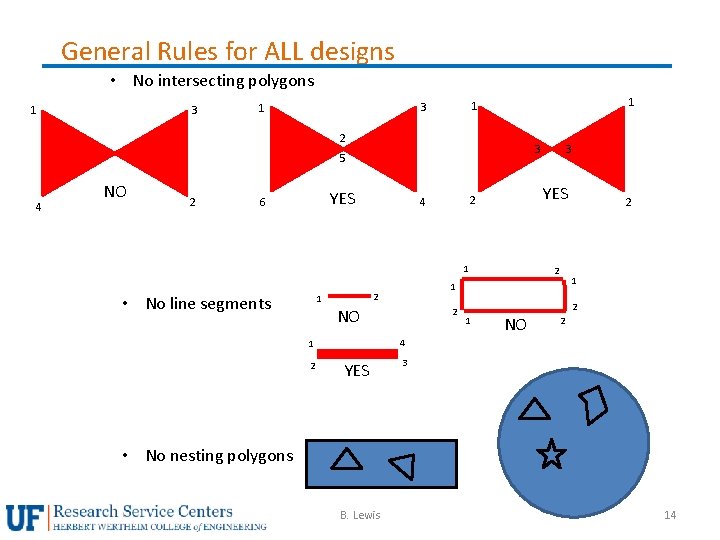
General Rules for ALL designs • No intersecting polygons 3 1 1 1 3 1 2 3 5 4 NO 2 YES 6 YES 2 4 1 • No line segments 1 2 2 NO 2 1 NO 2 4 1 2 3 YES 3 • No nesting polygons B. Lewis 14
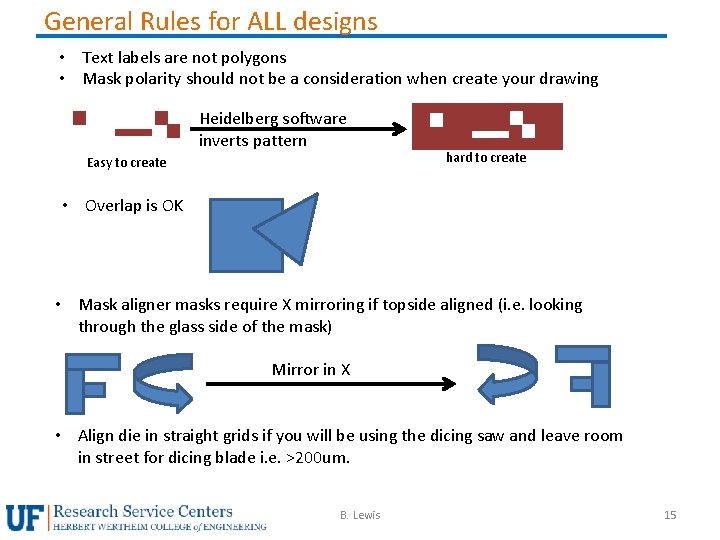
General Rules for ALL designs • Text labels are not polygons • Mask polarity should not be a consideration when create your drawing Heidelberg software inverts pattern Easy to create hard to create • Overlap is OK • Mask aligner masks require X mirroring if topside aligned (i. e. looking through the glass side of the mask) Mirror in X • Align die in straight grids if you will be using the dicing saw and leave room in street for dicing blade i. e. >200 um. B. Lewis 15
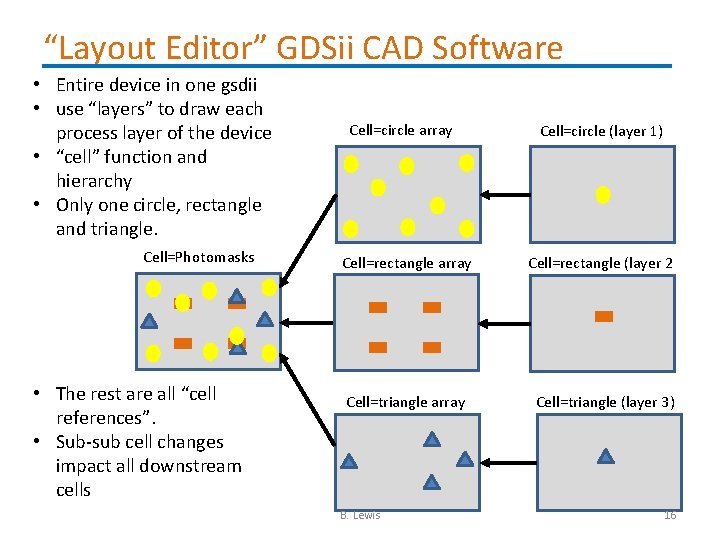
“Layout Editor” GDSii CAD Software • Entire device in one gsdii • use “layers” to draw each process layer of the device • “cell” function and hierarchy • Only one circle, rectangle and triangle. Cell=Photomasks • The rest are all “cell references”. • Sub-sub cell changes impact all downstream cells Cell=circle array Cell=circle (layer 1) Cell=rectangle array Cell=rectangle (layer 2 Cell=triangle array Cell=triangle (layer 3) B. Lewis 16
• • • “Layout Editor” Software Demo Freeware version will only save to 1000 polygons Mouse operations Coordinate display Snap to Grid Draw functions (box, free polygon) Snap to point Circle – limiting vector points Selecting polygons and points “properties” settings Layer controls for mask device layers Layer colors/hatching Boolean operation B. Lewis 17
Software Demo Inserting single cell reference Inserting Array cell reference Flatten cell to allow edit of array Moving polygons or cell refs. Use “move by” function = “right click, move, m, shift+left click” • Example of nested polygons • Use separate non-working layer to make layout boundaries • • B. Lewis 18
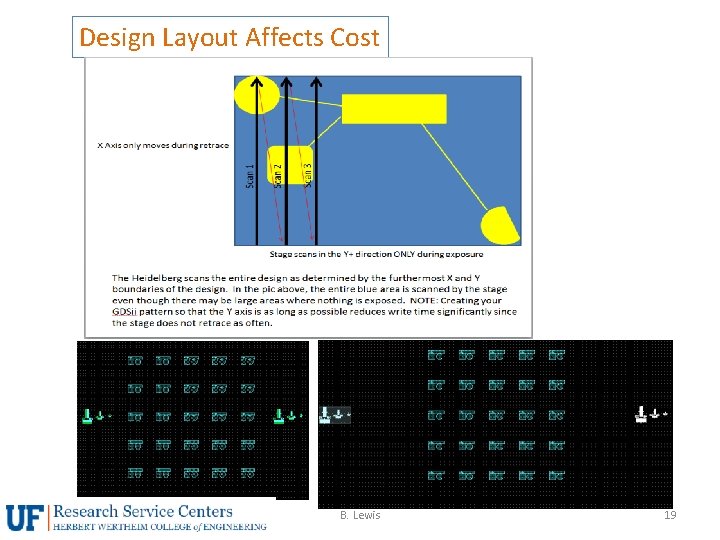
Design Layout Affects Cost B. Lewis 19
Requesting Masks or Training to make your own mask B. Lewis 20
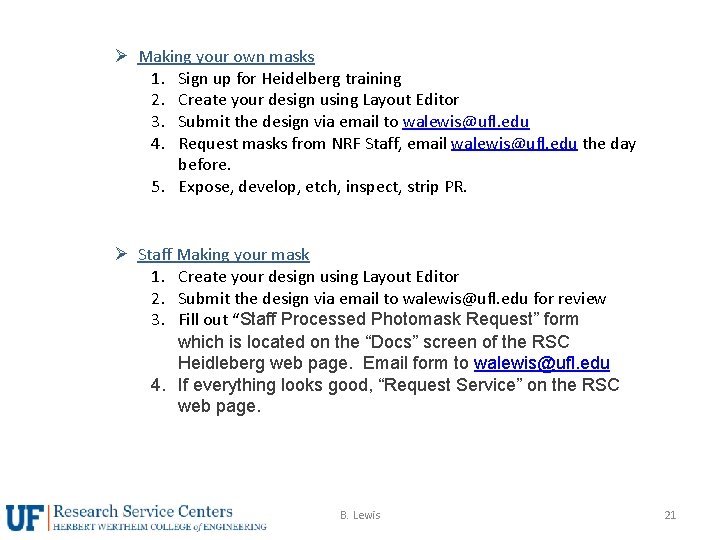
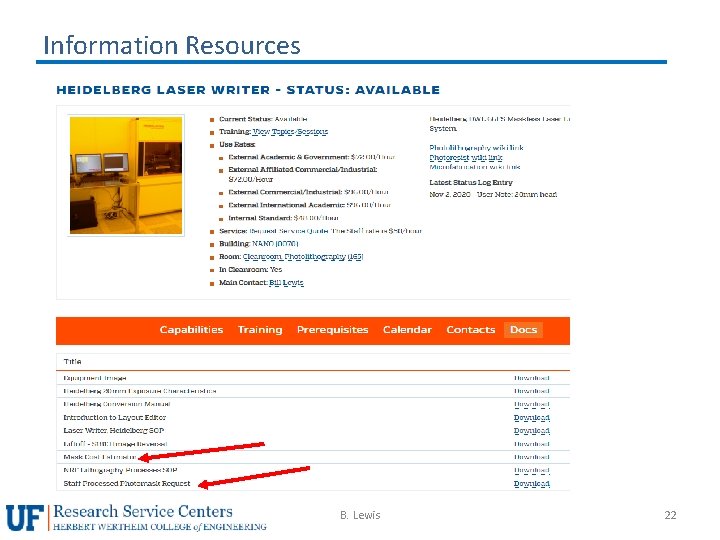
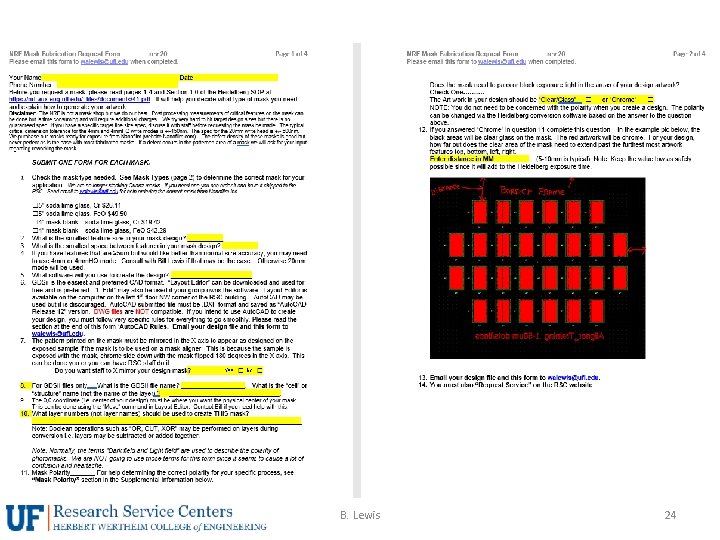
Ø Making your own masks 1. Sign up for Heidelberg training 2. Create your design using Layout Editor 3. Submit the design via email to walewis@ufl. edu 4. Request masks from NRF Staff, email walewis@ufl. edu the day before. 5. Expose, develop, etch, inspect, strip PR. Ø Staff Making your mask 1. Create your design using Layout Editor 2. Submit the design via email to walewis@ufl. edu for review 3. Fill out “Staff Processed Photomask Request” form which is located on the “Docs” screen of the RSC Heidleberg web page. Email form to walewis@ufl. edu 4. If everything looks good, “Request Service” on the RSC web page. B. Lewis 21
Information Resources B. Lewis 22
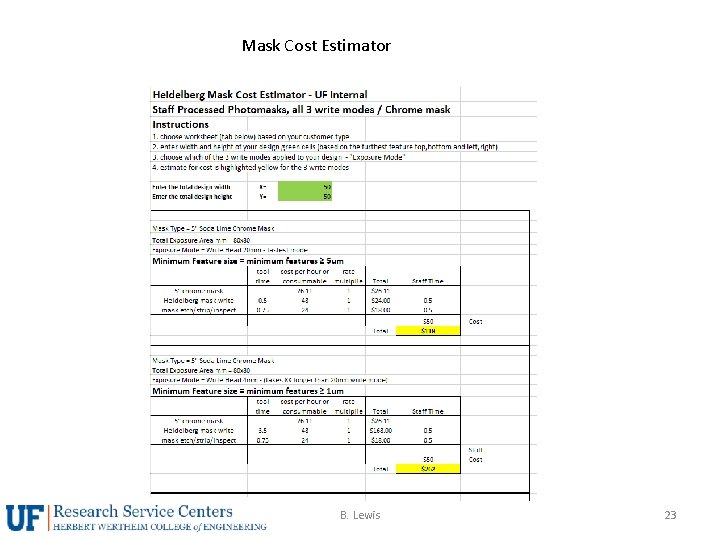
Mask Cost Estimator B. Lewis 23
B. Lewis 24
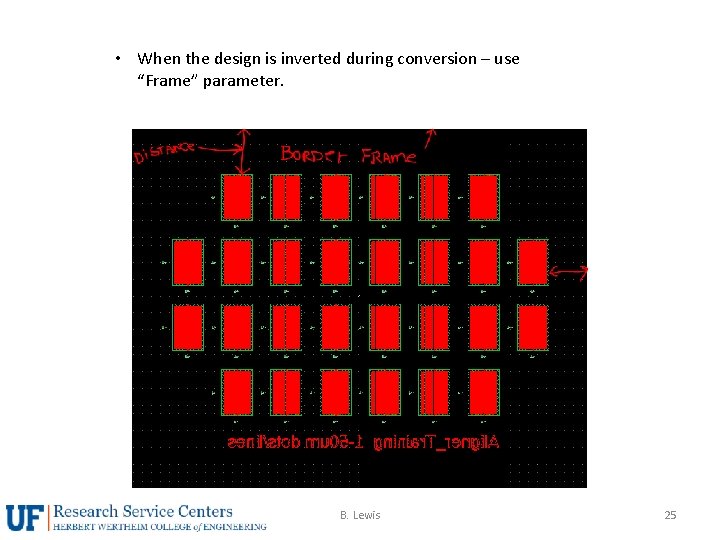
• When the design is inverted during conversion – use “Frame” parameter. B. Lewis 25
Do you really need a Photomask? B. Lewis 26
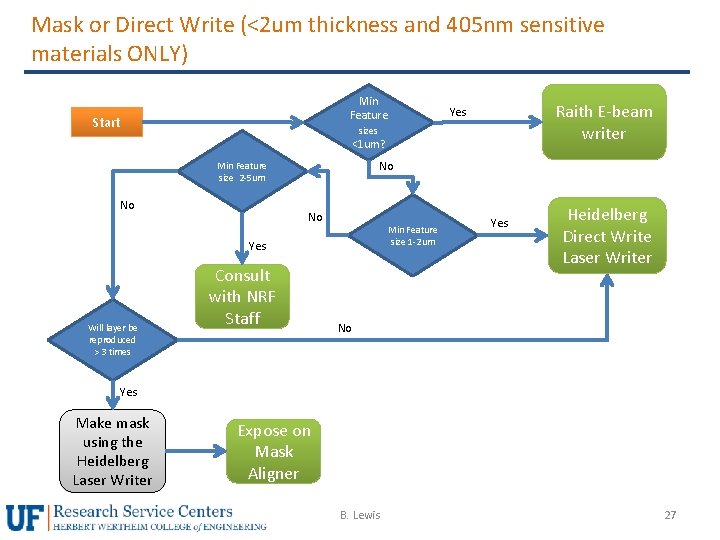
Mask or Direct Write (<2 um thickness and 405 nm sensitive materials ONLY) Min Feature Start Raith E-beam writer Yes sizes <1 um? No Min Feature size 2 -5 um No No Min Feature size 1 -2 um Yes Will layer be reproduced > 3 times Consult with NRF Staff Yes Heidelberg Direct Write Laser Writer No Yes Make mask using the Heidelberg Laser Writer Expose on Mask Aligner B. Lewis 27
Photomask Design Considerations B. Lewis 28
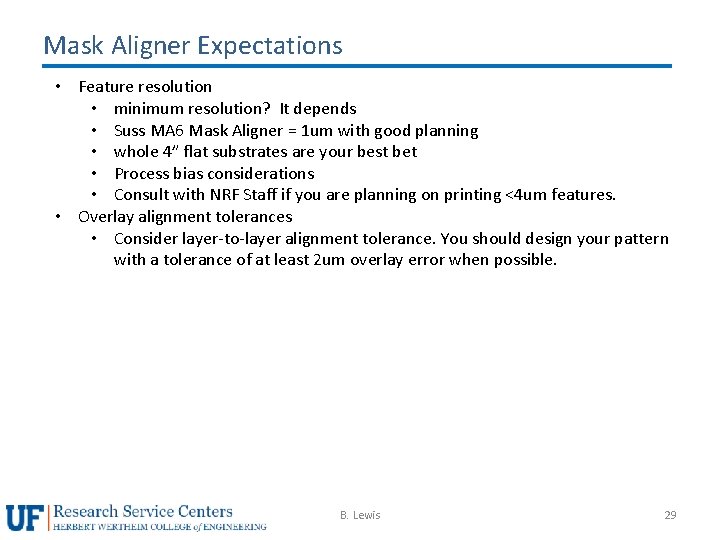
Mask Aligner Expectations • Feature resolution • minimum resolution? It depends • Suss MA 6 Mask Aligner = 1 um with good planning • whole 4” flat substrates are your best bet • Process bias considerations • Consult with NRF Staff if you are planning on printing <4 um features. • Overlay alignment tolerances • Consider layer-to-layer alignment tolerance. You should design your pattern with a tolerance of at least 2 um overlay error when possible. B. Lewis 29
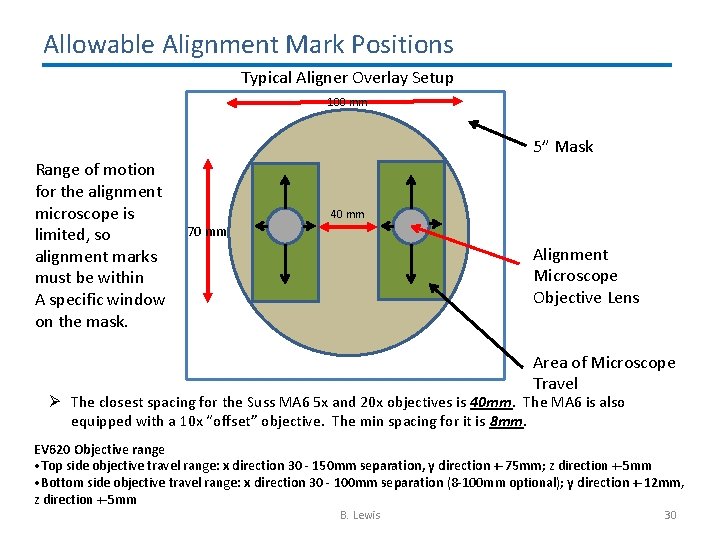
Allowable Alignment Mark Positions Typical Aligner Overlay Setup 100 mm 5” Mask Range of motion for the alignment microscope is limited, so alignment marks must be within A specific window on the mask. 40 mm 70 mm Alignment Microscope Objective Lens Area of Microscope Travel Ø The closest spacing for the Suss MA 6 5 x and 20 x objectives is 40 mm. The MA 6 is also equipped with a 10 x “offset” objective. The min spacing for it is 8 mm. EV 620 Objective range • Top side objective travel range: x direction 30 - 150 mm separation, y direction +-75 mm; z direction +-5 mm • Bottom side objective travel range: x direction 30 - 100 mm separation (8 -100 mm optional); y direction +-12 mm, z direction +-5 mm B. Lewis 30
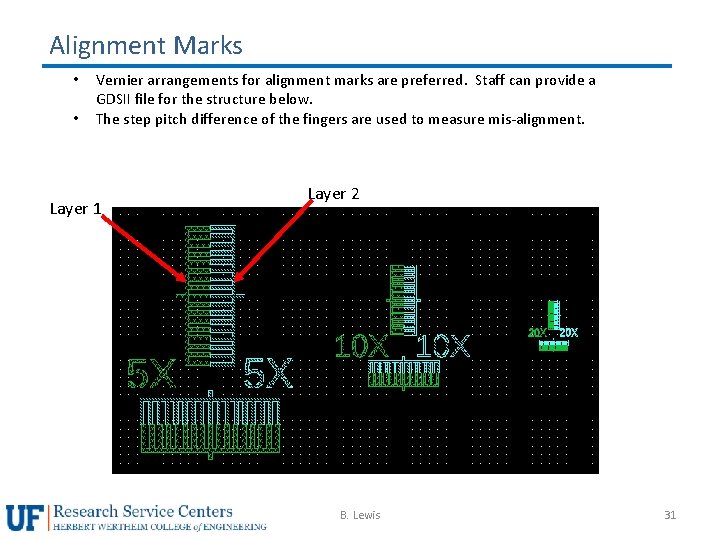
Alignment Marks • • Vernier arrangements for alignment marks are preferred. Staff can provide a GDSII file for the structure below. The step pitch difference of the fingers are used to measure mis-alignment. Layer 1 Layer 2 B. Lewis 31
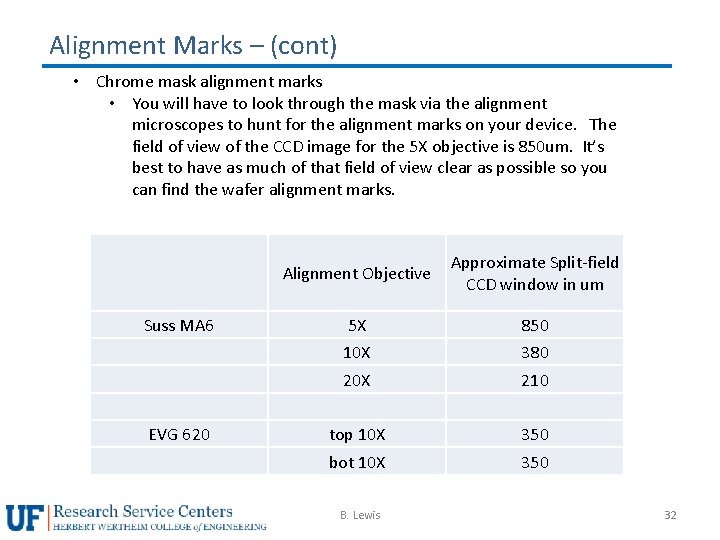
Alignment Marks – (cont) • Chrome mask alignment marks • You will have to look through the mask via the alignment microscopes to hunt for the alignment marks on your device. The field of view of the CCD image for the 5 X objective is 850 um. It’s best to have as much of that field of view clear as possible so you can find the wafer alignment marks. Suss MA 6 EVG 620 Alignment Objective Approximate Split-field CCD window in um 5 X 850 10 X 380 20 X 210 top 10 X 350 bot 10 X 350 B. Lewis 32
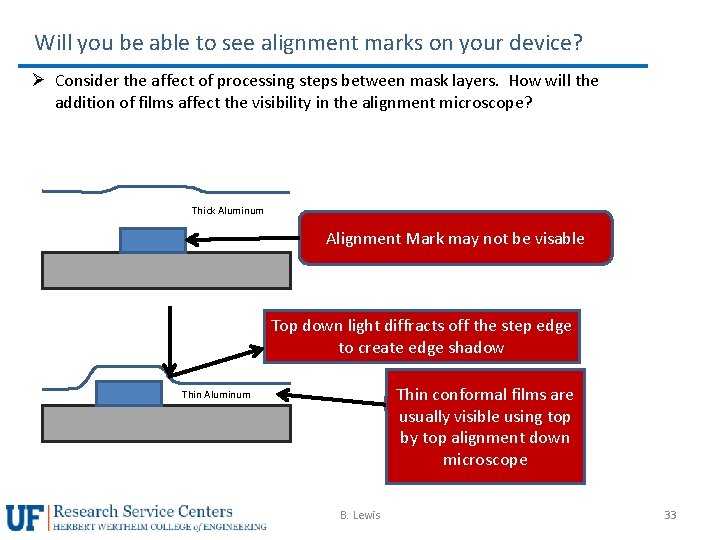
Will you be able to see alignment marks on your device? Ø Consider the affect of processing steps between mask layers. How will the addition of films affect the visibility in the alignment microscope? Thick Aluminum Alignment Mark may not be visable Top down light diffracts off the step edge to create edge shadow Thin conformal films are usually visible using top by top alignment down microscope Thin Aluminum B. Lewis 33
Process considerations for masks B. Lewis 34
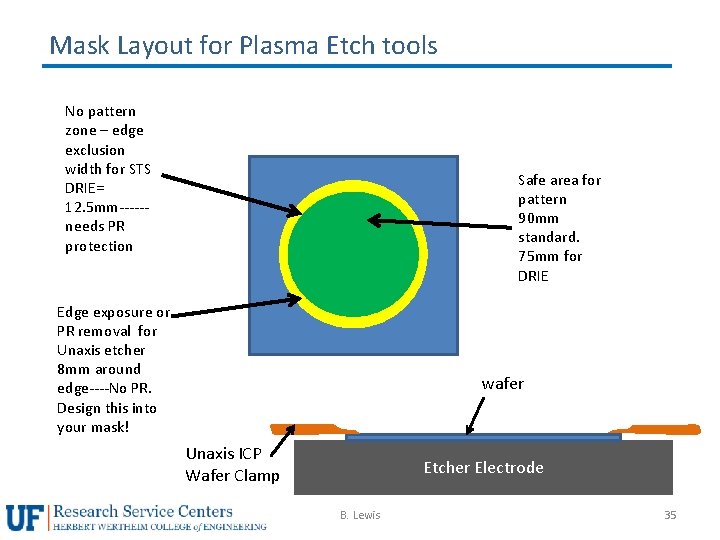
Mask Layout for Plasma Etch tools No pattern zone – edge exclusion width for STS DRIE= 12. 5 mm-----needs PR protection Safe area for pattern 90 mm standard. 75 mm for DRIE Edge exposure or PR removal for Unaxis etcher 8 mm around edge----No PR. Design this into your mask! wafer Unaxis ICP Wafer Clamp Etcher Electrode B. Lewis 35
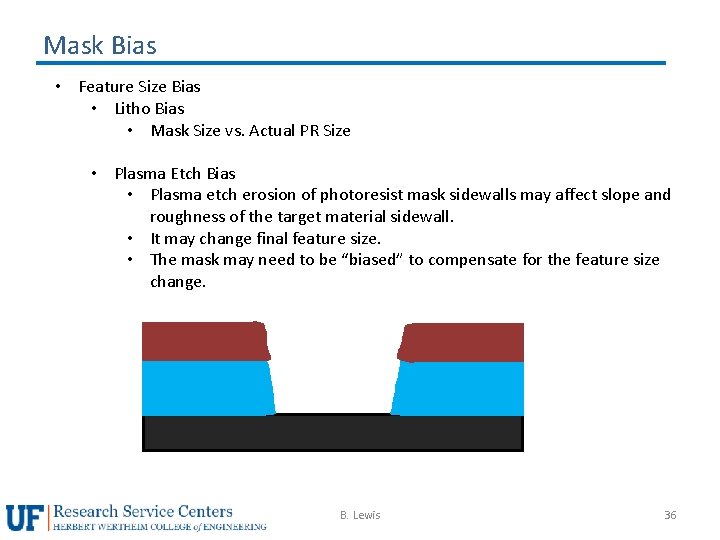
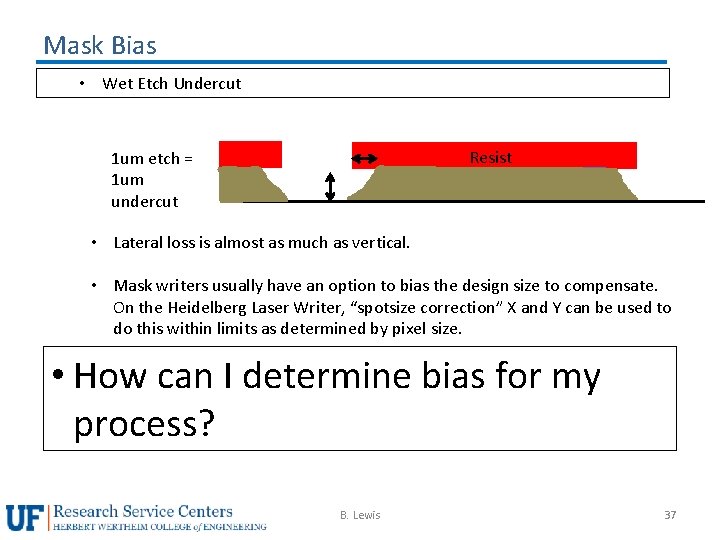
Mask Bias • Feature Size Bias • Litho Bias • Mask Size vs. Actual PR Size • Plasma Etch Bias • Plasma etch erosion of photoresist mask sidewalls may affect slope and roughness of the target material sidewall. • It may change final feature size. • The mask may need to be “biased” to compensate for the feature size change. B. Lewis 36
Mask Bias • Wet Etch Undercut Resist 1 um etch = 1 um undercut • Lateral loss is almost as much as vertical. • Mask writers usually have an option to bias the design size to compensate. On the Heidelberg Laser Writer, “spotsize correction” X and Y can be used to do this within limits as determined by pixel size. • How can I determine bias for my process? B. Lewis 37