
Phishing How to identify phishing attempts and examples

- Slides: 39
Phishing How to identify phishing attempts and examples
Learning Outcomes for this Module • Discover the different types of phishing and common examples of them. • Why phishing is so prevalent. • Being able to recognize the signs of a phishing attempt. • What to do if you accidentally click on a phishing link. 2
How to Identify a Phishing Message
Common Features of Phishing Emails (1/4) • Too good to be true. • It will claim that you have won a prize (from a contest you never entered in the first place) of money or a new phone. • This is your typical “you have been wired $1, 000 click this link and pay a processing fee to claim it”. 4
Common Features of Phishing Emails (2/4) • Sense of Urgency. • Most of the time these emails say “urgent”, have a timer that you must claim the prize within, or say your account will be terminated if you do not act fast. 5
Common Features of Phishing Emails (3/4) • Hyperlinks • Phishing emails will sometimes contain links to websites for you to sign in to. • These will redirect you to fake websites to steal your information. • You can hover your mouse over a hyperlink to view where it will take you if you click on it. 6
Common Features of Phishing Emails (4/4) • Attachments • Phishing emails will sometimes contain attachments. • Clicking these attachments will likely infect your computer with malware. 7
Unknown Senders (1 of 2) • One of the biggest things to pay attention to is the email address it comes from. • The email will very often be from some random Gmail or Outlook account you have never seen before. 8
Unknown Senders (2 of 2) • Sometimes they can spoof the email so you cannot just use the From: address to determine if it is safe or not. • Pay attention to all the other common signs as well when deciding on whether it is a phishing attempt or not. 9 Spoofing the email address means making it look like it is from one email address but that is not actually where it is from.
Email Content • The content of the email can often give away whether it is a phishing scam or not. • Look out for poor spelling and grammar. • If the email has very little content besides a few words asking you to click on a link or the attachment. • If the request is out of the ordinary for the person claiming to have sent it. 10
Sophisticated Phishing Scams (1 of 2) • Some phishing scams can be more sophisticated and put a lot more effort into the email. • In order to replicate a legitimate looking email, they will copy a template for a company’s email. 11
Sophisticated Phishing Scams (2 of 2) • Look out for dead links to social media. • Logos such as Facebook and Instagram's will not be links, just pictures on the email. • Think about what the company would normally send you and ask yourself, “Would they really send me this email? ” • If it is a reward of some kind, would that company normally give that prize away? 12
Phishing Examples
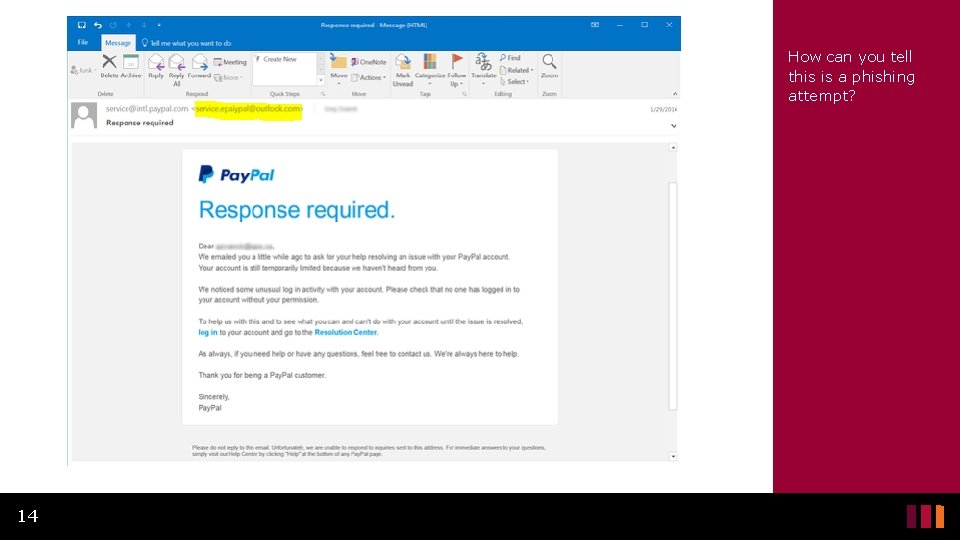
How can you tell this is a phishing attempt? 14
What Looks Convincing? Ex. 1 • This one is well crafted. • The grammar and spelling is good, but there a few telling clues. • It looks like the email comes from “service@intl. paypal. com” 15
What’s Wrong with this Email? Ex. 1 • If you look at the actual email it came from you see service. epaypal@outlook. com • An email from Pay. Pal would never come from an Outlook address. • If you hovered over the links they provide, you would see that they do not lead to the real Pay. Pal website. 16
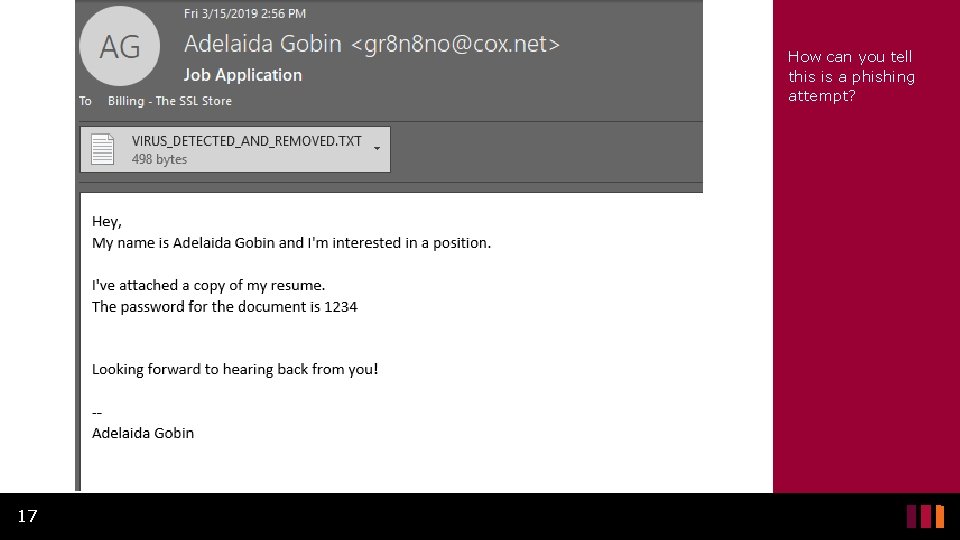
How can you tell this is a phishing attempt? 17
What’s wrong with this Email? Ex. 2 • A common phishing scam is sending a fake resume that contains a virus to install on your system. • In this example, the attachment got removed by a spam filter. • This could easily not have been caught and it would simply look like a word or text document. • The email address is strange. A real person would generally not have an email address like that. 18
• It is also strange to password protect a resume from someone who would be expecting to receive it. • The email started very informally with just “hey” • This is not necessarily a clue, but most real job applications would not be so informal. • It does not reference the job in the subject line as you would expect. • The first line saying “… and I’m interested in a position” 19
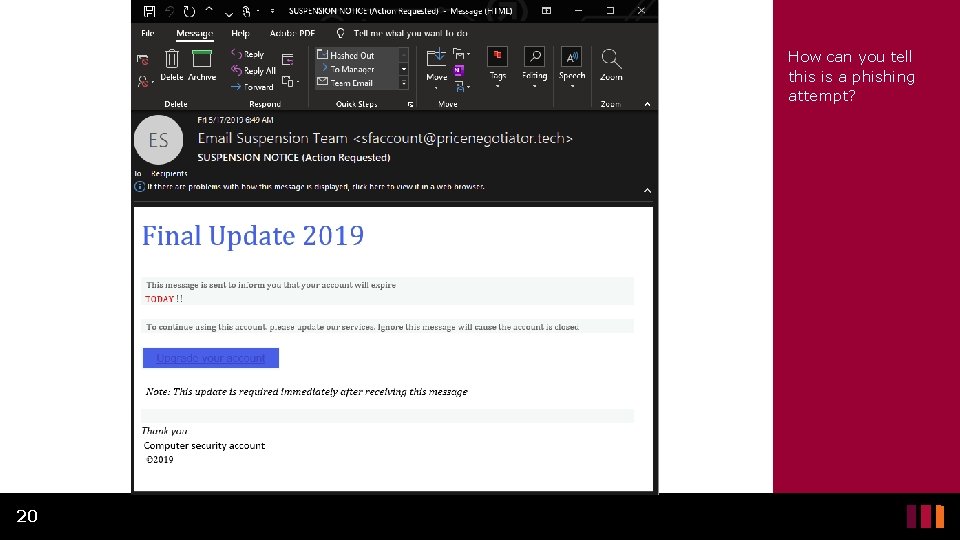
How can you tell this is a phishing attempt? 20
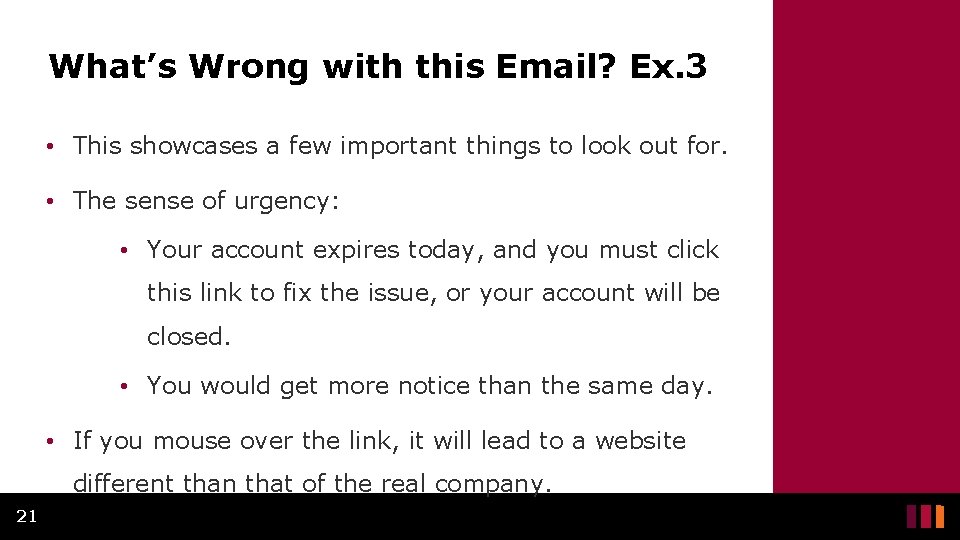
What’s Wrong with this Email? Ex. 3 • This showcases a few important things to look out for. • The sense of urgency: • Your account expires today, and you must click this link to fix the issue, or your account will be closed. • You would get more notice than the same day. • If you mouse over the link, it will lead to a website different than that of the real company. 21
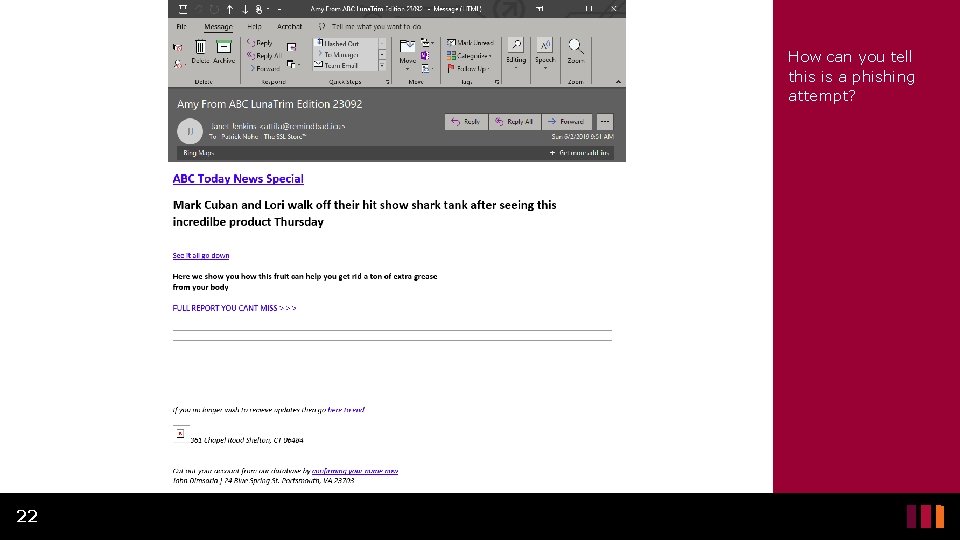
How can you tell this is a phishing attempt? 22
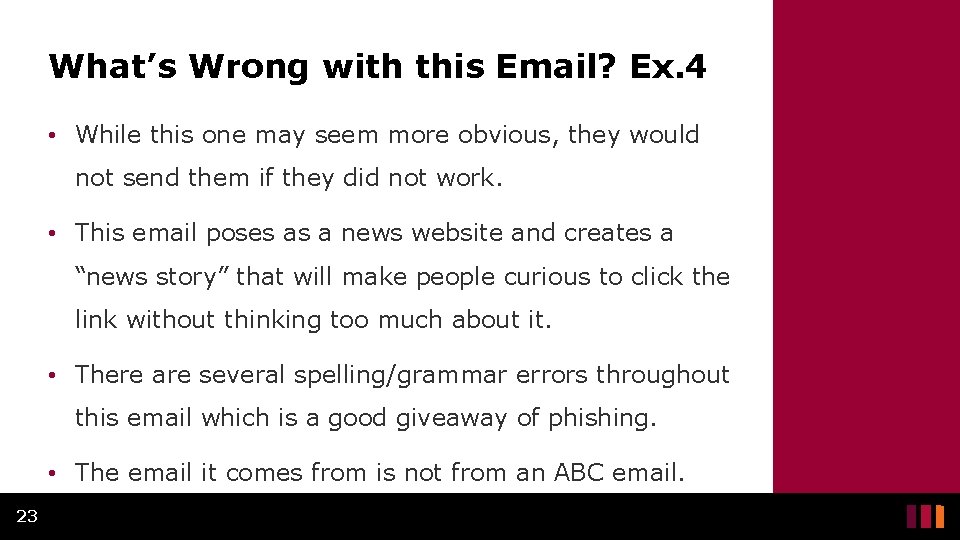
What’s Wrong with this Email? Ex. 4 • While this one may seem more obvious, they would not send them if they did not work. • This email poses as a news website and creates a “news story” that will make people curious to click the link without thinking too much about it. • There are several spelling/grammar errors throughout this email which is a good giveaway of phishing. • The email it comes from is not from an ABC email. 23
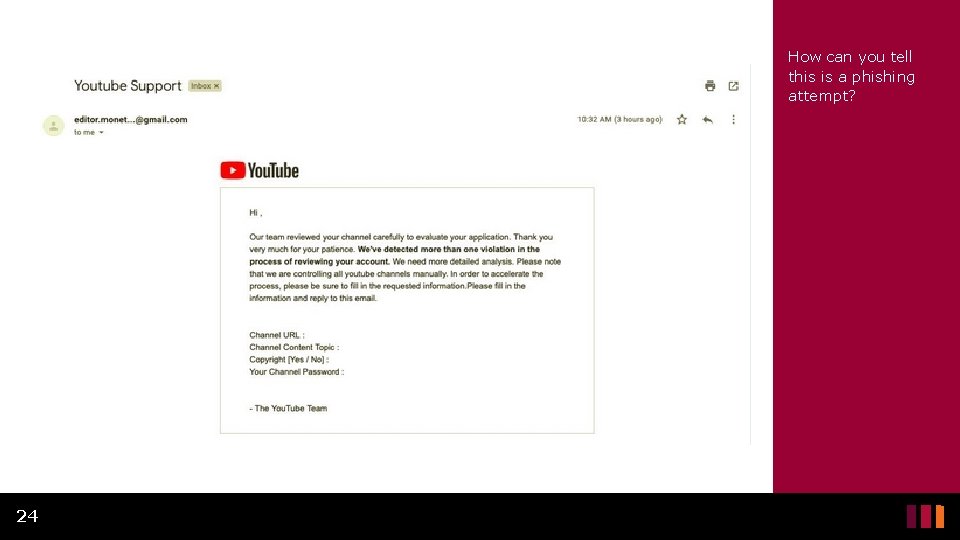
How can you tell this is a phishing attempt? 24
What’s Wrong with this Email? Ex. 5 • The email is from a Gmail address which You. Tube would never send from. • It does not address the person by name, but rather it looks like a mass email that was sent out to a lot of people. • It asks you to fill out information about your account, including your password, which You. Tube would never ask for. 25
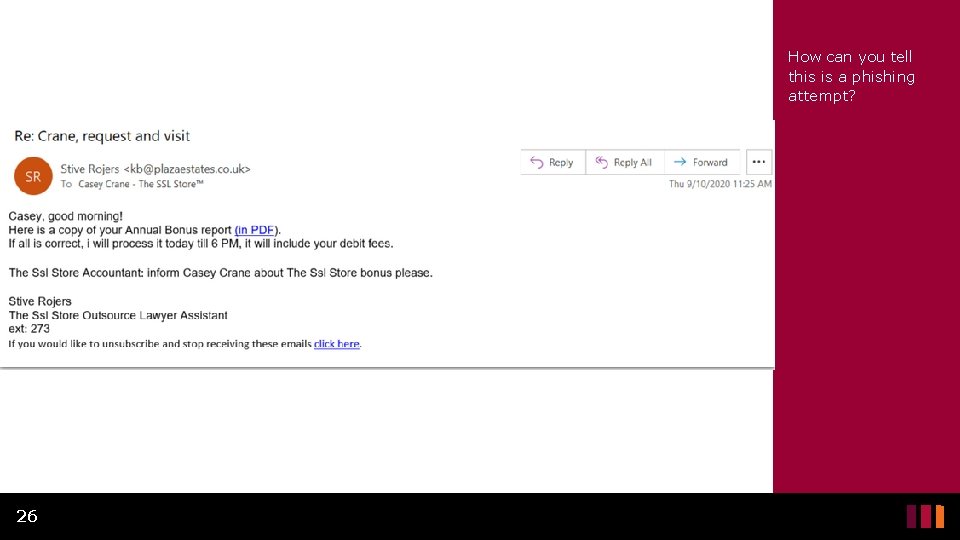
How can you tell this is a phishing attempt? 26
What’s Wrong with this Email? Ex. 6 • Although this is not a very well-crafted phishing email, the thought of receiving an annual bonus will make some people click the link without thinking. • It looks like it comes from someone the recipient may know, but the email address shows that it is not. • There is an attempt at an email signature to make it look more legitimate but normally it would look more professional and include an actual phone number and a real job title. 27
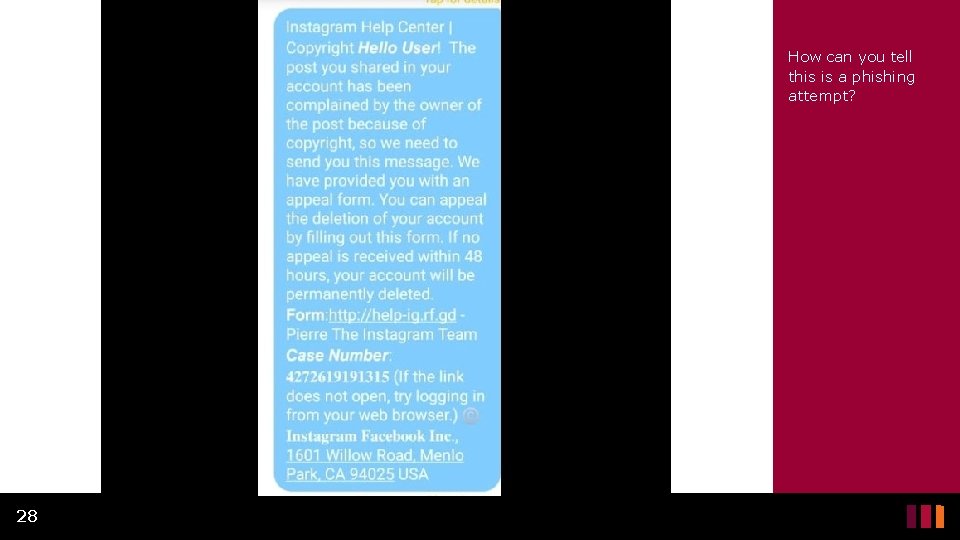
How can you tell this is a phishing attempt? 28
What’s wrong with this SMS Message? Ex. 7 • The sense of urgency. • This warns you if you do not fill out the information within 48 hours, your account will be deleted. • The link they provide is clearly not the Instagram website however, it would likely bring you to a page that looks like Instagram. 29
Conclusion
Protect Yourself from Phishing (1 of 6) • The most important thing when it comes to stopping phishing attacks is to pay attention to what emails, texts, phone calls you receive. • Do not click on hyperlinks or attachments unless you were expecting one and know where/who it came from. • Think before you click! 31
Protect Yourself from Phishing (2 of 6) • Pay attention to the sender and double check to make sure it is coming from an email address you recognize or would expect. • Phishing scams will often claim you won a prize to get you excited, do not be tempted by it. • Companies will not just ask you for your information over text and email. 32
Protect Yourself from Phishing (3 of 6) • If a friend, colleague, company, or organization contacts you and you were not expecting it, or it seems out of place, consider the following: • Try to contact them another way, for example if they emailed you, call them. • Do not use a phone number provided in the email, call the number posted on their secure, verified website. 33
Protect Yourself from Phishing (4 of 6) • If a friend, colleague, company, or organization contacts you and you were not expecting it, or it seems out of place, consider the following: • If you decide to email back to check for validity, start a separate email directly to the correct email of the person you are trying to reach. 34
Protect Yourself from Phishing (5 of 6) • Look over the content of the email to make sure it is what you would expect from that person/company. • If it is littered with spelling/grammatical errors, it is probably not legitimate. • If it is claiming you won a prize you did not enter to win, it is probably not legitimate. • Emails that have small amounts of content, asking you to click a link, are probably not legitimate. 35
Protect Yourself from Phishing (6 of 6) • Know the common phone phishing scams (vishing) so you can recognize when it is not real. • Examples include: • The CRA does not call you to threaten you with prison unless you speak to them. • Microsoft will not call you about computer viruses. • Duct cleaning services are not legitimately calling you to get you an estimate on cleaning your ducts. 36
Canadian Internet Registration Authority (CIRA) These modules were made possible by the contributions of CIRA and their Community Investment Program. 37
References (1 of 2) • Mash, Marina. "Dear You. Tubers, phishers are after your accounts. " Kaspersky, 7 May 2019, www. kaspersky. com/blog/youtube-channel-ownersphishing/26894/. Accessed 25 Nov. 2020. • "Re-Hashed: Phishing Email Examples — The Best & Worst. " Hashed. Out, 21 Oct. 2020, www. thesslstore. com/blog/phishing-email-examples-thebest-worst/. Accessed 25 Nov. 2020. 38
References (2 of 2) • "What Is Phishing? " Phishing. org, www. phishing. org/what-isphishing. Accessed 25 Nov. 2020. • Ahmed, Arooj. "A Phishing Scam Is Targeting Instagram Users To Steal Email And Instagram Credentials. " Digital Information World, 3 Sept. 2020, www. digitalinformationworld. com/2020/09/aphishing-scam-is-targeting-instagram-users-to-steal-email-andinstagram-credentials. html. Accessed 25 Nov. 2020. • "What to Do if You Click on a Phishing Link? " The Defence Works, 23 Aug. 2019, thedefenceworks. com/blog/what-to-do-if-you-clickon-a-phishing-link/. Accessed 25 Nov. 2020. 39