
Phases steps and activities in a project PHASE

- Slides: 12
Phases, steps, and activities in a project PHASE 1 PROJECT STEP 1 STEP 2 : STEP 1 PHASE 2 PHASE n STEP 2 : STEP 1 STEP 2 : • When do we do this? • What was done to the project? ACTIVITY 1. 1 ACTIVITY 1. 2 ACTIVITY 1. 3 : ACTIVITY 2. 1 ACTIVITY 2. 2 ACTIVITY 2. 3 :
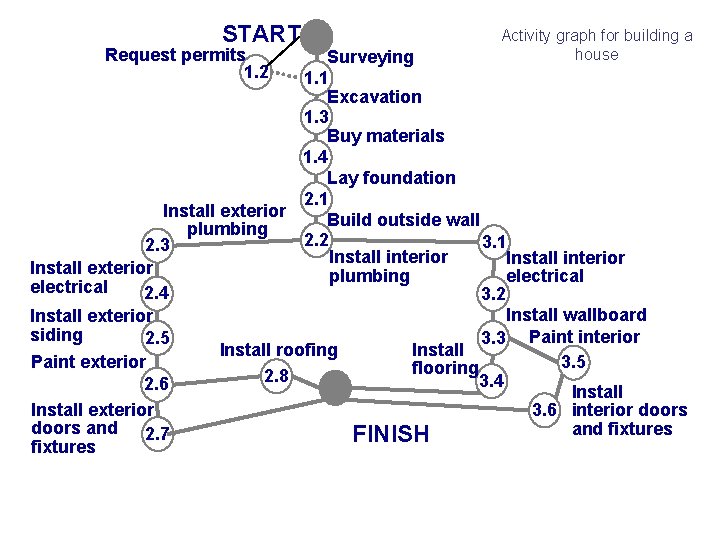
START Request permits 1. 2 Activity graph for building a house Surveying 1. 1 Excavation 1. 3 Buy materials 1. 4 Lay foundation 2. 1 Install exterior Build outside wall plumbing 2. 2 3. 1 2. 3 Install interior Install exterior plumbing electrical 2. 4 3. 2 Install wallboard Install exterior siding 2. 5 3. 3 Paint interior Install roofing Install 3. 5 Paint exterior flooring 2. 8 3. 4 2. 6 Install exterior 3. 6 interior doors and fixtures 2. 7 FINISH fixtures
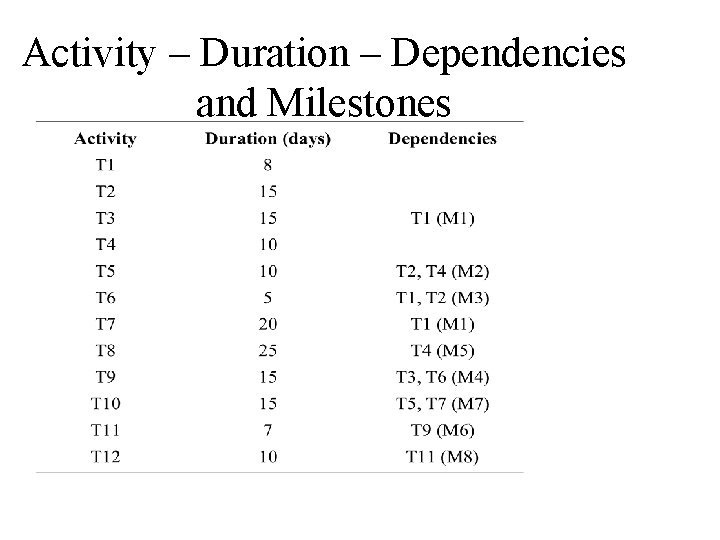
Activity – Duration – Dependencies and Milestones
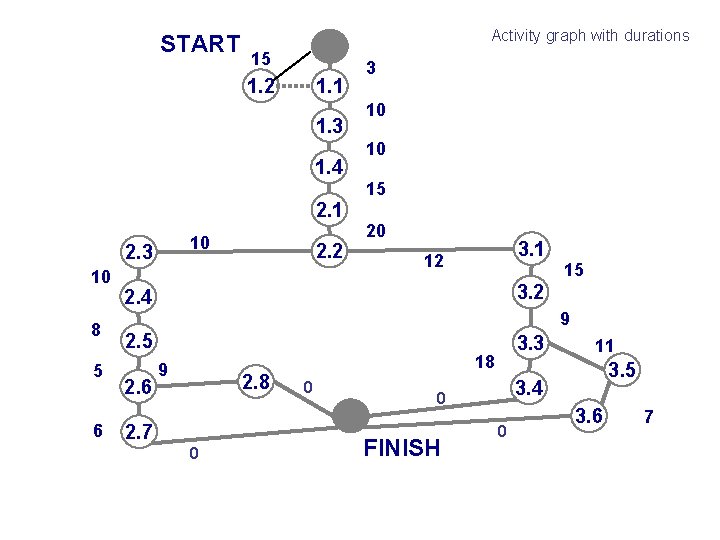
START Activity graph with durations 15 1. 2 1. 1 1. 3 1. 4 3 10 10 15 2. 1 10 2. 3 10 8 5 6 2. 2 20 3. 1 12 15 3. 2 2. 4 9 2. 5 2. 6 9 2. 8 2. 7 0 3. 3 18 0 3. 5 3. 4 0 FINISH 11 0 3. 6 7
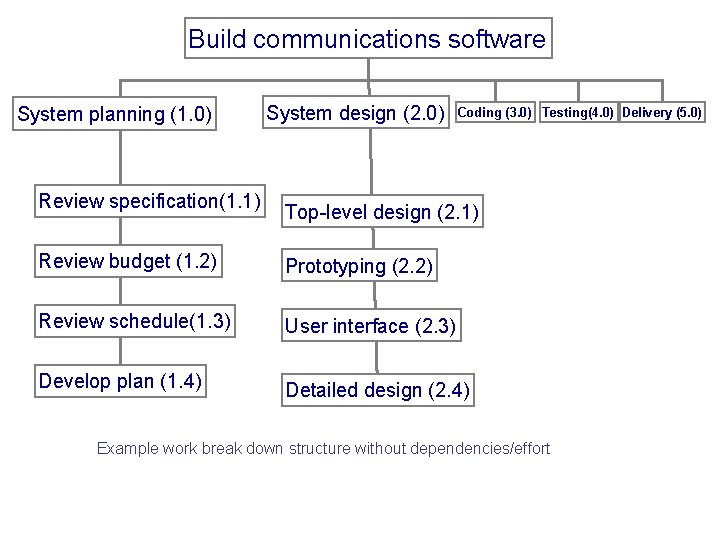
Build communications software System planning (1. 0) Review specification(1. 1) System design (2. 0) Coding (3. 0) Testing(4. 0) Delivery (5. 0) Top-level design (2. 1) Review budget (1. 2) Prototyping (2. 2) Review schedule(1. 3) User interface (2. 3) Develop plan (1. 4) Detailed design (2. 4) Example work break down structure without dependencies/effort
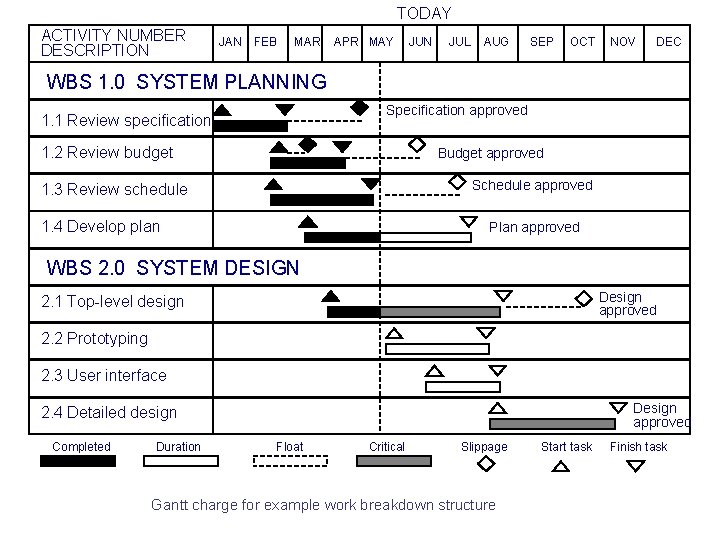
TODAY ACTIVITY NUMBER DESCRIPTION JAN FEB MAR APR MAY JUN JUL AUG SEP OCT NOV DEC WBS 1. 0 SYSTEM PLANNING Specification approved 1. 1 Review specification 1. 2 Review budget Budget approved Schedule approved 1. 3 Review schedule 1. 4 Develop plan Plan approved WBS 2. 0 SYSTEM DESIGN Design approved 2. 1 Top-level design 2. 2 Prototyping 2. 3 User interface Design approved 2. 4 Detailed design Completed Duration Float Critical Slippage Gantt charge for example work breakdown structure Start task Finish task
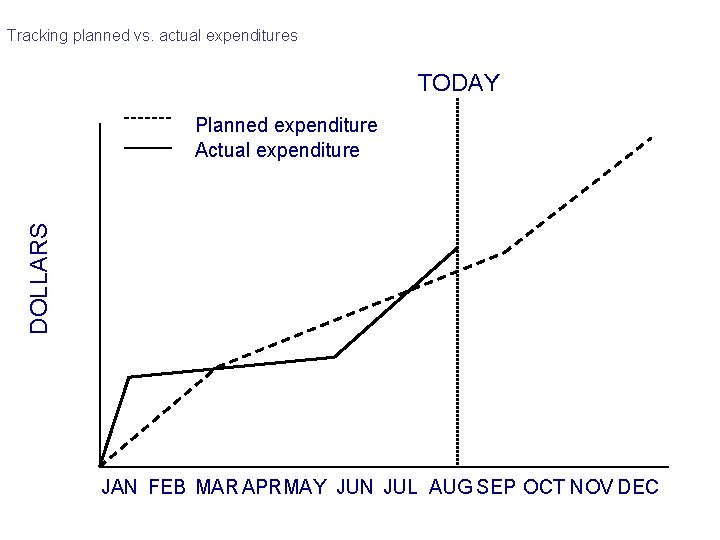
Tracking planned vs. actual expenditures TODAY DOLLARS Planned expenditure Actual expenditure JAN FEB MAR APRMAY JUN JUL AUG SEP OCT NOV DEC
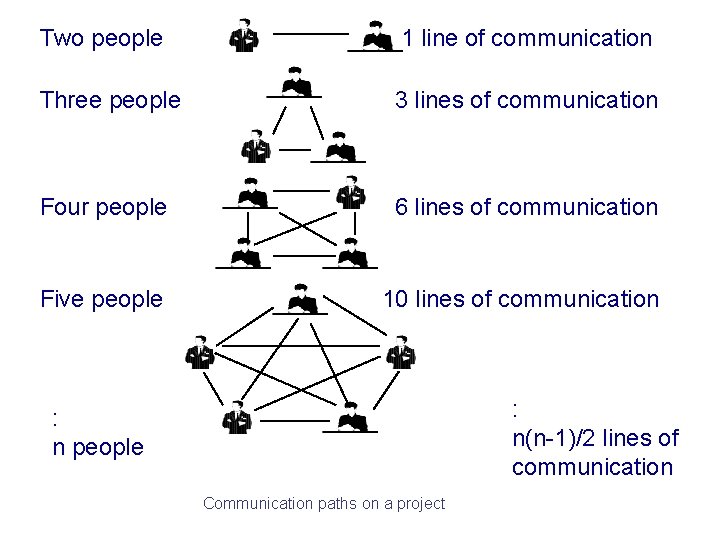
Two people 1 line of communication Three people 3 lines of communication Four people 6 lines of communication Five people 10 lines of communication : n(n-1)/2 lines of communication : n people Communication paths on a project
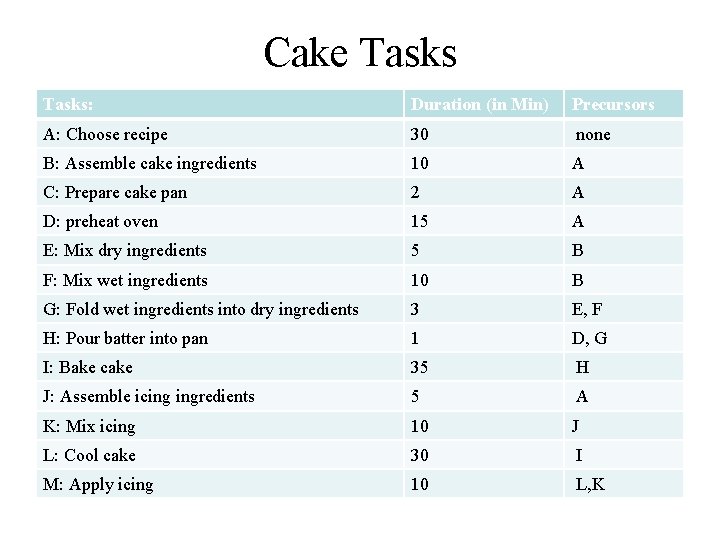
Cake Enterprise • You need to make 22 cakes daily • you have 2 worker dedicated to cake production exclusively • You have 3 other possible workers that can help out about 10 minutes or less every two hours. The following slide is a work breakdown structure of cake production. Generate an activity graph (PERT) from that structure. What is the critical path Plan your enterprise to work effectively and efficiently.
Cake Tasks: Duration (in Min) Precursors A: Choose recipe 30 none B: Assemble cake ingredients 10 A C: Prepare cake pan 2 A D: preheat oven 15 A E: Mix dry ingredients 5 B F: Mix wet ingredients 10 B G: Fold wet ingredients into dry ingredients 3 E, F H: Pour batter into pan 1 D, G I: Bake cake 35 H J: Assemble icing ingredients 5 A K: Mix icing 10 J L: Cool cake 30 I M: Apply icing 10 L, K
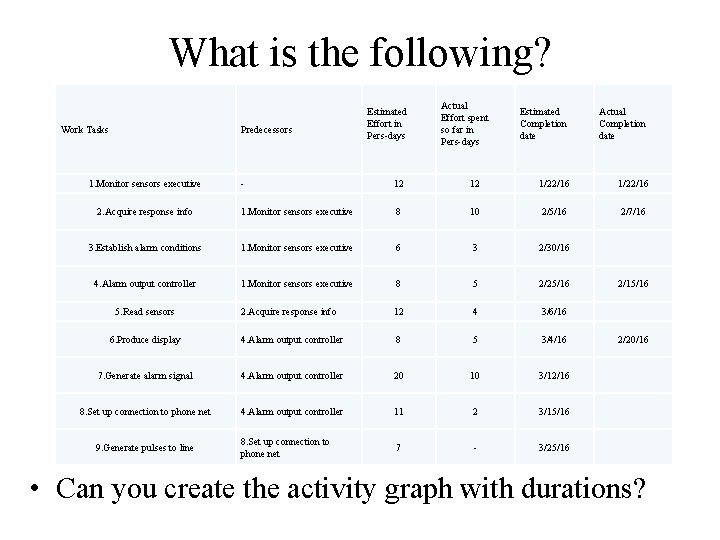
What is the following? Work Tasks Predecessors 1. Monitor sensors executive Estimated Effort in Pers-days Actual Effort spent so far in Pers-days Estimated Completion date Actual Completion date - 12 12 1/22/16 2. Acquire response info 1. Monitor sensors executive 8 10 2/5/16 2/7/16 3. Establish alarm conditions 1. Monitor sensors executive 6 3 2/30/16 4. Alarm output controller 1. Monitor sensors executive 8 5 2/25/16 2. Acquire response info 12 4 3/6/16 6. Produce display 4. Alarm output controller 8 5 3/4/16 7. Generate alarm signal 4. Alarm output controller 20 10 3/12/16 8. Set up connection to phone net 4. Alarm output controller 11 2 3/15/16 8. Set up connection to phone net 7 - 3/25/16 5. Read sensors 9. Generate pulses to line 2/15/16 2/20/16 • Can you create the activity graph with durations?
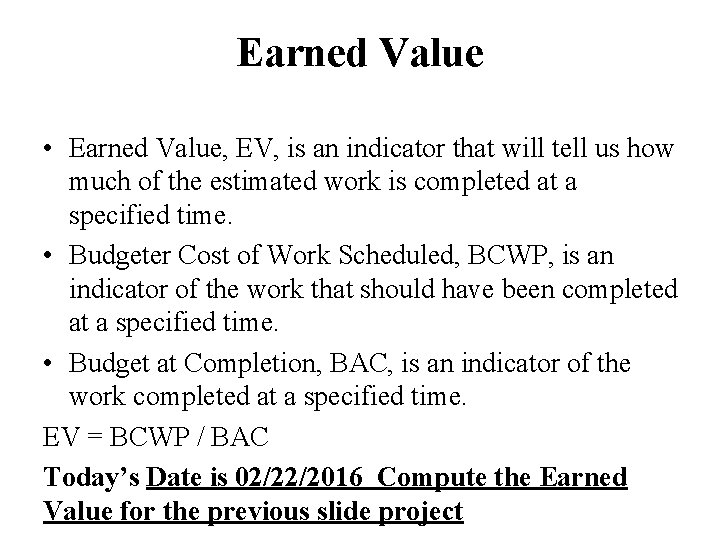
Earned Value • Earned Value, EV, is an indicator that will tell us how much of the estimated work is completed at a specified time. • Budgeter Cost of Work Scheduled, BCWP, is an indicator of the work that should have been completed at a specified time. • Budget at Completion, BAC, is an indicator of the work completed at a specified time. EV = BCWP / BAC Today’s Date is 02/22/2016 Compute the Earned Value for the previous slide project