
Phase Implementation and Test Plan 1 Making your
![Making your implementation plan First Steps ] Consider your use case diagram and your](https://slidetodoc.com/presentation_image_h2/8116a30f9caa37e78412577e441a8326/image-2.jpg "Making your implementation plan First Steps ] Consider your use case diagram and your")
![LMS partial use case diagram ] Order based on importance of each use case](https://slidetodoc.com/presentation_image_h2/8116a30f9caa37e78412577e441a8326/image-3.jpg "LMS partial use case diagram ] Order based on importance of each use case")
![Making your implementation plan Next schedule each phase ] Consider your time constraints, Decide](https://slidetodoc.com/presentation_image_h2/8116a30f9caa37e78412577e441a8326/image-4.jpg "Making your implementation plan Next schedule each phase ] Consider your time constraints, Decide")
![Making your implementation plan Considerations in scheduling ] Consider your time constraints, ] Consider](https://slidetodoc.com/presentation_image_h2/8116a30f9caa37e78412577e441a8326/image-5.jpg "Making your implementation plan Considerations in scheduling ] Consider your time constraints, ] Consider")
![Making a schedule: First steps ] Divide you group into implementation phase subgroups u](https://slidetodoc.com/presentation_image_h2/8116a30f9caa37e78412577e441a8326/image-6.jpg "Making a schedule: First steps ] Divide you group into implementation phase subgroups u")
![Important parts of implementation ] Create implementation test plan ] Create unit test plan](https://slidetodoc.com/presentation_image_h2/8116a30f9caa37e78412577e441a8326/image-7.jpg "Important parts of implementation ] Create implementation test plan ] Create unit test plan")
![Planning using Gantt chart ] The Gantt chart in the next slide illustrates the](https://slidetodoc.com/presentation_image_h2/8116a30f9caa37e78412577e441a8326/image-9.jpg "Planning using Gantt chart ] The Gantt chart in the next slide illustrates the")
![On your Gantt chart also include ] The Gantt chart in the next slide](https://slidetodoc.com/presentation_image_h2/8116a30f9caa37e78412577e441a8326/image-11.jpg "On your Gantt chart also include ] The Gantt chart in the next slide")
![Updates to your Gantt chart ] At the end of each phase of the](https://slidetodoc.com/presentation_image_h2/8116a30f9caa37e78412577e441a8326/image-13.jpg "Updates to your Gantt chart ] At the end of each phase of the")
![LMS partial use case diagram ] Order based on importance of each use case](https://slidetodoc.com/presentation_image_h2/8116a30f9caa37e78412577e441a8326/image-14.jpg "LMS partial use case diagram ] Order based on importance of each use case")
![LMS Example: ] ] Make the test plan for first phase (or group of](https://slidetodoc.com/presentation_image_h2/8116a30f9caa37e78412577e441a8326/image-15.jpg "LMS Example: ] ] Make the test plan for first phase (or group of")
![LMS partial use case diagram ] Order based on importance of each use case](https://slidetodoc.com/presentation_image_h2/8116a30f9caa37e78412577e441a8326/image-16.jpg "LMS partial use case diagram ] Order based on importance of each use case")
![LMS Example: Thread phase 2 ] ] Make the test plan for 2 nd](https://slidetodoc.com/presentation_image_h2/8116a30f9caa37e78412577e441a8326/image-18.jpg "LMS Example: Thread phase 2 ] ] Make the test plan for 2 nd")
![LMS Example: Phase 2 ] For this case use cases in phase 2 are](https://slidetodoc.com/presentation_image_h2/8116a30f9caa37e78412577e441a8326/image-20.jpg "LMS Example: Phase 2 ] For this case use cases in phase 2 are")
![LMS Example: Phase 2 ] Complete code reviews of the written code u Again](https://slidetodoc.com/presentation_image_h2/8116a30f9caa37e78412577e441a8326/image-21.jpg "LMS Example: Phase 2 ] Complete code reviews of the written code u Again")
- Slides: 21
Phase Implementation and Test Plan 1
Making your implementation plan First Steps ] Consider your use case diagram and your prioritization of use cases from your design document (checked against provided list) ] Use the prioritization (and provided list) to decide the priority or priorities of each use case ] Modify your use case diagram to show your priorities. Janice Regan, 2008 2
LMS partial use case diagram ] Order based on importance of each use case as expressed by the user/client Calculate overdue fee patron Generate overdue letter …. resourc e Overdue form letter browse. Resource reserve. Resource manage. Resource check. Out. Resource manage. Patron Janice Regan, 2008 check. In. Resource Library staff Phase 1 Phase 2 Phase 3 Phase 4 3
Making your implementation plan Next schedule each phase ] Consider your time constraints, Decide which phases will be completed for each presentation date u Iteration 1 Client Demonstration (July 21) 20 minutes, prepare your system before meeting u Iteration 2 Client Demonstration (July 30 ) 20 minutes, prepare your system before meeting u User Acceptance Test (Aug. 5 -7) 60 minutes, install from code during meeting Janice Regan, 2008 4
Making your implementation plan Considerations in scheduling ] Consider your time constraints, ] Consider dates, July 21, July 30, Aug 5 -7 u You will be told which phases to present at each meeting, Leave time to be sure you have fully tested the components for a phase before the meeting. You may develop more than is needed for the presentation meeting (particularly the first two meetings) before the meeting but present only what is promised) The system you present should be stable, it is better to miss a deadline on one promised feature than to present an unstable system. Janice Regan, 2008 5
Making a schedule: First steps ] Divide you group into implementation phase subgroups u Divide into pairs (or a single or triple if you have an odd number of members) u Decide which use cases / classes will be developed by each pair in each phase of development. u Decide how much time to allow for each part of the implementation process, for each of the use cases / classes or groups of use cases /classes (within the duration of each phase) Janice Regan, 2008 6
Important parts of implementation ] Create implementation test plan ] Create unit test plan ] Implement ] Code inspection ] Unit testing ] Integration test plan ] Integration into system ] Integration testing ] Create System test plan ] System testing ] User acceptance testing (UAT for your project) Janice Regan, 2008 7
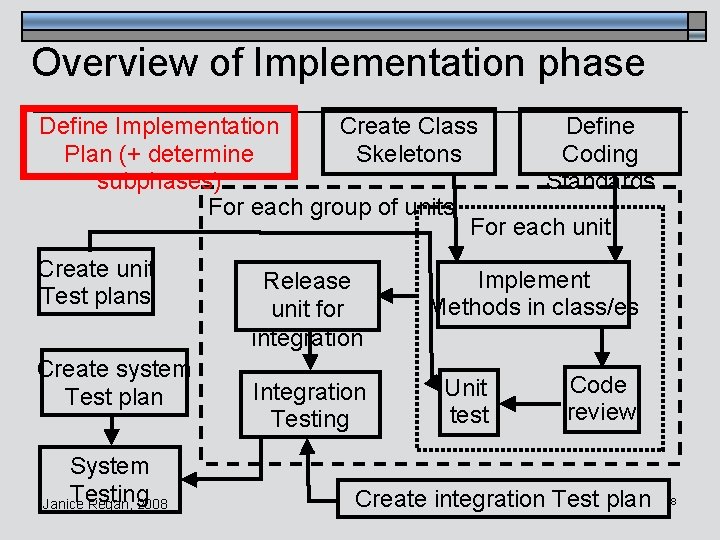
Overview of Implementation phase Define Implementation Create Class Define Plan (+ determine Skeletons Coding subphases) Standards For each group of units For each unit Create unit Test plans Create system Test plan System Testing Janice Regan, 2008 Release unit for integration Integration Testing Implement Methods in class/es Unit test Code review Create integration Test plan 8
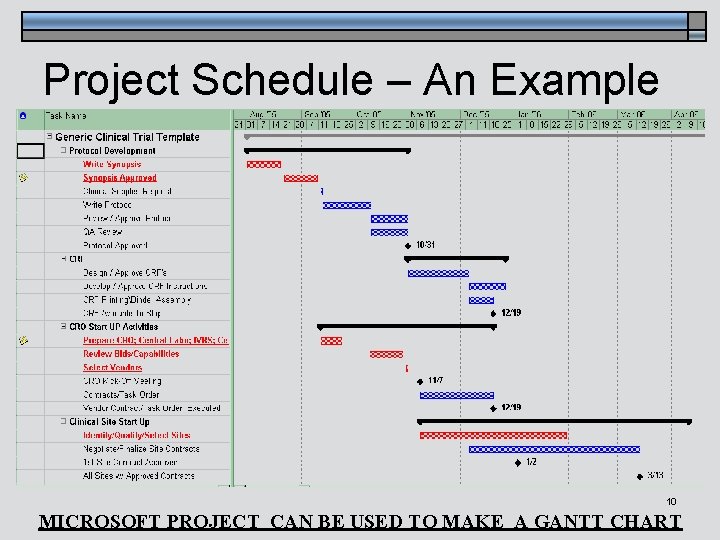
Planning using Gantt chart ] The Gantt chart in the next slide illustrates the following items that you should include in a project schedule GANTT chart u Milestones: Due dates of deliverables Dates of important meetings (UAT, Client Meeting …) u Phases Start and end date of each phase u Tasks (sub phases, activities) Start and end date of each task Tasks on critical path highlighted Janice Regan, 2008 9
Project Schedule – An Example Janice Regan, 2008 10 MICROSOFT PROJECT CAN BE USED TO MAKE A GANTT CHART
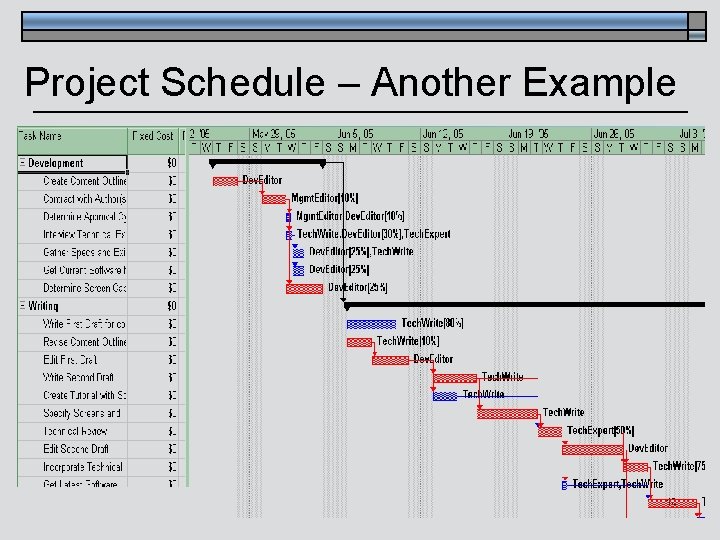
On your Gantt chart also include ] The Gantt chart in the next slide illustrates the following additional items that should be included in a project schedule GANTT chart ] Tasks (activities) u Names of resources (team members) responsible for each task u Percentage of available time of resource on each task (when a resource is assigned to more than 1 task at a time) u Dependencies between tasks (does task A need to be finished before task B starts) Janice Regan, 2008 11
Project Schedule – Another Example Janice Regan, 2008 12
Updates to your Gantt chart ] At the end of each phase of the project the Gantt chart should be updated to reflect the details of the next phase. u Some tasks may be unfinished and need to be added to the next phase u Some tasks may be finished early and need to be moved back from the next phase Janice Regan, 2008 13
LMS partial use case diagram ] Order based on importance of each use case as expressed by the user/client Calculate overdue fee patron Generate overdue letter …. resourc e Overdue form letter browse. Resource reserve. Resource manage. Resource check. Out. Resource manage. Patron Janice Regan, 2008 check. In. Resource Library staff Phase 1 Phase 2 Phase 3 Phase 4 14
LMS Example: ] ] Make the test plan for first phase (or group of phases) Implement the use cases or parts of use cases in the first phase (or group of phases) u ] ] ] Each pairs use cases/classes may be consider a unit Complete code reviews of the written code, code should be reviewed by a different pair (not the pair that wrote it) Unit test the code (run and test) Once each unit is unit tested, integrate all units into build 1 (the build containing all use cases or parts of used cases in the first phase) Build 1 can be tested (integration testing) by performing the check. In. Resource use case (function) and the check. Out. Resource use cases Build 1 may be presented to the client Janice Regan, 2008 15
LMS partial use case diagram ] Order based on importance of each use case as expressed by the user/client Calculate overdue fee patron Generate overdue letter …. resourc e Overdue form letter browse. Resource reserve. Resource manage. Resource check. Out. Resource manage. Patron Janice Regan, 2008 check. In. Resource Library staff Phase 1 Phase 2 Phase 3 Phase 4 16
LMS Example: Phase 2 You need to consider if the parts of the classes being implemented in phase 2 are substantially independent of those implemented in phase 1 ] CASE A: If they are substantially different u You can produce build 2 by integrating all units developed during phase 2. u Build 2 can be developed at the same time as build 1. u When build 1 and build 2 have been individually integration tested they can be integrated together into build 3 and integration tested. Janice Regan, 2008 17
LMS Example: Thread phase 2 ] ] Make the test plan for 2 nd phase (or 2 nd group of phases) Implement the use cases or parts of use cases in the 2 nd phase (or 2 nd group of phases) u ] ] ] Each pairs use cases/classes may be consider a unit Complete code reviews of the written code, code should be reviewed by a different pair (not the pair that wrote it) Unit test the code (run and test) Once each unit is unit tested, integrate all units into build 2 (the build containing all use cases or parts of used cases in the 2 nd phase or 2 nd group of phases) Build 2 can be tested (integration testing) by performing the manage. Resource use case (function) Build 2 can be presented to the client Janice Regan, 2008 18
LMS Example: Alternate approach You need to consider if the parts of the classes being implemented in thread 2 are substantially independent of those implemented in thread 1 ] CASE B: If they have many interdependent components u It may be more efficient to modify build 1 by sequentially integrating the partial classes (units) produced in thread 2 into build 1. u When all units for thread two have been integrated you have produced build 2. Janice Regan, 2008 19
LMS Example: Phase 2 ] For this case use cases in phase 2 are strongly related (coupled) to the use cases in phase 1 u u u ] ] Many parts of phase 2 use or depend on code developed in phase 1 The phase 1 code will be used as a basis for developing the phase 2 code Therefore development of phase 2 follows development of phase 1, they cannot be developed simultaneously Make the test plan for 2 nd phase (or 2 nd group of phases) Implement the use cases or parts of use cases in the 2 nd phase (or 2 nd group of phases) u u Each pairs use cases/classes may be consider a unit Units are added to phase 1 code after unit testing Janice Regan, 2008 20
LMS Example: Phase 2 ] Complete code reviews of the written code u Again code should be reviewed by another pair before testing begins ] Unit test the code (run and test) ] Once each unit is unit tested, integrate all units (one unit at a time) into build 1 ] Intermediate builds (1. 1, 1. 2 …) are produced each time a new unit is integrated into the previous intermediate build. Integration testing is done at each step ] Build 2 can be tested (system testing) by performing the manage. Resource use case (function) the check. In. Resource use case (function) and the check. Out. Resource use cases ] Build 2 can be presented to the client Janice Regan, 2008 21