
PC101 G FTTH Design and Network Basics Mark
PC-101 -G FTTH Design and Network Basics Mark Boxer Applications Engineering Manager, OFS Jeff Bush Professional Services Manager, OFS Page 1
Agenda • • Drivers for FTTx Why fiber Fiber feeds everything Flavors of FTTX Nuts and bolts – the components Installation techniques Network design configurations Page 2
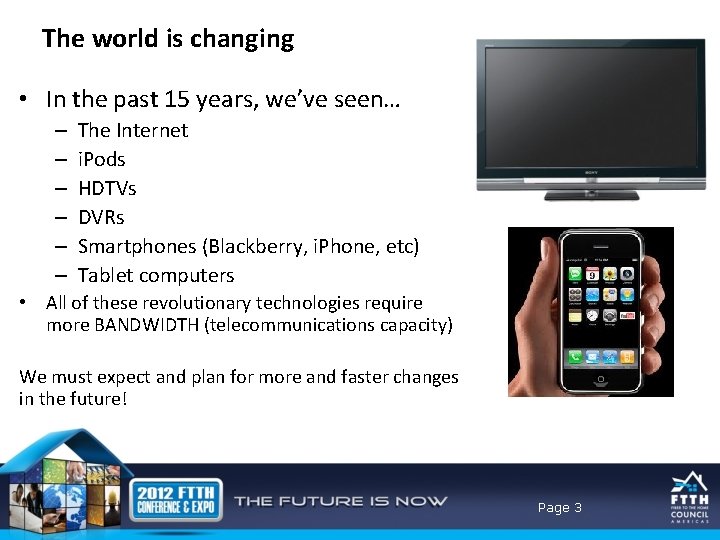
The world is changing • In the past 15 years, we’ve seen… – – – The Internet i. Pods HDTVs DVRs Smartphones (Blackberry, i. Phone, etc) Tablet computers • All of these revolutionary technologies require more BANDWIDTH (telecommunications capacity) We must expect and plan for more and faster changes in the future! Page 3
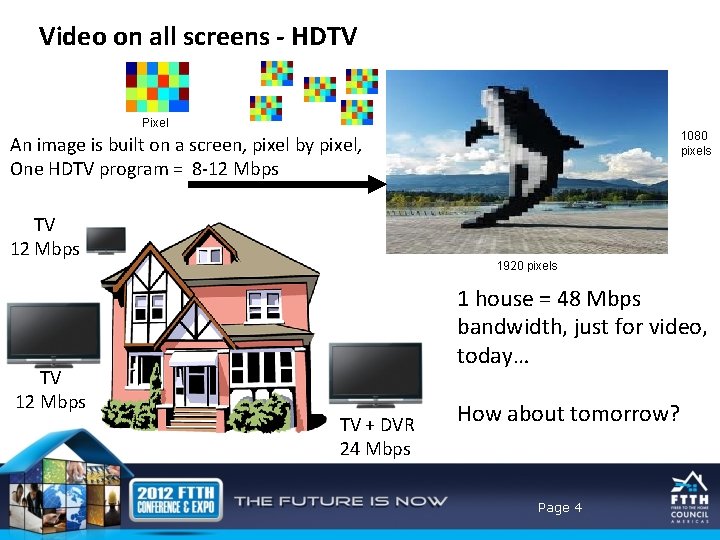
Video on all screens - HDTV Pixel 1080 pixels An image is built on a screen, pixel by pixel, One HDTV program = 8 -12 Mbps TV 12 Mbps 1920 pixels 1 house = 48 Mbps bandwidth, just for video, today… TV + DVR 24 Mbps How about tomorrow? Page 4
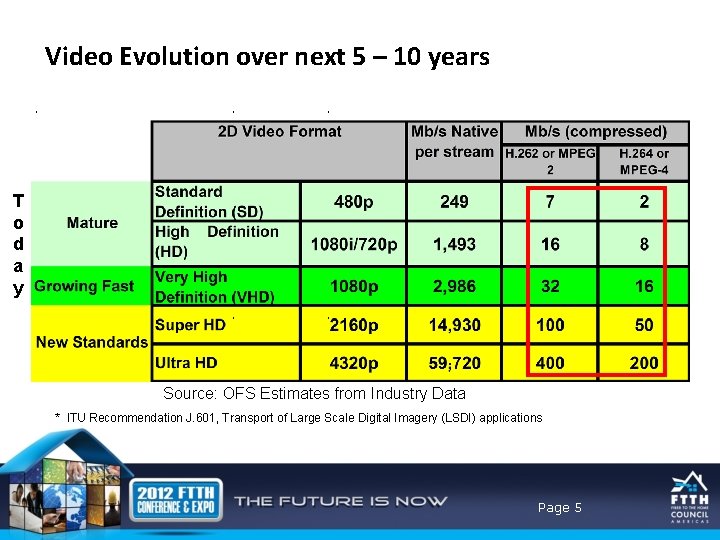
Video Evolution over next 5 – 10 years T o d a y Source: OFS Estimates from Industry Data * ITU Recommendation J. 601, Transport of Large Scale Digital Imagery (LSDI) applications Page 5
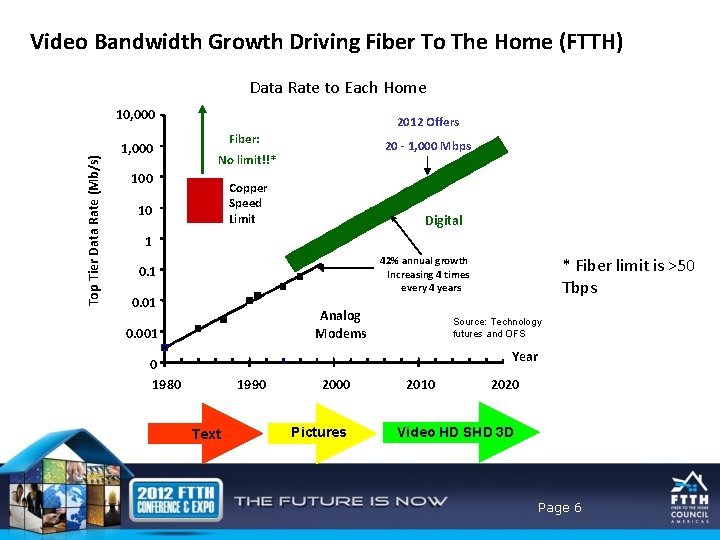
Video Bandwidth Growth Driving Fiber To The Home (FTTH) Data Rate to Each Home Top Tier Data Rate (Mb/s) 10, 000 1, 000 2012 Offers Fiber: 20 - 1, 000 Mbps No limit!!* 100 Copper Speed Limit 10 Digital 1 42% annual growth Increasing 4 times every 4 years 0. 1 0. 01 Analog Modems 0. 001 * Fiber limit is >50 Tbps Source: Technology futures and OFS Year 0 1980 1990 Text 2000 Pictures 2010 2020 Video HD SHD 3 D Page 6
Agenda • • Drivers for FTTx Why fiber Fiber feeds everything Flavors of FTTX Nuts and bolts – the components Installation techniques Network design configurations Page 7
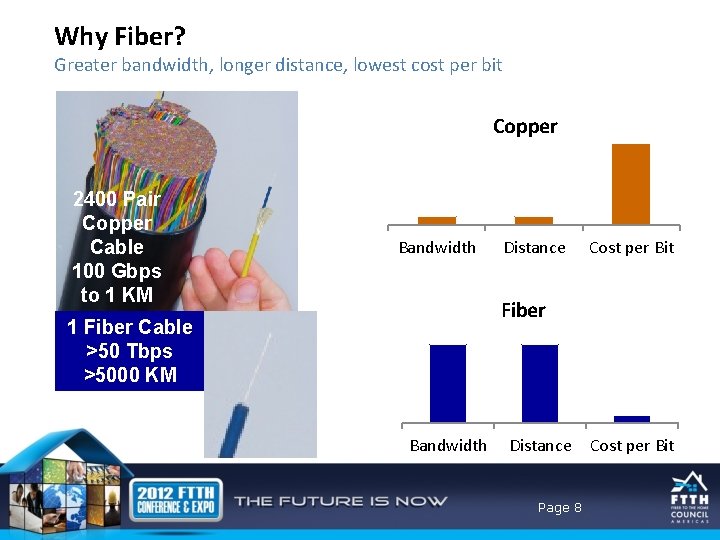
Why Fiber? Greater bandwidth, longer distance, lowest cost per bit Copper 2400 Pair Copper Cable 100 Gbps to 1 KM Bandwidth Distance Cost per Bit Fiber 1 Fiber Cable >50 Tbps >5000 KM Bandwidth Distance Page 8 Cost per Bit
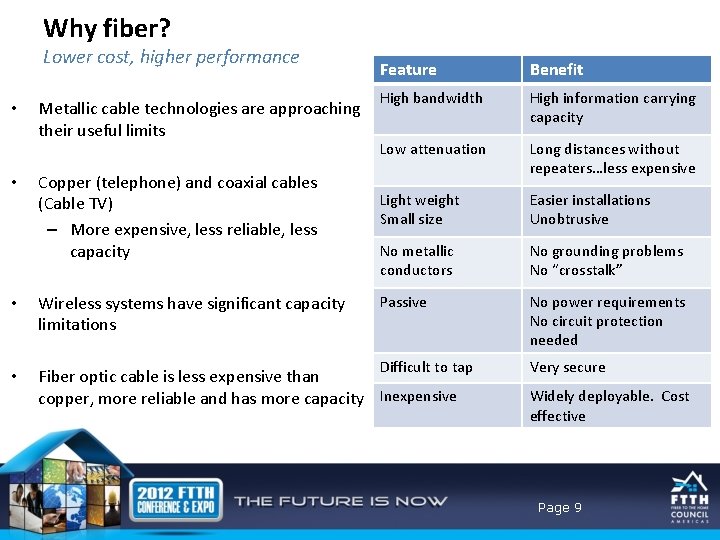
Why fiber? Lower cost, higher performance • • Metallic cable technologies are approaching their useful limits Copper (telephone) and coaxial cables (Cable TV) – More expensive, less reliable, less capacity Feature Benefit High bandwidth High information carrying capacity Low attenuation Long distances without repeaters…less expensive Light weight Small size Easier installations Unobtrusive No metallic conductors No grounding problems No “crosstalk” Passive No power requirements No circuit protection needed Difficult to tap Very secure • Wireless systems have significant capacity limitations • Fiber optic cable is less expensive than copper, more reliable and has more capacity Inexpensive Widely deployable. Cost effective Page 9
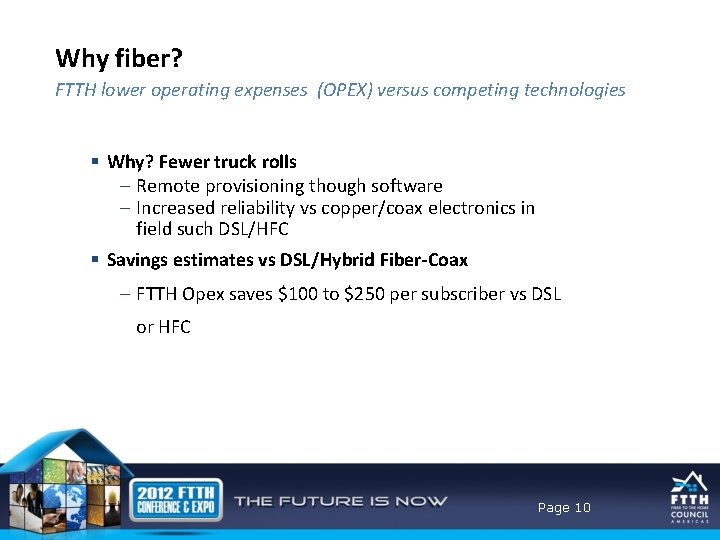
Why fiber? FTTH lower operating expenses (OPEX) versus competing technologies § Why? Fewer truck rolls – Remote provisioning though software – Increased reliability vs copper/coax electronics in field such DSL/HFC § Savings estimates vs DSL/Hybrid Fiber-Coax – FTTH Opex saves $100 to $250 per subscriber vs DSL or HFC Page 10
Agenda • • Drivers for FTTx Why fiber Fiber feeds everything Flavors of FTTX Nuts and bolts – the components Installation techniques Network design configurations Page 11
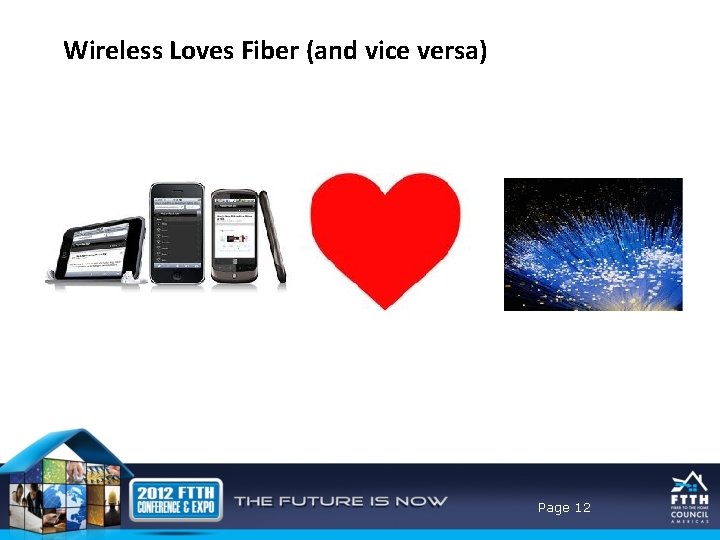
Wireless Loves Fiber (and vice versa) Page 12
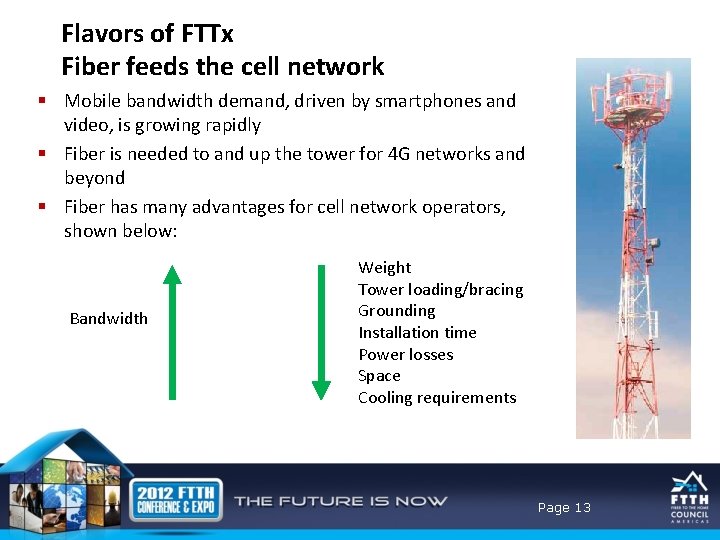
Flavors of FTTx Fiber feeds the cell network § Mobile bandwidth demand, driven by smartphones and video, is growing rapidly § Fiber is needed to and up the tower for 4 G networks and beyond § Fiber has many advantages for cell network operators, shown below: Bandwidth Weight Tower loading/bracing Grounding Installation time Power losses Space Cooling requirements Page 13 13
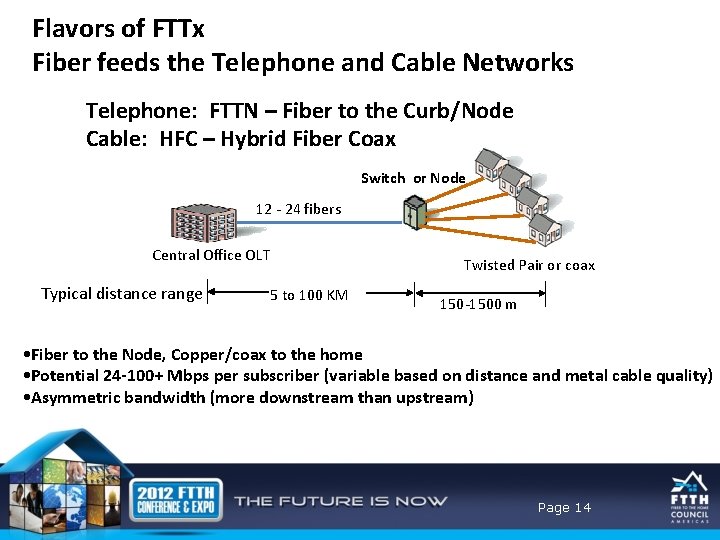
Flavors of FTTx Fiber feeds the Telephone and Cable Networks Telephone: FTTN – Fiber to the Curb/Node Cable: HFC – Hybrid Fiber Coax Switch or Node 12 - 24 fibers Central Office OLT Typical distance range 5 to 100 KM Twisted Pair or coax 150 -1500 m • Fiber to the Node, Copper/coax to the home • Potential 24 -100+ Mbps per subscriber (variable based on distance and metal cable quality) • Asymmetric bandwidth (more downstream than upstream) Page 14
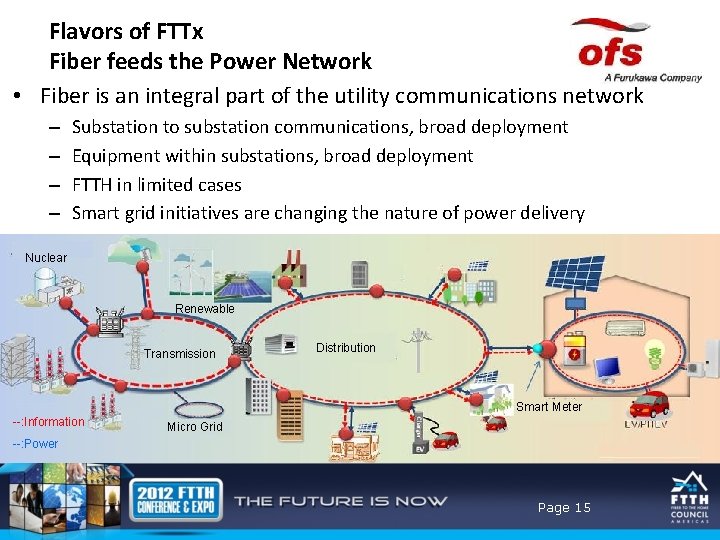
Flavors of FTTx Fiber feeds the Power Network • Fiber is an integral part of the utility communications network – – Substation to substation communications, broad deployment Equipment within substations, broad deployment FTTH in limited cases Smart grid initiatives are changing the nature of power delivery Nuclear Renewable Transmission Distribution Smart Meter --: Information Micro Grid --: Power Page 15
Agenda • • Drivers for FTTx Why fiber Fiber feeds everything Flavors of FTTX Nuts and bolts – the components Installation techniques Network design configurations Page 16
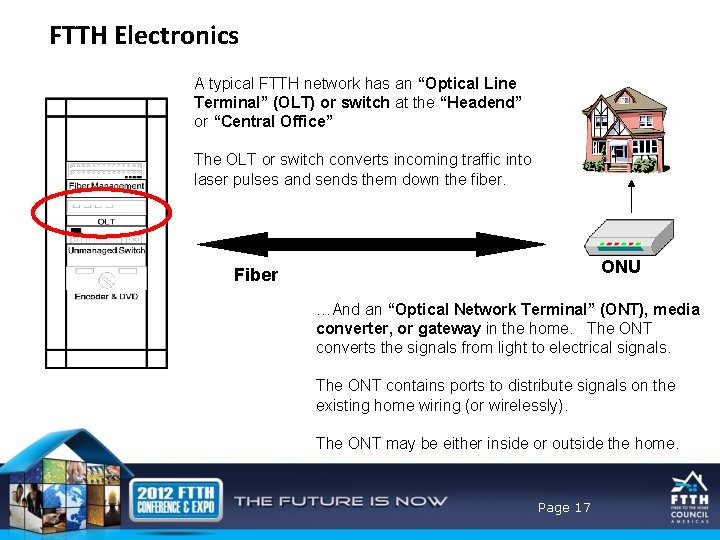
FTTH Electronics A typical FTTH network has an “Optical Line Terminal” (OLT) or switch at the “Headend” or “Central Office” The OLT or switch converts incoming traffic into laser pulses and sends them down the fiber. ONU Fiber …And an “Optical Network Terminal” (ONT), media converter, or gateway in the home. The ONT converts the signals from light to electrical signals. The ONT contains ports to distribute signals on the existing home wiring (or wirelessly). The ONT may be either inside or outside the home. Page 17
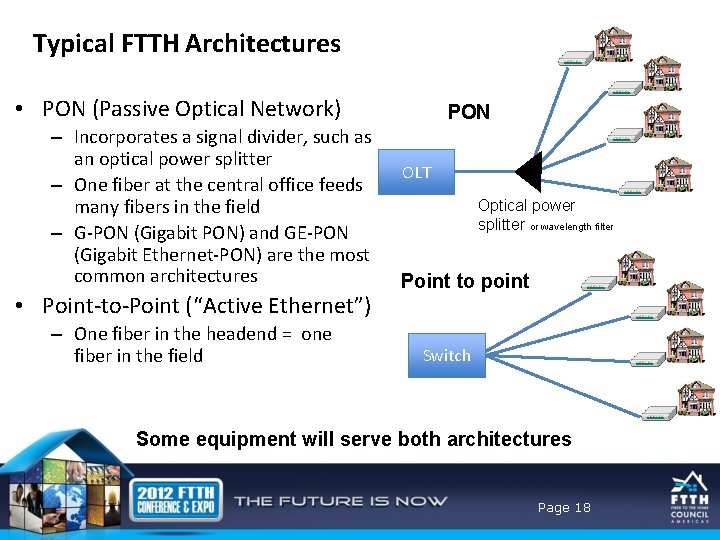
Typical FTTH Architectures • PON (Passive Optical Network) – Incorporates a signal divider, such as an optical power splitter – One fiber at the central office feeds many fibers in the field – G-PON (Gigabit PON) and GE-PON (Gigabit Ethernet-PON) are the most common architectures • Point-to-Point (“Active Ethernet”) – One fiber in the headend = one fiber in the field PON OLT Optical power splitter or wavelength filter Point to point Switch Some equipment will serve both architectures Page 18
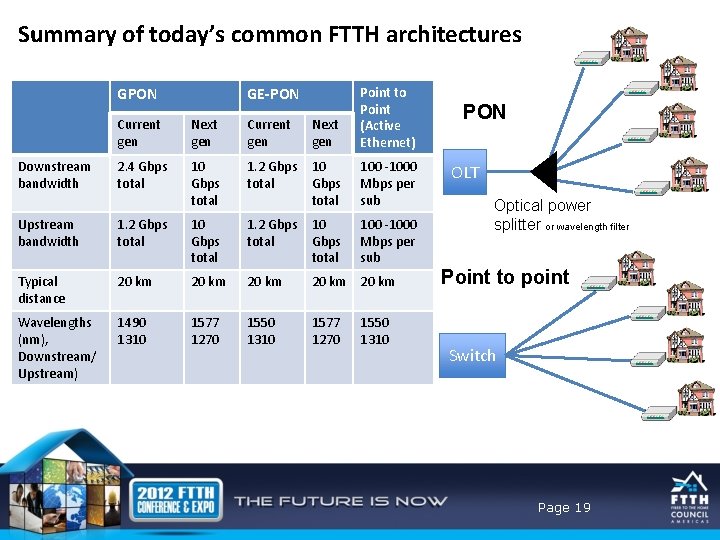
Summary of today’s common FTTH architectures GPON Downstream bandwidth GE-PON Current gen Next gen Point to Point (Active Ethernet) 2. 4 Gbps total 10 Gbps total 1. 2 Gbps total 100 -1000 Mbps per sub Upstream bandwidth 1. 2 Gbps total 10 Gbps total Typical distance 20 km 20 km Wavelengths (nm), Downstream/ Upstream) 1490 1310 1577 1270 1550 1310 PON OLT Optical power splitter or wavelength filter Point to point Switch Page 19
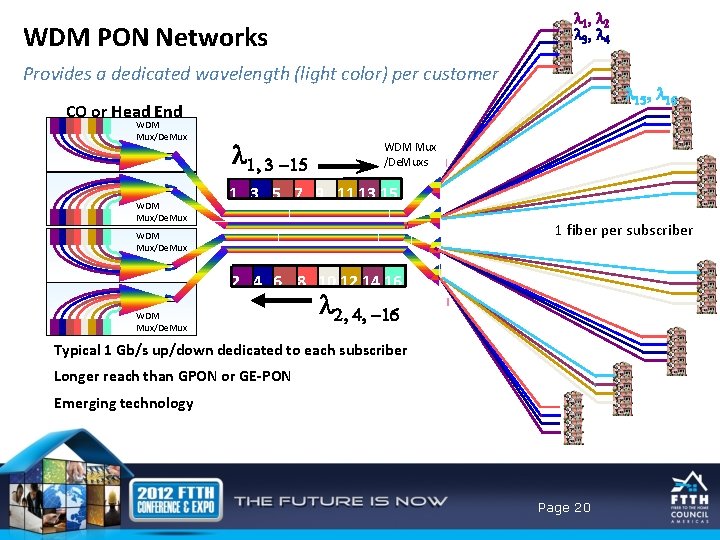
l 1, l 2 l 3, l 4 WDM PON Networks Provides a dedicated wavelength (light color) per customer l 15, l 16 CO or Head End WDM Mux/De. Mux l 1, 3 -15 WDM Mux /De. Muxs 1 3 5 7 9 11 13 15 1 fiber per subscriber WDM Mux/De. Mux 2 4 6 8 10 12 14 16 WDM Mux/De. Mux l 2, 4, -16 Typical 1 Gb/s up/down dedicated to each subscriber Longer reach than GPON or GE-PON Emerging technology Page 20
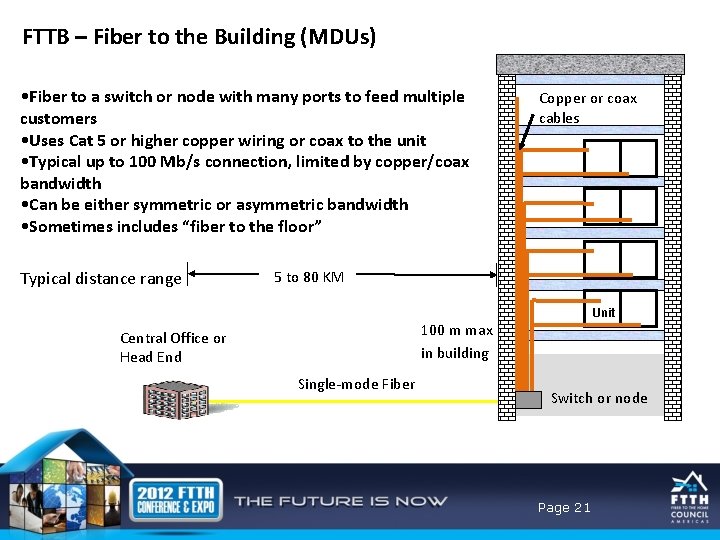
FTTB – Fiber to the Building (MDUs) • Fiber to a switch or node with many ports to feed multiple customers • Uses Cat 5 or higher copper wiring or coax to the unit • Typical up to 100 Mb/s connection, limited by copper/coax bandwidth • Can be either symmetric or asymmetric bandwidth • Sometimes includes “fiber to the floor” Typical distance range Copper or coax cables 5 to 80 KM Unit 100 m max in building Central Office or Head End Single-mode Fiber Switch or node Page 21
Agenda • • Drivers for FTTx Why fiber Fiber feeds everything Flavors of FTTX Nuts and bolts – the components Installation techniques Network design configurations Page 22
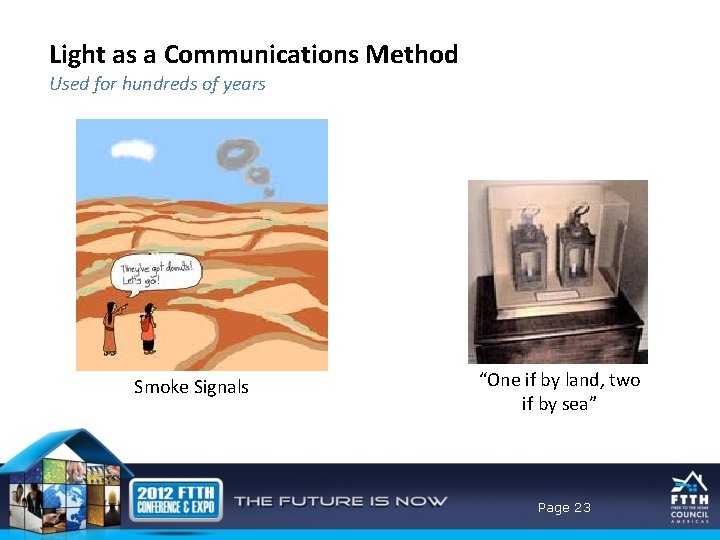
Light as a Communications Method Used for hundreds of years Smoke Signals “One if by land, two if by sea” Page 23
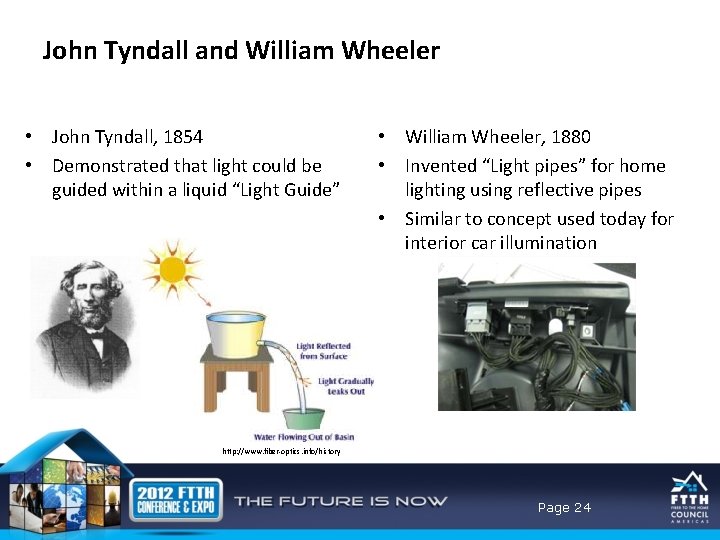
John Tyndall and William Wheeler • John Tyndall, 1854 • Demonstrated that light could be guided within a liquid “Light Guide” • William Wheeler, 1880 • Invented “Light pipes” for home lighting using reflective pipes • Similar to concept used today for interior car illumination http: //www. fiber-optics. info/history Page 24
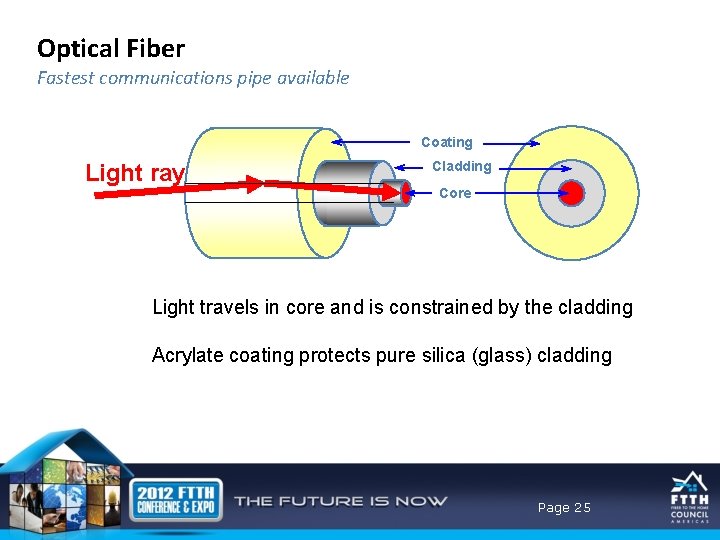
Optical Fiber Fastest communications pipe available Coating Light ray Cladding Core Light travels in core and is constrained by the cladding Acrylate coating protects pure silica (glass) cladding Page 25
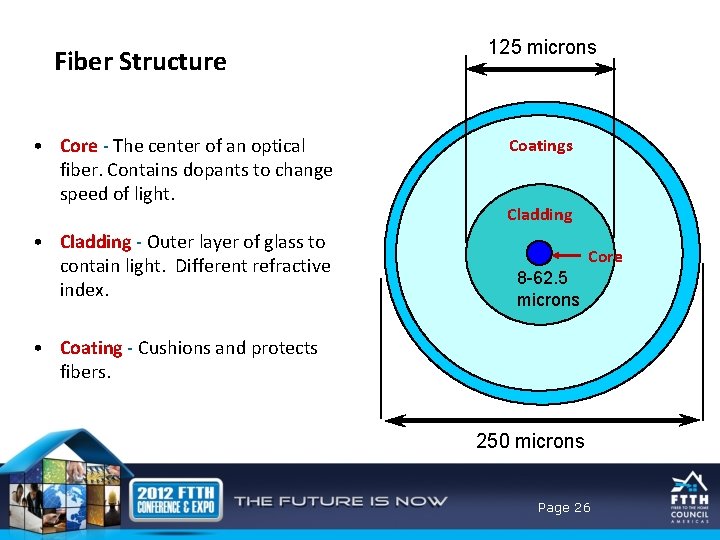
Fiber Structure • Core - The center of an optical fiber. Contains dopants to change speed of light. • Cladding - Outer layer of glass to contain light. Different refractive index. 125 microns Coatings Cladding vv vs Core 8 -62. 5 microns • Coating - Cushions and protects fibers. 250 microns Page 26
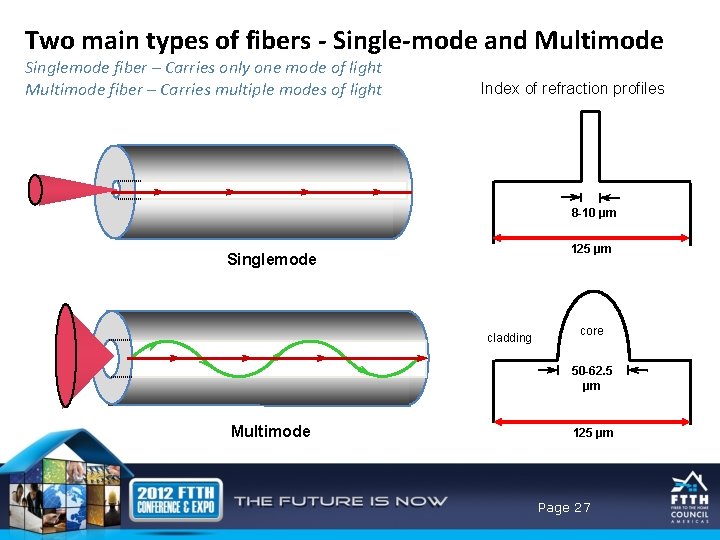
Two main types of fibers - Single-mode and Multimode Singlemode fiber – Carries only one mode of light Multimode fiber – Carries multiple modes of light Index of refraction profiles 8 -10 µm 125 µm Singlemode cladding core 50 -62. 5 µm Multimode 125 µm Page 27
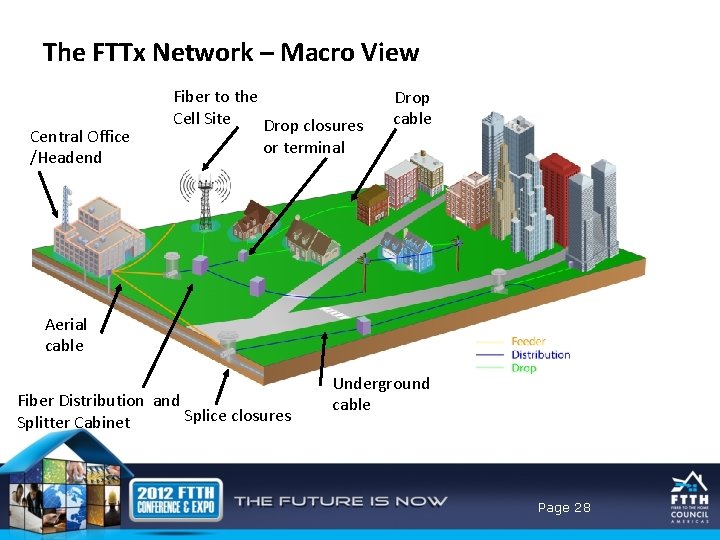
The FTTx Network – Macro View Central Office /Headend Fiber to the Cell Site Drop closures Drop cable or terminal High level picture of where things go Aerial cable Fiber Distribution and Splice closures Splitter Cabinet Underground cable Page 28
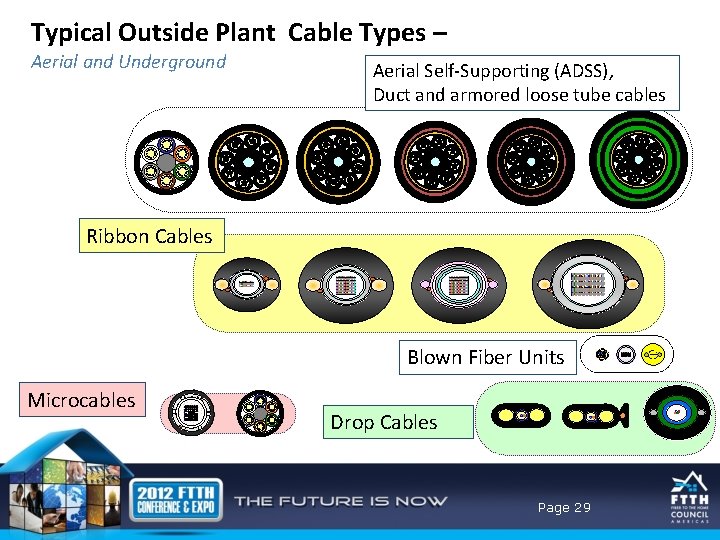
Typical Outside Plant Cable Types – Aerial and Underground Aerial Self-Supporting (ADSS), Duct and armored loose tube cables Ribbon Cables Blown Fiber Units Microcables Drop Cables Page 29
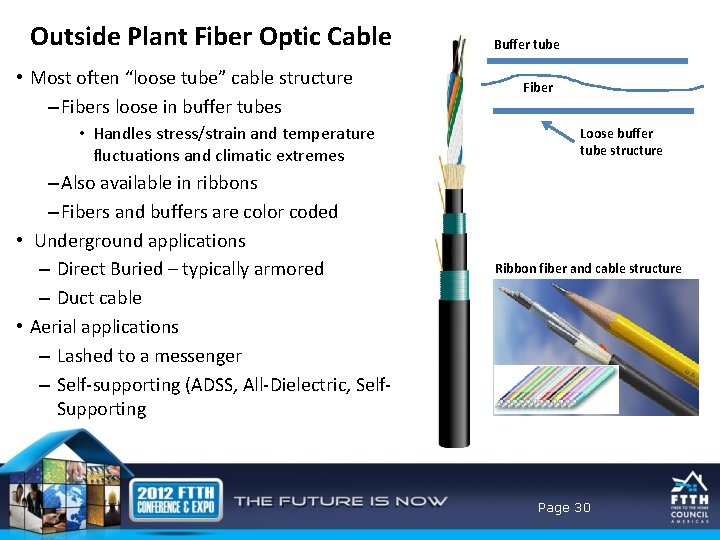
Outside Plant Fiber Optic Cable • Most often “loose tube” cable structure – Fibers loose in buffer tubes • Handles stress/strain and temperature fluctuations and climatic extremes – Also available in ribbons – Fibers and buffers are color coded • Underground applications – Direct Buried – typically armored – Duct cable • Aerial applications – Lashed to a messenger – Self-supporting (ADSS, All-Dielectric, Self. Supporting Buffer tube Fiber Loose buffer tube structure Ribbon fiber and cable structure Page 30
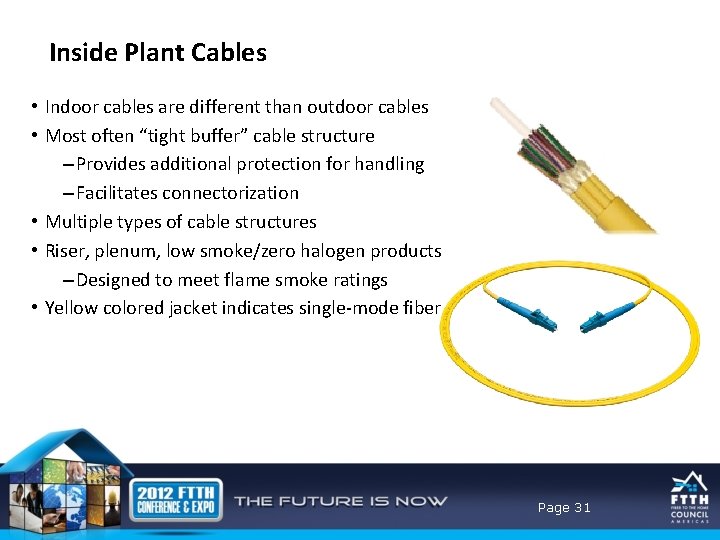
Inside Plant Cables • Indoor cables are different than outdoor cables • Most often “tight buffer” cable structure – Provides additional protection for handling – Facilitates connectorization • Multiple types of cable structures • Riser, plenum, low smoke/zero halogen products – Designed to meet flame smoke ratings • Yellow colored jacket indicates single-mode fiber Page 31
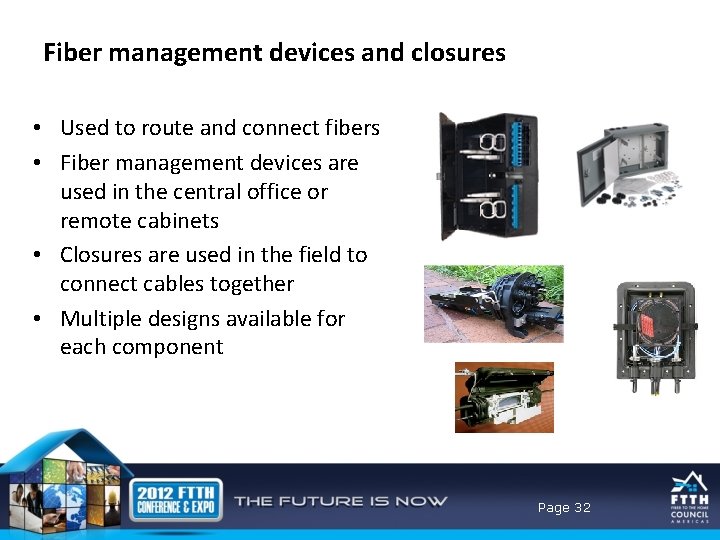
Fiber management devices and closures • Used to route and connect fibers • Fiber management devices are used in the central office or remote cabinets • Closures are used in the field to connect cables together • Multiple designs available for each component Page 32
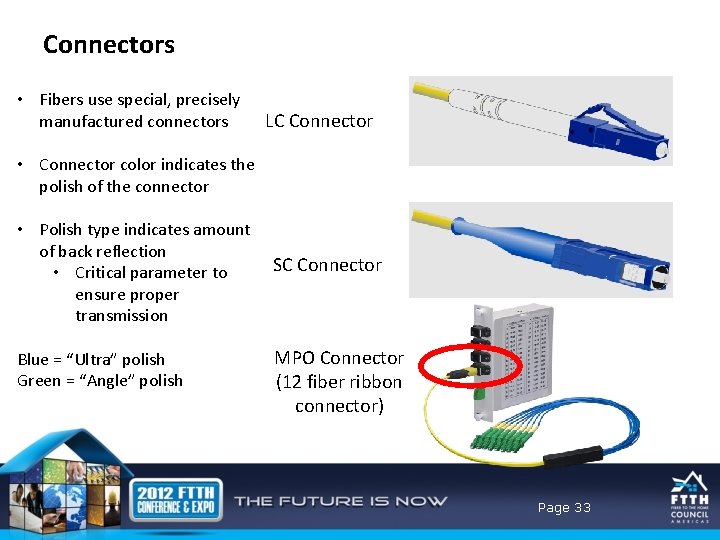
Connectors • Fibers use special, precisely manufactured connectors LC Connector • Connector color indicates the polish of the connector • Polish type indicates amount of back reflection • Critical parameter to ensure proper transmission Blue = “Ultra” polish Green = “Angle” polish SC Connector MPO Connector (12 fiber ribbon connector) Page 33
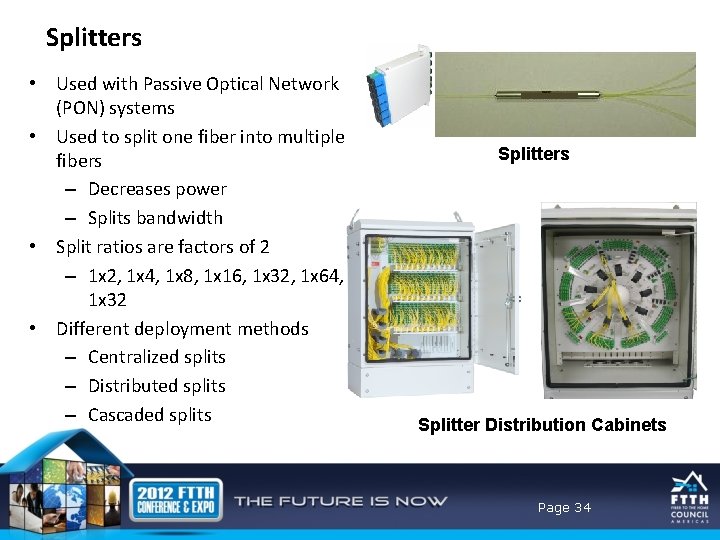
Splitters • Used with Passive Optical Network (PON) systems • Used to split one fiber into multiple fibers – Decreases power – Splits bandwidth • Split ratios are factors of 2 – 1 x 2, 1 x 4, 1 x 8, 1 x 16, 1 x 32, 1 x 64, 1 x 32 • Different deployment methods – Centralized splits – Distributed splits – Cascaded splits Splitter Distribution Cabinets Page 34
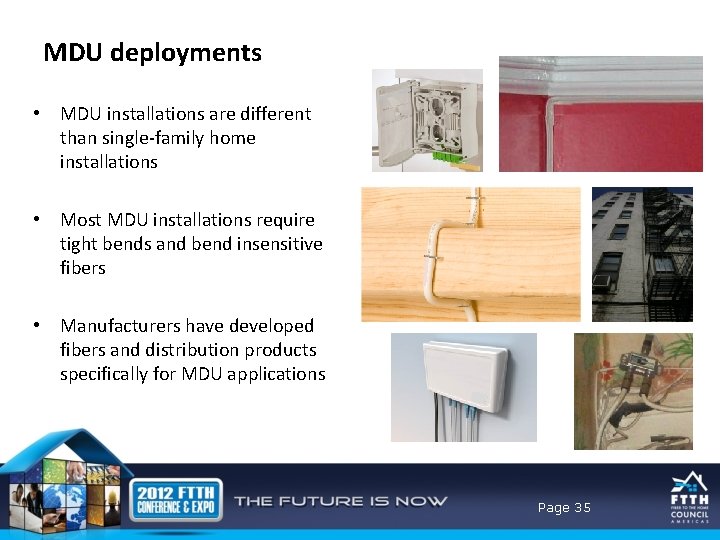
MDU deployments • MDU installations are different than single-family home installations • Most MDU installations require tight bends and bend insensitive fibers • Manufacturers have developed fibers and distribution products specifically for MDU applications Page 35
Agenda • • Drivers for FTTx Why fiber Fiber feeds everything Flavors of FTTX Nuts and bolts – the components Installation techniques Network design configurations Page 36
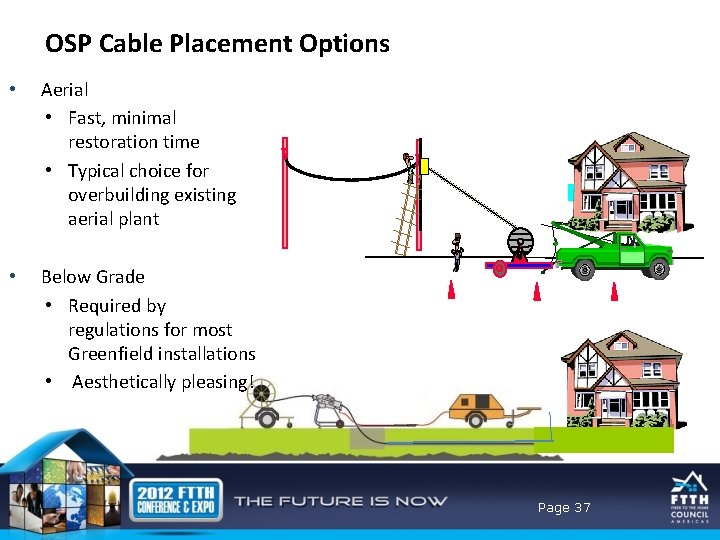
OSP Cable Placement Options • Aerial • Fast, minimal restoration time • Typical choice for overbuilding existing aerial plant • Below Grade • Required by regulations for most Greenfield installations • Aesthetically pleasing! Page 37
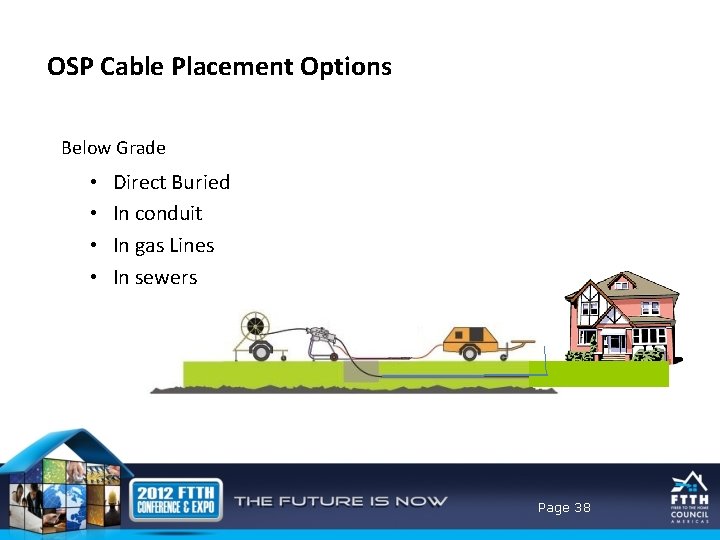
OSP Cable Placement Options Below Grade • • Direct Buried In conduit In gas Lines In sewers Page 38
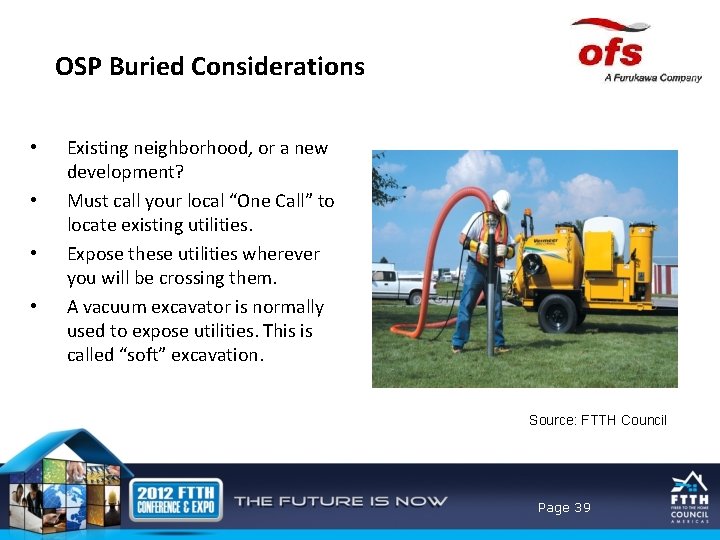
OSP Buried Considerations • • Existing neighborhood, or a new development? Must call your local “One Call” to locate existing utilities. Expose these utilities wherever you will be crossing them. A vacuum excavator is normally used to expose utilities. This is called “soft” excavation. Source: FTTH Council Page 39
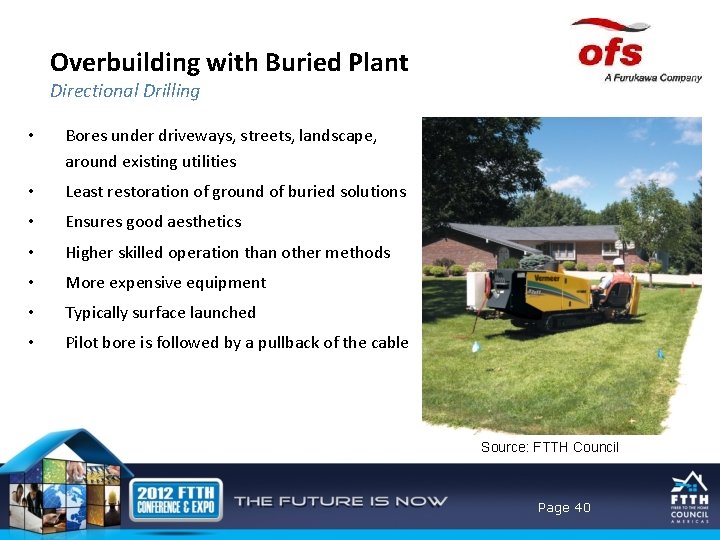
Overbuilding with Buried Plant Directional Drilling • Bores under driveways, streets, landscape, around existing utilities • Least restoration of ground of buried solutions • Ensures good aesthetics • Higher skilled operation than other methods • More expensive equipment • Typically surface launched • Pilot bore is followed by a pullback of the cable Source: FTTH Council Page 40
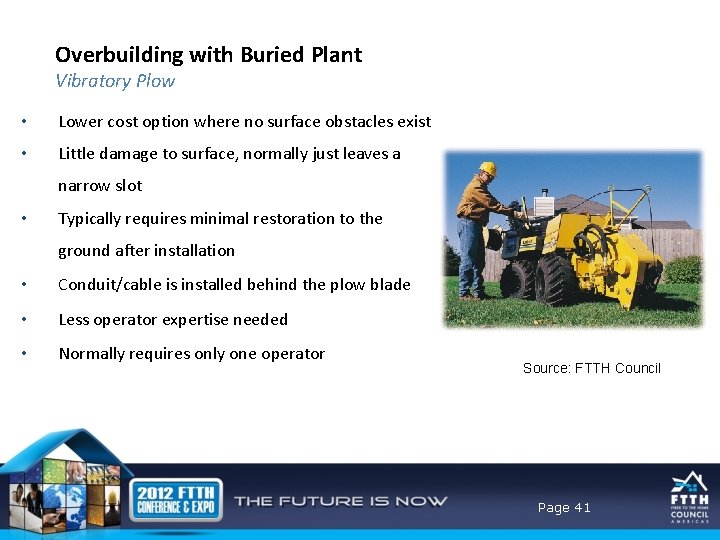
Overbuilding with Buried Plant Vibratory Plow • Lower cost option where no surface obstacles exist • Little damage to surface, normally just leaves a narrow slot • Typically requires minimal restoration to the ground after installation • Conduit/cable is installed behind the plow blade • Less operator expertise needed • Normally requires only one operator Source: FTTH Council Page 41
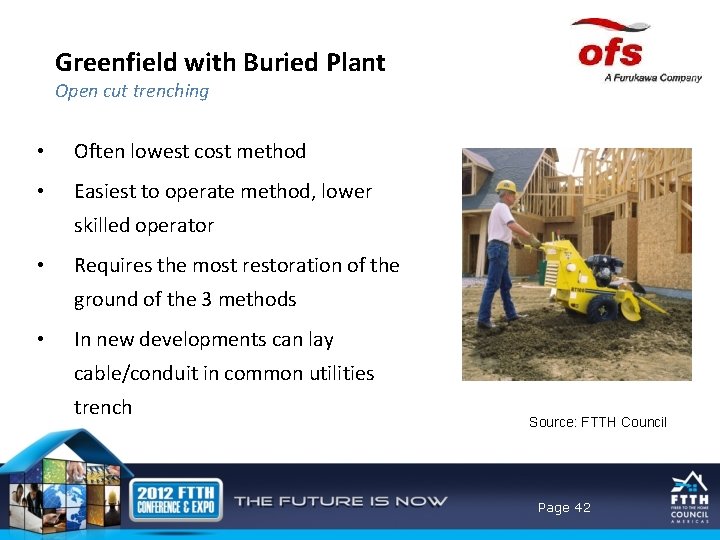
Greenfield with Buried Plant Open cut trenching • Often lowest cost method • Easiest to operate method, lower skilled operator • Requires the most restoration of the ground of the 3 methods • In new developments can lay cable/conduit in common utilities trench Source: FTTH Council Page 42
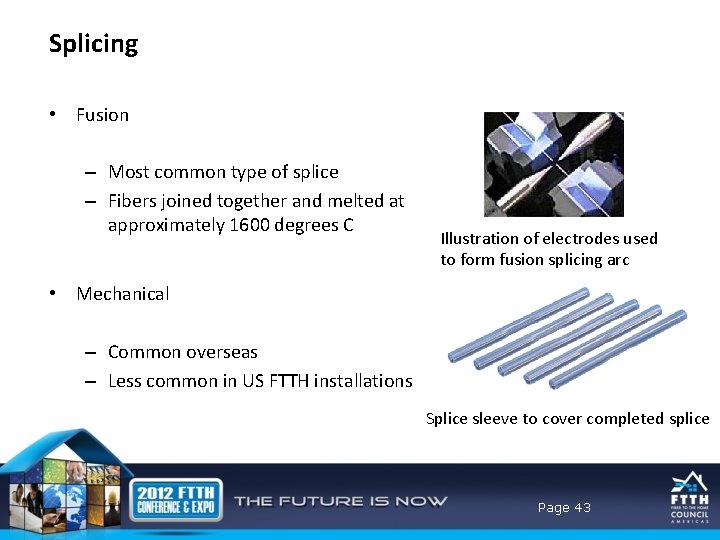
Splicing • Fusion – Most common type of splice – Fibers joined together and melted at approximately 1600 degrees C Illustration of electrodes used to form fusion splicing arc • Mechanical – Common overseas – Less common in US FTTH installations Splice sleeve to cover completed splice Page 43
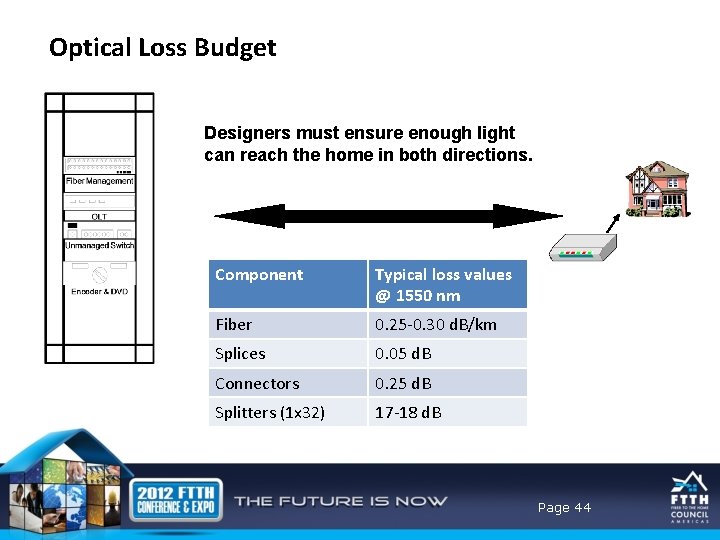
Optical Loss Budget Designers must ensure enough light can reach the home in both directions. Component Typical loss values @ 1550 nm Fiber 0. 25 -0. 30 d. B/km Splices 0. 05 d. B Connectors 0. 25 d. B Splitters (1 x 32) 17 -18 d. B Page 44
Agenda • • Drivers for FTTx Why fiber Fiber feeds everything Flavors of FTTX Nuts and bolts – the components Installation techniques Network design configurations Page 45
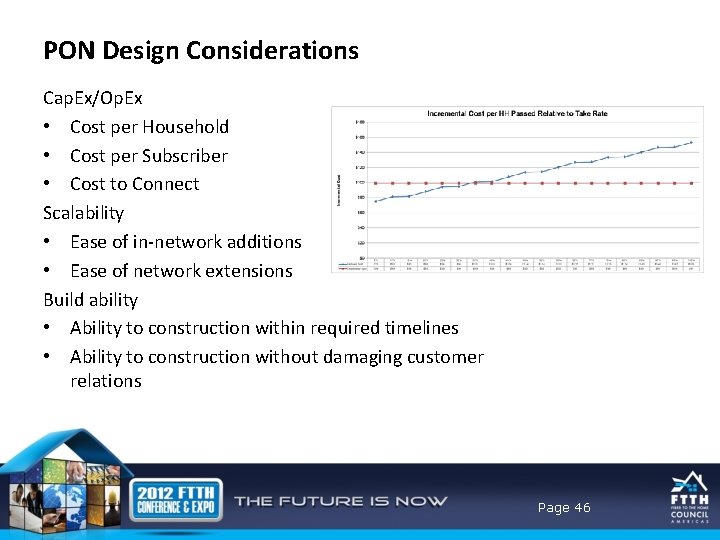
PON Design Considerations Cap. Ex/Op. Ex • Cost per Household • Cost per Subscriber • Cost to Connect Scalability • Ease of in-network additions • Ease of network extensions Build ability • Ability to construction within required timelines • Ability to construction without damaging customer relations Page 46
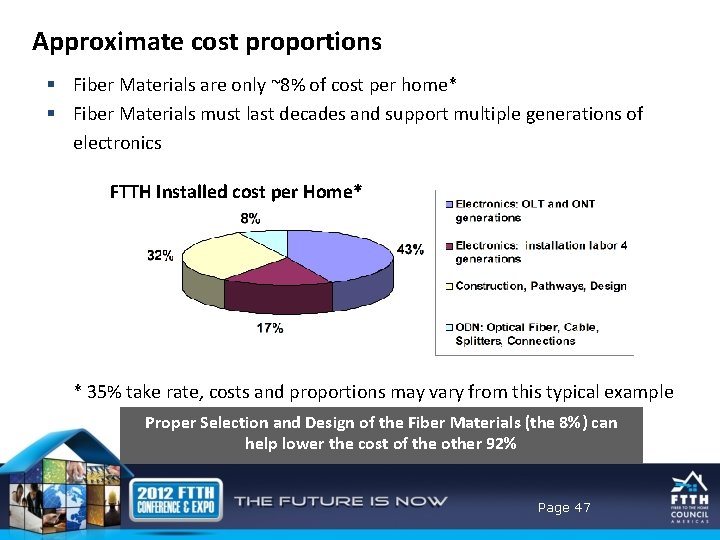
Approximate cost proportions § Fiber Materials are only ~8% of cost per home* § Fiber Materials must last decades and support multiple generations of electronics FTTH Installed cost per Home* * 35% take rate, costs and proportions may vary from this typical example Proper Selection and Design of the Fiber Materials (the 8%) can help lower the cost of the other 92% Page 47
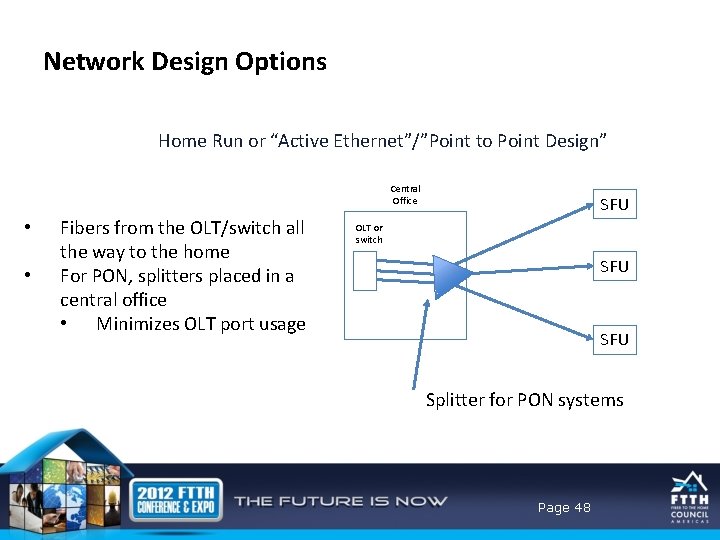
Network Design Options Home Run or “Active Ethernet”/”Point to Point Design” Central Office • • Fibers from the OLT/switch all the way to the home For PON, splitters placed in a central office • Minimizes OLT port usage SFU OLT or switch SFU Splitter for PON systems Page 48
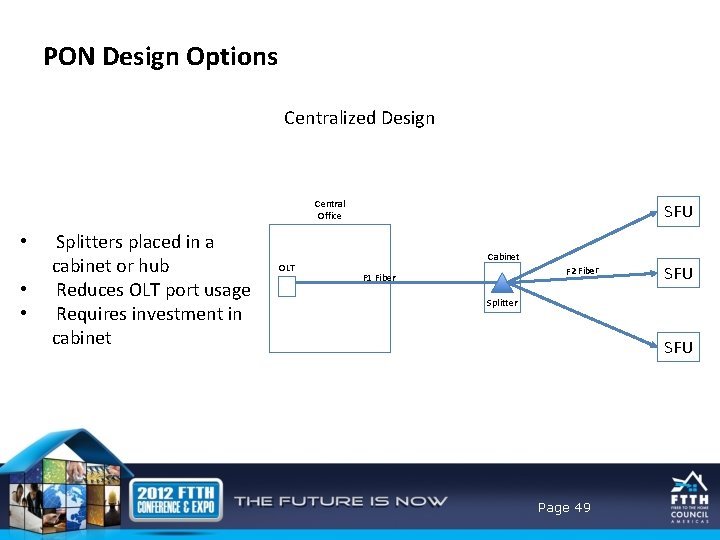
PON Design Options Centralized Design Central Office • • • Splitters placed in a cabinet or hub Reduces OLT port usage Requires investment in cabinet OLT SFU Cabinet F 2 Fiber F 1 Fiber SFU Splitter SFU Page 49
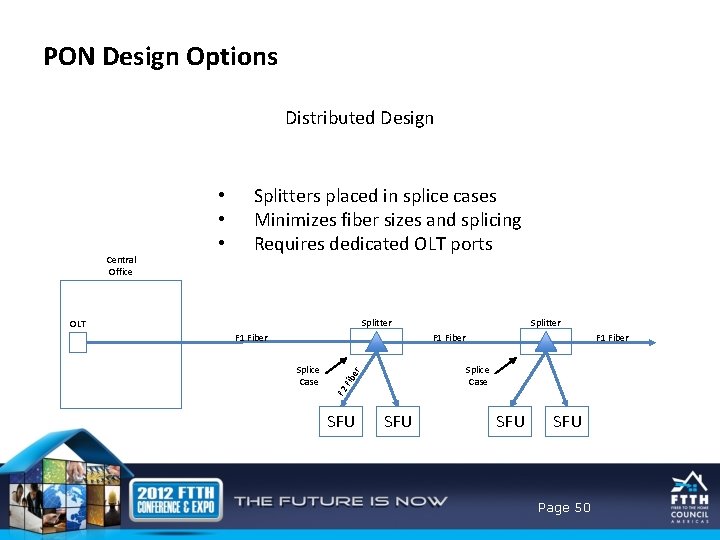
PON Design Options Distributed Design Central Office • • • Splitters placed in splice cases Minimizes fiber sizes and splicing Requires dedicated OLT ports Splitter OLT F 1 Fiber Fib e r Splice Case F 2 Splice Case SFU SFU Page 50
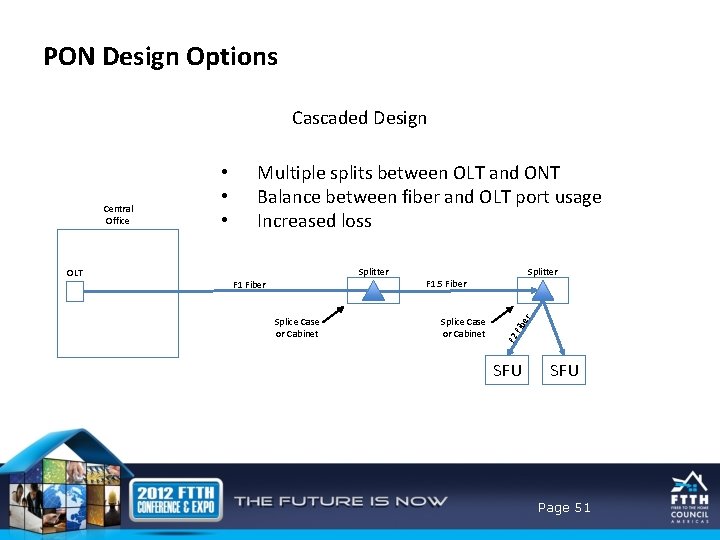
PON Design Options Cascaded Design Multiple splits between OLT and ONT Balance between fiber and OLT port usage Increased loss Splice Case or Cabinet r F 1 Fiber Splitter F 1. 5 Fiber Fib e Splitter OLT F 2 Central Office • • • SFU Page 51
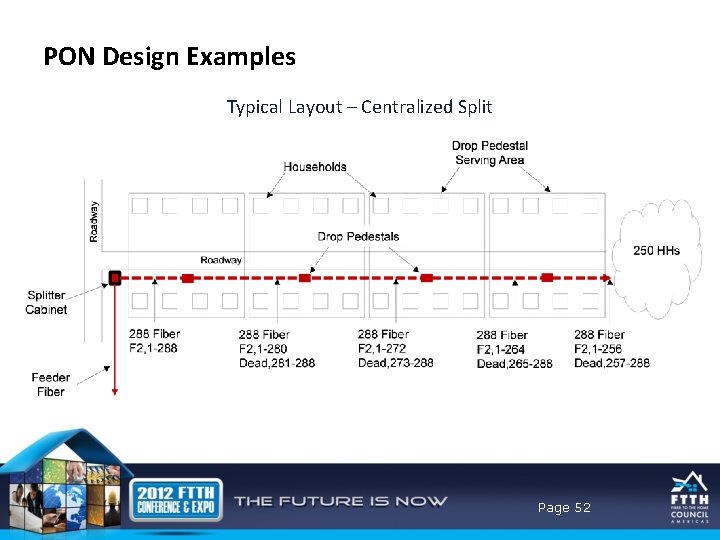
PON Design Examples Typical Layout – Centralized Split Page 52
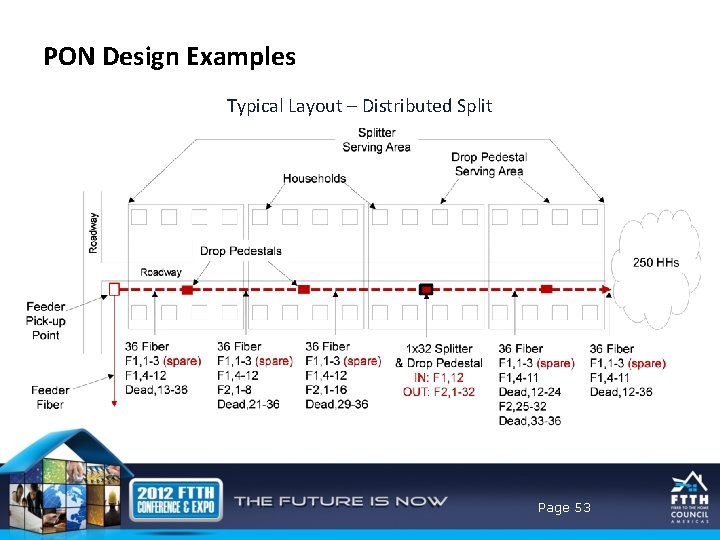
PON Design Examples Typical Layout – Distributed Split Page 53
PON Design Considerations 1. OLT Cost per Port As the cost per port drops, designs that require a higher utilization of ports but less fiber and splicing become more cost effective – 2. Take Rates As take rates increase, the impact of dedicating OLT ports to a greater number of splitters is reduced – 3. Assessing Cost Impacts When conducting a cost analysis to determine the impact of different design approaches, it is helpful to focus only on cost that vary between the designs – • Eliminate costs that are common to the designs being assessed 4. Cost Assessment Focus Cost effectiveness can be measured in multiple ways: – • • Cost per household/living unit Cost per subscriber Page 54
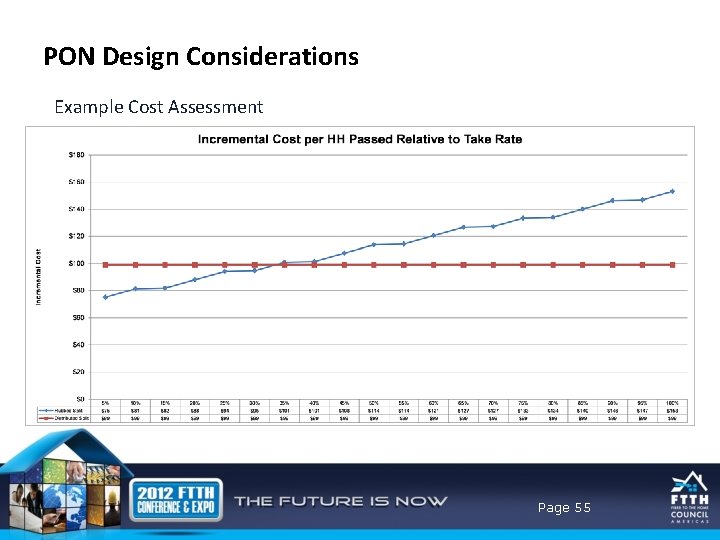
PON Design Considerations Example Cost Assessment Page 55
PON Design Considerations Example Cost Assessment Page 56
MDU Design Approaches 1. MDU ONT – ONT placed at existing demarcation point – Utilize existing wiring (coax, cat 3/5) to the living units 2. Single Family ONT – – Drop placed to each living unit ONT mounted within the living unit 3. Desktop ONT – Drop placed within living units (along molding, etc. ) Page 57
MDU Design Pros and Cons 1. MDU ONT – – Avoids challenges and costs associated with retrofitting buildings Dependent on type and condition of existing wiring 2. Single Family ONT – – Eliminates usage of existing wiring (possibly substandard) Cost and labor intensive 3. Desktop ONT – – Minimal space requirements Typically requires drop to be routed through the living units (aesthetics) Page 58
Summary • Video, internet, and new applications are driving bandwidth increases that require fiber • Fiber is the best method for providing low cost, high bandwidth services – – Lowest cost/bit Lowest OPEX More reliable than metallic technologies Lower attenuation, weight • Fiber architectures include various versions of PON and Point to Point • Multiple ways of deploying FTTH – Different design options for outside plant can significant impact costs and network functionality Page 59
- Slides: 59