
PBA Repair Guide GTS 5230 Samsung Electronics 130
![PBA Repair Guide [GT-S 5230] Samsung Electronics 1/30](https://slidetodoc.com/presentation_image/bf2c1a2dbf4ea66120fab2c1c0be8e05/image-1.jpg "PBA Repair Guide [GT-S 5230] Samsung Electronics 1/30")
PBA Repair Guide [GT-S 5230] Samsung Electronics 1/30
Contents 1. PBA Diagram 2. Trouble Shooting 2 -1. No Power 2 -2. Lockup / Reset 2 -3. SIM Card Failed 2 -4. Camera Failed 2 -5. No Vibration 2 -6. Bluetooth Searching Failed 2 -7. No Charging 3. Appendix 3 -1. How to check the voltage and frequency 2/30
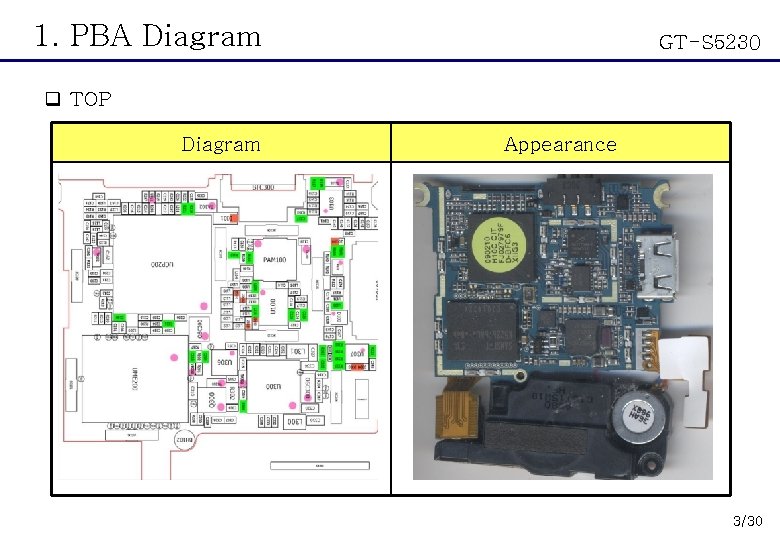
1. PBA Diagram GT-S 5230 q TOP Diagram Appearance 3/30
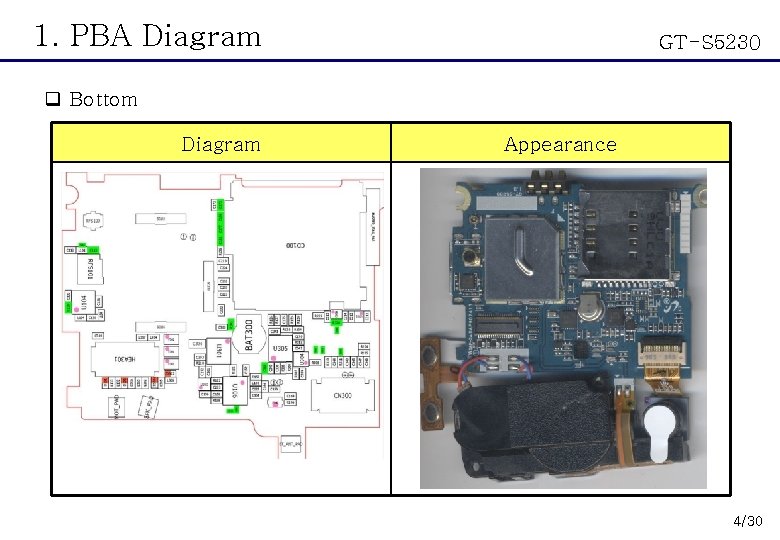
1. PBA Diagram GT-S 5230 q Bottom Diagram Appearance 4/30
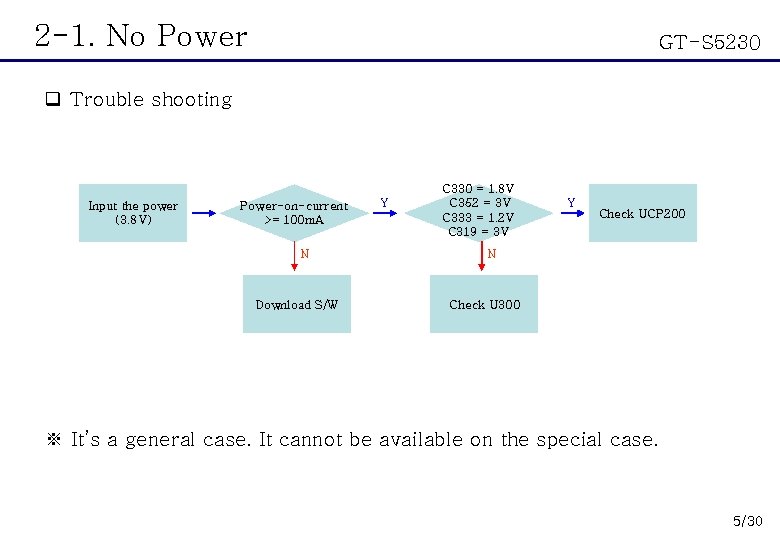
2 -1. No Power GT-S 5230 q Trouble shooting Input the power (3. 8 V) Power-on-current >= 100 m. A N Download S/W Y C 330 = 1. 8 V C 352 = 3 V C 333 = 1. 2 V C 319 = 3 V Y Check UCP 200 N Check U 300 ※ It’s a general case. It cannot be available on the special case. 5/30
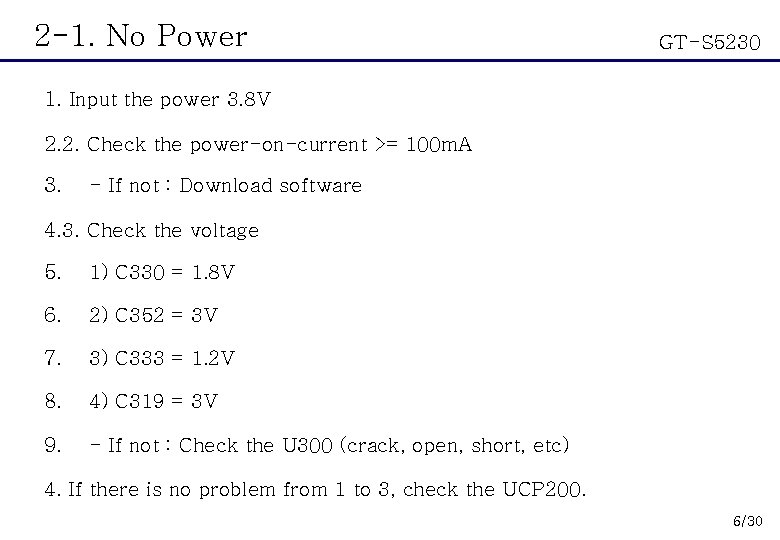
2 -1. No Power GT-S 5230 1. Input the power 3. 8 V 2. 2. Check the power-on-current >= 100 m. A 3. - If not : Download software 4. 3. Check the voltage 5. 1) C 330 = 1. 8 V 6. 2) C 352 = 3 V 7. 3) C 333 = 1. 2 V 8. 4) C 319 = 3 V 9. - If not : Check the U 300 (crack, open, short, etc) 4. If there is no problem from 1 to 3, check the UCP 200. 6/30
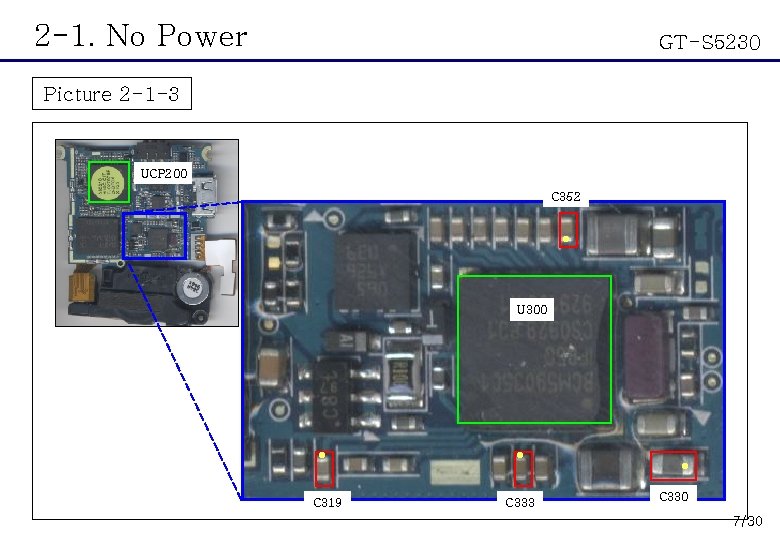
2 -1. No Power GT-S 5230 Picture 2 -1 -3 UCP 200 C 352 ● U 300 ● ● ● C 319 C 333 C 330 7/30
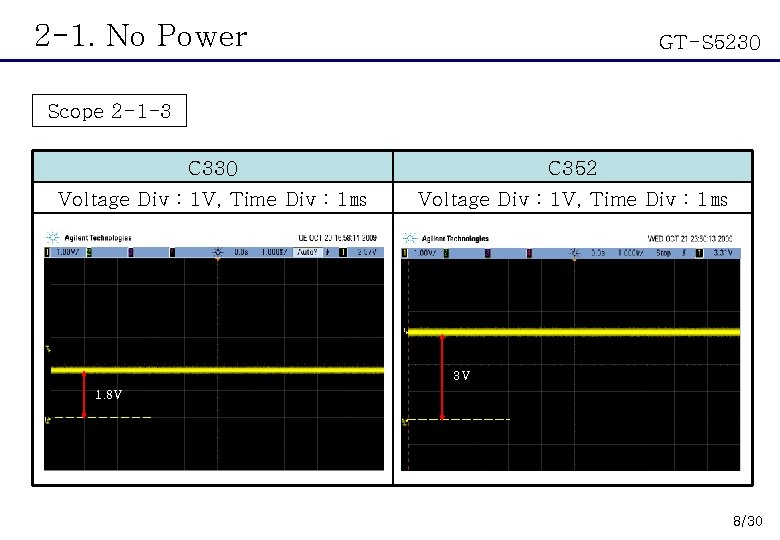
2 -1. No Power GT-S 5230 Scope 2 -1 -3 C 330 C 352 Voltage Div : 1 V, Time Div : 1㎳ 3 V 1. 8 V 8/30
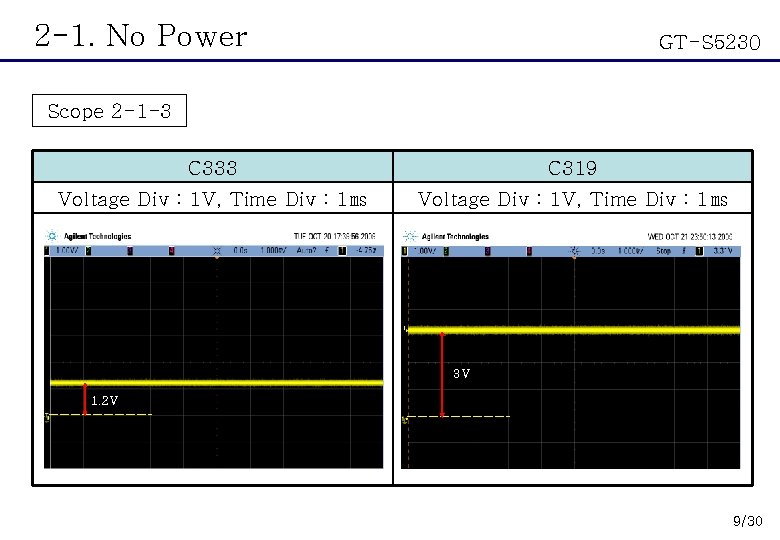
2 -1. No Power GT-S 5230 Scope 2 -1 -3 C 333 C 319 Voltage Div : 1 V, Time Div : 1㎳ 3 V 1. 2 V 9/30
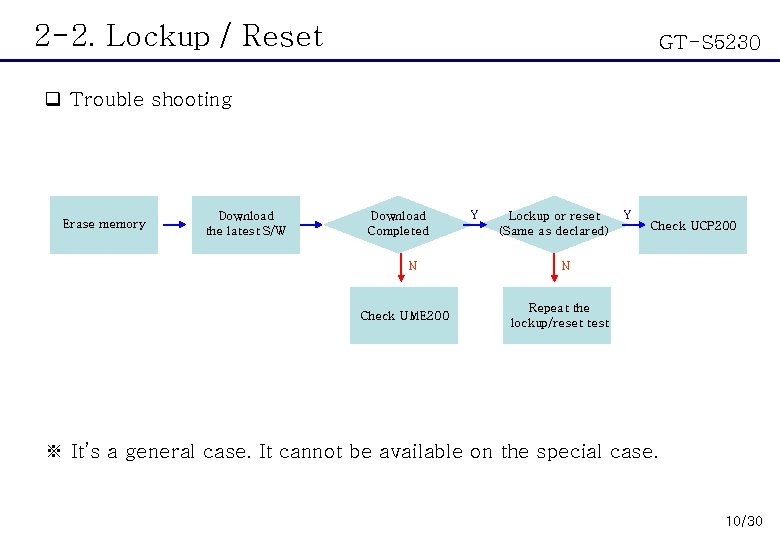
2 -2. Lockup / Reset GT-S 5230 q Trouble shooting Erase memory Download the latest S/W Download Completed N Check UME 200 Y Lockup or reset (Same as declared) Y Check UCP 200 N Repeat the lockup/reset test ※ It’s a general case. It cannot be available on the special case. 10/30
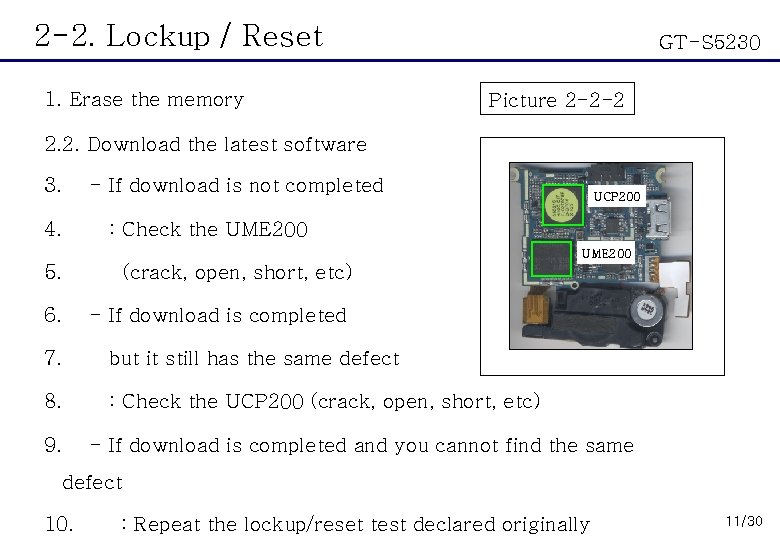
2 -2. Lockup / Reset 1. Erase the memory GT-S 5230 Picture 2 -2 -2 2. 2. Download the latest software 3. 4. - If download is not completed UCP 200 : Check the UME 200 5. (crack, open, short, etc) 6. - If download is completed 7. but it still has the same defect 8. : Check the UCP 200 (crack, open, short, etc) 9. - If download is completed and you cannot find the same defect 10. : Repeat the lockup/reset test declared originally 11/30
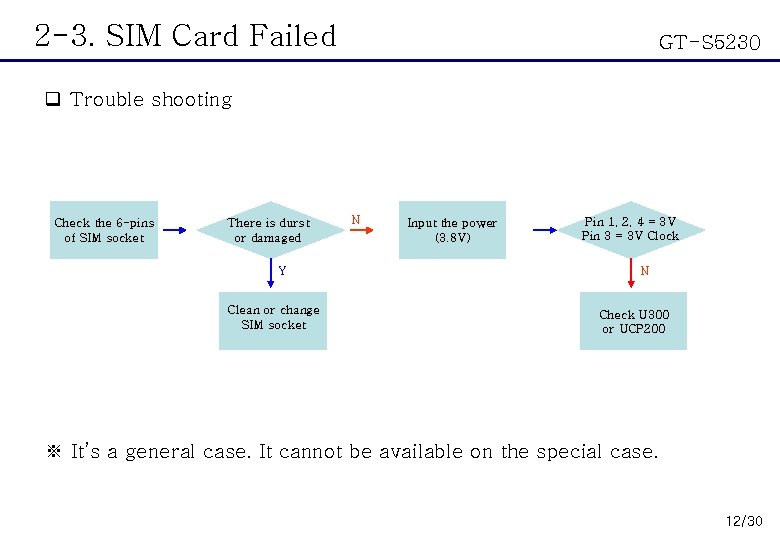
2 -3. SIM Card Failed GT-S 5230 q Trouble shooting Check the 6 -pins of SIM socket There is durst or damaged Y Clean or change SIM socket N Input the power (3. 8 V) Pin 1, 2, 4 = 3 V Pin 3 = 3 V Clock N Check U 300 or UCP 200 ※ It’s a general case. It cannot be available on the special case. 12/30
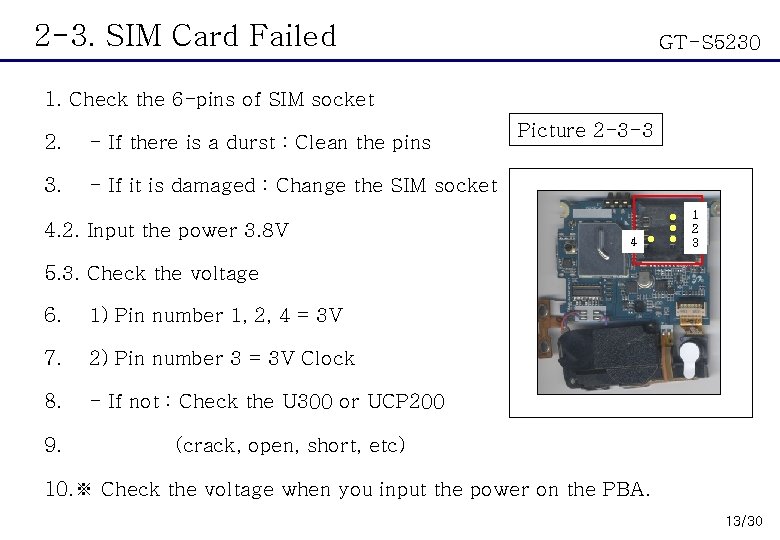
2 -3. SIM Card Failed GT-S 5230 1. Check the 6 -pins of SIM socket 2. - If there is a durst : Clean the pins 3. - If it is damaged : Change the SIM socket 4. 2. Input the power 3. 8 V Picture 2 -3 -3 4 ● ● 1 2 3 5. 3. Check the voltage 6. 1) Pin number 1, 2, 4 = 3 V 7. 2) Pin number 3 = 3 V Clock 8. - If not : Check the U 300 or UCP 200 9. (crack, open, short, etc) 10. ※ Check the voltage when you input the power on the PBA. 13/30
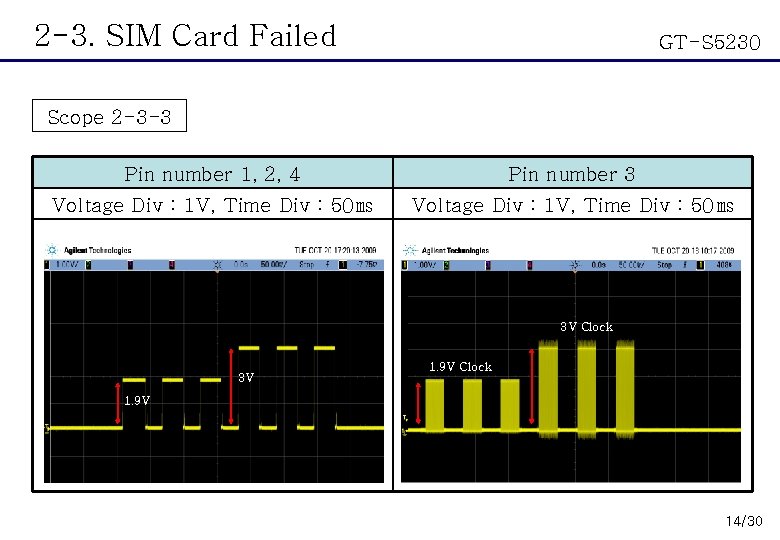
2 -3. SIM Card Failed GT-S 5230 Scope 2 -3 -3 Pin number 1, 2, 4 Pin number 3 Voltage Div : 1 V, Time Div : 50㎳ 3 V Clock 3 V 1. 9 V Clock 1. 9 V 14/30
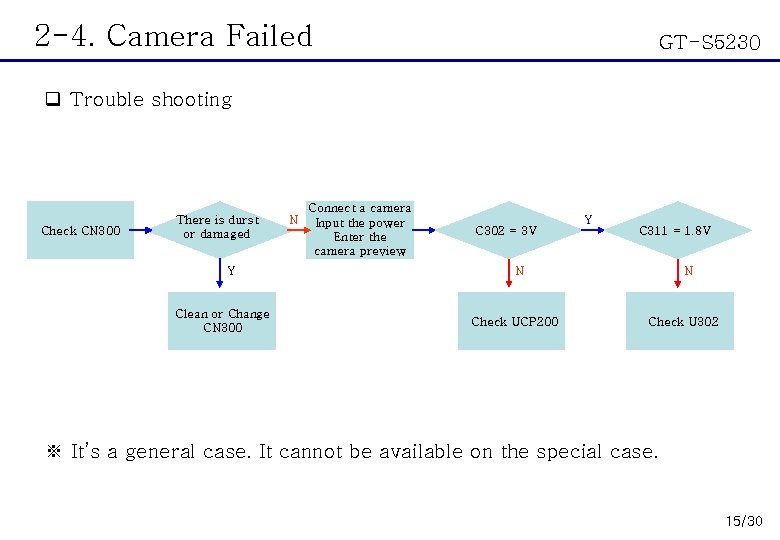
2 -4. Camera Failed GT-S 5230 q Trouble shooting Check CN 300 There is durst or damaged Y Clean or Change CN 300 N Connect a camera Input the power Enter the camera preview C 302 = 3 V Y C 311 = 1. 8 V N Check UCP 200 N Check U 302 ※ It’s a general case. It cannot be available on the special case. 15/30
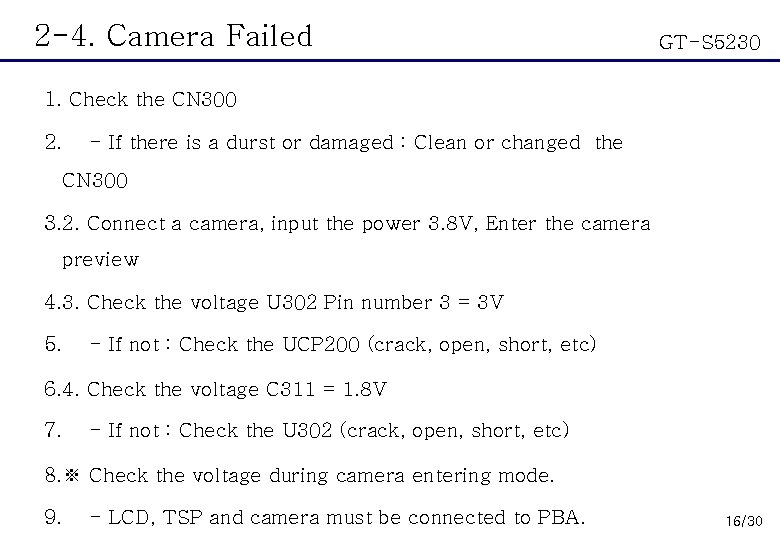
2 -4. Camera Failed GT-S 5230 1. Check the CN 300 2. - If there is a durst or damaged : Clean or changed the CN 300 3. 2. Connect a camera, input the power 3. 8 V, Enter the camera preview 4. 3. Check the voltage U 302 Pin number 3 = 3 V 5. - If not : Check the UCP 200 (crack, open, short, etc) 6. 4. Check the voltage C 311 = 1. 8 V 7. - If not : Check the U 302 (crack, open, short, etc) 8. ※ Check the voltage during camera entering mode. 9. - LCD, TSP and camera must be connected to PBA. 16/30
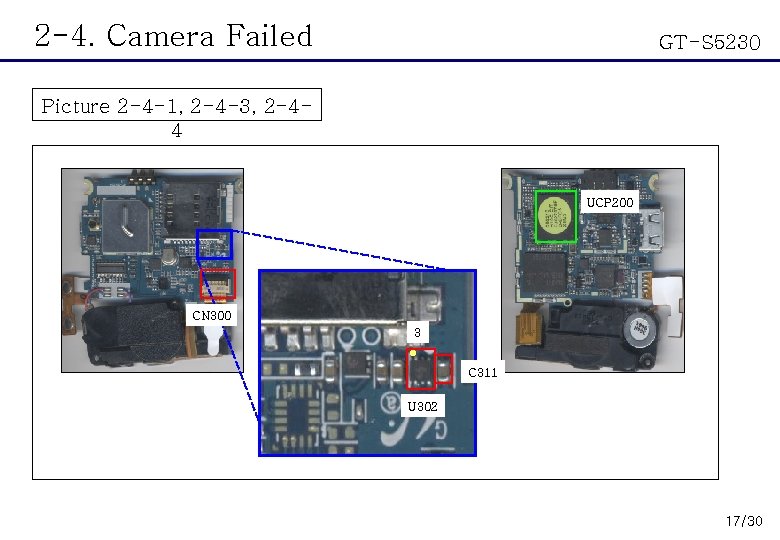
2 -4. Camera Failed GT-S 5230 Picture 2 -4 -1, 2 -4 -3, 2 -44 UCP 200 CN 300 3 ● C 311 U 302 17/30
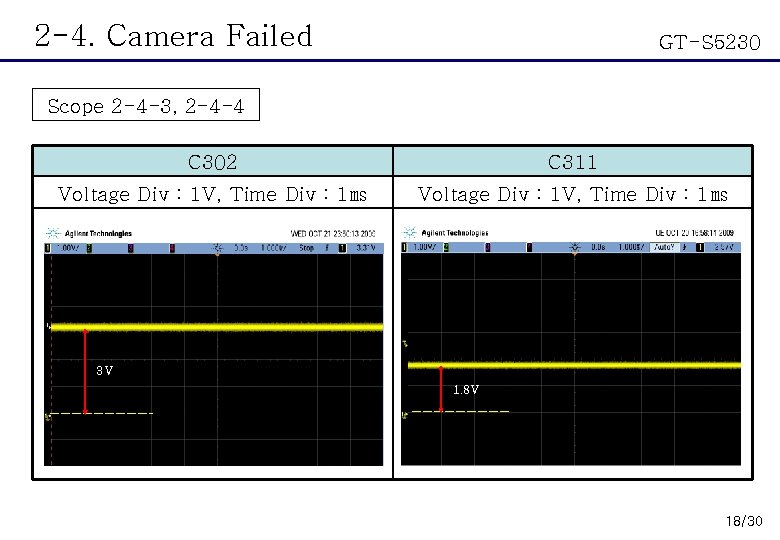
2 -4. Camera Failed GT-S 5230 Scope 2 -4 -3, 2 -4 -4 C 302 C 311 Voltage Div : 1 V, Time Div : 1㎳ 3 V 1. 8 V 18/30
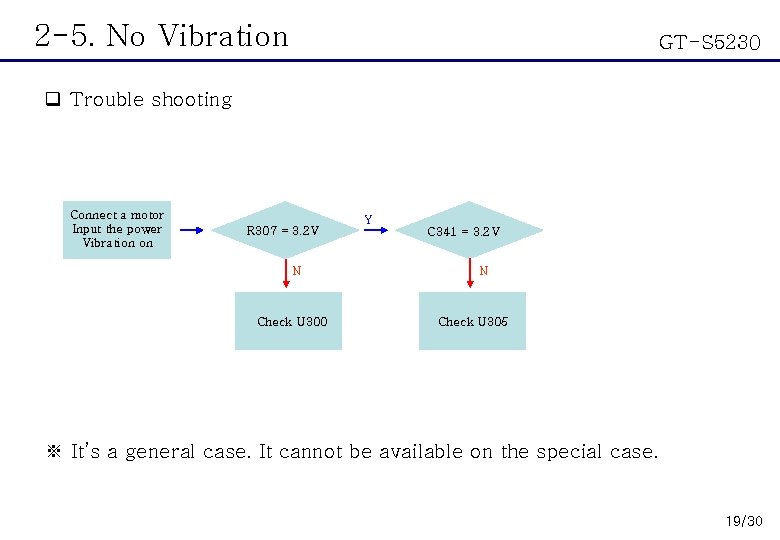
2 -5. No Vibration GT-S 5230 q Trouble shooting Connect a motor Input the power Vibration on R 307 = 3. 2 V N Check U 300 Y C 341 = 3. 2 V N Check U 305 ※ It’s a general case. It cannot be available on the special case. 19/30
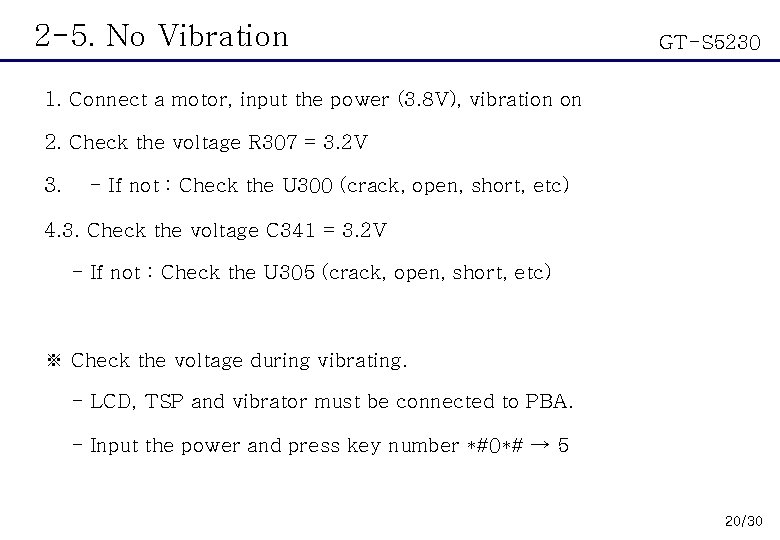
2 -5. No Vibration GT-S 5230 1. Connect a motor, input the power (3. 8 V), vibration on 2. Check the voltage R 307 = 3. 2 V 3. - If not : Check the U 300 (crack, open, short, etc) 4. 3. Check the voltage C 341 = 3. 2 V - If not : Check the U 305 (crack, open, short, etc) ※ Check the voltage during vibrating. - LCD, TSP and vibrator must be connected to PBA. - Input the power and press key number *#0*# → 5 20/30
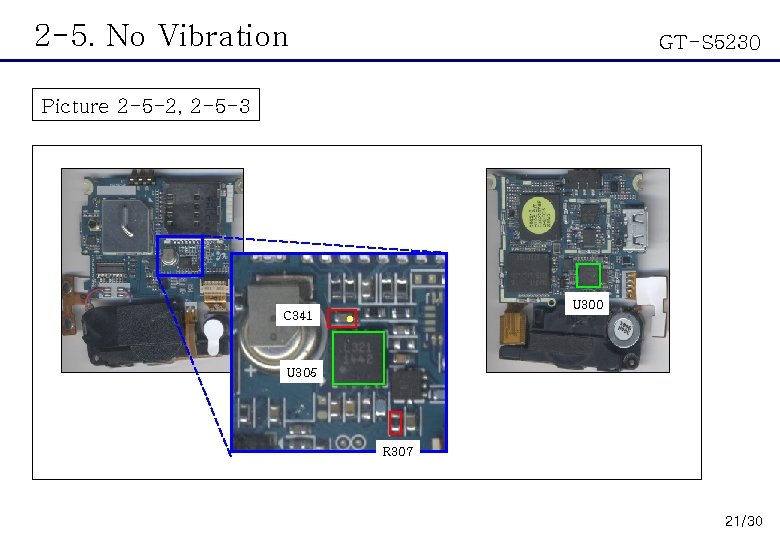
2 -5. No Vibration GT-S 5230 Picture 2 -5 -2, 2 -5 -3 C 341 U 300 ● U 305 R 307 21/30
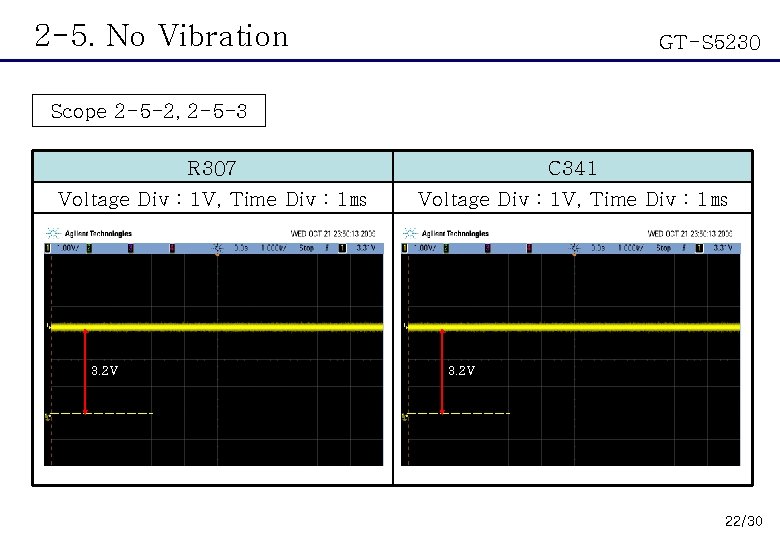
2 -5. No Vibration GT-S 5230 Scope 2 -5 -2, 2 -5 -3 R 307 C 341 Voltage Div : 1 V, Time Div : 1㎳ 3. 2 V 22/30
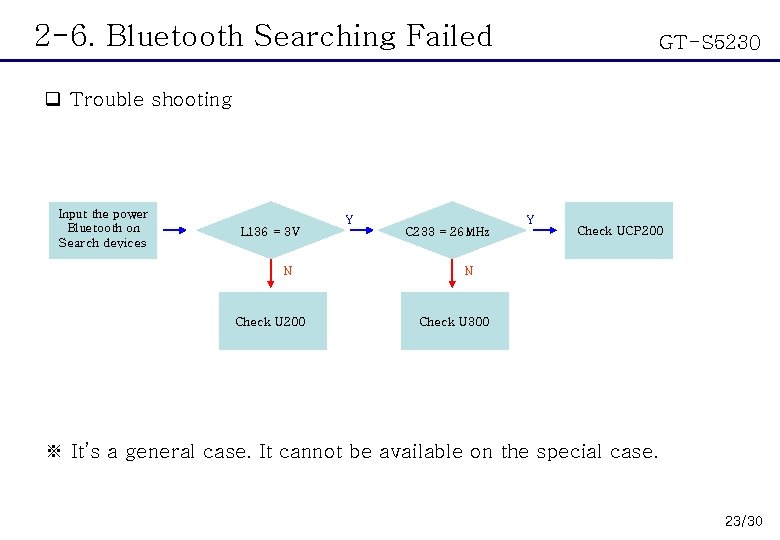
2 -6. Bluetooth Searching Failed GT-S 5230 q Trouble shooting Input the power Bluetooth on Search devices Y L 136 = 3 V N Check U 200 Y C 233 = 26 MHz Check UCP 200 N Check U 300 ※ It’s a general case. It cannot be available on the special case. 23/30
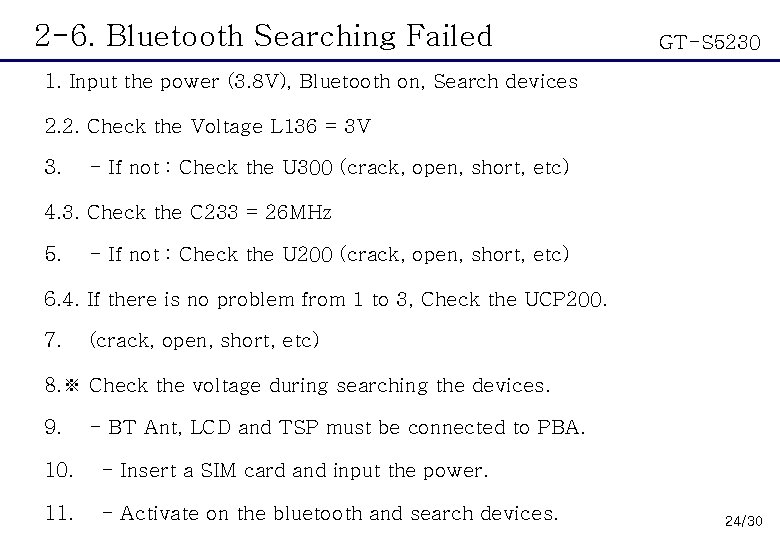
2 -6. Bluetooth Searching Failed GT-S 5230 1. Input the power (3. 8 V), Bluetooth on, Search devices 2. 2. Check the Voltage L 136 = 3 V 3. - If not : Check the U 300 (crack, open, short, etc) 4. 3. Check the C 233 = 26 MHz 5. - If not : Check the U 200 (crack, open, short, etc) 6. 4. If there is no problem from 1 to 3, Check the UCP 200. 7. (crack, open, short, etc) 8. ※ Check the voltage during searching the devices. 9. - BT Ant, LCD and TSP must be connected to PBA. 10. - Insert a SIM card and input the power. 11. - Activate on the bluetooth and search devices. 24/30
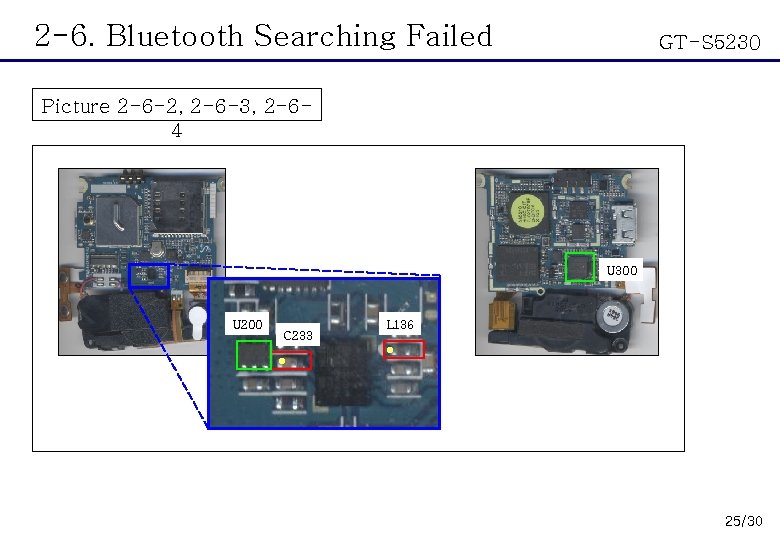
2 -6. Bluetooth Searching Failed GT-S 5230 Picture 2 -6 -2, 2 -6 -3, 2 -64 U 300 U 200 C 233 L 136 ● ● 25/30
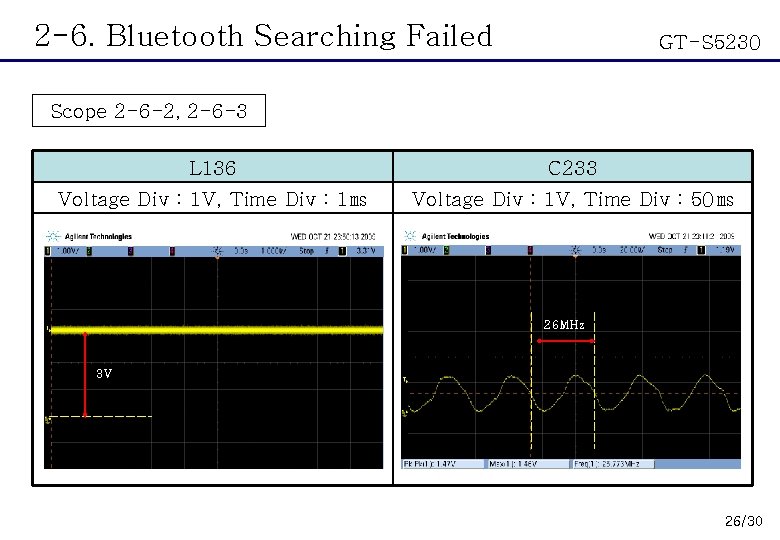
2 -6. Bluetooth Searching Failed GT-S 5230 Scope 2 -6 -2, 2 -6 -3 L 136 C 233 Voltage Div : 1 V, Time Div : 1㎳ Voltage Div : 1 V, Time Div : 50㎳ 26 MHz 3 V 26/30
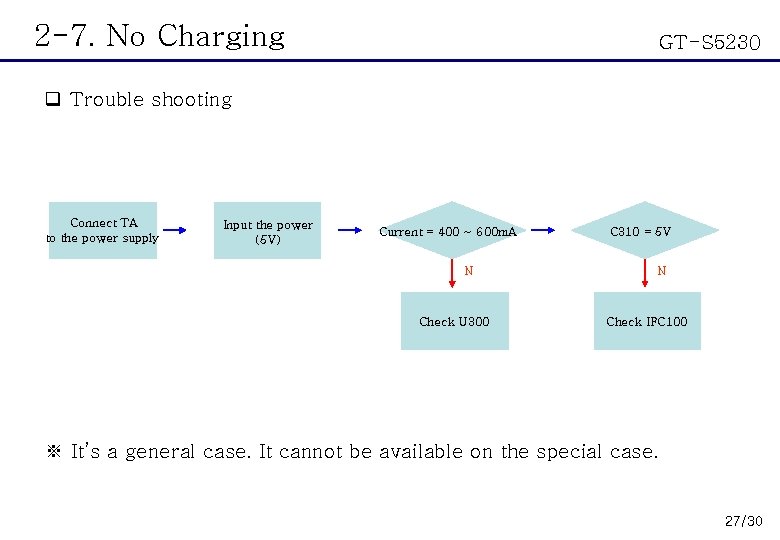
2 -7. No Charging GT-S 5230 q Trouble shooting Connect TA to the power supply Input the power (5 V) Current = 400 ~ 600 m. A N Check U 300 C 310 = 5 V N Check IFC 100 ※ It’s a general case. It cannot be available on the special case. 27/30
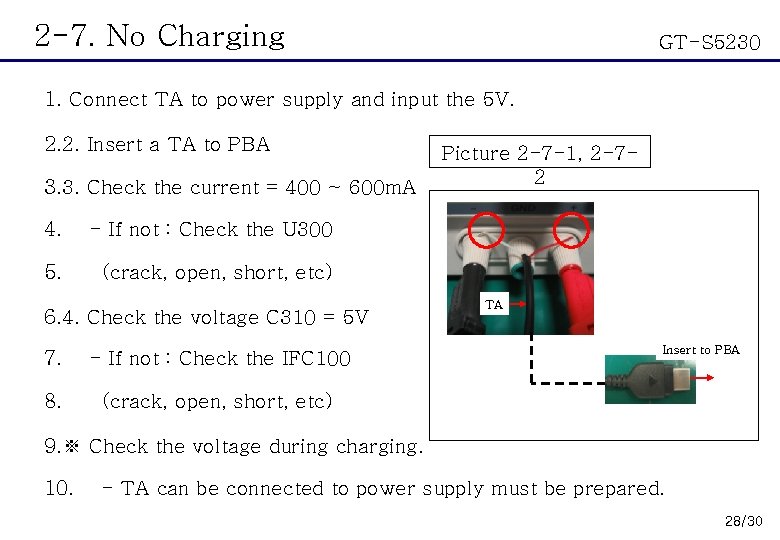
2 -7. No Charging GT-S 5230 1. Connect TA to power supply and input the 5 V. 2. 2. Insert a TA to PBA 3. 3. Check the current = 400 ~ 600 m. A 4. - If not : Check the U 300 5. (crack, open, short, etc) 6. 4. Check the voltage C 310 = 5 V 7. - If not : Check the IFC 100 8. (crack, open, short, etc) Picture 2 -7 -1, 2 -72 TA Insert to PBA 9. ※ Check the voltage during charging. 10. - TA can be connected to power supply must be prepared. 28/30
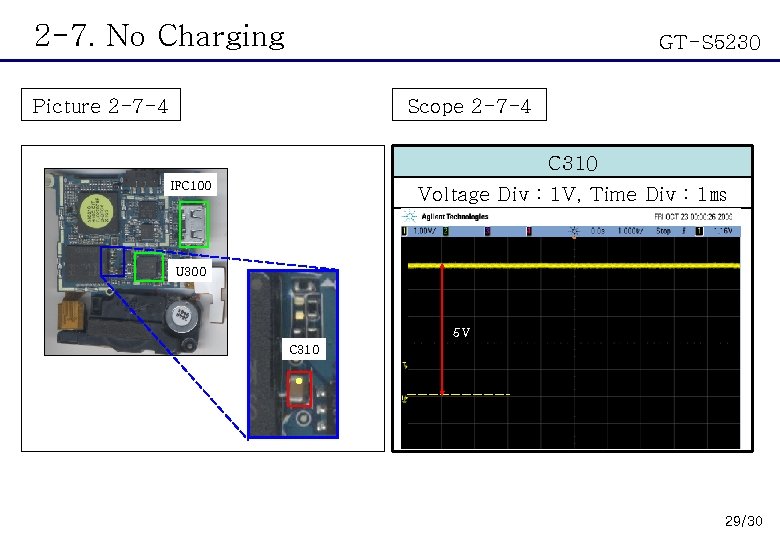
2 -7. No Charging GT-S 5230 Picture 2 -7 -4 Scope 2 -7 -4 C 310 IFC 100 Voltage Div : 1 V, Time Div : 1㎳ U 300 5 V C 310 ● 29/30
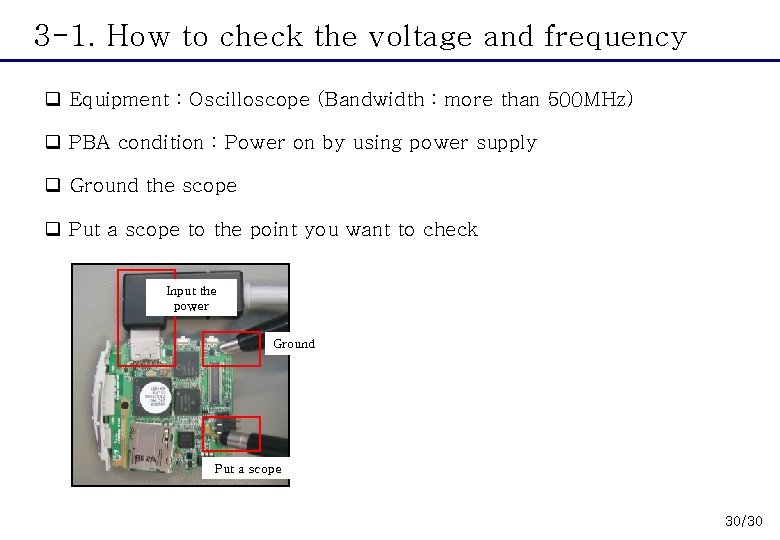
3 -1. How to check the voltage and frequency q Equipment : Oscilloscope (Bandwidth : more than 500 MHz) q PBA condition : Power on by using power supply q Ground the scope q Put a scope to the point you want to check Input the power Ground Put a scope 30/30
- Slides: 30