
Paystubs The header of your paystub will display
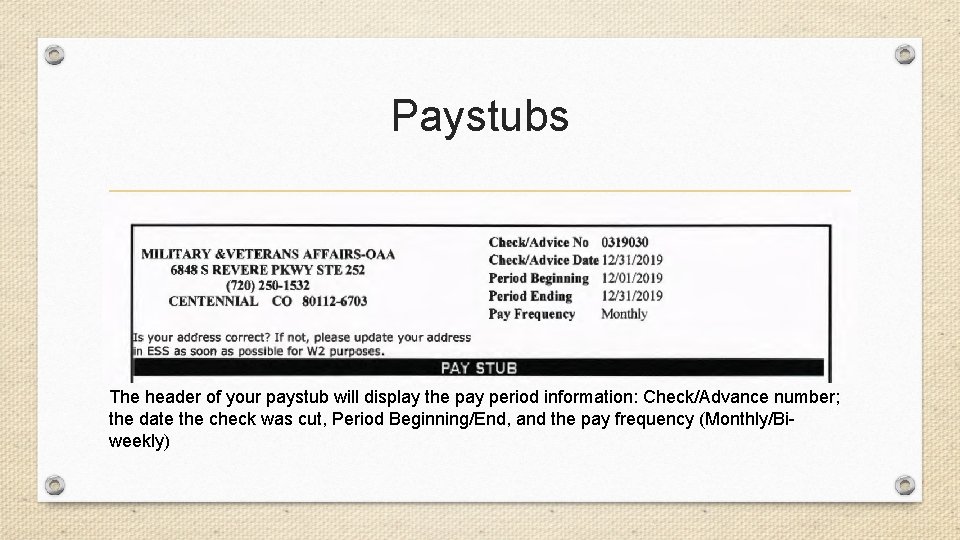
Paystubs The header of your paystub will display the pay period information: Check/Advance number; the date the check was cut, Period Beginning/End, and the pay frequency (Monthly/Biweekly)
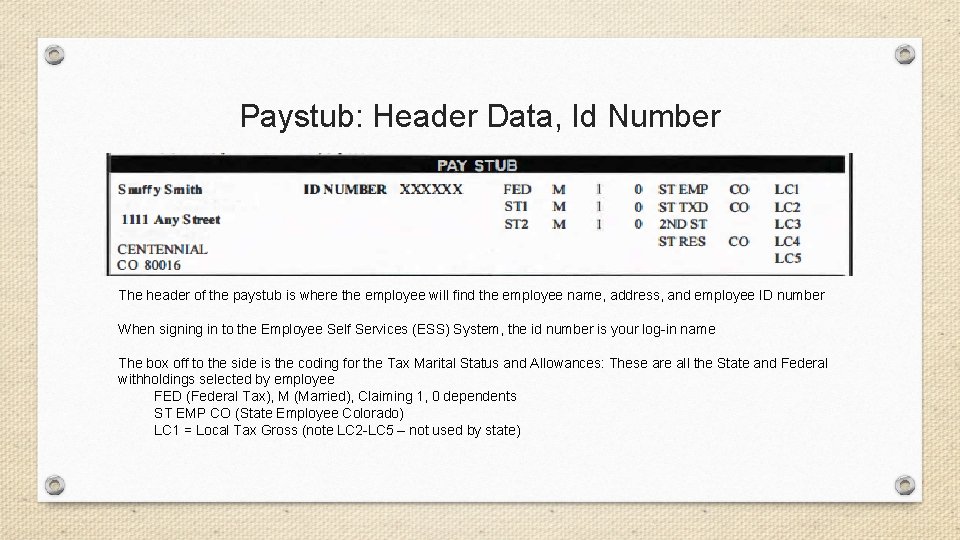
Paystub: Header Data, Id Number The header of the paystub is where the employee will find the employee name, address, and employee ID number When signing in to the Employee Self Services (ESS) System, the id number is your log-in name The box off to the side is the coding for the Tax Marital Status and Allowances: These are all the State and Federal withholdings selected by employee FED (Federal Tax), M (Married), Claiming 1, 0 dependents ST EMP CO (State Employee Colorado) LC 1 = Local Tax Gross (note LC 2 -LC 5 – not used by state)
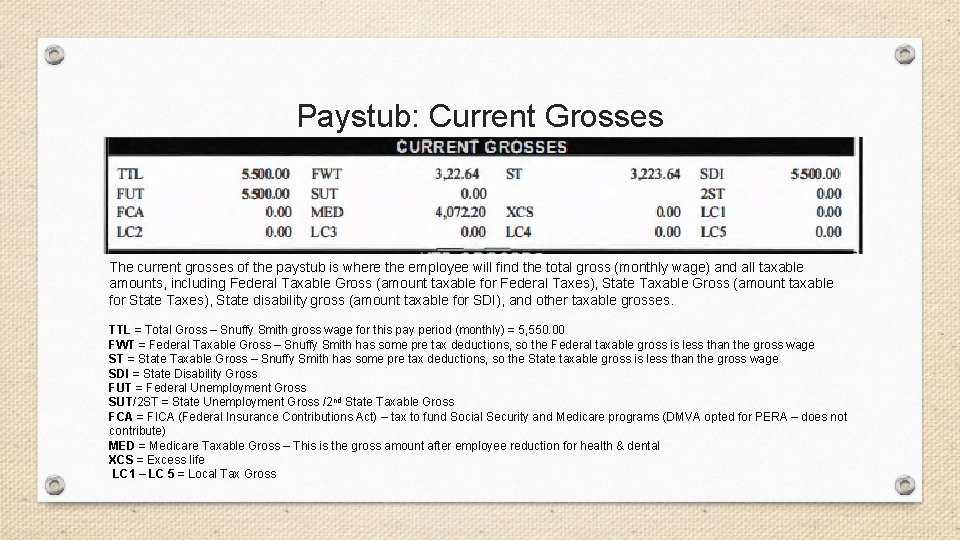
Paystub: Current Grosses The current grosses of the paystub is where the employee will find the total gross (monthly wage) and all taxable amounts, including Federal Taxable Gross (amount taxable for Federal Taxes), State Taxable Gross (amount taxable for State Taxes), State disability gross (amount taxable for SDI), and other taxable grosses. TTL = Total Gross – Snuffy Smith gross wage for this pay period (monthly) = 5, 550. 00 FWT = Federal Taxable Gross – Snuffy Smith has some pre tax deductions, so the Federal taxable gross is less than the gross wage ST = State Taxable Gross – Snuffy Smith has some pre tax deductions, so the State taxable gross is less than the gross wage SDI = State Disability Gross FUT = Federal Unemployment Gross SUT/2 ST = State Unemployment Gross /2 nd State Taxable Gross FCA = FICA (Federal Insurance Contributions Act) – tax to fund Social Security and Medicare programs (DMVA opted for PERA – does not contribute) MED = Medicare Taxable Gross – This is the gross amount after employee reduction for health & dental XCS = Excess life LC 1 – LC 5 = Local Tax Gross
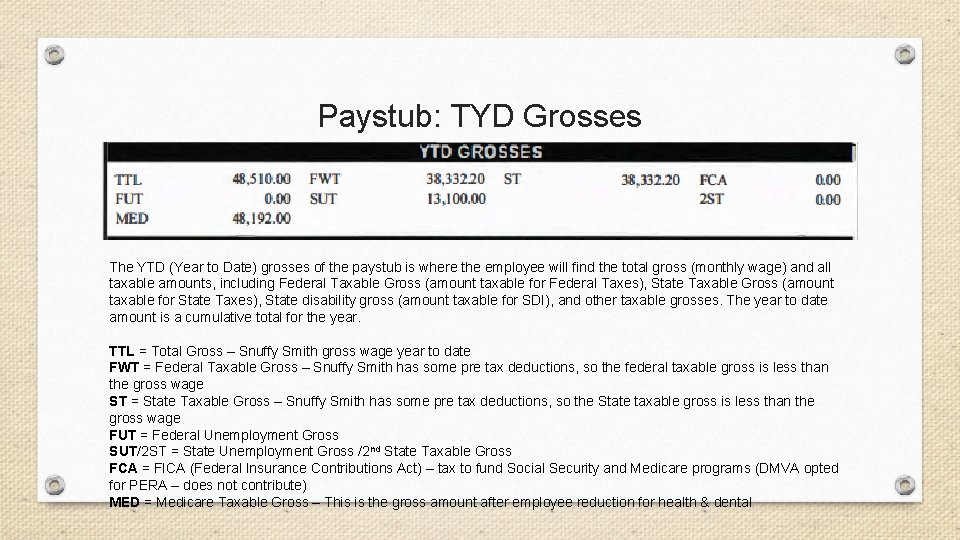
Paystub: TYD Grosses The YTD (Year to Date) grosses of the paystub is where the employee will find the total gross (monthly wage) and all taxable amounts, including Federal Taxable Gross (amount taxable for Federal Taxes), State Taxable Gross (amount taxable for State Taxes), State disability gross (amount taxable for SDI), and other taxable grosses. The year to date amount is a cumulative total for the year. TTL = Total Gross – Snuffy Smith gross wage year to date FWT = Federal Taxable Gross – Snuffy Smith has some pre tax deductions, so the federal taxable gross is less than the gross wage ST = State Taxable Gross – Snuffy Smith has some pre tax deductions, so the State taxable gross is less than the gross wage FUT = Federal Unemployment Gross SUT/2 ST = State Unemployment Gross /2 nd State Taxable Gross FCA = FICA (Federal Insurance Contributions Act) – tax to fund Social Security and Medicare programs (DMVA opted for PERA – does not contribute) MED = Medicare Taxable Gross – This is the gross amount after employee reduction for health & dental
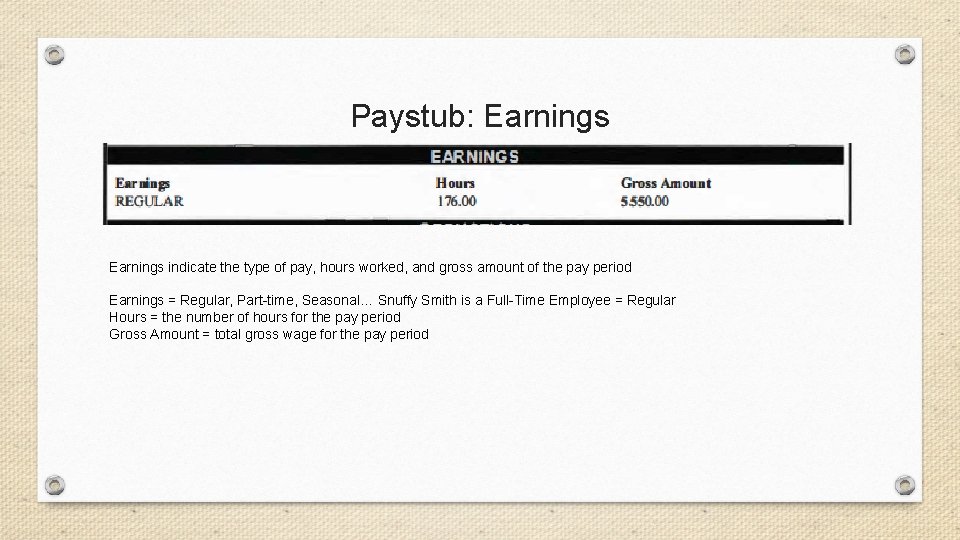
Paystub: Earnings indicate the type of pay, hours worked, and gross amount of the pay period Earnings = Regular, Part-time, Seasonal… Snuffy Smith is a Full-Time Employee = Regular Hours = the number of hours for the pay period Gross Amount = total gross wage for the pay period
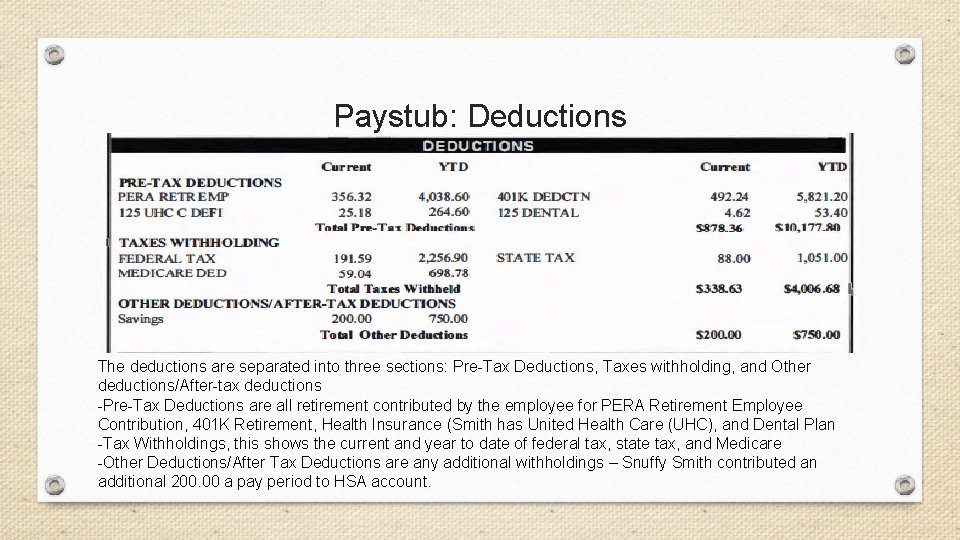
Paystub: Deductions The deductions are separated into three sections: Pre-Tax Deductions, Taxes withholding, and Other deductions/After-tax deductions -Pre-Tax Deductions are all retirement contributed by the employee for PERA Retirement Employee Contribution, 401 K Retirement, Health Insurance (Smith has United Health Care (UHC), and Dental Plan -Tax Withholdings, this shows the current and year to date of federal tax, state tax, and Medicare -Other Deductions/After Tax Deductions are any additional withholdings – Snuffy Smith contributed an additional 200. 00 a pay period to HSA account.
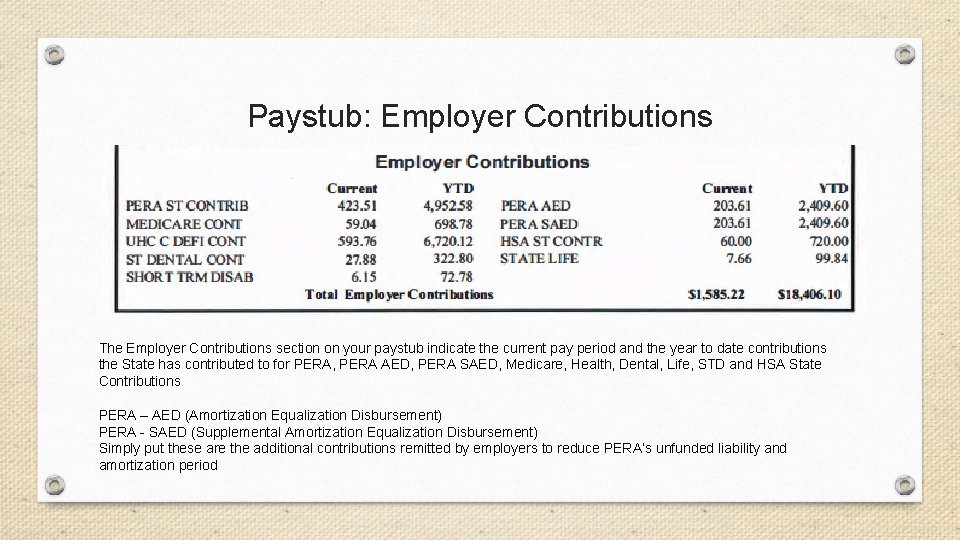
Paystub: Employer Contributions The Employer Contributions section on your paystub indicate the current pay period and the year to date contributions the State has contributed to for PERA, PERA AED, PERA SAED, Medicare, Health, Dental, Life, STD and HSA State Contributions PERA – AED (Amortization Equalization Disbursement) PERA - SAED (Supplemental Amortization Equalization Disbursement) Simply put these are the additional contributions remitted by employers to reduce PERA’s unfunded liability and amortization period
Benefits: Medical The State of Colorado Group Employee Medical Plan offers two plan designs: copay and qualified high deductible health plans (HDHPs). Both are offered through Kaiser Permanente and Cigna. Actual enrollment in each plan and tier (i. e. , employee only, family, etc. ) was multiplied by the employer monthly contribution to determine the total employer contribution, divided this amount by the total number of enrolled employees, and then multiplied this monthly amount by 12 to arrive at a per employee, per year employer contribution. The State contributes 88. 5% across all medical plans offered for Employee Only coverage. The median contribution across all medical plans offered for the peer group for Employee Only coverage was 84. 7%. For Family coverage across all medical plans offered, the State contributes 80. 6% as compared to the peer group where contributions for Family coverage were 79. 6%. Example: United. Health Care HDHP w/HSA Employee only: Total Premium = $618. 94, State Contributes $593. 76, Employee Contributes $25. 18
Benefits: Dental The State of Colorado offers two dental plans administered by Delta Dental Basic and Dental Basic Plus The dental plans differ in monthly premium cost and how much reimbursement is available. The monthly premium for dental insurance consists of an employer portion and an employee portion. The State pays the employer portion of this monthly premium. Employee contributions to the monthly premium are deducted automatically from paychecks.
Benefits: PERA The State of Colorado opted to used the PERA system instead of paying into the FICA (Federal Insurance Contributions Act) – tax to fund Social Security and Medicare programs PERA has two types of Plans: A Defined Benefit (DB) Plan and a Defined Contribution (DC) Plan available for eligible State employees. Both Plans are considered 401(a) plans and are created under that section of the Internal Revenue Service (IRS) Code. If a plan is not elected within 60 calendar days from the date of hire, the choice defaults to the PERA DB Plan. Under either option, employees may choose to contribute additional retirement savings to the voluntary PERA Plus 401(k) and 457 Plans. These plans help employees reduce their current income taxes, by deferring income, as they save for retirement.

Benefits: PERA – Defined Benefit (DB) Plan The PERA Defined Benefit (DB) Plan is the traditional pension plan, where employees’ contributions are invested by professionals. Under PERA’s hybrid DB Plan, employees earn a monthly lifetime retirement benefit based on age, number of years of service, and the Highest Average Salary (HAS). Upon termination of employment, employees have access to their contributions (plus interest and an employer match, if applicable). Employees also qualify for additional built-in benefits, including survivor and disability benefit coverage.
Benefits: PERA – Defined Contribution (DC) Plan In the PERA Defined Contribution (DC) Plan, employees direct their investments to an array of fund options, similar to a 401(k) plan. Under the PERA DC Plan, employees set how their contributions will be invested. The PERA DC Plan is based solely on the money the employee and employer have contributed, and the investment earnings or losses incurred, minus expenses.

Benefits: PERA – Contributions Both PERA DB and PERA DC Plan contributions of 8. 75% are tax deferred, which means reduced current state and federal income taxes, that is, they are not subject to federal or state income tax until they are withdrawn or received as a monthly benefit. • July 1, 2019, employees pay a total contribution of 8. 75%. • Beginning July 1, 2020, employees will pay an additional. 75% for a total contribution of 9. 5%. • Beginning July 1, 2021, employees will pay an additional. 50% for a total contribution 10%.
Benefits: PERA – Contact Info The State of Colorado schedules orientations sessions for PERA a couple times a year. One for impending retirees and another for new employees. The PERA sessions will be posted on the DMVA HR Resources webpage and the Colorado PERA Website Tamy Callahan, HR Manager, will be able to answer questions or direct you to PERA Or Colorado PERA Phone: 303 -832 -9550 or 1 -800 -759 -7372. Colorado PERA Website: www. copera. org
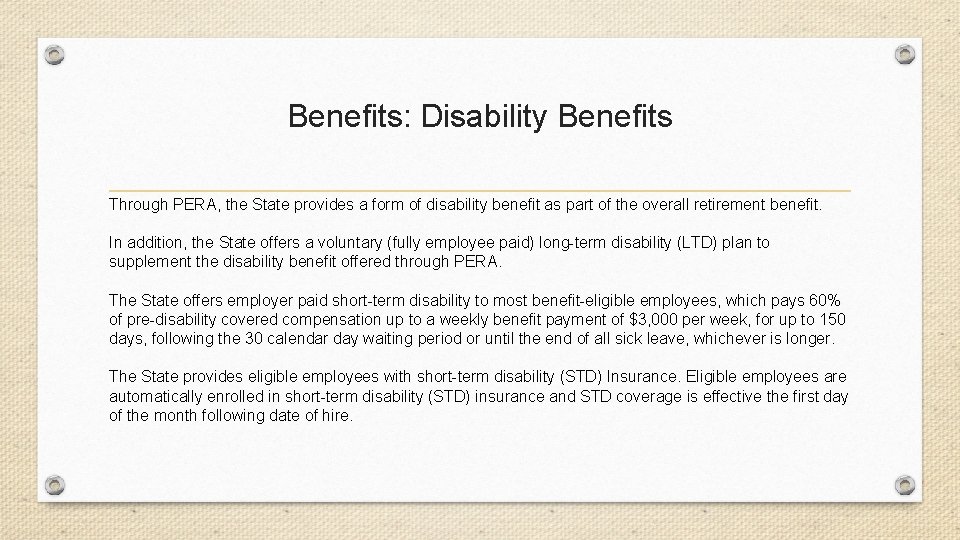
Benefits: Disability Benefits Through PERA, the State provides a form of disability benefit as part of the overall retirement benefit. In addition, the State offers a voluntary (fully employee paid) long-term disability (LTD) plan to supplement the disability benefit offered through PERA. The State offers employer paid short-term disability to most benefit-eligible employees, which pays 60% of pre-disability covered compensation up to a weekly benefit payment of $3, 000 per week, for up to 150 days, following the 30 calendar day waiting period or until the end of all sick leave, whichever is longer. The State provides eligible employees with short-term disability (STD) Insurance. Eligible employees are automatically enrolled in short-term disability (STD) insurance and STD coverage is effective the first day of the month following date of hire.
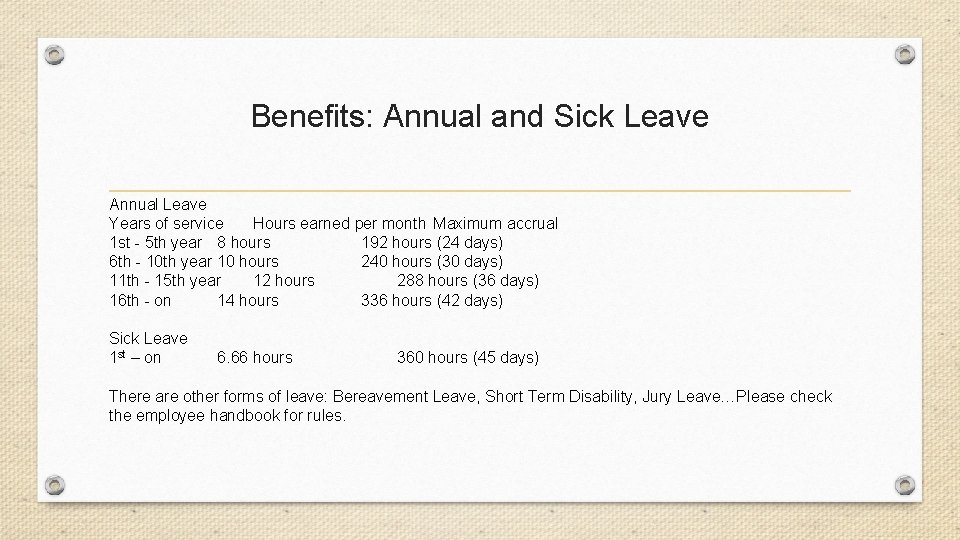
Benefits: Annual and Sick Leave Annual Leave Years of service Hours earned per month Maximum accrual 1 st - 5 th year 8 hours 192 hours (24 days) 6 th - 10 th year 10 hours 240 hours (30 days) 11 th - 15 th year 12 hours 288 hours (36 days) 16 th - on 14 hours 336 hours (42 days) Sick Leave 1 st – on 6. 66 hours 360 hours (45 days) There are other forms of leave: Bereavement Leave, Short Term Disability, Jury Leave…Please check the employee handbook for rules.
- Slides: 16