
Passwords The Good the Bad and the Ugly
Passwords The Good, the Bad and the Ugly Copyright © 2004 -2019 – Curt Hill
Authentication • One of the major security tasks is the authentication of users – A variety of applications need this – OS, any system accessing confidential information • Eliminate phony users but enable real ones • Needs conflicting requirements – Secure – Easy to use Copyright © 2004 -2019 – Curt Hill
Usually based on what they: • Are – fingerprints or retinal scans – Often for security exceeding what a general OS can implement in general – Hardware is required • Possess – a key or card or location – UNIX can be configured to only allow root access from console or specified IP – Callback for increasing security from network • Know – a password – Frequent approach from remote sites, such as over network • Do – dynamic biometrics – Voice recognition, typing rhythm, handwriting Copyright © 2004 -2019 – Curt Hill
Passwords • Usual form is that user presents an account number and a password – Present on almost every multiuser system • Password protection can also be applied to a variety of objects within the system as well, such as files – There may be different passwords for accessing the same file in different modes • They are well understood and easy to use Copyright © 2004 -2019 – Curt Hill
Password attacks • They are vulnerable to a number of attacks: • Guessed • Exposed • Transferred • Phishing or other social engineering approaches Copyright © 2004 -2019 – Curt Hill
Guessing passwords • People tend to use obvious passwords • Important dates: birthdays and anniversaries • Names of family or pets • Other familiar words or numbers • Someone who knows a person or researches them can find this information from public and private sources • Keep trying these until one works Copyright © 2004 -2019 – Curt Hill
Brute force approaches • Try all possibilities via program • Short passwords tend to make this easier • Dictionaries are used for alphabetic passwords • Systems that allow or force a password to contain upper and lower case characters tend to discourage this – Limit the number of attempts Copyright © 2004 -2019 – Curt Hill
Exposure • Shoulder surfing or watching key strokes – Just because a password is not displayed does not make it invisible • Electronic monitoring – Keyboard loggers can also capture – Packet sniffers can be tailored to collect account and password information • Written passwords – Security is better for long passwords, but they are harder to remember – So we write them down and this becomes available to theft Copyright © 2004 -2019 – Curt Hill
Transfer • Security is an inconvenience to most users who have not been burned – I give my company account number and password to someone else so they can look at something, so I do not have to do it – They give it to others • The current thought is that passwords are too vulnerable for accounts of importance Copyright © 2004 -2019 – Curt Hill
What should a system do? • • • Password choosing Minimum requirements Aging Reactive checking Limit incorrect attempts Copyright © 2004 -2019 – Curt Hill
Password choosing • Systems randomly generate passwords that are hard to remember and are often written down – They are not well accepted by the users • People tend to generate passwords that are easy to guess • Some systems require that a user generated password have certain characteristics – Strength Copyright © 2004 -2019 – Curt Hill
Strength • Strength is a measure of how capable it is to defeat brute force attacks • Mix of character types – Uppers, lowers, digits and specials • Not in a dictionary • There is a balance to making the password too easy to crack and too hard for a user to find or remember • There are numerous measures of strength, including those on the web Copyright © 2004 -2019 – Curt Hill
Aging • Force users to change their passwords in a timely fashion • Keep a history of passwords so they will not oscillate between two or three • Other options – Force a new password at the end of each session – Then a password that is stolen locks out the legitimate user which is a notification of the breach Copyright © 2004 -2019 – Curt Hill
Reactive checking • Periodically check the user passwords for crackability • Disable those that are easy to crack because they are too short or easy to guess • May be the idle time consumer program of the system Copyright © 2004 -2019 – Curt Hill
Limit Incorrect Attempts • Brute force and guessing approaches need many attempts – Usually generated by a computer • The system should only allow a few before ignoring further attempts – Few is typically 3 – 5 – Could also 3 or 4 attempts of 3 to 5 – After one group do not accept logins from that user for a time – Stronger still disable the account Copyright © 2004 -2019 – Curt Hill
Keeping the passwords • The file of passwords is a particularly nice target • Most early operating systems attempt to hide this file from users with varying degrees of success – Accessible only be privileged users • Windows stores hashed passwords – Not the password itself • UNIX encrypts the passwords Copyright © 2004 -2019 – Curt Hill
UNIX Password file • It uses the password as the key to encrypt a block of zeros – The encryption function is a variation of DES, so that it is not susceptible to attack from DES hardware chips • crypt() is the function and is available for inspection • The resulting file is then hidden, so that only a privileged user could access Copyright © 2004 -2019 – Curt Hill
One time passwords • Several approaches are possible that only let a single password be used once, yet still are easy to remember – These include • Password pairs • Functions • One time pads Copyright © 2004 -2019 – Curt Hill
Password pairs • A user has five pairs of passwords • The first word of each of the pairs is unique at all letters • At login the system gives the user a unique, but randomly chosen fragment of one of the first words • The user must then type in the second word • A shoulder surfer does not know all of the first word and only knows the second word Copyright © 2004 -2019 – Curt Hill
Functions • This is a generalization of the password pairs • A unique function is agreed upon between the system and user • The system provides the parameter and user responds with the result • The system computes the result and grants authentication if it matches Copyright © 2004 -2019 – Curt Hill
Audience Participation • I heard of one person who had a function to generate web site passwords – The password could be generated in his head • This password was based on the web site in question • What kind of transformations are easy enough to do in your head but make a strong password? Copyright © 2004 -2019 – Curt Hill
One time pads • A randomly generated list of random numbers is the password • As each one is used it is discarded • They passwords must be used once and in order • One time pads are the only cipher method that is algorithmically unbreakable • They are exposed by the printing Copyright © 2004 -2019 – Curt Hill
Password Cracking Study • A study published in 1990 attempted to crack passwords on UNIX • Security has become a more pronounced issue since then but this does illustrate the problem of user selected passwords • Started with 14, 000 passwords • Each type of attack was repeated with a number of variations Copyright © 2004 -2019 – Curt Hill
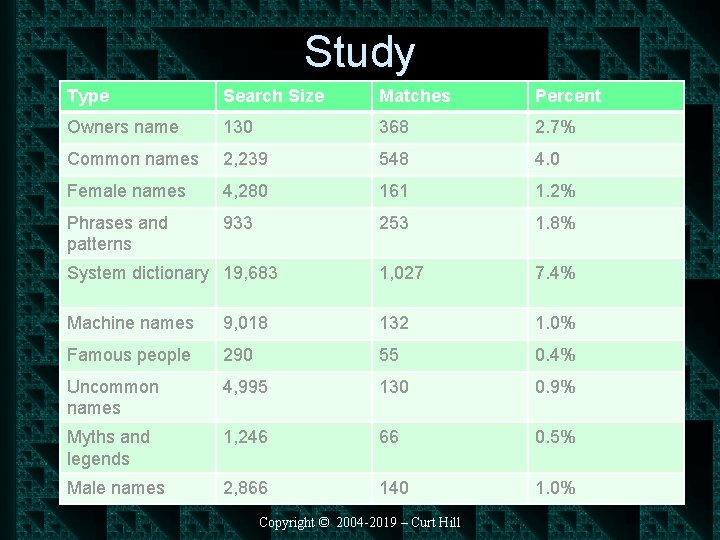
Study Type Search Size Matches Percent Owners name 130 368 2. 7% Common names 2, 239 548 4. 0 Female names 4, 280 161 1. 2% Phrases and patterns 933 253 1. 8% System dictionary 19, 683 1, 027 7. 4% Machine names 9, 018 132 1. 0% Famous people 290 55 0. 4% Uncommon names 4, 995 130 0. 9% Myths and legends 1, 246 66 0. 5% Male names 2, 866 140 1. 0% Copyright © 2004 -2019 – Curt Hill
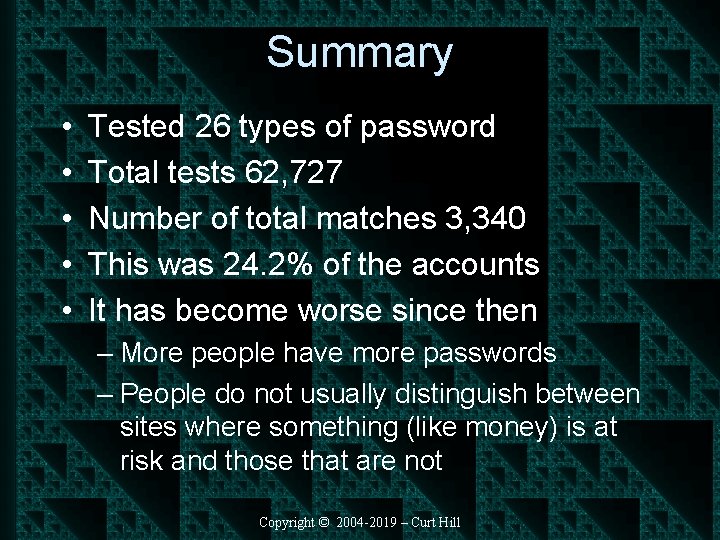
Summary • • • Tested 26 types of password Total tests 62, 727 Number of total matches 3, 340 This was 24. 2% of the accounts It has become worse since then – More people have more passwords – People do not usually distinguish between sites where something (like money) is at risk and those that are not Copyright © 2004 -2019 – Curt Hill
Another Study • 10 million were analyzed in 2016 • The top 25 accounted for 50% of those • Only two are reasonable – It is believed these were used by bots • The next page has the list Copyright © 2004 -2019 – Curt Hill
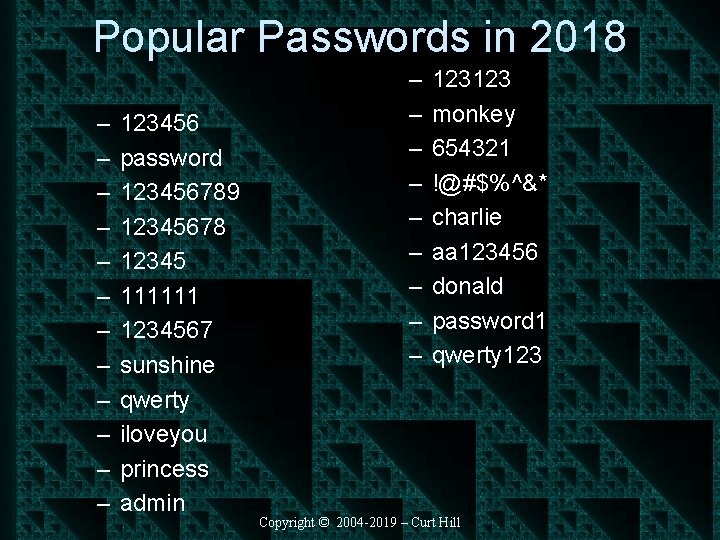
Popular Passwords in 2018 – – – 123456 password 123456789 12345678 12345 111111 1234567 sunshine qwerty iloveyou princess admin – – – – – 123123 monkey 654321 !@#$%^&* charlie aa 123456 donald password 1 qwerty 123 Copyright © 2004 -2019 – Curt Hill
Equifax • One of the three largest consumer credit reporting agencies • In 2017 they were breached • In 2019 settled a class action lawsuit with those harmed by breach • Also in 2019 another class action suit was filed – Claim that Equifax used ‘admin’ as both the login and password of important portal Copyright © 2004 -2019 – Curt Hill
Pwn • Meaning: To utterly defeat • The problem with passwords is that there are many ways to defeat them • So many ways, that there are one or more websites to answer the question: – https: //haveibeenpwned. com/ • For this reason additional security is always helpful Copyright © 2004 -2019 – Curt Hill
Finally • Passwords are a traditional form of authentication • The strength of the password is inversely proportional to the ability to guess it • The increase of computing power makes weak passwords vulnerable • Other means must be added to increase security Copyright © 2004 -2019 – Curt Hill
- Slides: 30