
Passwords The Good The Bad and The Ugly
Passwords
The Good, The Bad and The Ugly • Authenticate: You are what you know • Assumption: The password is something only the user knows – Proves identity of the user – Gives access to data/functionality that only the user should be able to have
The Good, The Bad and The Ugly • The good – Rely on memory only, no extra hardware/software – Easy to change if compromised – Universally used, requires terminal access only • The bad – Weak passwords, easy to guess by strangers – Personal passwords, easy to guess by friends – Many passwords, reuse or forget/reset • The ugly – Compromised passwords reused at other servers – Compromised passwords give access to more than just user data
Ideal Passwords Are • Strong – Hard to guess by strangers and friends • Memorable – Easily and consistently recalled by the user • Diverse – Very different passwords for different sites
Opposite Requirements • Strong – Look like random character strings • Memorable – Have some connection to user memories/values • Diverse – Hard to remember many strong passwords, which are uncorrelated
Some Other Auth Failure Causes • Capitalization, plural, punctuation, character replacement – Hard to remember • Misspelling • Password policies are not public during auth. • Hard to associate a password with a site – Username too • Making choices is easy, remembering them is hard
How People Use Passwords* • ½ million users over 3 months • Instrument browser, observe – Number of passwords/sites total and per day – Password strength and types – Password reuse (only able to detect substring matches) – Recall via reset events *“A Large-Scale Study of Web Password Habits” Dinei Florencio and Cormac Herley, Microsoft Research, Proc. of WWW 2007
Password Usage • An average user has 25 password accounts • On average 7 actively used, unique passwords – 8 passwords typed per day, includes duplicates • An average password is reused at 6 sites – Strong passwords (>60 bits, 9 chars) are reused at 4. 48 sites – Weak passwords (<30 bits, 4 chars) are reused at 6 sites Lots of need for passwords, lots of reuse
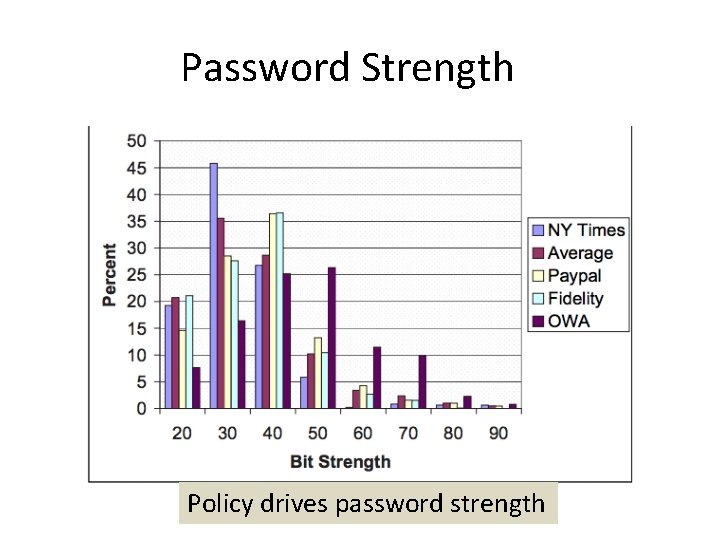
Password Strength Policy drives password strength

Password Composition Most passwords contain only letters
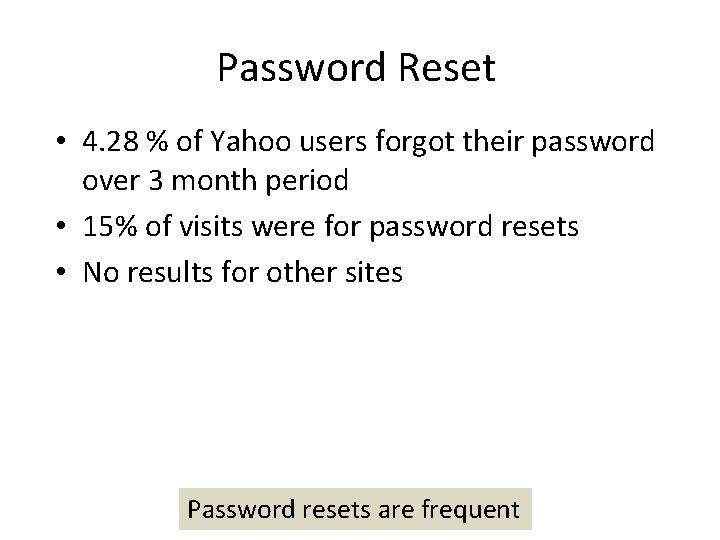
Password Reset • 4. 28 % of Yahoo users forgot their password over 3 month period • 15% of visits were for password resets • No results for other sites Password resets are frequent
How People Reuse Passwords* • Collected publicly available leaked password sets – Containing email and password – This way authors can evaluate if one could use credentials stolen from one site to log into another – Without email one could mix up the above measure with measure how many users use popular passwords • 6, 077 unique users with at least two leaked passwords (97. 75% had exactly two) – So this study is really asking “if you have two passwords how likely it is that they are similar/same” *“A Tangled Web of Password Reuse” Anupam Das et al, UIUC, Proc. of NDSS 2014

Do People Reuse Passwords? • Password reuse strategies 2 -3 chars Yes! Many passwords are reused with simple strategies Attacker can try a small number of candidates to version a compromised password into the correct one
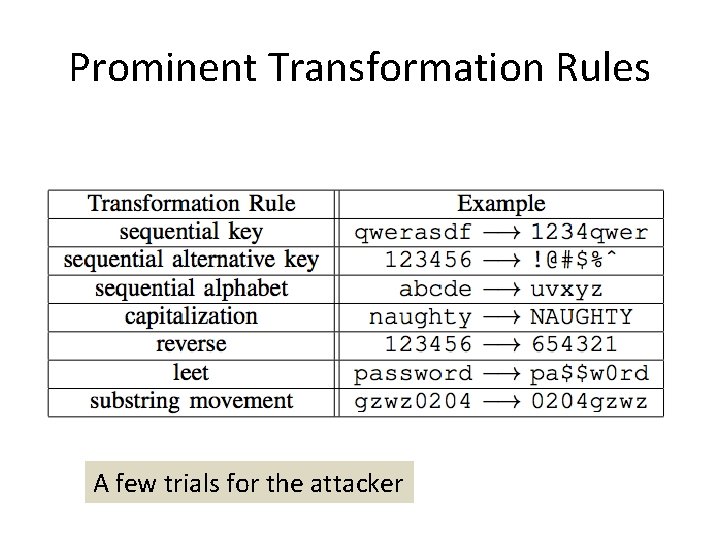
Prominent Transformation Rules A few trials for the attacker
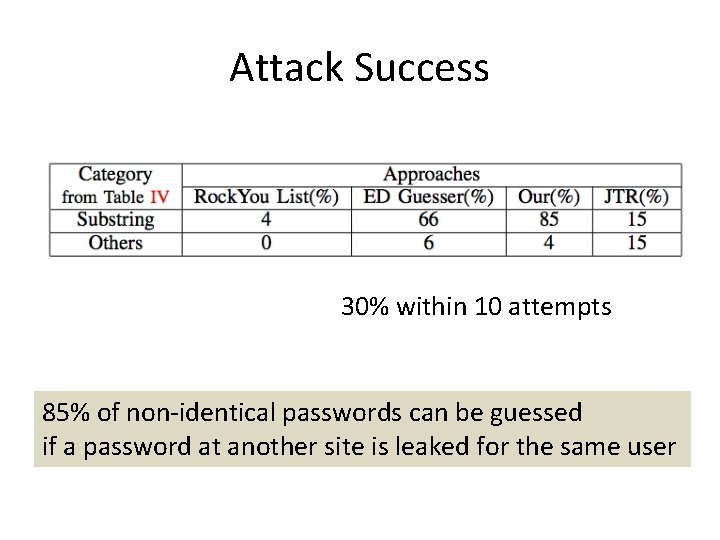
Attack Success 30% within 10 attempts 85% of non-identical passwords can be guessed if a password at another site is leaked for the same user

Why People Version Passwords Ran a survey, 220 respondents Version to comply with policy, increase security or increase recall
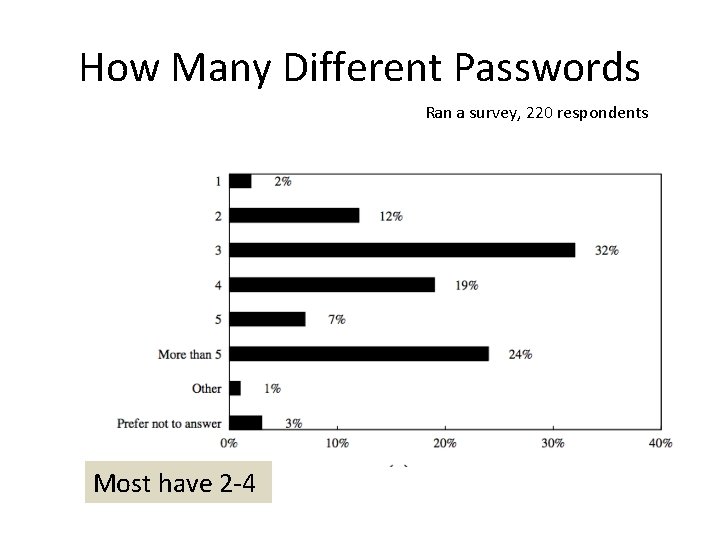
How Many Different Passwords Ran a survey, 220 respondents Most have 2 -4
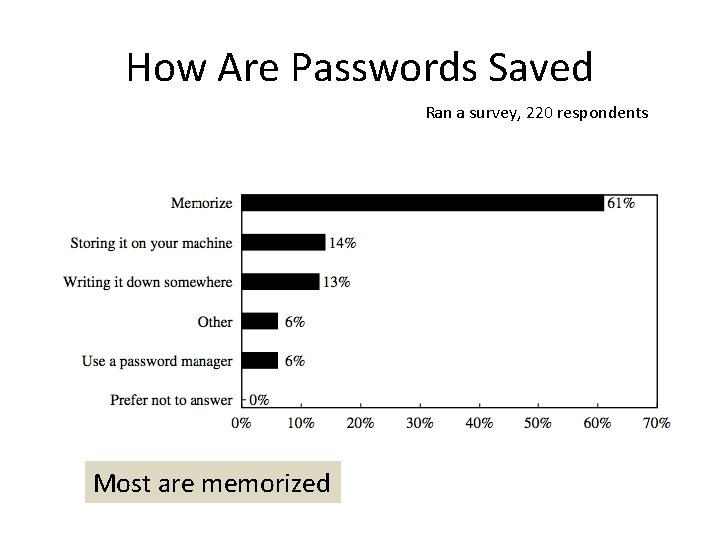
How Are Passwords Saved Ran a survey, 220 respondents Most are memorized
How People Create Passwords* • Lab study with 49 participants – Created passwords for fictitious banking, email and news website – While thinking aloud – 3 password composition policies, each user assigned to only one of them • 1 class 6: 6 characters • 2 class 8: 8 characters, 2 classes (e. g. , upper and lowercase letters) • 3 class 12: 12 characters, 3 classes • Post-study interview to investigate strategies *”I added ! at the end to make it secure” Blasé Ur et al, CMU, Proc. of SOUPS 2014
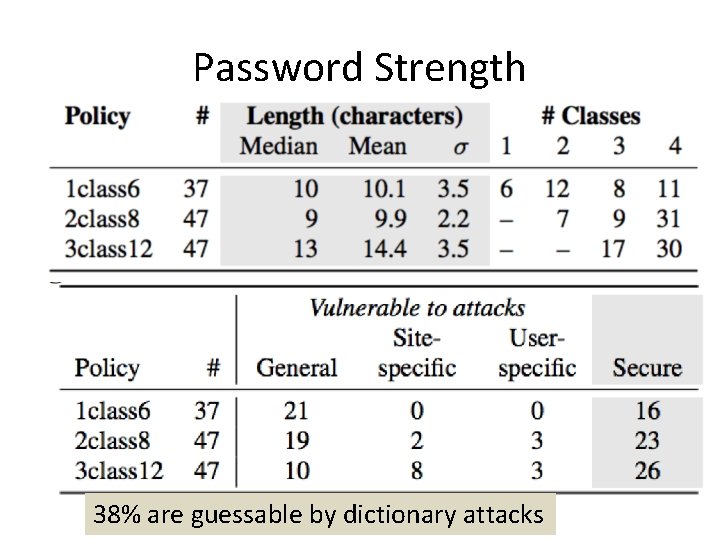
Password Strength 38% are guessable by dictionary attacks
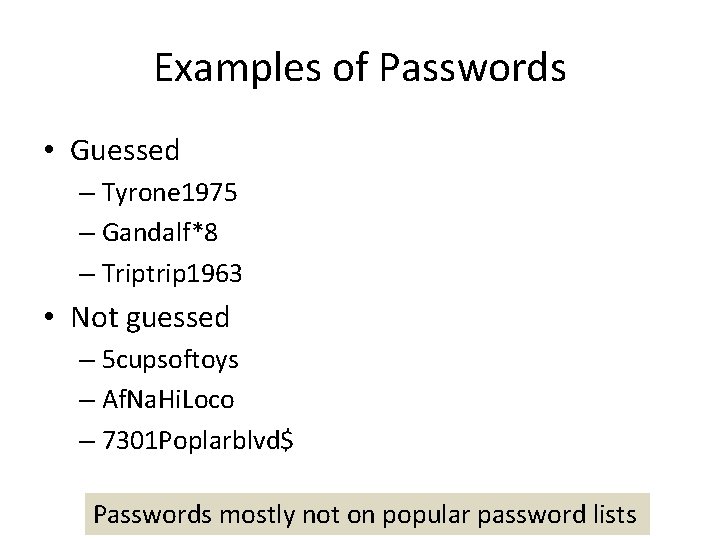
Examples of Passwords • Guessed – Tyrone 1975 – Gandalf*8 – Triptrip 1963 • Not guessed – 5 cupsoftoys – Af. Na. Hi. Loco – 7301 Poplarblvd$ Passwords mostly not on popular password lists
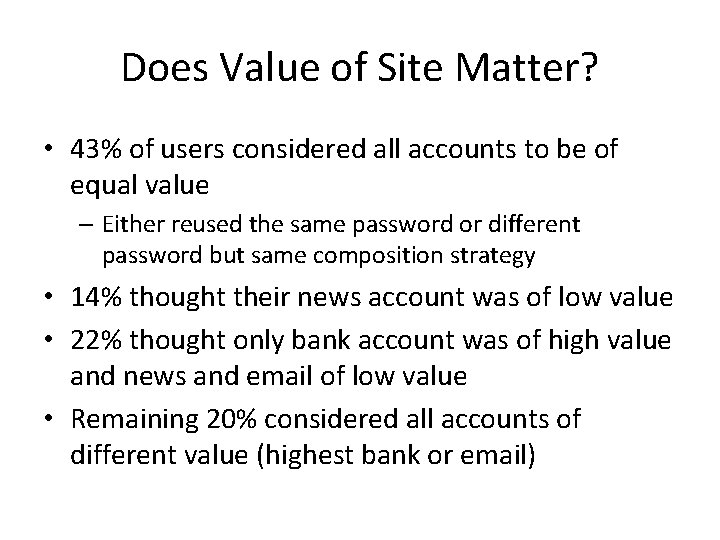
Does Value of Site Matter? • 43% of users considered all accounts to be of equal value – Either reused the same password or different password but same composition strategy • 14% thought their news account was of low value • 22% thought only bank account was of high value and news and email of low value • Remaining 20% considered all accounts of different value (highest bank or email)
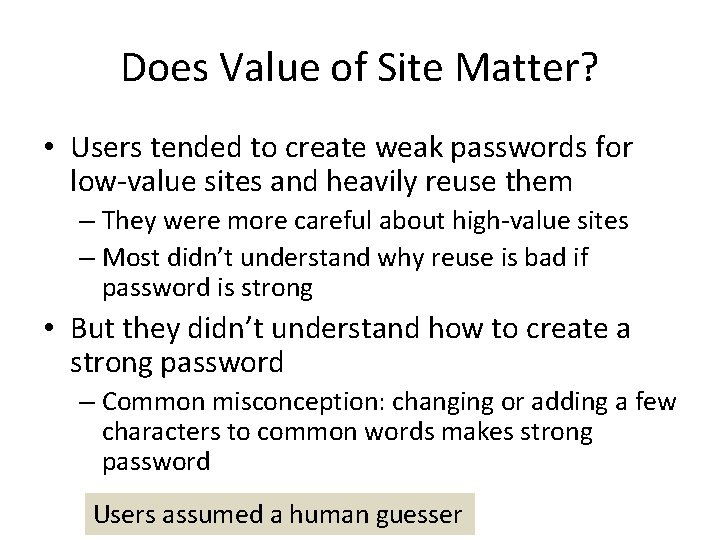
Does Value of Site Matter? • Users tended to create weak passwords for low-value sites and heavily reuse them – They were more careful about high-value sites – Most didn’t understand why reuse is bad if password is strong • But they didn’t understand how to create a strong password – Common misconception: changing or adding a few characters to common words makes strong password Users assumed a human guesser
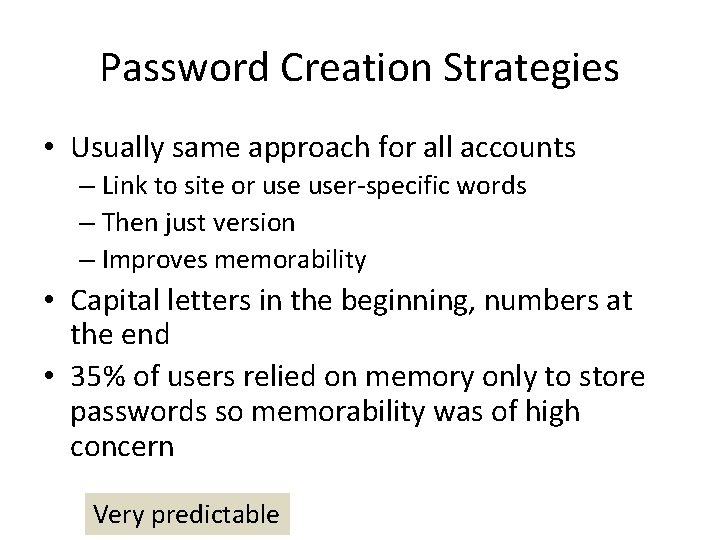
Password Creation Strategies • Usually same approach for all accounts – Link to site or user-specific words – Then just version – Improves memorability • Capital letters in the beginning, numbers at the end • 35% of users relied on memory only to store passwords so memorability was of high concern Very predictable
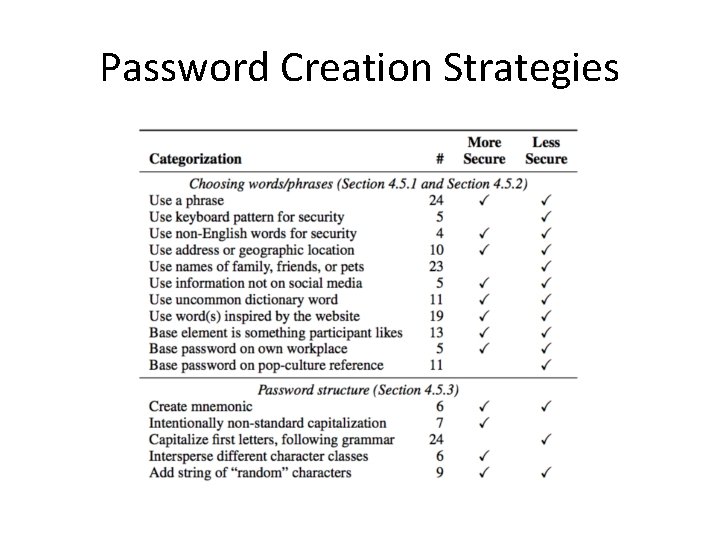
Password Creation Strategies
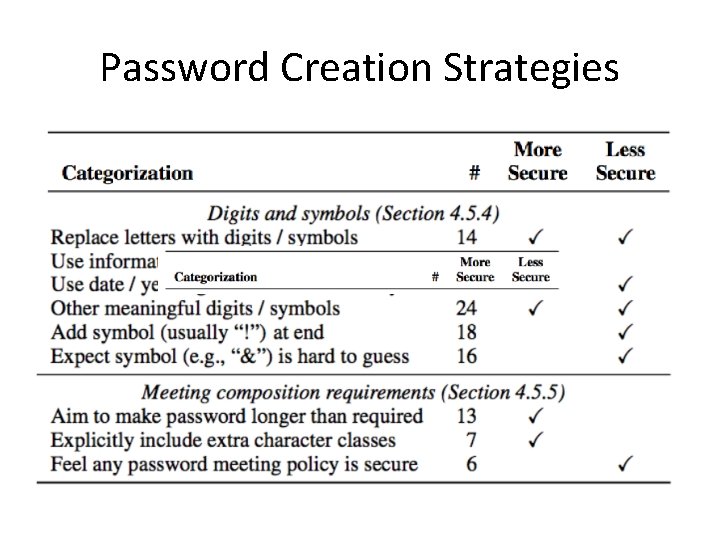
Password Creation Strategies
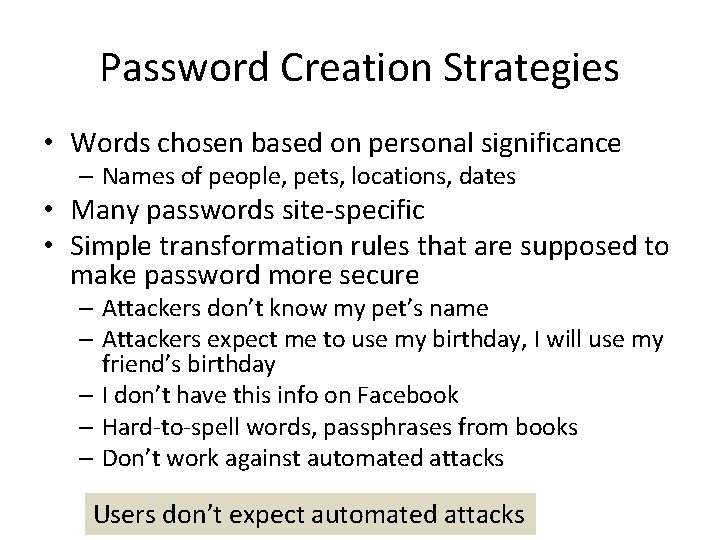
Password Creation Strategies • Words chosen based on personal significance – Names of people, pets, locations, dates • Many passwords site-specific • Simple transformation rules that are supposed to make password more secure – Attackers don’t know my pet’s name – Attackers expect me to use my birthday, I will use my friend’s birthday – I don’t have this info on Facebook – Hard-to-spell words, passphrases from books – Don’t work against automated attacks Users don’t expect automated attacks
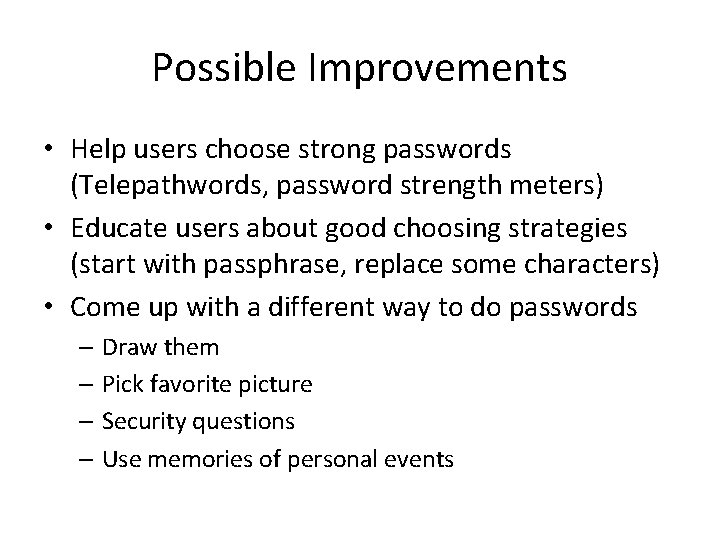
Possible Improvements • Help users choose strong passwords (Telepathwords, password strength meters) • Educate users about good choosing strategies (start with passphrase, replace some characters) • Come up with a different way to do passwords – Draw them – Pick favorite picture – Security questions – Use memories of personal events
Comparing Subjective and Objective Password Strategies* • 50 USC students, half non-tech majors • How prevalent are bad password habits? • What influences password strength? • • User’s intent Risk perception Website importance Website’s password policy • How well does users’ password practices align with their intent? • User survey and analysis of real passwords • Cannot store real passwords due to privacy *”Leveraging semantic transformation to investigate password habits and their causes”, Hanamsagar, Woo, Kanich and Mirkovic, CHI 2018
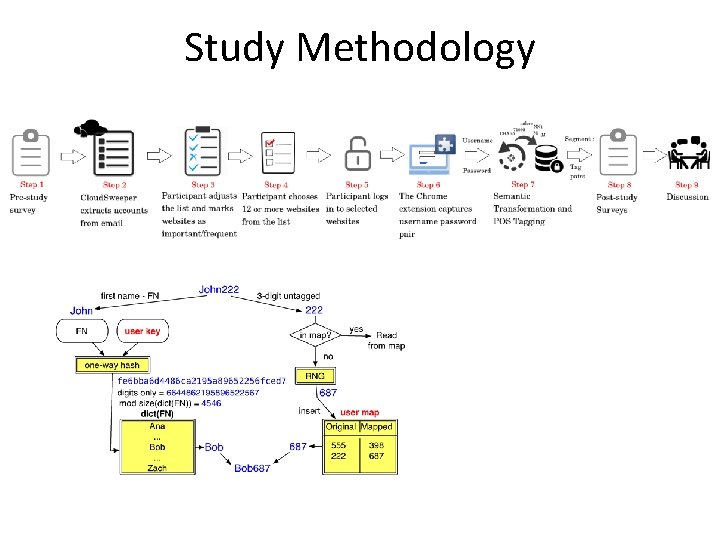
Study Methodology
Findings • Users do not know what they are doing • Bounded rationality – users do not make rational decisions but are bounded by time, cognitive limitations, problem complexity • Users underestimate the number of accounts they have: 15 vs 80 • Narrate more rational reuse strategies, not supported by password analysis, e. g. , “I do not reuse” or “I reuse only between non-important accounts” • Narrate different password composition policies, e. g. , “I use random letters”, not supported by password analysis
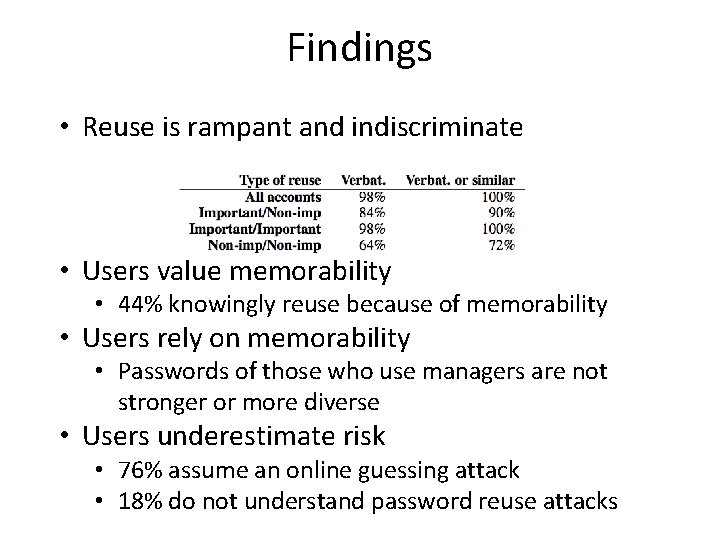
Findings • Reuse is rampant and indiscriminate • Users value memorability • 44% knowingly reuse because of memorability • Users rely on memorability • Passwords of those who use managers are not stronger or more diverse • Users underestimate risk • 76% assume an online guessing attack • 18% do not understand password reuse attacks
Recommendations • Tools that keep track of user password habits • Easy to integrate this with password managers • Identify problematic cases of reuse (important accounts) • Identify rarely-used accounts and help users change their passwords to random • Produce summaries of password hygiene • Help users create stronger passwords • Help users create strategies that associate passwords with servers
Mnemonic Passphrase (MNPass)* • System-Generated Passphrases (Sys. Pass): Secure but less memorable. Also, does not scale as number of accounts increase • User-Chosen Passphrases (Upass): Memorable but less secure • Our Goal (MNPass): explore Memorable, Secure, Diverse, and Usable Passphrase generation – We hypothesize people are creative enough but just not trained to come up with good passphrases – Increase Memorability: By letting users choose their own instead system assigns and also provide the first letter mnemonic – Increase Security: By carefully generating mnemonic chars (MNChars) constraints, where each word user chooses should contain a letter from MNchars in order *”Improving Recall and Security of Passphrases through Use of Mnemonics” Simon Woo, Jelena Mirkovic, Proc of Passwords Conference 2016
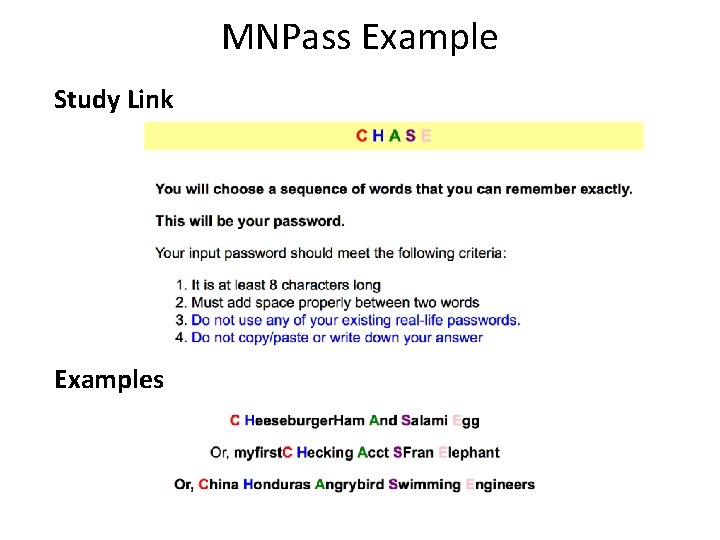
MNPass Example Study Link Examples

Recall is comparable to UPass
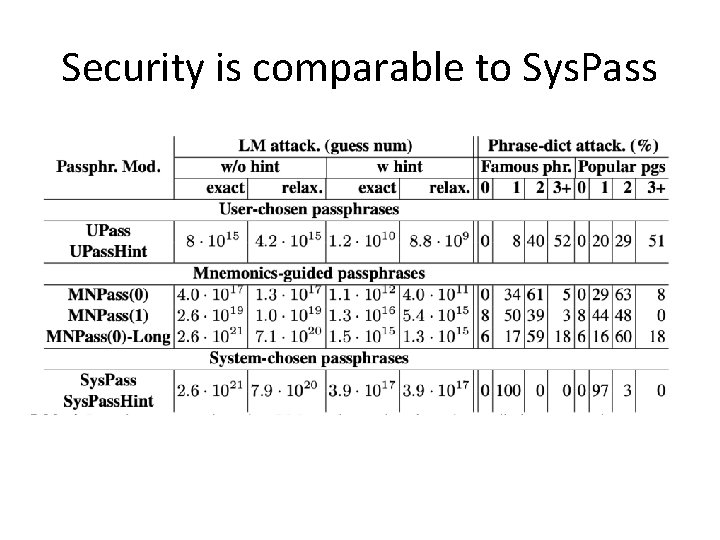
Security is comparable to Sys. Pass
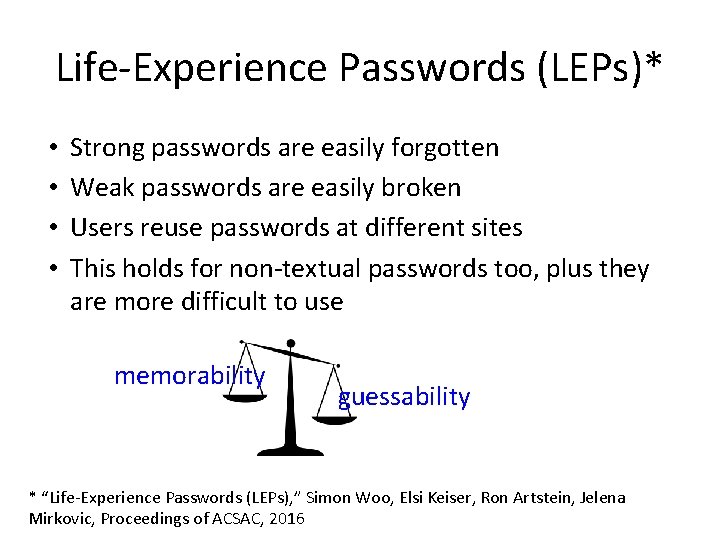
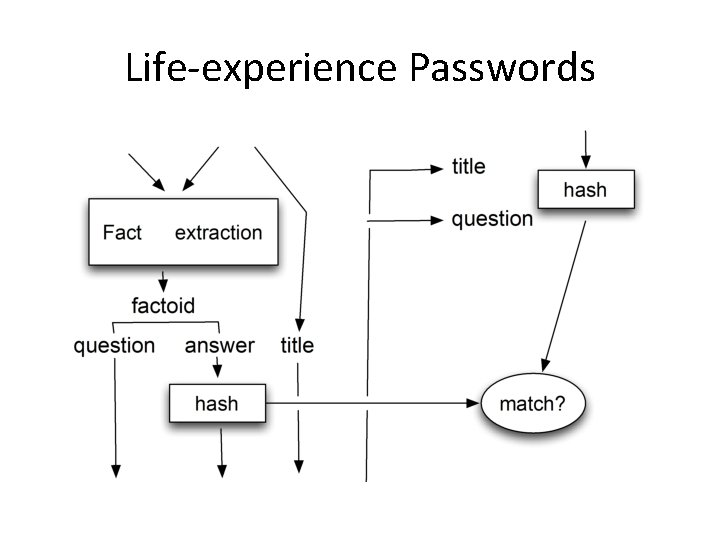
Life-Experience Passwords (LEPs)* • • Strong passwords are easily forgotten Weak passwords are easily broken Users reuse passwords at different sites This holds for non-textual passwords too, plus they are more difficult to use memorability guessability * “Life-Experience Passwords (LEPs), ” Simon Woo, Elsi Keiser, Ron Artstein, Jelena Mirkovic, Proceedings of ACSAC, 2016
Life-experience Passwords • Use memories from a user’s past • Collect facts – time, locations, people, activities, conversations – No preferences, no opinions • Turn this into Q & A pairs – Questions become prompts – Answers become LEP
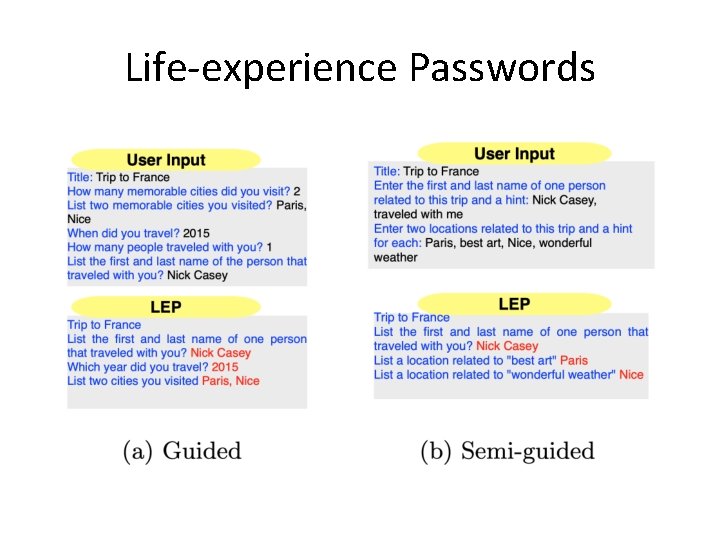
Life-experience Passwords
Life-experience Passwords
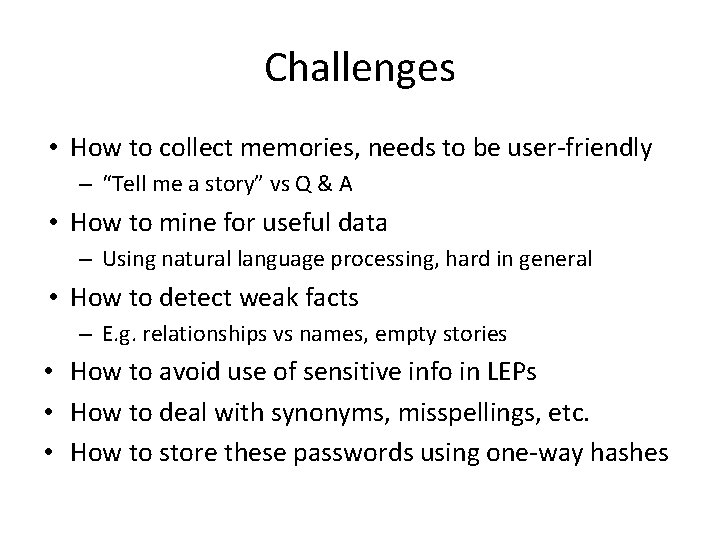
Challenges • How to collect memories, needs to be user-friendly – “Tell me a story” vs Q & A • How to mine for useful data – Using natural language processing, hard in general • How to detect weak facts – E. g. relationships vs names, empty stories • How to avoid use of sensitive info in LEPs • How to deal with synonyms, misspellings, etc. • How to store these passwords using one-way hashes
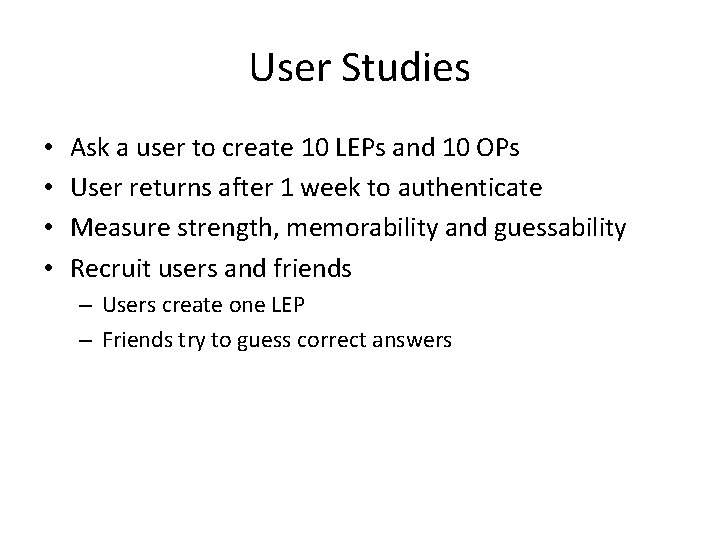
User Studies • • Ask a user to create 10 LEPs and 10 OPs User returns after 1 week to authenticate Measure strength, memorability and guessability Recruit users and friends – Users create one LEP – Friends try to guess correct answers
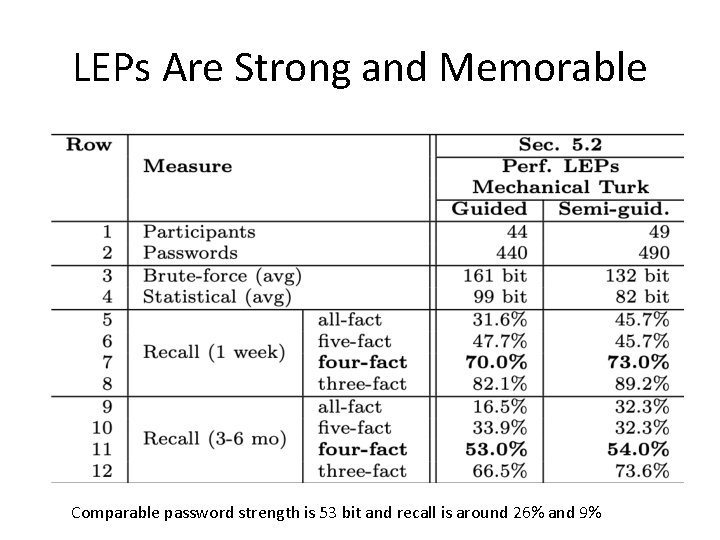
LEPs Are Strong and Memorable Comparable password strength is 53 bit and recall is around 26% and 9%
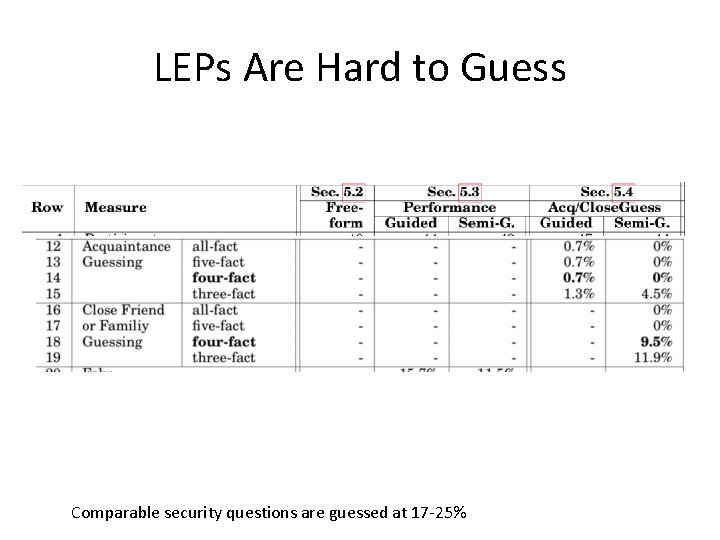
LEPs Are Hard to Guess Comparable security questions are guessed at 17 -25%
LEPs Are Diverse • Less than 0. 5% are the same and up to 15% are similar – Attacker must guess 34 -48 bits to authenticate • Around 6% of OPs are the same and up to 32% are similar – Attacker must guess 37 bits to authenticate
Issues • LEPs took 5 x longer to create and authenticate • How do we store LEPs? – Hash per answer • Easy to break by guessing most likely answers first – Hash per LEP • User must recall facts – Several hashes of strong combinations of facts • No feedback to user what they missed
- Slides: 47