
Password Management Strategies for Online Accounts Shirley Gaw


- Slides: 28
Password Management Strategies for Online Accounts Shirley Gaw and Edward W. Felten Department of Computer Science Princeton University Sandhya Jognipalli 1
Outline o o o o Introduction Related Work Overview of Study Quantifying Password Reuse User Priorities User Models of Attack Survey Implications Conclusions 2
Introduction o For password authentication systems, users often are the enemy o Users are ill-informed about dictionary attacks o Users do not understand of password policies o This paper broadly looks at password practices, quantifying password reuse and also surveying the contributing factors to this reuse o A survey of how users manage passwords for online accounts 3
Related Work o Many projects try to overcome poor password practices o Tools for users to manage their passwords, particularly password hashing systems o Researchers have also conducted empirical studies of password use and management o Few papers that empirically quantify how many passwords people have o Other studies have based estimations of people's passwords through surveys o Participants were first asked to login to websites and then count how many passwords they used 4
Overview of Study o Studied password practices, focusing on real users password reuse and the technology designs that encouraged these practices o Participants were compensated with $10 o 58 students completed an online questionnaire (First session) o Only 49 of the original participants completed the second session 5
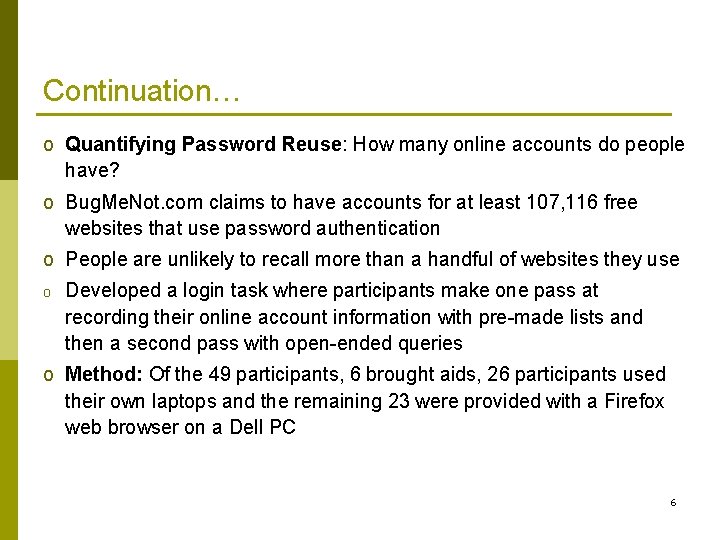
Continuation… o Quantifying Password Reuse: How many online accounts do people have? o Bug. Me. Not. com claims to have accounts for at least 107, 116 free websites that use password authentication o People are unlikely to recall more than a handful of websites they use o Developed a login task where participants make one pass at recording their online account information with pre-made lists and then a second pass with open-ended queries o Method: Of the 49 participants, 6 brought aids, 26 participants used their own laptops and the remaining 23 were provided with a Firefox web browser on a Dell PC 6
Continuation… o Participants estimated their use of websites and passwords in two passes o In the first pass, participants were directed to a CGI script that presented the names of 139 websites grouped into 12 categories (news, travel, finance, shopping etc) o They were presented with a webpage that instructed them to log in to the website o The experimenters observed participants attempting to login more than once o Participants self-reported summary statistics on the number of passwords they used in the experiment 7
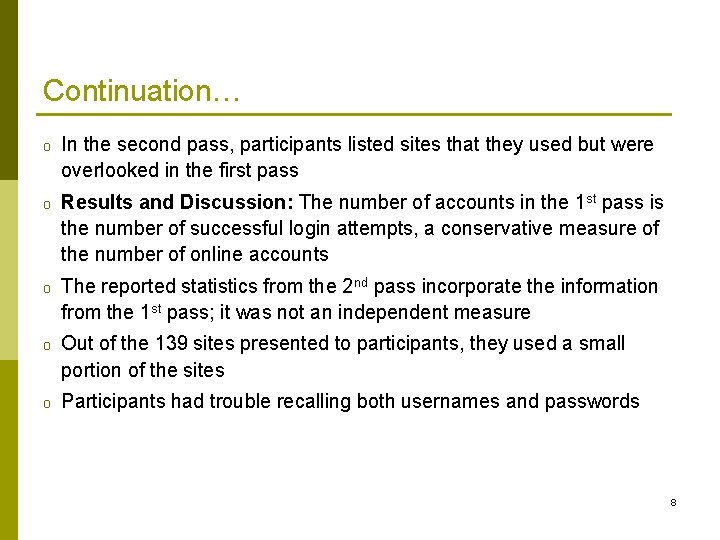
Continuation… o In the second pass, participants listed sites that they used but were overlooked in the first pass o Results and Discussion: The number of accounts in the 1 st pass is the number of successful login attempts, a conservative measure of the number of online accounts o The reported statistics from the 2 nd pass incorporate the information from the 1 st pass; it was not an independent measure o Out of the 139 sites presented to participants, they used a small portion of the sites o Participants had trouble recalling both usernames and passwords 8
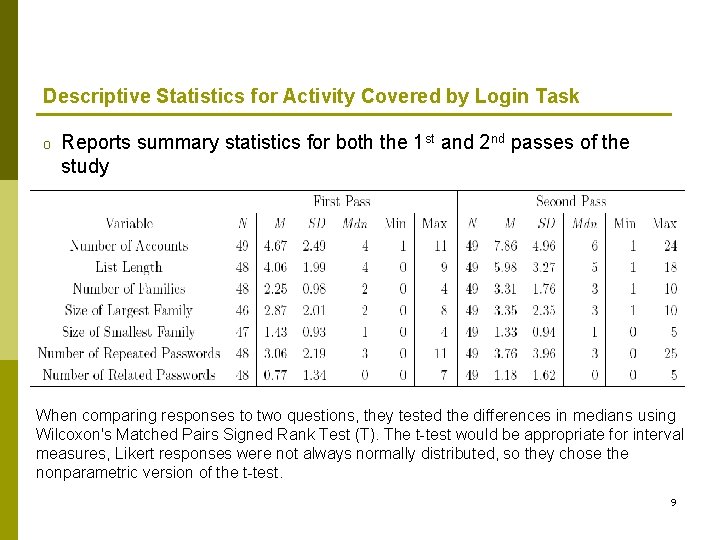
Descriptive Statistics for Activity Covered by Login Task o Reports summary statistics for both the 1 st and 2 nd passes of the study When comparing responses to two questions, they tested the differences in medians using Wilcoxon's Matched Pairs Signed Rank Test (T). The t-test would be appropriate for interval measures, Likert responses were not always normally distributed, so they chose the nonparametric version of the t-test. 9
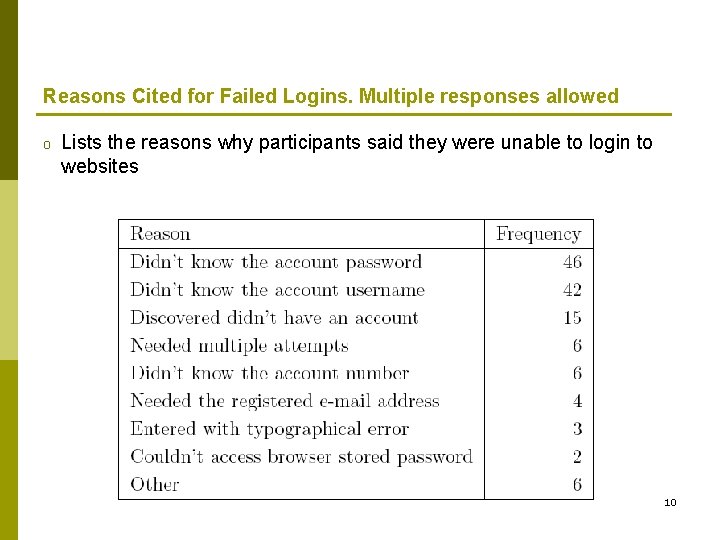
Reasons Cited for Failed Logins. Multiple responses allowed o Lists the reasons why participants said they were unable to login to websites 10
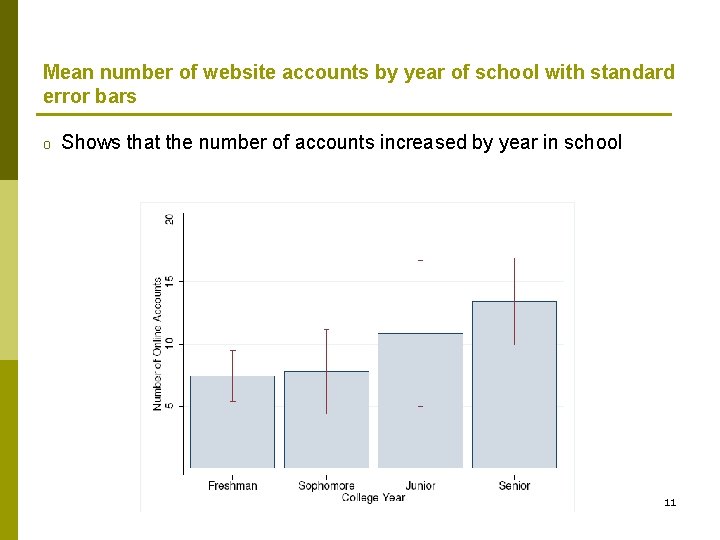
Mean number of website accounts by year of school with standard error bars o Shows that the number of accounts increased by year in school 11
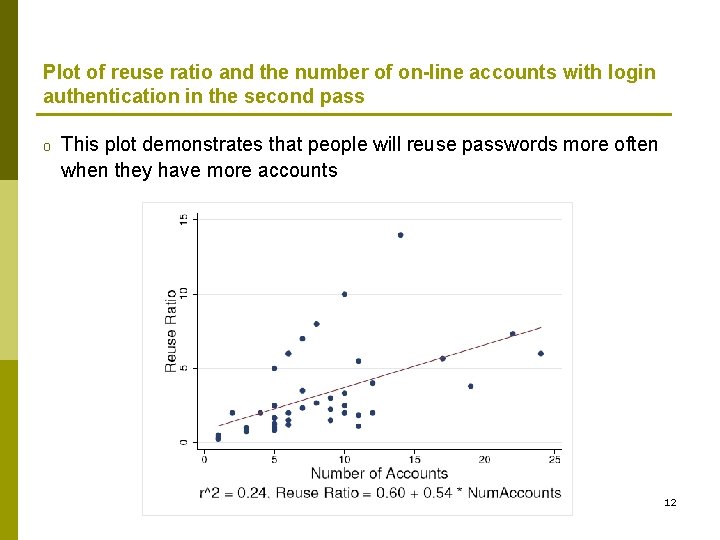
Plot of reuse ratio and the number of on-line accounts with login authentication in the second pass o This plot demonstrates that people will reuse passwords more often when they have more accounts 12
User Priorities o Prior work has indicated that security is not a priority for users and that password authentication is seen as a nuisance rather than a protection o The premise of password authentication is identifying the user to protect access to a resource o People reuse user-names and passwords, users are vulnerable to attacks o The attacker could compromise multiple accounts through a single account's login information but also could compromise multiple accounts through a single user's login information 13
Continuation… o This section describes our results in studying user's behavior and the role technology has played in increasing password security o Method: 58 participants took a 115 -question survey o Explanations of password reuse and avoidance, explanations of password creation and storage, and descriptions of password management methods o 5 -point Likert scale (1 = Strongly Disagree, 2 = Slightly Disagree, 3 = Neither Agree Nor Disagree, 4 = Slightly Agree, 5 = Strongly Agree) for responses o Justifications of Password Practices: If there were “two websites where you use the same password" and, if so, “why do these websites have the same password. “ 14
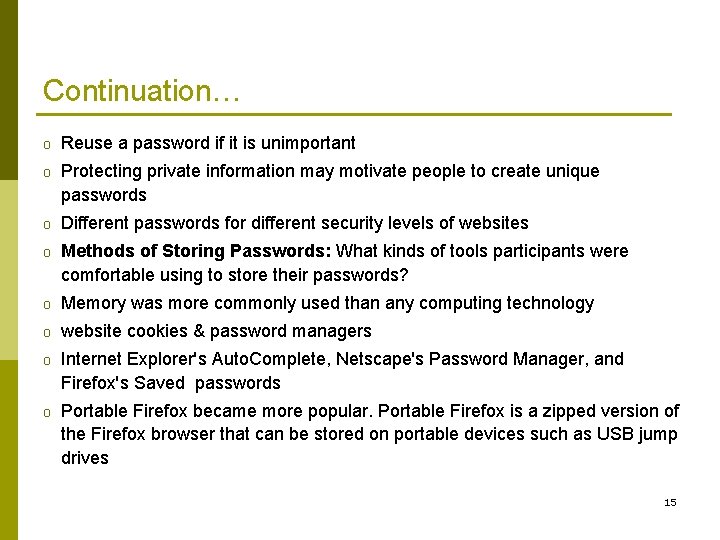
Continuation… o Reuse a password if it is unimportant o Protecting private information may motivate people to create unique passwords o Different passwords for different security levels of websites o Methods of Storing Passwords: What kinds of tools participants were comfortable using to store their passwords? o Memory was more commonly used than any computing technology o website cookies & password managers o Internet Explorer's Auto. Complete, Netscape's Password Manager, and Firefox's Saved passwords o Portable Firefox became more popular. Portable Firefox is a zipped version of the Firefox browser that can be stored on portable devices such as USB jump drives 15
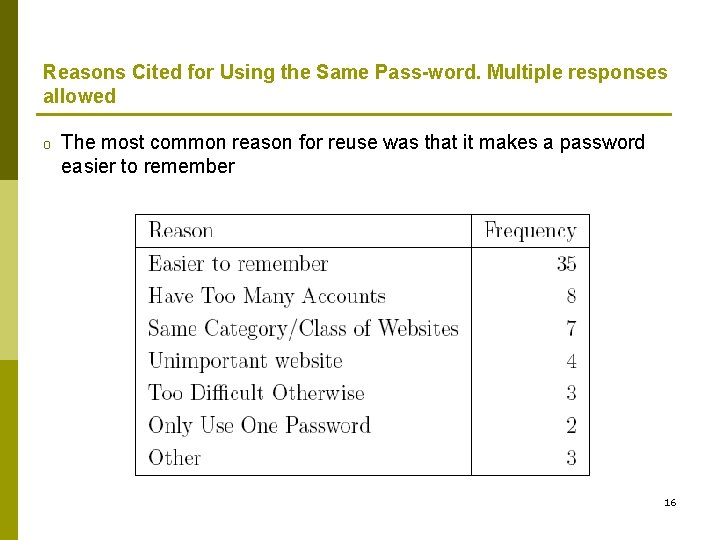
Reasons Cited for Using the Same Pass-word. Multiple responses allowed o The most common reason for reuse was that it makes a password easier to remember 16
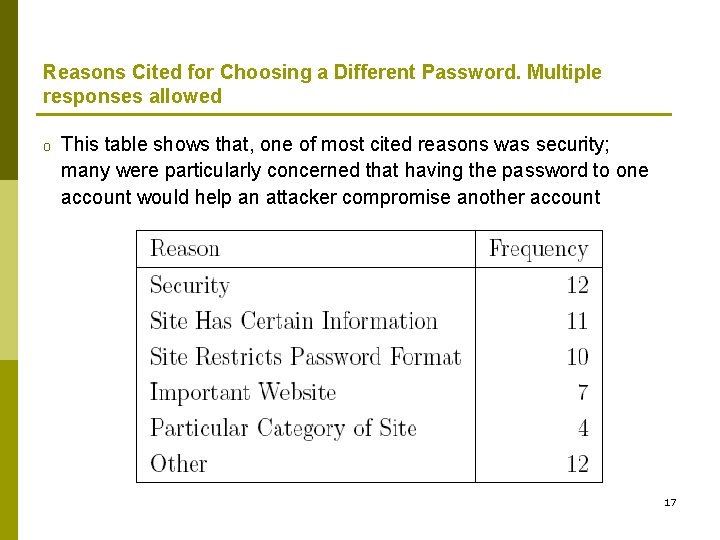
Reasons Cited for Choosing a Different Password. Multiple responses allowed o This table shows that, one of most cited reasons was security; many were particularly concerned that having the password to one account would help an attacker compromise another account 17
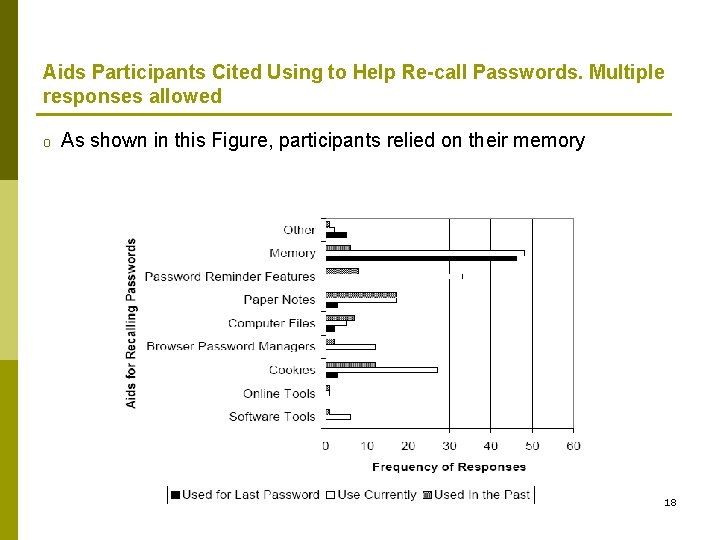
Aids Participants Cited Using to Help Re-call Passwords. Multiple responses allowed o As shown in this Figure, participants relied on their memory 18
User Models of Attack o Perceived threat models for what they believed made a strong password and for who they believed was likely to attack their online accounts o Perceived Threat by Others: Who participants saw as likely attackers to online accounts o Method: Participants were first provided with examples where a password could be compromised o The population was partitioned: friend, acquaintance-nontech, acquaintance-expert, insider, competitor, hackers 19
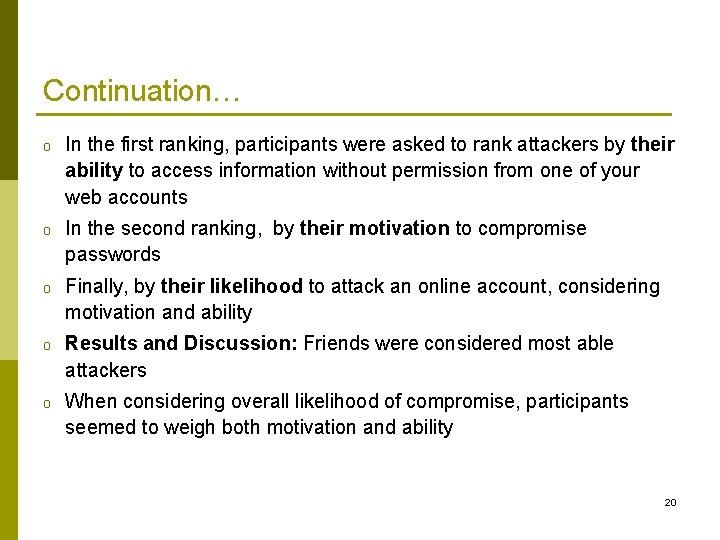
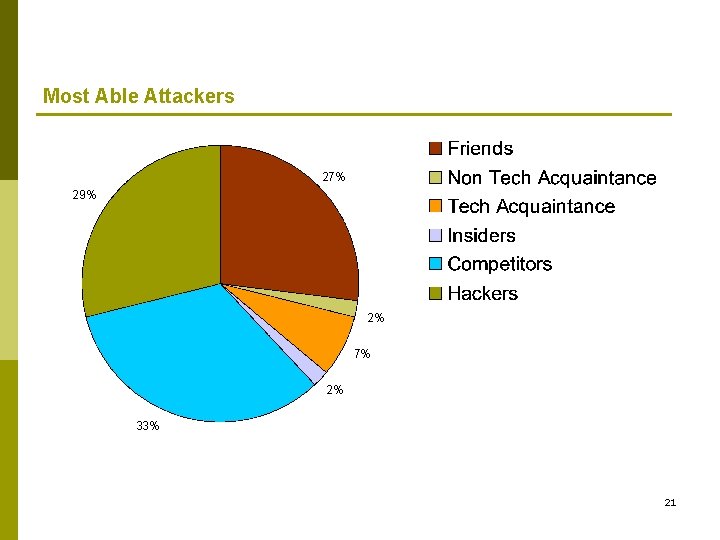
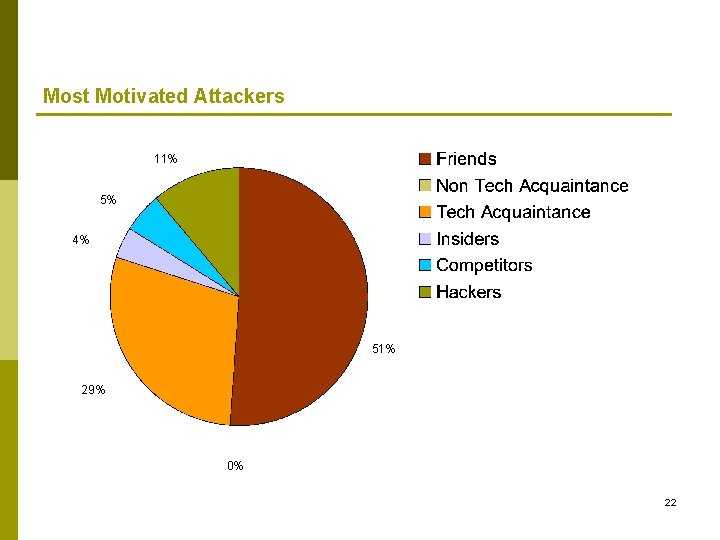
Continuation… o In the first ranking, participants were asked to rank attackers by their ability to access information without permission from one of your web accounts o In the second ranking, by their motivation to compromise passwords o Finally, by their likelihood to attack an online account, considering motivation and ability o Results and Discussion: Friends were considered most able attackers o When considering overall likelihood of compromise, participants seemed to weigh both motivation and ability 20
Most Able Attackers 27% 29% 2% 7% 2% 33% 21
Most Motivated Attackers 11% 5% 4% 51% 29% 0% 22
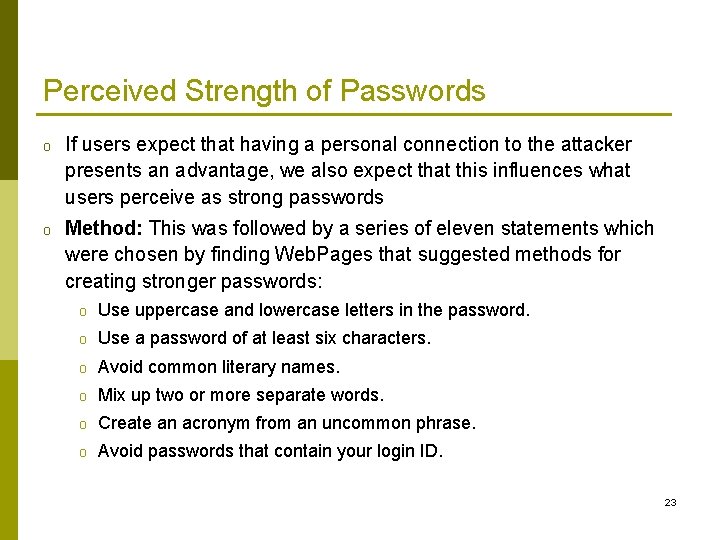
Perceived Strength of Passwords o If users expect that having a personal connection to the attacker presents an advantage, we also expect that this influences what users perceive as strong passwords o Method: This was followed by a series of eleven statements which were chosen by finding Web. Pages that suggested methods for creating stronger passwords: o Use uppercase and lowercase letters in the password. o Use a password of at least six characters. o Avoid common literary names. o Mix up two or more separate words. o Create an acronym from an uncommon phrase. o Avoid passwords that contain your login ID. 23
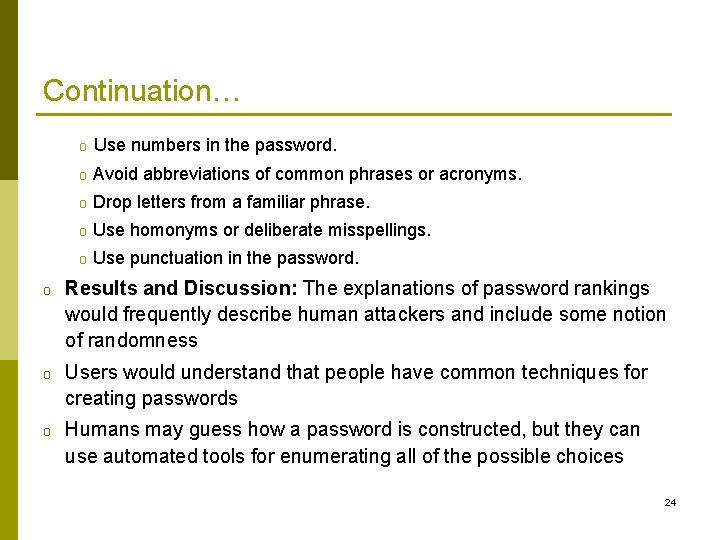
Continuation… o Use numbers in the password. o Avoid abbreviations of common phrases or acronyms. o Drop letters from a familiar phrase. o Use homonyms or deliberate misspellings. o Use punctuation in the password. o Results and Discussion: The explanations of password rankings would frequently describe human attackers and include some notion of randomness o Users would understand that people have common techniques for creating passwords o Humans may guess how a password is constructed, but they can use automated tools for enumerating all of the possible choices 24
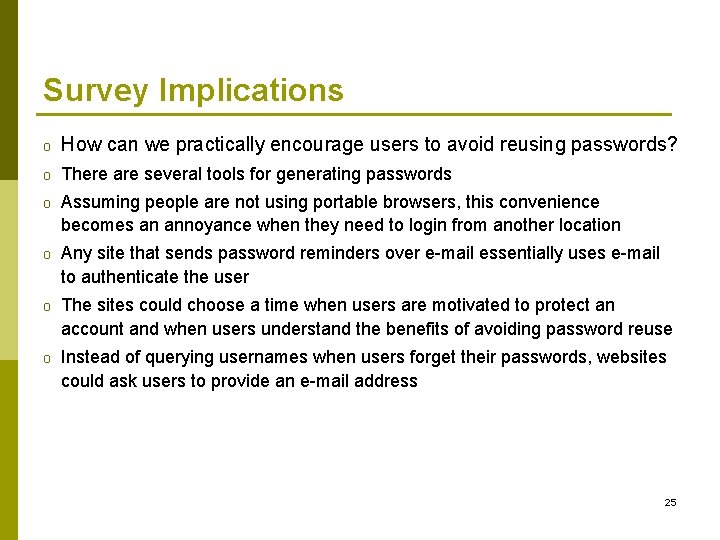
Survey Implications o How can we practically encourage users to avoid reusing passwords? o There are several tools for generating passwords o Assuming people are not using portable browsers, this convenience becomes an annoyance when they need to login from another location o Any site that sends password reminders over e-mail essentially uses e-mail to authenticate the user o The sites could choose a time when users are motivated to protect an account and when users understand the benefits of avoiding password reuse o Instead of querying usernames when users forget their passwords, websites could ask users to provide an e-mail address 25
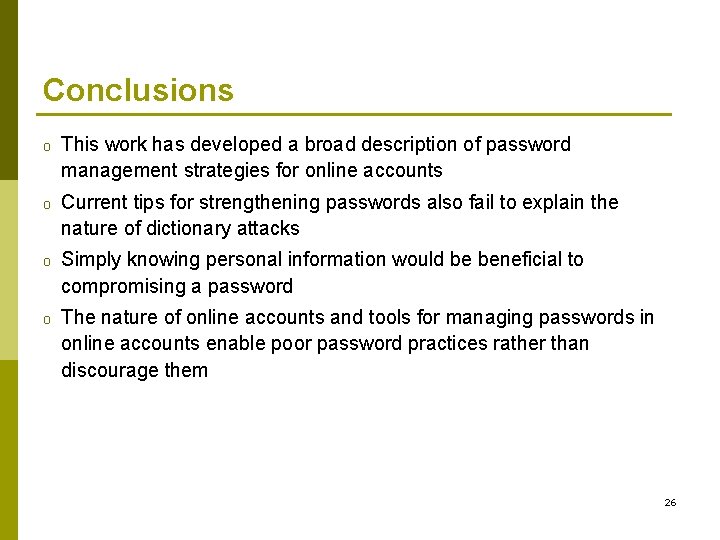
Conclusions o This work has developed a broad description of password management strategies for online accounts o Current tips for strengthening passwords also fail to explain the nature of dictionary attacks o Simply knowing personal information would be beneficial to compromising a password o The nature of online accounts and tools for managing passwords in online accounts enable poor password practices rather than discourage them 26
Continuation… o Findings indicated that despite their technical abilities and education, they still had trouble understanding the nature of some attacks o While participants understood the benefit of having randomly generated passwords, they still pictured human attackers and strengthened passwords by making it difficult for a human to guess them o They demonstrated that password reuse is likely to become more problematic over time as people accumulate more accounts and having more accounts implies more password reuse 27
28