
Partner User Guide Problem Solution 2 Did you
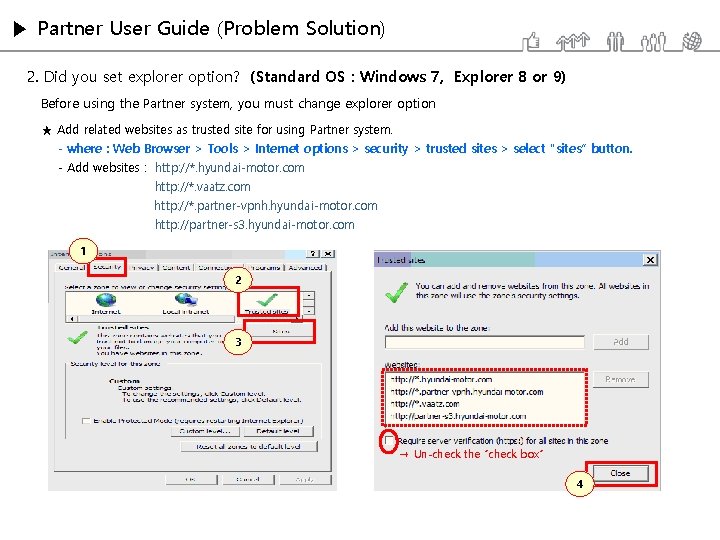
▶ Partner User Guide (Problem Solution) 2. Did you set explorer option? (Standard OS : Windows 7, Explorer 8 or 9) Before using the Partner system, you must change explorer option ★ Add related websites as trusted site for using Partner system. - where : Web Browser > Tools > Internet options > security > trusted sites > select “sites” button. - Add websites : http: //*. hyundai-motor. com http: //*. vaatz. com http: //*. partner-vpnh. hyundai-motor. com http: //partner-s 3. hyundai-motor. com 1 2 3 → Un-check the “check box” 4

▶ Partner User Guide (Problem Solution) Before using the Partner system, you must change explorer option ★ Select ‘Enable’ in all of Active-X related for using Partner system. - where : Web Browser > Tools > Internet options > security tab> select ‘Custom level’ > Active. X controls and plug ins. 1 2 3

▶ Partner User Guide (Problem Solution) Before using the Partner system, you must change explorer option ★ Select ‘Enable’ in all of ① Access Data sources across domains ② Launching programs and files in an IFRAME ③ Navigate windows and frames across different domains - where : Web Browser > Tools > Internet options > security > select ‘‘Custom level’. ★ Select ‘Disable’ in Use Pop-up blocker for using Partner system. - where : Web Browser > Tools > Internet options > security > select ‘‘Custom level’.
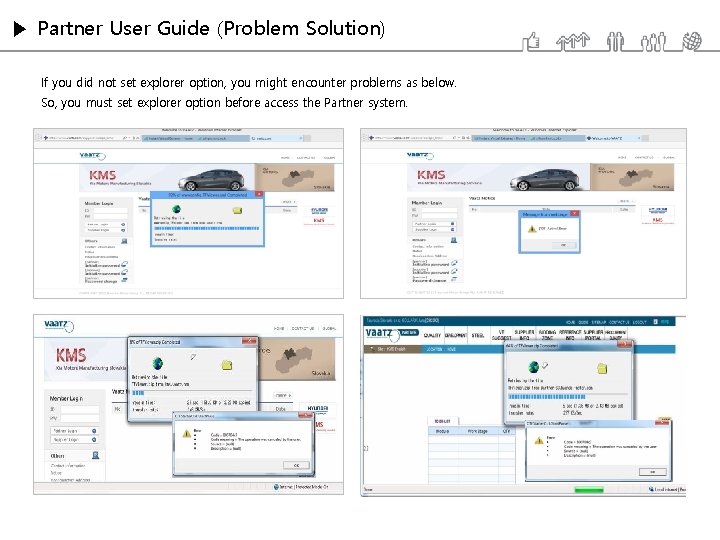
▶ Partner User Guide (Problem Solution) If you did not set explorer option, you might encounter problems as below. So, you must set explorer option before access the Partner system.
- Slides: 4