
Partner Practice Enablement Overview Module 1 Introduction to
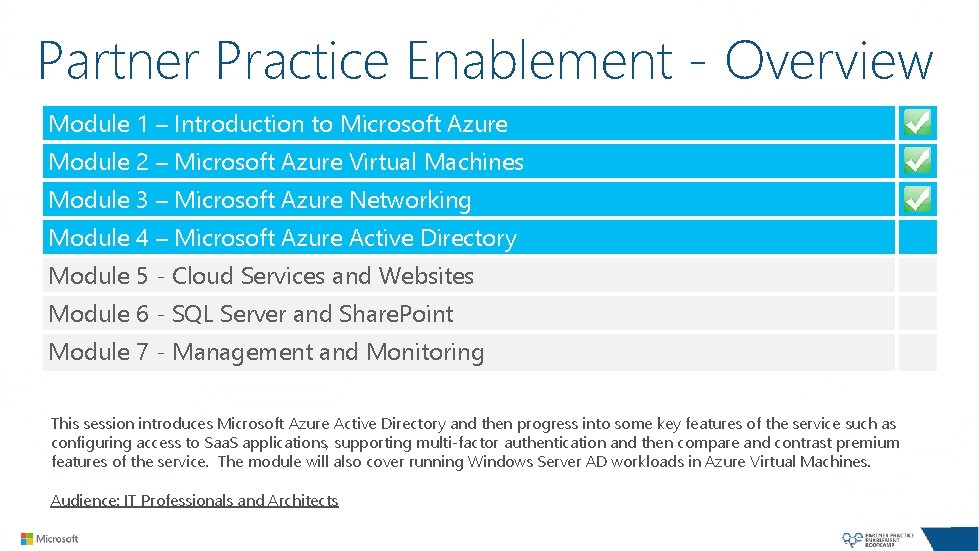
Partner Practice Enablement - Overview Module 1 – Introduction to Microsoft Azure Module 2 – Microsoft Azure Virtual Machines Module 3 – Microsoft Azure Networking Module 4 – Microsoft Azure Active Directory Module 5 - Cloud Services and Websites Module 6 - SQL Server and Share. Point Module 7 - Management and Monitoring This session introduces Microsoft Azure Active Directory and then progress into some key features of the service such as configuring access to Saa. S applications, supporting multi-factor authentication and then compare and contrast premium features of the service. The module will also cover running Windows Server AD workloads in Azure Virtual Machines. Audience: IT Professionals and Architects

About the Instructor CEO & Co-Founder of Opsgility, Experts in Instructor-Led Microsoft Azure Training. Prior to starting Opsgility Michael was a Principal Cloud Architect with a leading Solution Integrator and a fifteen year Microsoft veteran. While at Microsoft Michael's roles included being a Senior Program Manager on the Microsoft Azure Runtime team and a Senior Technical Evangelist for Microsoft Azure Infrastructure Services. Michael Washam Microsoft Azure Trainer http: //www. opsgility. com Twitter: @MWasham. TX michael@Opsgility. com Michael was the original developer of the Microsoft Azure Power. Shell Cmdlets and is a globally recognized speaker for conferences such as Tech. Ed and BUILD.
Microsoft Azure Active Directory
Agenda Microsoft Azure Active Directory Introduction Application Access Azure AD Application Proxy Multi-Factor Authentication (MFA) Company Branding Directory Integration Running Windows Server AD / AD FS on Azure VM’s
Microsoft Azure Active Directory Introduction
Microsoft Azure Active Directory What is it? A multi-tenant service that provides enterprise-level identity and access management for the cloud. Built to support global scale, reliability and availability. Backed by a 99. 99% SLA for Azure AD Premium or Basic What can I do with it? Manage users and access to cloud resources. Extend your on premise Active Directory to the cloud. Provide single-sign-on (SSO) across your cloud applications. Reduce risks by enabling multi-factor authentication. Support development’s need to build secure directory integrated applications for the enterprise. 6
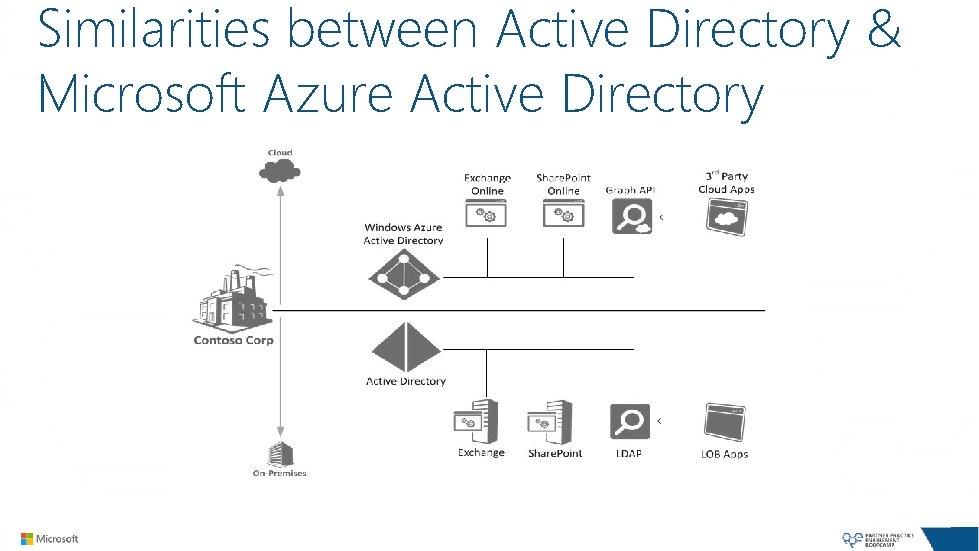
Similarities between Active Directory & Microsoft Azure Active Directory
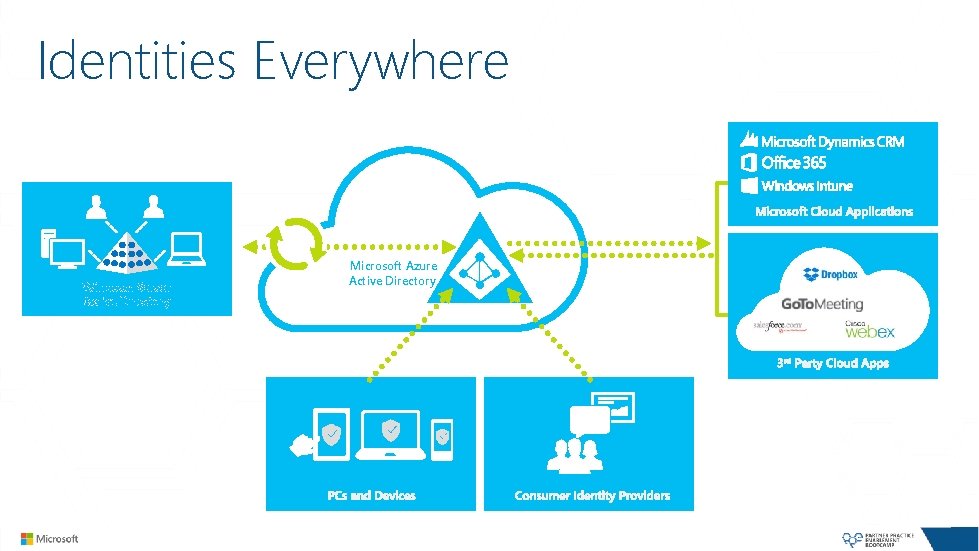
Identities Everywhere Windows Server Active Directory Microsoft Azure Active Directory
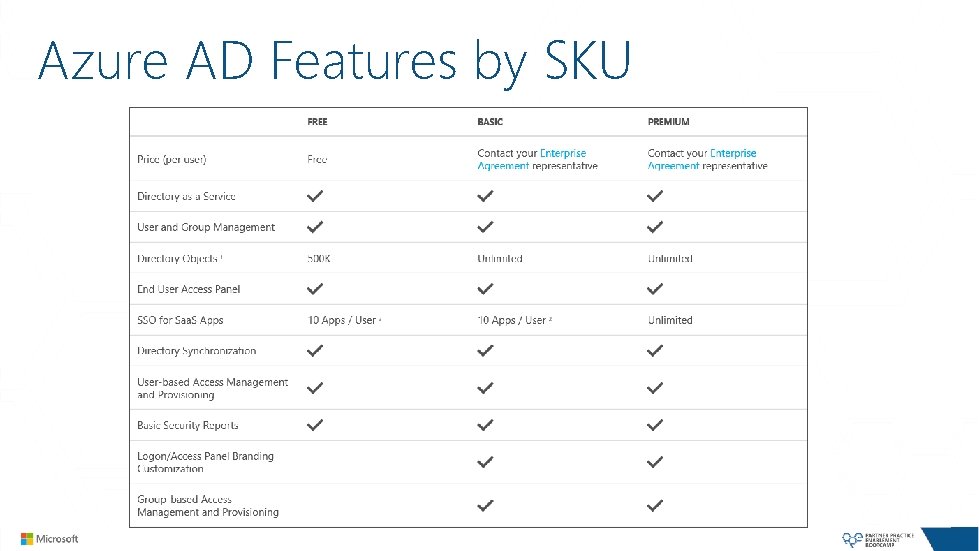
Azure AD Features by SKU
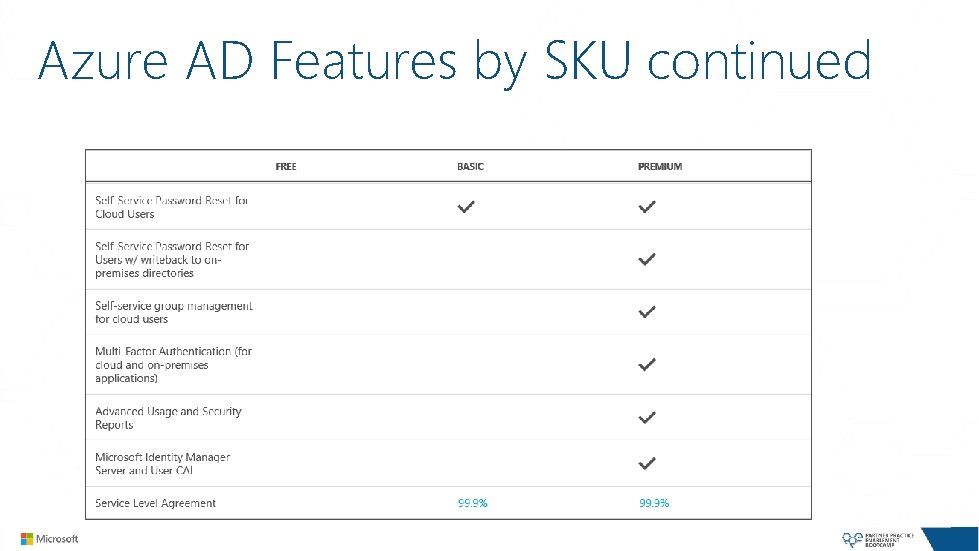
Azure AD Features by SKU continued
LAB 6 Microsoft Azure Active Directory
Application Access using Microsoft Azure AD

Application Access Overview Software-as-a-Service (Saa. S) Applications Organizations increasingly rely on Saa. S applications to support business activities. Microsoft Azure AD enables easy integration to many of today’s popular Saa. S applications, such as Salesforce, Box, Google Apps, Docu. Sign, Drop. Box. etc. Tenets of Integrating Saa. S Apps w/Microsoft Azure AD Single Sign-On (SSO) enables users to access their applications using their organizational ID. Account synchronization enables user provisioning/de-provisioning into application based on changes in Windows Server AD and/or Microsoft Azure AD. Centralized application access management. Unified monitoring and reporting. 13
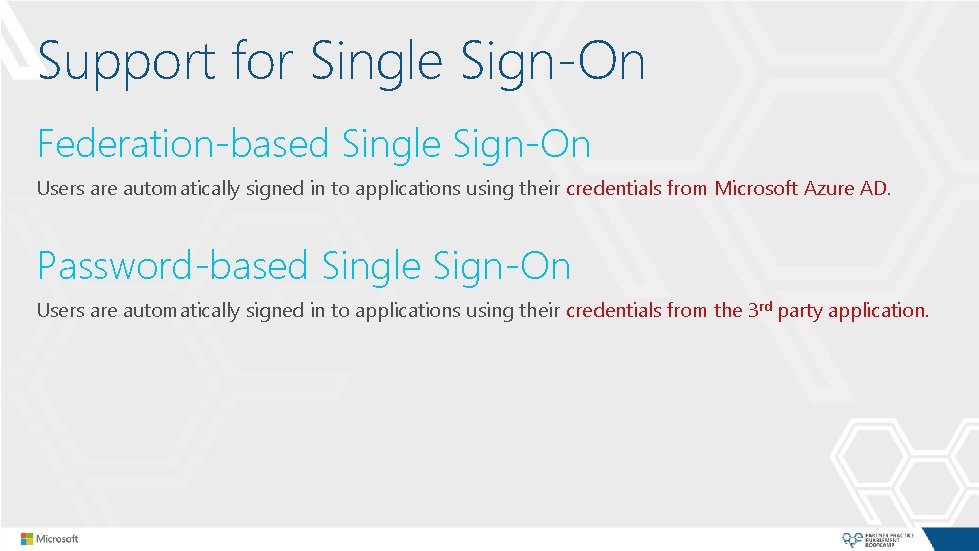
Support for Single Sign-On Federation-based Single Sign-On Users are automatically signed in to applications using their credentials from Microsoft Azure AD. Password-based Single Sign-On Users are automatically signed in to applications using their credentials from the 3 rd party application.

Access Panel http: //myapps. microsoft. com This is where users can discover the applications they have access to. Features of the Access Panel Users can change the password associated with their organizational account. Users can edit multi-factor authentication-related contact and preference settings. Users can view details about their account.

Access Panel for i. OS 7 Provides SSO to Apps integrated with your Azure Active Directory Supports i. Pad and i. Phone devices Full parity with the web-based Application Access Panel Install “My Apps – Azure Active Directory” from the Apple App Store
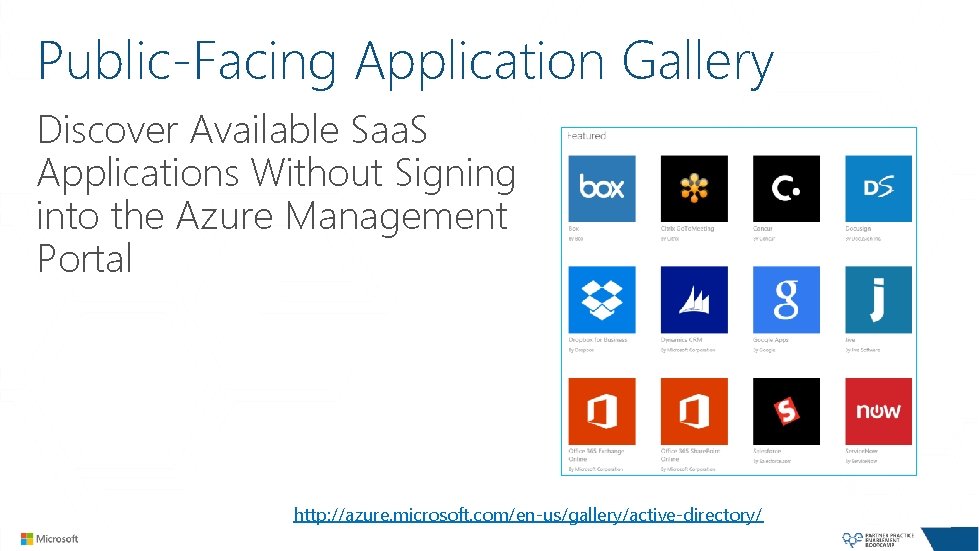
Public-Facing Application Gallery Discover Available Saa. S Applications Without Signing into the Azure Management Portal http: //azure. microsoft. com/en-us/gallery/active-directory/
LAB 7 Application Access with Azure Active Directory and Password. Based Single Sign-On
DEMO Application Access with Azure Active Directory and Federation. Based Single Sign-On
Cloud App Discovery

Cloud App Discovery Visibility Gain visibility into which cloud applications are being used within an organization. Assess Risk and Remediate See usage graphs based on users, requests, volume of data exchanged. Identify top cloud applications being used in the organization. Proceed with application integration (if appropriate). Get Started By General Availability (GA), will be integrated into the Azure Management Portal. Until then, sign up at https: //appdiscovery. azure. com/. Install Agent on machines in the organization.
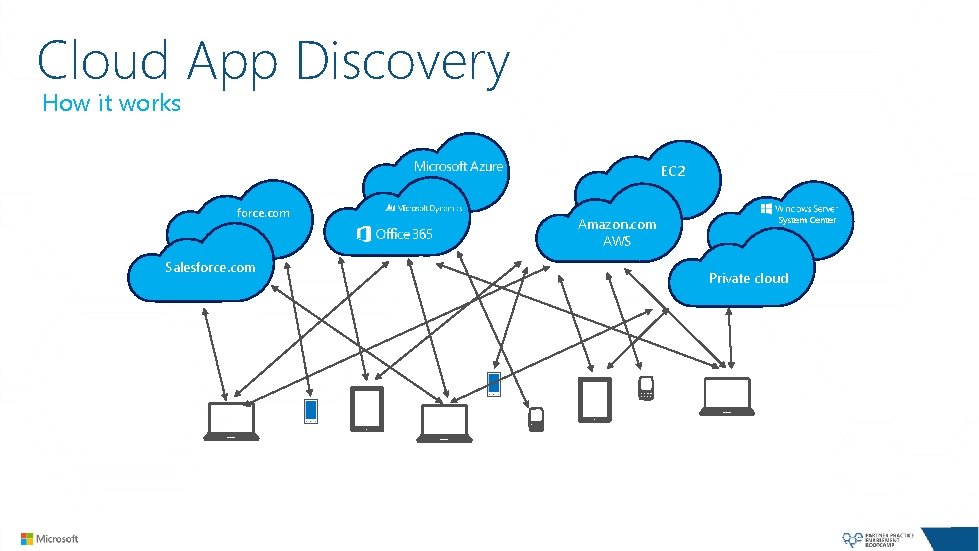
Cloud App Discovery How it works EC 2 force. com Salesforce. com Amazon. com AWS System Center Private cloud
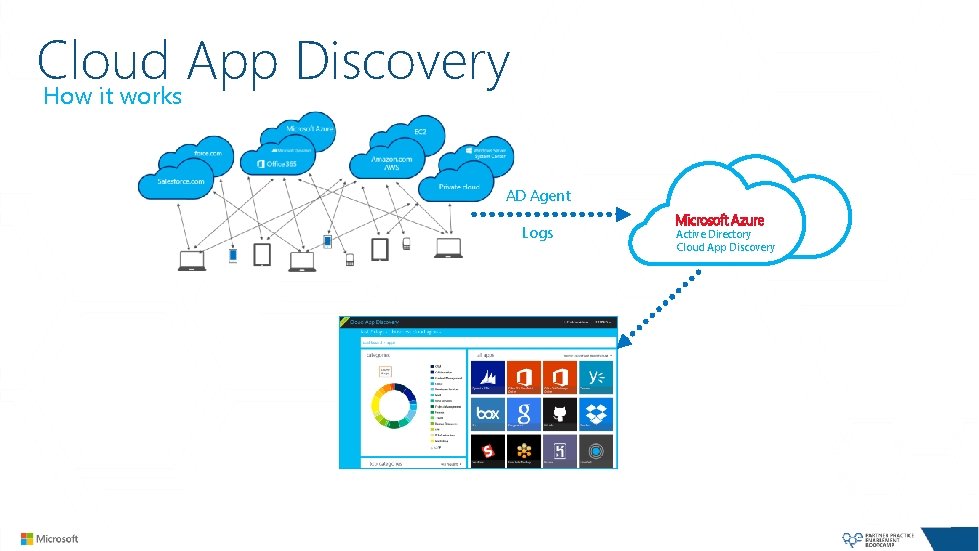
Cloud App Discovery How it works AD Agent Logs Active Directory Cloud App Discovery
Azure AD Application Proxy

Azure AD Application Proxy PREVIEW Reverse-Proxy as a Service Builds on the Web Application Proxy capabilities in Windows Server 2012 R 2. Supports browser-based applications - http(s). Cloud Connector Pattern Simpler On-Premises Deployment Connectors can be redundant for HA Stateless Architecture (as compared to WAP with AD FS)
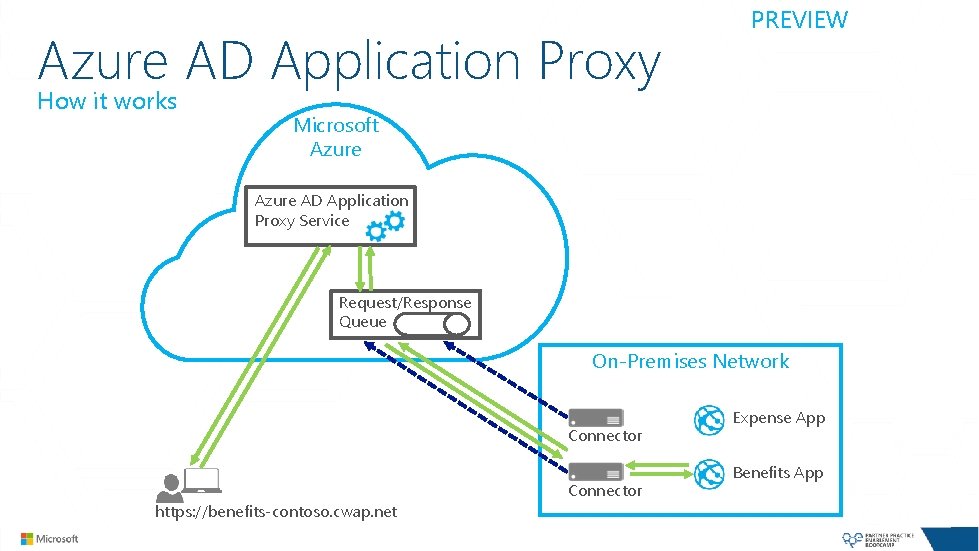
Azure AD Application Proxy How it works PREVIEW Microsoft Azure AD Application Proxy Service Request/Response Queue On-Premises Network Connector https: //benefits-contoso. cwap. net Connector Expense App Benefits App
Multi-Factor Authentication
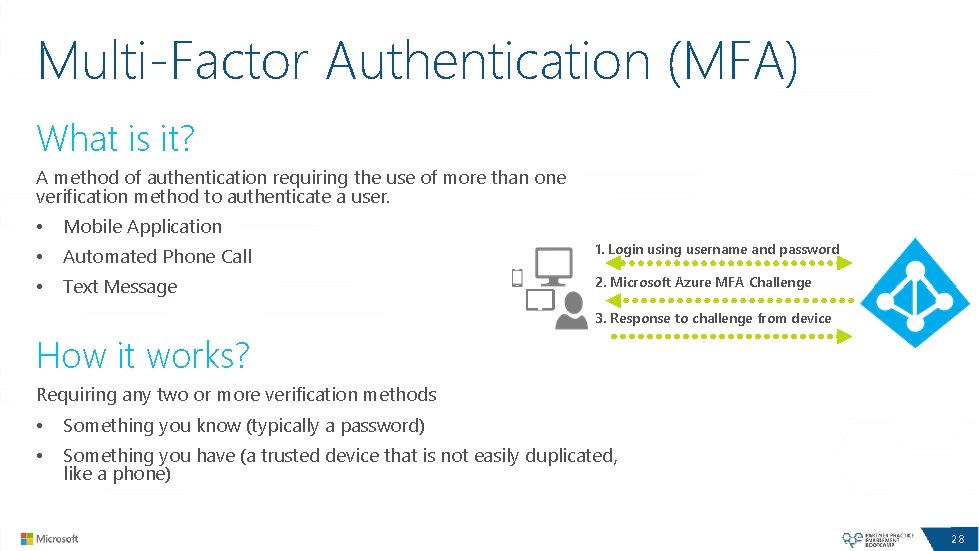
Multi-Factor Authentication (MFA) What is it? A method of authentication requiring the use of more than one verification method to authenticate a user. • Mobile Application • Automated Phone Call 1. Login using username and password • Text Message 2. Microsoft Azure MFA Challenge 3. Response to challenge from device How it works? Requiring any two or more verification methods • Something you know (typically a password) • Something you have (a trusted device that is not easily duplicated, like a phone) 28
LAB 8 Multi-Factor Authentication
Company Branding
Azure AD Company Branding Requirements Azure Active Directory Premium or Basic (both require an EA) Pages that can be custom branded Sign-in page Access Panel page Components that can be changed Banner Logo Large Illustration (left of Sign-in page) Background Color Sign-in page text
Directory Integration with Azure Active Directory

Directory Synchronizes Users, Groups, and Contacts to Windows Azure AD. Users will have a different password in Windows Azure AD than they have for the onpremise AD.
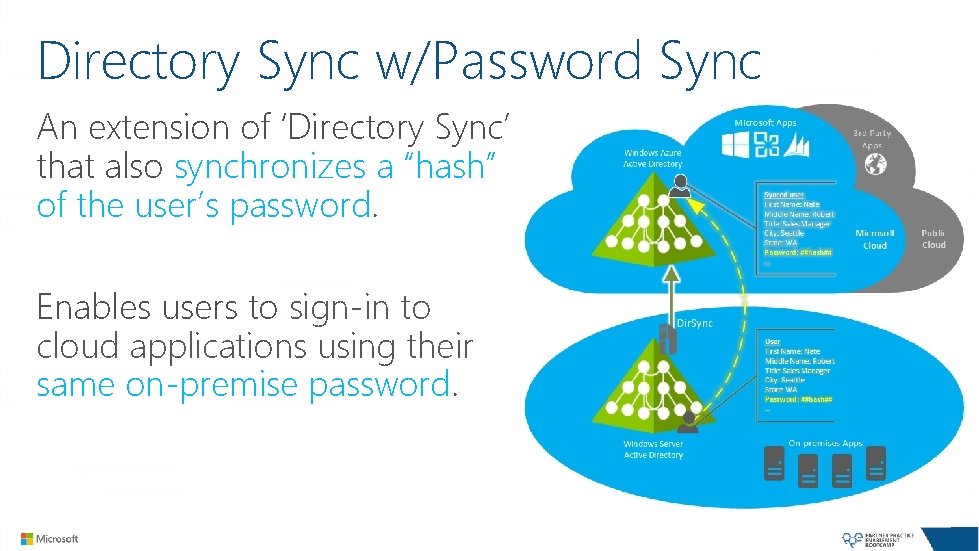
Directory Sync w/Password Sync An extension of ‘Directory Sync’ that also synchronizes a “hash” of the user’s password. Enables users to sign-in to cloud applications using their same on-premise password.
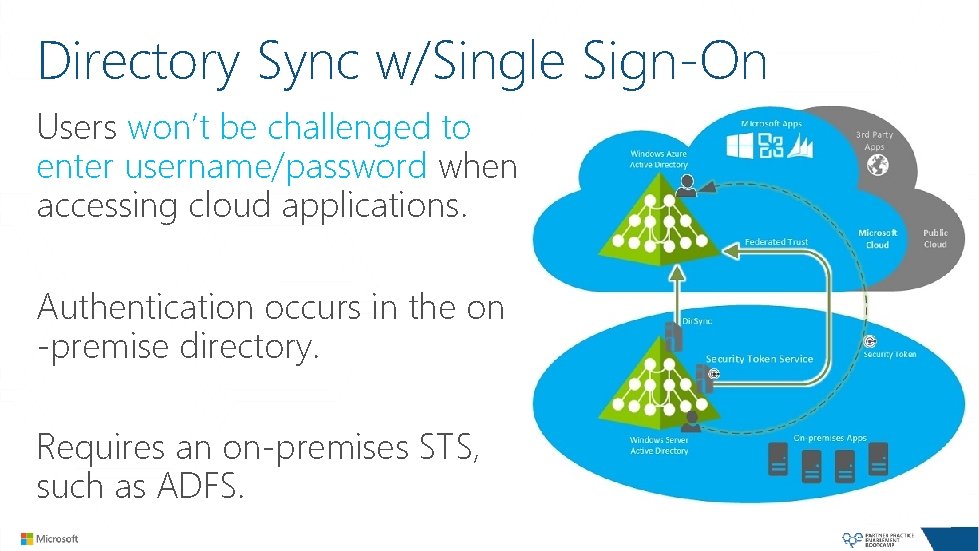
Directory Sync w/Single Sign-On Users won’t be challenged to enter username/password when accessing cloud applications. Authentication occurs in the on -premise directory. Requires an on-premises STS, such as ADFS.

Writeback Capability (“Dir. Sync”) Self-Services Password Reset with Writeback capability enables password resets to be persisted back to on-premises Server AD A feature of the Azure Active Directory “Dir. Sync” Tool Only available in Azure AD Premium

Enabling Password Writeback
Synchronization with Dir. Sync Intervals Directory Sync runs on 3 hour intervals. Password Sync runs on 2 minute intervals. Password Writeback’s occur instantly. Dir. Sync On-Demand Start-Online. Coexistence. Sync (Power. Shell)
Monitoring Dir. Sync Directory Synchronization logs events in the Windows Application Event Log. Event Source: “Directory Synchronization” Synchronization Service Manager for a UI Experience C: Program FilesWindows Azure Active Directory SyncSYNCBUSSynchronization ServiceUIShellmiisclient. exe Create Security Group “MIISAdmins” on the Dir. Sync Server and add the logged in user to the group. Reference: http: //support. microsoft. com/kb/2791422

Azure Active Directory Sync (“AAD Sync”) New “One Sync” Tool, replaces Dir. Sync General availability and available for download Features Onboard Multi-Forest Server AD Deployments to Azure AD Advanced provisioning, mapping and filtering rules Map multiple on-premises Exchange organizations to a single Azure AD tenant
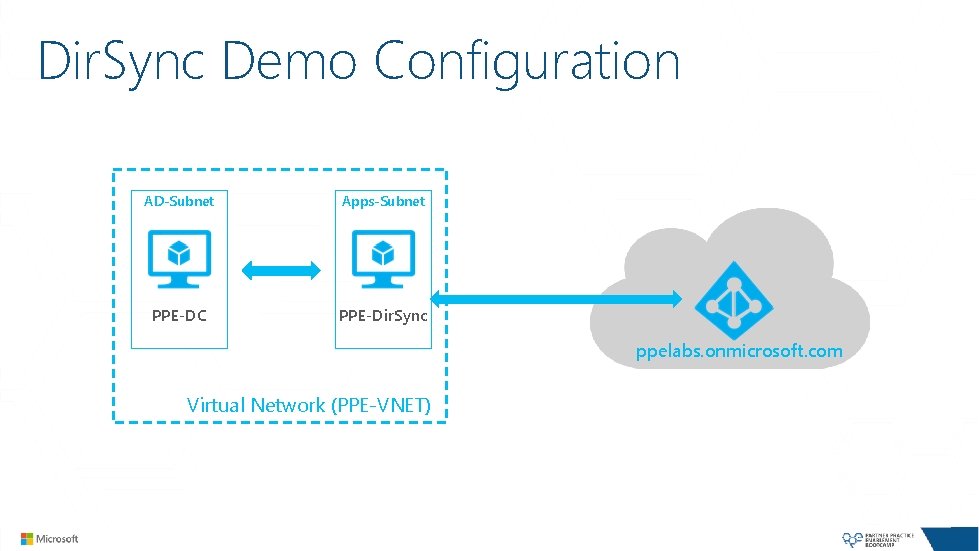
Dir. Sync Demo Configuration AD-Subnet Apps-Subnet PPE-DC PPE-Dir. Sync ppelabs. onmicrosoft. com Virtual Network (PPE-VNET)
DEMO Directory Sync w/Password Sync
Running Windows Server AD on Azure Virtual Machines
Why Server AD in a Azure VM? Business Drivers Support for pre-requisites for existing applications, such as Share. Point. High Availability Solutions for SQL Server Databases using Always-On Availability Groups. Disaster Recovery solution for branch offices and a limited set of VM’s. Dev/Test Workloads.
Azure VM Considerations From an Existing Physical Machine P 2 V a physical machine and move to Windows Azure Move the DC’s VHD file to Windows Azure Create the VM from the VHD Starting with a new Virtual Machine Build a new Virtual Machine and replicate directory to Windows Azure

Azure VM Considerations (continued…) Attach data disk (caching turned off) Don’t use D: ( temporary physical disk) Put logs and account DB on attached disk to avoid data loss

Azure VM Considerations (continued…) IP Addressing Microsoft Azure VM’s require use of a DHCP leased IP address. The lease is an infinite ‘dynamic’ lease, but not the same as ‘static assigned’ address that you would expect to use in and on-premises environment. The leased IP address is routable for the duration of the lease, which is determined by the life time of the service (or VM). Set a Static IP in the Virtual Network using the Set-Azure. Static. VNet. IP cmdlet.
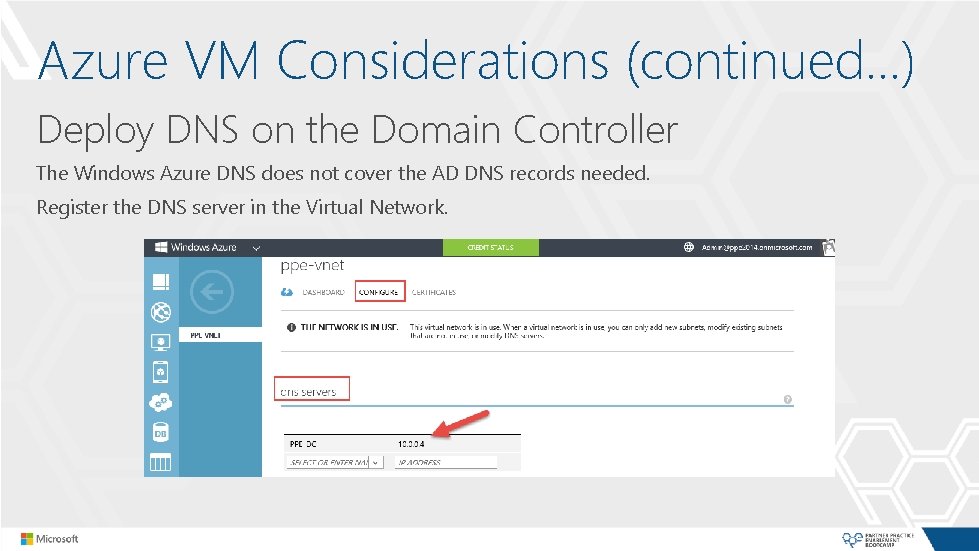
Azure VM Considerations (continued…) Deploy DNS on the Domain Controller The Windows Azure DNS does not cover the AD DNS records needed. Register the DNS server in the Virtual Network.
Running AD FS on Azure Virtual Machines

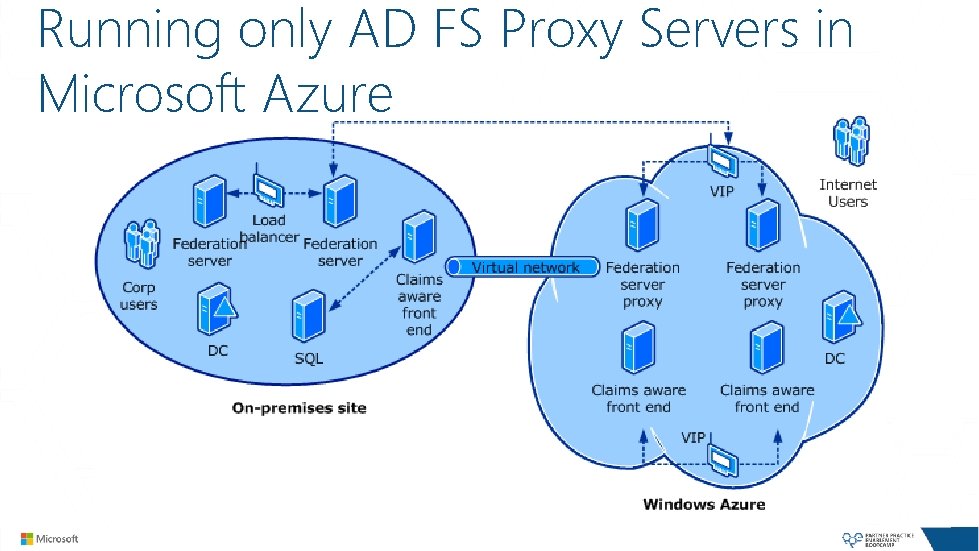
Running AD FS on Azure VM’s ADFS Best Practices call for Load balancing the AD FS Proxy and STS endpoints for high availability. If running this workload in Azure, use the Azure Internal Load Balancer. • Requires Regional Virtual Network

Typical AD FS deployment on-premises…

Example Cloud Based Architecture Federation Server Proxies Cloud Service On-Premises Environment FSP 1 Internal Load Balancer FSP 2 Federation Server Farm Cloud Service FS 1 FS 2

Running ADFS On-Premises Deploy AD FS Proxy Servers in Azure. Establish a site-to-site VPN or Express Route between the on-premises network and the Azure Virtual Network. Ideal for Production Environments.
Running only AD FS Proxy Servers in Microsoft Azure
Summary Microsoft Azure Active Directory Introduction Application Access Azure AD Application Proxy Multi-Factor Authentication (MFA) Company Branding Directory Integration Running Windows Server AD / AD FS on Azure VM’s
Coming Up Next. . . Cloud Services and Websites
Thank You
- Slides: 57