
Part 3 B Census Geography and Contemporary Technologies
Part 3 - B: Census Geography and Contemporary Technologies Data Collection and Data Conversion Mobile - Android 2020 World Round of Population and Housing Censuses – Pacific Island countries’ census planning meeting International recommendations/standards, contemporary technologies and regional cooperation Noumea, New Caledonia, 27 July – 31 July 2015
Contents • • • Collection modes (traditional and tablet) Household listing exercise About the pilot Development and deployment Experiences and results Picking the right collection mode
Introduction • Benefits of the traditional method – Proven – Low cost per project – Ability to make quick changes with a stroke of a pen – Ability to make notes besides related fields – Short development time – Semi durable and printed medium can be weather proof – Portable and wider area of deployment
Introduction • Benefits of technology based interviews – Better data quality – Improved data turnaround – Improved data management – Ability to make and implement consistent changes quicker – Moving with times – more sociably acceptable – Potential cost savings over the long run
Household Listing Exercise • What is the Household Listing Exercise – is an exercise aimed at obtaining specific management information data items. • Number of enumeration areas; • Number of management areas; • Estimated households in each area; • Estimates of potential travel requirements; • Intelligence about problem areas; • Obtain geographic coordinates for study linkages. • Why is this important – Proper planning – Provides geographic information with out adding burden and time
About the Pilot • Why trial a TAPI application – Regional New Technology Issues surrounding • Development • Deployment • Data management • Design – 11 selected EA – 365 households – Run in Parallel as silent observers – 14 household level data items; no person level information 6
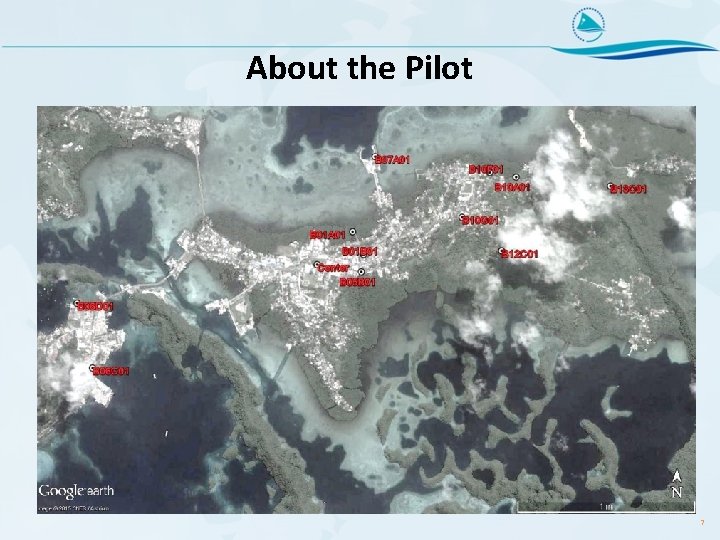
About the Pilot 7
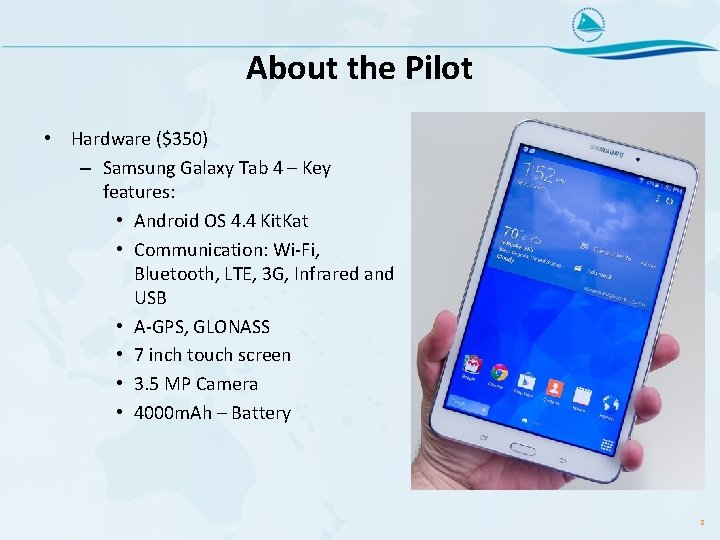
About the Pilot • Hardware ($350) – Samsung Galaxy Tab 4 – Key features: • Android OS 4. 4 Kit. Kat • Communication: Wi-Fi, Bluetooth, LTE, 3 G, Infrared and USB • A-GPS, GLONASS • 7 inch touch screen • 3. 5 MP Camera • 4000 m. Ah – Battery 8
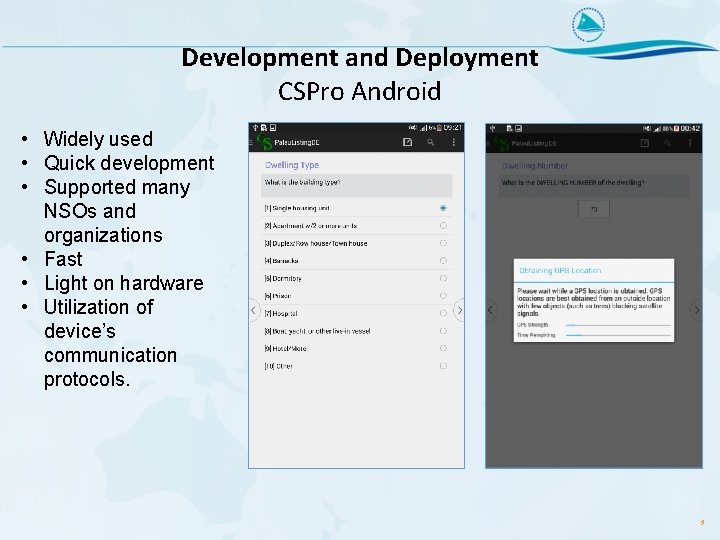
Development and Deployment CSPro Android • Widely used • Quick development • Supported many NSOs and organizations • Fast • Light on hardware • Utilization of device’s communication protocols. 9
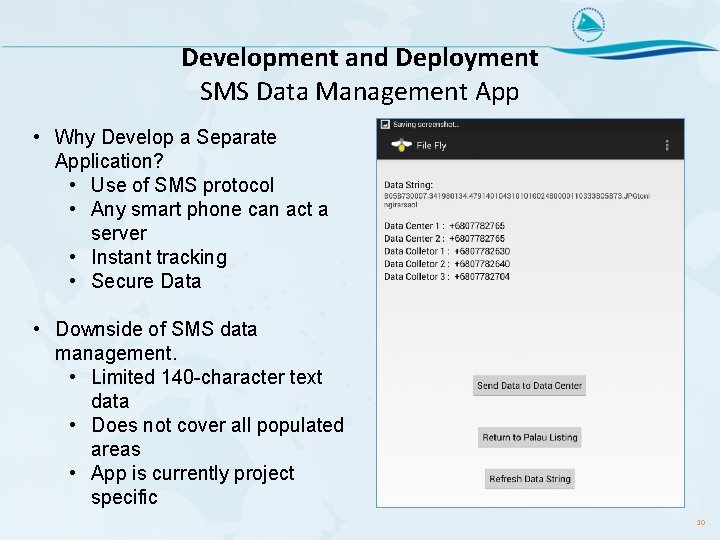
Development and Deployment SMS Data Management App • Why Develop a Separate Application? • Use of SMS protocol • Any smart phone can act a server • Instant tracking • Secure Data • Downside of SMS data management. • Limited 140 -character text data • Does not cover all populated areas • App is currently project specific 10
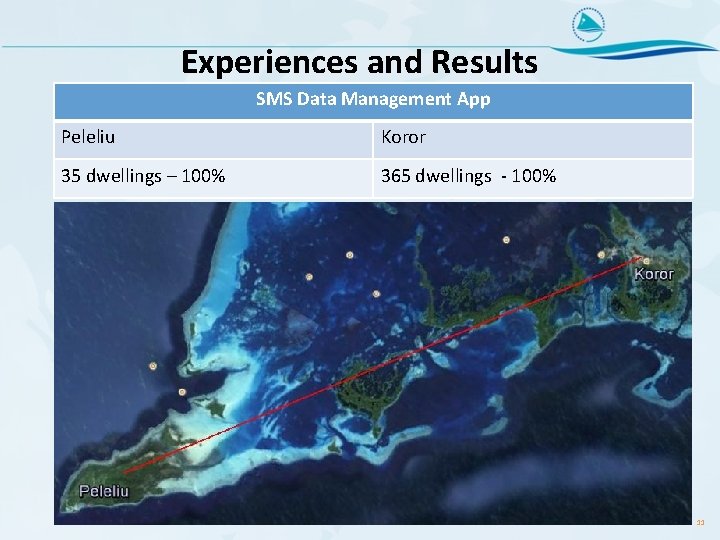
Experiences and Results SMS Data Management App Peleliu Koror 35 dwellings – 100% 365 dwellings - 100% 11
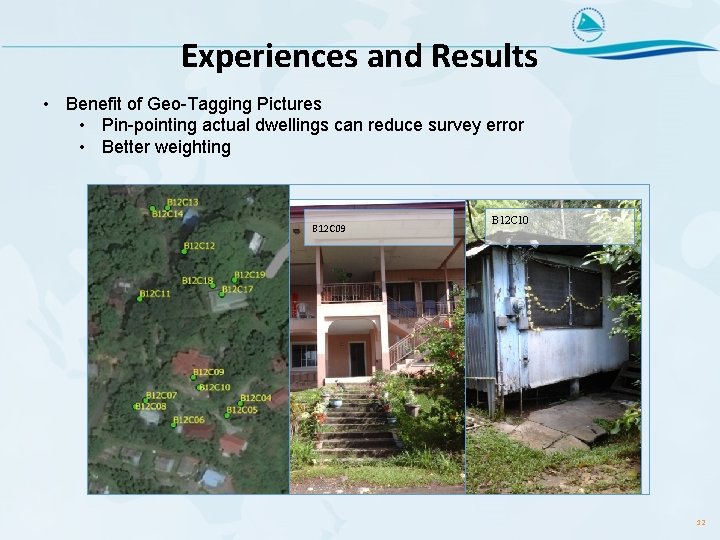
Experiences and Results • Benefit of Geo-Tagging Pictures • Pin-pointing actual dwellings can reduce survey error • Better weighting B 12 C 09 B 12 C 10 12

Experiences and Results Tablet GPS receiver vs Garmin Handheld GPS receiver Circular Error Probable (CEP) – 50 percent @ 3 meters - Comparing 2 GPS units – 6 meters is good All n Maximum Value Minimum Value Average Median Standard Deviation 365 dwellings 315. 31 m 0. 55 m 26. 01 m 9. 54 m 53. 53 m Lower 90 percent 329 dwellings 41. 21 m 0. 55 m 11. 59 m 8. 74 m 9. 00 m Percent of offsets 29, 2% 29, 5% 13, 7% 14, 0% 7, 3% 6, 1% 0, 3% 1 -5 m 6 -10 m 11 -15 m 16 -20 m 21 -30 m 31 -40 m 41+ m 13
Experiences and Results 14

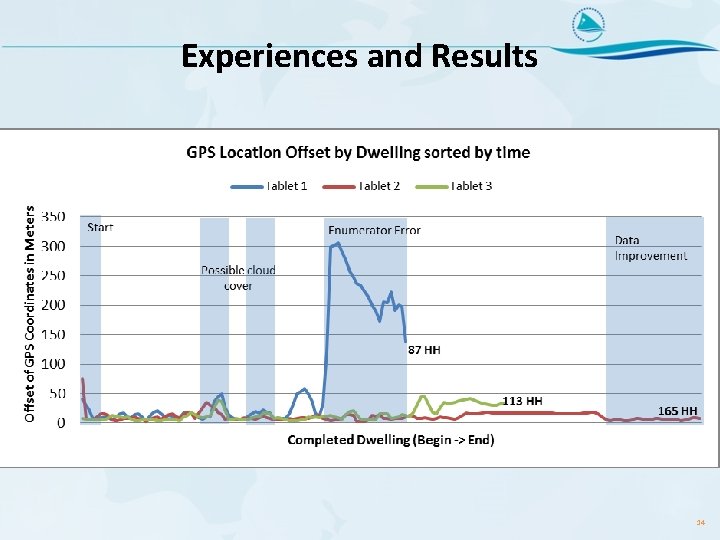
Experiences and Results • Tablets can be effectively be deployed in limited areas for simple studies. • There associated costs that should be considered. – Plans should be implemented to resale or add value to purchased equipment. • Use is relatively easy because, we limit enumerator decisions. • GPS receiver is not as accurate but can deliver enough accuracy for our needs. • Screen content is difficult to read in direct sunlight. • Development time is much longer and need testing and planning. • Although we provide the tools to improve quality it is still dependant on field work.
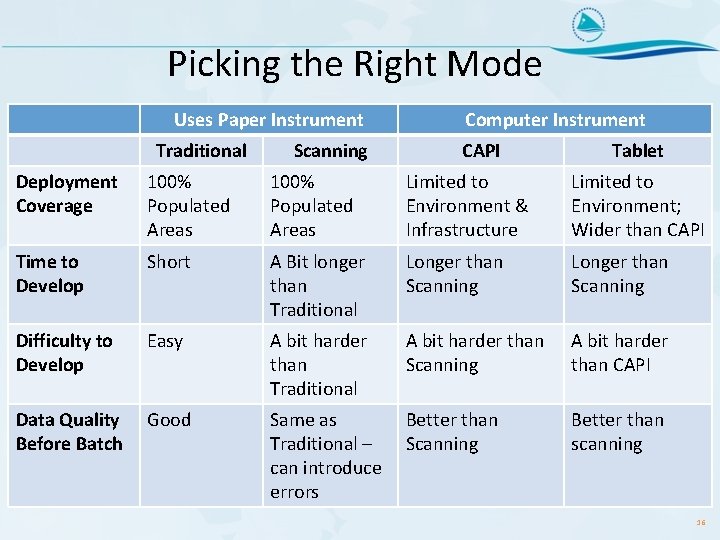
Picking the Right Mode Uses Paper Instrument Traditional Scanning Computer Instrument CAPI Tablet Deployment Coverage 100% Populated Areas Limited to Environment & Infrastructure Limited to Environment; Wider than CAPI Time to Develop Short A Bit longer than Traditional Longer than Scanning Difficulty to Develop Easy A bit harder than Traditional A bit harder than Scanning A bit harder than CAPI Data Quality Before Batch Good Same as Traditional – can introduce errors Better than Scanning Better than scanning 16
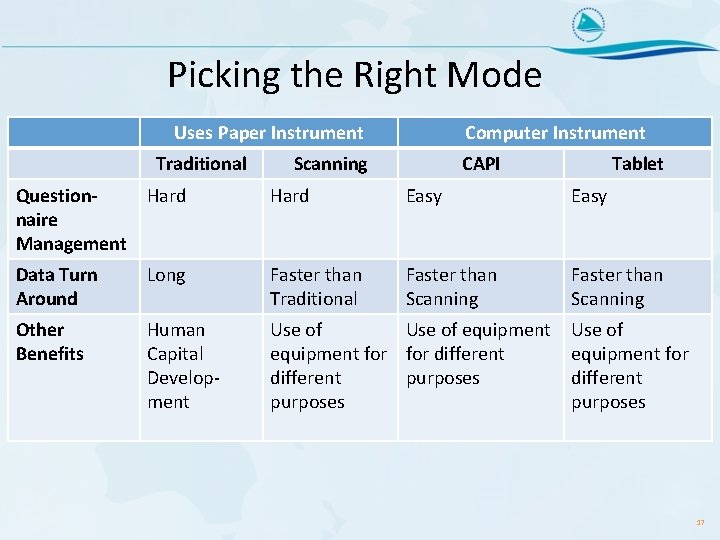
Picking the Right Mode Uses Paper Instrument Traditional Computer Instrument Scanning CAPI Tablet Question. Hard naire Management Hard Easy Data Turn Around Long Faster than Traditional Faster than Scanning Other Benefits Human Capital Development Use of equipment for different purposes 17
- Slides: 17