
Packet Capture and Analysis An Introduction to Wireshark
- Slides: 8
Packet Capture and Analysis: An Introduction to Wireshark 1
Why Capture Packets? • Small scale – Analysis of existing protocols – Design and testing of new protocols • Large scale – Traffic analysis and statistics – Capacity planning – Creation and implementation of traffic policy • Network attacks and attack prevention – Reconnaissance prior to targeted attack – Capture of credentials, etc. – Verify security policy 2
Considerations for Capturing Packets • Minimize the effect of the capture on the network traffic – We don’t want to make architectural changes just to capture traffic • Your capture device can only capture traffic that reaches its network interface – Only some of the network traffic normally appears on a specific network segment • The normal host interface behavior is to filter traffic that does not match an interface address – You may want to capture additional traffic 3
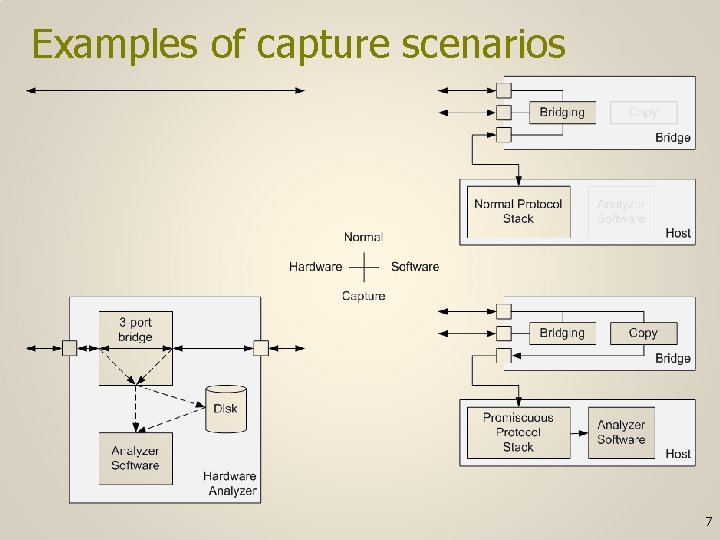
Hardware Capture • The appliance is a custom host with multiple network interfaces, some bridging capability, a tap within that bridge, and often a large data storage capacity • The appliance is inserted into an existing network link • Most hardware appliances use software for their analysis • Complete appliances are disappearing – but hardware taps are still popular 4
Software Capture • An existing host has capture software installed – The host may only need one interface 1 • The host interface is operated promiscuously – Filtering of packets is disabled so that all received packets can be captured • The network tap occurs outside the host – A tap is inserted into a link and the capture host is attached to the hub – A managed bridge is configured to copy packets going in or out of one bridge port and send that copy out another port where the capture host is attached 5
Local Host Software Capture • If we are only interested in traffic to or from the host with the analyzer software then no network tap is needed – Promiscuous operation of the local interface may also be optional • The host continues to operate normally on the network for protocols other than the one being tested • This is useful when analyzing an application layer protocol, for example 6
Examples of capture scenarios 7
Wireshark • Wireshark is free protocol analyzer software available for Windows and Linux platforms • What follows is a very brief introduction – There is documentation at the Wireshark site – Laura Chappell has written several useful books on how to use Wireshark – There are several You. Tube videos that introduce Wireshark 8