
Packages 1 Introduction As the number of elements

Packages 1
Introduction • As the number of elements in a design grows it is often necessary to group related elements together into packages. • A package is a general-purpose mechanism for organizing elements into groups. • Grouping like elements into packages is a technique for managing complexity. • The items in a particular package should be semantically close and subject to change at the same time. 2
Introduction • Package is synonymous with directory and folder. • Graphically, a package is drawn as a tabbed folder. • The visibility of individual elements within a package can vary. • Packages are loosely coupled and highly cohesive. • Packages, unlike classes, cannot be instantiated. • Packages have no meaning in the problem domain. They are used to organize the various elements of the problem domain. 3
Terms and Concepts • Names – Every package must have a name. • The name is a text string. • The name may be a simple name (Graphics. dll) or a path name (Dll. Library: : Graphics. dll). • Owned elements – A package is a container that may contain other packages. (A directory may contain subdirectories). – Package icons may be drawn inside other package icons. – The elements contained directly within a package should have unique names. 4
Terms and Concepts • Visibility – Just as the members of a class may me declared as public, protected or private, the members of a package may be declared as public, protected or private. • Public (+) - Visible to all. Provides the interface to the package. • Protected (#) - Visible only to descendants in inheritance relationships. • Private (-) - Not accessible outside the package. 5

Simple and Extended Packages 6
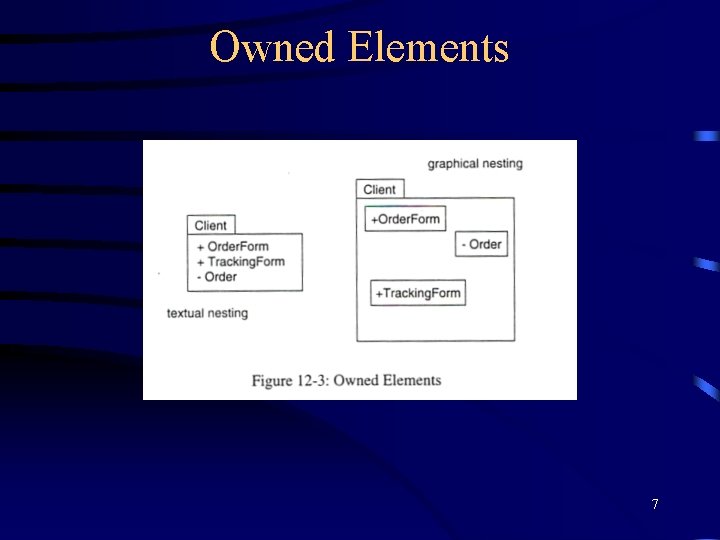
Owned Elements 7
Terms and Concepts • Importing and Exporting – Packages form a wall around their contents. – Elements within a package cannot be arbitrarily accessed from outside the package, even if the element(s) are public. – The public elements are known as exports. – To access elements in a package, the package must be imported. – Importing grants one-way permission for the elements in the importing package to access elements in the imported package. – Imports are modeled as a dependency adorned with the stereotype <import>. 8
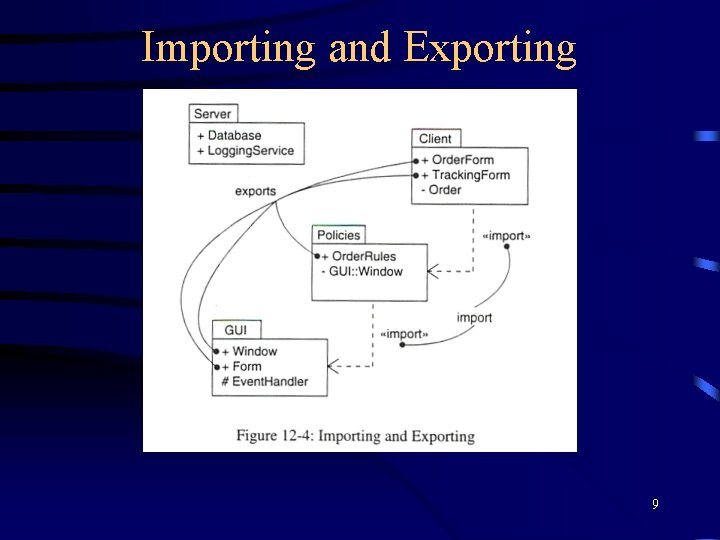
Importing and Exporting 9
Terms and Concepts • Generalization – Based on the same principle as generalization among classes. – A package that is derived (inherits) from another package can access all of its public and protected members. – Graphically, generalization between packages is represented the same way as generalization between classes. • Standard Elements – There are 5 pre-defined stereotypes that apply to packages: facade, framework, stub, subsystem and system. 10
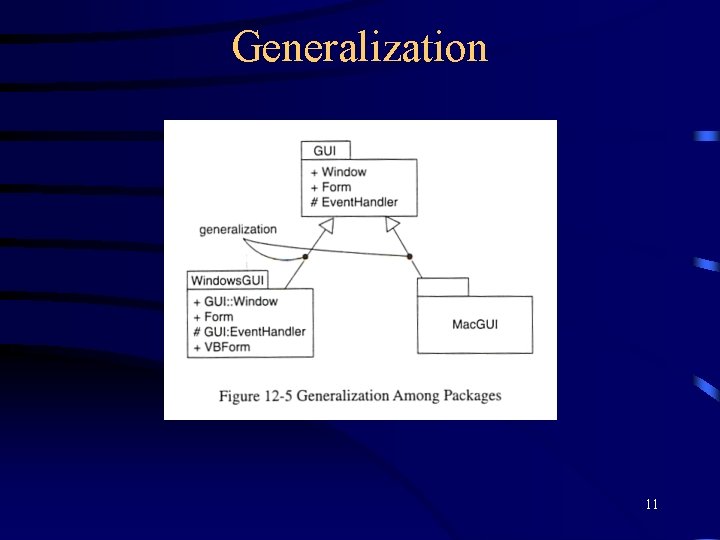
Generalization 11
Common Modeling Techniques • Package elements together that you wish to manipulate as a set. These elements will have similar semantics. • The larger the system, the greater the need for multiple packages. – Imagine how difficult it would be to comprehend a textbook that was not organized into chapters. • When in doubt about the visibility of a package element, make it private. • Look for relationships between packages. • Packages may be used for architectural modeling. 12
- Slides: 12