
Overview of IBM Spectrum Protect for Virtual Environments
Overview of IBM Spectrum Protect for Virtual Environments (TSM 4 VE)
Agenda � Overview of IBM Spectrum Protect for Virtual Environments (TSM 4 VE) � Product Components Overview � Tivoli Storage Manager Server Backend Structure � Backup and restore types � Backup Transport Options � Data. Mover (aka v. Storage Backup Server) � Options File (dsm. opt) � Client Schedules � Log Files, Stats and Reporting � Application Aware-Backups � Issues and Common Error Codes � Extras � Questions
Who am I ? Steven Soave Twitter: @Steven. Soave Current Position: Wintel & VMware Technical Specialist Worked in IT for around 14 years (VMware products around 8 years) VMware Certification: VCP 6 -NV
Disclaimer � The information in this presentation are from my own experiences and do not reflect the views or configures of the product at my employer.
Poll � Who has used/is using IBM Spectrum Protect for Virtual Environments?
Overview of IBM Spectrum Protect for Virtual Environments (TSM 4 VE) � What is it? � Image level virtual machine backup product leveraging VMware snapshots/change block tracking (CBT) � Who are some of its direct competitors? � Veeam � Comm. Vault � Veritas Net. Backup � Supports VMware (v. Center / v. Cloud Director) and Hyper-V - (Windows and Linux VMs) � Working with this product since 2014 when it was called “Tivoli Storage Manager for Virtual Environments 6. 4 (TSM 4 VE)” to present where it is now called “IBM Spectrum Protect for Virtual Environments 8. 1” (name changed circa v 7. 1. 3) � Licensing model I’ve been exposed to: ‘data volume licensing’ – which means you can use all the IBM Spectrum Protect suite of products. Hence in essence corporations that have this licensing won’t let you use anything else as they will see it as paying double (through experience) (cont. )
� Pre using an imaged based backup solution like TSM 4 VE all my experiences were backing up at the file level. � With TSM 4 VE if all the stars are in aligned its been known to achieve 100% backup success rates…. . For a day or two ; -) More on this later as “It Depends” on a number of components all working optimally
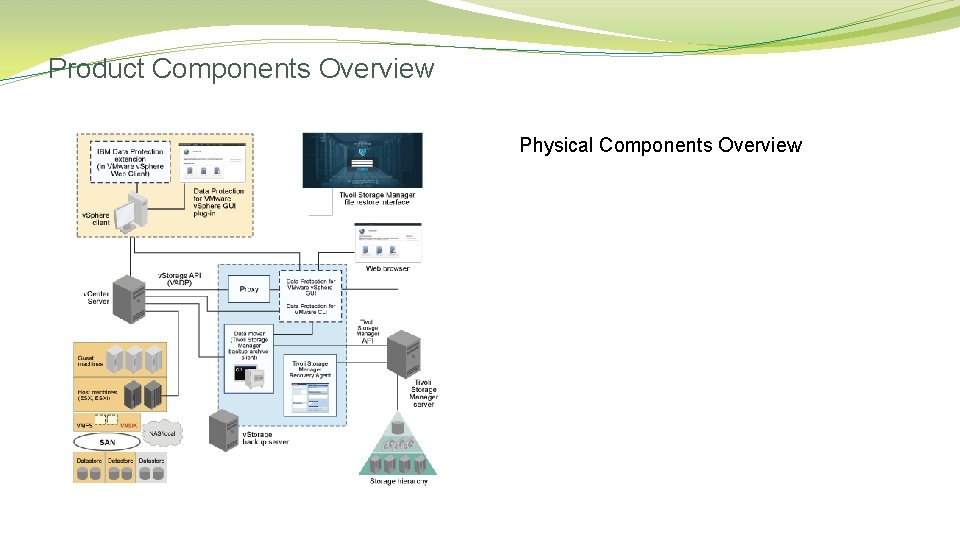
Product Components Overview Physical Components Overview

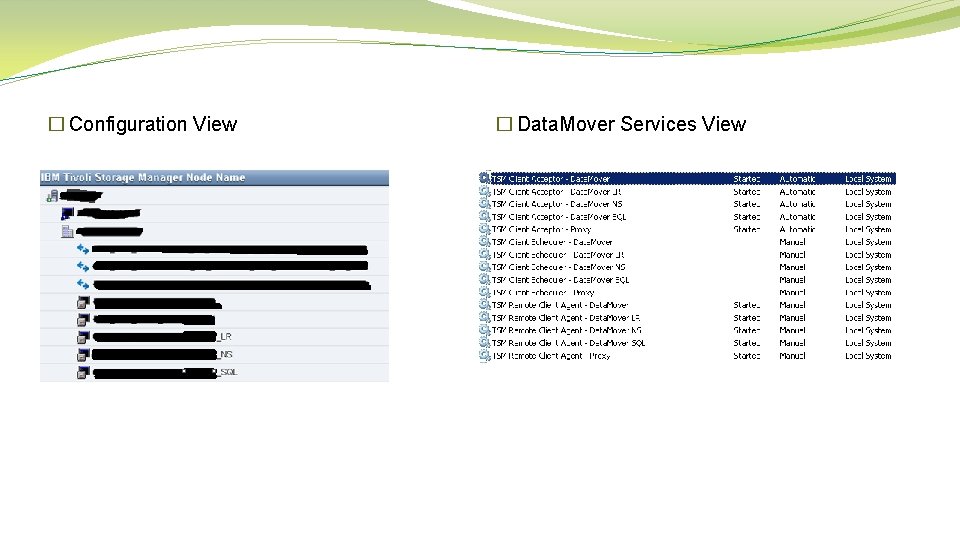
� Configuration View � Data. Mover Services View
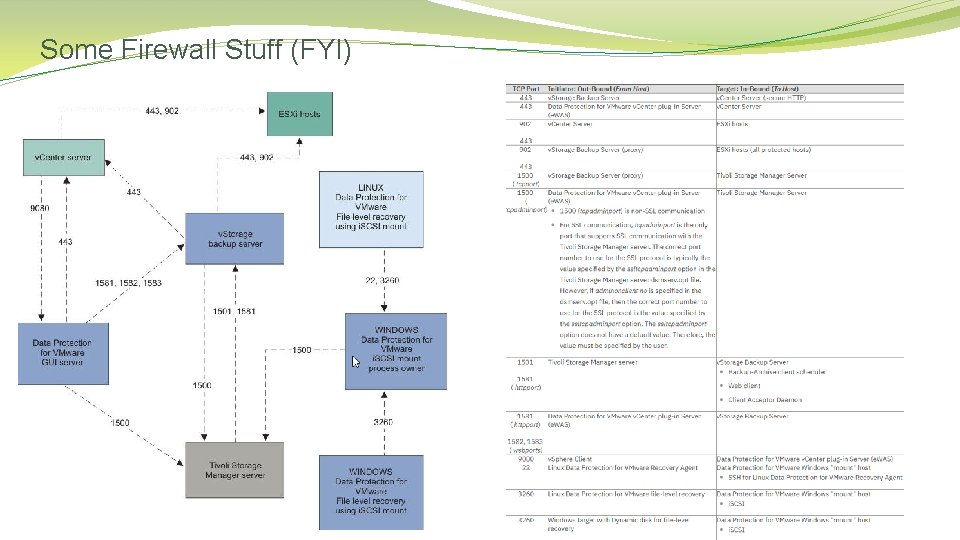
Some Firewall Stuff (FYI)
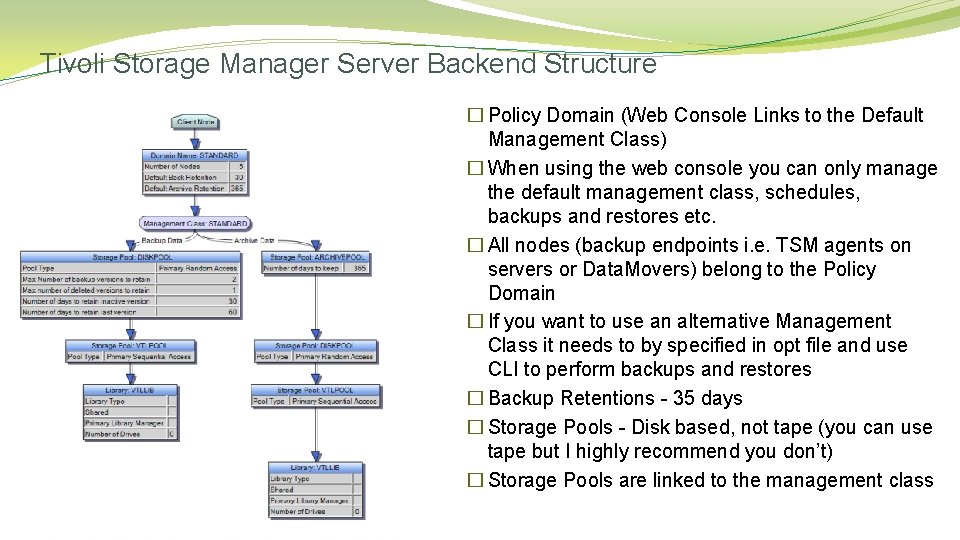
Tivoli Storage Manager Server Backend Structure � Policy Domain (Web Console Links to the Default Management Class) � When using the web console you can only manage the default management class, schedules, backups and restores etc. � All nodes (backup endpoints i. e. TSM agents on servers or Data. Movers) belong to the Policy Domain � If you want to use an alternative Management Class it needs to by specified in opt file and use CLI to perform backups and restores � Backup Retentions - 35 days � Storage Pools - Disk based, not tape (you can use tape but I highly recommend you don’t) � Storage Pools are linked to the management class
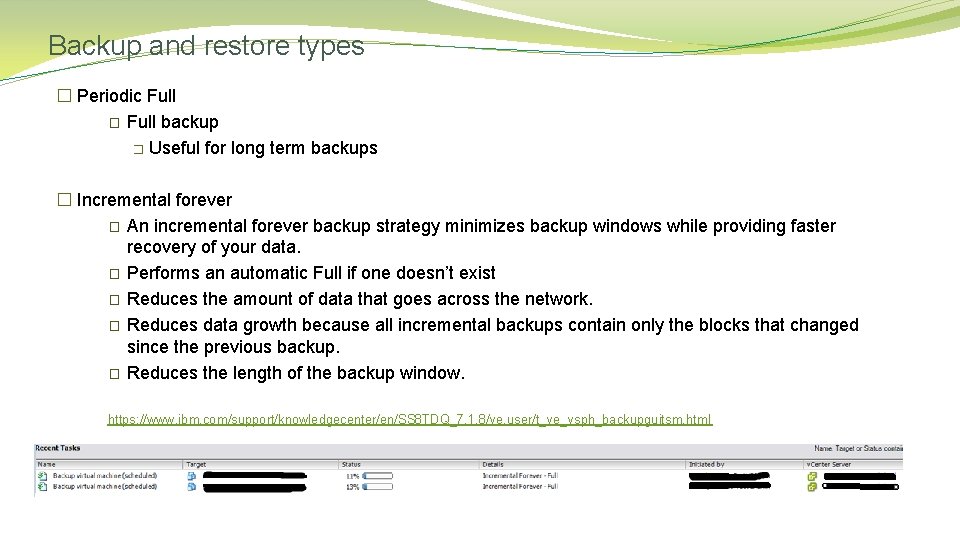
Backup and restore types � Periodic Full � Full backup � Useful for long term backups � Incremental forever � An incremental forever backup strategy minimizes backup windows while providing faster recovery of your data. � Performs an automatic Full if one doesn’t exist � Reduces the amount of data that goes across the network. � Reduces data growth because all incremental backups contain only the blocks that changed since the previous backup. � Reduces the length of the backup window. https: //www. ibm. com/support/knowledgecenter/en/SS 8 TDQ_7. 1. 8/ve. user/t_ve_vsph_backupguitsm. html
� Full VM Restore � Restore a full or incremental VM backup. The entire VM is restored to the state it existed in when originally backed up. � Note: When restoring a VM the original v. NIC MAC addresses are retained, as long as the original VM has been deleted or the v. NIC removed from it so the system doesn’t detect a MAC conflict. � Full VM Instant Restore � The restored VM becomes available for instant use, either for validating the backed up VM or for restoring the VM to permanent. � Basically gives you instant access while the full restore is happening in the background. � Full VM Instant Access � The restored VM becomes available for instant use for validating the backed up VM as at the restore point specified. � Any changes while using this restore will be cleaned up when the restore point is unmounted, no changes are written back to the backup.
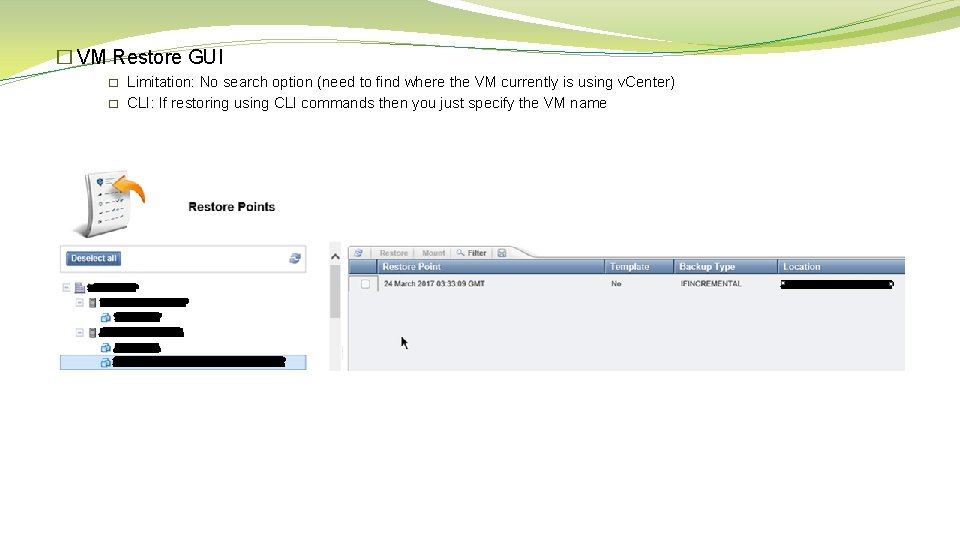
� VM Restore GUI � � Limitation: No search option (need to find where the VM currently is using v. Center) CLI: If restoring using CLI commands then you just specify the VM name
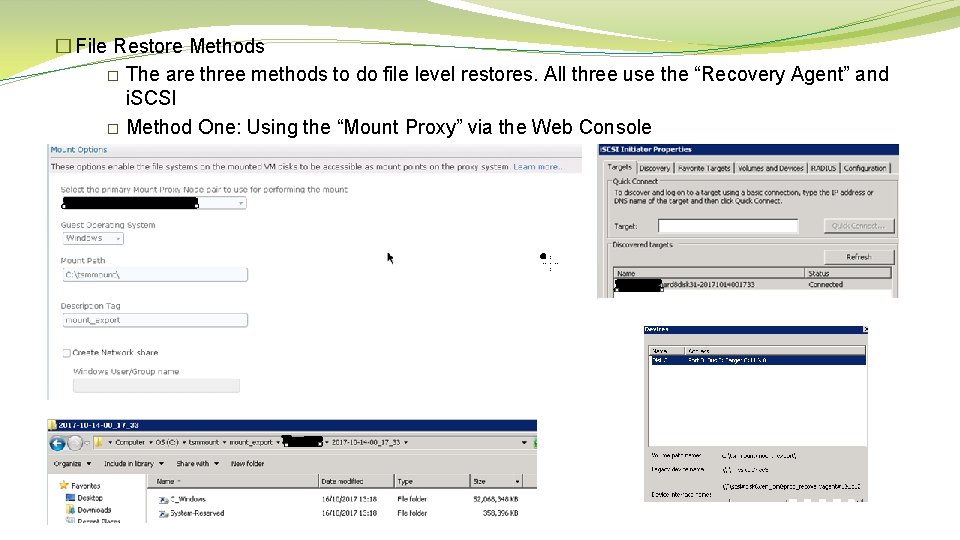
� File Restore Methods � The are three methods to do file level restores. All three use the “Recovery Agent” and i. SCSI � Method One: Using the “Mount Proxy” via the Web Console
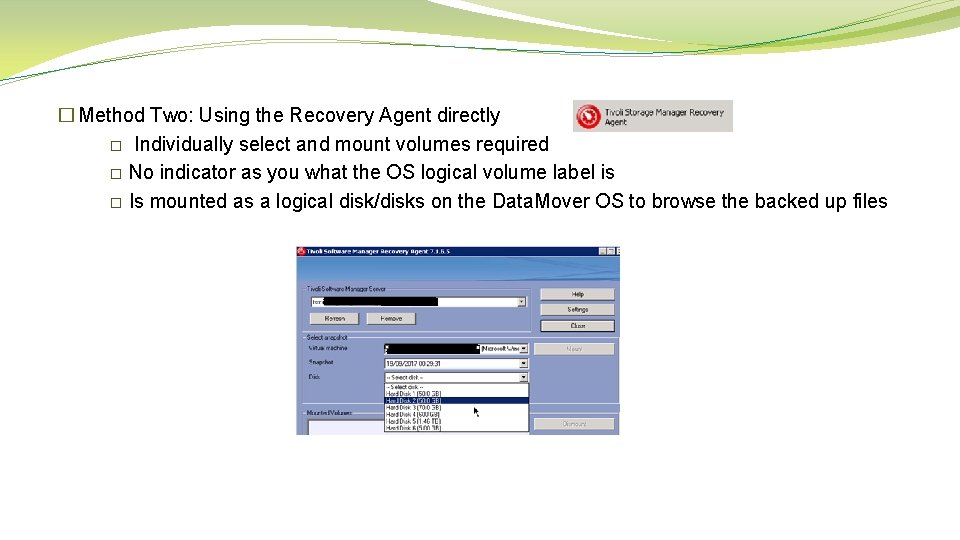
� Method Two: Using the Recovery Agent directly � Individually select and mount volumes required � No indicator as you what the OS logical volume label is � Is mounted as a logical disk/disks on the Data. Mover OS to browse the backed up files
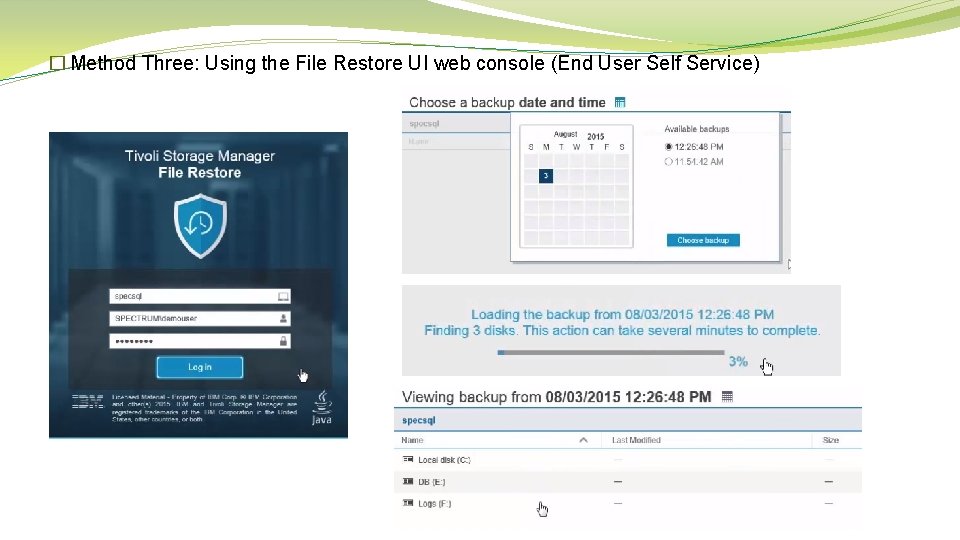
� Method Three: Using the File Restore UI web console (End User Self Service)
Backup Transport Options dsm. opt = vmvstortransport option to default (san: hotadd: nbdssl: nbd) � san You want to offload backup traffic from the LAN, and instead, move it over a SAN. � Required the Data. Mover to be a physical server � � hotadd � You are using a data mover node that is installed on a virtual machine to back up other virtual machines. � Mounts target VMs vmdk using SCSI on the Data. Mover. � Maximum of 15 SCSI disks per controller and a maximum of four controllers = 60 SCSI disks.
� ndb You are backing up virtual machines over an Ethernet LAN; you either do not have, or do not want to use, a SAN to offload backup traffic from the LAN. � Uses port TCP 902 Network File Copy (NFC) from the ESXi host management interface to the Data. Mover. Note: if using any bandwidth restricting technology (Blade. Systems) then ensure you have taken this into account as it could elongate the backups. � � nbdssl � You are backing up virtual machines over an Ethernet LAN and you want to use SSL to encrypt the data. . � Note that encrypting data can degrade backup performance
Data. Mover (aka v. Storage Backup Server) � Proxy Sizing https: //www. ibm. com/developerworks/community/wikis/form/anonymous/api/wiki/f 731037 e-c 0 cf-436 e-88 b 5 -862 b 9 a 6597 c 3/page/41 a 14 c 27 -1 ef 1 -4205 -bf 9 ed 2880970 d 877/attachment/969 be 223 -c 832 -44 bf-9 a 54 -1 df 64497 b 514/media/TSM-VE-Proxy-Sizing_26 may. pdf � General rule of thumb is to use a data mover for every 100 TB of v. Sphere data � 10 Gb. E (or Hot. Add / SAN equivalent) available on all data paths in the environment, specifically the path from the datastore to the data mover and then to the IBM Spectrum Protect server � 5% average daily change rate � 8 hour backup window � Data mover hardware specification The following hardware specification is suggested for each data mover: 16 cores (2. 8 GHz) if using client-side deduplication 8 cores (2. 8 GHz) if using server-side deduplication 8 GB RAM 10 Gb. E network
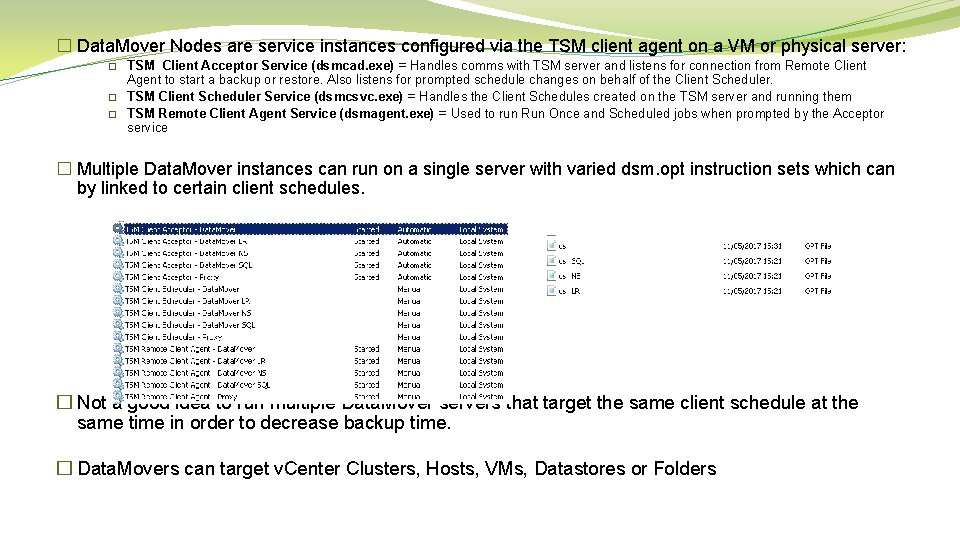
� Data. Mover Nodes are service instances configured via the TSM client agent on a VM or physical server: � � � TSM Client Acceptor Service (dsmcad. exe) = Handles comms with TSM server and listens for connection from Remote Client Agent to start a backup or restore. Also listens for prompted schedule changes on behalf of the Client Scheduler. TSM Client Scheduler Service (dsmcsvc. exe) = Handles the Client Schedules created on the TSM server and running them TSM Remote Client Agent Service (dsmagent. exe) = Used to run Run Once and Scheduled jobs when prompted by the Acceptor service � Multiple Data. Mover instances can run on a single server with varied dsm. opt instruction sets which can by linked to certain client schedules. � Not a good idea to run multiple Data. Mover servers that target the same client schedule at the same time in order to decrease backup time. � Data. Movers can target v. Center Clusters, Hosts, VMs, Datastores or Folders
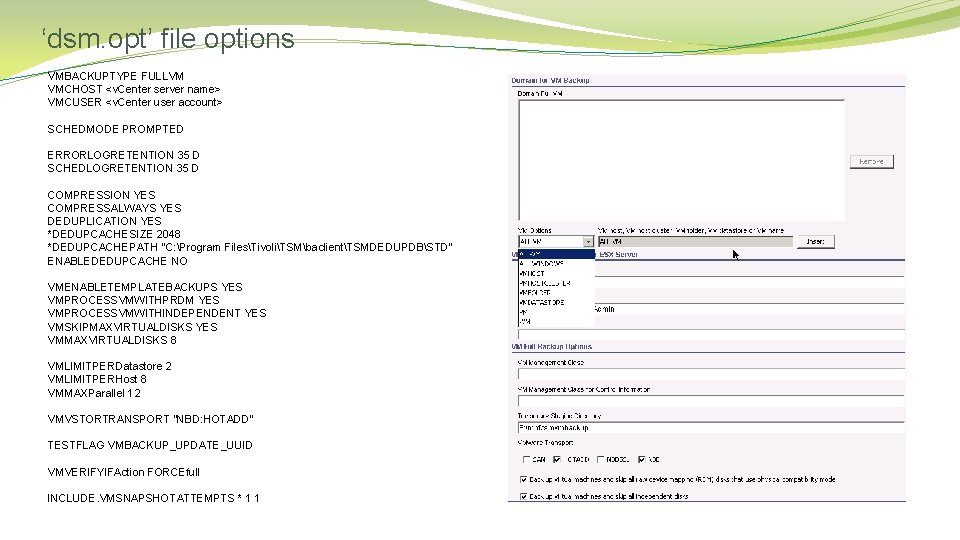
‘dsm. opt’ file options VMBACKUPTYPE FULLVM VMCHOST <v. Center server name> VMCUSER <v. Center user account> SCHEDMODE PROMPTED ERRORLOGRETENTION 35 D SCHEDLOGRETENTION 35 D COMPRESSION YES COMPRESSALWAYS YES DEDUPLICATION YES *DEDUPCACHESIZE 2048 *DEDUPCACHEPATH "C: Program FilesTivoliTSMbaclientTSMDEDUPDBSTD" ENABLEDEDUPCACHE NO VMENABLETEMPLATEBACKUPS YES VMPROCESSVMWITHPRDM YES VMPROCESSVMWITHINDEPENDENT YES VMSKIPMAXVIRTUALDISKS YES VMMAXVIRTUALDISKS 8 VMLIMITPERDatastore 2 VMLIMITPERHost 8 VMMAXParallel 12 VMVSTORTRANSPORT "NBD: HOTADD" TESTFLAG VMBACKUP_UPDATE_UUID VMVERIFYIFAction FORCEfull INCLUDE. VMSNAPSHOTATTEMPTS * 1 1
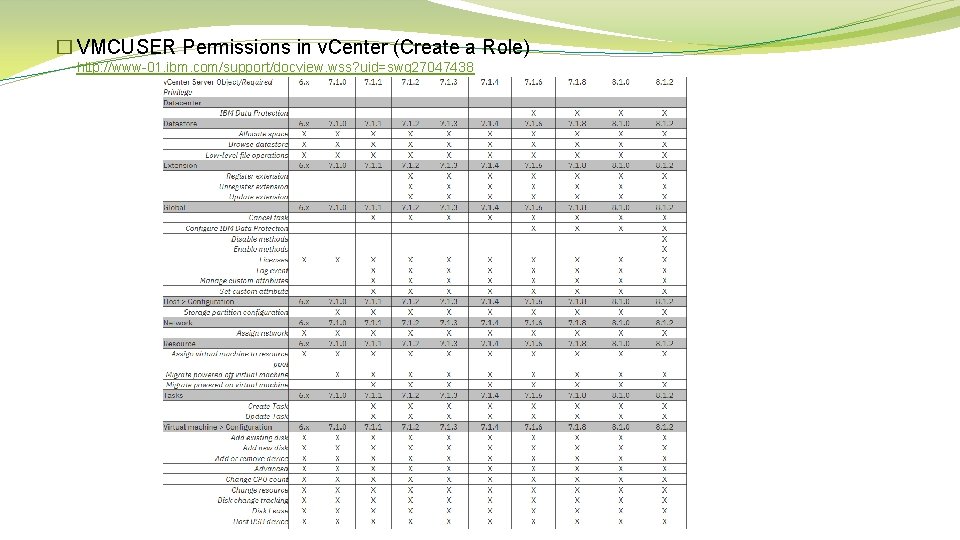
� VMCUSER Permissions in v. Center (Create a Role) http: //www-01. ibm. com/support/docview. wss? uid=swg 27047438
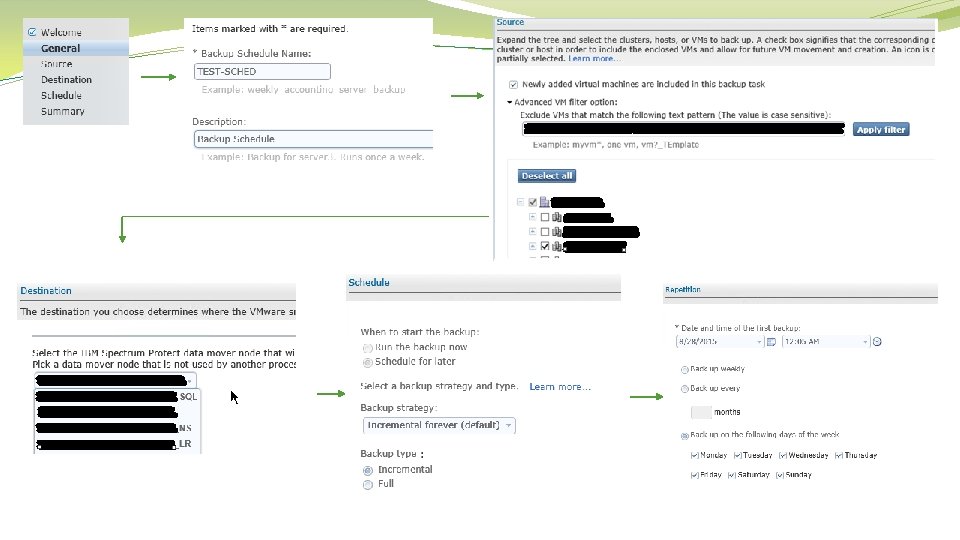
Client Schedules � Unsupported characters in VM or datacenter name Data Protection for VMware does not support backing up VMs or datacenters that contain any of the following characters in their name (ignore the brackets) (“) Double quotation mark (‘) Single quotation mark (: ) Colon (; ) Semicolon (*) Asterisk (? ) Question mark (, ) Comma (<) Less than sign (>) Greater than sign (/) Forward slash () Backward slash (|) Vertical bar � Schedules are associated with a Data. Mover instance (service) � No other schedule can be run using a Data. Mover instance that currently has a scheduled job running. Hence you will see the need for multiple Data. Mover instances if breaking out longer running backups etc. � Data. Movers can have multiple schedules assigned to it. (Note: Care must be taken as the later schedule may not run if current schedule run time supersedes the latter's start time (see Schedule Duration) � Schedules have Duration Windows. If schedule is due to run but another is still running then the latter will still run as long as its start time is within: - Start time + Duration Window � Two types of schedule: - Run Now - Scheduled
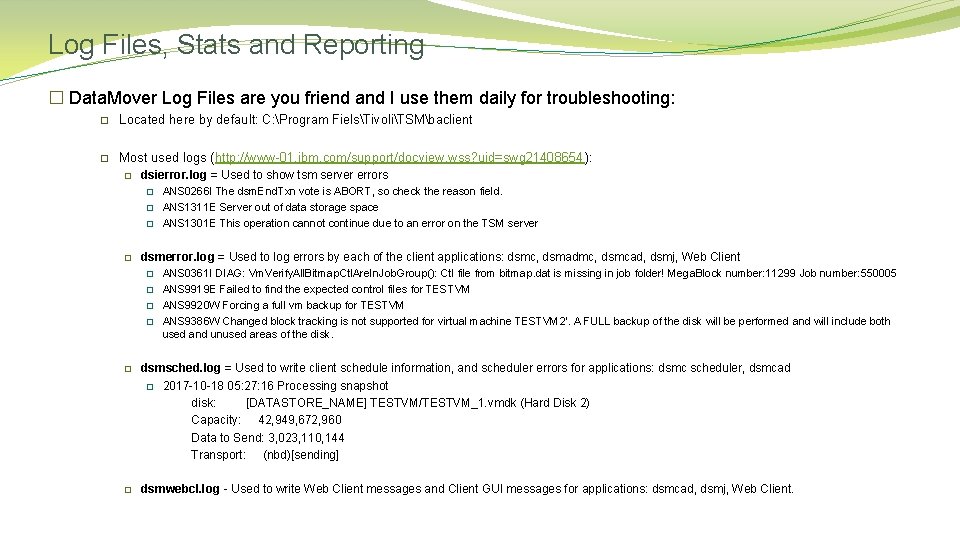
Log Files, Stats and Reporting � Data. Mover Log Files are you friend and I use them daily for troubleshooting: � Located here by default: C: Program FielsTivoliTSMbaclient � Most used logs (http: //www-01. ibm. com/support/docview. wss? uid=swg 21408654): � dsierror. log = Used to show tsm server errors � � ANS 0266 I The dsm. End. Txn vote is ABORT, so check the reason field. ANS 1311 E Server out of data storage space ANS 1301 E This operation cannot continue due to an error on the TSM server dsmerror. log = Used to log errors by each of the client applications: dsmc, dsmadmc, dsmcad, dsmj, Web Client � � ANS 0361 I DIAG: Vm. Verify. All. Bitmap. Ctl. Are. In. Job. Group(): Ctl file from bitmap. dat is missing in job folder! Mega. Block number: 11299 Job number: 550005 ANS 9919 E Failed to find the expected control files for TESTVM ANS 9920 W Forcing a full vm backup for TESTVM ANS 9386 W Changed block tracking is not supported for virtual machine TESTVM 2'. A FULL backup of the disk will be performed and will include both used and unused areas of the disk. � dsmsched. log = Used to write client schedule information, and scheduler errors for applications: dsmc scheduler, dsmcad � 2017 -10 -18 05: 27: 16 Processing snapshot disk: [DATASTORE_NAME] TESTVM/TESTVM_1. vmdk (Hard Disk 2) Capacity: 42, 949, 672, 960 Data to Send: 3, 023, 110, 144 Transport: (nbd)[sending] � dsmwebcl. log - Used to write Web Client messages and Client GUI messages for applications: dsmcad, dsmj, Web Client.
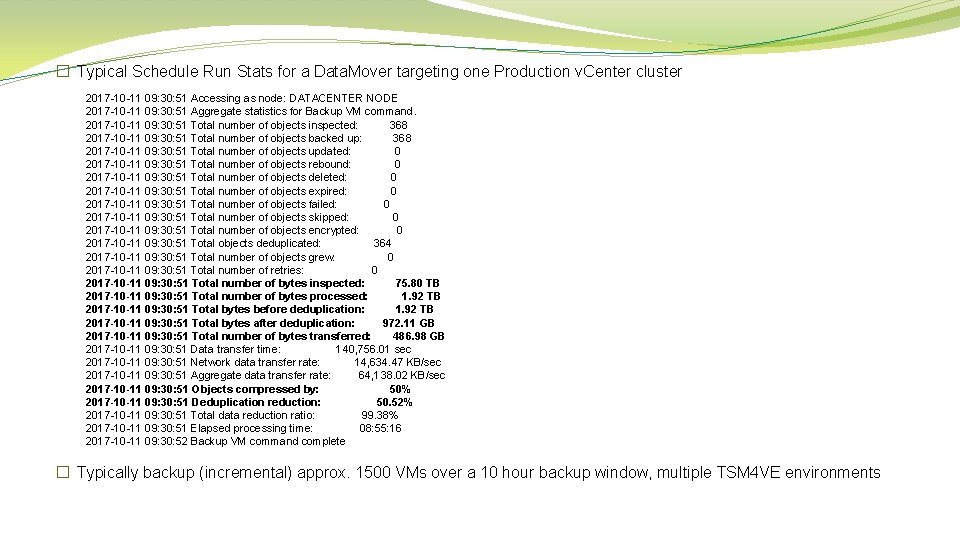
� Typical Schedule Run Stats for a Data. Mover targeting one Production v. Center cluster 2017 -10 -11 09: 30: 51 Accessing as node: DATACENTER NODE 2017 -10 -11 09: 30: 51 Aggregate statistics for Backup VM command. 2017 -10 -11 09: 30: 51 Total number of objects inspected: 368 2017 -10 -11 09: 30: 51 Total number of objects backed up: 368 2017 -10 -11 09: 30: 51 Total number of objects updated: 0 2017 -10 -11 09: 30: 51 Total number of objects rebound: 0 2017 -10 -11 09: 30: 51 Total number of objects deleted: 0 2017 -10 -11 09: 30: 51 Total number of objects expired: 0 2017 -10 -11 09: 30: 51 Total number of objects failed: 0 2017 -10 -11 09: 30: 51 Total number of objects skipped: 0 2017 -10 -11 09: 30: 51 Total number of objects encrypted: 0 2017 -10 -11 09: 30: 51 Total objects deduplicated: 364 2017 -10 -11 09: 30: 51 Total number of objects grew: 0 2017 -10 -11 09: 30: 51 Total number of retries: 0 2017 -10 -11 09: 30: 51 Total number of bytes inspected: 75. 80 TB 2017 -10 -11 09: 30: 51 Total number of bytes processed: 1. 92 TB 2017 -10 -11 09: 30: 51 Total bytes before deduplication: 1. 92 TB 2017 -10 -11 09: 30: 51 Total bytes after deduplication: 972. 11 GB 2017 -10 -11 09: 30: 51 Total number of bytes transferred: 486. 98 GB 2017 -10 -11 09: 30: 51 Data transfer time: 140, 756. 01 sec 2017 -10 -11 09: 30: 51 Network data transfer rate: 14, 634. 47 KB/sec 2017 -10 -11 09: 30: 51 Aggregate data transfer rate: 64, 138. 02 KB/sec 2017 -10 -11 09: 30: 51 Objects compressed by: 50% 2017 -10 -11 09: 30: 51 Deduplication reduction: 50. 52% 2017 -10 -11 09: 30: 51 Total data reduction ratio: 99. 38% 2017 -10 -11 09: 30: 51 Elapsed processing time: 08: 55: 16 2017 -10 -11 09: 30: 52 Backup VM command complete � Typically backup (incremental) approx. 1500 VMs over a 10 hour backup window, multiple TSM 4 VE environments
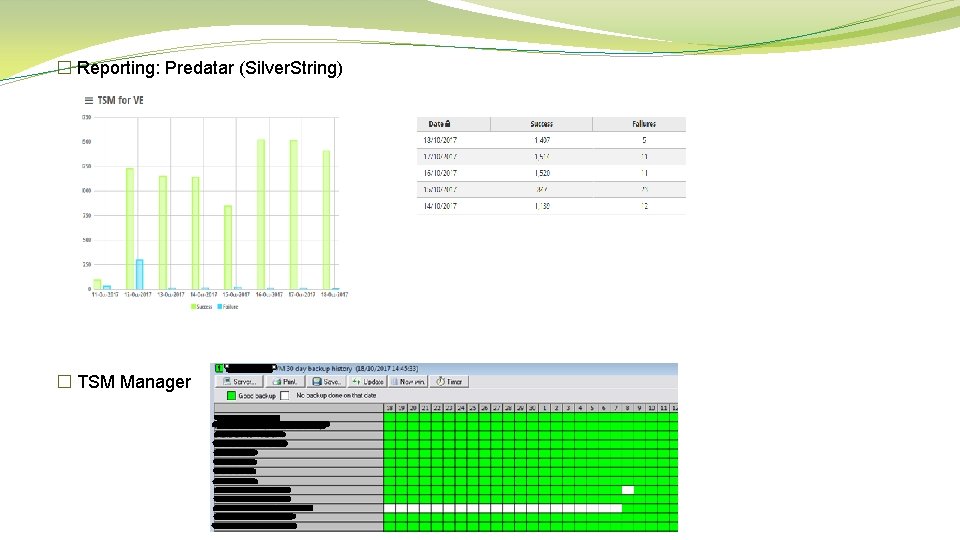
� Reporting: Predatar (Silver. String) � TSM Manager
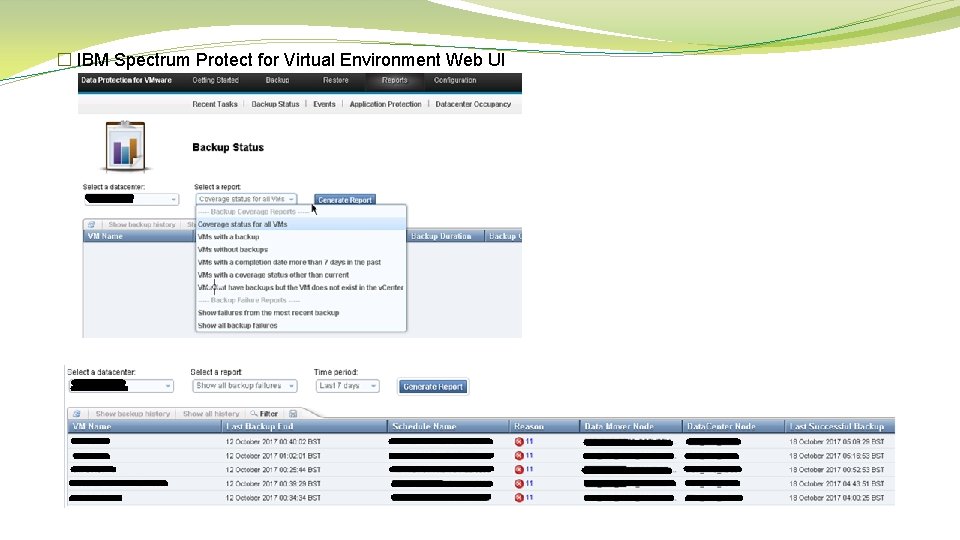
� IBM Spectrum Protect for Virtual Environment Web UI
Application-Aware Backups � Supports � Microsoft Exchange Server � Microsoft SQL Servers � Microsoft Active Directory Domain Controllers � More info: https: //www. ibm. com/support/knowledgecenter/en/SS 8 TDQ_7. 1. 2/com. ibm. itsm. ve. doc/c_ve_plan_dpapps. html
Issues and Common Error Codes � Consolidating VM backups After a VM backup, the VM might contain pre-existing snapshots even though no snapshots are present in the Snapshot Manager. For example, the VM hard disk points to snapshot VMDK files (for example *-000001. vmdk) instead of regular VMDK files. � Rare: When removing snapshot after backup VM is powered down When logged with VMware they say its Storage I/O / timeout related where v. Center will power off the VM by design? � Be aware of snapshot stun times, I’ve known this to affect SQL servers mostly. I believe this is better in v. Sphere 6 > � Centrally (Help Desk) managed file restores is a major pain to achieve. Lots of support calls with IBM support � RC -50 - TCP/IP disconnect issues between Data. Mover and TSM server instance � RC 6584 - Kind of a false positive. Quiesce snapshot failed but crash consistent successful (net result VM backed up) � RC 4390 - Target specific VM in schedule and VM no longer exists in v. Center inventory � RC 11 - Normally Storage Pool is full � RC 4379 - Normally issues around VMTools
Extras � New version of this product called “IBM Spectrum Protect Plus” https: //www. ibm. com/us-en/marketplace/ibm-spectrum-protect-plus https: //www. ibm. com/blogs/systems/vm-protection-and-availability-made-easy/ � Includes RESTful API � New file restore (search and recovery) � Rumoured Q 1 2018 � IBM Spectrum Protect for Virtual Environments as of v 8. 1 can now do: https: //www. ibm. com/support/knowledgecenter/en/SSERB 6_8. 1. 0/ve. user/r_techchg_ve. html � Enhancements for backup and restore performance for VMs: Optimized backup operations for multiple virtual disks by using parallel sessions, one session for each virtual disk Optimized backup operations for a single virtual disk by using parallel sessions, multiple sessions for each virtual disk � VVols Support � Veeam Availability Suite – Not-For-resale (NFR) License https: //www. veeam. com/blog/how-to-get-free-veeam-nfr-key. html � If you have a Home Lab and need a backup solution check this out!
Thank you Questions
- Slides: 34