
Overview of Form 4 processes on SOAR for
- Slides: 8
Overview of Form 4 processes on SOAR for ALL roles associated with Academic Appraisals on SOAR (Primary and Secondary Care) Quality Education for a Healthier Scotland
• If you do not know how the Appraisal process or Form 4 works, please review other guides first • This Power. Point is created as supplementary guidance for Academic Appraisals on SOAR
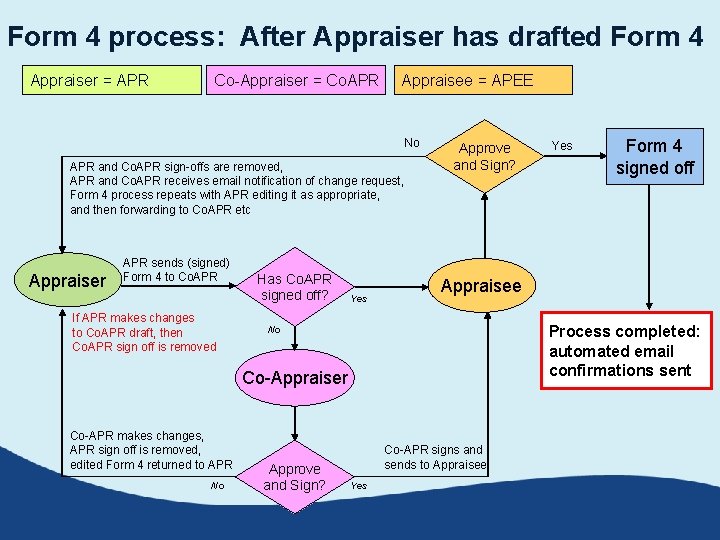
Form 4 process: After Appraiser has drafted Form 4 Appraiser = APR Co-Appraiser = Co. APR Appraisee = APEE No APR and Co. APR sign-offs are removed, APR and Co. APR receives email notification of change request, Form 4 process repeats with APR editing it as appropriate, and then forwarding to Co. APR etc Appraiser APR sends (signed) Form 4 to Co. APR If APR makes changes to Co. APR draft, then Co. APR sign off is removed Has Co. APR signed off? Yes Approve and Sign? Process completed: automated email confirmations sent No No Approve and Sign? Form 4 signed off Appraisee Co-Appraiser Co-APR makes changes, APR sign off is removed, edited Form 4 returned to APR Yes Co-APR signs and sends to Appraisee Yes
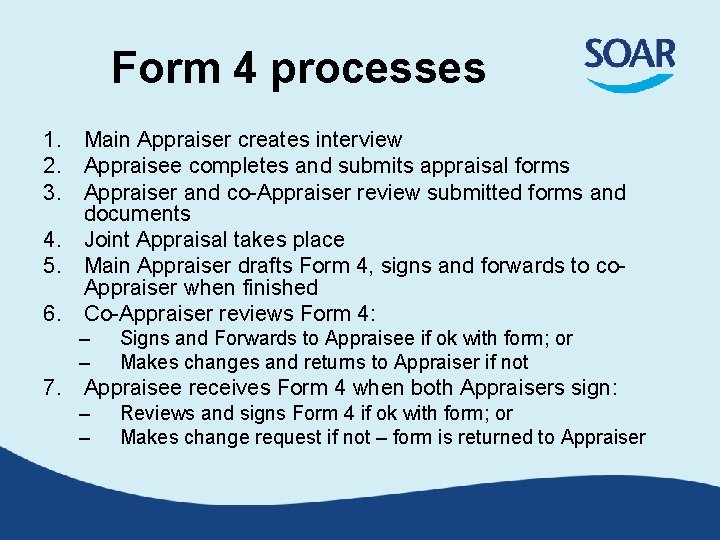
Form 4 processes 1. Main Appraiser creates interview 2. Appraisee completes and submits appraisal forms 3. Appraiser and co-Appraiser review submitted forms and documents 4. Joint Appraisal takes place 5. Main Appraiser drafts Form 4, signs and forwards to co. Appraiser when finished 6. Co-Appraiser reviews Form 4: – – Signs and Forwards to Appraisee if ok with form; or Makes changes and returns to Appraiser if not 7. Appraisee receives Form 4 when both Appraisers sign: – – Reviews and signs Form 4 if ok with form; or Makes change request if not – form is returned to Appraiser
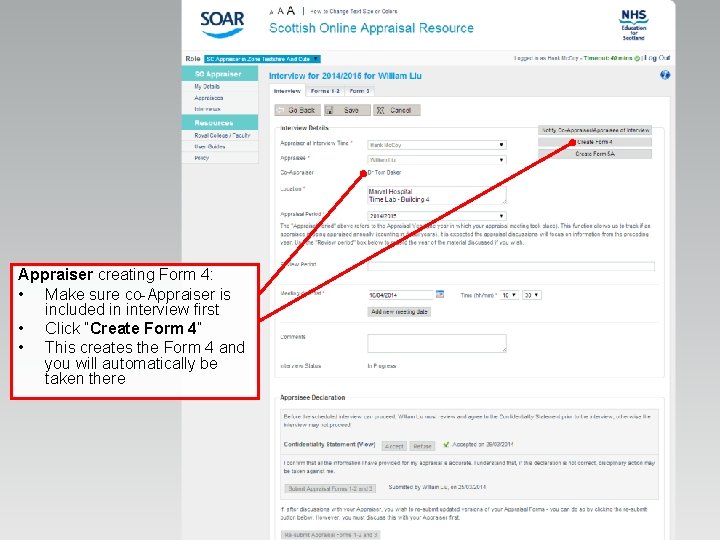
Appraiser creating Form 4: • Make sure co-Appraiser is included in interview first • Click “Create Form 4” • This creates the Form 4 and you will automatically be taken there
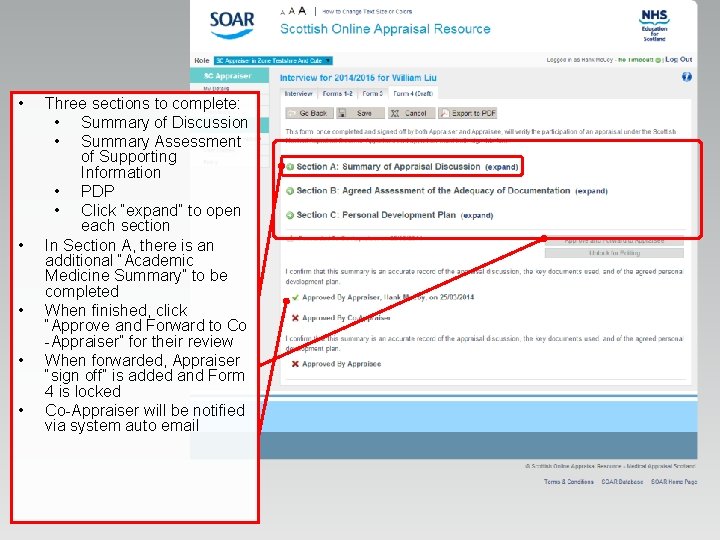
• • • Three sections to complete: • Summary of Discussion • Summary Assessment of Supporting Information • PDP • Click “expand” to open each section In Section A, there is an additional “Academic Medicine Summary” to be completed When finished, click “Approve and Forward to Co -Appraiser” for their review When forwarded, Appraiser “sign off” is added and Form 4 is locked Co-Appraiser will be notified via system auto email
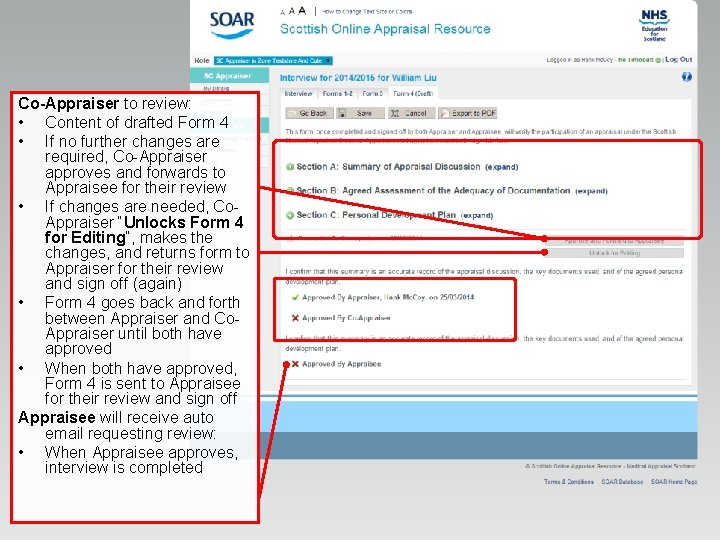
Co-Appraiser to review: • Content of drafted Form 4 • If no further changes are required, Co-Appraiser approves and forwards to Appraisee for their review • If changes are needed, Co. Appraiser “Unlocks Form 4 for Editing”, makes the changes, and returns form to Appraiser for their review and sign off (again) • Form 4 goes back and forth between Appraiser and Co. Appraiser until both have approved • When both have approved, Form 4 is sent to Appraisee for their review and sign off Appraisee will receive auto email requesting review: • When Appraisee approves, interview is completed
Further support • Medical Appraisal Scotland website: – www. appraisal. nes. scot. nhs. uk – Resources, FAQ and other useful sections • Local Administration teams: – Contact info on Medical Appraisal Scotland site • SOAR Helpdesk – Black “Help” box on right when logged into SOAR; – or SOAR@nes. scot. nhs. uk • Due to capacity issues we are unable to offer telephone support – You can request a call back via the Helpdesk, but we need detailed descriptions of the issue(s)