
Output Formatting Bina Ramamurthy 1 12182021 BR Introduction
Output Formatting Bina Ramamurthy 1 12/18/2021 BR
Introduction l l l 2 We will review the cmath functions When outputting data we would like to display the appropriately: For exam, right number of digits, left or right justified, in scientific or ordinary notation. IOmanipulation functions are also useful for displaying monetary data. In this discussion we will see how we can do that for C++ program outputs. 12/18/2021 BR

Functions in <cmath> 3 abs(x) computes absolute value of x sqrt(x) computes square root of x, where x >=0 pow(x, y) computes xy ceil(x) nearest integer larger than x floor(x) nearest integer smaller than x exp(x) computes ex log(x) computes ln x, where x >0 log 10(x) computes log 10 x, where x>0 sin(x) sine of x, where x is in radians cos(x) cosine of x, where x is in radians tan(x) tangent of x, where x is in radians 12/18/2021 BR
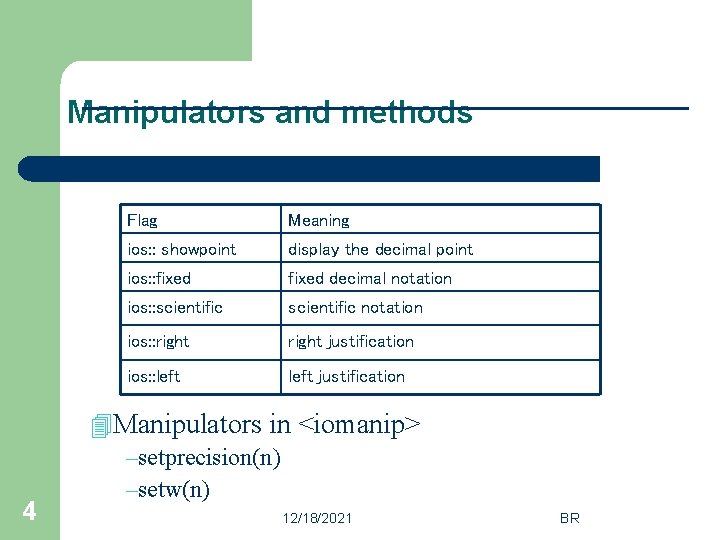
Manipulators and methods l 4 setf() and unsetf() Flag Meaning ios: : showpoint display the decimal point ios: : fixed decimal notation ios: : scientific notation ios: : right justification ios: : left justification 4 Manipulators in <iomanip> –setprecision(n) –setw(n) 12/18/2021 BR
setw() and setprecision l l l 5 setw( n ) specifies the number of columns for printing a value; value of the data is printed right justified in the number of columns specified. setprecision( n ): specifies the number of significant digits to be displayed. Lets examine all these “manipulators” using a sample program. 12/18/2021 BR
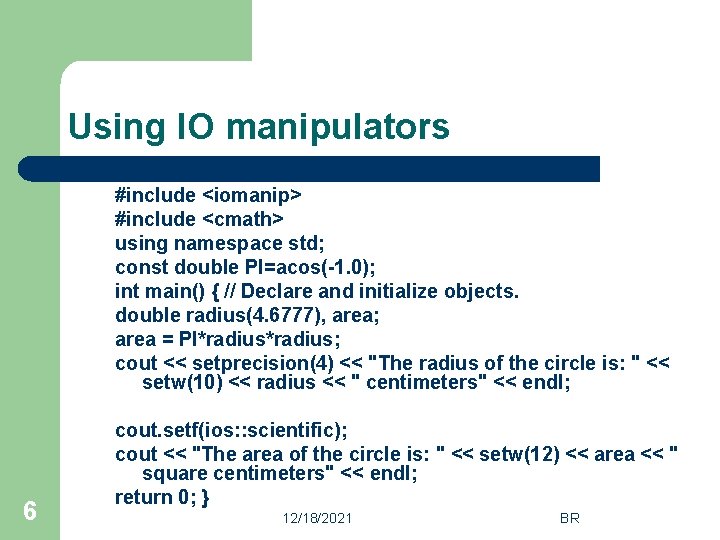
Using IO manipulators #include <iostream> #include <iomanip> #include <cmath> using namespace std; const double PI=acos(-1. 0); int main() { // Declare and initialize objects. double radius(4. 6777), area; area = PI*radius; cout << setprecision(4) << "The radius of the circle is: " << setw(10) << radius << " centimeters" << endl; 6 cout. setf(ios: : scientific); cout << "The area of the circle is: " << setw(12) << area << " square centimeters" << endl; return 0; } 12/18/2021 BR
- Slides: 6