
Outline v Describe the benchmark system structure v
Outline v Describe the benchmark system structure v Benchmark System Scoring Metrics v Modify codes to add a new variable v Modify codes to add a new diagnostics v Modify codes to add a new benchmark data v Modify codes to add a new model

Benchmark System Structure
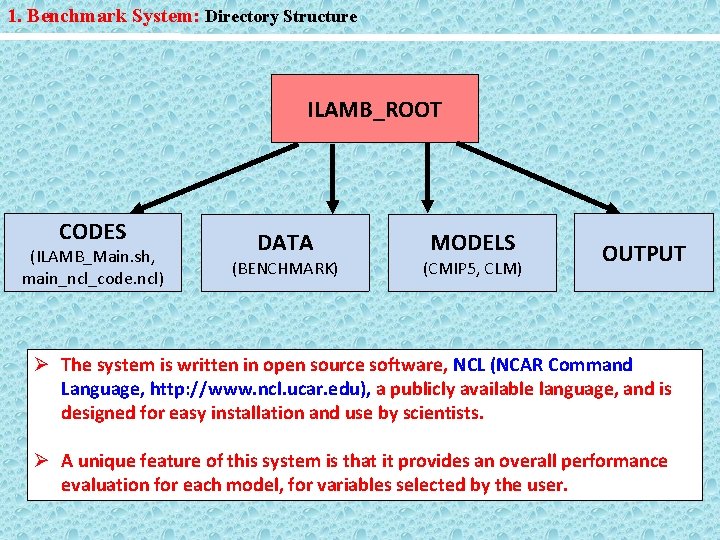
1. Benchmark System: Directory Structure ILAMB_ROOT CODES (ILAMB_Main. sh, main_ncl_code. ncl) DATA (BENCHMARK) MODELS (CMIP 5, CLM) OUTPUT The system is written in open source software, NCL (NCAR Command Language, http: //www. ncl. ucar. edu), a publicly available language, and is designed for easy installation and use by scientists. A unique feature of this system is that it provides an overall performance evaluation for each model, for variables selected by the user.
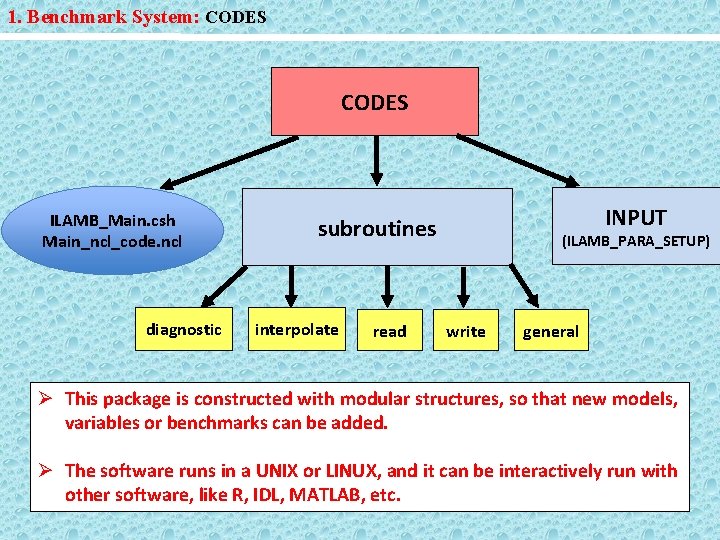
1. Benchmark System: CODES ILAMB_Main. csh Main_ncl_code. ncl diagnostic INPUT subroutines interpolate read (ILAMB_PARA_SETUP) write general This package is constructed with modular structures, so that new models, variables or benchmarks can be added. The software runs in a UNIX or LINUX, and it can be interactively run with other software, like R, IDL, MATLAB, etc.

2. Code Structure: Main and Subroutine Codes EPS Info for Burnt. Area Plots Annual. Mean Info for Biomass Tables Plots Bias PNG EPS PNG Tables Input Control Para Info for NEE Read Data Info for GPP RMSE Summary Phase. Score EPS Info for Reco Read Model Info for LE Plots Taylor. Score PNG Tables Interannual EPS Info for SH Over. All. Score Plots PNG Tables Info for albedo Prepare Module Read Module Run Module Publish Module
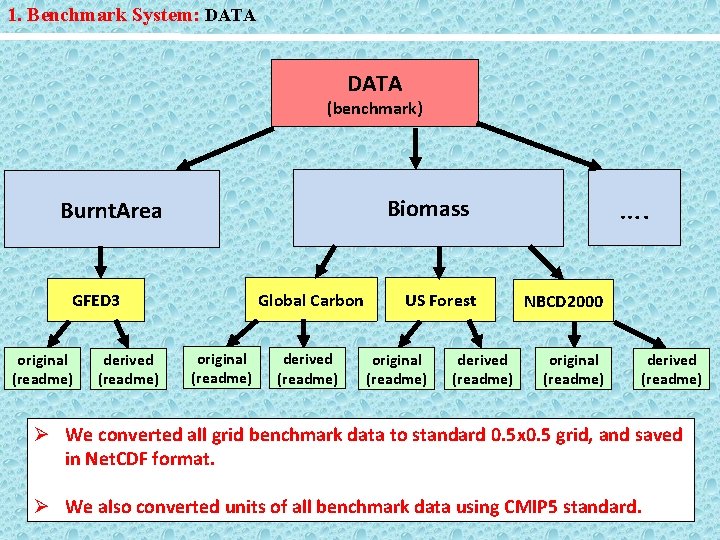
1. Benchmark System: DATA (benchmark) Global Carbon GFED 3 original (readme) derived (readme) …. Biomass Burnt. Area original (readme) derived (readme) US Forest original (readme) derived (readme) NBCD 2000 original (readme) derived (readme) We converted all grid benchmark data to standard 0. 5 x 0. 5 grid, and saved in Net. CDF format. We also converted units of all benchmark data using CMIP 5 standard.
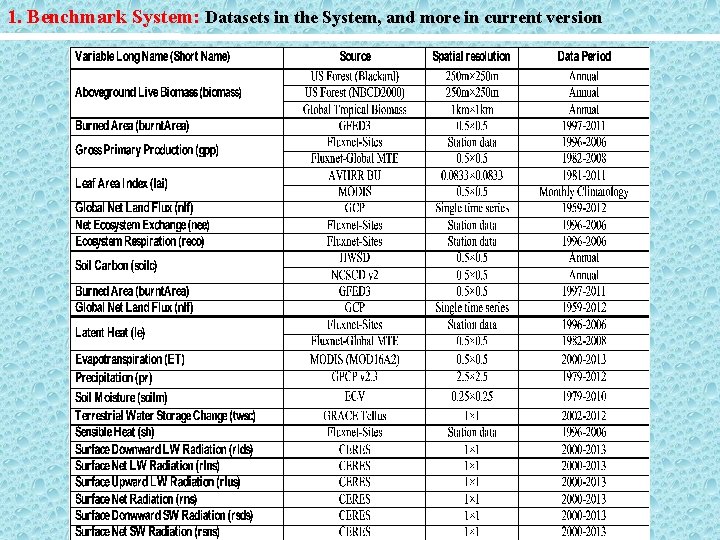
1. Benchmark System: Datasets in the System, and more in current version
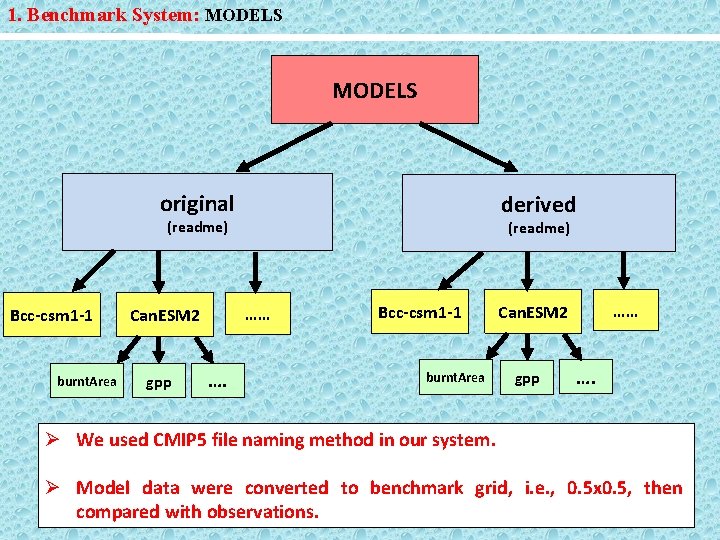
1. Benchmark System: MODELS original derived (readme) Bcc-csm 1 -1 burnt. Area …… Can. ESM 2 gpp (readme) …. Bcc-csm 1 -1 burnt. Area …… Can. ESM 2 gpp …. We used CMIP 5 file naming method in our system. Model data were converted to benchmark grid, i. e. , 0. 5 x 0. 5, then compared with observations.
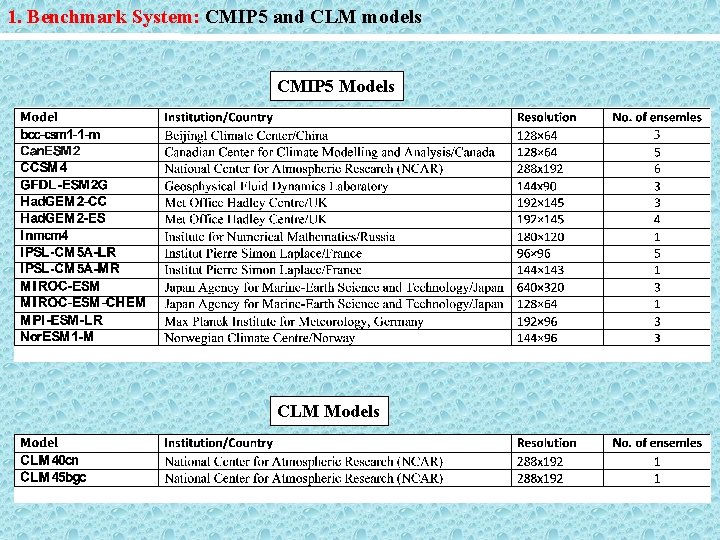
1. Benchmark System: CMIP 5 and CLM models CMIP 5 Models CLM Models
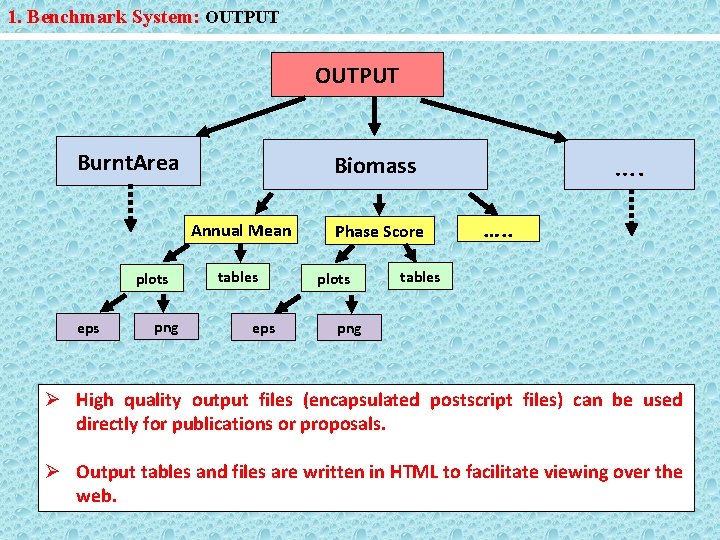
1. Benchmark System: OUTPUT Burnt. Area Annual Mean plots eps png …. Biomass tables eps Phase Score plots …. . tables png High quality output files (encapsulated postscript files) can be used directly for publications or proposals. Output tables and files are written in HTML to facilitate viewing over the web.
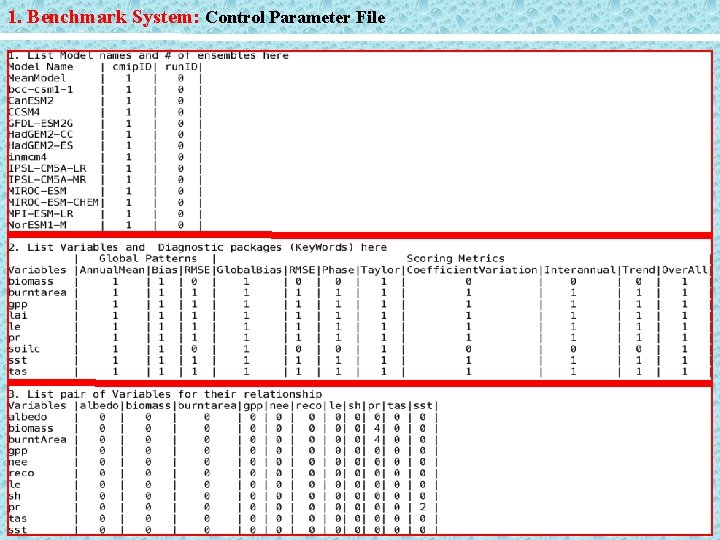
1. Benchmark System: Control Parameter File
Benchmark System Scoring Metrics
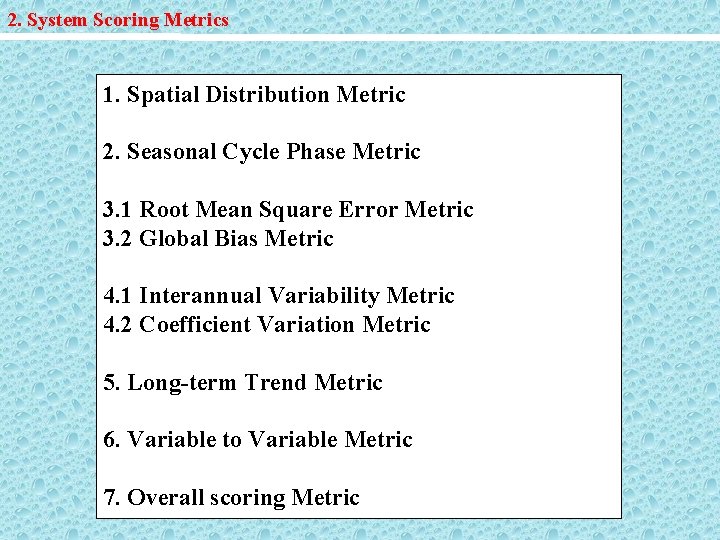
2. System Scoring Metrics 1. Spatial Distribution Metric 2. Seasonal Cycle Phase Metric 3. 1 Root Mean Square Error Metric 3. 2 Global Bias Metric 4. 1 Interannual Variability Metric 4. 2 Coefficient Variation Metric 5. Long-term Trend Metric 6. Variable to Variable Metric 7. Overall scoring Metric

2. System Scoring Metrics Spatial Distribution Metric Where R 0 is the maximum correlation, R is the correlation coefficient between model and benchmark, and σf is the ratio of standard deviation for model and benchmark. This quantity was area-weighted over all the land grid cells in the model to obtain the global-scale metric. Ref: Taylor, JGR, 106, 2001

2. System Scoring Metrics Seasonal Cycle Phase Metric Where is the difference of the angle between the month of maximum values for the model and the month of maximum observations at each grid cell. This quantity was areaweighted over all the land grid cells in the model to obtain the global-scale metric. Ref: Prentice, et al. , GBC, 25, 2011
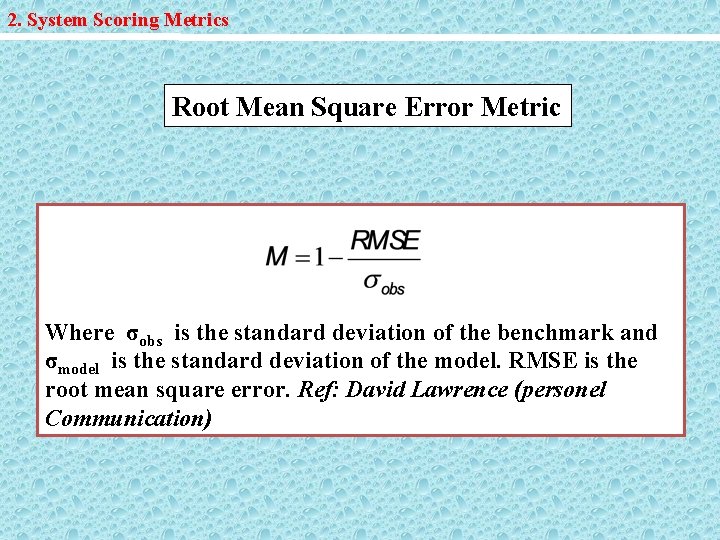
2. System Scoring Metrics Root Mean Square Error Metric Where σobs is the standard deviation of the benchmark and σmodel is the standard deviation of the model. RMSE is the root mean square error. Ref: David Lawrence (personel Communication)

2. System Scoring Metrics Global Bias Metric Where is the global annual mean of the benchmark and is the global annual mean of the model.
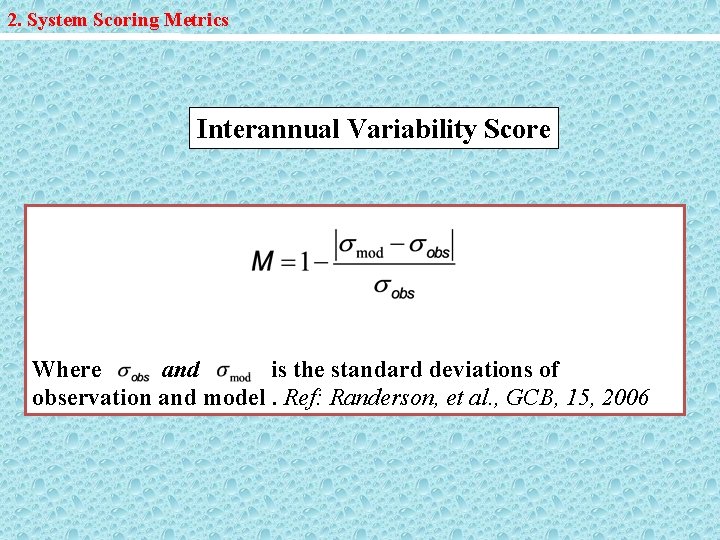
2. System Scoring Metrics Interannual Variability Score Where and is the standard deviations of observation and model. Ref: Randerson, et al. , GCB, 15, 2006
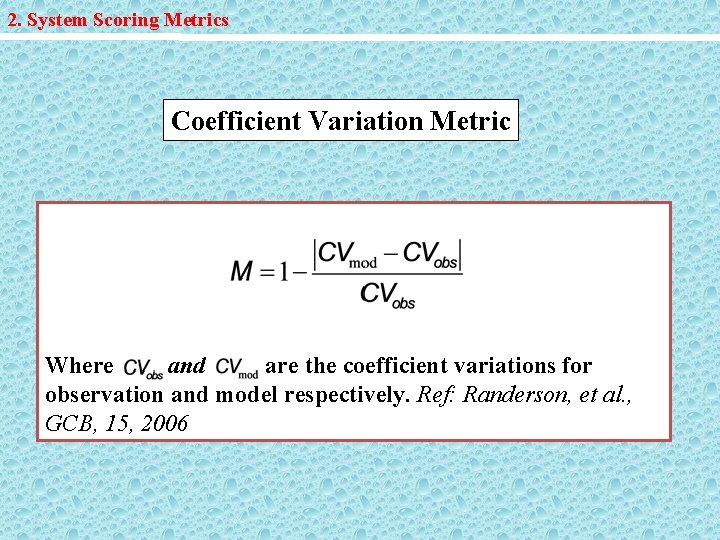
2. System Scoring Metrics Coefficient Variation Metric Where and are the coefficient variations for observation and model respectively. Ref: Randerson, et al. , GCB, 15, 2006
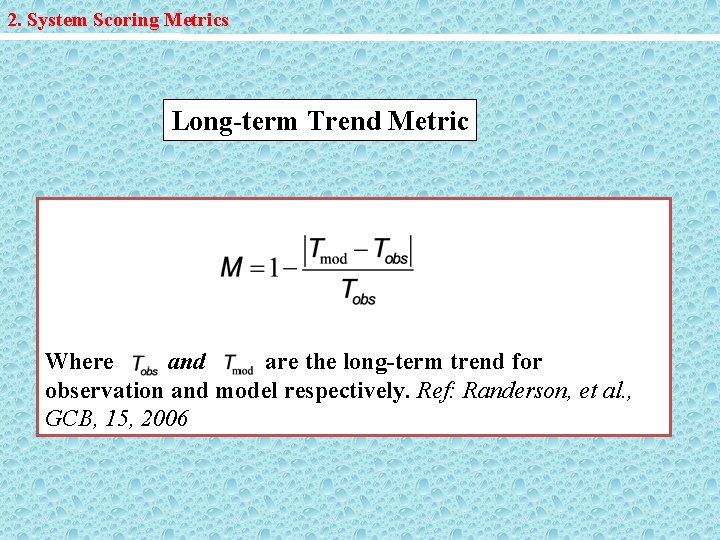
2. System Scoring Metrics Long-term Trend Metric Where and are the long-term trend for observation and model respectively. Ref: Randerson, et al. , GCB, 15, 2006
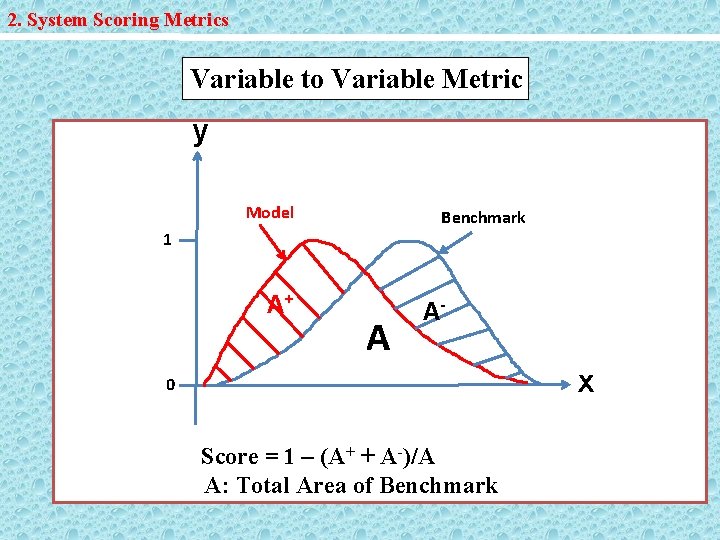
2. System Scoring Metrics Variable to Variable Metric y Model Benchmark 1 A+ A A- x 0 Score = 1 – (A+ + A-)/A A: Total Area of Benchmark
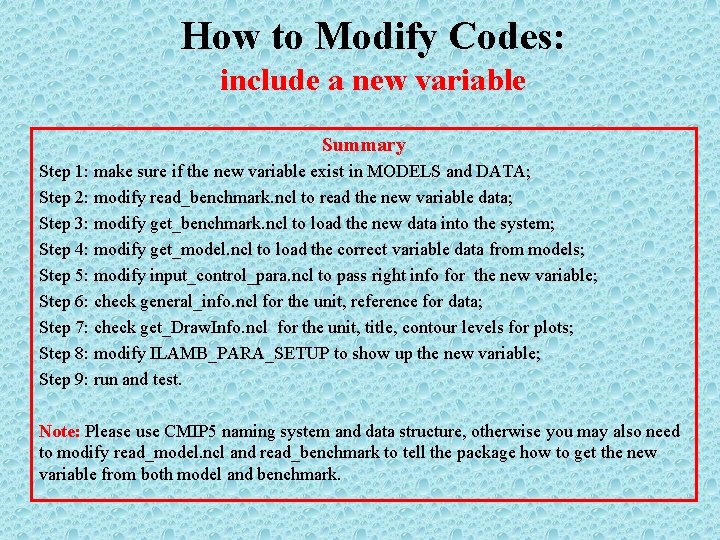
How to Modify Codes: include a new variable Summary Step 1: make sure if the new variable exist in MODELS and DATA; Step 2: modify read_benchmark. ncl to read the new variable data; Step 3: modify get_benchmark. ncl to load the new data into the system; Step 4: modify get_model. ncl to load the correct variable data from models; Step 5: modify input_control_para. ncl to pass right info for the new variable; Step 6: check general_info. ncl for the unit, reference for data; Step 7: check get_Draw. Info. ncl for the unit, title, contour levels for plots; Step 8: modify ILAMB_PARA_SETUP to show up the new variable; Step 9: run and test. Note: Please use CMIP 5 naming system and data structure, otherwise you may also need to modify read_model. ncl and read_benchmark to tell the package how to get the new variable from both model and benchmark.
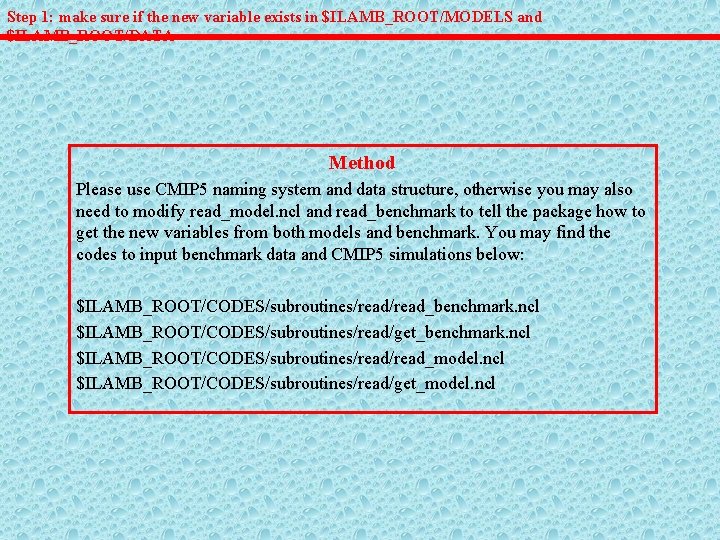
Step 1: make sure if the new variable exists in $ILAMB_ROOT/MODELS and $ILAMB_ROOT/DATA Method Please use CMIP 5 naming system and data structure, otherwise you may also need to modify read_model. ncl and read_benchmark to tell the package how to get the new variables from both models and benchmark. You may find the codes to input benchmark data and CMIP 5 simulations below: $ILAMB_ROOT/CODES/subroutines/read_benchmark. ncl $ILAMB_ROOT/CODES/subroutines/read/get_benchmark. ncl $ILAMB_ROOT/CODES/subroutines/read_model. ncl $ILAMB_ROOT/CODES/subroutines/read/get_model. ncl
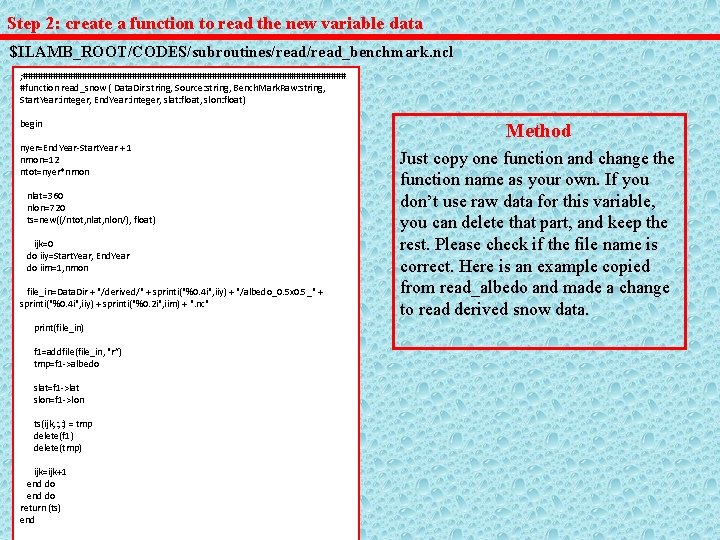
Step 2: create a function to read the new variable data $ILAMB_ROOT/CODES/subroutines/read_benchmark. ncl ; ################################# #function read_snow ( Data. Dir: string, Source: string, Bench. Mark. Raw: string, Start. Year: integer, End. Year: integer, slat: float, slon: float) begin nyer=End. Year-Start. Year + 1 nmon=12 ntot=nyer*nmon nlat=360 nlon=720 ts=new((/ntot, nlat, nlon/), float) ijk=0 do iiy=Start. Year, End. Year do iim=1, nmon file_in=Data. Dir + "/derived/" + sprinti("%0. 4 i", iiy) + "/albedo_0. 5 x 0. 5_" + sprinti("%0. 4 i", iiy) + sprinti("%0. 2 i", iim) + ". nc" print(file_in) f 1=addfile(file_in, "r”) tmp=f 1 ->albedo slat=f 1 ->lat slon=f 1 ->lon ts(ijk, : ) = tmp delete(f 1) delete(tmp) ijk=ijk+1 end do return (ts) end Method Just copy one function and change the function name as your own. If you don’t use raw data for this variable, you can delete that part, and keep the rest. Please check if the file name is correct. Here is an example copied from read_albedo and made a change to read derived snow data.
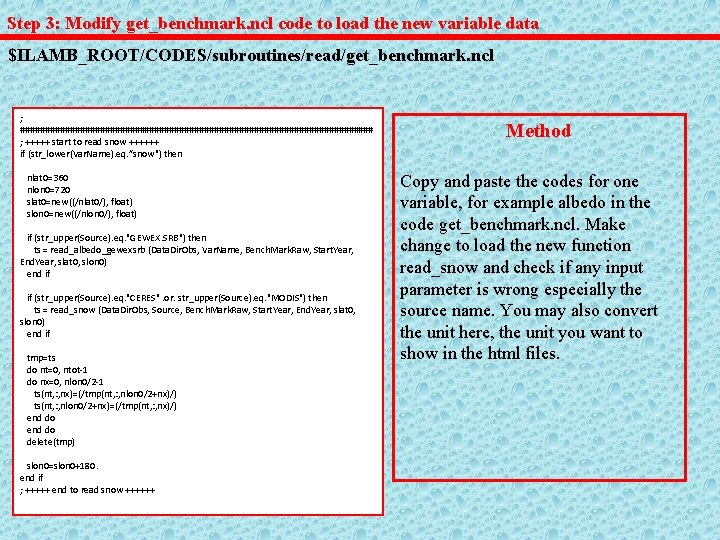
Step 3: Modify get_benchmark. ncl code to load the new variable data $ILAMB_ROOT/CODES/subroutines/read/get_benchmark. ncl ; #################################### ; +++++ start to read snow ++++++ if (str_lower(Var. Name). eq. ”snow") then nlat 0=360 nlon 0=720 slat 0=new((/nlat 0/), float) slon 0=new((/nlon 0/), float) if (str_upper(Source). eq. "GEWEX. SRB") then ts = read_albedo_gewexsrb (Data. Dir. Obs, Var. Name, Bench. Mark. Raw, Start. Year, End. Year, slat 0, slon 0) end if if (str_upper(Source). eq. "CERES". or. str_upper(Source). eq. "MODIS") then ts = read_snow (Data. Dir. Obs, Source, Bench. Mark. Raw, Start. Year, End. Year, slat 0, slon 0) end if tmp=ts do nt=0, ntot-1 do nx=0, nlon 0/2 -1 ts(nt, : , nx)=(/tmp(nt, : , nlon 0/2+nx)/) ts(nt, : , nlon 0/2+nx)=(/tmp(nt, : , nx)/) end do delete(tmp) slon 0=slon 0+180. end if ; +++++ end to read snow ++++++ Method Copy and paste the codes for one variable, for example albedo in the code get_benchmark. ncl. Make change to load the new function read_snow and check if any input parameter is wrong especially the source name. You may also convert the unit here, the unit you want to show in the html files.
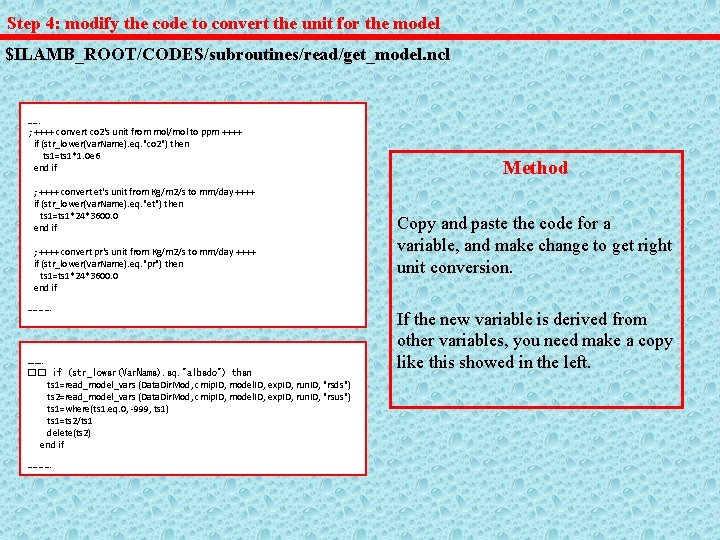
Step 4: modify the code to convert the unit for the model $ILAMB_ROOT/CODES/subroutines/read/get_model. ncl ……. ; ++++ convert co 2's unit from mol/mol to ppm ++++ if (str_lower(Var. Name). eq. "co 2") then ts 1=ts 1*1. 0 e 6 end if ; ++++ convert et's unit from Kg/m 2/s to mm/day ++++ if (str_lower(Var. Name). eq. "et") then ts 1=ts 1*24*3600. 0 end if ; ++++ convert pr's unit from Kg/m 2/s to mm/day ++++ if (str_lower(Var. Name). eq. "pr") then ts 1=ts 1*24*3600. 0 end if …………. �� if (str_lower(Var. Name). eq. "albedo") then ts 1=read_model_vars (Data. Dir. Mod, cmip. ID, model. ID, exp. ID, run. ID, "rsds") ts 2=read_model_vars (Data. Dir. Mod, cmip. ID, model. ID, exp. ID, run. ID, "rsus") ts 1=where(ts 1. eq. 0, -999, ts 1) ts 1=ts 2/ts 1 delete(ts 2) end if …………. Method Copy and paste the code for a variable, and make change to get right unit conversion. If the new variable is derived from other variables, you need make a copy like this showed in the left.
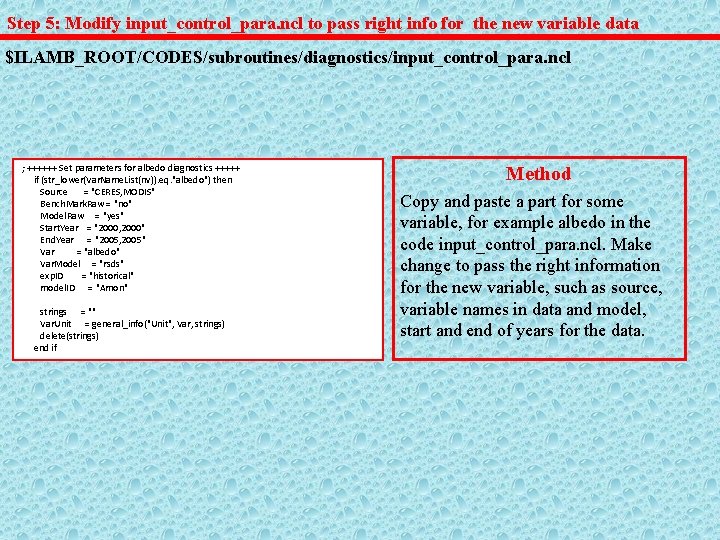
Step 5: Modify input_control_para. ncl to pass right info for the new variable data $ILAMB_ROOT/CODES/subroutines/diagnostics/input_control_para. ncl ; ++++++ Set parameters for albedo diagnostics +++++ if (str_lower(Var. Name. List(nv)). eq. "albedo") then Source = "CERES, MODIS" Bench. Mark. Raw = "no" Model. Raw = "yes" Start. Year = "2000, 2000" End. Year = "2005, 2005" Var = "albedo" Var. Model = "rsds" exp. ID = "historical" model. ID = "Amon" strings = "" Var. Unit = general_info("Unit", Var, strings) delete(strings) end if Method Copy and paste a part for some variable, for example albedo in the code input_control_para. ncl. Make change to pass the right information for the new variable, such as source, variable names in data and model, start and end of years for the data.
Step 6: check general_info. ncl for the unit, reference for data, long variable … $ILAMB_ROOT/CODES/subroutines/general_info. ncl Method Copy, paste and modify the code to provide the correct unit, reference for data, long variable name and category. This information will be showed in the html files.
Step 7: check get_Draw. Info. ncl for the unit, title, contour levels $ILAMB_ROOT/CODES/subroutines/draw/get_Draw. Info. ncl Method Copy, paste and modify the code to provide the correct unit, title and contour. This information will be showed in the plots for annual mean, bias and rmse.
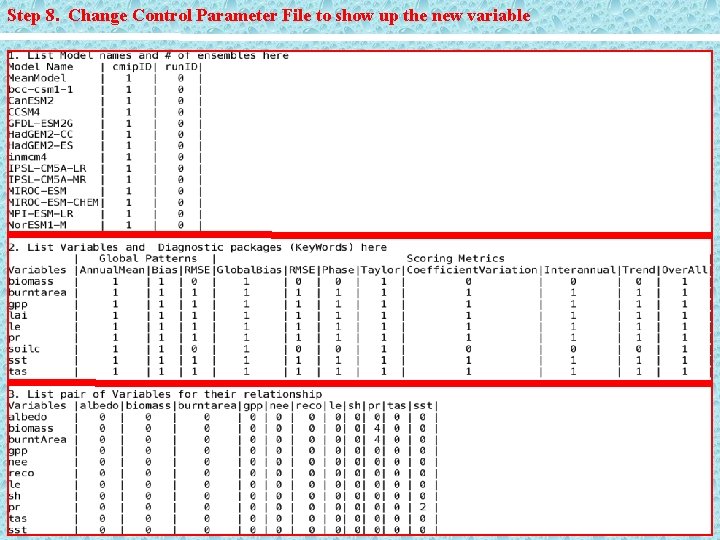
Step 8. Change Control Parameter File to show up the new variable
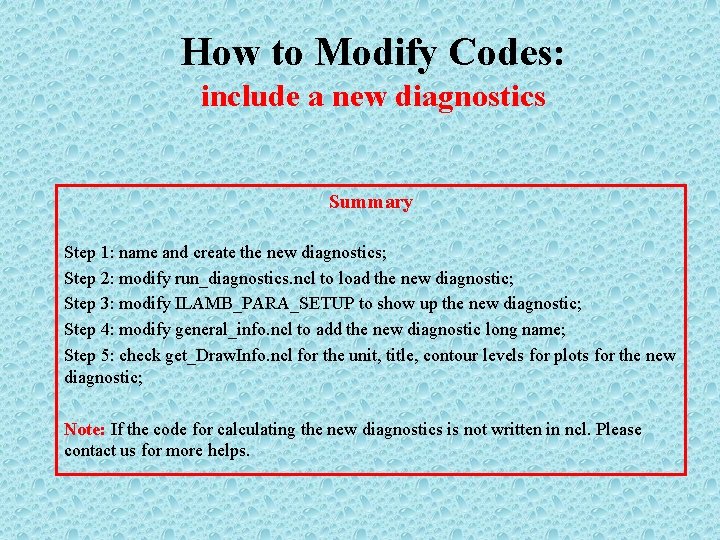
How to Modify Codes: include a new diagnostics Summary Step 1: name and create the new diagnostics; Step 2: modify run_diagnostics. ncl to load the new diagnostic; Step 3: modify ILAMB_PARA_SETUP to show up the new diagnostic; Step 4: modify general_info. ncl to add the new diagnostic long name; Step 5: check get_Draw. Info. ncl for the unit, title, contour levels for plots for the new diagnostic; Note: If the code for calculating the new diagnostics is not written in ncl. Please contact us for more helps.
Step 1: name and create the new diagnostics $ILAMB_ROOT/CODES/subroutines/diagnostic-allsubs. ncl Method Please name your new diagnostics first, like annualmean, bias etc already existing in this diagnostic package. Of course, you have your own code written in ncl to calculate it. Please refer to the following code to calculate phasescore (procedure Phase. Score): $ILAMB_ROOT/CODES/subroutines/diagnostic-allsubs. ncl
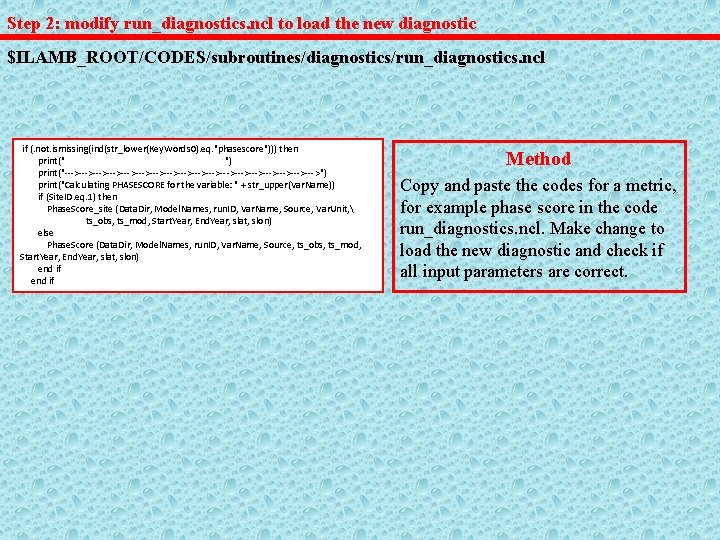
Step 2: modify run_diagnostics. ncl to load the new diagnostic $ILAMB_ROOT/CODES/subroutines/diagnostics/run_diagnostics. ncl if (. not. ismissing(ind(str_lower(Key. Words 0). eq. "phasescore"))) then print(" ") print("--->--->--->--->--->--->--->--->--->") print("Calculating PHASESCORE for the variable: " + str_upper(Var. Name)) if (Site. ID. eq. 1) then Phase. Score_site (Data. Dir, Model. Names, run. ID, Var. Name, Source, Var. Unit, ts_obs, ts_mod, Start. Year, End. Year, slat, slon) else Phase. Score (Data. Dir, Model. Names, run. ID, Var. Name, Source, ts_obs, ts_mod, Start. Year, End. Year, slat, slon) end if Method Copy and paste the codes for a metric, for example phase score in the code run_diagnostics. ncl. Make change to load the new diagnostic and check if all input parameters are correct.
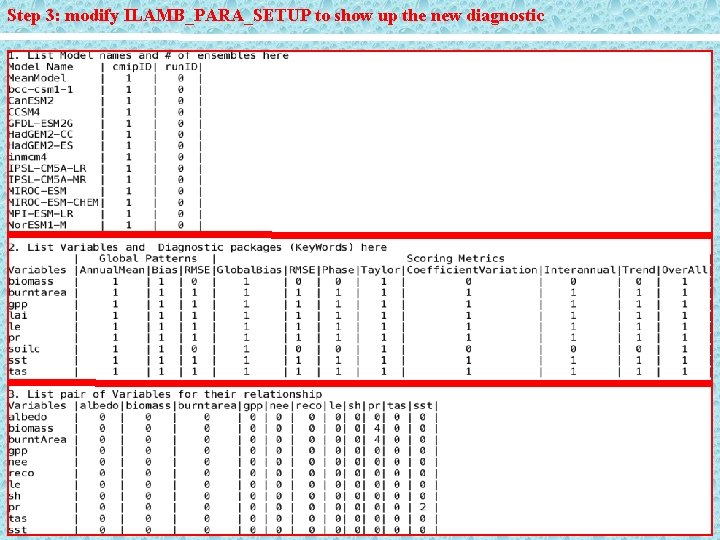
Step 3: modify ILAMB_PARA_SETUP to show up the new diagnostic
Step 4: modify general_info. ncl to add the new diagnostic long name $ILAMB_ROOT/CODES/subroutines/general_info. ncl Method Copy, paste and modify the code to provide the correct the long name for the new diagnostic. This information will be showed in the html files.
Step 5: check get_Draw. Info. ncl for the unit, title, contour levels for the plots $ILAMB_ROOT/CODES/subroutines/draw/get_Draw. Info. ncl Method Copy, paste and modify the code to provide the correct unit, title and contour. This information will be showed in the plots for annual mean, bias and rmse. If the new diagnostic for scoring metric, you don’t need care about this part.
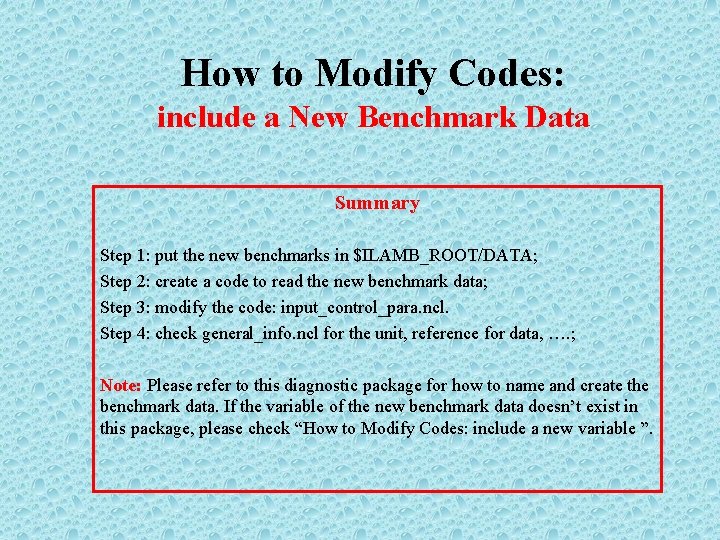
How to Modify Codes: include a New Benchmark Data Summary Step 1: put the new benchmarks in $ILAMB_ROOT/DATA; Step 2: create a code to read the new benchmark data; Step 3: modify the code: input_control_para. ncl. Step 4: check general_info. ncl for the unit, reference for data, …. ; Note: Please refer to this diagnostic package for how to name and create the benchmark data. If the variable of the new benchmark data doesn’t exist in this package, please check “How to Modify Codes: include a new variable ”.
Step 1: put the new benchmark data in $ILAMB_ROOT/DATA Method Please refer to this diagnostic package for how to name and create the benchmark data. If the variables of the new benchmark data don’t exist in this package, please check “How to Modify Codes: include new variables ” first.
Step 2: create a code to read the new benchmark data $ILAMB_ROOT/CODES/subroutines/read Method To create a code to read the new benchmark data, please refer to the following codes for how to input the benchmarks to the diagnostic package. $ILAMB_ROOT/CODES/subroutines/read_benchmark. ncl $ILAMB_ROOT/CODES/subroutines/read/get_benchmark. ncl
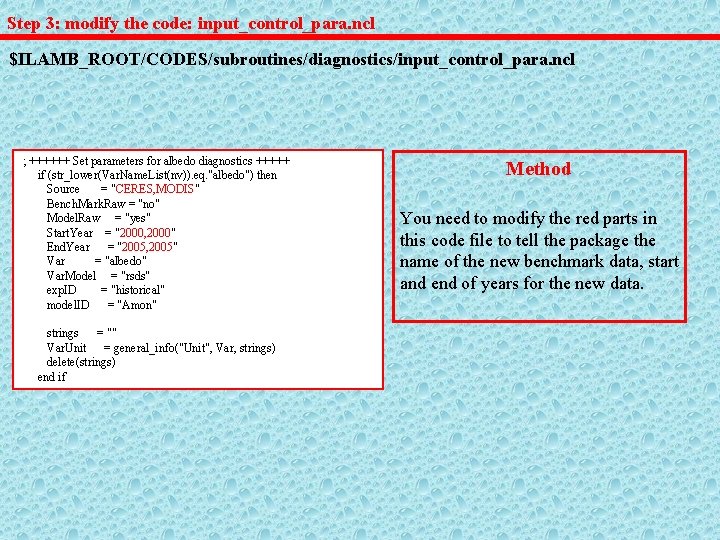
Step 3: modify the code: input_control_para. ncl $ILAMB_ROOT/CODES/subroutines/diagnostics/input_control_para. ncl ; ++++++ Set parameters for albedo diagnostics +++++ if (str_lower(Var. Name. List(nv)). eq. "albedo") then Source = "CERES, MODIS" Bench. Mark. Raw = "no" Model. Raw = "yes" Start. Year = "2000, 2000" End. Year = "2005, 2005" Var = "albedo" Var. Model = "rsds" exp. ID = "historical" model. ID = "Amon" strings = "" Var. Unit = general_info("Unit", Var, strings) delete(strings) end if Method You need to modify the red parts in this code file to tell the package the name of the new benchmark data, start and end of years for the new data.
Step 4: check general_info. ncl for the reference for the new benchmark data $ILAMB_ROOT/CODES/subroutines/general_info. ncl Method Copy, paste and modify the code to provide the correct unit, reference for data, long variable name and category. This information will be showed in the html files.
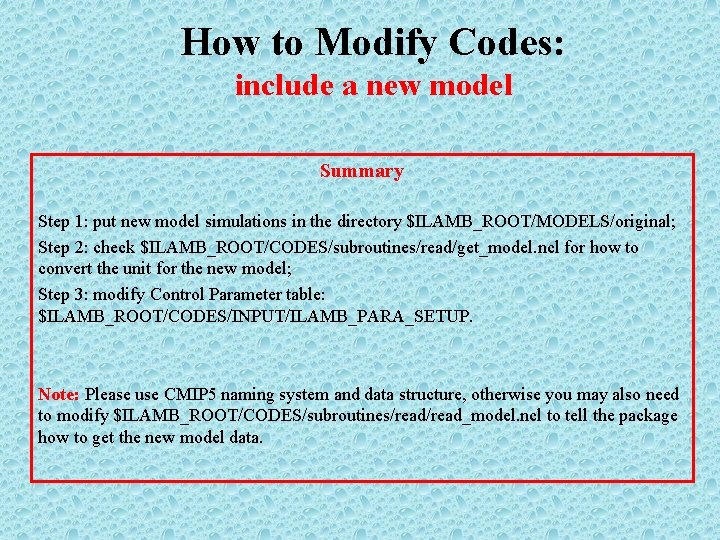
How to Modify Codes: include a new model Summary Step 1: put new model simulations in the directory $ILAMB_ROOT/MODELS/original; Step 2: check $ILAMB_ROOT/CODES/subroutines/read/get_model. ncl for how to convert the unit for the new model; Step 3: modify Control Parameter table: $ILAMB_ROOT/CODES/INPUT/ILAMB_PARA_SETUP. Note: Please use CMIP 5 naming system and data structure, otherwise you may also need to modify $ILAMB_ROOT/CODES/subroutines/read_model. ncl to tell the package how to get the new model data.
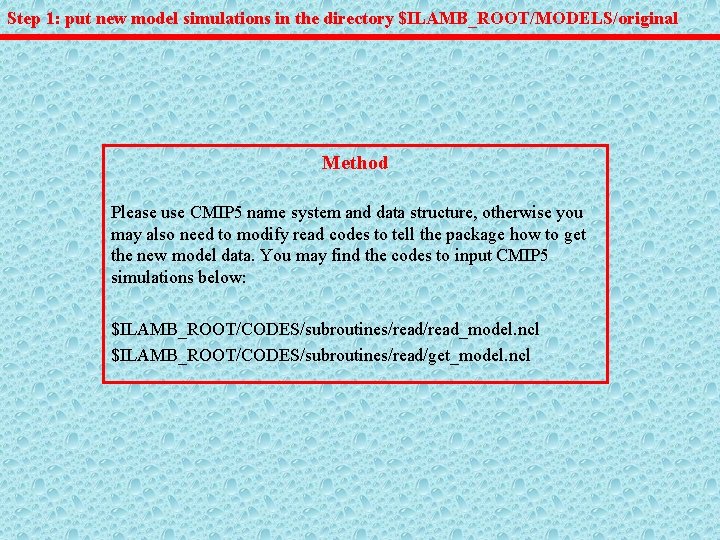
Step 1: put new model simulations in the directory $ILAMB_ROOT/MODELS/original Method Please use CMIP 5 name system and data structure, otherwise you may also need to modify read codes to tell the package how to get the new model data. You may find the codes to input CMIP 5 simulations below: $ILAMB_ROOT/CODES/subroutines/read_model. ncl $ILAMB_ROOT/CODES/subroutines/read/get_model. ncl
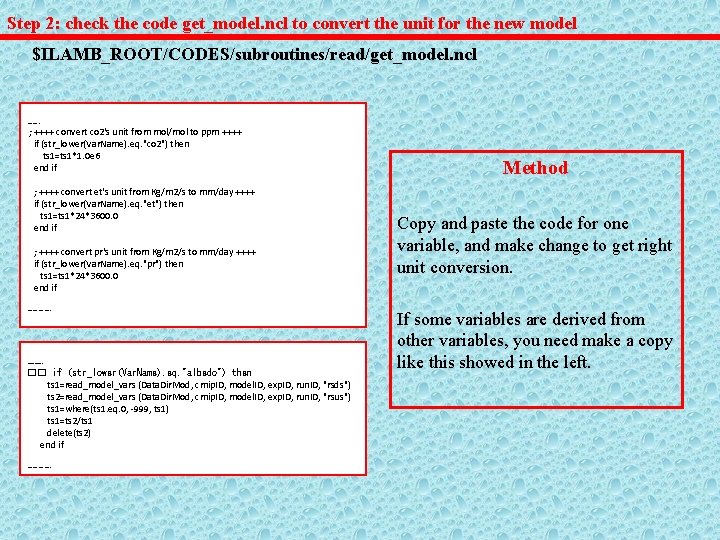
Step 2: check the code get_model. ncl to convert the unit for the new model $ILAMB_ROOT/CODES/subroutines/read/get_model. ncl ……. ; ++++ convert co 2's unit from mol/mol to ppm ++++ if (str_lower(Var. Name). eq. "co 2") then ts 1=ts 1*1. 0 e 6 end if ; ++++ convert et's unit from Kg/m 2/s to mm/day ++++ if (str_lower(Var. Name). eq. "et") then ts 1=ts 1*24*3600. 0 end if ; ++++ convert pr's unit from Kg/m 2/s to mm/day ++++ if (str_lower(Var. Name). eq. "pr") then ts 1=ts 1*24*3600. 0 end if …………. �� if (str_lower(Var. Name). eq. "albedo") then ts 1=read_model_vars (Data. Dir. Mod, cmip. ID, model. ID, exp. ID, run. ID, "rsds") ts 2=read_model_vars (Data. Dir. Mod, cmip. ID, model. ID, exp. ID, run. ID, "rsus") ts 1=where(ts 1. eq. 0, -999, ts 1) ts 1=ts 2/ts 1 delete(ts 2) end if …………. Method Copy and paste the code for one variable, and make change to get right unit conversion. If some variables are derived from other variables, you need make a copy like this showed in the left.
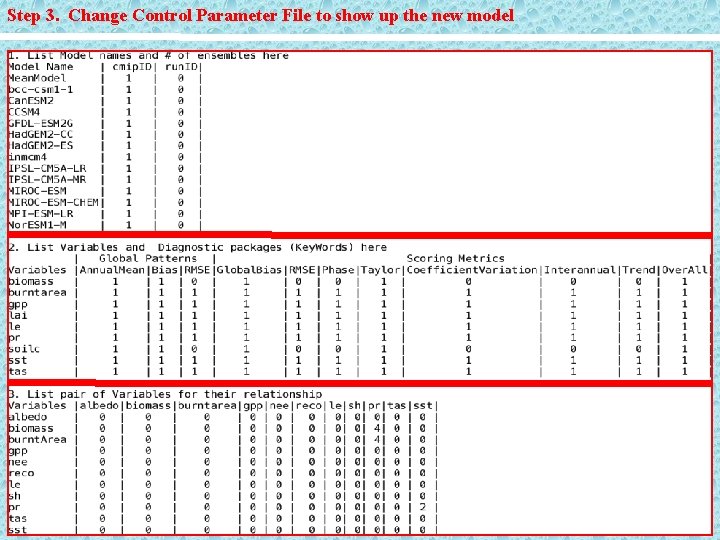
Step 3. Change Control Parameter File to show up the new model
- Slides: 45