
OSPF Header OSPF HEADER Version 1 byte Pkt
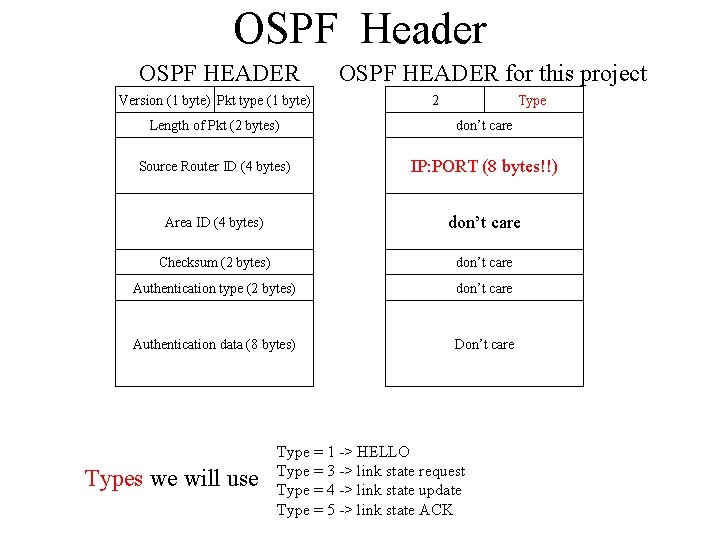
OSPF Header OSPF HEADER Version (1 byte) Pkt type (1 byte) OSPF HEADER for this project 2 Type Length of Pkt (2 bytes) don’t care Source Router ID (4 bytes) IP: PORT (8 bytes!!) Area ID (4 bytes) don’t care Checksum (2 bytes) don’t care Authentication type (2 bytes) don’t care Authentication data (8 bytes) Don’t care Types we will use Type = 1 -> HELLO Type = 3 -> link state request Type = 4 -> link state update Type = 5 -> link state ACK
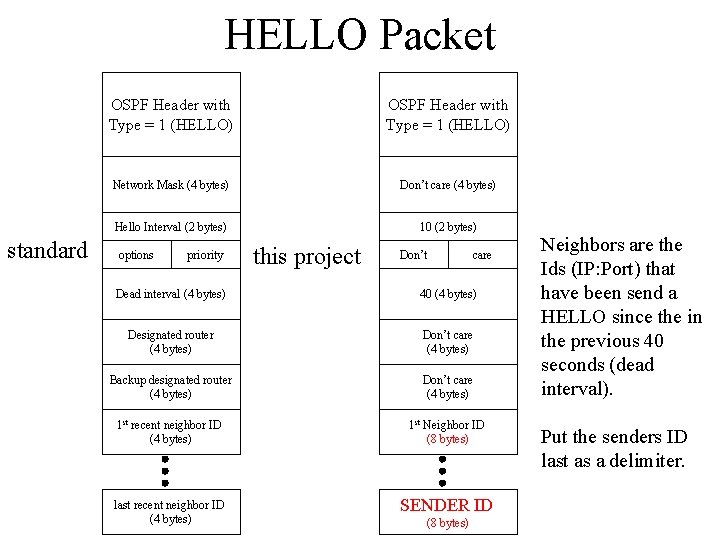
HELLO Packet standard OSPF Header with Type = 1 (HELLO) Network Mask (4 bytes) Don’t care (4 bytes) Hello Interval (2 bytes) 10 (2 bytes) options priority this project Don’t care Dead interval (4 bytes) 40 (4 bytes) Designated router (4 bytes) Don’t care (4 bytes) Backup designated router (4 bytes) Don’t care (4 bytes) 1 st recent neighbor ID (4 bytes) 1 st Neighbor ID (8 bytes) last recent neighbor ID (4 bytes) SENDER ID (8 bytes) Neighbors are the Ids (IP: Port) that have been send a HELLO since the in the previous 40 seconds (dead interval). Put the senders ID last as a delimiter.
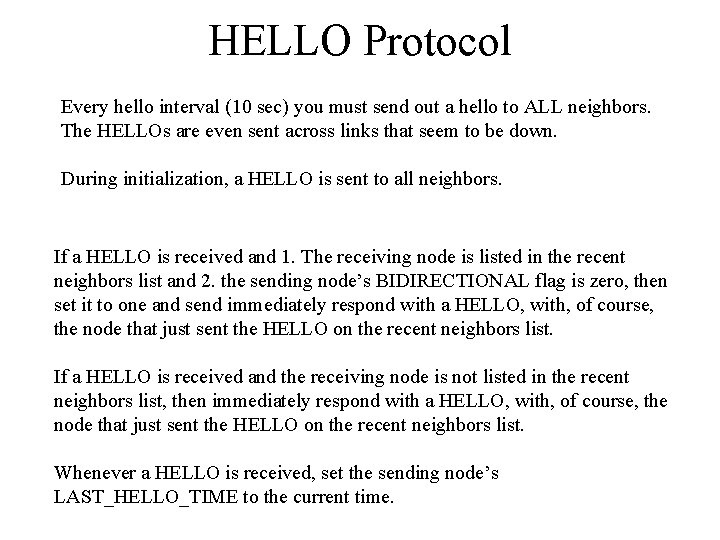
HELLO Protocol Every hello interval (10 sec) you must send out a hello to ALL neighbors. The HELLOs are even sent across links that seem to be down. During initialization, a HELLO is sent to all neighbors. If a HELLO is received and 1. The receiving node is listed in the recent neighbors list and 2. the sending node’s BIDIRECTIONAL flag is zero, then set it to one and send immediately respond with a HELLO, with, of course, the node that just sent the HELLO on the recent neighbors list. If a HELLO is received and the receiving node is not listed in the recent neighbors list, then immediately respond with a HELLO, with, of course, the node that just sent the HELLO on the recent neighbors list. Whenever a HELLO is received, set the sending node’s LAST_HELLO_TIME to the current time.

The Link State Update packet LSA Age OSPF Header with Type = 4 (update) options LS type Link State ID 4 bytes Number of LSAs Advertising router 4 bytes LSA 1 LSA Header LS Sequence Number 4 bytes checksum length LSA 2 router type 0 Number of Links Link ID 4 bytes Link 1 Link Data 6 bytes Link type metric TOS
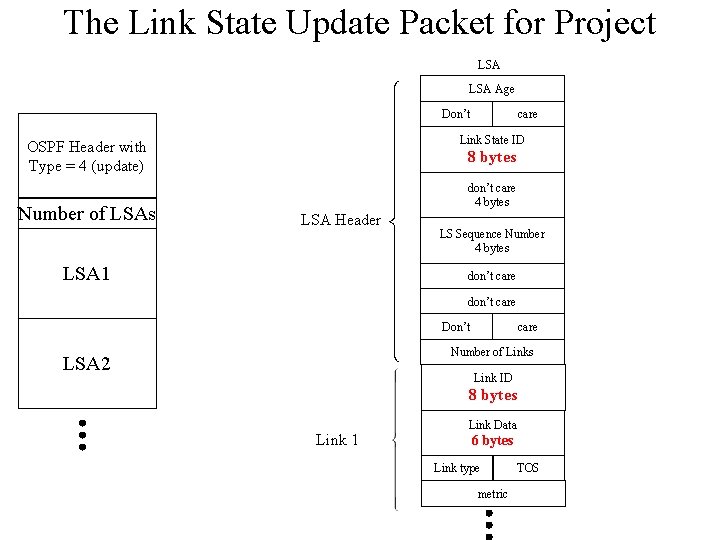
The Link State Update Packet for Project LSA Age Don’t Link State ID OSPF Header with Type = 4 (update) Number of LSAs care 8 bytes don’t care 4 bytes LSA Header LSA 1 LS Sequence Number 4 bytes don’t care Don’t care Number of Links LSA 2 Link ID 8 bytes Link 1 Link Data 6 bytes Link type metric TOS
Database Exchange This is not according to the OSPF standard. It will generate more control traffic than the standard, and will not work in all situations. But, it is simpler to program and will suffice for this project. When a link switches to bidirectional, a full database exchange should take place. Suppose that node A has switched its bidirectional flag to node B to one, then node A initializes a database exchange: • Node A sends an OSPF link state request packet to node B. • Node B responds by all its LSA’s in one packet. • If A does not get a LSA from B within 2 seconds, A resends an OSPF link state request packet to node B until either it gets an LSA or the link is no longer BIDIRECTIONAL. • When A receives the LSA database, it responds with a link state ACK packet. • If B fails to get a link state ACK within 2 seconds, B retransmits the LSA database. (Remember to not miss sending and receiving HELLO messages while sending a database). • B continues to retransmit the LSA database until the link is no longer BIDIRECTIONAL or the entire database has been sent. Note, since both ends will switch the link to bidirectional, both ends will initiate a database exchange
Reception of link state update A link state update is made up of one or more LSAs When an link state update arrives, send a link state ACK to sending node (not quite the standard). • For each in the LSA in the update • if the sequence number is larger than the sequence number in the current database then • If the Link State ID of in the LSA is not the same as this node’s ID, then • Update link state database • Flood this LSA to all neighbor except the one that sent it. • else • Generate a new LSA with sequence number equal to one plus the sequence number in the arrived LSA. • Flood this LSA to ALL neighbors. • If the LSA sequence number is less than or equal to the one currently in the database, then don’t do anything.
Reliable Flooding • When a packet is to be flooded, put it in the To. Be. Flooded list. • This list should contain the packet to be flooded, the address to where it should be sent and the time out, the next time it should be resent. • Hint: Since you should check periodically if packets need to be resent, you can initially put the packet in the list with an expired time out. • When you get an ACK, the packet should be removed from the To. Be. Flooded list.
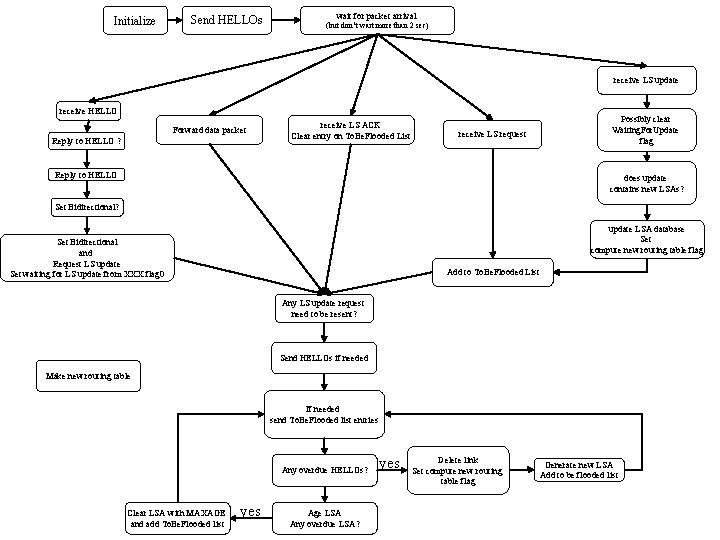
Initialize Send HELLOs wait for packet arrival (but don’t wait more than 2 sec) receive LS update receive HELLO Forward data packet Reply to HELLO ? receive LS ACK Clear entry on To. Be. Flooded List receive LS request Reply to HELLO Possibly clear Waiting. For. Update flag does update contains new LSAs? Set Bidirectional? update LSA database Set compute new routing table flag Set Bidirectional and Request LS update Set waiting for LS update from XXX flag 0 Add to To. Be. Flooded List Any LS update request need to be resent? Send HELLOs if needed Make new routing table If needed send To. Be. Flooded list entries Any overdue HELLOs? Clear LSA with MAXAGE and add To. Be. Flooded list yes Age LSA Any overdue LSA? yes Delete link Set compute new routing table flag Generate new LSA Add to be flooded list
- Slides: 9