
OSCAR Online System for Clerkship Application and Review

- Slides: 11
OSCAR Online System for Clerkship Application and Review http: //oscar. ao. dcn/
What Is OSCAR Version 4? • Serves as the single, centralized resource for notice of available clerkships, clerkship application information, and law clerk employment information. • Incorporates the Federal Law Clerk Information System (FLCIS) functionalities. FLCIS “sunsets” on Friday May 2 nd. • Accommodates judges who choose to receive electronic applications, judges who want to continue to receive paper applications, and judges who wish to advise applicants that they do not have a clerkship vacancy. • For judges who choose to receive electronic applications -- allows them to sort, screen, and review applications on-screen, downloading and printing only the materials they wish to see in paper form.
What Are the Benefits of OSCAR Version 4? • Judges no longer have to maintain separate passwords for two systems. • Judges no longer have to provide duplicate clerkship qualification and application information in each system. • Judges no longer have to contact separate help desks for assistance. • One central system for all clerkship hiring will reduce the number of calls to chambers from applicants and law schools by eliminating inconsistencies of clerkship position postings in two separate systems.
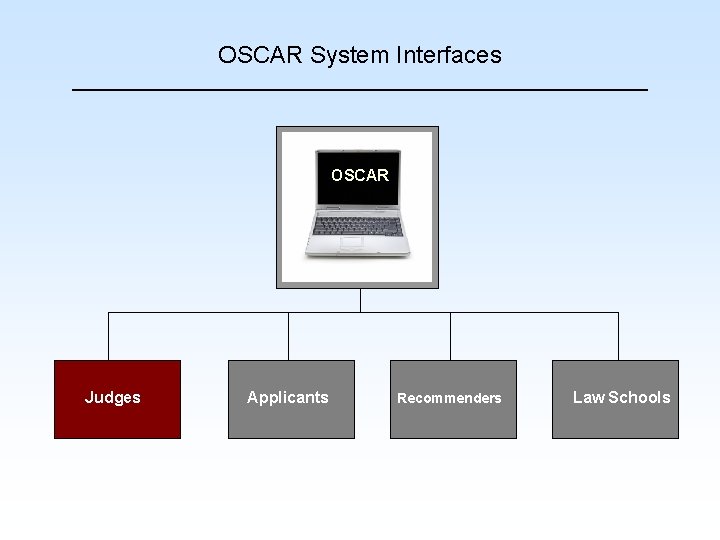
OSCAR System Features • Judges post their clerkship positions and application requirements. • For electronic applications, applicant submission consists of applicant profile form, resume, cover letter, gradesheet(s), writing sample, and letters of recommendation. • Separate user interfaces for applicants, recommenders, law schools, and judges. • Data release to judges timed to meet requirements of the judiciary’s Clerkship Hiring Plan. Ø Applications from law school alumni will be available for review at the time of submission. Ø Applications from law school students complies with the hiring plan.
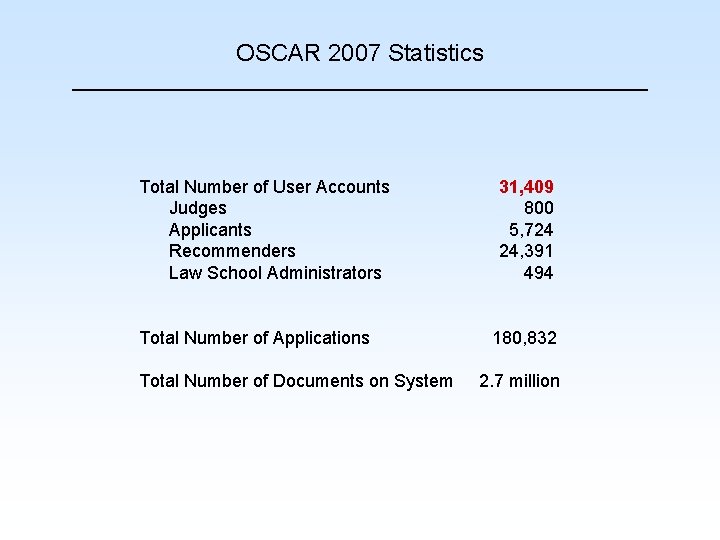
OSCAR 2007 Statistics Total Number of User Accounts Judges Applicants Recommenders Law School Administrators Total Number of Applications Total Number of Documents on System 31, 409 800 5, 724 24, 391 494 180, 832 2. 7 million
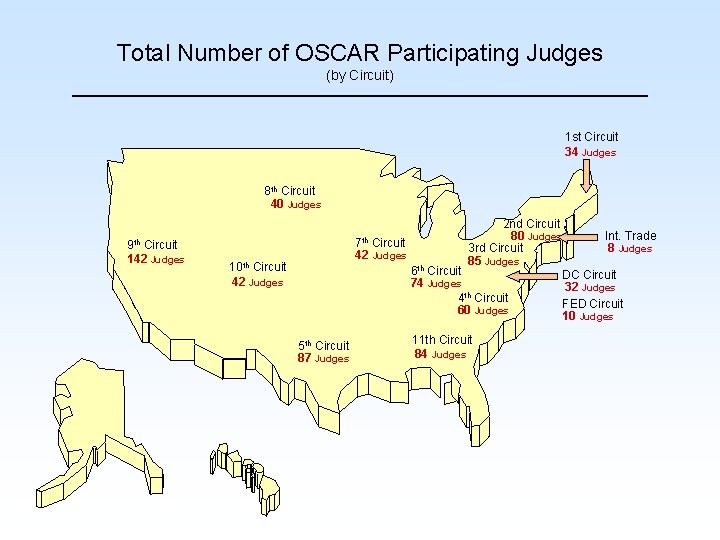
Total Number of OSCAR Participating Judges (by Circuit) 1 st Circuit 34 Judges 8 th Circuit 40 Judges 9 th Circuit 142 Judges 7 th Circuit 42 Judges 10 th Circuit 42 Judges 2 nd Circuit 80 Judges 3 rd Circuit 85 Judges 6 th Circuit 74 Judges 4 th Circuit 60 Judges 5 th Circuit 87 Judges 11 th Circuit 84 Judges Int. Trade 8 Judges DC Circuit 32 Judges FED Circuit 10 Judges
OSCAR System Interfaces OSCAR Judges Applicants Recommenders Law Schools
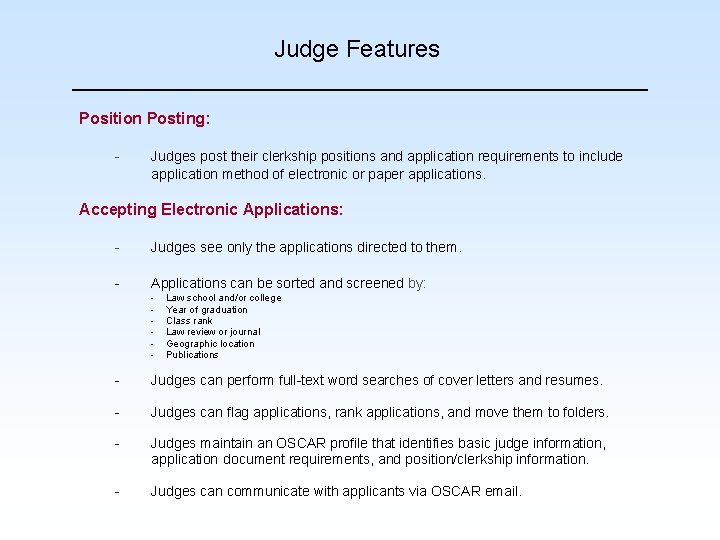
Judge Features Position Posting: - Judges post their clerkship positions and application requirements to include application method of electronic or paper applications. Accepting Electronic Applications: - Judges see only the applications directed to them. - Applications can be sorted and screened by: - Law school and/or college Year of graduation Class rank Law review or journal Geographic location Publications - Judges can perform full-text word searches of cover letters and resumes. - Judges can flag applications, rank applications, and move them to folders. - Judges maintain an OSCAR profile that identifies basic judge information, application document requirements, and position/clerkship information. - Judges can communicate with applicants via OSCAR email.
Version 4. 0 New Features • Post positions to receive electronic or paper applications. • Ability to post “No Positions are Available. ” • Ability to post multiple positions for multiple terms. • Draft emails and “Save” them to use at anytime. • Differentiate the requirements for grade sheets (e. g. , Law School Grade Sheet, Undergraduate Grade Sheet, and Other Grade Sheet). • View that an applicant has been placed in multiple folders. • Trigger a request to an applicant to update electronic application.
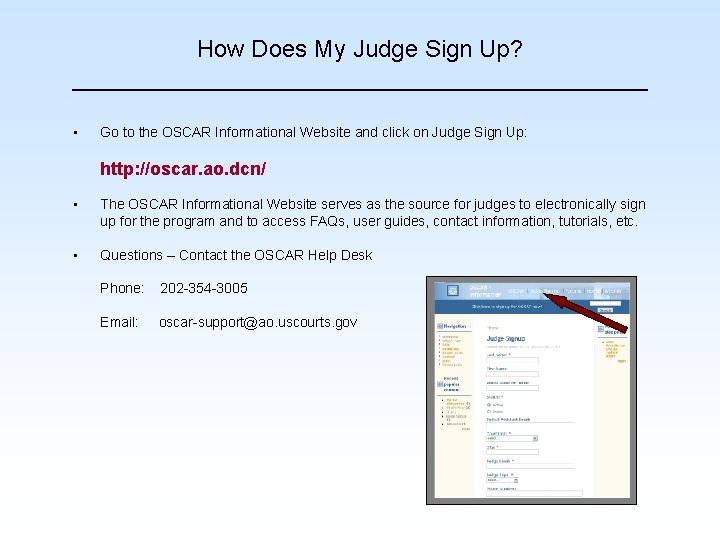
How Does My Judge Sign Up? • Go to the OSCAR Informational Website and click on Judge Sign Up: http: //oscar. ao. dcn/ • The OSCAR Informational Website serves as the source for judges to electronically sign up for the program and to access FAQs, user guides, contact information, tutorials, etc. • Questions – Contact the OSCAR Help Desk Phone: 202 -354 -3005 Email: oscar-support@ao. uscourts. gov
Demo & Questions