
Oracle Inmemory Timesten Database Osama Mustafa Principal consultant
Oracle In-memory Timesten Database Osama Mustafa Principal consultant/ DBA
About me • • • Oracle ACE. Oracle OCP, OCE, OCS … Certified Ethical Hacker. Fusion Middleware Specialist. RAC-ATTACK Organizer around the world. Speaker in Oracle User Group. Author for the book : Oracle Penetration Testing. Technical Reviewer for Oracle books. Published Articles in different Magazine. Board member in Oracle RAC SIG. Volunteer in IOUG, ODTUG & UKOUG. Blogger.
Goog. Ie Search Without Oracle With Oracle
Gurus Solutions • Guru Solution was founded in 2004 and it’s market leader in IT Consulting. • Focusing on Oracle and Operating system. Oracle BI Fusion Middleware Database Operating System Training Gurus Solutions Gives you a better idea about your solutions https: //www. gurussolutions. com/
Agenda • • • Timesten Overview. Timesten vs Oracle Database. Timesten Caching Overview. Timesten Connectivity. Timesten Installation / Linux Version. Timesten Caching – Oracle Side. – Timesten side. • Tune Tips
What is Timesten ? • Any company looking for faster, reliable and access data quickly thru application, which mean they planned to develop new generation of application, especially if this application expected high number of transactions. – For Example : - telecom applications, billing and fraud detections • Oracle Times. Ten In-memory database (Times. Ten) the solution for any faster application. • Times. Ten store data in the memory which mean no network latency or no disk I/O, in that case transaction will take just microsecond
What is Timesten ? • Reliability in Times. Ten occurs in logging data and transactions to disks to provide full recovery. • Times. Ten can be configured for high availability and instant failover. • New generation of full system engineered hardware oracle embedded Times. Ten in Oracle Exalytics to enable oracle business intelligence with two editions standard and enterprise to preform high speed query
What is Timesten ? • Times. Ten is relational database support full SQL transaction and PL/SQL. • Times. Ten designed to manage data in physical memory, therefore there is no special hardware/software requirement one consideration while working with Times. Ten which is have sufficient RAM available in the application tier. • The size for Times. Ten will be limited by amount of physical RAM in the server – Example : 32 bit platforms considered by 32 bit address space otherwise 64 bit platforms has no limit size depend on physical memory you have in this server
What is Timesten ? • another benefits As Any application having appropriate number of CPU is important to run application faster. • Times. Ten can run multiple application per time • Oracle database instant client installed with Time. Sten to enable SQL*NET to communicate with oracle database. • Times. Ten Supported Different Platforms and can installed to work as Standalone database the supported Operating system.
Cont’d Linux x 86 -64 Solaris SPARC (64 -bit) o Microsoft Windows x 86 Microsoft Windows x 64 (64 -bit) IBM AIX Solaris x 86 -64 (64 -bit) • The Oracle Times. Ten Database support different version of Oracle Database – Oracle Database 12 c – Oracle Database 11 g Release 2 – Oracle Database 11 g Release 1
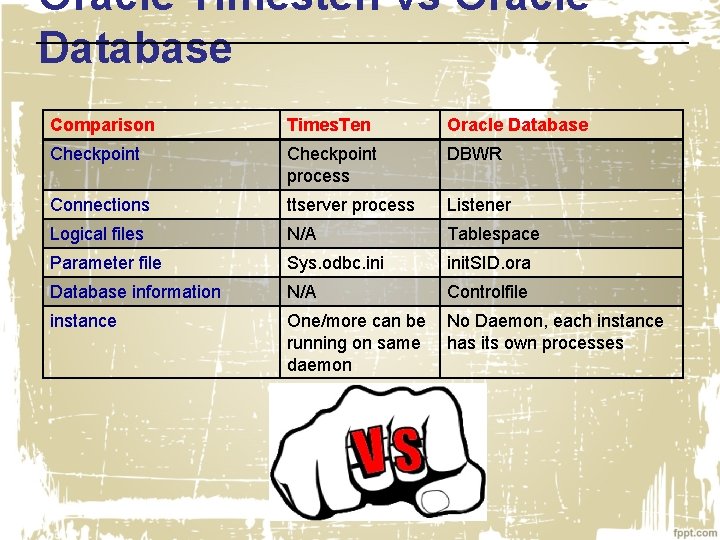
Oracle Timesten vs Oracle Database Comparison Times. Ten Oracle Database Checkpoint process DBWR Connections ttserver process Listener Logical files N/A Tablespace Parameter file Sys. odbc. init. SID. ora Database information N/A Controlfile instance One/more can be running on same daemon No Daemon, each instance has its own processes
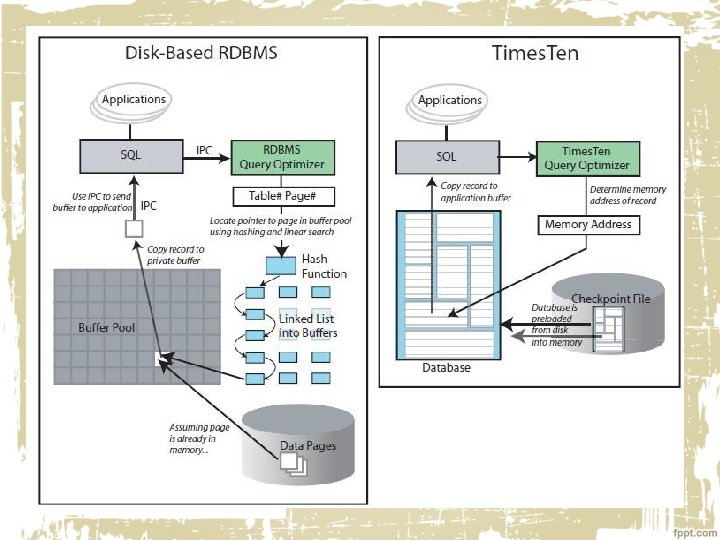
Timesten caching • Another concept for Times. Ten Called Times. Ten Application Tier Database Cache is Oracle database product option that provide real time, read/write caching for oracle database with this option transaction response time will be improved by caching performance-critical subset of tables and table fragment from oracle database to application tier. • Times. Ten Cache is deployed in application-tier for multiuser in application. • application connect to cache database and access cached tables using JDBC, ODBC, ADO. NET Or OCI.
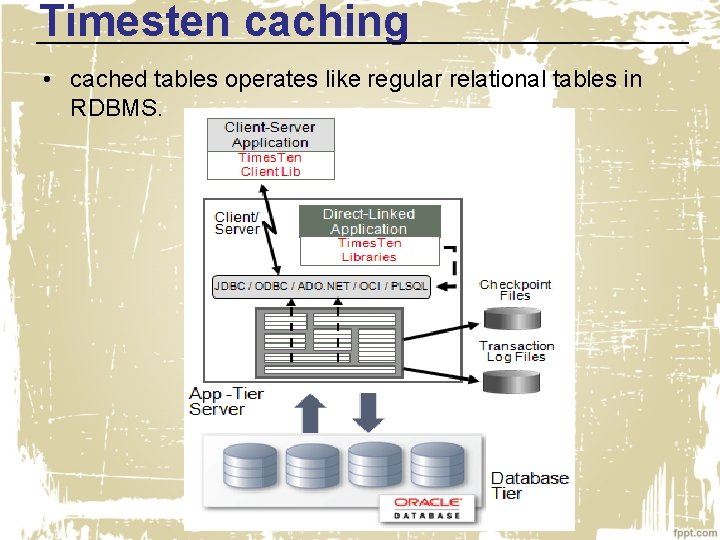
Timesten caching • cached tables operates like regular relational tables in RDBMS.
Timesten caching • Applications using Times. Ten Cache may choose to configure a combination of caching options: • Read-only caches – Transactions are performed in the Oracle Database and the changes are refreshed to the Times. Ten cache database. • Read-write – Transactions are performed in the Times. Ten cache database and then propagated to the Oracle Database. • On-demand preloaded cached – Data may be loaded on-demand or preloaded
Timesten Connectivity • Times. Ten and Times. Ten Cache support different kind of connectivity each one of them has its own advantage and disadvantage. • Applications can connect to a Times. Ten database in different way : – Direct driver connection – Client/server connection – Driver manager connection
Cont’d • Direct driver connection • Traditional database system. – TCP/IP or another IPC mechanism is used by client applications to communicate with a database server process. – Times. Ten and application on the same host. – Java/OCI applications access direct ODBC driver through JDBC/OCI. – Fastest One. • Driver manager connection – Can provide support for ODBC applications written for a different ODBC version. – Support multiple RDBMS products with ODBC interfaces. – Database independent interface for example: - MS ODBC driver.
Cont’d • Client/server connection – Times. Ten and application on a different or the same host. – The server daemon spawns a separate server child process for each client connection to the database (called child Process). – Client communicates with a server daemon process. – Depend on the network, therefore it will be slower. – Provide more flexibility
Timesten Installation Steps/ Linux • To install Times. Ten on Linux System you have to perform these steps: – Shared memory, Semaphores (Kernel Parameters). • Depend on server memory. • Oracle provide equation to calculate size of segments • Perm. Size + Temp. Size + Log. Buf. MB + 64 MB – Large pages/Huge pages (Optional). • It’s advisable to configure large pages. • Use of Huge. Pages is required if the size of the Times. Ten main shared memory segment is greater than 256 GB. • If there is support for Huge Pages you can check value from “cat /proc/meminfo” – IPC Client/Server (Daemon Ports).
Cont’d • On Linux/Unix Operating system No GUI provided to install Oracle Times. Ten. • Download Time. Sten Software From OTN: – http: //www. oracle. com/technetwork/databasetechnologies/timesten/downloads/index. html • To start installation Run the following Command. /setup. sh • The Installation document provided on my blog : – http: //osamamustafa. blogspot. ae/2014/01/installing-oracletimesten-in-memory. html • Video Link: – http: //osamamustafa. blogspot. com/2014/07/install-oracletimesten-on-linux-video. html
![Installation Time Please choose an instance name for this installation? [ tt 1122 ]](http://slidetodoc.com/presentation_image_h2/75ab76320fcd2a8317e0adc149660ba8/image-21.jpg "Installation Time Please choose an instance name for this installation? [ tt 1122 ]")
Installation Time Please choose an instance name for this installation? [ tt 1122 ] Instance name will be 'tt 1122'. Is this correct? [ yes ] Of the three components: [1] Client/Server and Data Manager [2] Data Manager Only [3] Client Only Which would you like to install? [ 1 ] 1 Where would you like to install the tt 1122 instance of Times. Ten? [ 1 ] /u 01/app/Times. Ten The daemon logs will be located in /u 01/app/Times. Ten/tt 1122/info Would you like to specify a different location for the daemon logs? [ no ] Installing into /u 01/app/Times. Ten/tt 1122. . . Uncompressing. . .
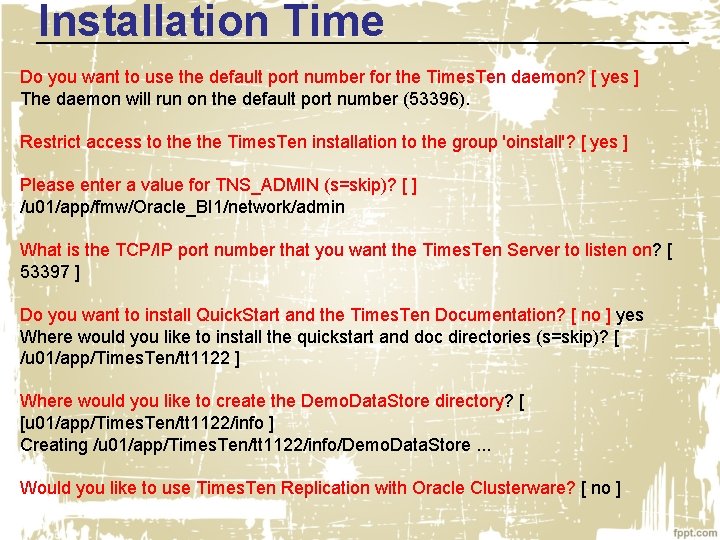
Installation Time Do you want to use the default port number for the Times. Ten daemon? [ yes ] The daemon will run on the default port number (53396). Restrict access to the Times. Ten installation to the group 'oinstall'? [ yes ] Please enter a value for TNS_ADMIN (s=skip)? [ ] /u 01/app/fmw/Oracle_BI 1/network/admin What is the TCP/IP port number that you want the Times. Ten Server to listen on? [ 53397 ] Do you want to install Quick. Start and the Times. Ten Documentation? [ no ] yes Where would you like to install the quickstart and doc directories (s=skip)? [ /u 01/app/Times. Ten/tt 1122 ] Where would you like to create the Demo. Data. Store directory? [ [u 01/app/Times. Ten/tt 1122/info ] Creating /u 01/app/Times. Ten/tt 1122/info/Demo. Data. Store. . . Would you like to use Times. Ten Replication with Oracle Clusterware? [ no ]
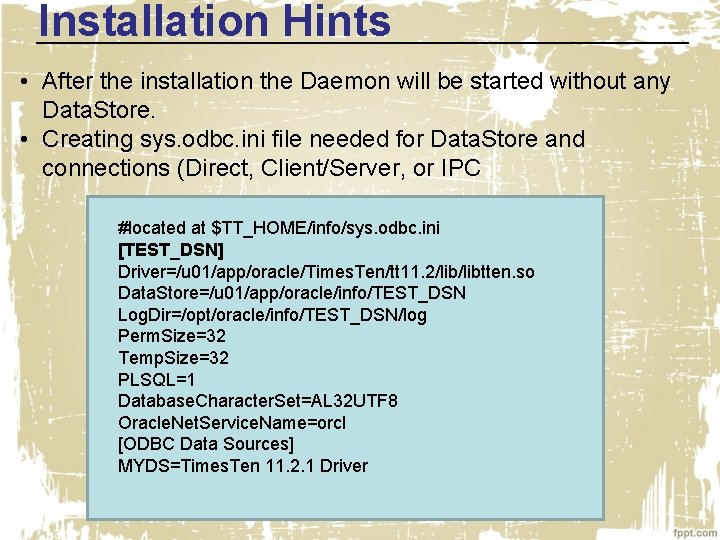
Installation Hints • After the installation the Daemon will be started without any Data. Store. • Creating sys. odbc. ini file needed for Data. Store and connections (Direct, Client/Server, or IPC #located at $TT_HOME/info/sys. odbc. ini [TEST_DSN] Driver=/u 01/app/oracle/Times. Ten/tt 11. 2/libtten. so Data. Store=/u 01/app/oracle/info/TEST_DSN Log. Dir=/opt/oracle/info/TEST_DSN/log Perm. Size=32 Temp. Size=32 PLSQL=1 Database. Character. Set=AL 32 UTF 8 Oracle. Net. Service. Name=orcl [ODBC Data Sources] MYDS=Times. Ten 11. 2. 1 Driver
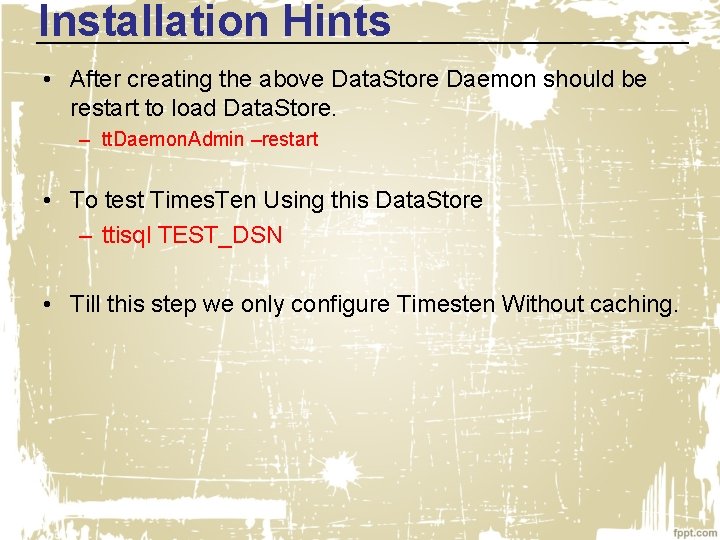
Installation Hints • After creating the above Data. Store Daemon should be restart to load Data. Store. – tt. Daemon. Admin –restart • To test Times. Ten Using this Data. Store – ttisql TEST_DSN • Till this step we only configure Timesten Without caching.
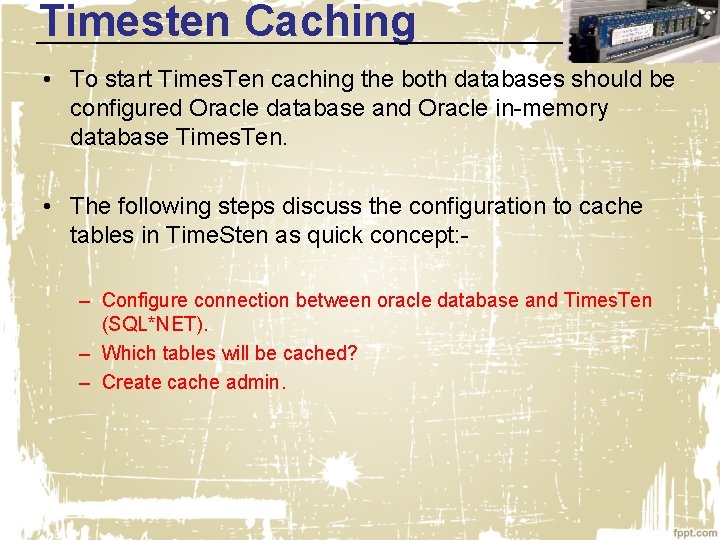
Timesten Caching • To start Times. Ten caching the both databases should be configured Oracle database and Oracle in-memory database Times. Ten. • The following steps discuss the configuration to cache tables in Time. Sten as quick concept: – Configure connection between oracle database and Times. Ten (SQL*NET). – Which tables will be cached? – Create cache admin.
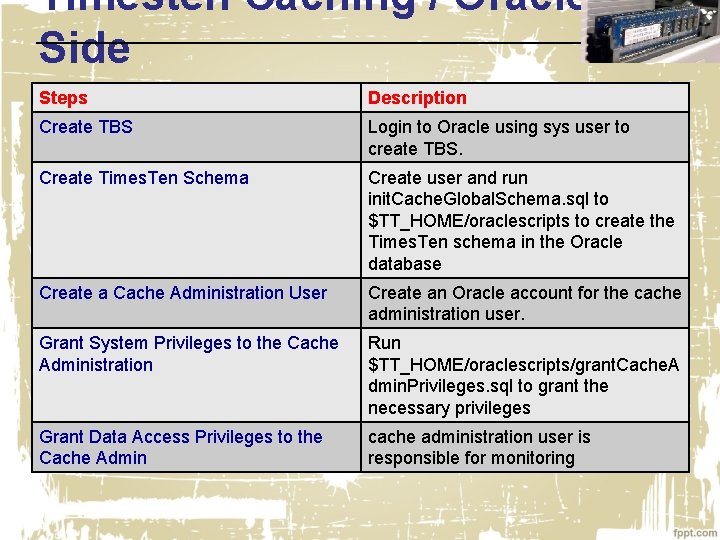
Timesten Caching / Oracle Side Steps Description Create TBS Login to Oracle using sys user to create TBS. Create Times. Ten Schema Create user and run init. Cache. Global. Schema. sql to $TT_HOME/oraclescripts to create the Times. Ten schema in the Oracle database Create a Cache Administration User Create an Oracle account for the cache administration user. Grant System Privileges to the Cache Administration Run $TT_HOME/oraclescripts/grant. Cache. A dmin. Privileges. sql to grant the necessary privileges Grant Data Access Privileges to the Cache Admin cache administration user is responsible for monitoring
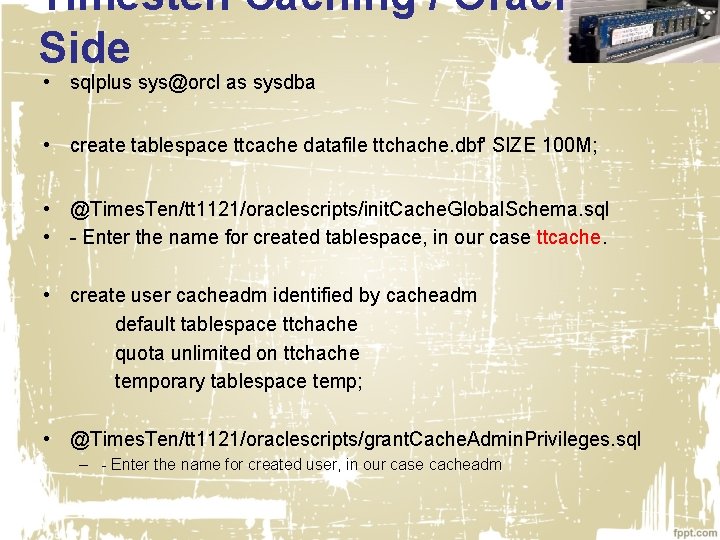
Timesten Caching / Oracle Side • sqlplus sys@orcl as sysdba • create tablespace ttcache datafile ttchache. dbf' SIZE 100 M; • @Times. Ten/tt 1121/oraclescripts/init. Cache. Global. Schema. sql • - Enter the name for created tablespace, in our case ttcache. • create user cacheadm identified by cacheadm default tablespace ttchache quota unlimited on ttchache temporary tablespace temp; • @Times. Ten/tt 1121/oraclescripts/grant. Cache. Admin. Privileges. sql – - Enter the name for created user, in our case cacheadm
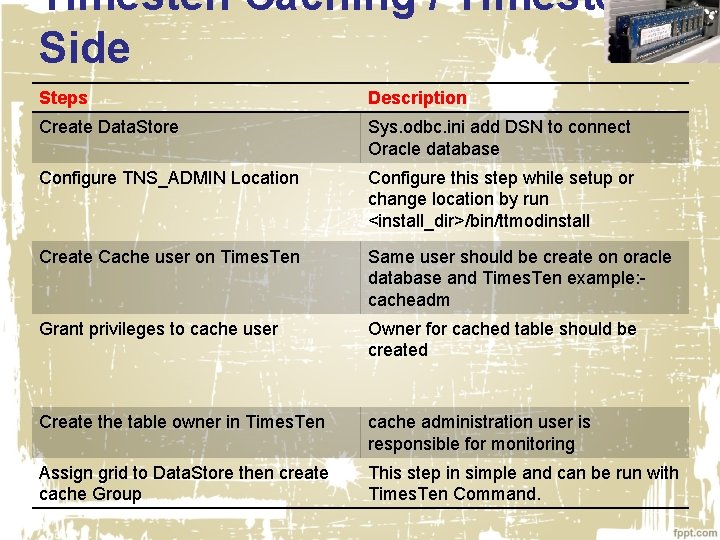
Timesten Caching / Timesten Side Steps Description Create Data. Store Sys. odbc. ini add DSN to connect Oracle database Configure TNS_ADMIN Location Configure this step while setup or change location by run <install_dir>/bin/ttmodinstall Create Cache user on Times. Ten Same user should be create on oracle database and Times. Ten example: cacheadm Grant privileges to cache user Owner for cached table should be created Create the table owner in Times. Ten cache administration user is responsible for monitoring Assign grid to Data. Store then create cache Group This step in simple and can be run with Times. Ten Command.
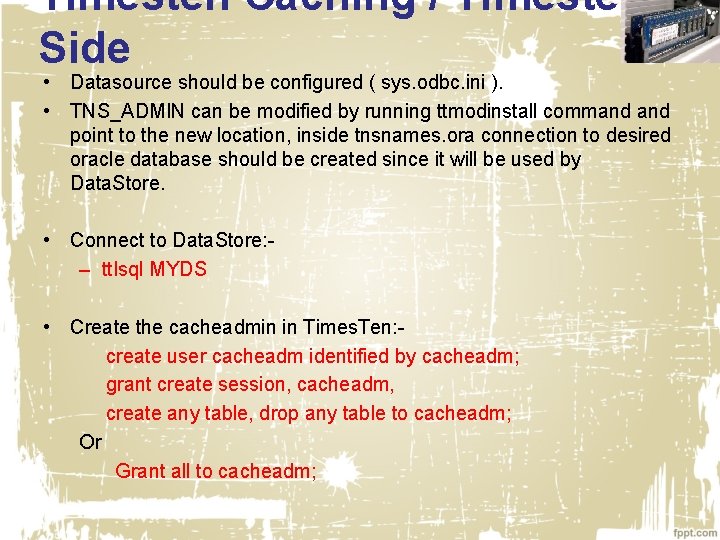
Timesten Caching / Timesten Side • Datasource should be configured ( sys. odbc. ini ). • TNS_ADMIN can be modified by running ttmodinstall command point to the new location, inside tnsnames. ora connection to desired oracle database should be created since it will be used by Data. Store. • Connect to Data. Store: – tt. Isql MYDS • Create the cacheadmin in Times. Ten: create user cacheadm identified by cacheadm; grant create session, cacheadm, create any table, drop any table to cacheadm; Or Grant all to cacheadm;
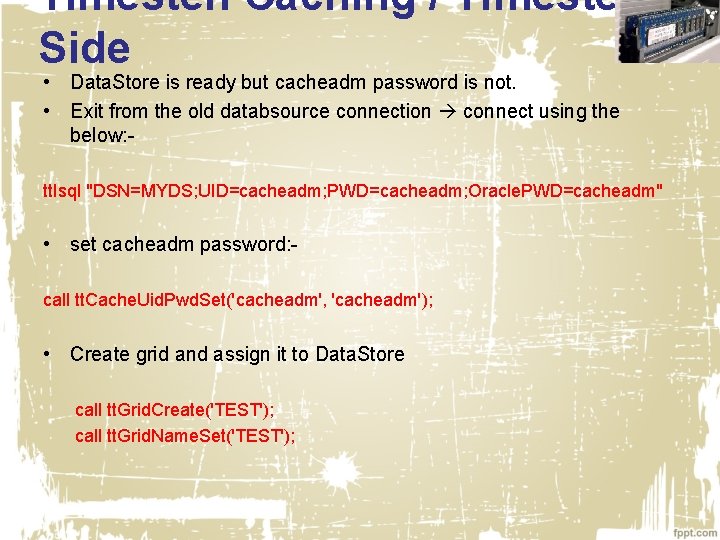
Timesten Caching / Timesten Side • Data. Store is ready but cacheadm password is not. • Exit from the old databsource connection connect using the below: - tt. Isql "DSN=MYDS; UID=cacheadm; PWD=cacheadm; Oracle. PWD=cacheadm" • set cacheadm password: call tt. Cache. Uid. Pwd. Set('cacheadm', 'cacheadm'); • Create grid and assign it to Data. Store call tt. Grid. Create('TEST'); call tt. Grid. Name. Set('TEST');
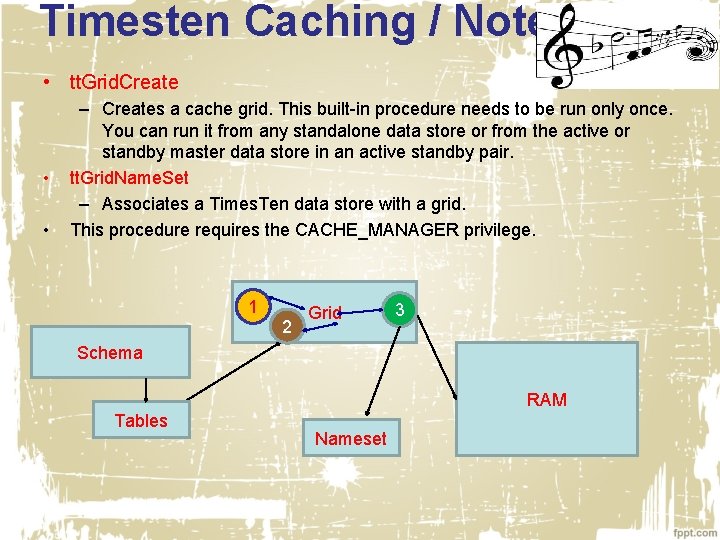
Timesten Caching / Notes • tt. Grid. Create • • – Creates a cache grid. This built-in procedure needs to be run only once. You can run it from any standalone data store or from the active or standby master data store in an active standby pair. tt. Grid. Name. Set – Associates a Times. Ten data store with a grid. This procedure requires the CACHE_MANAGER privilege. 1 2 Grid 3 Schema RAM Tables Nameset
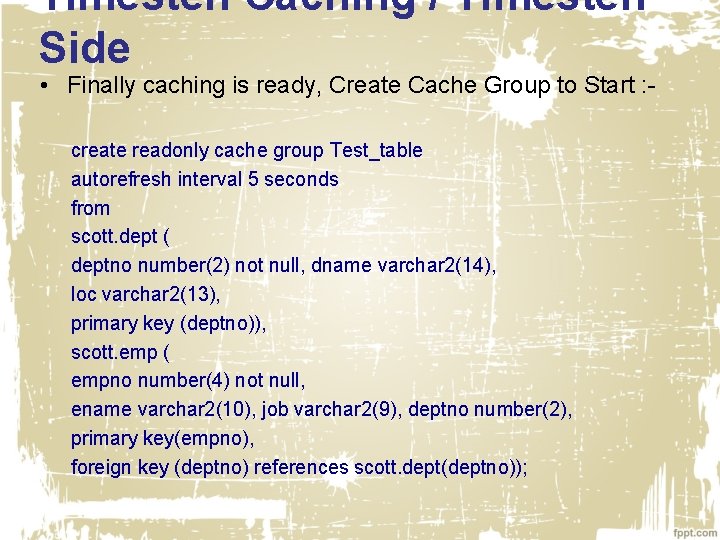
Timesten Caching / Timesten Side • Finally caching is ready, Create Cache Group to Start : create readonly cache group Test_table autorefresh interval 5 seconds from scott. dept ( deptno number(2) not null, dname varchar 2(14), loc varchar 2(13), primary key (deptno)), scott. emp ( empno number(4) not null, ename varchar 2(10), job varchar 2(9), deptno number(2), primary key(empno), foreign key (deptno) references scott. dept(deptno));
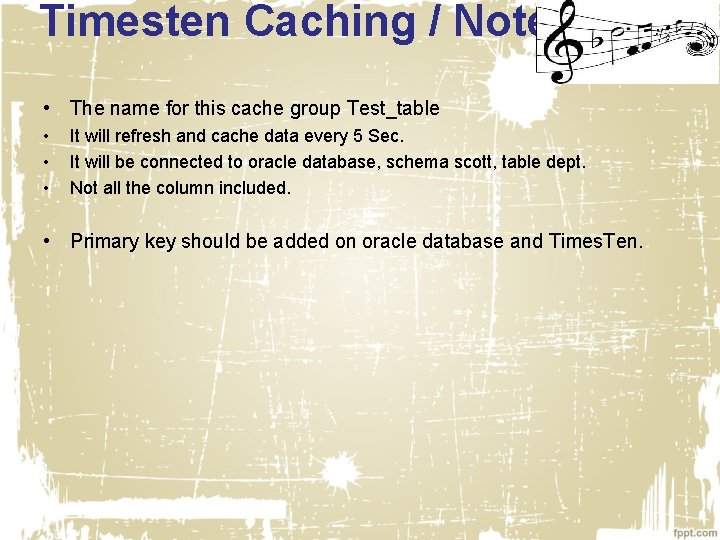
Timesten Caching / Notes • The name for this cache group Test_table • • • It will refresh and cache data every 5 Sec. It will be connected to oracle database, schema scott, table dept. Not all the column included. • Primary key should be added on oracle database and Times. Ten.
Tune Tips • First it’s really Hard to Tune timesten comparing to Oracle database. • One of the most tools used in Times. Ten for troubleshooting: – Using the tt. Capture utility – Using the tt. Status utility – Using the tt. Trace. Mon utility – Using the tt. Xact. Admin utility – Using ODBC tracing
Tune Tips • tt. Capture utility: This utility capture information about the Times. Ten Configuration the information will be written to files that provides Times. Ten technical support with a snapshot of system using the command is simple tt. Capture –dest [file_location]. • tt. Status utility This utility check the status of the Times. Ten daemon and the state of all Times. Ten connections. • tt. Trace. Mon utility Enable and disable the Times. Ten internal tracing facilities, tracing options can be enabled and disabled separately for each database, this utility requires the ADMIN privilege.
Tune Tips • tt. Xact. Admin utility Displays ownership, status, log and lock information for each outstanding transaction. You can also use it to show all current connections to a database.

osama. mustafa@gurussolutions. com @Osama. Oracle http: //osamamustafa. blogspot. com Osama Mustafa
- Slides: 38