
Oracle 12 c Sharding Concepts Implementation What is

- Slides: 36
Oracle 12 c Sharding Concepts & Implementation
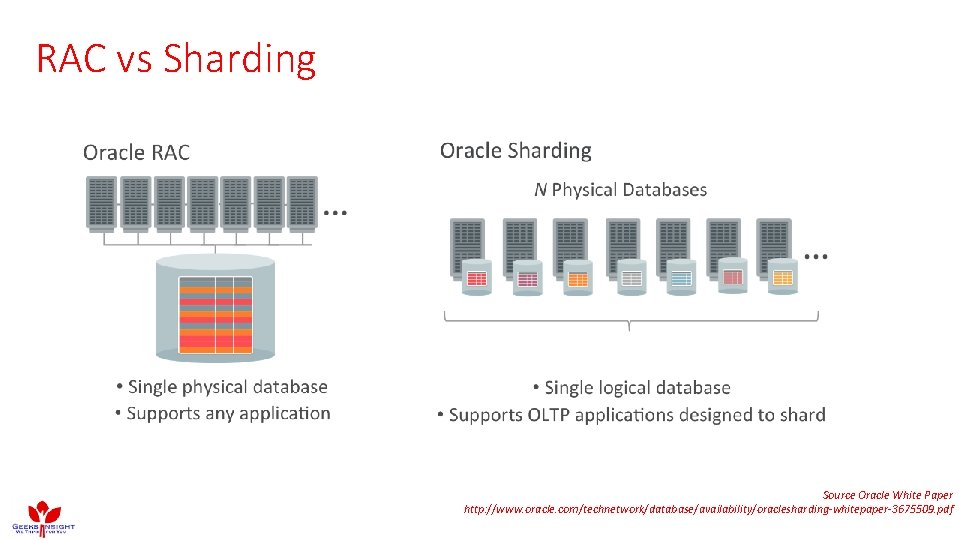
What is Sharding? Sharding is a type of database partitioning that separates very large databases the into smaller, faster, more easily managed parts called data shards. The word shard means a small part of a whole. • • A mechanism of horizontal scaling Distributes datasets (tables/data) over multiple servers/databases Each shard is independent of databases All shards consists a single logical database
Before Oracle Sharding… • No. SQL Databases • • Cassandra Mongo. DB Couch. DB Etc…. • My. SQL – NDB Cluster • MS-SQL – Sharding • DB 2 – Partitioning/Sharding
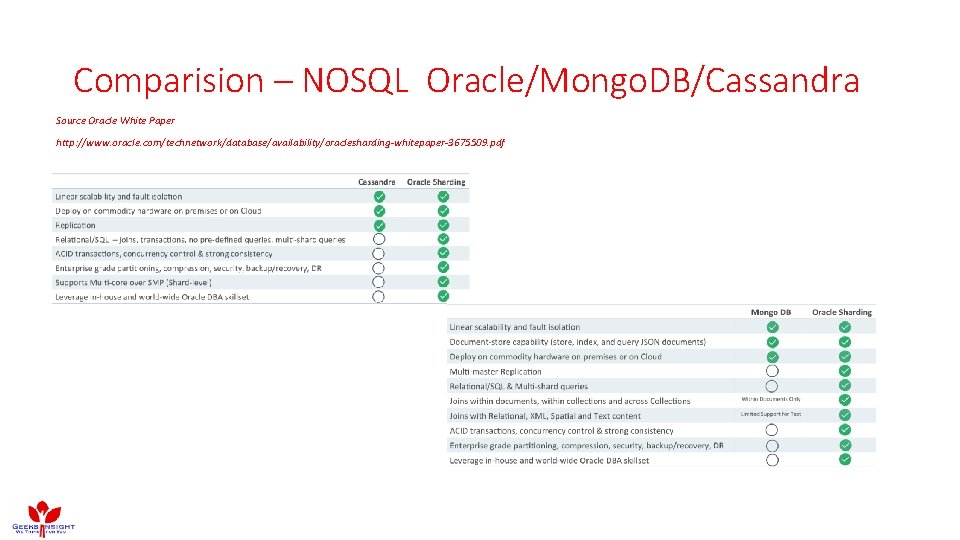
Comparision – NOSQL Oracle/Mongo. DB/Cassandra Source Oracle White Paper http: //www. oracle. com/technetwork/database/availability/oraclesharding-whitepaper-3675509. pdf
RAC vs Sharding Source Oracle White Paper http: //www. oracle. com/technetwork/database/availability/oraclesharding-whitepaper-3675509. pdf
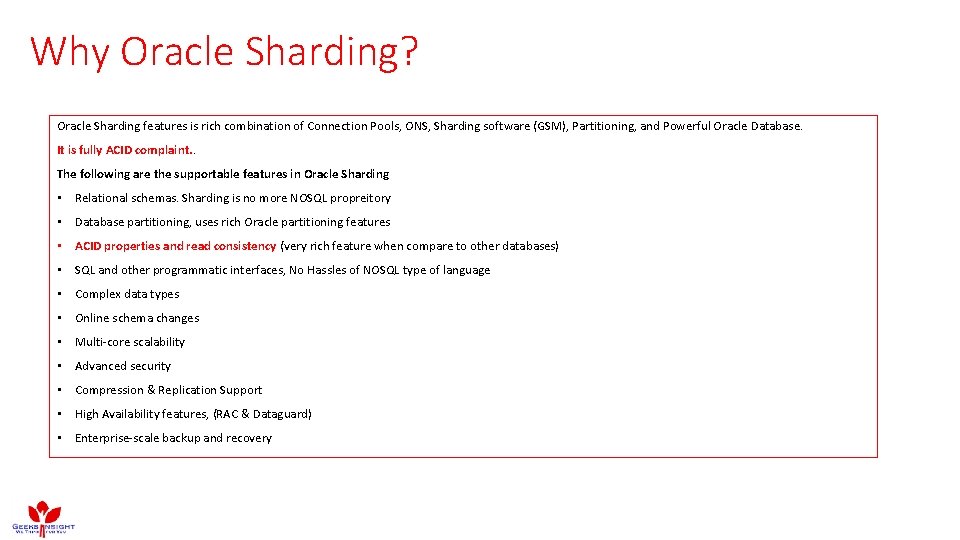
Why Oracle Sharding? Oracle Sharding features is rich combination of Connection Pools, ONS, Sharding software (GSM), Partitioning, and Powerful Oracle Database. It is fully ACID complaint. . The following are the supportable features in Oracle Sharding • Relational schemas. Sharding is no more NOSQL propreitory • Database partitioning, uses rich Oracle partitioning features • ACID properties and read consistency (very rich feature when compare to other databases) • SQL and other programmatic interfaces, No Hassles of NOSQL type of language • Complex data types • Online schema changes • Multi-core scalability • Advanced security • Compression & Replication Support • High Availability features, (RAC & Dataguard) • Enterprise-scale backup and recovery
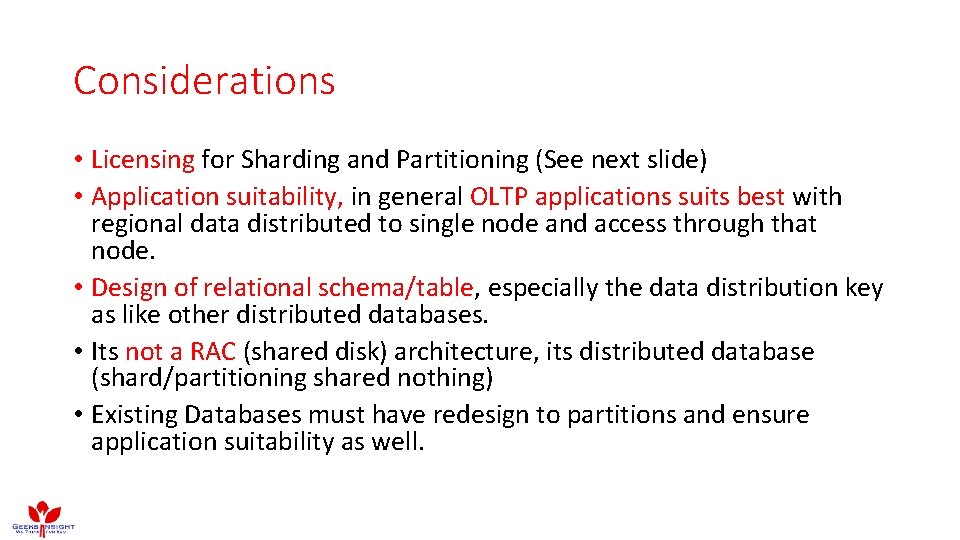
Considerations • Licensing for Sharding and Partitioning (See next slide) • Application suitability, in general OLTP applications suits best with regional data distributed to single node and access through that node. • Design of relational schema/table, especially the data distribution key as like other distributed databases. • Its not a RAC (shared disk) architecture, its distributed database (shard/partitioning shared nothing) • Existing Databases must have redesign to partitions and ensure application suitability as well.
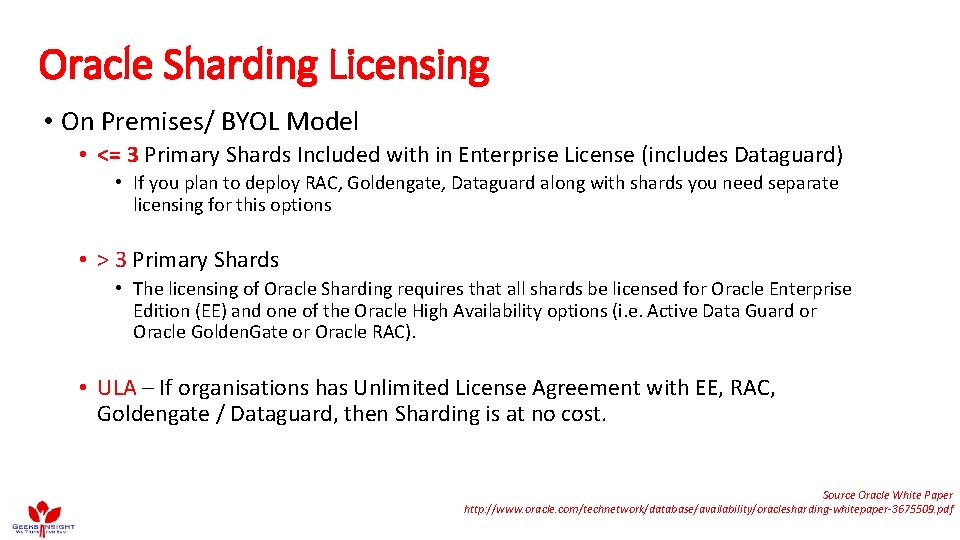
Oracle Sharding Licensing • On Premises/ BYOL Model • <= 3 Primary Shards Included with in Enterprise License (includes Dataguard) • If you plan to deploy RAC, Goldengate, Dataguard along with shards you need separate licensing for this options • > 3 Primary Shards • The licensing of Oracle Sharding requires that all shards be licensed for Oracle Enterprise Edition (EE) and one of the Oracle High Availability options (i. e. Active Data Guard or Oracle Golden. Gate or Oracle RAC). • ULA – If organisations has Unlimited License Agreement with EE, RAC, Goldengate / Dataguard, then Sharding is at no cost. Source Oracle White Paper http: //www. oracle. com/technetwork/database/availability/oraclesharding-whitepaper-3675509. pdf
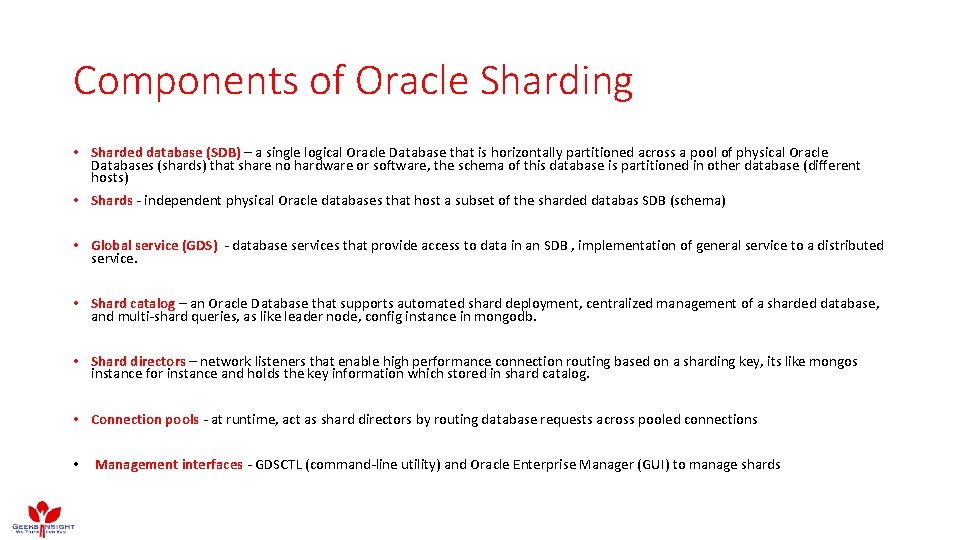
Components of Oracle Sharding • Sharded database (SDB) – a single logical Oracle Database that is horizontally partitioned across a pool of physical Oracle Databases (shards) that share no hardware or software, the schema of this database is partitioned in other database (different hosts) • Shards - independent physical Oracle databases that host a subset of the sharded databas SDB (schema) • Global service (GDS) - database services that provide access to data in an SDB , implementation of general service to a distributed service. • Shard catalog – an Oracle Database that supports automated shard deployment, centralized management of a sharded database, and multi-shard queries, as like leader node, config instance in mongodb. • Shard directors – network listeners that enable high performance connection routing based on a sharding key, its like mongos instance for instance and holds the key information which stored in shard catalog. • Connection pools - at runtime, act as shard directors by routing database requests across pooled connections • Management interfaces - GDSCTL (command-line utility) and Oracle Enterprise Manager (GUI) to manage shards
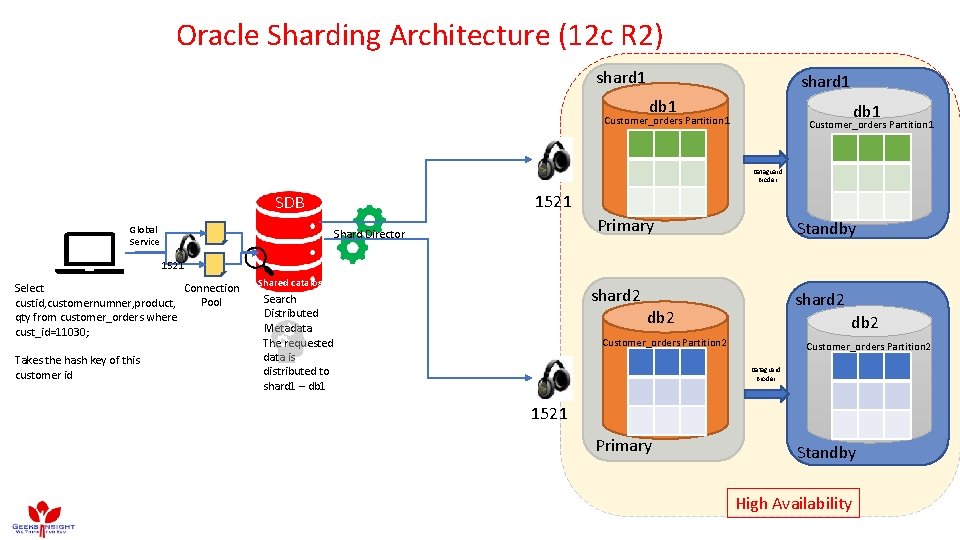
Oracle Sharding Architecture (12 c R 2) shard 1 db 1 Customer_orders Partition 1 Dataguard Broder 1521 SDB Global Service Primary Shard Director Standby 1521 Connection Select Pool custid, customernumner, product, qty from customer_orders where cust_id=11030; Takes the hash key of this customer id Shared catalog shard 2 Search Distributed Metadata The requested data is distributed to shard 1 – db 1 shard 2 db 2 Customer_orders Partition 2 Dataguard Broder 1521 Primary Standby High Availability
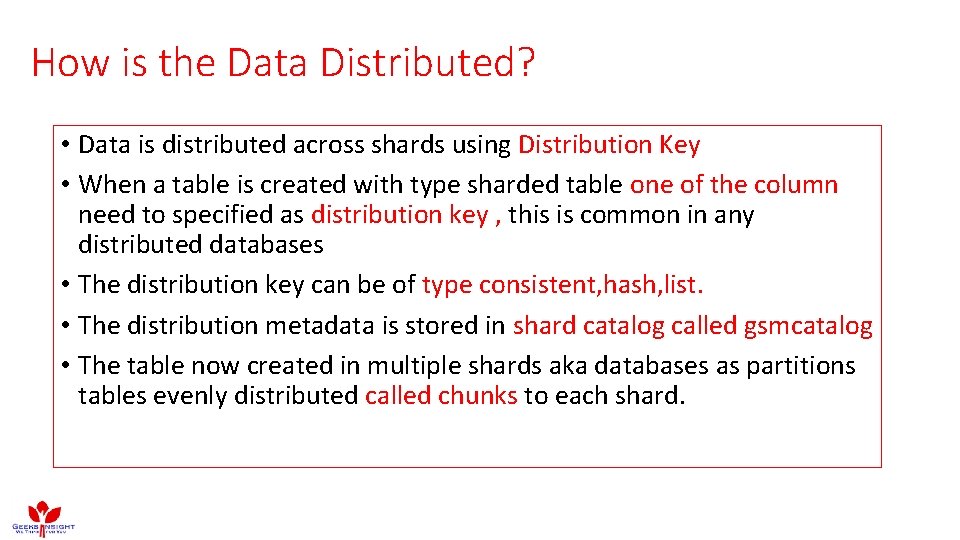
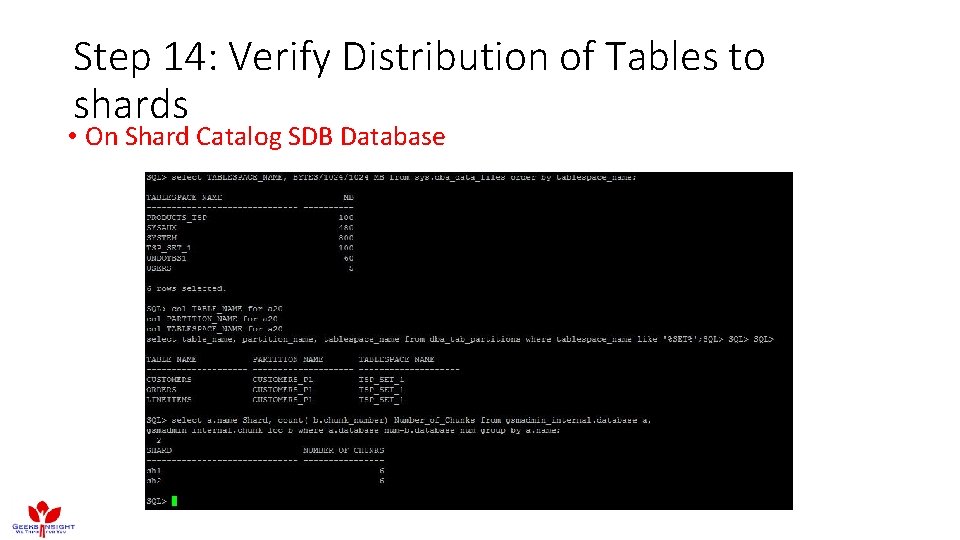
How is the Data Distributed? • Data is distributed across shards using Distribution Key • When a table is created with type sharded table one of the column need to specified as distribution key , this is common in any distributed databases • The distribution key can be of type consistent, hash, list. • The distribution metadata is stored in shard catalog called gsmcatalog • The table now created in multiple shards aka databases as partitions tables evenly distributed called chunks to each shard.
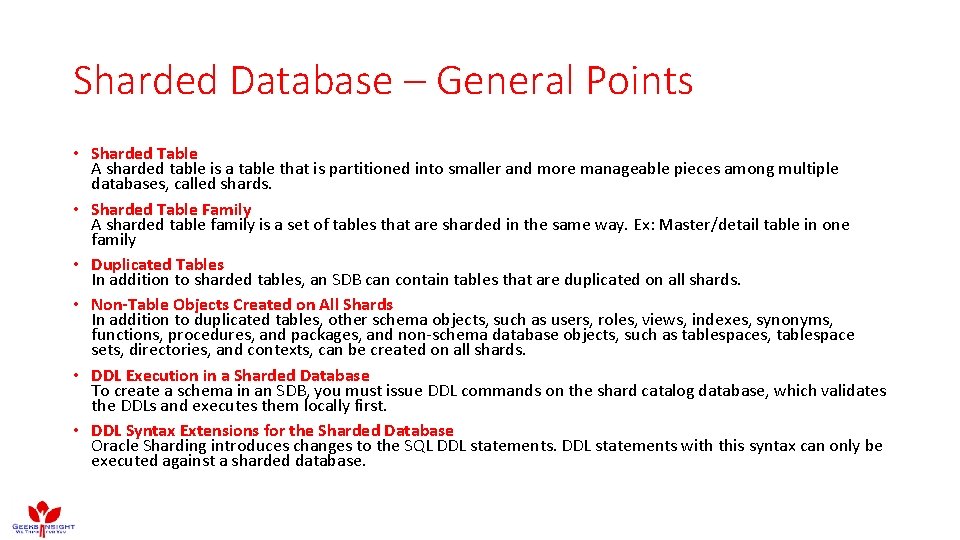
Sharded Database – General Points • Sharded Table A sharded table is a table that is partitioned into smaller and more manageable pieces among multiple databases, called shards. • Sharded Table Family A sharded table family is a set of tables that are sharded in the same way. Ex: Master/detail table in one family • Duplicated Tables In addition to sharded tables, an SDB can contain tables that are duplicated on all shards. • Non-Table Objects Created on All Shards In addition to duplicated tables, other schema objects, such as users, roles, views, indexes, synonyms, functions, procedures, and packages, and non-schema database objects, such as tablespaces, tablespace sets, directories, and contexts, can be created on all shards. • DDL Execution in a Sharded Database To create a schema in an SDB, you must issue DDL commands on the shard catalog database, which validates the DDLs and executes them locally first. • DDL Syntax Extensions for the Sharded Database Oracle Sharding introduces changes to the SQL DDL statements with this syntax can only be executed against a sharded database.
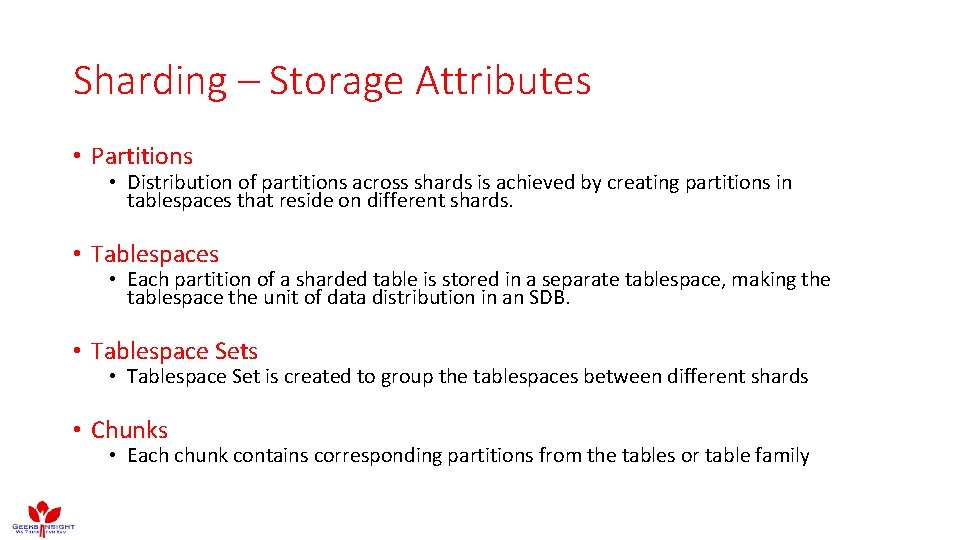
Sharding – Storage Attributes • Partitions • Distribution of partitions across shards is achieved by creating partitions in tablespaces that reside on different shards. • Tablespaces • Each partition of a sharded table is stored in a separate tablespace, making the tablespace the unit of data distribution in an SDB. • Tablespace Sets • Tablespace Set is created to group the tablespaces between different shards • Chunks • Each chunk contains corresponding partitions from the tables or table family
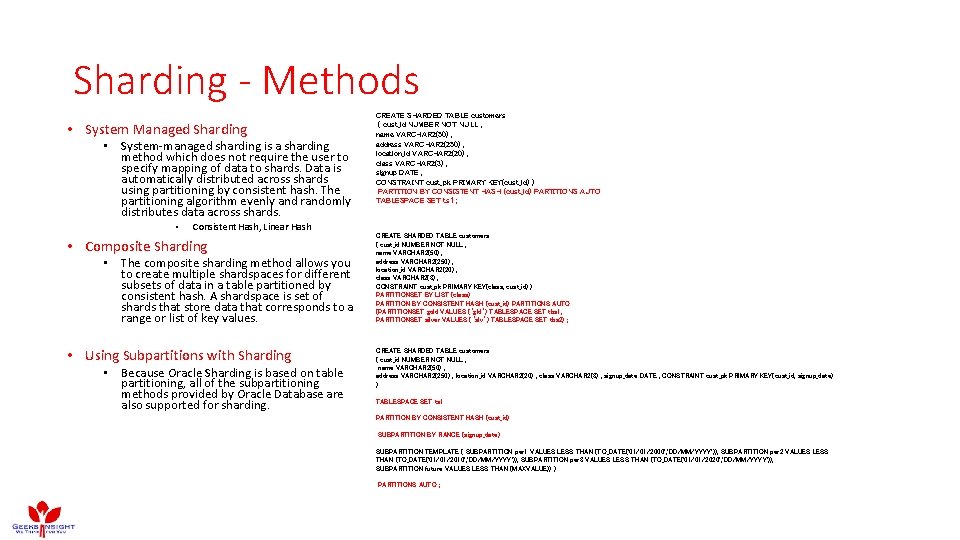
Sharding - Methods • System Managed Sharding • System-managed sharding is a sharding method which does not require the user to specify mapping of data to shards. Data is automatically distributed across shards using partitioning by consistent hash. The partitioning algorithm evenly and randomly distributes data across shards. • CREATE SHARDED TABLE customers ( cust_id NUMBER NOT NULL , name VARCHAR 2(50) , address VARCHAR 2(250) , location_id VARCHAR 2(20) , class VARCHAR 2(3) , signup DATE , CONSTRAINT cust_pk PRIMARY KEY(cust_id) ) PARTITION BY CONSISTENT HASH (cust_id) PARTITIONS AUTO TABLESPACE SET ts 1 ; Consistent Hash, Linear Hash • Composite Sharding • The composite sharding method allows you to create multiple shardspaces for different subsets of data in a table partitioned by consistent hash. A shardspace is set of shards that store data that corresponds to a range or list of key values. • Using Subpartitions with Sharding • Because Oracle Sharding is based on table partitioning, all of the subpartitioning methods provided by Oracle Database are also supported for sharding. CREATE SHARDED TABLE customers ( cust_id NUMBER NOT NULL , name VARCHAR 2(50) , address VARCHAR 2(250) , location_id VARCHAR 2(20) , class VARCHAR 2(3) , CONSTRAINT cust_pk PRIMARY KEY(class, cust_id) ) PARTITIONSET BY LIST (class) PARTITION BY CONSISTENT HASH (cust_id) PARTITIONS AUTO (PARTITIONSET gold VALUES (‘gld’) TABLESPACE SET tbs 1, PARTITIONSET silver VALUES (‘slv’) TABLESPACE SET tbs 2) ; CREATE SHARDED TABLE customers ( cust_id NUMBER NOT NULL , name VARCHAR 2(50) , address VARCHAR 2(250) , location_id VARCHAR 2(20) , class VARCHAR 2(3) , signup_date DATE , CONSTRAINT cust_pk PRIMARY KEY(cust_id, signup_date) ) TABLESPACE SET ts 1 PARTITION BY CONSISTENT HASH (cust_id) SUBPARTITION BY RANGE (signup_date) SUBPARTITION TEMPLATE ( SUBPARTITION per 1 VALUES LESS THAN (TO_DATE('01/01/2000', 'DD/MM/YYYY')), SUBPARTITION per 2 VALUES LESS THAN (TO_DATE('01/01/2010', 'DD/MM/YYYY')), SUBPARTITION per 3 VALUES LESS THAN (TO_DATE('01/01/2020', 'DD/MM/YYYY')), SUBPARTITION future VALUES LESS THAN (MAXVALUE)) ) PARTITIONS AUTO ;
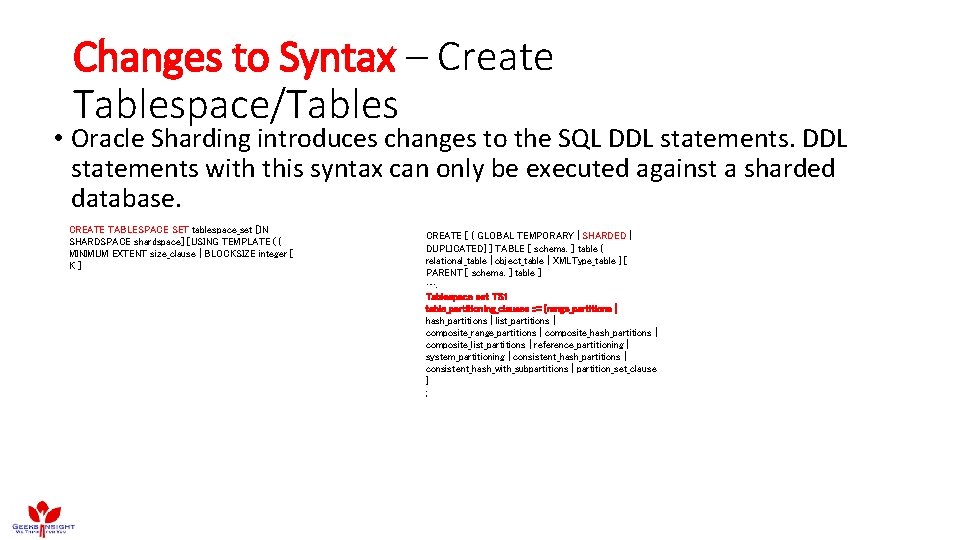
Changes to Syntax – Create Tablespace/Tables • Oracle Sharding introduces changes to the SQL DDL statements with this syntax can only be executed against a sharded database. CREATE TABLESPACE SET tablespace_set [IN SHARDSPACE shardspace] [USING TEMPLATE ( { MINIMUM EXTENT size_clause | BLOCKSIZE integer [ K ] CREATE [ { GLOBAL TEMPORARY | SHARDED | DUPLICATED} ] TABLE [ schema. ] table { relational_table | object_table | XMLType_table } [ PARENT [ schema. ] table ] …. Tablespace set TS 1 table_partitioning_clauses : : = {range_partitions | hash_partitions | list_partitions | composite_range_partitions | composite_hash_partitions | composite_list_partitions | reference_partitioning | system_partitioning | consistent_hash_partitions | consistent_hash_with_subpartitions | partition_set_clause } ;
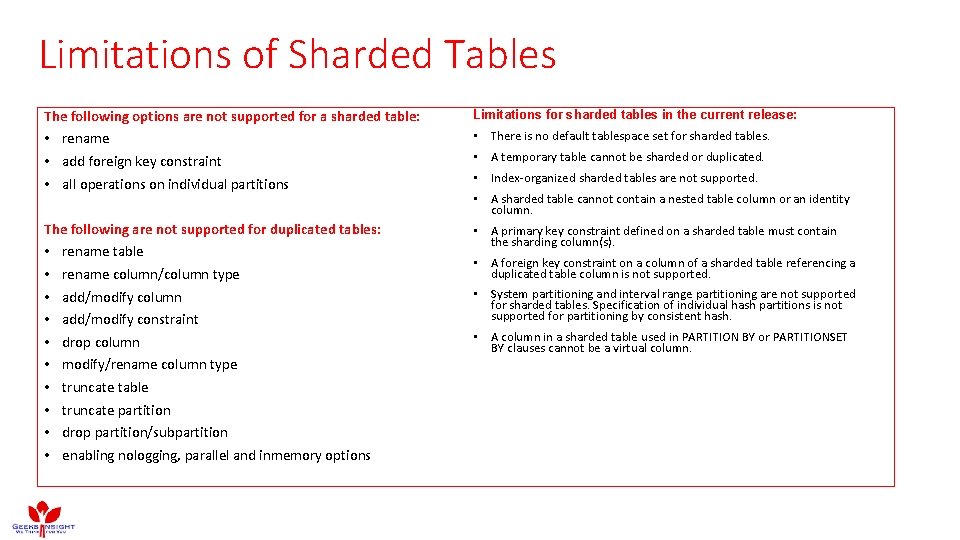
Limitations of Sharded Tables The following options are not supported for a sharded table: Limitations for sharded tables in the current release: • rename • add foreign key constraint • all operations on individual partitions • There is no default tablespace set for sharded tables. The following are not supported for duplicated tables: • A primary key constraint defined on a sharded table must contain the sharding column(s). • • • rename table rename column/column type • A temporary table cannot be sharded or duplicated. • Index-organized sharded tables are not supported. • A sharded table cannot contain a nested table column or an identity column. • A foreign key constraint on a column of a sharded table referencing a duplicated table column is not supported. add/modify constraint • System partitioning and interval range partitioning are not supported for sharded tables. Specification of individual hash partitions is not supported for partitioning by consistent hash. drop column • A column in a sharded table used in PARTITION BY or PARTITIONSET BY clauses cannot be a virtual column. add/modify column modify/rename column type truncate table truncate partition drop partition/subpartition enabling nologging, parallel and inmemory options
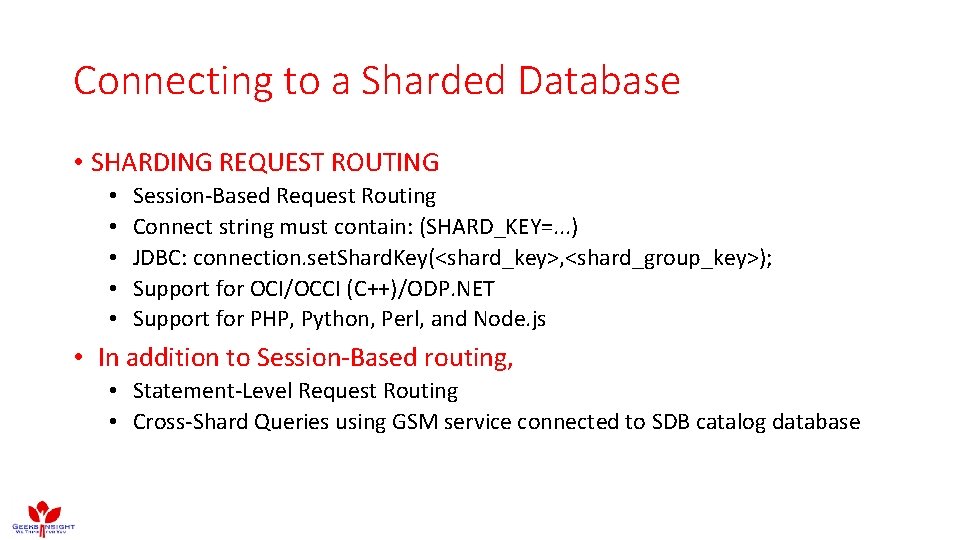
Connecting to a Sharded Database • SHARDING REQUEST ROUTING • • • Session-Based Request Routing Connect string must contain: (SHARD_KEY=. . . ) JDBC: connection. set. Shard. Key(<shard_key>, <shard_group_key>); Support for OCI/OCCI (C++)/ODP. NET Support for PHP, Python, Perl, and Node. js • In addition to Session-Based routing, • Statement-Level Request Routing • Cross-Shard Queries using GSM service connected to SDB catalog database
Oracle Sharding How to Implement? Like RAC ? #(#*$(# No…It’s simple
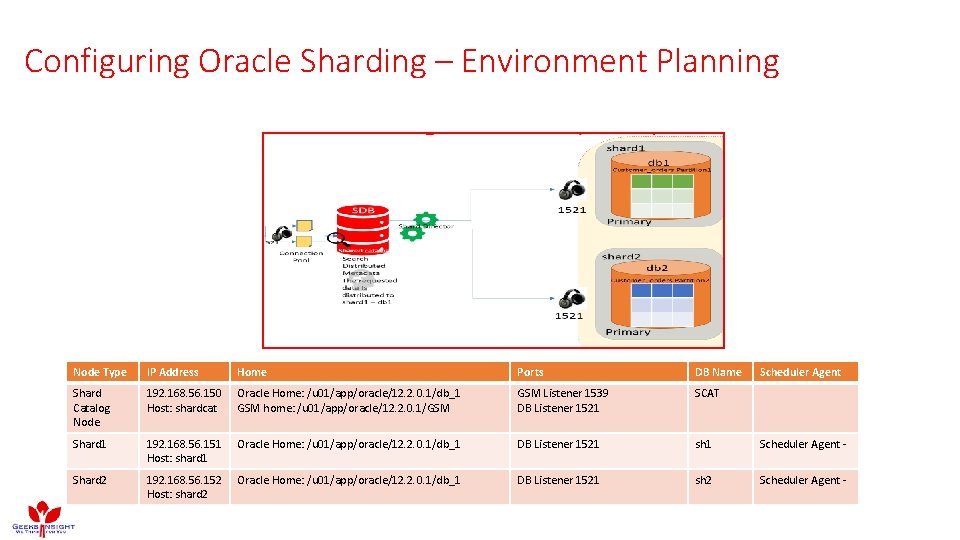
Configuring Oracle Sharding – Environment Planning Node Type IP Address Home Ports DB Name Scheduler Agent Shard Catalog Node 192. 168. 56. 150 Host: shardcat Oracle Home: /u 01/app/oracle/12. 2. 0. 1/db_1 GSM home: /u 01/app/oracle/12. 2. 0. 1/GSM Listener 1539 DB Listener 1521 SCAT Shard 1 192. 168. 56. 151 Host: shard 1 Oracle Home: /u 01/app/oracle/12. 2. 0. 1/db_1 DB Listener 1521 sh 1 Scheduler Agent - Shard 2 192. 168. 56. 152 Host: shard 2 Oracle Home: /u 01/app/oracle/12. 2. 0. 1/db_1 DB Listener 1521 sh 2 Scheduler Agent -
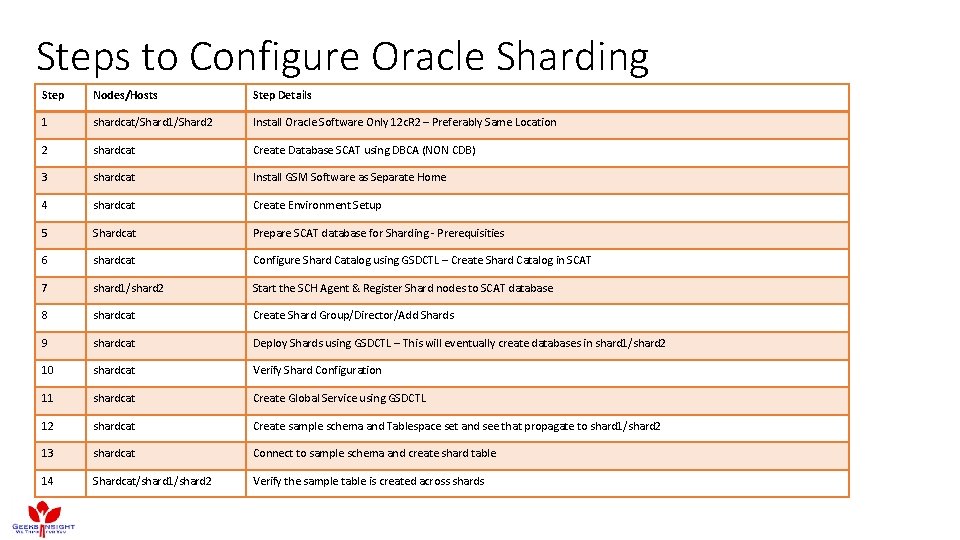
Steps to Configure Oracle Sharding Step Nodes/Hosts Step Details 1 shardcat/Shard 1/Shard 2 Install Oracle Software Only 12 c. R 2 – Preferably Same Location 2 shardcat Create Database SCAT using DBCA (NON CDB) 3 shardcat Install GSM Software as Separate Home 4 shardcat Create Environment Setup 5 Shardcat Prepare SCAT database for Sharding - Prerequisities 6 shardcat Configure Shard Catalog using GSDCTL – Create Shard Catalog in SCAT 7 shard 1/shard 2 Start the SCH Agent & Register Shard nodes to SCAT database 8 shardcat Create Shard Group/Director/Add Shards 9 shardcat Deploy Shards using GSDCTL – This will eventually create databases in shard 1/shard 2 10 shardcat Verify Shard Configuration 11 shardcat Create Global Service using GSDCTL 12 shardcat Create sample schema and Tablespace set and see that propagate to shard 1/shard 2 13 shardcat Connect to sample schema and create shard table 14 Shardcat/shard 1/shard 2 Verify the sample table is created across shards
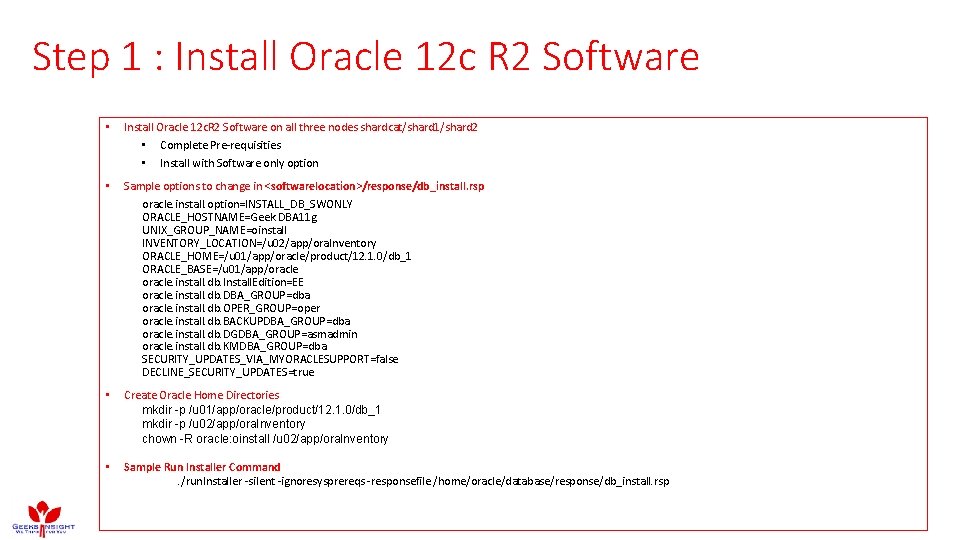
Step 1 : Install Oracle 12 c R 2 Software • Install Oracle 12 c. R 2 Software on all three nodes shardcat/shard 1/shard 2 • Complete Pre-requisities • Install with Software only option • Sample options to change in <softwarelocation>/response/db_install. rsp oracle. install. option=INSTALL_DB_SWONLY ORACLE_HOSTNAME=Geek DBA 11 g UNIX_GROUP_NAME=oinstall INVENTORY_LOCATION=/u 02/app/ora. Inventory ORACLE_HOME=/u 01/app/oracle/product/12. 1. 0/db_1 ORACLE_BASE=/u 01/app/oracle. install. db. Install. Edition=EE oracle. install. db. DBA_GROUP=dba oracle. install. db. OPER_GROUP=oper oracle. install. db. BACKUPDBA_GROUP=dba oracle. install. db. DGDBA_GROUP=asmadmin oracle. install. db. KMDBA_GROUP=dba SECURITY_UPDATES_VIA_MYORACLESUPPORT=false DECLINE_SECURITY_UPDATES=true • Create Oracle Home Directories mkdir -p /u 01/app/oracle/product/12. 1. 0/db_1 mkdir -p /u 02/app/ora. Inventory chown -R oracle: oinstall /u 02/app/ora. Inventory • Sample Run Installer Command. /run. Installer -silent -ignoresysprereqs -responsefile /home/oracle/database/response/db_install. rsp
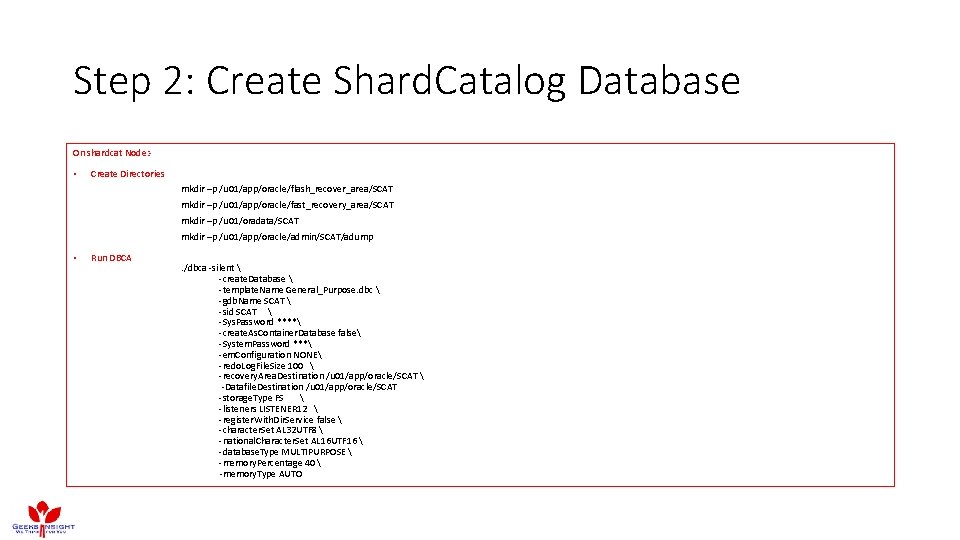
Step 2: Create Shard. Catalog Database On shardcat Node: - • Create Directories mkdir –p /u 01/app/oracle/flash_recover_area/SCAT mkdir –p /u 01/app/oracle/fast_recovery_area/SCAT mkdir –p /u 01/oradata/SCAT mkdir –p /u 01/app/oracle/admin/SCAT/adump • Run DBCA . /dbca -silent -create. Database -template. Name General_Purpose. dbc -gdb. Name SCAT -sid SCAT -Sys. Password **** -create. As. Container. Database false -System. Password *** -em. Configuration NONE -redo. Log. File. Size 100 -recovery. Area. Destination /u 01/app/oracle/SCAT -Datafile. Destination /u 01/app/oracle/SCAT -storage. Type FS -listeners LISTENER 12 -register. With. Dir. Service false -character. Set AL 32 UTF 8 -national. Character. Set AL 16 UTF 16 -database. Type MULTIPURPOSE -memory. Percentage 40 -memory. Type AUTO
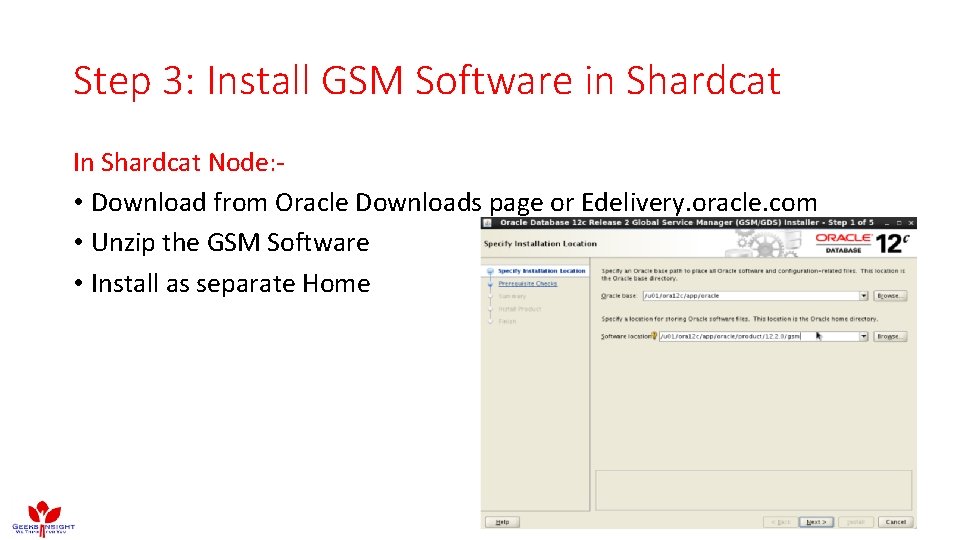
Step 3: Install GSM Software in Shardcat In Shardcat Node: • Download from Oracle Downloads page or Edelivery. oracle. com • Unzip the GSM Software • Install as separate Home
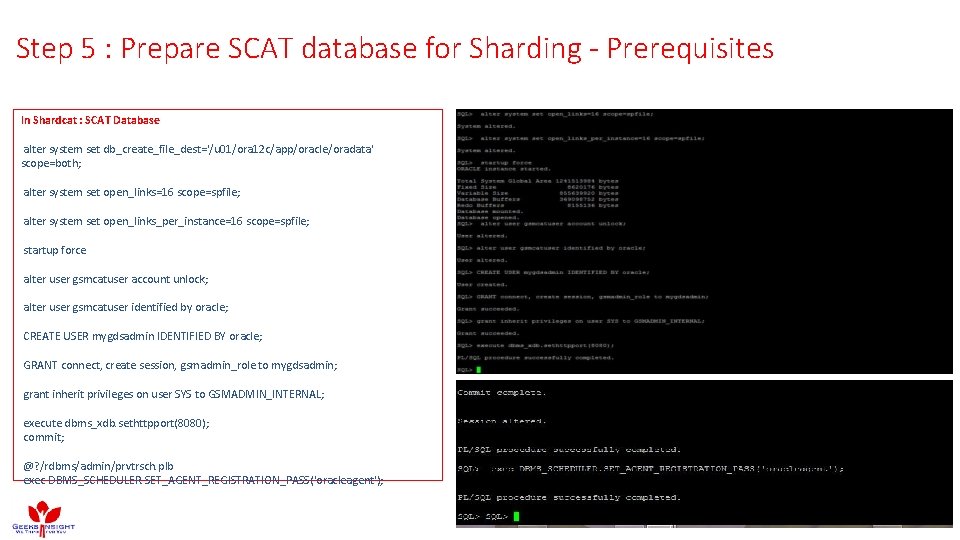
Step 5 : Prepare SCAT database for Sharding - Prerequisites In Shardcat : SCAT Database alter system set db_create_file_dest='/u 01/ora 12 c/app/oracle/oradata' scope=both; alter system set open_links=16 scope=spfile; alter system set open_links_per_instance=16 scope=spfile; startup force alter user gsmcatuser account unlock; alter user gsmcatuser identified by oracle; CREATE USER mygdsadmin IDENTIFIED BY oracle; GRANT connect, create session, gsmadmin_role to mygdsadmin; grant inherit privileges on user SYS to GSMADMIN_INTERNAL; execute dbms_xdb. sethttpport(8080); commit; @? /rdbms/admin/prvtrsch. plb exec DBMS_SCHEDULER. SET_AGENT_REGISTRATION_PASS('oracleagent');
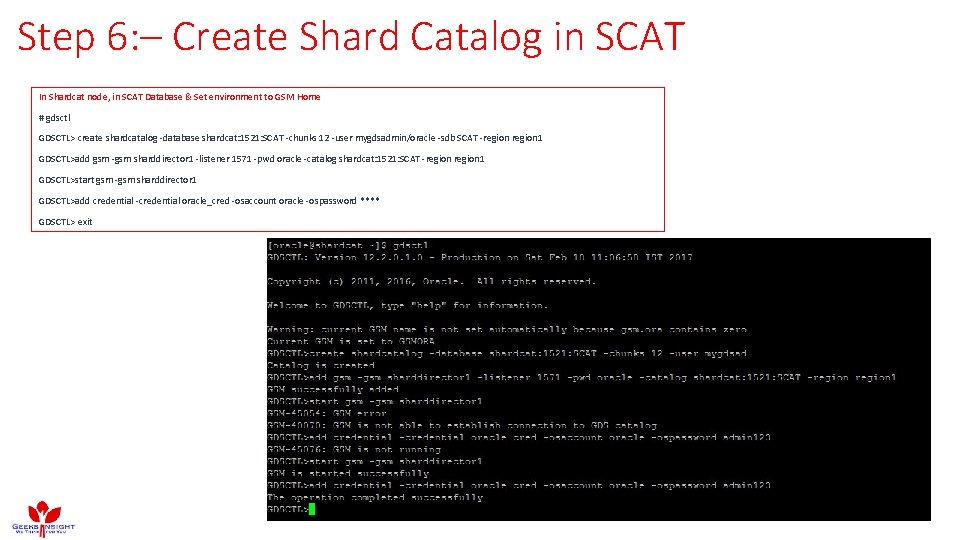
Step 6: – Create Shard Catalog in SCAT In Shardcat node, in SCAT Database & Set environment to GSM Home # gdsctl GDSCTL> create shardcatalog -database shardcat: 1521: SCAT -chunks 12 -user mygdsadmin/oracle -sdb SCAT -region 1 GDSCTL>add gsm -gsm sharddirector 1 -listener 1571 -pwd oracle -catalog shardcat: 1521: SCAT -region 1 GDSCTL>start gsm -gsm sharddirector 1 GDSCTL>add credential -credential oracle_cred -osaccount oracle -ospassword **** GDSCTL> exit
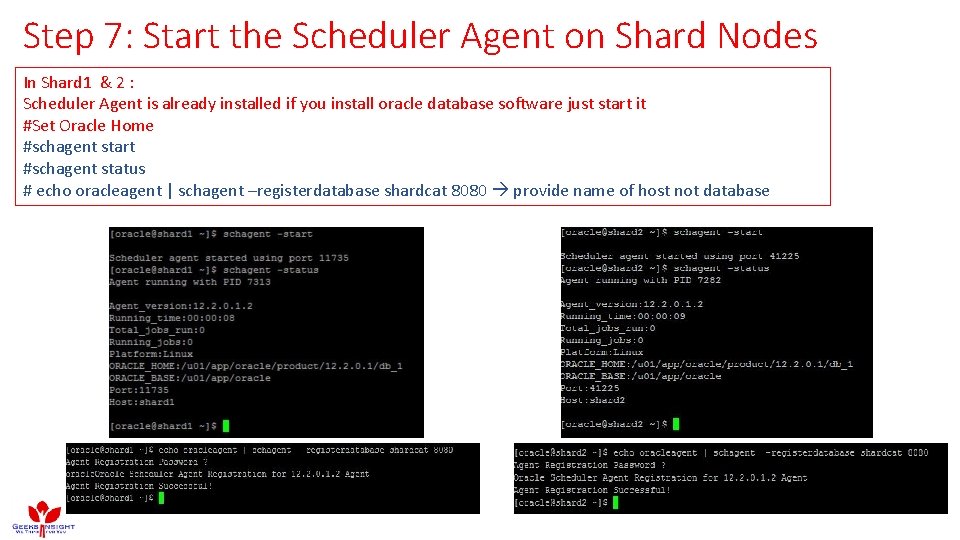
Step 7: Start the Scheduler Agent on Shard Nodes In Shard 1 & 2 : Scheduler Agent is already installed if you install oracle database software just start it #Set Oracle Home #schagent start #schagent status # echo oracleagent | schagent –registerdatabase shardcat 8080 provide name of host not database
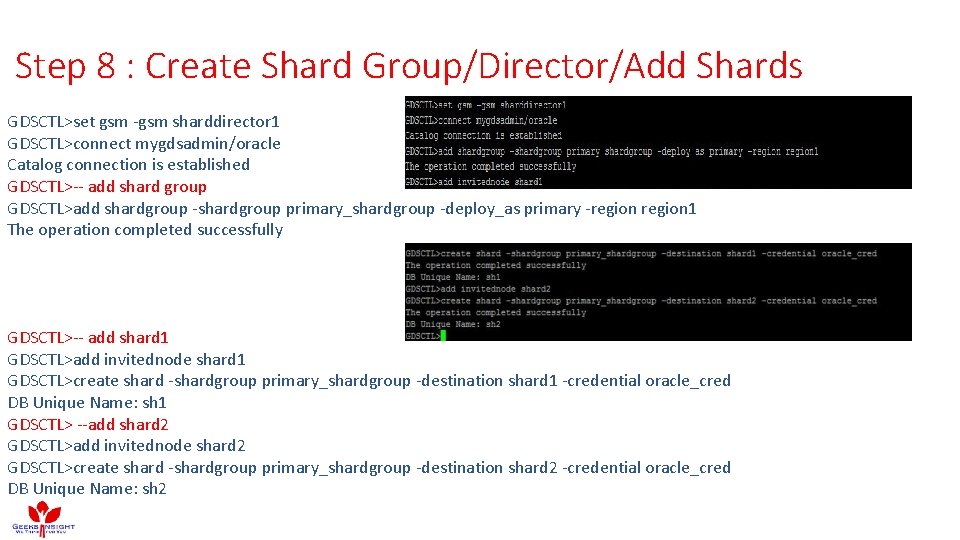
Step 8 : Create Shard Group/Director/Add Shards GDSCTL>set gsm -gsm sharddirector 1 GDSCTL>connect mygdsadmin/oracle Catalog connection is established GDSCTL>-- add shard group GDSCTL>add shardgroup -shardgroup primary_shardgroup -deploy_as primary -region 1 The operation completed successfully GDSCTL>-- add shard 1 GDSCTL>add invitednode shard 1 GDSCTL>create shard -shardgroup primary_shardgroup -destination shard 1 -credential oracle_cred DB Unique Name: sh 1 GDSCTL> --add shard 2 GDSCTL>add invitednode shard 2 GDSCTL>create shard -shardgroup primary_shardgroup -destination shard 2 -credential oracle_cred DB Unique Name: sh 2
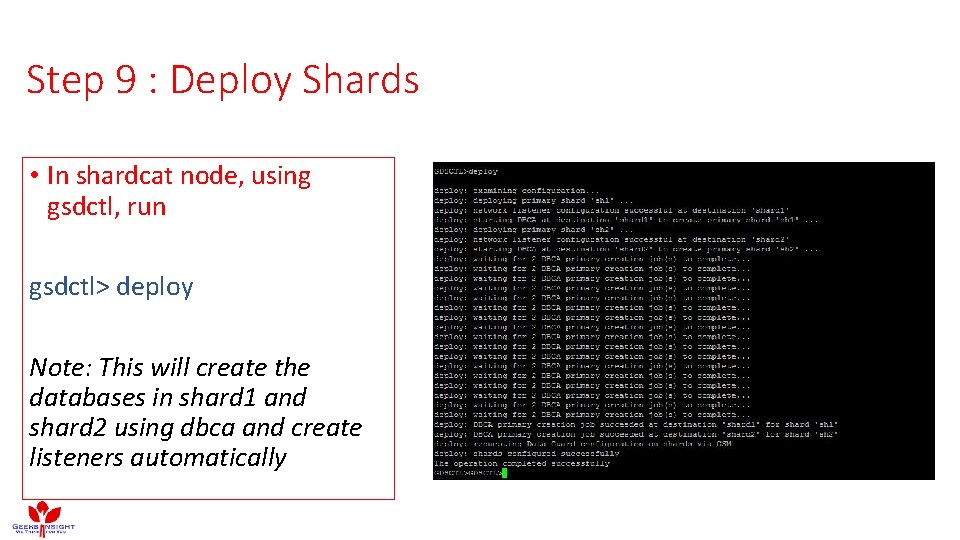
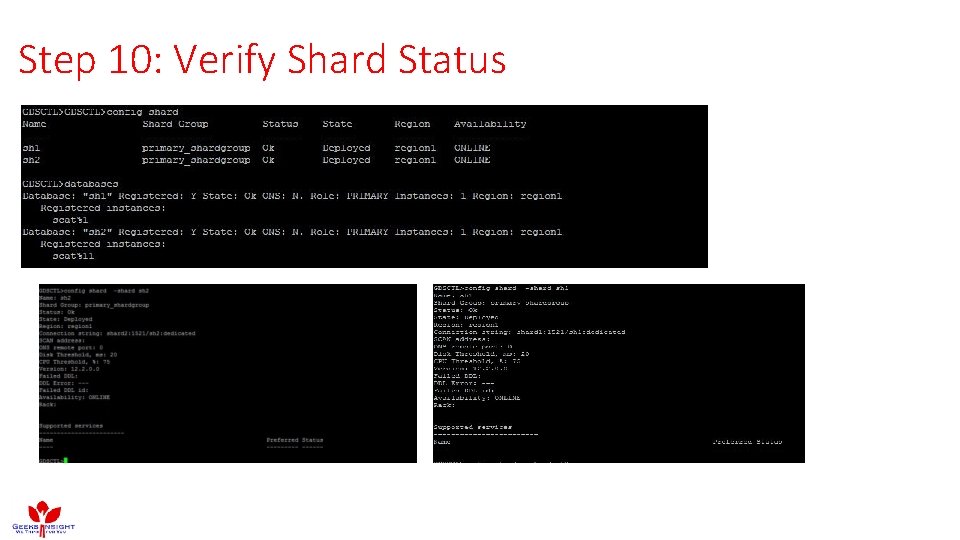
Step 9 : Deploy Shards • In shardcat node, using gsdctl, run gsdctl> deploy Note: This will create the databases in shard 1 and shard 2 using dbca and create listeners automatically
Step 10: Verify Shard Status
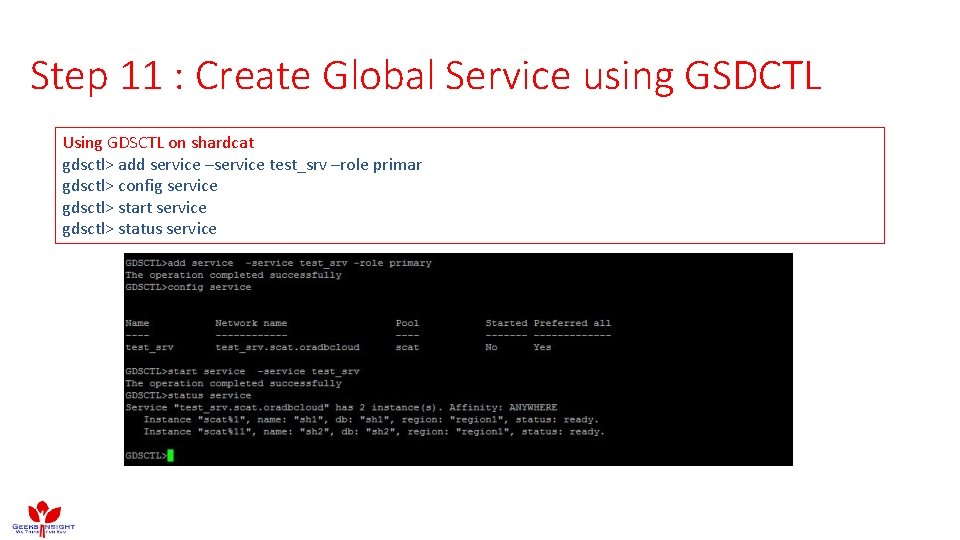
Step 11 : Create Global Service using GSDCTL Using GDSCTL on shardcat gdsctl> add service –service test_srv –role primar gdsctl> config service gdsctl> start service gdsctl> status service
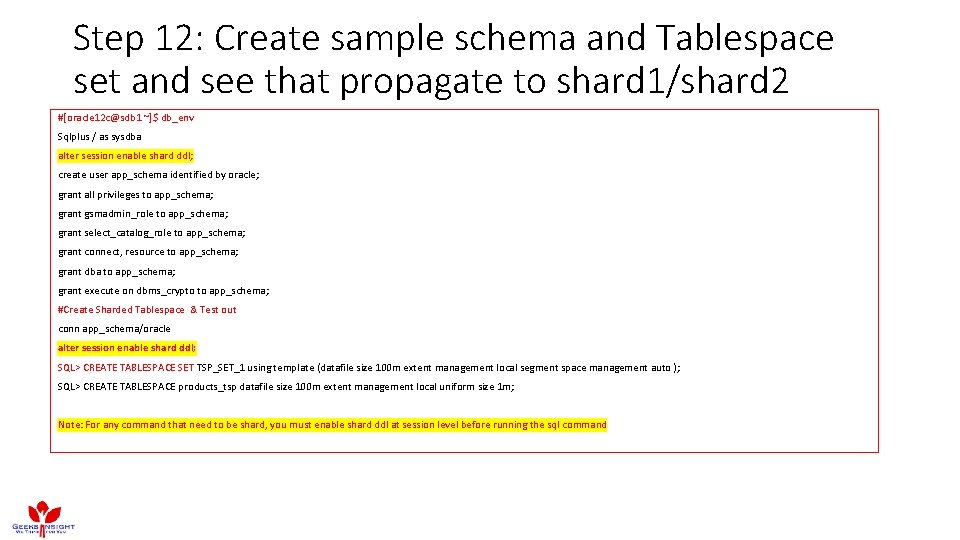
Step 12: Create sample schema and Tablespace set and see that propagate to shard 1/shard 2 #[oracle 12 c@sdb 1 ~]$ db_env Sqlplus / as sysdba alter session enable shard ddl; create user app_schema identified by oracle; grant all privileges to app_schema; grant gsmadmin_role to app_schema; grant select_catalog_role to app_schema; grant connect, resource to app_schema; grant dba to app_schema; grant execute on dbms_crypto to app_schema; #Create Sharded Tablespace & Test out conn app_schema/oracle alter session enable shard ddl; SQL> CREATE TABLESPACE SET TSP_SET_1 using template (datafile size 100 m extent management local segment space management auto ); SQL> CREATE TABLESPACE products_tsp datafile size 100 m extent management local uniform size 1 m; Note: For any command that need to be shard, you must enable shard ddl at session level before running the sql command
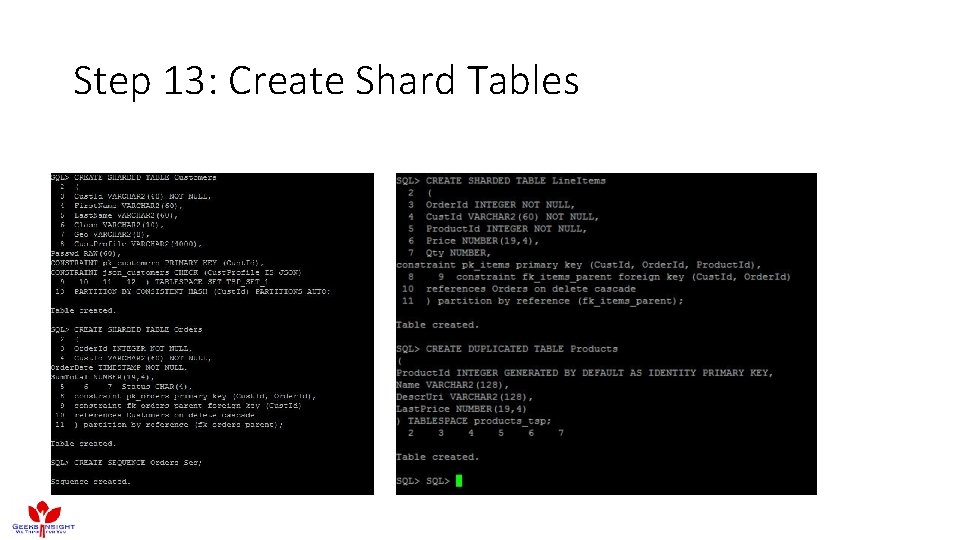
Step 13: Create Shard Tables
Step 14: Verify Distribution of Tables to shards • On Shard Catalog SDB Database
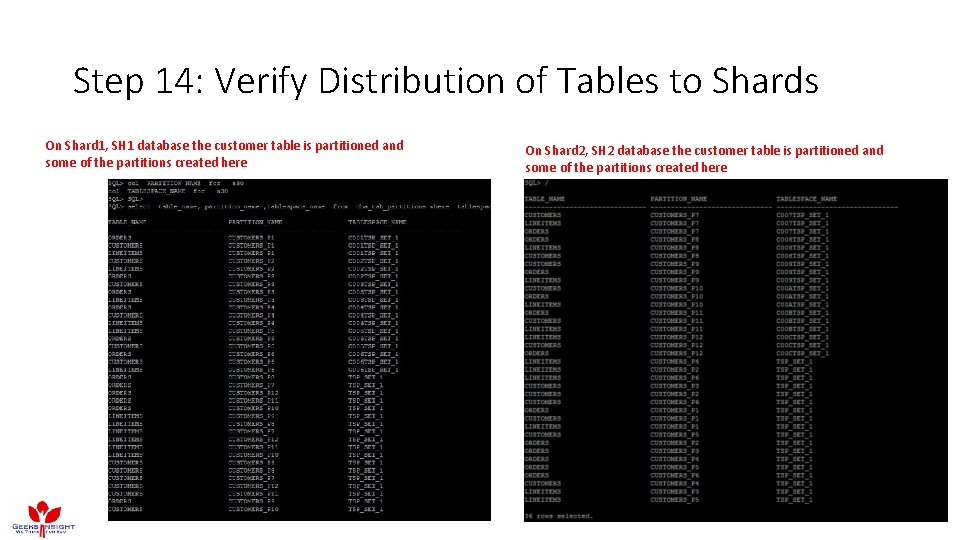
Step 14: Verify Distribution of Tables to Shards On Shard 1, SH 1 database the customer table is partitioned and some of the partitions created here On Shard 2, SH 2 database the customer table is partitioned and some of the partitions created here
Maintaining Shards – Next Part • Adding Shard • Recovering Shard • Deleting Shard • Resharding • Validating Shard
Thanks for Joining…. Questions ? ? ? References https: //docs. oracle. com/database/122/ADMIN/sharding-overview. htm#ADMIN-GUID-0 F 39 B 1 FB-DCF 9 -4 C 8 A-A 2 EA-88705 B 90 C 5 BF