
OPERATORS Introduction Operators are the symbols which operates
OPERATORS

Introduction • Operators are the symbols which operates on value or a variable. It tells the compiler to perform certain mathematical or logical manipulations. • Can be of following categories: • Following are the types of operators: • • • Unary – requires a single operand Binary – requires two operands Ternary – requires three operands Arithmetic Relational Logical Bitwise Assignment Conditional (ternary) Increment/Decrement Special

Types of operators Description Arithmetic operators (binary) These are used to perform mathematical calculations like addition, subtraction, multiplication, division and modulus. Assignment operators (binary) These are used to assign the values for the variables in programs. Relational operators (binary) These operators are used to compare the value of two variables. Logical operators (binary) These operators are used to perform logical operations on the given two variables. Bitwise operators (binary) These operators are used to perform bit operations on given two variables. Conditional operators (ternary) Conditional operators return one value if condition is true and returns another value is condition is false. Increment/Decrement (unary) These operators are used to either increase or decrease the value of the variable by one. Special operators sizeof( )
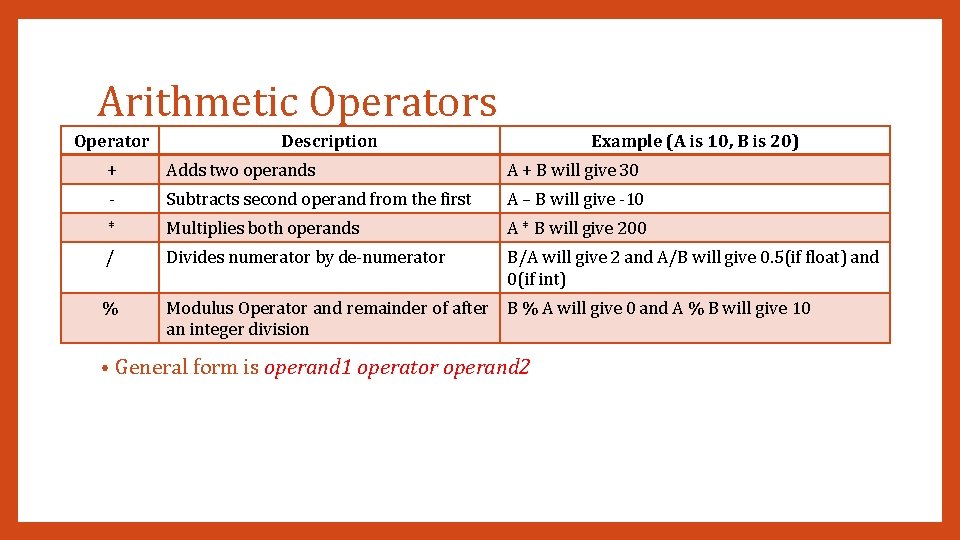
Arithmetic Operators Operator Description Example (A is 10, B is 20) + Adds two operands A + B will give 30 - Subtracts second operand from the first A – B will give -10 * Multiplies both operands A * B will give 200 / Divides numerator by de-numerator B/A will give 2 and A/B will give 0. 5(if float) and 0(if int) % Modulus Operator and remainder of after an integer division B % A will give 0 and A % B will give 10 • General form is operand 1 operator operand 2

Assignment Operators Operator Description = Simple assignment operator, Assigns values from right side operands to left side operand += Compound assignment operator, Add and assignment operator. It adds right operand to the left operand assign the result to left operand C += A is equivalent to C = C + A -= Compound assignment operator, Subtract and assignment operator. It subtract right operand from the left operand assign the result to left operand, others would be “ *=, /=, %= “ C -= A is equivalent to C = C - A <<= Left shift and assignment operator C <<= 2 is same as C = C << 2 >>= Right shift and assignment operator C >>= 2 is same as C = C >> 2 &= Bitwise and assignment operator, others would be “^=, |=“ C &= 2 is same as C = C & 2 • Example C = A + B will assign value of A + B into C General form is v op= exp where v is a variable and op is a binary arithmetic operator. This statement is equivalent to v = v op(exp)

Relational Operators Operator Description == Checks if the values of two operands are equal or not, if yes then condition becomes true. != Checks if the values of two operands are equal or not, if values are not equal then condition becomes true. A != B will give 1 > Checks if the value of left operand is greater than the value of right operand, if yes then condition becomes true. A > B will give 0 < Checks if the value of left operand is less than the value of right operand, if yes then condition becomes true. A < B will give 1 >= Checks if the value of left operand is greater than or equal to the value of right operand, if yes then condition becomes true. A >= B will give 0 <= Checks if the value of left operand is less than or equal to the value of right operand, if yes then condition becomes true. • Example (A is 10, B is 20) A == B will give 0 A <= B will give 1 General form is operand 1 relational-operator operand 2 takes a value of 1(int) if the relationship is true and 0(int) if relationship is false.
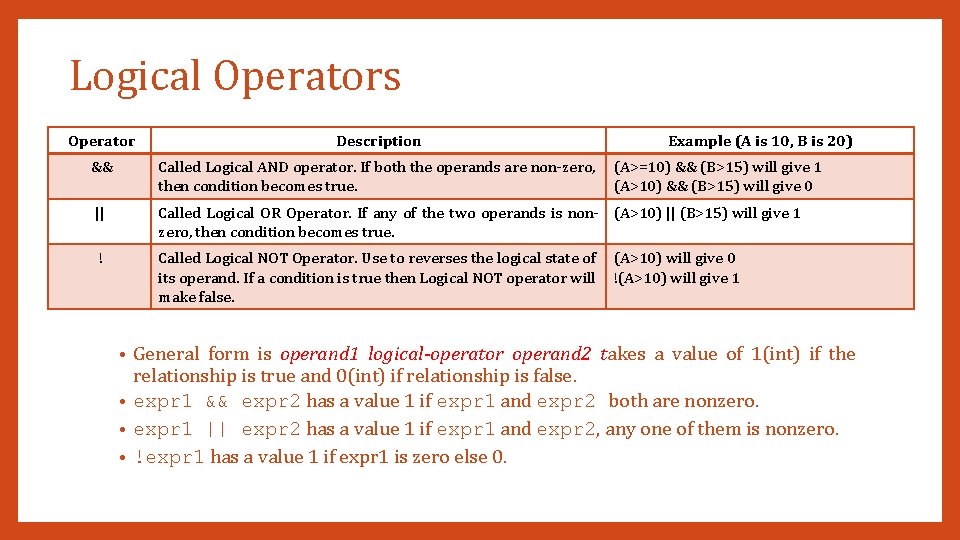
Logical Operators Operator Description Example (A is 10, B is 20) && Called Logical AND operator. If both the operands are non-zero, then condition becomes true. || Called Logical OR Operator. If any of the two operands is non- (A>10) || (B>15) will give 1 zero, then condition becomes true. ! Called Logical NOT Operator. Use to reverses the logical state of its operand. If a condition is true then Logical NOT operator will make false. (A>=10) && (B>15) will give 1 (A>10) && (B>15) will give 0 (A>10) will give 0 !(A>10) will give 1 General form is operand 1 logical-operator operand 2 takes a value of 1(int) if the relationship is true and 0(int) if relationship is false. • expr 1 && expr 2 has a value 1 if expr 1 and expr 2 both are nonzero. • expr 1 || expr 2 has a value 1 if expr 1 and expr 2, any one of them is nonzero. • !expr 1 has a value 1 if expr 1 is zero else 0. •
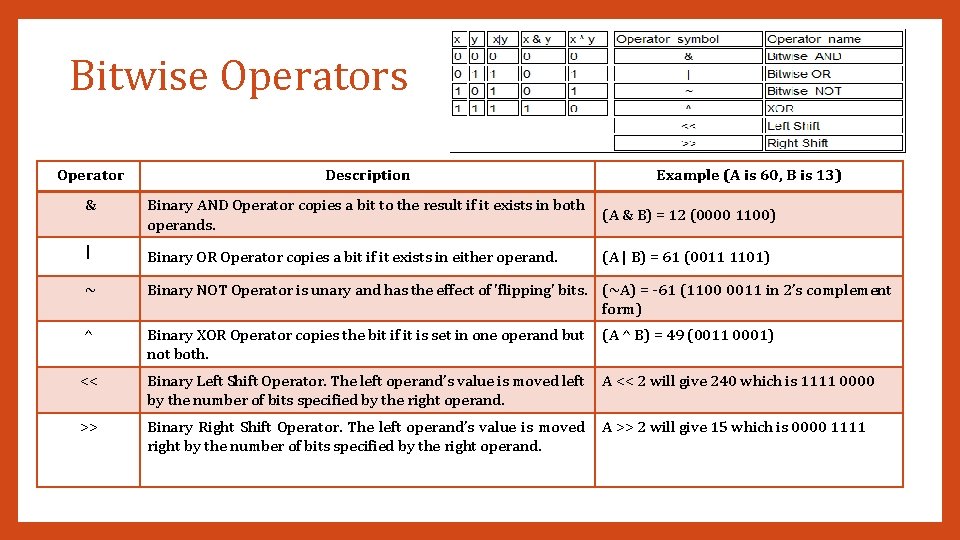
Bitwise Operators Operator Description Example (A is 60, B is 13) & Binary AND Operator copies a bit to the result if it exists in both operands. (A & B) = 12 (0000 1100) | Binary OR Operator copies a bit if it exists in either operand. (A | B) = 61 (0011 1101) ~ Binary NOT Operator is unary and has the effect of 'flipping' bits. (~A) = -61 (1100 0011 in 2’s complement form) ^ Binary XOR Operator copies the bit if it is set in one operand but not both. (A ^ B) = 49 (0011 0001) << Binary Left Shift Operator. The left operand’s value is moved left by the number of bits specified by the right operand. A << 2 will give 240 which is 1111 0000 >> Binary Right Shift Operator. The left operand’s value is moved right by the number of bits specified by the right operand. A >> 2 will give 15 which is 0000 1111
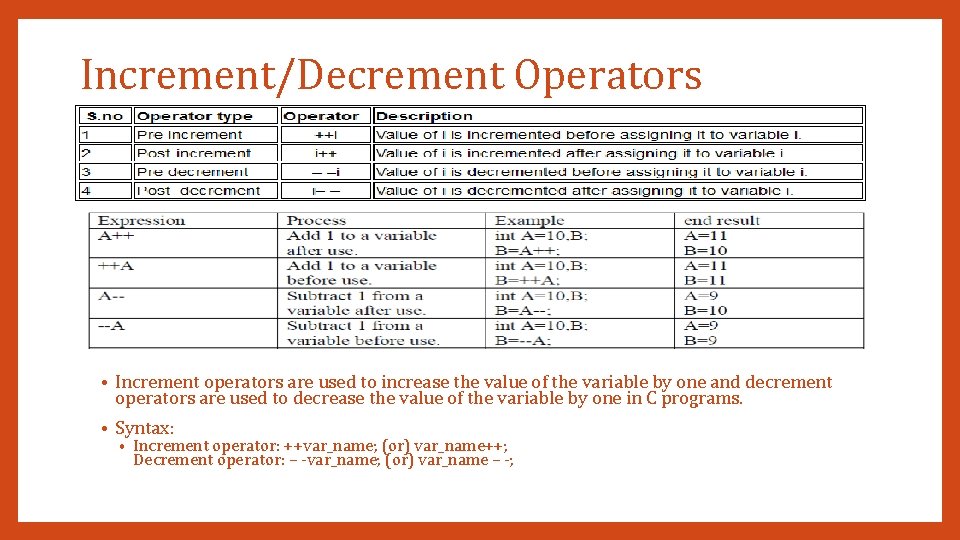
Increment/Decrement Operators • Increment operators are used to increase the value of the variable by one and decrement operators are used to decrease the value of the variable by one in C programs. • Syntax: • Increment operator: ++var_name; (or) var_name++; Decrement operator: – -var_name; (or) var_name – -;
Conditional Operators • A ternary operator pair “? : ” is available to construct conditional expression of the form Exp 1 ? Exp 2 : Exp 3 where Exp 1, Exp 2 and Exp 3 are expressions. • The operator ? : works as follows: Exp 1 is evaluated first. If it is nonzero (true), then the expression Exp 2 is evaluated and becomes the value of the expression. • If Exp 1 is false, Exp 3 is evaluated and its value becomes the value of the expression. • Syntax • • • (Condition? true_value: false_value); E. g. a = 10; b = 15; x = (a > b) ? a : b 10
Special Operators • To get the exact size of a type or a variable on a particular platform, you can use the sizeof operator. The expressions sizeof(type) yields the storage size of the object or type in bytes. int a; sizeof(a) 2 bytes (in 32 bit machine) and 4 bytes (in 64 bit machine) • float b; sizeof(b) 4 bytes • double c; sizeof(c) 8 bytes • char d; sizeof(d) 1 byte • 11
Precedence and Associativity • Precedence and Associativity are two characteristics of operators that determine the evaluation order of subexpressions in absence of brackets. • Please check document attached in blog for this topic. • Some points: All operators with same precedence have same associativity This is necessary, otherwise there won’t be any way for compiler to decide evaluation order of expressions which have two operators of same precedence and different associativity. For example + and – have same associativity. • Associativity is only used when there are two or more operators of same precedence. •

THANK YOU ANY QUESTIONS? ? ?
- Slides: 13