
OPERATIONS ON DATA CHAPTER 4 Chapter Outline Logic


- Slides: 60
OPERATIONS ON DATA CHAPTER 4
Chapter Outline Logic Operations: � Logic Operations at level bit. � Logic operations at pattern level. Shift Operations: � Logical shift operations. � Arithmetic shift operations. Arithmetic Operations.
4. 1 LOGIC OPERATIONS
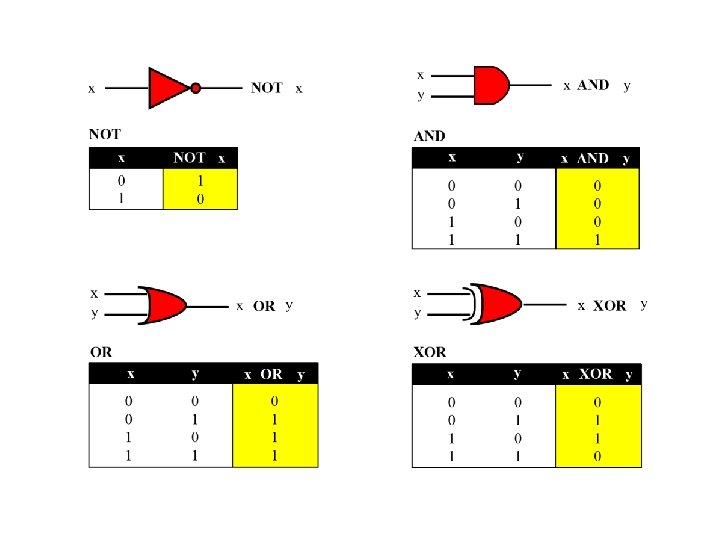
Logic Operations at bit level A bit can take one of two values: 0 or 1. If we consider the value 1 as True! and the value 0 as False! We can apply the operations defined in Boolean Algebra. q A truth table defines the values of the output for each possible input or inputs We will show briefly four bit level operators: NOT, AND, OR & XOR.
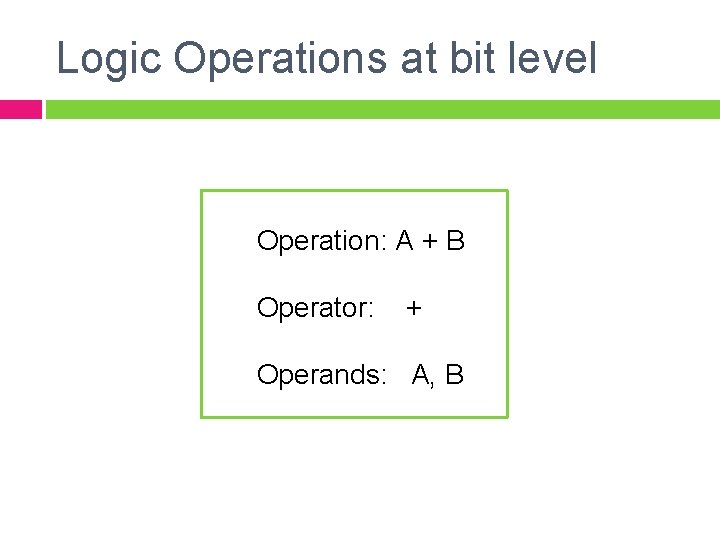
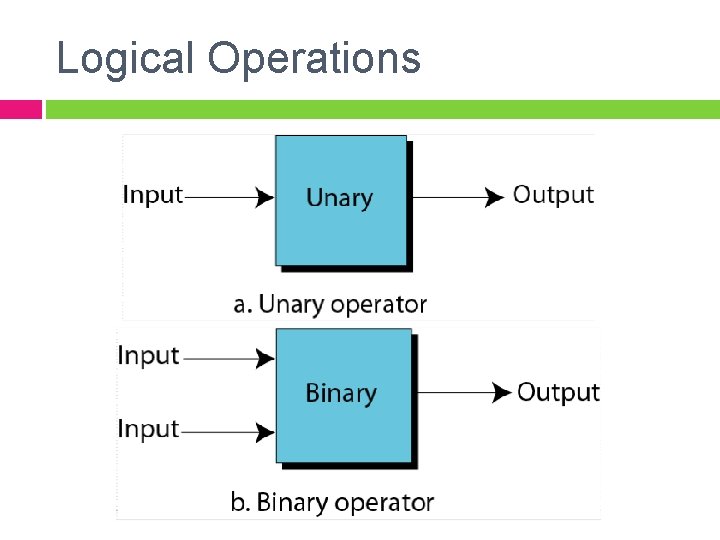
Logic Operations at bit level Operation: A + B Operator: + Operands: A, B
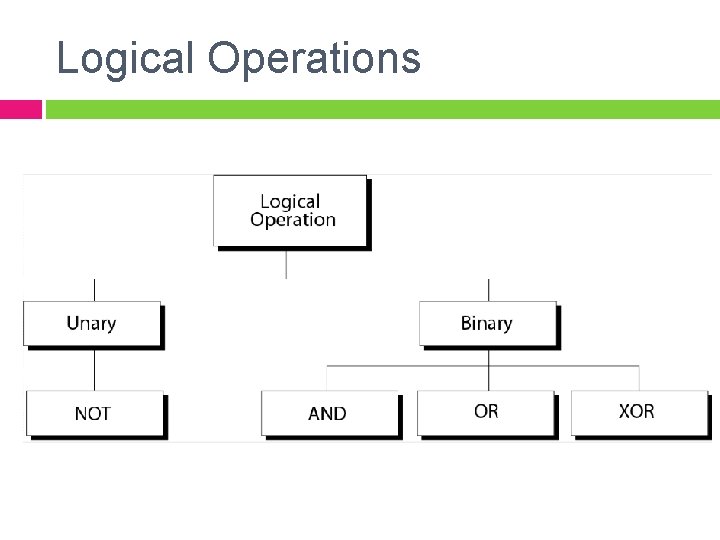
Logical Operations
Logical Operations
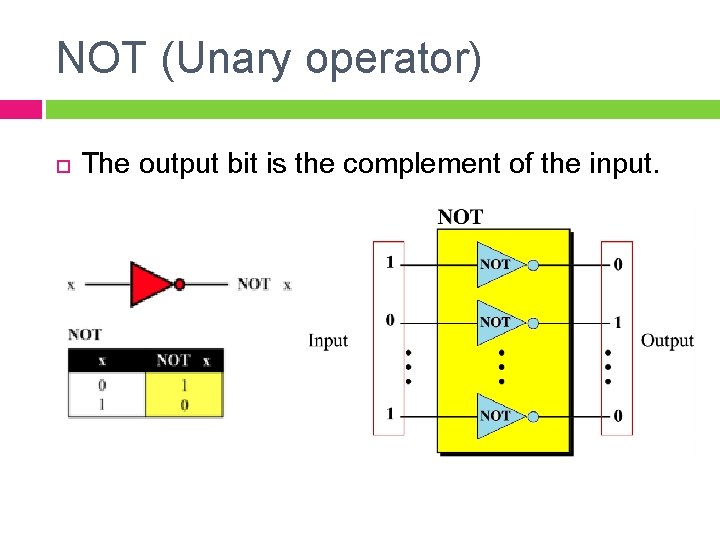
NOT (Unary operator) The output bit is the complement of the input.
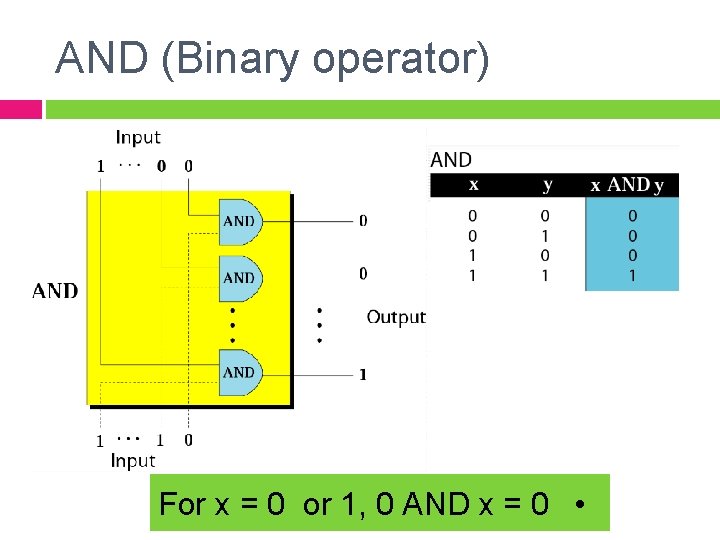
AND (Binary operator) For x = 0 or 1, 0 AND x = 0 •
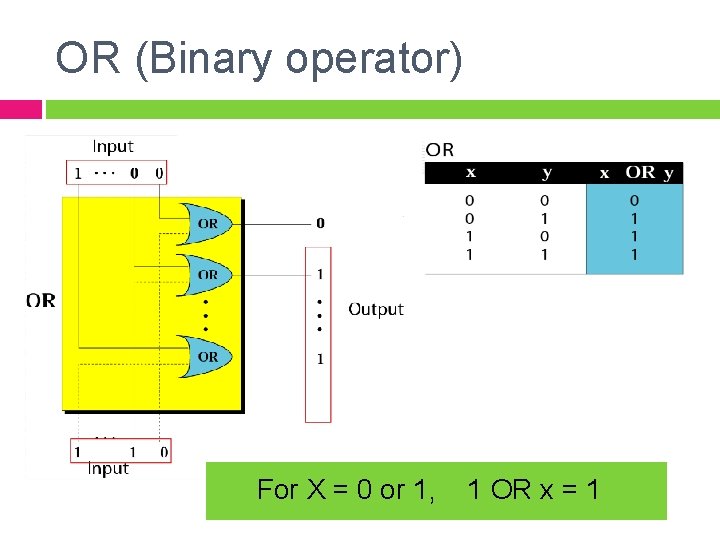
OR (Binary operator) For X = 0 or 1, 1 OR x = 1
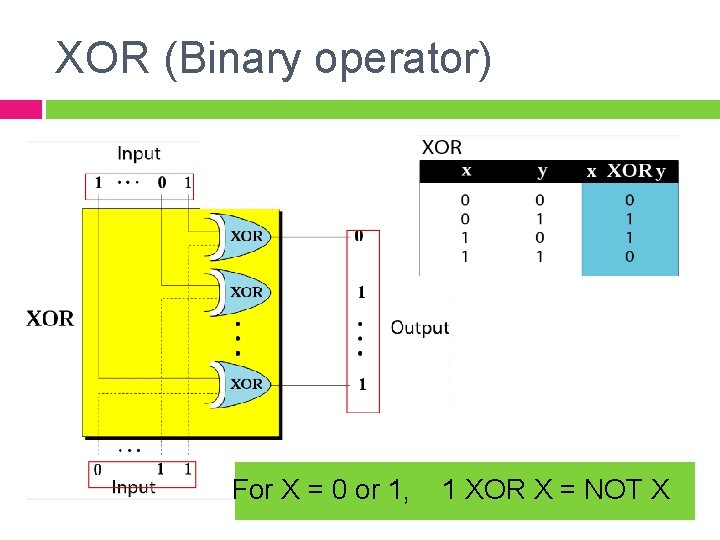
XOR (Binary operator) For X = 0 or 1, 1 XOR X = NOT X
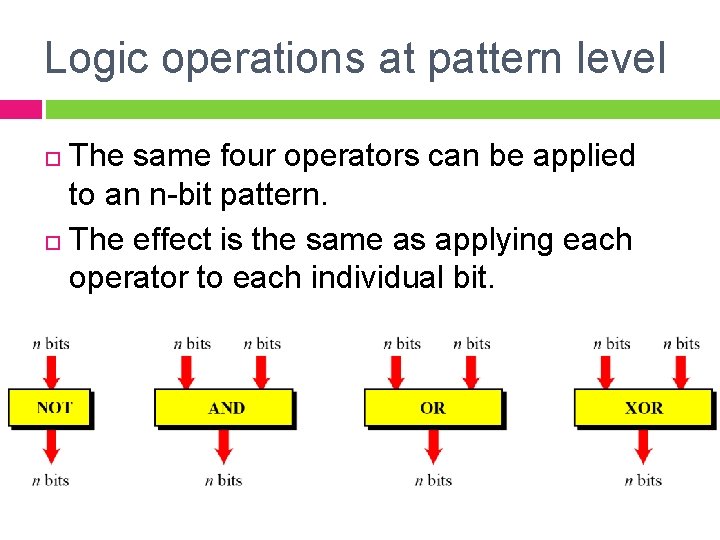
Logic operations at pattern level The same four operators can be applied to an n-bit pattern. The effect is the same as applying each operator to each individual bit.
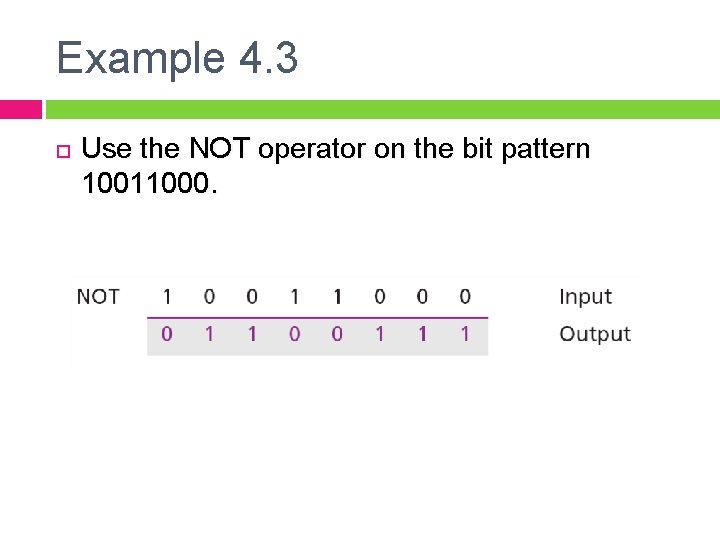
Example 4. 3 Use the NOT operator on the bit pattern 10011000.
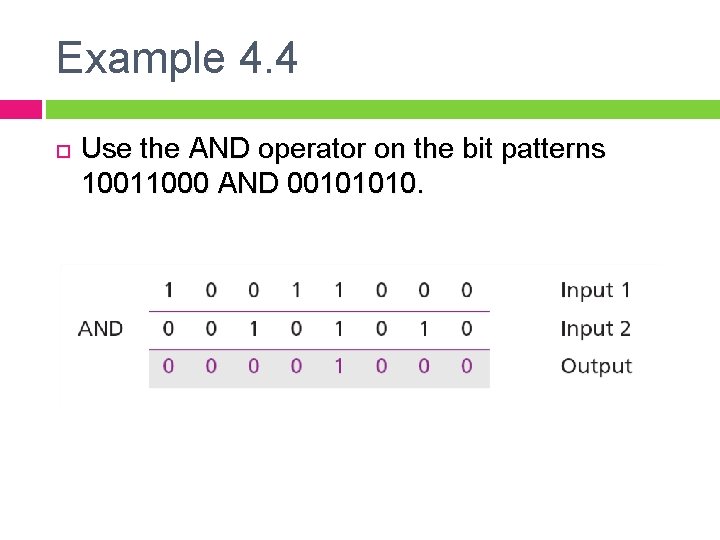
Example 4. 4 Use the AND operator on the bit patterns 10011000 AND 00101010.
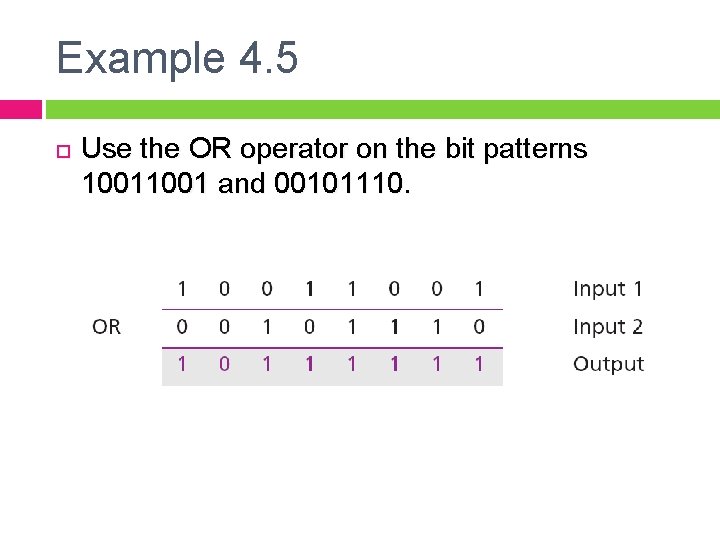
Example 4. 5 Use the OR operator on the bit patterns 1001 and 00101110.
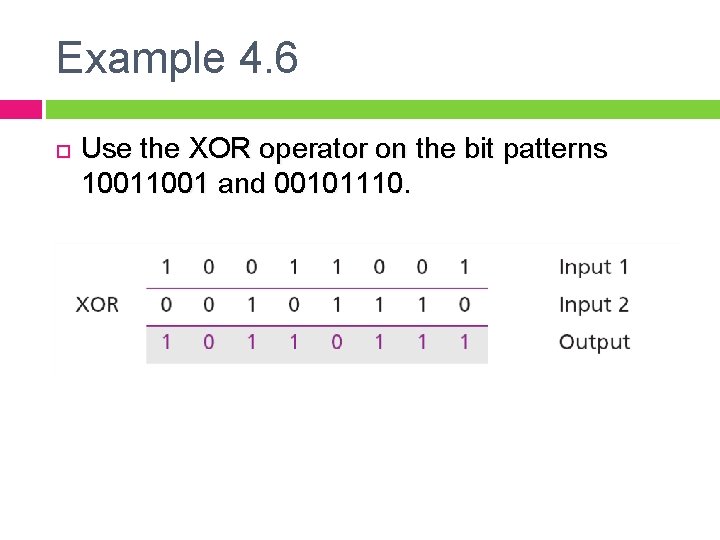
Example 4. 6 Use the XOR operator on the bit patterns 1001 and 00101110.
Applications The four logic operations can be used to modify a bit pattern. q Complementing (NOT) q Unsetting (AND) q Setting (OR) q Flipping (XOR)
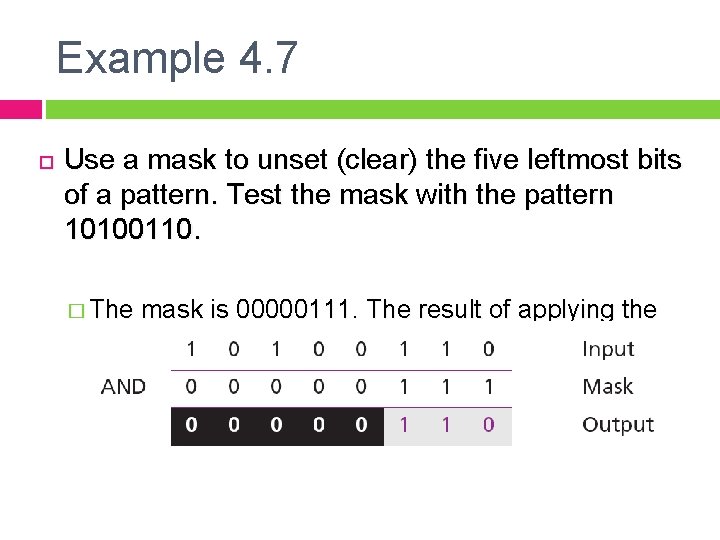
Example 4. 7 Use a mask to unset (clear) the five leftmost bits of a pattern. Test the mask with the pattern 10100110. � The mask is 00000111. The result of applying the mask is:
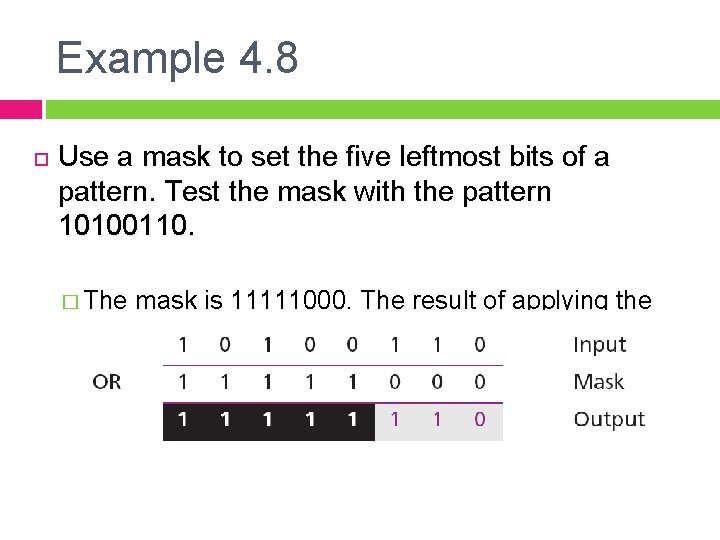
Example 4. 8 Use a mask to set the five leftmost bits of a pattern. Test the mask with the pattern 10100110. � The mask is 11111000. The result of applying the mask is:
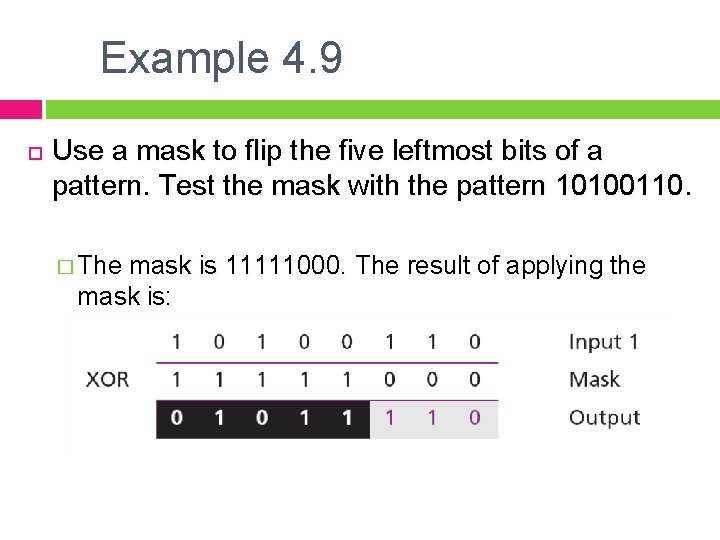
Example 4. 9 Use a mask to flip the five leftmost bits of a pattern. Test the mask with the pattern 10100110. � The mask is 11111000. The result of applying the mask is:
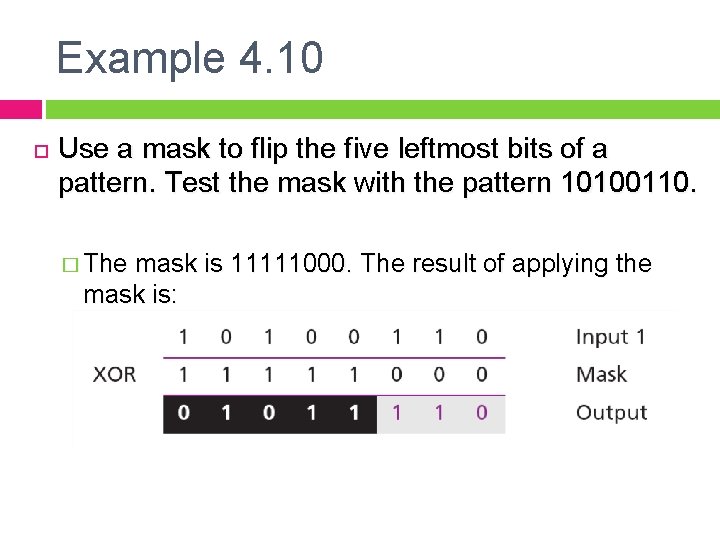
Example 4. 10 Use a mask to flip the five leftmost bits of a pattern. Test the mask with the pattern 10100110. � The mask is 11111000. The result of applying the mask is:
4. 2 SHIFT OPERATIONS
Shift Operations Shift operations change the positions of the bits, they can move bits to the left or to the right. Two types of shift operations: � Logical shift operations � Arithmetic shift operations
Logical Shift Operations A logical shift operation is applied to a pattern that does not represent a signed number. There is two types of logical shift operations: 1. Logical shift. 2. Circular shift.
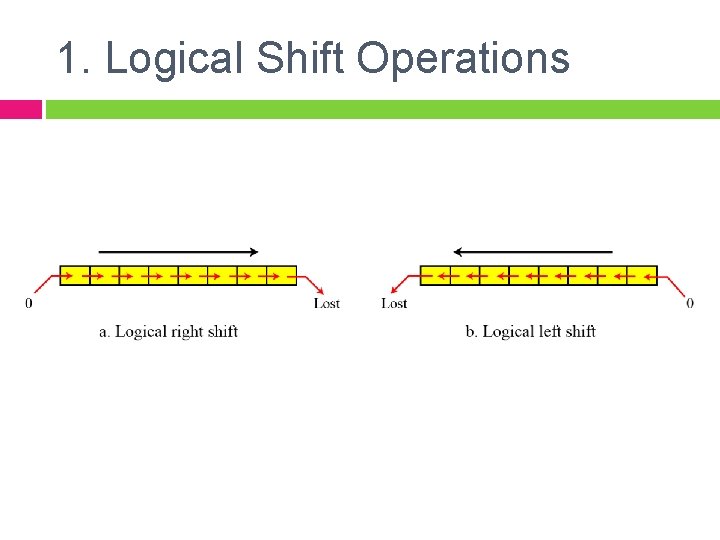
1. Logical Shift Operations
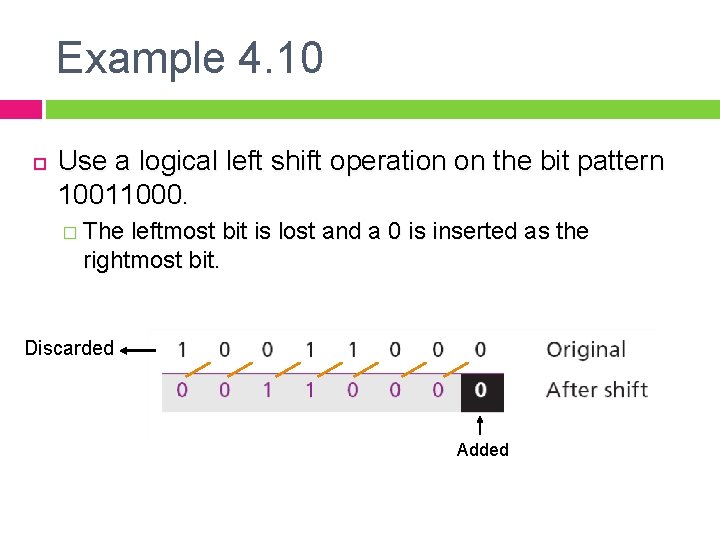
Example 4. 10 Use a logical left shift operation on the bit pattern 10011000. � The leftmost bit is lost and a 0 is inserted as the rightmost bit. Discarded Added
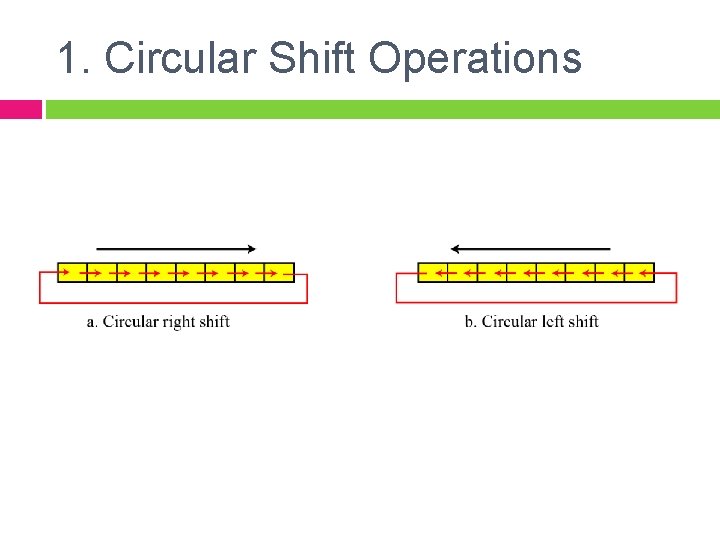
1. Circular Shift Operations
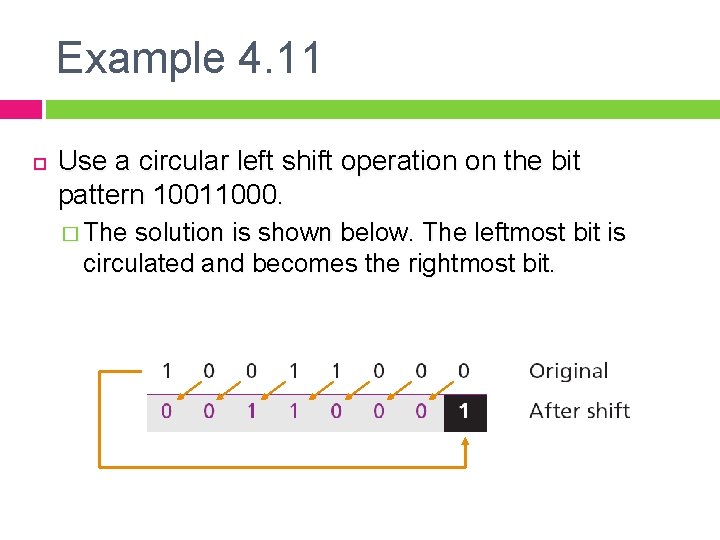
Example 4. 11 Use a circular left shift operation on the bit pattern 10011000. � The solution is shown below. The leftmost bit is circulated and becomes the rightmost bit.
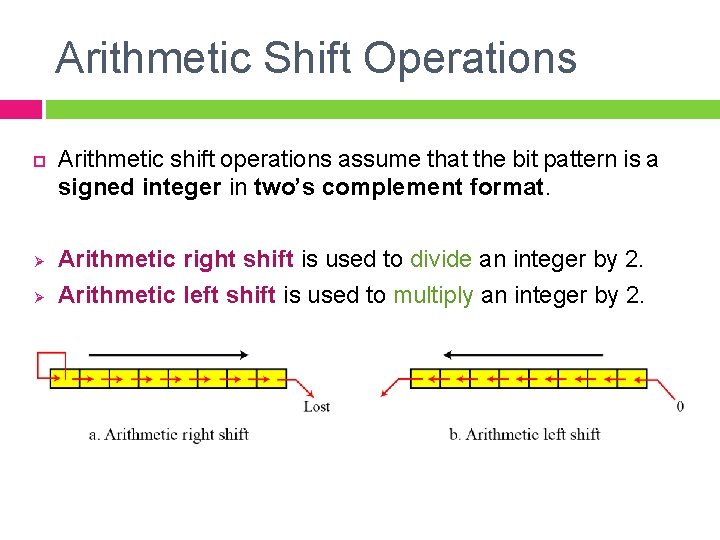
Arithmetic Shift Operations Ø Ø Arithmetic shift operations assume that the bit pattern is a signed integer in two’s complement format. Arithmetic right shift is used to divide an integer by 2. Arithmetic left shift is used to multiply an integer by 2.
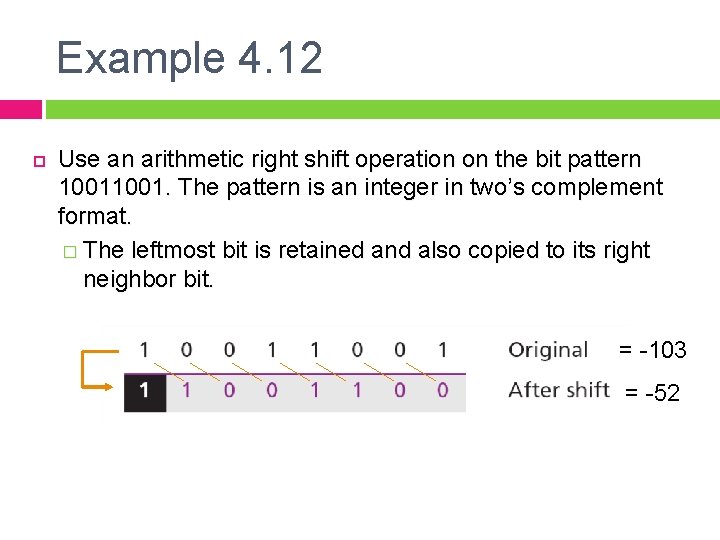
Example 4. 12 Use an arithmetic right shift operation on the bit pattern 1001. The pattern is an integer in two’s complement format. � The leftmost bit is retained and also copied to its right neighbor bit. = -103 = -52
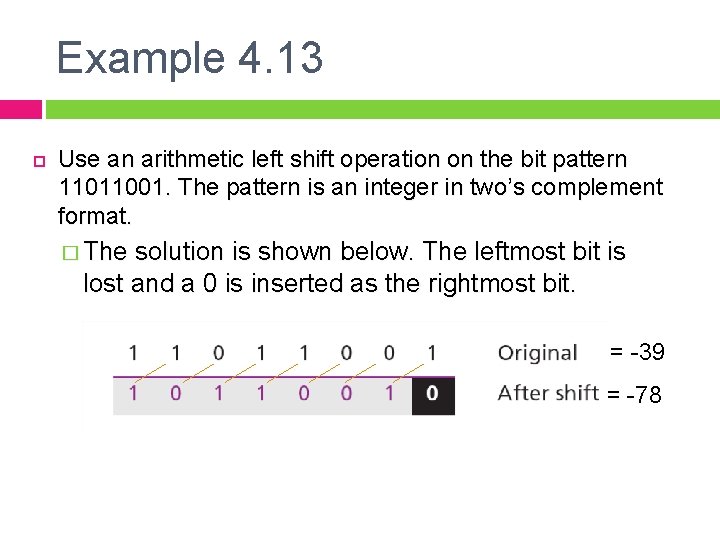
Example 4. 13 Use an arithmetic left shift operation on the bit pattern 11011001. The pattern is an integer in two’s complement format. � The solution is shown below. The leftmost bit is lost and a 0 is inserted as the rightmost bit. = -39 = -78
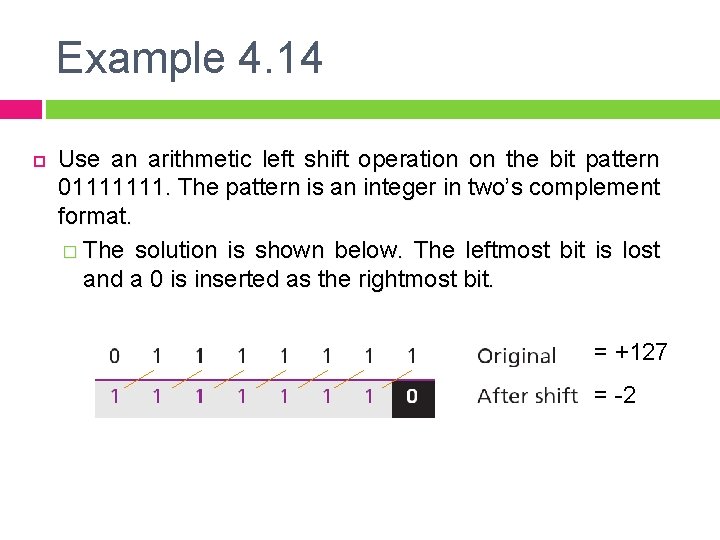
Example 4. 14 Use an arithmetic left shift operation on the bit pattern 01111111. The pattern is an integer in two’s complement format. � The solution is shown below. The leftmost bit is lost and a 0 is inserted as the rightmost bit. = +127 = -2
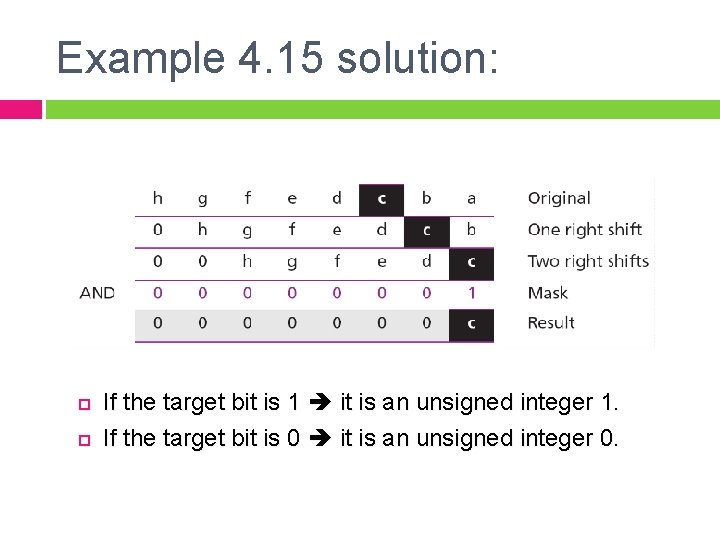
Example 4. 15 Combining logic operations and logical shift operations give us some tools for manipulating bit patterns. Assume that we have a pattern and we need to use third bit (from the right) of this pattern in a decision-making process. We want to know if this particular bit is 0 or 1. The following shows how we can find out.
Example 4. 15 solution: If the target bit is 1 it is an unsigned integer 1. If the target bit is 0 it is an unsigned integer 0.
4. 3 ARITHMETIC OPERATIONS
Arithmetic Operations On Integers We focus only on addition and subtraction because §Multiplication is just repeated addition §Division is just repeated subtraction
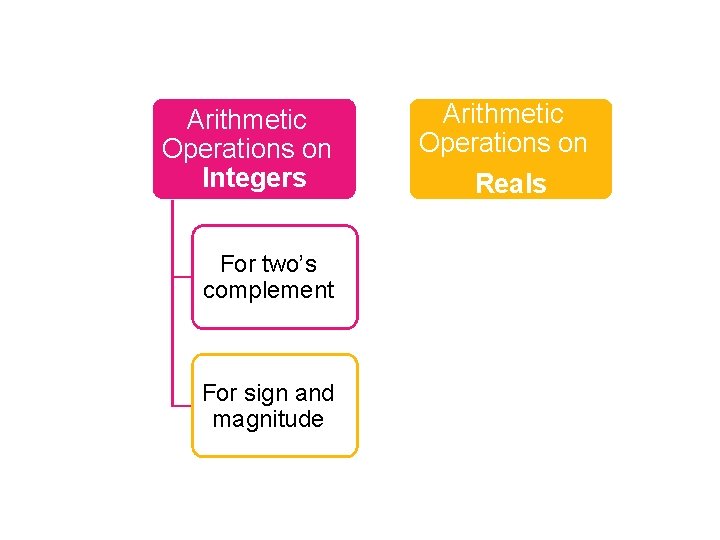
Arithmetic Operations on Integers For two’s complement For sign and magnitude Arithmetic Operations on Reals
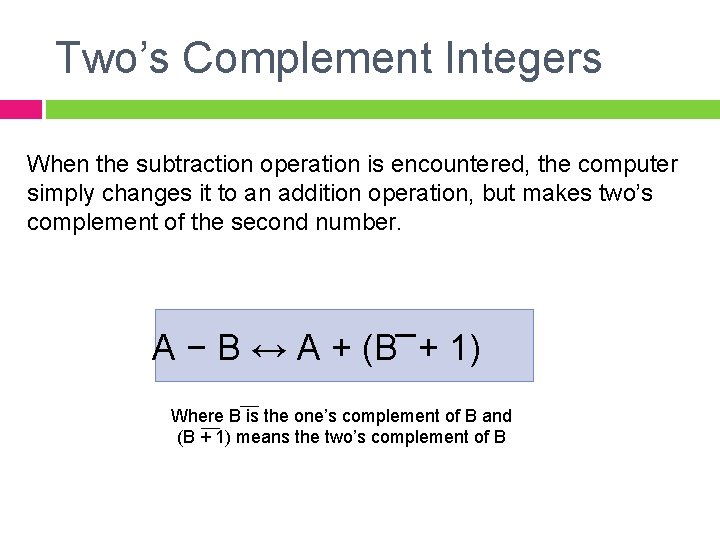
Two’s Complement Integers When the subtraction operation is encountered, the computer simply changes it to an addition operation, but makes two’s complement of the second number. A − B ↔ A + (B + 1) Where B is the one’s complement of B and (B + 1) means the two’s complement of B
The following table shows the sum and carry (C).
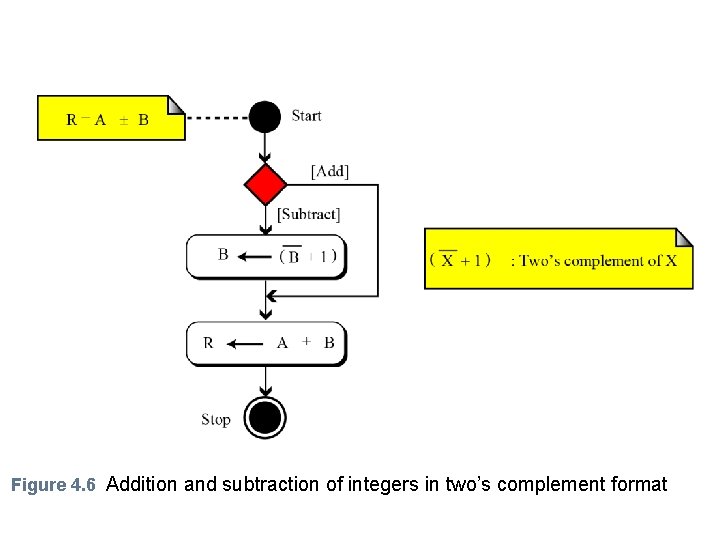
Figure 4. 6 Addition and subtraction of integers in two’s complement format
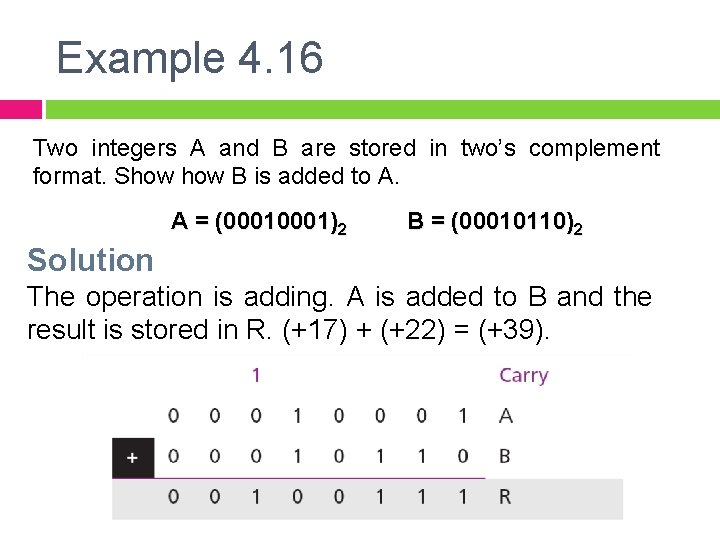
Example 4. 16 Two integers A and B are stored in two’s complement format. Show B is added to A. A = (0001)2 B = (00010110)2 Solution The operation is adding. A is added to B and the result is stored in R. (+17) + (+22) = (+39).
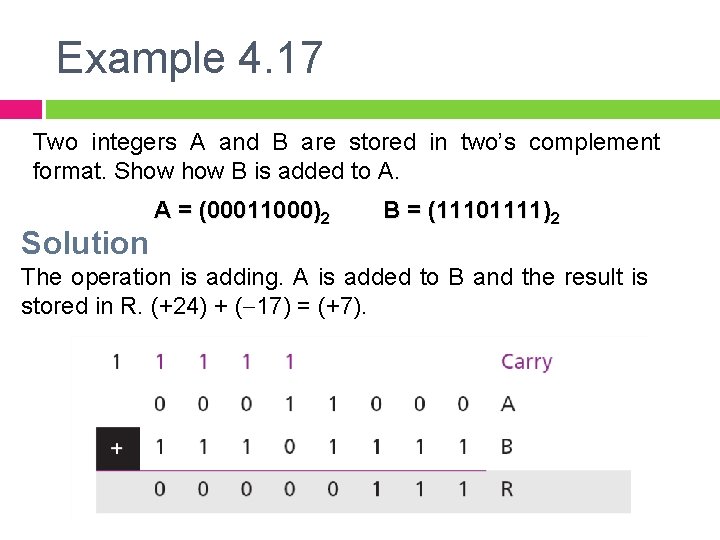
Example 4. 17 Two integers A and B are stored in two’s complement format. Show B is added to A. Solution A = (00011000)2 B = (11101111)2 The operation is adding. A is added to B and the result is stored in R. (+24) + (-17) = (+7).
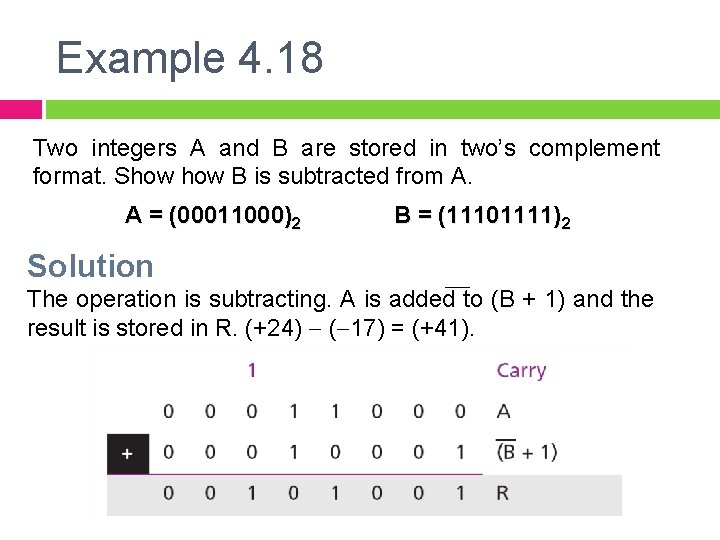
Example 4. 18 Two integers A and B are stored in two’s complement format. Show B is subtracted from A. A = (00011000)2 B = (11101111)2 Solution The operation is subtracting. A is added to (B + 1) and the result is stored in R. (+24) - (-17) = (+41).
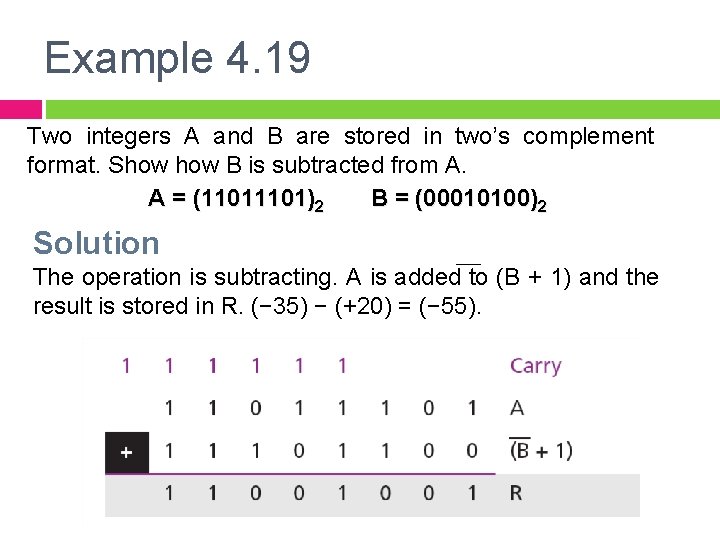
Example 4. 19 Two integers A and B are stored in two’s complement format. Show B is subtracted from A. A = (1101)2 B = (00010100)2 Solution The operation is subtracting. A is added to (B + 1) and the result is stored in R. (− 35) − (+20) = (− 55).
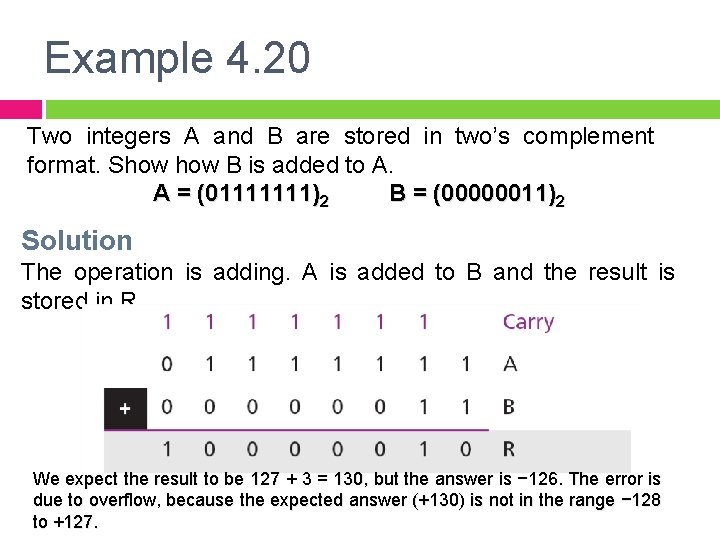
Example 4. 20 Two integers A and B are stored in two’s complement format. Show B is added to A. A = (01111111)2 B = (00000011)2 Solution The operation is adding. A is added to B and the result is stored in R. We expect the result to be 127 + 3 = 130, but the answer is − 126. The error is due to overflow, because the expected answer (+130) is not in the range − 128 to +127.
NOT E we do arithmetic operations on numbers in a When computer, we should remember that each number and the result should be in the range defined by the bit allocation.
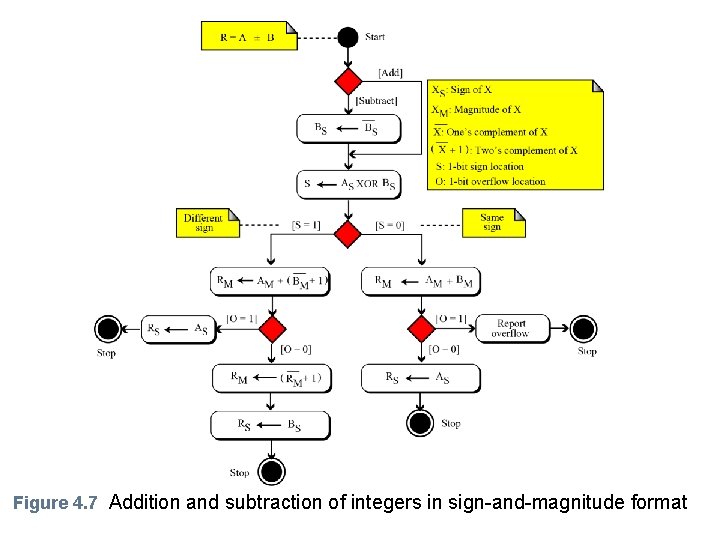
Sign and Magnitude Integers § Addition and subtraction for integers in sign-and magnitude looks very complex. § We have four different combination of signs (two signs, each of two values) for addition and four different conditions for subtraction. § This means that we need to consider eight different situations. However, we can reduce these cases, as shown in Figure 4. 7.
Figure 4. 7 Addition and subtraction of integers in sign-and-magnitude format
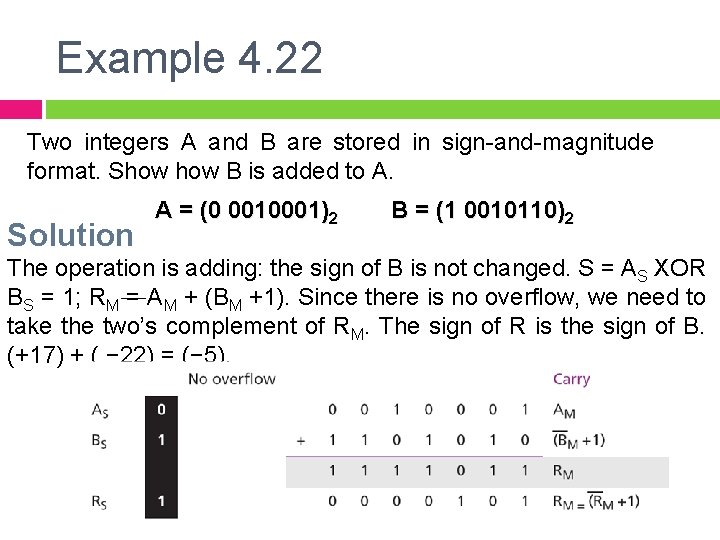
Example 4. 22 Two integers A and B are stored in sign-and-magnitude format. Show B is added to A. Solution A = (0 0010001)2 B = (1 0010110)2 The operation is adding: the sign of B is not changed. S = AS XOR BS = 1; RM = AM + (BM +1). Since there is no overflow, we need to take the two’s complement of RM. The sign of R is the sign of B. (+17) + ( − 22) = (− 5).
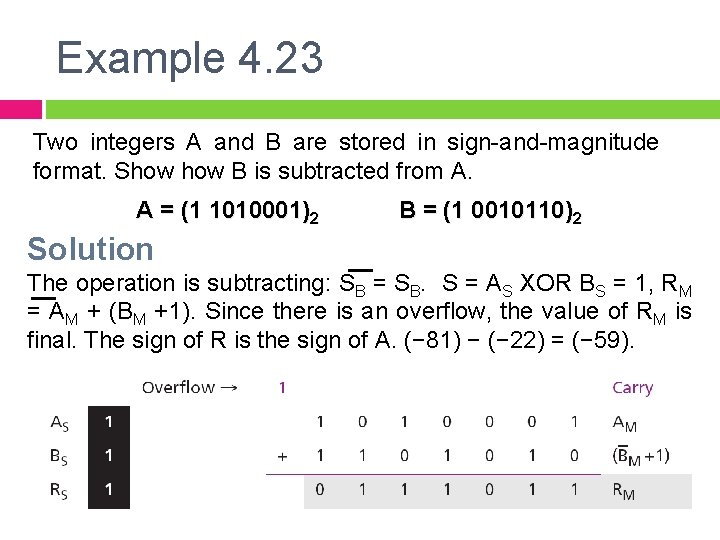
Example 4. 23 Two integers A and B are stored in sign-and-magnitude format. Show B is subtracted from A. A = (1 1010001)2 B = (1 0010110)2 Solution The operation is subtracting: SB = SB. S = AS XOR BS = 1, RM = AM + (BM +1). Since there is an overflow, the value of RM is final. The sign of R is the sign of A. (− 81) − (− 22) = (− 59).
Arithmetic Operations on Reals § All arithmetic operations can be applied to reals stored in floating-point format. § Multiplication involves multiplication of two integers in sign -and-magnitude representation. § Division involves division of two integers in sign-andmagnitude representations. We only show addition and subtractions for reals.
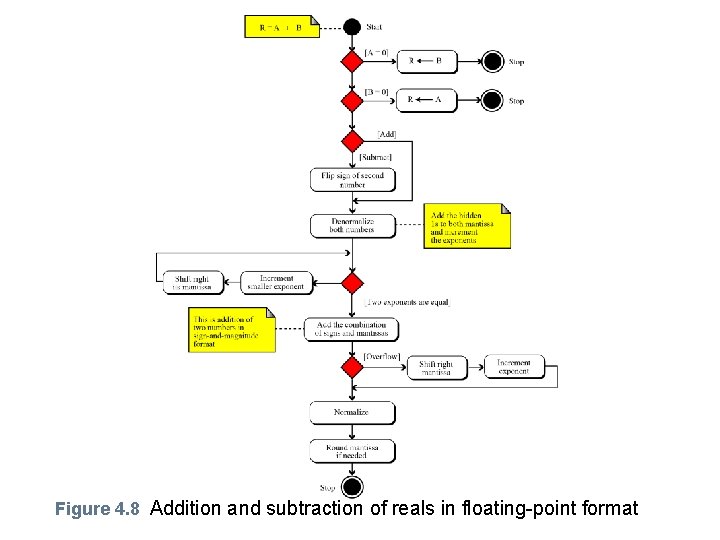
Addition and Subtraction of Reals § Addition and subtraction of real numbers stored in floatingpoint is reduced to addition and subtraction of two integers stored in sign-and magnitude after the alignment of decimal points. §Figure 4. 8 shows a simplified version of the procedure (there are some special cases that we have ignored).
Figure 4. 8 Addition and subtraction of reals in floating-point format
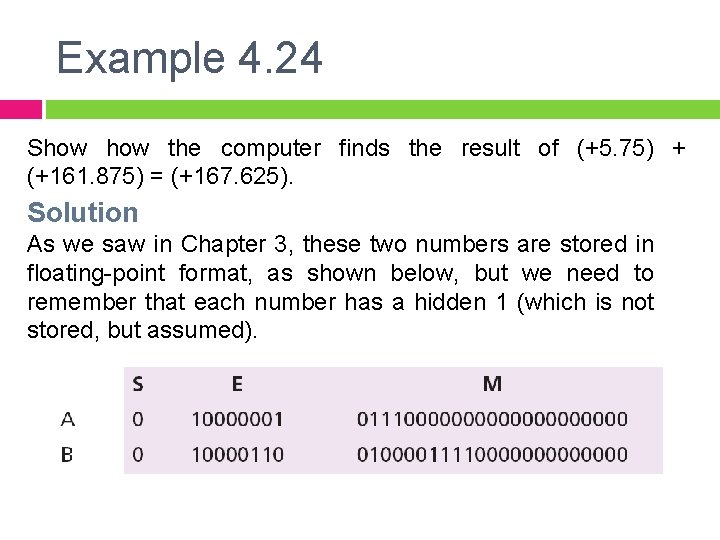
Example 4. 24 Show the computer finds the result of (+5. 75) + (+161. 875) = (+167. 625). Solution As we saw in Chapter 3, these two numbers are stored in floating-point format, as shown below, but we need to remember that each number has a hidden 1 (which is not stored, but assumed).
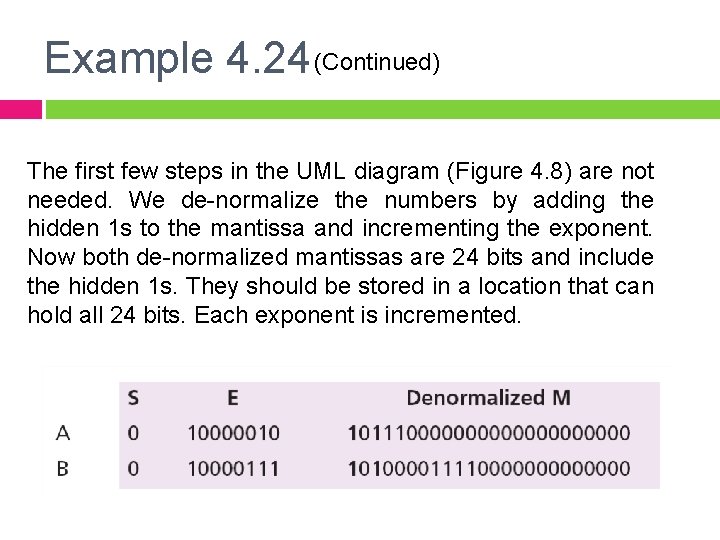
Example 4. 24 (Continued) The first few steps in the UML diagram (Figure 4. 8) are not needed. We de-normalize the numbers by adding the hidden 1 s to the mantissa and incrementing the exponent. Now both de-normalized mantissas are 24 bits and include the hidden 1 s. They should be stored in a location that can hold all 24 bits. Each exponent is incremented.
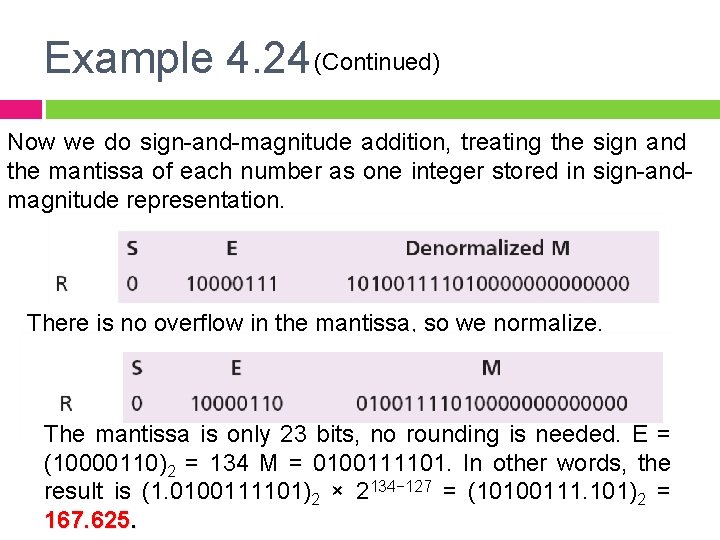
Example 4. 24 (Continued) Now we do sign-and-magnitude addition, treating the sign and the mantissa of each number as one integer stored in sign-andmagnitude representation. There is no overflow in the mantissa, so we normalize. The mantissa is only 23 bits, no rounding is needed. E = (10000110)2 = 134 M = 0100111101. In other words, the result is (1. 0100111101)2 × 2134− 127 = (10100111. 101)2 = 167. 625.
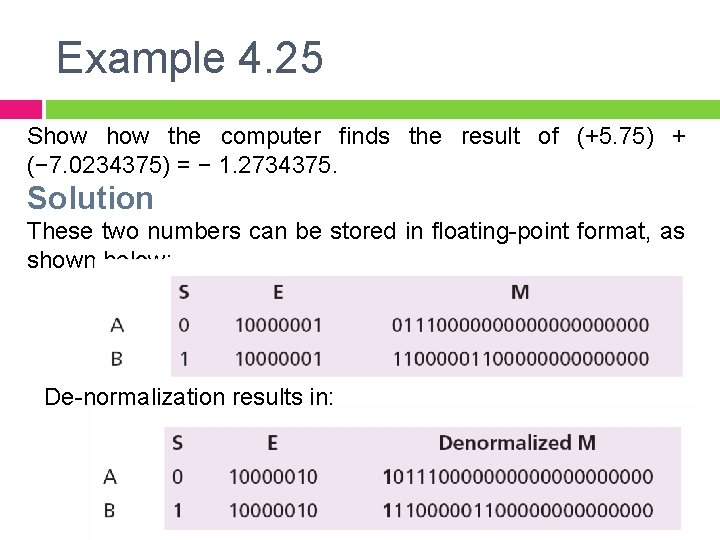
Example 4. 25 Show the computer finds the result of (+5. 75) + (− 7. 0234375) = − 1. 2734375. Solution These two numbers can be stored in floating-point format, as shown below: De-normalization results in:
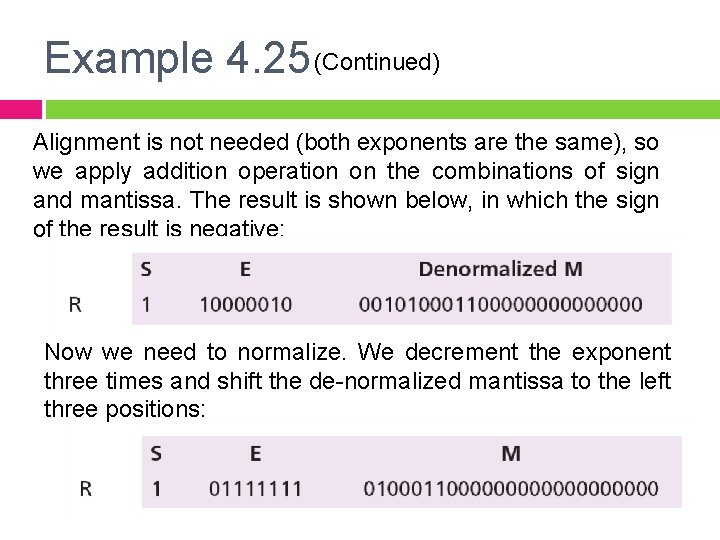
Example 4. 25 (Continued) Alignment is not needed (both exponents are the same), so we apply addition operation on the combinations of sign and mantissa. The result is shown below, in which the sign of the result is negative: Now we need to normalize. We decrement the exponent three times and shift the de-normalized mantissa to the left three positions:
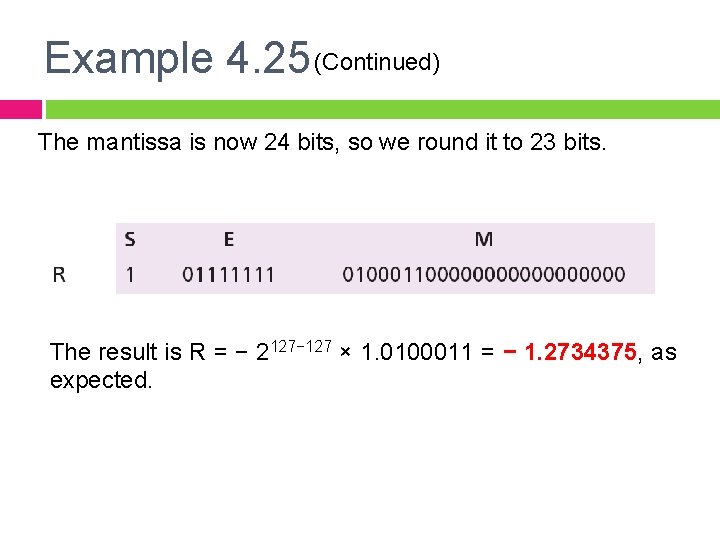
Example 4. 25 (Continued) The mantissa is now 24 bits, so we round it to 23 bits. The result is R = − 2127− 127 × 1. 0100011 = − 1. 2734375, as expected.