
Operating Systems Internals and Design Principles 6E William
- Slides: 79
Operating Systems: Internals and Design Principles, 6/E William Stallings Chapter 16 Client/Server Computing Dave Bremer Otago Polytechnic, N. Z. © 2008, Prentice Hall
Roadmap • • Distributed Computing Introduction Client/Server Computing Distributed message passing Remote Procedure Calls Clusters Windows Cluster Server Sun Cluster Beowulf and Linux Clusters
Traditional Data Processing • Traditionally data processing was centralised • Typically involving centralised – Computers – Processing – Data
Distributed Data Processing • Distributed Data Processing (DDP) departs from the centralised model in one or multiple ways. • Usually smaller computers, are dispersed throughout an organization. • May involve central node with satellites, or be a dispersed peer to peer approach – Interconnection is usually required
Advantages of DDP • • • Responsiveness Availability Resource Sharing Incremental growth Increased user involvement and control End-user productivity
Roadmap • • Distributed Computing Introduction Client/Server Computing Distributed message passing Remote Procedure Calls Clusters Windows Cluster Server Sun Cluster Beowulf and Linux Clusters
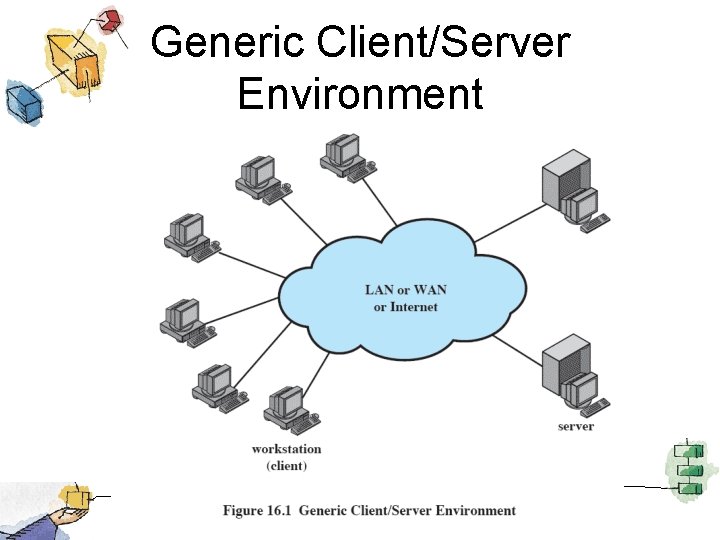
Client/Server Computing • Client machines are generally single-user workstations providing a user-friendly interface to the end user • Each server provides a set of shared services to the clients – enables many clients to share access to the same database – enables the use of a high-performance computer system to manage the database
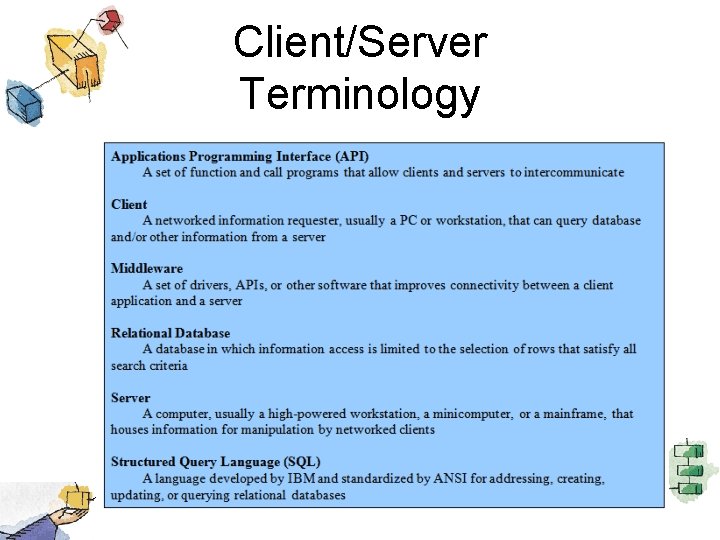
Client/Server Terminology
Generic Client/Server Environment
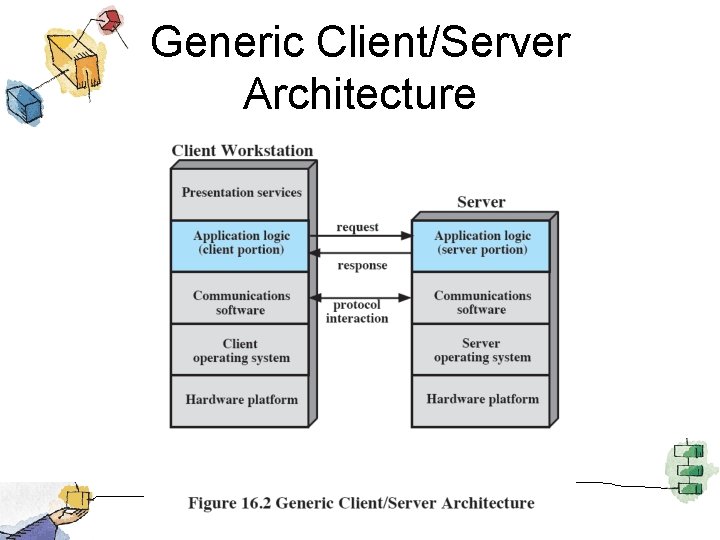
Client/Server Applications • The key feature of a client/server architecture is the allocation of applicationlevel tasks between clients and servers. • Hardware and the operating systems of client and server may differ – These lower-level differences are irrelevant as long as a client and server share the same communications protocols and support the same applications
Generic Client/Server Architecture
Client/Server Applications • Bulk of applications software executes on the server • Application logic is located at the client • Presentation services in the client
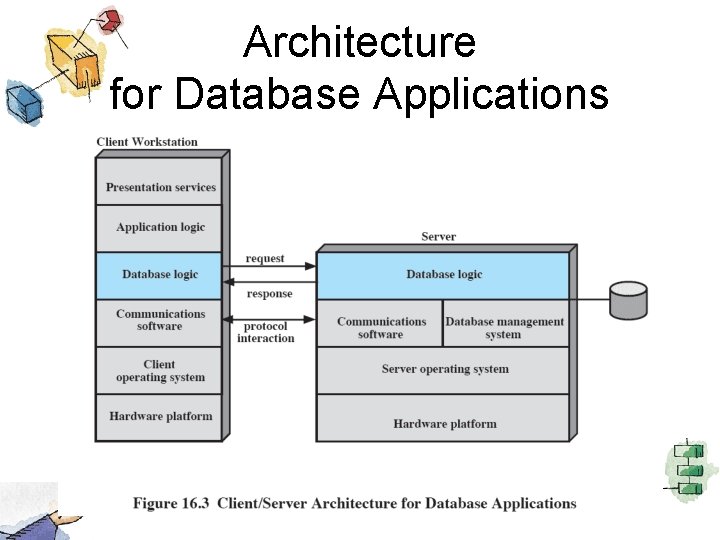
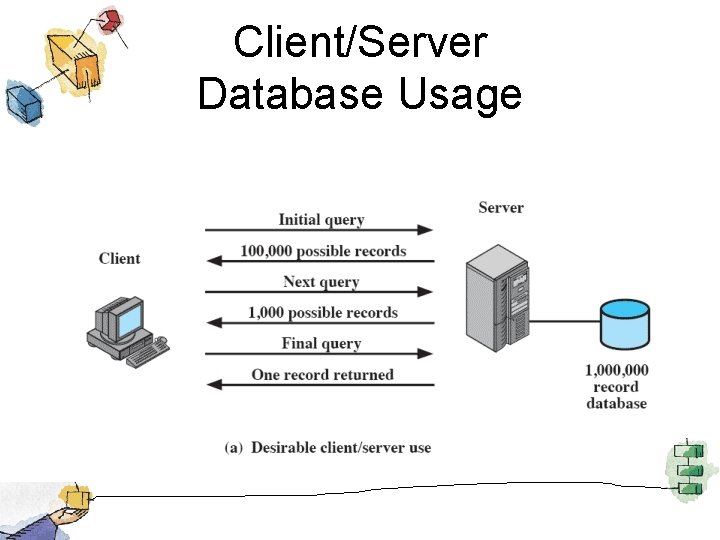
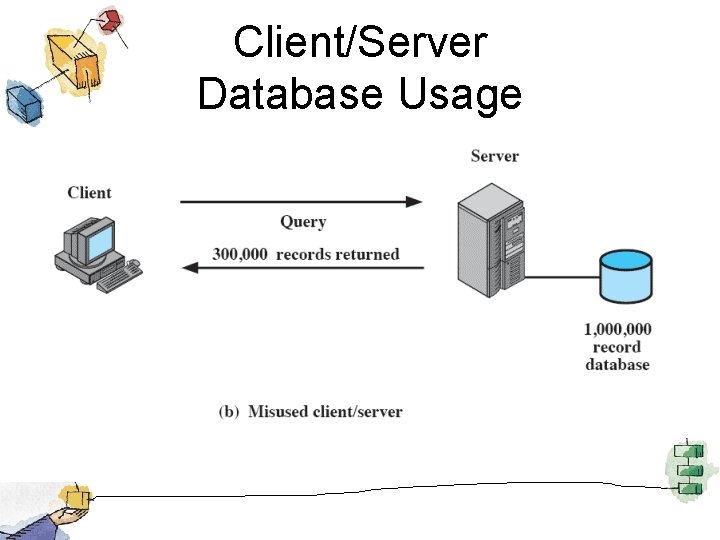
Database Applications • The server is a database server – Most common family of client/server applications • Interaction is in the form of transactions – the client makes a database request and receives a database response from server • Server is responsible for maintaining the database
Architecture for Database Applications
Client/Server Database Usage
Client/Server Database Usage
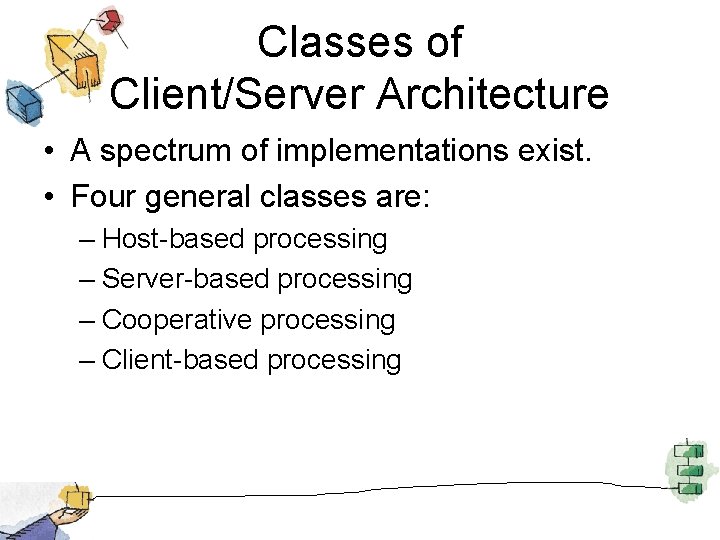
Classes of Client/Server Architecture • A spectrum of implementations exist. • Four general classes are: – Host-based processing – Server-based processing – Cooperative processing – Client-based processing
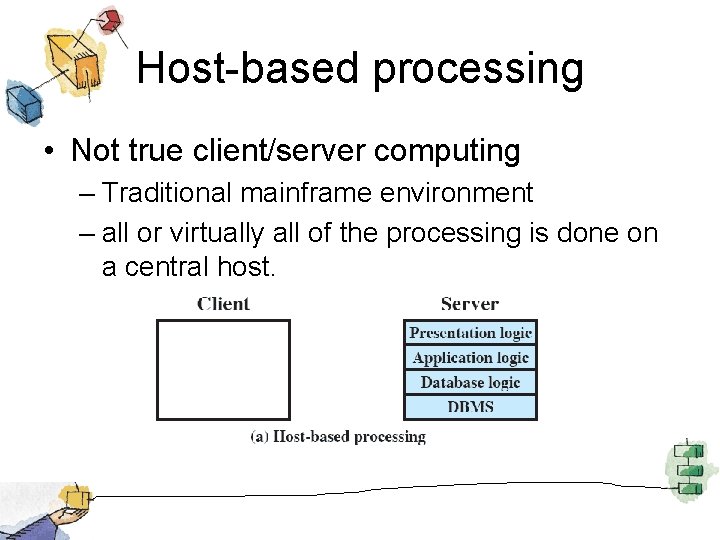
Host-based processing • Not true client/server computing – Traditional mainframe environment – all or virtually all of the processing is done on a central host.
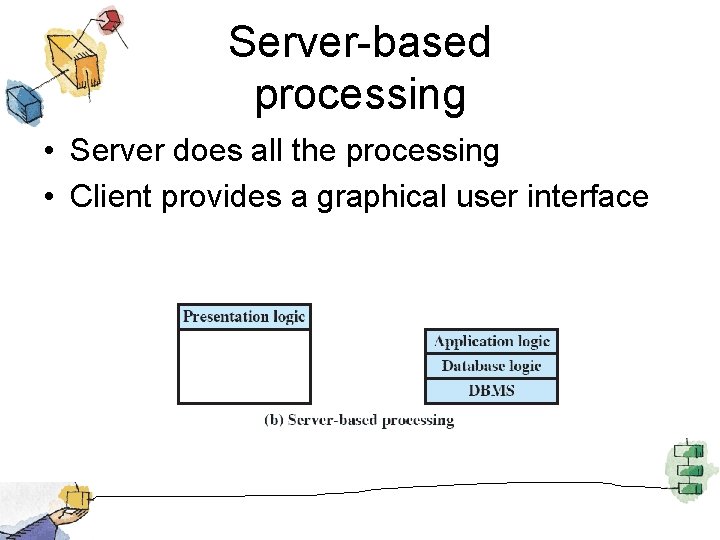
Server-based processing • Server does all the processing • Client provides a graphical user interface
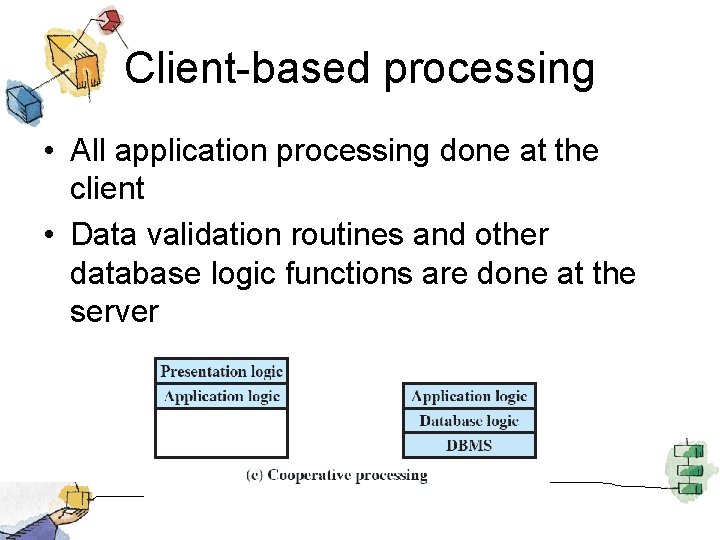
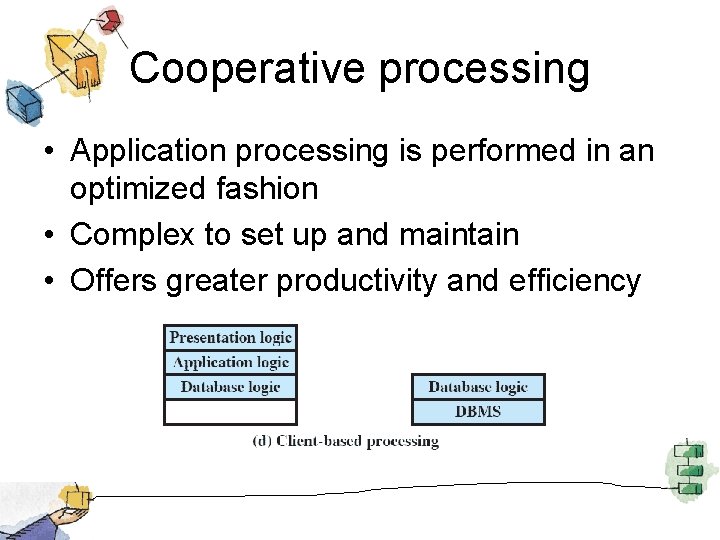
Client-based processing • All application processing done at the client • Data validation routines and other database logic functions are done at the server
Cooperative processing • Application processing is performed in an optimized fashion • Complex to set up and maintain • Offers greater productivity and efficiency
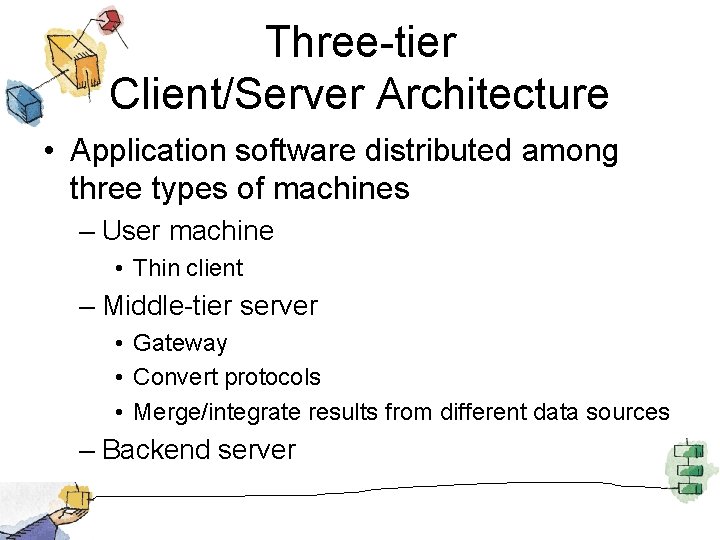
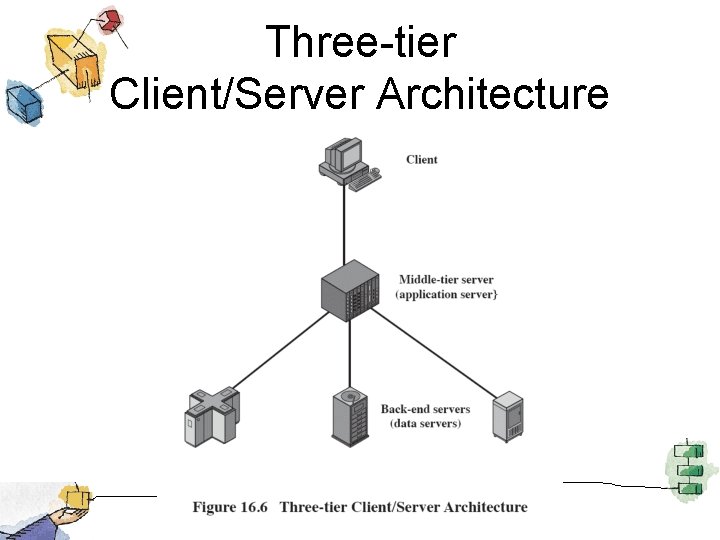
Three-tier Client/Server Architecture • Application software distributed among three types of machines – User machine • Thin client – Middle-tier server • Gateway • Convert protocols • Merge/integrate results from different data sources – Backend server
Three-tier Client/Server Architecture
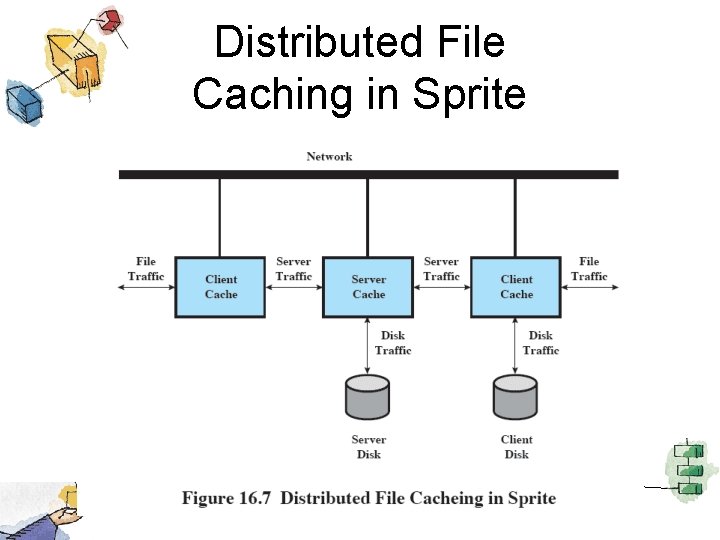
File Cache Consistency • File caches hold recently accessed file records • Caches are consistent when they contain exact copies for remote data • File-locking prevents simultaneous access to a file
Distributed File Caching in Sprite
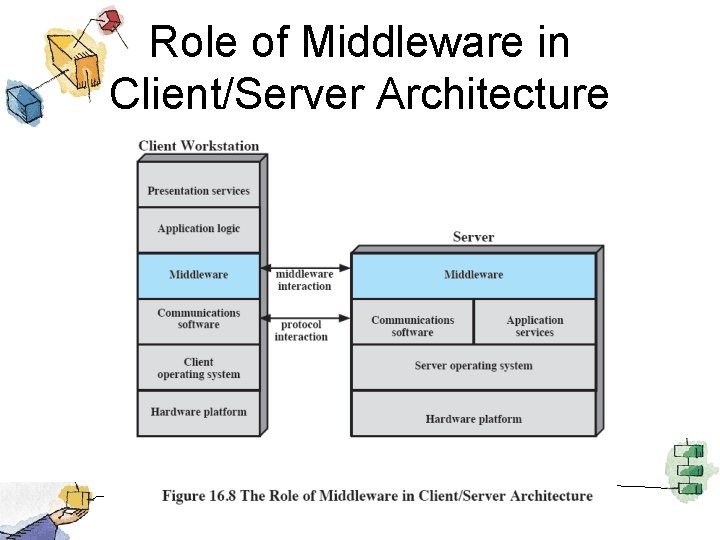
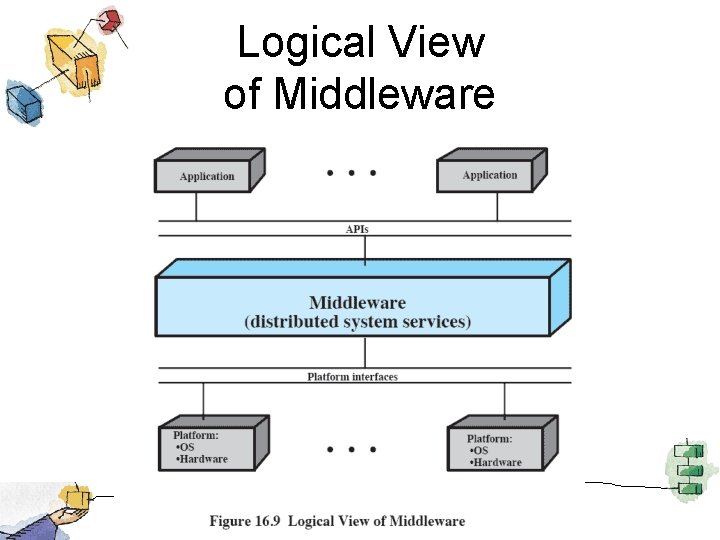
Middleware • Set of tools that provide a uniform means and style of access to system resources across all platforms • Enable programmers to build applications that look and feel the same • Enable programmers to use the same method to access data
Role of Middleware in Client/Server Architecture
Logical View of Middleware
Roadmap • • Distributed Computing Introduction Client/Server Computing Distributed message passing Remote Procedure Calls Clusters Windows Cluster Server Sun Cluster Beowulf and Linux Clusters
Interprocess Communication (IPC) • Usually computers involved in DDP do not share a main memory – They are isolated computers • IPC techniques relying on filters cannot work – Must rely on message passing
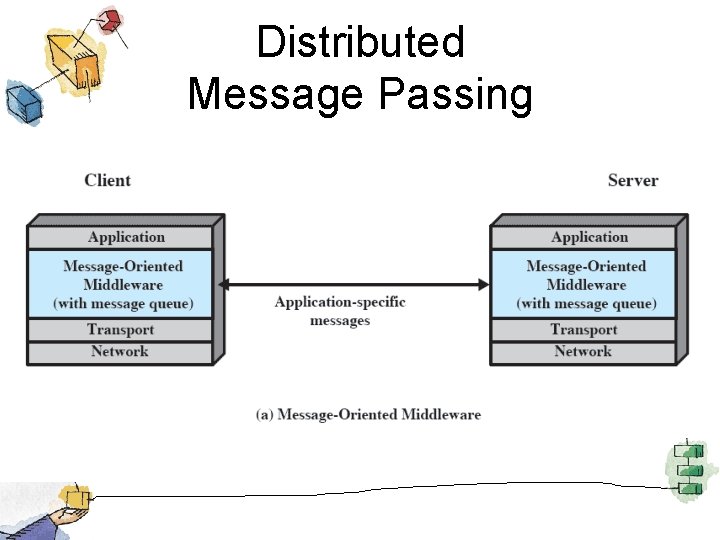
Distributed Message Passing
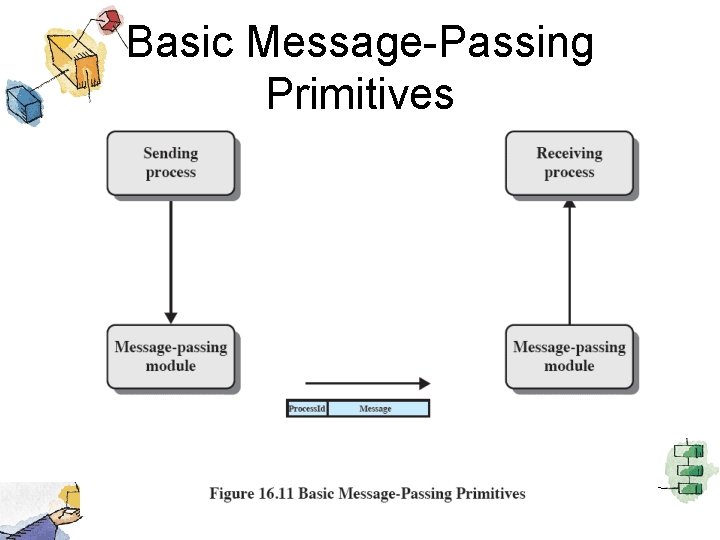
Basic Message-Passing Primitives
Reliability vs. . Unreliability • Reliable message-passing guarantees delivery if possible – Not necessary to let the sending process know that the message was delivered (but useful) • Send the message out into the communication network without reporting success or failure – Reduces complexity and overhead
Blocking vs. . Nonblocking • Nonblocking – Process is not suspended as a result of issuing a Send or Receive – Efficient and flexible – Difficult to debug
Blocking vs. . Nonblocking • Blocking – Send does not return control to the sending process until the message has been transmitted – OR does not return control until an acknowledgment is received – Receive does not return until a message has been placed in the allocated buffer
Roadmap • • Distributed Computing Introduction Client/Server Computing Distributed message passing Remote Procedure Calls Clusters Windows Cluster Server Sun Cluster Beowulf and Linux Clusters
Remote Procedure Calls • Allow programs on different machines to interact using simple procedure call/return semantics • Widely accepted • Standardized – Client and server modules can be moved among computers and operating systems easily
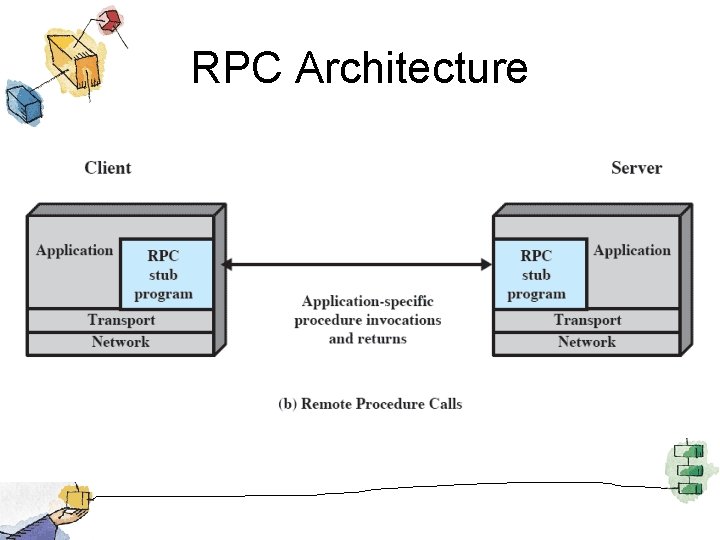
RPC Architecture
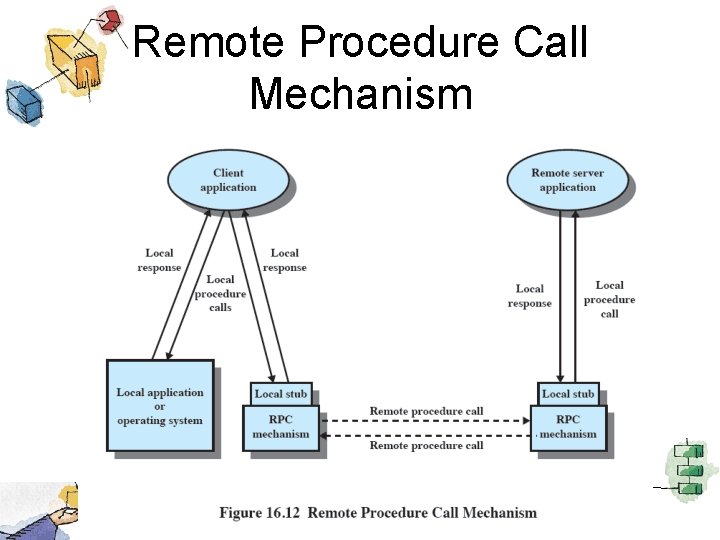
Remote Procedure Call Mechanism
Parameters • Passing a parameter by value is easy with RPC • Passing by reference is more difficult – A unique system wide pointer is necessary • The representation/format of the parameter and message may be the difficult if the programming languages differ between client and server.
Client/Server Binding • Binding specifies the relationship between remote procedure and calling program • Nonpersistent binding – Logical connection established during remote procedure call • Persistent binding – Connection is sustained after the procedure returns
Synchronous versus Asynchronous • Synchronous RPC – Behaves much like a subroutine call • Asynchronous RPC – Does not block the caller – Enable a client execution to proceed locally in parallel with server invocation
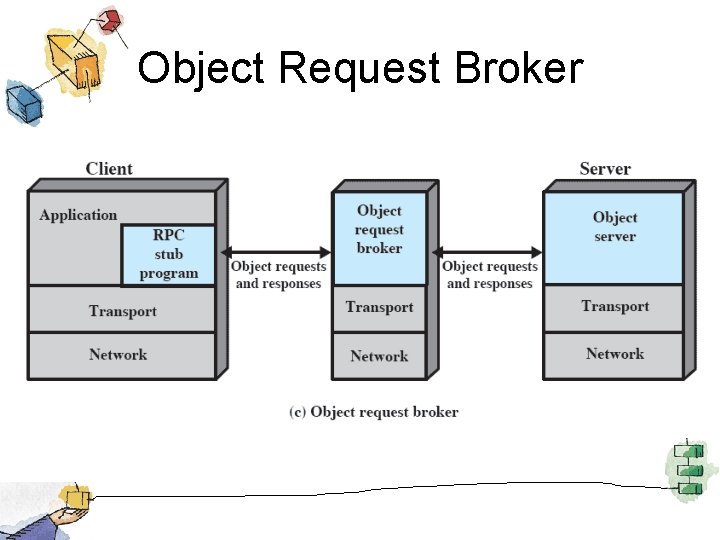
Object-Oriented Mechanisms • Clients and servers ship messages back and forth between objects • A client sends a request to an object broker • The broker calls the appropriate object and passes along any relevant data • Examples include Microsoft’s COM and CORBA
Object Request Broker
Roadmap • • Distributed Computing Introduction Client/Server Computing Distributed message passing Remote Procedure Calls Clusters Windows Cluster Server Sun Cluster Beowulf and Linux Clusters
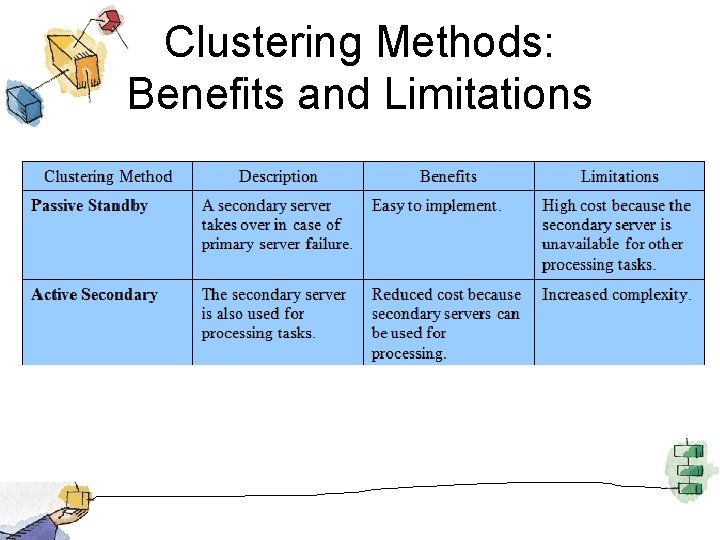
Clusters • Alternative to symmetric multiprocessing (SMP) • Group of interconnected, whole computers working together as a unified computing resource – Illusion is one machine – System can run on its own
Benefits of Clusters • Absolute Scalability – Larger than any single device is possible • Incremental scalability – System can grow by adding new nodes • High availability – Failure of one node is not critical to system • Superior price/performance – Using commodity equipment
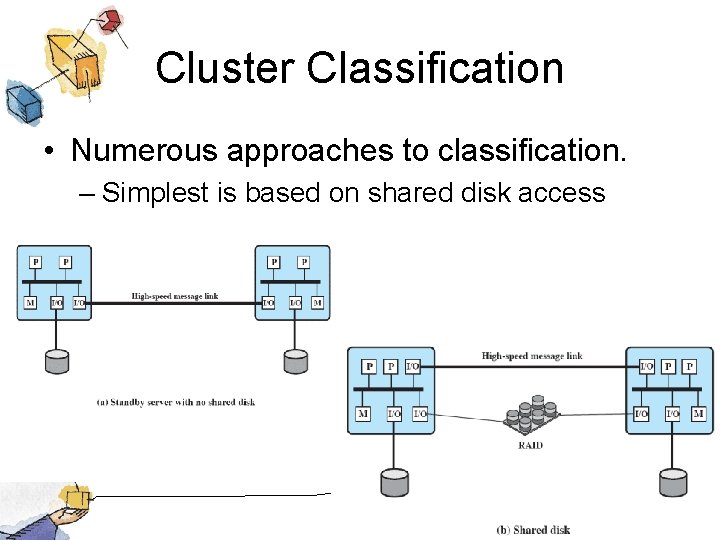
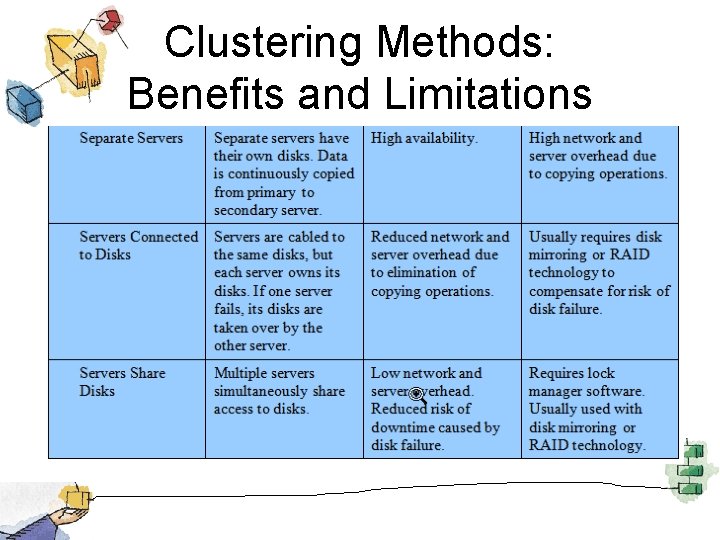
Cluster Classification • Numerous approaches to classification. – Simplest is based on shared disk access
Clustering Methods: Benefits and Limitations
Clustering Methods: Benefits and Limitations
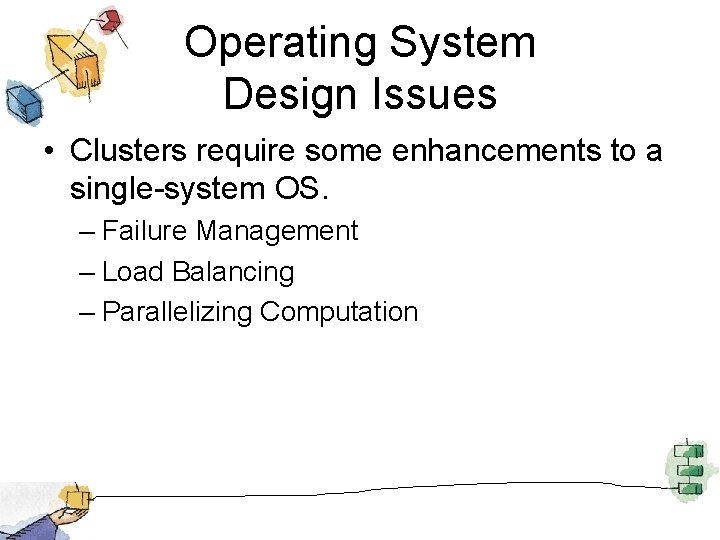
Operating System Design Issues • Clusters require some enhancements to a single-system OS. – Failure Management – Load Balancing – Parallelizing Computation
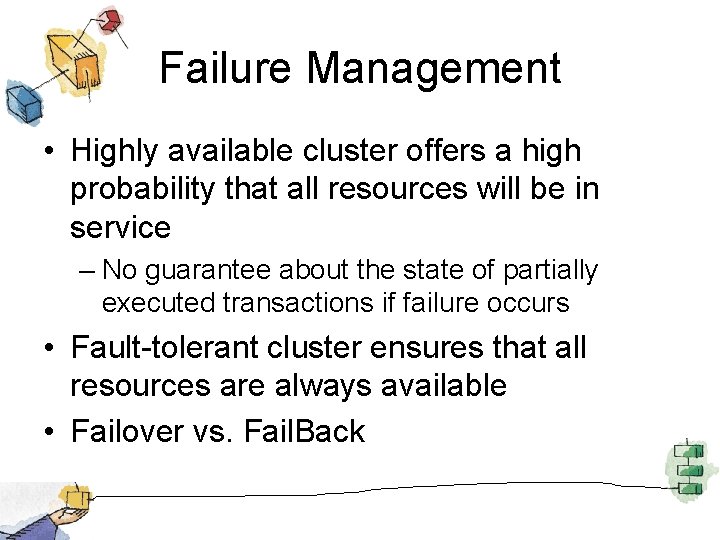
Failure Management • Highly available cluster offers a high probability that all resources will be in service – No guarantee about the state of partially executed transactions if failure occurs • Fault-tolerant cluster ensures that all resources are always available • Failover vs. Fail. Back
Load Balancing • When new computer added to the cluster, the load-balancing facility should automatically include this computer in scheduling applications • Middleware must recognize that services can appear on many different members of the cluster
Parallelizing Computation • Parallelizing compiler – determines, at compile time, which parts of an application can be executed in parallel. • Parallelized application – application written to run on a cluster and uses message passing to move data, • Parametric computing – Algorithm must run many times with different parameters
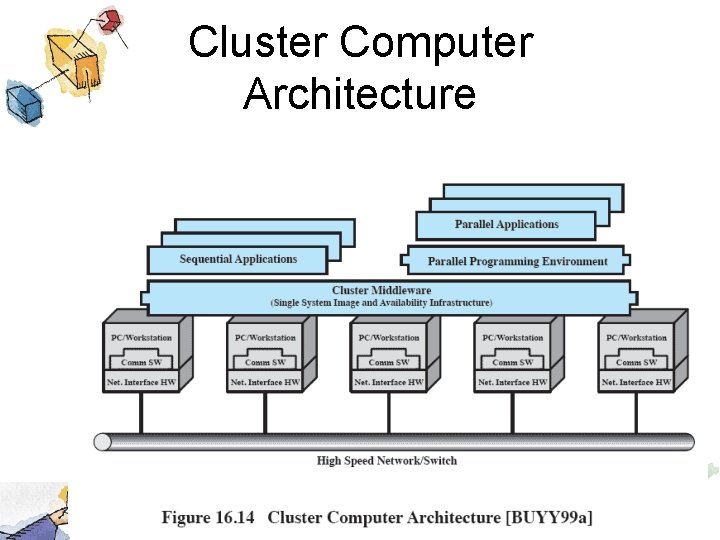
Cluster Computer Architecture
Middleware Services and Functions • Single entry point – User logs onto cluster, not individual server • • Single file hierarchy Single control point Single virtual networking Single memory space – Distributed shared memory enables programs to share variables.
Middleware Services and Functions (cont. ) • • • Single job-management system Single user interface Single I/O space Single process space Checkpointing – Allowing rollback and recovery • Process migration – Enables load balancing
Clusters Compared to SMP • SMP is easier to manage and configure, take up less space and draw less power • SMP products are well established and stable • Clusters are better for incremental and absolute scalability • Clusters are superior in terms of availability
Roadmap • • Distributed Computing Introduction Client/Server Computing Distributed message passing Remote Procedure Calls Clusters Windows Cluster Server Sun Cluster Beowulf and Linux Clusters
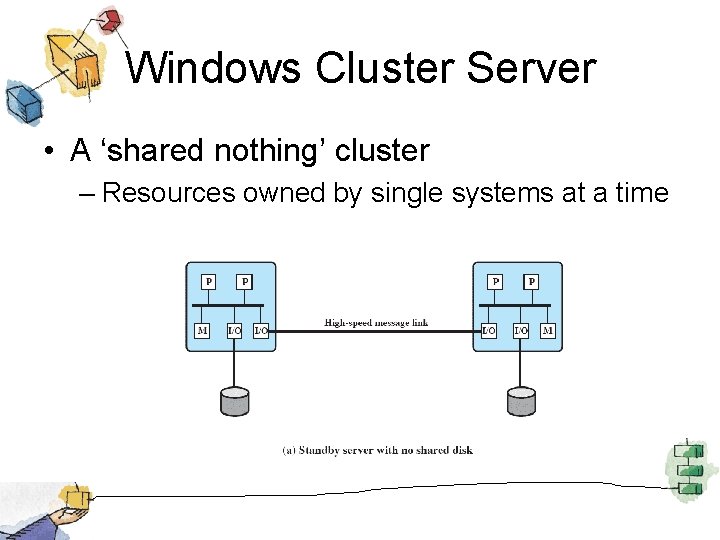
Windows Cluster Server • A ‘shared nothing’ cluster – Resources owned by single systems at a time
Windows Cluster Server • Cluster Service – Manages cluster activity • Resource – Item managed by the cluster • Online – Resource is online when providing a service • Group – Set of elements needed to run an application
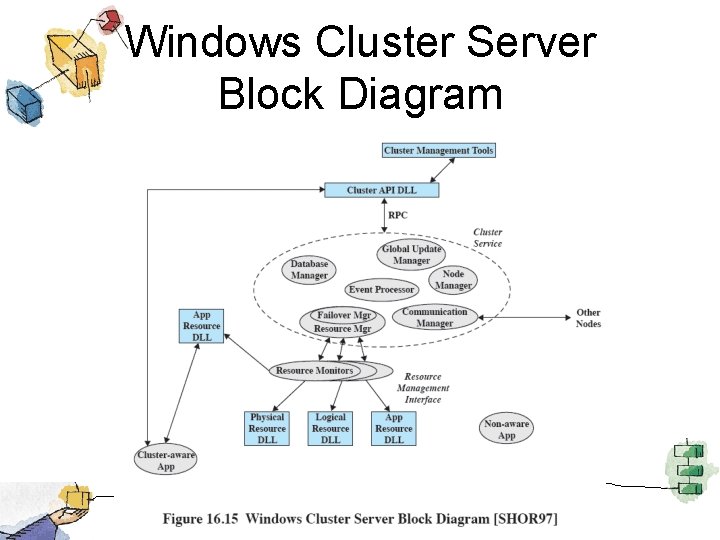
Group • Combines resources into larger units that are easily managed • Operations performed on a group affect all resources in that group. • Resources are implemented as DLL’s – Managed by resource monitor • Resource Monitor uses RPC to interact with Cluster Service.
Windows Cluster Server Block Diagram
Major Components • Configuration database manager – Manages the database with information about resources, groups and node ownership of groups • Resource Manager/Failover Manager – makes all decisions regarding resource groups and initiates appropriate actions • Event processor – Connects components
Roadmap • • Distributed Computing Introduction Client/Server Computing Distributed message passing Remote Procedure Calls Clusters Windows Cluster Server Sun Cluster Beowulf and Linux Clusters
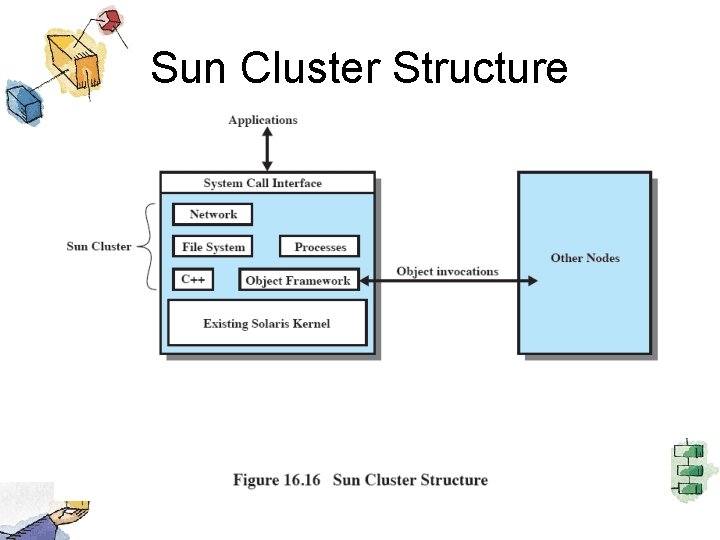
Sun Cluster • Distributed OS built as a set of extensions to Solaris UNIX system • Provides a cluster with a single-system image – The cluster is transparent to the user who sees a single computer system running Solaris
Major Components • Major components – Object and communication support – Process management – Networking – Global distributed file system
Sun Cluster Structure
Object and Communication Support • Sun Cluster is object orientated • CORBA object model defines used to define objects and RPC mechanism • CORBA Interface Definition Language specifies interfaces between components in different nodes • Uses Solaris kernel with virtually no changes.
Process Management • Process management extends globally – The location of a process is transparent to a user • Process ID’s are unique across the cluster – Each node can learn location and status of each process • Process migration is possible – But all threads of a process must be on the same node
Networking • Uses a packet filter to rout packets to the proper node • Externally, the cluster appears as a single server with a single IP address. • Incoming connections (client requests) are load balanced among the available nodes of the cluster.
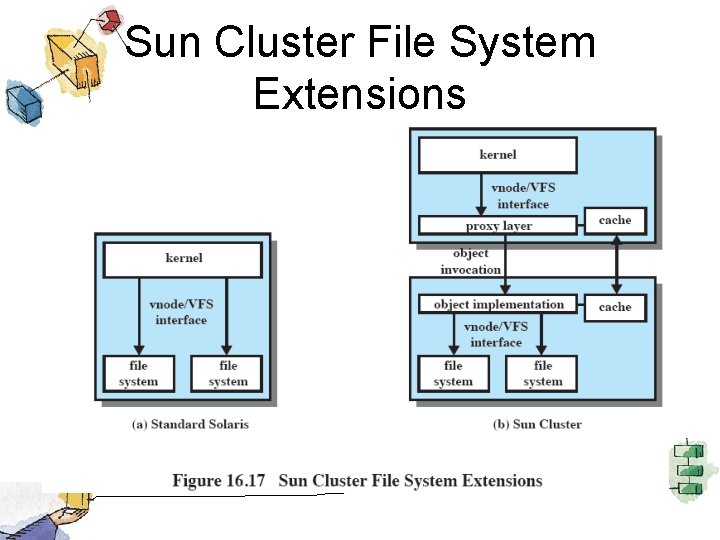
Sun Cluster File System Extensions
Roadmap • • Distributed Computing Introduction Client/Server Computing Distributed message passing Remote Procedure Calls Clusters Windows Cluster Server Sun Cluster Beowulf and Linux Clusters
Beowulf and Linux Clusters • Initiated in 1994 by NASA’s High Performance Computing and Communications project • To investigate the potential for clustered PC’s to perform computational tasks beyond the capacity of typical workstations at minimal cost • The project was a success!
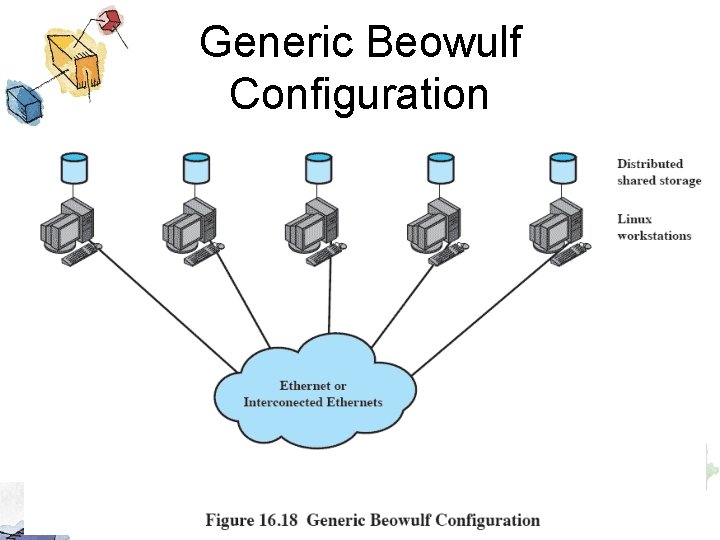
Beowulf and Linux Clusters • Key features – Mass market commodity components – Dedicated processors (rather than scavenging cycles from idle workstations) – A dedicated, private network (LAN or WAN or internetted combination) – No custom components – Easy replication from multiple vendors
Beowulf Features • • • Mass market commodity items Dedicated processors and network Scalable I/O A freely available software base Use freely available distribution computing tools with minimal changes • Return of the design and improvements to the community
Generic Beowulf Configuration
Beowulf Software • Each node runs it’s own copy of the Linux Kernel and functions as an autonomous system • Extensions to the kernel allow nodes to participate in a number of global namespaces
System Software • Beowulf distributed process space (BPROC) – Allows process ID to span multiple nodes • Beowulf Ethernet Channel Bonding • Pvmsync – Synchronises shared objects • En. Fuzion – set of tools for doing parametric computing.