
OPERATING SYSTEMS DESIGN AND IMPLEMENTATION Third Edition ANDREW

- Slides: 66
OPERATING SYSTEMS DESIGN AND IMPLEMENTATION Third Edition ANDREW S. TANENBAUM ALBERT S. WOODHULL Chapter 3 Input/Output
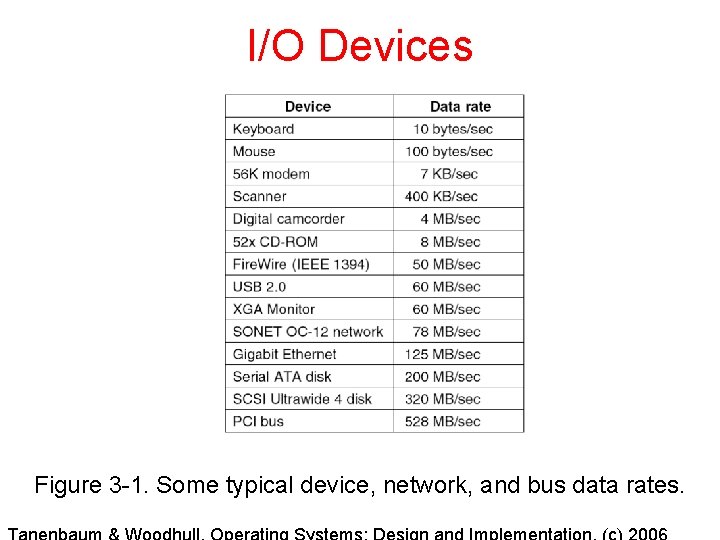
I/O Devices Figure 3 -1. Some typical device, network, and bus data rates.
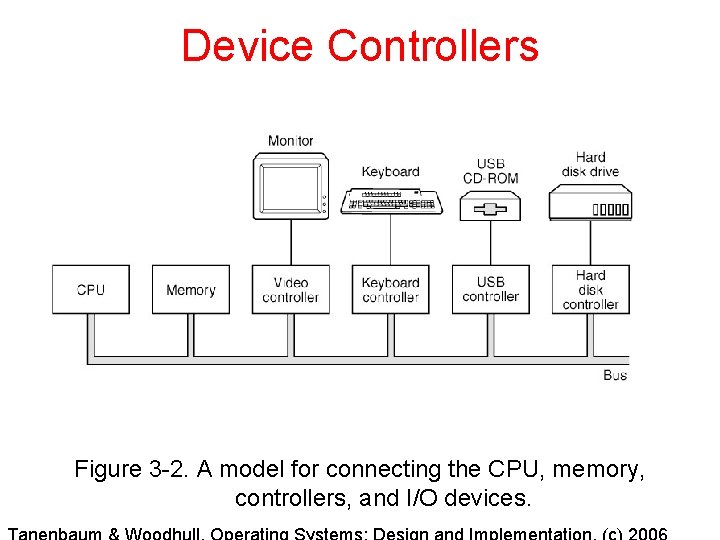
Device Controllers Figure 3 -2. A model for connecting the CPU, memory, controllers, and I/O devices.
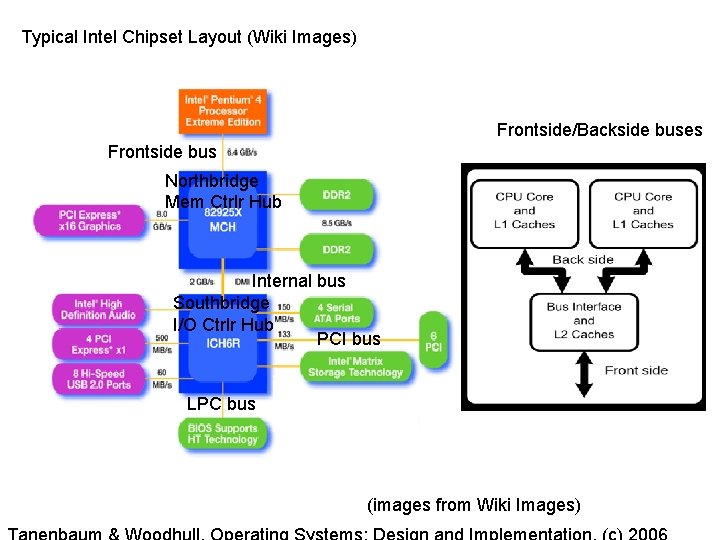
Typical Intel Chipset Layout (Wiki Images) Frontside/Backside buses Frontside bus Northbridge Mem Ctrlr Hub Internal bus Southbridge I/O Ctrlr Hub PCI bus LPC bus (images from Wiki Images)
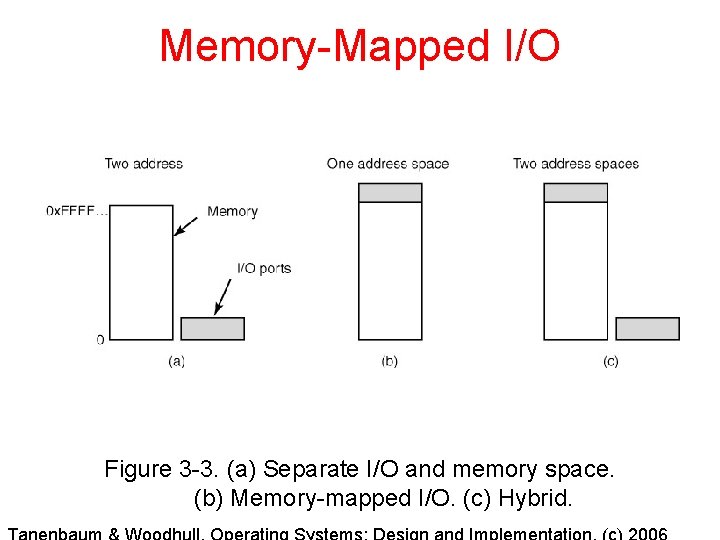
Memory-Mapped I/O Figure 3 -3. (a) Separate I/O and memory space. (b) Memory-mapped I/O. (c) Hybrid.
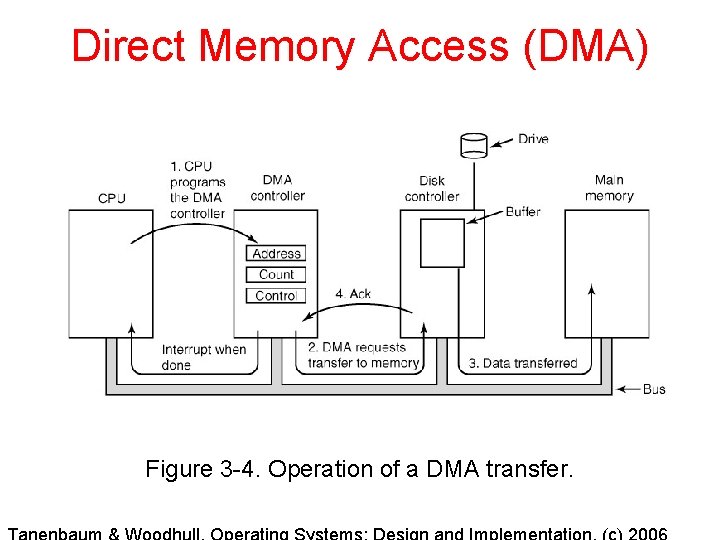
Direct Memory Access (DMA) Figure 3 -4. Operation of a DMA transfer.
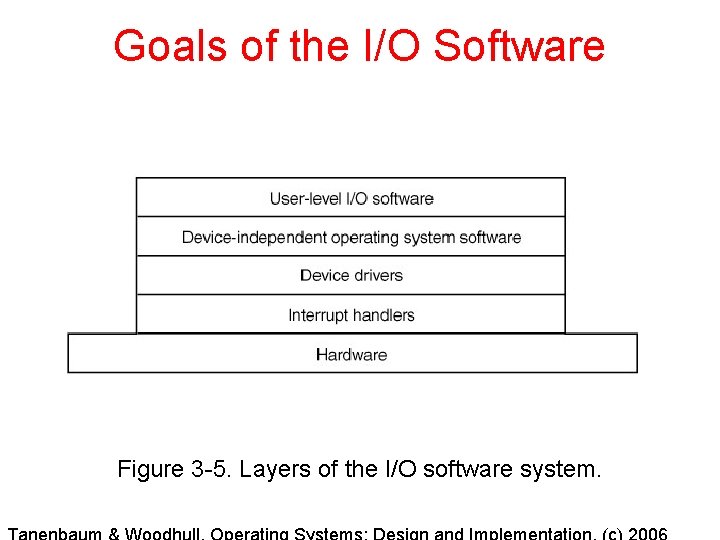
Goals of the I/O Software Figure 3 -5. Layers of the I/O software system.
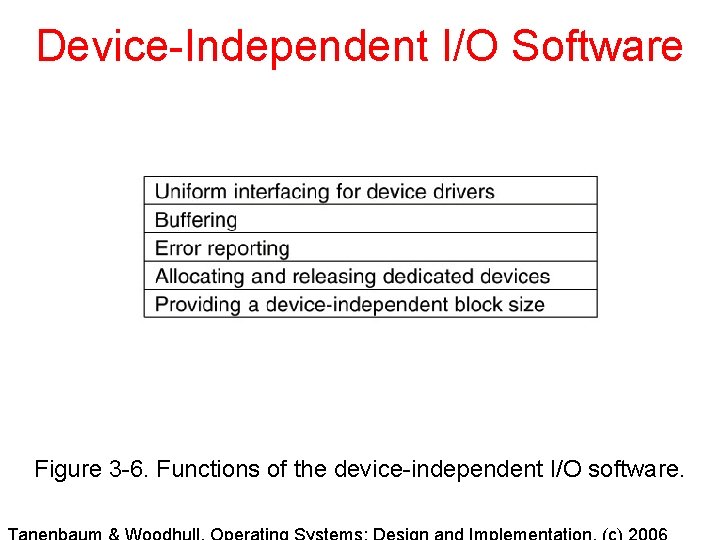
Device-Independent I/O Software Figure 3 -6. Functions of the device-independent I/O software.
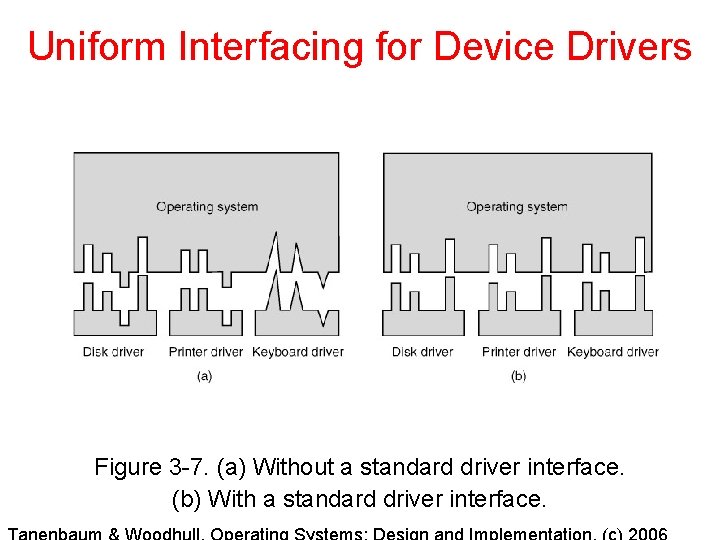
Uniform Interfacing for Device Drivers Figure 3 -7. (a) Without a standard driver interface. (b) With a standard driver interface.
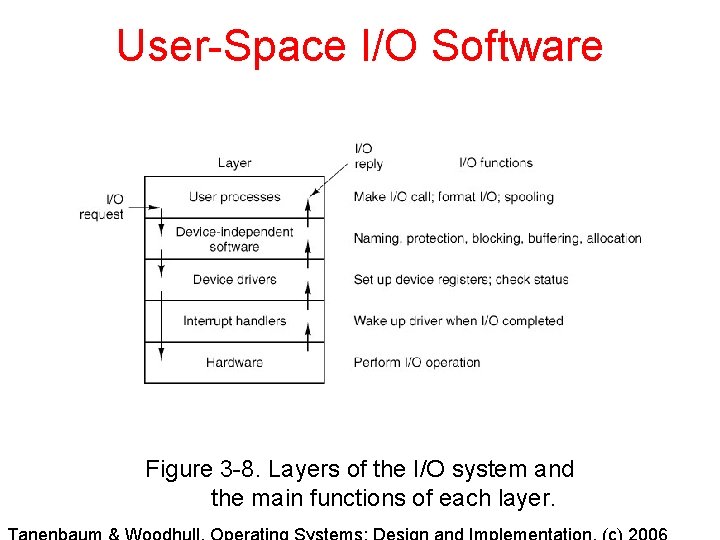
User-Space I/O Software Figure 3 -8. Layers of the I/O system and the main functions of each layer.
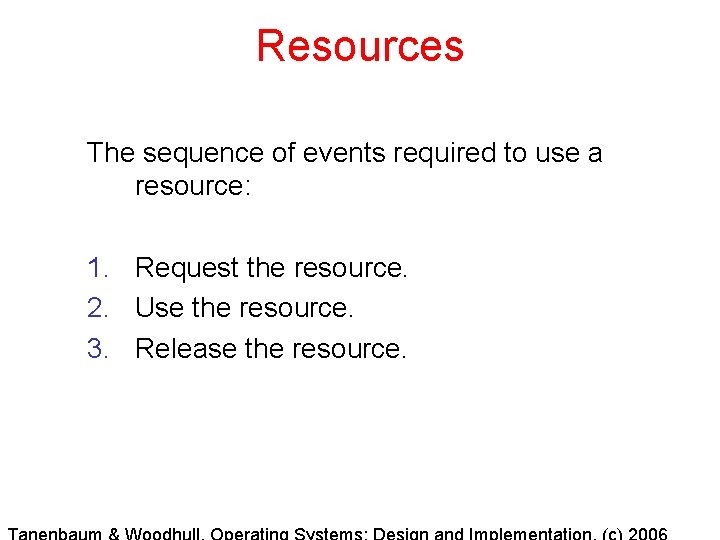
Resources The sequence of events required to use a resource: 1. Request the resource. 2. Use the resource. 3. Release the resource.
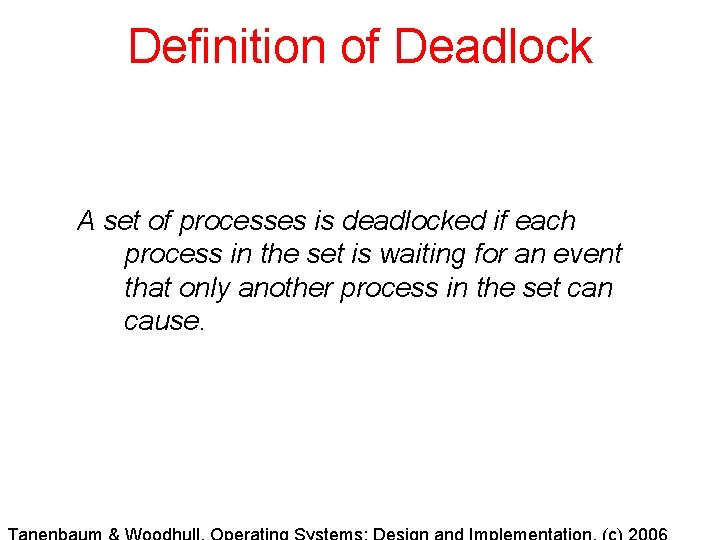
Definition of Deadlock A set of processes is deadlocked if each process in the set is waiting for an event that only another process in the set can cause.
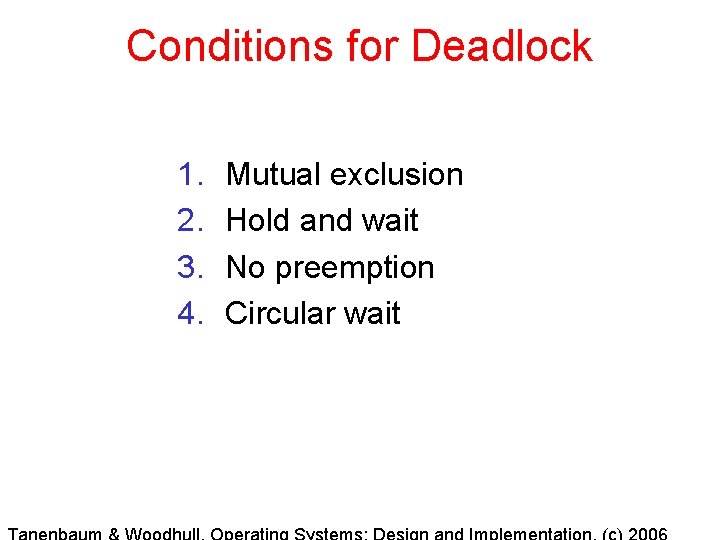
Conditions for Deadlock 1. 2. 3. 4. Mutual exclusion Hold and wait No preemption Circular wait
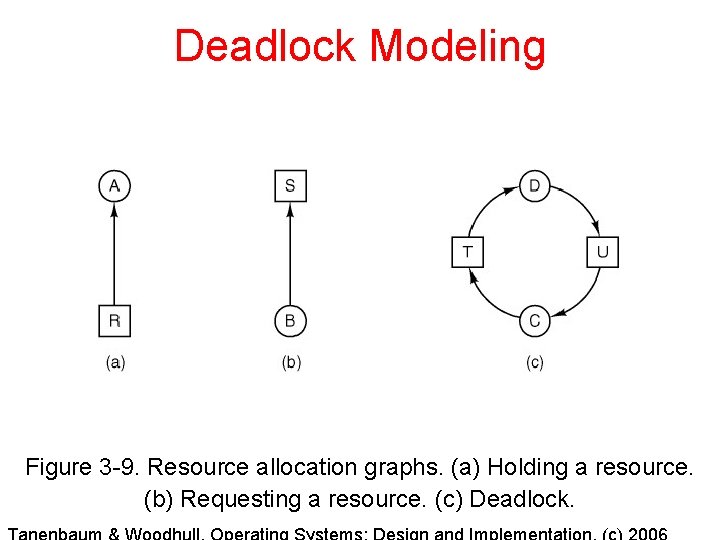
Deadlock Modeling Figure 3 -9. Resource allocation graphs. (a) Holding a resource. (b) Requesting a resource. (c) Deadlock.
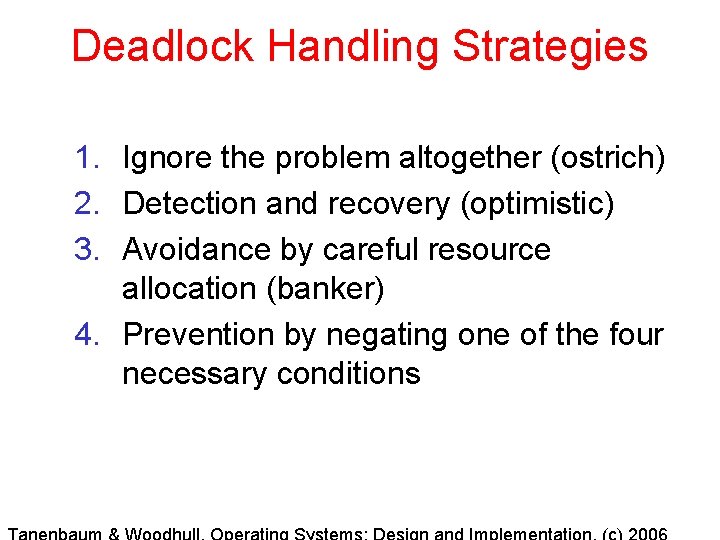
Deadlock Handling Strategies 1. Ignore the problem altogether (ostrich) 2. Detection and recovery (optimistic) 3. Avoidance by careful resource allocation (banker) 4. Prevention by negating one of the four necessary conditions
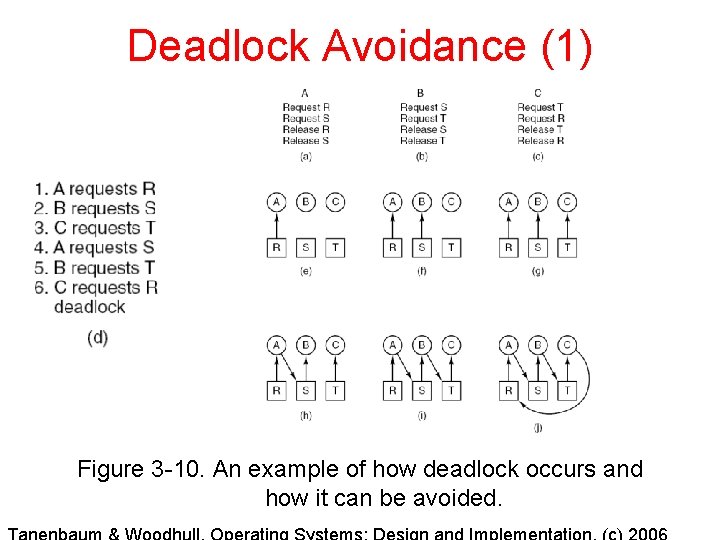
Deadlock Avoidance (1) Figure 3 -10. An example of how deadlock occurs and how it can be avoided.
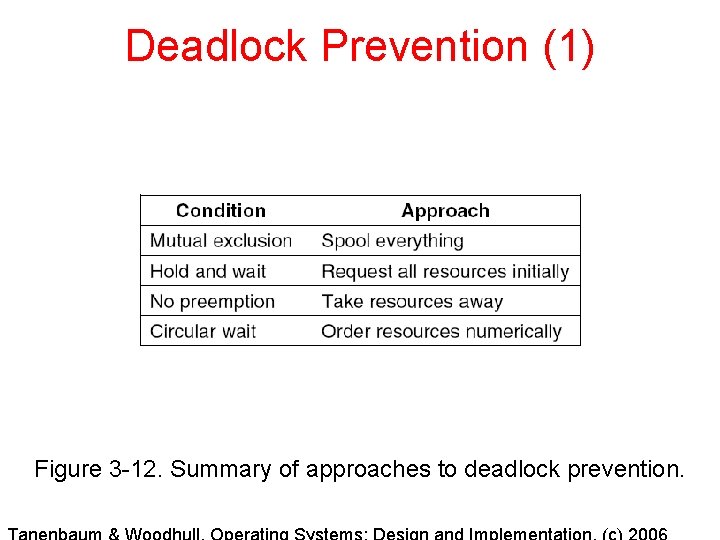
Deadlock Prevention (1) Figure 3 -12. Summary of approaches to deadlock prevention.
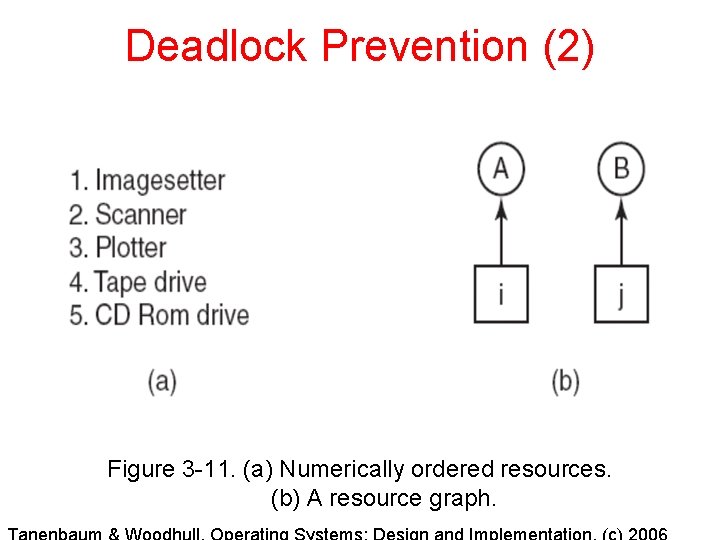
Deadlock Prevention (2) Figure 3 -11. (a) Numerically ordered resources. (b) A resource graph.
Deadlock Prevention (3) Two-Phase Locking 1. Growing phase – acquire locks 2. Use resources 3. Shrinking phase – release locks Prevents roll-backs in transaction systems Does NOT directly prevent deadlock
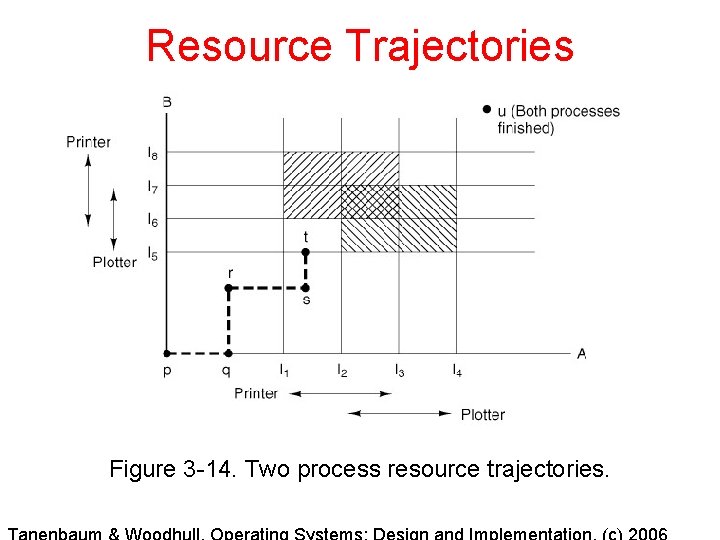
Resource Trajectories Figure 3 -14. Two process resource trajectories.
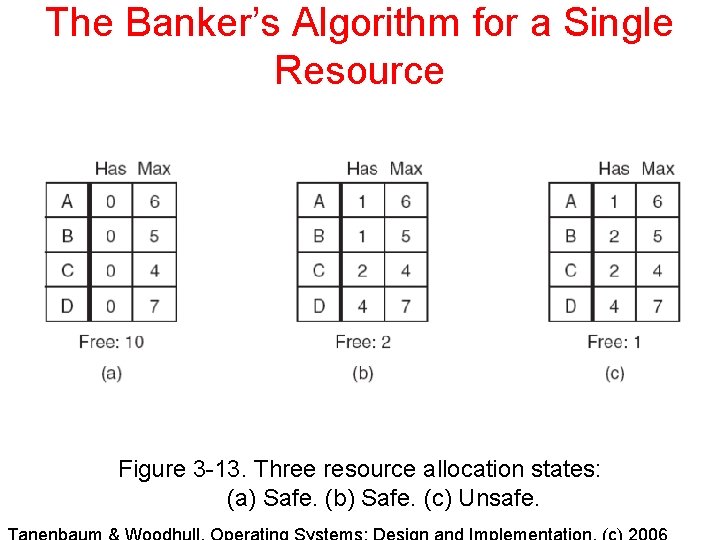
The Banker’s Algorithm for a Single Resource Figure 3 -13. Three resource allocation states: (a) Safe. (b) Safe. (c) Unsafe.
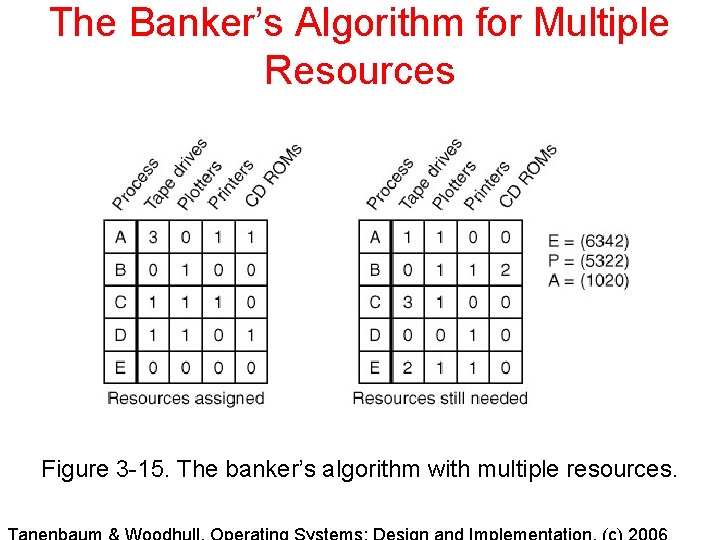
The Banker’s Algorithm for Multiple Resources Figure 3 -15. The banker’s algorithm with multiple resources.
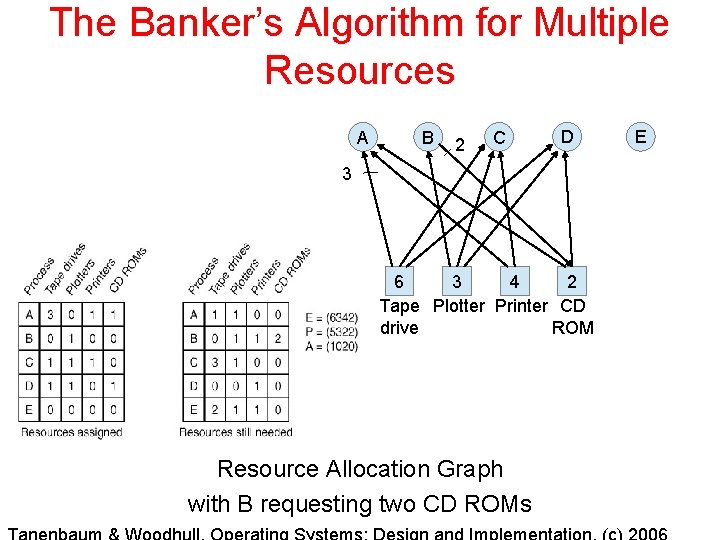
The Banker’s Algorithm for Multiple Resources A B 2 C D 3 6 3 4 2 Tape Plotter Printer CD drive ROM Resource Allocation Graph with B requesting two CD ROMs E
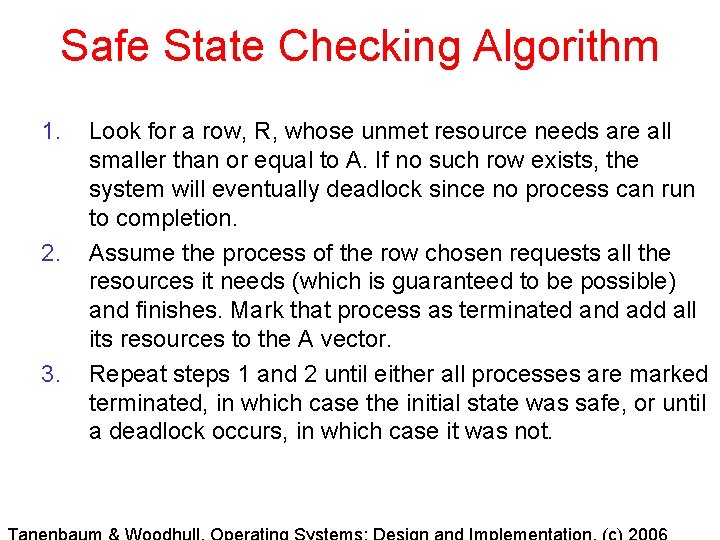
Safe State Checking Algorithm 1. 2. 3. Look for a row, R, whose unmet resource needs are all smaller than or equal to A. If no such row exists, the system will eventually deadlock since no process can run to completion. Assume the process of the row chosen requests all the resources it needs (which is guaranteed to be possible) and finishes. Mark that process as terminated and add all its resources to the A vector. Repeat steps 1 and 2 until either all processes are marked terminated, in which case the initial state was safe, or until a deadlock occurs, in which case it was not.
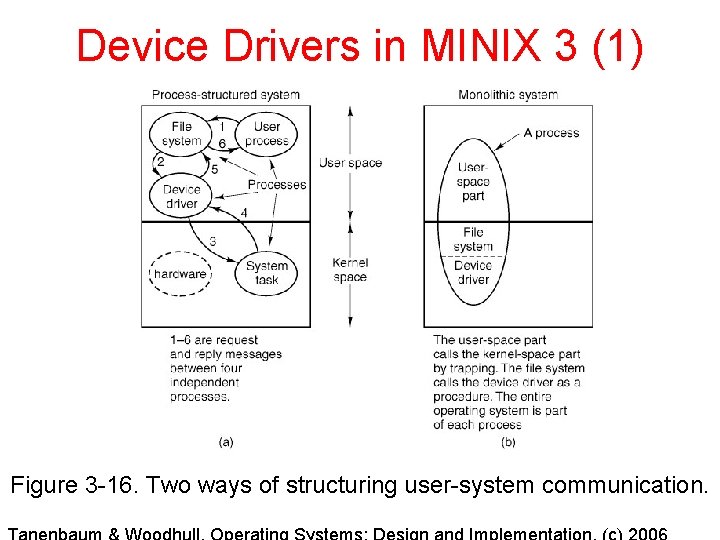
Device Drivers in MINIX 3 (1) Figure 3 -16. Two ways of structuring user-system communication.
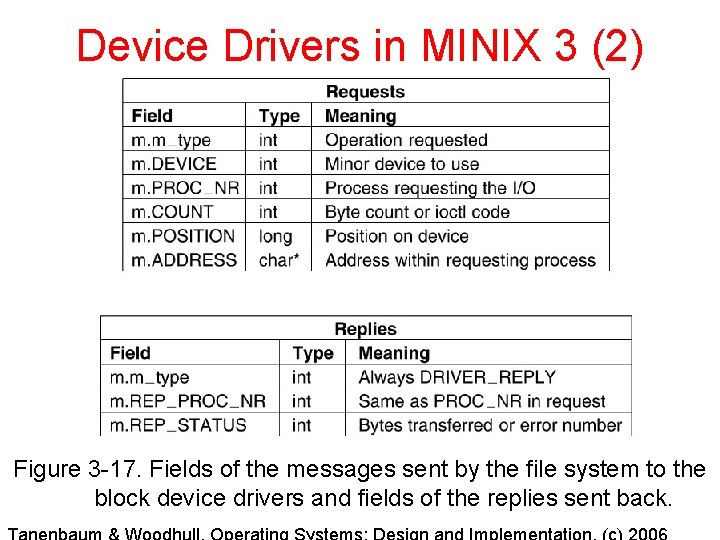
Device Drivers in MINIX 3 (2) Figure 3 -17. Fields of the messages sent by the file system to the block device drivers and fields of the replies sent back.
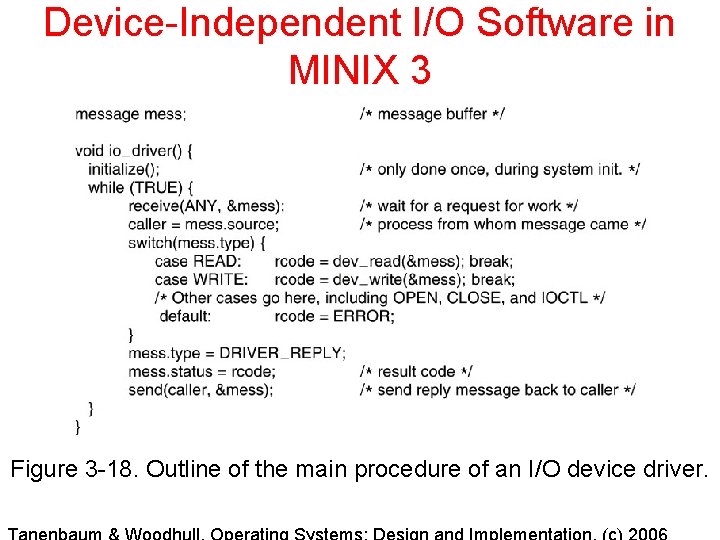
Device-Independent I/O Software in MINIX 3 Figure 3 -18. Outline of the main procedure of an I/O device driver.
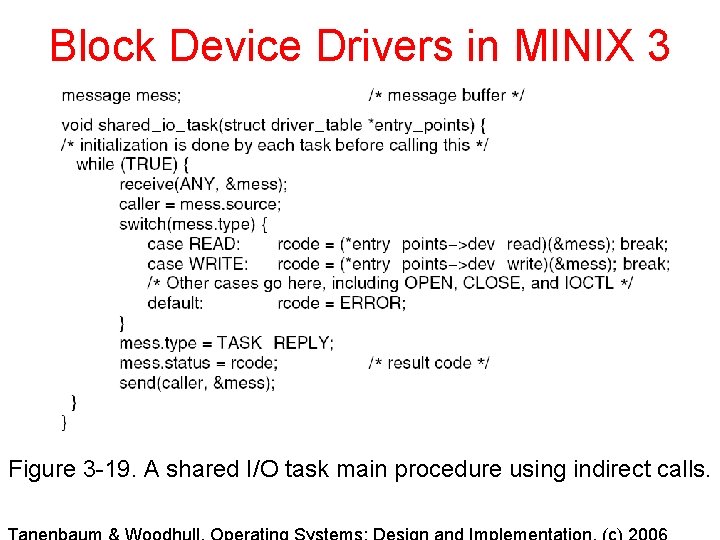
Block Device Drivers in MINIX 3 Figure 3 -19. A shared I/O task main procedure using indirect calls.
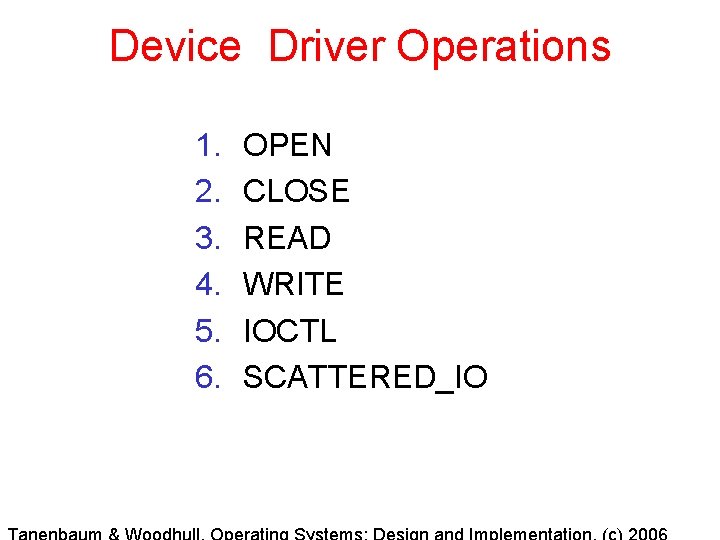
Device Driver Operations 1. 2. 3. 4. 5. 6. OPEN CLOSE READ WRITE IOCTL SCATTERED_IO
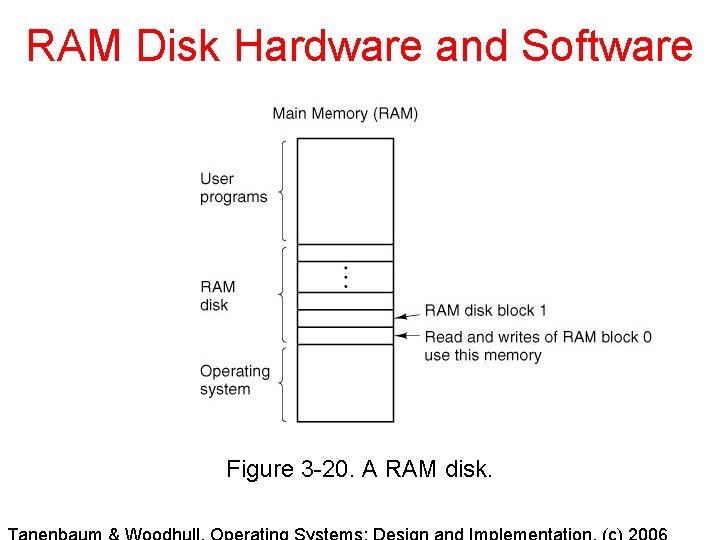
RAM Disk Hardware and Software Figure 3 -20. A RAM disk.
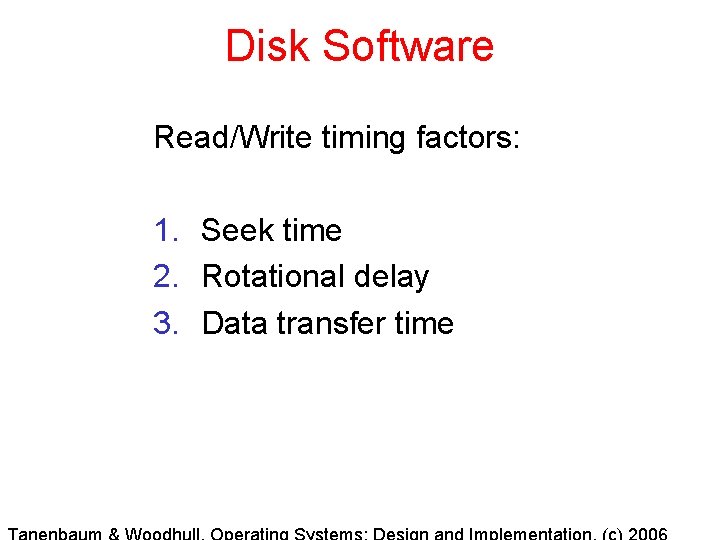
Disk Software Read/Write timing factors: 1. Seek time 2. Rotational delay 3. Data transfer time
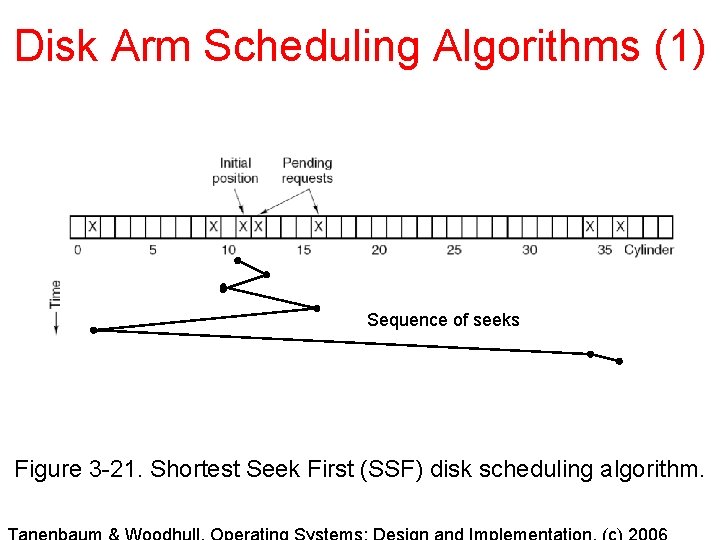
Disk Arm Scheduling Algorithms (1) Sequence of seeks Figure 3 -21. Shortest Seek First (SSF) disk scheduling algorithm.
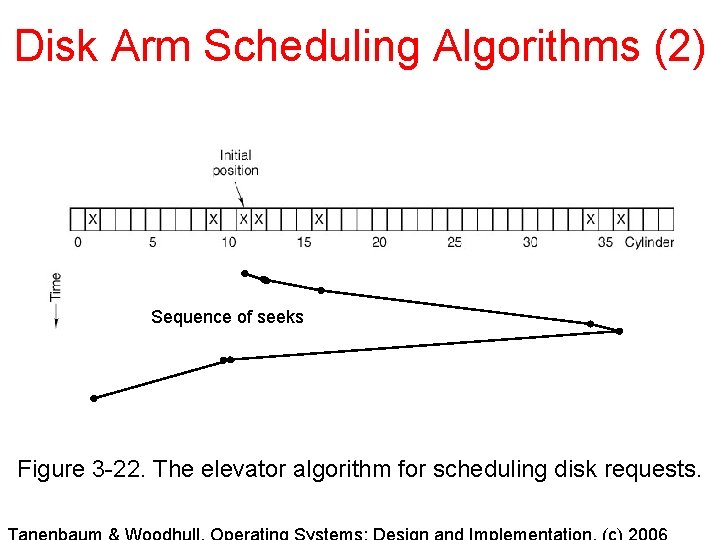
Disk Arm Scheduling Algorithms (2) Sequence of seeks Figure 3 -22. The elevator algorithm for scheduling disk requests.
Common Hard Drive Errors 1. Programming error - request for nonexistent sector 2. Transient checksum error - caused by dust on the head 3. Permanent checksum error - disk block physically damaged 4. Seek error - the arm sent to cylinder 6 but it went to 7 5. Controller error - controller refuses to accept commands
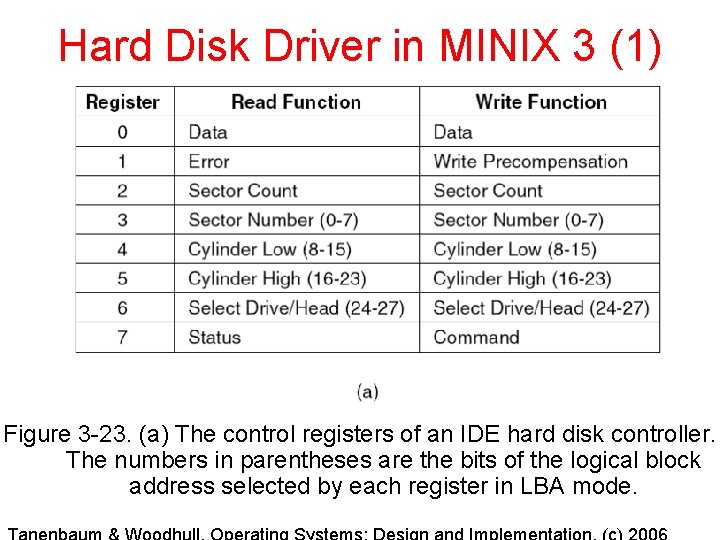
Hard Disk Driver in MINIX 3 (1) Figure 3 -23. (a) The control registers of an IDE hard disk controller. The numbers in parentheses are the bits of the logical block address selected by each register in LBA mode.
Write Precompensation A circular disk drive platter is divided into sectors (pie slices). If the same number of sectors are placed on an outer track as on an inner track, the sectors are physically smaller on the inner track. However, all the sectors hold the same amount of data. Write precompensation causes the drive to increase the current used when writing to the inner tracks to compensate for the greater density. The write precompensation field in the control registers for a drive indicates the track number where write precompensation begins. Many modern disks have a variable number of sectors per track, and do not need write precompensation.
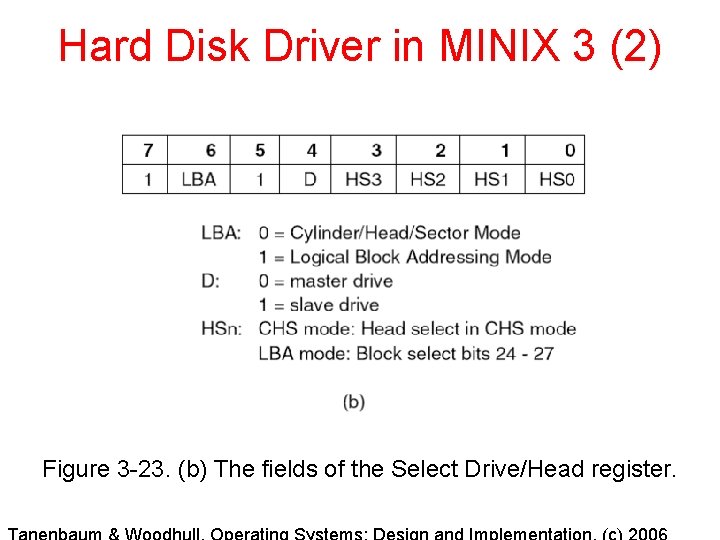
Hard Disk Driver in MINIX 3 (2) Figure 3 -23. (b) The fields of the Select Drive/Head register.
Floppy Disk Drive Characteristics that complicate the driver: 1. Removable media. 2. Multiple disk formats. 3. Motor control.
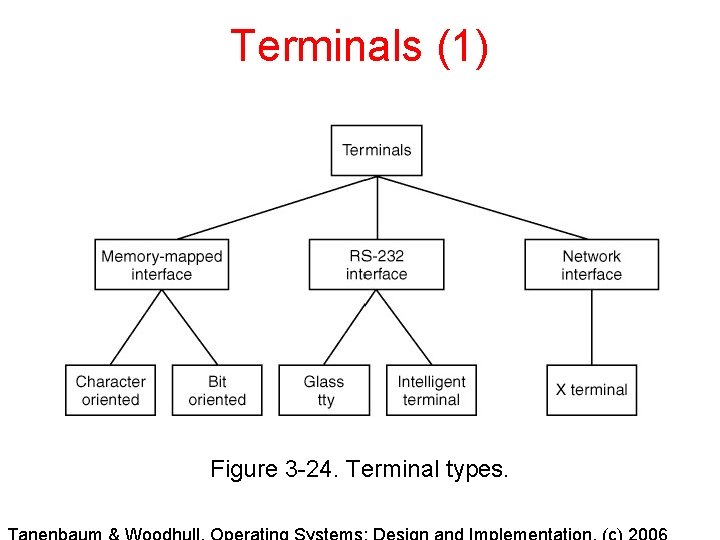
Terminals (1) Figure 3 -24. Terminal types.
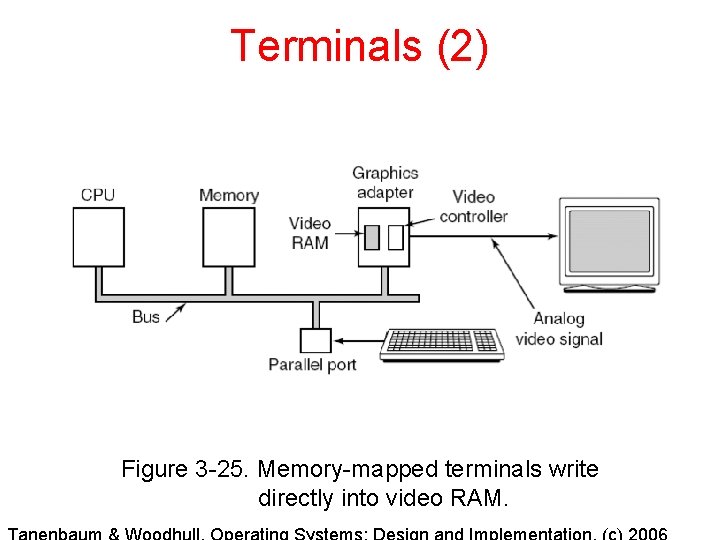
Terminals (2) Figure 3 -25. Memory-mapped terminals write directly into video RAM.
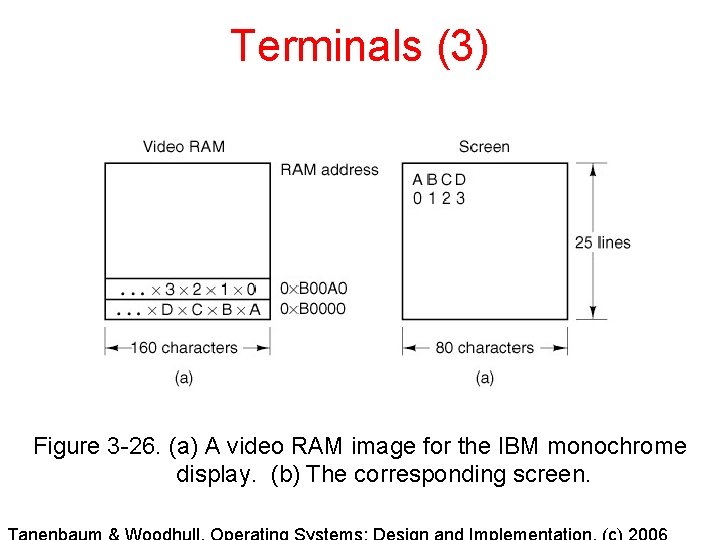
Terminals (3) Figure 3 -26. (a) A video RAM image for the IBM monochrome display. (b) The corresponding screen.
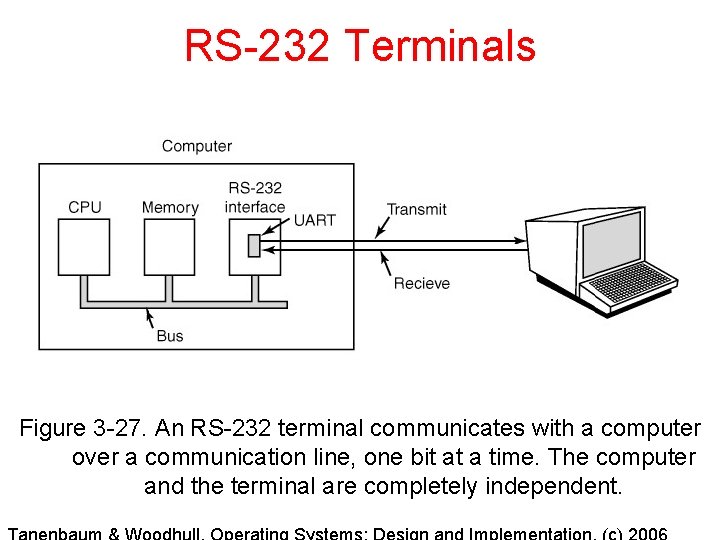
RS-232 Terminals Figure 3 -27. An RS-232 terminal communicates with a computer over a communication line, one bit at a time. The computer and the terminal are completely independent.
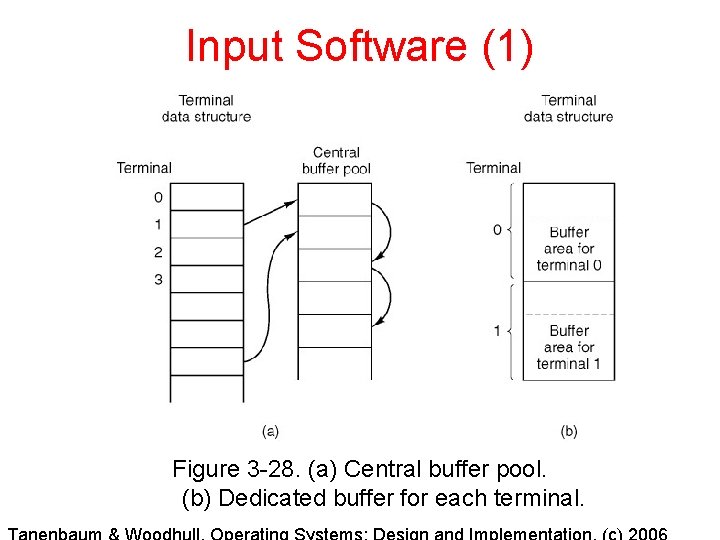
Input Software (1) Figure 3 -28. (a) Central buffer pool. (b) Dedicated buffer for each terminal.
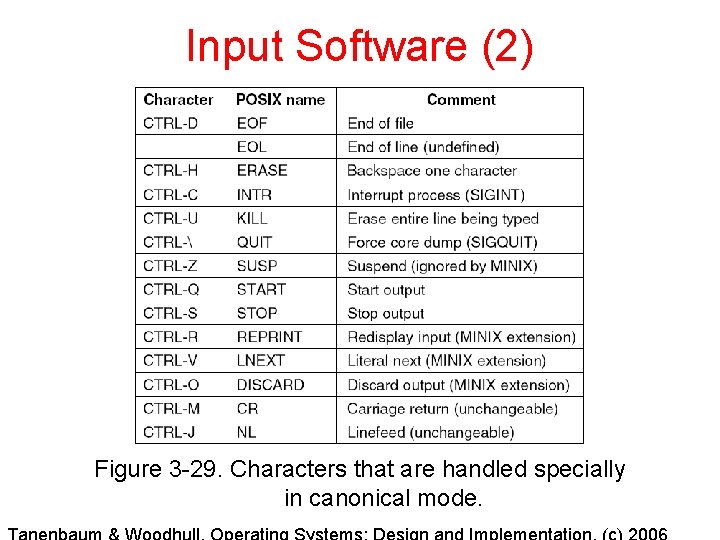
Input Software (2) Figure 3 -29. Characters that are handled specially in canonical mode.
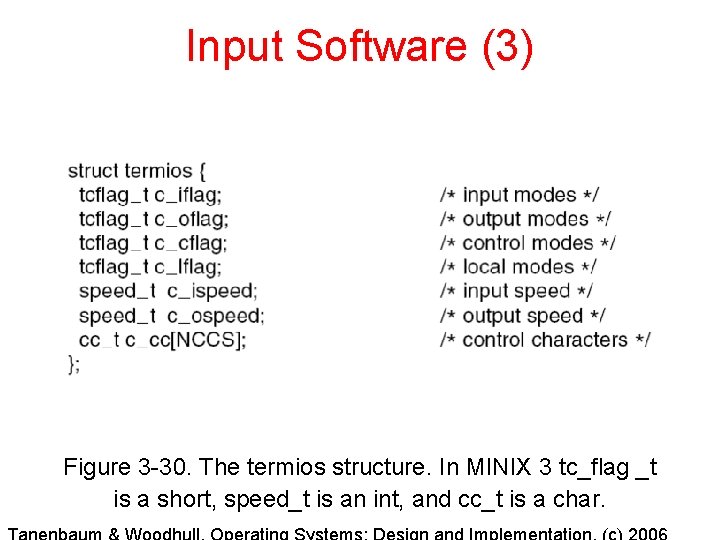
Input Software (3) Figure 3 -30. The termios structure. In MINIX 3 tc_flag _t is a short, speed_t is an int, and cc_t is a char.
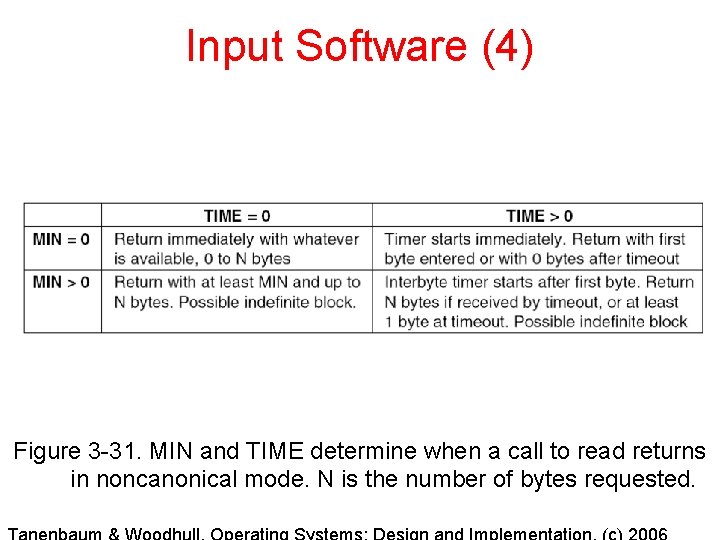
Input Software (4) Figure 3 -31. MIN and TIME determine when a call to read returns in noncanonical mode. N is the number of bytes requested.
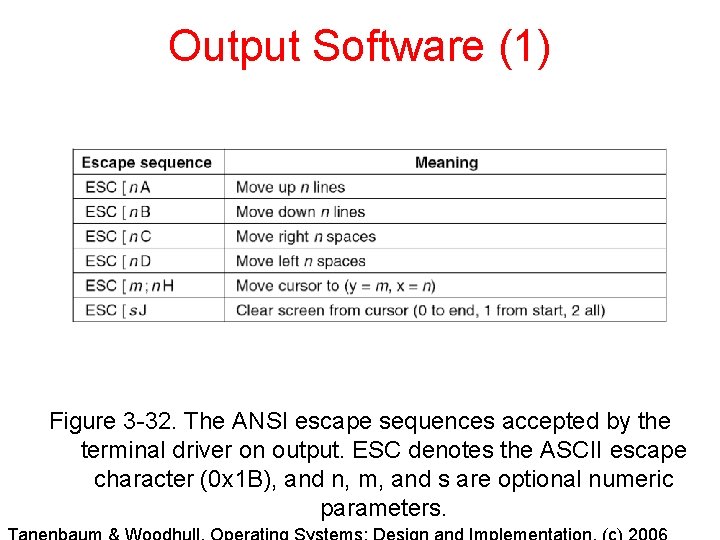
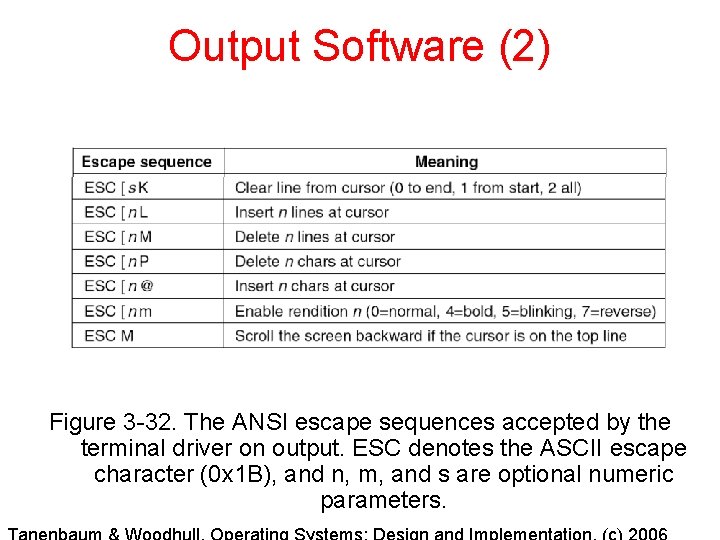
Output Software (1) Figure 3 -32. The ANSI escape sequences accepted by the terminal driver on output. ESC denotes the ASCII escape character (0 x 1 B), and n, m, and s are optional numeric parameters.
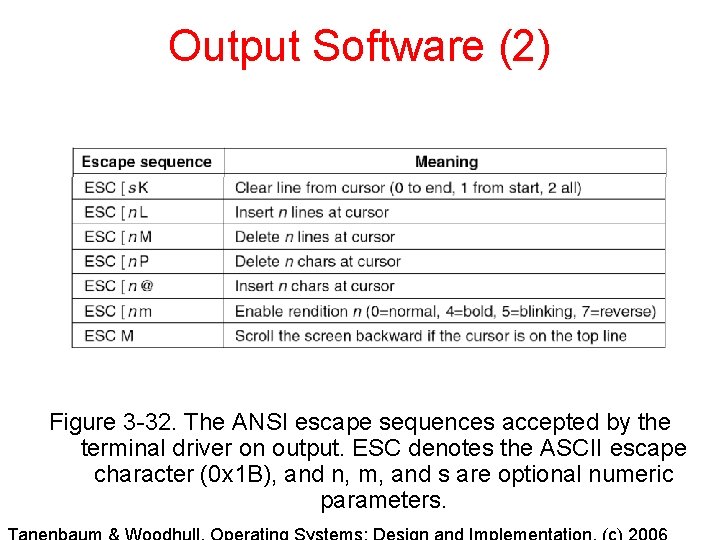
Output Software (2) Figure 3 -32. The ANSI escape sequences accepted by the terminal driver on output. ESC denotes the ASCII escape character (0 x 1 B), and n, m, and s are optional numeric parameters.
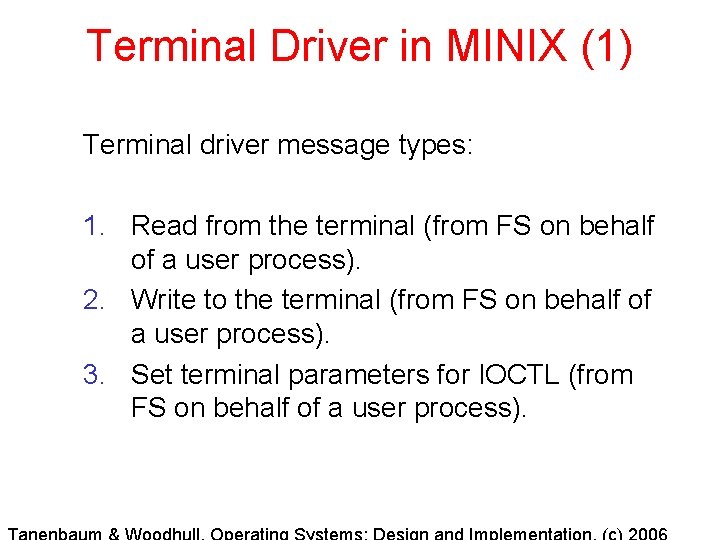
Terminal Driver in MINIX (1) Terminal driver message types: 1. Read from the terminal (from FS on behalf of a user process). 2. Write to the terminal (from FS on behalf of a user process). 3. Set terminal parameters for IOCTL (from FS on behalf of a user process).
Terminal Driver in MINIX (2) Terminal driver message types (continued): 1. I/O occurred during last clock tick (from the clock interrupt). 2. Cancel previous request (from the file system when a signal occurs). 3. Open a device. 4. Close a device.
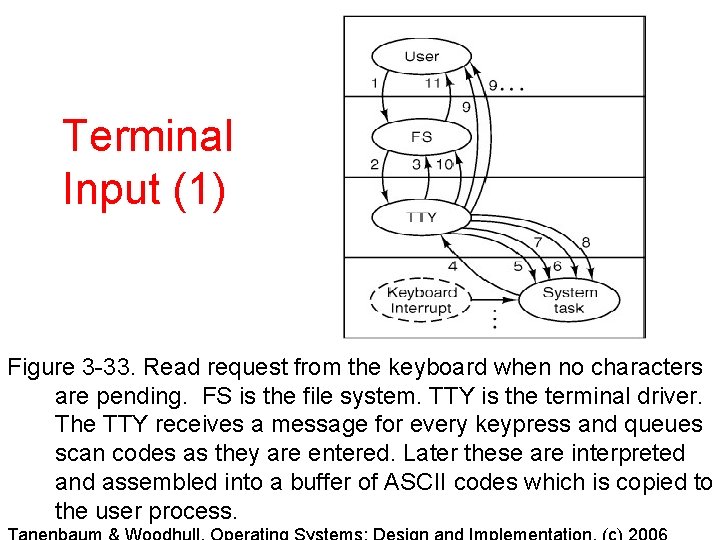
Terminal Input (1) Figure 3 -33. Read request from the keyboard when no characters are pending. FS is the file system. TTY is the terminal driver. The TTY receives a message for every keypress and queues scan codes as they are entered. Later these are interpreted and assembled into a buffer of ASCII codes which is copied to the user process.
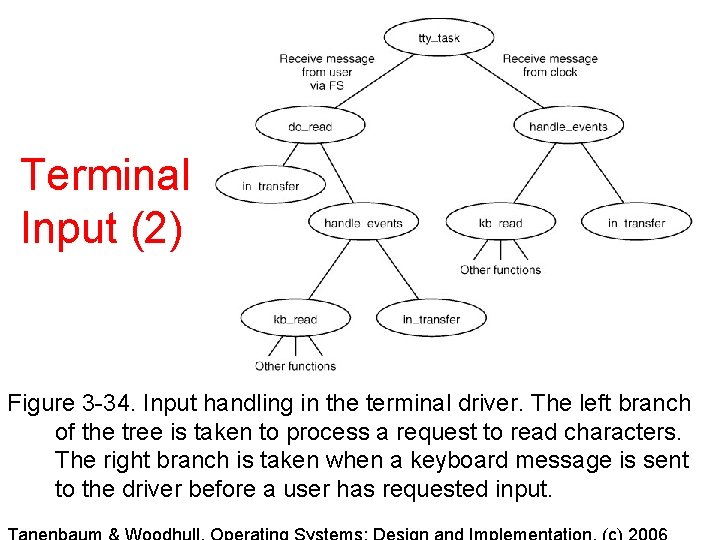
Terminal Input (2) Figure 3 -34. Input handling in the terminal driver. The left branch of the tree is taken to process a request to read characters. The right branch is taken when a keyboard message is sent to the driver before a user has requested input.
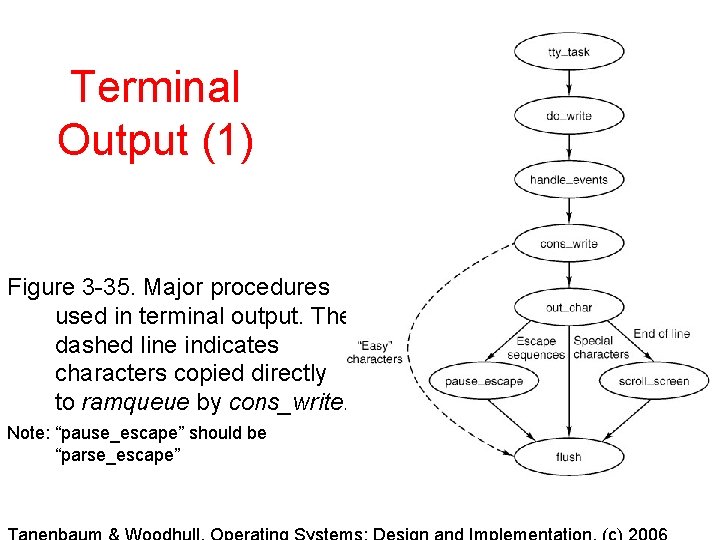
Terminal Output (1) Figure 3 -35. Major procedures used in terminal output. The dashed line indicates characters copied directly to ramqueue by cons_write. Note: “pause_escape” should be “parse_escape”
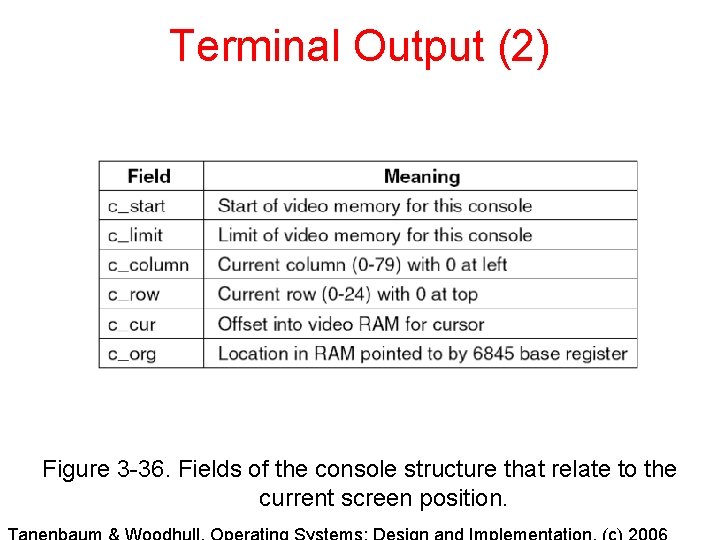
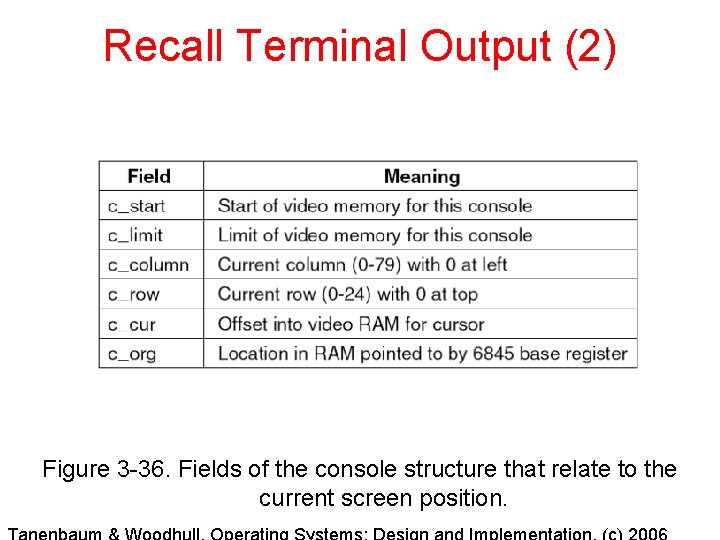
Terminal Output (2) Figure 3 -36. Fields of the console structure that relate to the current screen position.
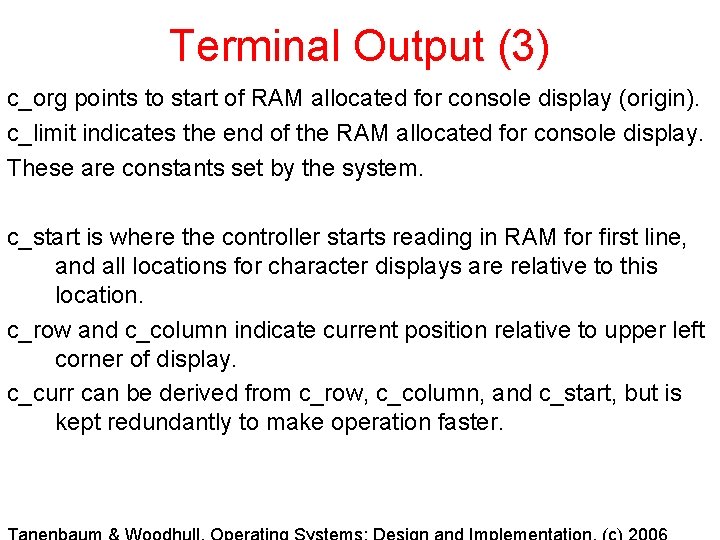
Terminal Output (3) c_org points to start of RAM allocated for console display (origin). c_limit indicates the end of the RAM allocated for console display. These are constants set by the system. c_start is where the controller starts reading in RAM for first line, and all locations for character displays are relative to this location. c_row and c_column indicate current position relative to upper left corner of display. c_curr can be derived from c_row, c_column, and c_start, but is kept redundantly to make operation faster.
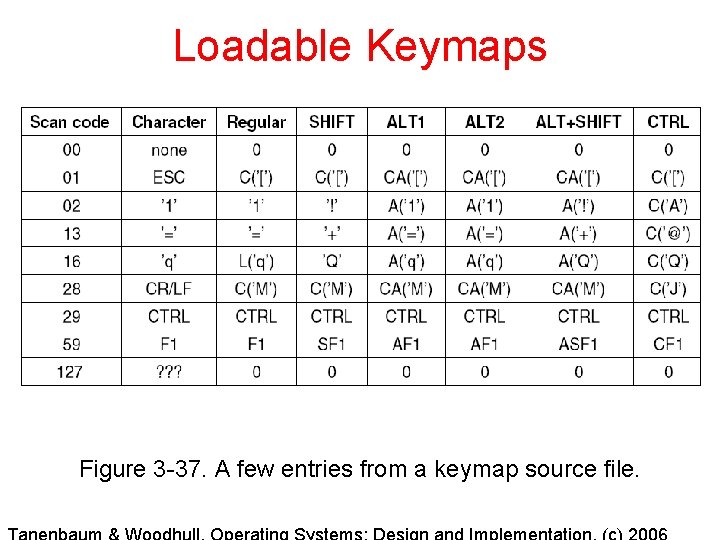
Loadable Keymaps Figure 3 -37. A few entries from a keymap source file.
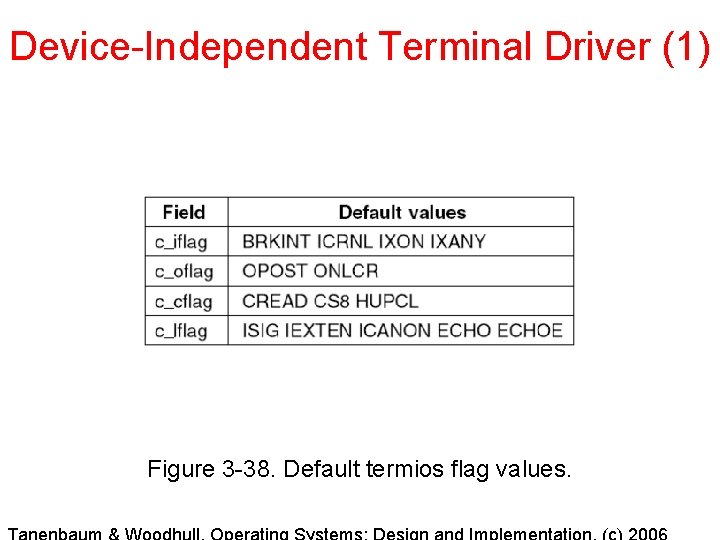
Device-Independent Terminal Driver (1) Figure 3 -38. Default termios flag values.
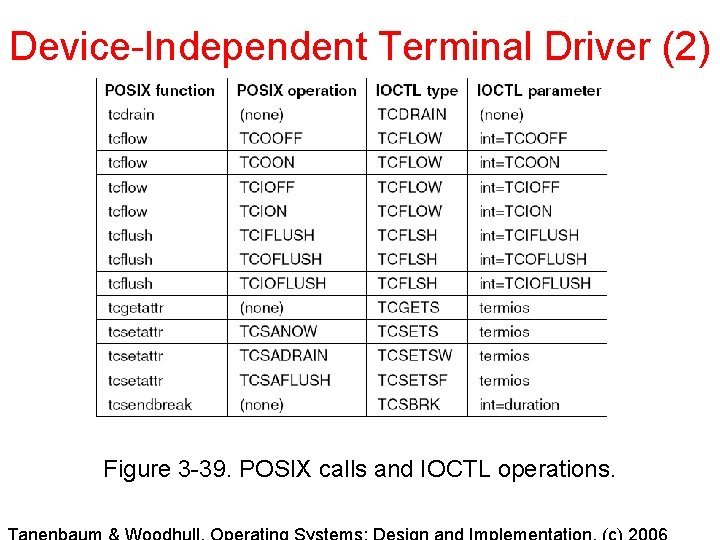
Device-Independent Terminal Driver (2) Figure 3 -39. POSIX calls and IOCTL operations.
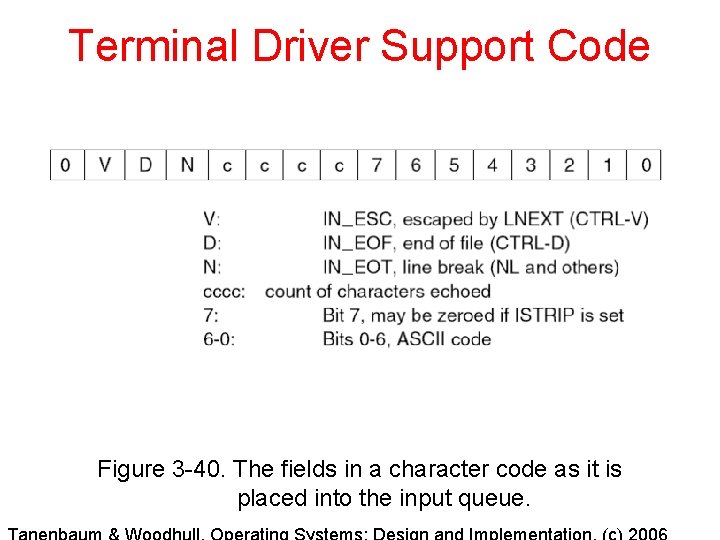
Terminal Driver Support Code Figure 3 -40. The fields in a character code as it is placed into the input queue.
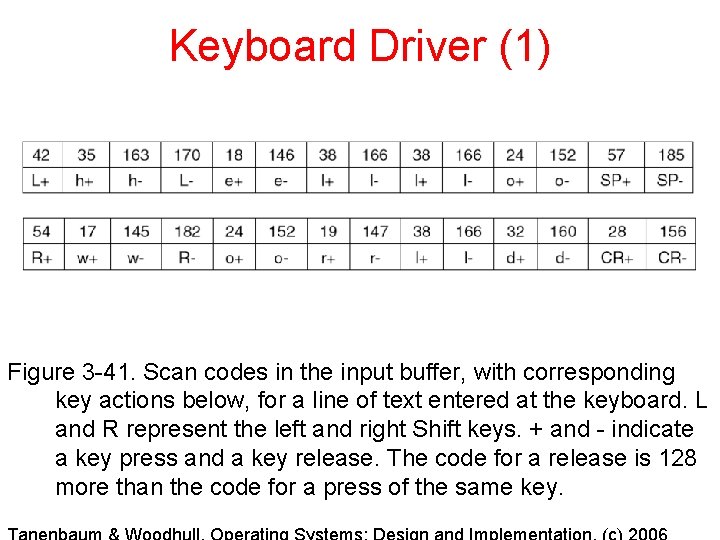
Keyboard Driver (1) Figure 3 -41. Scan codes in the input buffer, with corresponding key actions below, for a line of text entered at the keyboard. L and R represent the left and right Shift keys. + and - indicate a key press and a key release. The code for a release is 128 more than the code for a press of the same key.
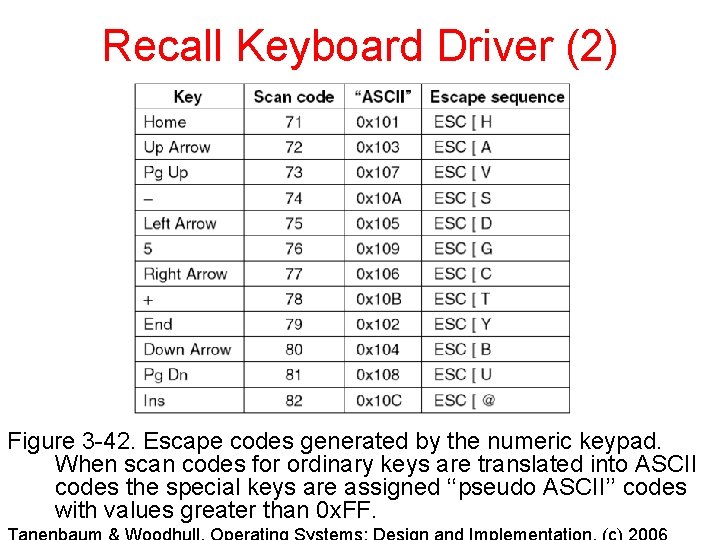
Recall Keyboard Driver (2) Figure 3 -42. Escape codes generated by the numeric keypad. When scan codes for ordinary keys are translated into ASCII codes the special keys are assigned ‘‘pseudo ASCII’’ codes with values greater than 0 x. FF.
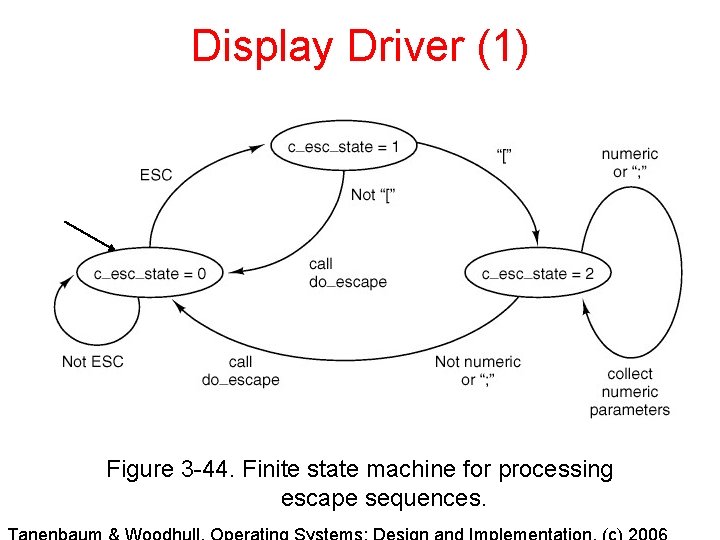
Display Driver (1) Figure 3 -44. Finite state machine for processing escape sequences.
Output Software (2) Figure 3 -32. The ANSI escape sequences accepted by the terminal driver on output. ESC denotes the ASCII escape character (0 x 1 B), and n, m, and s are optional numeric parameters.
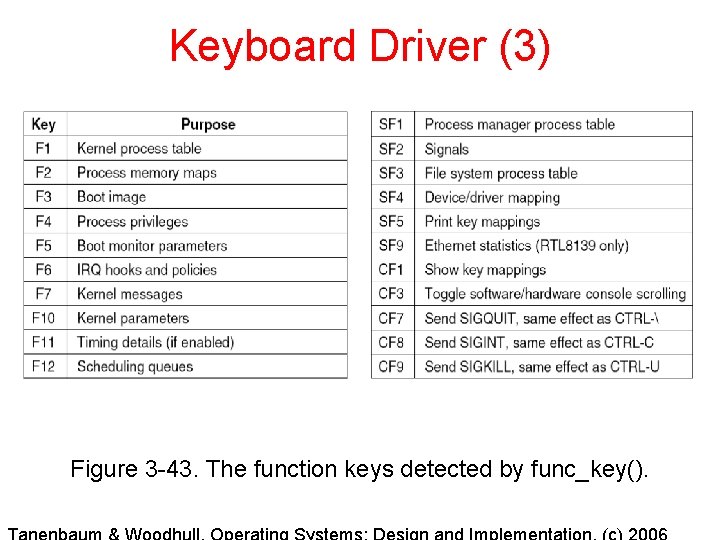
Keyboard Driver (3) Figure 3 -43. The function keys detected by func_key().
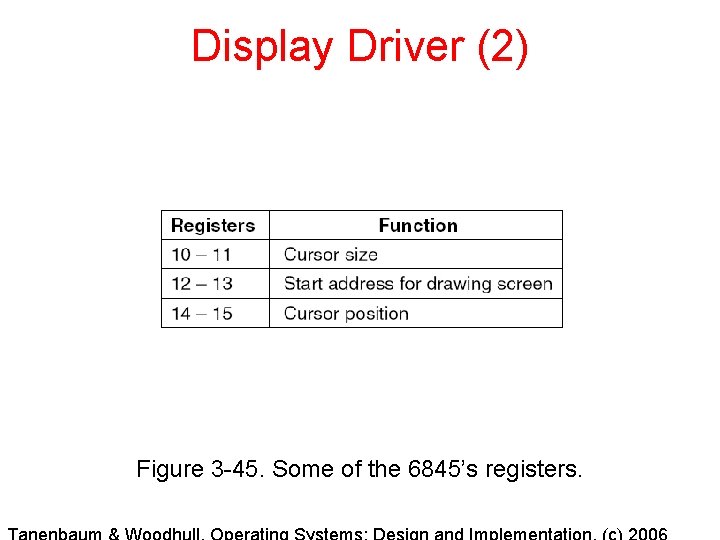
Display Driver (2) Figure 3 -45. Some of the 6845’s registers.
Recall Terminal Output (2) Figure 3 -36. Fields of the console structure that relate to the current screen position.