
OPERATING SYSTEMS DESIGN AND IMPLEMENTATION Third Edition ANDREW

- Slides: 65
OPERATING SYSTEMS DESIGN AND IMPLEMENTATION Third Edition ANDREW S. TANENBAUM ALBERT S. WOODHULL Chapter 4 Memory Management
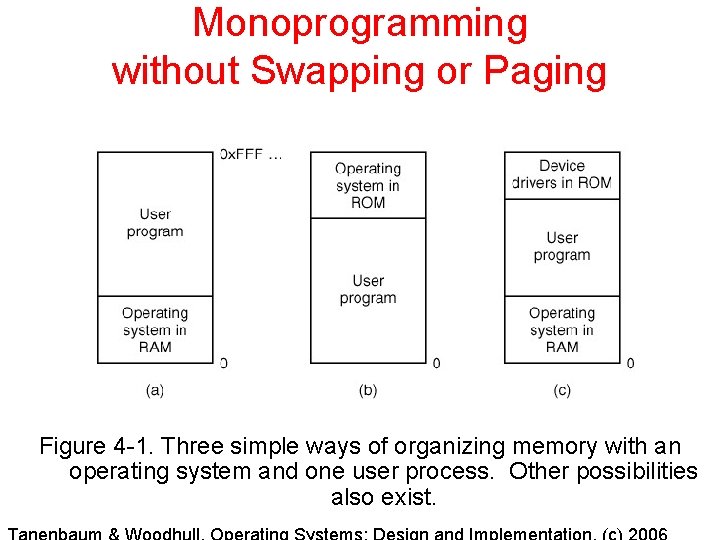
Monoprogramming without Swapping or Paging Figure 4 -1. Three simple ways of organizing memory with an operating system and one user process. Other possibilities also exist.
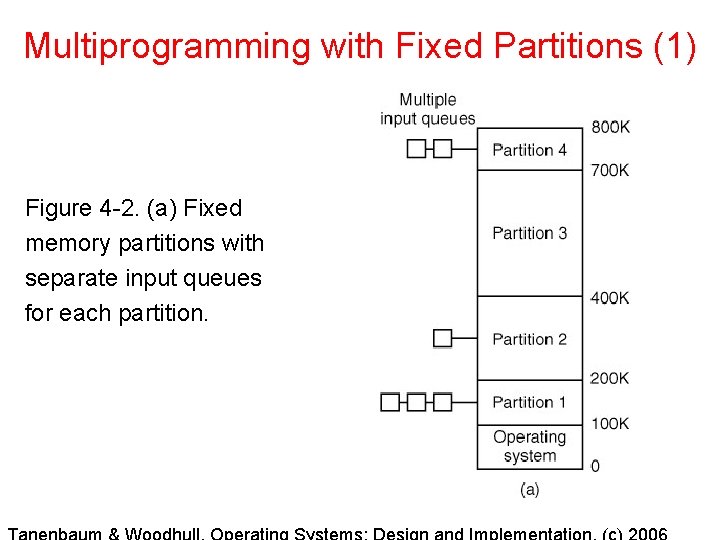
Multiprogramming with Fixed Partitions (1) Figure 4 -2. (a) Fixed memory partitions with separate input queues for each partition.
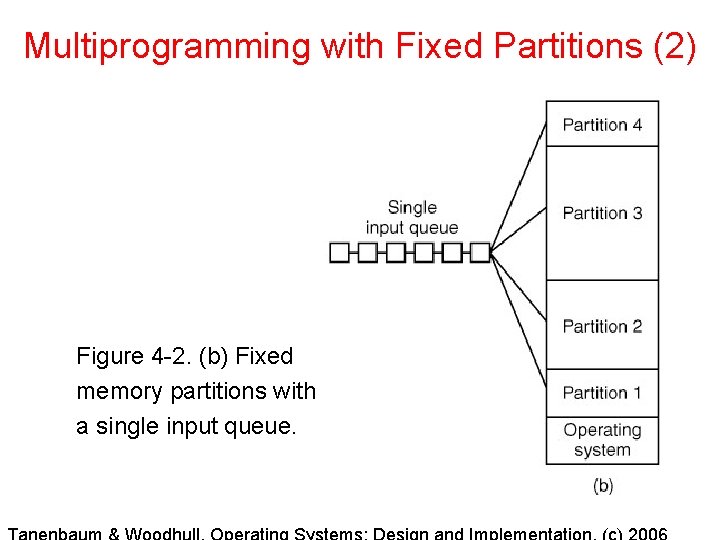
Multiprogramming with Fixed Partitions (2) Figure 4 -2. (b) Fixed memory partitions with a single input queue.
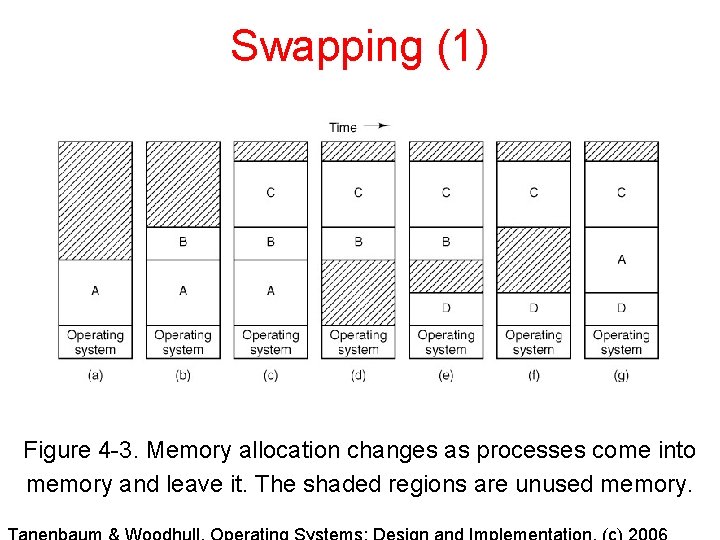
Swapping (1) Figure 4 -3. Memory allocation changes as processes come into memory and leave it. The shaded regions are unused memory.
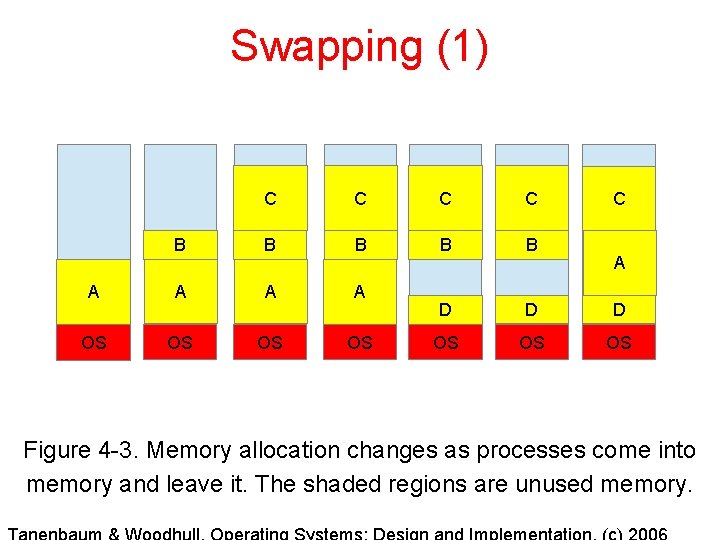
Swapping (1) C C B B B A A D D D OS OS C A Figure 4 -3. Memory allocation changes as processes come into memory and leave it. The shaded regions are unused memory.
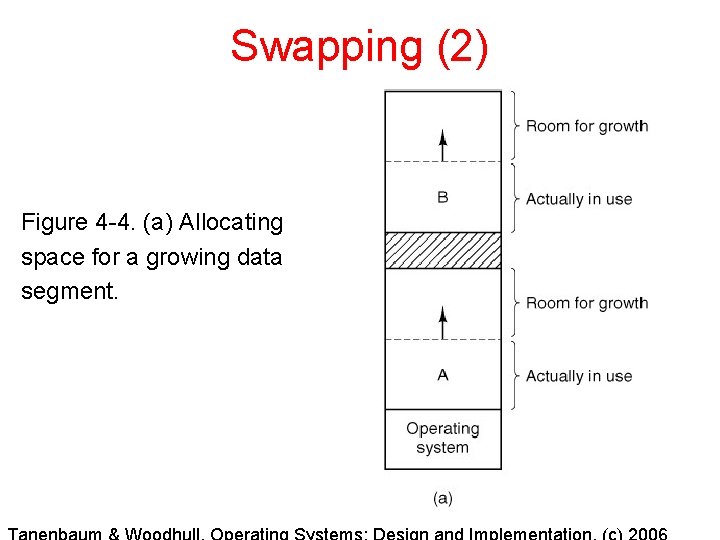
Swapping (2) Figure 4 -4. (a) Allocating space for a growing data segment.
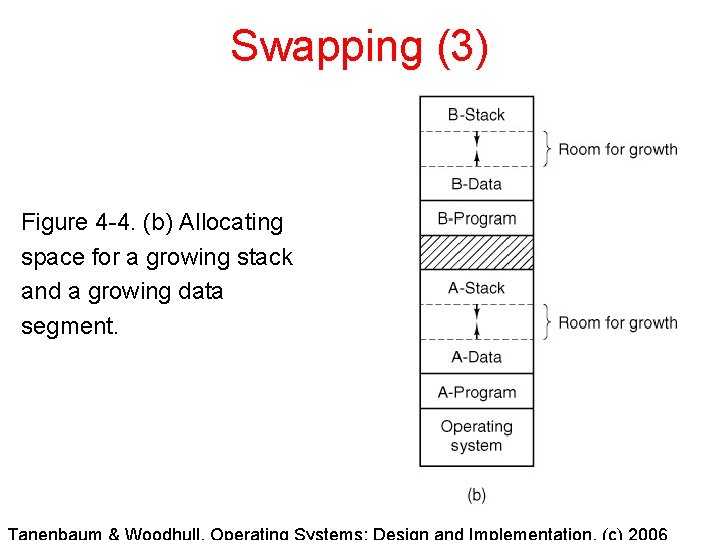
Swapping (3) Figure 4 -4. (b) Allocating space for a growing stack and a growing data segment.
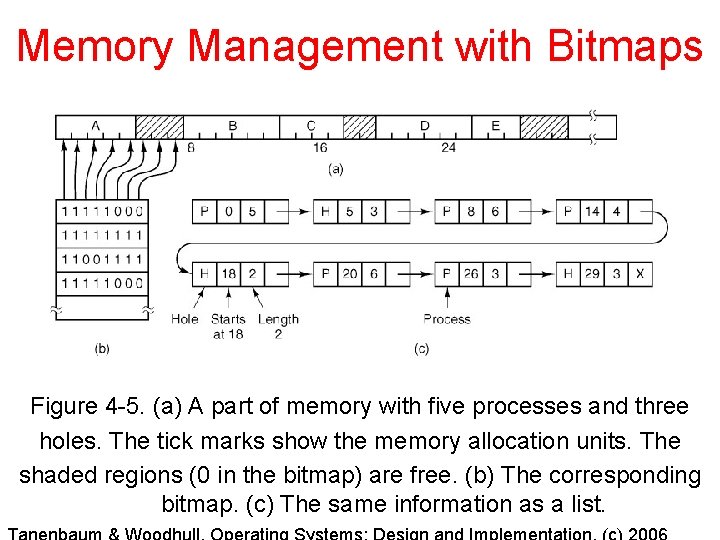
Memory Management with Bitmaps Figure 4 -5. (a) A part of memory with five processes and three holes. The tick marks show the memory allocation units. The shaded regions (0 in the bitmap) are free. (b) The corresponding bitmap. (c) The same information as a list.
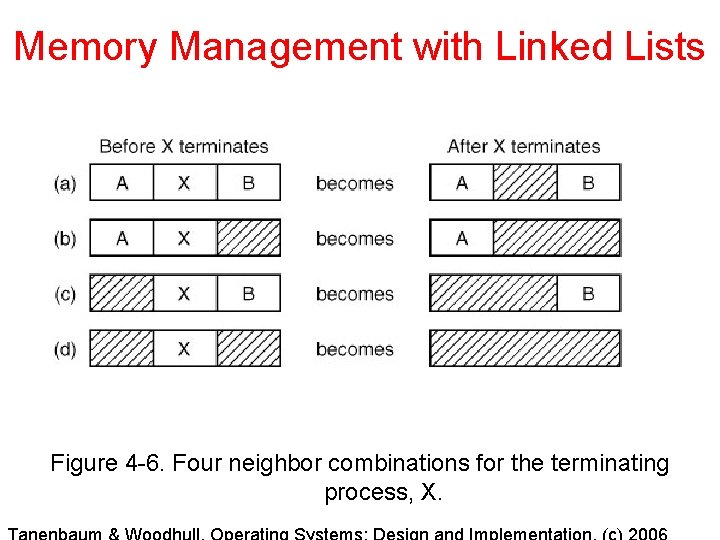
Memory Management with Linked Lists Figure 4 -6. Four neighbor combinations for the terminating process, X.
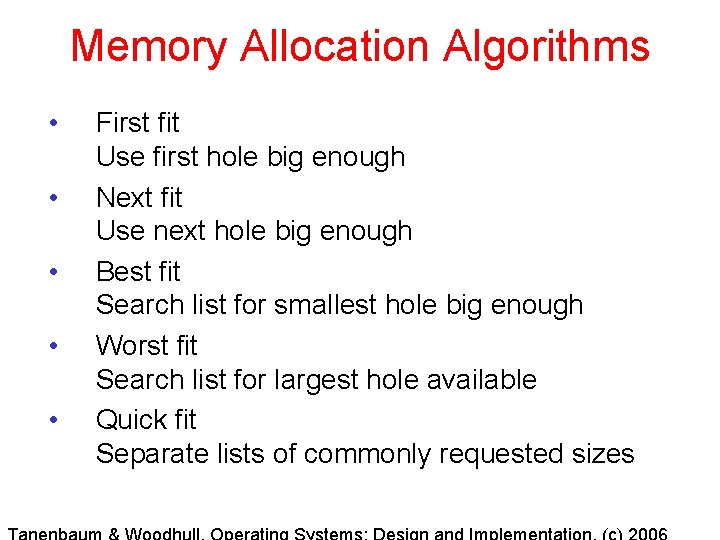
Memory Allocation Algorithms • • • First fit Use first hole big enough Next fit Use next hole big enough Best fit Search list for smallest hole big enough Worst fit Search list for largest hole available Quick fit Separate lists of commonly requested sizes
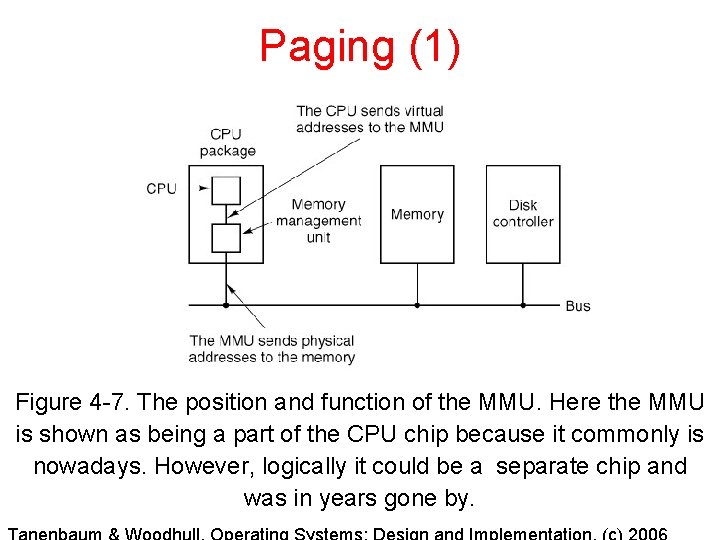
Paging (1) Figure 4 -7. The position and function of the MMU. Here the MMU is shown as being a part of the CPU chip because it commonly is nowadays. However, logically it could be a separate chip and was in years gone by.
Paging (2) Figure 4 -8. The relation between virtual addresses and physical memory addresses is given by the page table.
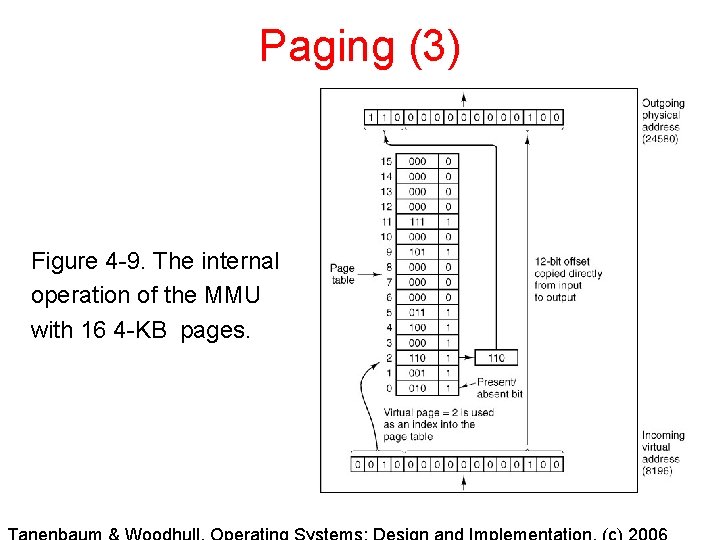
Paging (3) Figure 4 -9. The internal operation of the MMU with 16 4 -KB pages.
Page Tables • Purpose : map virtual pages onto page frames • Major issues to be faced 1. The page table can be extremely large 2. The mapping must be fast.
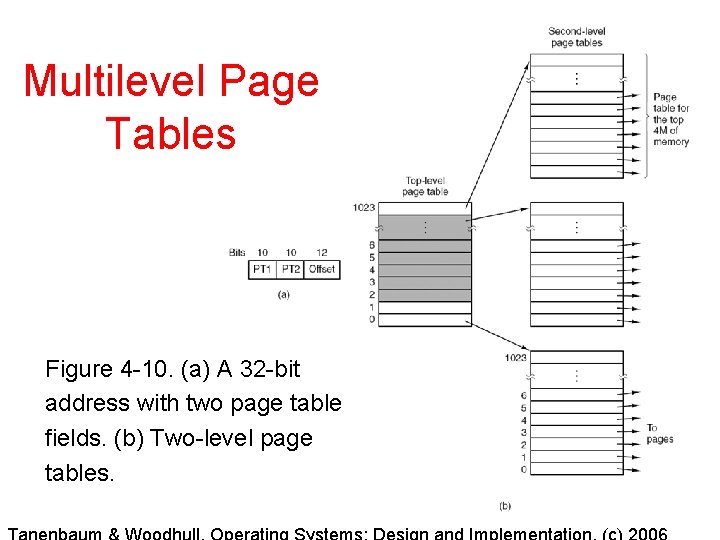
Multilevel Page Tables Figure 4 -10. (a) A 32 -bit address with two page table fields. (b) Two-level page tables.
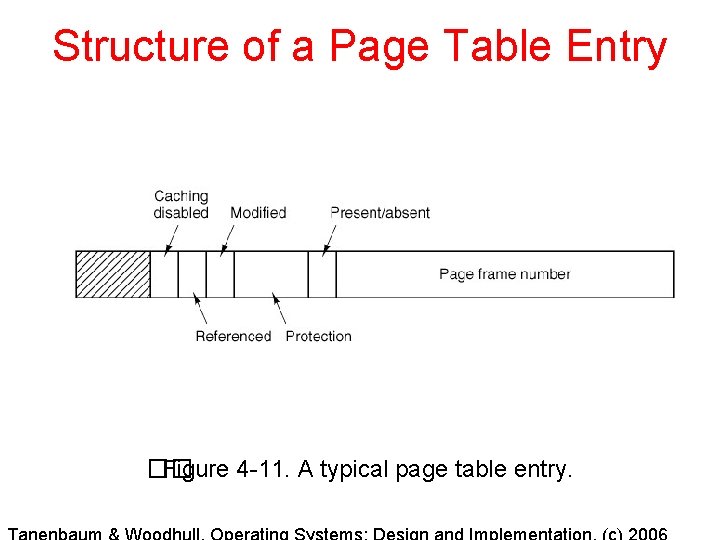
Structure of a Page Table Entry �� Figure 4 -11. A typical page table entry.
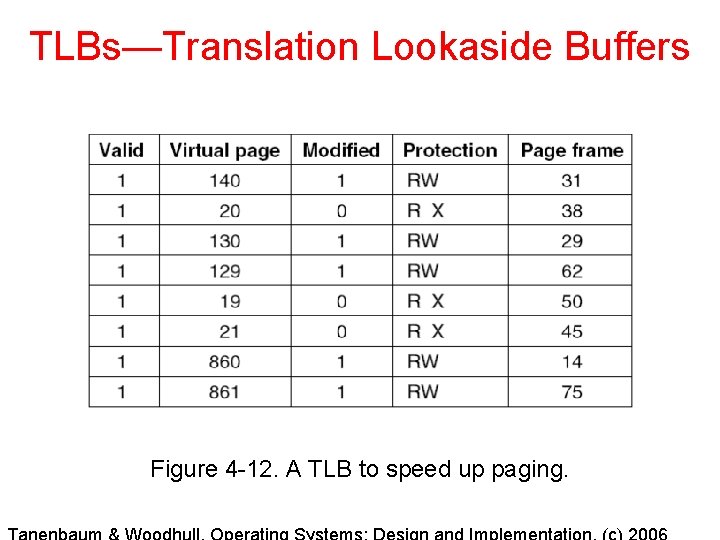
TLBs—Translation Lookaside Buffers Figure 4 -12. A TLB to speed up paging.
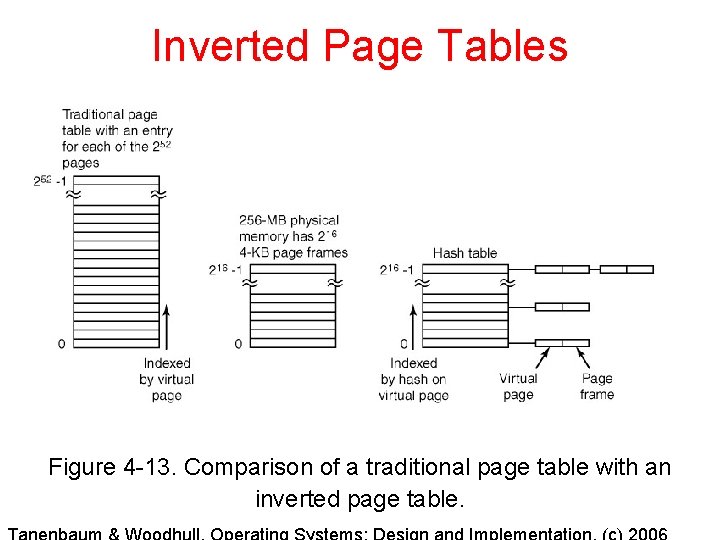
Inverted Page Tables Figure 4 -13. Comparison of a traditional page table with an inverted page table.
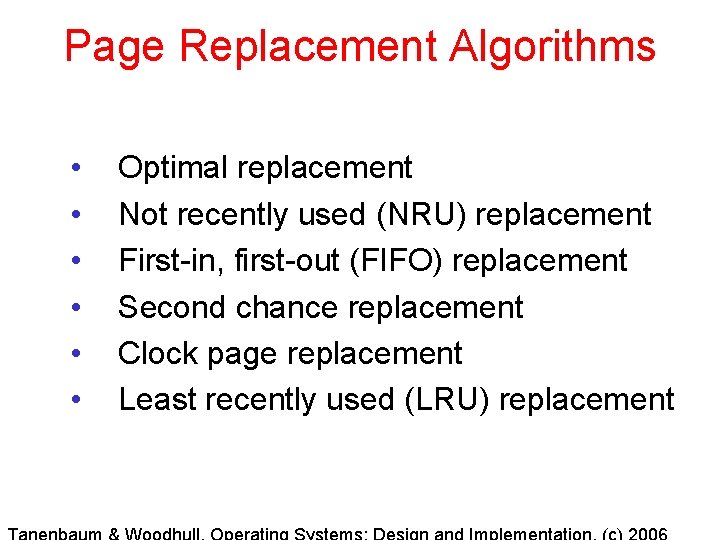
Page Replacement Algorithms • • • Optimal replacement Not recently used (NRU) replacement First-in, first-out (FIFO) replacement Second chance replacement Clock page replacement Least recently used (LRU) replacement
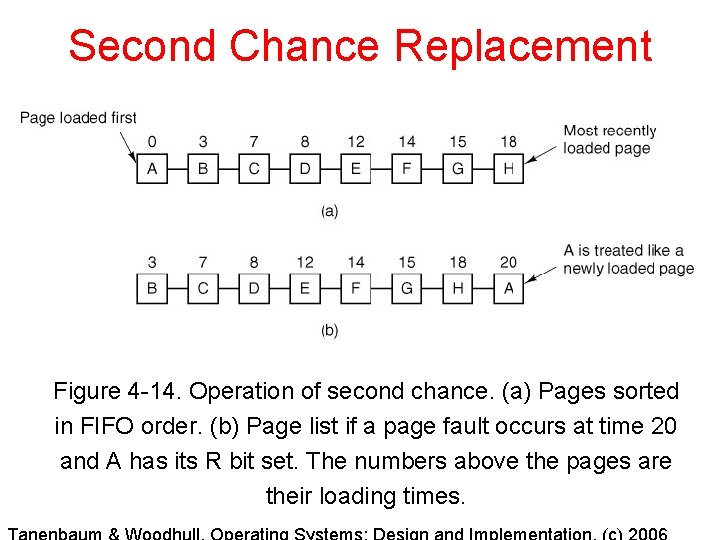
Second Chance Replacement Figure 4 -14. Operation of second chance. (a) Pages sorted in FIFO order. (b) Page list if a page fault occurs at time 20 and A has its R bit set. The numbers above the pages are their loading times.
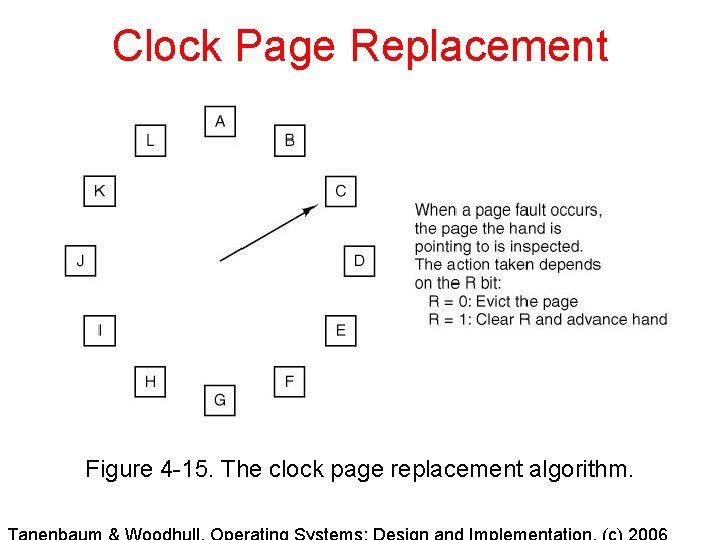
Clock Page Replacement Figure 4 -15. The clock page replacement algorithm.
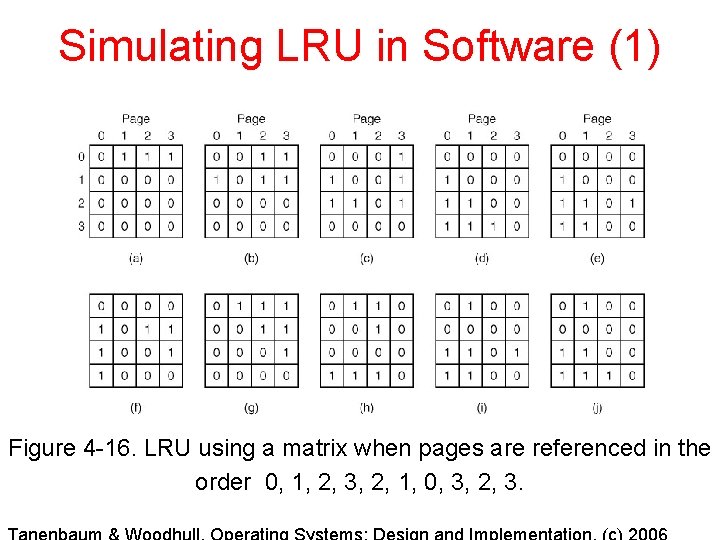
Simulating LRU in Software (1) Figure 4 -16. LRU using a matrix when pages are referenced in the order 0, 1, 2, 3, 2, 1, 0, 3, 2, 3.
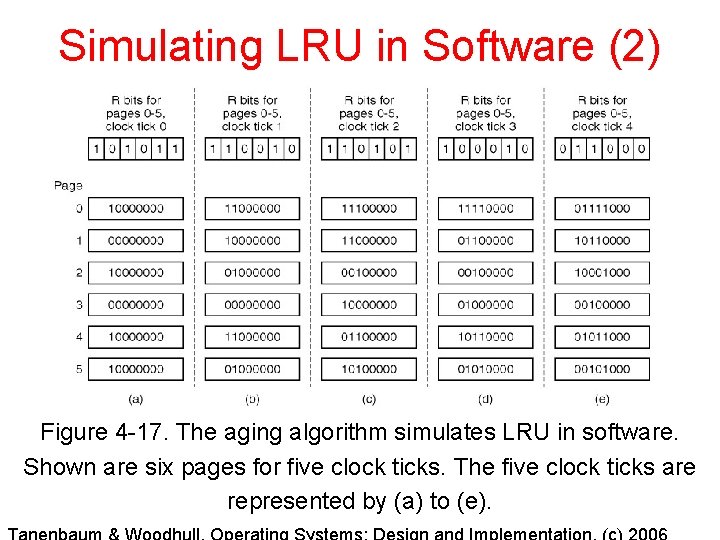
Simulating LRU in Software (2) Figure 4 -17. The aging algorithm simulates LRU in software. Shown are six pages for five clock ticks. The five clock ticks are represented by (a) to (e).
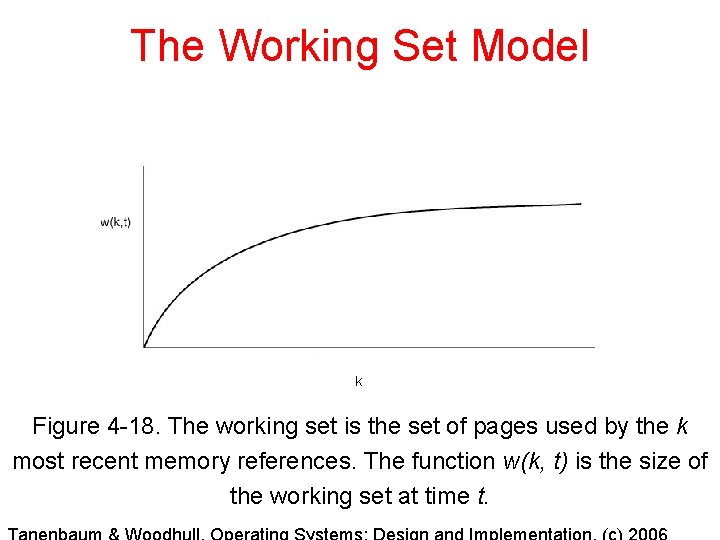
The Working Set Model k Figure 4 -18. The working set is the set of pages used by the k most recent memory references. The function w(k, t) is the size of the working set at time t.
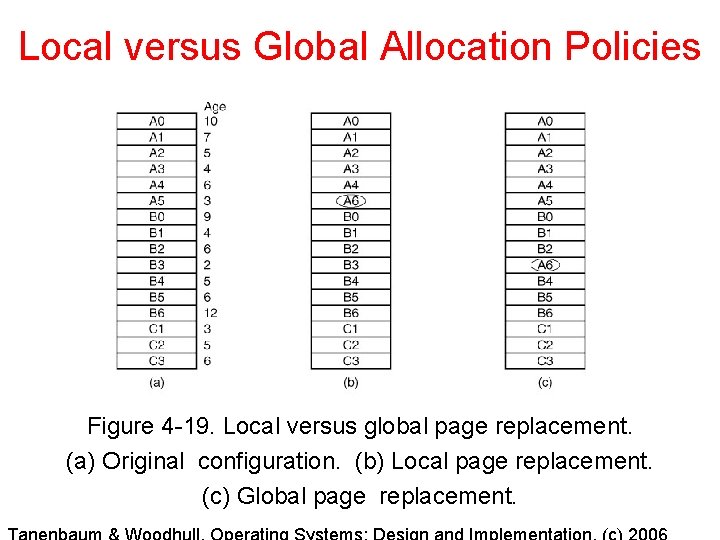
Local versus Global Allocation Policies Figure 4 -19. Local versus global page replacement. (a) Original configuration. (b) Local page replacement. (c) Global page replacement.
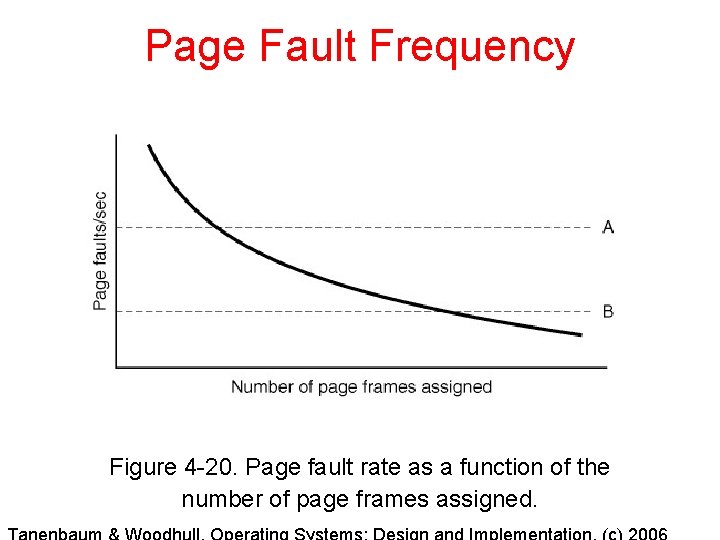
Page Fault Frequency Figure 4 -20. Page fault rate as a function of the number of page frames assigned.
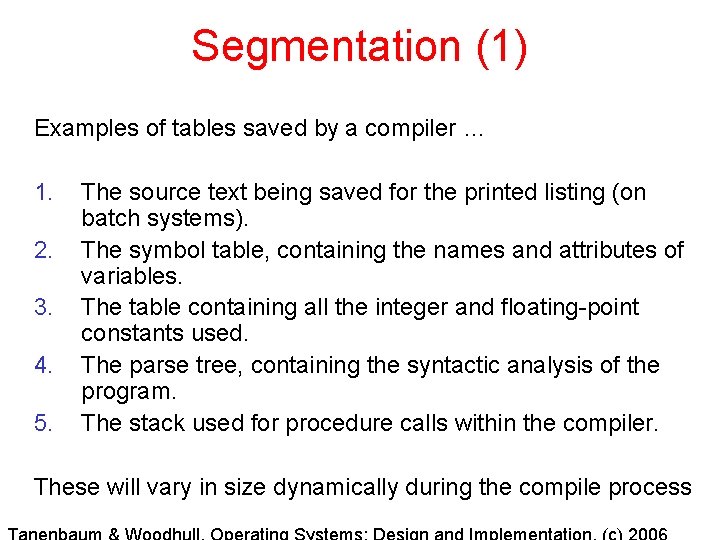
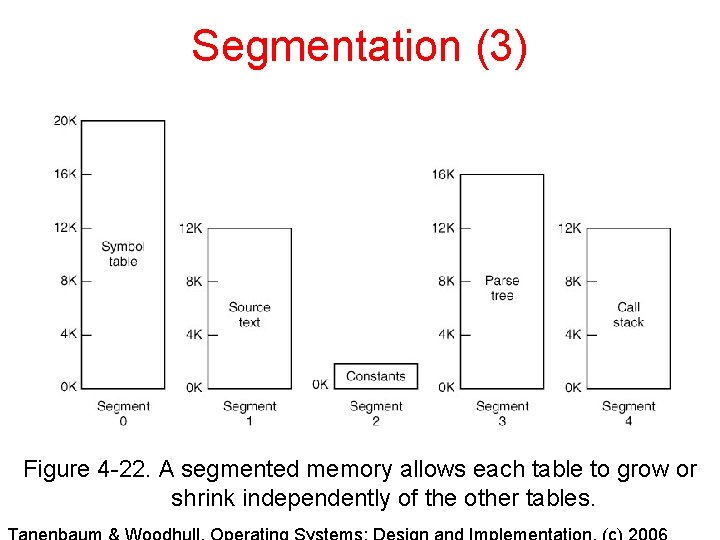
Segmentation (1) Examples of tables saved by a compiler … 1. 2. 3. 4. 5. The source text being saved for the printed listing (on batch systems). The symbol table, containing the names and attributes of variables. The table containing all the integer and floating-point constants used. The parse tree, containing the syntactic analysis of the program. The stack used for procedure calls within the compiler. These will vary in size dynamically during the compile process
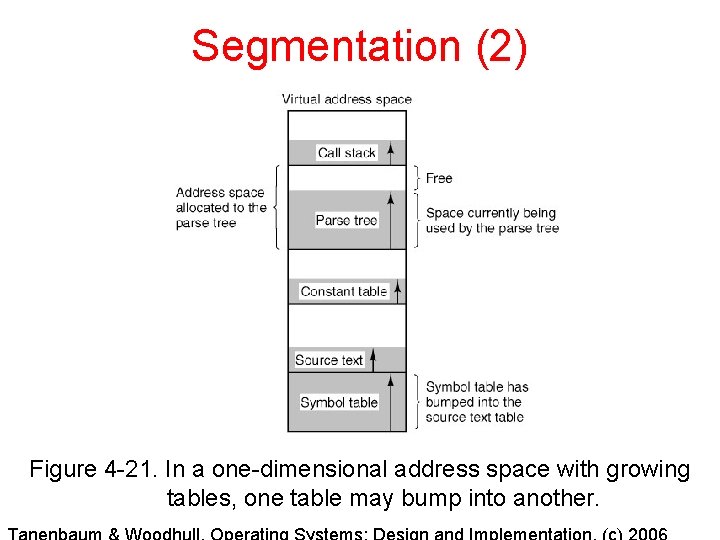
Segmentation (2) Figure 4 -21. In a one-dimensional address space with growing tables, one table may bump into another.
Segmentation (3) Figure 4 -22. A segmented memory allows each table to grow or shrink independently of the other tables.
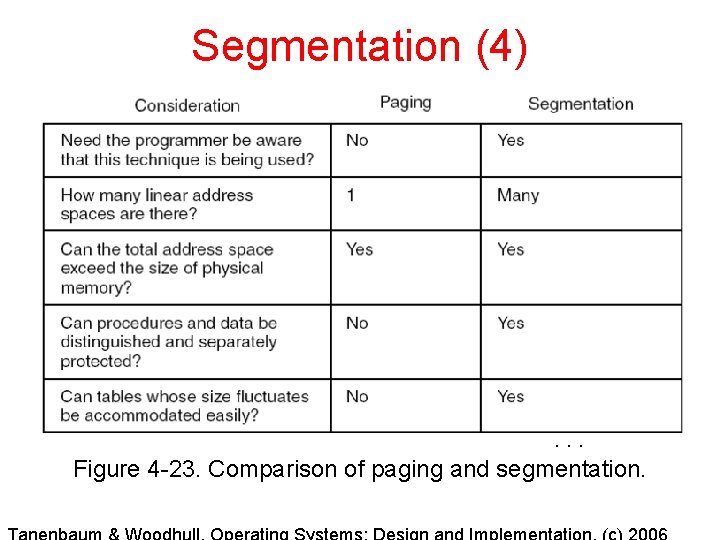
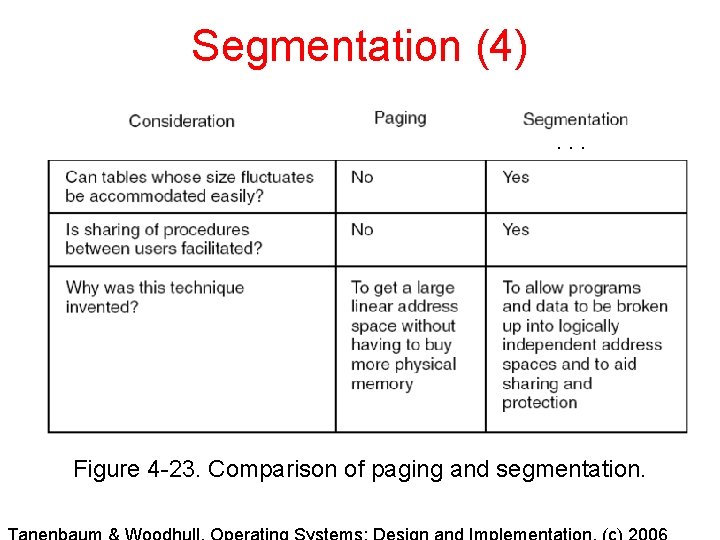
Segmentation (4) . . . Figure 4 -23. Comparison of paging and segmentation.
Segmentation (4). . . Figure 4 -23. Comparison of paging and segmentation.
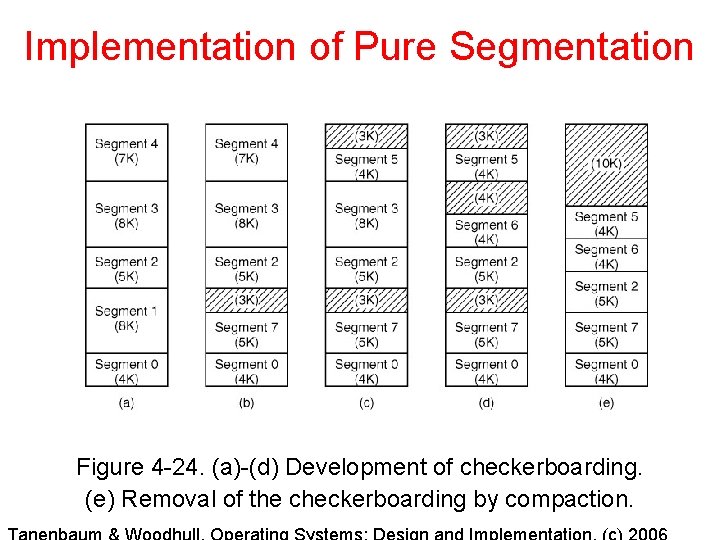
Implementation of Pure Segmentation Figure 4 -24. (a)-(d) Development of checkerboarding. (e) Removal of the checkerboarding by compaction.
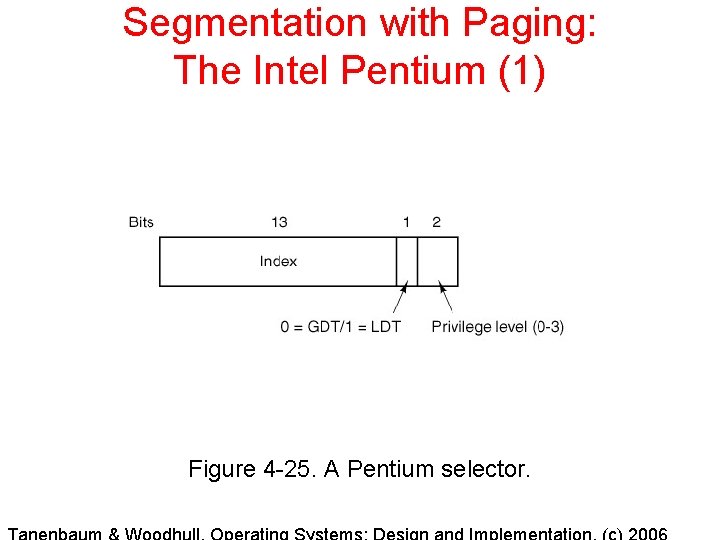
Segmentation with Paging: The Intel Pentium (1) Figure 4 -25. A Pentium selector.
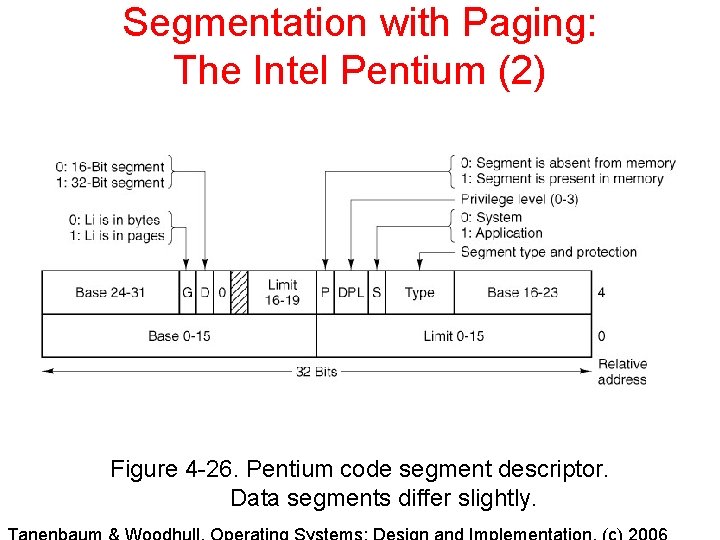
Segmentation with Paging: The Intel Pentium (2) Figure 4 -26. Pentium code segment descriptor. Data segments differ slightly.
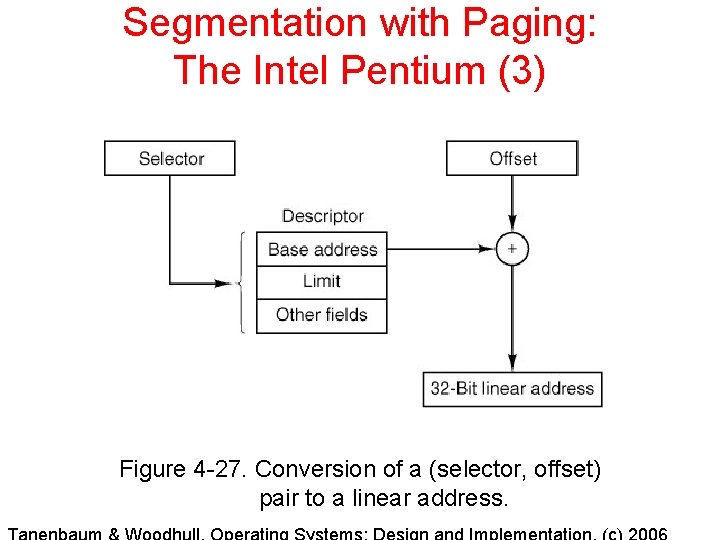
Segmentation with Paging: The Intel Pentium (3) Figure 4 -27. Conversion of a (selector, offset) pair to a linear address.
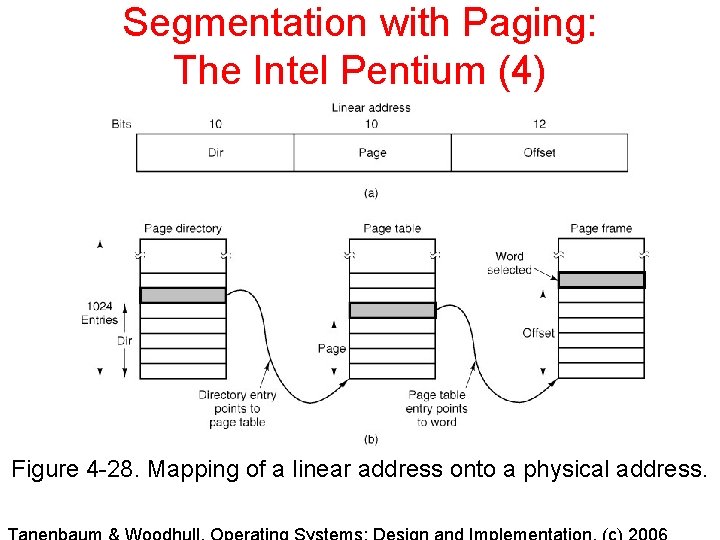
Segmentation with Paging: The Intel Pentium (4) Figure 4 -28. Mapping of a linear address onto a physical address.
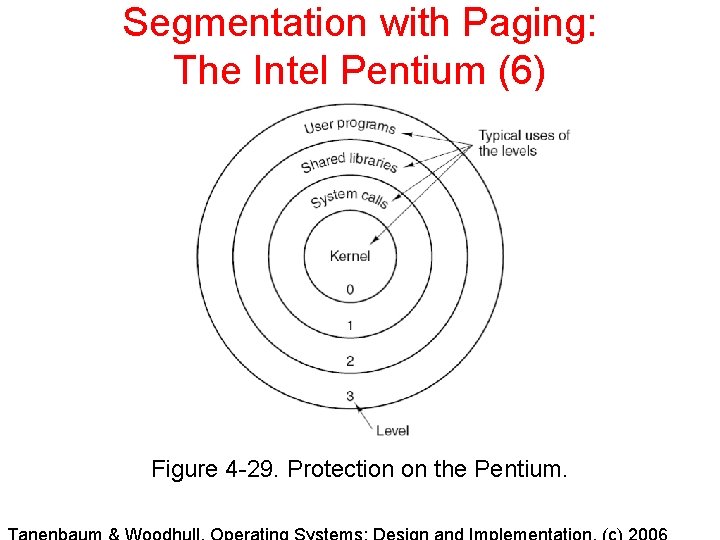
Segmentation with Paging: The Intel Pentium (6) Figure 4 -29. Protection on the Pentium.
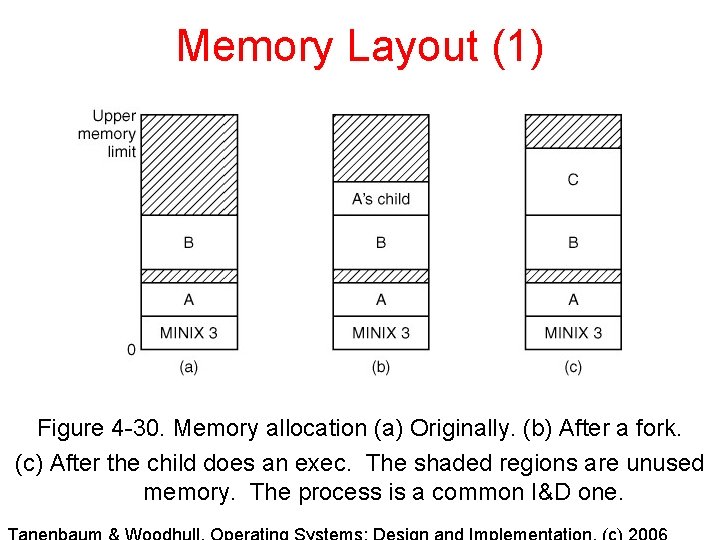
Memory Layout (1) Figure 4 -30. Memory allocation (a) Originally. (b) After a fork. (c) After the child does an exec. The shaded regions are unused memory. The process is a common I&D one.
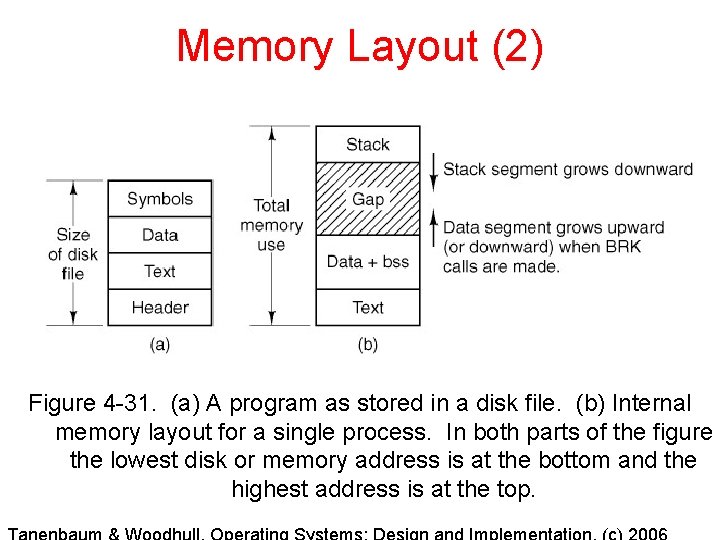
Memory Layout (2) Figure 4 -31. (a) A program as stored in a disk file. (b) Internal memory layout for a single process. In both parts of the figure the lowest disk or memory address is at the bottom and the highest address is at the top.
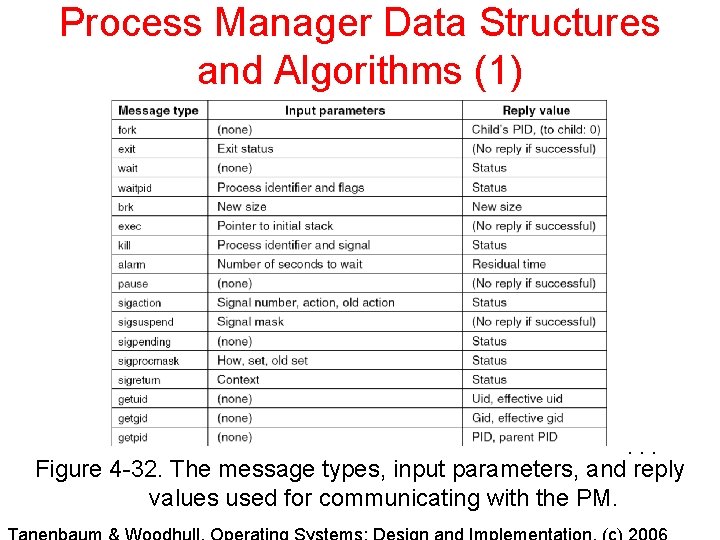
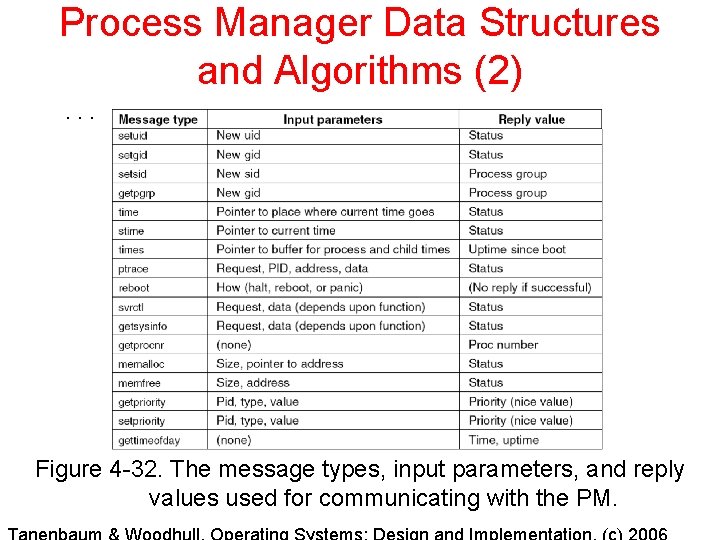
Process Manager Data Structures and Algorithms (1) . . . Figure 4 -32. The message types, input parameters, and reply values used for communicating with the PM.
Process Manager Data Structures and Algorithms (2). . . Figure 4 -32. The message types, input parameters, and reply values used for communicating with the PM.
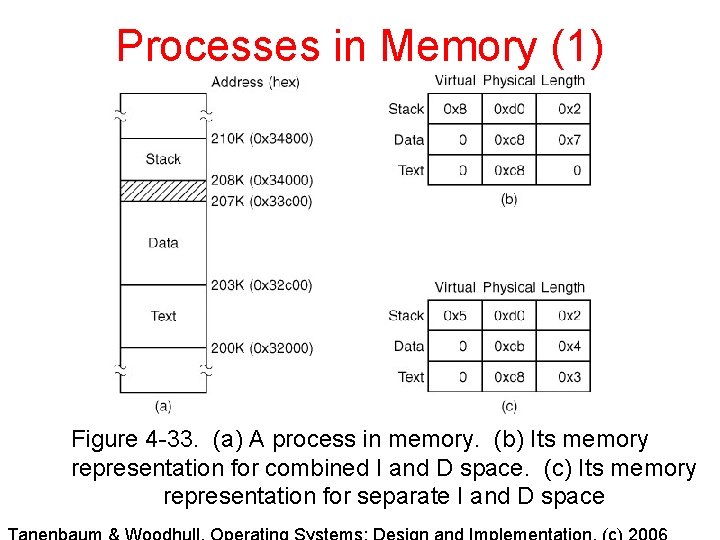
Processes in Memory (1) Figure 4 -33. (a) A process in memory. (b) Its memory representation for combined I and D space. (c) Its memory representation for separate I and D space
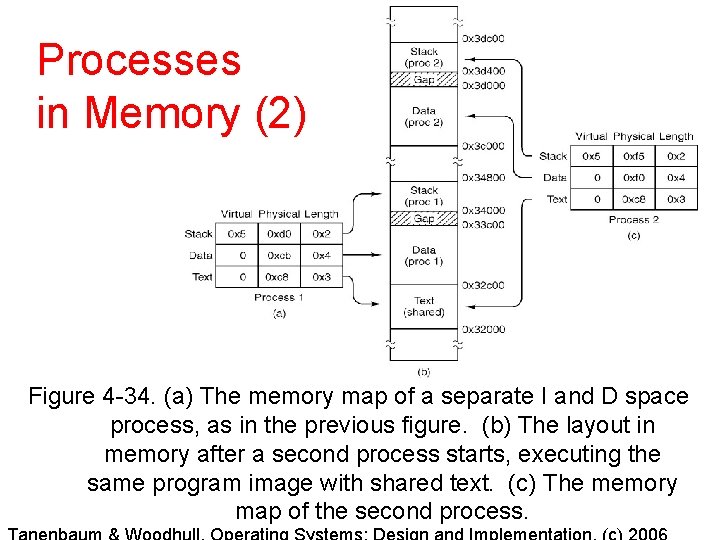
Processes in Memory (2) Figure 4 -34. (a) The memory map of a separate I and D space process, as in the previous figure. (b) The layout in memory after a second process starts, executing the same program image with shared text. (c) The memory map of the second process.
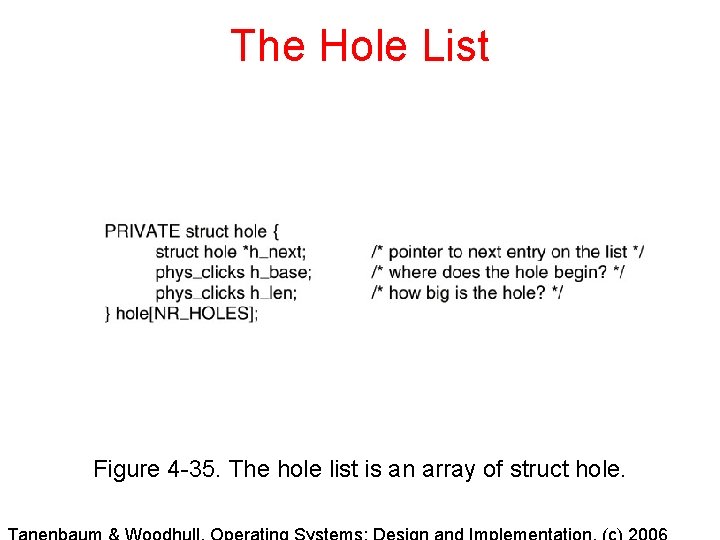
The Hole List Figure 4 -35. The hole list is an array of struct hole.
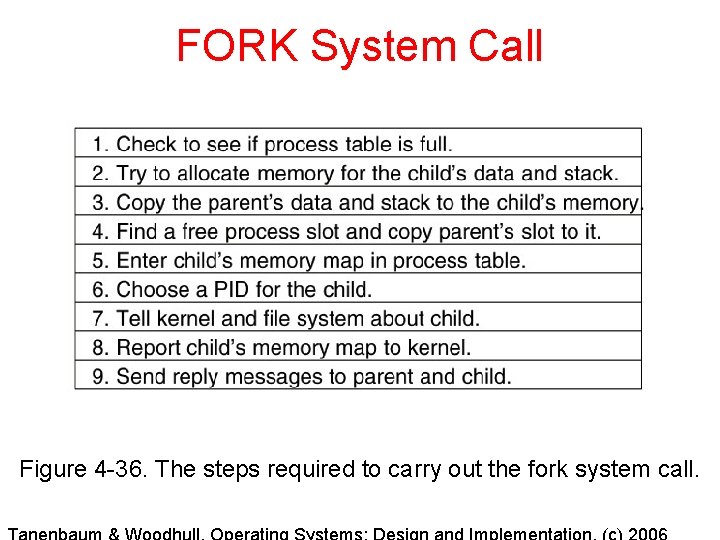
FORK System Call Figure 4 -36. The steps required to carry out the fork system call.
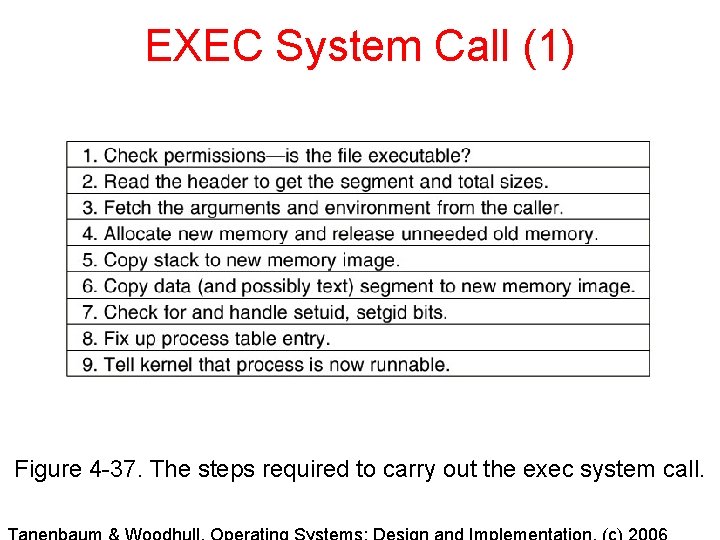
EXEC System Call (1) Figure 4 -37. The steps required to carry out the exec system call.
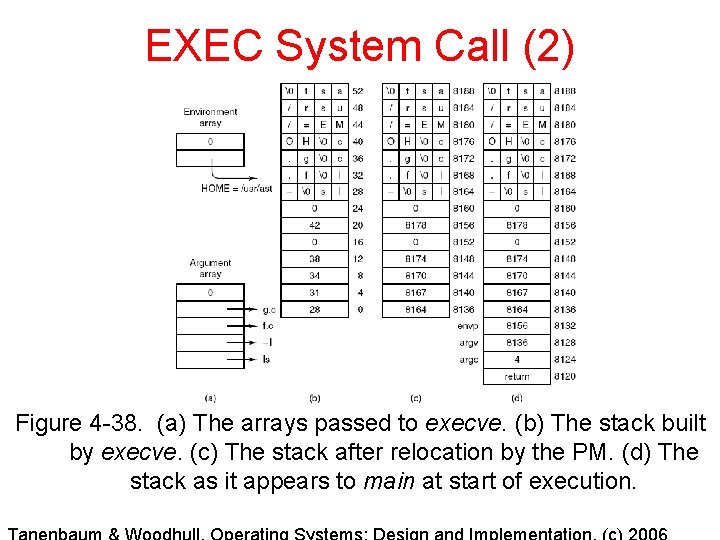
EXEC System Call (2) Figure 4 -38. (a) The arrays passed to execve. (b) The stack built by execve. (c) The stack after relocation by the PM. (d) The stack as it appears to main at start of execution.
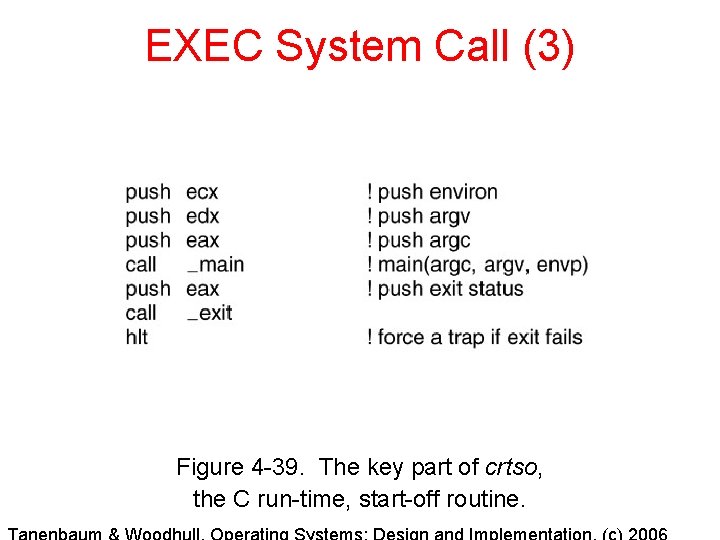
EXEC System Call (3) Figure 4 -39. The key part of crtso, the C run-time, start-off routine.
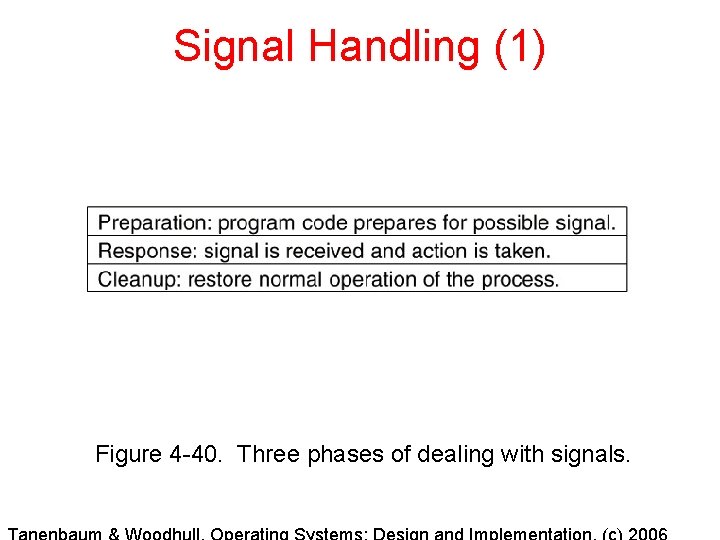
Signal Handling (1) Figure 4 -40. Three phases of dealing with signals.
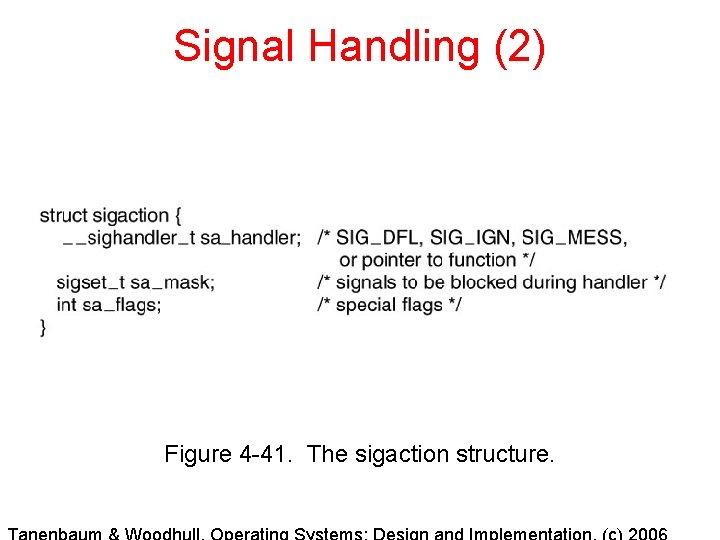
Signal Handling (2) Figure 4 -41. The sigaction structure.
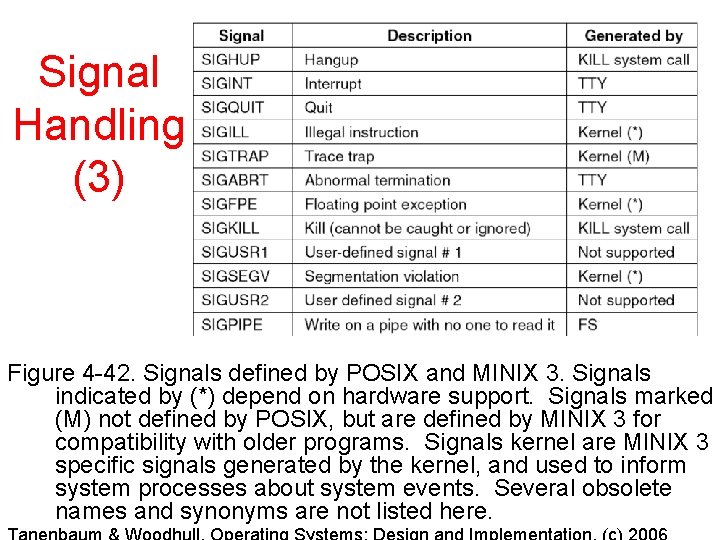
Signal Handling (3) Figure 4 -42. Signals defined by POSIX and MINIX 3. Signals indicated by (*) depend on hardware support. Signals marked (M) not defined by POSIX, but are defined by MINIX 3 for compatibility with older programs. Signals kernel are MINIX 3 specific signals generated by the kernel, and used to inform system processes about system events. Several obsolete names and synonyms are not listed here.
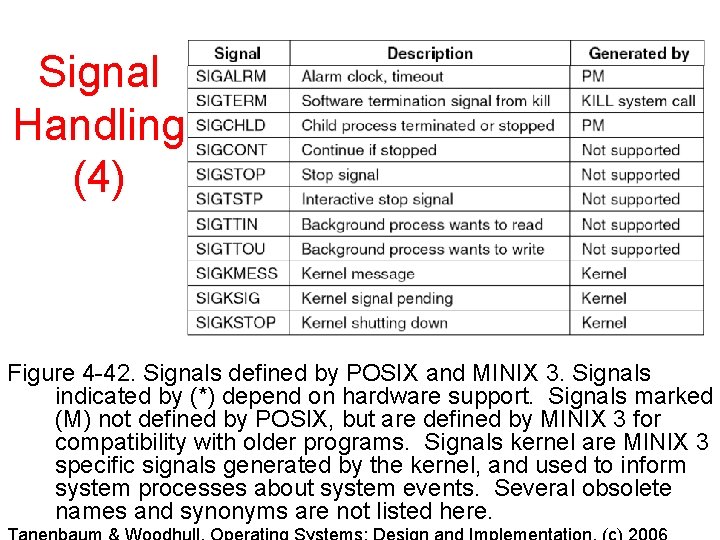
Signal Handling (4) Figure 4 -42. Signals defined by POSIX and MINIX 3. Signals indicated by (*) depend on hardware support. Signals marked (M) not defined by POSIX, but are defined by MINIX 3 for compatibility with older programs. Signals kernel are MINIX 3 specific signals generated by the kernel, and used to inform system processes about system events. Several obsolete names and synonyms are not listed here.
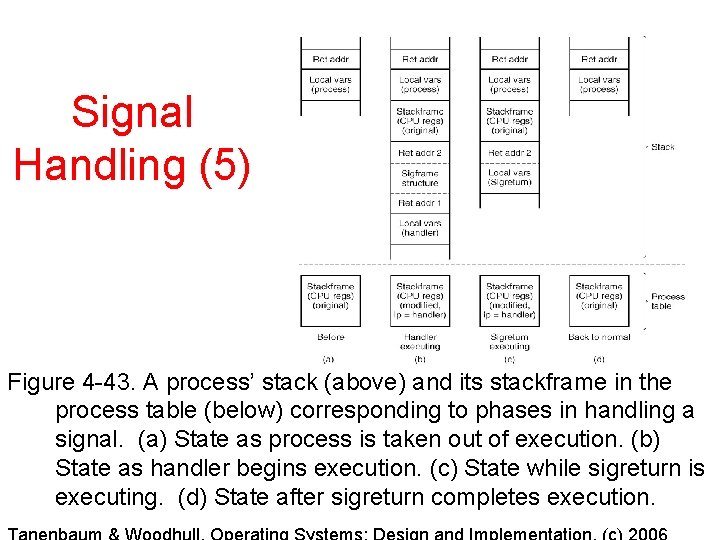
Signal Handling (5) Figure 4 -43. A process’ stack (above) and its stackframe in the process table (below) corresponding to phases in handling a signal. (a) State as process is taken out of execution. (b) State as handler begins execution. (c) State while sigreturn is executing. (d) State after sigreturn completes execution.
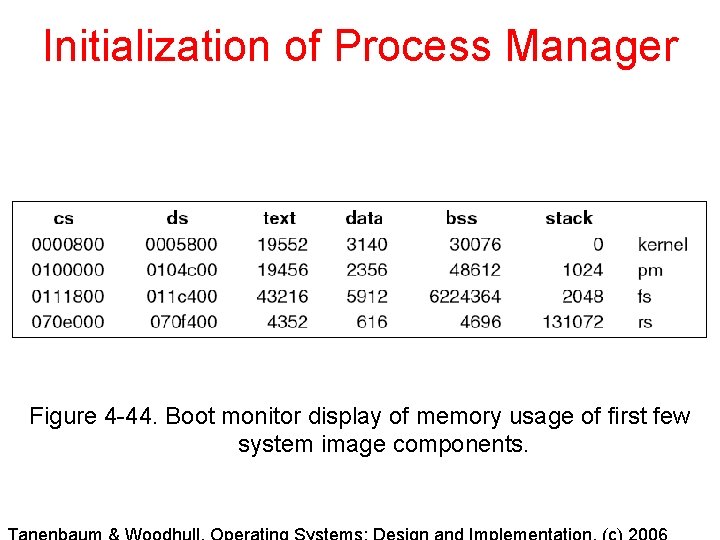
Initialization of Process Manager Figure 4 -44. Boot monitor display of memory usage of first few system image components.
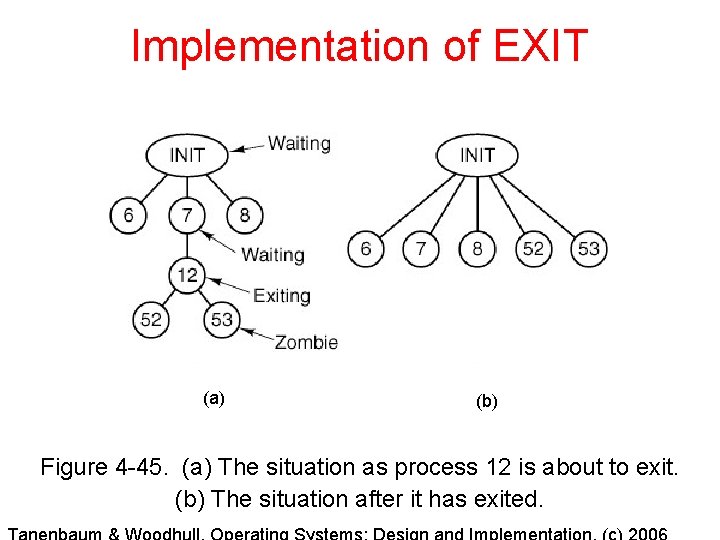
Implementation of EXIT (a) (b) Figure 4 -45. (a) The situation as process 12 is about to exit. (b) The situation after it has exited.
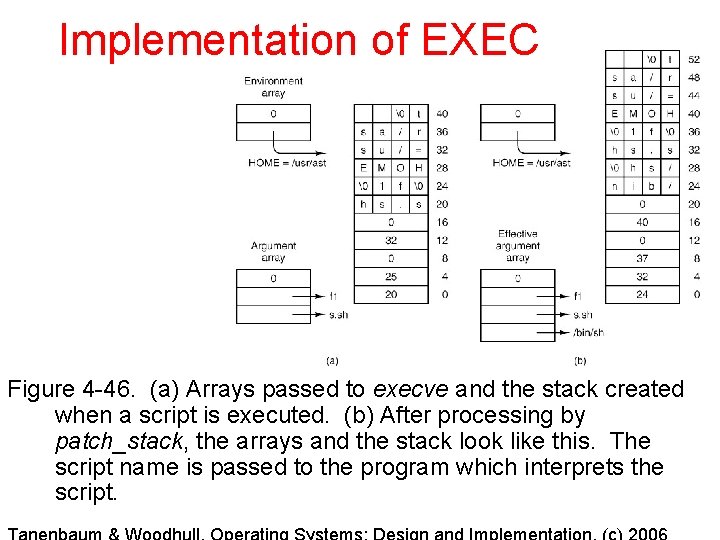
Implementation of EXEC Figure 4 -46. (a) Arrays passed to execve and the stack created when a script is executed. (b) After processing by patch_stack, the arrays and the stack look like this. The script name is passed to the program which interprets the script.
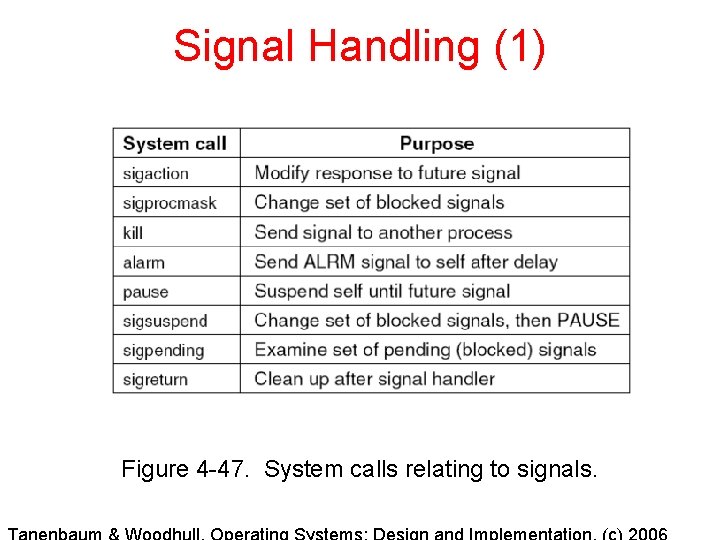
Signal Handling (1) Figure 4 -47. System calls relating to signals.
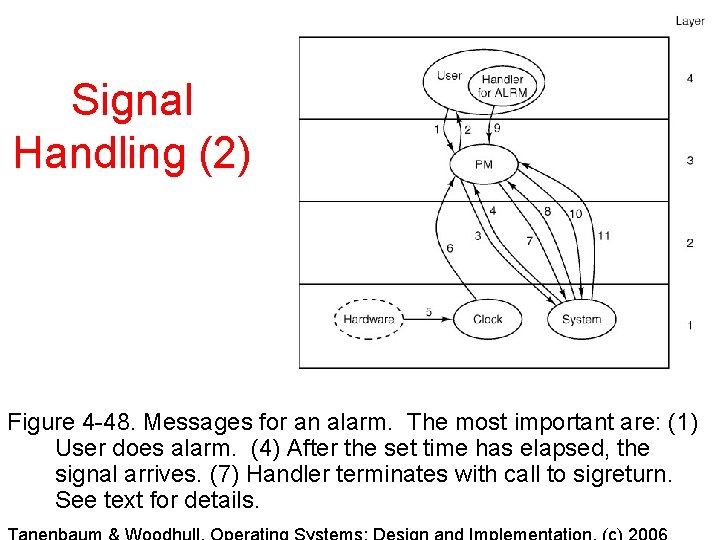
Signal Handling (2) Figure 4 -48. Messages for an alarm. The most important are: (1) User does alarm. (4) After the set time has elapsed, the signal arrives. (7) Handler terminates with call to sigreturn. See text for details.
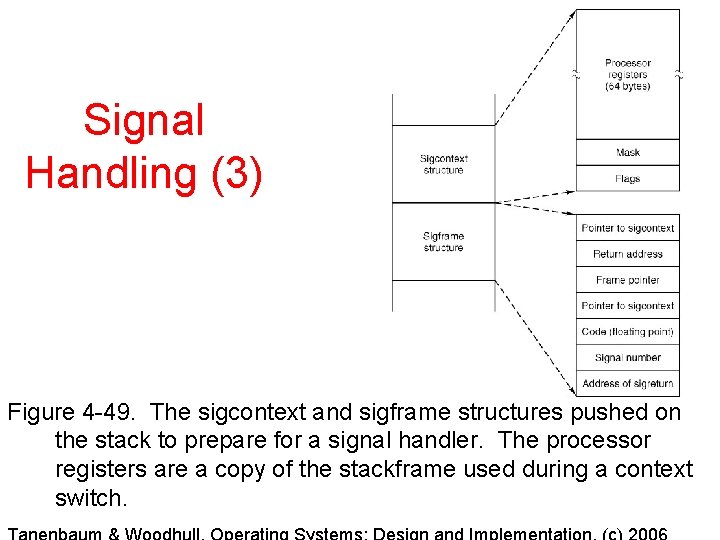
Signal Handling (3) Figure 4 -49. The sigcontext and sigframe structures pushed on the stack to prepare for a signal handler. The processor registers are a copy of the stackframe used during a context switch.
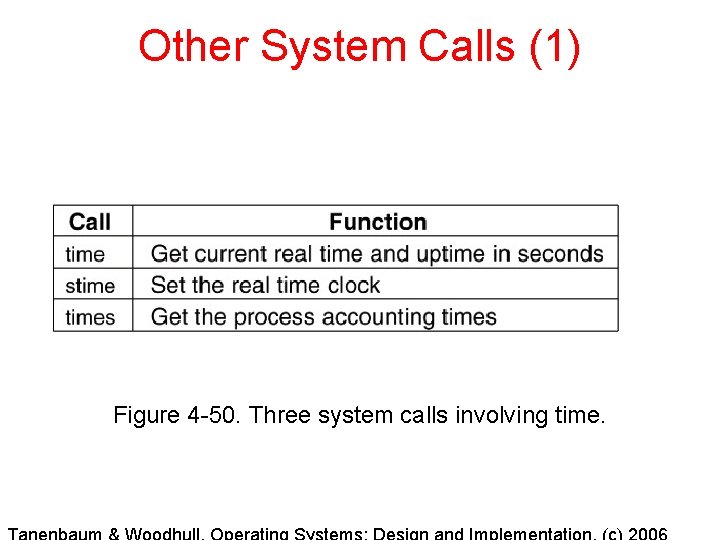
Other System Calls (1) Figure 4 -50. Three system calls involving time.
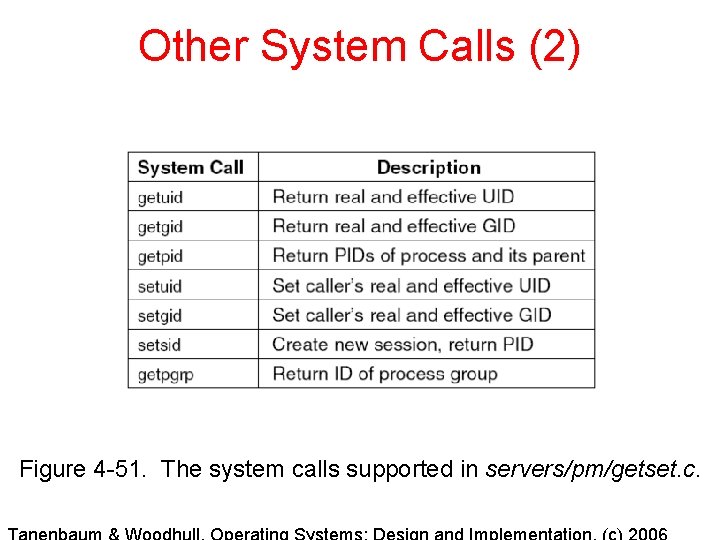
Other System Calls (2) Figure 4 -51. The system calls supported in servers/pm/getset. c.
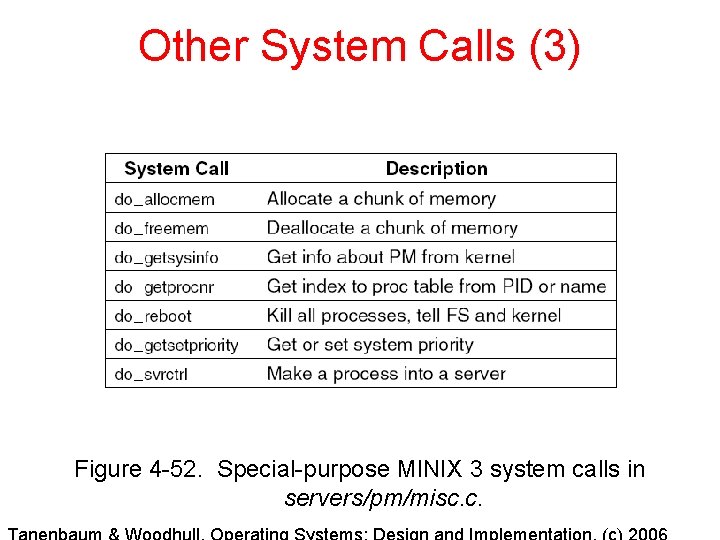
Other System Calls (3) Figure 4 -52. Special-purpose MINIX 3 system calls in servers/pm/misc. c.
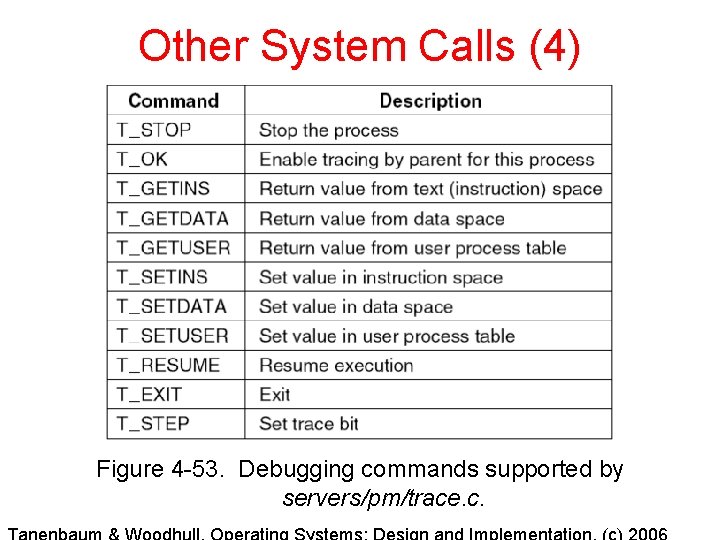
Other System Calls (4) Figure 4 -53. Debugging commands supported by servers/pm/trace. c.
Memory Management Utilities Three entry points of alloc. c 1. 2. 3. alloc_mem – request a block of memory of given size free_mem – return memory that is no longer needed mem_init – initialize free list when PM starts running