
Open Forum Presentation BI Tools Upgrade Project July
Open Forum Presentation BI Tools Upgrade Project July 25, 2008 1
Agenda ■ ■ ■ ■ Project Goals and Objectives What’s In Scope Roles and Assigned Staff High Level Timeline Why Dashboards ? BI Tools Capability Demo Q&A 2
Project Goals ■ ■ The primary goal of the Business Intelligence (BI) Tools Upgrade project is to replace Brio Query with the Web enabled Oracle Business Intelligence Enterprise Edition (OBIEE) toolset by no later than December 31, 2008. Secondary goals: – Establish strategy, funding and capability for ongoing ITS support for Business Intelligence – Establish strategy and plan for rolling out and supporting additional Business Intelligence analytics capability 3

Primary Objectives ■ ■ Convert all ITS delivered Brio Query “repository” queries to equivalent OBIEE requests Implement Business Process Oriented Dashboards which provide interactive as well as simple report content 4
Secondary Objectives ■ ■ ■ Establish end user support capability to insure successful implementation and ongoing use Provide tool training and support to all users. Integrate the OBIEE application with the existing environment – Authentication - CAS/LDAP – Account Provisioning – Poly. Data (Enterprise Data Warehouse) 5
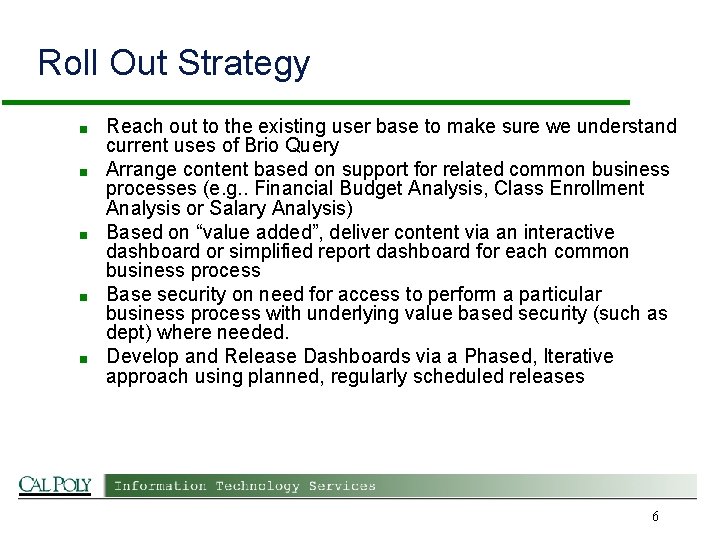
Roll Out Strategy ■ ■ ■ Reach out to the existing user base to make sure we understand current uses of Brio Query Arrange content based on support for related common business processes (e. g. . Financial Budget Analysis, Class Enrollment Analysis or Salary Analysis) Based on “value added”, deliver content via an interactive dashboard or simplified report dashboard for each common business process Base security on need for access to perform a particular business process with underlying value based security (such as dept) where needed. Develop and Release Dashboards via a Phased, Iterative approach using planned, regularly scheduled releases 6
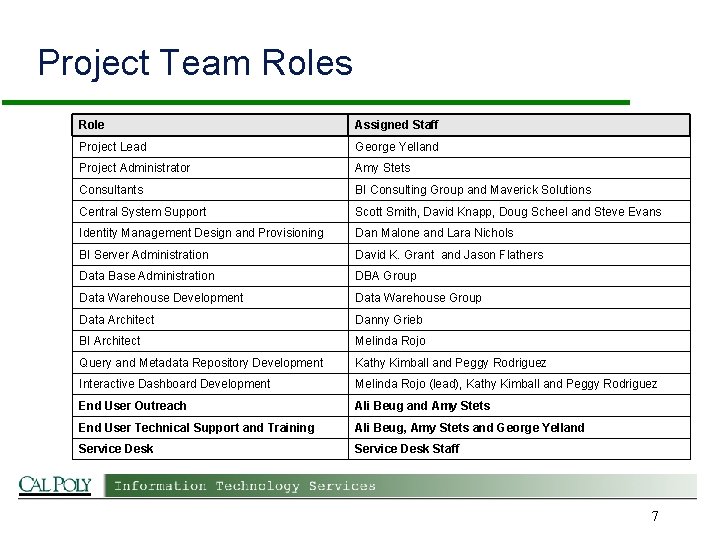
Project Team Roles Role Assigned Staff Project Lead George Yelland Project Administrator Amy Stets Consultants BI Consulting Group and Maverick Solutions Central System Support Scott Smith, David Knapp, Doug Scheel and Steve Evans Identity Management Design and Provisioning Dan Malone and Lara Nichols BI Server Administration David K. Grant and Jason Flathers Data Base Administration DBA Group Data Warehouse Development Data Warehouse Group Data Architect Danny Grieb BI Architect Melinda Rojo Query and Metadata Repository Development Kathy Kimball and Peggy Rodriguez Interactive Dashboard Development Melinda Rojo (lead), Kathy Kimball and Peggy Rodriguez End User Outreach Ali Beug and Amy Stets End User Technical Support and Training Ali Beug, Amy Stets and George Yelland Service Desk Staff 7
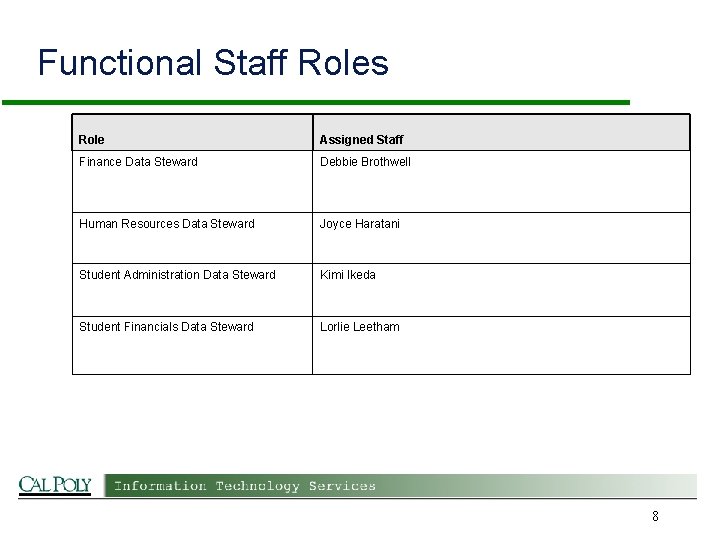
Functional Staff Roles Role Assigned Staff Finance Data Steward Debbie Brothwell Human Resources Data Steward Joyce Haratani Student Administration Data Steward Kimi Ikeda Student Financials Data Steward Lorlie Leetham 8
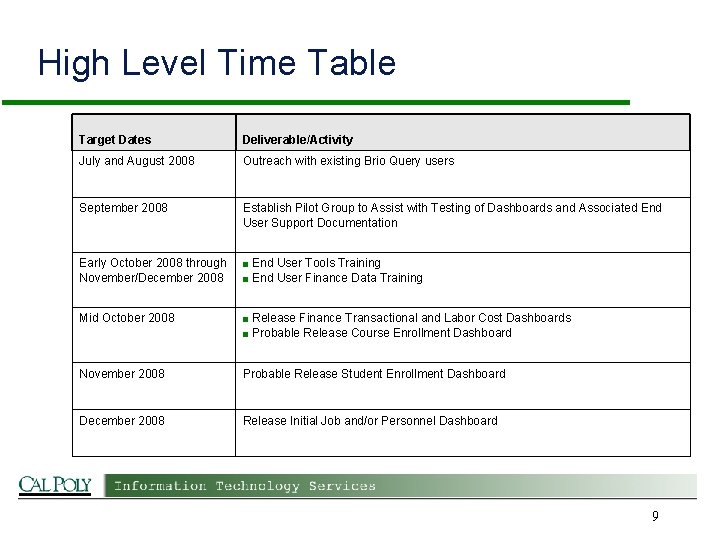
High Level Time Table Target Dates Deliverable/Activity July and August 2008 Outreach with existing Brio Query users September 2008 Establish Pilot Group to Assist with Testing of Dashboards and Associated End User Support Documentation Early October 2008 through November/December 2008 ■ Mid October 2008 ■ November 2008 Probable Release Student Enrollment Dashboard December 2008 Release Initial Job and/or Personnel Dashboard End User Tools Training ■ End User Finance Data Training Release Finance Transactional and Labor Cost Dashboards ■ Probable Release Course Enrollment Dashboard 9
Why Dashboards ? ■ Ease of Use! – Intuitive – Flexible » Adapt to various working styles » Easy download to desktop software (e. g. Excel) – Fast ■ ■ Content organized (and secured) based on business process “Peel the onion” approach – Provide summarized views that progressively drill down to appropriate detail but also provide single click drill down to full detail 10
OBIEE Demo ■ Tool Capability Demo 11
Questions & Answers ■ Q&A ■ Web: http: //polydata. calpoly. edu Email Contacts: ■ – General Questions/Concerns: polydata@calpoly. edu – Specific Feedback on Brio Query Migration: astets@calpoly. edu 12
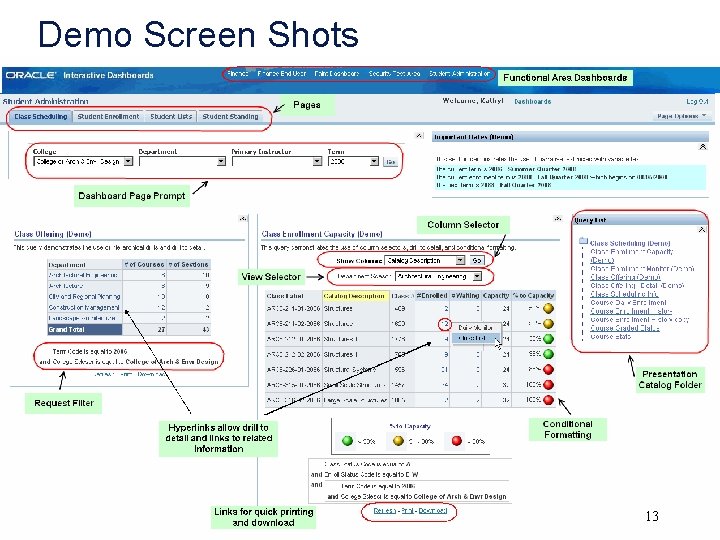
Demo Screen Shots 13
Dashboard Terminology ■ ■ ■ ■ ■ Dashboard – content separated by Functional Areas Dashboard Page Prompt – controls requests on dashboard page Narrative text – allows static and variable text Request – query Hyperlinks - hierarchical drills, drill to detail options, and links to related information Filter – request selection criteria appears below the display Column Selector – view different columns of data View Selector – select different reports Conditional formatting using green, yellow, red symbols Presentation Catalog Folder – list of content related requests 14
- Slides: 14