
Open CV Tutorials Dongchul Kim Media System Lab
Open. CV Tutorials Dongchul Kim Media System Lab. , Yonsei University http: //msl. yonsei. ac. kr e-mail: dongchul@gmail. com 2009. 12
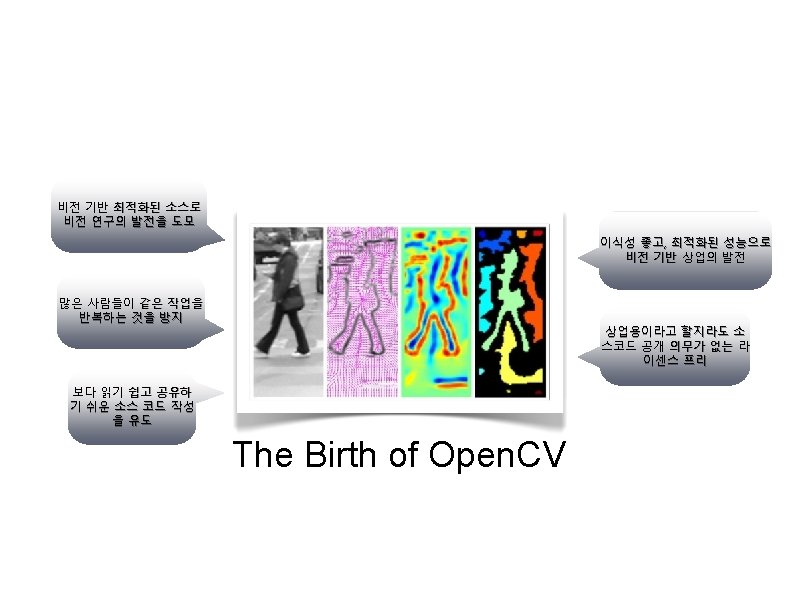
Introduction • About Open. CV • • • Who : Shinn Lee, Intel Performance Library Team Vadim Pisarevsky, Victor Eruhimov, Valery Kuriakin When : 1999. 1. alpha ~ 2009. 2. 0 beta Where : Intel What : Open Source Computer Vision Library, Open. CV Why : Fast, Easy, License free. . How : C/C++, Optimized Intel CPU
Open. CV Overview • • • More than 500 algorithms Basic structure and operation Image Analysis Object Recognition Motion Analysis and Object Tracking 3 D Reconstruction
Open. CV Overview • Image data manipulation • Image and video I/O • Matrix and vector manipulation, and linear algebra routines • Various dynamic data structures • Basic image processing – allocation, release, copying, setting, conversion – file and camera based input, image/video file output – products, solvers, eigenvalues, SVD – lists, queues, sets, trees, graphs – filtering, edge detection, corner detection, sampling and interpolation, color conversion, morphological operations, histograms, image
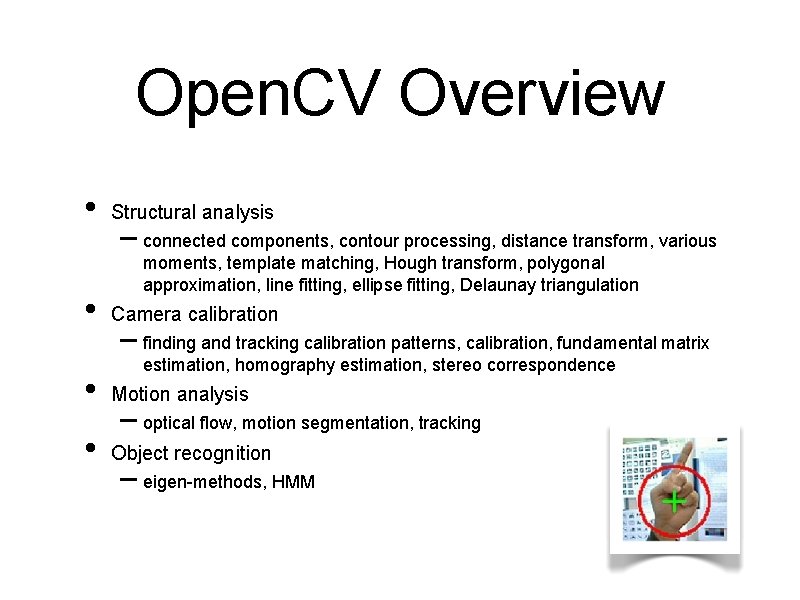
Open. CV Overview • • Structural analysis – connected components, contour processing, distance transform, various moments, template matching, Hough transform, polygonal approximation, line fitting, ellipse fitting, Delaunay triangulation Camera calibration – finding and tracking calibration patterns, calibration, fundamental matrix estimation, homography estimation, stereo correspondence • Motion analysis • Object recognition – optical flow, motion segmentation, tracking – eigen-methods, HMM
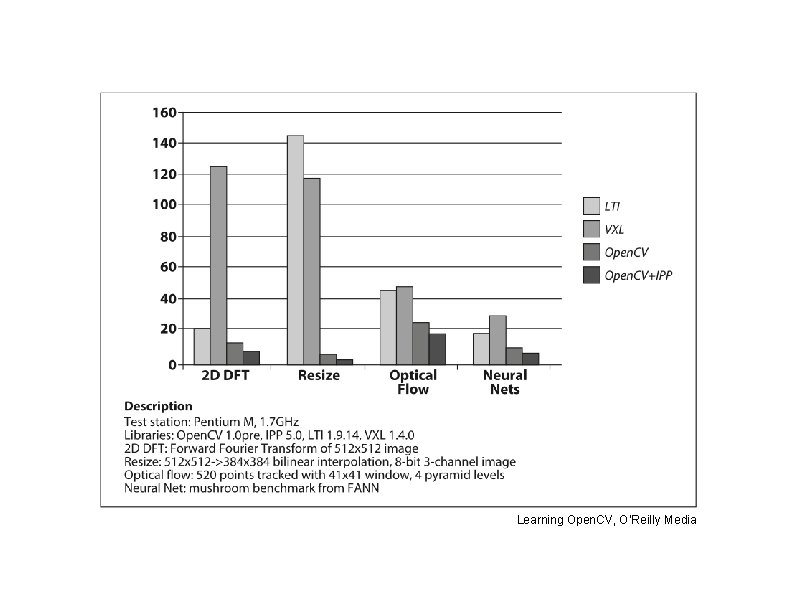
Learning Open. CV, O’Reilly Media
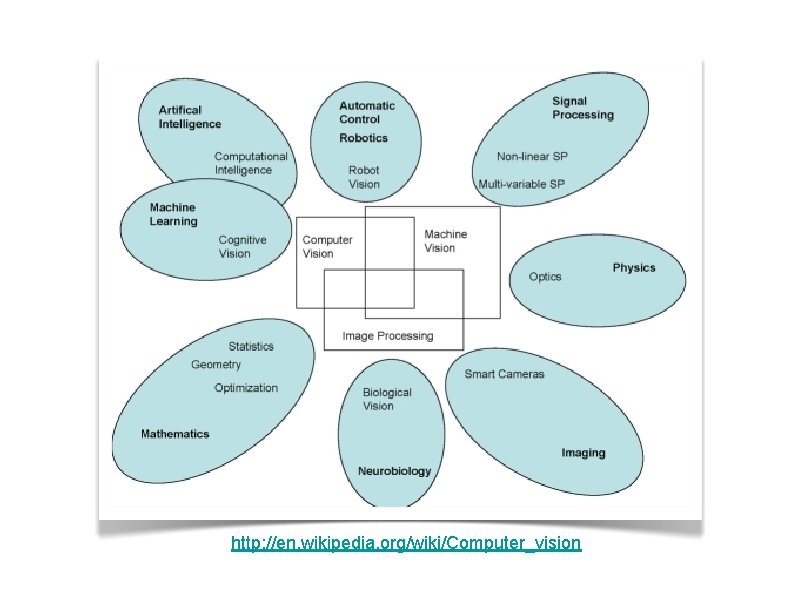
http: //en. wikipedia. org/wiki/Computer_vision
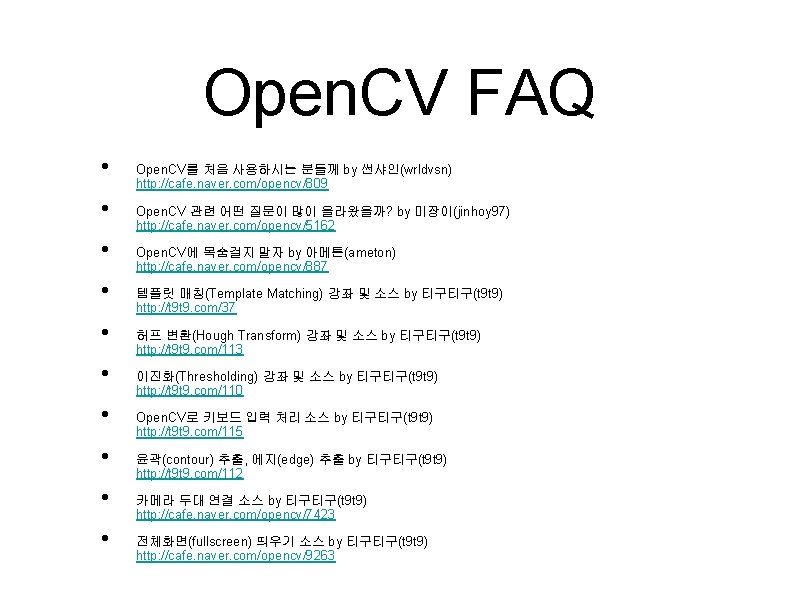
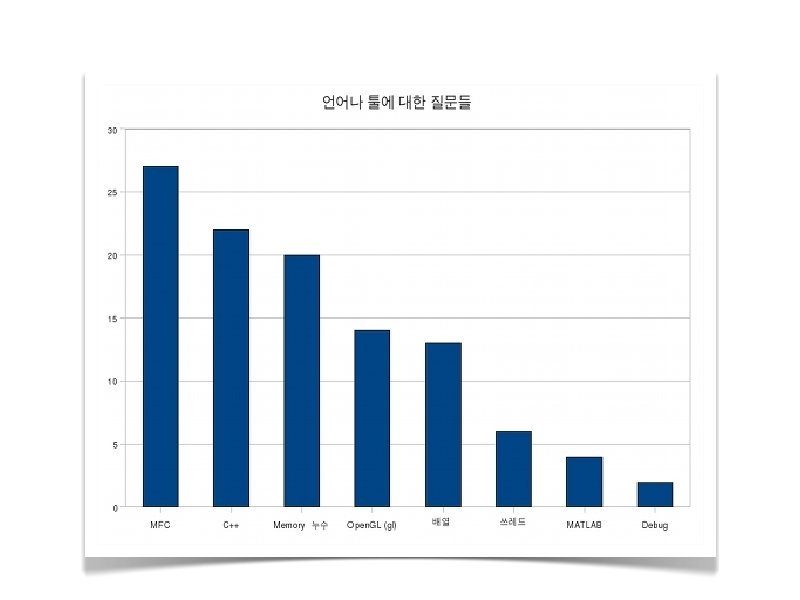
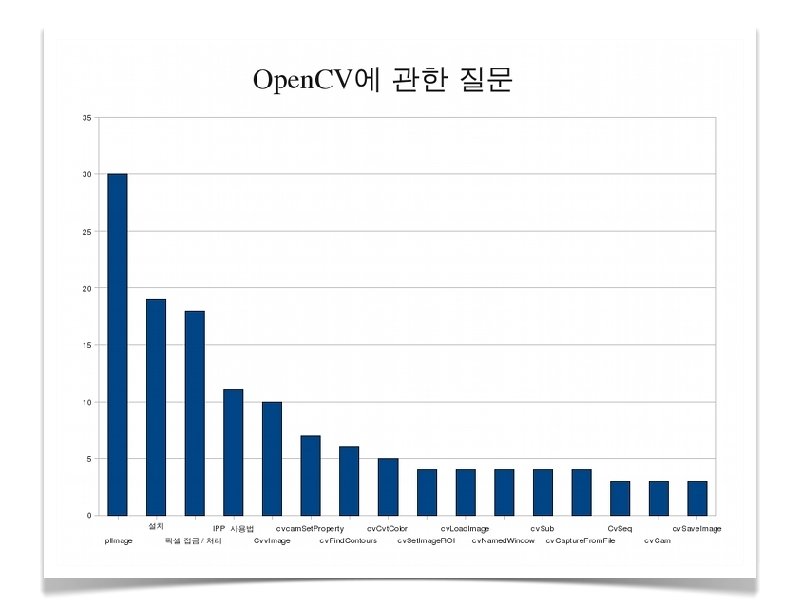
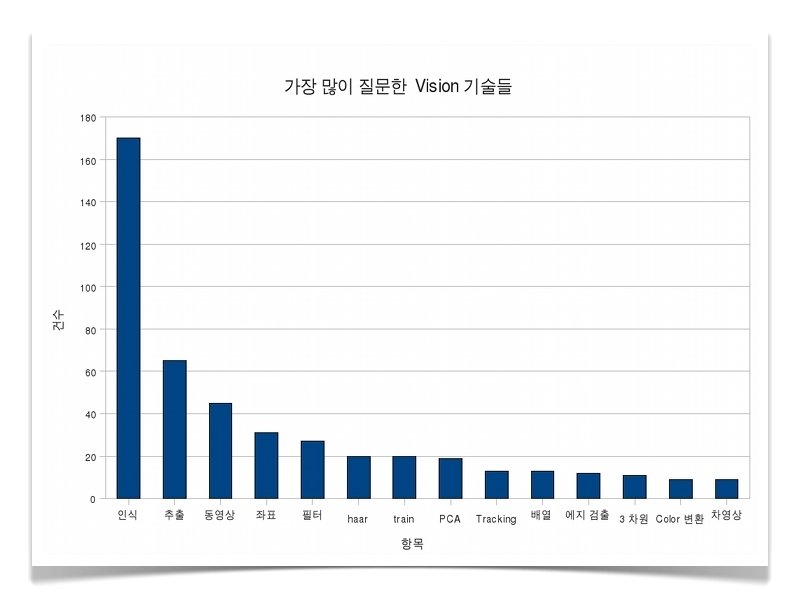
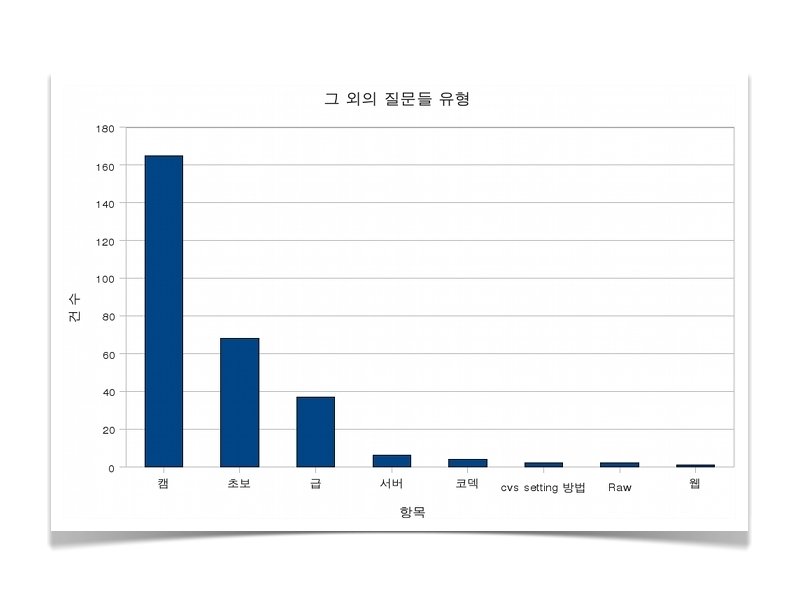
Open. CV FAQ • • • Open. CV를 처음 사용하시는 분들께 by 썬샤인(wrldvsn) http: //cafe. naver. com/opencv/809 Open. CV 관련 어떤 질문이 많이 올라왔을까? by 미장이(jinhoy 97) http: //cafe. naver. com/opencv/5162 Open. CV에 목숨걸지 말자 by 아메톤(ameton) http: //cafe. naver. com/opencv/887 템플릿 매칭(Template Matching) 강좌 및 소스 by 티구티구(t 9 t 9) http: //t 9 t 9. com/37 허프 변환(Hough Transform) 강좌 및 소스 by 티구티구(t 9 t 9) http: //t 9 t 9. com/113 이진화(Thresholding) 강좌 및 소스 by 티구티구(t 9 t 9) http: //t 9 t 9. com/110 Open. CV로 키보드 입력 처리 소스 by 티구티구(t 9 t 9) http: //t 9 t 9. com/115 윤곽(contour) 추출, 에지(edge) 추출 by 티구티구(t 9 t 9) http: //t 9 t 9. com/112 카메라 두대 연결 소스 by 티구티구(t 9 t 9) http: //cafe. naver. com/opencv/7423 전체화면(fullscreen) 띄우기 소스 by 티구티구(t 9 t 9) http: //cafe. naver. com/opencv/9263
Tutorials
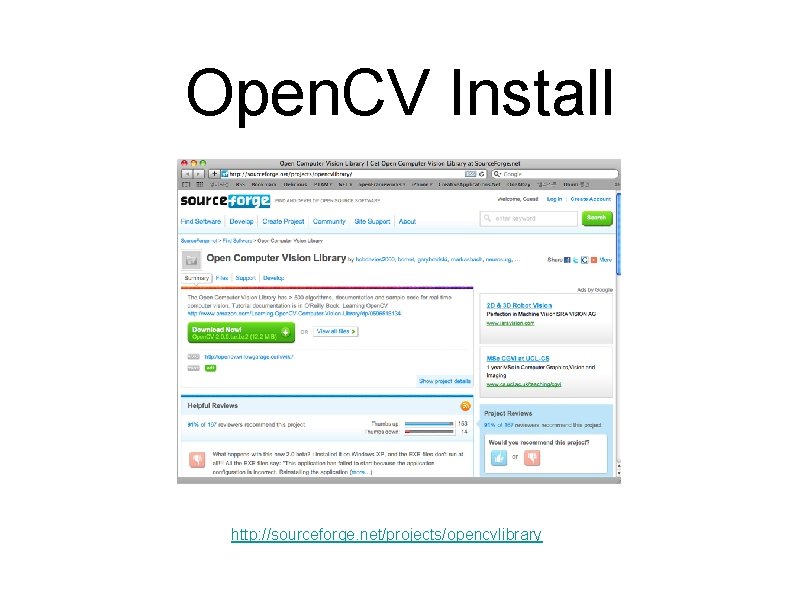
Open. CV Install http: //sourceforge. net/projects/opencvlibrary
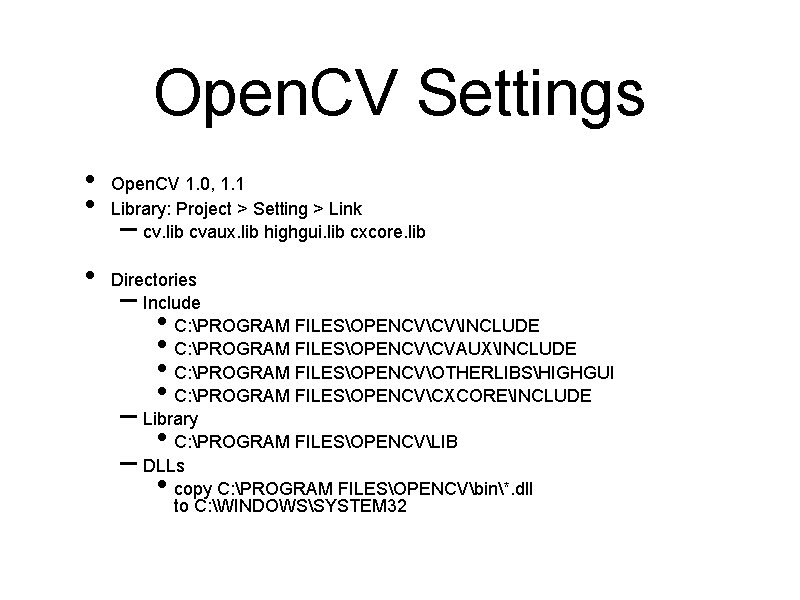
Open. CV Settings • • • Open. CV 1. 0, 1. 1 Library: Project > Setting > Link cv. lib cvaux. lib highgui. lib cxcore. lib – Directories Include C: PROGRAM FILESOPENCVCVINCLUDE C: PROGRAM FILESOPENCVCVAUXINCLUDE C: PROGRAM FILESOPENCVOTHERLIBSHIGHGUI C: PROGRAM FILESOPENCVCXCOREINCLUDE Library C: PROGRAM FILESOPENCVLIB DLLs copy C: PROGRAM FILESOPENCVbin*. dll to C: WINDOWSSYSTEM 32 – • • – •
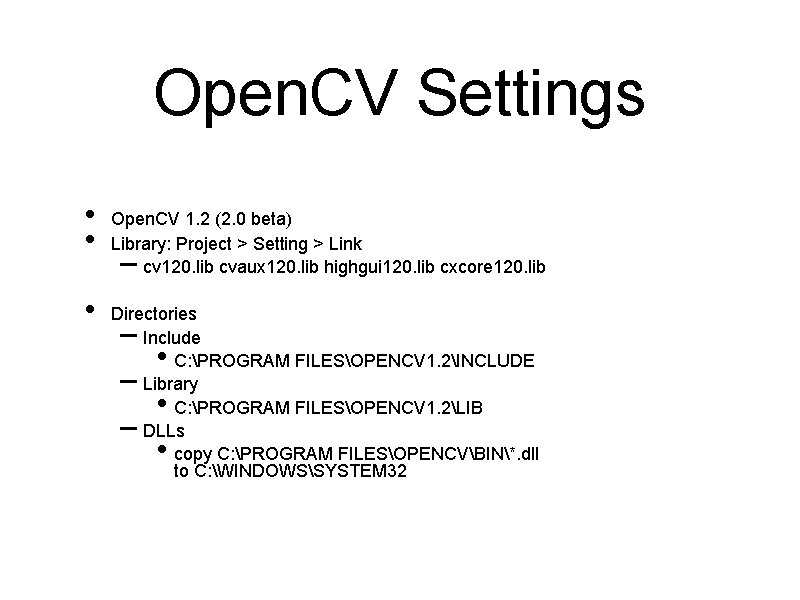
Open. CV Settings • • • Open. CV 1. 2 (2. 0 beta) Library: Project > Setting > Link cv 120. lib cvaux 120. lib highgui 120. lib cxcore 120. lib – Directories Include C: PROGRAM FILESOPENCV 1. 2INCLUDE Library C: PROGRAM FILESOPENCV 1. 2LIB DLLs copy C: PROGRAM FILESOPENCVBIN*. dll to C: WINDOWSSYSTEM 32 – • – •
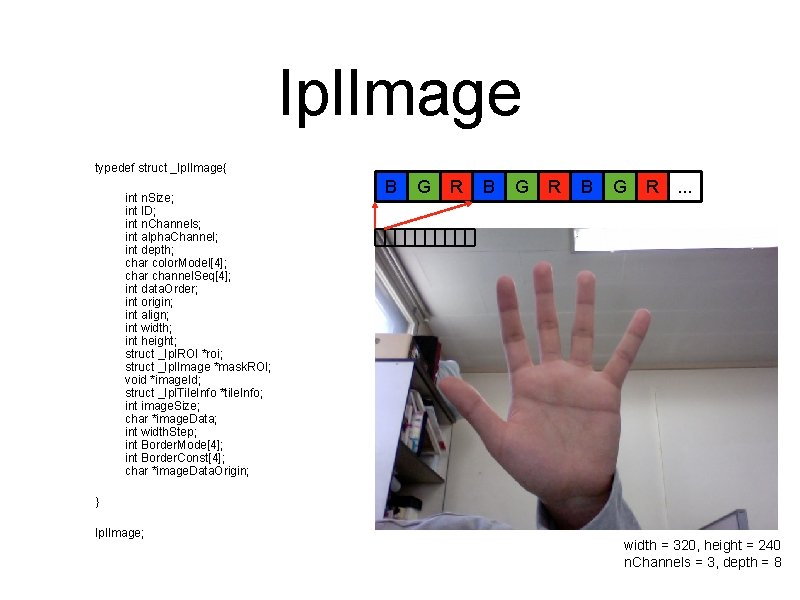
Ipl. Image typedef struct _Ipl. Image{ int n. Size; int ID; int n. Channels; int alpha. Channel; int depth; char color. Model[4]; char channel. Seq[4]; int data. Order; int origin; int align; int width; int height; struct _Ipl. ROI *roi; struct _Ipl. Image *mask. ROI; void *image. Id; struct _Ipl. Tile. Info *tile. Info; int image. Size; char *image. Data; int width. Step; int Border. Mode[4]; int Border. Const[4]; char *image. Data. Origin; B G R . . . } Ipl. Image; width = 320, height = 240 n. Channels = 3, depth = 8
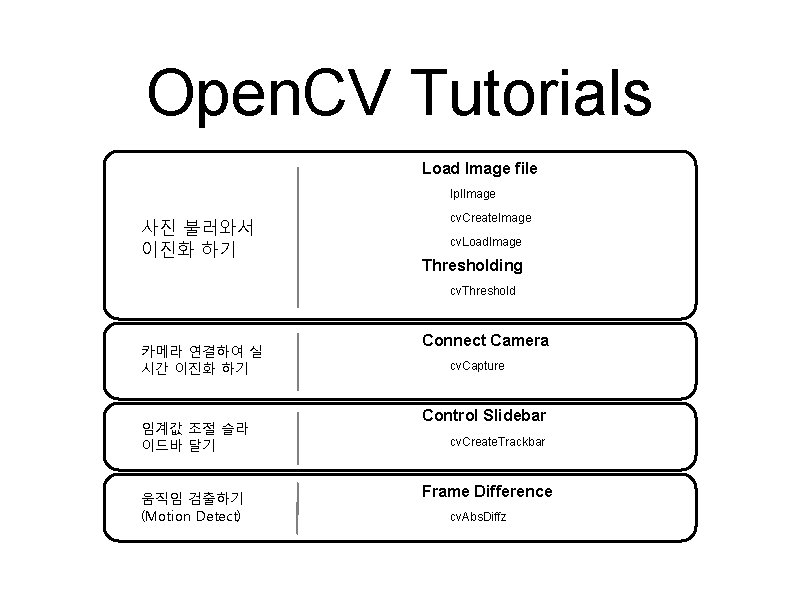
Open. CV Tutorials Load Image file Ipl. Image 사진 불러와서 이진화 하기 cv. Create. Image cv. Load. Image Thresholding cv. Threshold 카메라 연결하여 실 시간 이진화 하기 임계값 조절 슬라 이드바 달기 움직임 검출하기 (Motion Detect) Connect Camera cv. Capture Control Slidebar cv. Create. Trackbar Frame Difference cv. Abs. Diffz
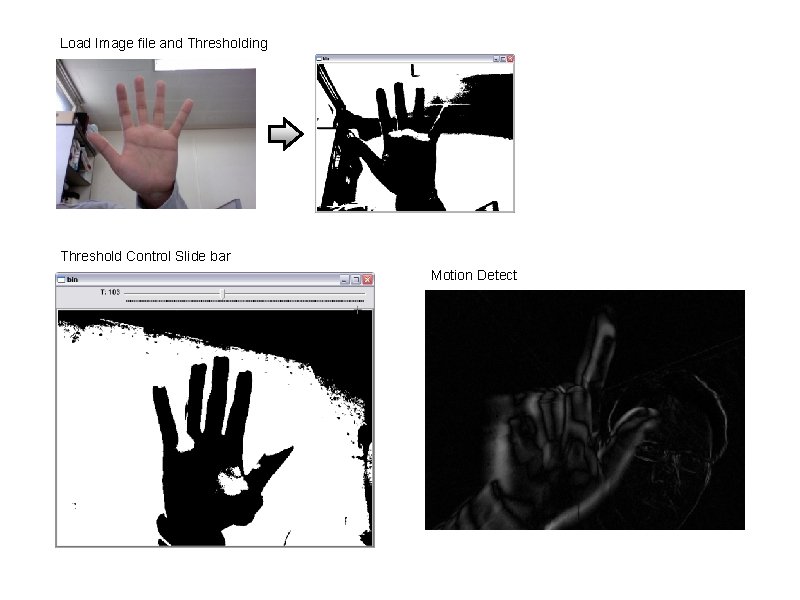
Load Image file and Thresholding Threshold Control Slide bar Motion Detect
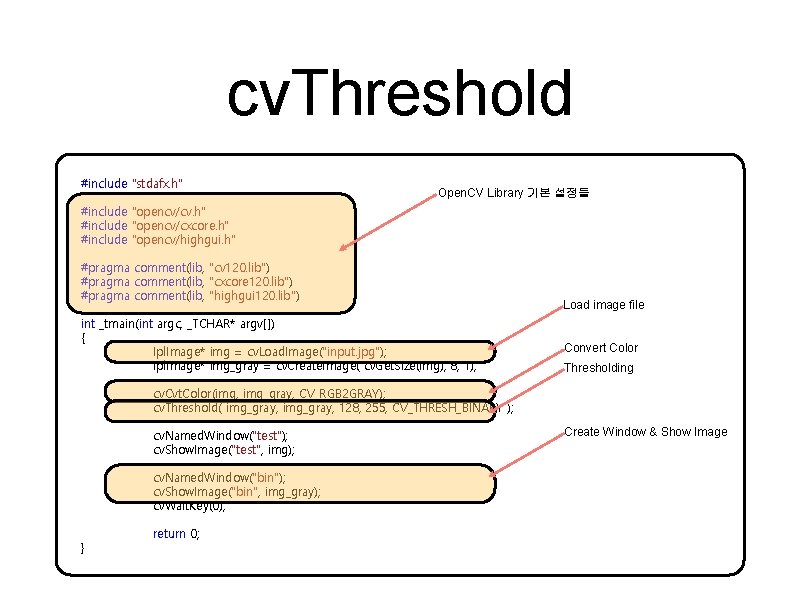
cv. Threshold #include "stdafx. h" Open. CV Library 기본 설정들 #include "opencv/cv. h" #include "opencv/cxcore. h" #include "opencv/highgui. h" #pragma comment(lib, "cv 120. lib") #pragma comment(lib, "cxcore 120. lib") #pragma comment(lib, "highgui 120. lib") int _tmain(int argc, _TCHAR* argv[]) { Ipl. Image* img = cv. Load. Image("input. jpg"); Ipl. Image* img_gray = cv. Create. Image( cv. Get. Size(img), 8, 1); Load image file Convert Color Thresholding cv. Cvt. Color(img, img_gray, CV_RGB 2 GRAY); cv. Threshold( img_gray, 128, 255, CV_THRESH_BINARY ); cv. Named. Window("test"); cv. Show. Image("test", img); cv. Named. Window("bin"); cv. Show. Image("bin", img_gray); cv. Wait. Key(0); } return 0; Create Window & Show Image
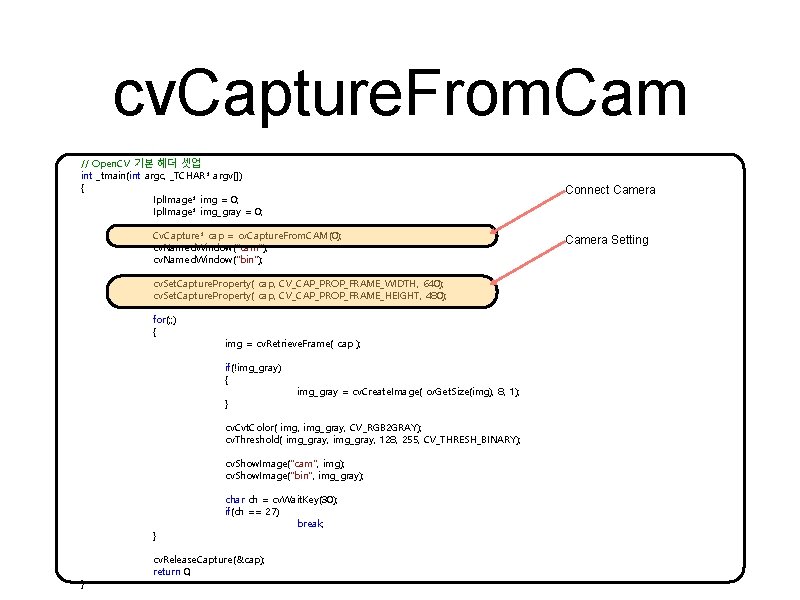
cv. Capture. From. Cam // Open. CV 기본 헤더 셋업 int _tmain(int argc, _TCHAR* argv[]) { Ipl. Image* img = 0; Ipl. Image* img_gray = 0; Connect Camera Cv. Capture* cap = cv. Capture. From. CAM(0); cv. Named. Window("cam"); cv. Named. Window("bin"); cv. Set. Capture. Property( cap, CV_CAP_PROP_FRAME_WIDTH, 640); cv. Set. Capture. Property( cap, CV_CAP_PROP_FRAME_HEIGHT, 480); for(; ; ) { img = cv. Retrieve. Frame( cap ); if(!img_gray) { } img_gray = cv. Create. Image( cv. Get. Size(img), 8, 1); cv. Cvt. Color( img, img_gray, CV_RGB 2 GRAY); cv. Threshold( img_gray, 128, 255, CV_THRESH_BINARY); cv. Show. Image("cam", img); cv. Show. Image("bin", img_gray); } } char ch = cv. Wait. Key(30); if(ch == 27) break; cv. Release. Capture(&cap); return 0; Camera Setting
![cv. Create. Trackbar // Open. CV 기본 헤더 셋업 int _tmain(int argc, _TCHAR* argv[])](http://slidetodoc.com/presentation_image_h2/2d5e42ea149db706a34ce09dcf539f34/image-25.jpg "cv. Create. Trackbar // Open. CV 기본 헤더 셋업 int _tmain(int argc, _TCHAR* argv[])")
cv. Create. Trackbar // Open. CV 기본 헤더 셋업 int _tmain(int argc, _TCHAR* argv[]) { int T = 128; Ipl. Image* img = 0; Ipl. Image* img_gray = 0; Camera Connect & Setting Cv. Capture* cap = cv. Capture. From. CAM(0); cv. Set. Capture. Property( cap, CV_CAP_PROP_FRAME_WIDTH, 640); cv. Set. Capture. Property( cap, CV_CAP_PROP_FRAME_HEIGHT, 480); Trackbar cv. Named. Window("cam"); cv. Named. Window("bin"); cv. Create. Trackbar("T", "bin", &T, 255, NULL); for(; ; ) { img = cv. Retrieve. Frame( cap ); if(!img_gray) { img_gray = cv. Create. Image( cv. Get. Size(img), 8, 1); } cv. Cvt. Color( img, img_gray, CV_RGB 2 GRAY); cv. Threshold( img_gray, T, 255, CV_THRESH_BINARY); cv. Show. Image("cam", img); cv. Show. Image("bin", img_gray); char ch = cv. Wait. Key(30); if(ch == 27) break; } cv. Release. Capture(&cap); cv. Release. Image(&img_gray); return 0; } Keyboard Event
![cv. Abs. Diff // Open. CV 기본 헤더 셋업 int _tmain(int argc, _TCHAR* argv[])](http://slidetodoc.com/presentation_image_h2/2d5e42ea149db706a34ce09dcf539f34/image-26.jpg "cv. Abs. Diff // Open. CV 기본 헤더 셋업 int _tmain(int argc, _TCHAR* argv[])")
cv. Abs. Diff // Open. CV 기본 헤더 셋업 int _tmain(int argc, _TCHAR* argv[]) { int T = 128; Ipl. Image *img = 0; Ipl. Image *img_gray = 0, *img_gray_prev = 0; Ipl. Image *img_diff = 0; Camera Connect & Setting Cv. Capture* cap = cv. Capture. From. CAM(0); cv. Set. Capture. Property( cap, CV_CAP_PROP_FRAME_WIDTH, 640); cv. Set. Capture. Property( cap, CV_CAP_PROP_FRAME_HEIGHT, 480); cv. Named. Window("cam"); cv. Named. Window("diff"); for(; ; ) { img = cv. Retrieve. Frame( cap ); if(!img_gray) { img_gray = cv. Create. Image( cv. Get. Size(img), 8, 1); img_gray_prev = cv. Create. Image( cv. Get. Size(img), 8, 1); img_diff = cv. Create. Image( cv. Get. Size(img), 8, 1); } cv. Cvt. Color( img, img_gray, CV_RGB 2 GRAY ); cv. Abs. Diff( img_gray_prev, img_gray, img_diff ); cv. Show. Image("cam", img); cv. Show. Image("diff", img_diff); char ch = cv. Wait. Key(30); if(ch == 27) break; else if(ch == ' ') cv. Save. Image( "output. jpg", img_diff ); cv. Copy. Image( img_gray, img_gray_prev ); } } cv. Release. Capture(&cap); cv. Release. Image(&img_gray_prev); return 0; Frame Difference Keyboard Event
Reference • • • 국내 커뮤니티, http: //www. opencv. co. kr Open. CV Library Download, http: //sourceforge. net/projects/opencvlibrary/ Open. CV Wiki, http: //opencv. willowgarage. com/wiki Open. CV Yahoo Groups, http: //tech. groups. yahoo. com/group/Open. CV Computer Vision, http: //en. wikipedia. org/wiki/Computer_vision Open. CV 저자 이문호씨 웹사이트, http: //www. conv 2. com Open. CV 유용 소스 및 팁, http: //t 9 t 9. com/category/Research/Open. CV 참고 책 • • • 황선규, “Open. CV 제대로 배우기” 정성환, 이문호, “Open. CV를 이용한 컴퓨터 비전 실무 프로그래밍” 임동훈, “초보자를 위한 Open. CV를 이용한 영상처리” 강의자료, http: //opencv. t 9 t 9. com
- Slides: 27