
ONAP PNF Plug and Play for Casablanca R
ONAP PNF Plug and Play for Casablanca (R 3, 4 Q 2018) • ONAP and PNF Plug and Play for 5 G RAN • 5 G Use Case Team Jul 16, 2018 version 7
PNF Plug and Play CASABLANCA IMPROVEMENTS OVERVIEW • ONAP and PNF Plug and Play for 5 G RAN • 5 G Use Case Team
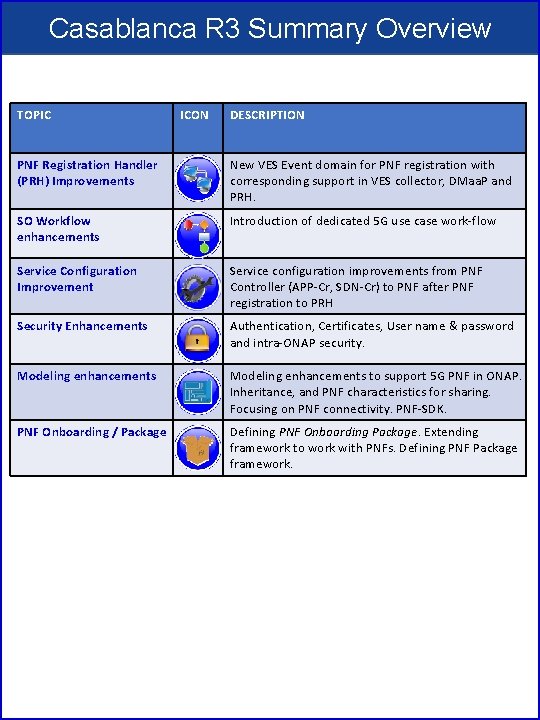
Casablanca R 3 Summary Overview TOPIC ICON DESCRIPTION PNF Registration Handler (PRH) Improvements New VES Event domain for PNF registration with corresponding support in VES collector, DMaa. P and PRH. SO Workflow enhancements Introduction of dedicated 5 G use case work-flow Service Configuration Improvement Service configuration improvements from PNF Controller (APP-Cr, SDN-Cr) to PNF after PNF registration to PRH Security Enhancements Authentication, Certificates, User name & password and intra-ONAP security. Modeling enhancements to support 5 G PNF in ONAP. Inheritance, and PNF characteristics for sharing. Focusing on PNF connectivity. PNF-SDK. PNF Onboarding / Package Defining PNF Onboarding Package. Extending framework to work with PNFs. Defining PNF Package framework.
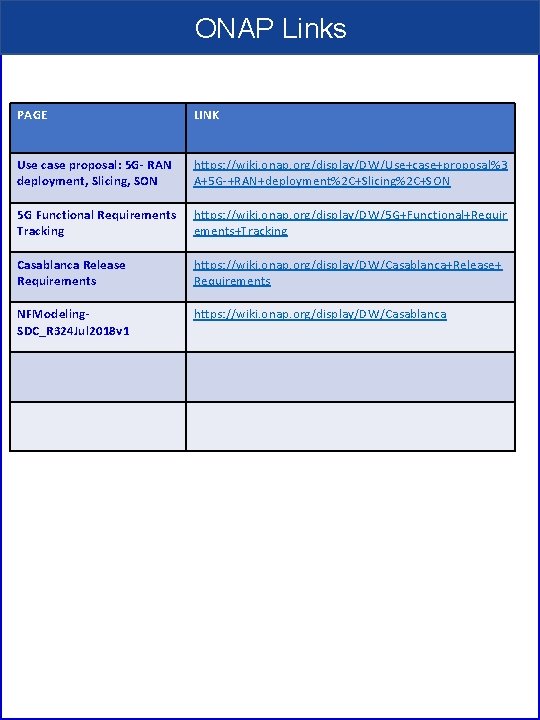
ONAP Links PAGE LINK Use case proposal: 5 G- RAN deployment, Slicing, SON https: //wiki. onap. org/display/DW/Use+case+proposal%3 A+5 G-+RAN+deployment%2 C+Slicing%2 C+SON 5 G Functional Requirements Tracking https: //wiki. onap. org/display/DW/5 G+Functional+Requir ements+Tracking Casablanca Release Requirements https: //wiki. onap. org/display/DW/Casablanca+Release+ Requirements NFModeling. SDC_R 324 Jul 2018 v 1 https: //wiki. onap. org/display/DW/Casablanca
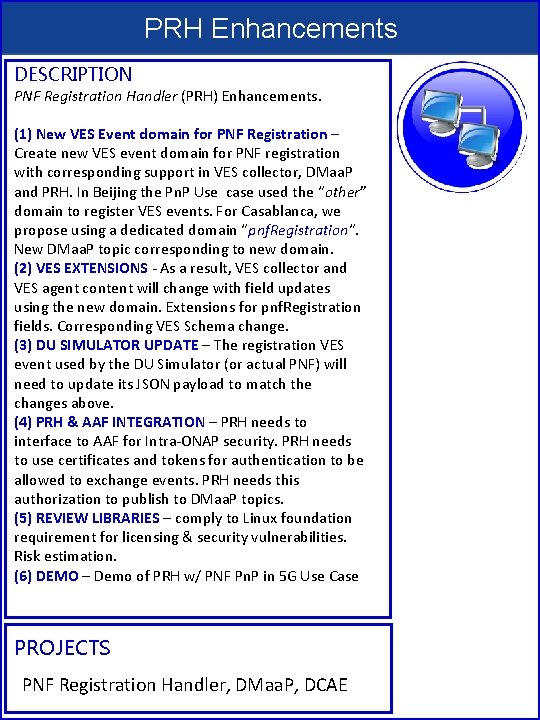
PRH Enhancements DESCRIPTION PNF Registration Handler (PRH) Enhancements. (1) New VES Event domain for PNF Registration – Create new VES event domain for PNF registration with corresponding support in VES collector, DMaa. P and PRH. In Beijing the Pn. P Use case used the “other” domain to register VES events. For Casablanca, we propose using a dedicated domain “pnf. Registration“. New DMaa. P topic corresponding to new domain. (2) VES EXTENSIONS - As a result, VES collector and VES agent content will change with field updates using the new domain. Extensions for pnf. Registration fields. Corresponding VES Schema change. (3) DU SIMULATOR UPDATE – The registration VES event used by the DU Simulator (or actual PNF) will need to update its JSON payload to match the changes above. (4) PRH & AAF INTEGRATION – PRH needs to interface to AAF for Intra-ONAP security. PRH needs to use certificates and tokens for authentication to be allowed to exchange events. PRH needs this authorization to publish to DMaa. P topics. (5) REVIEW LIBRARIES – comply to Linux foundation requirement for licensing & security vulnerabilities. Risk estimation. (6) DEMO – Demo of PRH w/ PNF Pn. P in 5 G Use Case PROJECTS PNF Registration Handler, DMaa. P, DCAE
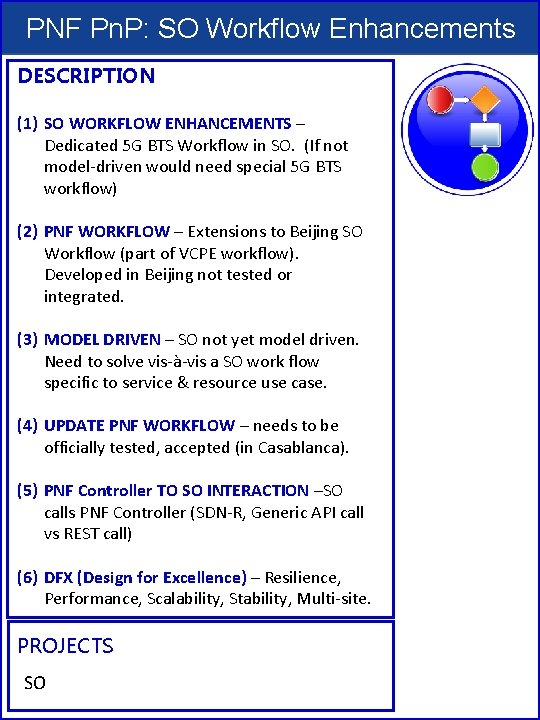
PNF Pn. P: SO Workflow Enhancements DESCRIPTION (1) SO WORKFLOW ENHANCEMENTS – Dedicated 5 G BTS Workflow in SO. (If not model-driven would need special 5 G BTS workflow) (2) PNF WORKFLOW – Extensions to Beijing SO Workflow (part of VCPE workflow). Developed in Beijing not tested or integrated. (3) MODEL DRIVEN – SO not yet model driven. Need to solve vis-à-vis a SO work flow specific to service & resource use case. (4) UPDATE PNF WORKFLOW – needs to be officially tested, accepted (in Casablanca). (5) PNF Controller TO SO INTERACTION –SO calls PNF Controller (SDN-R, Generic API call vs REST call) (6) DFX (Design for Excellence) – Resilience, Performance, Scalability, Stability, Multi-site. PROJECTS SO
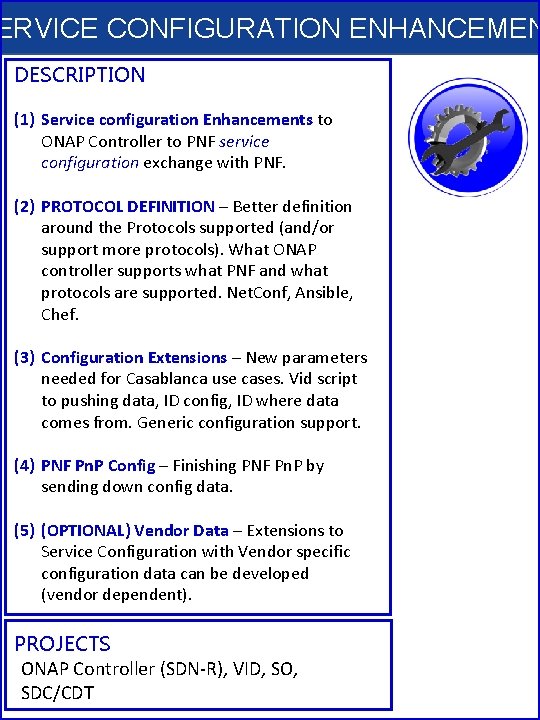
ERVICE CONFIGURATION ENHANCEMEN DESCRIPTION (1) Service configuration Enhancements to ONAP Controller to PNF service configuration exchange with PNF. (2) PROTOCOL DEFINITION – Better definition around the Protocols supported (and/or support more protocols). What ONAP controller supports what PNF and what protocols are supported. Net. Conf, Ansible, Chef. (3) Configuration Extensions – New parameters needed for Casablanca use cases. Vid script to pushing data, ID config, ID where data comes from. Generic configuration support. (4) PNF Pn. P Config – Finishing PNF Pn. P by sending down config data. (5) (OPTIONAL) Vendor Data – Extensions to Service Configuration with Vendor specific configuration data can be developed (vendor dependent). PROJECTS ONAP Controller (SDN-R), VID, SO, SDC/CDT
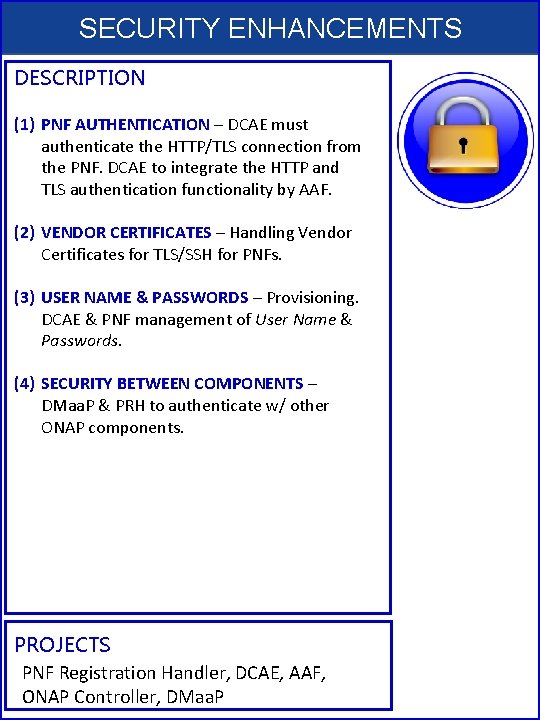
SECURITY ENHANCEMENTS DESCRIPTION (1) PNF AUTHENTICATION – DCAE must authenticate the HTTP/TLS connection from the PNF. DCAE to integrate the HTTP and TLS authentication functionality by AAF. (2) VENDOR CERTIFICATES – Handling Vendor Certificates for TLS/SSH for PNFs. (3) USER NAME & PASSWORDS – Provisioning. DCAE & PNF management of User Name & Passwords. (4) SECURITY BETWEEN COMPONENTS – DMaa. P & PRH to authenticate w/ other ONAP components. PROJECTS PNF Registration Handler, DCAE, AAF, ONAP Controller, DMaa. P
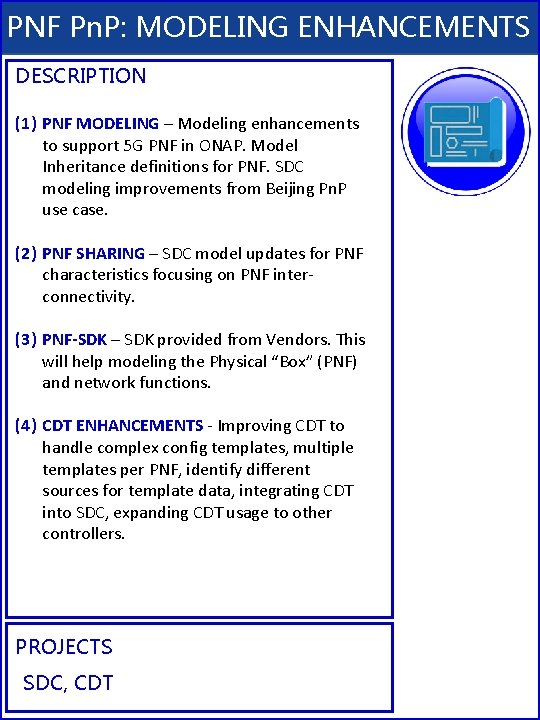
PNF Pn. P: MODELING ENHANCEMENTS DESCRIPTION (1) PNF MODELING – Modeling enhancements to support 5 G PNF in ONAP. Model Inheritance definitions for PNF. SDC modeling improvements from Beijing Pn. P use case. (2) PNF SHARING – SDC model updates for PNF characteristics focusing on PNF interconnectivity. (3) PNF-SDK – SDK provided from Vendors. This will help modeling the Physical “Box” (PNF) and network functions. (4) CDT ENHANCEMENTS - Improving CDT to handle complex config templates, multiple templates per PNF, identify different sources for template data, integrating CDT into SDC, expanding CDT usage to other controllers. PROJECTS SDC, CDT
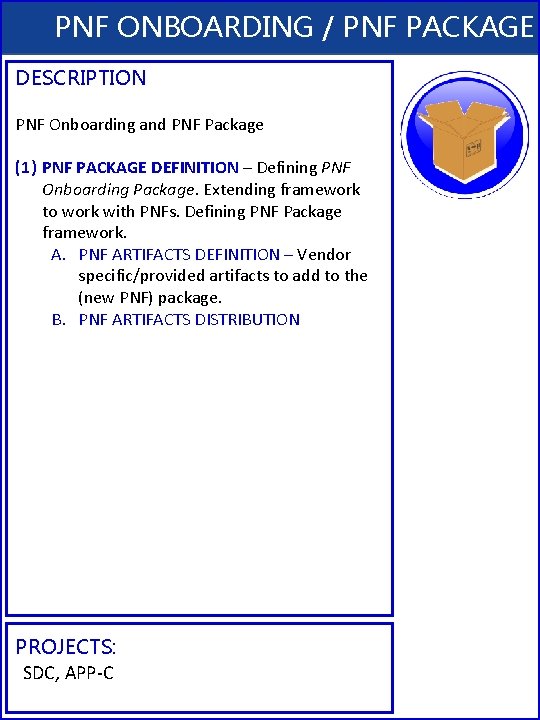
PNF ONBOARDING / PNF PACKAGE DESCRIPTION PNF Onboarding and PNF Package (1) PNF PACKAGE DEFINITION – Defining PNF Onboarding Package. Extending framework to work with PNFs. Defining PNF Package framework. A. PNF ARTIFACTS DEFINITION – Vendor specific/provided artifacts to add to the (new PNF) package. B. PNF ARTIFACTS DISTRIBUTION PROJECTS: SDC, APP-C
PNF Plug and Play IN CASABLANCA (R 3) • ONAP and PNF Plug and Play for 5 G RAN • 5 G Use Case Team
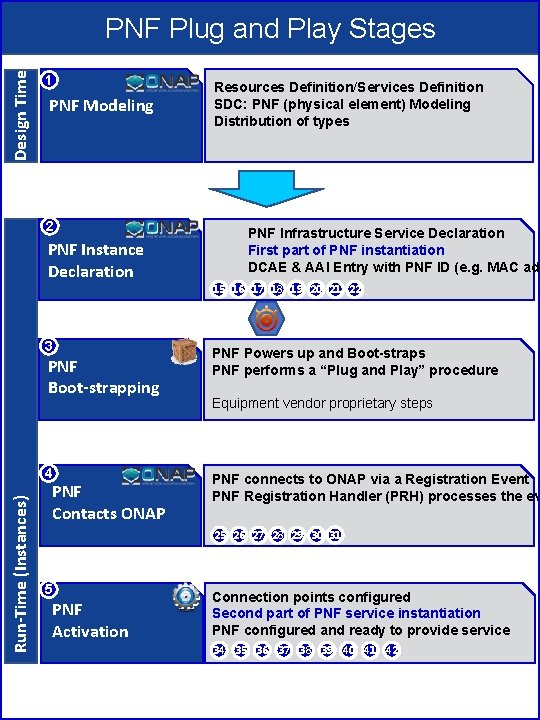
Design Time PNF Plug and Play Stages 1 PNF Modeling 2 PNF Instance Declaration Resources Definition/Services Definition SDC: PNF (physical element) Modeling Distribution of types PNF Infrastructure Service Declaration First part of PNF instantiation DCAE & AAI Entry with PNF ID (e. g. MAC add 15 16 17 18 19 20 21 22 3 PNF Boot-strapping Run-Time (Instances) 4 PNF Contacts ONAP PNF Powers up and Boot-straps PNF performs a “Plug and Play” procedure Equipment vendor proprietary steps PNF connects to ONAP via a Registration Event PNF Registration Handler (PRH) processes the ev 25 26 27 28 29 30 31 5 PNF Activation Connection points configured Second part of PNF service instantiation PNF configured and ready to provide service 34 35 36 37 38 39 40 41 42
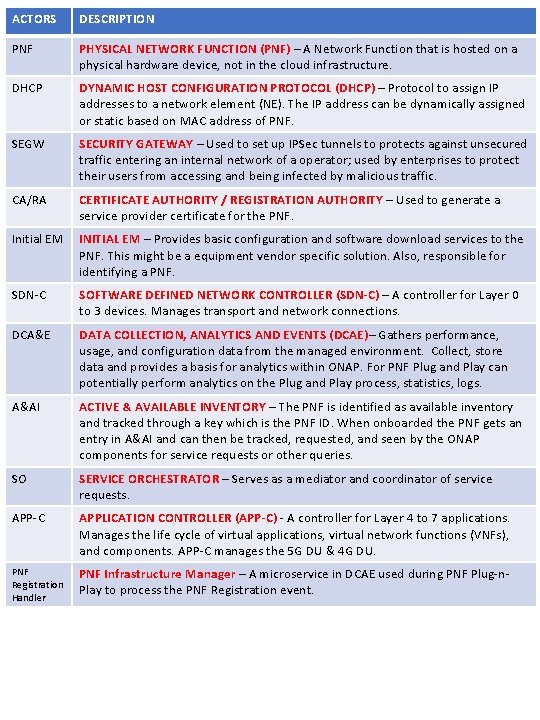
ACTORS DESCRIPTION PNF PHYSICAL NETWORK FUNCTION (PNF) – A Network Function that is hosted on a physical hardware device, not in the cloud infrastructure. DHCP DYNAMIC HOST CONFIGURATION PROTOCOL (DHCP) – Protocol to assign IP addresses to a network element (NE). The IP address can be dynamically assigned or static based on MAC address of PNF. SEGW SECURITY GATEWAY – Used to set up IPSec tunnels to protects against unsecured traffic entering an internal network of a operator; used by enterprises to protect their users from accessing and being infected by malicious traffic. CA/RA CERTIFICATE AUTHORITY / REGISTRATION AUTHORITY – Used to generate a service provider certificate for the PNF. Initial EM INITIAL EM – Provides basic configuration and software download services to the PNF. This might be a equipment vendor specific solution. Also, responsible for identifying a PNF. SDN-C SOFTWARE DEFINED NETWORK CONTROLLER (SDN-C) – A controller for Layer 0 to 3 devices. Manages transport and network connections. DCA&E DATA COLLECTION, ANALYTICS AND EVENTS (DCAE)– Gathers performance, usage, and configuration data from the managed environment. Collect, store data and provides a basis for analytics within ONAP. For PNF Plug and Play can potentially perform analytics on the Plug and Play process, statistics, logs. A&AI ACTIVE & AVAILABLE INVENTORY – The PNF is identified as available inventory and tracked through a key which is the PNF ID. When onboarded the PNF gets an entry in A&AI and can then be tracked, requested, and seen by the ONAP components for service requests or other queries. SO SERVICE ORCHESTRATOR – Serves as a mediator and coordinator of service requests. APP-C APPLICATION CONTROLLER (APP-C) - A controller for Layer 4 to 7 applications. Manages the life cycle of virtual applications, virtual network functions (VNFs), and components. APP-C manages the 5 G DU & 4 G DU. PNF Registration Handler PNF Infrastructure Manager – A microservice in DCAE used during PNF Plug-n. Play to process the PNF Registration event.

Design Time (ONAP) SDC 1 SO Resource Definition SDN-C SDN-R APP-C DCAE AAI CASABLANCA PNF Onboarding Package PNF type INPUT: PNF Descriptor (PNFD) (Vendor Provider) ACTION: User builds a resource definition customizing vendor’s PNF description. “blue print” of PNF OUTPUT: SDC Resource Definition 2 Service 2 Definition Service Definition CASABLANCA PNF Modeling Enhancements Customization of Resource Definition INPUT: SDC Resource Definition ACTION: Designer: Customizes the SDC Resource Definition with service specific parameters. Define the PNF types “object Model” e. g. 5 G DU, 4 G, Legacy DU. Infrastructure services, services for PNF. OUTPUT: Service Definition 3 Type Modeling Artifacts Distribution Listener UEB Listener Service Change Handler INPUT: SDC Service Definitions ACTION: Type Modeling Artifact (from SDC) are distributed to other ONAP components (DCAE, SO, AAI). SDC artifacts include policies & Work-flows related to that type are defined. Context-sensitive distribution based on PNF type. OUTPUT: ONAP components are prepared to manage PNFs of that new type. Vendor Specific Step Listener
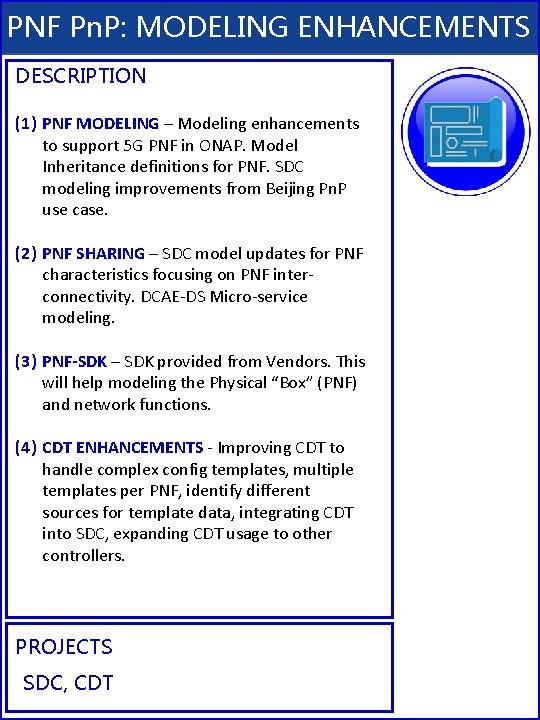
PNF Pn. P: MODELING ENHANCEMENTS DESCRIPTION (1) PNF MODELING – Modeling enhancements to support 5 G PNF in ONAP. Model Inheritance definitions for PNF. SDC modeling improvements from Beijing Pn. P use case. (2) PNF SHARING – SDC model updates for PNF characteristics focusing on PNF interconnectivity. DCAE-DS Micro-service modeling. (3) PNF-SDK – SDK provided from Vendors. This will help modeling the Physical “Box” (PNF) and network functions. (4) CDT ENHANCEMENTS - Improving CDT to handle complex config templates, multiple templates per PNF, identify different sources for template data, integrating CDT into SDC, expanding CDT usage to other controllers. PROJECTS SDC, CDT
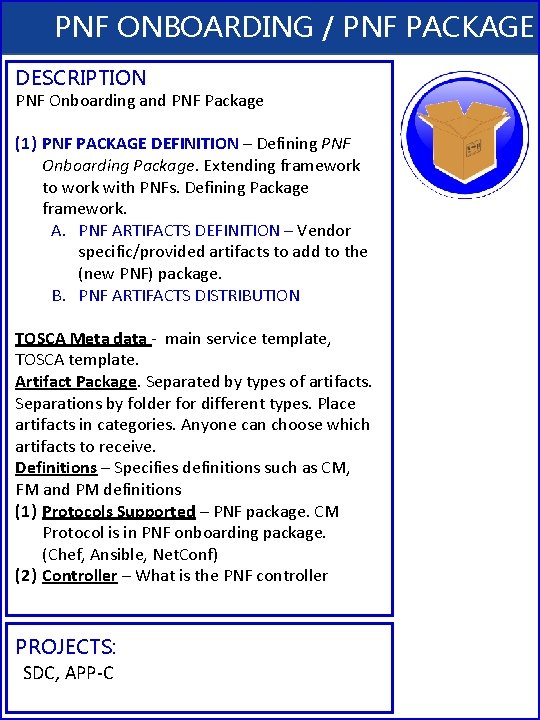
PNF ONBOARDING / PNF PACKAGE DESCRIPTION PNF Onboarding and PNF Package (1) PNF PACKAGE DEFINITION – Defining PNF Onboarding Package. Extending framework to work with PNFs. Defining Package framework. A. PNF ARTIFACTS DEFINITION – Vendor specific/provided artifacts to add to the (new PNF) package. B. PNF ARTIFACTS DISTRIBUTION TOSCA Meta data - main service template, TOSCA template. Artifact Package. Separated by types of artifacts. Separations by folder for different types. Place artifacts in categories. Anyone can choose which artifacts to receive. Definitions – Specifies definitions such as CM, FM and PM definitions (1) Protocols Supported – PNF package. CM Protocol is in PNF onboarding package. (Chef, Ansible, Net. Conf) (2) Controller – What is the PNF controller PROJECTS: SDC, APP-C
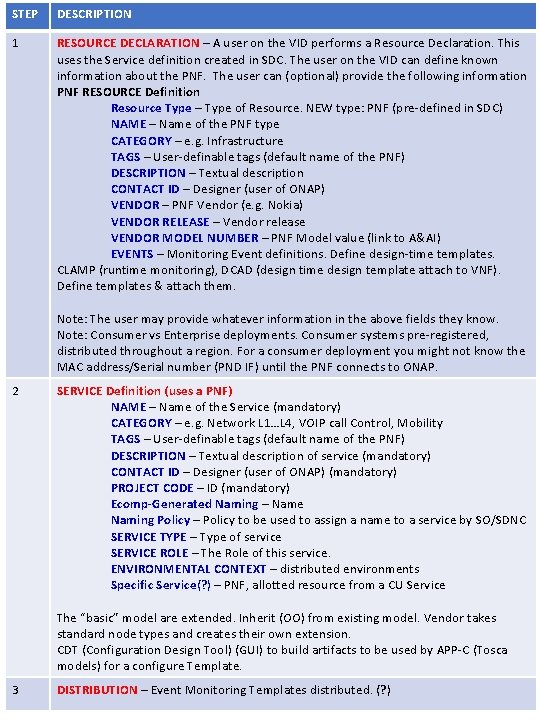
STEP DESCRIPTION 1 RESOURCE DECLARATION – A user on the VID performs a Resource Declaration. This uses the Service definition created in SDC. The user on the VID can define known information about the PNF. The user can (optional) provide the following information PNF RESOURCE Definition Resource Type – Type of Resource. NEW type: PNF (pre-defined in SDC) NAME – Name of the PNF type CATEGORY – e. g. Infrastructure TAGS – User-definable tags (default name of the PNF) DESCRIPTION – Textual description CONTACT ID – Designer (user of ONAP) VENDOR – PNF Vendor (e. g. Nokia) VENDOR RELEASE – Vendor release VENDOR MODEL NUMBER – PNF Model value (link to A&AI) EVENTS – Monitoring Event definitions. Define design-time templates. CLAMP (runtime monitoring), DCAD (design time design template attach to VNF). Define templates & attach them. Note: The user may provide whatever information in the above fields they know. Note: Consumer vs Enterprise deployments. Consumer systems pre-registered, distributed throughout a region. For a consumer deployment you might not know the MAC address/Serial number (PND IF) until the PNF connects to ONAP. 2 SERVICE Definition (uses a PNF) NAME – Name of the Service (mandatory) CATEGORY – e. g. Network L 1…L 4, VOIP call Control, Mobility TAGS – User-definable tags (default name of the PNF) DESCRIPTION – Textual description of service (mandatory) CONTACT ID – Designer (user of ONAP) (mandatory) PROJECT CODE – ID (mandatory) Ecomp-Generated Naming – Name Naming Policy – Policy to be used to assign a name to a service by SO/SDNC SERVICE TYPE – Type of service SERVICE ROLE – The Role of this service. ENVIRONMENTAL CONTEXT – distributed environments Specific Service(? ) – PNF, allotted resource from a CU Service The “basic” model are extended. Inherit (OO) from existing model. Vendor takes standard node types and creates their own extension. CDT (Configuration Design Tool) (GUI) to build artifacts to be used by APP-C (Tosca models) for a configure Template. 3 DISTRIBUTION – Event Monitoring Templates distributed. (? )
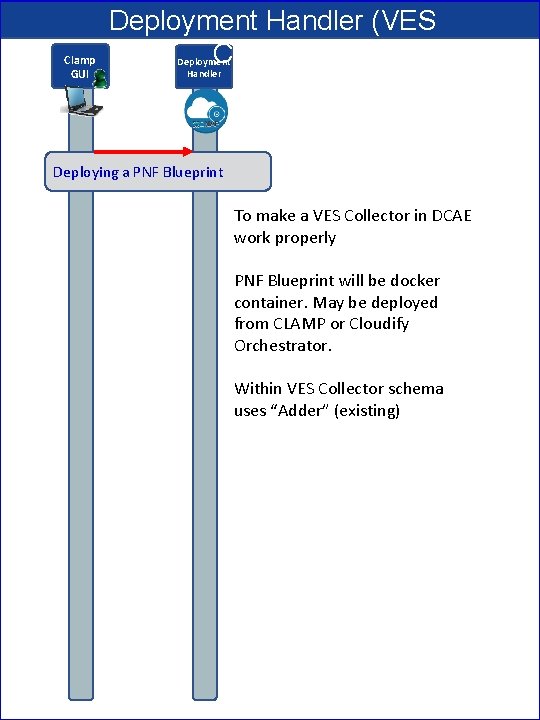
Clamp GUI Deployment Handler (VES Collector) Deployment Handler Deploying a PNF Blueprint To make a VES Collector in DCAE work properly PNF Blueprint will be docker container. May be deployed from CLAMP or Cloudify Orchestrator. Within VES Collector schema uses “Adder” (existing)
STEP DESCRIPTION 1 DEPLOYMENT HANDLER PNF BLUEPRINT – The Deployment handler is necessary to use, to give it the PNF blueprint so that later on in the Plug and Play flow, DCAE will recognize the PNF. The PNF Blueprint will be docker container. The PNF blueprint May be deployed from CLAMP or Cloudify Orchestrator to DCAE. Within VES Collector schema uses “Adder” (existing).
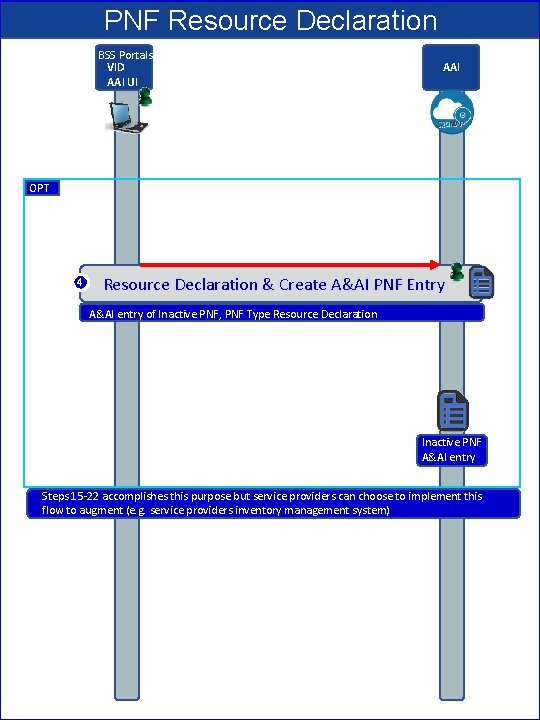
PNF Resource Declaration BSS Portals VID AAI UI AAI OPT 4 Resource Declaration & Create A&AI PNF Entry A&AI entry of Inactive PNF, PNF Type Resource Declaration Inactive PNF A&AI entry Steps 15 -22 accomplishes this purpose but service providers can choose to implement this flow to augment (e. g. service providers inventory management system)
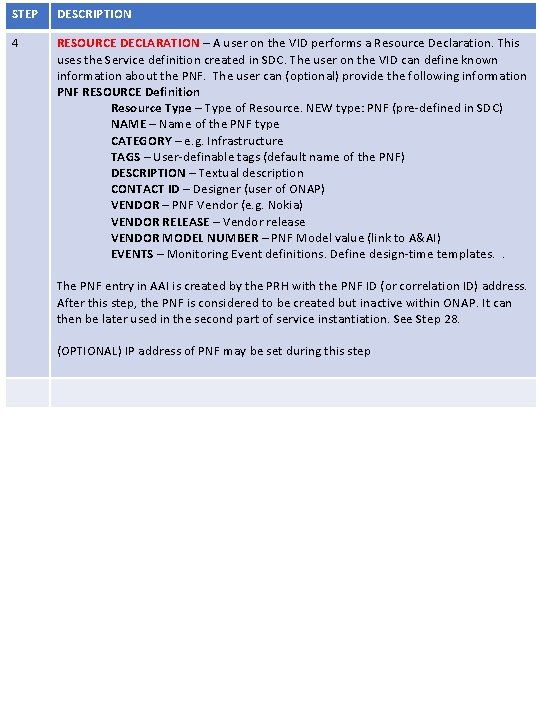
STEP DESCRIPTION 4 RESOURCE DECLARATION – A user on the VID performs a Resource Declaration. This uses the Service definition created in SDC. The user on the VID can define known information about the PNF. The user can (optional) provide the following information PNF RESOURCE Definition Resource Type – Type of Resource. NEW type: PNF (pre-defined in SDC) NAME – Name of the PNF type CATEGORY – e. g. Infrastructure TAGS – User-definable tags (default name of the PNF) DESCRIPTION – Textual description CONTACT ID – Designer (user of ONAP) VENDOR – PNF Vendor (e. g. Nokia) VENDOR RELEASE – Vendor release VENDOR MODEL NUMBER – PNF Model value (link to A&AI) EVENTS – Monitoring Event definitions. Define design-time templates. . The PNF entry in AAI is created by the PRH with the PNF ID (or correlation ID) address. After this step, the PNF is considered to be created but inactive within ONAP. It can then be later used in the second part of service instantiation. See Step 28. (OPTIONAL) IP address of PNF may be set during this step
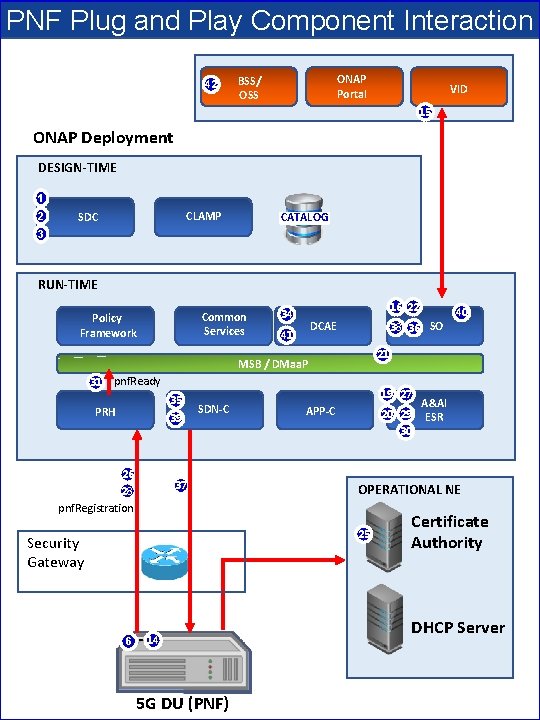
PNF Plug and Play Component Interaction 42 ONAP Portal BSS/ OSS VID 15 ONAP Deployment DESIGN-TIME 1 2 CLAMP SDC CATALOG 3 RUN-TIME Common Services Policy Framework 16 22 34 DCAE 41 38 36 21 MSB / DMaa. P 31 pnf. Ready 35 PRH 39 26 19 27 SDN-C 37 28 APP-C 20 29 30 25 6 - 14 5 G DU (PNF) A&AI ESR OPERATIONAL NE pnf. Registration Security Gateway 40 SO Certificate Authority DHCP Server
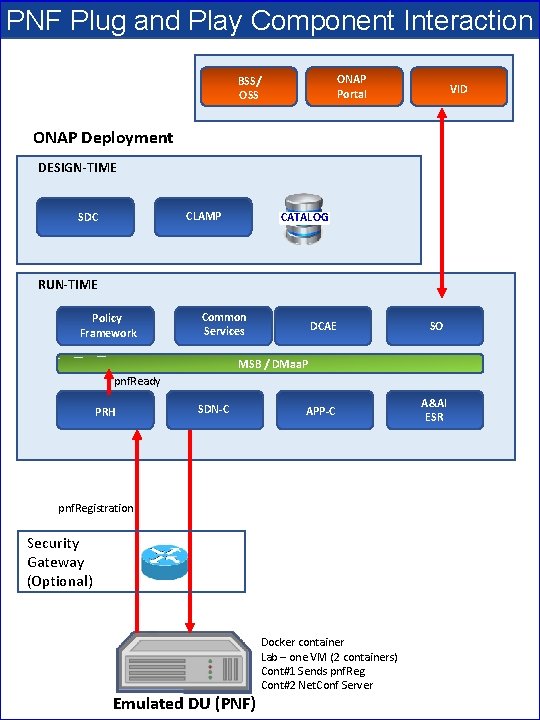
PNF Plug and Play Component Interaction ONAP Portal BSS/ OSS VID ONAP Deployment DESIGN-TIME CLAMP SDC CATALOG RUN-TIME Policy Framework Common Services DCAE SO APP-C A&AI ESR MSB / DMaa. P pnf. Ready PRH SDN-C pnf. Registration Security Gateway (Optional) Emulated DU (PNF) Docker container Lab – one VM (2 containers) Cont#1 Sends pnf. Reg Cont#2 Net. Conf Server
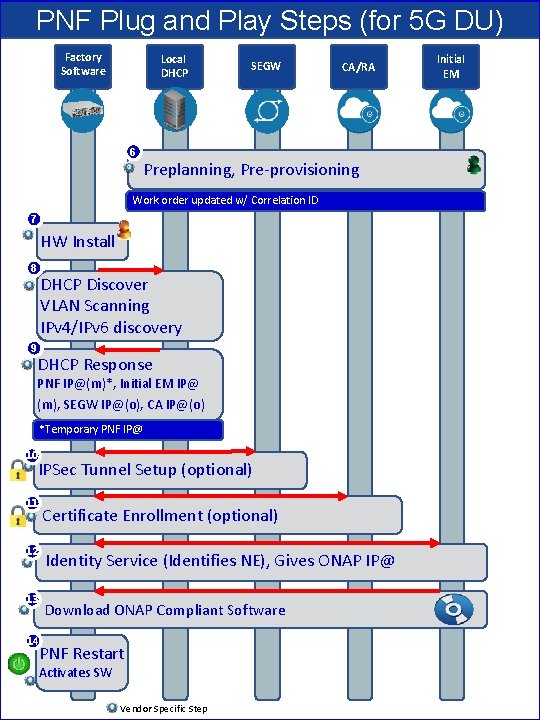
PNF Plug and Play Steps (for 5 G DU) Factory Software Local DHCP SEGW CA/RA 6 Preplanning, Pre-provisioning Work order updated w/ Correlation ID 7 HW Install 8 9 DHCP Discover VLAN Scanning IPv 4/IPv 6 discovery DHCP Response PNF IP@(m)*, Initial EM IP@ (m), SEGW IP@(o), CA IP@(o) *Temporary PNF IP@ 10 IPSec Tunnel Setup (optional) 11 Certificate Enrollment (optional) 12 Identity Service (Identifies NE), Gives ONAP IP@ 13 Download ONAP Compliant Software 14 PNF Restart Activates SW Vendor Specific Step Initial EM
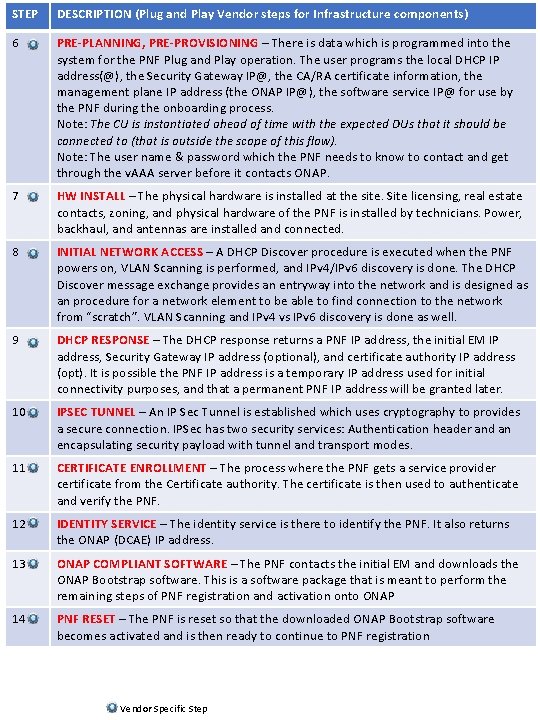
STEP DESCRIPTION (Plug and Play Vendor steps for Infrastructure components) 6 PRE-PLANNING, PRE-PROVISIONING – There is data which is programmed into the system for the PNF Plug and Play operation. The user programs the local DHCP IP address(@), the Security Gateway IP@, the CA/RA certificate information, the management plane IP address (the ONAP IP@), the software service IP@ for use by the PNF during the onboarding process. Note: The CU is instantiated ahead of time with the expected DUs that it should be connected to (that is outside the scope of this flow). Note: The user name & password which the PNF needs to know to contact and get through the v. AAA server before it contacts ONAP. 7 HW INSTALL – The physical hardware is installed at the site. Site licensing, real estate contacts, zoning, and physical hardware of the PNF is installed by technicians. Power, backhaul, and antennas are installed and connected. 8 INITIAL NETWORK ACCESS – A DHCP Discover procedure is executed when the PNF powers on, VLAN Scanning is performed, and IPv 4/IPv 6 discovery is done. The DHCP Discover message exchange provides an entryway into the network and is designed as an procedure for a network element to be able to find connection to the network from “scratch”. VLAN Scanning and IPv 4 vs IPv 6 discovery is done as well. 9 DHCP RESPONSE – The DHCP response returns a PNF IP address, the initial EM IP address, Security Gateway IP address (optional), and certificate authority IP address (opt). It is possible the PNF IP address is a temporary IP address used for initial connectivity purposes, and that a permanent PNF IP address will be granted later. 10 IPSEC TUNNEL – An IP Sec Tunnel is established which uses cryptography to provides a secure connection. IPSec has two security services: Authentication header and an encapsulating security payload with tunnel and transport modes. 11 CERTIFICATE ENROLLMENT – The process where the PNF gets a service provider certificate from the Certificate authority. The certificate is then used to authenticate and verify the PNF. 12 IDENTITY SERVICE – The identity service is there to identify the PNF. It also returns the ONAP (DCAE) IP address. 13 ONAP COMPLIANT SOFTWARE – The PNF contacts the initial EM and downloads the ONAP Bootstrap software. This is a software package that is meant to perform the remaining steps of PNF registration and activation onto ONAP 14 PNF RESET – The PNF is reset so that the downloaded ONAP Bootstrap software becomes activated and is then ready to continue to PNF registration Vendor Specific Step
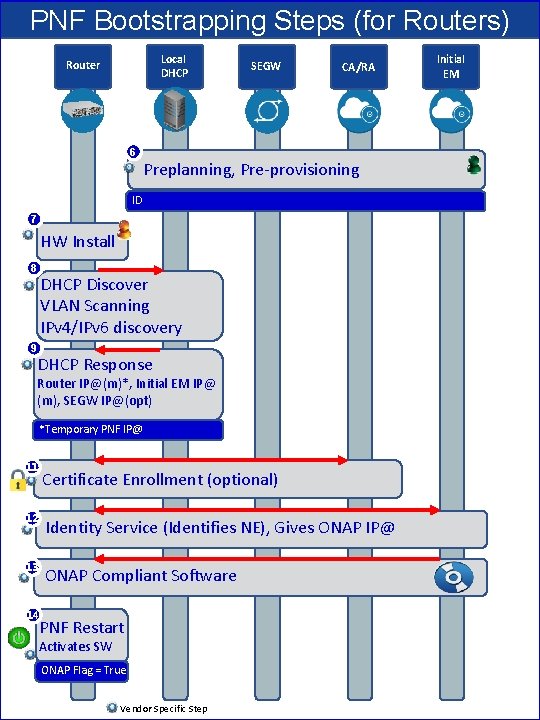
PNF Bootstrapping Steps (for Routers) Local DHCP Router SEGW CA/RA 6 Preplanning, Pre-provisioning ID 7 HW Install 8 9 DHCP Discover VLAN Scanning IPv 4/IPv 6 discovery DHCP Response Router IP@(m)*, Initial EM IP@ (m), SEGW IP@(opt) *Temporary PNF IP@ 11 Certificate Enrollment (optional) 12 Identity Service (Identifies NE), Gives ONAP IP@ 13 ONAP Compliant Software 14 PNF Restart Activates SW ONAP Flag = True Vendor Specific Step Initial EM
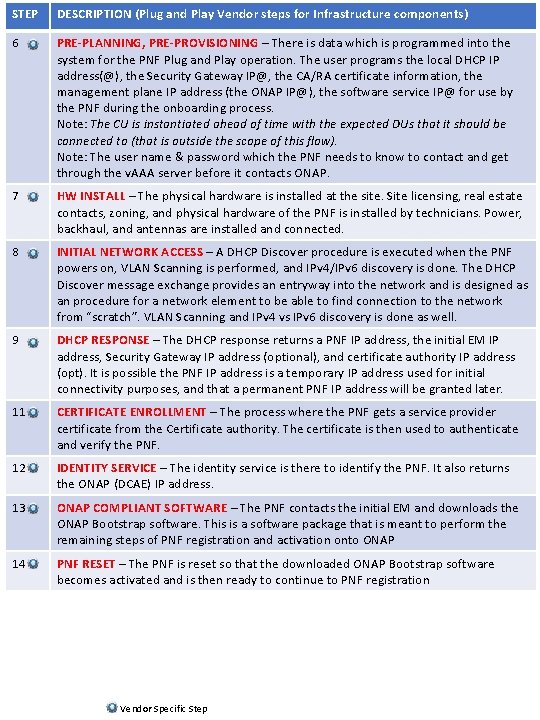
STEP DESCRIPTION (Plug and Play Vendor steps for Infrastructure components) 6 PRE-PLANNING, PRE-PROVISIONING – There is data which is programmed into the system for the PNF Plug and Play operation. The user programs the local DHCP IP address(@), the Security Gateway IP@, the CA/RA certificate information, the management plane IP address (the ONAP IP@), the software service IP@ for use by the PNF during the onboarding process. Note: The CU is instantiated ahead of time with the expected DUs that it should be connected to (that is outside the scope of this flow). Note: The user name & password which the PNF needs to know to contact and get through the v. AAA server before it contacts ONAP. 7 HW INSTALL – The physical hardware is installed at the site. Site licensing, real estate contacts, zoning, and physical hardware of the PNF is installed by technicians. Power, backhaul, and antennas are installed and connected. 8 INITIAL NETWORK ACCESS – A DHCP Discover procedure is executed when the PNF powers on, VLAN Scanning is performed, and IPv 4/IPv 6 discovery is done. The DHCP Discover message exchange provides an entryway into the network and is designed as an procedure for a network element to be able to find connection to the network from “scratch”. VLAN Scanning and IPv 4 vs IPv 6 discovery is done as well. 9 DHCP RESPONSE – The DHCP response returns a PNF IP address, the initial EM IP address, Security Gateway IP address (optional), and certificate authority IP address (opt). It is possible the PNF IP address is a temporary IP address used for initial connectivity purposes, and that a permanent PNF IP address will be granted later. 11 CERTIFICATE ENROLLMENT – The process where the PNF gets a service provider certificate from the Certificate authority. The certificate is then used to authenticate and verify the PNF. 12 IDENTITY SERVICE – The identity service is there to identify the PNF. It also returns the ONAP (DCAE) IP address. 13 ONAP COMPLIANT SOFTWARE – The PNF contacts the initial EM and downloads the ONAP Bootstrap software. This is a software package that is meant to perform the remaining steps of PNF registration and activation onto ONAP 14 PNF RESET – The PNF is reset so that the downloaded ONAP Bootstrap software becomes activated and is then ready to continue to PNF registration Vendor Specific Step
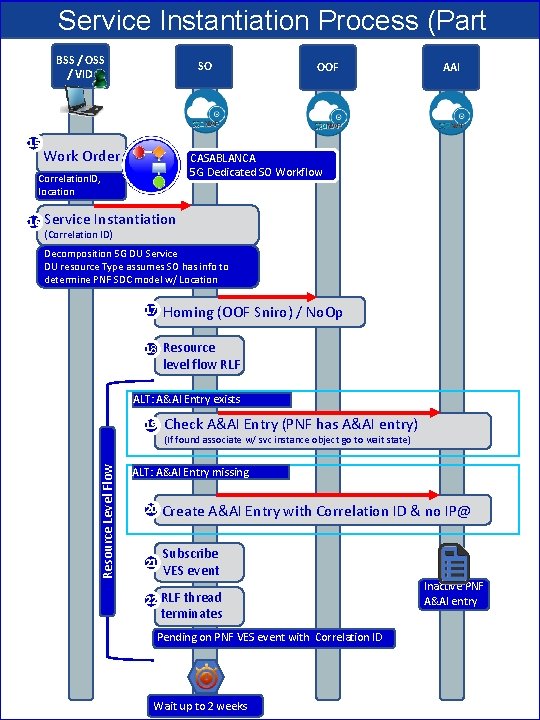
Service Instantiation Process (Part 1) OOF BSS / OSS SO AAI / VID 15 Work Order CASABLANCA 5 G Dedicated SO Workflow Correlation. ID, location Service Instantiation (Correlation ID) Decomposition 5 G DU Service DU resource Type assumes SO has info to determine PNF SDC model w/ Location 17 Homing (OOF Sniro) / No. Op 18 Resource level flow RLF ALT: A&AI Entry exists 19 Check A&AI Entry (PNF has A&AI entry) (If found associate w/ svc instance object go to wait state) Resource Level Flow 16 ALT: A&AI Entry missing 20 Create A&AI Entry with Correlation ID & no IP@ 21 Subscribe VES event 22 RLF thread terminates Pending on PNF VES event with Correlation ID Wait up to 2 weeks Inactive PNF A&AI entry
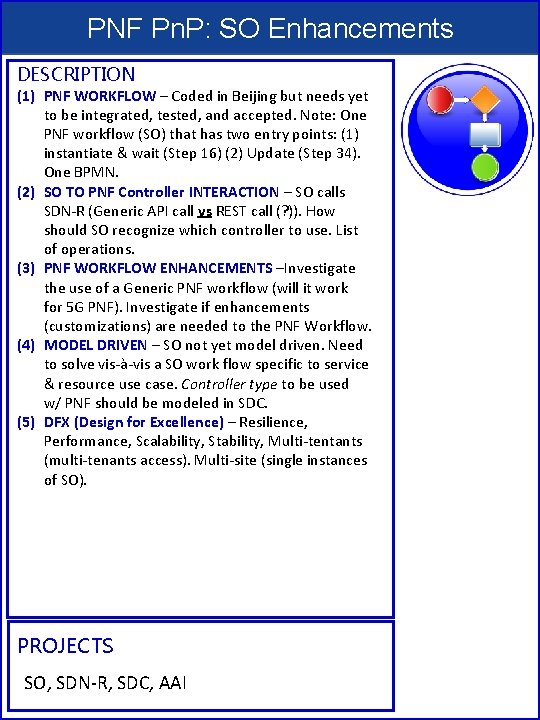
PNF Pn. P: SO Enhancements DESCRIPTION (1) PNF WORKFLOW – Coded in Beijing but needs yet to be integrated, tested, and accepted. Note: One PNF workflow (SO) that has two entry points: (1) instantiate & wait (Step 16) (2) Update (Step 34). One BPMN. (2) SO TO PNF Controller INTERACTION – SO calls SDN-R (Generic API call vs REST call (? )). How should SO recognize which controller to use. List of operations. (3) PNF WORKFLOW ENHANCEMENTS –Investigate the use of a Generic PNF workflow (will it work for 5 G PNF). Investigate if enhancements (customizations) are needed to the PNF Workflow. (4) MODEL DRIVEN – SO not yet model driven. Need to solve vis-à-vis a SO work flow specific to service & resource use case. Controller type to be used w/ PNF should be modeled in SDC. (5) DFX (Design for Excellence) – Resilience, Performance, Scalability, Stability, Multi-tentants (multi-tenants access). Multi-site (single instances of SO). PROJECTS SO, SDN-R, SDC, AAI
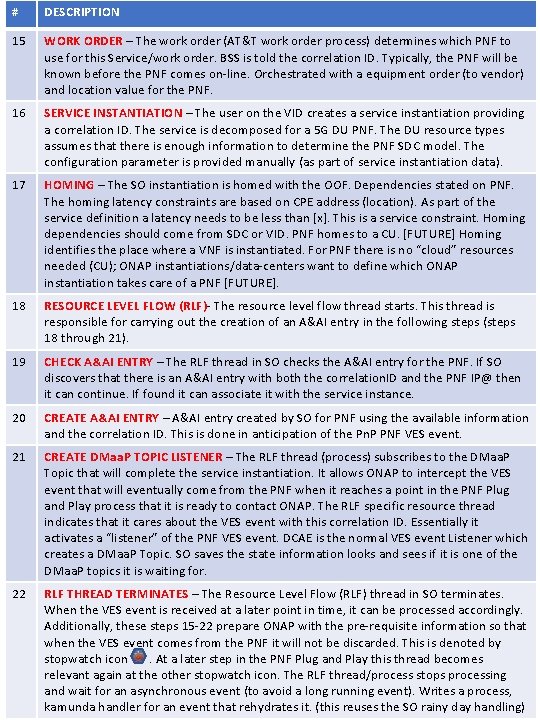
# DESCRIPTION 15 WORK ORDER – The work order (AT&T work order process) determines which PNF to use for this Service/work order. BSS is told the correlation ID. Typically, the PNF will be known before the PNF comes on-line. Orchestrated with a equipment order (to vendor) and location value for the PNF. 16 SERVICE INSTANTIATION – The user on the VID creates a service instantiation providing a correlation ID. The service is decomposed for a 5 G DU PNF. The DU resource types assumes that there is enough information to determine the PNF SDC model. The configuration parameter is provided manually (as part of service instantiation data). 17 HOMING – The SO instantiation is homed with the OOF. Dependencies stated on PNF. The homing latency constraints are based on CPE address (location). As part of the service definition a latency needs to be less than [x]. This is a service constraint. Homing dependencies should come from SDC or VID. PNF homes to a CU. [FUTURE] Homing identifies the place where a VNF is instantiated. For PNF there is no “cloud” resources needed (CU); ONAP instantiations/data-centers want to define which ONAP instantiation takes care of a PNF [FUTURE]. 18 RESOURCE LEVEL FLOW (RLF)- The resource level flow thread starts. This thread is responsible for carrying out the creation of an A&AI entry in the following steps (steps 18 through 21). 19 CHECK A&AI ENTRY – The RLF thread in SO checks the A&AI entry for the PNF. If SO discovers that there is an A&AI entry with both the correlation. ID and the PNF IP@ then it can continue. If found it can associate it with the service instance. 20 CREATE A&AI ENTRY – A&AI entry created by SO for PNF using the available information and the correlation ID. This is done in anticipation of the Pn. P PNF VES event. 21 CREATE DMaa. P TOPIC LISTENER – The RLF thread (process) subscribes to the DMaa. P Topic that will complete the service instantiation. It allows ONAP to intercept the VES event that will eventually come from the PNF when it reaches a point in the PNF Plug and Play process that it is ready to contact ONAP. The RLF specific resource thread indicates that it cares about the VES event with this correlation ID. Essentially it activates a “listener” of the PNF VES event. DCAE is the normal VES event Listener which creates a DMaa. P Topic. SO saves the state information looks and sees if it is one of the DMaa. P topics it is waiting for. 22 RLF THREAD TERMINATES – The Resource Level Flow (RLF) thread in SO terminates. When the VES event is received at a later point in time, it can be processed accordingly. Additionally, these steps 15 -22 prepare ONAP with the pre-requisite information so that when the VES event comes from the PNF it will not be discarded. This is denoted by stopwatch icon . At a later step in the PNF Plug and Play this thread becomes relevant again at the other stopwatch icon. The RLF thread/process stops processing and wait for an asynchronous event (to avoid a long running event). Writes a process, kamunda handler for an event that rehydrates it. (this reuses the SO rainy day handling)
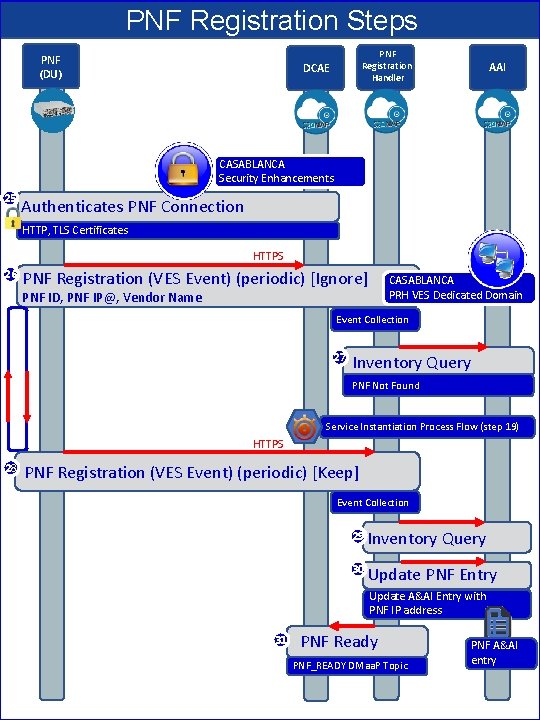
PNF Registration Steps PNF (DU) AAI Registration Handler DCAE CASABLANCA Security Enhancements 25 Authenticates PNF Connection HTTP, TLS Certificates HTTPS 26 PNF Registration (VES Event) (periodic) [Ignore] CASABLANCA PRH VES Dedicated Domain PNF ID, PNF IP@, Vendor Name Event Collection 27 Inventory Query PNF Not Found Service Instantiation Process Flow (step 19) HTTPS 28 PNF Registration (VES Event) (periodic) [Keep] Event Collection 29 Inventory Query 30 Update PNF Entry Update A&AI Entry with PNF IP address 31 PNF Ready PNF_READY DMaa. P Topic PNF A&AI entry
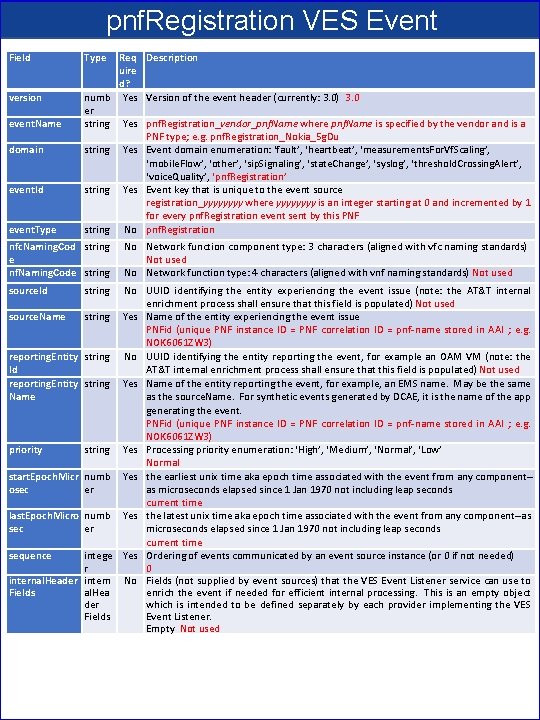
pnf. Registration VES Event Field version event. Name domain event. Id event. Type Req Description uire d? numb Yes Version of the event header (currently: 3. 0) 3. 0 er string Yes pnf. Registration_vendor_pnf. Name where pnf. Name is specified by the vendor and is a PNF type; e. g. pnf. Registration_Nokia_5 g. Du string Yes Event domain enumeration: ‘fault’, ‘heartbeat’, ‘measurements. For. Vf. Scaling’, ‘mobile. Flow’, ‘other’, ‘sip. Signaling’, ‘state. Change’, ‘syslog’, ‘threshold. Crossing. Alert’, ‘voice. Quality’, ‘pnf. Registration’ string Yes Event key that is unique to the event source registration_yyyy where yyyy is an integer starting at 0 and incremented by 1 for every pnf. Registration event sent by this PNF string No pnf. Registration nfc. Naming. Cod string e nf. Naming. Code string source. Id string No Network function component type: 3 characters (aligned with vfc naming standards) Not used No Network function type: 4 characters (aligned with vnf naming standards) Not used No UUID identifying the entity experiencing the event issue (note: the AT&T internal enrichment process shall ensure that this field is populated) Not used source. Name string Yes Name of the entity experiencing the event issue PNFid (unique PNF instance ID = PNF correlation ID = pnf-name stored in AAI ; e. g. NOK 6061 ZW 3) reporting. Entity string No UUID identifying the entity reporting the event, for example an OAM VM (note: the Id AT&T internal enrichment process shall ensure that this field is populated) Not used reporting. Entity string Yes Name of the entity reporting the event, for example, an EMS name. May be the same Name as the source. Name. For synthetic events generated by DCAE, it is the name of the app generating the event. PNFid (unique PNF instance ID = PNF correlation ID = pnf-name stored in AAI ; e. g. NOK 6061 ZW 3) priority string Yes Processing priority enumeration: ‘High’, ‘Medium’, ‘Normal’, ‘Low’ Normal start. Epoch. Micr numb Yes the earliest unix time aka epoch time associated with the event from any component-osec er as microseconds elapsed since 1 Jan 1970 not including leap seconds current time last. Epoch. Micro numb Yes the latest unix time aka epoch time associated with the event from any component--as sec er microseconds elapsed since 1 Jan 1970 not including leap seconds current time sequence intege Yes Ordering of events communicated by an event source instance (or 0 if not needed) r 0 internal. Header intern No Fields (not supplied by event sources) that the VES Event Listener service can use to Fields al. Hea enrich the event if needed for efficient internal processing. This is an empty object der which is intended to be defined separately by each provider implementing the VES Fields Event Listener. Empty Not used
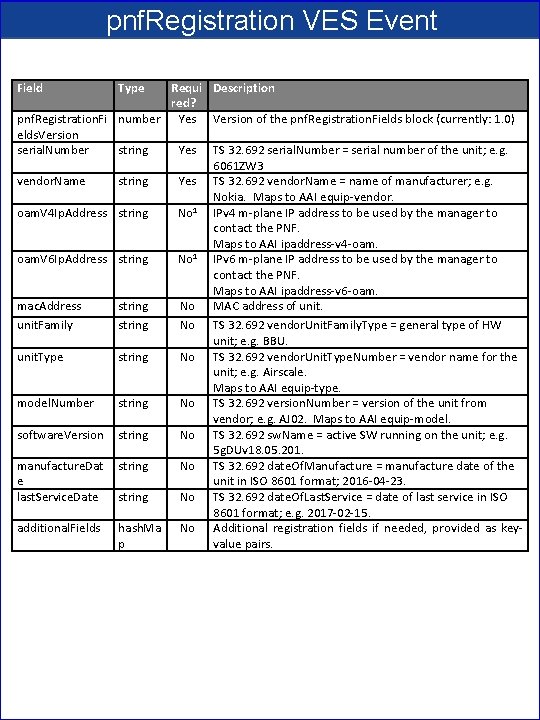
pnf. Registration VES Event Field Type Requi Description red? pnf. Registration. Fi number Yes Version of the pnf. Registration. Fields block (currently: 1. 0) elds. Version serial. Number string Yes TS 32. 692 serial. Number = serial number of the unit; e. g. 6061 ZW 3 vendor. Name string Yes TS 32. 692 vendor. Name = name of manufacturer; e. g. Nokia. Maps to AAI equip-vendor. 1 oam. V 4 Ip. Address string No IPv 4 m-plane IP address to be used by the manager to contact the PNF. Maps to AAI ipaddress-v 4 -oam. 1 oam. V 6 Ip. Address string No IPv 6 m-plane IP address to be used by the manager to contact the PNF. Maps to AAI ipaddress-v 6 -oam. mac. Address string No MAC address of unit. Family string No TS 32. 692 vendor. Unit. Family. Type = general type of HW unit; e. g. BBU. unit. Type string No TS 32. 692 vendor. Unit. Type. Number = vendor name for the unit; e. g. Airscale. Maps to AAI equip-type. model. Number string No TS 32. 692 version. Number = version of the unit from vendor; e. g. AJ 02. Maps to AAI equip-model. software. Version string No TS 32. 692 sw. Name = active SW running on the unit; e. g. 5 g. DUv 18. 05. 201. manufacture. Dat string No TS 32. 692 date. Of. Manufacture = manufacture date of the e unit in ISO 8601 format; 2016 -04 -23. last. Service. Date string No TS 32. 692 date. Of. Last. Service = date of last service in ISO 8601 format; e. g. 2017 -02 -15. additional. Fields hash. Ma No Additional registration fields if needed, provided as keyp value pairs.
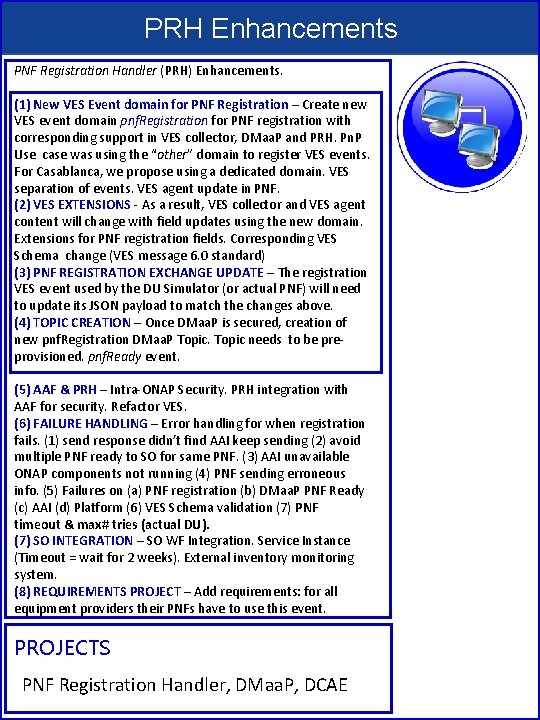
PRH Enhancements PNF Registration Handler (PRH) Enhancements. (1) New VES Event domain for PNF Registration – Create new VES event domain pnf. Registration for PNF registration with corresponding support in VES collector, DMaa. P and PRH. Pn. P Use case was using the “other” domain to register VES events. For Casablanca, we propose using a dedicated domain. VES separation of events. VES agent update in PNF. (2) VES EXTENSIONS - As a result, VES collector and VES agent content will change with field updates using the new domain. Extensions for PNF registration fields. Corresponding VES Schema change (VES message 6. 0 standard) (3) PNF REGISTRATION EXCHANGE UPDATE – The registration VES event used by the DU Simulator (or actual PNF) will need to update its JSON payload to match the changes above. (4) TOPIC CREATION – Once DMaa. P is secured, creation of new pnf. Registration DMaa. P Topic needs to be preprovisioned. pnf. Ready event. (5) AAF & PRH – Intra-ONAP Security. PRH integration with AAF for security. Refactor VES. (6) FAILURE HANDLING – Error handling for when registration fails. (1) send response didn’t find AAI keep sending (2) avoid multiple PNF ready to SO for same PNF. (3) AAI unavailable ONAP components not running (4) PNF sending erroneous info. (5) Failures on (a) PNF registration (b) DMaa. P PNF Ready (c) AAI (d) Platform (6) VES Schema validation (7) PNF timeout & max# tries (actual DU). (7) SO INTEGRATION – SO WF Integration. Service Instance (Timeout = wait for 2 weeks). External inventory monitoring system. (8) REQUIREMENTS PROJECT – Add requirements: for all equipment providers their PNFs have to use this event. PROJECTS PNF Registration Handler, DMaa. P, DCAE
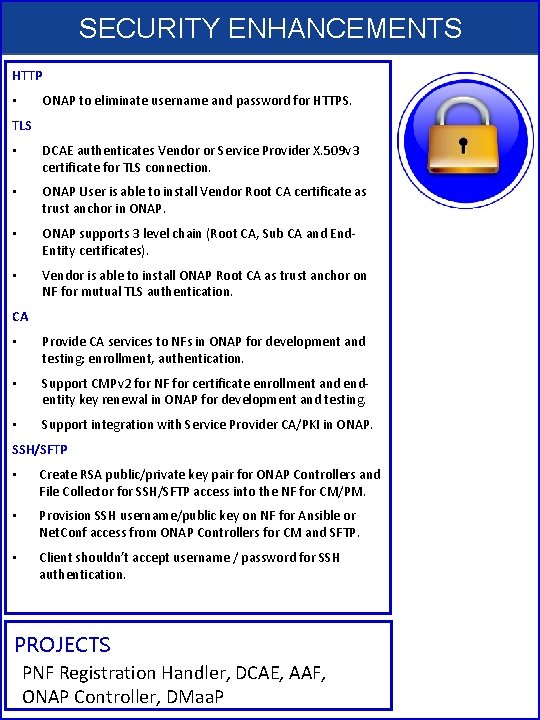
SECURITY ENHANCEMENTS HTTP • ONAP to eliminate username and password for HTTPS. TLS • DCAE authenticates Vendor or Service Provider X. 509 v 3 certificate for TLS connection. • ONAP User is able to install Vendor Root CA certificate as trust anchor in ONAP. • ONAP supports 3 level chain (Root CA, Sub CA and End. Entity certificates). • Vendor is able to install ONAP Root CA as trust anchor on NF for mutual TLS authentication. CA • Provide CA services to NFs in ONAP for development and testing; enrollment, authentication. • Support CMPv 2 for NF for certificate enrollment and endentity key renewal in ONAP for development and testing. • Support integration with Service Provider CA/PKI in ONAP. SSH/SFTP • Create RSA public/private key pair for ONAP Controllers and File Collector for SSH/SFTP access into the NF for CM/PM. • Provision SSH username/public key on NF for Ansible or Net. Conf access from ONAP Controllers for CM and SFTP. • Client shouldn’t accept username / password for SSH authentication. PROJECTS PNF Registration Handler, DCAE, AAF, ONAP Controller, DMaa. P
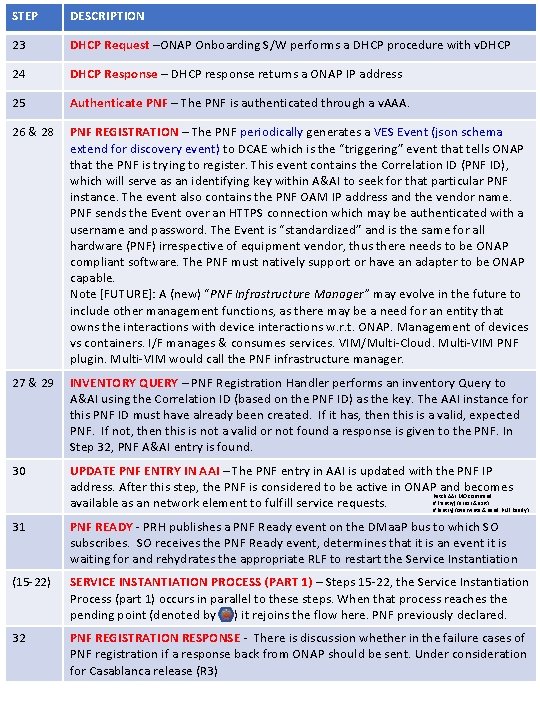
STEP DESCRIPTION 23 DHCP Request –ONAP Onboarding S/W performs a DHCP procedure with v. DHCP 24 DHCP Response – DHCP response returns a ONAP IP address 25 Authenticate PNF – The PNF is authenticated through a v. AAA. 26 & 28 PNF REGISTRATION – The PNF periodically generates a VES Event (json schema extend for discovery event) to DCAE which is the “triggering” event that tells ONAP that the PNF is trying to register. This event contains the Correlation ID (PNF ID), which will serve as an identifying key within A&AI to seek for that particular PNF instance. The event also contains the PNF OAM IP address and the vendor name. PNF sends the Event over an HTTPS connection which may be authenticated with a username and password. The Event is “standardized” and is the same for all hardware (PNF) irrespective of equipment vendor, thus there needs to be ONAP compliant software. The PNF must natively support or have an adapter to be ONAP capable. Note [FUTURE]: A (new) “PNF Infrastructure Manager” may evolve in the future to include other management functions, as there may be a need for an entity that owns the interactions with device interactions w. r. t. ONAP. Management of devices vs containers. I/F manages & consumes services. VIM/Multi-Cloud. Multi-VIM PNF plugin. Multi-VIM would call the PNF infrastructure manager. 27 & 29 INVENTORY QUERY – PNF Registration Handler performs an inventory Query to A&AI using the Correlation ID (based on the PNF ID) as the key. The AAI instance for this PNF ID must have already been created. If it has, then this is a valid, expected PNF. If not, then this is not a valid or not found a response is given to the PNF. In Step 32, PNF A&AI entry is found. 30 UPDATE PNF ENTRY IN AAI – The PNF entry in AAI is updated with the PNF IP address. After this step, the PNF is considered to be active in ONAP and becomes Patch AAI MO command If (!entry) {error & exit} available as an network element to fulfill service requests. If (entry) {overwrite & send PNF Ready} 31 PNF READY - PRH publishes a PNF Ready event on the DMaa. P bus to which SO subscribes. SO receives the PNF Ready event, determines that it is an event it is waiting for and rehydrates the appropriate RLF to restart the Service Instantiation (15 -22) SERVICE INSTANTIATION PROCESS (PART 1) – Steps 15 -22, the Service Instantiation Process (part 1) occurs in parallel to these steps. When that process reaches the pending point (denoted by ) it rejoins the flow here. PNF previously declared. 32 PNF REGISTRATION RESPONSE - There is discussion whether in the failure cases of PNF registration if a response back from ONAP should be sent. Under consideration for Casablanca release (R 3)
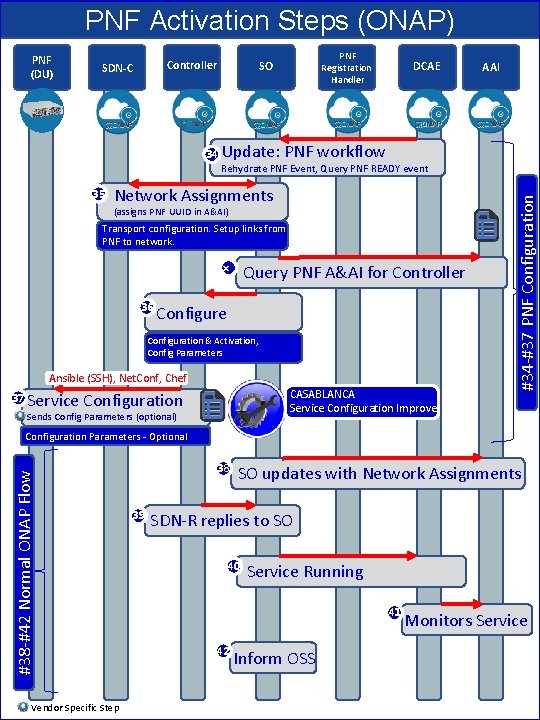
PNF Activation Steps (ONAP) PNF (DU) Controller SDN-C PNF SO 34 DCAE Registration Handler AAI Update: PNF workflow 35 Network Assignments (assigns PNF UUID in A&AI) Transport configuration. Setup links from PNF to network. x 36 Query PNF A&AI for Controller Configure Configuration & Activation, Config Parameters Ansible (SSH), Net. Conf, Chef 37 CASABLANCA Service Configuration Improve Service Configuration Sends Config Parameters (optional) #34 -#37 PNF Configuration Rehydrate PNF Event, Query PNF READY event #38 -#42 Normal ONAP Flow Configuration Parameters - Optional Vendor Specific Step 38 39 SO updates with Network Assignments SDN-R replies to SO 40 Service Running 41 42 Inform OSS Monitors Service
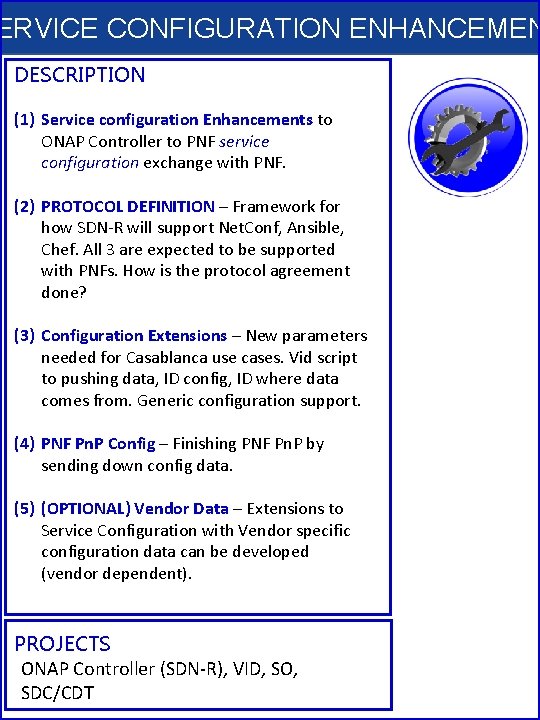
ERVICE CONFIGURATION ENHANCEMEN DESCRIPTION (1) Service configuration Enhancements to ONAP Controller to PNF service configuration exchange with PNF. (2) PROTOCOL DEFINITION – Framework for how SDN-R will support Net. Conf, Ansible, Chef. All 3 are expected to be supported with PNFs. How is the protocol agreement done? (3) Configuration Extensions – New parameters needed for Casablanca use cases. Vid script to pushing data, ID config, ID where data comes from. Generic configuration support. (4) PNF Pn. P Config – Finishing PNF Pn. P by sending down config data. (5) (OPTIONAL) Vendor Data – Extensions to Service Configuration with Vendor specific configuration data can be developed (vendor dependent). PROJECTS ONAP Controller (SDN-R), VID, SO, SDC/CDT
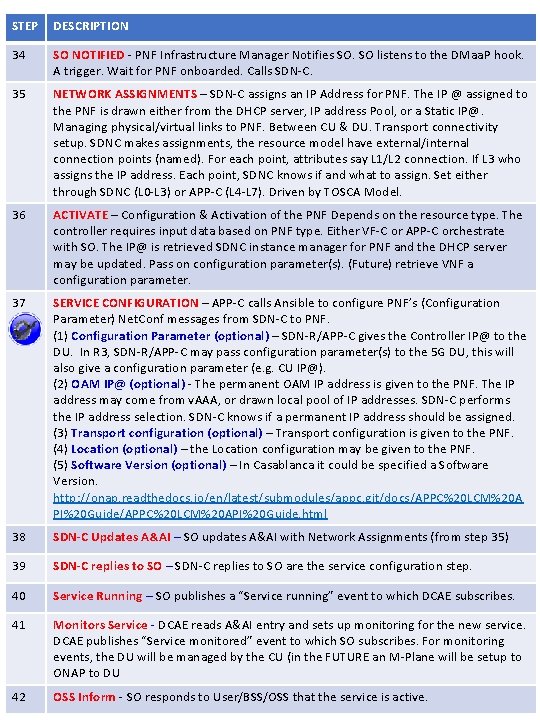
STEP DESCRIPTION 34 SO NOTIFIED - PNF Infrastructure Manager Notifies SO. SO listens to the DMaa. P hook. A trigger. Wait for PNF onboarded. Calls SDN-C. 35 NETWORK ASSIGNMENTS – SDN-C assigns an IP Address for PNF. The IP @ assigned to the PNF is drawn either from the DHCP server, IP address Pool, or a Static IP@. Managing physical/virtual links to PNF. Between CU & DU. Transport connectivity setup. SDNC makes assignments, the resource model have external/internal connection points (named). For each point, attributes say L 1/L 2 connection. If L 3 who assigns the IP address. Each point, SDNC knows if and what to assign. Set either through SDNC (L 0 -L 3) or APP-C (L 4 -L 7). Driven by TOSCA Model. 36 ACTIVATE – Configuration & Activation of the PNF Depends on the resource type. The controller requires input data based on PNF type. Either VF-C or APP-C orchestrate with SO. The IP@ is retrieved SDNC instance manager for PNF and the DHCP server may be updated. Pass on configuration parameter(s). (Future) retrieve VNF a configuration parameter. 37 SERVICE CONFIGURATION – APP-C calls Ansible to configure PNF’s (Configuration Parameter) Net. Conf messages from SDN-C to PNF. (1) Configuration Parameter (optional) – SDN-R/APP-C gives the Controller IP@ to the DU. In R 3, SDN-R/APP-C may pass configuration parameter(s) to the 5 G DU, this will also give a configuration parameter (e. g. CU IP@). (2) OAM IP@ (optional) - The permanent OAM IP address is given to the PNF. The IP address may come from v. AAA, or drawn local pool of IP addresses. SDN-C performs the IP address selection. SDN-C knows if a permanent IP address should be assigned. (3) Transport configuration (optional) – Transport configuration is given to the PNF. (4) Location (optional) – the Location configuration may be given to the PNF. (5) Software Version (optional) – In Casablanca it could be specified a Software Version. http: //onap. readthedocs. io/en/latest/submodules/appc. git/docs/APPC%20 LCM%20 A PI%20 Guide/APPC%20 LCM%20 API%20 Guide. html 38 SDN-C Updates A&AI – SO updates A&AI with Network Assignments (from step 35) 39 SDN-C replies to SO – SDN-C replies to SO are the service configuration step. 40 Service Running – SO publishes a “Service running” event to which DCAE subscribes. 41 Monitors Service - DCAE reads A&AI entry and sets up monitoring for the new service. DCAE publishes “Service monitored” event to which SO subscribes. For monitoring events, the DU will be managed by the CU (in the FUTURE an M-Plane will be setup to ONAP to DU 42 OSS Inform - SO responds to User/BSS/OSS that the service is active.
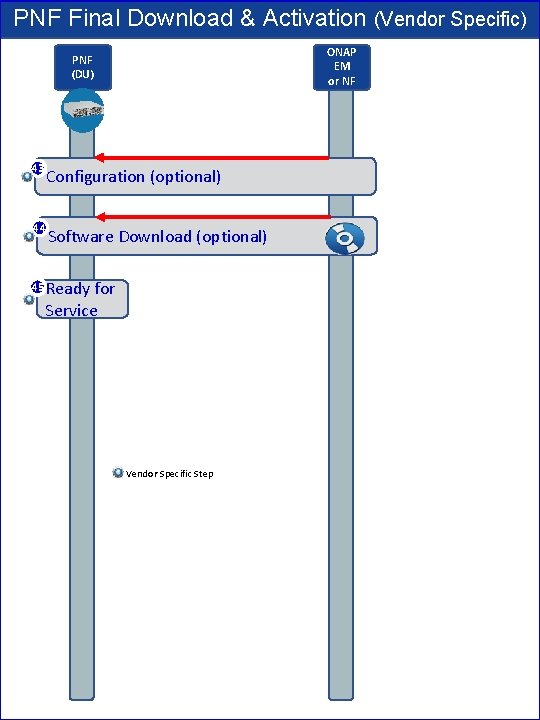
PNF Final Download & Activation (Vendor Specific) ONAP EM or NF PNF (DU) 43 Configuration (optional) 44 Software Download (optional) 45 Ready for Service Vendor Specific Step
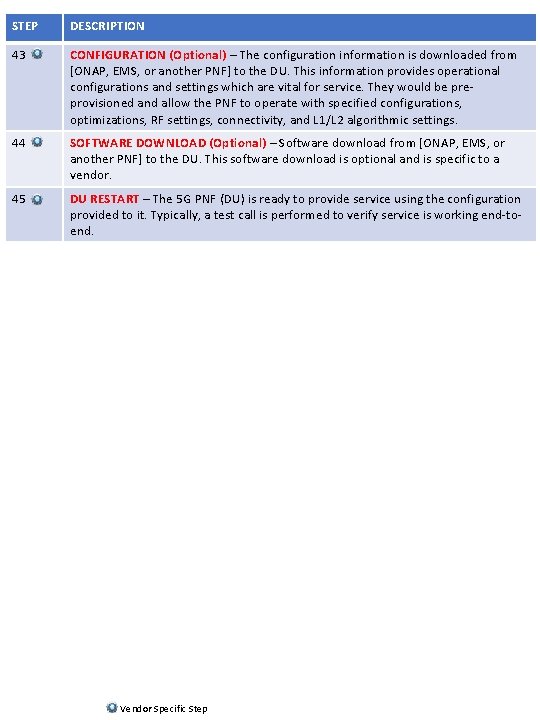
STEP DESCRIPTION 43 CONFIGURATION (Optional) – The configuration information is downloaded from [ONAP, EMS, or another PNF] to the DU. This information provides operational configurations and settings which are vital for service. They would be preprovisioned and allow the PNF to operate with specified configurations, optimizations, RF settings, connectivity, and L 1/L 2 algorithmic settings. 44 SOFTWARE DOWNLOAD (Optional) – Software download from [ONAP, EMS, or another PNF] to the DU. This software download is optional and is specific to a vendor. 45 DU RESTART – The 5 G PNF (DU) is ready to provide service using the configuration provided to it. Typically, a test call is performed to verify service is working end-toend. Vendor Specific Step
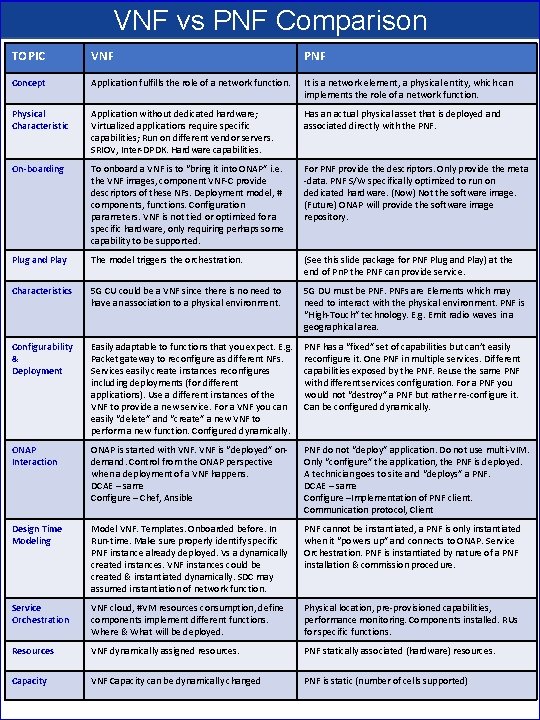
VNF vs PNF Comparison TOPIC VNF PNF Concept Application fulfills the role of a network function. It is a network element, a physical entity, which can implements the role of a network function. Physical Characteristic Application without dedicated hardware; Virtualized applications require specific capabilities; Run on different vendor servers. SRIOV, Inter-DPDK. Hardware capabilities. Has an actual physical asset that is deployed and associated directly with the PNF. On-boarding To onboard a VNF is to “bring it into ONAP” i. e. the VNF images, component VNF-C provide descriptors of these NFs. Deployment model, # components, functions. Configuration parameters. VNF is not tied or optimized for a specific hardware, only requiring perhaps some capability to be supported. For PNF provide the descriptors. Only provide the meta -data. PNF S/W specifically optimized to run on dedicated hardware. (Now) Not the software image. (Future) ONAP will provide the software image repository. Plug and Play The model triggers the orchestration. (See this slide package for PNF Plug and Play) at the end of Pn. P the PNF can provide service. Characteristics 5 G CU could be a VNF since there is no need to have an association to a physical environment. 5 G DU must be PNFs are Elements which may need to interact with the physical environment. PNF is “High-Touch” technology. E. g. Emit radio waves in a geographical area. Configurability & Deployment Easily adaptable to functions that you expect. E. g. Packet gateway to reconfigure as different NFs. Services easily create instances reconfigures including deployments (for different applications). Use a different instances of the VNF to provide a new service. For a VNF you can easily “delete” and “create” a new VNF to perform a new function. Configured dynamically. PNF has a “fixed” set of capabilities but can’t easily reconfigure it. One PNF in multiple services. Different capabilities exposed by the PNF. Reuse the same PNF with different services configuration. For a PNF you would not “destroy” a PNF but rather re-configure it. Can be configured dynamically. ONAP Interaction ONAP is started with VNF is “deployed” ondemand. Control from the ONAP perspective when a deployment of a VNF happens. DCAE – same Configure – Chef, Ansible PNF do not “deploy” application. Do not use multi-VIM. Only “configure” the application, the PNF is deployed. A technician goes to site and “deploys” a PNF. DCAE – same Configure –Implementation of PNF client. Communication protocol, Client Design Time Modeling Model VNF. Templates. Onboarded before. In Run-time. Make sure properly identify specific PNF instance already deployed. Vs a dynamically created instances. VNF instances could be created & instantiated dynamically. SDC may assumed instantiation of network function. PNF cannot be instantiated, a PNF is only instantiated when it “powers up” and connects to ONAP. Service Orchestration. PNF is instantiated by nature of a PNF installation & commission procedure. Service Orchestration VNF cloud, #VM resources consumption, define components implement different functions. Where & What will be deployed. Physical location, pre-provisioned capabilities, performance monitoring. Components installed. RUs for specific functions. Resources VNF dynamically assigned resources. PNF statically associated (hardware) resources. Capacity VNF Capacity can be dynamically changed PNF is static (number of cells supported)
PNF Plug and Play Project Impacts • ONAP and PNF Plug and Play for 5 G RAN • 5 G Use Case Team
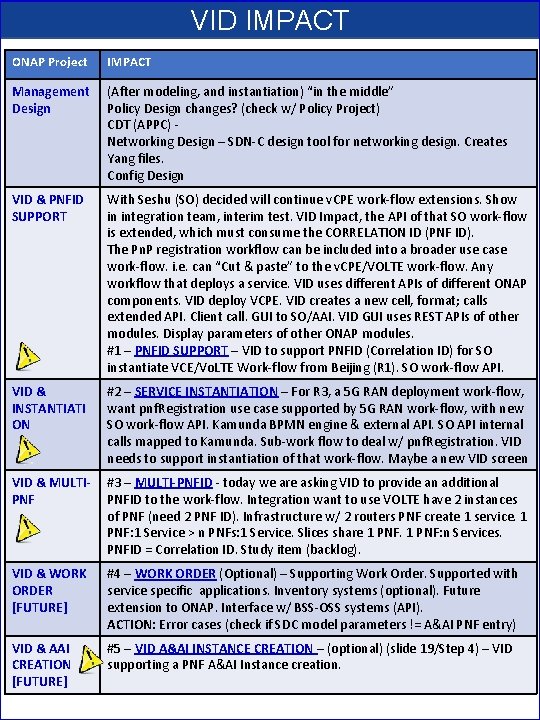
VID IMPACT ONAP Project IMPACT Management Design (After modeling, and instantiation) “in the middle” Policy Design changes? (check w/ Policy Project) CDT (APPC) Networking Design – SDN-C design tool for networking design. Creates Yang files. Config Design VID & PNFID SUPPORT With Seshu (SO) decided will continue v. CPE work-flow extensions. Show in integration team, interim test. VID Impact, the API of that SO work-flow is extended, which must consume the CORRELATION ID (PNF ID). The Pn. P registration workflow can be included into a broader use case work-flow. i. e. can “Cut & paste” to the v. CPE/VOLTE work-flow. Any workflow that deploys a service. VID uses different APIs of different ONAP components. VID deploy VCPE. VID creates a new cell, format; calls extended API. Client call. GUI to SO/AAI. VID GUI uses REST APIs of other modules. Display parameters of other ONAP modules. #1 – PNFID SUPPORT – VID to support PNFID (Correlation ID) for SO instantiate VCE/Vo. LTE Work-flow from Beijing (R 1). SO work-flow API. VID & INSTANTIATI ON #2 – SERVICE INSTANTIATION – For R 3, a 5 G RAN deployment work-flow, want pnf. Registration use case supported by 5 G RAN work-flow, with new SO work-flow API. Kamunda BPMN engine & external API. SO API internal calls mapped to Kamunda. Sub-work flow to deal w/ pnf. Registration. VID needs to support instantiation of that work-flow. Maybe a new VID screen VID & MULTIPNF #3 – MULTI-PNFID - today we are asking VID to provide an additional PNFID to the work-flow. Integration want to use VOLTE have 2 instances of PNF (need 2 PNF ID). Infrastructure w/ 2 routers PNF create 1 service. 1 PNF: 1 Service > n PNFs: 1 Service. Slices share 1 PNF: n Services. PNFID = Correlation ID. Study item (backlog). VID & WORK ORDER [FUTURE] #4 – WORK ORDER (Optional) – Supporting Work Order. Supported with service specific applications. Inventory systems (optional). Future extension to ONAP. Interface w/ BSS-OSS systems (API). ACTION: Error cases (check if SDC model parameters != A&AI PNF entry) VID & AAI CREATION [FUTURE] #5 – VID A&AI INSTANCE CREATION – (optional) (slide 19/Step 4) – VID supporting a PNF A&AI Instance creation.
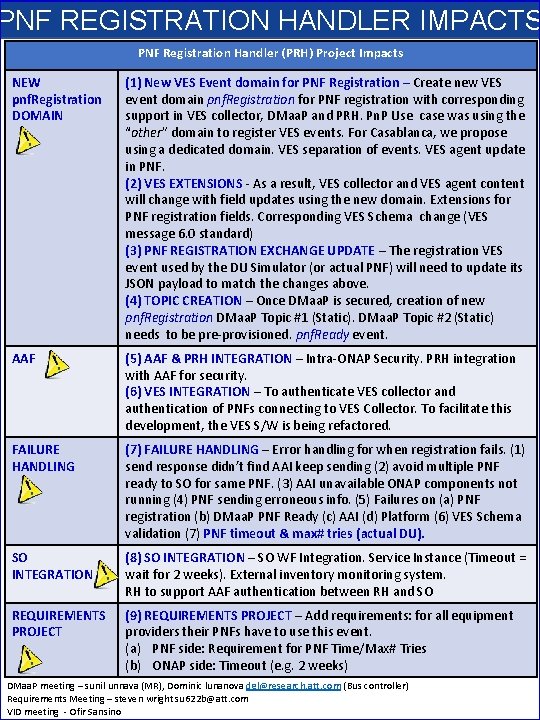
PNF REGISTRATION HANDLER IMPACTS PNF Registration Handler (PRH) Project Impacts NEW pnf. Registration DOMAIN (1) New VES Event domain for PNF Registration – Create new VES event domain pnf. Registration for PNF registration with corresponding support in VES collector, DMaa. P and PRH. Pn. P Use case was using the “other” domain to register VES events. For Casablanca, we propose using a dedicated domain. VES separation of events. VES agent update in PNF. (2) VES EXTENSIONS - As a result, VES collector and VES agent content will change with field updates using the new domain. Extensions for PNF registration fields. Corresponding VES Schema change (VES message 6. 0 standard) (3) PNF REGISTRATION EXCHANGE UPDATE – The registration VES event used by the DU Simulator (or actual PNF) will need to update its JSON payload to match the changes above. (4) TOPIC CREATION – Once DMaa. P is secured, creation of new pnf. Registration DMaa. P Topic #1 (Static). DMaa. P Topic #2 (Static) needs to be pre-provisioned. pnf. Ready event. AAF (5) AAF & PRH INTEGRATION – Intra-ONAP Security. PRH integration with AAF for security. (6) VES INTEGRATION – To authenticate VES collector and authentication of PNFs connecting to VES Collector. To facilitate this development, the VES S/W is being refactored. FAILURE HANDLING (7) FAILURE HANDLING – Error handling for when registration fails. (1) send response didn’t find AAI keep sending (2) avoid multiple PNF ready to SO for same PNF. (3) AAI unavailable ONAP components not running (4) PNF sending erroneous info. (5) Failures on (a) PNF registration (b) DMaa. P PNF Ready (c) AAI (d) Platform (6) VES Schema validation (7) PNF timeout & max# tries (actual DU). SO INTEGRATION (8) SO INTEGRATION – SO WF Integration. Service Instance (Timeout = wait for 2 weeks). External inventory monitoring system. RH to support AAF authentication between RH and SO REQUIREMENTS PROJECT (9) REQUIREMENTS PROJECT – Add requirements: for all equipment providers their PNFs have to use this event. (a) PNF side: Requirement for PNF Time/Max# Tries (b) ONAP side: Timeout (e. g. 2 weeks) DMaa. P meeting – sunil unnava (MR), Dominic lunanova dgl@research. att. com (Bus controller) Requirements Meeting – steven wright su 622 b@att. com VID meeting - Ofir Sansino
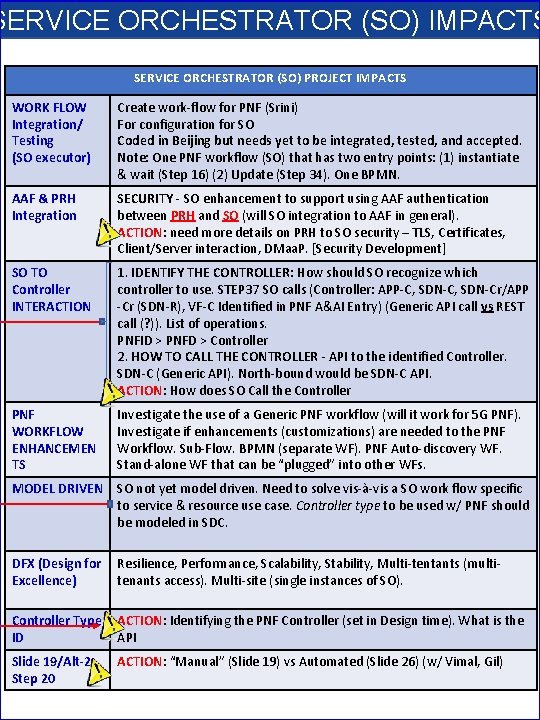
SERVICE ORCHESTRATOR (SO) IMPACTS SERVICE ORCHESTRATOR (SO) PROJECT IMPACTS WORK FLOW Integration/ Testing (SO executor) Create work-flow for PNF (Srini) For configuration for SO Coded in Beijing but needs yet to be integrated, tested, and accepted. Note: One PNF workflow (SO) that has two entry points: (1) instantiate & wait (Step 16) (2) Update (Step 34). One BPMN. AAF & PRH Integration SECURITY - SO enhancement to support using AAF authentication between PRH and SO (will SO integration to AAF in general). ACTION: need more details on PRH to SO security – TLS, Certificates, Client/Server interaction, DMaa. P. [Security Development] SO TO Controller INTERACTION 1. IDENTIFY THE CONTROLLER: How should SO recognize which controller to use. STEP 37 SO calls (Controller: APP-C, SDN-Cr/APP -Cr (SDN-R), VF-C Identified in PNF A&AI Entry) (Generic API call vs REST call (? )). List of operations. PNFID > PNFD > Controller 2. HOW TO CALL THE CONTROLLER - API to the identified Controller. SDN-C (Generic API). North-bound would be SDN-C API. ACTION: How does SO Call the Controller PNF WORKFLOW ENHANCEMEN TS Investigate the use of a Generic PNF workflow (will it work for 5 G PNF). Investigate if enhancements (customizations) are needed to the PNF Workflow. Sub-Flow. BPMN (separate WF). PNF Auto-discovery WF. Stand-alone WF that can be “plugged” into other WFs. MODEL DRIVEN SO not yet model driven. Need to solve vis-à-vis a SO work flow specific to service & resource use case. Controller type to be used w/ PNF should be modeled in SDC. DFX (Design for Resilience, Performance, Scalability, Stability, Multi-tentants (multi. Excellence) tenants access). Multi-site (single instances of SO). Controller Type ACTION: Identifying the PNF Controller (set in Design time). What is the ID API Slide 19/Alt-2 Step 20 ACTION: “Manual” (Slide 19) vs Automated (Slide 26) (w/ Vimal, Gil)

PNF Modeling IMPACTS in SDC Project See the Slides NFModeling-SDC_R 324 Jul 2018 v 1
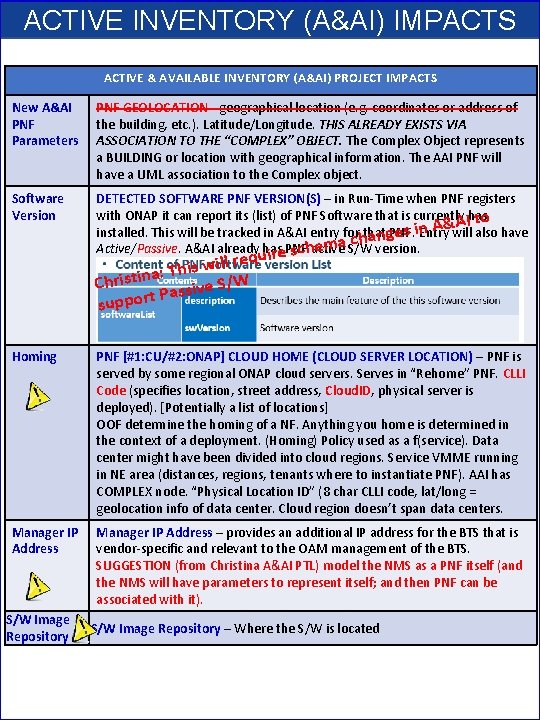
ACTIVE INVENTORY (A&AI) IMPACTS ACTIVE & AVAILABLE INVENTORY (A&AI) PROJECT IMPACTS New A&AI PNF Parameters PNF GEOLOCATION - geographical location (e. g. coordinates or address of the building, etc. ). Latitude/Longitude. THIS ALREADY EXISTS VIA ASSOCIATION TO THE “COMPLEX” OBJECT. The Complex Object represents a BUILDING or location with geographical information. The AAI PNF will have a UML association to the Complex object. Software Version DETECTED SOFTWARE PNF VERSION(S) – in Run-Time when PNF registers with ONAP it can report its (list) of PNF Software that is currently has I to A & A n i installed. This will be tracked in A&AI entry for that PNF. Entry will also have hanges c a m e Active/Passive. A&AI already has PNF active S/W version. ire sch l requ l i w s i h a: T Christin ssive S/W Pa support Homing PNF [#1: CU/#2: ONAP] CLOUD HOME (CLOUD SERVER LOCATION) – PNF is served by some regional ONAP cloud servers. Serves in “Rehome” PNF. CLLI Code (specifies location, street address, Cloud. ID, physical server is deployed). [Potentially a list of locations] OOF determine the homing of a NF. Anything you home is determined in the context of a deployment. (Homing) Policy used as a f(service). Data center might have been divided into cloud regions. Service VMME running in NE area (distances, regions, tenants where to instantiate PNF). AAI has COMPLEX node. “Physical Location ID” (8 char CLLI code, lat/long = geolocation info of data center. Cloud region doesn’t span data centers. Manager IP Address – provides an additional IP address for the BTS that is vendor-specific and relevant to the OAM management of the BTS. SUGGESTION (from Christina A&AI PTL) model the NMS as a PNF itself (and the NMS will have parameters to represent itself; and then PNF can be associated with it). S/W Image Repository – Where the S/W is located
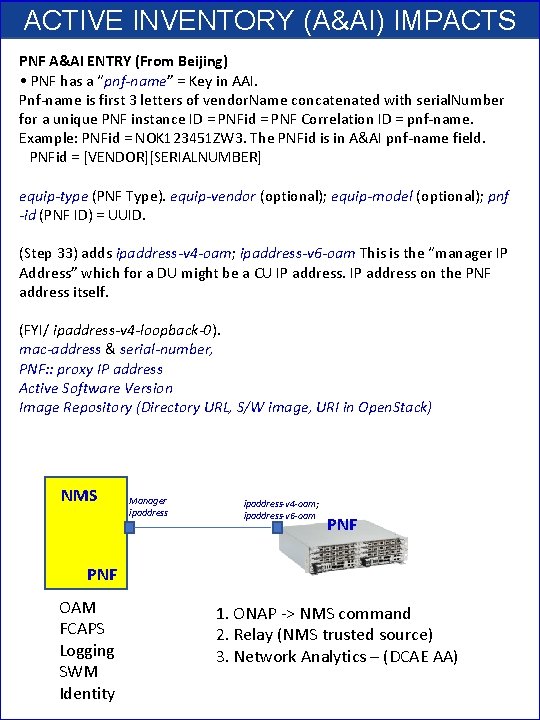
ACTIVE INVENTORY (A&AI) IMPACTS PNF A&AI ENTRY (From Beijing) • PNF has a “pnf-name” = Key in AAI. Pnf-name is first 3 letters of vendor. Name concatenated with serial. Number for a unique PNF instance ID = PNFid = PNF Correlation ID = pnf-name. Example: PNFid = NOK 123451 ZW 3. The PNFid is in A&AI pnf-name field. PNFid = [VENDOR][SERIALNUMBER] equip-type (PNF Type). equip-vendor (optional); equip-model (optional); pnf -id (PNF ID) = UUID. (Step 33) adds ipaddress-v 4 -oam; ipaddress-v 6 -oam This is the “manager IP Address” which for a DU might be a CU IP address on the PNF address itself. (FYI/ ipaddress-v 4 -loopback-0). mac-address & serial-number, PNF: : proxy IP address Active Software Version Image Repository (Directory URL, S/W image, URI in Open. Stack) NMS Manager ipaddress-v 4 -oam; ipaddress-v 6 -oam PNF OAM FCAPS Logging SWM Identity 1. ONAP -> NMS command 2. Relay (NMS trusted source) 3. Network Analytics – (DCAE AA)
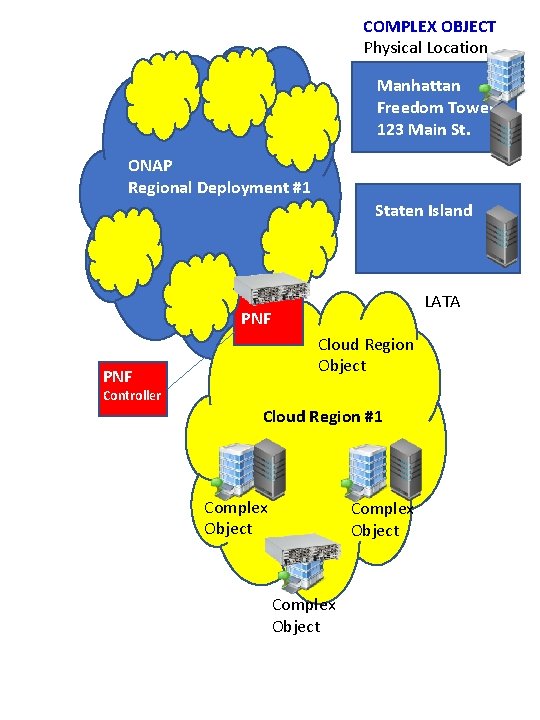
COMPLEX OBJECT Physical Location Manhattan Freedom Tower 123 Main St. ONAP Regional Deployment #1 Staten Island LATA PNF Cloud Region Object PNF Controller Cloud Region #1 Complex Object
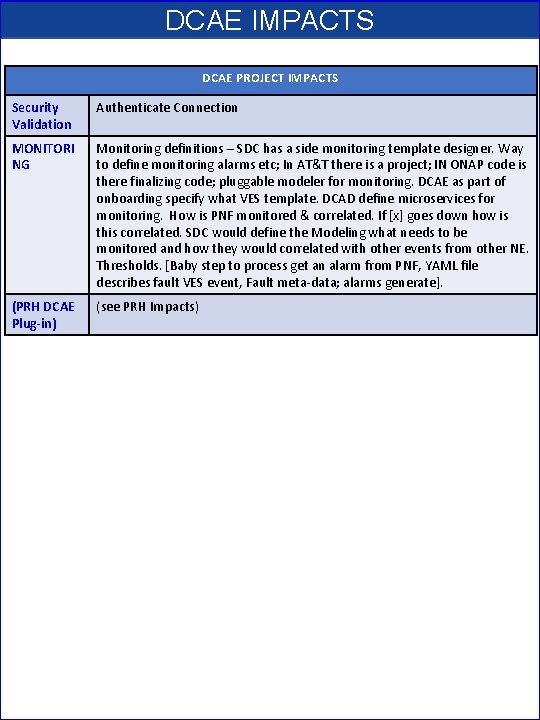
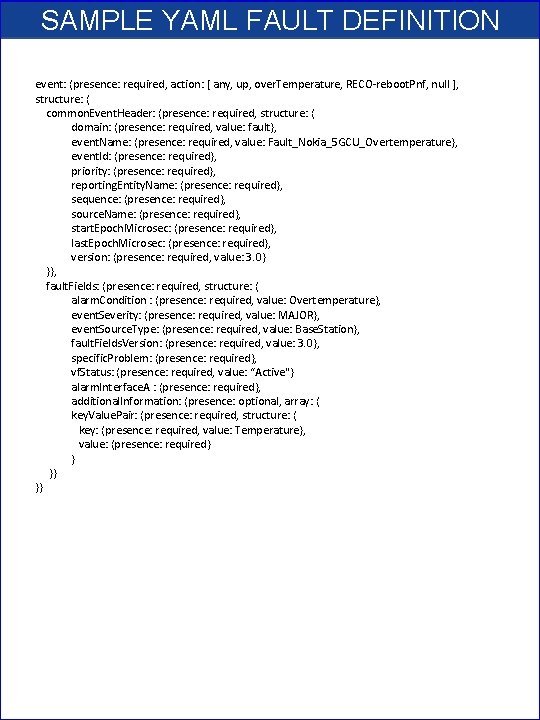
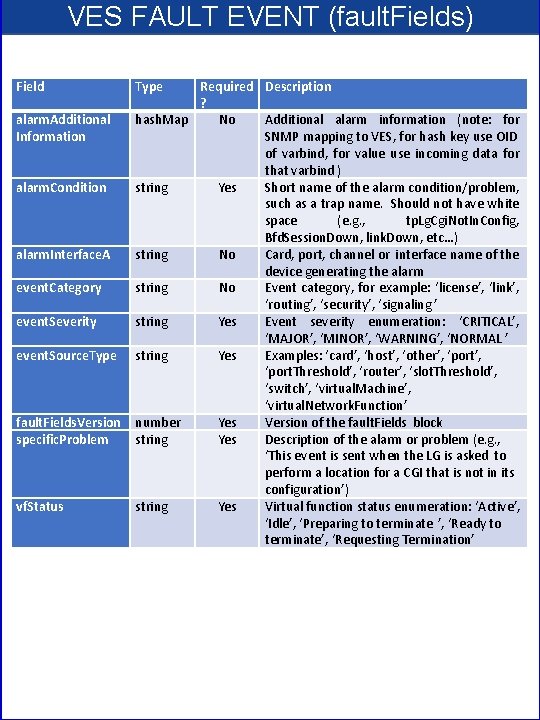
DCAE IMPACTS DCAE PROJECT IMPACTS Security Validation Authenticate Connection MONITORI NG Monitoring definitions – SDC has a side monitoring template designer. Way to define monitoring alarms etc; In AT&T there is a project; IN ONAP code is there finalizing code; pluggable modeler for monitoring. DCAE as part of onboarding specify what VES template. DCAD define microservices for monitoring. How is PNF monitored & correlated. If [x] goes down how is this correlated. SDC would define the Modeling what needs to be monitored and how they would correlated with other events from other NE. Thresholds. [Baby step to process get an alarm from PNF, YAML file describes fault VES event, Fault meta-data; alarms generate]. (PRH DCAE Plug-in) (see PRH Impacts)
![SDN-R (Controller) IMPACTS [APP-C] SDN-R APP-C PROJECT IMPACTS CC-SDK (SDN-R) Artifacts from CC-SDK, APP-C](http://slidetodoc.com/presentation_image/22ddac1edc050977b917f3cffba990bb/image-52.jpg "SDN-R (Controller) IMPACTS [APP-C] SDN-R APP-C PROJECT IMPACTS CC-SDK (SDN-R) Artifacts from CC-SDK, APP-C")
SDN-R (Controller) IMPACTS [APP-C] SDN-R APP-C PROJECT IMPACTS CC-SDK (SDN-R) Artifacts from CC-SDK, APP-C Mobility controller Artifacts “borrowed” will become part of CC-SDK Available for all controller persona. QUESTION: moving towards CC-SDK & common foundation is there anything On top of that planned for SDN-R. Some thing specific to wireless, … perhaps they do not belong in CC-SDK. Things borrowed from CC-SDK and libraries that are common.
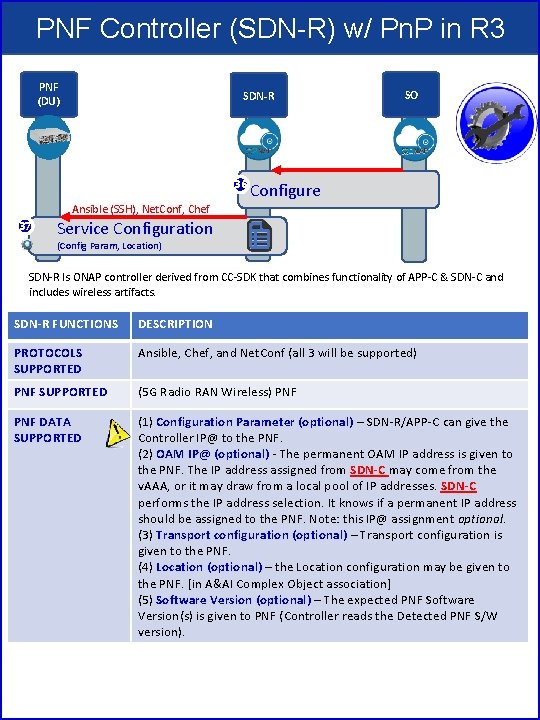
PNF Controller (SDN-R) w/ Pn. P in R 3 PNF (DU) SDN-R 36 SO Configure Ansible (SSH), Net. Conf, Chef 37 Service Configuration (Config Param, Location) SDN-R Is ONAP controller derived from CC-SDK that combines functionality of APP-C & SDN-C and includes wireless artifacts. SDN-R FUNCTIONS DESCRIPTION PROTOCOLS SUPPORTED Ansible, Chef, and Net. Conf (all 3 will be supported) PNF SUPPORTED (5 G Radio RAN Wireless) PNF DATA SUPPORTED (1) Configuration Parameter (optional) – SDN-R/APP-C can give the Controller IP@ to the PNF. (2) OAM IP@ (optional) - The permanent OAM IP address is given to the PNF. The IP address assigned from SDN-C may come from the v. AAA, or it may draw from a local pool of IP addresses. SDN-C performs the IP address selection. It knows if a permanent IP address should be assigned to the PNF. Note: this IP@ assignment optional. (3) Transport configuration (optional) – Transport configuration is given to the PNF. (4) Location (optional) – the Location configuration may be given to the PNF. [in A&AI Complex Object association] (5) Software Version (optional) – The expected PNF Software Version(s) is given to PNF (Controller reads the Detected PNF S/W version).
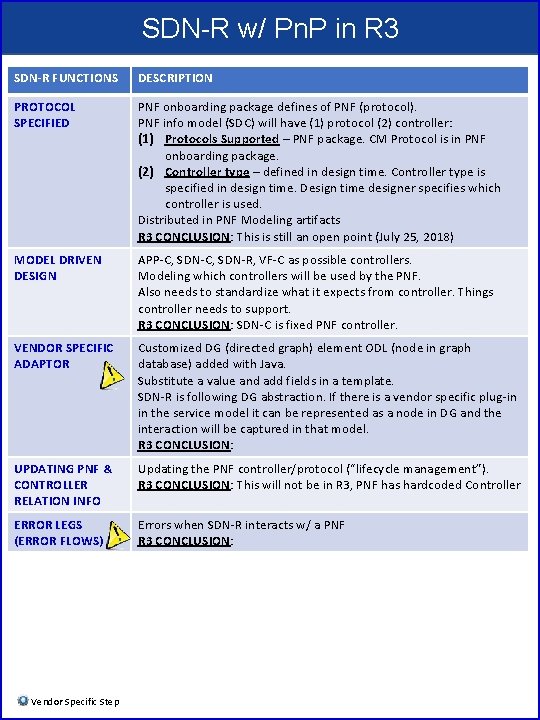
SDN-R w/ Pn. P in R 3 SDN-R FUNCTIONS DESCRIPTION PROTOCOL SPECIFIED PNF onboarding package defines of PNF (protocol). PNF info model (SDC) will have (1) protocol (2) controller: (1) Protocols Supported – PNF package. CM Protocol is in PNF onboarding package. (2) Controller type – defined in design time. Controller type is specified in design time. Design time designer specifies which controller is used. Distributed in PNF Modeling artifacts R 3 CONCLUSION: This is still an open point (July 25, 2018) MODEL DRIVEN DESIGN APP-C, SDN-R, VF-C as possible controllers. Modeling which controllers will be used by the PNF. Also needs to standardize what it expects from controller. Things controller needs to support. R 3 CONCLUSION: SDN-C is fixed PNF controller. VENDOR SPECIFIC ADAPTOR Customized DG (directed graph) element ODL (node in graph database) added with Java. Substitute a value and add fields in a template. SDN-R is following DG abstraction. If there is a vendor specific plug-in in the service model it can be represented as a node in DG and the interaction will be captured in that model. R 3 CONCLUSION: UPDATING PNF & CONTROLLER RELATION INFO Updating the PNF controller/protocol (“lifecycle management”). R 3 CONCLUSION: This will not be in R 3, PNF has hardcoded Controller ERROR LEGS (ERROR FLOWS) Errors when SDN-R interacts w/ a PNF R 3 CONCLUSION: Vendor Specific Step
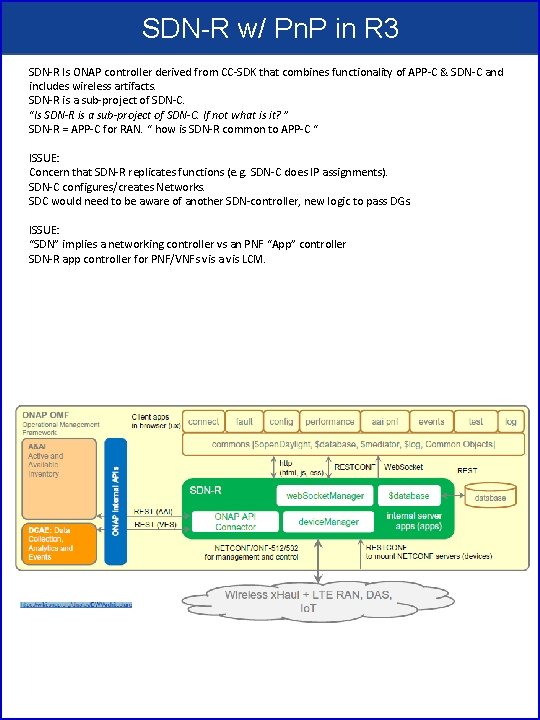
SDN-R w/ Pn. P in R 3 SDN-R Is ONAP controller derived from CC-SDK that combines functionality of APP-C & SDN-C and includes wireless artifacts. SDN-R is a sub-project of SDN-C. “Is SDN-R is a sub-project of SDN-C. If not what is it? ” SDN-R = APP-C for RAN. “ how is SDN-R common to APP-C “ ISSUE: Concern that SDN-R replicates functions (e. g. SDN-C does IP assignments). SDN-C configures/creates Networks. SDC would need to be aware of another SDN-controller, new logic to pass DGs. ISSUE: “SDN” implies a networking controller vs an PNF “App” controller SDN-R app controller for PNF/VNFs vis a vis LCM.
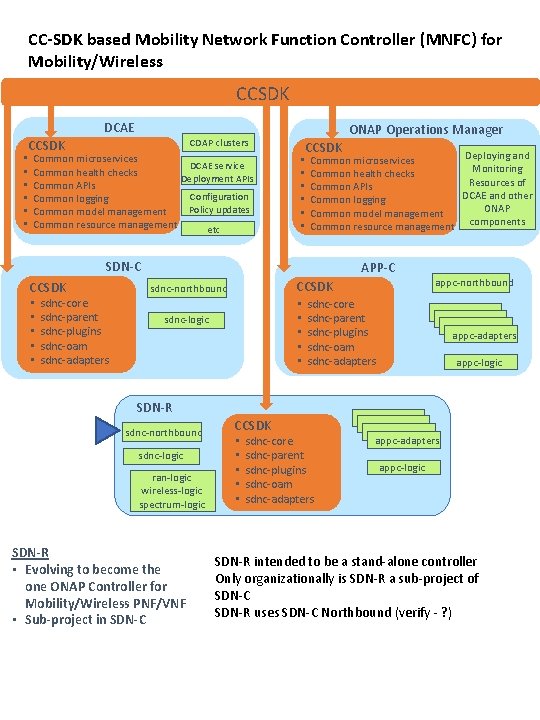
CC-SDK based Mobility Network Function Controller (MNFC) for Mobility/Wireless CCSDK DCAE CCSDK • • • ONAP Operations Manager CDAP clusters Common microservices DCAE service Common health checks Deployment APIs Common APIs Configuration Common logging Policy updates Common model management Common resource management etc CCSDK • • • Deploying and Common microservices Monitoring Common health checks Resources of Common APIs DCAE and other Common logging ONAP Common model management Common resource management components SDN-C CCSDK • • • sdnc-core sdnc-parent sdnc-plugins sdnc-oam sdnc-adapters APP-C CCSDK sdnc-northbound • • • sdnc-logic appc-northbound sdnc-core sdnc-parent sdnc-plugins sdnc-oam sdnc-adapters appc-logic SDN-R sdnc-northbound sdnc-logic ran-logic wireless-logic spectrum-logic SDN-R • Evolving to become the one ONAP Controller for Mobility/Wireless PNF/VNF • Sub-project in SDN-C CCSDK • • • sdnc-core sdnc-parent sdnc-plugins sdnc-oam sdnc-adapters appc-logic SDN-R intended to be a stand-alone controller Only organizationally is SDN-R a sub-project of SDN-C SDN-R uses SDN-C Northbound (verify - ? )

SDN-R Device Discovery A&AI 2. Rest. Conf: mount DCAE SDN-R 3. Net. Conf: hello by ODL 1. VES event Is such event already defined? PNF SDN-R Event Flow DCAE A&AI 3. Forward to … (currently not tested) VES collector SDN-R 2. Translating in proper VES message format 1. Net. Conf: notification PNF SDN-R A&AI Flow DCAE A&AI After discovery 1. Check if device is expected SDN-R 1. Net. Conf: Get Equipment PNF 5. Update 3. Translating in proper AAI-API (v 8, REST) 2. Net. Conf: Response Equipment
PNF Plug and Play INTEGRATION & SHOWCASING • ONAP and PNF Plug and Play for 5 G RAN • 5 G Use Case Team
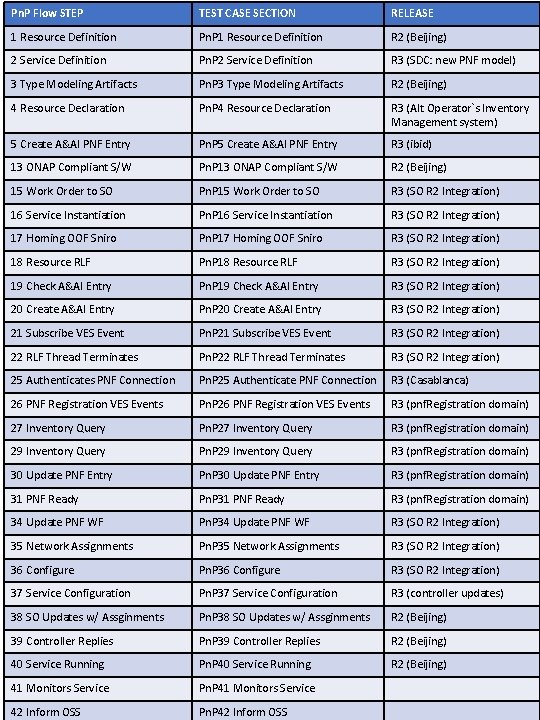
Pn. P Flow STEP TEST CASE SECTION RELEASE 1 Resource Definition Pn. P 1 Resource Definition R 2 (Beijing) 2 Service Definition Pn. P 2 Service Definition R 3 (SDC: new PNF model) 3 Type Modeling Artifacts Pn. P 3 Type Modeling Artifacts R 2 (Beijing) 4 Resource Declaration Pn. P 4 Resource Declaration R 3 (Alt Operator`s Inventory Management system) 5 Create A&AI PNF Entry Pn. P 5 Create A&AI PNF Entry R 3 (ibid) 13 ONAP Compliant S/W Pn. P 13 ONAP Compliant S/W R 2 (Beijing) 15 Work Order to SO Pn. P 15 Work Order to SO R 3 (SO R 2 Integration) 16 Service Instantiation Pn. P 16 Service Instantiation R 3 (SO R 2 Integration) 17 Homing OOF Sniro Pn. P 17 Homing OOF Sniro R 3 (SO R 2 Integration) 18 Resource RLF Pn. P 18 Resource RLF R 3 (SO R 2 Integration) 19 Check A&AI Entry Pn. P 19 Check A&AI Entry R 3 (SO R 2 Integration) 20 Create A&AI Entry Pn. P 20 Create A&AI Entry R 3 (SO R 2 Integration) 21 Subscribe VES Event Pn. P 21 Subscribe VES Event R 3 (SO R 2 Integration) 22 RLF Thread Terminates Pn. P 22 RLF Thread Terminates R 3 (SO R 2 Integration) 25 Authenticates PNF Connection Pn. P 25 Authenticate PNF Connection R 3 (Casablanca) 26 PNF Registration VES Events Pn. P 26 PNF Registration VES Events R 3 (pnf. Registration domain) 27 Inventory Query Pn. P 27 Inventory Query R 3 (pnf. Registration domain) 29 Inventory Query Pn. P 29 Inventory Query R 3 (pnf. Registration domain) 30 Update PNF Entry Pn. P 30 Update PNF Entry R 3 (pnf. Registration domain) 31 PNF Ready Pn. P 31 PNF Ready R 3 (pnf. Registration domain) 34 Update PNF WF Pn. P 34 Update PNF WF R 3 (SO R 2 Integration) 35 Network Assignments Pn. P 35 Network Assignments R 3 (SO R 2 Integration) 36 Configure Pn. P 36 Configure R 3 (SO R 2 Integration) 37 Service Configuration Pn. P 37 Service Configuration R 3 (controller updates) 38 SO Updates w/ Assginments Pn. P 38 SO Updates w/ Assginments R 2 (Beijing) 39 Controller Replies Pn. P 39 Controller Replies R 2 (Beijing) 40 Service Running Pn. P 40 Service Running R 2 (Beijing) 41 Monitors Service Pn. P 41 Monitors Service 42 Inform OSS Pn. P 42 Inform OSS
![INTEGRATION TEAM IMPACTS SHOWCASING DEMO CONTENT – [Closed] What will be showcased? Test send](http://slidetodoc.com/presentation_image/22ddac1edc050977b917f3cffba990bb/image-60.jpg "INTEGRATION TEAM IMPACTS SHOWCASING DEMO CONTENT – [Closed] What will be showcased? Test send")
INTEGRATION TEAM IMPACTS SHOWCASING DEMO CONTENT – [Closed] What will be showcased? Test send registration event. Instantiation Pt 1/Pt 2 (Update A&AI). PRH service request (VES event & DMaa. P topic). APP-C Ansible configure. PNF sends event, receives ansible event. Start with R 1 use case (Vo. LTE / v. CPE) upgraded w/ mechanisms of R 2. DU Emulator (for registration). ACTUAL PNF, DU Emulator DU EMULATOR – [Closed] Nokia will provide a simple DU emulator [Mar 16 2018]. Capable of sending PNF registration request (Step 26, 28). Capable of receive configuration command from APP-C via Ansible (Step 37) and recording result of successful reception (or failure) in a log. Test Case Description (Demo Document) [Open Point] (1) Demo Document – Document describing demo (use case group? ) https: //wiki. onap. org/display/DW/v. CPE+Use+Case+Tutorial%3 A+Design+ and+Deploy+based+on+ONAP+Amsterdam+Release (2) Test case description – Documenting the test case. Start with Volt. E and modify it. LOGISTICS (Open Point) (1) DEMO ANNOUNCEMENT – “come see this demo” – Integration ONAP Wiki. Video. Schedule ONAP Wiki Events Calendar. Integration project. (SME = x). (2) LOGISTICS – Contacts Helen Chen, Yang Xu. Intel Windriver Lab, T-Lab (AT&T Lab, Bedminster), and/or use CMCC Lab. ONAP “Open Lab”. ONAP installed in a lab. Demo shown via conference. Virtual Demo (dial in). (3) RELEASE MANAGER – Coordinate w/ Joe Gildas release manager (status of project). M 4 Voting. AUTHENTICAT ION AUTHENTICATION – Authentication is optional, and for R 2 Demo we will not have any authentication. Could be considered for Casablanca (R 3). Amsterdam authentication flow not useful for PNFs. Not use second v. DHCP & v. AAA. CONTROLLER CONFIGURATI ON CONFIGURATION: IP address (from DHCP). Username & Password. Configured in controller (manually added to ONAP). VES configuration (do not need username & password to be configured on VES)
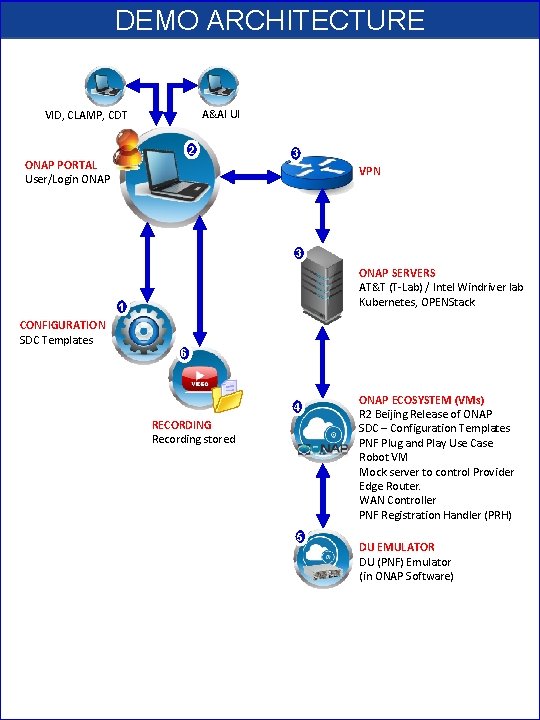
DEMO ARCHITECTURE A&AI UI VID, CLAMP, CDT 2 ONAP PORTAL User/Login ONAP 3 VPN 3 ONAP SERVERS AT&T (T-Lab) / Intel Windriver lab Kubernetes, OPENStack 1 CONFIGURATION SDC Templates 6 4 RECORDING Recording stored 5 ONAP ECOSYSTEM (VMs) R 2 Beijing Release of ONAP SDC – Configuration Templates PNF Plug and Play Use Case Robot VM Mock server to control Provider Edge Router. WAN Controller PNF Registration Handler (PRH) DU EMULATOR DU (PNF) Emulator (in ONAP Software)
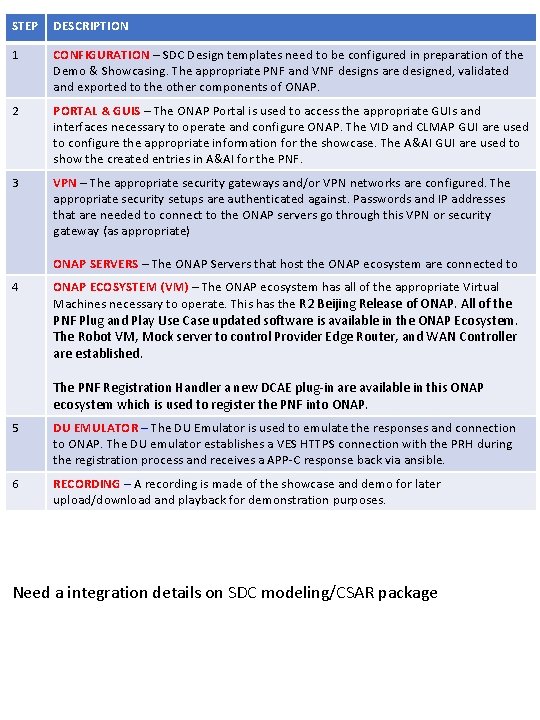
STEP DESCRIPTION 1 CONFIGURATION – SDC Design templates need to be configured in preparation of the Demo & Showcasing. The appropriate PNF and VNF designs are designed, validated and exported to the other components of ONAP. 2 PORTAL & GUIS – The ONAP Portal is used to access the appropriate GUIs and interfaces necessary to operate and configure ONAP. The VID and CLMAP GUI are used to configure the appropriate information for the showcase. The A&AI GUI are used to show the created entries in A&AI for the PNF. 3 VPN – The appropriate security gateways and/or VPN networks are configured. The appropriate security setups are authenticated against. Passwords and IP addresses that are needed to connect to the ONAP servers go through this VPN or security gateway (as appropriate) ONAP SERVERS – The ONAP Servers that host the ONAP ecosystem are connected to 4 ONAP ECOSYSTEM (VM) – The ONAP ecosystem has all of the appropriate Virtual Machines necessary to operate. This has the R 2 Beijing Release of ONAP. All of the PNF Plug and Play Use Case updated software is available in the ONAP Ecosystem. The Robot VM, Mock server to control Provider Edge Router, and WAN Controller are established. The PNF Registration Handler a new DCAE plug-in are available in this ONAP ecosystem which is used to register the PNF into ONAP. 5 DU EMULATOR – The DU Emulator is used to emulate the responses and connection to ONAP. The DU emulator establishes a VES HTTPS connection with the PRH during the registration process and receives a APP-C response back via ansible. 6 RECORDING – A recording is made of the showcase and demo for later upload/download and playback for demonstration purposes. Need a integration details on SDC modeling/CSAR package
PNF Plug and Play ROADMAP (After Casablanca) • ONAP and PNF Plug and Play for 5 G RAN • 5 G Use Case Team
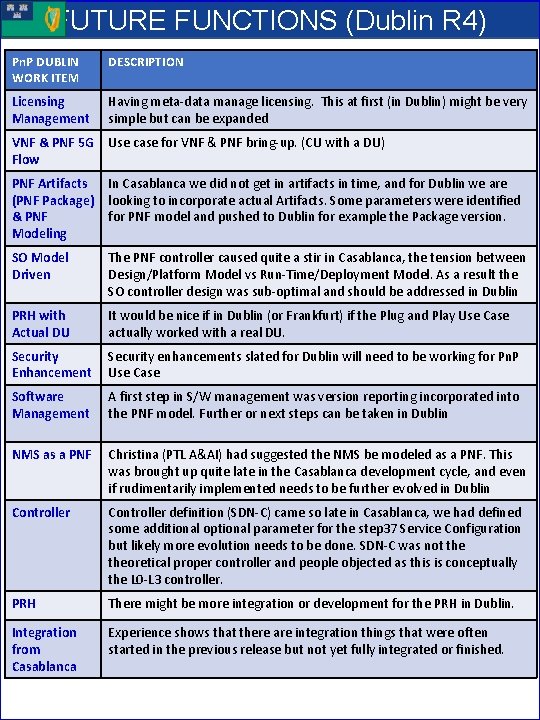
FUTURE FUNCTIONS (Dublin R 4) Pn. P DUBLIN WORK ITEM DESCRIPTION Licensing Management Having meta-data manage licensing. This at first (in Dublin) might be very simple but can be expanded VNF & PNF 5 G Use case for VNF & PNF bring-up. (CU with a DU) Flow PNF Artifacts In Casablanca we did not get in artifacts in time, and for Dublin we are (PNF Package) looking to incorporate actual Artifacts. Some parameters were identified & PNF for PNF model and pushed to Dublin for example the Package version. Modeling SO Model Driven The PNF controller caused quite a stir in Casablanca, the tension between Design/Platform Model vs Run-Time/Deployment Model. As a result the SO controller design was sub-optimal and should be addressed in Dublin PRH with Actual DU It would be nice if in Dublin (or Frankfurt) if the Plug and Play Use Case actually worked with a real DU. Security Enhancement Security enhancements slated for Dublin will need to be working for Pn. P Use Case Software Management A first step in S/W management was version reporting incorporated into the PNF model. Further or next steps can be taken in Dublin NMS as a PNF Christina (PTL A&AI) had suggested the NMS be modeled as a PNF. This was brought up quite late in the Casablanca development cycle, and even if rudimentarily implemented needs to be further evolved in Dublin Controller definition (SDN-C) came so late in Casablanca, we had defined some additional optional parameter for the step 37 Service Configuration but likely more evolution needs to be done. SDN-C was not theoretical proper controller and people objected as this is conceptually the L 0 -L 3 controller. PRH There might be more integration or development for the PRH in Dublin. Integration from Casablanca Experience shows that there are integration things that were often started in the previous release but not yet fully integrated or finished.
APPENDIX & Meeting Notes
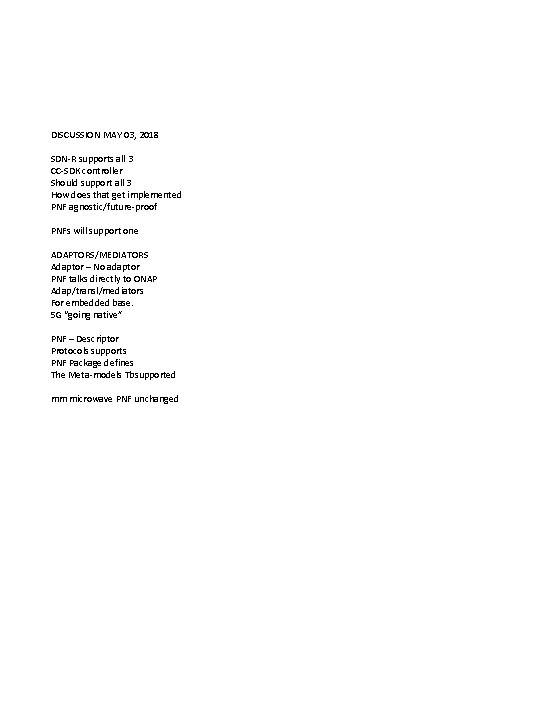
DISCUSSION MAY 03, 2018 SDN-R supports all 3 CC-SDK controller Should support all 3 How does that get implemented PNF agnostic/future-proof PNFs will support one ADAPTORS/MEDIATORS Adaptor – No adaptor PNF talks directly to ONAP Adap/transl/mediators For embedded base. 5 G “going native” PNF – Descriptor Protocols supports PNF Package defines The Meta-models Tbsupported mm microwave PNF unchanged
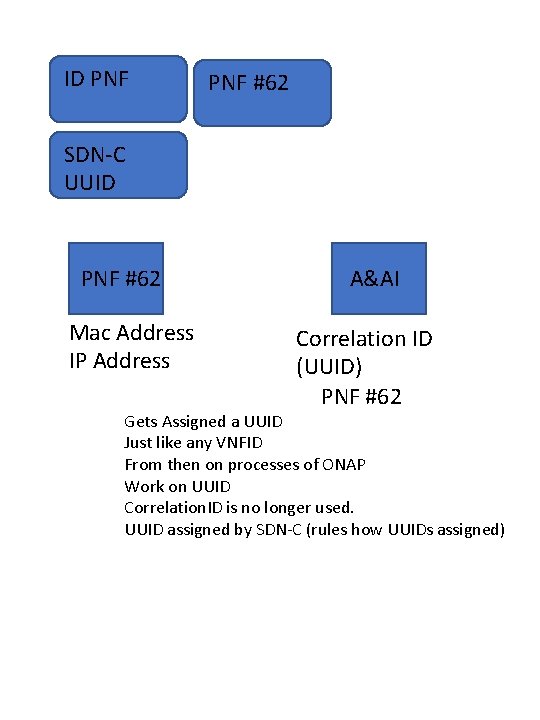
ID PNF #62 SDN-C UUID PNF #62 Mac Address IP Address A&AI Correlation ID (UUID) PNF #62 Gets Assigned a UUID Just like any VNFID From then on processes of ONAP Work on UUID Correlation. ID is no longer used. UUID assigned by SDN-C (rules how UUIDs assigned)
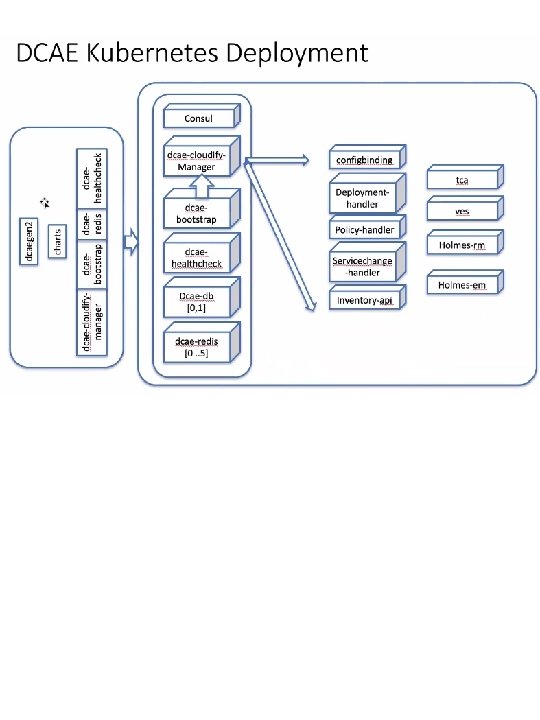
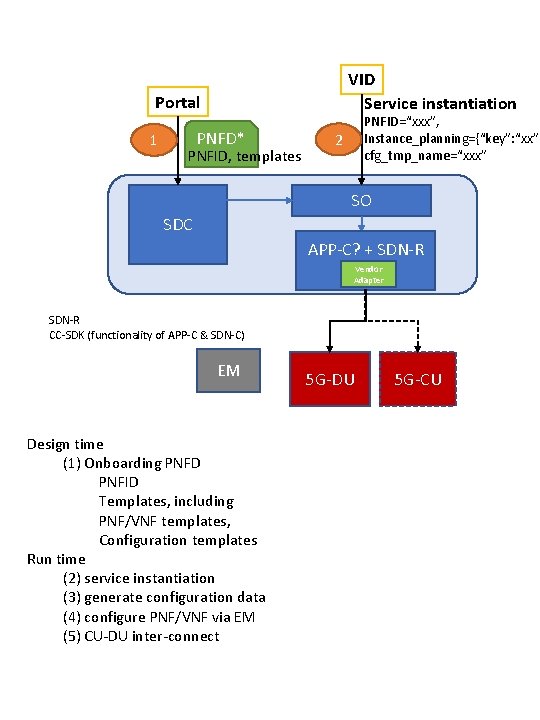
VID Service instantiation Portal 1 PNFD* PNFID, templates PNFID=“xxx”, Instance_planning={“key”: “xx”} cfg_tmp_name=“xxx” 2 SO SDC APP-C? + SDN-R Vendor Adapter SDN-R CC-SDK (functionality of APP-C & SDN-C) EM Design time (1) Onboarding PNFD PNFID Templates, including PNF/VNF templates, Configuration templates Run time (2) service instantiation (3) generate configuration data (4) configure PNF/VNF via EM (5) CU-DU inter-connect 5 G-DU 5 G-CU
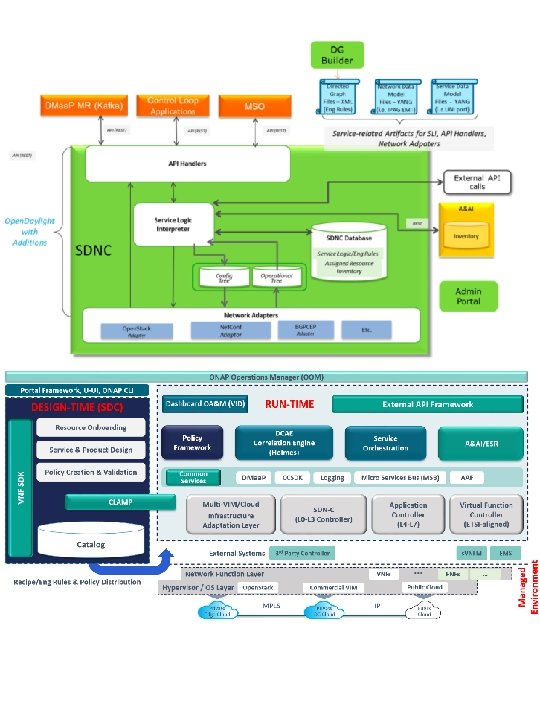
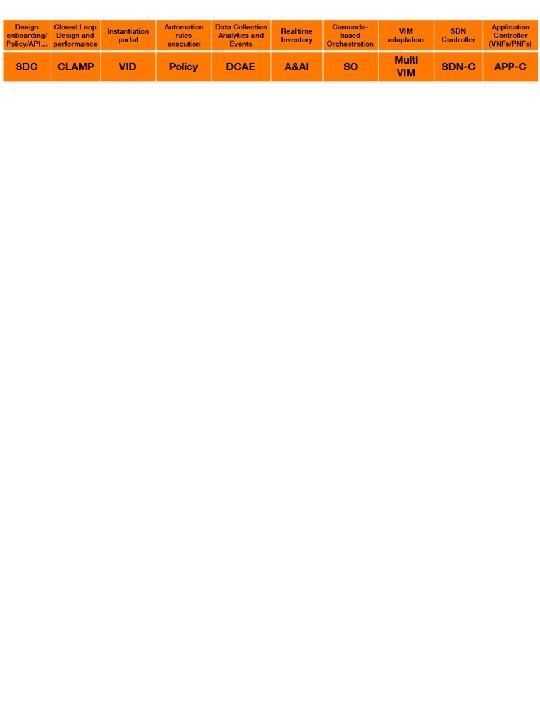

MEASUREMENTS DICTIONARY FIELD Suggested format is XML MEASUREMENT FIELD Meas Id Meas Type 3 GPP Meas Obj Class Meas Collection Method Meas Unit Meas Range Meas Family Meas Sub. Family Meas Description Meas Condition COUNTER FIELD Criteria Counter ID Counter Name Counter Description Counter Suffix 3 GPP Counter Condition MEASUREMENT FIELDS DESCRIPTION Gives the Identifier for the Measurement. Meas Type is the Measurement Name in Camel Format Measurement Name in 3 GPP Standards defined in 3 GPP TS 32. 425. Managed object (MO) associated with this Measurement. The objects will be vendor specific and it indicates the NF object for that vendor related to that measurement. The Collection method for the measurement. Cumulative (CC), Lead, Max, Snapshot, Value Unit type for the Measurement. Typical unit values include: watt (power), d. B, bits/s (throughput), PRB, Packets, Sequence. Numerical Value Range for the measurement in the units given by the meas units. Family or grouping of measurements. Subgrouping for the measurement. This field provides a textual description of the measurement. This is intended for an operator to understand the meaning of the measurement. Provides the Measure Conditions. COUNTER FIELDS DESCRIPTION Criteria to determine which counter to peg (same for all counters associated with the measurement. If there are no criteria there will also not be counters associated with the meas. Gives the identifier of the Counter This is the name of the counter This field provides a textual description of the counter. This is intended for an operator to understand the meaning of the counter. The 3 GPP standardized Suffix. The suffix value is defined in the 3 GPP TS 32. 425 standard. This field describes the trigger condition that trips the counter. Triggering events are specific exchanges that happen in the flow of call management
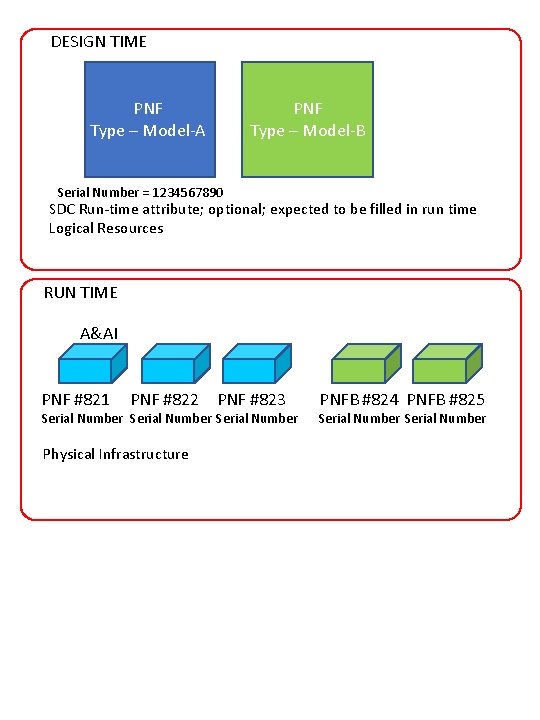
DESIGN TIME PNF Type – Model-A PNF Type – Model-B Serial Number = 1234567890 SDC Run-time attribute; optional; expected to be filled in run time Logical Resources RUN TIME A&AI PNF #821 PNF #822 PNF #823 Serial Number Physical Infrastructure PNFB #824 PNFB #825 Serial Number
SAMPLE YAML FAULT DEFINITION event: {presence: required, action: [ any, up, over. Temperature, RECO-reboot. Pnf, null ], structure: { common. Event. Header: {presence: required, structure: { domain: {presence: required, value: fault}, event. Name: {presence: required, value: Fault_Nokia_5 GCU_Overtemperature}, event. Id: {presence: required}, priority: {presence: required}, reporting. Entity. Name: {presence: required}, sequence: {presence: required}, source. Name: {presence: required}, start. Epoch. Microsec: {presence: required}, last. Epoch. Microsec: {presence: required}, version: {presence: required, value: 3. 0} }}, fault. Fields: {presence: required, structure: { alarm. Condition : {presence: required, value: Overtemperature}, event. Severity: {presence: required, value: MAJOR}, event. Source. Type: {presence: required, value: Base. Station}, fault. Fields. Version: {presence: required, value: 3. 0}, specific. Problem: {presence: required}, vf. Status: {presence: required, value: “Active"} alarm. Interface. A : {presence: required}, additional. Information: {presence: optional, array: { key. Value. Pair: {presence: required, structure: { key: {presence: required, value: Temperature}, value: {presence: required} } }} }}
VES FAULT EVENT (fault. Fields) Field alarm. Additional Information alarm. Condition alarm. Interface. A event. Category event. Severity event. Source. Type fault. Fields. Version specific. Problem vf. Status Type Required Description ? hash. Map No Additional alarm information (note: for SNMP mapping to VES, for hash key use OID of varbind, for value use incoming data for that varbind ) string Yes Short name of the alarm condition/problem, such as a trap name. Should not have white space (e. g. , tp. Lg. Cgi. Not. In. Config, Bfd. Session. Down, link. Down, etc…) string No Card, port, channel or interface name of the device generating the alarm string No Event category, for example: ‘license’, ‘link’, ‘routing’, ‘security’, ‘signaling ’ string Yes Event severity enumeration: ‘CRITICAL’, ‘MAJOR’, ‘MINOR’, ‘WARNING’, ‘NORMAL ’ string Yes Examples: ‘card’, ‘host’, ‘other’, ‘port’, ‘port. Threshold’, ‘router’, ‘slot. Threshold’, ‘switch’, ‘virtual. Machine’, ‘virtual. Network. Function’ number Yes Version of the fault. Fields block string Yes Description of the alarm or problem (e. g. , ‘This event is sent when the LG is asked to perform a location for a CGI that is not in its configuration’) string Yes Virtual function status enumeration: ‘Active’, ‘Idle’, ‘Preparing to terminate ’, ‘Ready to terminate’, ‘Requesting Termination’
- Slides: 76