
ONAP E 2 E Flow v CPE Service
- Slides: 13
ONAP E 2 E Flow `
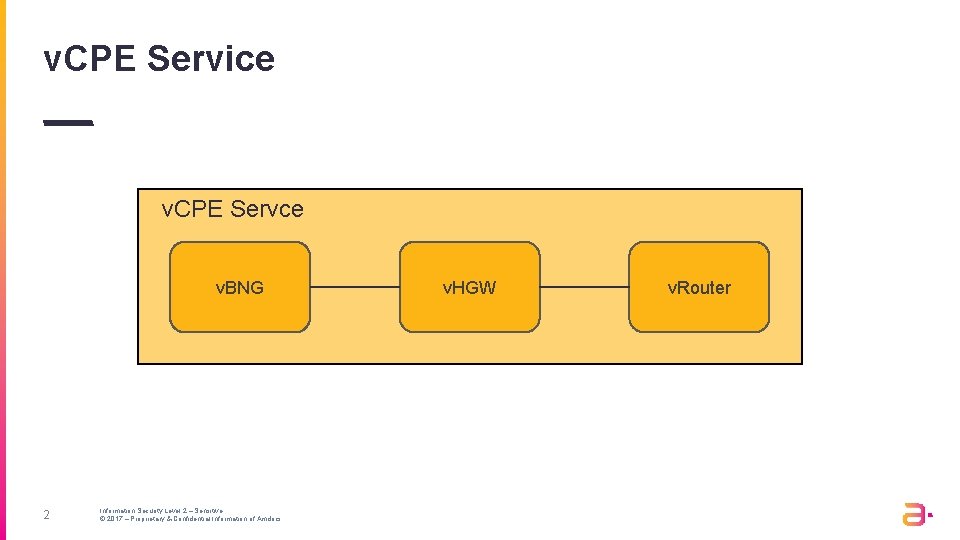
v. CPE Service v. CPE Servce v. BNG 2 Information Security Level 2 – Sensitive © 2017 – Proprietary & Confidential Information of Amdocs v. HGW v. Router
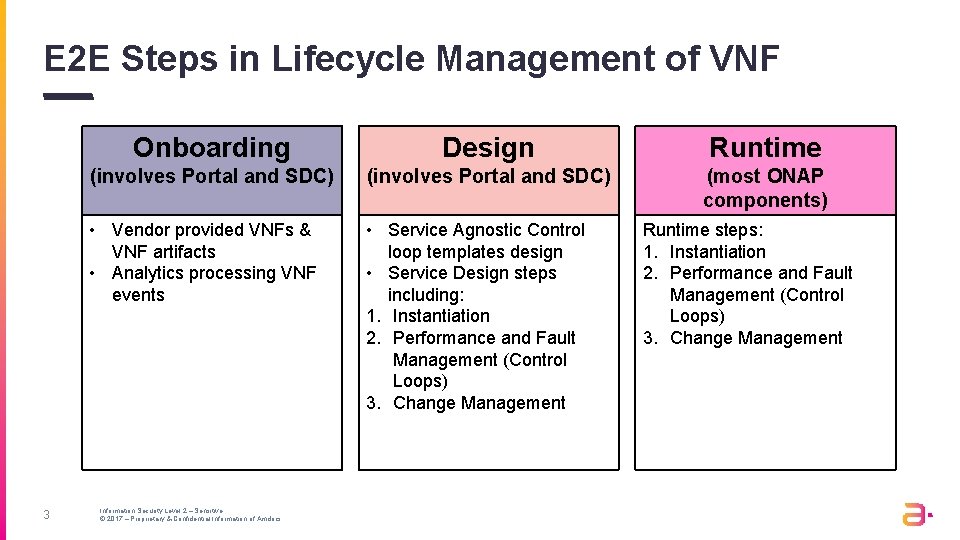
E 2 E Steps in Lifecycle Management of VNF 3 Onboarding Design Runtime (involves Portal and SDC) (most ONAP components) • Vendor provided VNFs & VNF artifacts • Analytics processing VNF events • Service Agnostic Control loop templates design • Service Design steps including: 1. Instantiation 2. Performance and Fault Management (Control Loops) 3. Change Management Information Security Level 2 – Sensitive © 2017 – Proprietary & Confidential Information of Amdocs Runtime steps: 1. Instantiation 2. Performance and Fault Management (Control Loops) 3. Change Management
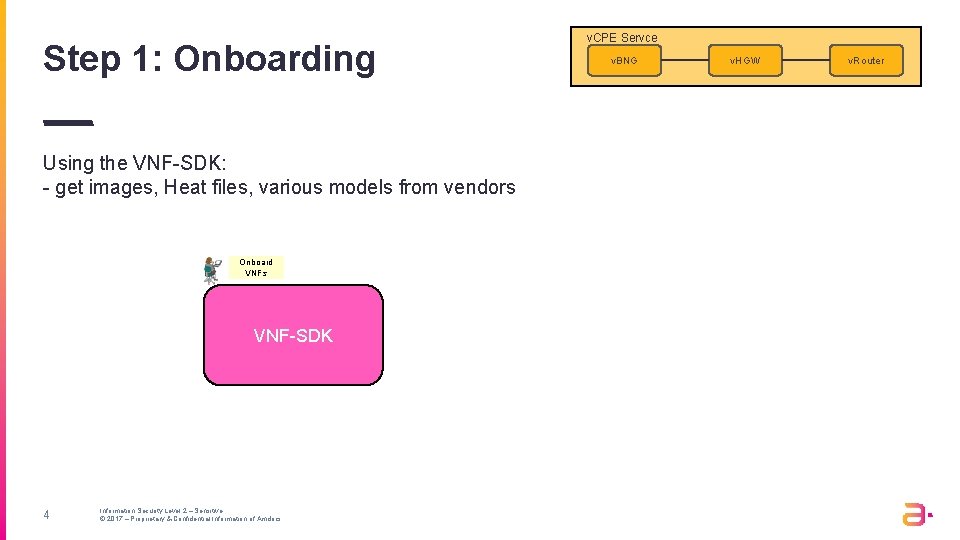
Step 1: Onboarding Using the VNF-SDK: - get images, Heat files, various models from vendors Onboard VNFs VNF-SDK 4 Information Security Level 2 – Sensitive © 2017 – Proprietary & Confidential Information of Amdocs v. CPE Servce v. BNG v. HGW v. Router
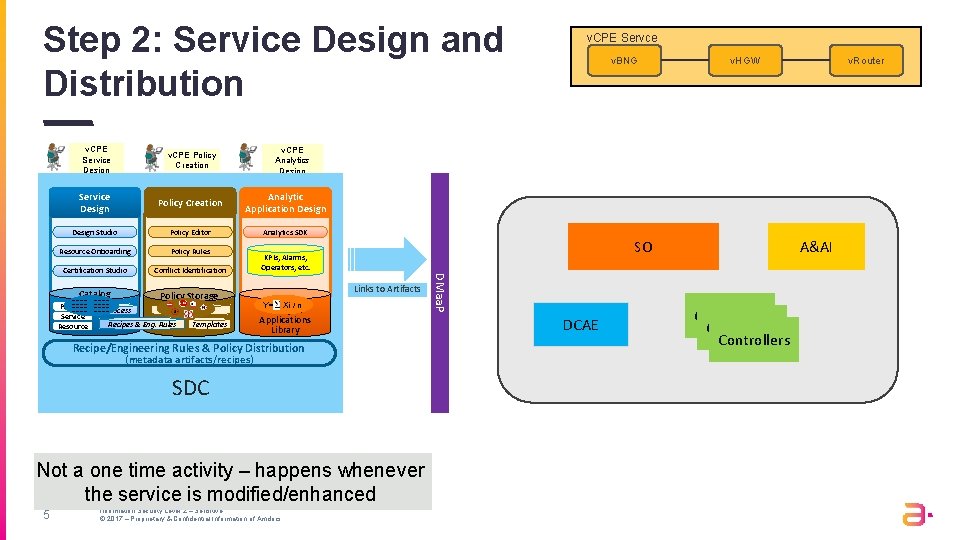
Step 2: Service Design and Distribution v. CPE Service Design v. CPE Policy Creation Service Design Policy Creation Analytic Application Design Studio Policy Editor Analytics SDK Resource Onboarding Policy Rules Certification Studio Conflict Identification Catalog Policy Storage Resource Templates SO KPIs, Alarms, Operators, etc. Artifact Xi / n Analytic distribution Applications Library Links to Artifacts Y= Recipe/Engineering Rules & Policy Distribution (metadata artifacts/recipes) SDC Not a one time activity – happens whenever the service is modified/enhanced 5 v. HGW v. Router v. CPE Analytics Design Library Recipes & Eng. Rules v. BNG Information Security Level 2 – Sensitive © 2017 – Proprietary & Confidential Information of Amdocs DMaa. P ---------Product -------Process Service v. CPE Servce DCAE A&AI Controllers
Step 3: Customer Order External to ONAP 6 Information Security Level 2 – Sensitive © 2017 – Proprietary & Confidential Information of Amdocs v. CPE Servce v. BNG v. HGW v. Router
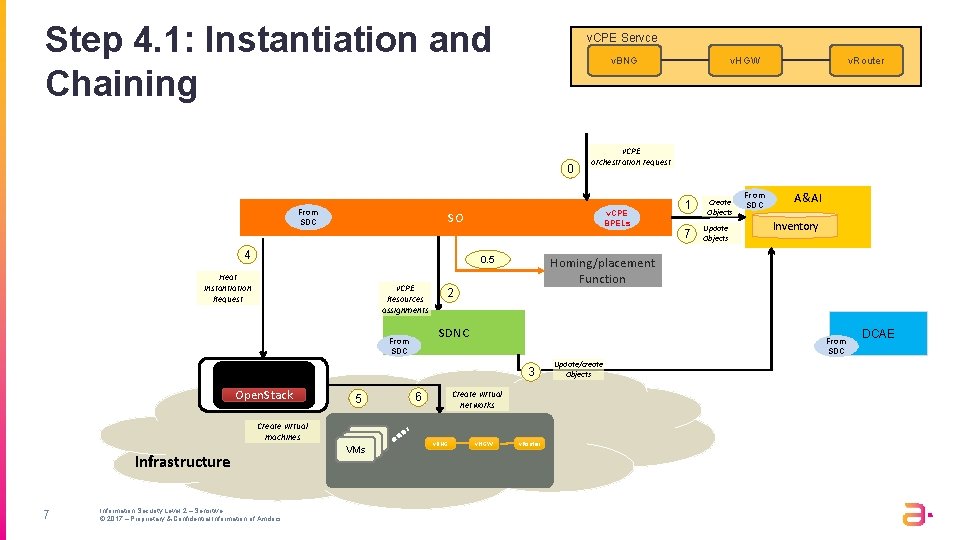
Step 4. 1: Instantiation and Chaining v. CPE Servce 0 From SDC v. HGW v. BNG v. CPE orchestration request v. CPE BPELs SO 1 7 4 0. 5 Heat Instantiation Request v. CPE Resources assignments Create virtual machines Infrastructure 7 Information Security Level 2 – Sensitive © 2017 – Proprietary & Confidential Information of Amdocs 5 v. CE VMs Update Objects From SDC A&AI Inventory 2 From SDC 3 Open. Stack Create Objects Homing/placement Function SDNC From SDC v. Router Create virtual networks 6 v. BNG v. HGW v. Router Update/create Objects DCAE
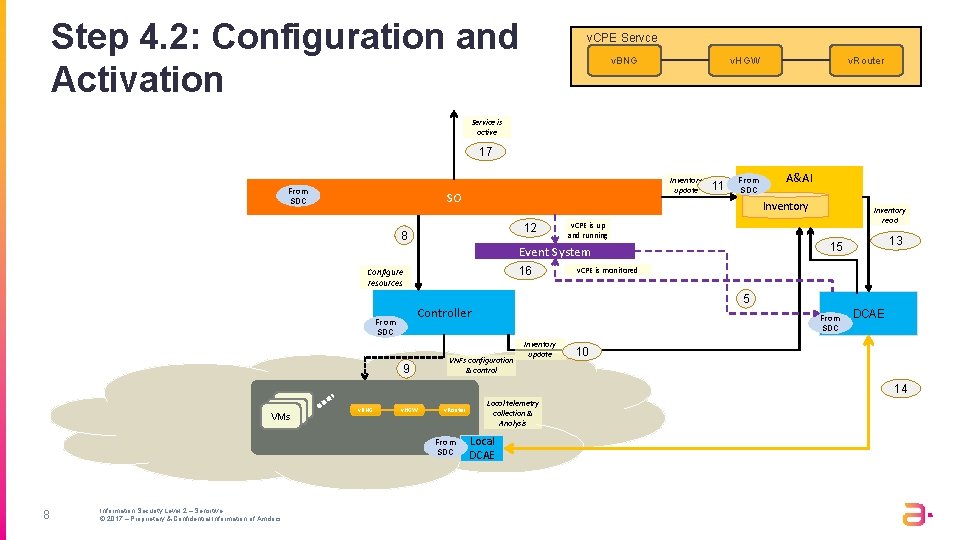
Step 4. 2: Configuration and Activation v. CPE Servce v. HGW v. BNG v. Router Service is active 17 From SDC Inventory update SO 11 From SDC Inventory 12 8 16 Configure resources 13 15 v. CPE is monitored 5 Controller 9 Inventory read v. CPE is up and running Event System From SDC A&AI From SDC VNFs configuration & control Inventory update DCAE 10 14 v. CE VMs v. BNG v. HGW v. Router From SDC 8 Information Security Level 2 – Sensitive © 2017 – Proprietary & Confidential Information of Amdocs Local telemetry collection & Analysis Local DCAE
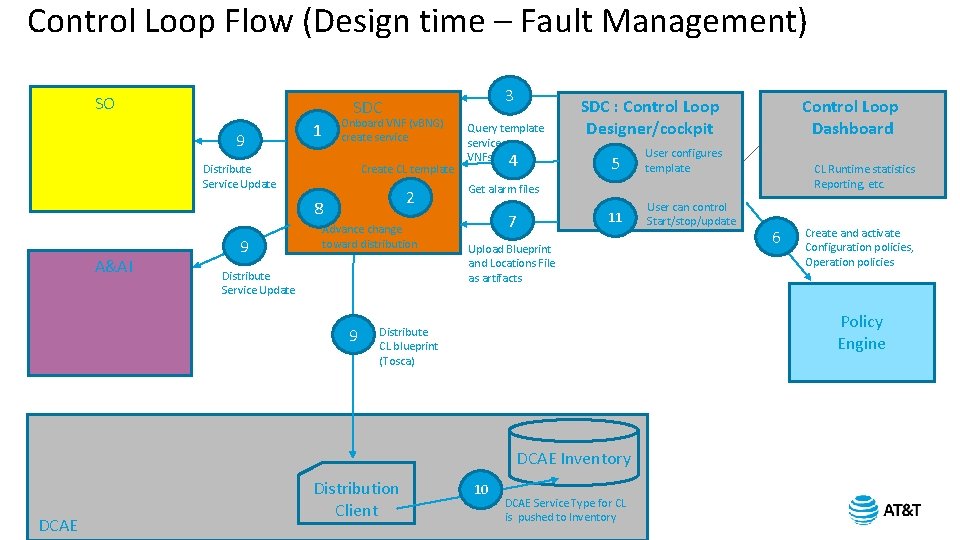
Control Loop Flow (Design time – Fault Management) SO 9 Onboard VNF (v. BNG) create service 1 Distribute Service Update Create CL template 2 8 A&AI 3 SDC 9 Advance change toward distribution Distribute Service Update 9 Query template services, VNFs 4 5 User configures template 11 User can control Start/stop/update 7 Upload Blueprint and Locations File as artifacts 6 Create and activate Configuration policies, Operation policies Policy Engine DCAE Inventory DCAE CL Runtime statistics Reporting, etc. Get alarm files Distribute CL blueprint (Tosca) Distribution Client Control Loop Dashboard SDC : Control Loop Designer/cockpit 10 DCAE Service Type for CL is pushed to Inventory
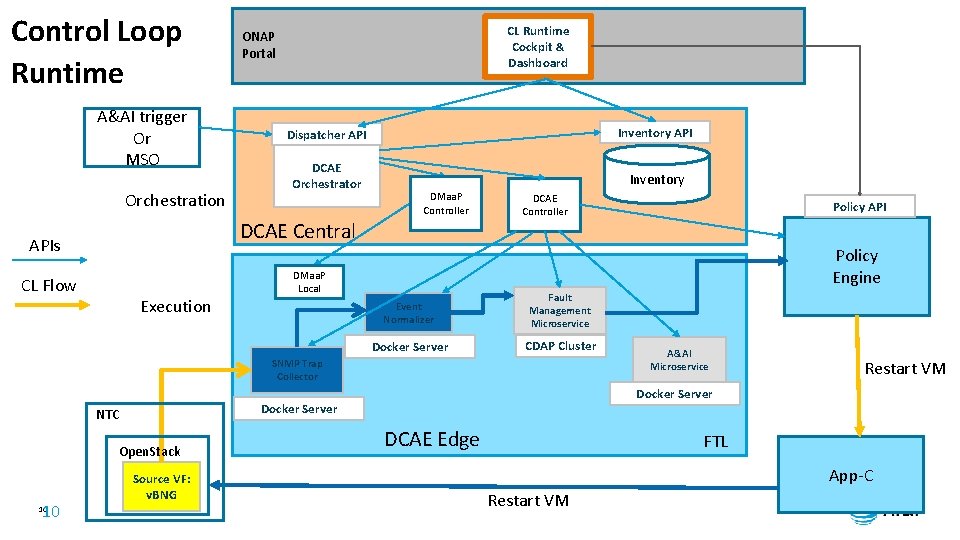
Control Loop Runtime A&AI trigger Or MSO Orchestration CL Runtime Cockpit & Dashboard ONAP Portal Dispatcher API Inventory API DCAE Orchestrator Inventory DMaa. P Controller DCAE Central APIs CL Flow Execution DCAE Controller Policy Engine DMaa. P Local Event Normalizer Fault Management Microservice Docker Server CDAP Cluster SNMP Trap Collector Open. Stack 10 10 Source VF: v. BNG A&AI Microservice Restart VM Docker Server NTC Policy API DCAE Edge FTL App-C Restart VM
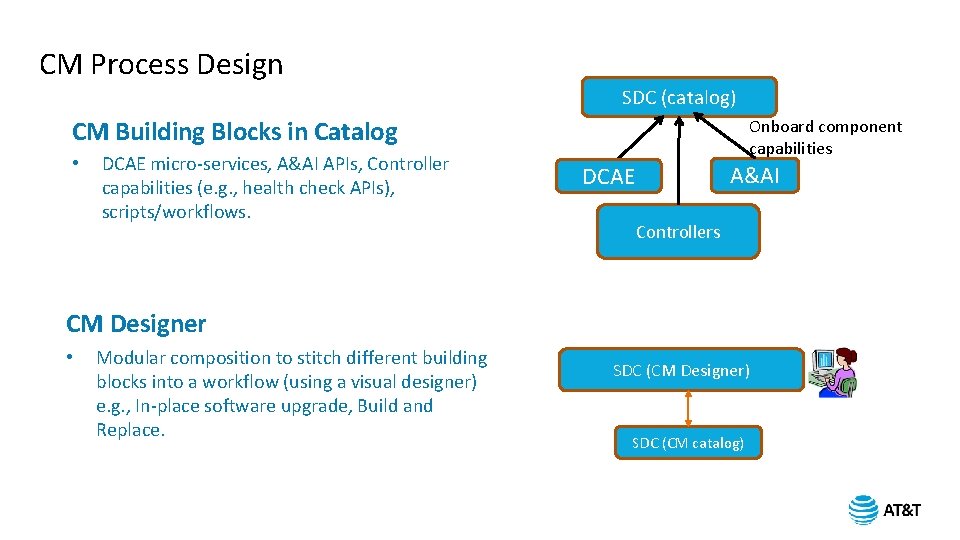
CM Process Design SDC (catalog) CM Building Blocks in Catalog • DCAE micro-services, A&AI APIs, Controller capabilities (e. g. , health check APIs), scripts/workflows. Onboard component capabilities A&AI DCAE Controllers CM Designer • Modular composition to stitch different building blocks into a workflow (using a visual designer) e. g. , In-place software upgrade, Build and Replace. SDC (CM Designer) SDC (CM catalog)
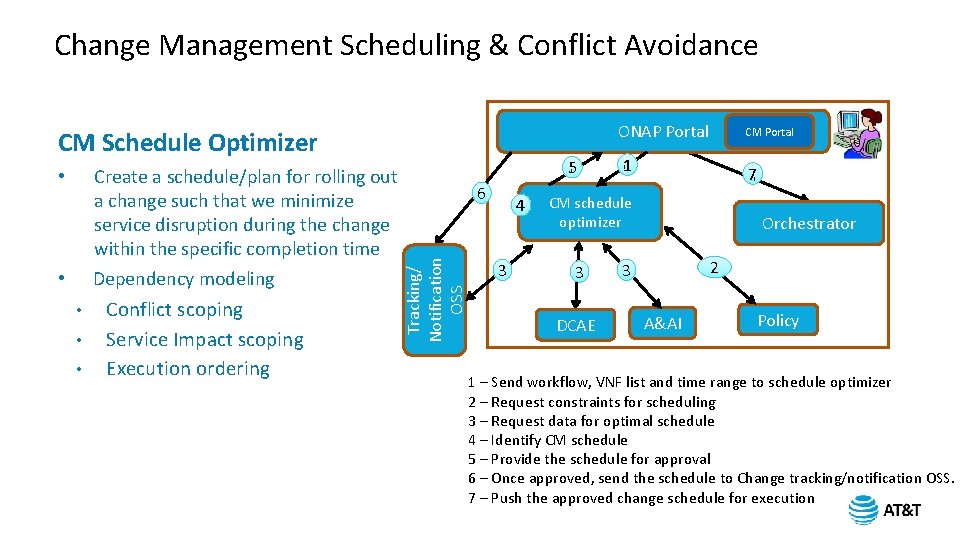
Change Management Scheduling & Conflict Avoidance ONAP Portal CM Schedule Optimizer • • Conflict scoping Service Impact scoping Execution ordering 5 6 Tracking/ Notification OSS Create a schedule/plan for rolling out a change such that we minimize service disruption during the change within the specific completion time Dependency modeling • 4 3 CM Portal 1 7 CM schedule optimizer 3 DCAE Orchestrator 2 3 A&AI Policy 1 – Send workflow, VNF list and time range to schedule optimizer 2 – Request constraints for scheduling 3 – Request data for optimal schedule 4 – Identify CM schedule 5 – Provide the schedule for approval 6 – Once approved, send the schedule to Change tracking/notification OSS. 7 – Push the approved change schedule for execution
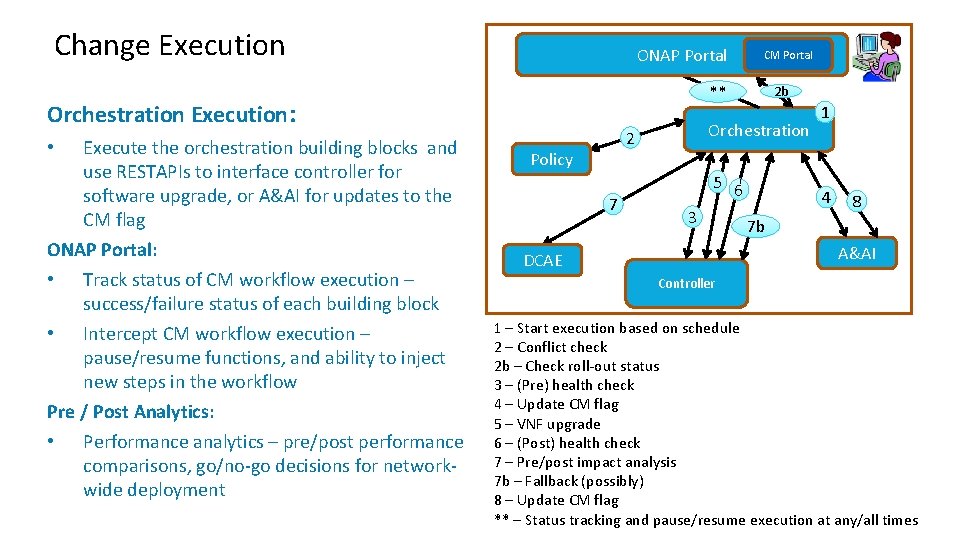
Change Execution ONAP Portal ** Orchestration Execution: Execute the orchestration building blocks and use RESTAPIs to interface controller for software upgrade, or A&AI for updates to the CM flag ONAP Portal: • Track status of CM workflow execution – success/failure status of each building block • Intercept CM workflow execution – pause/resume functions, and ability to inject new steps in the workflow Pre / Post Analytics: • Performance analytics – pre/post performance comparisons, go/no-go decisions for networkwide deployment • CM Portal Orchestration 2 Policy 7 2 b 5 6 3 1 4 8 7 b A&AI DCAE Controller 1 – Start execution based on schedule 2 – Conflict check 2 b – Check roll-out status 3 – (Pre) health check 4 – Update CM flag 5 – VNF upgrade 6 – (Post) health check 7 – Pre/post impact analysis 7 b – Fallback (possibly) 8 – Update CM flag ** – Status tracking and pause/resume execution at any/all times