
Office of Traffic Safety and Technology Guide Sign
- Slides: 25
Office of Traffic, Safety and Technology Guide Sign Design June 17 -18, 2015 Shoreview, MN
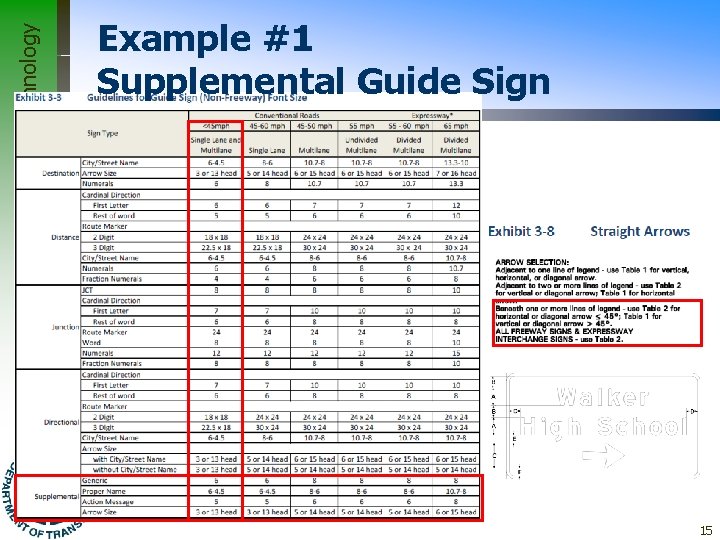
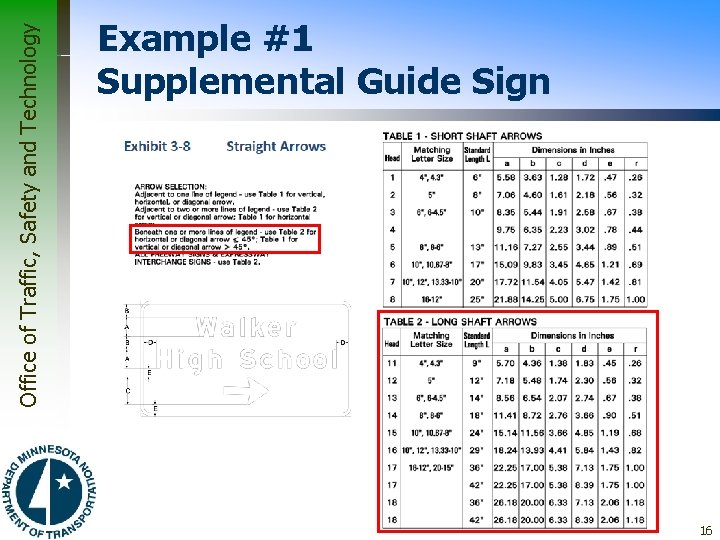
Office of Traffic, Safety and Technology General Design Process 1. First, use the guidelines for Font Sizes (Section 3. 3. 2 on page 3 -5) to determine correct letter size and overlay size, based on speed, number of lanes, and roadway type (freeway or non-freeway) 2. The matching arrow size can be found in Section 3. 8 on page 3 -16 3. Vertical spacing between lines: ½ to ¾ of letter height – This requirement may not be feasible with all overheads due to restrictions caused by existing mounting structures 2
Office of Traffic, Safety and Technology General Design Process 4. Vertical spacing between text and inside of border: ½ to ¾ of letter height 5. Horizontal spacing between objects (fractions, overlays, arrows): ¾ to full letter height 6. Horizontal spacing between text and inside of border: ½ to ¾ of letter height 3
Office of Traffic, Safety and Technology General Design Process 7. The appropriate arrow will be larger than the matching font height, and spacing around it will be less than the vertical spacing between lines (½ to ¾ letter height) – Due to the shapes of arrows, compressing space around them doesn't make them appear crowded 4
Office of Traffic, Safety and Technology General Design Process 8. Vertical spacing around fractions can be compressed somewhat because fractions are much taller than the rest of the legend on the same line 9. Whenever possible, allow no more than three destinations or street names on a guide sign 5
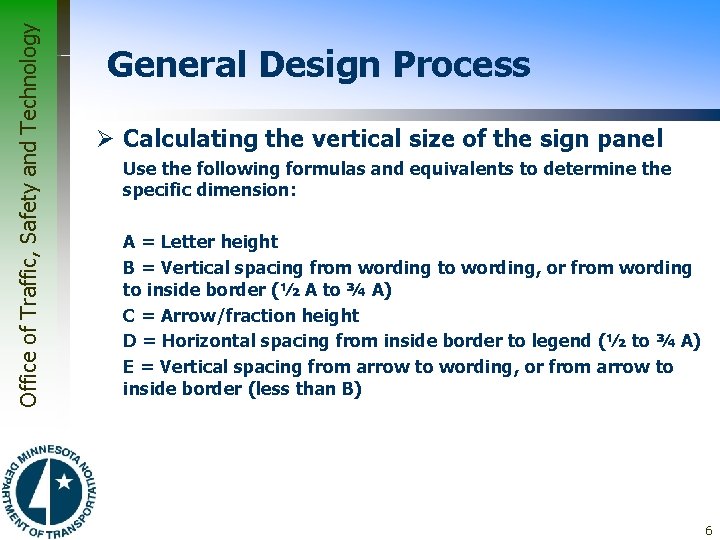
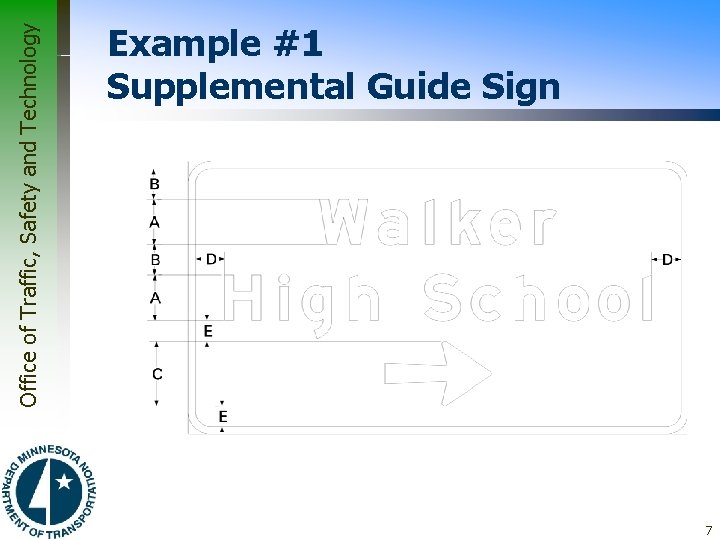
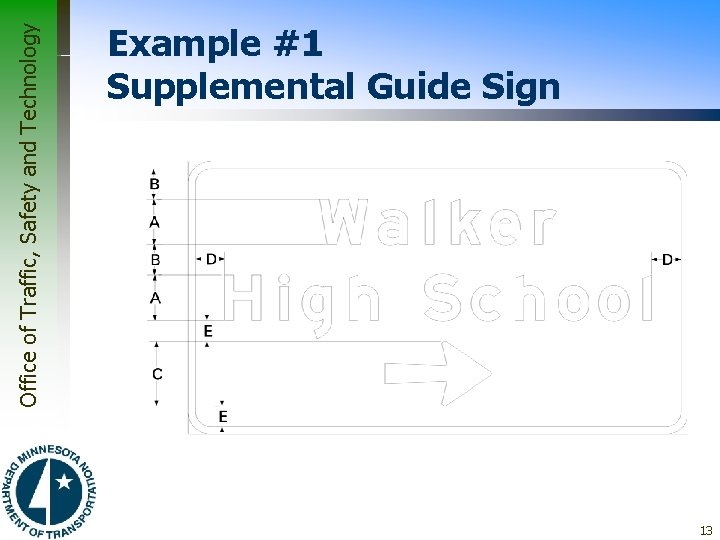
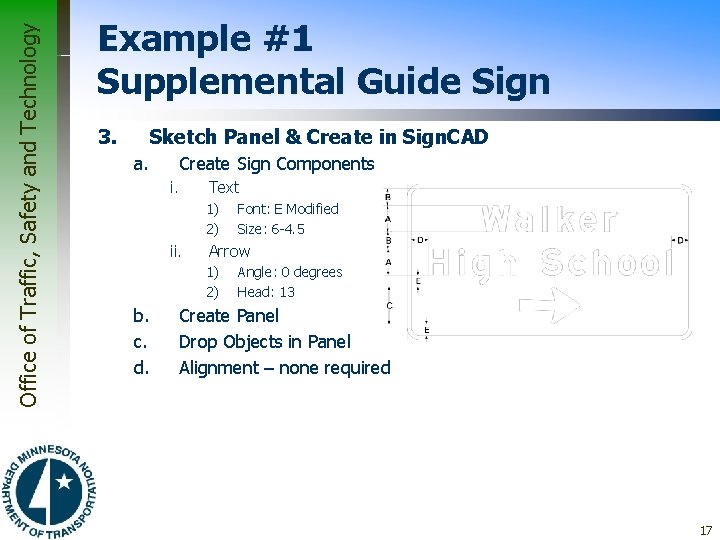
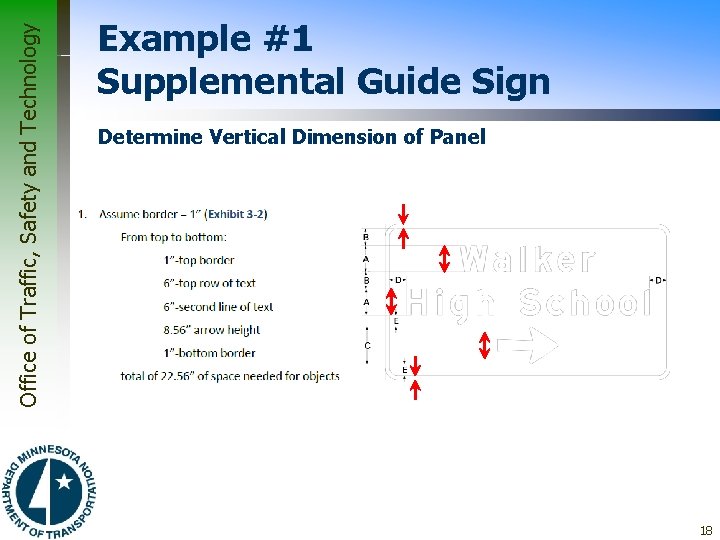
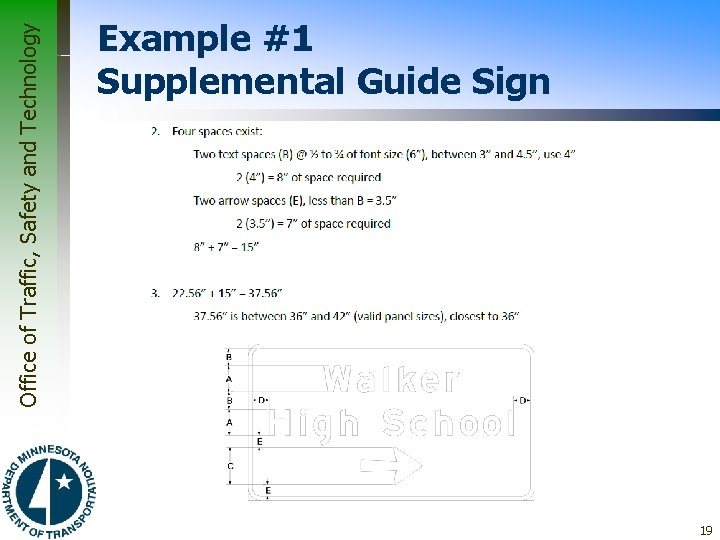
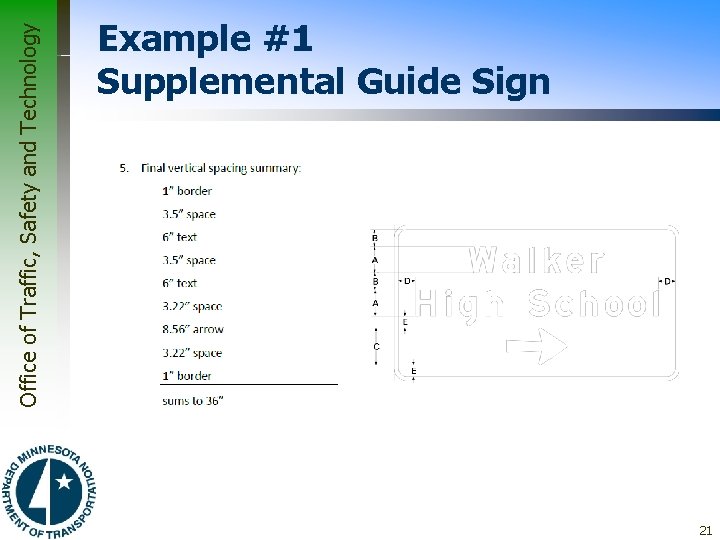
Office of Traffic, Safety and Technology General Design Process Ø Calculating the vertical size of the sign panel Use the following formulas and equivalents to determine the specific dimension: A = Letter height B = Vertical spacing from wording to wording, or from wording to inside border (½ A to ¾ A) C = Arrow/fraction height D = Horizontal spacing from inside border to legend (½ to ¾ A) E = Vertical spacing from arrow to wording, or from arrow to inside border (less than B) 6
Office of Traffic, Safety and Technology Example #1 Supplemental Guide Sign 7
Office of Traffic, Safety and Technology General Design Process Ø Calculating the Vertical size of the Sign Panel 1. Add the heights of all objects in the sign, including border thicknesses – The border thickness may have to be estimated if the length of the panel’s shortest side – height or width – is not known (typical borders widths are summarized in Exhibit 3‑ 2) – Add the thickness of horizontal lines, which will be the same as the value given for border thickness – On signs with Font size combinations on the same line, use the largest size when determining component spacing 2. Add the heights of the spaces between legend lines as well as the spaces between legend lines and border 8
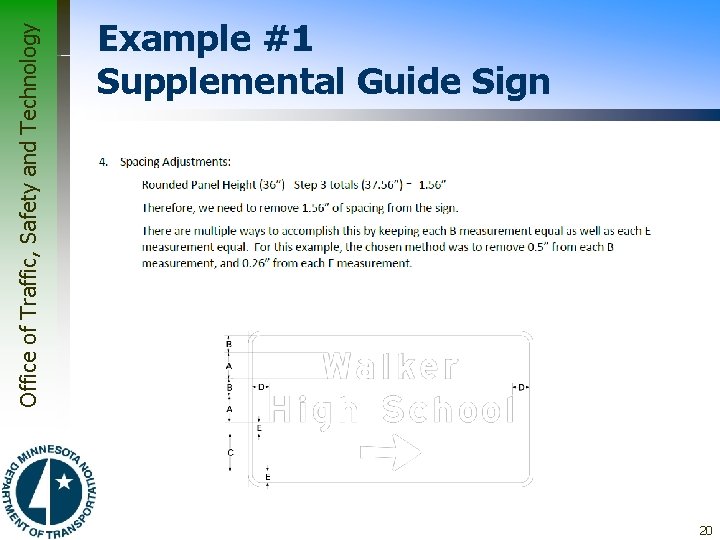
Office of Traffic, Safety and Technology General Design Process 3. Add the two totals from Steps 1 and 2, rounding to the nearest number divisible by 6 (6” increments) – This figure is the panel height – Bear in mind that an adjustment may have to be made in border and horizontal line thickness to achieve the right size 4. Because of the rounding of the panel height in Step 3, spacing likely will need to be adjusted – To do this, find the difference between the rounded panel height and the actual total from Step 3 – Then distribute this difference between the spaces on the panel, ensuring to keep ‘B’ measurements equivalent, ‘D’ measurements equivalent, and ‘E’ measurements equivalent – Exceptions to this rule may be necessary in some cases to account for words containing low-hanging letters, such as g, j, p, q, and y, or in other situations 9
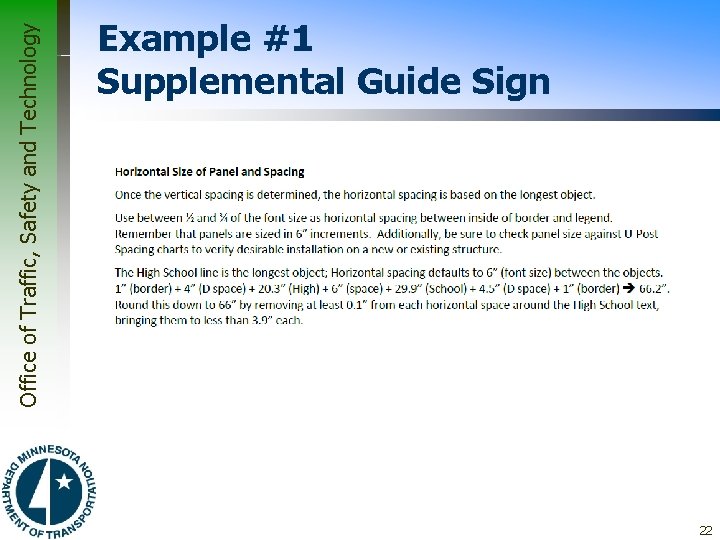
Office of Traffic, Safety and Technology General Design Process Ø Calculating the Horizontal size of the Sign Panel – Horizontal spacing is fairly automatic in most cases – Primarily, it involves maintaining proper spacing from borders to legend and from legend to vertical lines – The example problems illustrate this in more detail • In the few complicated instances instructions are given as to how horizontal spacing can be done – Spacings from legends to borders and vertical lines should be between ½ and ¾ letter height in most cases 10
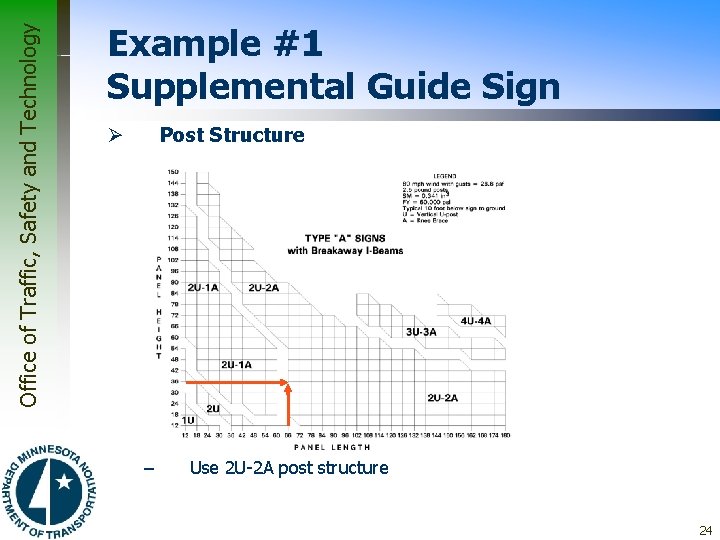
Office of Traffic, Safety and Technology General Design Process Ø Review Panel Structure for Proper Supports Ø Once the panel has been sized using vertical and horizontal spacing guidelines refer to section 3. 12. 1 on page 3 -24 to ensure U-Posts will be used versus I -beams 11
Office of Traffic, Safety and Technology Example #1 Supplemental Guide Sign Ø Problem Statement – Using the given conditions listed above and the sign components illustrated below, develop the guide sign using Sign. CAD paying particular attention to component location, justification, and spacing. Ø Purpose of Example – – Color selection Font, font size, and arrow selection Vertical spacing Horizontal spacing 12
Office of Traffic, Safety and Technology Example #1 Supplemental Guide Sign 13
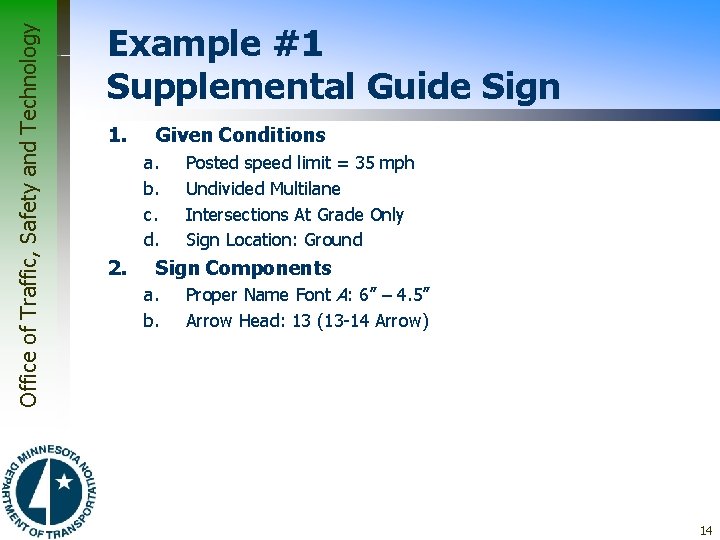
Office of Traffic, Safety and Technology Example #1 Supplemental Guide Sign 1. Given Conditions a. b. c. d. 2. Posted speed limit = 35 mph Undivided Multilane Intersections At Grade Only Sign Location: Ground Sign Components a. b. Proper Name Font A: 6” – 4. 5” Arrow Head: 13 (13 -14 Arrow) 14
Office of Traffic, Safety and Technology Example #1 Supplemental Guide Sign 15
Office of Traffic, Safety and Technology Example #1 Supplemental Guide Sign 16
Office of Traffic, Safety and Technology Example #1 Supplemental Guide Sign 3. Sketch Panel & Create in Sign. CAD a. Create Sign Components i. Text 1) 2) ii. Arrow 1) 2) b. c. d. Font: E Modified Size: 6 -4. 5 Angle: 0 degrees Head: 13 Create Panel Drop Objects in Panel Alignment – none required 17
Office of Traffic, Safety and Technology Example #1 Supplemental Guide Sign Determine Vertical Dimension of Panel 18
Office of Traffic, Safety and Technology Example #1 Supplemental Guide Sign 19
Office of Traffic, Safety and Technology Example #1 Supplemental Guide Sign 20
Office of Traffic, Safety and Technology Example #1 Supplemental Guide Sign 21
Office of Traffic, Safety and Technology Example #1 Supplemental Guide Sign 22
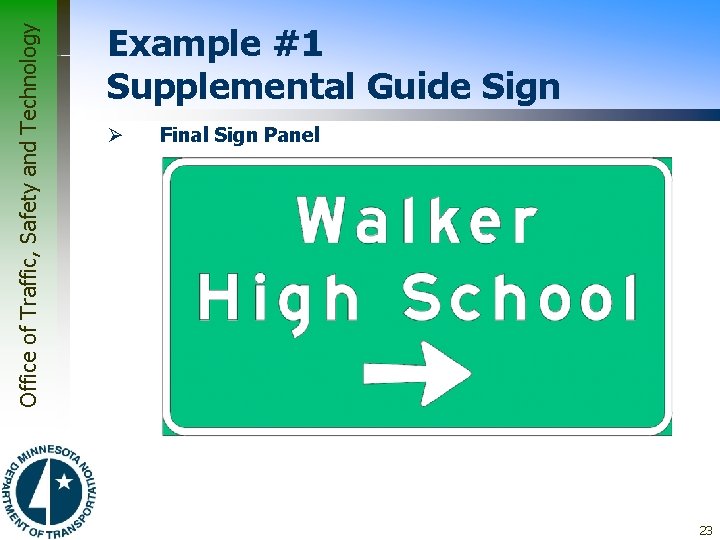
Office of Traffic, Safety and Technology Example #1 Supplemental Guide Sign Ø Final Sign Panel 23
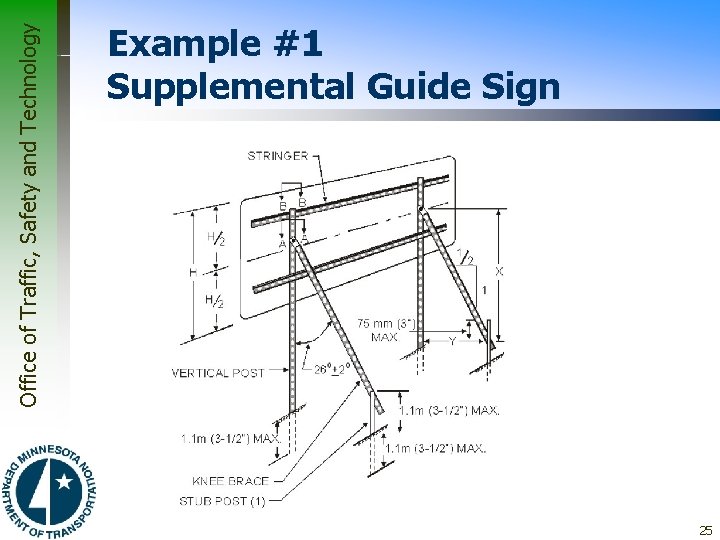
Office of Traffic, Safety and Technology Example #1 Supplemental Guide Sign Post Structure Ø – Use 2 U-2 A post structure 24
Office of Traffic, Safety and Technology Example #1 Supplemental Guide Sign 25