
ObjectOriented Software Engineering Practical Software Development using UML

Object-Oriented Software Engineering Practical Software Development using UML and Java Chapter 8: Modelling Interactions and Behaviour UML Activity Diagram
Objectives To read and write UML activity diagrams To know when and how to use activity diagrams © Lethbridge/Laganière 2005 Chapter 8: Modelling Interactions and Behaviour 2
What is an Activity Diagrams? • An activity diagram is like a state diagram. —Except most transitions are caused by internal events, such as the completion of a computation. —It shows actions and of control and data between them. • An activity diagram —Can be used to understand the flow of work that an object or component performs. —Can also be used to visualize the interrelation and interaction between different use cases. —Is most often associated with several classes. • One of the strengths of activity diagrams is the representation of concurrent activities. © Lethbridge/Laganière 2005 Chapter 8: Modelling Interactions and Behaviour 3
What is the purpose of activity diagrams? The basic purposes of activity diagrams are similar to other four diagrams; class diagram, object diagram, sequence diagram and state transition diagram. It captures the dynamic behaviour of the system. Other four diagrams are used to show the message flow from one object to another but activity diagram is used to show message flow from one activity to another. Activity diagram does not show any message flow from one activity to another. Activity diagram is some time considered as the flow chart. Although the diagrams looks like a flow chart but it is not. So the purposes can be described as: –Draw the activity flow of a system. –Describe the sequence from one activity to another. –Describe the parallel, branched and concurrent flow of the system. © Lethbridge/Laganière 2005 Chapter 8: Modelling Interactions and Behaviour 4
When to Use Activity Diagrams The activity diagram is suitable for modeling the activity flow of the system. An application can have multiple systems. Activity diagram also captures these systems and describes flow from one system to another. This specific usage is not available in other diagrams. These systems can be database, external queues or any other system. © Lethbridge/Laganière 2005 Chapter 8: Modelling Interactions and Behaviour 5
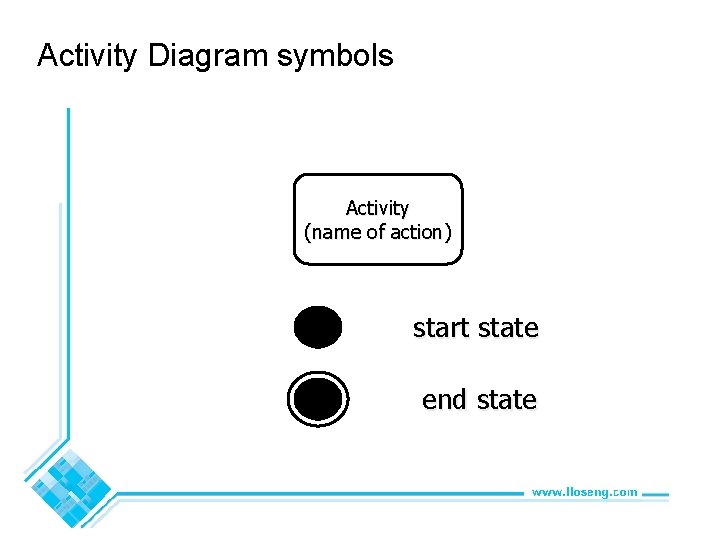
Activity Diagram symbols Activity (name of action) start state end state © Lethbridge/Laganière 2005 Chapter 8: Modelling Interactions and Behaviour 6
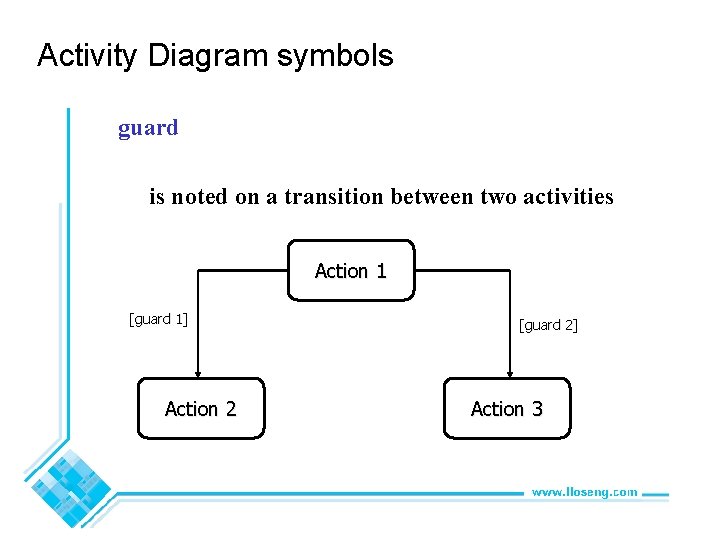
Activity Diagram symbols guard is noted on a transition between two activities Action 1 [guard 1] Action 2 © Lethbridge/Laganière 2005 [guard 2] Action 3 Chapter 8: Modelling Interactions and Behaviour 7
![Activity Diagram symbols branch single incoming transition, several guarded outgoing transitions [guard 1] ©](http://slidetodoc.com/presentation_image/a95b2ef1a9f76dc1d9c903df8bc821e9/image-8.jpg "Activity Diagram symbols branch single incoming transition, several guarded outgoing transitions [guard 1] ©")
Activity Diagram symbols branch single incoming transition, several guarded outgoing transitions [guard 1] © Lethbridge/Laganière 2005 [guard 2] Chapter 8: Modelling Interactions and Behaviour 8
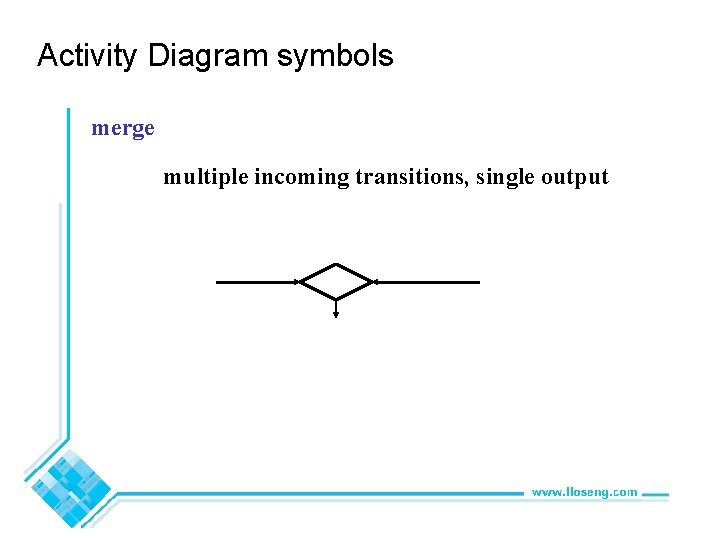
Activity Diagram symbols merge multiple incoming transitions, single output © Lethbridge/Laganière 2005 Chapter 8: Modelling Interactions and Behaviour 9
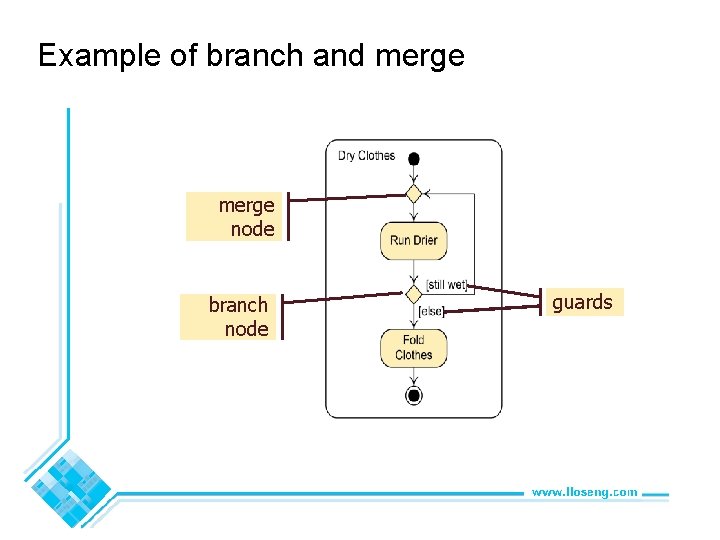
Example of branch and merge node branch node © Lethbridge/Laganière 2005 guards Chapter 8: Modelling Interactions and Behaviour 10
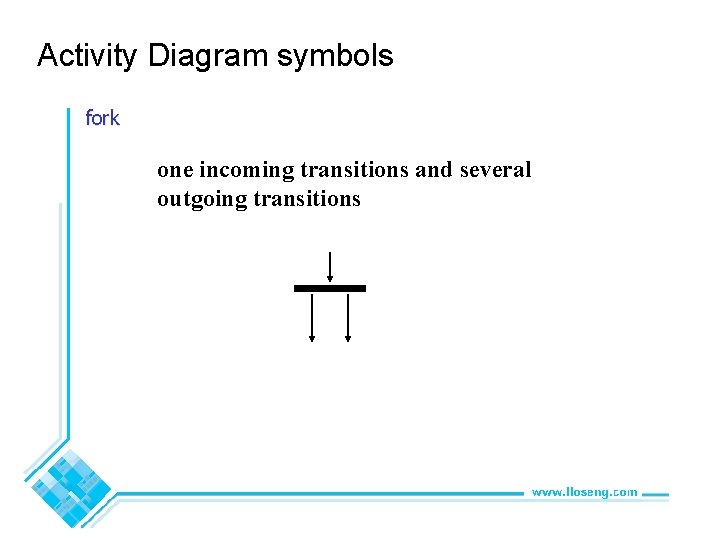
Activity Diagram symbols fork one incoming transitions and several outgoing transitions © Lethbridge/Laganière 2005 Chapter 8: Modelling Interactions and Behaviour 11
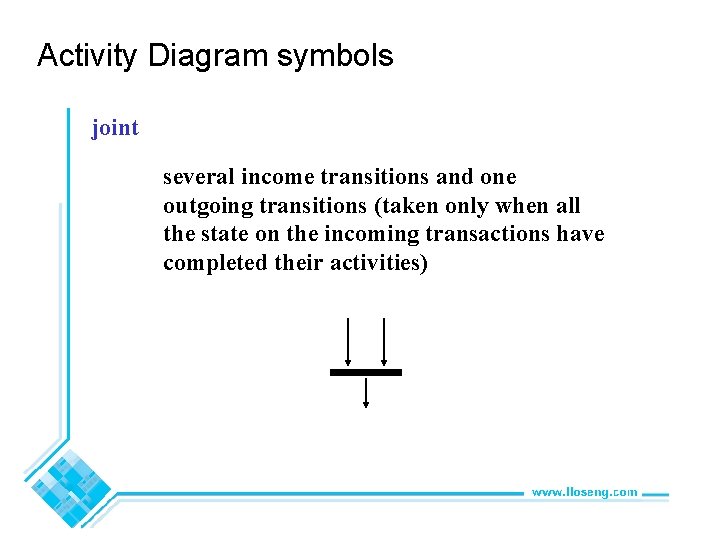
Activity Diagram symbols joint several income transitions and one outgoing transitions (taken only when all the state on the incoming transactions have completed their activities) © Lethbridge/Laganière 2005 Chapter 8: Modelling Interactions and Behaviour 12
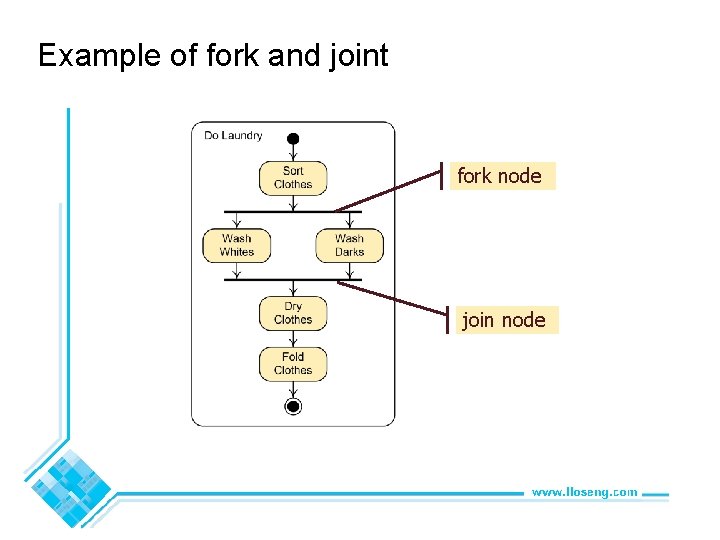
Example of fork and joint fork node join node © Lethbridge/Laganière 2005 Chapter 8: Modelling Interactions and Behaviour 13
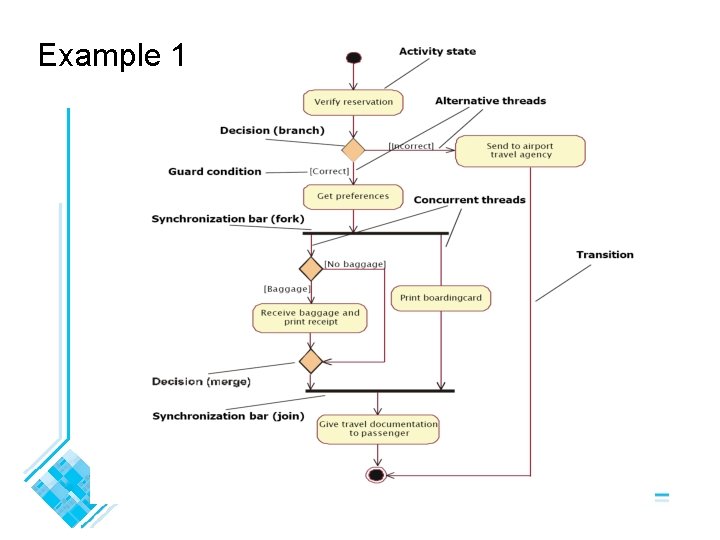
Example 1 © Lethbridge/Laganière 2005 Chapter 8: Modelling Interactions and Behaviour 14
Example 2 – Buying Drinks from a Simple Vending Machine © Lethbridge/Laganière 2005 Chapter 8: Modelling Interactions and Behaviour 15
Swimlanes Activity diagrams are most often associated with several classes. • The partition of activities among the existing classes can be explicitly shown using swimlanes. © Lethbridge/Laganière 2005 Chapter 8: Modelling Interactions and Behaviour 16
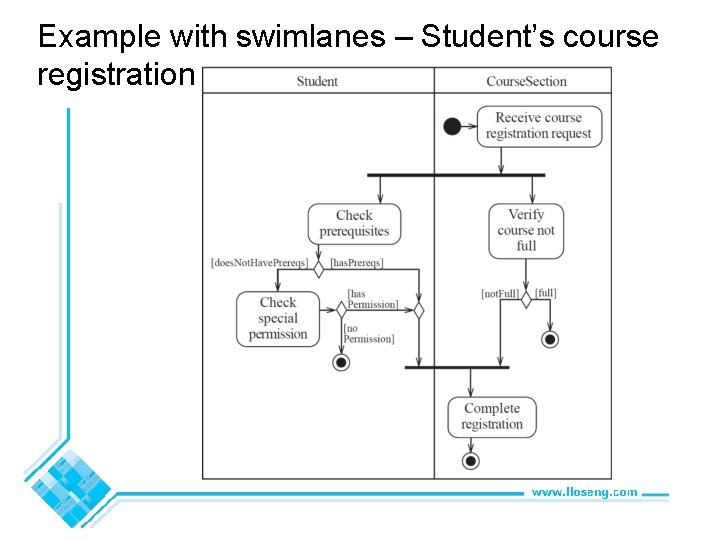
Example with swimlanes – Student’s course registration © Lethbridge/Laganière 2005 Chapter 8: Modelling Interactions and Behaviour 17
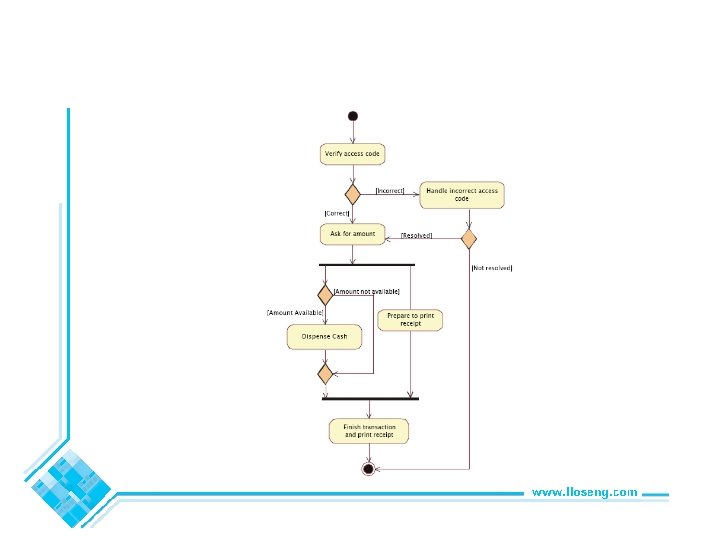
Exercise 1 Draw an activity diagram to show the activity of withdrawing money from the ATM machine. Include the following basic activities: i)Enter pin ii)Verify the pin iii)Withdraw the money iv)Print the receipt © Lethbridge/Laganière 2005 Chapter 8: Modelling Interactions and Behaviour 18
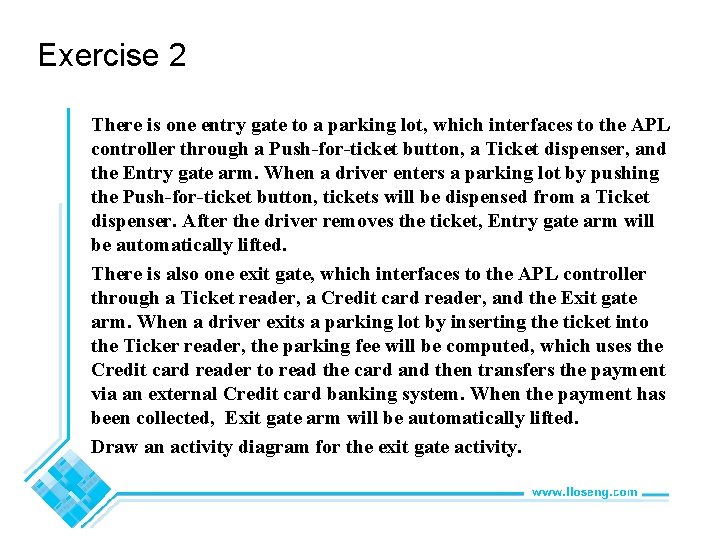
Exercise 2 There is one entry gate to a parking lot, which interfaces to the APL controller through a Push-for-ticket button, a Ticket dispenser, and the Entry gate arm. When a driver enters a parking lot by pushing the Push-for-ticket button, tickets will be dispensed from a Ticket dispenser. After the driver removes the ticket, Entry gate arm will be automatically lifted. There is also one exit gate, which interfaces to the APL controller through a Ticket reader, a Credit card reader, and the Exit gate arm. When a driver exits a parking lot by inserting the ticket into the Ticker reader, the parking fee will be computed, which uses the Credit card reader to read the card and then transfers the payment via an external Credit card banking system. When the payment has been collected, Exit gate arm will be automatically lifted. Draw an activity diagram for the exit gate activity. © Lethbridge/Laganière 2005 Chapter 8: Modelling Interactions and Behaviour 19
© Lethbridge/Laganière 2005 Chapter 8: Modelling Interactions and Behaviour 20
- Slides: 20