
ObjectOriented Software Engineering An Agile Unified Methodology by
Object-Oriented Software Engineering: An Agile Unified Methodology by David Kung Chapter 18: Implementation Considerations Copyright {c} 2014 by the Mc. Graw-Hill Companies, Inc. All rights Reserved.
Key Takeaway Points • Everyone in the team should follow the same coding standards. • Test-driven development, pair programming, and code review improve the quality of the code. • Classes should be implemented according to their dependencies to reduce the need for test stubs. 18 -2 Copyright {c} 2014 by the Mc. Graw-Hill Companies, Inc. All rights Reserved.
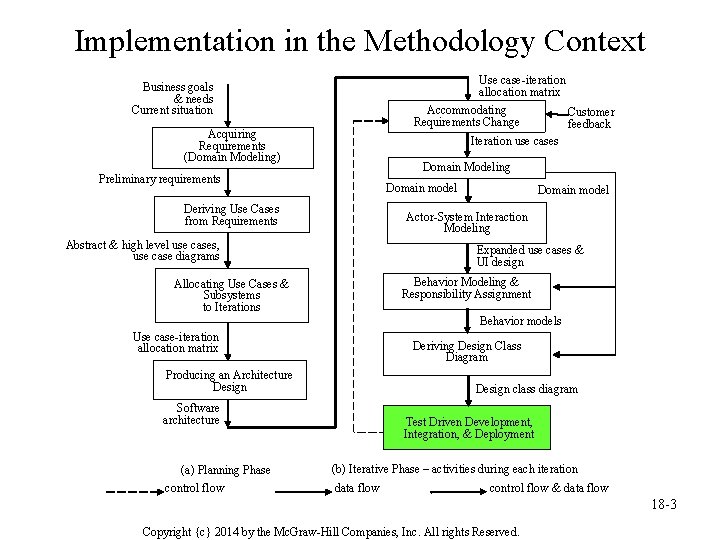
Implementation in the Methodology Context Use case-iteration allocation matrix Business goals & needs Current situation Accommodating Requirements Change Acquiring Requirements (Domain Modeling) Customer feedback Iteration use cases Domain Modeling Preliminary requirements Domain model Deriving Use Cases from Requirements Domain model Actor-System Interaction Modeling Abstract & high level use cases, use case diagrams Expanded use cases & UI design Behavior Modeling & Responsibility Assignment Allocating Use Cases & Subsystems to Iterations Behavior models Use case-iteration allocation matrix Deriving Design Class Diagram Producing an Architecture Design class diagram Software architecture (a) Planning Phase control flow Test Driven Development, Integration, & Deployment (b) Iterative Phase – activities during each iteration data flow control flow & data flow 18 -3 Copyright {c} 2014 by the Mc. Graw-Hill Companies, Inc. All rights Reserved.
Coding Standards • Define the required and optional items. • Define the format and language. • Define the coding requirements and conventions. • Define the rules and responsibilities to create and implement the coding standards, as well as review and improve the practice. 18 -4 Copyright {c} 2014 by the Mc. Graw-Hill Companies, Inc. All rights Reserved.

Components of Coding Standards? • File header file location, version number, author, project, update history. • Description of classes – a functional description for each class including – purpose – description of methods – description of fields – in-code comments • Conventions 18 -5 Copyright {c} 2014 by the Mc. Graw-Hill Companies, Inc. All rights Reserved.

Coding Conventions • Naming conventions specify rules for naming packages, modules, paths, files, classes, attributes, functions, constants, and the like. • Formatting conventions specify formatting rules for line breaking, indentation, alignment, and spacing. • In-code comment conventions define the requirements and guidelines for writing incode documentation. 18 -6 Copyright {c} 2014 by the Mc. Graw-Hill Companies, Inc. All rights Reserved.

Guidelines for Practicing Coding Standards • Define barely enough coding standards. • The coding standards should be easy to understand practice. • The coding standards should be documented and include examples. • Training on how to use the coding standards is helpful. 18 -7 Copyright {c} 2014 by the Mc. Graw-Hill Companies, Inc. All rights Reserved.

Guidelines for Practicing Coding Standards • The coding standards, once defined and published, should be practiced, enforced, and checked for compliance regularly. • It is important to assign the responsibilities to individuals and make sure that all involved know the assignment. • The practice of coding standards should involve stakeholders. 18 -8 Copyright {c} 2014 by the Mc. Graw-Hill Companies, Inc. All rights Reserved.
Organizing the Implementation Artifacts • Architectural-style organization: Classes are organized according to an architectural style. • Functional subsystem organization: Classes are organized according to the functional subsystems of the software system. • Hybrid organizations: – architectural-style functional subsystem organization – functional subsystem architectural-style organization 18 -9 Copyright {c} 2014 by the Mc. Graw-Hill Companies, Inc. All rights Reserved.
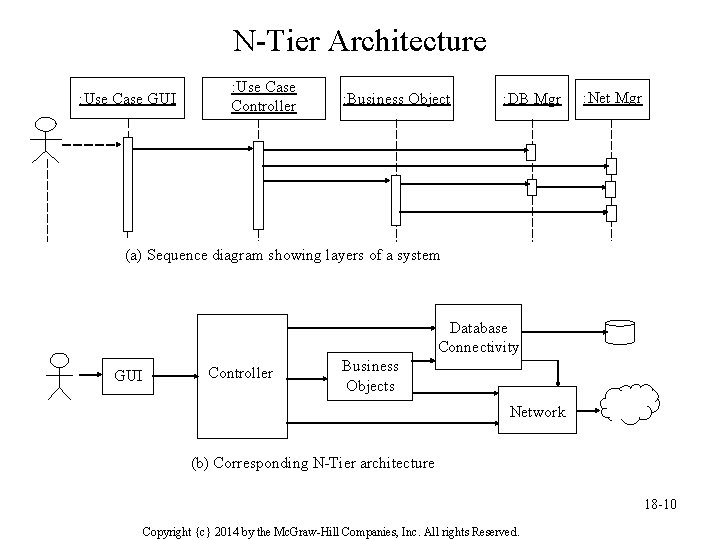
N-Tier Architecture : Use Case GUI : Use Case Controller : Business Object : DB Mgr : Net Mgr (a) Sequence diagram showing layers of a system Database Connectivity GUI Controller Business Objects Network (b) Corresponding N-Tier architecture 18 -10 Copyright {c} 2014 by the Mc. Graw-Hill Companies, Inc. All rights Reserved.
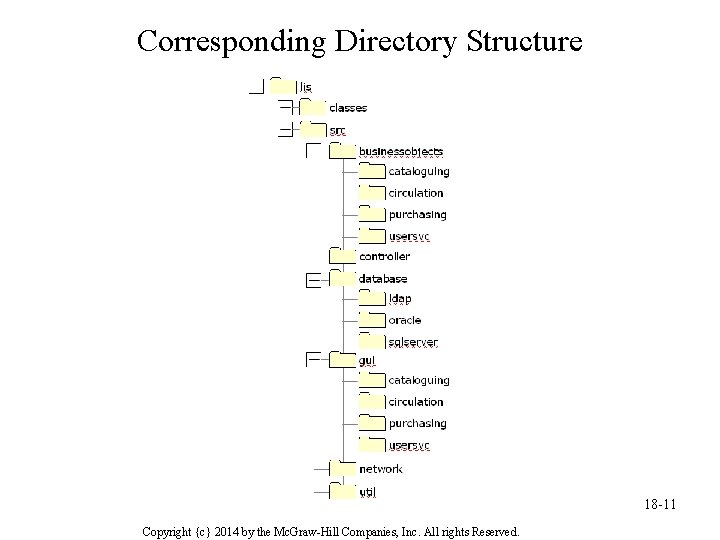
Corresponding Directory Structure 18 -11 Copyright {c} 2014 by the Mc. Graw-Hill Companies, Inc. All rights Reserved.
Implementation • Assign classes to team members according to – dependencies between classes, and – abilities of the team members – to reduce number of test stubs • Implement classes – test driven development – pair programming – deriving method skeleton from sequence diagrams • Implement association relationships 18 -12 Copyright {c} 2014 by the Mc. Graw-Hill Companies, Inc. All rights Reserved.
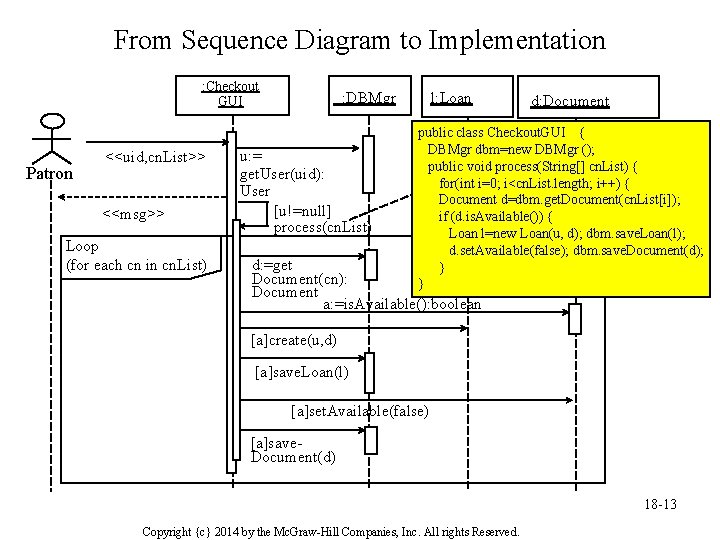
From Sequence Diagram to Implementation : Checkout GUI Patron <<uid, cn. List>> <<msg>> Loop (for each cn in cn. List) : DBMgr u: = get. User(uid): User [u!=null] process(cn. List) l: Loan d: Document public class Checkout. GUI { DBMgr dbm=new DBMgr (); public void process(String[] cn. List) { for(int i=0; i<cn. List. length; i++) { Document d=dbm. get. Document(cn. List[i]); if (d. is. Available()) { Loan l=new Loan(u, d); dbm. save. Loan(l); d. set. Available(false); dbm. save. Document(d); } } d: =get Document(cn): Document a: =is. Available(): boolean [a]create(u, d) [a]save. Loan(l) [a]set. Available(false) [a]save. Document(d) 18 -13 Copyright {c} 2014 by the Mc. Graw-Hill Companies, Inc. All rights Reserved.
Implementing Association Relationships • A one-to-one association between class A and class B is implemented by – A holding a reference to B if A calls a function of B, and/or – B holding a reference to A if B calls a function of A. • A one-to-many association between is implemented by – A holding a collection of references to B if A calls functions of B instances, or – B holding a reference to A if instances of B call a function of A. • A many-to-many association is implemented by a collection of references from A to B, and vice versa. 18 -14 Copyright {c} 2014 by the Mc. Graw-Hill Companies, Inc. All rights Reserved.
Pair Programming • Two developers program at one machine simultaneously. • They discuss how to implement the features. • The one with the keyboard and mouse implements the functionality, the other reviews the program as it is being typed. • The developers switch roles periodically, whenever they like, or between programming sessions. • Each session lasts one to three hours. • Pairs are not fixed, they switch around all the time. • All team members are required to work with others. If two people cannot work together, they don’t have to pair with each other. 18 -15 Copyright {c} 2014 by the Mc. Graw-Hill Companies, Inc. All rights Reserved.
Merits of Pair Programming • It reduces pressure and brings fun to programming because there is always someone with whom to share the stress and joy of success. • It enhances team communication because the partners exchange ideas during pair programming. • Pair-switching helps team members gain insight into the components of the system. This improves productivity and quality. • It enhances mutual understanding and collaboration because pair programming lets the team members understand each other and learn from each other in various ways and aspects. • It tends to produce simpler and more efficient solutions faster because discussions stimulate creative thinking and help in problem solving. 18 -16 Copyright {c} 2014 by the Mc. Graw-Hill Companies, Inc. All rights Reserved.
Pair Programming Limitations • It is not for everyone—there are programmers who prefer to work alone. • Discussions between the partners can take a lot of time. Therefore, it should focus on solving the problem and getting • the work done. • It could be slow to start due to the need to adapt to the differences of the partners. • Other limitations: – the partners have to be at the same location – it may be difficult for the partners to find a meeting time due to conflicting schedules, and – it might not be as effective as systematic review methods in detecting defects. 18 -17 Copyright {c} 2014 by the Mc. Graw-Hill Companies, Inc. All rights Reserved.
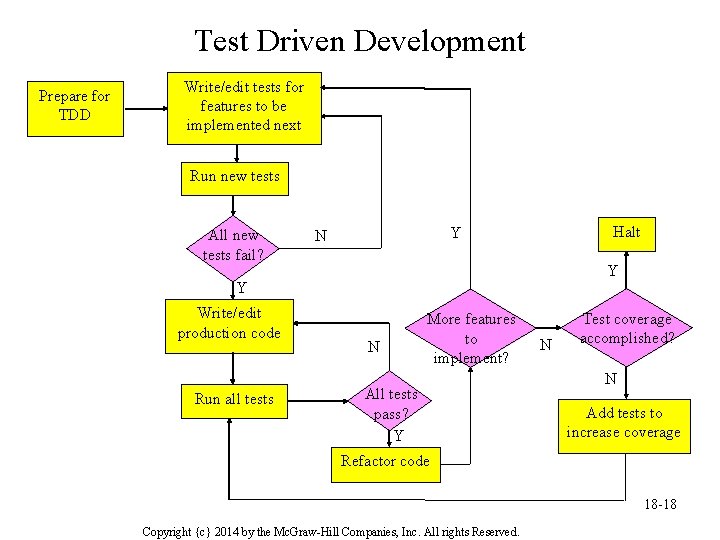
Test Driven Development Prepare for TDD Write/edit tests for features to be implemented next Run new tests All new tests fail? Halt Y N Y Y Write/edit production code Run all tests N More features to implement? All tests pass? Y N Test coverage accomplished? N Add tests to increase coverage Refactor code 18 -18 Copyright {c} 2014 by the Mc. Graw-Hill Companies, Inc. All rights Reserved.
Merits of Test Driven Development • TDD helps the team understand improve requirements. • TDD produces high-quality code. • TDD improves program structure and readability through refactoring. • TDD makes it easier to debug. 18 -19 Copyright {c} 2014 by the Mc. Graw-Hill Companies, Inc. All rights Reserved.
Applying Agile Principles • Develop small, incremental releases and iterate; focus on frequent delivery of software products. • Complete each feature before moving onto the next. • Test early and often. • Everybody owns the code—everybody is responsible for the quality of the code. 18 -20 Copyright {c} 2014 by the Mc. Graw-Hill Companies, Inc. All rights Reserved.
- Slides: 20