
ObjectOriented Software Design lecture 7 1 Objectoriented Concepts
Object-Oriented Software Design (lecture 7) 1
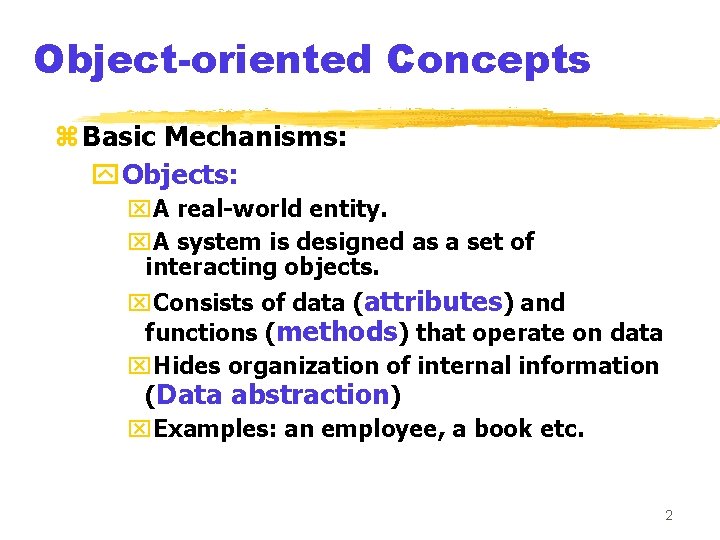
Object-oriented Concepts z Basic Mechanisms: y. Objects: x. A real-world entity. x. A system is designed as a set of interacting objects. x. Consists of data (attributes) and functions (methods) that operate on data x. Hides organization of internal information (Data abstraction) x. Examples: an employee, a book etc. 2
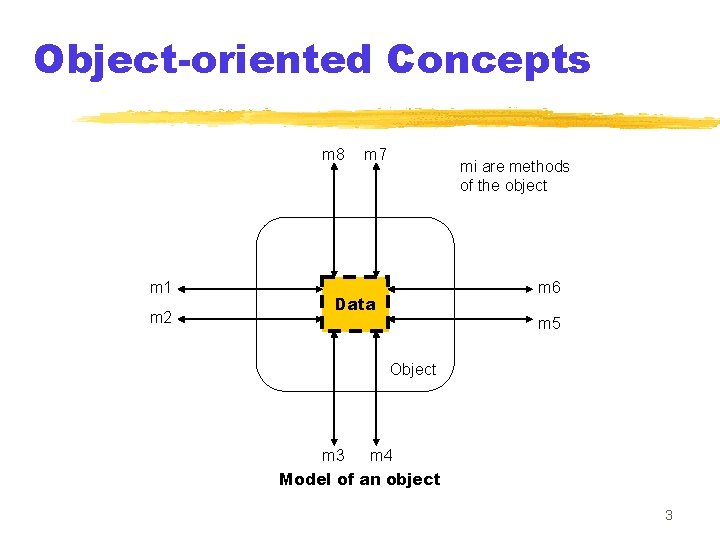
Object-oriented Concepts m 8 m 1 m 2 m 7 mi are methods of the object m 6 Data m 5 Object m 3 m 4 Model of an object 3
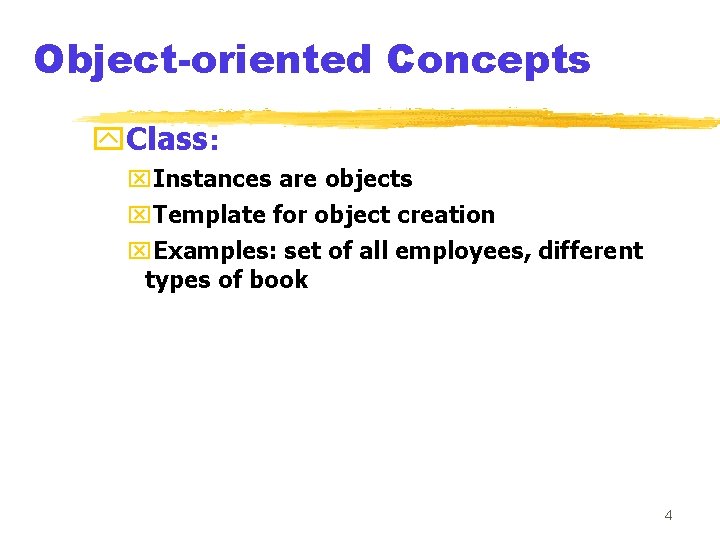
Object-oriented Concepts y. Class: x. Instances are objects x. Template for object creation x. Examples: set of all employees, different types of book 4
Object-oriented Concepts y. Methods and message: x. Operations supported by an object x. Means for manipulating the data of other objects x. Invoked by sending message x. Examples: calculate_salary, issuebook, member_details, etc. 5
Object-oriented Concepts y. Inheritance: x. Allows to define a new class (derived class) by extending or modifying existing class (base class) x. Represents Generalizationspecialization relationship x. Allows redefinition of the existing methods (method overriding) 6
Object-oriented Concepts y. Multiple Inheritance: x. Subclass can inherit attributes and methods from more than one base class x. Multiple inheritance is represented by arrows drawn from the subclass to each of the base classes 7
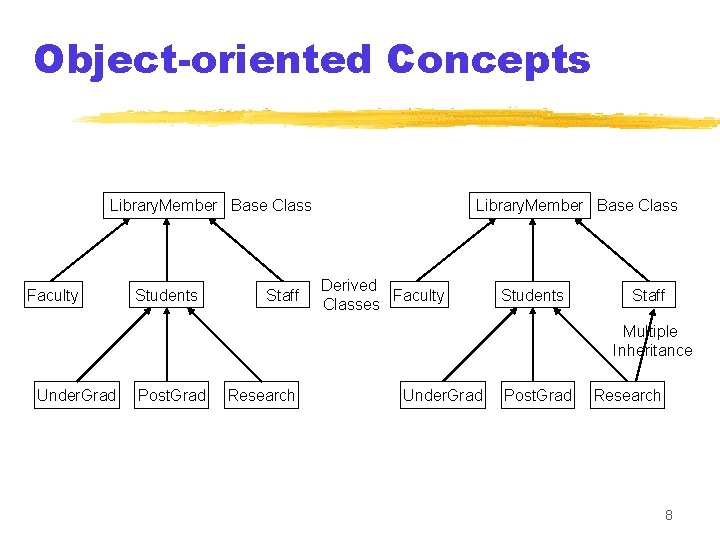
Object-oriented Concepts Library. Member Base Class Faculty Students Staff Library. Member Base Class Derived Faculty Classes Students Staff Multiple Inheritance Under. Grad Post. Grad Research 8
Object-oriented Concepts z Key Concepts: y. Abstraction: x. Consider aspects relevant for certain purpose x. Suppress non-relevant aspects x. Supported at two levels i. e. class level where base class is an abstraction & object level where object is a data abstraction entity 9
Object-oriented Concepts y. Advantages of abstraction: x. Reduces complexity of software x. Increases software productivity y It is shown that software productivity is inversely proportional to software complexity 10
Object-oriented Concepts y. Encapsulation: x. Objects communicate outside world through messages x. Objects data encapsulated within its methods 11
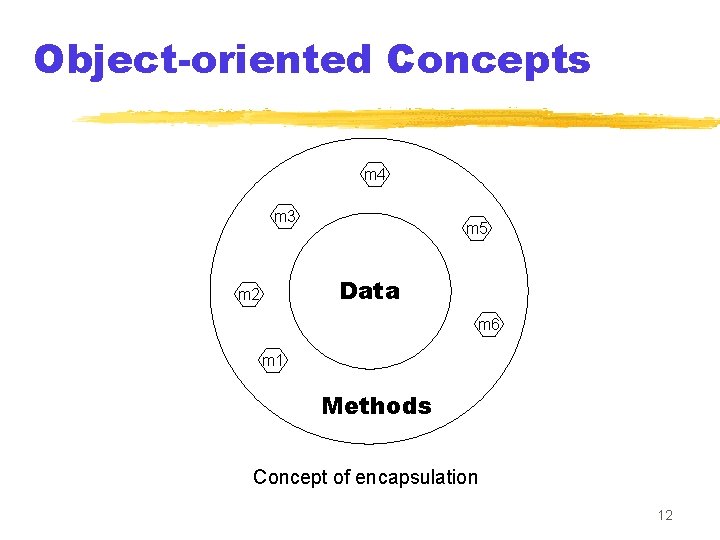
Object-oriented Concepts m 4 m 3 m 5 Data m 2 m 6 m 1 Methods Concept of encapsulation 12
Object-oriented Concepts y. Polymorphism: x. Denotes to poly (many) morphism (forms) x. Same message result in different actions by different objects (static binding) 13
Object-oriented Concepts y. Dynamic binding: x. In inheritance hierarchy, an object can be assigned to another object of its ancestor class x. A method call to an ancestor object would result in the invocation of appropriate method of object of the derived class 14
Object-oriented Concepts y. Dynamic binding: x. Exact method cannot be known at compile time x. Dynamically decided at runtime 15
Object-oriented Concepts y. Composite objects: x. Object containing other objects 16
Advantages of Object-oriented design y. Code and design reuse y. Increased productivity y. Ease of testing & maintenance y. Better understandability y. Its agreed that increased productivity is chief advantage 17
Advantages of Object-oriented design y. Initially incur higher costs, but after completion of some projects reduction in cost become possible y. Well-established OO methodology and environment can be managed with 20 -50% of traditional cost of development 18
Object modelling using UML y. UML is a modelling language y. Not a system design or development methodology y. Used to document objectoriented analysis and design y. Independent of any specific design methodology 19
![UML y. Based Principally on x. OMT [Rumbaugh 1991] x. Booch’s methodology[Booch 1991] x.](http://slidetodoc.com/presentation_image_h2/5e3f3e1738d9c0b2c9855ce9175797e9/image-20.jpg "UML y. Based Principally on x. OMT [Rumbaugh 1991] x. Booch’s methodology[Booch 1991] x.")
UML y. Based Principally on x. OMT [Rumbaugh 1991] x. Booch’s methodology[Booch 1991] x. OOSE [Jacobson 1992] x. Odell’s methodology[Odell 1992] x. Shlaer and Mellor [Shlaer 1992] 20
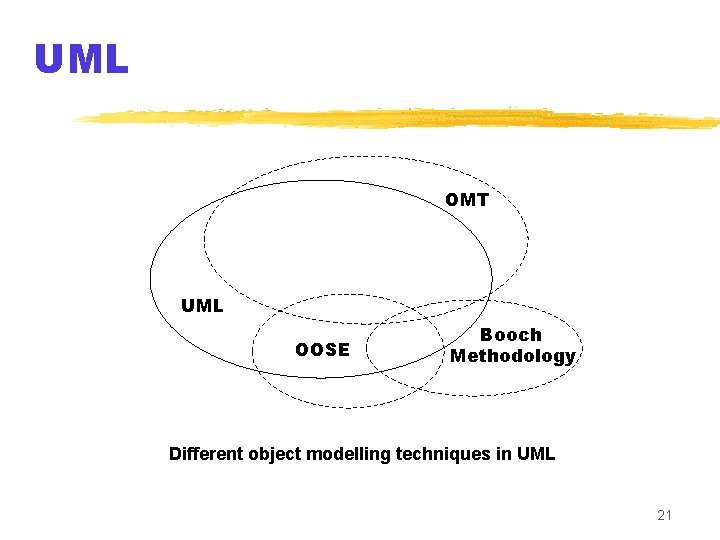
UML OMT UML OOSE Booch Methodology Different object modelling techniques in UML 21
Why UML is required? y. Model is required to capture only important aspects y. UML a graphical modelling tool, easy to understand construct y. Helps in managing complexity 22
UML diagrams y. Nine diagrams to capture different views of a system y. Provide different perspectives of the software system y. Diagrams can be refined to get the actual implementation of the system 23
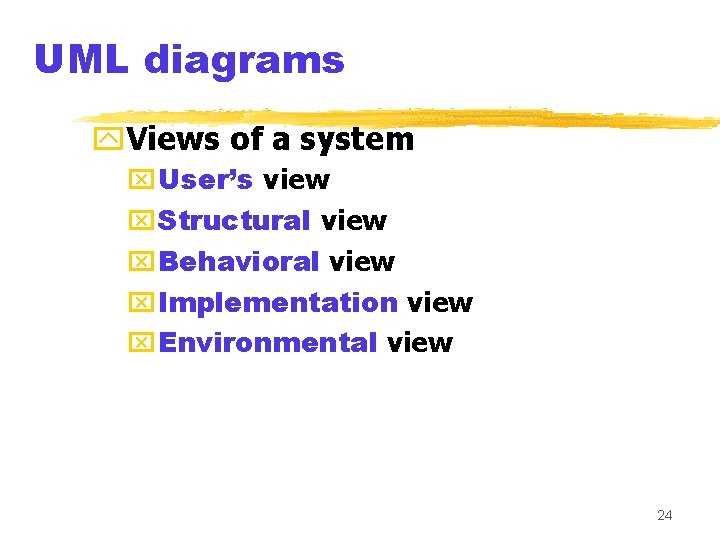
UML diagrams y. Views of a system x. User’s view x. Structural view x. Behavioral view x. Implementation view x. Environmental view 24
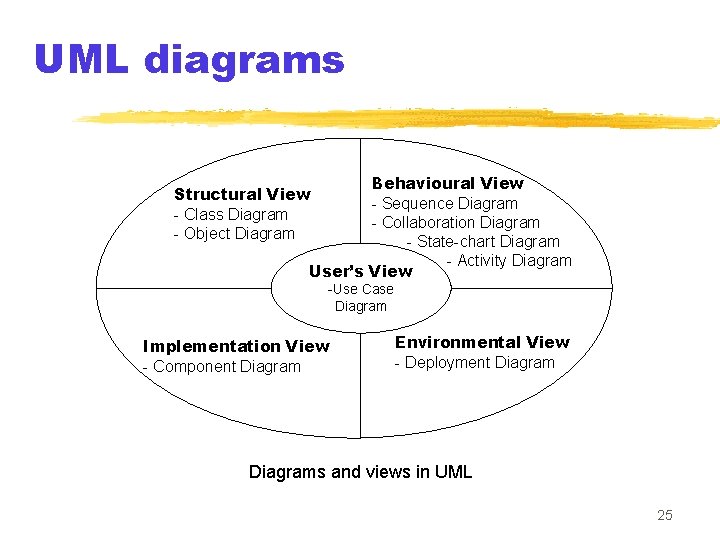
UML diagrams Behavioural View - Sequence Diagram - Collaboration Diagram - State-chart Diagram - Activity Diagram User’s View Structural View - Class Diagram - Object Diagram -Use Case Diagram Implementation View - Component Diagram Environmental View - Deployment Diagrams and views in UML 25
Are all views required? y. NO y. Use case model, class diagram and one of the interaction diagram for a simple system y. State chart diagram in case of many state changes y. Deployment diagram in case of large number of hardware components 26

27
Use Case model y. Consists of set of “use cases” y. An important analysis and design artifact y. Other models must confirm to this model y. Not really an object-oriented model y. Represents a functional or process model 28
Use Cases y. Different ways in which system can be used by the users y. Corresponds to the high-level requirements y. Represents transaction between the user and the system y. Define behavior without revealing internal structure of system y. Set of related scenarios tied together by a common goal 29
Use Cases y. Normally, use cases are independent of each other y. Implicit dependencies may exist y. Example: In Library Automation System, renew-book & reserve-book are independent use cases. But in actual implementation of renew-book, a check is made to see if any book has been reserved using reserve-book 30
Example of Use Cases y. For library information system xissue-book x. Query-book x. Return-book x. Create-member x. Add-book, etc. 31
Representation of Use Cases y. Represented by use case diagram y. Use case is represented by ellipse y. System boundary is represented by rectangle y. Users are represented by stick person icon (actor) y. Communication relationship between actor and use case by line y. External system by stereotype 32
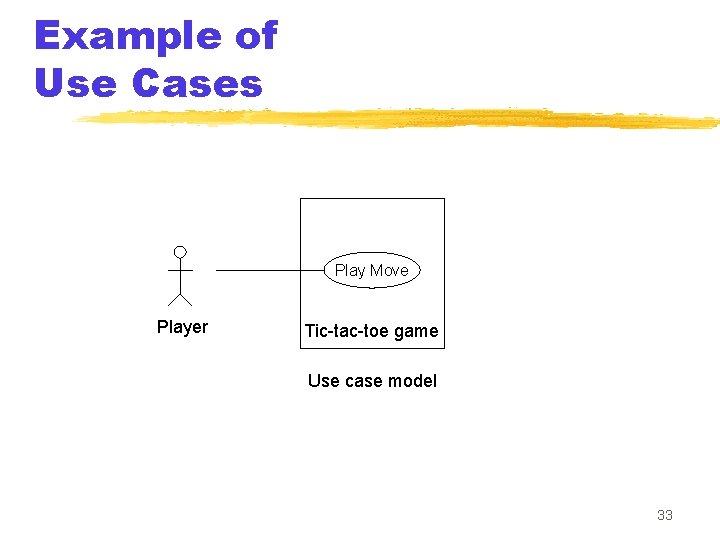
Example of Use Cases Play Move Player Tic-tac-toe game Use case model 33
Why develop Use Case diagram? y. Serves as requirements specification y. Users identification helps in implementing security mechanism through login system y. Another use in preparing the documents (e. g. user’s manual) 34
Factoring Use Cases y. Complex use cases need to be factored into simpler use cases y. Represent common behavior across different use cases y. Three ways of factoring x. Generalization x. Includes x. Extends 35
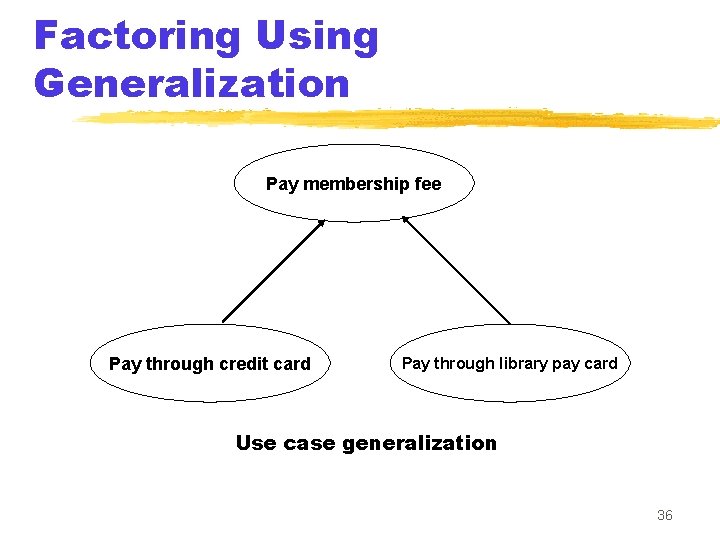
Factoring Using Generalization Pay membership fee Pay through credit card Pay through library pay card Use case generalization 36
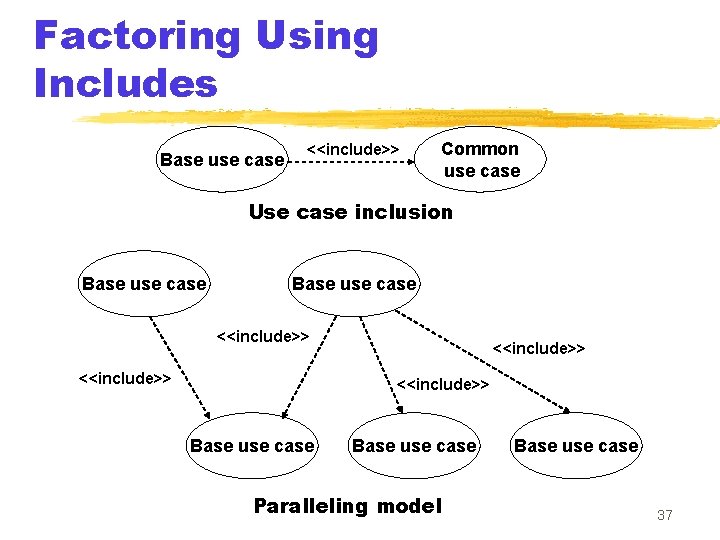
Factoring Using Includes Base use case <<include>> Common use case Use case inclusion Base use case <<include>> Base use case Paralleling model Base use case 37
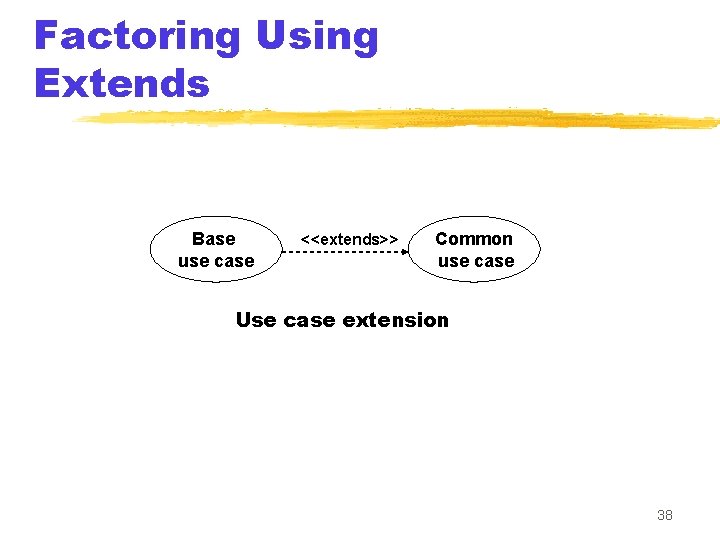
Factoring Using Extends Base use case <<extends>> Common use case Use case extension 38
Class diagram y. Describes static structure of a system y. Main constituents are classes and their relationships: x. Generalization x. Aggregation x. Association x. Various kinds of dependencies 39
Class diagram y. Entities with common features, i. e. attributes and operations y. Classes are represented as solid outline rectangle with compartments y. Compartments for name, attributes & operations y. Attribute and operation compartment are optional for reuse purpose 40
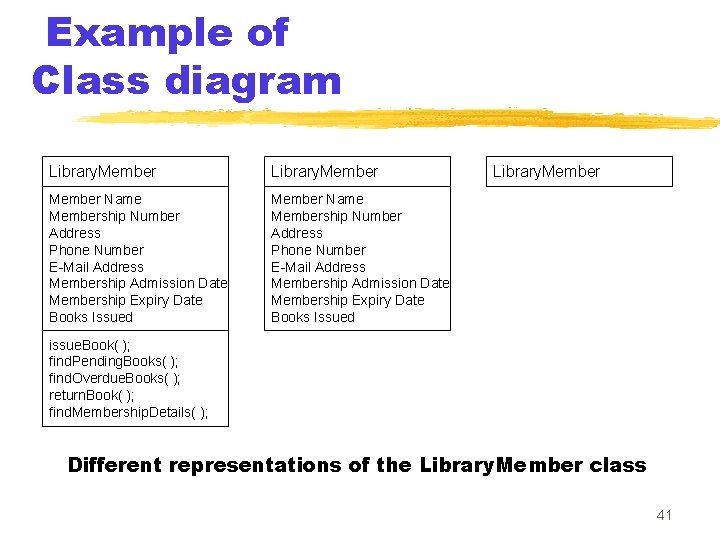
Example of Class diagram Library. Member Name Membership Number Address Phone Number E-Mail Address Membership Admission Date Membership Expiry Date Books Issued Library. Member issue. Book( ); find. Pending. Books( ); find. Overdue. Books( ); return. Book( ); find. Membership. Details( ); Different representations of the Library. Member class 41
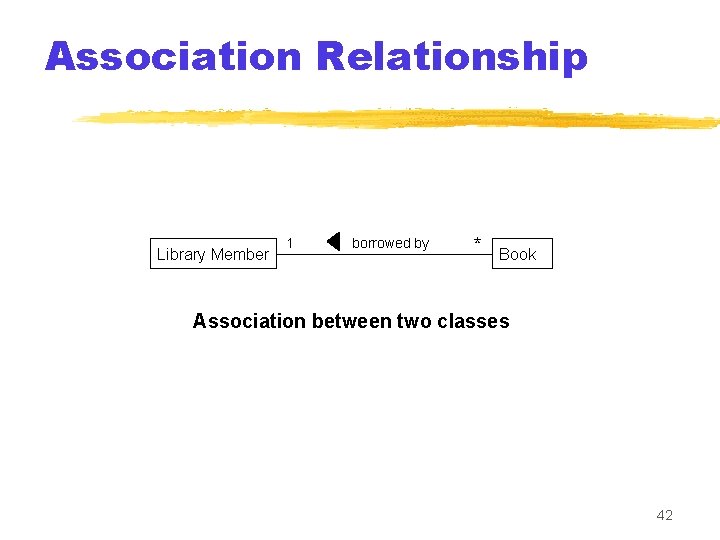
Association Relationship Library Member 1 borrowed by * Book Association between two classes 42
Aggregation Relationship y. Represent a whole-part relationship y. Represented by diamond symbol at the composite end y. Cannot be reflexive(i. e. recursive) y. Not symmetric y. It can be transitive 43
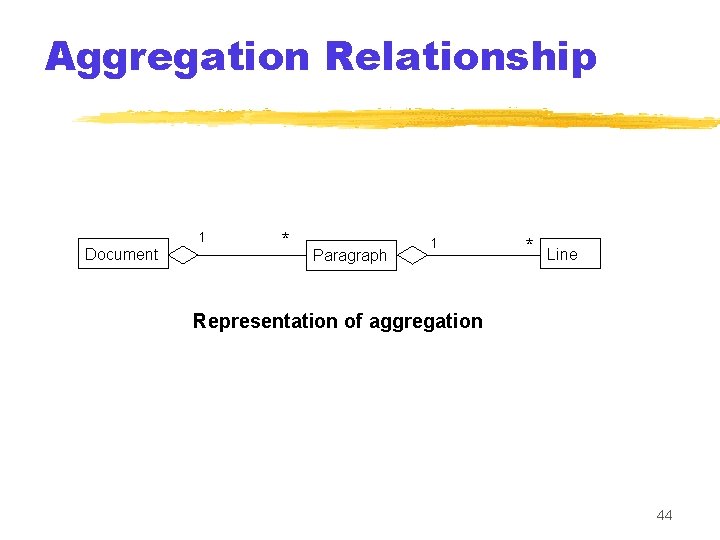
Aggregation Relationship 1 Document * Paragraph 1 * Line Representation of aggregation 44
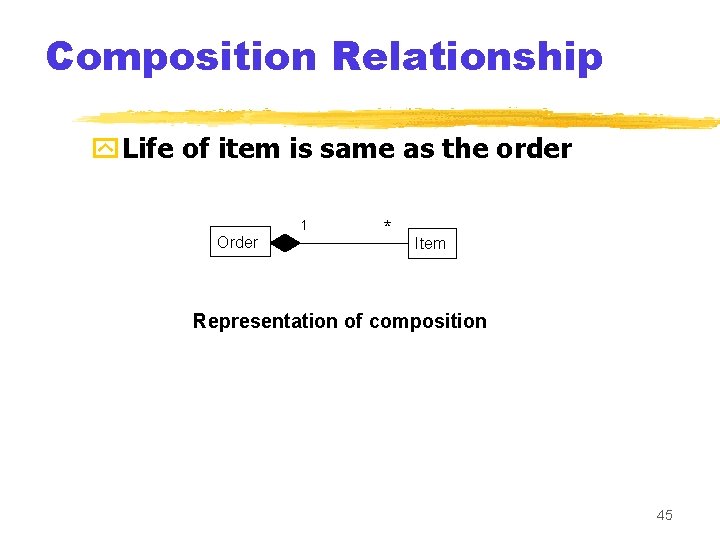
Composition Relationship y. Life of item is same as the order 1 Order * Item Representation of composition 45
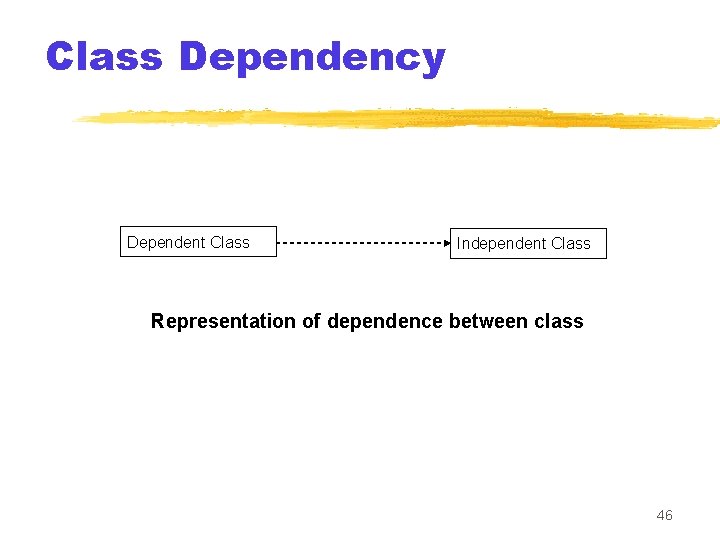
Class Dependency Dependent Class Independent Class Representation of dependence between class 46
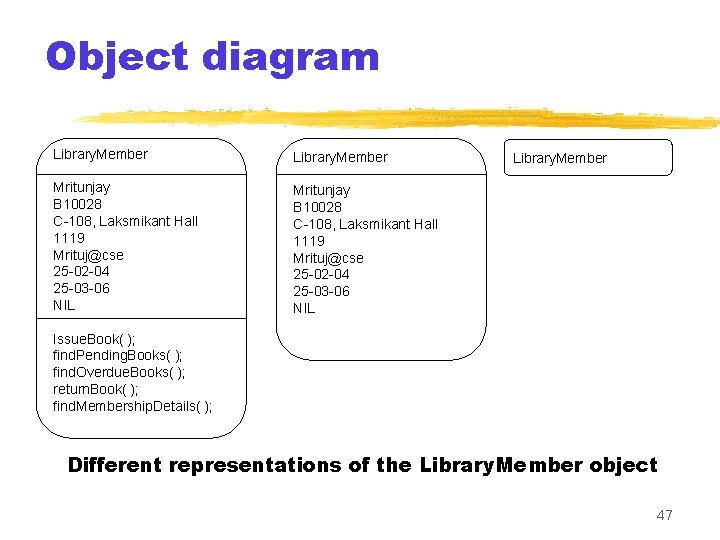
Object diagram Library. Member Mritunjay B 10028 C-108, Laksmikant Hall 1119 Mrituj@cse 25 -02 -04 25 -03 -06 NIL Library. Member Issue. Book( ); find. Pending. Books( ); find. Overdue. Books( ); return. Book( ); find. Membership. Details( ); Different representations of the Library. Member object 47
Interaction diagram y. Models how groups of objects collaborate to realize some behaviour y. Typically each interaction diagram realizes behaviour of a single use case 48
Interaction diagram y. Two kinds: Sequence & Collaboration y. Two diagrams are equivalent but portrays different perspective y. These diagram play a very important role in the design process 49
Sequence diagram y. Shows interaction among objects as twodimensional chart y. Objects are shown as boxes at top y. If object created during execution then shown at appropriate place y. Objects existence are shown as dashed lines (lifeline) y. Objects activeness, shown as rectangle on lifeline 50
Sequence diagram y. Messages are shown as arrows y. Message labelled with message name y. Message can be labelled with control information y. Two types of control information: condition ([]) & an iteration (*) 51
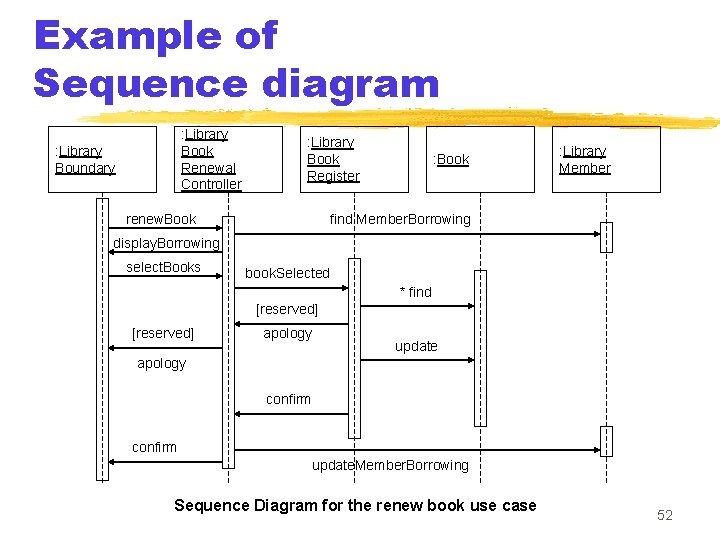
Example of Sequence diagram : Library Book Renewal Controller : Library Boundary : Library Book Register renew. Book : Library Member find Member. Borrowing display. Borrowing select. Books book. Selected * find [reserved] apology update apology confirm update. Member. Borrowing Sequence Diagram for the renew book use case 52
Collaboration diagram y. Shows both structural and behavioural aspects y. Objects are collaborator, shown as boxes y. Messages between objects shown as a solid line y. Message is shown as a labelled arrow placed near the link y. Messages are prefixed with sequence numbers to show relative sequencing 53
![Example of Collaboration diagram [reserved] 8: apology 1: renew. Book : Library Boundary 3:](http://slidetodoc.com/presentation_image_h2/5e3f3e1738d9c0b2c9855ce9175797e9/image-54.jpg "Example of Collaboration diagram [reserved] 8: apology 1: renew. Book : Library Boundary 3:")
Example of Collaboration diagram [reserved] 8: apology 1: renew. Book : Library Boundary 3: display Borrowing 4: select. Books 12: confirm 6: * find : Library Book Register 5: book Selected : Library Book Renewal Controller : Book 9: update 10: confirm [reserved] 7: apology 2: find. Member. Borrowing : Library Member update. Member. Borrowing Collaboration Diagram for the renew book use case 54
![Activity diagram y. New concept, possibly based on event diagram of Odell [1992] y.](http://slidetodoc.com/presentation_image_h2/5e3f3e1738d9c0b2c9855ce9175797e9/image-55.jpg "Activity diagram y. New concept, possibly based on event diagram of Odell [1992] y.")
Activity diagram y. New concept, possibly based on event diagram of Odell [1992] y. Represent processing activity, may not correspond to methods y. Activity is a state with an internal action and one/many outgoing transition 55
Activity diagram y. Can represent parallel activity and synchronization aspects y. Swim lanes enable to group activities based on who is performing them y. Example: academic department vs. hostel 56
Activity diagram y. Normally employed in business process modelling y. Carried out during requirement analysis and specification y. Can be used to develop interaction diagrams 57
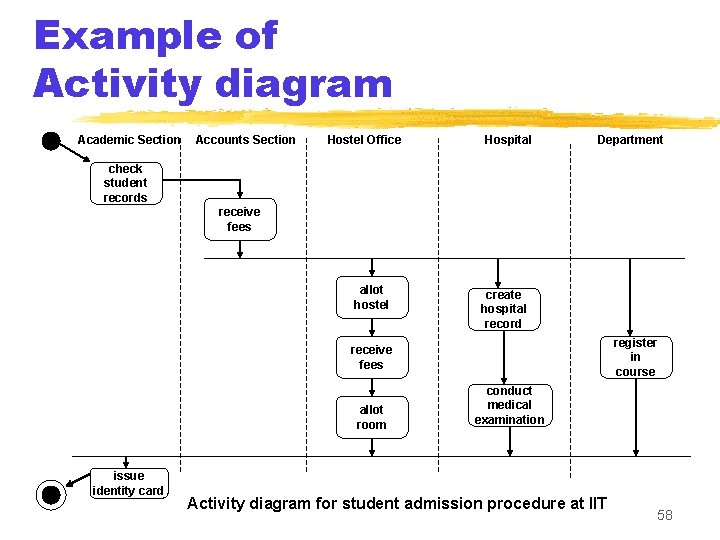
Example of Activity diagram Academic Section Accounts Section Hostel Office Hospital Department check student records receive fees allot hostel create hospital record register in course receive fees allot room issue identity card conduct medical examination Activity diagram for student admission procedure at IIT 58
![State Chart diagram y. Based on the work of David Harel [1990] y. Model](http://slidetodoc.com/presentation_image_h2/5e3f3e1738d9c0b2c9855ce9175797e9/image-59.jpg "State Chart diagram y. Based on the work of David Harel [1990] y. Model")
State Chart diagram y. Based on the work of David Harel [1990] y. Model how the state of an object changes in its lifetime y. Based on finite state machine (FSM) formalism 59
State Chart diagram y. Elements of state chart diagram y. Initial State: Filled circle y. Final State: Filled circle inside larger circle y. State: Rectangle with rounded corners y. Transitions: Arrow between states, also boolean logic condition (guard) 60
![Example of State Chart diagram order received [reject] checked Unprocessed Order [accept] checked Rejected](http://slidetodoc.com/presentation_image_h2/5e3f3e1738d9c0b2c9855ce9175797e9/image-61.jpg "Example of State Chart diagram order received [reject] checked Unprocessed Order [accept] checked Rejected")
Example of State Chart diagram order received [reject] checked Unprocessed Order [accept] checked Rejected Order Accepted Order [some items available] processed / deliver [some items not available] processed Pending Order [all items available] newsupply Example: State chart diagram for an order object Fulfilled Order 61
Design Patterns y. Standard solutions to commonly recurring problems y. Provides a good solution to model y. Pattern has four important parts x. The problem x. The context (problem) x. The solution x. The context (solution) 62
Example Pattern z. Expert y. Problem: Which class should be responsible for doing certain things y. Solution: Assign responsibility to the class that has the information necessary to fulfil the required responsibility 63
Example Pattern z. Creator y. Problem: Which class should be responsible for creating a new instance of some class? y. Solution: Assign a class C 1 the responsibility to create class C 2 if x. C 1 is an aggregation of objects of type C 2 x. C 1 contains object of type C 2 64
Example Pattern z. Controller y. Problem: Who should be responsible for handling the actor requests? y. Solution: Separate controller object for each use case. 65
Example Pattern z. Facade y. Problem: How should the services be requested from a service package? y. Context (problem): A package (cohesive set of classes), example: RDBMS interface package y. Solution: A class (DBfacade) can be created which provides a common interface to the services of the package 66
Example 1: Tic-Tac-Toe Computer Game z A human player and the computer make alternate moves on a 3 3 square. z A move consists of marking a previously unmarked square. z The user inputs a number between 1 and 9 to mark a square z Whoever is first to place three consecutive marks along a straight line (i. e. , along a row, column, or diagonal) on the square wins. 67
Example 1: Tic-Tac-Toe Computer Game z As soon as either of the human player or the computer wins, ya message announcing the winner should be displayed. z If neither player manages to get three consecutive marks along a straight line, yand all the squares on the board are filled up, ythen the game is drawn. z The computer always tries to win a game. 68
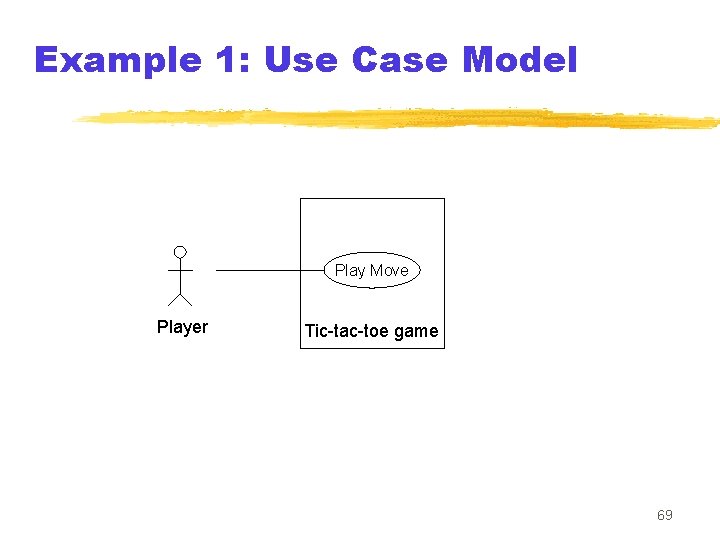
Example 1: Use Case Model Play Move Player Tic-tac-toe game 69
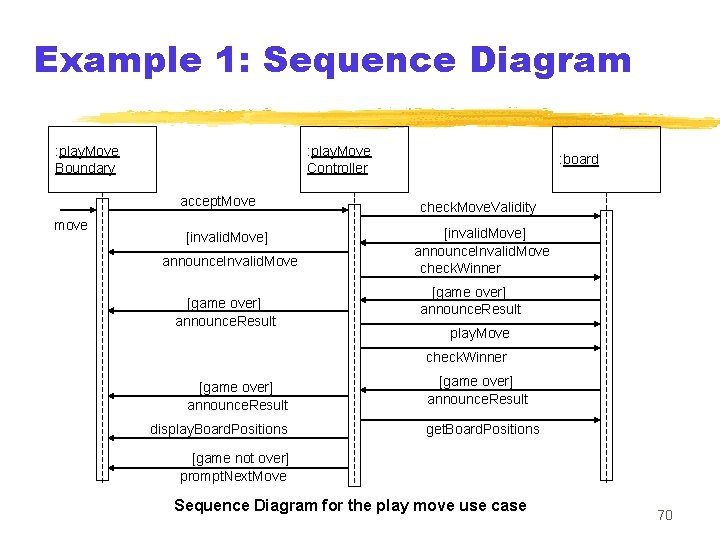
Example 1: Sequence Diagram : play. Move Boundary : play. Move Controller accept. Move move [invalid. Move] announce. Invalid. Move [game over] announce. Result : board check. Move. Validity [invalid. Move] announce. Invalid. Move check. Winner [game over] announce. Result play. Move check. Winner [game over] announce. Result display. Board. Positions [game over] announce. Result get. Board. Positions [game not over] prompt. Next. Move Sequence Diagram for the play move use case 70
![Example 1: Class Diagram Board Play. Move. Boundary int position[9] check. Move Validity check.](http://slidetodoc.com/presentation_image_h2/5e3f3e1738d9c0b2c9855ce9175797e9/image-71.jpg "Example 1: Class Diagram Board Play. Move. Boundary int position[9] check. Move Validity check.")
Example 1: Class Diagram Board Play. Move. Boundary int position[9] check. Move Validity check. Result play. Move announce. Invalid. Move announce. Result display. Board Controller announce. Invalid. Move announce. Result 71
Example 2: Supermarket Prize Scheme z. Supermarket needs to develop software to encourage regular customers. z. Customer needs to supply his residence address, telephone number, and the driving licence number. z. Each customer who registers is assigned a unique customer number (CN) by the computer. 72
Example 2: Supermarket Prize Scheme z. A customer can present his CN to the staff when he makes any purchase. z. The value of his purchase is credited against his CN. z. At the end of each year, the supermarket awards surprise gifts to ten customers who make highest purchase. 73
Example 2: Supermarket Prize Scheme z. Also, it awards a 22 carat gold coin to every customer whose purchases exceed Rs. 10, 000. z. The entries against the CN are reset on the last day of every year after the prize winner’s lists are generated. 74
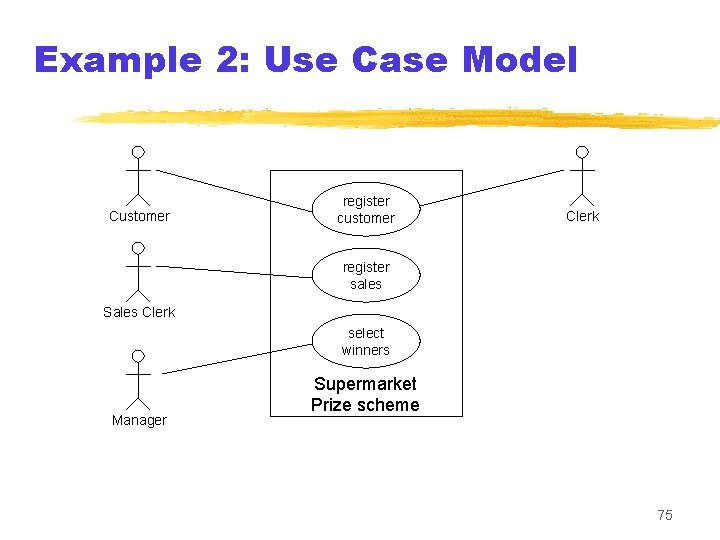
Example 2: Use Case Model Customer register customer Clerk register sales Sales Clerk select winners Manager Supermarket Prize scheme 75
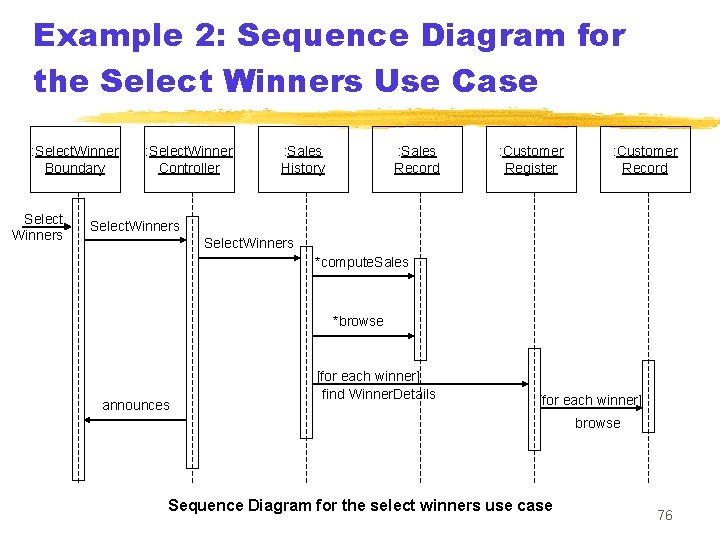
Example 2: Sequence Diagram for the Select Winners Use Case : Select. Winner Boundary Select Winners : Select. Winner Controller : Sales History : Sales Record : Customer Register : Customer Record Select. Winners *compute. Sales *browse announces [for each winner] find Winner. Details [for each winner] browse Sequence Diagram for the select winners use case 76
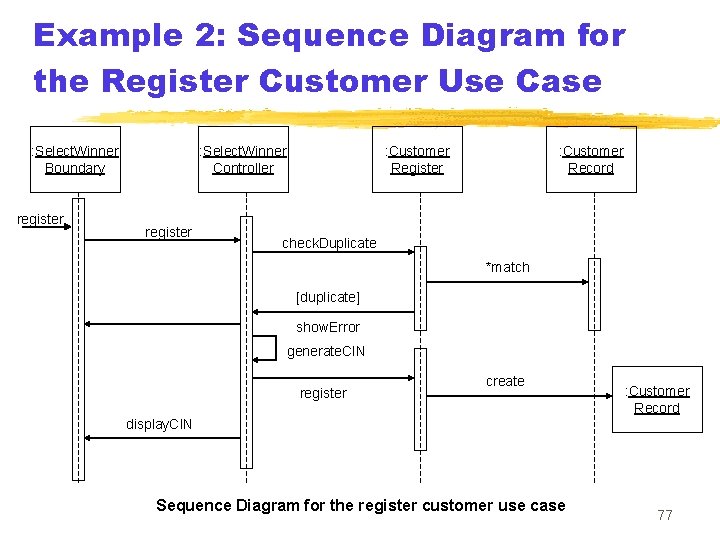
Example 2: Sequence Diagram for the Register Customer Use Case : Select. Winner Boundary register : Select. Winner Controller register : Customer Record check. Duplicate *match [duplicate] show. Error generate. CIN register create : Customer Record display. CIN Sequence Diagram for the register customer use case 77
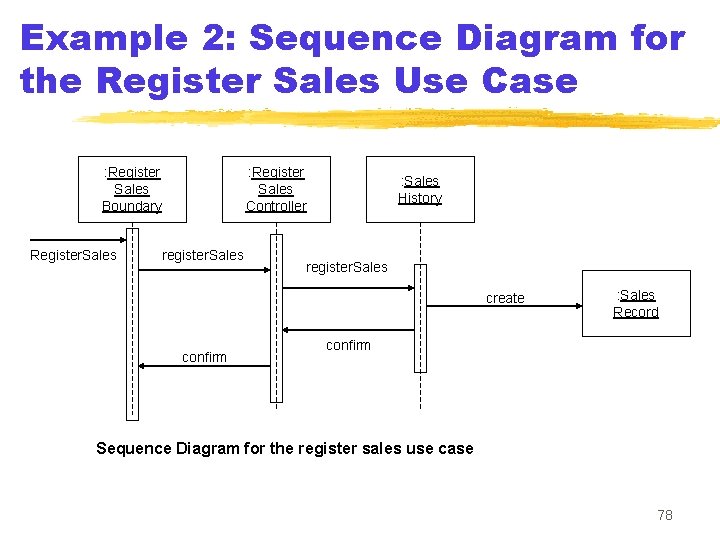
Example 2: Sequence Diagram for the Register Sales Use Case : Register Sales Boundary Register. Sales : Register Sales Controller register. Sales : Sales History register. Sales create confirm : Sales Record confirm Sequence Diagram for the register sales use case 78
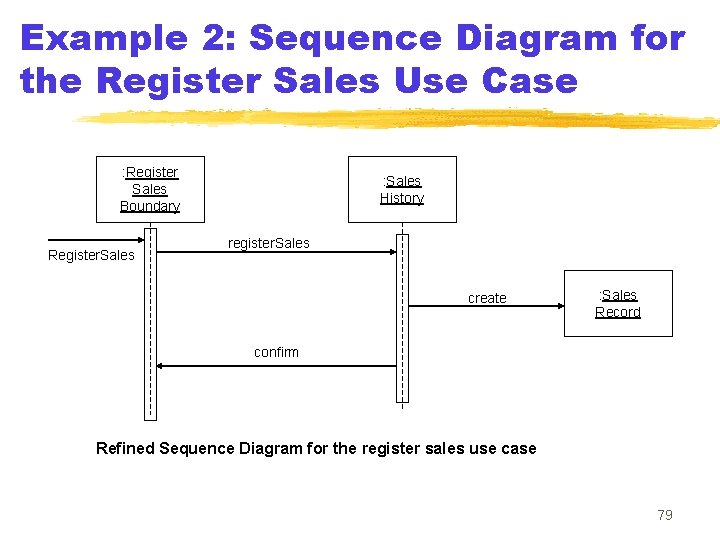
Example 2: Sequence Diagram for the Register Sales Use Case : Register Sales Boundary Register. Sales : Sales History register. Sales create : Sales Record confirm Refined Sequence Diagram for the register sales use case 79
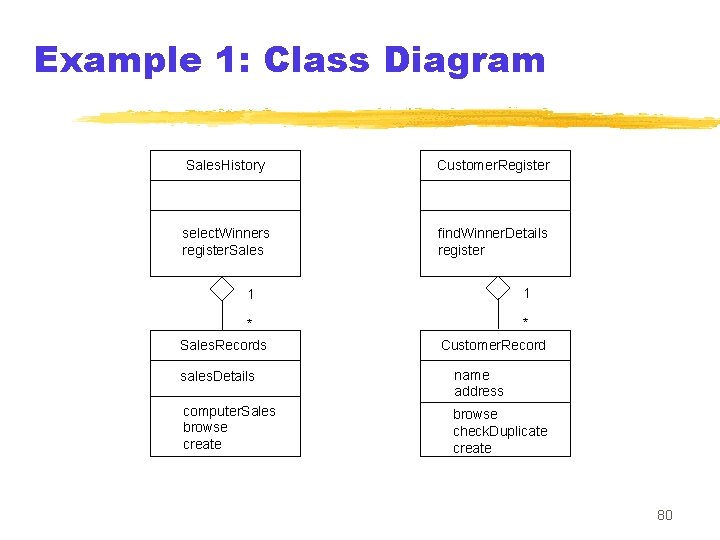
Example 1: Class Diagram Sales. History Customer. Register select. Winners register. Sales find. Winner. Details register 1 1 * Sales. Records * Customer. Record sales. Details name address computer. Sales browse create browse check. Duplicate create 80
Summary z. We discussed object-oriented concepts y. Basic mechanisms: Such as objects, class, methods, inheritance etc. y. Key concepts: Such as abstraction, encapsulation, polymorphism, composite objects etc. 81
Summary z We discussed an important OO language UML y. Its origin, as a standard, as a model y. Use case representation, its factorisation such as generalization, includes and extends y. Different diagrams for UML representation y. In class diagram we discussed some relationships association, aggregation, composition and inheritance 82
Summary y. Some more diagrams such as interaction diagrams (sequence and collaboration), activity diagrams, state chart diagram z. We discussed OO software development process and patterns y. In this we discussed some patterns example and domain modelling 83
- Slides: 83