
ObjectBased Audio A Signal Processing Overview Sachin Ghanekar
Object-Based Audio: A Signal Processing Overview Sachin Ghanekar
Agenda • A brief Overview & History of Digital Audio • Basic Concepts of Object Audio & How it works • Signal Processing in Object Based Audio on Headphones. • Signal Processing in Object Based Audio on Immersive Speaker Layouts • Trends and Summary
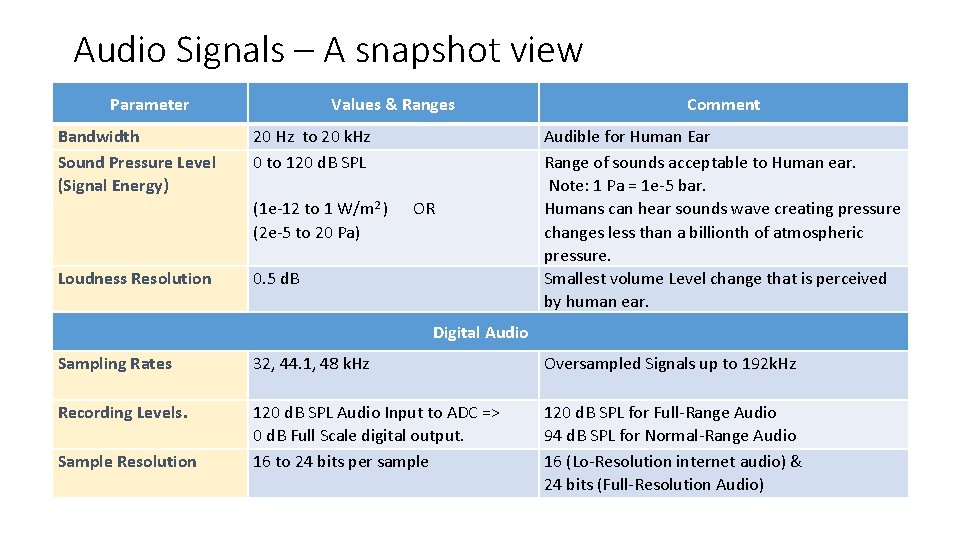
Audio Signals – A snapshot view Parameter Bandwidth Sound Pressure Level (Signal Energy) Loudness Resolution Values & Ranges 20 Hz to 20 k. Hz 0 to 120 d. B SPL (1 e-12 to 1 W/m 2 ) OR (2 e-5 to 20 Pa) 0. 5 d. B Comment Audible for Human Ear Range of sounds acceptable to Human ear. Note: 1 Pa = 1 e-5 bar. Humans can hear sounds wave creating pressure changes less than a billionth of atmospheric pressure. Smallest volume Level change that is perceived by human ear. Digital Audio Sampling Rates 32, 44. 1, 48 k. Hz Oversampled Signals up to 192 k. Hz Recording Levels. 120 d. B SPL Audio Input to ADC => 0 d. B Full Scale digital output. 16 to 24 bits per sample 120 d. B SPL for Full-Range Audio 94 d. B SPL for Normal-Range Audio 16 (Lo-Resolution internet audio) & 24 bits (Full-Resolution Audio) Sample Resolution
![A Brief History of Audio • [1979 – 1993] : Digital PCM Audio •](http://slidetodoc.com/presentation_image/2f6502fac67fa82f20ccae9c6d5148aa/image-4.jpg "A Brief History of Audio • [1979 – 1993] : Digital PCM Audio •")
A Brief History of Audio • [1979 – 1993] : Digital PCM Audio • Sampled PCM audio signals – LD (1979), CD (1982) , DAT (1987), Sony-MD (1992) • MIDI Audio (1983) • [1991 – 2003] : MPEG Stereo Audio • Digital Stereo Audio Compression Standards • ISO mpeg 1, 2 and mp 3, (1991 to 1998). • mp 4 -aac (2003) • [1996 – 2007] : Digital Radio/TV Broad-Cast Audio • Digital Video & Stereo Audio Compression Standards • DTV/ATSC standards for TV broadcast • Video: 1998 (mp 1), 2009 (H 264/AVC) • Audio: mp 2 and Dolby-AC 3 -multi channel • Digital Radio Broadcast DAB stereo (1995 (mp 2), 2006 (aac) – till now) • [1997 – onwards] : Immersive Multi-Channel Audio (Cinema/Home) Dolby/DTS • Multi-Channel Immersive Audio for Home, Theater • VCD (1994 – mp 2 audio), DVD (1997 – ac 3/dts 5. 1 audio), Blue. Ray (2006 – dd+/dts-hd audio) • Dolby/DTS encoded sound tracks for Movies, Songs & Concerts.
![A Brief History of Audio • [1987 – onwards] : Audio for Gaming Devices](http://slidetodoc.com/presentation_image/2f6502fac67fa82f20ccae9c6d5148aa/image-5.jpg "A Brief History of Audio • [1987 – onwards] : Audio for Gaming Devices")
A Brief History of Audio • [1987 – onwards] : Audio for Gaming Devices • MIDI and FM synthesis. (Synthetic Audio Sounds) • ATARI Gaming Consoles 1987+, • Game Boy, Nintendo Gaming Gadgets 1989 -1996 • CD-Audio Tracks (Natural + Synthetic Audio) [1994 – onwards] • SEGA Saturn, Sony PS 1994 onwards – PCM stereo Audio • Microsoft XBOX, Sony PS 2 – Immersive Audio – Dolby/DTS 8 channels compressed audio. • Next: XBOX, PS 2+ - 3 D Audio experience. • Immersive, 3 D-Audio Tracks (Immersive Audio & Sounds) [2014 – onwards] • XBOX One • Sony PS 3 / • [2005 – onwards] : Audio for Internet Streaming & Mobile Devices • Most popular stereo standards (mp 3, aac, wma, real) • Low Power DSPs, Low bit-rate stereo audio standards • Bitrates requirements are 40 to 256 kbps – high-resolution upto 640 kbps.
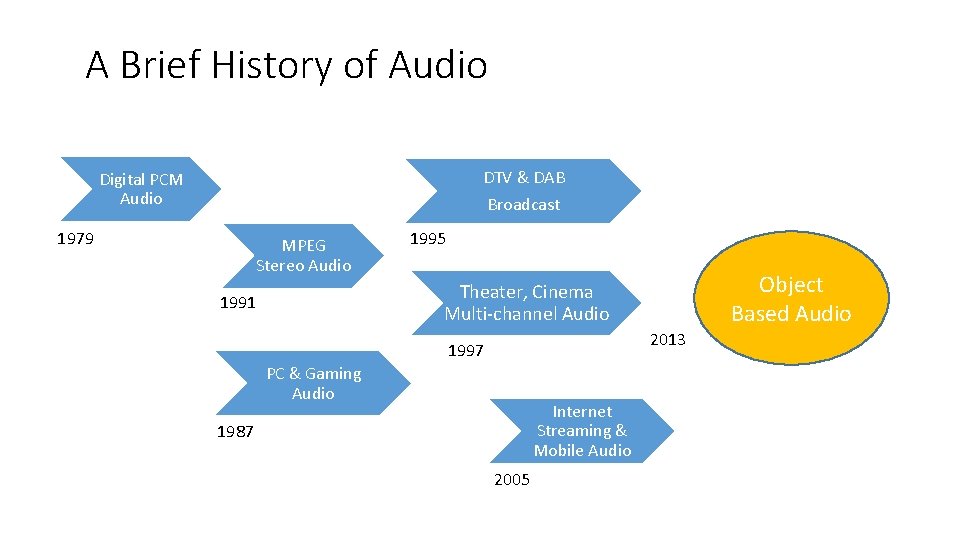
A Brief History of Audio DTV & DAB Digital PCM Audio Broadcast 1979 MPEG Stereo Audio 1995 Object Based Audio Theater, Cinema Multi-channel Audio 1991 2013 1997 PC & Gaming Audio Internet Streaming & Mobile Audio 1987 2005
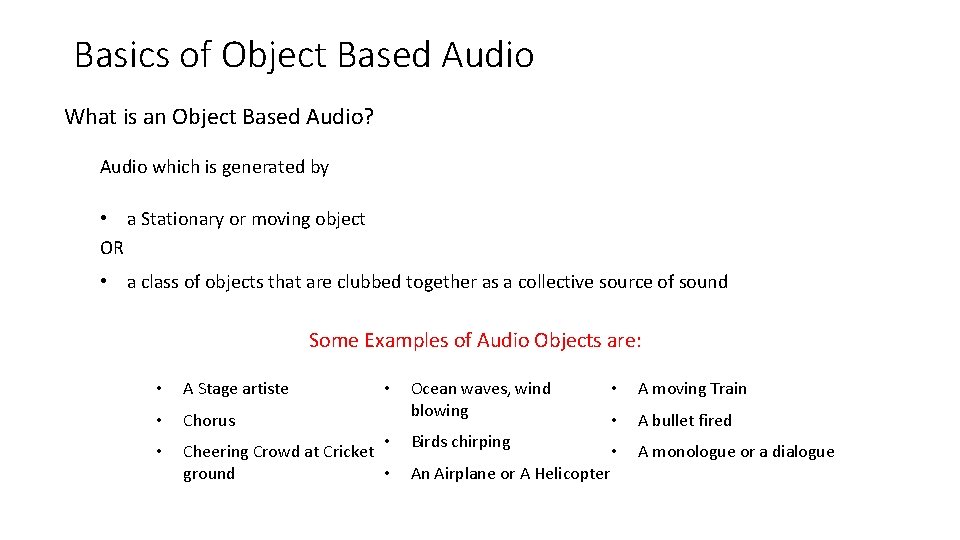
Basics of Object Based Audio What is an Object Based Audio? Audio which is generated by • a Stationary or moving object OR • a class of objects that are clubbed together as a collective source of sound Some Examples of Audio Objects are: • A Stage artiste • Chorus • • Cheering Crowd at Cricket ground • • Ocean waves, wind blowing Birds chirping An Airplane or A Helicopter • A moving Train • A bullet fired • A monologue or a dialogue
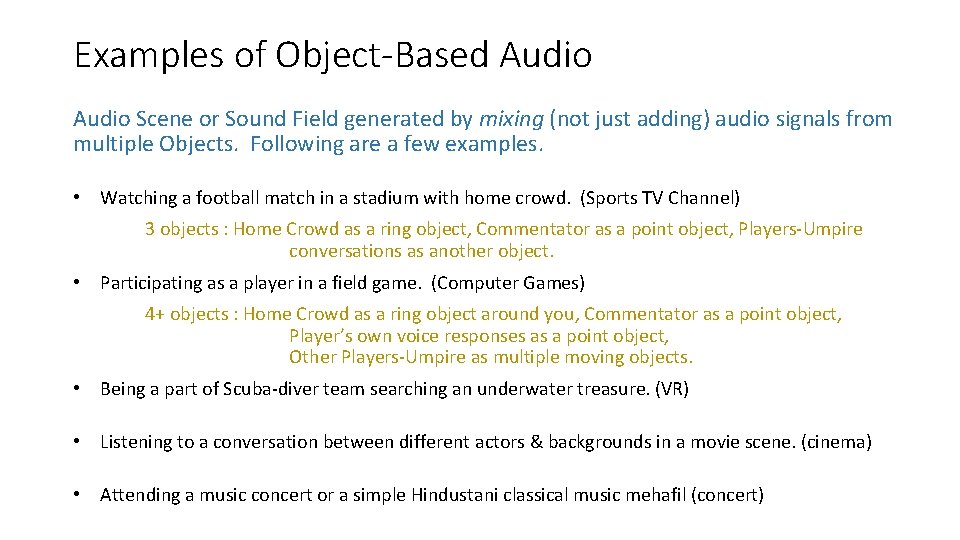
Examples of Object-Based Audio Scene or Sound Field generated by mixing (not just adding) audio signals from multiple Objects. Following are a few examples. • Watching a football match in a stadium with home crowd. (Sports TV Channel) 3 objects : Home Crowd as a ring object, Commentator as a point object, Players-Umpire conversations as another object. • Participating as a player in a field game. (Computer Games) 4+ objects : Home Crowd as a ring object around you, Commentator as a point object, Player’s own voice responses as a point object, Other Players-Umpire as multiple moving objects. • Being a part of Scuba-diver team searching an underwater treasure. (VR) • Listening to a conversation between different actors & backgrounds in a movie scene. (cinema) • Attending a music concert or a simple Hindustani classical music mehafil (concert)
Basics of Object-Based Audio A You. Tube examples of Audio Scene with different Objects: http: //youtube search "UDK + Super. Collider for real-time sound effect synthesis - demo 6“ Observe the Video carefully & Identify -- • Number of Audio Objects present in the scene. • Shape of the objects • Movement of those objects. • Appearance / Disappearance of objects • Properties of the audio signals generated by these objects.
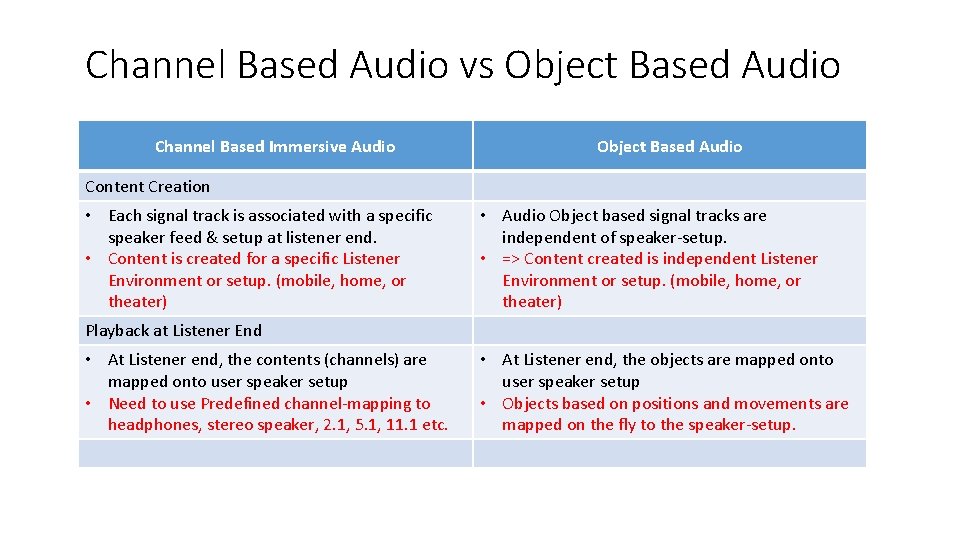
Channel Based Audio vs Object Based Audio Channel Based Immersive Audio Object Based Audio Content Creation • Each signal track is associated with a specific speaker feed & setup at listener end. • Content is created for a specific Listener Environment or setup. (mobile, home, or theater) • Audio Object based signal tracks are independent of speaker-setup. • => Content created is independent Listener Environment or setup. (mobile, home, or theater) Playback at Listener End • At Listener end, the contents (channels) are mapped onto user speaker setup • Need to use Predefined channel-mapping to headphones, stereo speaker, 2. 1, 5. 1, 11. 1 etc. • At Listener end, the objects are mapped onto user speaker setup • Objects based on positions and movements are mapped on the fly to the speaker-setup.
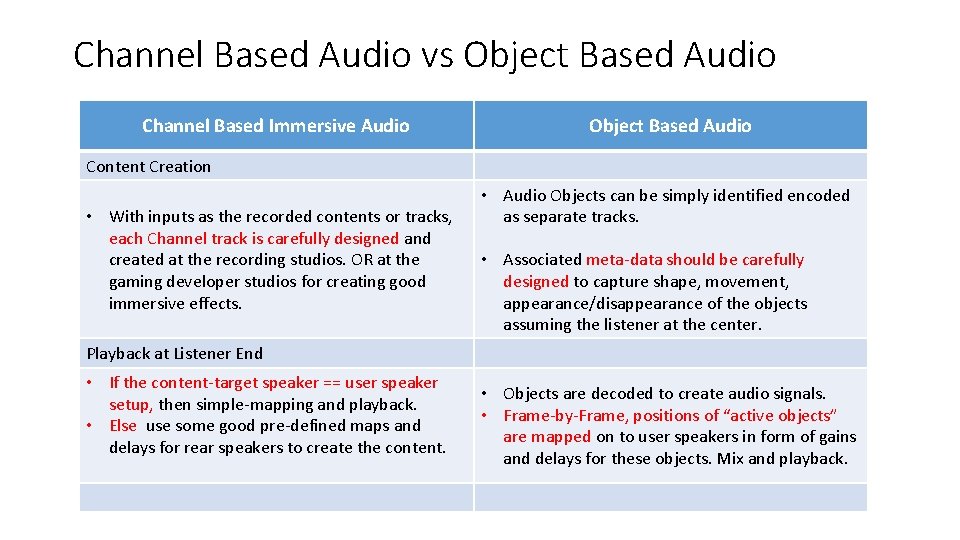
Channel Based Audio vs Object Based Audio Channel Based Immersive Audio Object Based Audio Content Creation • With inputs as the recorded contents or tracks, each Channel track is carefully designed and created at the recording studios. OR at the gaming developer studios for creating good immersive effects. • Audio Objects can be simply identified encoded as separate tracks. • Associated meta-data should be carefully designed to capture shape, movement, appearance/disappearance of the objects assuming the listener at the center. Playback at Listener End • If the content-target speaker == user speaker setup, then simple-mapping and playback. • Else use some good pre-defined maps and delays for rear speakers to create the content. • Objects are decoded to create audio signals. • Frame-by-Frame, positions of “active objects” are mapped on to user speakers in form of gains and delays for these objects. Mix and playback.
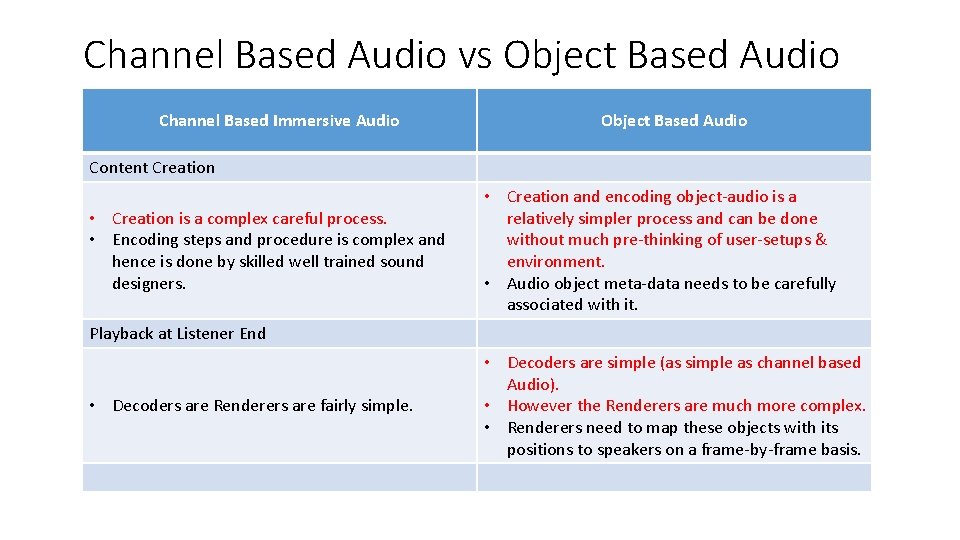
Channel Based Audio vs Object Based Audio Channel Based Immersive Audio Object Based Audio Content Creation • Creation is a complex careful process. • Encoding steps and procedure is complex and hence is done by skilled well trained sound designers. • Creation and encoding object-audio is a relatively simpler process and can be done without much pre-thinking of user-setups & environment. • Audio object meta-data needs to be carefully associated with it. Playback at Listener End • Decoders are Renderers are fairly simple. • Decoders are simple (as simple as channel based Audio). • However the Renderers are much more complex. • Renderers need to map these objects with its positions to speakers on a frame-by-frame basis.
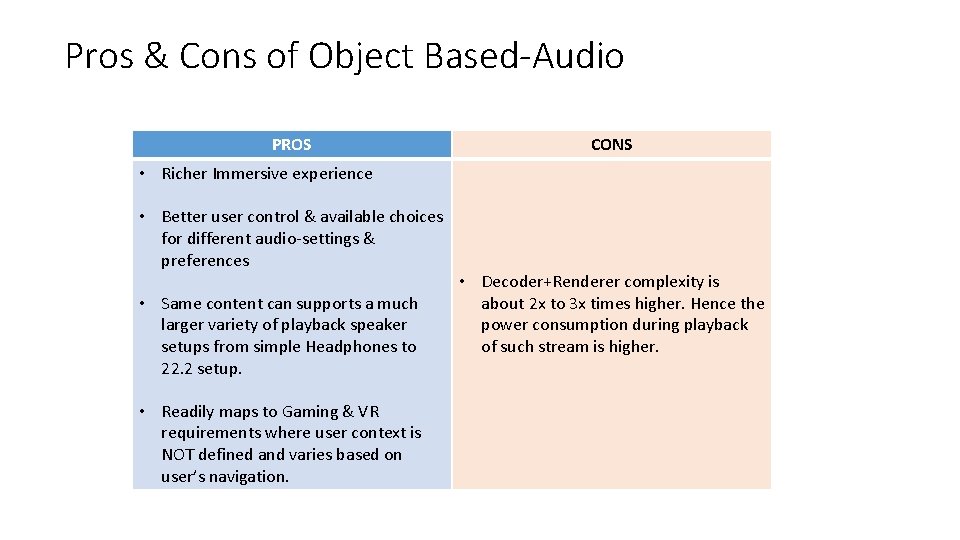
Pros & Cons of Object Based-Audio PROS CONS • Richer Immersive experience • Better user control & available choices for different audio-settings & preferences • Same content can supports a much larger variety of playback speaker setups from simple Headphones to 22. 2 setup. • Readily maps to Gaming & VR requirements where user context is NOT defined and varies based on user’s navigation. • Decoder+Renderer complexity is about 2 x to 3 x times higher. Hence the power consumption during playback of such stream is higher.
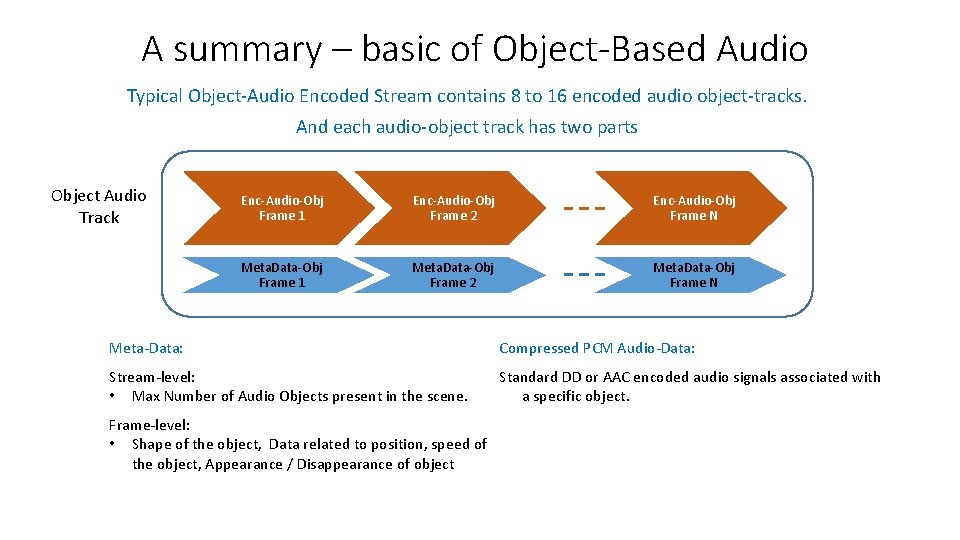
A summary – basic of Object-Based Audio Typical Object-Audio Encoded Stream contains 8 to 16 encoded audio object-tracks. And each audio-object track has two parts Object Audio Track Enc-Audio-Obj Frame 1 Enc-Audio-Obj Frame 2 Enc-Audio-Obj Frame N Meta. Data-Obj Frame 1 Meta. Data-Obj Frame 2 Meta. Data-Obj Frame N Meta-Data: Compressed PCM Audio-Data: Stream-level: • Max Number of Audio Objects present in the scene. Standard DD or AAC encoded audio signals associated with a specific object. Frame-level: • Shape of the object, Data related to position, speed of the object, Appearance / Disappearance of object
Revisit – basic of Object-Based Audio A You. Tube examples of Audio Scene with different Objects: http: //youtube search "UDK + Super. Collider for real-time sound effect synthesis - demo 6“ Observe the Video carefully & Identify - • 4 -5 object of different shapes appear, move and disappear w. r. t. to the listener. Footsteps, lava-pond, whirling wind, flowing stream, dripping water
Object-Based Audio Stream Decoding & Rendering • Decoding: The basic audio from object is encoded using standard legacy encoders. Therefore, decoding uses standard mp 3, aac, dolby-digital decoding to provide basic audio PCM for the object. • Renderers: Challenges are in Rendering the decoded object-based audio PCM contents & use object’s shape/motion meta-data to create – • An immersive audio experience on headphones. (VR, Gaming, smartphones, and tablets) • An immersive audio experience on our multi-speaker layouts at homes or theaters
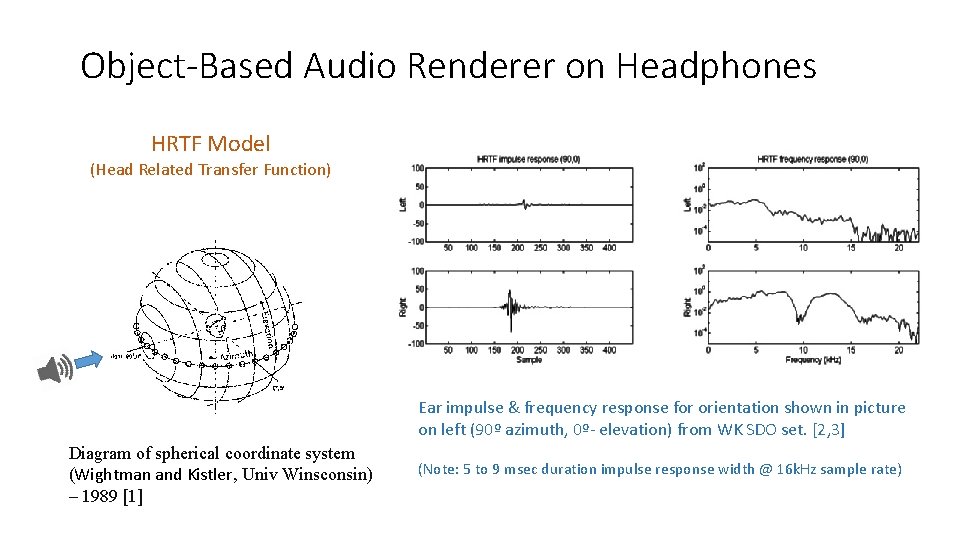
Object-Based Audio Renderer on Headphones HRTF Model (Head Related Transfer Function) Ear impulse & frequency response for orientation shown in picture on left (90º azimuth, 0º- elevation) from WK SDO set. [2, 3] Diagram of spherical coordinate system (Wightman and Kistler, Univ Winsconsin) – 1989 [1] (Note: 5 to 9 msec duration impulse response width @ 16 k. Hz sample rate)
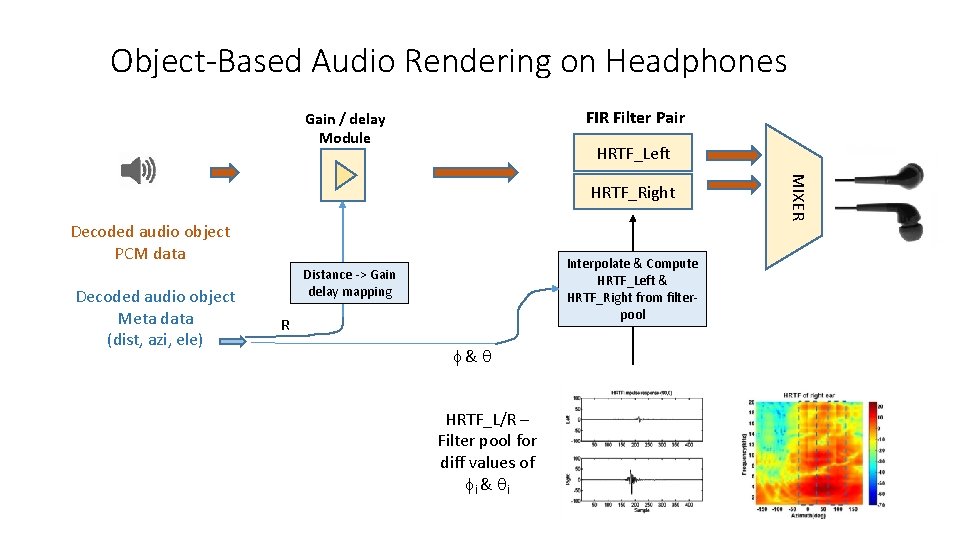
Object-Based Audio Rendering on Headphones FIR Filter Pair Gain / delay Module HRTF_Left Decoded audio object PCM data Decoded audio object Meta data (dist, azi, ele) Interpolate & Compute HRTF_Left & HRTF_Right from filterpool Distance -> Gain delay mapping R f & q HRTF_L/R – Filter pool for diff values of fi & qi MIXER HRTF_Right
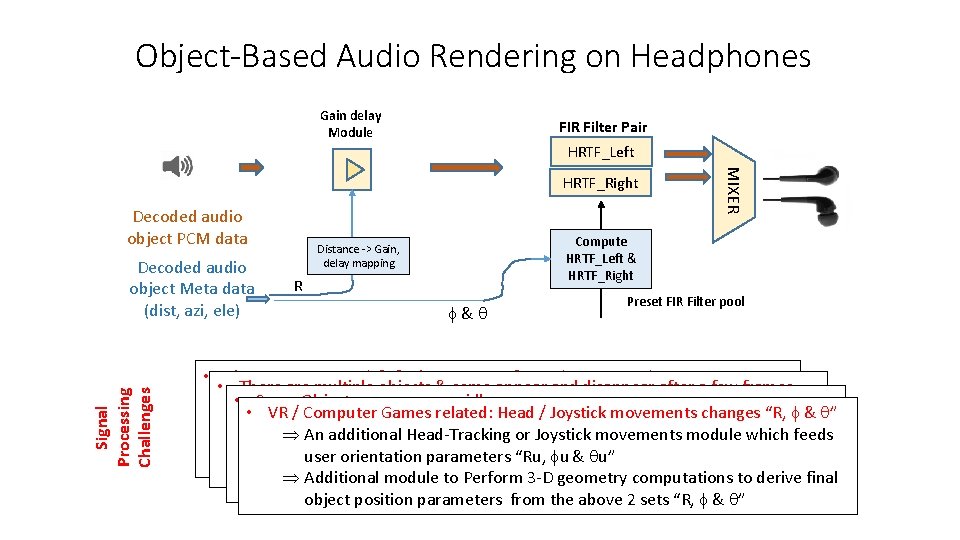
Object-Based Audio Rendering on Headphones Gain delay Module FIR Filter Pair HRTF_Left Decoded audio object PCM data Signal Processing Challenges Decoded audio object Meta data (dist, azi, ele) MIXER HRTF_Right Compute HRTF_Left & HRTF_Right Distance -> Gain, delay mapping R f & q Preset FIR Filter pool • The parameters R, f & q change every frame (20 -30 msec) • There are multiple objects & some appear and disappear after a few frames. filter coeffs, gain change every frame • ÞÞ Some Objects move very rapidly Need for on the fly object pcm + associated meta-data memory • This may cause glitches, distortions in the outputs. VR / Computer Games related: Head / Joystick movements changes “R, f & q” Þ Þ allocation, update and destruction “R” changes w. r. t. time => the speed of the object is substantial causing Þ An additional Head-Tracking or Joystick movements module which feeds Þ Need for techniques to adaptively & smoothly change those coefficients Doppler effect on audio signal (e. g. a fast-train passing by) Þ Need for fade-in / fade-out / mute of output PCM samples user orientation parameters “Ru, fu & qu” Þ Need for pitch shifting (variable-delay) module to be introduced on top of Þ Need for a well-designed multi-port PCM mixing module Þ Additional module to Perform 3 -D geometry computations to derive final gain application Module. Oversampling & Interpolation would be required. object position parameters from the above 2 sets “R, f & q”
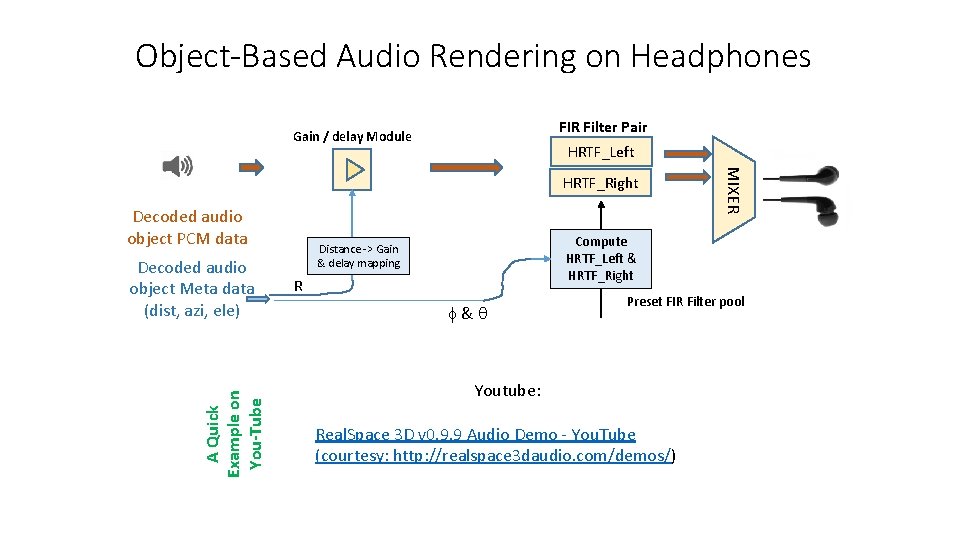
Object-Based Audio Rendering on Headphones FIR Filter Pair Gain / delay Module HRTF_Left Decoded audio object PCM data A Quick Example on You-Tube Decoded audio object Meta data (dist, azi, ele) MIXER HRTF_Right Compute HRTF_Left & HRTF_Right Distance -> Gain & delay mapping R f & q Preset FIR Filter pool Youtube: Real. Space 3 D v 0. 9. 9 Audio Demo - You. Tube (courtesy: http: //realspace 3 daudio. com/demos/)
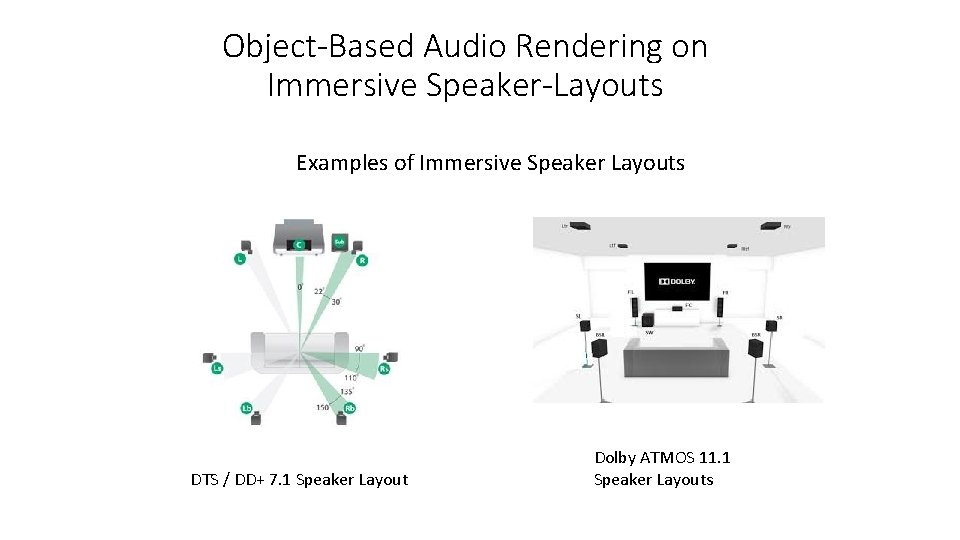
Object-Based Audio Rendering on Immersive Speaker-Layouts Examples of Immersive Speaker Layouts DTS / DD+ 7. 1 Speaker Layout Dolby ATMOS 11. 1 Speaker Layouts
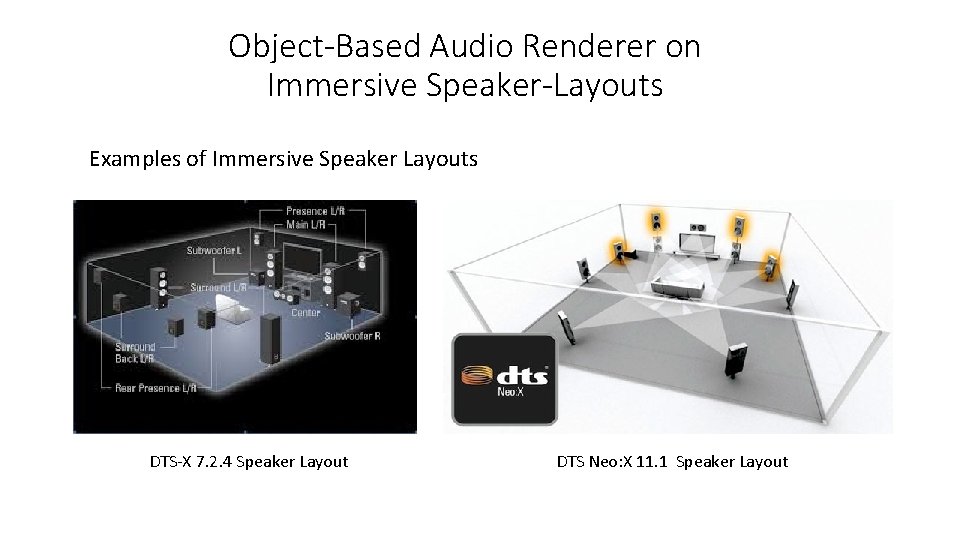
Object-Based Audio Renderer on Immersive Speaker-Layouts Examples of Immersive Speaker Layouts DTS-X 7. 2. 4 Speaker Layout DTS Neo: X 11. 1 Speaker Layout
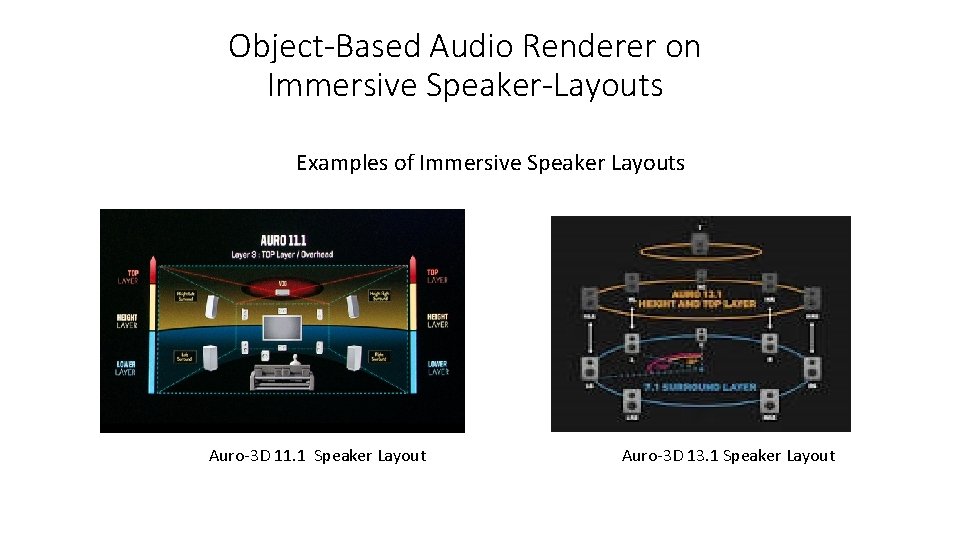
Object-Based Audio Renderer on Immersive Speaker-Layouts Examples of Immersive Speaker Layouts Auro-3 D 11. 1 Speaker Layout Auro-3 D 13. 1 Speaker Layout
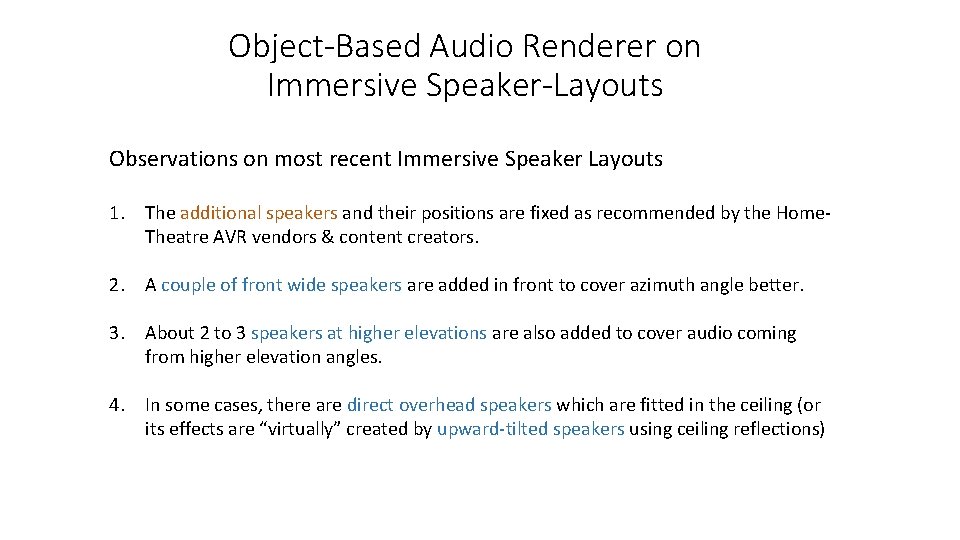
Object-Based Audio Renderer on Immersive Speaker-Layouts Observations on most recent Immersive Speaker Layouts 1. The additional speakers and their positions are fixed as recommended by the Home. Theatre AVR vendors & content creators. 2. A couple of front wide speakers are added in front to cover azimuth angle better. 3. About 2 to 3 speakers at higher elevations are also added to cover audio coming from higher elevation angles. 4. In some cases, there are direct overhead speakers which are fitted in the ceiling (or its effects are “virtually” created by upward-tilted speakers using ceiling reflections)
Object-Based Audio Renderer on Immersive Speaker-Layouts Two Main Techniques. • VBAP – Vector based amplitude Panning: Mapping object audio to Virtual Speaker Array • HOA – Higher Order Ambisonics : Creating desired “Sound-Field” at listeners’ sitting position VBAP (Vector Based Amplitude Panning): • A large array of “Virtual” Speaker Positions are assumed to surround the listener. Audio. Objects and their motions / positions w. r. t. the listener are mapped on a larger set of “Virtual” Speaker Positions. • Audio signals for each object is mapped on this virtual speaker positions using VBAP method • The audio associated with virtual speakers is then mapped to standard user speaker layouts using pre-defined down-mixing matrices & set of delays.
![VBAP based object rendering on Immersive Speaker-Layouts Vector Base Amplitude Panning [Pulkki 1997] •](http://slidetodoc.com/presentation_image/2f6502fac67fa82f20ccae9c6d5148aa/image-26.jpg "VBAP based object rendering on Immersive Speaker-Layouts Vector Base Amplitude Panning [Pulkki 1997] •")
VBAP based object rendering on Immersive Speaker-Layouts Vector Base Amplitude Panning [Pulkki 1997] • 3 D-VBAP describes/derives sound-field of an object kept on unit sphere by means of 3 relevant channel unit vectors. • These channel position vectors need not be orthogonal to each other – correspond to “nearest” speaker positions. (real or virtual) • When the 3 channel position vectors are orthonormal (e. g. on x, y, z axis), 3 D-VBAP mapping gets simplified to 1 st order mapping.
![VBAP based object rendering on Immersive Speaker-Layouts Vector Base Amplitude Panning [Pulkki 1997] §](http://slidetodoc.com/presentation_image/2f6502fac67fa82f20ccae9c6d5148aa/image-27.jpg "VBAP based object rendering on Immersive Speaker-Layouts Vector Base Amplitude Panning [Pulkki 1997] §")
VBAP based object rendering on Immersive Speaker-Layouts Vector Base Amplitude Panning [Pulkki 1997] § P = [g 1 g 2, g 3] x [L 1, L 2, L 3]’ = object Position & loudness vector. − where [g] is gain 3 x 1 vector, − L = [L 1, L 2, L 3]’ is 3 x 3 matrix formed by of x, y, z co-ordinates of Virtual Speaker positions L 1, L 2, L 3. − P is Audio Object representation vector with direction & amplitude § [g 1, g 2, g 3] = P * L-1 § Typically, the space around the listener is divided into 80 to 100 valid triangular meshes or region. The object is mapped in one of the regions • The object-audio stream is created by encoding P values and sent as meta-data for the object. • At the renderer, the matrices L-1 are pre-computed and stored for the triangular meshes. • The gains g 1, g 2, g 3 are calculated as (P * L-1) for the object. The gains are applied to the audio object PCM data to create the audio-signals to be played at the virtual speaker positions
![HOA based object rendering on Immersive Speaker-Layouts Higher Order Ambisonics [Gerzon 1970] • Creates](http://slidetodoc.com/presentation_image/2f6502fac67fa82f20ccae9c6d5148aa/image-28.jpg "HOA based object rendering on Immersive Speaker-Layouts Higher Order Ambisonics [Gerzon 1970] • Creates")
HOA based object rendering on Immersive Speaker-Layouts Higher Order Ambisonics [Gerzon 1970] • Creates a sound field generated by audio-object(s) when it gets captured by directional microphones located at the listener’s position First Order Ambisonics fields Second Order Ambisonics fields An Ambisonic Microphone • HOA channels are encoded and these channels are decoded and then mapped onto any standard “user speaker layouts” from 5. 1, or 7. 2. 4 or 13. 1”. These mappings are easy and less complex. • HOA technique makes it easy to modify the sound-field for different user (listener) orientations (required mainly in VR & Computer Gaming)
Rendering on Headphones using intermediate audio of Immersive Speaker-Layouts • In industry, typically the following technique is used (in non-gaming) application to render the object-based content on headphones. • Decode and render the object–based content for an Immersive Speaker layout. • Map the immersive speaker layout audio signals to headphones using “Bin. Aural” Rendering Advantages are: • The same content can be decoded for immersive speaker layout, theater, or headphones. • Reduced Complexity if the stream carries standard immersive channel configurations as substream then this can be done as multi-channel decoding followed by Bin-Aural Rendering.
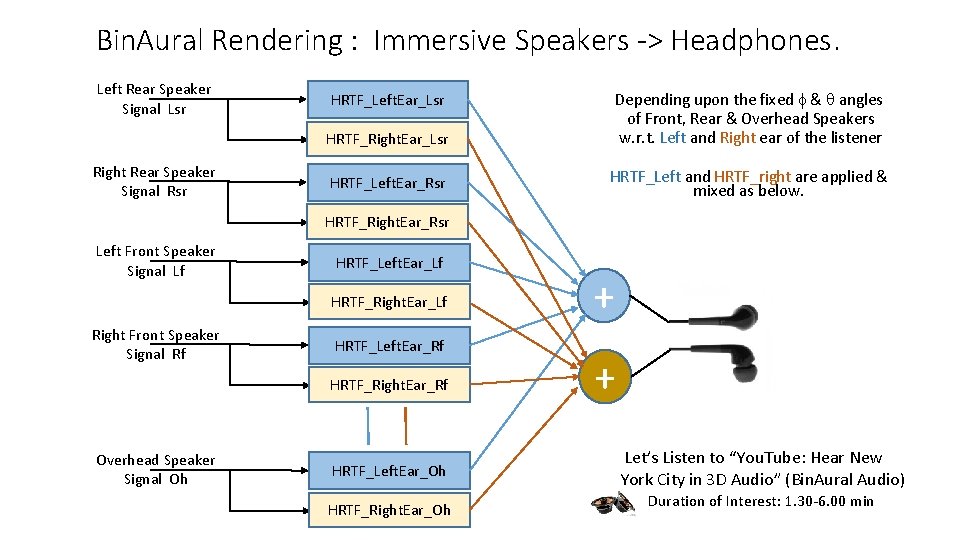
Bin. Aural Rendering : Immersive Speakers -> Headphones. Left Rear Speaker Signal Lsr Depending upon the fixed f & q angles of Front, Rear & Overhead Speakers w. r. t. Left and Right ear of the listener HRTF_Left. Ear_Lsr HRTF_Right. Ear_Lsr Right Rear Speaker Signal Rsr HRTF_Left. Ear_Rsr HRTF_Left and HRTF_right are applied & mixed as below. HRTF_Right. Ear_Rsr Left Front Speaker Signal Lf HRTF_Left. Ear_Lf HRTF_Right. Ear_Lf Right Front Speaker Signal Rf HRTF_Left. Ear_Rf HRTF_Right. Ear_Rf Overhead Speaker Signal Oh HRTF_Left. Ear_Oh HRTF_Right. Ear_Oh + + Let’s Listen to “You. Tube: Hear New York City in 3 D Audio” (Bin. Aural Audio) Duration of Interest: 1. 30 -6. 00 min
Industry Trends for Object-Based Audio • Reference Material based on Object-Audio: • Dolby, DTS and Fraunhofer are introducing their freshly designed audio standard reference IPs which support Object-based audio contents for Cinema, Home theater and Digital broadcasts. • Gaming industry and VR gadgets manufacturers are welcoming this trend in their domains. • For listeners, this trend will provide • Better immersive experience for the latest movie releases and audio contents on their existing home theater setup. • Streaming contents & games on mobile phones / tablets would sound much richer. • The Sports channels & movies will carry more options for user controls to select audio environments for watching their favorite match. • Upgrading to the latest AVRs and Sound. Bars with “wide front” and ceiling with “overhead speakers” (actual or virtual) will provide the best effects. • For DSP solution providers: • Higher computational burden on Audio DSPs to decode and especially rich post processing to render the content. • Audio DSP gets burdened with 3 -D geometry computations, computes related to square-root, sine, cos, matrix operations are required. • Compute Power required to decode this content is going to be 2 to 3 x higher, thus battery drain may be higher.
Summary of Object-Based Audio • Each sound source is captured as an object which is associated with “compressed audio” as payload and motion/shape information as meta-data. • For listener using Headphones, objects along with its motions are mapped to left and right ear from a pool of pre-generated “HRTF (Head related transfer functions)” functions. • For listener sitting in living room or cinema theaters, objects along with its motions are mapped onto an array of immersive speaker layouts, using • VBAP, HOA methods. • The content creators also use combination of the above two methods called Bin-aural rendering to render the contents for creating immersive audio perception on the Headphones.

Thank you Q & A Session?
![References [1] http: //youtube search "UDK + Super. Collider for real-time sound effect synthesis](http://slidetodoc.com/presentation_image/2f6502fac67fa82f20ccae9c6d5148aa/image-34.jpg "References [1] http: //youtube search \"UDK + Super. Collider for real-time sound effect synthesis")
References [1] http: //youtube search "UDK + Super. Collider for real-time sound effect synthesis - demo 6“ [2] http: //alumnus. caltech. edu/~franko/thesis/Chapter 4. html (HRTF related discussions & details) [3] Headphone simulation of free-field listening. I- Stimulus synthesis - J Acoust Soc Am 1989 - Wightman. pdf ("SDO" HRTF by Wightman and Kistler from Department of Psychology and Waisman Center, University of Wisconsin--Madison, provided a basis for HRTF research) [4] http: //youtube search " Real. Space 3 D v 0. 9. 9 Audio Demo – You. Tube” Ref: http: //realspace 3 daudio. com/demos/ [5] http: //slab 3 d. sourceforge. net/ - Simple HRTF code to try out simulations of moving audio-objects. [6] Virtual Sound Source Positioning Using VBAP, Ville Pulkki, Journal of Audio Engg. Society, Vol 45, No 6, June 1997 [7] Spatial Sound – Technologies and Psychoacoustics, presentation by V. Pulkki in IEEE Winter School in 2012 at Crete, Greece. [8] An Introduction to Higher Order Ambisonic, Florian Hollerweger, Oct 2008 [9] http: //youtube search “Hear New York City in 3 D Audio” (1 st short clip)
- Slides: 34