
Object Oriented Programming Introduction to NET Dr Mike
Object Oriented Programming Introduction to. NET Dr. Mike Spann m. spann@bham. ac. uk
Contents n n n n n Overview What is. NET? . NET – the big picture The Common Language Runtime Common Intermediate Language, Metadata and JIT Compilation Managed modules and assemblies Framework Class Library Visual Studio. NET application scenarios

Overview n In this lecture, we will introduce the. NET programming environment in preparation for the course on the object oriented programming using C# u. NET is a multi-language programming platform but C# targets only. NET
What is. NET? This is a tough question! n. NET is a complex software environment for providing services u From enabling the development of simple standalone (maybe Windowsbased) applications running locally u To complex Web services distributed across the internet perhaps using mobile devices n
What is. NET? n n We live in a distributed world where services are no longer just provided locally. NET can be used to develop robust software at any point in a distributed application environment u In the past different technologies and maybe even different programming languages were necessary at different parts of the application (client/server/database. . . ) u. NET is a common framework for all software development and execution
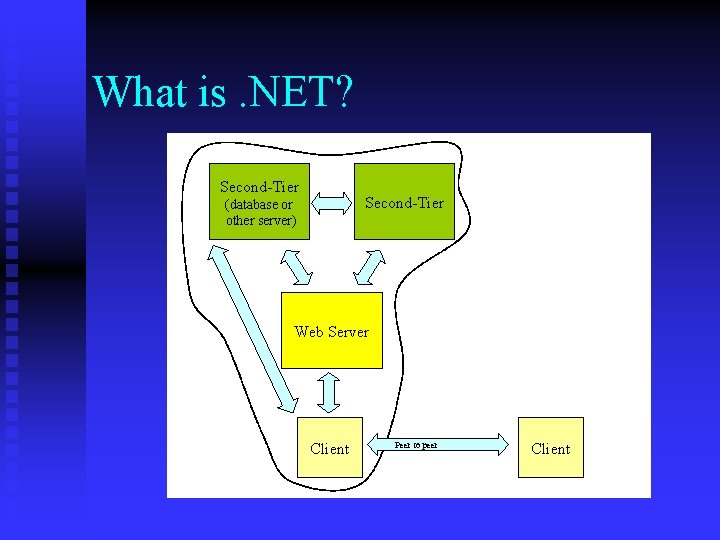
What is. NET? Second-Tier (database or other server) Web Server Client Peer to peer Client
. NET – the big picture n n . NET has a number of distinct features : u CLR (Common Language Runtime) u FCL (Framework Class Library) u Metadata u CIL (Common Intermediate Language) The first two are the most important from a programmers point of view u Any application that runs under the supervision of the CLR is known as a managed application
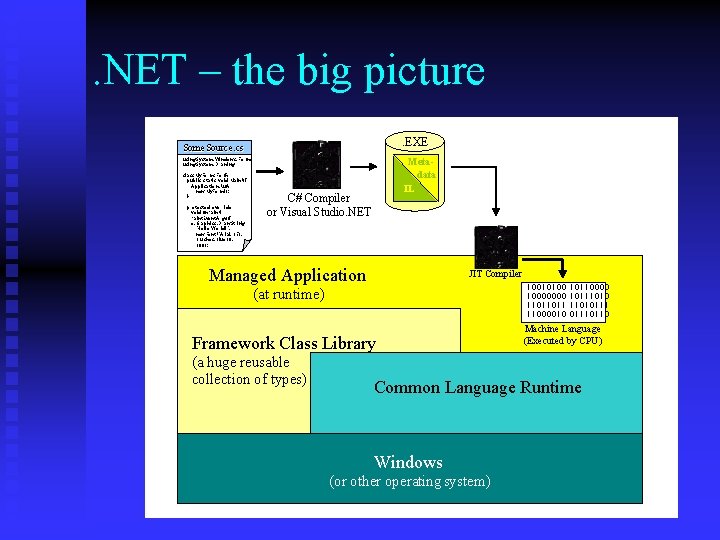
. NET – the big picture. EXE Some. Source. cs using System. Windows. Forms ; using System. Drawing ; class My. Form: Form { public static void Main(){ Application. Run ( new My. Form()); } protected override void. On. Paint( Paint. Event. Argse){ e. Graphics. Draw. String ( "Hello World!", new Font("Arial ", 35), Brushes. Blue , 100); Metadata IL C# Compiler or Visual Studio. NET Managed Application JIT Compiler 10010100 10000000 11011011 11000010 (at runtime) Framework Class Library (a huge reusable collection of types) 10110000 10111010111 01110110 Machine Language (Executed by CPU) Common Language Runtime Windows (or other operating system)
The Common Language Runtime (CLR) n. NET code runs under the supervision of the CLR For this reason such code is called Managed Code The CLR supplies memory management, type safety, code verifiability, thread management and security u These are complex issues, especially security u However, the key point is we can safely plug in software components into our application from diverse and un-trusted sources u n
The Common Language Runtime (CLR) n The CLR manages memory for managed code u u n All allocations of objects and buffers made from a Managed Heap Unused objects and buffers are cleaned up automatically through Garbage Collection Some of the worst bugs in software development are not possible with managed code u u u Leaked memory or objects References to freed or non-existent objects Reading of uninitialized variables
The Common Language Runtime (CLR) n n All programs running under CLR allocate memory from a managed heap The managed heap is maintained by the CLR u It is used for all memory resources, such as data buffers, strings, collections, stacks and caches u Enables automatic garbage collection to be efficient as the CLR can keep a track of unused memory

The Common Language Runtime (CLR)
Common Intermediate Language, Metadata and JIT Compilation n A managed executable comprises instructions expressed in the common intermediate language (CIL) plus metadata. EXE = CIL + Metadata n n The key point is that the CIL is completely language independent (C#, C++, Java, Perl. . ) Metadata describes high level features of the CIL instructions, for example u Method argument types, return values u Class definitions u Provides type information and binding rules
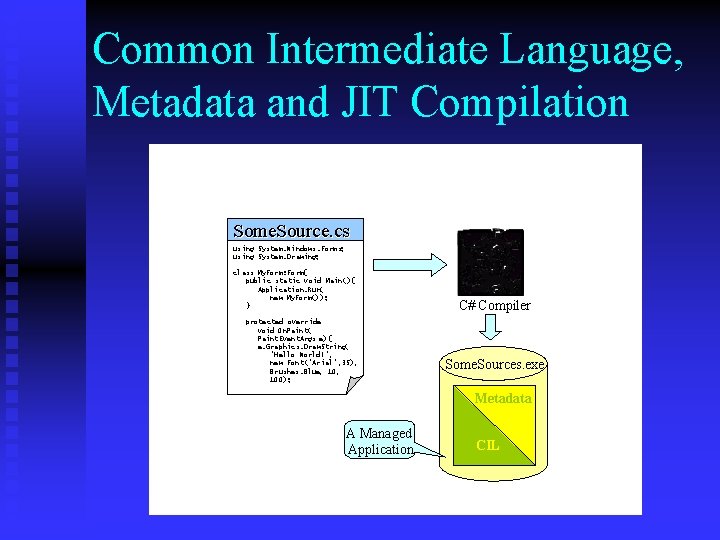
Common Intermediate Language, Metadata and JIT Compilation Some. Source. cs using System. Windows. Forms; using System. Drawing; class My. Form: Form{ public static void Main(){ Application. Run( new My. Form()); } protected override void On. Paint( Paint. Event. Args e){ e. Graphics. Draw. String( "Hello World!", new Font("Arial", 35), Brushes. Blue, 100); C# Compiler Some. Sources. exe Metadata A Managed Application CIL
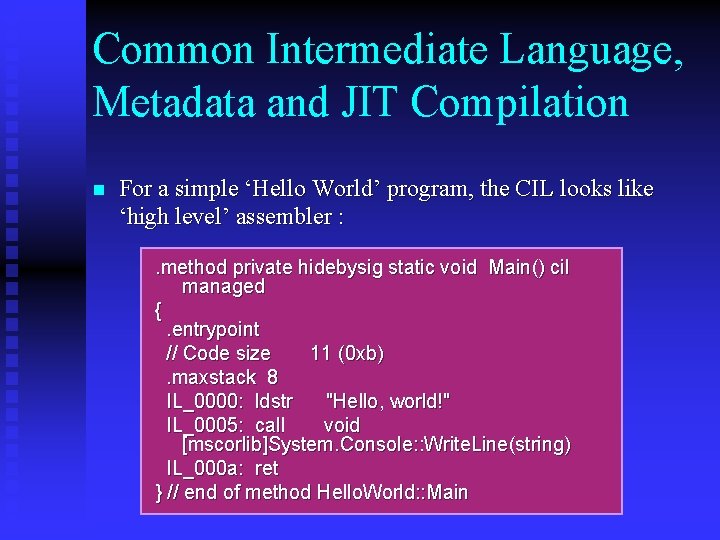
Common Intermediate Language, Metadata and JIT Compilation n For a simple ‘Hello World’ program, the CIL looks like ‘high level’ assembler : . method private hidebysig static void Main() cil managed {. entrypoint // Code size 11 (0 xb). maxstack 8 IL_0000: ldstr "Hello, world!" IL_0005: call void [mscorlib]System. Console: : Write. Line(string) IL_000 a: ret } // end of method Hello. World: : Main
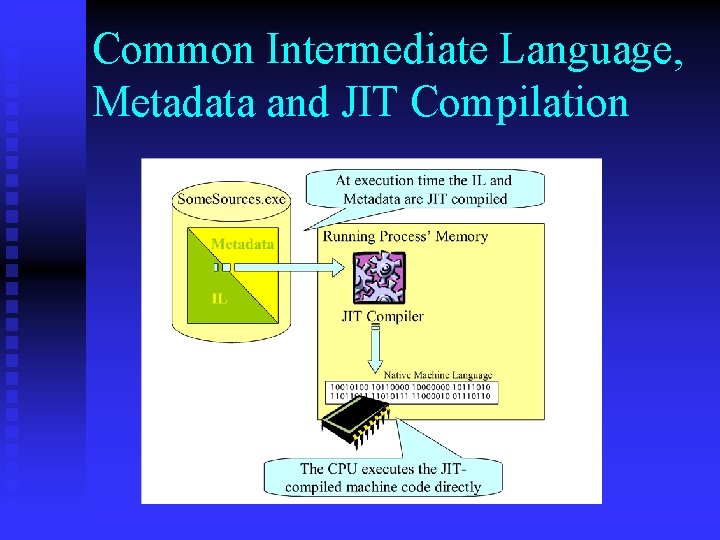
Common Intermediate Language, Metadata and JIT Compilation The Just in Time (JIT) compiler is part of the CLR n The JIT compiler uses both the metadata and the IL from a managed executable to create machine language instructions at runtime n These machine language instructions are executed natively n
Common Intermediate Language, Metadata and JIT Compilation
Common Intermediate Language, Metadata and JIT Compilation n For efficiency, the JIT compiler is only invoked the first time an object method is called u Subsequently execution jumps straight into native code u The system never wastes time JIT compiling methods that won’t be called by this run of your application
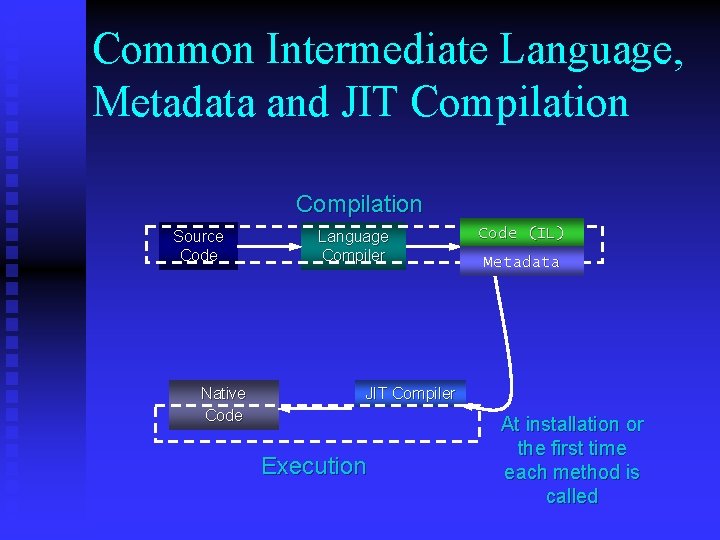
Common Intermediate Language, Metadata and JIT Compilation Source Code Native Code Language Compiler Code (IL) Assembly Metadata JIT Compiler Execution At installation or the first time each method is called
Common Intermediate Language, Metadata and JIT Compilation n However, in the process of JIT compiling the code some very important things happen. u Type-safety and security are verified u Code correctness is verified (no dangling memory references, or referencing unassigned data) u Code executes at native speed In short, the combination of CLR verification and JIT compilation will increase the functionality and robustness traditional console or GUI applications However, for widely distributed applications that make use of components from many sources, the advantages of managed code are a necessity
Managed modules and assemblies n n . NET refers to the combination of the CIL and metadata as a managed module However, the CLR cannot execute a managed module u The smallest unit of executable code is referred to as an assembly
Managed modules and assemblies n n A managed module is made up of only a single file However, a managed assembly can be made up of one or more files u These files can be any number of managed modules u Also assemblies can also include resource files (which can be any kind of file, including. jpg and. xml files, for example) u Assemblies also contain a manifest t Describes the files that make up the assembly
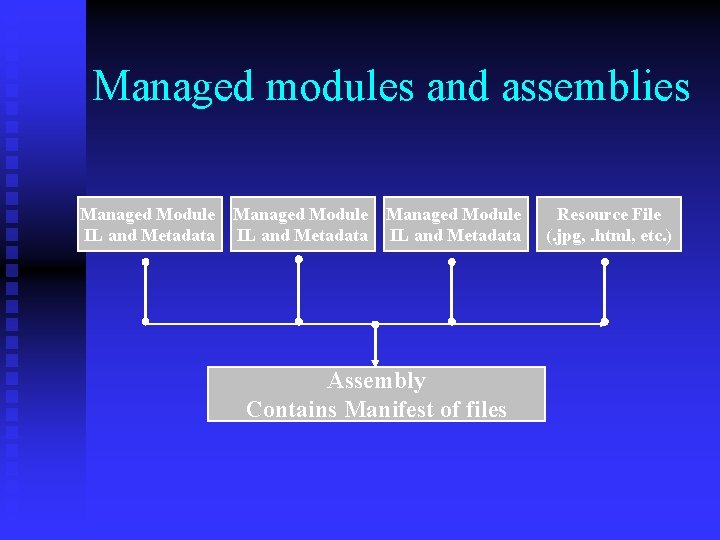
Managed modules and assemblies Managed Module IL and Metadata Assembly Contains Manifest of files Resource File (. jpg, . html, etc. )
Managed modules and assemblies n Typically re-useable components exist in assemblies external of the main executable assembly u Pretty much the same as linking in external libraries u A. dll file is created instead of a. exe file and no main method is required u More of this when we look at developing C# programs
Framework Class Library (FCL) n n The FCL is a massive collection of classes, structures, enumerated types and interfaces defined and implemented for reuse For example, with the FCL we can use it to u Display windows u Manipulate files u Create container objects (such as arrays) u Do maths u The FCL also has advanced classes for creating web and distributed applications
Framework Class Library (FCL) n The various classes and types are grouped into a hierarchy of namespaces u Similar to the package/sub-package arrangement of Java API’s u Helps find specific classes for your application u For example the System. IO namespace is a good place to look in the documentation for classes related to input/output u The System. Windows. Forms namespace contains classes for manipulating top level windows
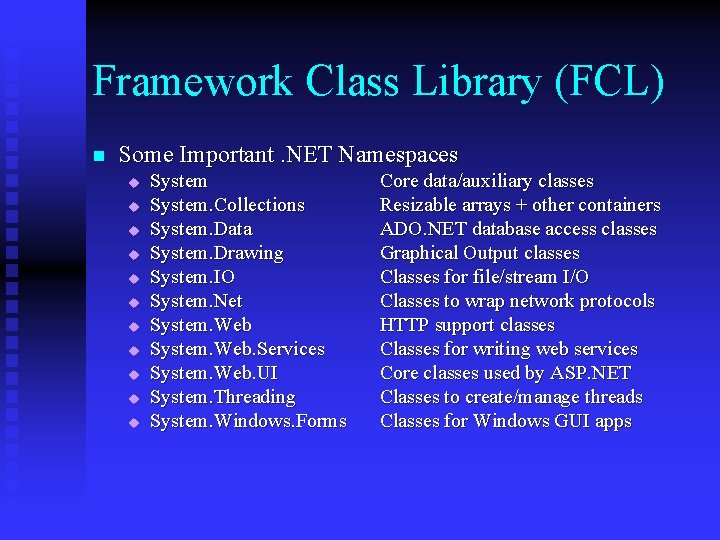
Framework Class Library (FCL) n Some Important. NET Namespaces u u u System. Collections System. Data System. Drawing System. IO System. Net System. Web. Services System. Web. UI System. Threading System. Windows. Forms Core data/auxiliary classes Resizable arrays + other containers ADO. NET database access classes Graphical Output classes Classes for file/stream I/O Classes to wrap network protocols HTTP support classes Classes for writing web services Core classes used by ASP. NET Classes to create/manage threads Classes for Windows GUI apps
Framework Class Library (FCL) It’s important to be able to efficiently use the FCL documentation which comes with Visual Studio or the. NET SDK n We can access the documentation from the Visual Studio homepage u Each FCL class has its own page with a lot of information u The most useful is some example code u Code can be language filtered n
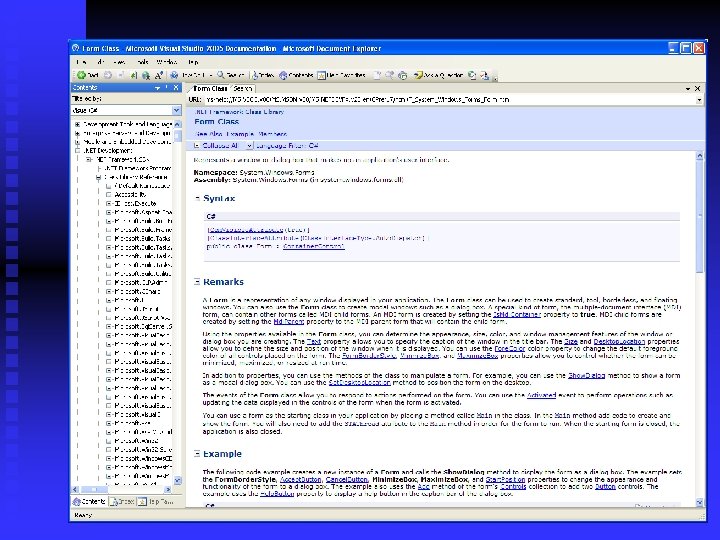
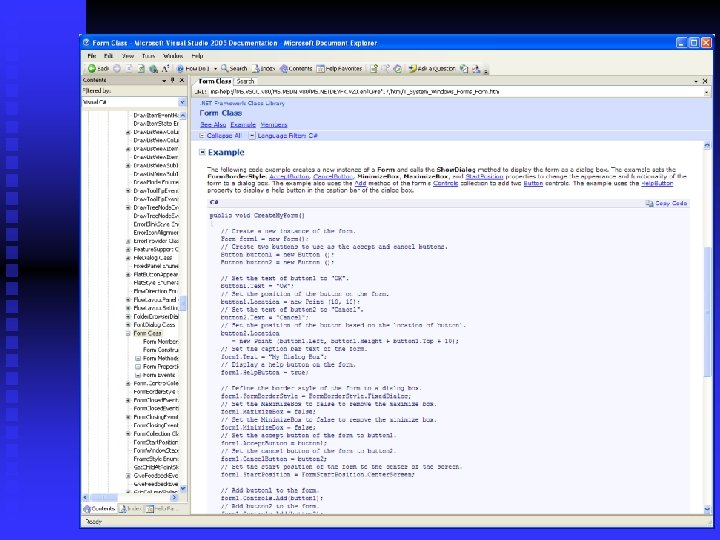
Framework Class Library (FCL) n Programming using FCL classes is much simpler than ‘traditional’ windows programming u Very intuitive u Equivalent simplicity to Java graphics (Swing) programming
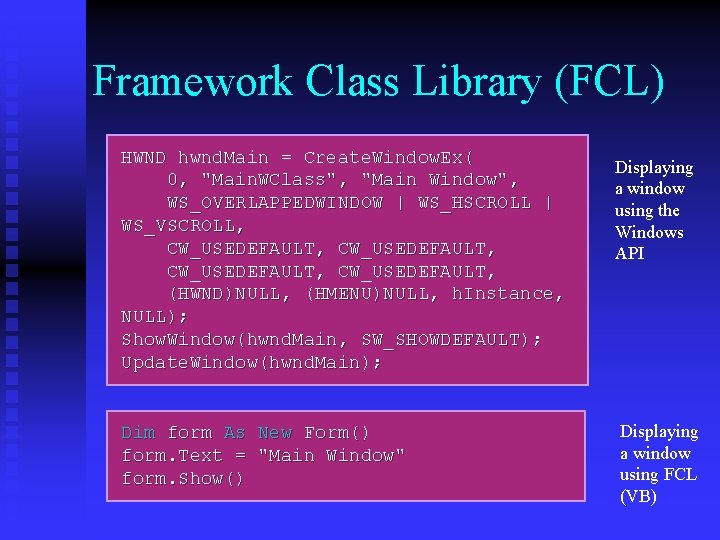
Framework Class Library (FCL) HWND hwnd. Main = Create. Window. Ex( 0, "Main. WClass", "Main Window", WS_OVERLAPPEDWINDOW | WS_HSCROLL | WS_VSCROLL, CW_USEDEFAULT, (HWND)NULL, (HMENU)NULL, h. Instance, NULL); Show. Window(hwnd. Main, SW_SHOWDEFAULT); Update. Window(hwnd. Main); Dim form As New Form() form. Text = "Main Window" form. Show() Displaying a window using the Windows API Displaying a window using FCL (VB)
Visual Studio. NET is not part of the. NET Framework! n Visual Studio is an integrated development environment published by Microsoft for writing Windows programs u But. NET applications can be developed with a simple text editor and compiled and run with command line instructions! n Obviously VS requires the. NET framework to be installed n
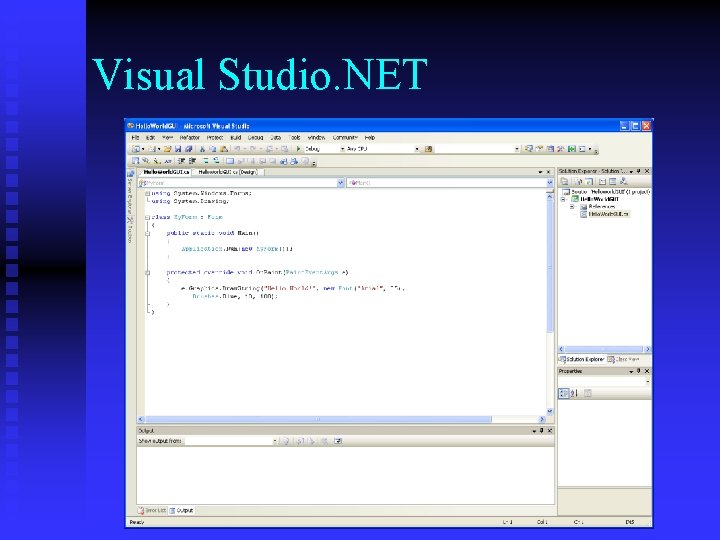
Visual Studio. NET
Visual Studio. NET n We will look in more detail at how to develop projects using VS in the next lecture u However, it’s important to emphasise that for simple programs, its sometimes easier to use the command based compiler u Even for developing Windows applications!
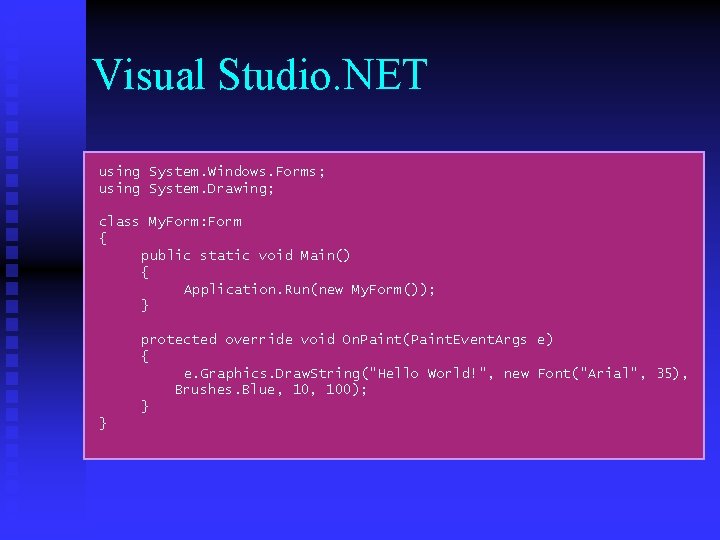
Visual Studio. NET using System. Windows. Forms; using System. Drawing; class My. Form: Form { public static void Main() { Application. Run(new My. Form()); } protected override void On. Paint(Paint. Event. Args e) { e. Graphics. Draw. String("Hello World!", new Font("Arial", 35), Brushes. Blue, 100); } }
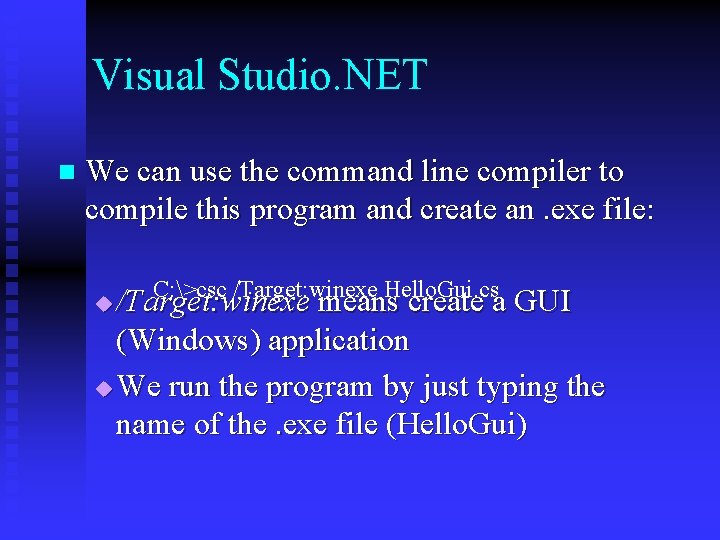
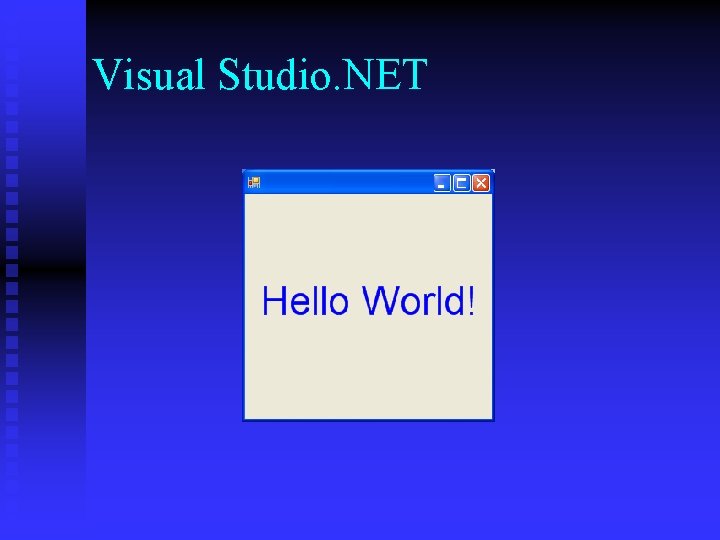
Visual Studio. NET n We can use the command line compiler to compile this program and create an. exe file: C: >csc /Target: winexe Hello. Gui. cs /Target: winexe means create a GUI (Windows) application u We run the program by just typing the name of the. exe file (Hello. Gui) u
Visual Studio. NET
. NET application scenarios n Applications can be developed in. NET for the following scenarios u Standalone applications t Console t Windows u Active Web Applications t Web forms t Server side processing
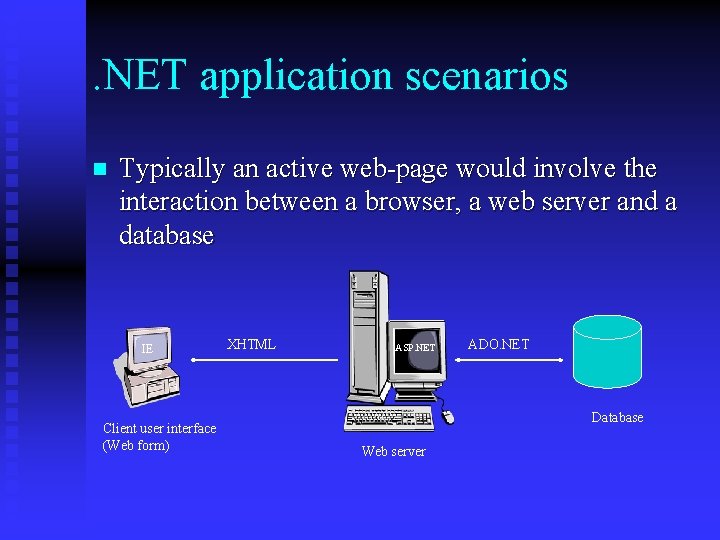
. NET application scenarios n Typically an active web-page would involve the interaction between a browser, a web server and a database IE Client user interface (Web form) XHTML ASP. NET ADO. NET Database Web server
. NET application scenarios u Web service applications t Software components that perform a task in a distributed manner across the internet t Web services use standard protocols such as SOAP and XML to communicate data between machines across the internet t The. NET Framework can easily be used to create and expose web service applications on the Internet t It is also very easy to create web-service client software using C# (or any other. NET Language)
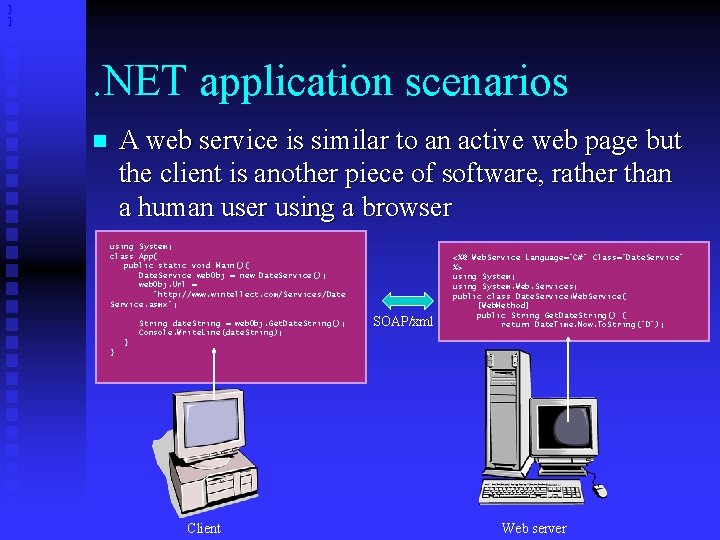
} } . NET application scenarios A web service is similar to an active web page but the client is another piece of software, rather than a human user using a browser n using System; class App{ public static void Main(){ Date. Service web. Obj = new Date. Service(); web. Obj. Url = "http: //www. wintellect. com/Services/Date Service. asmx"; String date. String = web. Obj. Get. Date. String(); Console. Write. Line(date. String); SOAP/xml <%@ Web. Service Language="C#" Class="Date. Service" %> using System; using System. Web. Services; public class Date. Service: Web. Service{ [Web. Method] public String Get. Date. String() { return Date. Time. Now. To. String("D"); } } Client Web server
Summary n n We have seen a fairly detailed overview of the. NET framework We have seen that it’s a robust environment for application program development and execution It’s language neutral although C# only targets. NET It removes many of the programmer headaches for the development of windows (component-based) applications as well as distributed applications u Much of the technicalities we have discussed are transparent to the programmer
- Slides: 43