
Numerical Processing and Basic Data Visualization 01204111 Computers
Numerical Processing and Basic Data Visualization 01204111 Computers and Programming Chaiporn Jaikaeo Department of Computer Engineering Kasetsart University Cliparts are taken from http: //openclipart. org Revised 2017 -10 -23
Outline • Numerical processing using Num. Py library ◦ Arrays vs. lists ◦ One-dimensional (1 D) arrays ◦ Two-dimensional (2 D) arrays • Basic data visualization using Matplotlib library ◦ Line plots ◦ Scatter plots ◦ Heat maps 2
Num. Py Library • Num. Py library provides ◦ Data types such as array and matrix specifically designed for processing large amount of numerical data ◦ A large collection of mathematical operations and functions, especially for linear algebra ◦ A foundation to many other scientific libraries for Python • Num. Py is not part of standard Python ◦ But is included in scientific Python distributions such as Anaconda 3
Using Num. Py • Num. Py library is named numpy and can be imported using the import keyword, e. g. , import numpy a = numpy. array([1, 2, 3]) • By convention, the name numpy is renamed to np for convenience using the as keyword, e. g. , import numpy as np a = np. array([1, 2, 3]) • From now on we will simply refer to numpy module as np 4
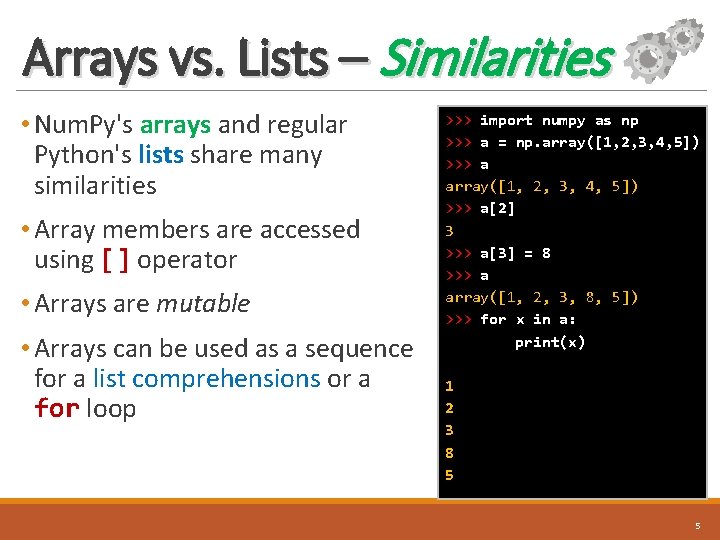
Arrays vs. Lists – Similarities • Num. Py's arrays and regular Python's lists share many similarities • Array members are accessed using [] operator • Arrays are mutable • Arrays can be used as a sequence for a list comprehensions or a for loop >>> import numpy as np >>> a = np. array([1, 2, 3, 4, 5]) >>> a[2] 3 >>> a[3] = 8 >>> a array([1, 2, 3, 8, 5]) >>> for x in a: print(x) 1 2 3 8 5 5
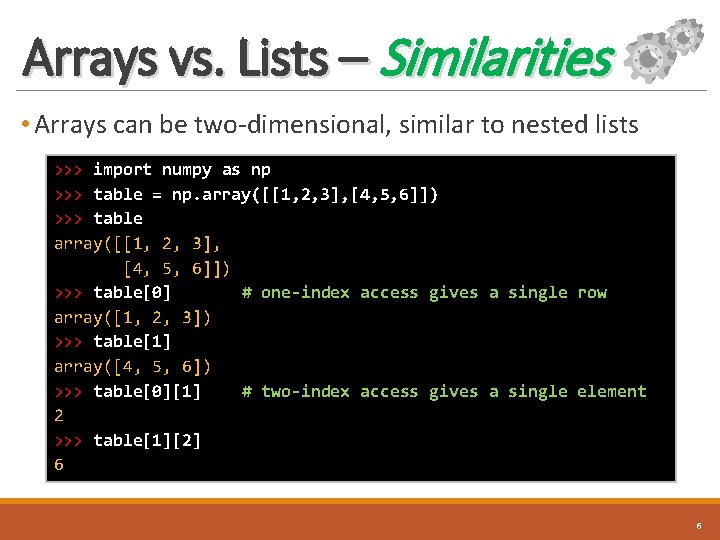
Arrays vs. Lists – Similarities • Arrays can be two-dimensional, similar to nested lists >>> import numpy as np >>> table = np. array([[1, 2, 3], [4, 5, 6]]) >>> table[0] # one-index access gives a single row array([1, 2, 3]) >>> table[1] array([4, 5, 6]) >>> table[0][1] # two-index access gives a single element 2 >>> table[1][2] 6 6
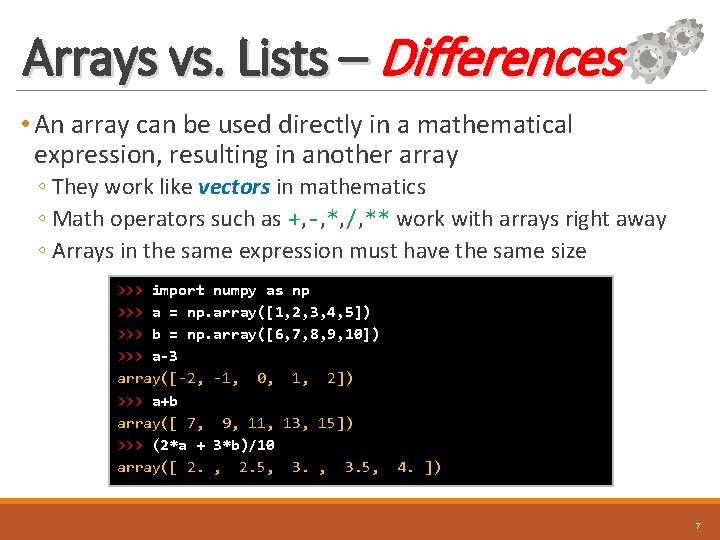
Arrays vs. Lists – Differences • An array can be used directly in a mathematical expression, resulting in another array ◦ They work like vectors in mathematics ◦ Math operators such as +, -, *, /, ** work with arrays right away ◦ Arrays in the same expression must have the same size >>> import numpy as np >>> a = np. array([1, 2, 3, 4, 5]) >>> b = np. array([6, 7, 8, 9, 10]) >>> a-3 array([-2, -1, 0, 1, 2]) >>> a+b array([ 7, 9, 11, 13, 15]) >>> (2*a + 3*b)/10 array([ 2. , 2. 5, 3. 5, 4. ]) 7
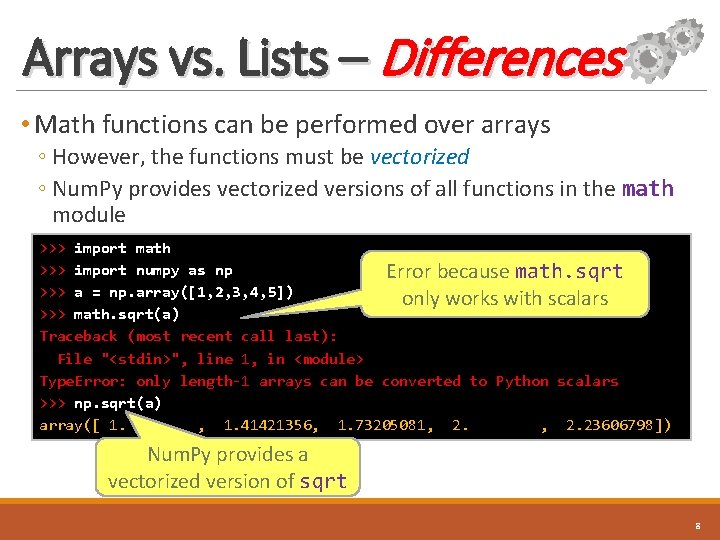
Arrays vs. Lists – Differences • Math functions can be performed over arrays ◦ However, the functions must be vectorized ◦ Num. Py provides vectorized versions of all functions in the math module >>> import math >>> import numpy as np Error because math. sqrt >>> a = np. array([1, 2, 3, 4, 5]) only works with scalars >>> math. sqrt(a) Traceback (most recent call last): File "<stdin>", line 1, in <module> Type. Error: only length-1 arrays can be converted to Python scalars >>> np. sqrt(a) array([ 1. , 1. 41421356, 1. 73205081, 2. 23606798]) Num. Py provides a vectorized version of sqrt 8
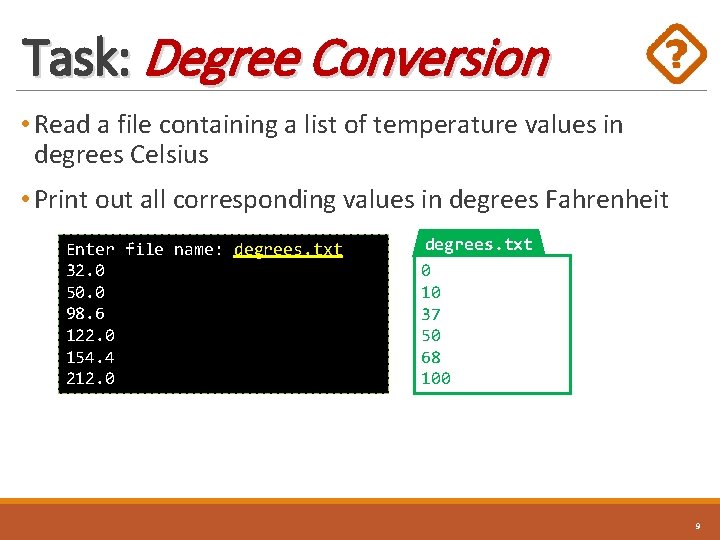
Task: Degree Conversion • Read a file containing a list of temperature values in degrees Celsius • Print out all corresponding values in degrees Fahrenheit Enter file name: degrees. txt 32. 0 50. 0 98. 6 122. 0 154. 4 212. 0 degrees. txt 0 10 37 50 68 100 9
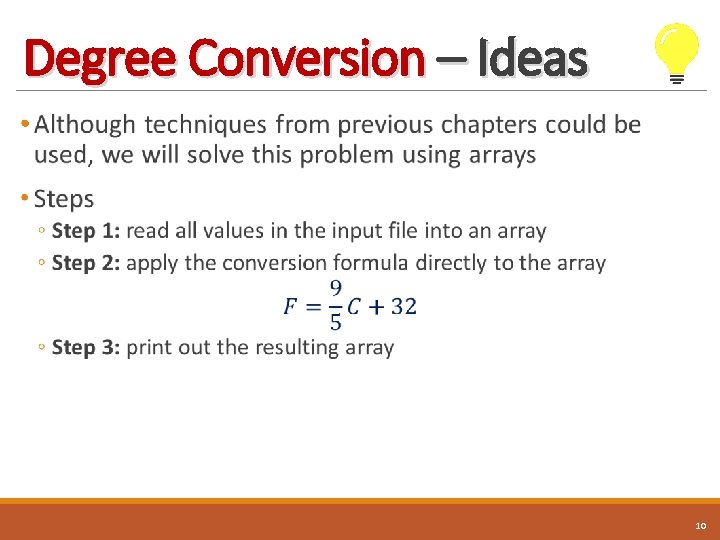
Degree Conversion – Ideas • 10
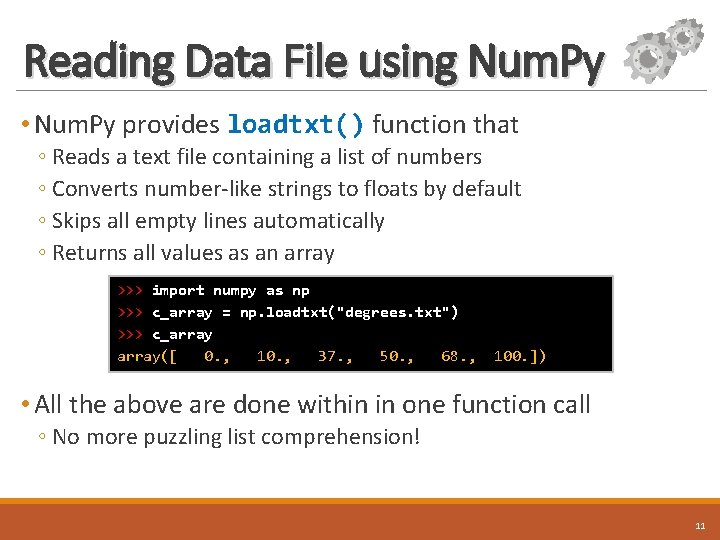
Reading Data File using Num. Py • Num. Py provides loadtxt() function that ◦ Reads a text file containing a list of numbers ◦ Converts number-like strings to floats by default ◦ Skips all empty lines automatically ◦ Returns all values as an array >>> import numpy as np >>> c_array = np. loadtxt("degrees. txt") >>> c_array([ 0. , 10. , 37. , 50. , 68. , 100. ]) • All the above are done within in one function call ◦ No more puzzling list comprehension! 11
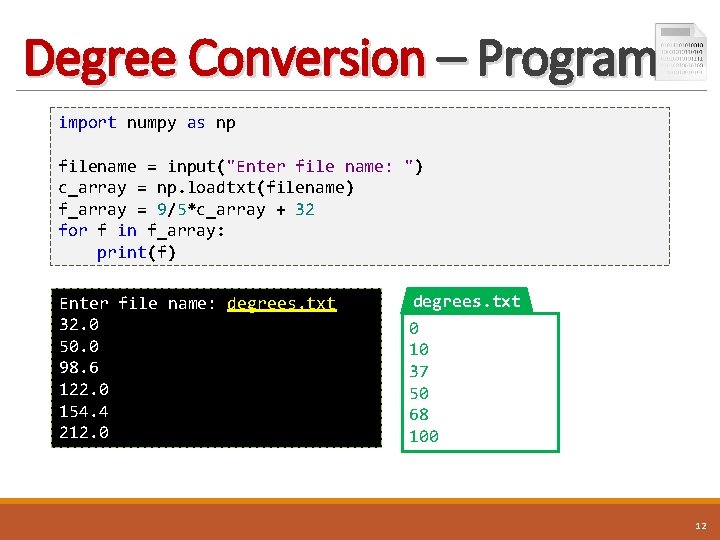
Degree Conversion – Program import numpy as np filename = input("Enter file name: ") c_array = np. loadtxt(filename) f_array = 9/5*c_array + 32 for f in f_array: print(f) Enter file name: degrees. txt 32. 0 50. 0 98. 6 122. 0 154. 4 212. 0 degrees. txt 0 10 37 50 68 100 12
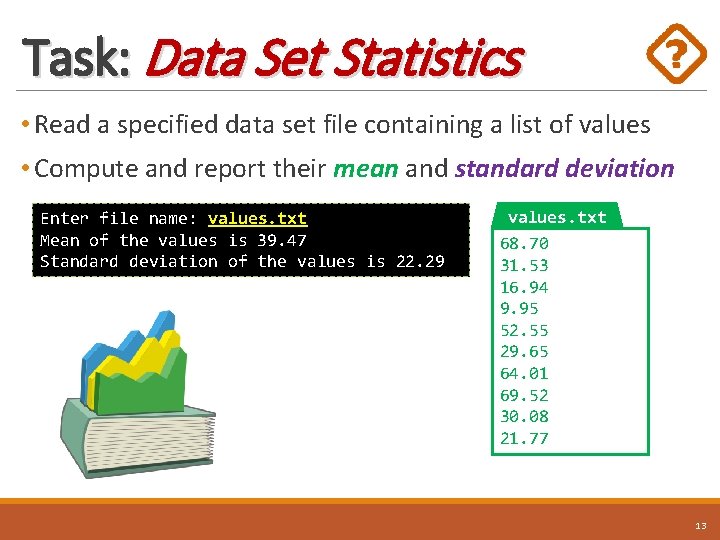
Task: Data Set Statistics • Read a specified data set file containing a list of values • Compute and report their mean and standard deviation Enter file name: values. txt Mean of the values is 39. 47 Standard deviation of the values is 22. 29 values. txt 68. 70 31. 53 16. 94 9. 95 52. 55 29. 65 64. 01 69. 52 30. 08 21. 77 13
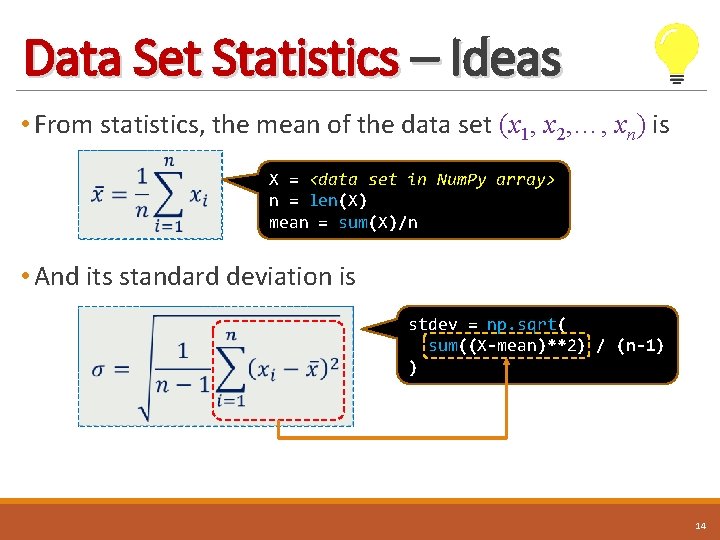
Data Set Statistics – Ideas • From statistics, the mean of the data set (x 1, x 2, …, xn) is X = <data set in Num. Py array> n = len(X) mean = sum(X)/n • And its standard deviation is stdev = np. sqrt( sum((X-mean)**2) / (n-1) ) 14
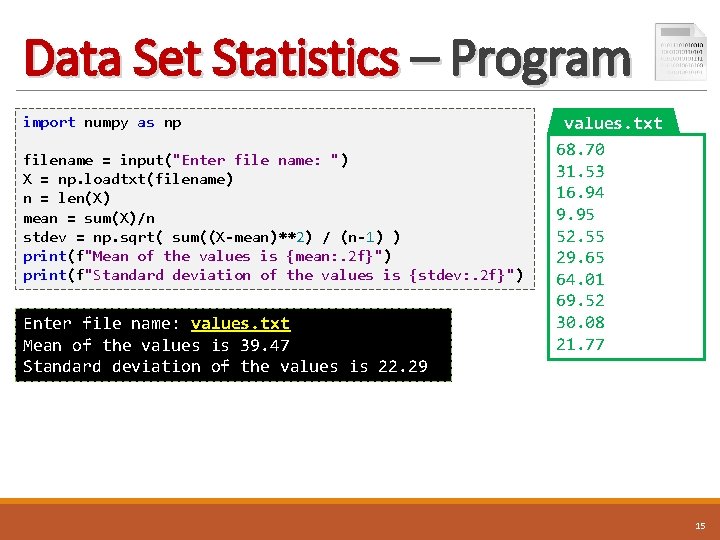
Data Set Statistics – Program import numpy as np filename = input("Enter file name: ") X = np. loadtxt(filename) n = len(X) mean = sum(X)/n stdev = np. sqrt( sum((X-mean)**2) / (n-1) ) print(f"Mean of the values is {mean: . 2 f}") print(f"Standard deviation of the values is {stdev: . 2 f}") Enter file name: values. txt Mean of the values is 39. 47 Standard deviation of the values is 22. 29 values. txt 68. 70 31. 53 16. 94 9. 95 52. 55 29. 65 64. 01 69. 52 30. 08 21. 77 15
Computing with 2 D Arrays • Processing numerical tabular data using 2 D arrays offers several benefits over regular Python nested lists • Some benefits are: ◦ Convenient text file reading and writing, including CSV files ◦ Math operations/functions are done in a vectorized style ◦ Much faster speed with large data sets 16
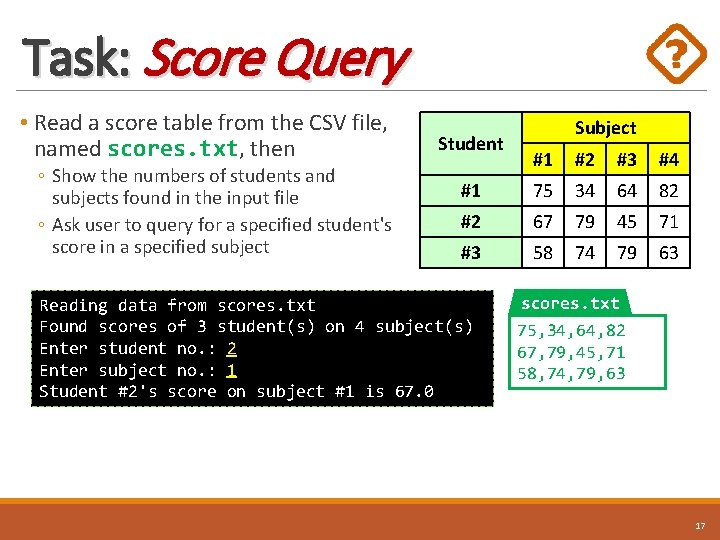
Task: Score Query • Read a score table from the CSV file, named scores. txt, then ◦ Show the numbers of students and subjects found in the input file ◦ Ask user to query for a specified student's score in a specified subject Student Subject #1 #2 #3 #4 #1 75 34 64 82 #2 67 79 45 71 #3 58 74 79 63 Reading data from scores. txt Found scores of 3 student(s) on 4 subject(s) Enter student no. : 2 Enter subject no. : 1 Student #2's score on subject #1 is 67. 0 scores. txt 75, 34, 64, 82 67, 79, 45, 71 58, 74, 79, 63 17
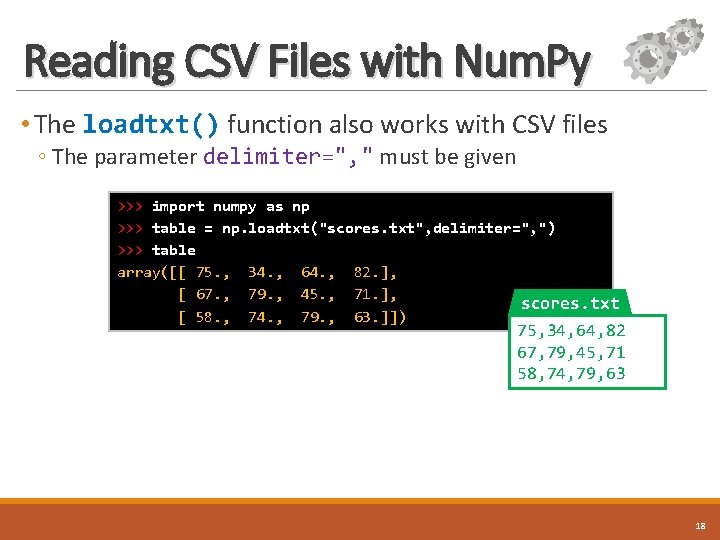
Reading CSV Files with Num. Py • The loadtxt() function also works with CSV files ◦ The parameter delimiter=", " must be given >>> import numpy as np >>> table = np. loadtxt("scores. txt", delimiter=", ") >>> table array([[ 75. , 34. , 64. , 82. ], [ 67. , 79. , 45. , 71. ], scores. txt [ 58. , 74. , 79. , 63. ]]) 75, 34, 64, 82 67, 79, 45, 71 58, 74, 79, 63 18
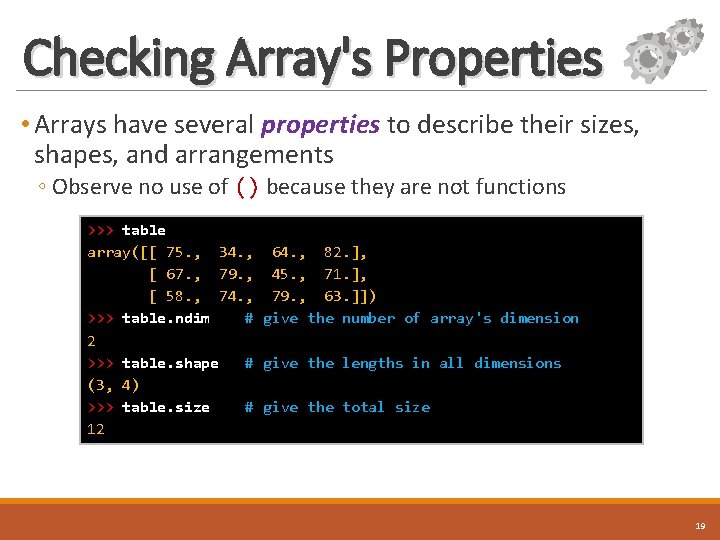
Checking Array's Properties • Arrays have several properties to describe their sizes, shapes, and arrangements ◦ Observe no use of () because they are not functions >>> table array([[ 75. , 34. , 64. , 82. ], [ 67. , 79. , 45. , 71. ], [ 58. , 74. , 79. , 63. ]]) >>> table. ndim # give the number of array's dimension 2 >>> table. shape # give the lengths in all dimensions (3, 4) >>> table. size # give the total size 12 19
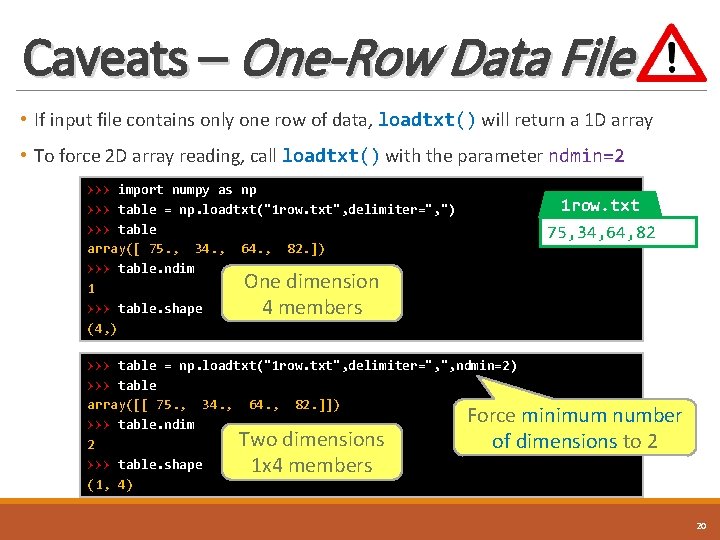
Caveats – One-Row Data File • If input file contains only one row of data, loadtxt() will return a 1 D array • To force 2 D array reading, call loadtxt() with the parameter ndmin=2 >>> import numpy as np >>> table = np. loadtxt("1 row. txt", delimiter=", ") >>> table array([ 75. , 34. , 64. , 82. ]) >>> table. ndim One dimension 1 >>> table. shape 4 members (4, ) 1 row. txt 75, 34, 64, 82 >>> table = np. loadtxt("1 row. txt", delimiter=", ", ndmin=2) >>> table array([[ 75. , 34. , 64. , 82. ]]) Force minimum number >>> table. ndim Two dimensions of dimensions to 2 2 >>> table. shape 1 x 4 members (1, 4) 20
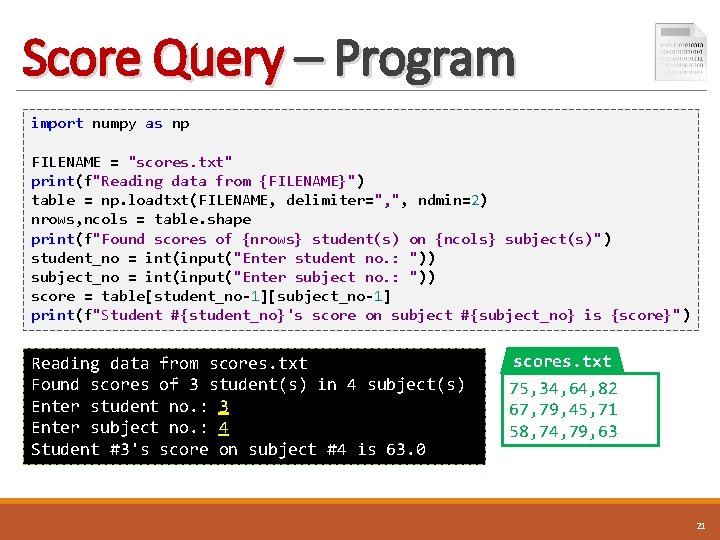
Score Query – Program import numpy as np FILENAME = "scores. txt" print(f"Reading data from {FILENAME}") table = np. loadtxt(FILENAME, delimiter=", ", ndmin=2) nrows, ncols = table. shape print(f"Found scores of {nrows} student(s) on {ncols} subject(s)") student_no = int(input("Enter student no. : ")) subject_no = int(input("Enter subject no. : ")) score = table[student_no-1][subject_no-1] print(f"Student #{student_no}'s score on subject #{subject_no} is {score}") Reading data from scores. txt Found scores of 3 student(s) in 4 subject(s) Enter student no. : 3 Enter subject no. : 4 Student #3's score on subject #4 is 63. 0 scores. txt 75, 34, 64, 82 67, 79, 45, 71 58, 74, 79, 63 21
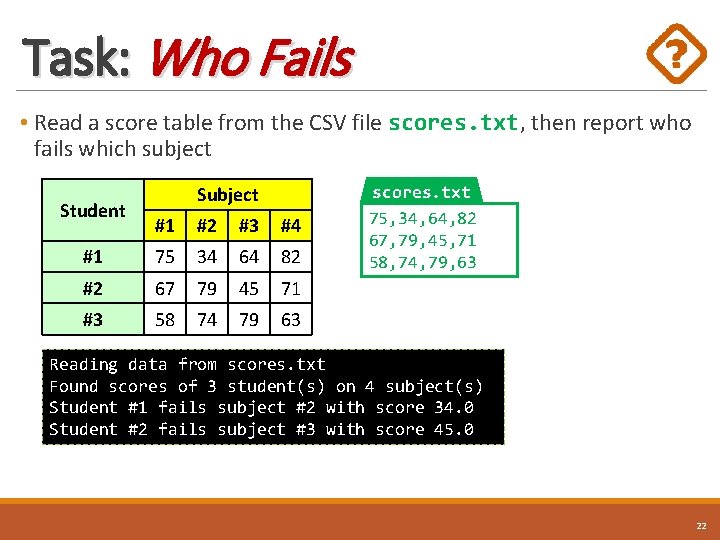
Task: Who Fails • Read a score table from the CSV file scores. txt, then report who fails which subject Student Subject #1 #2 #3 #4 #1 75 34 64 82 #2 67 79 45 71 #3 58 74 79 63 scores. txt 75, 34, 64, 82 67, 79, 45, 71 58, 74, 79, 63 Reading data from scores. txt Found scores of 3 student(s) on 4 subject(s) Student #1 fails subject #2 with score 34. 0 Student #2 fails subject #3 with score 45. 0 22
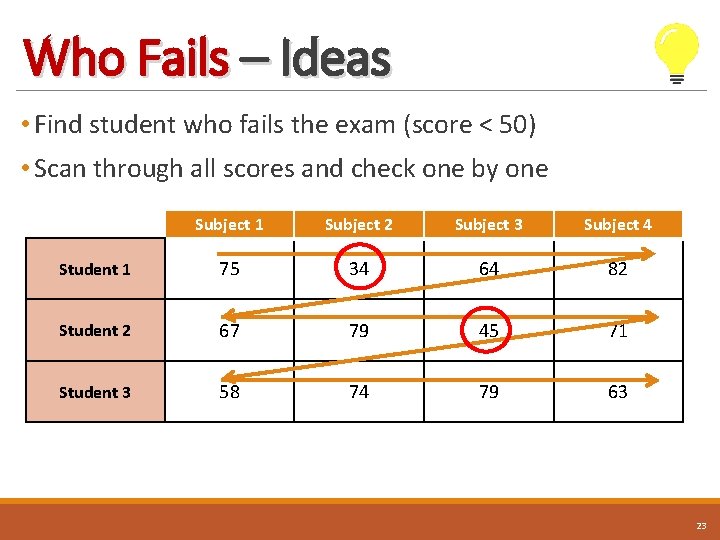
Who Fails – Ideas • Find student who fails the exam (score < 50) • Scan through all scores and check one by one Subject 1 Subject 2 Subject 3 Subject 4 Student 1 75 34 64 82 Student 2 67 79 45 71 Student 3 58 74 79 63 23
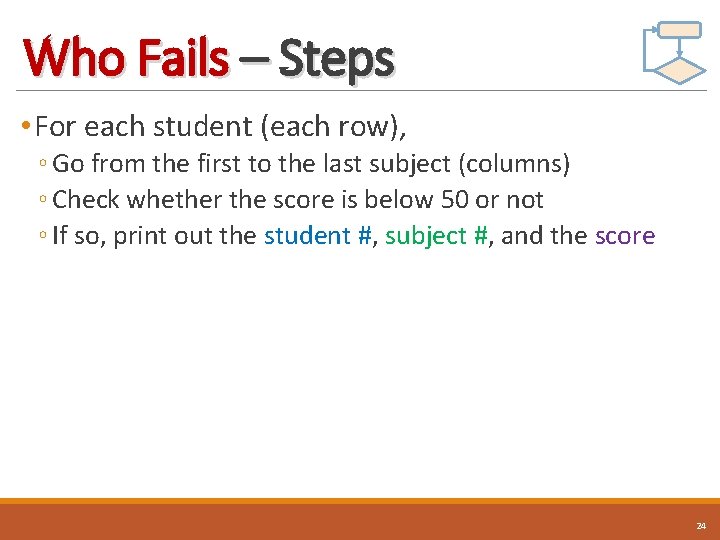
Who Fails – Steps • For each student (each row), ◦ Go from the first to the last subject (columns) ◦ Check whether the score is below 50 or not ◦ If so, print out the student #, subject #, and the score 24
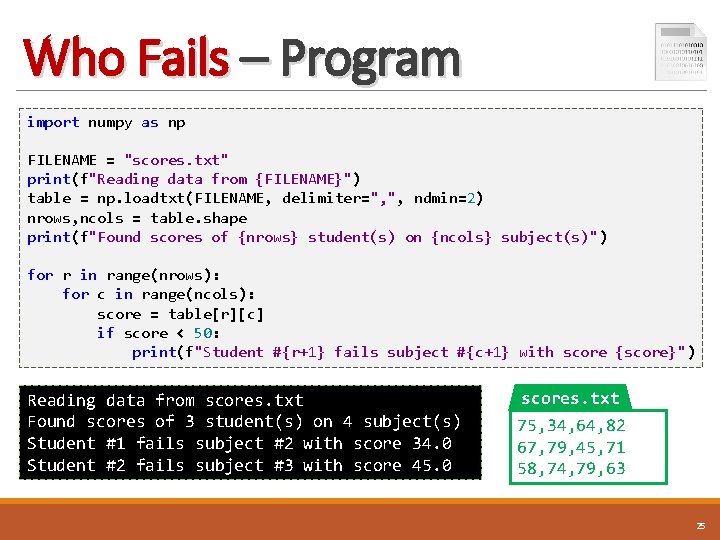
Who Fails – Program import numpy as np FILENAME = "scores. txt" print(f"Reading data from {FILENAME}") table = np. loadtxt(FILENAME, delimiter=", ", ndmin=2) nrows, ncols = table. shape print(f"Found scores of {nrows} student(s) on {ncols} subject(s)") for r in range(nrows): for c in range(ncols): score = table[r][c] if score < 50: print(f"Student #{r+1} fails subject #{c+1} with score {score}") Reading data from scores. txt Found scores of 3 student(s) on 4 subject(s) Student #1 fails subject #2 with score 34. 0 Student #2 fails subject #3 with score 45. 0 scores. txt 75, 34, 64, 82 67, 79, 45, 71 58, 74, 79, 63 25
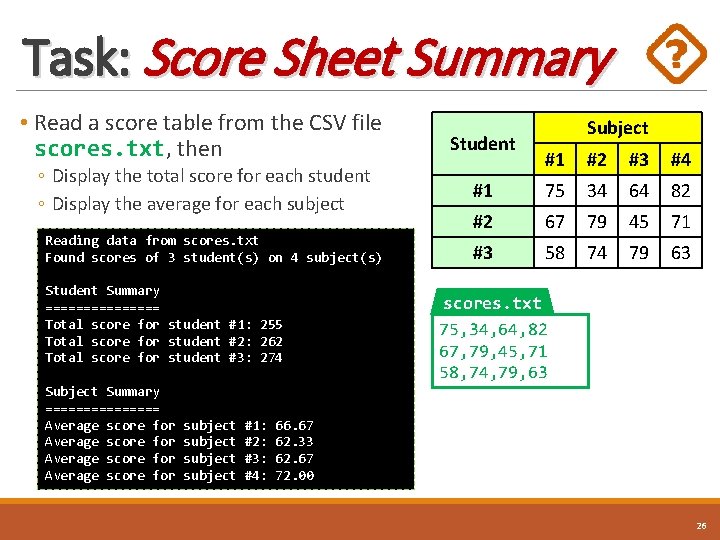
Task: Score Sheet Summary • Read a score table from the CSV file scores. txt, then Student ◦ Display the total score for each student ◦ Display the average for each subject Reading data from scores. txt Found scores of 3 student(s) on 4 subject(s) Student Summary ======== Total score for student #1: 255 Total score for student #2: 262 Total score for student #3: 274 Subject Summary ======== Average score for subject #1: #2: #3: #4: Subject #1 #2 #3 #4 #1 75 34 64 82 #2 67 79 45 71 #3 58 74 79 63 scores. txt 75, 34, 64, 82 67, 79, 45, 71 58, 74, 79, 63 66. 67 62. 33 62. 67 72. 00 26
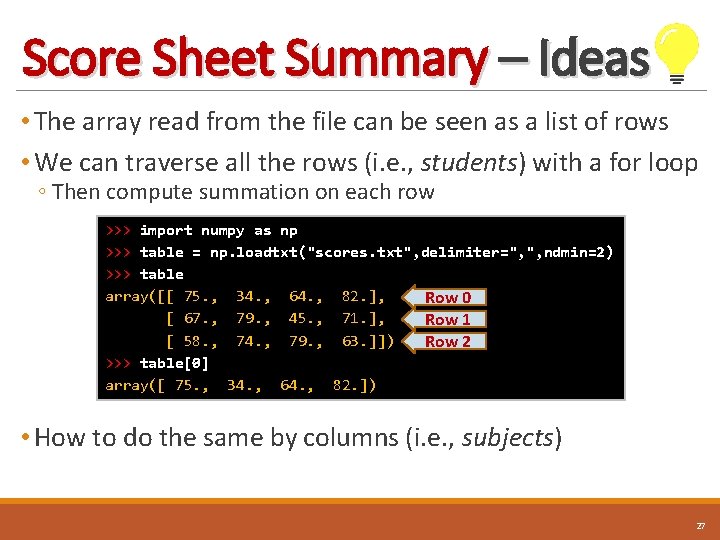
Score Sheet Summary – Ideas • The array read from the file can be seen as a list of rows • We can traverse all the rows (i. e. , students) with a for loop ◦ Then compute summation on each row >>> import numpy as np >>> table = np. loadtxt("scores. txt", delimiter=", ", ndmin=2) >>> table array([[ 75. , 34. , 64. , 82. ], Row 0 [ 67. , 79. , 45. , 71. ], Row 1 [ 58. , 74. , 79. , 63. ]]) Row 2 >>> table[0] array([ 75. , 34. , 64. , 82. ]) • How to do the same by columns (i. e. , subjects) 27
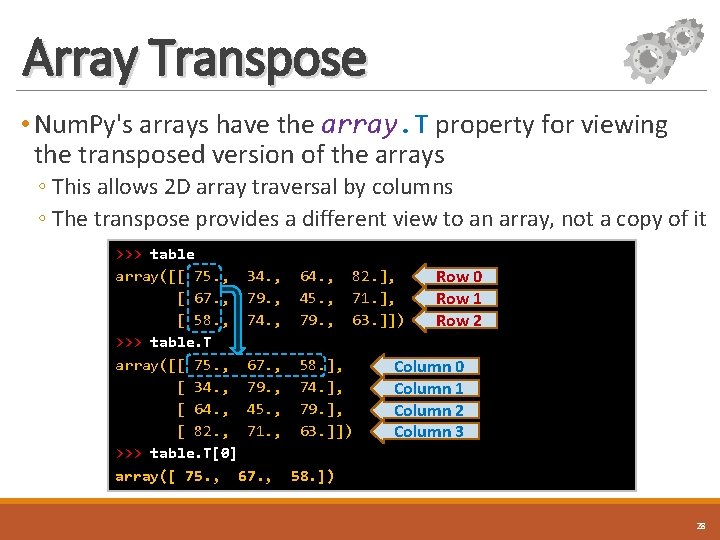
Array Transpose • Num. Py's arrays have the array. T property for viewing the transposed version of the arrays ◦ This allows 2 D array traversal by columns ◦ The transpose provides a different view to an array, not a copy of it >>> table array([[ 75. , 34. , 64. , 82. ], Row 0 [ 67. , 79. , 45. , 71. ], Row 1 [ 58. , 74. , 79. , 63. ]]) Row 2 >>> table. T array([[ 75. , 67. , 58. ], Column 0 [ 34. , 79. , 74. ], Column 1 [ 64. , 45. , 79. ], Column 2 [ 82. , 71. , 63. ]]) Column 3 >>> table. T[0] array([ 75. , 67. , 58. ]) 28
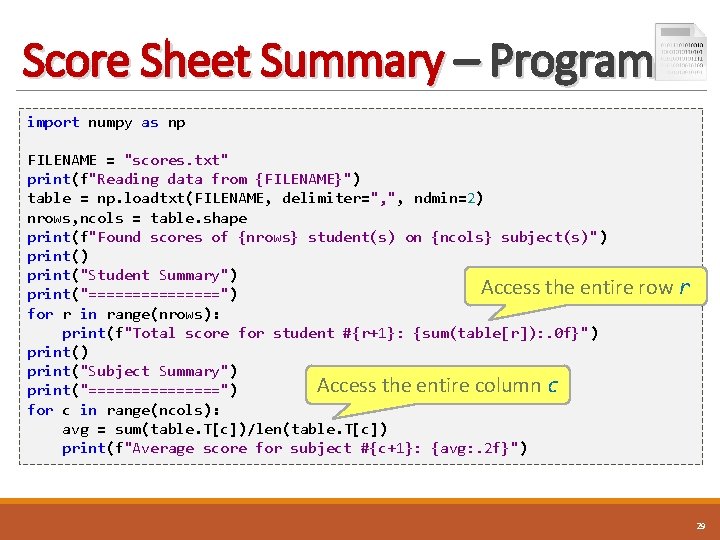
Score Sheet Summary – Program import numpy as np FILENAME = "scores. txt" print(f"Reading data from {FILENAME}") table = np. loadtxt(FILENAME, delimiter=", ", ndmin=2) nrows, ncols = table. shape print(f"Found scores of {nrows} student(s) on {ncols} subject(s)") print("Student Summary") Access the entire print("========") for r in range(nrows): print(f"Total score for student #{r+1}: {sum(table[r]): . 0 f}") print("Subject Summary") Access the entire column c print("========") for c in range(ncols): avg = sum(table. T[c])/len(table. T[c]) print(f"Average score for subject #{c+1}: {avg: . 2 f}") row r 29
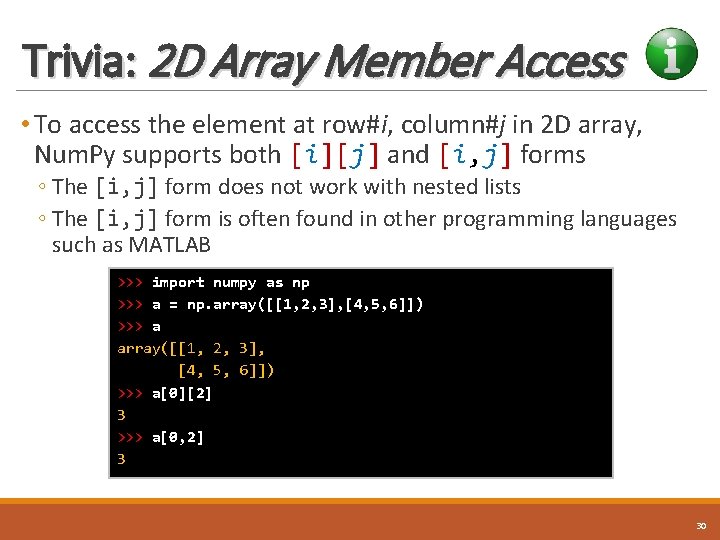
Trivia: 2 D Array Member Access • To access the element at row#i, column#j in 2 D array, Num. Py supports both [i][j] and [i, j] forms ◦ The [i, j] form does not work with nested lists ◦ The [i, j] form is often found in other programming languages such as MATLAB >>> import numpy as np >>> a = np. array([[1, 2, 3], [4, 5, 6]]) >>> a[0][2] 3 >>> a[0, 2] 3 30
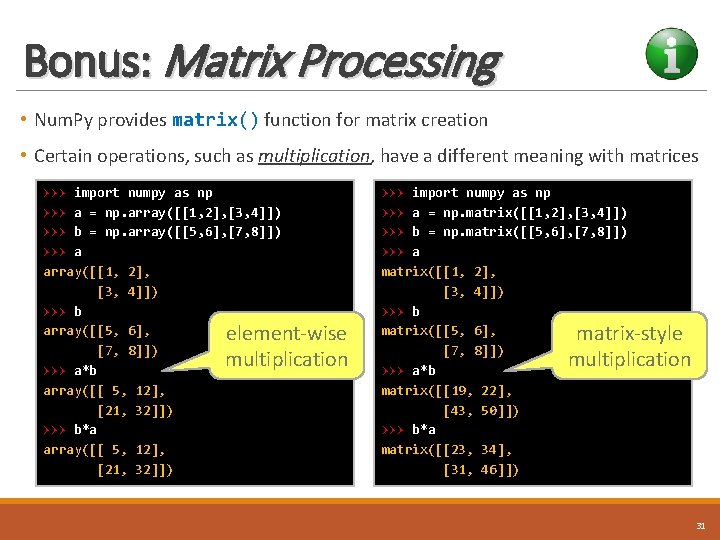
Bonus: Matrix Processing • Num. Py provides matrix() function for matrix creation • Certain operations, such as multiplication, have a different meaning with matrices >>> import numpy as np >>> a = np. array([[1, 2], [3, 4]]) >>> b = np. array([[5, 6], [7, 8]]) >>> a array([[1, 2], [3, 4]]) >>> b array([[5, 6], element-wise [7, 8]]) multiplication >>> a*b array([[ 5, 12], [21, 32]]) >>> b*a array([[ 5, 12], [21, 32]]) >>> import numpy as np >>> a = np. matrix([[1, 2], [3, 4]]) >>> b = np. matrix([[5, 6], [7, 8]]) >>> a matrix([[1, 2], [3, 4]]) >>> b matrix([[5, 6], matrix-style [7, 8]]) multiplication >>> a*b matrix([[19, 22], [43, 50]]) >>> b*a matrix([[23, 34], [31, 46]]) 31
Bonus Materials: Basic Data Visualization Numbers have an important story to tell. They rely on you to give them a clear and convincing voice. — Stephen Few — Author of “Now You See It” Image source: http: //www. affecto. com
Matplotlib Library • Matplotlib provides a rich set of data visualization tools • Like Num. Py, Matplotlib is not part of standard Python ◦ Anaconda and other scientific Python distributions come with it Images from http: //matplotlib. org 33
Using Matplotlib • Matplotlib library has many submodules, but most commonly used submodule is pyplot ◦ It provides functions similar to that of MATLAB • Pyplot can be imported using the import keyword, e. g. , import matplotlib. pyplot([1, 2, 3], [4, 5, 6]) matplotlib. pyplot. show() • By convention, the lengthy module name is renamed to plt , e. g. , import matplotlib. pyplot as plt. plot([1, 2, 3], [4, 5, 6]) plt. show() 34
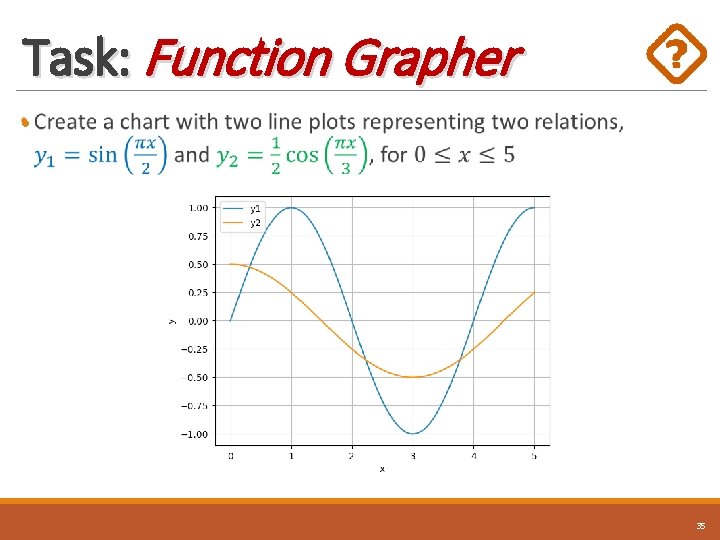
Task: Function Grapher • 35
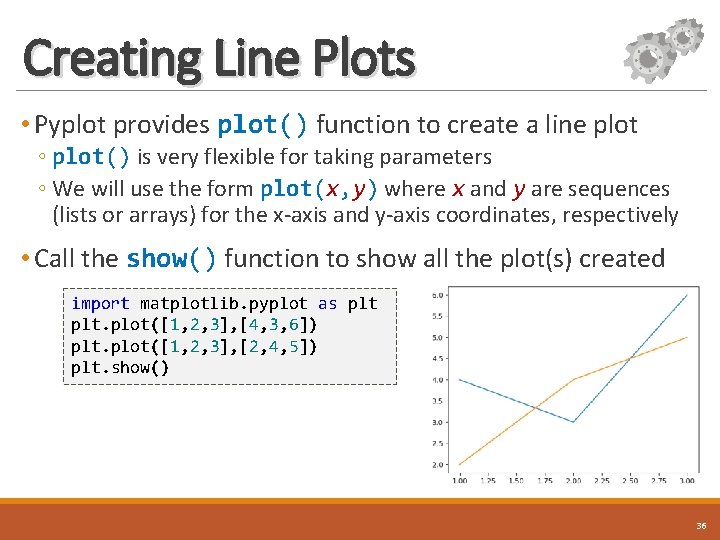
Creating Line Plots • Pyplot provides plot() function to create a line plot ◦ plot() is very flexible for taking parameters ◦ We will use the form plot(x, y) where x and y are sequences (lists or arrays) for the x-axis and y-axis coordinates, respectively • Call the show() function to show all the plot(s) created import matplotlib. pyplot as plt. plot([1, 2, 3], [4, 3, 6]) plt. plot([1, 2, 3], [2, 4, 5]) plt. show() 36
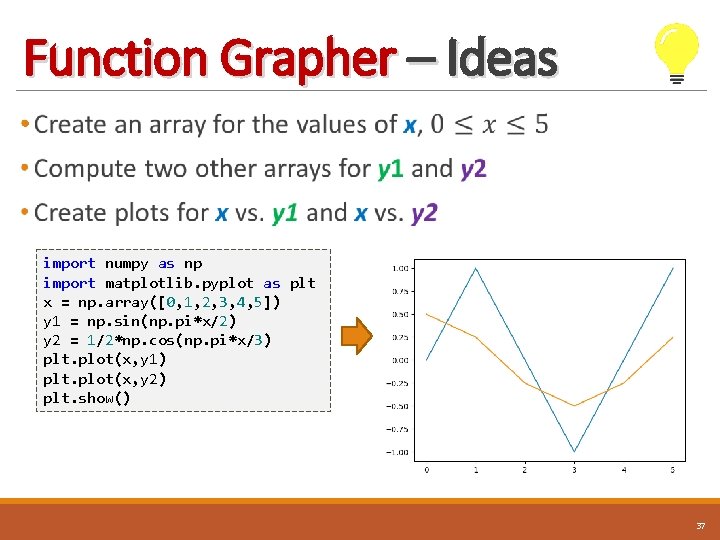
Function Grapher – Ideas • import numpy as np import matplotlib. pyplot as plt x = np. array([0, 1, 2, 3, 4, 5]) y 1 = np. sin(np. pi*x/2) y 2 = 1/2*np. cos(np. pi*x/3) plt. plot(x, y 1) plt. plot(x, y 2) plt. show() 37
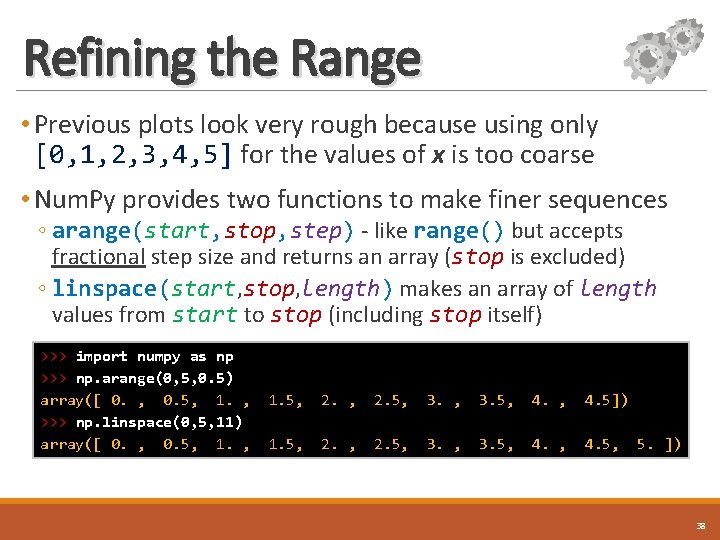
Refining the Range • Previous plots look very rough because using only [0, 1, 2, 3, 4, 5] for the values of x is too coarse • Num. Py provides two functions to make finer sequences ◦ arange(start, stop, step) - like range() but accepts fractional step size and returns an array (stop is excluded) ◦ linspace(start, stop, length) makes an array of length values from start to stop (including stop itself) >>> import numpy as np >>> np. arange(0, 5, 0. 5) array([ 0. , 0. 5, 1. , >>> np. linspace(0, 5, 11) array([ 0. , 0. 5, 1. , 1. 5, 2. 5, 3. 5, 4. 5]) 1. 5, 2. 5, 3. 5, 4. 5, 5. ]) 38
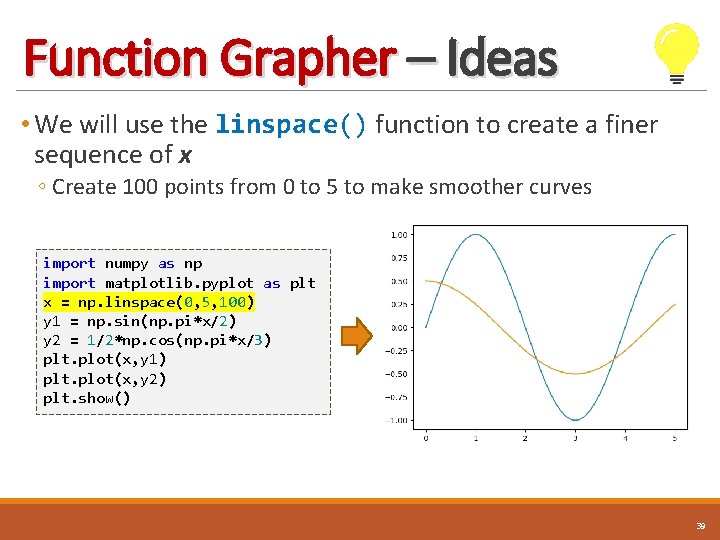
Function Grapher – Ideas • We will use the linspace() function to create a finer sequence of x ◦ Create 100 points from 0 to 5 to make smoother curves import numpy as np import matplotlib. pyplot as plt x = np. linspace(0, 5, 100) y 1 = np. sin(np. pi*x/2) y 2 = 1/2*np. cos(np. pi*x/3) plt. plot(x, y 1) plt. plot(x, y 2) plt. show() 39
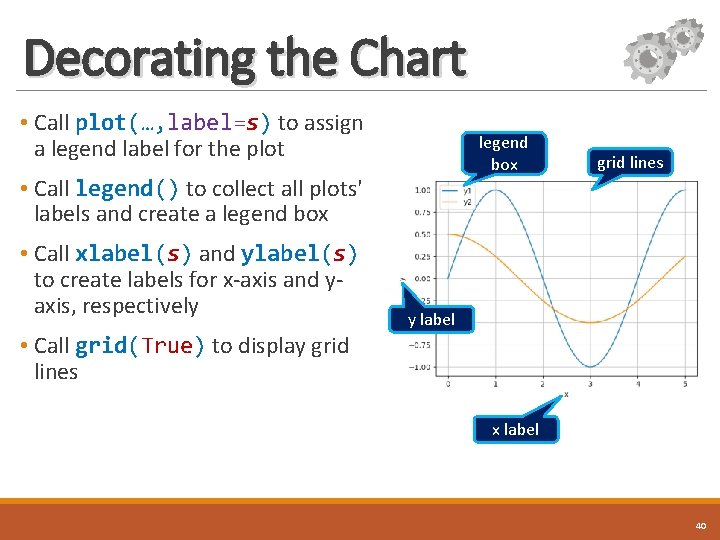
Decorating the Chart • Call plot(…, label=s) to assign a legend label for the plot legend box • Call legend() to collect all plots' labels and create a legend box • Call xlabel(s) and ylabel(s) to create labels for x-axis and yaxis, respectively grid lines y label • Call grid(True) to display grid lines x label 40
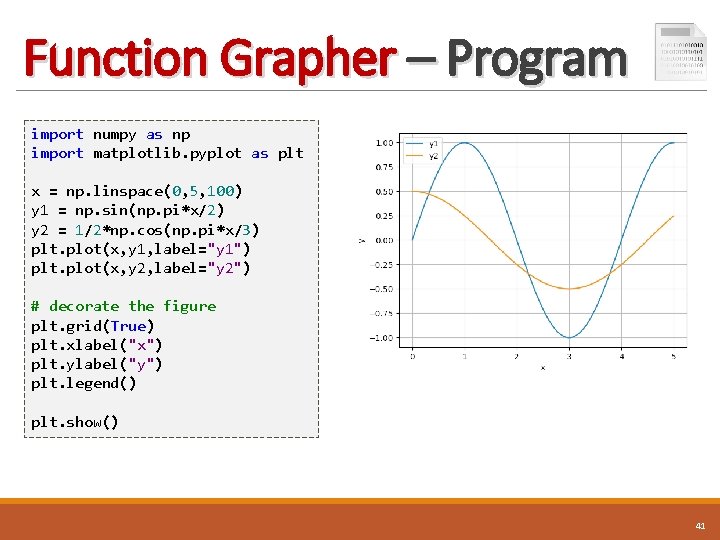
Function Grapher – Program import numpy as np import matplotlib. pyplot as plt x = np. linspace(0, 5, 100) y 1 = np. sin(np. pi*x/2) y 2 = 1/2*np. cos(np. pi*x/3) plt. plot(x, y 1, label="y 1") plt. plot(x, y 2, label="y 2") # decorate the figure plt. grid(True) plt. xlabel("x") plt. ylabel("y") plt. legend() plt. show() 41
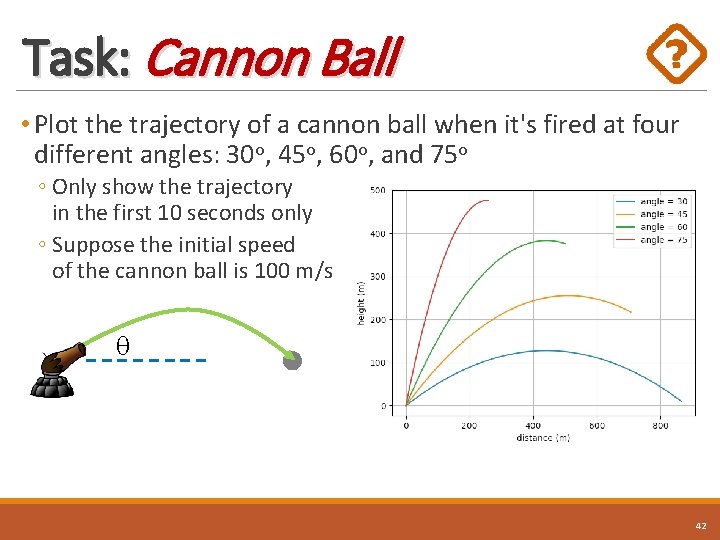
Task: Cannon Ball • Plot the trajectory of a cannon ball when it's fired at four different angles: 30 o, 45 o, 60 o, and 75 o ◦ Only show the trajectory in the first 10 seconds only ◦ Suppose the initial speed of the cannon ball is 100 m/s 42
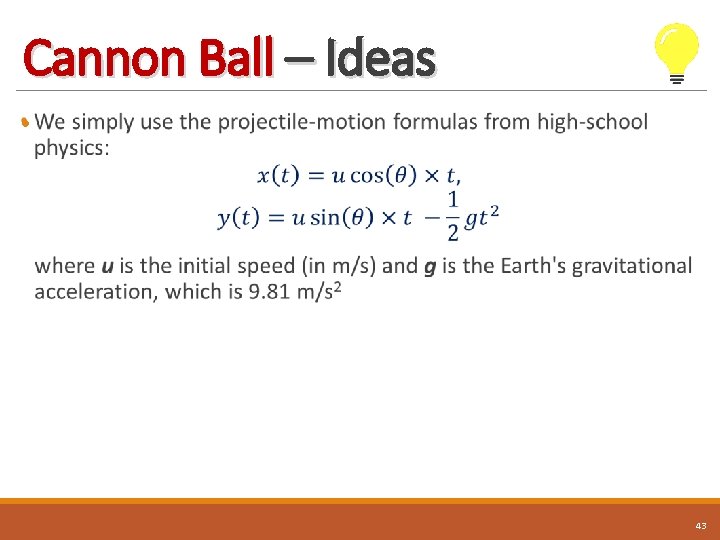
Cannon Ball – Ideas • 43
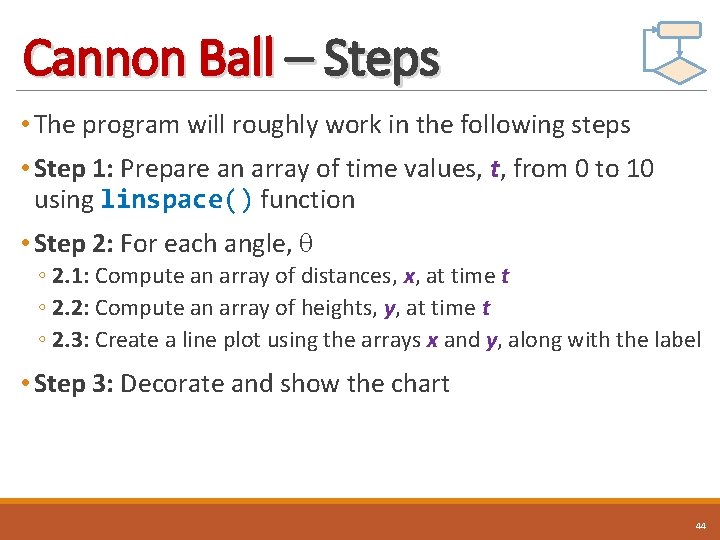
Cannon Ball – Steps • The program will roughly work in the following steps • Step 1: Prepare an array of time values, t, from 0 to 10 using linspace() function • Step 2: For each angle, ◦ 2. 1: Compute an array of distances, x, at time t ◦ 2. 2: Compute an array of heights, y, at time t ◦ 2. 3: Create a line plot using the arrays x and y, along with the label • Step 3: Decorate and show the chart 44
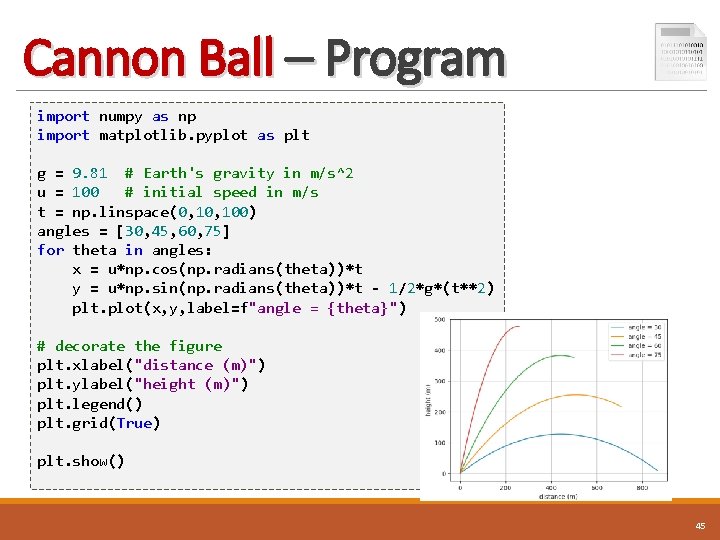
Cannon Ball – Program import numpy as np import matplotlib. pyplot as plt g = 9. 81 # Earth's gravity in m/s^2 u = 100 # initial speed in m/s t = np. linspace(0, 100) angles = [30, 45, 60, 75] for theta in angles: x = u*np. cos(np. radians(theta))*t y = u*np. sin(np. radians(theta))*t - 1/2*g*(t**2) plt. plot(x, y, label=f"angle = {theta}") # decorate the figure plt. xlabel("distance (m)") plt. ylabel("height (m)") plt. legend() plt. grid(True) plt. show() 45
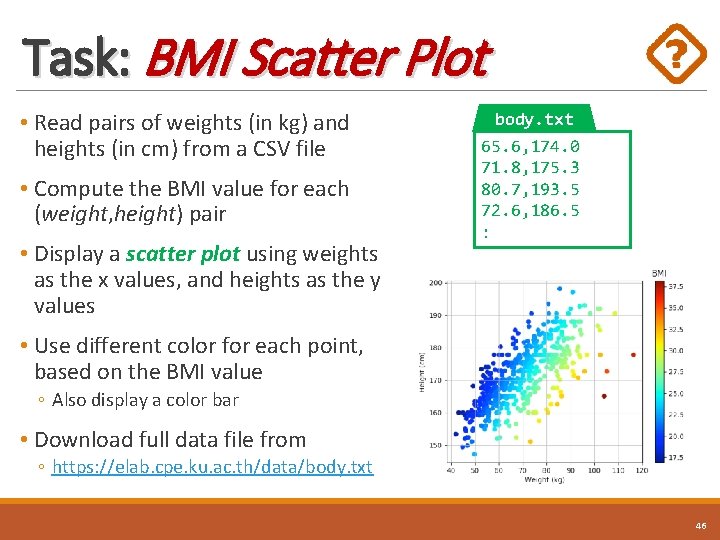
Task: BMI Scatter Plot • Read pairs of weights (in kg) and heights (in cm) from a CSV file • Compute the BMI value for each (weight, height) pair • Display a scatter plot using weights as the x values, and heights as the y values body. txt 65. 6, 174. 0 71. 8, 175. 3 80. 7, 193. 5 72. 6, 186. 5 : • Use different color for each point, based on the BMI value ◦ Also display a color bar • Download full data file from ◦ https: //elab. cpe. ku. ac. th/data/body. txt 46
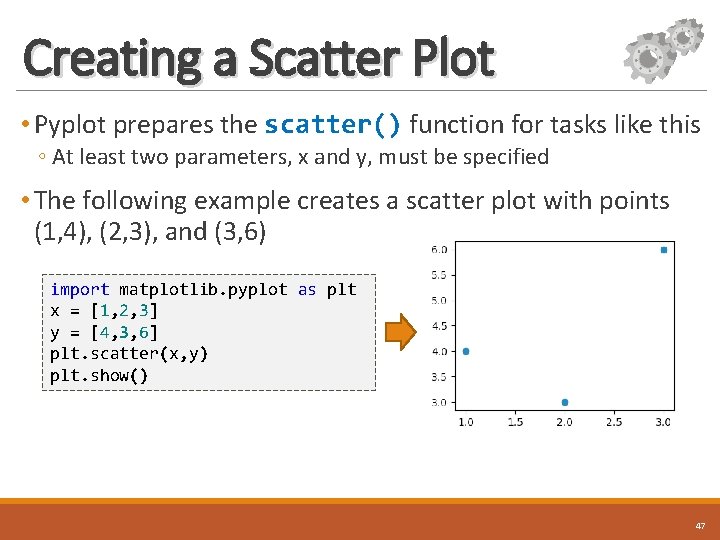
Creating a Scatter Plot • Pyplot prepares the scatter() function for tasks like this ◦ At least two parameters, x and y, must be specified • The following example creates a scatter plot with points (1, 4), (2, 3), and (3, 6) import matplotlib. pyplot as plt x = [1, 2, 3] y = [4, 3, 6] plt. scatter(x, y) plt. show() 47
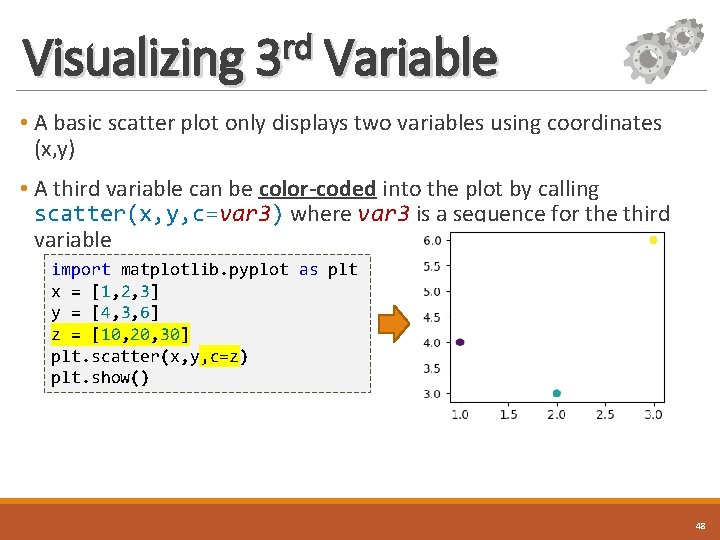
rd Visualizing 3 Variable • A basic scatter plot only displays two variables using coordinates (x, y) • A third variable can be color-coded into the plot by calling scatter(x, y, c=var 3) where var 3 is a sequence for the third variable import matplotlib. pyplot as plt x = [1, 2, 3] y = [4, 3, 6] z = [10, 20, 30] plt. scatter(x, y, c=z) plt. show() 48
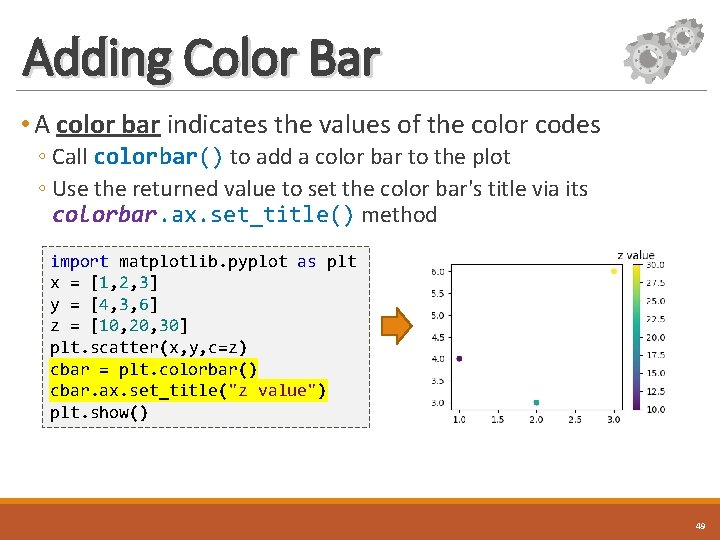
Adding Color Bar • A color bar indicates the values of the color codes ◦ Call colorbar() to add a color bar to the plot ◦ Use the returned value to set the color bar's title via its colorbar. ax. set_title() method import matplotlib. pyplot as plt x = [1, 2, 3] y = [4, 3, 6] z = [10, 20, 30] plt. scatter(x, y, c=z) cbar = plt. colorbar() cbar. ax. set_title("z value") plt. show() 49
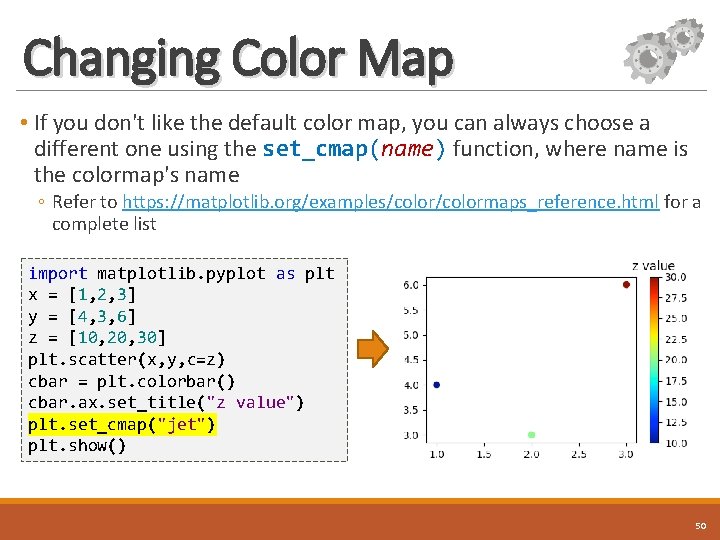
Changing Color Map • If you don't like the default color map, you can always choose a different one using the set_cmap(name) function, where name is the colormap's name ◦ Refer to https: //matplotlib. org/examples/colormaps_reference. html for a complete list import matplotlib. pyplot as plt x = [1, 2, 3] y = [4, 3, 6] z = [10, 20, 30] plt. scatter(x, y, c=z) cbar = plt. colorbar() cbar. ax. set_title("z value") plt. set_cmap("jet") plt. show() 50
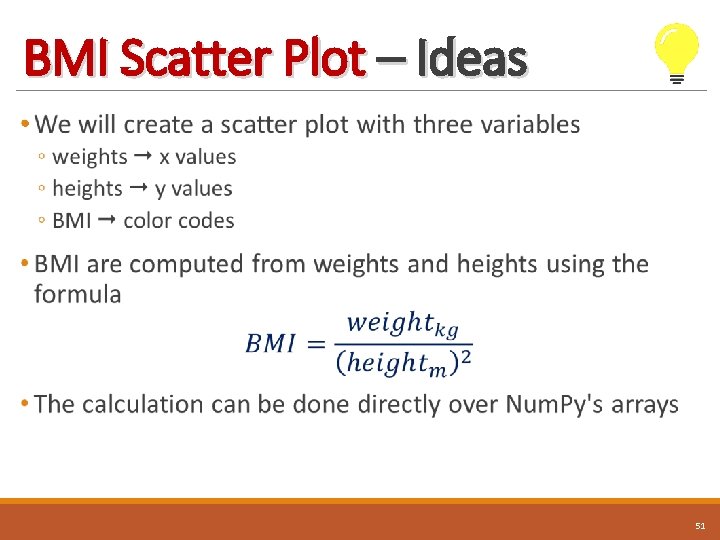
BMI Scatter Plot – Ideas • 51
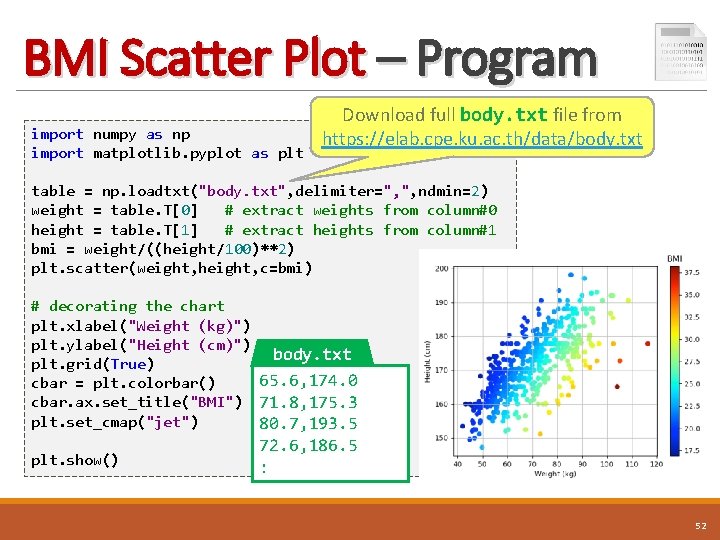
BMI Scatter Plot – Program import numpy as np import matplotlib. pyplot as plt Download full body. txt file from https: //elab. cpe. ku. ac. th/data/body. txt table = np. loadtxt("body. txt", delimiter=", ", ndmin=2) weight = table. T[0] # extract weights from column#0 height = table. T[1] # extract heights from column#1 bmi = weight/((height/100)**2) plt. scatter(weight, height, c=bmi) # decorating the chart plt. xlabel("Weight (kg)") plt. ylabel("Height (cm)") body. txt plt. grid(True) 65. 6, 174. 0 cbar = plt. colorbar() cbar. ax. set_title("BMI") 71. 8, 175. 3 plt. set_cmap("jet") 80. 7, 193. 5 plt. show() 72. 6, 186. 5 : 52
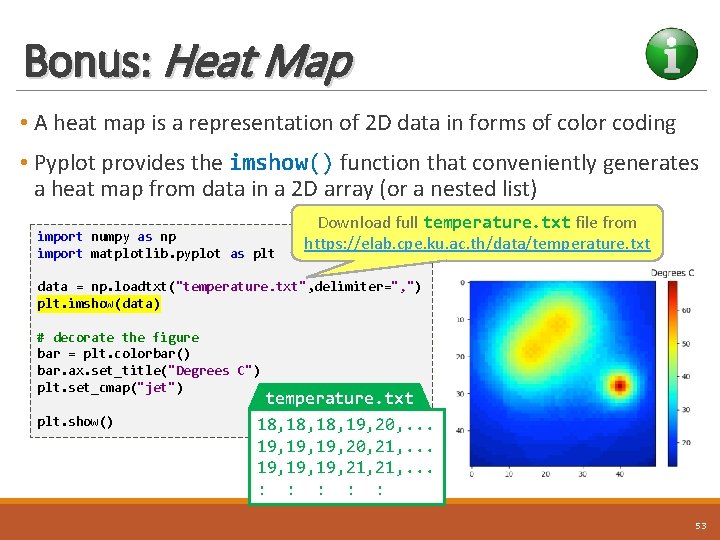
Bonus: Heat Map • A heat map is a representation of 2 D data in forms of color coding • Pyplot provides the imshow() function that conveniently generates a heat map from data in a 2 D array (or a nested list) import numpy as np import matplotlib. pyplot as plt Download full temperature. txt file from https: //elab. cpe. ku. ac. th/data/temperature. txt data = np. loadtxt("temperature. txt", delimiter=", ") plt. imshow(data) # decorate the figure bar = plt. colorbar() bar. ax. set_title("Degrees C") plt. set_cmap("jet") plt. show() temperature. txt 18, 18, 19, 20, . . . 19, 19, 20, 21, . . . 19, 19, 21, . . . : : : 53
Conclusion • Num. Py library offers the array datatype that allows processing lists of numbers all at once • Num. Py's arrays can be 1 D arrays, 2 D arrays, or even higher-dimensional arrays • Matplotlib library provides many functions for creating various kinds of visualization from data stored in arrays 54
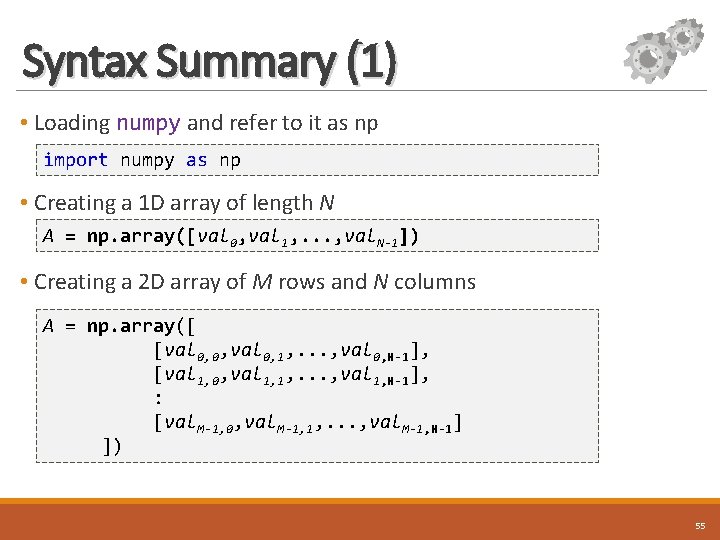
Syntax Summary (1) • Loading numpy and refer to it as np import numpy as np • Creating a 1 D array of length N A = np. array([val 0, val 1, . . . , val. N-1]) • Creating a 2 D array of M rows and N columns A = np. array([ [val 0, 0, val 0, 1, . . . , val 0, N-1], [val 1, 0, val 1, 1, . . . , val 1, N-1], : [val. M-1, 0, val. M-1, 1, . . . , val. M-1, N-1] ]) 55
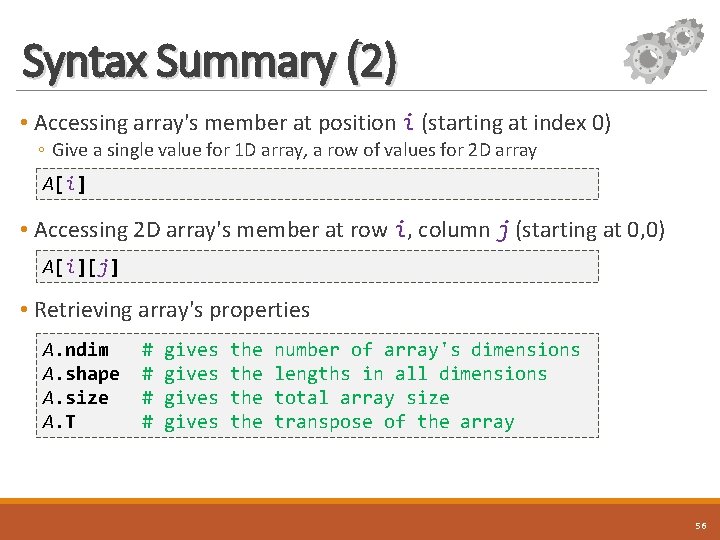
Syntax Summary (2) • Accessing array's member at position i (starting at index 0) ◦ Give a single value for 1 D array, a row of values for 2 D array A[i] • Accessing 2 D array's member at row i, column j (starting at 0, 0) A[i][j] • Retrieving array's properties A. ndim A. shape A. size A. T # # gives the the number of array's dimensions lengths in all dimensions total array size transpose of the array 56
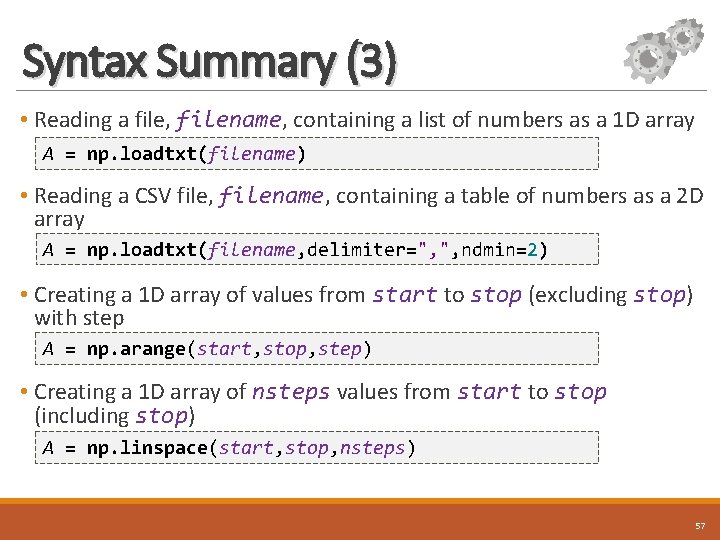
Syntax Summary (3) • Reading a file, filename, containing a list of numbers as a 1 D array A = np. loadtxt(filename) • Reading a CSV file, filename, containing a table of numbers as a 2 D array A = np. loadtxt(filename, delimiter=", ", ndmin=2) • Creating a 1 D array of values from start to stop (excluding stop) with step A = np. arange(start, stop, step) • Creating a 1 D array of nsteps values from start to stop (including stop) A = np. linspace(start, stop, nsteps) 57
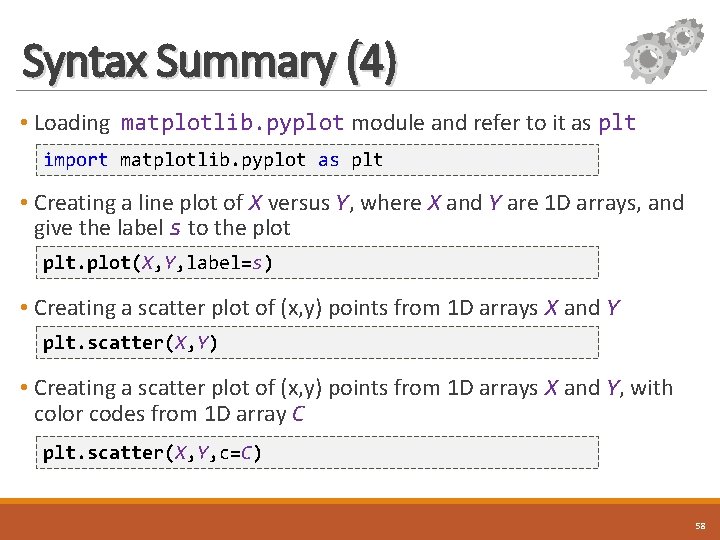
Syntax Summary (4) • Loading matplotlib. pyplot module and refer to it as plt import matplotlib. pyplot as plt • Creating a line plot of X versus Y, where X and Y are 1 D arrays, and give the label s to the plot plt. plot(X, Y, label=s) • Creating a scatter plot of (x, y) points from 1 D arrays X and Y plt. scatter(X, Y) • Creating a scatter plot of (x, y) points from 1 D arrays X and Y, with color codes from 1 D array C plt. scatter(X, Y, c=C) 58
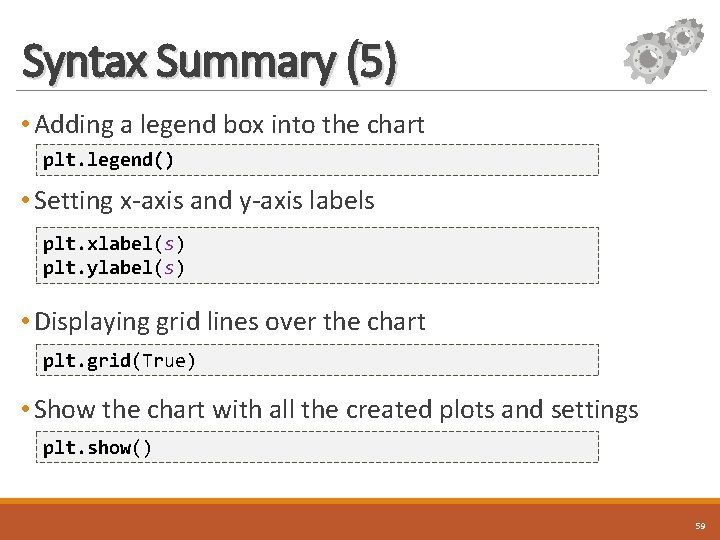
Syntax Summary (5) • Adding a legend box into the chart plt. legend() • Setting x-axis and y-axis labels plt. xlabel(s) plt. ylabel(s) • Displaying grid lines over the chart plt. grid(True) • Show the chart with all the created plots and settings plt. show() 59
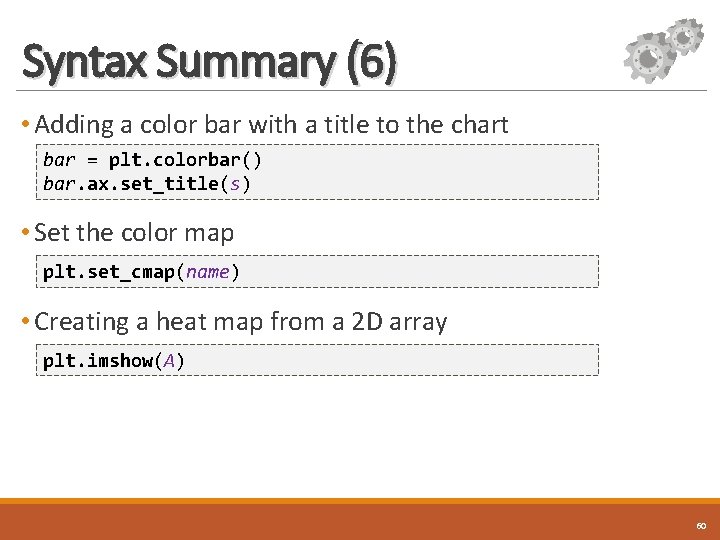
Syntax Summary (6) • Adding a color bar with a title to the chart bar = plt. colorbar() bar. ax. set_title(s) • Set the color map plt. set_cmap(name) • Creating a heat map from a 2 D array plt. imshow(A) 60
References • Num. Py User Guide ◦ https: //docs. scipy. org/doc/numpy/user/index. html • Matplotlib User's Guide ◦ https: //matplotlib. org/users/index. html • Introduction to Scientific Python: Num. Py, Sci. Py, and Matplotlib by Sven Schmit at Stanford University ◦ https: //web. stanford. edu/~schmit/cme 193/lec 5. pdf 61
Revision History • September 2016 – Supaporn Erjongmanee (supaporn. e@ku. ac. th) ◦ Prepared slides for 2 D arrays in C# • October 2017 – Chaiporn Jaikaeo (chaiporn. j@ku. ac. th) ◦ Revised for Python and added basic visualization 62
- Slides: 62