
Num Py and Sci Py Travis E Oliphant
![Introducing Num. Py Arrays SIMPLE ARRAY CREATION >>> a = array([0, 1, 2, 3])](https://slidetodoc.com/presentation_image_h/e19f8bd8fca49c0e61abcf668eed3df1/image-7.jpg "Introducing Num. Py Arrays SIMPLE ARRAY CREATION >>> a = array([0, 1, 2, 3])")

![Setting Array Elements ARRAY INDEXING >>> a[0] 0 >>> a[0] = 10 >>> a](https://slidetodoc.com/presentation_image_h/e19f8bd8fca49c0e61abcf668eed3df1/image-9.jpg "Setting Array Elements ARRAY INDEXING >>> a[0] 0 >>> a[0] = 10 >>> a")
![Multi-Dimensional Arrays MULTI-DIMENSIONAL ARRAYS >>> a = array([[ 0, 1, 2, 3], [10, 11,](https://slidetodoc.com/presentation_image_h/e19f8bd8fca49c0e61abcf668eed3df1/image-10.jpg "Multi-Dimensional Arrays MULTI-DIMENSIONAL ARRAYS >>> a = array([[ 0, 1, 2, 3], [10, 11,")
![Array Slicing SLICING WORKS MUCH LIKE STANDARD PYTHON SLICING >>> a[0, 3: 5] array([3,](https://slidetodoc.com/presentation_image_h/e19f8bd8fca49c0e61abcf668eed3df1/image-11.jpg "Array Slicing SLICING WORKS MUCH LIKE STANDARD PYTHON SLICING >>> a[0, 3: 5] array([3,")

![Array Calculation Methods SUM FUNCTION >>> a = array([[1, 2, 3], [4, 5, 6]],](https://slidetodoc.com/presentation_image_h/e19f8bd8fca49c0e61abcf668eed3df1/image-22.jpg "Array Calculation Methods SUM FUNCTION >>> a = array([[1, 2, 3], [4, 5, 6]],")
![Min/Max MIN >>> a = array([2. , 3. , 0. , 1. ]) >>>](https://slidetodoc.com/presentation_image_h/e19f8bd8fca49c0e61abcf668eed3df1/image-23.jpg "Min/Max MIN >>> a = array([2. , 3. , 0. , 1. ]) >>>")
![Statistics Array Methods MEAN >>> a = array([[1, 2, 3], [4, 5, 6]], float)](https://slidetodoc.com/presentation_image_h/e19f8bd8fca49c0e61abcf668eed3df1/image-24.jpg "Statistics Array Methods MEAN >>> a = array([[1, 2, 3], [4, 5, 6]], float)")


![Array Operations SIMPLE ARRAY MATH >>> a = array([1, 2, 3, 4]) >>> b](https://slidetodoc.com/presentation_image_h/e19f8bd8fca49c0e61abcf668eed3df1/image-30.jpg "Array Operations SIMPLE ARRAY MATH >>> a = array([1, 2, 3, 4]) >>> b")








![Bar Plots BAR PLOT >>> bar(x, sin(x), . . . width=x[1]-x[0]) HORIZONTAL BAR PLOT](https://slidetodoc.com/presentation_image_h/e19f8bd8fca49c0e61abcf668eed3df1/image-48.jpg "Bar Plots BAR PLOT >>> bar(x, sin(x), . . . width=x[1]-x[0]) HORIZONTAL BAR PLOT")

![LTI Systems >>> >>> >>> b, a = [1], [1, 6, 25] ltisys =](https://slidetodoc.com/presentation_image_h/e19f8bd8fca49c0e61abcf668eed3df1/image-62.jpg "LTI Systems >>> >>> >>> b, a = [1], [1, 6, 25] ltisys =")




![Special Functions scipy. special AIRY FUNCTIONS EXAMPLE >>> >>> z = r_[-5: 100 j]](https://slidetodoc.com/presentation_image_h/e19f8bd8fca49c0e61abcf668eed3df1/image-80.jpg "Special Functions scipy. special AIRY FUNCTIONS EXAMPLE >>> >>> z = r_[-5: 100 j]")
- Slides: 85
Num. Py (and Sci. Py) Travis E. Oliphant oliphant@enthought. com Enthought, Inc. www. enthought. com 1
What is Num. Py? • Python is a fabulous language – Easy to extend – Great syntax which encourages easy to write and maintain code – Incredibly large standard-library and third-party tools • No built-in multi-dimensional array (but it supports the needed syntax for extracting elements from one) • Num. Py provides a fast built-in object (ndarray) which is a multi-dimensional array of a homogeneous datatype.
Num. Py • Website -- http: //numpy. scipy. org/ • Offers Matlab-ish capabilities within Python • Num. Py replaces Numeric and Numarray • Initially developed by Travis Oliphant (building on the work of dozens of others) • Over 30 svn “committers” to the project • Num. Py 1. 0 released October, 2006 • ~20 K downloads/month from Sourceforge. This does not count: • • Linux distributions that include Num. Py Enthought distributions that include Num. Py Mac OS X distributions that include Num. Py Sage distributes that include Num. Py 3
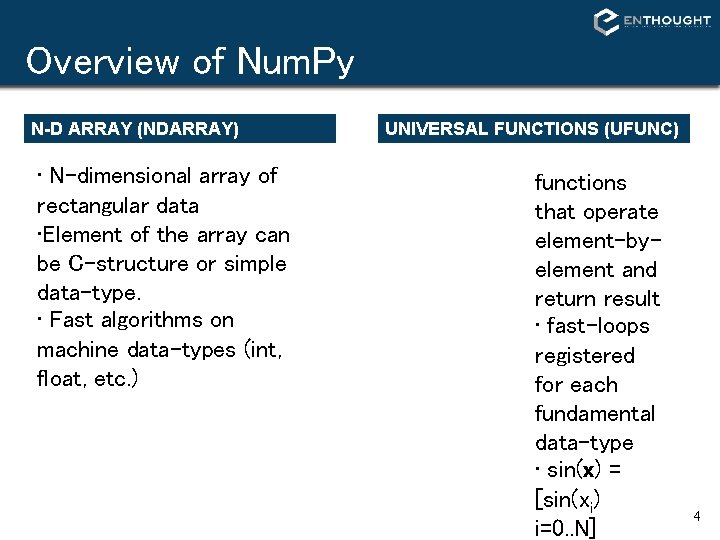
Overview of Num. Py N-D ARRAY (NDARRAY) • N-dimensional array of rectangular data • Element of the array can be C-structure or simple data-type. • Fast algorithms on machine data-types (int, float, etc. ) UNIVERSAL FUNCTIONS (UFUNC) functions that operate element-byelement and return result • fast-loops registered for each fundamental data-type • sin(x) = [sin(xi) i=0. . N] 4
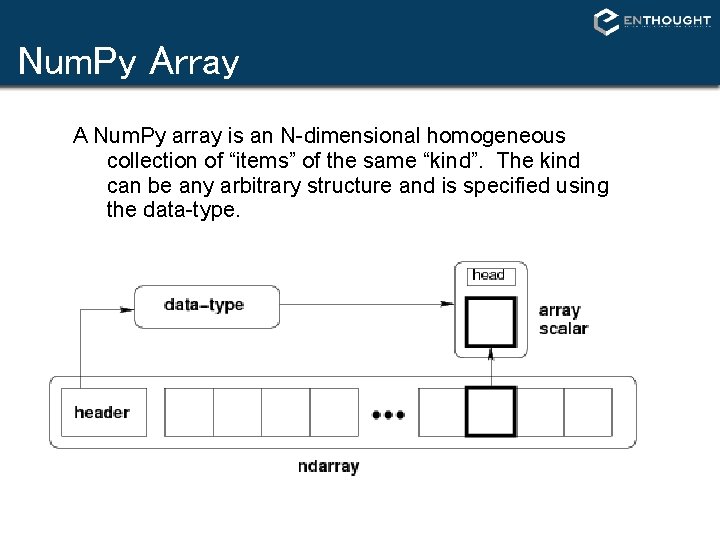
Num. Py Array A Num. Py array is an N-dimensional homogeneous collection of “items” of the same “kind”. The kind can be any arbitrary structure and is specified using the data-type.
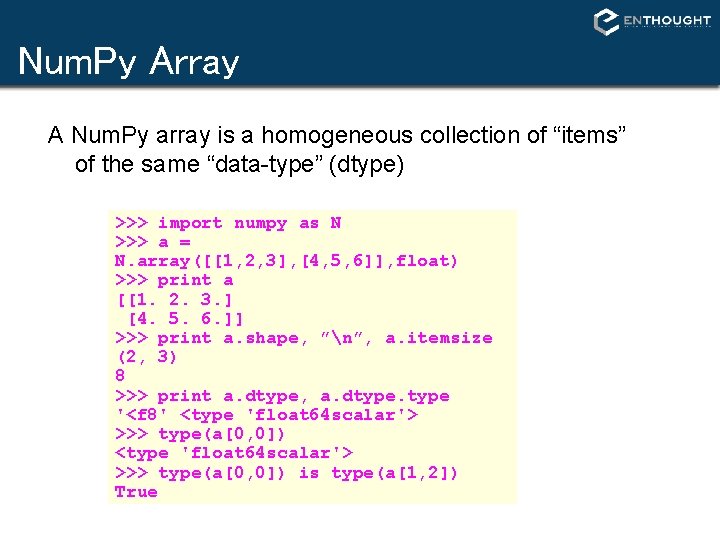
Num. Py Array A Num. Py array is a homogeneous collection of “items” of the same “data-type” (dtype) >>> import numpy as N >>> a = N. array([[1, 2, 3], [4, 5, 6]], float) >>> print a [[1. 2. 3. ] [4. 5. 6. ]] >>> print a. shape, ”n”, a. itemsize (2, 3) 8 >>> print a. dtype, a. dtype '<f 8' <type 'float 64 scalar'> >>> type(a[0, 0]) is type(a[1, 2]) True
Introducing Num. Py Arrays SIMPLE ARRAY CREATION >>> a = array([0, 1, 2, 3]) >>> a array([0, 1, 2, 3]) CHECKING THE TYPE >>> type(a) <type 'array'> NUMERIC ‘TYPE’ OF ELEMENTS >>> a. dtype(‘int 32’) BYTES PER ELEMENT >>> a. itemsize # per element 4 ARRAY SHAPE # shape returns a tuple # listing the length of the # array along each dimension. >>> a. shape (4, ) >>> shape(a) (4, ) ARRAY SIZE # size reports the entire # number of elements in an # array. >>> a. size 4 >>> size(a) 4 7
Introducing Num. Py Arrays BYTES OF MEMORY USED CONVERSION TO LIST # returns the number of bytes # used by the data portion of # the array. >>> a. nbytes 12 # convert a numpy array to a # python list. >>> a. tolist() [0, 1, 2, 3] NUMBER OF DIMENSIONS >>> a. ndim 1 # For 1 D arrays, list also # works equivalently, but # is slower. >>> list(a) [0, 1, 2, 3] ARRAY COPY # create a copy of the array >>> b = a. copy() >>> b array([0, 1, 2, 3]) 8
Setting Array Elements ARRAY INDEXING >>> a[0] 0 >>> a[0] = 10 >>> a [10, 1, 2, 3] FILL # set all values in an array. >>> a. fill(0) >>> a [0, 0, 0, 0] # This also works, but may # be slower. >>> a[: ] = 1 >>> a [1, 1, 1, 1] BEWARE OF TYPE COERSION >>> a. dtype('int 32') # assigning a float to into # an int 32 array will # truncate decimal part. >>> a[0] = 10. 6 >>> a [10, 1, 2, 3] # fill has the same behavior >>> a. fill(-4. 8) >>> a [-4, -4, -4] 9
Multi-Dimensional Arrays MULTI-DIMENSIONAL ARRAYS >>> a = array([[ 0, 1, 2, 3], [10, 11, 12, 13]]) >>> a array([[ 0, 1, 2, 3], [10, 11, 12, 13]]) NUMBER OF DIMENSIONS >>> a. ndims 2 (ROWS, COLUMNS) GET/SET ELEMENTS >>> a[1, 3] 13 column >>> (2, >>> a[1, 3] = -1 >>> a array([[ 0, 1, 2, 3], [10, 11, 12, -1]]) a. shape 4) shape(a) 4) ELEMENT COUNT >>> a. size 8 >>> size(a) 8 row ADDRESS FIRST ROW USINGLE INDEX >>> a[1] array([10, 11, 12, -1]) 10
Array Slicing SLICING WORKS MUCH LIKE STANDARD PYTHON SLICING >>> a[0, 3: 5] array([3, 4]) >>> a[4: , 4: ] array([[44, 45], [54, 55]]) >>> a[: , 2] array([2, 12, 22, 32, 42, 52]) STRIDES ARE ALSO POSSIBLE >>> a[2: : 2, : : 2] array([[20, 22, 24], [40, 42, 44]]) 11
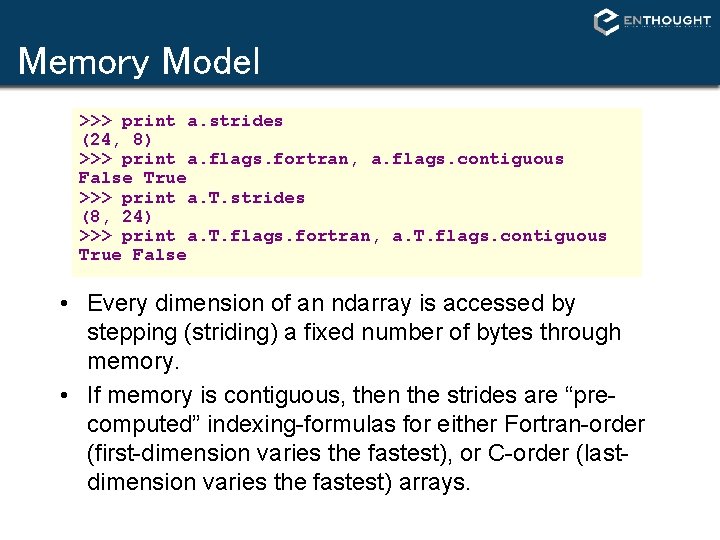
Memory Model >>> print a. strides (24, 8) >>> print a. flags. fortran, a. flags. contiguous False True >>> print a. T. strides (8, 24) >>> print a. T. flags. fortran, a. T. flags. contiguous True False • Every dimension of an ndarray is accessed by stepping (striding) a fixed number of bytes through memory. • If memory is contiguous, then the strides are “precomputed” indexing-formulas for either Fortran-order (first-dimension varies the fastest), or C-order (lastdimension varies the fastest) arrays.
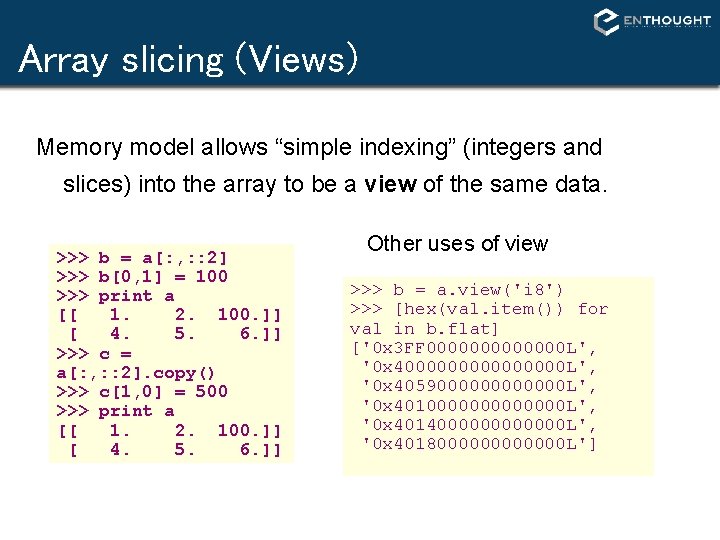
Array slicing (Views) Memory model allows “simple indexing” (integers and slices) into the array to be a view of the same data. >>> b = a[: , : : 2] >>> b[0, 1] = 100 >>> print a [[ 1. 2. 100. ]] [ 4. 5. 6. ]] >>> c = a[: , : : 2]. copy() >>> c[1, 0] = 500 >>> print a [[ 1. 2. 100. ]] [ 4. 5. 6. ]] Other uses of view >>> b = a. view('i 8') >>> [hex(val. item()) for val in b. flat] ['0 x 3 FF 0000000 L', '0 x 400000000 L', '0 x 4059000000 L', '0 x 4010000000 L', '0 x 4014000000 L', '0 x 4018000000 L']
Slices Are References Slices are references to memory in original array. Changing values in a slice also changes the original array. >>> a = array((0, 1, 2, 3, 4)) # create a slice containing only the # last element of a >>> b = a[2: 4] >>> b[0] = 10 # changing b changed a! >>> a array([ 1, 2, 10, 3, 4]) 14
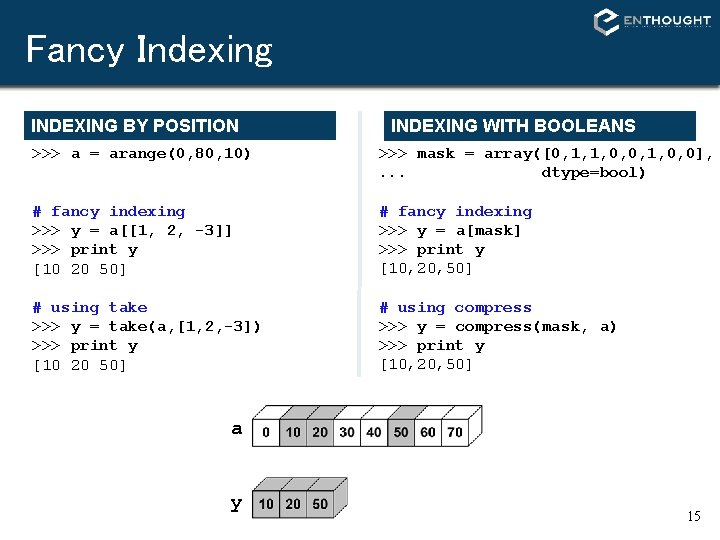
Fancy Indexing INDEXING BY POSITION INDEXING WITH BOOLEANS >>> a = arange(0, 80, 10) >>> mask = array([0, 1, 1, 0, 0], . . . dtype=bool) # fancy indexing >>> y = a[[1, 2, -3]] >>> print y [10 20 50] # fancy indexing >>> y = a[mask] >>> print y [10, 20, 50] # using take >>> y = take(a, [1, 2, -3]) >>> print y [10 20 50] # using compress >>> y = compress(mask, a) >>> print y [10, 20, 50] a y 15
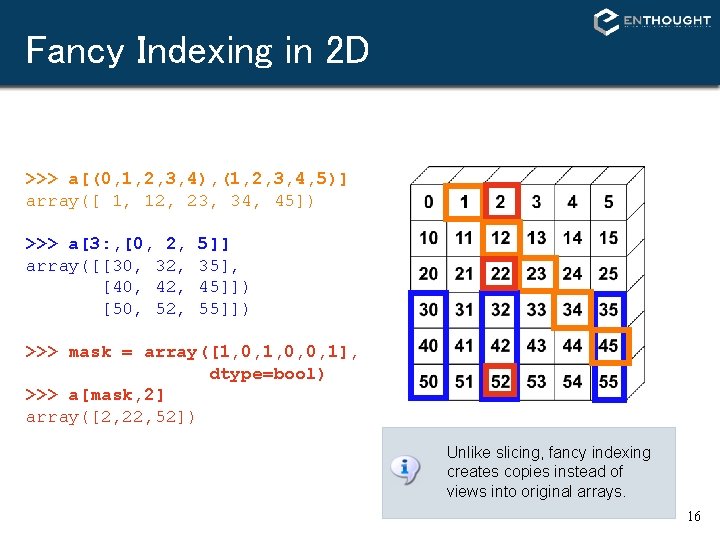
Fancy Indexing in 2 D >>> a[(0, 1, 2, 3, 4), (1, 2, 3, 4, 5)] array([ 1, 12, 23, 34, 45]) >>> a[3: , [0, 2, array([[30, 32, [40, 42, [50, 52, 5]] 35], 45]]) 55]]) >>> mask = array([1, 0, 0, 1], dtype=bool) >>> a[mask, 2] array([2, 22, 52]) Unlike slicing, fancy indexing creates copies instead of views into original arrays. 16
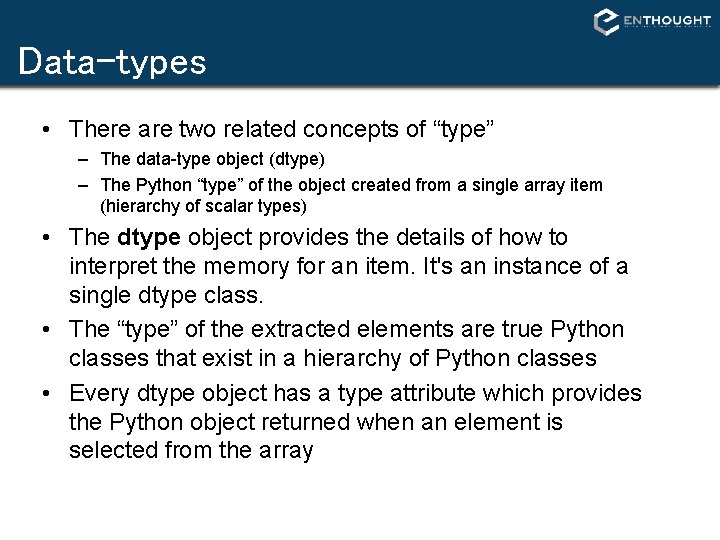
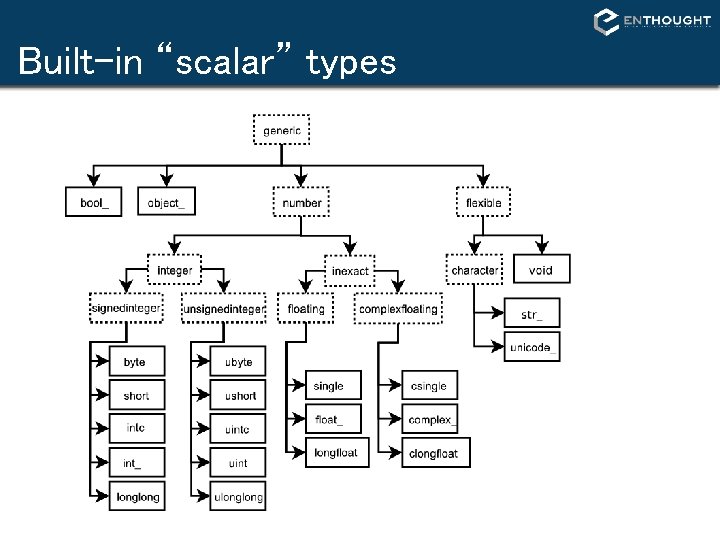
Data-types • There are two related concepts of “type” – The data-type object (dtype) – The Python “type” of the object created from a single array item (hierarchy of scalar types) • The dtype object provides the details of how to interpret the memory for an item. It's an instance of a single dtype class. • The “type” of the extracted elements are true Python classes that exist in a hierarchy of Python classes • Every dtype object has a type attribute which provides the Python object returned when an element is selected from the array
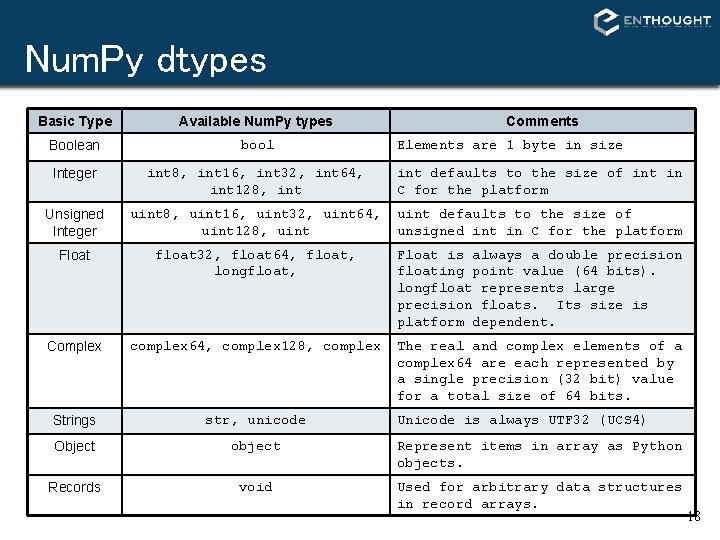
Num. Py dtypes Basic Type Available Num. Py types Comments Boolean bool Integer int 8, int 16, int 32, int 64, int 128, int defaults to the size of int in C for the platform Unsigned Integer uint 8, uint 16, uint 32, uint 64, uint 128, uint defaults to the size of unsigned int in C for the platform Float float 32, float 64, float, longfloat, Float is always a double precision floating point value (64 bits). longfloat represents large precision floats. Its size is platform dependent. Complex complex 64, complex 128, complex The real and complex elements of a complex 64 are each represented by a single precision (32 bit) value for a total size of 64 bits. Strings str, unicode Object object Represent items in array as Python objects. Records void Used for arbitrary data structures in record arrays. Elements are 1 byte in size Unicode is always UTF 32 (UCS 4) 18
Built-in “scalar” types
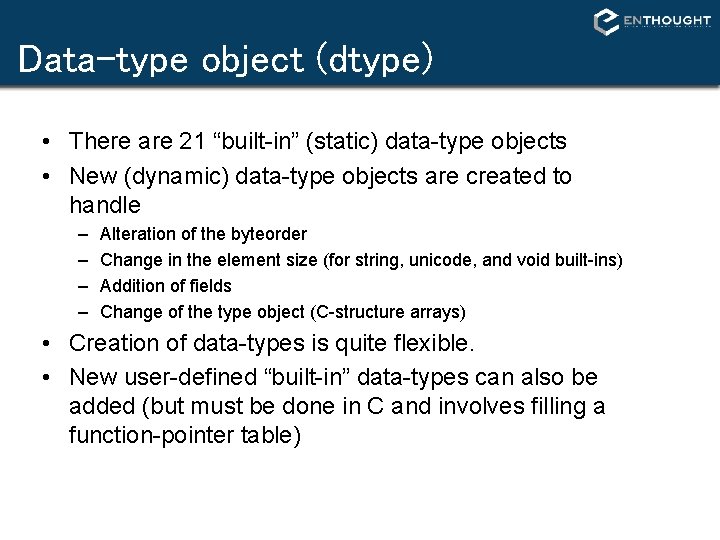
Data-type object (dtype) • There are 21 “built-in” (static) data-type objects • New (dynamic) data-type objects are created to handle – – Alteration of the byteorder Change in the element size (for string, unicode, and void built-ins) Addition of fields Change of the type object (C-structure arrays) • Creation of data-types is quite flexible. • New user-defined “built-in” data-types can also be added (but must be done in C and involves filling a function-pointer table)
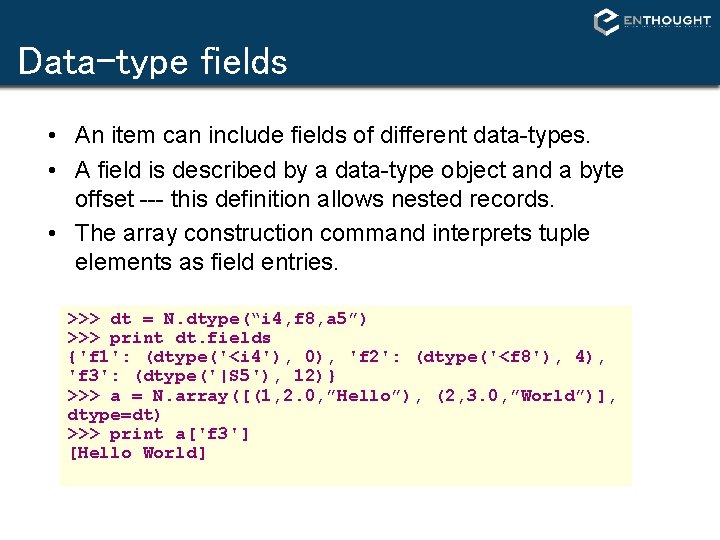
Data-type fields • An item can include fields of different data-types. • A field is described by a data-type object and a byte offset --- this definition allows nested records. • The array construction command interprets tuple elements as field entries. >>> dt = N. dtype(“i 4, f 8, a 5”) >>> print dt. fields {'f 1': (dtype('<i 4'), 0), 'f 2': (dtype('<f 8'), 4), 'f 3': (dtype('|S 5'), 12)} >>> a = N. array([(1, 2. 0, ”Hello”), (2, 3. 0, ”World”)], dtype=dt) >>> print a['f 3'] [Hello World]
Array Calculation Methods SUM FUNCTION >>> a = array([[1, 2, 3], [4, 5, 6]], float) # Sum defaults to summing all # *all* array values. >>> sum(a) 21. # supply the keyword axis to # sum along the 0 th axis. >>> sum(a, axis=0) array([5. , 7. , 9. ]) # supply the keyword axis to # sum along the last axis. >>> sum(a, axis=-1) array([6. , 15. ]) SUM ARRAY METHOD # The a. sum() defaults to # summing *all* array values >>> a. sum() 21. # Supply an axis argument to # sum along a specific axis. >>> a. sum(axis=0) array([5. , 7. , 9. ]) PRODUCT # product along columns. >>> a. prod(axis=0) array([ 4. , 10. , 18. ]) # functional form. >>> prod(a, axis=0) array([ 4. , 10. , 18. ]) 22
Min/Max MIN >>> a = array([2. , 3. , 0. , 1. ]) >>> a. min(axis=0) 0. # use Numpy’s amin() instead # of Python’s builtin min() # for speed operations on # multi-dimensional arrays. >>> amin(a, axis=0) 0. MAX >>> a = array([2. , 1. , 0. , 3. ]) >>> a. max(axis=0) 3. ARGMIN # Find index of minimum value. >>> a. argmin(axis=0) 2 # functional form >>> argmin(a, axis=0) 2 ARGMAX # Find index of maximum value. >>> a. argmax(axis=0) 1 # functional form >>> argmax(a, axis=0) 1 # functional form >>> amax(a, axis=0) 3. 23
Statistics Array Methods MEAN >>> a = array([[1, 2, 3], [4, 5, 6]], float) # mean value of each column >>> a. mean(axis=0) array([ 2. 5, 3. 5, 4. 5]) >>> mean(a, axis=0) array([ 2. 5, 3. 5, 4. 5]) >>> average(a, axis=0) array([ 2. 5, 3. 5, 4. 5]) STANDARD DEV. /VARIANCE # Standard Deviation >>> a. std(axis=0) array([ 1. 5, 1. 5]) # Variance >>> a. var(axis=0) array([2. 25, 2. 25]) >>> var(a, axis=0) array([2. 25, 2. 25]) # average can also calculate # a weighted average >>> average(a, weights=[1, 2], . . . axis=0) array([ 3. , 4. , 5. ]) 24
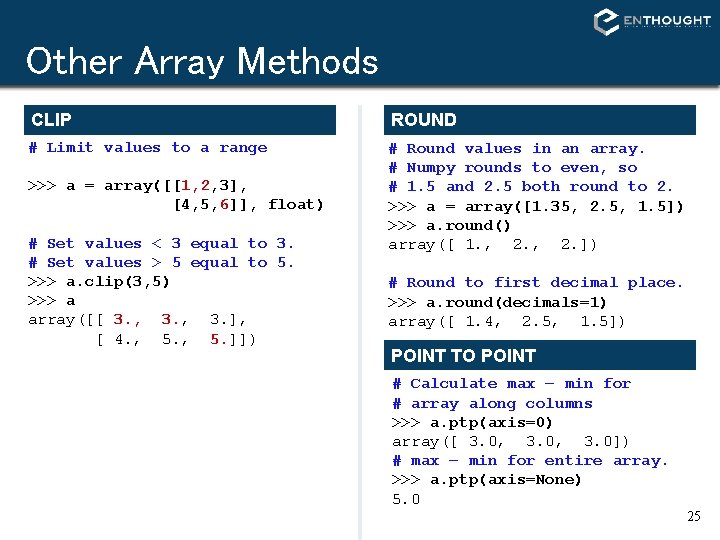
Other Array Methods CLIP ROUND # Limit values to a range # Round values in an array. # Numpy rounds to even, so # 1. 5 and 2. 5 both round to 2. >>> a = array([1. 35, 2. 5, 1. 5]) >>> a. round() array([ 1. , 2. ]) >>> a = array([[1, 2, 3], [4, 5, 6]], float) # Set values < 3 equal to 3. # Set values > 5 equal to 5. >>> a. clip(3, 5) >>> a array([[ 3. , 3. ], [ 4. , 5. ]]) # Round to first decimal place. >>> a. round(decimals=1) array([ 1. 4, 2. 5, 1. 5]) POINT TO POINT # Calculate max – min for # array along columns >>> a. ptp(axis=0) array([ 3. 0, 3. 0]) # max – min for entire array. >>> a. ptp(axis=None) 5. 0 25
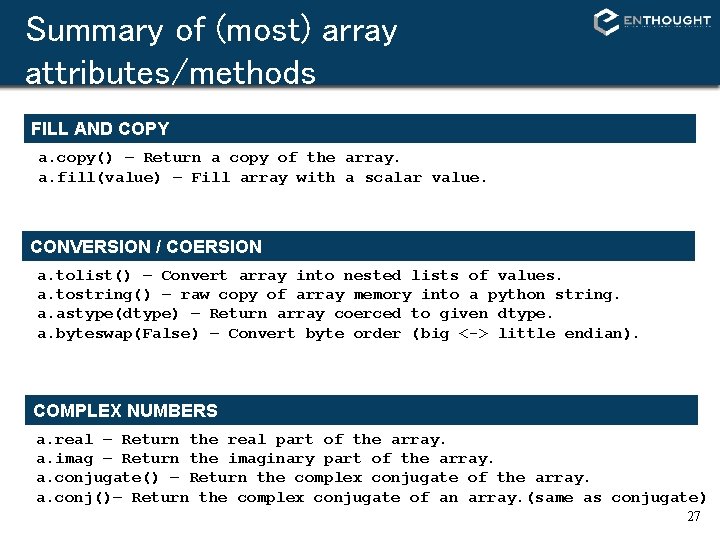
Summary of (most) array attributes/methods BASIC ATTRIBUTES a. dtype – Numerical type of array elements. float 32, uint 8, etc. a. shape – Shape of the array. (m, n, o, . . . ) a. size – Number of elements in entire array. a. itemsize – Number of bytes used by a single element in the array. a. nbytes – Number of bytes used by entire array (data only). a. ndim – Number of dimensions in the array. SHAPE OPERATIONS a. flat – An iterator to step through array as if it is 1 D. a. flatten() – Returns a 1 D copy of a multi-dimensional array. a. ravel() – Same as flatten(), but returns a ‘view’ if possible. a. resize(new_size) – Change the size/shape of an array in-place. a. swapaxes(axis 1, axis 2) – Swap the order of two axes in an array. a. transpose(*axes) – Swap the order of any number of array axes. a. T – Shorthand for a. transpose() a. squeeze() – Remove any length=1 dimensions from an array. 26
Summary of (most) array attributes/methods FILL AND COPY a. copy() – Return a copy of the array. a. fill(value) – Fill array with a scalar value. CONVERSION / COERSION a. tolist() – Convert array into nested lists of values. a. tostring() – raw copy of array memory into a python string. a. astype(dtype) – Return array coerced to given dtype. a. byteswap(False) – Convert byte order (big <-> little endian). COMPLEX NUMBERS a. real – Return the real part of the array. a. imag – Return the imaginary part of the array. a. conjugate() – Return the complex conjugate of the array. a. conj()– Return the complex conjugate of an array. (same as conjugate) 27
Summary of (most) array attributes/methods SAVING a. dump(file) – Store a binary array data out to the given file. a. dumps() – returns the binary pickle of the array as a string. a. tofile(fid, sep="", format="%s") Formatted ascii output to file. SEARCH / SORT a. nonzero() – Return indices for all non-zero elements in a. a. sort(axis=-1) – Inplace sort of array elements along axis. a. argsort(axis=-1) – Return indices for element sort order along axis. a. searchsorted(b) – Return index where elements from b would go in a. ELEMENT MATH OPERATIONS a. clip(low, high) – Limit values in array to the specified range. a. round(decimals=0) – Round to the specified number of digits. a. cumsum(axis=None) – Cumulative sum of elements along axis. a. cumprod(axis=None) – Cumulative product of elements along axis. 28
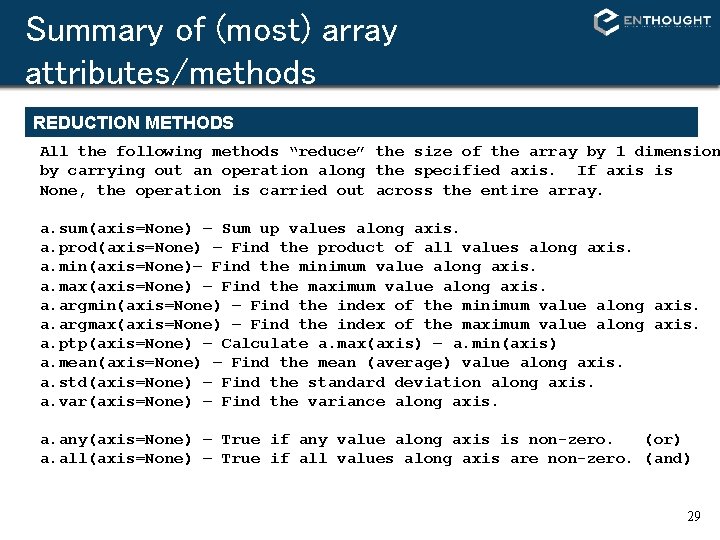
Summary of (most) array attributes/methods REDUCTION METHODS All the following methods “reduce” the size of the array by 1 dimension by carrying out an operation along the specified axis. If axis is None, the operation is carried out across the entire array. a. sum(axis=None) – Sum up values along axis. a. prod(axis=None) – Find the product of all values along axis. a. min(axis=None)– Find the minimum value along axis. a. max(axis=None) – Find the maximum value along axis. a. argmin(axis=None) – Find the index of the minimum value along axis. a. argmax(axis=None) – Find the index of the maximum value along axis. a. ptp(axis=None) – Calculate a. max(axis) – a. min(axis) a. mean(axis=None) – Find the mean (average) value along axis. a. std(axis=None) – Find the standard deviation along axis. a. var(axis=None) – Find the variance along axis. a. any(axis=None) – True if any value along axis is non-zero. (or) a. all(axis=None) – True if all values along axis are non-zero. (and) 29
Array Operations SIMPLE ARRAY MATH >>> a = array([1, 2, 3, 4]) >>> b = array([2, 3, 4, 5]) >>> a + b array([3, 5, 7, 9]) Numpy defines the following constants: pi = 3. 14159265359 e = 2. 7182846 MATH FUNCTIONS # Create array from 0 to 10 >>> x = arange(11. ) # multiply entire array by # scalar value >>> a = (2*pi)/10. >>> a 0. 62831853071795862 >>> a*x array([ 0. , 0. 628, …, 6. 283]) # inplace operations >>> x *= a >>> x array([ 0. , 0. 628, …, 6. 283]) # apply functions to array. >>> y = sin(x) 30
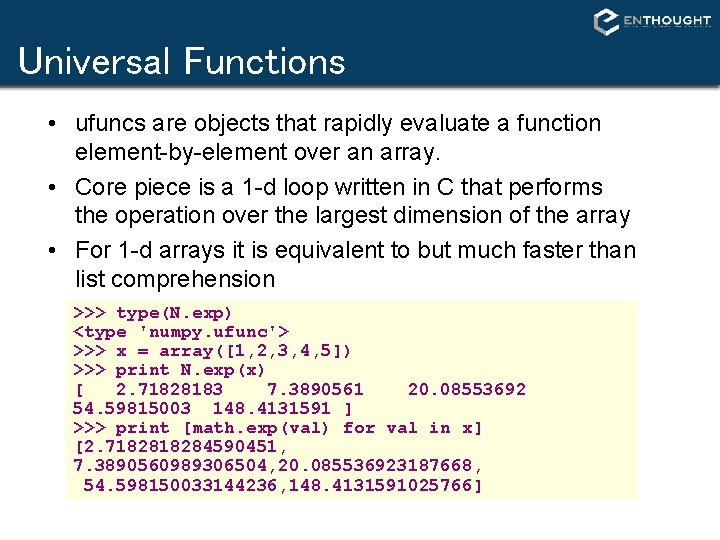
Universal Functions • ufuncs are objects that rapidly evaluate a function element-by-element over an array. • Core piece is a 1 -d loop written in C that performs the operation over the largest dimension of the array • For 1 -d arrays it is equivalent to but much faster than list comprehension >>> type(N. exp) <type 'numpy. ufunc'> >>> x = array([1, 2, 3, 4, 5]) >>> print N. exp(x) [ 2. 71828183 7. 3890561 20. 08553692 54. 59815003 148. 4131591 ] >>> print [math. exp(val) for val in x] [2. 718284590451, 7. 3890560989306504, 20. 085536923187668, 54. 598150033144236, 148. 4131591025766]
Mathematic Binary Operators a + b a - b a % b add(a, b) subtract(a, b) remainder(a, b) MULTIPLY BY A SCALAR >>> a = array((1, 2)) >>> a*3. array([3. , 6. ]) ELEMENT BY ELEMENT ADDITION >>> a = array([1, 2]) >>> b = array([3, 4]) >>> a + b array([4, 6]) a * b a / b a ** b multiply(a, b) divide(a, b) power(a, b) ADDITION USING AN OPERATOR FUNCTION >>> add(a, b) array([4, 6]) IN PLACE OPERATION # Overwrite contents of a. # Saves array creation # overhead >>> add(a, b, a) # a += b array([4, 6]) >>> a array([4, 6]) 32
Comparison and Logical Operators equal (==) greater_equal (>=) logical_and logical_not not_equal (!=) less (<) logical_or greater (>) less_equal (<=) logical_xor 2 D EXAMPLE >>> a = array(((1, 2, 3, 4), (2, 3, 4, 5))) >>> b = array(((1, 2, 5, 4), (1, 3, 4, 5))) >>> a == b array([[True, False, True], [False, True, True]]) # functional equivalent >>> equal(a, b) array([[True, False, True], [False, True, True]]) 33
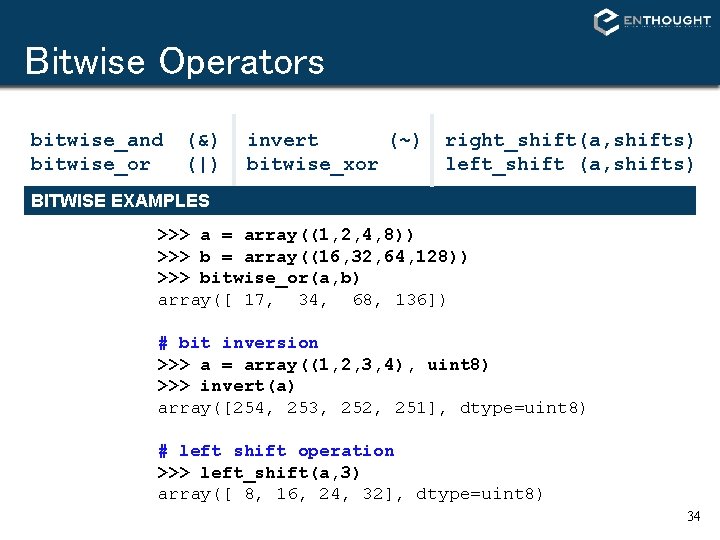
Bitwise Operators bitwise_and bitwise_or (&) (|) invert (~) bitwise_xor right_shift(a, shifts) left_shift (a, shifts) BITWISE EXAMPLES >>> a = array((1, 2, 4, 8)) >>> b = array((16, 32, 64, 128)) >>> bitwise_or(a, b) array([ 17, 34, 68, 136]) # bit inversion >>> a = array((1, 2, 3, 4), uint 8) >>> invert(a) array([254, 253, 252, 251], dtype=uint 8) # left shift operation >>> left_shift(a, 3) array([ 8, 16, 24, 32], dtype=uint 8) 34
Trig and Other Functions TRIGONOMETRIC sin(x) cos(x) arccos(x) OTHERS sinh(x) cosh(x) arctan(x) arctanh(x) arcsinh(x) arctan 2(x, y) exp(x) log 10(x) absolute(x) negative(x) floor(x) hypot(x, y) maximum(x, y) log(x) sqrt(x) conjugate(x) ceil(x) fabs(x) fmod(x, y) minimum(x, y) hypot(x, y) Element by element distance calculation using 35
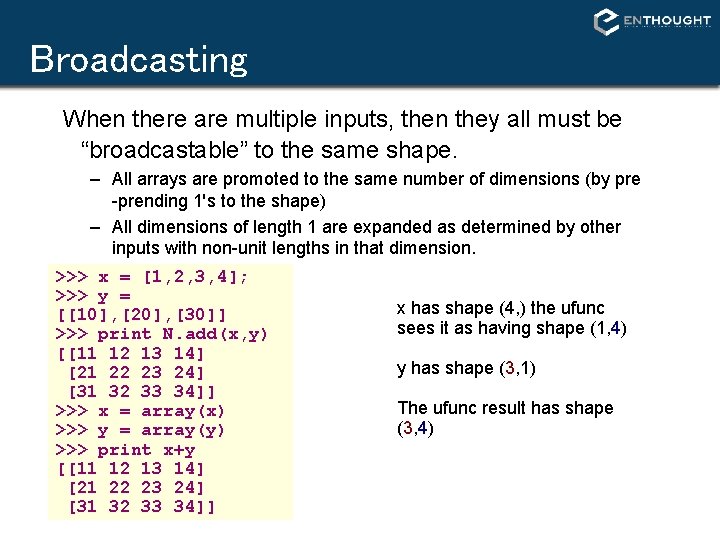
Broadcasting When there are multiple inputs, then they all must be “broadcastable” to the same shape. – All arrays are promoted to the same number of dimensions (by pre -prending 1's to the shape) – All dimensions of length 1 are expanded as determined by other inputs with non-unit lengths in that dimension. >>> x = [1, 2, 3, 4]; >>> y = x has shape (4, ) the ufunc [[10], [20], [30]] sees it as having shape (1, 4) >>> print N. add(x, y) [[11 12 13 14] y has shape (3, 1) [21 22 23 24] [31 32 33 34]] The ufunc result has shape >>> x = array(x) (3, 4) >>> y = array(y) >>> print x+y [[11 12 13 14] [21 22 23 24] [31 32 33 34]]
Array Broadcasting 4 x 3 3 4 x 1 stretch 37
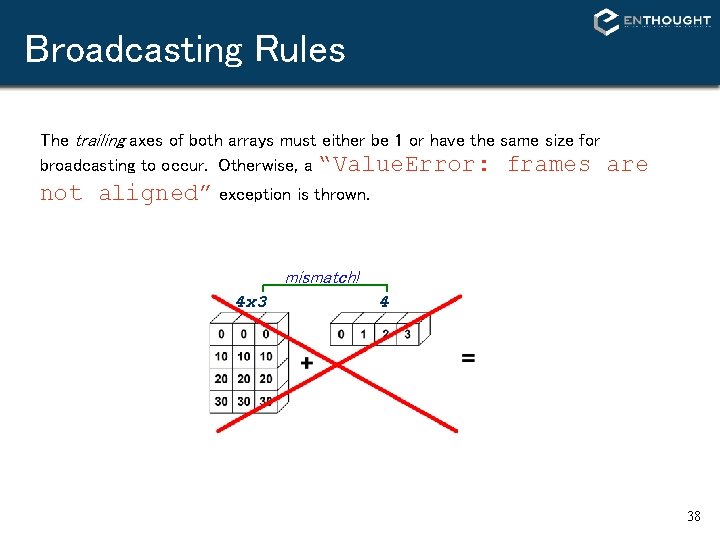
Broadcasting Rules The trailing axes of both arrays must either be 1 or have the same size for broadcasting to occur. Otherwise, a “Value. Error: frames are not aligned” exception is thrown. mismatch! 4 x 3 4 38
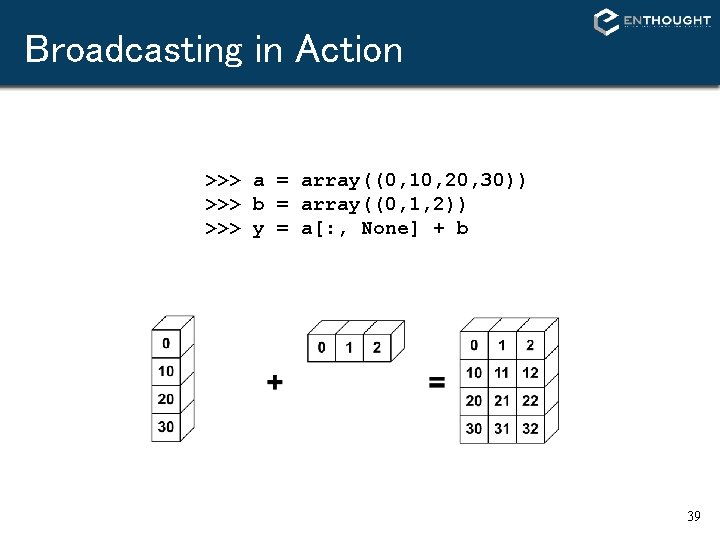
Broadcasting in Action >>> a = array((0, 10, 20, 30)) >>> b = array((0, 1, 2)) >>> y = a[: , None] + b 39
Universal Function Methods The mathematic, comparative, logical, and bitwise operators that take two arguments (binary operators) have special methods that operate on arrays: op. reduce(a, axis=0) op. accumulate(a, axis=0) op. outer(a, b) op. reduceat(a, indices) 40
Vectorizing Functions VECTORIZING FUNCTIONS Example # special. sinc already available # This is just for show. def sinc(x): if x == 0. 0: return 1. 0 else: w = pi*x return sin(w) / w # attempt >>> sinc([1. 3, 1. 5]) Type. Error: can't multiply sequence to non-int >>> x = r_[-5: 5: 100 j] >>> y = vsinc(x) >>> plot(x, y) SOLUTION >>> from numpy import vectorize >>> vsinc = vectorize(sinc) >>> vsinc([1. 3, 1. 5]) array([-0. 1981, -0. 2122]) 41
Interface with C/C++/Fortan • Python excels at interfacing with other languages – – – – weave (C/C++) f 2 py (Fortran) pyrex ctypes (C) SWIG (C/C++) Boost. Python (C++) RPy / RSPython (R)
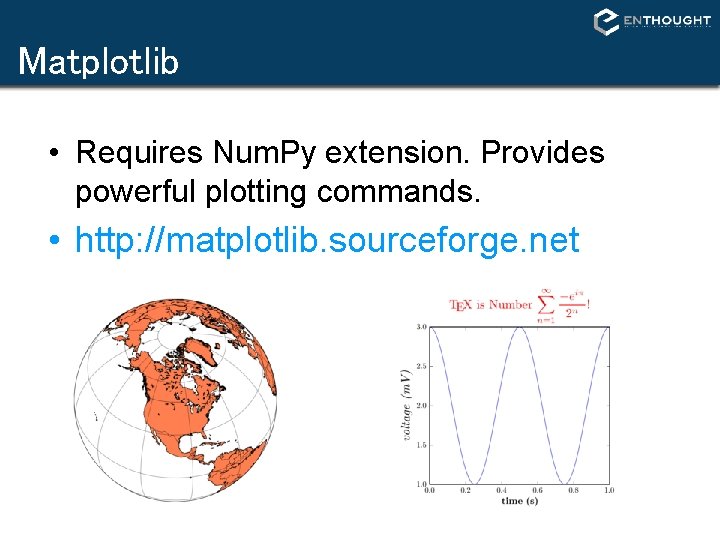
Matplotlib • Requires Num. Py extension. Provides powerful plotting commands. • http: //matplotlib. sourceforge. net
Recommendations • Matplotlib for day-to-day data exploration. Matplotlib has a large community, tons of plot types, and is well integrated into ipython. It is the de-facto standard for ‘command line’ plotting from ipython. • Chaco for building interactive plotting applications Chaco is architected for building highly interactive and configurable plots in python. It is more useful as plotting toolkit than for making one-off plots. 44
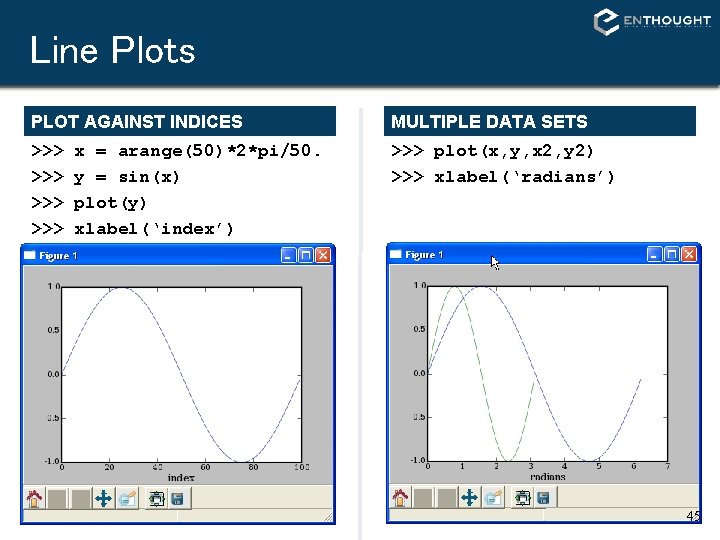
Line Plots PLOT AGAINST INDICES MULTIPLE DATA SETS >>> >>> >>> plot(x, y, x 2, y 2) >>> xlabel(‘radians’) x = arange(50)*2*pi/50. y = sin(x) plot(y) xlabel(‘index’) 45
Line Plots LINE FORMATTING MULTIPLE PLOT GROUPS # red, dot-dash, triangles >>> plot(x, sin(x), 'r-^') >>> plot(x, y 1, 'b-o', x, y 2), r-^') >>> axis([0, 7, -2, 2]) 46
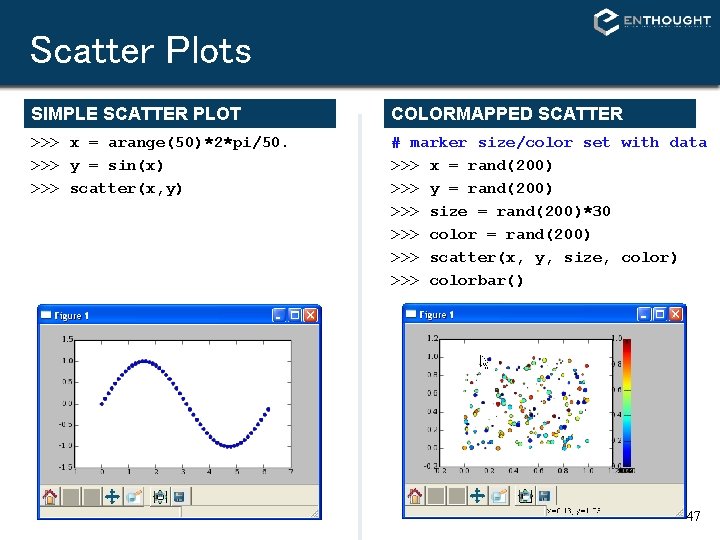
Scatter Plots SIMPLE SCATTER PLOT COLORMAPPED SCATTER >>> x = arange(50)*2*pi/50. >>> y = sin(x) >>> scatter(x, y) # marker size/color set with data >>> x = rand(200) >>> y = rand(200) >>> size = rand(200)*30 >>> color = rand(200) >>> scatter(x, y, size, color) >>> colorbar() 47
Bar Plots BAR PLOT >>> bar(x, sin(x), . . . width=x[1]-x[0]) HORIZONTAL BAR PLOT >>> hbar(x, sin(x), . . . height=x[1]-x[0], . . . orientation=‘horizontal’) 48
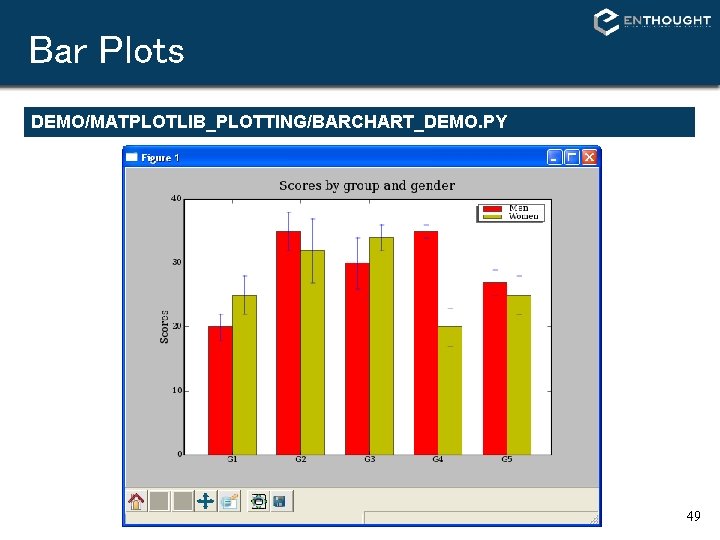
Bar Plots DEMO/MATPLOTLIB_PLOTTING/BARCHART_DEMO. PY 49
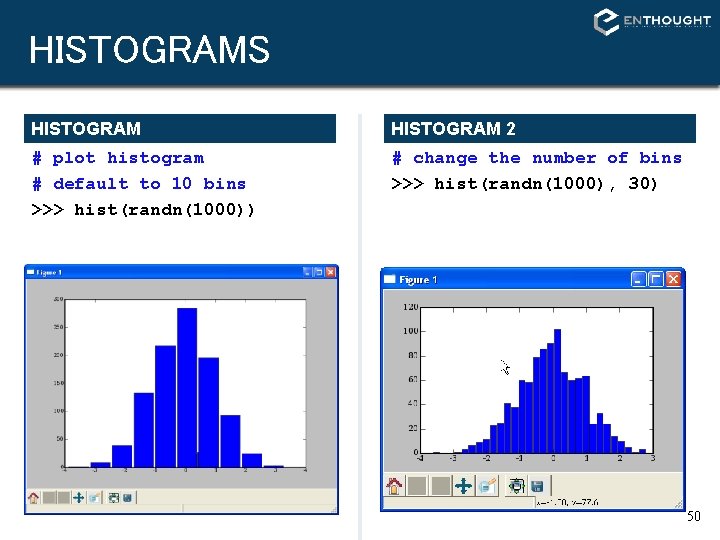
HISTOGRAMS HISTOGRAM 2 # plot histogram # default to 10 bins >>> hist(randn(1000)) # change the number of bins >>> hist(randn(1000), 30) 50
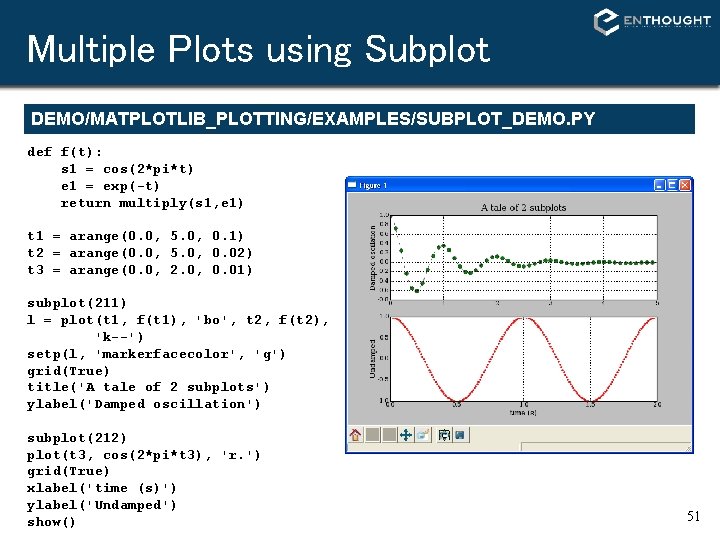
Multiple Plots using Subplot DEMO/MATPLOTLIB_PLOTTING/EXAMPLES/SUBPLOT_DEMO. PY def f(t): s 1 = cos(2*pi*t) e 1 = exp(-t) return multiply(s 1, e 1) t 1 = arange(0. 0, 5. 0, 0. 1) t 2 = arange(0. 0, 5. 0, 0. 02) t 3 = arange(0. 0, 2. 0, 0. 01) subplot(211) l = plot(t 1, f(t 1), 'bo', t 2, f(t 2), 'k--') setp(l, 'markerfacecolor', 'g') grid(True) title('A tale of 2 subplots') ylabel('Damped oscillation') subplot(212) plot(t 3, cos(2*pi*t 3), 'r. ') grid(True) xlabel('time (s)') ylabel('Undamped') show() 51
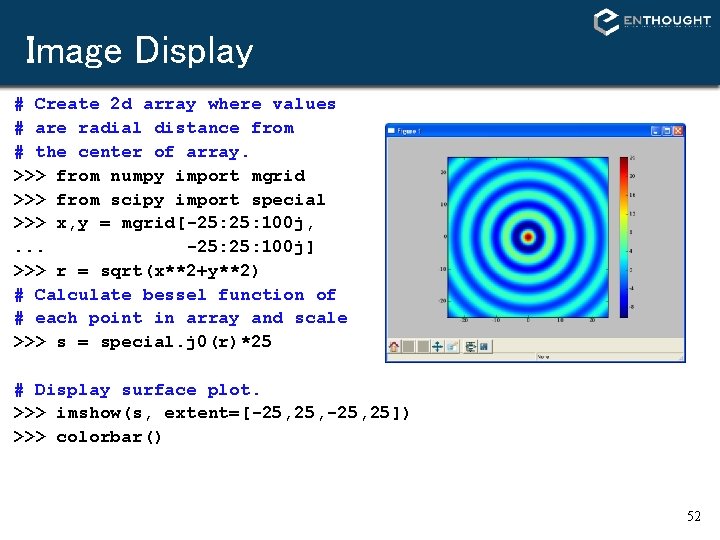
Image Display # Create 2 d array where values # are radial distance from # the center of array. >>> from numpy import mgrid >>> from scipy import special >>> x, y = mgrid[-25: 100 j, . . . -25: 100 j] >>> r = sqrt(x**2+y**2) # Calculate bessel function of # each point in array and scale >>> s = special. j 0(r)*25 # Display surface plot. >>> imshow(s, extent=[-25, 25]) >>> colorbar() 52
Surface plots with mlab # Create 2 d array where values # are radial distance from # the center of array. >>> from numpy import mgrid >>> from scipy import special >>> x, y = mgrid[-25: 100 j, . . . -25: 100 j] >>> r = sqrt(x**2+y**2) # Calculate bessel function of # each point in array and scale >>> s = special. j 0(r)*25 # Display surface plot. >>> from enthought. mayavi import mlab >>> mlab. surf(x, y, s) >>> mlab. scalarbar() >>> mlab. axes() 53
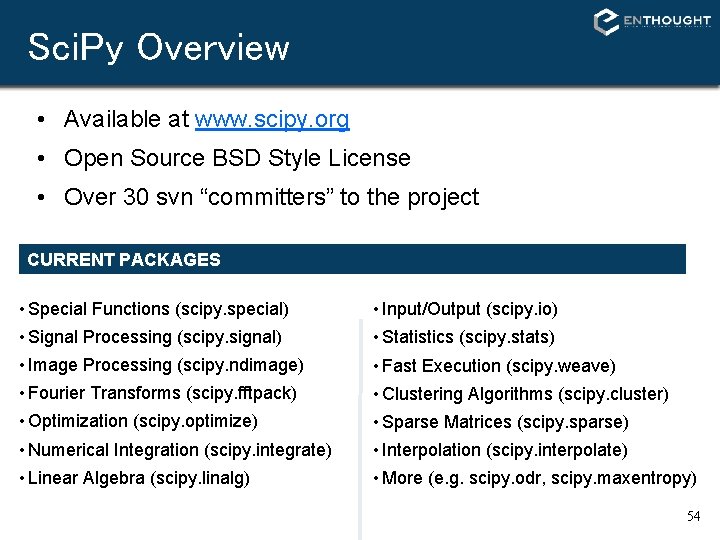
Sci. Py Overview • Available at www. scipy. org • Open Source BSD Style License • Over 30 svn “committers” to the project CURRENT PACKAGES • Special Functions (scipy. special) • Input/Output (scipy. io) • Signal Processing (scipy. signal) • Statistics (scipy. stats) • Image Processing (scipy. ndimage) • Fast Execution (scipy. weave) • Fourier Transforms (scipy. fftpack) • Clustering Algorithms (scipy. cluster) • Optimization (scipy. optimize) • Sparse Matrices (scipy. sparse) • Numerical Integration (scipy. integrate) • Interpolation (scipy. interpolate) • Linear Algebra (scipy. linalg) • More (e. g. scipy. odr, scipy. maxentropy) 54
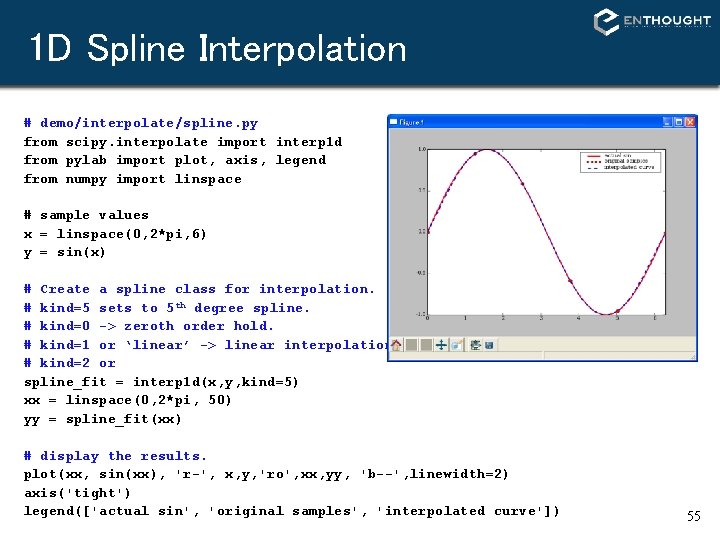
1 D Spline Interpolation # demo/interpolate/spline. py from scipy. interpolate import interp 1 d from pylab import plot, axis, legend from numpy import linspace # sample values x = linspace(0, 2*pi, 6) y = sin(x) # Create a spline class for interpolation. # kind=5 sets to 5 th degree spline. # kind=0 -> zeroth order hold. # kind=1 or ‘linear’ -> linear interpolation # kind=2 or spline_fit = interp 1 d(x, y, kind=5) xx = linspace(0, 2*pi, 50) yy = spline_fit(xx) # display the results. plot(xx, sin(xx), 'r-', x, y, 'ro', xx, yy, 'b--', linewidth=2) axis('tight') legend(['actual sin', 'original samples', 'interpolated curve']) 55
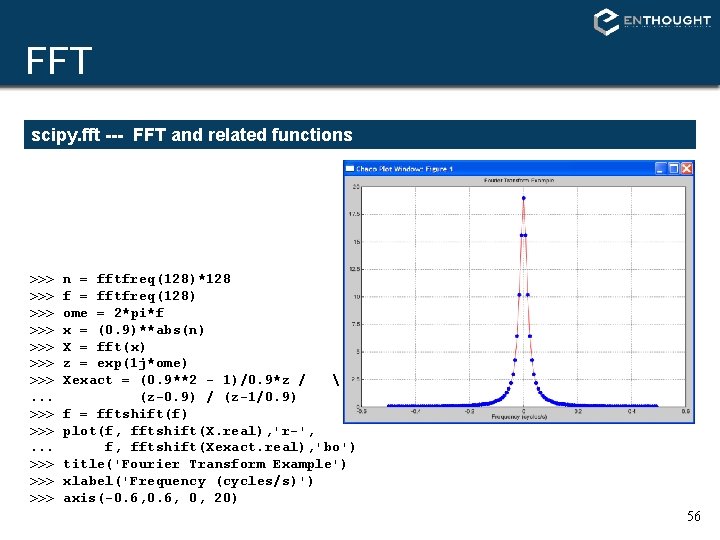
FFT scipy. fft --- FFT and related functions >>> >>>. . . >>> >>> n = fftfreq(128)*128 f = fftfreq(128) ome = 2*pi*f x = (0. 9)**abs(n) X = fft(x) z = exp(1 j*ome) Xexact = (0. 9**2 - 1)/0. 9*z / (z-0. 9) / (z-1/0. 9) f = fftshift(f) plot(f, fftshift(X. real), 'r-', f, fftshift(Xexact. real), 'bo') title('Fourier Transform Example') xlabel('Frequency (cycles/s)') axis(-0. 6, 0, 20) 56
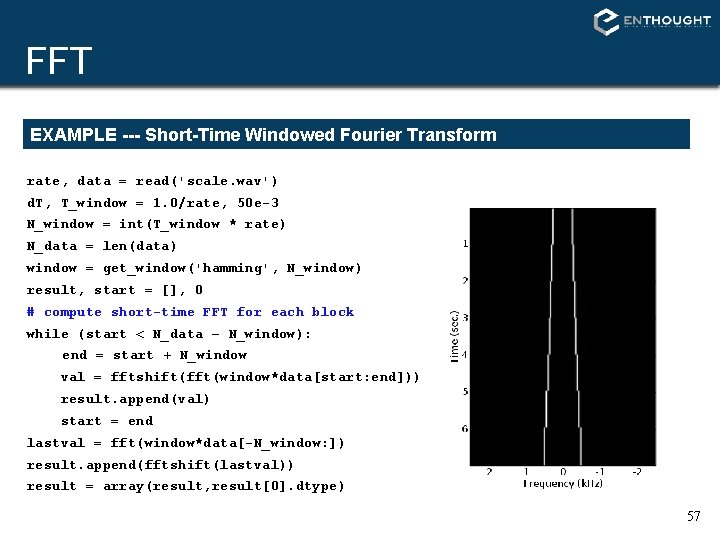
FFT EXAMPLE --- Short-Time Windowed Fourier Transform rate, data = read('scale. wav') d. T, T_window = 1. 0/rate, 50 e-3 N_window = int(T_window * rate) N_data = len(data) window = get_window('hamming', N_window) result, start = [], 0 # compute short-time FFT for each block while (start < N_data – N_window): end = start + N_window val = fftshift(fft(window*data[start: end])) result. append(val) start = end lastval = fft(window*data[-N_window: ]) result. append(fftshift(lastval)) result = array(result, result[0]. dtype) 57
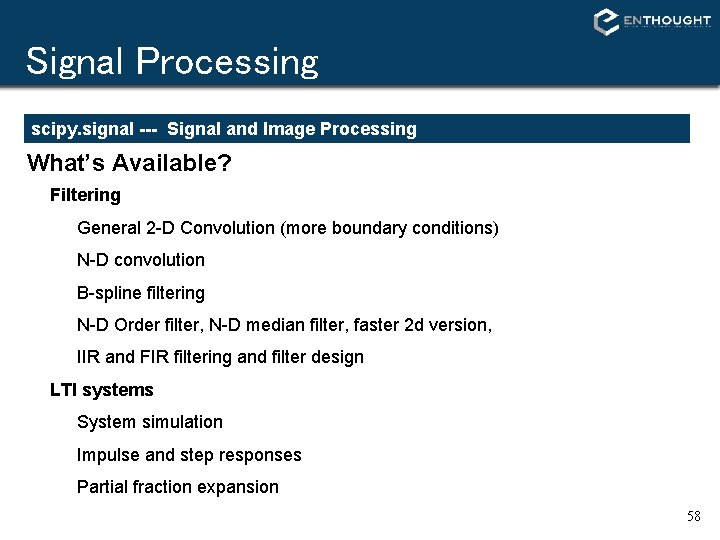
Signal Processing scipy. signal --- Signal and Image Processing What’s Available? Filtering General 2 -D Convolution (more boundary conditions) N-D convolution B-spline filtering N-D Order filter, N-D median filter, faster 2 d version, IIR and FIR filtering and filter design LTI systems System simulation Impulse and step responses Partial fraction expansion 58
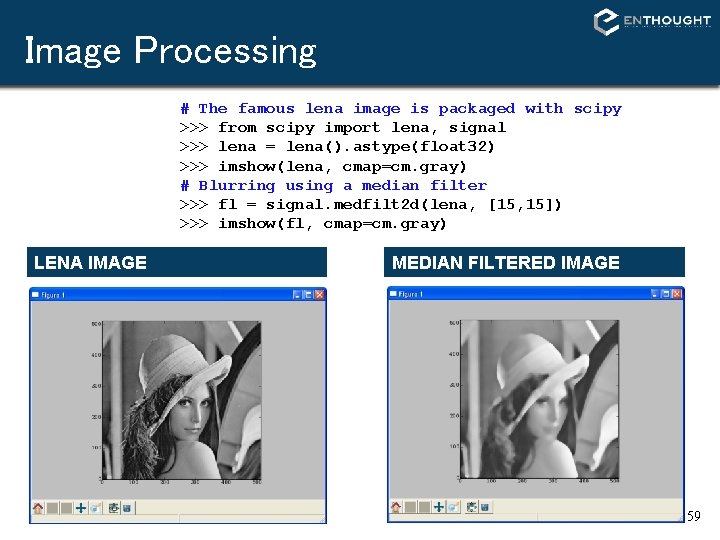
Image Processing # The famous lena image is packaged with scipy >>> from scipy import lena, signal >>> lena = lena(). astype(float 32) >>> imshow(lena, cmap=cm. gray) # Blurring using a median filter >>> fl = signal. medfilt 2 d(lena, [15, 15]) >>> imshow(fl, cmap=cm. gray) LENA IMAGE MEDIAN FILTERED IMAGE 59
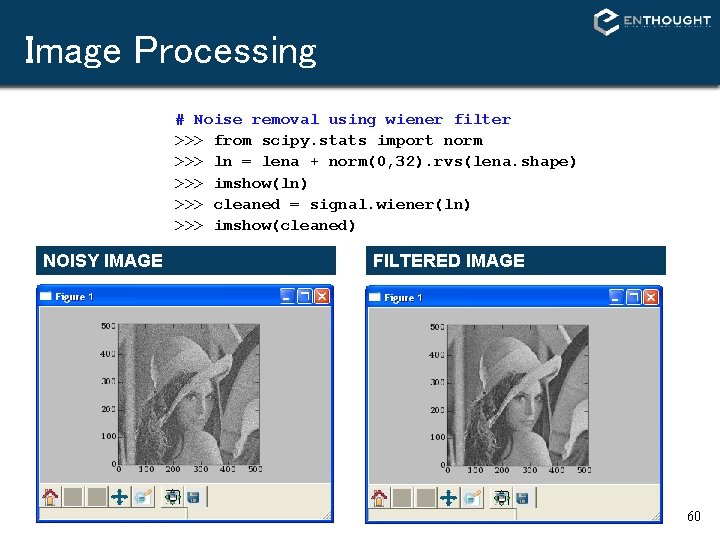
Image Processing # Noise removal using wiener filter >>> from scipy. stats import norm >>> ln = lena + norm(0, 32). rvs(lena. shape) >>> imshow(ln) >>> cleaned = signal. wiener(ln) >>> imshow(cleaned) NOISY IMAGE FILTERED IMAGE 60
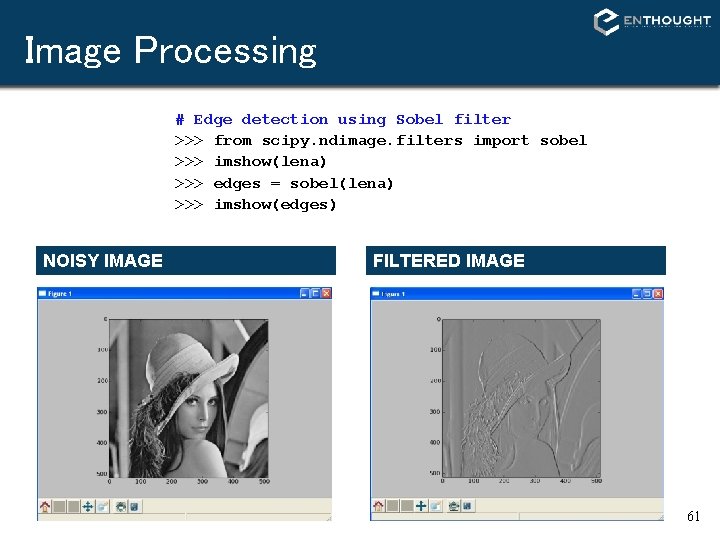
Image Processing # Edge detection using Sobel filter >>> from scipy. ndimage. filters import sobel >>> imshow(lena) >>> edges = sobel(lena) >>> imshow(edges) NOISY IMAGE FILTERED IMAGE 61
LTI Systems >>> >>> >>> b, a = [1], [1, 6, 25] ltisys = signal. lti(b, a) t, h = ltisys. impulse() ts, s = ltisys. step() plot(t, h, ts, s) legend(['Impulse response', 'Step response']) 62
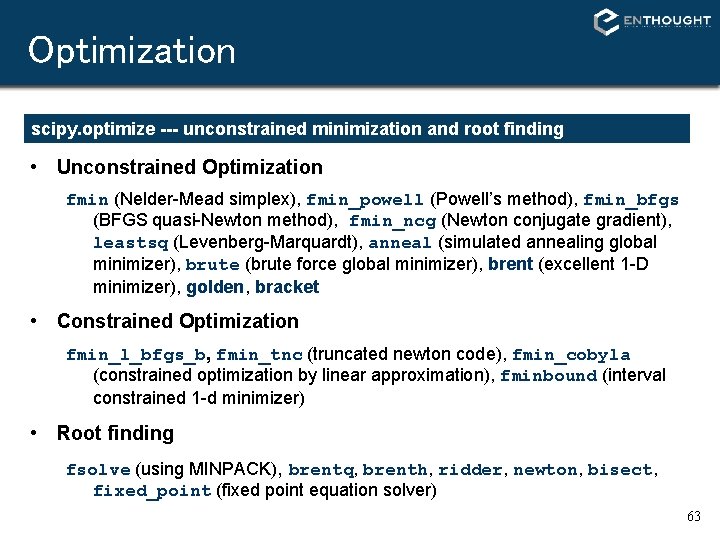
Optimization scipy. optimize --- unconstrained minimization and root finding • Unconstrained Optimization fmin (Nelder-Mead simplex), fmin_powell (Powell’s method), fmin_bfgs (BFGS quasi-Newton method), fmin_ncg (Newton conjugate gradient), leastsq (Levenberg-Marquardt), anneal (simulated annealing global minimizer), brute (brute force global minimizer), brent (excellent 1 -D minimizer), golden, bracket • Constrained Optimization fmin_l_bfgs_b, fmin_tnc (truncated newton code), fmin_cobyla (constrained optimization by linear approximation), fminbound (interval constrained 1 -d minimizer) • Root finding fsolve (using MINPACK), brentq, brenth, ridder, newton, bisect, fixed_point (fixed point equation solver) 63
Optimization EXAMPLE: MINIMIZE BESSEL FUNCTION # minimize 1 st order bessel # function between 4 and 7 >>> from scipy. special import j 1 >>> from scipy. optimize import fminbound >>> >>> x = r_[2: 7. 1: . 1] j 1 x = j 1(x) plot(x, j 1 x, ’-’) hold(True) x_min = fminbound(j 1, 4, 7) j 1_min = j 1(x_min) plot([x_min], [j 1_min], ’ro’) 64
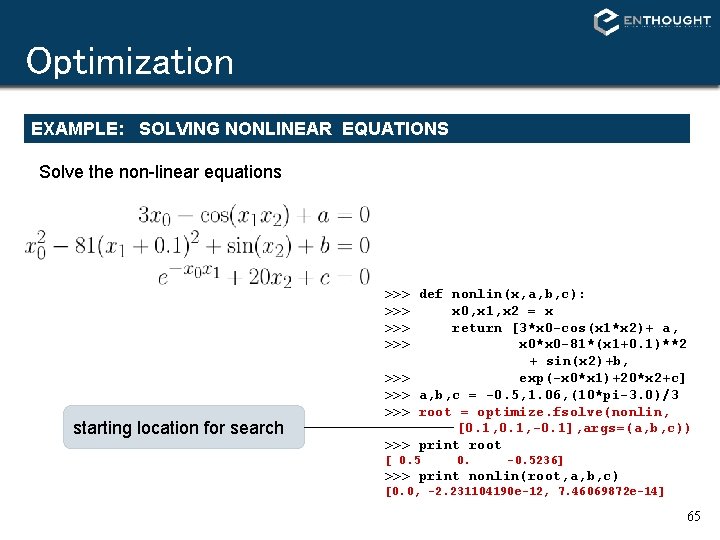
Optimization EXAMPLE: SOLVING NONLINEAR EQUATIONS Solve the non-linear equations starting location for search >>> def nonlin(x, a, b, c): >>> x 0, x 1, x 2 = x >>> return [3*x 0 -cos(x 1*x 2)+ a, >>> x 0*x 0 -81*(x 1+0. 1)**2 + sin(x 2)+b, >>> exp(-x 0*x 1)+20*x 2+c] >>> a, b, c = -0. 5, 1. 06, (10*pi-3. 0)/3 >>> root = optimize. fsolve(nonlin, [0. 1, -0. 1], args=(a, b, c)) >>> print root [ 0. 5 0. -0. 5236] >>> print nonlin(root, a, b, c) [0. 0, -2. 231104190 e-12, 7. 46069872 e-14] 65
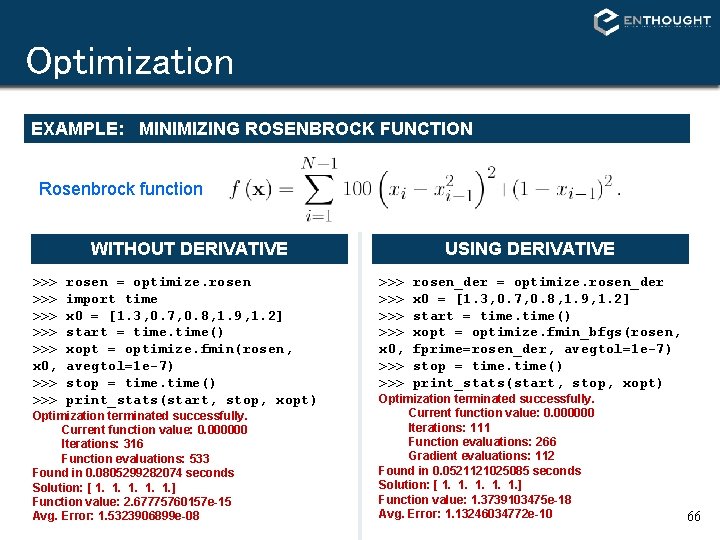
Optimization EXAMPLE: MINIMIZING ROSENBROCK FUNCTION Rosenbrock function WITHOUT DERIVATIVE >>> >>> >>> x 0, >>> rosen = optimize. rosen import time x 0 = [1. 3, 0. 7, 0. 8, 1. 9, 1. 2] start = time() xopt = optimize. fmin(rosen, avegtol=1 e-7) stop = time() print_stats(start, stop, xopt) Optimization terminated successfully. Current function value: 0. 000000 Iterations: 316 Function evaluations: 533 Found in 0. 0805299282074 seconds Solution: [ 1. 1. 1. ] Function value: 2. 67775760157 e-15 Avg. Error: 1. 5323906899 e-08 USING DERIVATIVE >>> >>> x 0, >>> rosen_der = optimize. rosen_der x 0 = [1. 3, 0. 7, 0. 8, 1. 9, 1. 2] start = time() xopt = optimize. fmin_bfgs(rosen, fprime=rosen_der, avegtol=1 e-7) stop = time() print_stats(start, stop, xopt) Optimization terminated successfully. Current function value: 0. 000000 Iterations: 111 Function evaluations: 266 Gradient evaluations: 112 Found in 0. 0521121025085 seconds Solution: [ 1. 1. 1. ] Function value: 1. 3739103475 e-18 Avg. Error: 1. 13246034772 e-10 66
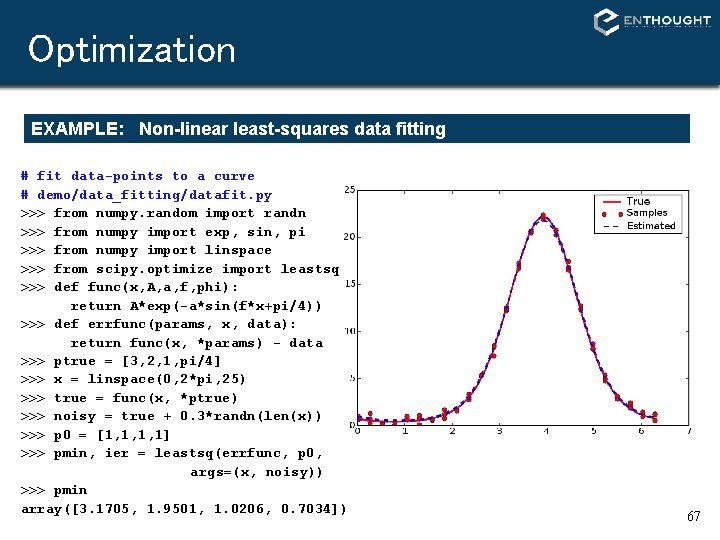
Optimization EXAMPLE: Non-linear least-squares data fitting # fit data-points to a curve # demo/data_fitting/datafit. py >>> from numpy. random import randn >>> from numpy import exp, sin, pi >>> from numpy import linspace >>> from scipy. optimize import leastsq >>> def func(x, A, a, f, phi): return A*exp(-a*sin(f*x+pi/4)) >>> def errfunc(params, x, data): return func(x, *params) - data >>> ptrue = [3, 2, 1, pi/4] >>> x = linspace(0, 2*pi, 25) >>> true = func(x, *ptrue) >>> noisy = true + 0. 3*randn(len(x)) >>> p 0 = [1, 1, 1, 1] >>> pmin, ier = leastsq(errfunc, p 0, args=(x, noisy)) >>> pmin array([3. 1705, 1. 9501, 1. 0206, 0. 7034]) 67
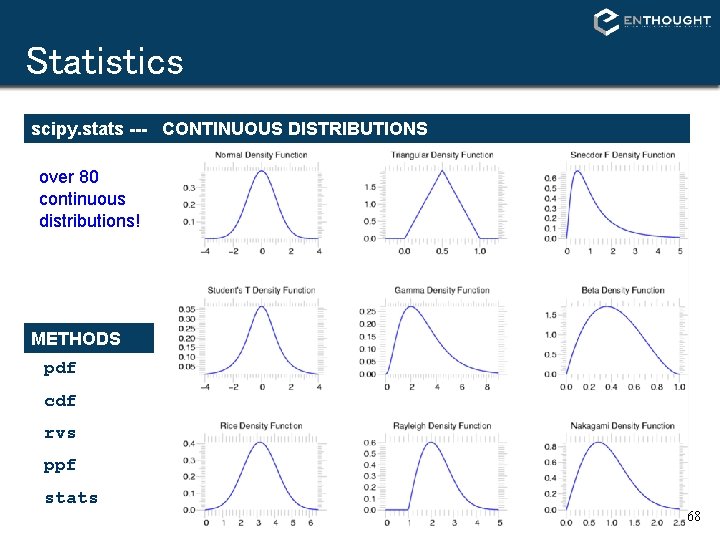
Statistics scipy. stats --- CONTINUOUS DISTRIBUTIONS over 80 continuous distributions! METHODS pdf cdf rvs ppf stats 68
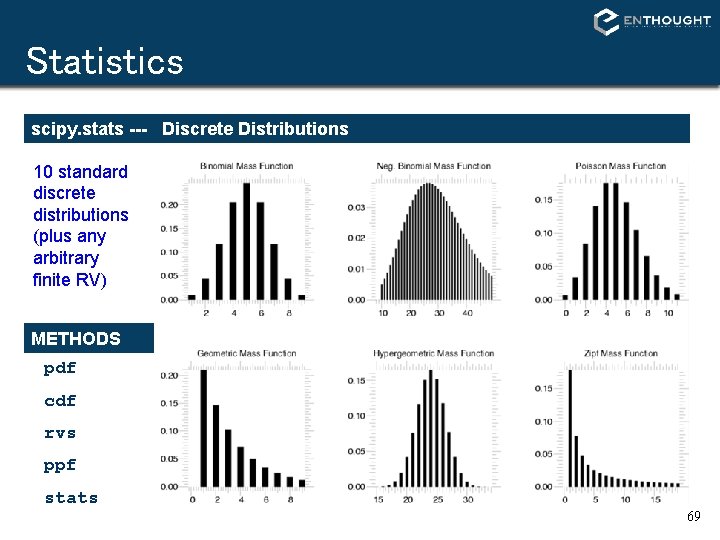
Statistics scipy. stats --- Discrete Distributions 10 standard discrete distributions (plus any arbitrary finite RV) METHODS pdf cdf rvs ppf stats 69
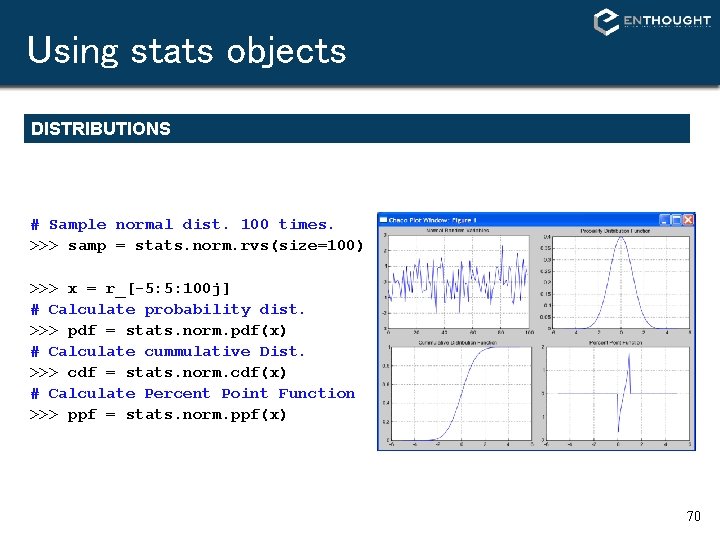
Using stats objects DISTRIBUTIONS # Sample normal dist. 100 times. >>> samp = stats. norm. rvs(size=100) >>> x = r_[-5: 5: 100 j] # Calculate probability dist. >>> pdf = stats. norm. pdf(x) # Calculate cummulative Dist. >>> cdf = stats. norm. cdf(x) # Calculate Percent Point Function >>> ppf = stats. norm. ppf(x) 70
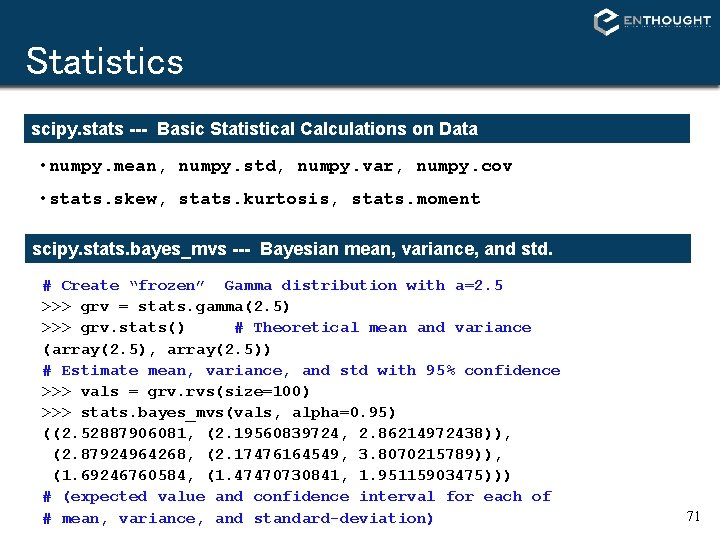
Statistics scipy. stats --- Basic Statistical Calculations on Data • numpy. mean, numpy. std, numpy. var, numpy. cov • stats. skew, stats. kurtosis, stats. moment scipy. stats. bayes_mvs --- Bayesian mean, variance, and std. # Create “frozen” Gamma distribution with a=2. 5 >>> grv = stats. gamma(2. 5) >>> grv. stats() # Theoretical mean and variance (array(2. 5), array(2. 5)) # Estimate mean, variance, and std with 95% confidence >>> vals = grv. rvs(size=100) >>> stats. bayes_mvs(vals, alpha=0. 95) ((2. 52887906081, (2. 19560839724, 2. 86214972438)), (2. 87924964268, (2. 17476164549, 3. 8070215789)), (1. 69246760584, (1. 47470730841, 1. 95115903475))) # (expected value and confidence interval for each of # mean, variance, and standard-deviation) 71
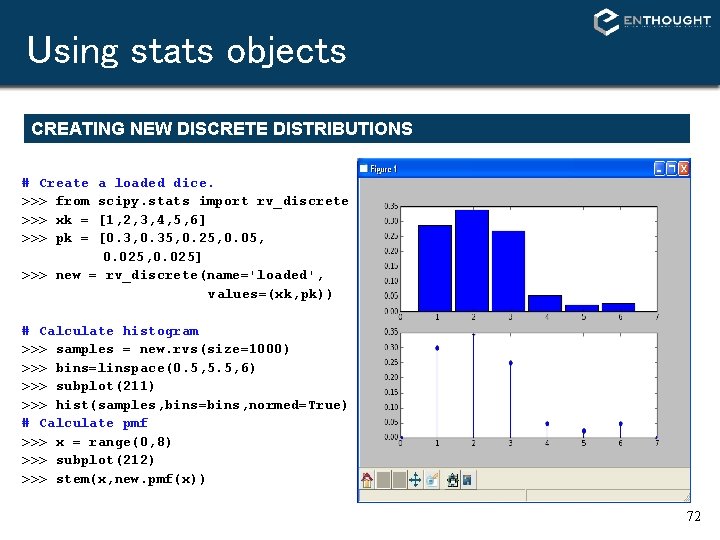
Using stats objects CREATING NEW DISCRETE DISTRIBUTIONS # Create >>> from >>> xk = >>> pk = a loaded dice. scipy. stats import rv_discrete [1, 2, 3, 4, 5, 6] [0. 3, 0. 35, 0. 25, 0. 025, 0. 025] >>> new = rv_discrete(name='loaded', values=(xk, pk)) # Calculate histogram >>> samples = new. rvs(size=1000) >>> bins=linspace(0. 5, 5. 5, 6) >>> subplot(211) >>> hist(samples, bins=bins, normed=True) # Calculate pmf >>> x = range(0, 8) >>> subplot(212) >>> stem(x, new. pmf(x)) 72
Statistics Continuous PDF Estimation using Gaussian Kernel Density Estimation # Sample normal dist. 100 times. >>> rv 1 = stats. norm() >>> rv 2 = stats. norm(2. 0, 0. 8) >>> samp = r_[rv 1. rvs(size=100), rv 2. rvs(size=100)] # Kernel estimate (smoothed histogram) >>> apdf = stats. kde. gaussian_kde(samp) >>> x = linspace(-3, 6, 200) >>> plot(x, apdf(x), ’r’) # Histogram >>> hist(x, bins=25, normed=True) 73
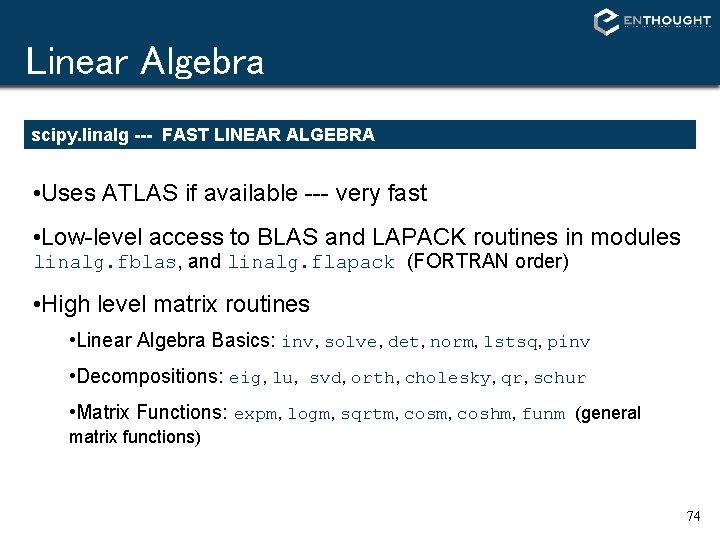
Linear Algebra scipy. linalg --- FAST LINEAR ALGEBRA • Uses ATLAS if available --- very fast • Low-level access to BLAS and LAPACK routines in modules linalg. fblas, and linalg. flapack (FORTRAN order) • High level matrix routines • Linear Algebra Basics: inv, solve, det, norm, lstsq, pinv • Decompositions: eig, lu, svd, orth, cholesky, qr, schur • Matrix Functions: expm, logm, sqrtm, coshm, funm (general matrix functions) 74
Linear Algebra LU FACTORIZATION >>> from scipy import linalg >>> a = array([[1, 3, 5], . . . [2, 5, 1], . . . [2, 3, 6]]) # time consuming factorization >>> lu, piv = linalg. lu_factor(a) # fast solve for 1 or more # right hand sides. >>> b = array([10, 8, 3]) >>> linalg. lu_solve((lu, piv), b) array([-7. 82608696, 4. 56521739, 0. 82608696]) EIGEN VALUES AND VECTORS >>> from scipy import linalg >>> a = array([[1, 3, 5], . . . [2, 5, 1], . . . [2, 3, 6]]) # compute eigen values/vectors >>> vals, vecs = linalg. eig(a) # print eigen values >>> vals array([ 9. 39895873+0. j, -0. 73379338+0. j, 3. 33483465+0. j]) # eigen vectors are in columns # print first eigen vector >>> vecs[: , 0] array([-0. 57028326, -0. 41979215, -0. 70608183]) # norm of vector should be 1. 0 >>> linalg. norm(vecs[: , 0]) 1. 0 75
Matrix Objects STRING CONSTRUCTION >>> from numpy import mat >>> a = mat('[1, 3, 5; 2, 5, 1; 2, 3, 6]') >>> a matrix([[1, 3, 5], [2, 5, 1], [2, 3, 6]]) TRANSPOSE ATTRIBUTE >>> a. T matrix([[1, 2, 2], [3, 5, 3], [5, 1, 6]]) INVERTED ATTRIBUTE >>> a. I matrix([[-1. 1739, 0. 1304, 0. 956], [ 0. 4347, 0. 1739, -0. 391], [ 0. 1739, -0. 130, 0. 0434] ]) # note: reformatted to fit slide DIAGONAL >>> a. diagonal() matrix([[1, 5, 6]]) >>> a. diagonal(-1) matrix([[3, 1]]) SOLVE >>> b = mat('10; 8; 3') >>> a. I*b matrix([[-7. 82608696], [ 4. 56521739], [ 0. 82608696]]) >>> from scipy import linalg >>> linalg. solve(a, b) matrix([[-7. 82608696], [ 4. 56521739], [ 0. 82608696]]) 76
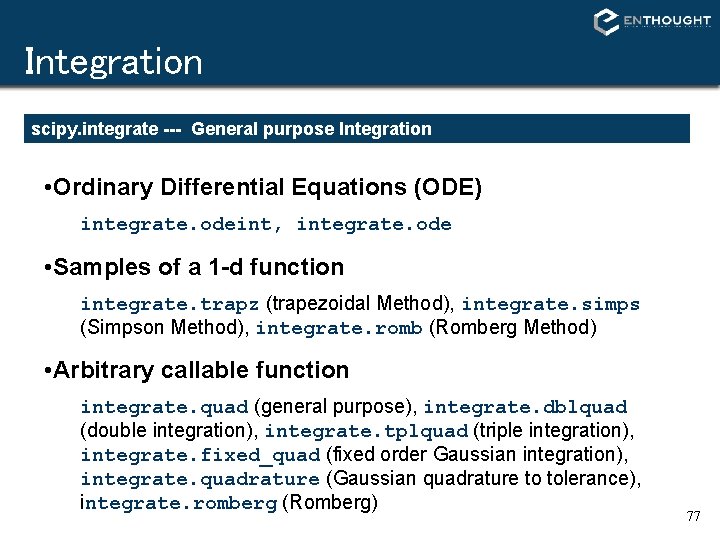
Integration scipy. integrate --- General purpose Integration • Ordinary Differential Equations (ODE) integrate. odeint, integrate. ode • Samples of a 1 -d function integrate. trapz (trapezoidal Method), integrate. simps (Simpson Method), integrate. romb (Romberg Method) • Arbitrary callable function integrate. quad (general purpose), integrate. dblquad (double integration), integrate. tplquad (triple integration), integrate. fixed_quad (fixed order Gaussian integration), integrate. quadrature (Gaussian quadrature to tolerance), integrate. romberg (Romberg) 77
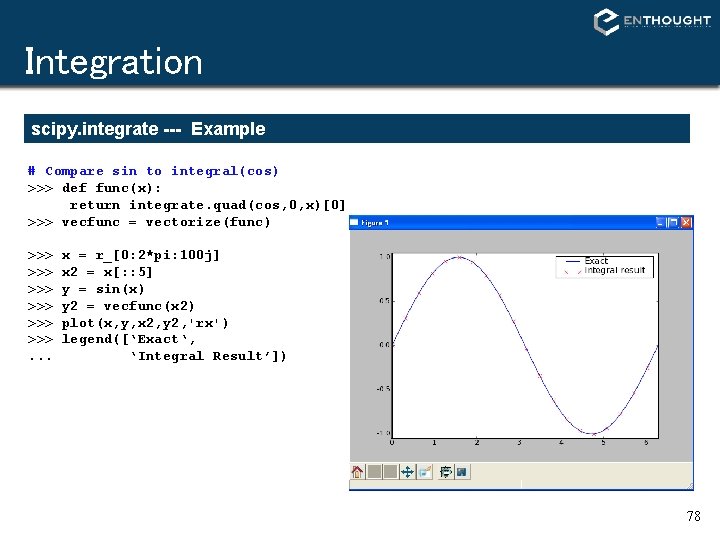
Integration scipy. integrate --- Example # Compare sin to integral(cos) >>> def func(x): return integrate. quad(cos, 0, x)[0] >>> vecfunc = vectorize(func) >>> >>> >>>. . . x = r_[0: 2*pi: 100 j] x 2 = x[: : 5] y = sin(x) y 2 = vecfunc(x 2) plot(x, y, x 2, y 2, 'rx') legend([‘Exact‘, ‘Integral Result’]) 78
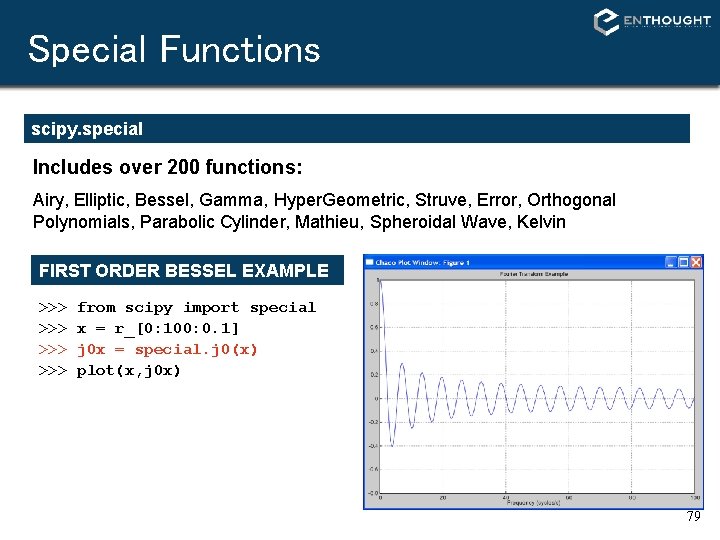
Special Functions scipy. special Includes over 200 functions: Airy, Elliptic, Bessel, Gamma, Hyper. Geometric, Struve, Error, Orthogonal Polynomials, Parabolic Cylinder, Mathieu, Spheroidal Wave, Kelvin FIRST ORDER BESSEL EXAMPLE >>> >>> from scipy import special x = r_[0: 100: 0. 1] j 0 x = special. j 0(x) plot(x, j 0 x) 79
Special Functions scipy. special AIRY FUNCTIONS EXAMPLE >>> >>> z = r_[-5: 100 j] vals = special. airy(z) plot(z, array(vals). T) legend(['Ai', 'Aip', ‘Bi‘, 'Bip']) >>> xlabel('z’) >>> title('Airy Functions and Derivatives‘) 80
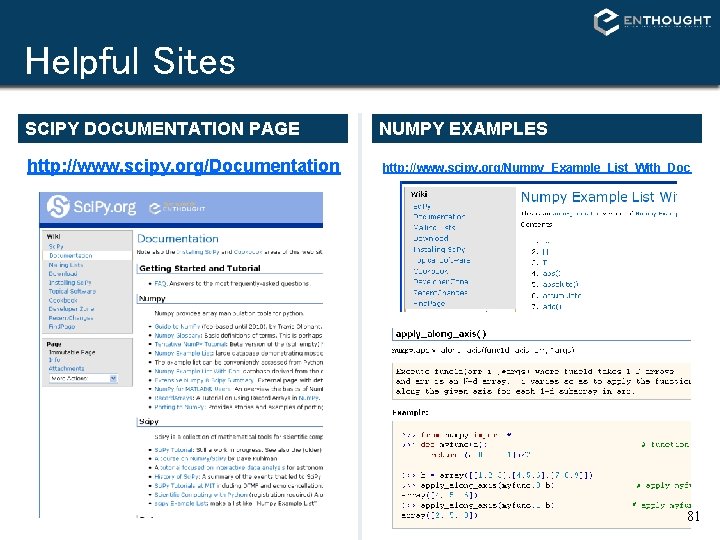
Helpful Sites SCIPY DOCUMENTATION PAGE http: //www. scipy. org/Documentation NUMPY EXAMPLES http: //www. scipy. org/Numpy_Example_List_With_Doc 81
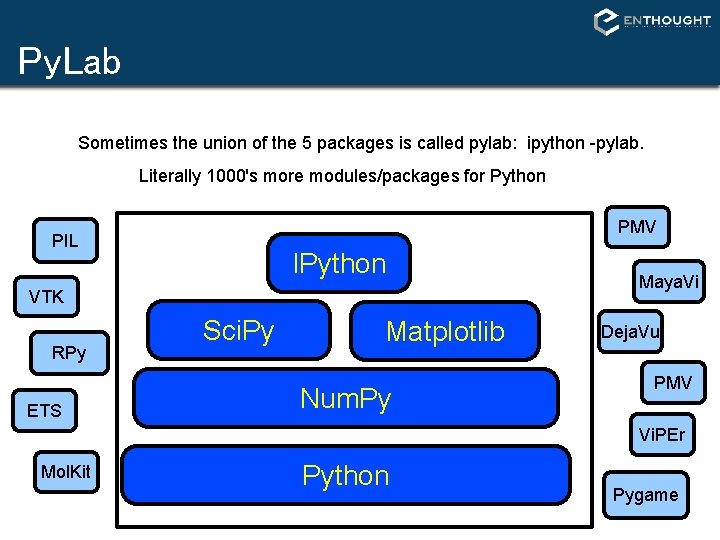
Py. Lab Sometimes the union of the 5 packages is called pylab: ipython -pylab. Literally 1000's more modules/packages for Python PMV PIL IPython VTK RPy ETS Sci. Py Matplotlib Num. Py Maya. Vi Deja. Vu PMV Vi. PEr Mol. Kit Python Pygame
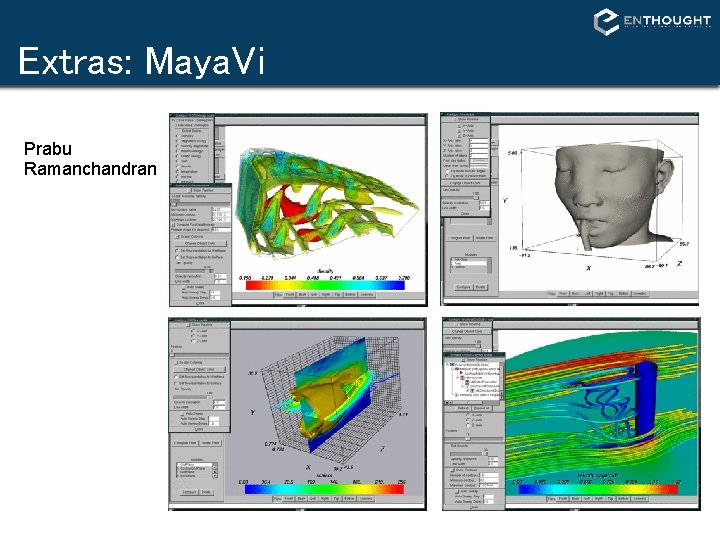
Extras: Maya. Vi Prabu Ramanchandran
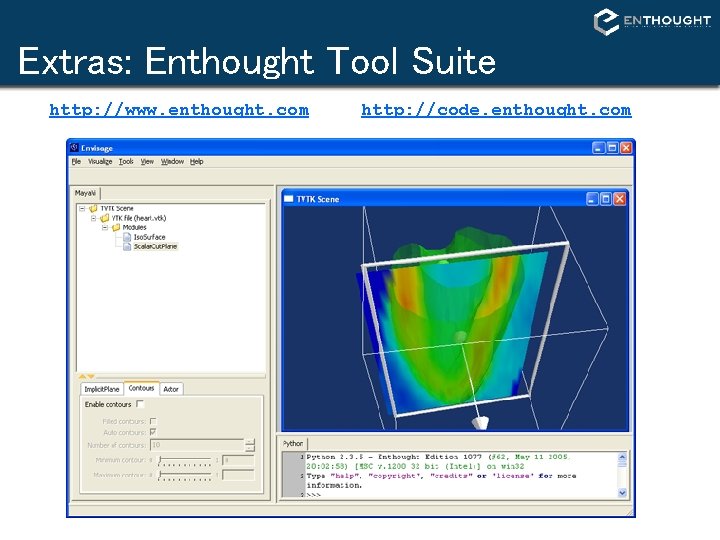
Extras: Enthought Tool Suite http: //www. enthought. com http: //code. enthought. com
You can get involved • New algorithms in Sci. Py • Documentation improvements • Community interaction (mailing lists and bug tracker) • Sci. Py conference 2008 at Caltech in Pasadena, CA (August 19 -24) • http: //www. scipy. org