
NSXT Load Balancer To I Update NSXT 3
NSX-T Load Balancer To. I (Update NSX-T 3. 1) Dimitri Desmidt - Senior TPM NSX ddesmidt@vmware. com 1
Agenda 1 NSX-T 3. 1 LB enhancements 2 NSX-T LB Technical Overview 3 NSX-T LB Technical Deep Dive 4 Demo 5 Key Takeaways 6 Q&A 2
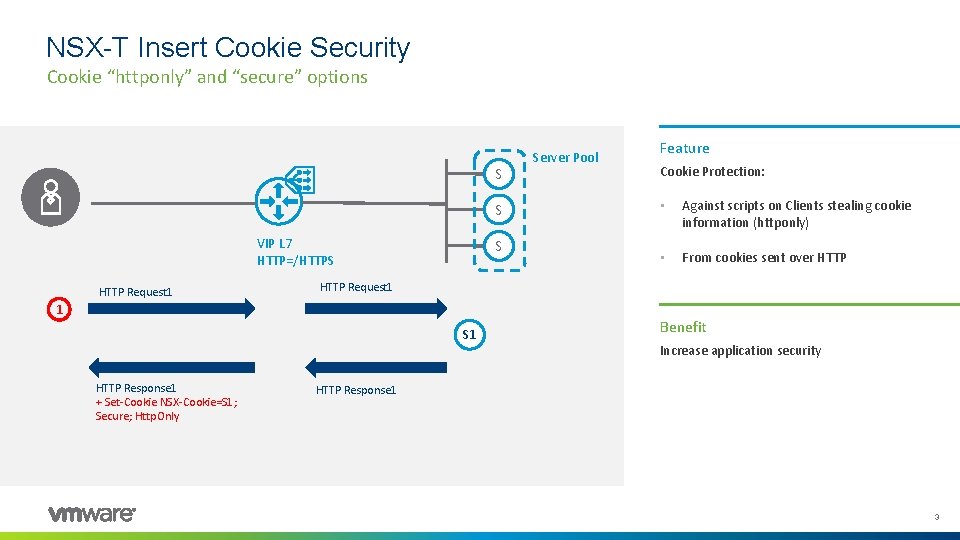
NSX-T Insert Cookie Security Cookie “httponly” and “secure” options S S VIP L 7 HTTP=/HTTPS HTTP Request 1 S Feature Cookie Protection: • Against scripts on Clients stealing cookie information (httponly) • From cookies sent over HTTP Request 1 1 S 1 HTTP Response 1 + Set-Cookie NSX-Cookie=S 1; Secure; Http. Only Server Pool Benefit Increase application security HTTP Response 1 3
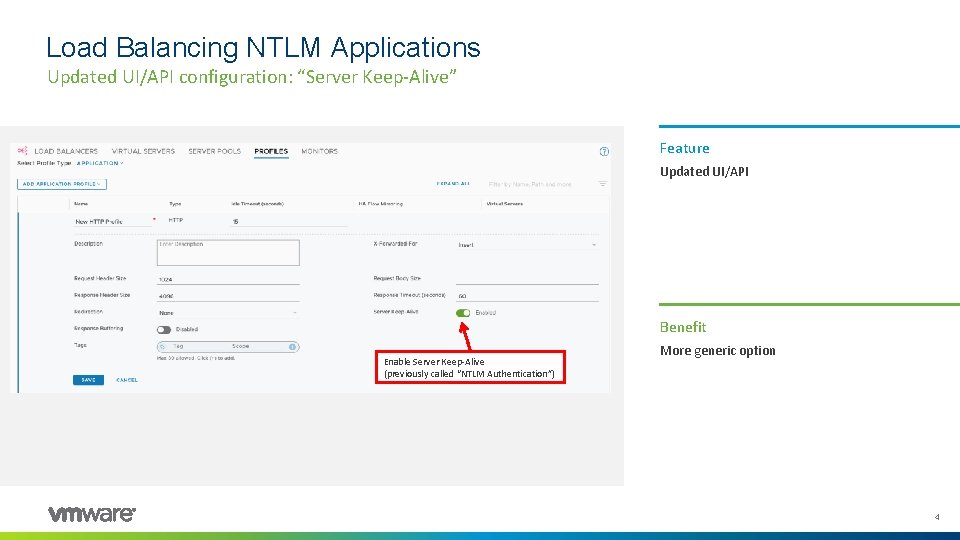
Load Balancing NTLM Applications Updated UI/API configuration: “Server Keep-Alive” Feature Updated UI/API Benefit Enable Server Keep-Alive (previously called “NTLM Authentication”) More generic option 4
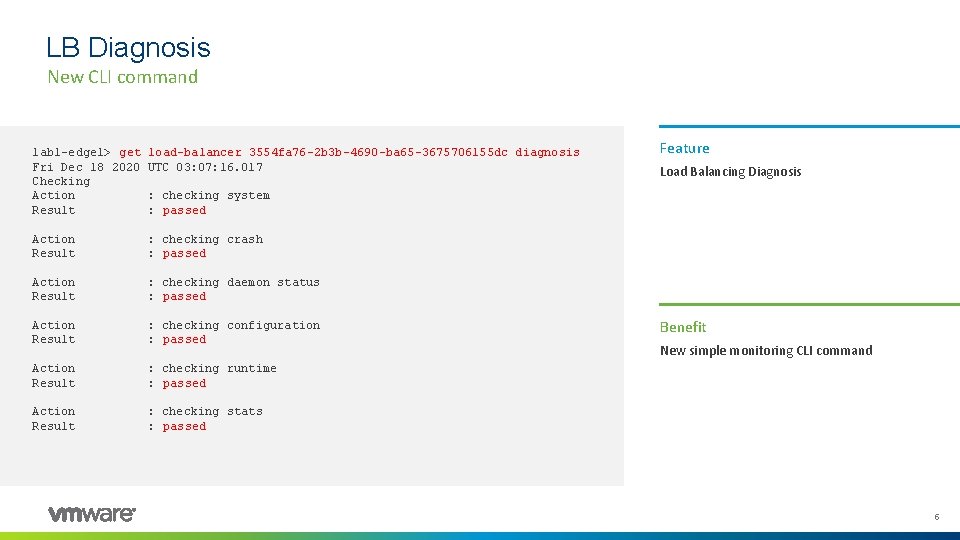
LB Diagnosis New CLI command lab 1 -edge 1> get Fri Dec 18 2020 Checking Action Result load-balancer 3554 fa 76 -2 b 3 b-4690 -ba 65 -3675706155 dc diagnosis UTC 03: 07: 16. 017 Action Result : checking crash : passed Action Result : checking daemon status : passed Action Result : checking configuration : passed Action Result : checking runtime : passed Action Result : checking stats : passed Feature Load Balancing Diagnosis : checking system : passed Benefit New simple monitoring CLI command 5
Agenda 1 NSX-T 3. 1 LB enhancements 2 NSX-T LB Technical Overview 3 NSX-T LB Technical Deep Dive 4 Demo 5 Key Takeaways 6 Q&A 6
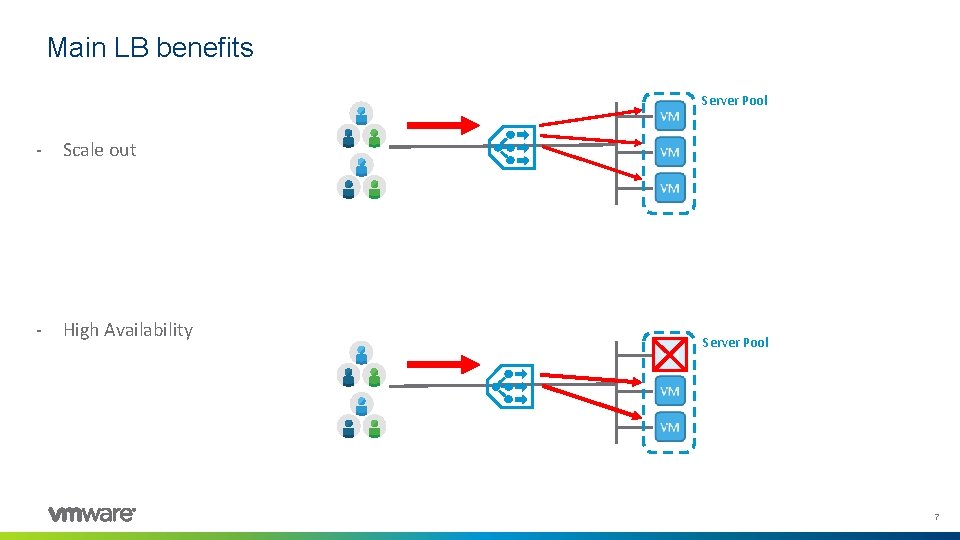
Main LB benefits Server Pool - Scale out - High Availability Server Pool 7
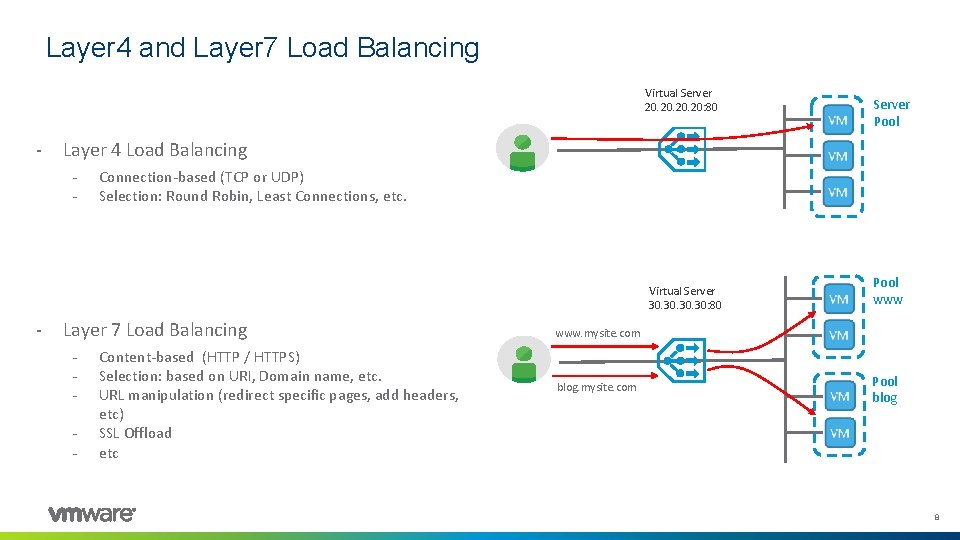
Layer 4 and Layer 7 Load Balancing Virtual Server 20. 20. 20: 80 - Layer 4 Load Balancing - Connection-based (TCP or UDP) Selection: Round Robin, Least Connections, etc. Virtual Server 30. 30. 30: 80 - Server Pool Layer 7 Load Balancing - Content-based (HTTP / HTTPS) Selection: based on URI, Domain name, etc. URL manipulation (redirect specific pages, add headers, etc) SSL Offload etc Pool www. mysite. com blog. mysite. com Pool blog 8
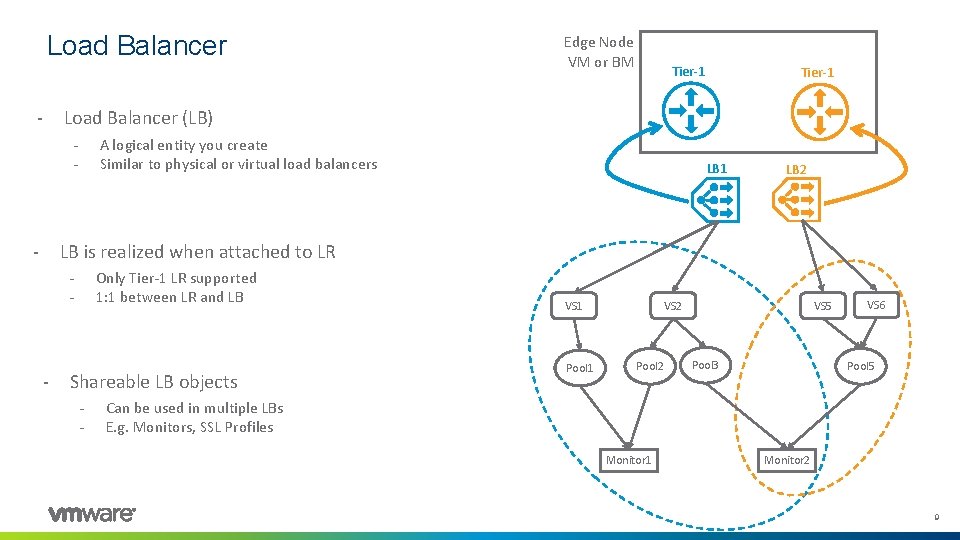
Load Balancer - Tier-1 Load Balancer (LB) - - Edge Node VM or BM A logical entity you create Similar to physical or virtual load balancers LB 1 LB 2 LB is realized when attached to LR - - Only Tier-1 LR supported 1: 1 between LR and LB Shareable LB objects - VS 1 Pool 1 VS 2 Pool 2 VS 5 Pool 3 VS 6 Pool 5 Can be used in multiple LBs E. g. Monitors, SSL Profiles Monitor 1 Monitor 2 9
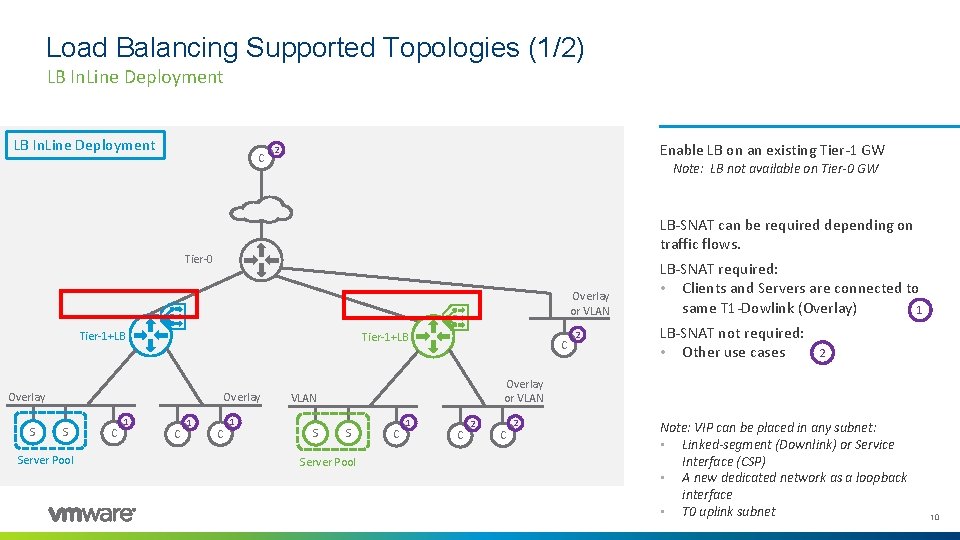
Load Balancing Supported Topologies (1/2) LB In. Line Deployment C Enable LB on an existing Tier-1 GW 2 Note: LB not available on Tier-0 GW LB-SNAT can be required depending on traffic flows. Tier-0 Overlay or VLAN Tier-1+LB Overlay S Server Pool C 1 C 1 C LB-SNAT not required: • Other use cases 2 Overlay or VLAN S 2 LB-SNAT required: • Clients and Servers are connected to same T 1 -Dowlink (Overlay) 1 S Server Pool C 1 C 2 Note: VIP can be placed in any subnet: • Linked-segment (Downlink) or Service Interface (CSP) • A new dedicated network as a loopback interface • T 0 uplink subnet 10

Deployment Modes (2/2) LB One. Arm Deployments LB One. Arm using T 1 Service Interface LB One. Arm using T 1 Uplink Interface Deploy dedicated One-Arm Tier-1 GW for Load Balancer Note: LB not available on Tier-0 GW Can be deployed on Overlay or VLAN Tier-0 Tier-1 Overlay or VLAN S T 1+LB Tier-1 VLAN S S Server Pool Physical Router LB-SNAT always required S Server Pool S T 1+LB S Note: VIP can be placed in any subnet: • Service Interface (CSP) • A new dedicated network as a loopback interface (require manual routing advertisement) Server Pool 11
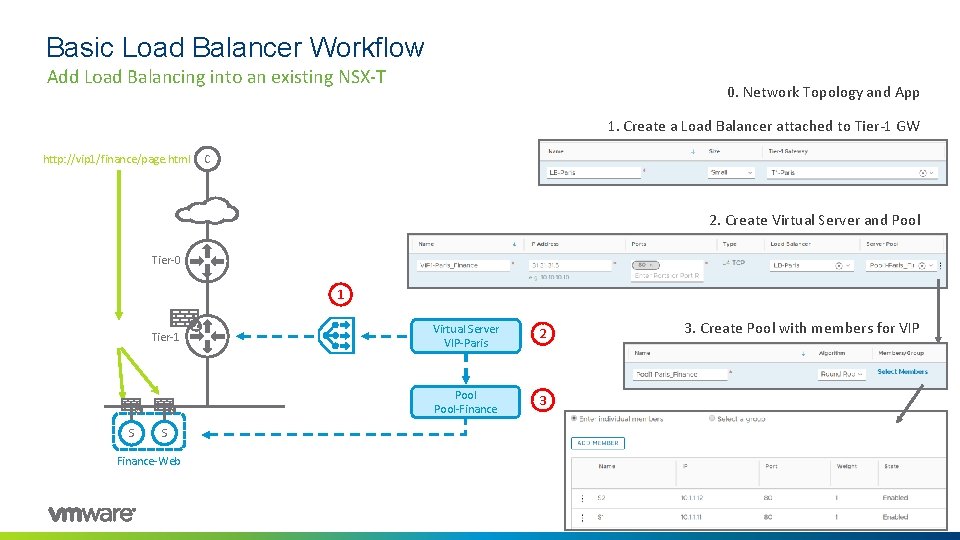
Basic Load Balancer Workflow Add Load Balancing into an existing NSX-T 0. Network Topology and App 1. Create a Load Balancer attached to Tier-1 GW http: //vip 1/finance/page. html C 2. Create Virtual Server and Pool Tier-0 1 Tier-1 S Virtual Server VIP-Paris 2 Pool-Finance 3 3. Create Pool with members for VIP S Finance-Web 12
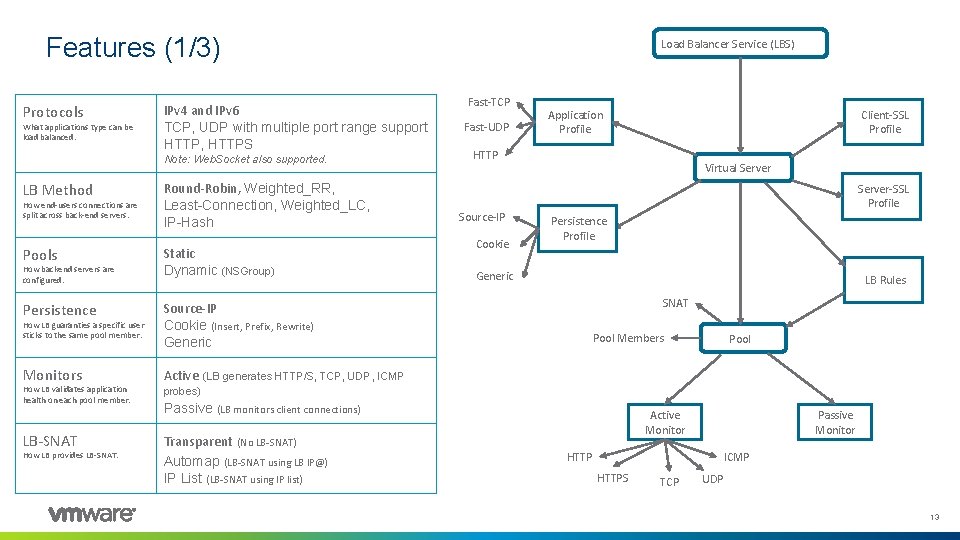
Features (1/3) Protocols What applications type can be load balanced. IPv 4 and IPv 6 TCP, UDP with multiple port range support HTTP, HTTPS Note: Web. Socket also supported. LB Method How end-users connections are split across back-end servers. Pools How backend servers are configured. Persistence How LB guaranties a specific user sticks to the same pool member. Monitors How LB validates application health on each pool member. LB-SNAT How LB provides LB-SNAT. Round-Robin, Weighted_RR, Least-Connection, Weighted_LC, IP-Hash Static Dynamic (NSGroup) Load Balancer Service (LBS) Fast-TCP Fast-UDP Application Profile HTTP Source-IP Cookie Virtual Server-SSL Profile Persistence Profile Generic LB Rules SNAT Source-IP Cookie (Insert, Prefix, Rewrite) Generic Active Client-SSL Profile Pool Members Pool (LB generates HTTP/S, TCP, UDP, ICMP probes) Passive (LB monitors client connections) Transparent (No LB-SNAT) Automap (LB-SNAT using LB IP@) IP List (LB-SNAT using IP list) Active Monitor Passive Monitor HTTP ICMP HTTPS TCP UDP 13
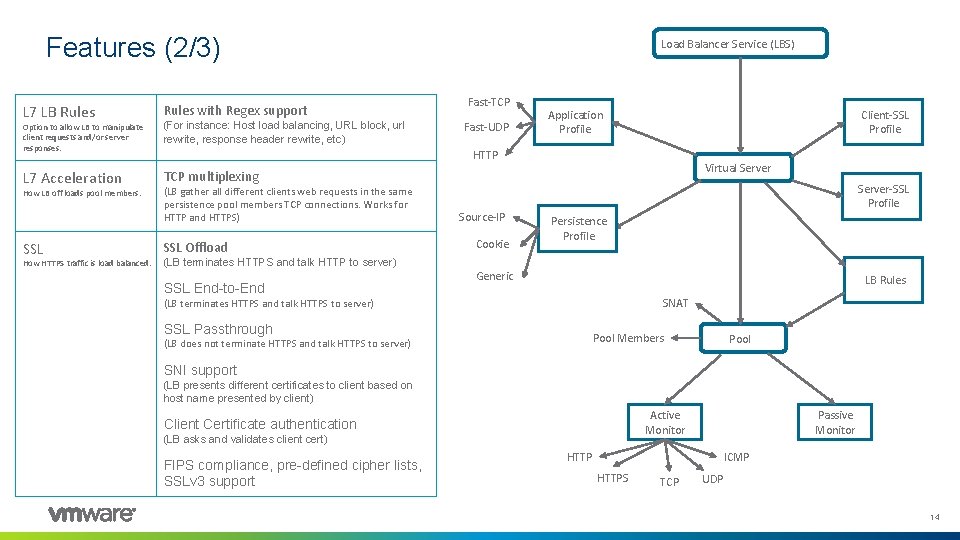
Features (2/3) L 7 LB Rules with Regex support Option to allow LB to manipulate client requests and/or server responses. (For instance: Host load balancing, URL block, url rewrite, response header rewrite, etc) L 7 Acceleration TCP multiplexing How LB off loads pool members. SSL How HTTPS traffic is load balanced. Load Balancer Service (LBS) Fast-TCP Fast-UDP Application Profile Client-SSL Profile HTTP (LB gather all different clients web requests in the same persistence pool members TCP connections. Works for HTTP and HTTPS) SSL Offload Source-IP Cookie Virtual Server-SSL Profile Persistence Profile (LB terminates HTTPS and talk HTTP to server) SSL End-to-End Generic LB Rules SNAT (LB terminates HTTPS and talk HTTPS to server) SSL Passthrough Pool Members (LB does not terminate HTTPS and talk HTTPS to server) Pool SNI support (LB presents different certificates to client based on host name presented by client) Active Monitor Client Certificate authentication (LB asks and validates client cert) FIPS compliance, pre-defined cipher lists, SSLv 3 support Passive Monitor HTTP ICMP HTTPS TCP UDP 14
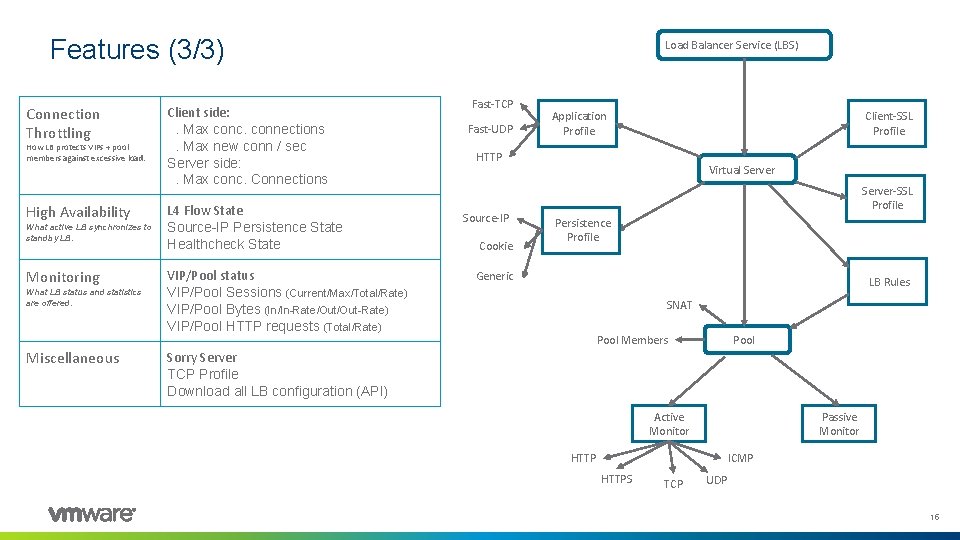
Features (3/3) Connection Throttling How LB protects VIPs + pool members against excessive load. High Availability What active LB synchronizes to standby LB. Monitoring What LB status and statistics are offered. Miscellaneous Client side: . Max conc. connections. Max new conn / sec Server side: . Max conc. Connections L 4 Flow State Source-IP Persistence State Healthcheck State VIP/Pool status VIP/Pool Sessions (Current/Max/Total/Rate) VIP/Pool Bytes (In/In-Rate/Out-Rate) VIP/Pool HTTP requests (Total/Rate) Load Balancer Service (LBS) Fast-TCP Fast-UDP Application Profile Client-SSL Profile HTTP Source-IP Cookie Virtual Server-SSL Profile Persistence Profile Generic LB Rules SNAT Pool Members Pool Sorry Server TCP Profile Download all LB configuration (API) Active Monitor Passive Monitor HTTP ICMP HTTPS TCP UDP 15
Agenda 1 NSX-T 3. 1 LB enhancements 2 NSX-T LB Technical Overview 3 NSX-T LB Technical Deep Dive 4 Demo 5 Key Takeaways 6 Q&A 16
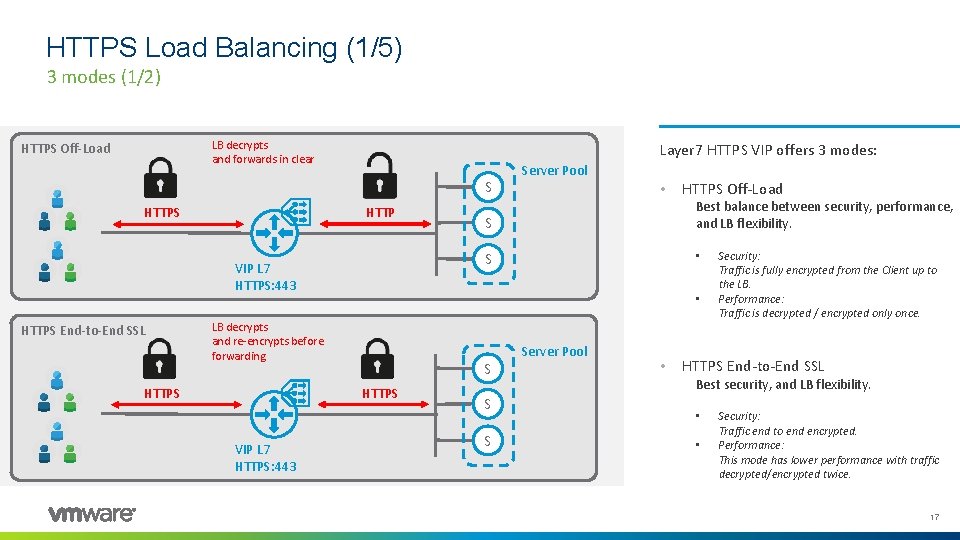
HTTPS Load Balancing (1/5) 3 modes (1/2) LB decrypts and forwards in clear HTTPS Off-Load Layer 7 HTTPS VIP offers 3 modes: S HTTP Best balance between security, performance, and LB flexibility. S S HTTPS VIP L 7 HTTPS: 443 HTTPS Off-Load • • LB decrypts and re-encrypts before forwarding HTTPS • S VIP L 7 HTTPS: 443 HTTPS End-to-End SSL Server Pool S S Server Pool • Security: Traffic is fully encrypted from the Client up to the LB. Performance: Traffic is decrypted / encrypted only once. HTTPS End-to-End SSL Best security, and LB flexibility. • • Security: Traffic end to end encrypted. Performance: This mode has lower performance with traffic decrypted/encrypted twice. 17
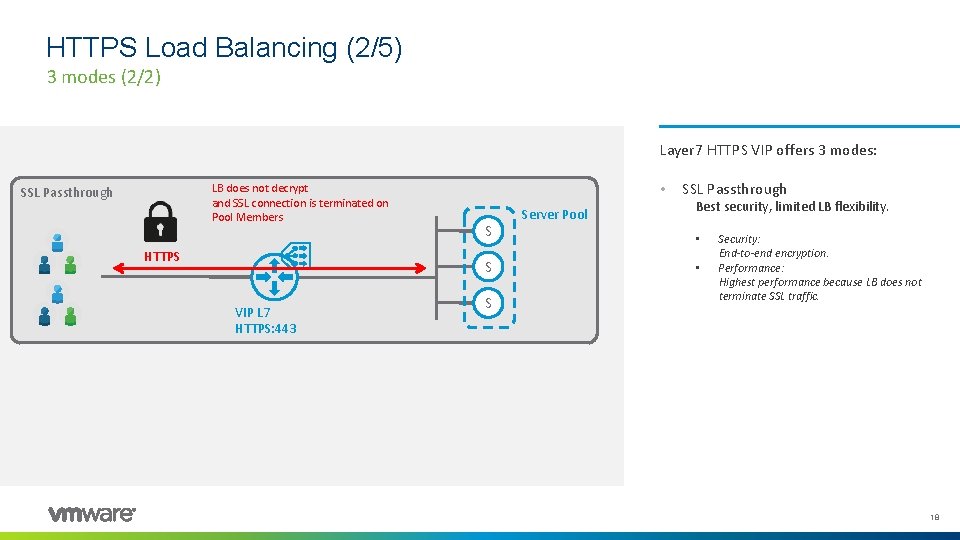
HTTPS Load Balancing (2/5) 3 modes (2/2) Layer 7 HTTPS VIP offers 3 modes: LB does not decrypt and SSL connection is terminated on Pool Members SSL Passthrough HTTPS • S S VIP L 7 HTTPS: 443 S Server Pool SSL Passthrough Best security, limited LB flexibility. • • Security: End-to-end encryption. Performance: Highest performance because LB does not terminate SSL traffic. 18
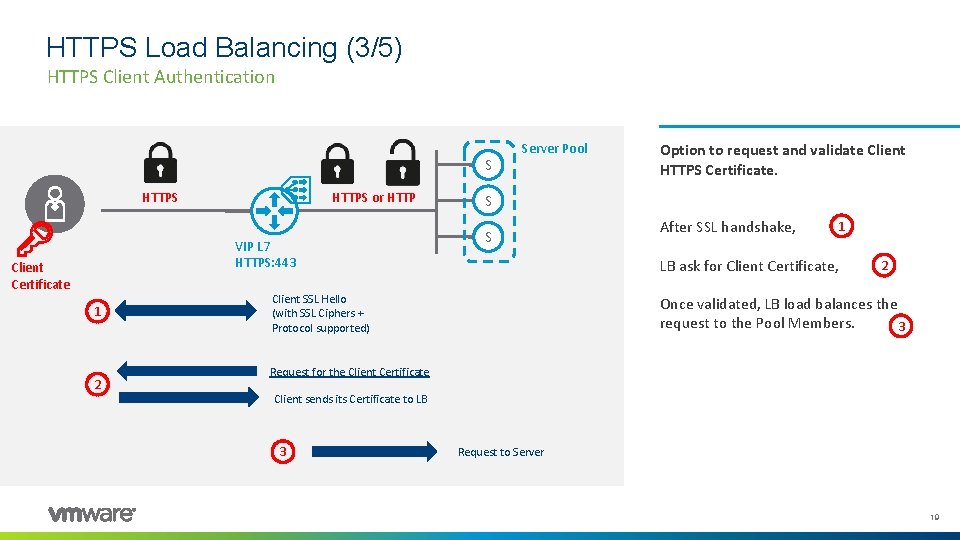
HTTPS Load Balancing (3/5) HTTPS Client Authentication S HTTPS or HTTP VIP L 7 HTTPS: 443 Client Certificate 1 2 Server Pool Option to request and validate Client HTTPS Certificate. S S After SSL handshake, 1 LB ask for Client Certificate, Client SSL Hello (with SSL Ciphers + Protocol supported) 2 Once validated, LB load balances the request to the Pool Members. 3 Request for the Client Certificate Client sends its Certificate to LB 3 Request to Server 19
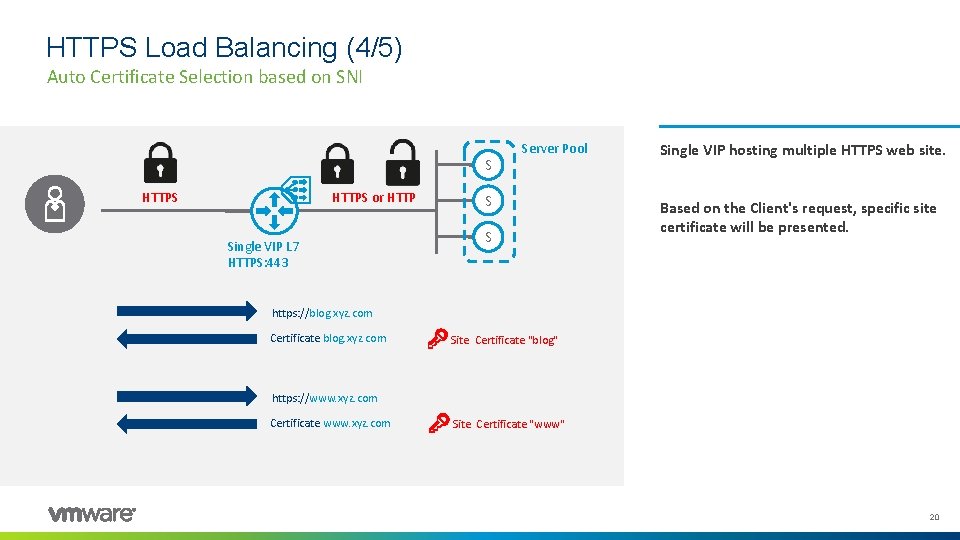
HTTPS Load Balancing (4/5) Auto Certificate Selection based on SNI S HTTPS or HTTP Single VIP L 7 HTTPS: 443 Server Pool S S Single VIP hosting multiple HTTPS web site. Based on the Client's request, specific site certificate will be presented. https: //blog. xyz. com Certificate blog. xyz. com Site Certificate "blog" https: //www. xyz. com Certificate www. xyz. com Site Certificate "www" 20
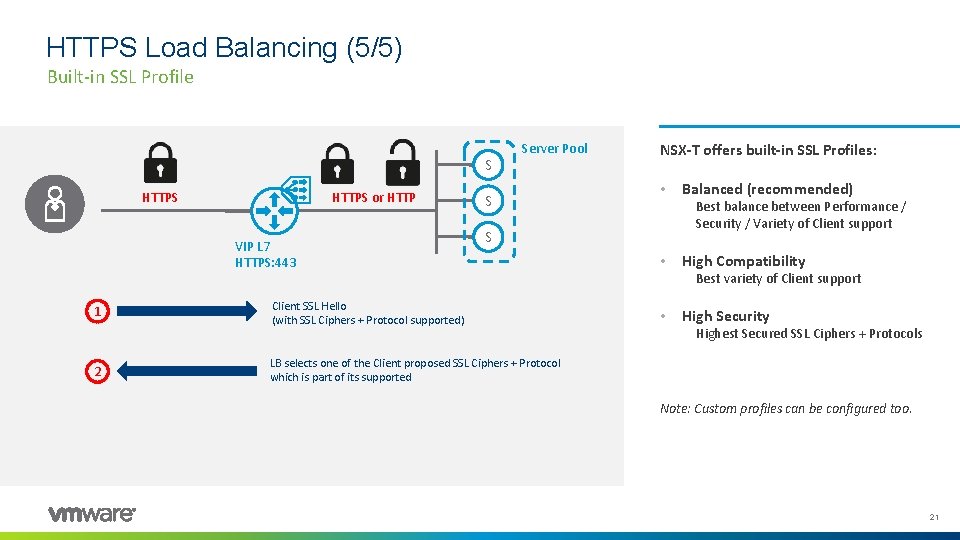
HTTPS Load Balancing (5/5) Built-in SSL Profile S HTTPS or HTTP VIP L 7 HTTPS: 443 1 2 Server Pool S NSX-T offers built-in SSL Profiles: • Best balance between Performance / Security / Variety of Client support S Client SSL Hello (with SSL Ciphers + Protocol supported) Balanced (recommended) • High Compatibility Best variety of Client support • High Security Highest Secured SSL Ciphers + Protocols LB selects one of the Client proposed SSL Ciphers + Protocol which is part of its supported Note: Custom profiles can be configured too. 21
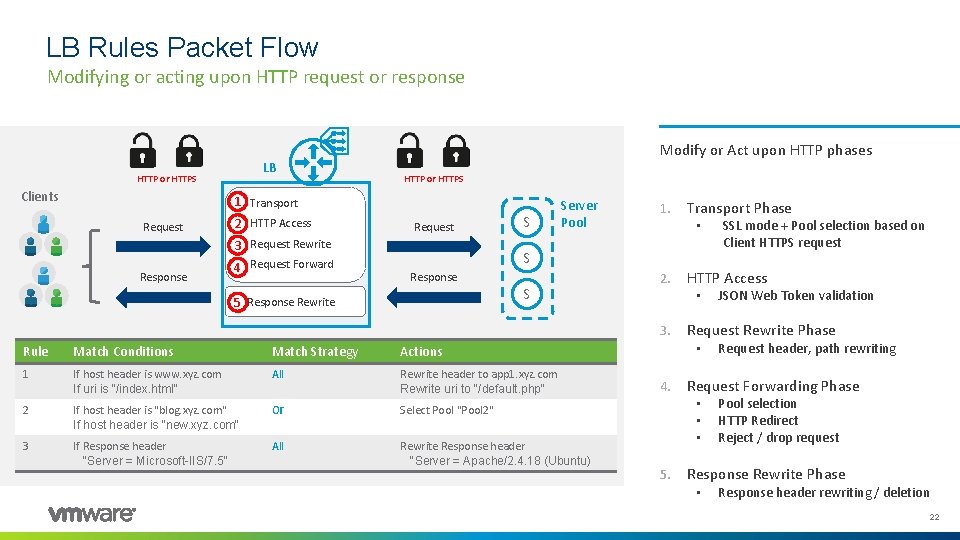
LB Rules Packet Flow Modifying or acting upon HTTP request or response LB HTTP or HTTPS Clients Modify or Act upon HTTP phases HTTP or HTTPS 1 Transport Request 2 HTTP Access Request 3 Request Rewrite Response 4 Request Forward S Server Pool 1. Transport Phase • S Response 5 Response Rewrite S 2. Rule Match Conditions Match Strategy Actions 1 If host header is www. xyz. com If uri is "/index. html" All Rewrite header to app 1. xyz. com Rewrite uri to "/default. php" 2 If host header is "blog. xyz. com" If host header is "new. xyz. com" Or Select Pool "Pool 2" 3 If Response header "Server = Microsoft-IIS/7. 5" All Rewrite Response header "Server = Apache/2. 4. 18 (Ubuntu) HTTP Access • 3. Request header, path rewriting Request Forwarding Phase • • • 5. JSON Web Token validation Request Rewrite Phase • 4. SSL mode + Pool selection based on Client HTTPS request Pool selection HTTP Redirect Reject / drop request Response Rewrite Phase • Response header rewriting / deletion 22
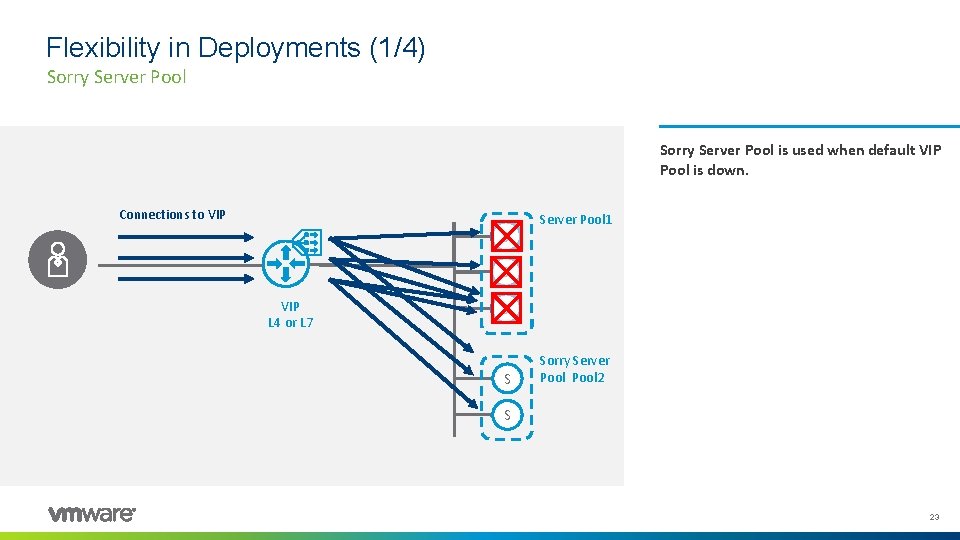
Flexibility in Deployments (1/4) Sorry Server Pool is used when default VIP Pool is down. Connections to VIP S Server Pool 1 S VIP L 4 or L 7 S S Sorry Server Pool 2 S 23
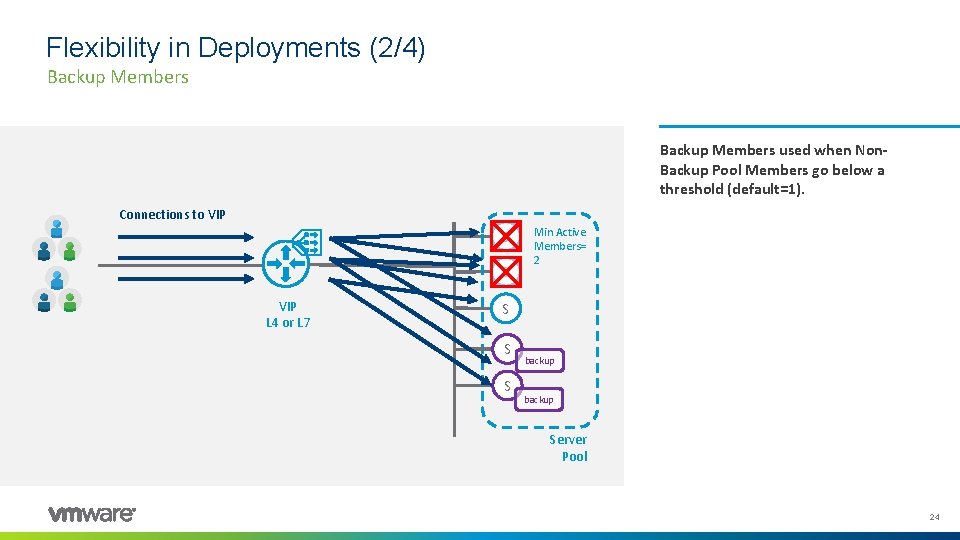
Flexibility in Deployments (2/4) Backup Members used when Non. Backup Pool Members go below a threshold (default=1). Connections to VIP S S VIP L 4 or L 7 Min Active Members= 2 S S S backup Server Pool 24
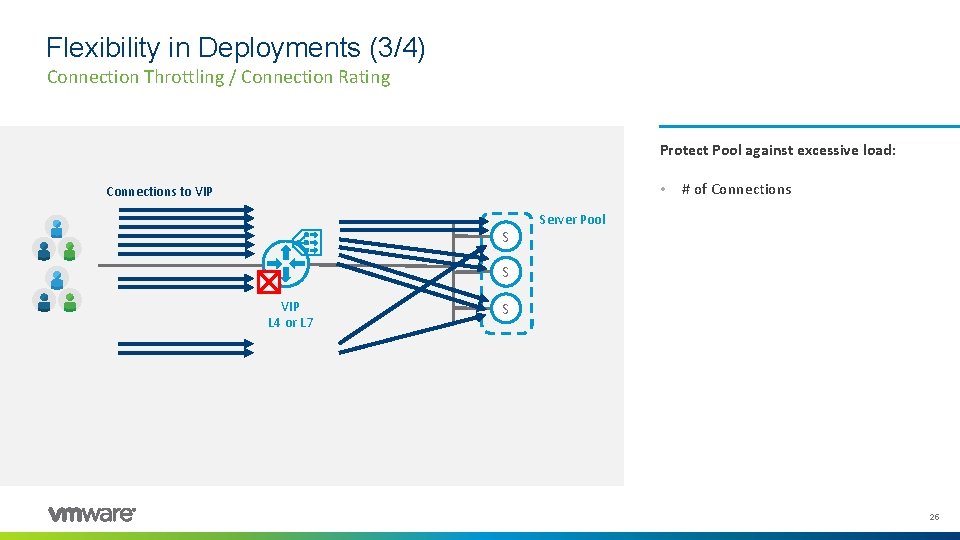
Flexibility in Deployments (3/4) Connection Throttling / Connection Rating Protect Pool against excessive load: • Connections to VIP S # of Connections Server Pool S VIP L 4 or L 7 S 25
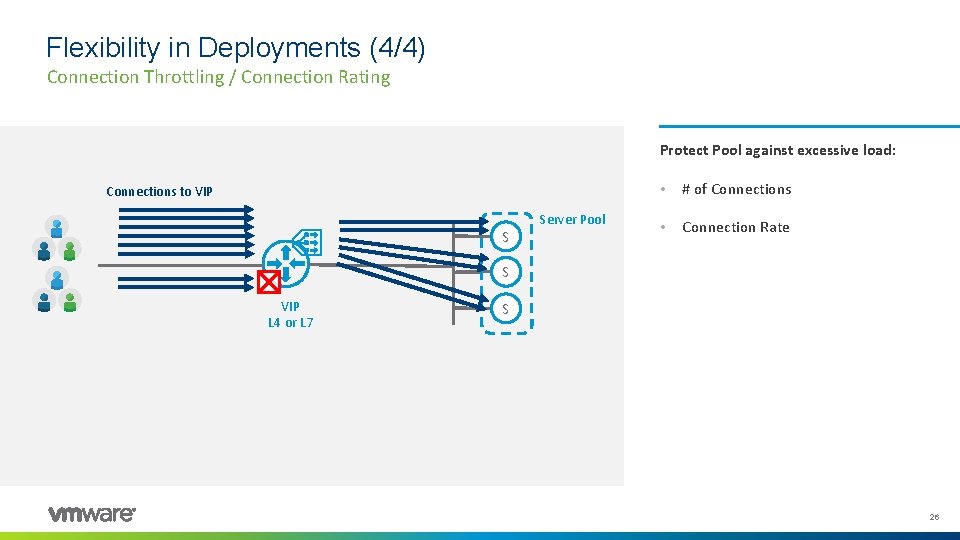
Flexibility in Deployments (4/4) Connection Throttling / Connection Rating Protect Pool against excessive load: Connections to VIP S Server Pool • # of Connections • Connection Rate S VIP L 4 or L 7 S 26
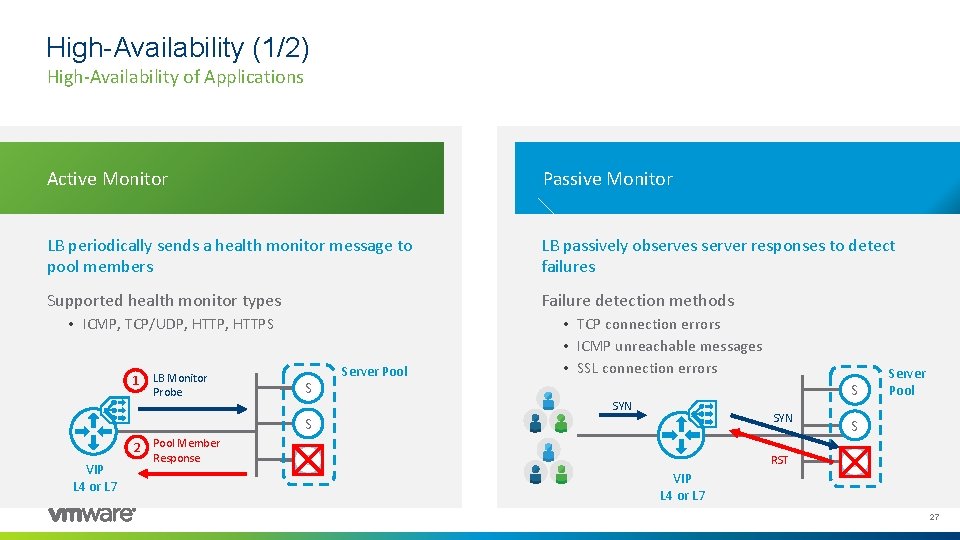
High-Availability (1/2) High-Availability of Applications Active Monitor Passive Monitor LB periodically sends a health monitor message to pool members LB passively observes server responses to detect failures Supported health monitor types Failure detection methods • ICMP, TCP/UDP, HTTPS 1 LB Monitor Probe S S 2 Pool Member VIP L 4 or L 7 Response Server Pool • TCP connection errors • ICMP unreachable messages • SSL connection errors S SYN S VIP L 4 or L 7 SYN S RST S Server Pool 27
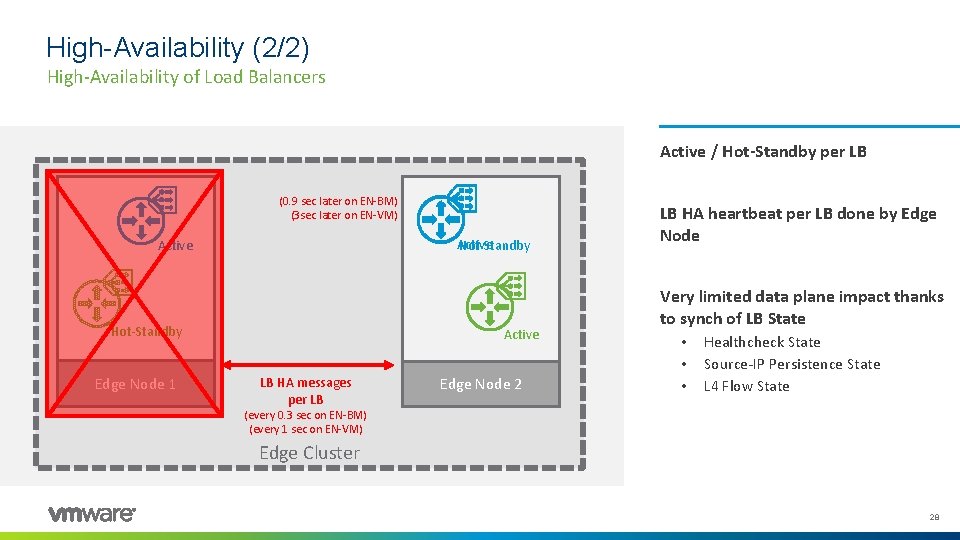
High-Availability (2/2) High-Availability of Load Balancers Active / Hot-Standby per LB (0. 9 sec later on EN-BM) (3 sec later on EN-VM) Active Hot-Standby Edge Node 1 Active LB HA messages per LB Edge Node 2 LB HA heartbeat per LB done by Edge Node Very limited data plane impact thanks to synch of LB State • • • Healthcheck State Source-IP Persistence State L 4 Flow State (every 0. 3 sec on EN-BM) (every 1 sec on EN-VM) Edge Cluster 28
Agenda 1 NSX-T 3. 1 LB enhancements 2 NSX-T LB Technical Overview 3 NSX-T LB Technical Deep Dive 4 Demo 5 Key Takeaways 6 Q&A 29
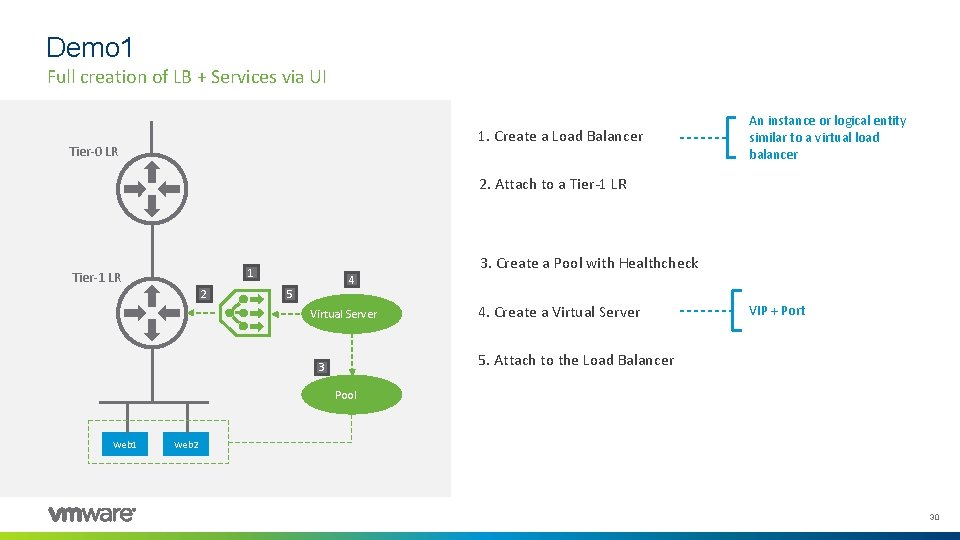
Demo 1 Full creation of LB + Services via UI 1. Create a Load Balancer Tier-0 LR An instance or logical entity similar to a virtual load balancer 2. Attach to a Tier-1 LR 3. Create a Pool with Healthcheck 1 Tier-1 LR 2 4 5 Virtual Server 4. Create a Virtual Server VIP + Port 5. Attach to the Load Balancer 3 Pool Web 1 Web 2 30
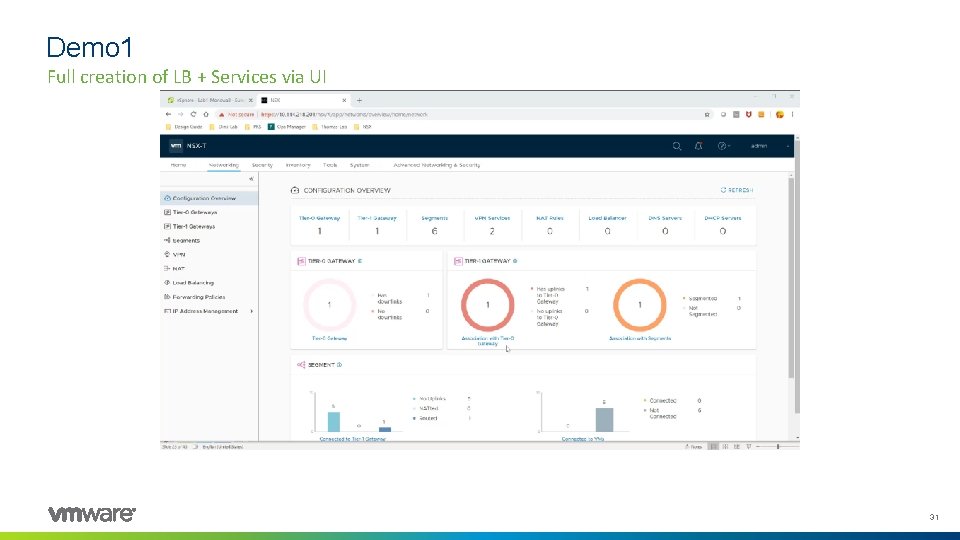
Demo 1 Full creation of LB + Services via UI 31
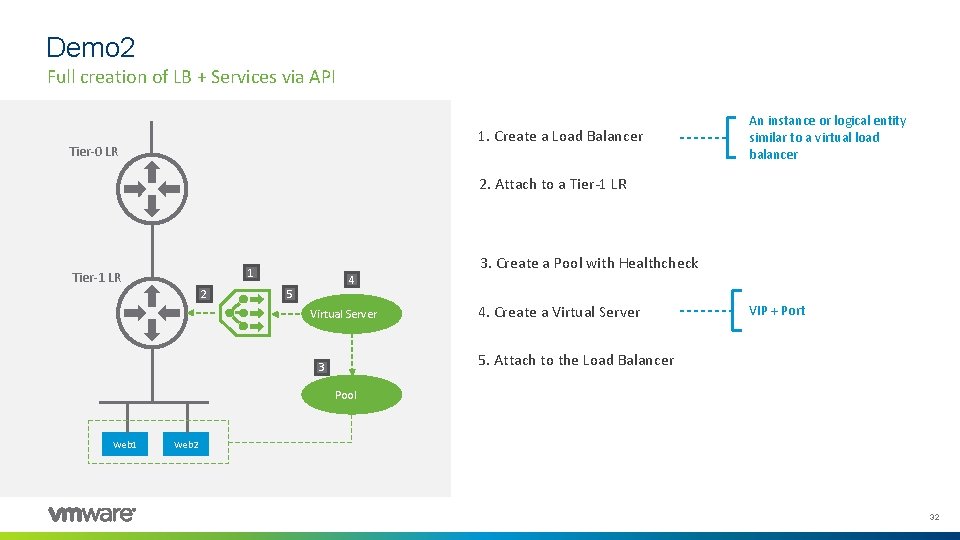
Demo 2 Full creation of LB + Services via API 1. Create a Load Balancer Tier-0 LR An instance or logical entity similar to a virtual load balancer 2. Attach to a Tier-1 LR 3. Create a Pool with Healthcheck 1 Tier-1 LR 2 4 5 Virtual Server 4. Create a Virtual Server VIP + Port 5. Attach to the Load Balancer 3 Pool Web 1 Web 2 32
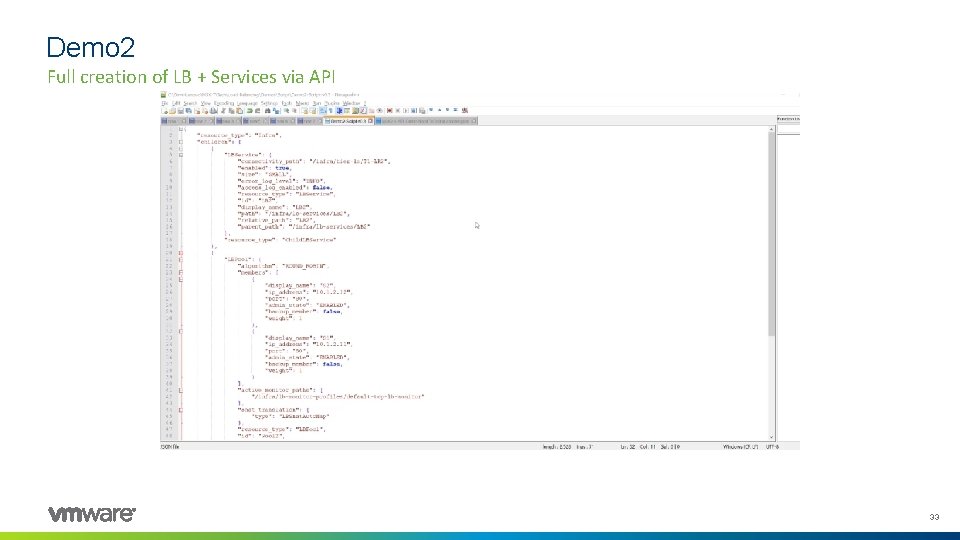
Demo 2 Full creation of LB + Services via API 33
Agenda 1 NSX-T 3. 1 LB enhancements 2 NSX-T LB Technical Overview 3 NSX-T LB Technical Deep Dive 4 Demo 5 Key Takeaways 6 Q&A 34
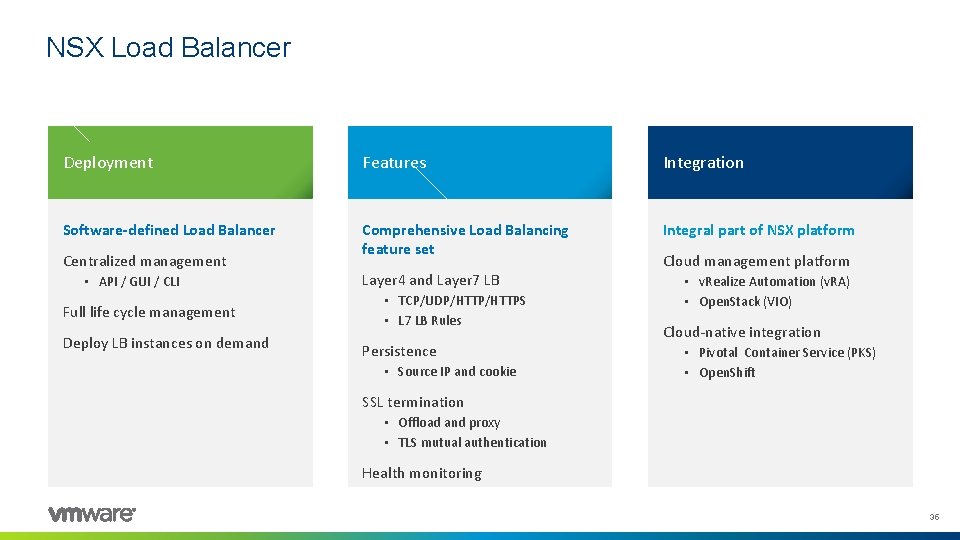
NSX Load Balancer Deployment Features Integration Software-defined Load Balancer Comprehensive Load Balancing feature set Integral part of NSX platform Centralized management • API / GUI / CLI Full life cycle management Deploy LB instances on demand Layer 4 and Layer 7 LB • TCP/UDP/HTTPS • L 7 LB Rules Persistence • Source IP and cookie Cloud management platform • v. Realize Automation (v. RA) • Open. Stack (VIO) Cloud-native integration • Pivotal Container Service (PKS) • Open. Shift SSL termination • Offload and proxy • TLS mutual authentication Health monitoring 35
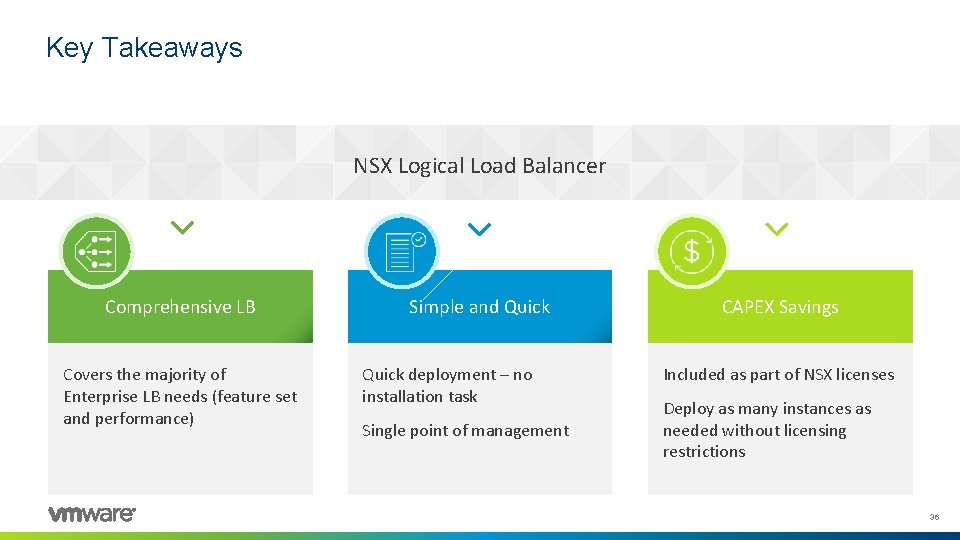
Key Takeaways NSX Logical Load Balancer Comprehensive LB Covers the majority of Enterprise LB needs (feature set and performance) Simple and Quick deployment – no installation task Single point of management CAPEX Savings Included as part of NSX licenses Deploy as many instances as needed without licensing restrictions 36
Agenda 1 NSX-T 3. 1 LB enhancements 2 NSX-T LB Technical Overview 3 NSX-T LB Technical Deep Dive 4 Demo 5 Key Takeaways 6 Q&A 37
Q&A 38
- Slides: 38