
NHSC PACS Web Tutorial PACS photometer mapmaking with
NHSC PACS Web Tutorial PACS photometer map-making with MADmap PACS-401 for HIPE 8 user release Version Babar Ali (NHSC) page 1 PACS map-making with MADmap. ESAC DP workshop 20 -24 Feb 2012
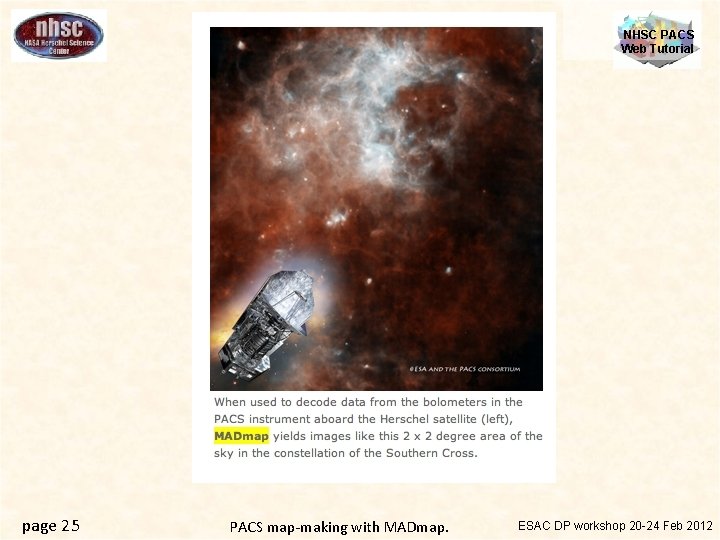
What is MADmap? NHSC PACS Web Tutorial • Mapping code written by the Berkeley CMB group to remove 1/f noise from bolometers. http: //newscenter. lbl. gov/feature-stories/2010/02/03/madmap/ • MADmap was ported to Java for use in HIPE. • MADmap offers the so-called optimal mapmaking to convert time ordered readouts to a final map. – Uses maximum likelihood (given a noise/probability model) to determine the optimal sky value. page 2 PACS map-making with MADmap. ESAC DP workshop 20 -24 Feb 2012
When should you use MADmap? NHSC PACS Web Tutorial • When spatially extended emission is present in the data. E. g. Galactic star-formation fields. – MADmap preserves spatially extended emission. • When the source itself is extended. E. g. large galaxies. • When extended structure is present around a compact source. E. g. extended halos or nebulosity. page 3 PACS map-making with MADmap. ESAC DP workshop 20 -24 Feb 2012
Caveats & Warnings NHSC PACS Web Tutorial • MADmap assumes that bolometer time-lines are calibrated. – Primarily that pixel-to-pixel instrument variations are already removed. • MADmap assumes that 1/f noise is uncorrelated amongst pixels. • All correlated noise (signal drift) must be removed prior to running MADmap. page 4 PACS map-making with MADmap. ESAC DP workshop 20 -24 Feb 2012

Pipeline section covered here Level 0 container PACS data, House Keeping Pointing Combine & Subtract ONOFF beams Masking: bad/dead pixels, glitches, saturation Initial Processing Chopper Processing Assign offsets on sky Flag “moving” frames page 5 Correct Flat Field Data Reorganization Logical blocks time stamps Unit conversion Distortion correction Chopped AOTs NHSC PACS Web Tutorial (a) Mapping AOTs (b) High Pass Filter Subtract offsets Correct Flat Field Calibrate Flux Calibrate Level 1 cubes Level 1 cube Assign pointing Level 0. 5 Minimally processed uncalibrated data cubes Project on sky Optimal Map Making Algorithm Combine individual beams Level 2 images PACS map-making with MADmap. Level 2 images ESAC DP workshop 20 -24 Feb 2012

Documentation Reference NHSC PACS Web Tutorial PACS data reduction guide, chapter 9 PACS-101: Introduction to PACS tutorials PACS-103: Accessing & Storing PACS data PACS-104: Using i. Pipe scripts PACS-201: Level 0 to 1 processing of PACS photometer data • PACS-401: MADmap map-making. • • • page 6 PACS map-making with MADmap. ESAC DP workshop 20 -24 Feb 2012
Outline of processing I. NHSC PACS Web Tutorial Pre-processing – – Calibrate time-lines Remove correlated signal drift II. MADmap – – Create “naïve”/simple map. Create optimal map. III. Post-processing (optional) – Remove point-source artifact around bright point sources. page 7 PACS map-making with MADmap. ESAC DP workshop 20 -24 Feb 2012
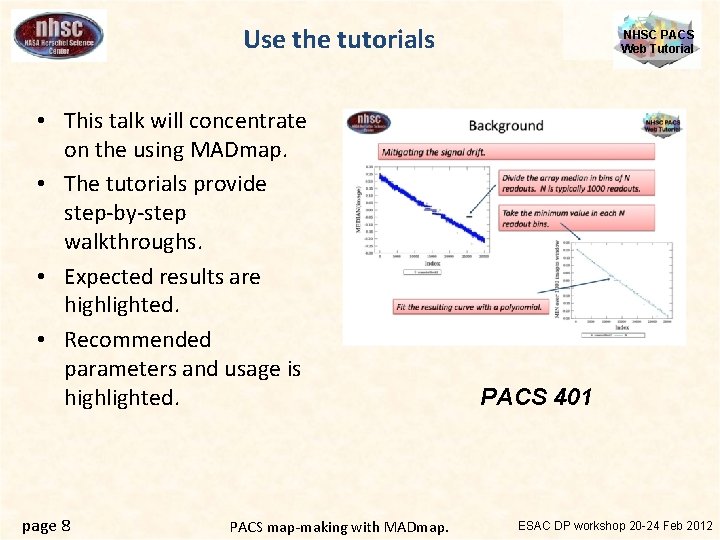
Use the tutorials • This talk will concentrate on the using MADmap. • The tutorials provide step-by-step walkthroughs. • Expected results are highlighted. • Recommended parameters and usage is highlighted. page 8 PACS map-making with MADmap. NHSC PACS Web Tutorial PACS 401 ESAC DP workshop 20 -24 Feb 2012
NHSC PACS Web Tutorial I: Pre-processing Preparing the time-lines for MADmap page 9 PACS map-making with MADmap. ESAC DP workshop 20 -24 Feb 2012
• Start with Level 1 products. – The ipipe scripts start with level 0 – However, the processing is similar between all pipeline branches of the PACS photometer • The following additional steps are needed to finish calibration for MADmap 1. Assign (a, d) values to each pixel 2. Remove pixel-to-pixel electronic offsets ESAC DP workshop 20 -24 Feb 2012 PACS map-making with MADmap. page 10 NHSC PACS Web Tutorial Calibrating Time-lines
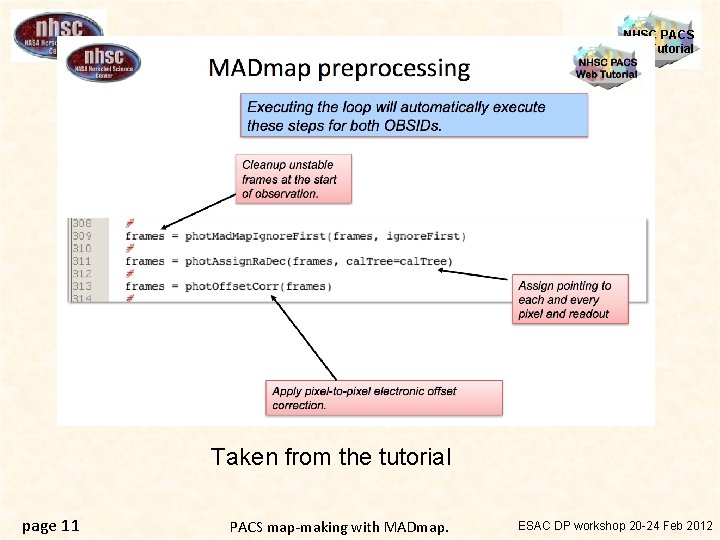
NHSC PACS Web Tutorial Taken from the tutorial page 11 PACS map-making with MADmap. ESAC DP workshop 20 -24 Feb 2012
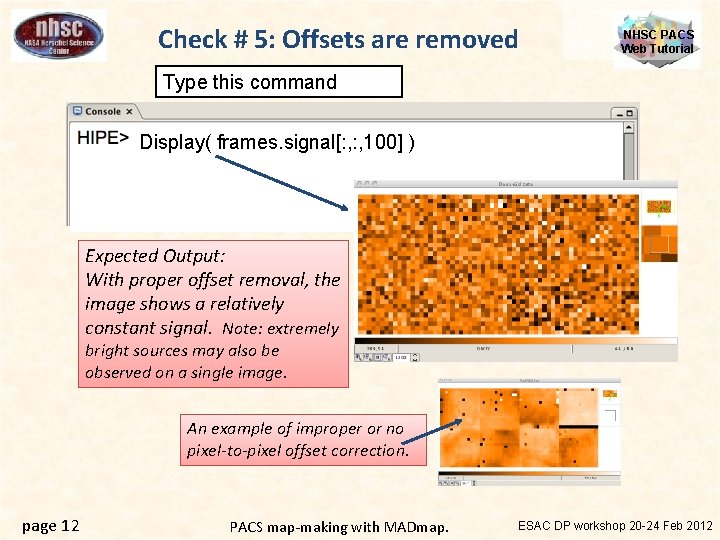
Check # 5: Offsets are removed NHSC PACS Web Tutorial Type this command Display( frames. signal[: , 100] ) Expected Output: With proper offset removal, the image shows a relatively constant signal. Note: extremely bright sources may also be observed on a single image. An example of improper or no pixel-to-pixel offset correction. page 12 PACS map-making with MADmap. ESAC DP workshop 20 -24 Feb 2012
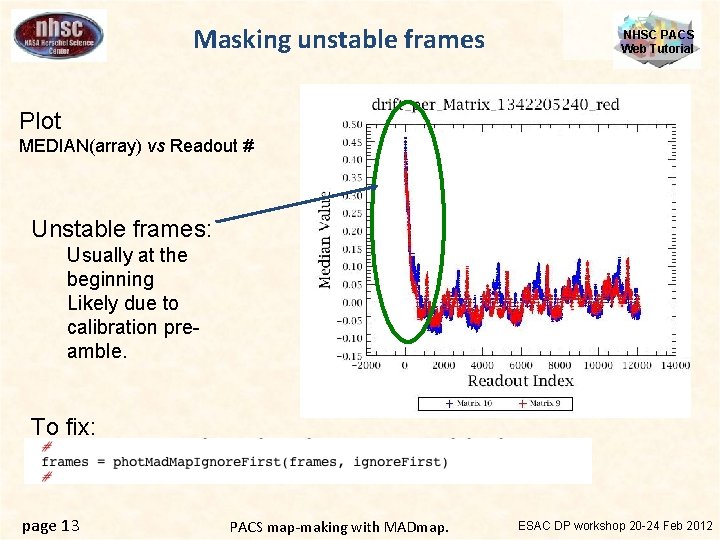
Masking unstable frames NHSC PACS Web Tutorial Plot MEDIAN(array) vs Readout # Unstable frames: Usually at the beginning Likely due to calibration preamble. To fix: page 13 PACS map-making with MADmap. ESAC DP workshop 20 -24 Feb 2012
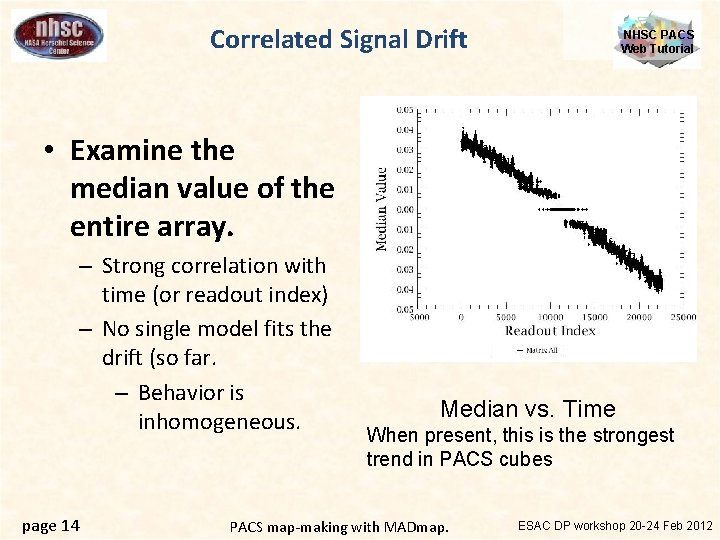
Correlated Signal Drift NHSC PACS Web Tutorial • Examine the median value of the entire array. – Strong correlation with time (or readout index) – No single model fits the drift (so far. – Behavior is inhomogeneous. page 14 Median vs. Time When present, this is the strongest trend in PACS cubes PACS map-making with MADmap. ESAC DP workshop 20 -24 Feb 2012
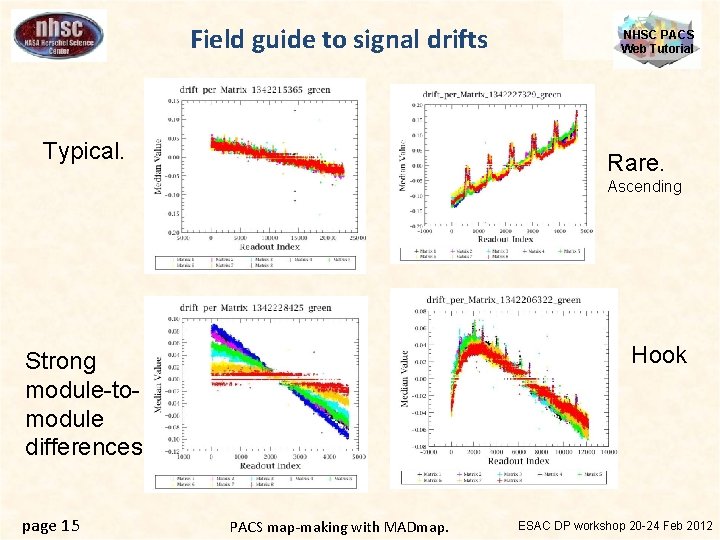
Field guide to signal drifts Typical. NHSC PACS Web Tutorial Rare. Ascending Hook Strong module-tomodule differences page 15 PACS map-making with MADmap. ESAC DP workshop 20 -24 Feb 2012
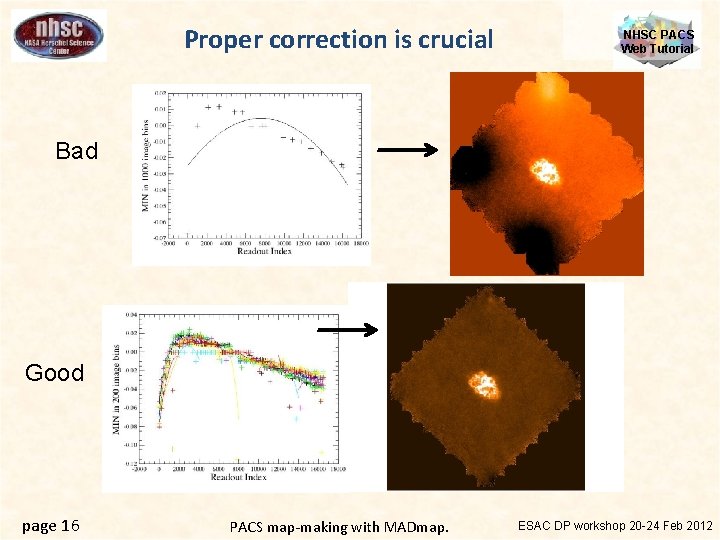
Proper correction is crucial NHSC PACS Web Tutorial Bad Good page 16 PACS map-making with MADmap. ESAC DP workshop 20 -24 Feb 2012
What to do? NHSC PACS Web Tutorial • Depending on the complexity of the drift, you may need to iterate with different bin sizes and different orders. • Complicated module-to-module and “hook” drifts require segmenting the timeline in smaller chunks. • Ensure that you plot the medians and the fit (do. Plot=True) and you are satisfied with the fit. page 17 PACS map-making with MADmap. ESAC DP workshop 20 -24 Feb 2012
NHSC PACS Web Tutorial II. MADmap The actual map-making page 18 PACS map-making with MADmap. ESAC DP workshop 20 -24 Feb 2012
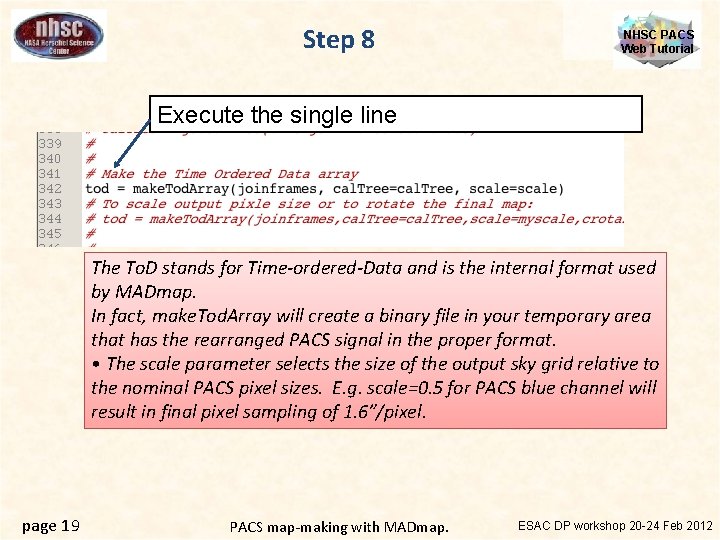
Step 8 NHSC PACS Web Tutorial Execute the single line The To. D stands for Time-ordered-Data and is the internal format used by MADmap. In fact, make. Tod. Array will create a binary file in your temporary area that has the rearranged PACS signal in the proper format. • The scale parameter selects the size of the output sky grid relative to the nominal PACS pixel sizes. E. g. scale=0. 5 for PACS blue channel will result in final pixel sampling of 1. 6”/pixel. page 19 PACS map-making with MADmap. ESAC DP workshop 20 -24 Feb 2012
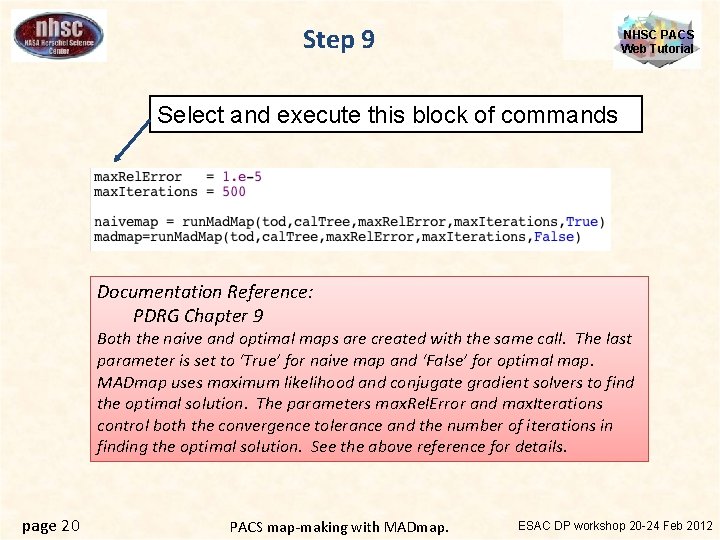
Step 9 NHSC PACS Web Tutorial Select and execute this block of commands Documentation Reference: PDRG Chapter 9 Both the naive and optimal maps are created with the same call. The last parameter is set to ‘True’ for naive map and ‘False’ for optimal map. MADmap uses maximum likelihood and conjugate gradient solvers to find the optimal solution. The parameters max. Rel. Error and max. Iterations control both the convergence tolerance and the number of iterations in finding the optimal solution. See the above reference for details. page 20 PACS map-making with MADmap. ESAC DP workshop 20 -24 Feb 2012
NHSC PACS Web Tutorial II. Post-processing Correct the final map for point source artifacts page 21 PACS map-making with MADmap. ESAC DP workshop 20 -24 Feb 2012
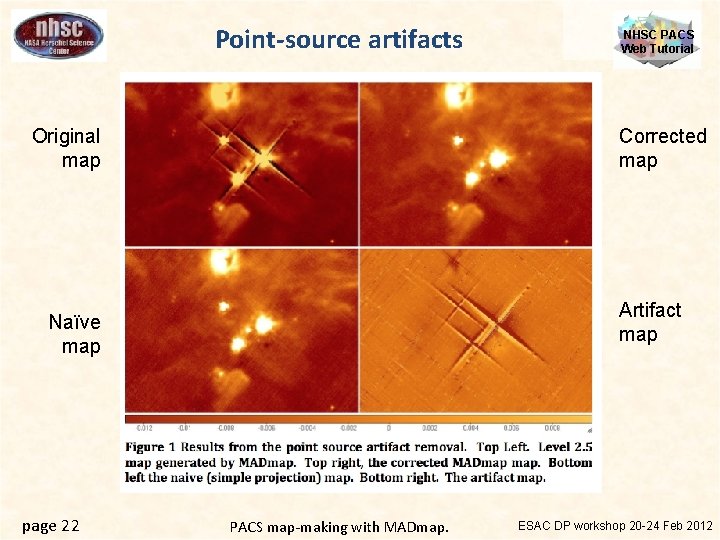
Point-source artifacts Original map Corrected map Artifact map Naïve map page 22 NHSC PACS Web Tutorial PACS map-making with MADmap. ESAC DP workshop 20 -24 Feb 2012
– Lorenzo et al. in prep (available on request) – Developed for Hi. Gal data processing. • Reference: • • Uses the optimal map as the starting point for sky emission. Subtract sky from original time lines, which leaves only noise+artifacts in the time-line. High-pass filter the noise+artifacts time-lines. This removes noise and leaves on artifact. In practice, several iterations are necessary. ESAC DP workshop 20 -24 Feb 2012 PACS map-making with MADmap. page 23 NHSC PACS Web Tutorial How does it work?
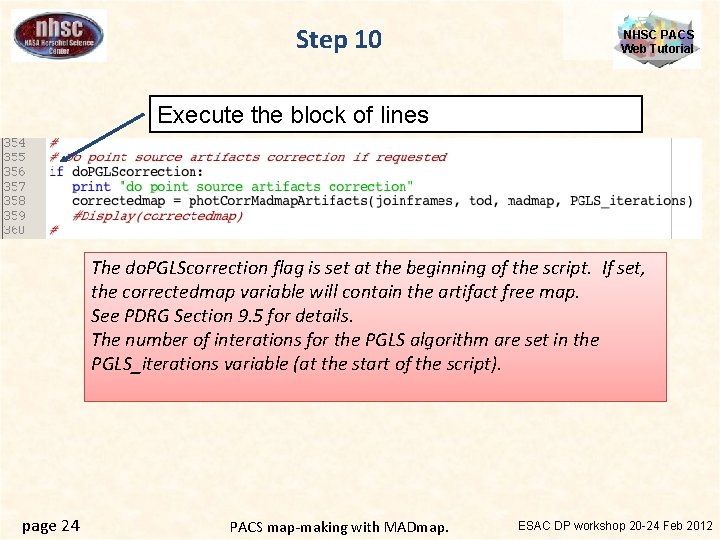
Step 10 NHSC PACS Web Tutorial Execute the block of lines The do. PGLScorrection flag is set at the beginning of the script. If set, the correctedmap variable will contain the artifact free map. See PDRG Section 9. 5 for details. The number of interations for the PGLS algorithm are set in the PGLS_iterations variable (at the start of the script). page 24 PACS map-making with MADmap. ESAC DP workshop 20 -24 Feb 2012
NHSC PACS Web Tutorial page 25 PACS map-making with MADmap. ESAC DP workshop 20 -24 Feb 2012
- Slides: 25