
New Features in Release 8 3 November 16
New Features in Release 8. 3 (November 16, 2008)
Release 8. 3 New Features l Previewing Sub-tabs when Browsing Navigation Tabs l Hover Help 2
Previewing Sub-tabs when Browsing Navigation Tabs l A new feature has been added to allow previewing of sub-tabs when browsing navigation tabs. l If you pause your cursor arrow at a navigation tab, (product search, carts, history, etc) you can quickly see the options available, saving time spent “clicking” unnecessarily. l The goal is to help users quickly find the right place in the application to perform the task at hand. 3
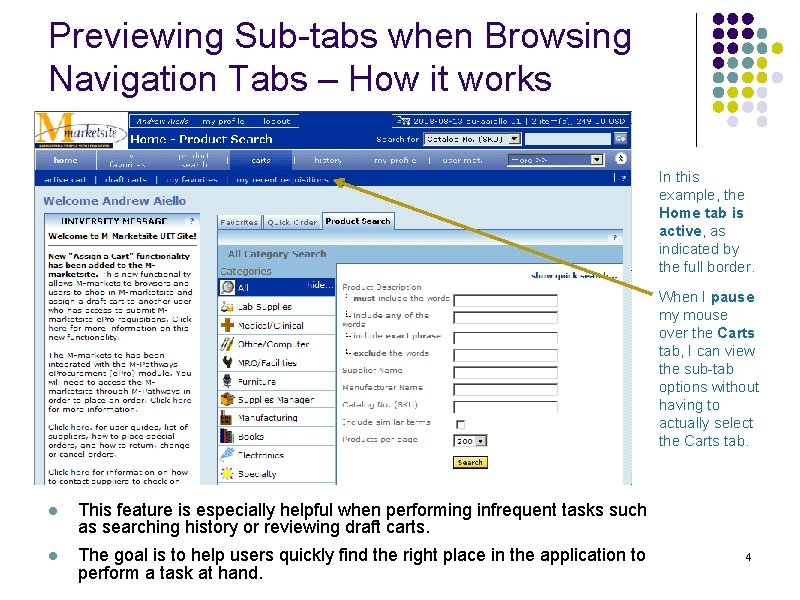
Previewing Sub-tabs when Browsing Navigation Tabs – How it works In this example, the Home tab is active, as indicated by the full border. When I pause my mouse over the Carts tab, I can view the sub-tab options without having to actually select the Carts tab. l This feature is especially helpful when performing infrequent tasks such as searching history or reviewing draft carts. l The goal is to help users quickly find the right place in the application to perform a task at hand. 4
Hover Help l A new feature is now available in the M-marketsite that allows users to “hover” over a field to view the fieldspecific help. l How it works: After placing your mouse on a field for approximately one second, a small popup window displays that allows users to learn more about the field 5

Hover Help – How it works Placing your mouse on a field and you will see a cursor arrow with a “? ” wait approximately one second, a small popup window displays the help information for the field. Users have the option to disable the Hover Help from here or their profile. l Disabling via the profile: my profile personal settings Help on mouse over 6
- Slides: 6