
New Employee Orientation Benefits Insurance Part 1 UCF

New Employee Orientation Benefits: Insurance (Part 1) UCF Human Resources Benefits Section (407) 823 -2771 Benefits@ucf. edu
New Employee Benefits Guide Please ensure you have access to the New Employee Benefits Guide, which is used in conjunction with New Employee Orientation.
Who is People First? Because UCF is a state university, we participate in the State Group Insurance Program. People First is the plan administrator for the State Group Insurance Program. They are responsible for plan enrollments, determining eligibility, processing changes and COBRA. Using People First to Enroll 1. Online: https: //peoplefirst. myflorida. com User ID and Password Required 2. Service Center: 1 -866 -663 -4735 Available Monday-Friday 8: 00 am to 6: 00 pm ET If you are transferring from another State Agency or State University, you will use your new People First ID when calling People First.
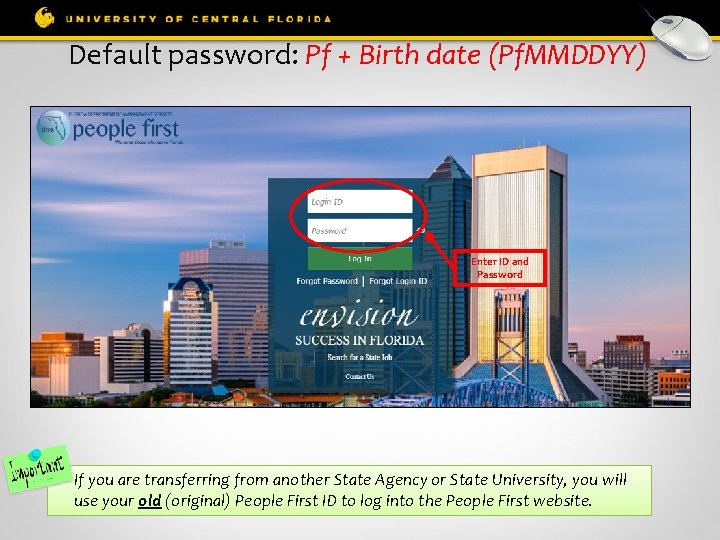
Default password: Pf + Birth date (Pf. MMDDYY) Enter ID and Password If you are transferring from another State Agency or State University, you will use your old (original) People First ID to log into the People First website.
Changing Insurance Employees have two ways to change insurance elections after 60 -day new hire enrollment window: 1. Qualifying Status Change (QSC) § Marriage, divorce, birth of child, spouse insurance termination, etc. § Employees have 60 days from event to contact People First 2. Open Enrollment § Held each fall § Coverage effective January 1 st of following year
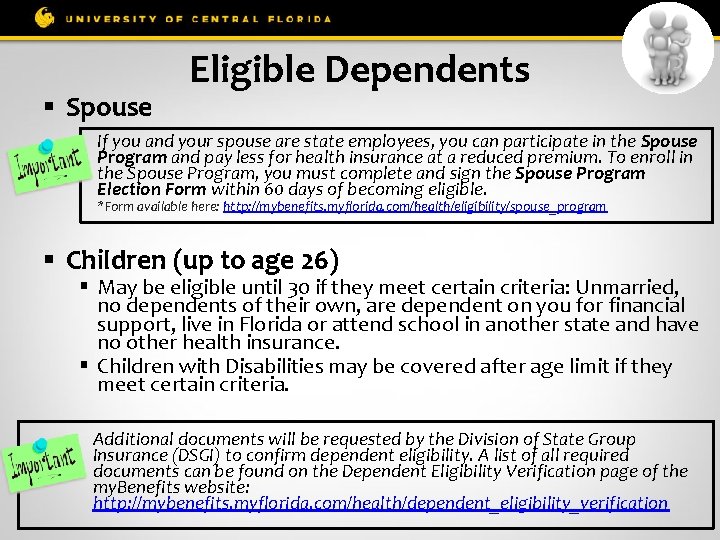
§ Spouse Eligible Dependents If you and your spouse are state employees, you can participate in the Spouse Program and pay less for health insurance at a reduced premium. To enroll in the Spouse Program, you must complete and sign the Spouse Program Election Form within 60 days of becoming eligible. *Form available here: http: //mybenefits. myflorida. com/health/eligibility/spouse_program § Children (up to age 26) § May be eligible until 30 if they meet certain criteria: Unmarried, no dependents of their own, are dependent on you for financial support, live in Florida or attend school in another state and have no other health insurance. § Children with Disabilities may be covered after age limit if they meet certain criteria. Additional documents will be requested by the Division of State Group Insurance (DSGI) to confirm dependent eligibility. A list of all required documents can be found on the Dependent Eligibility Verification page of the my. Benefits website: http: //mybenefits. myflorida. com/health/dependent_eligibility_verification
Insurance Effective Dates § Employees have 60 days from hire date to enroll in insurance § Employees in regular positions may elect health insurance to begin the month after they are hired – this is called an early effective date § For example, if you are hired in June, you can start your health insurance July 1. § Insurance cards will be mailed after effective date
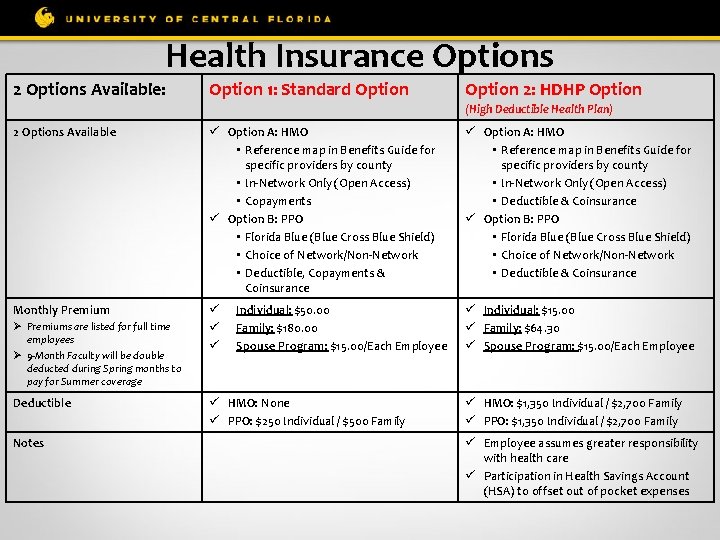
Health Insurance Options 2 Options Available: Option 1: Standard Option 2: HDHP Option (High Deductible Health Plan) 2 Options Available Option A: HMO • Reference map in Benefits Guide for specific providers by county • In-Network Only (Open Access) • Copayments Option B: PPO • Florida Blue (Blue Cross Blue Shield) • Choice of Network/Non-Network • Deductible, Copayments & Coinsurance Monthly Premium Ø Premiums are listed for full time employees Ø 9 -Month Faculty will be double deducted during Spring months to pay for Summer coverage Deductible Notes Individual: $50. 00 Family: $180. 00 Spouse Program: $15. 00/Each Employee HMO: None PPO: $250 Individual / $500 Family Option A: HMO • Reference map in Benefits Guide for specific providers by county • In-Network Only (Open Access) • Deductible & Coinsurance Option B: PPO • Florida Blue (Blue Cross Blue Shield) • Choice of Network/Non-Network • Deductible & Coinsurance Individual: $15. 00 Family: $64. 30 Spouse Program: $15. 00/Each Employee HMO: $1, 350 Individual / $2, 700 Family PPO: $1, 350 Individual / $2, 700 Family Employee assumes greater responsibility with health care Participation in Health Savings Account (HSA) to offset out of pocket expenses
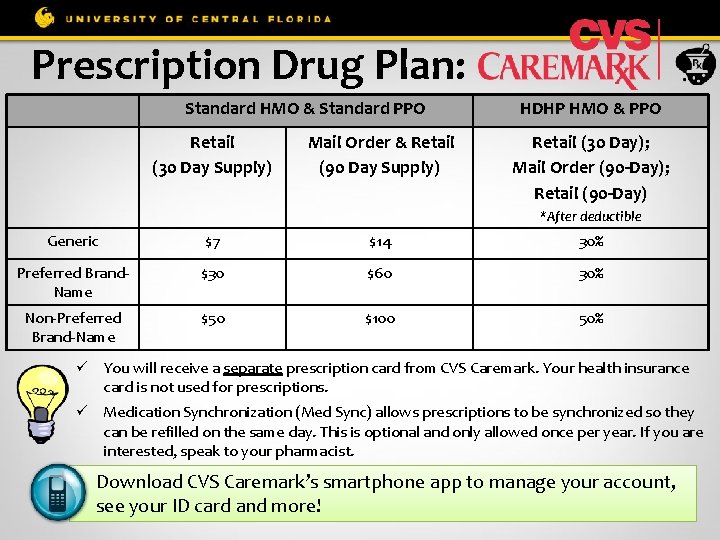
Prescription Drug Plan: Standard HMO & Standard PPO Retail (30 Day Supply) Mail Order & Retail (90 Day Supply) HDHP HMO & PPO Retail (30 Day); Mail Order (90 -Day); Retail (90 -Day) *After deductible Generic $7 $14 30% Preferred Brand. Name $30 $60 30% Non-Preferred Brand-Name $50 $100 50% You will receive a separate prescription card from CVS Caremark. Your health insurance card is not used for prescriptions. Medication Synchronization (Med Sync) allows prescriptions to be synchronized so they can be refilled on the same day. This is optional and only allowed once per year. If you are interested, speak to your pharmacist. Download CVS Caremark’s smartphone app to manage your account, see your ID card and more!
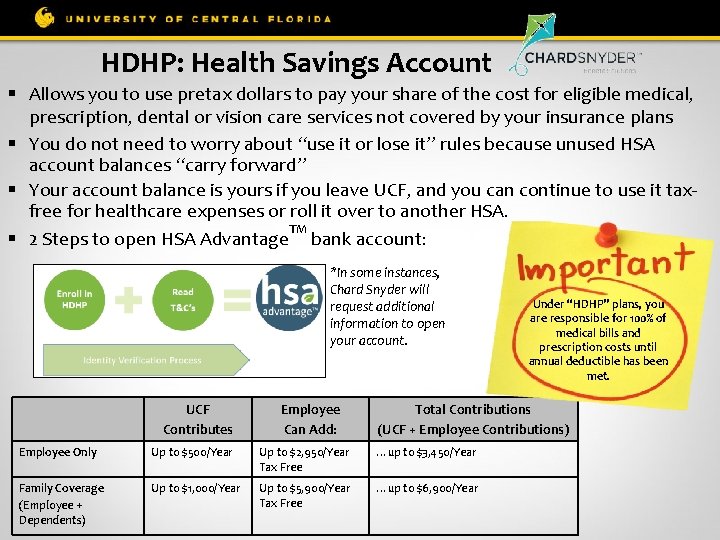
HDHP: Health Savings Account § Allows you to use pretax dollars to pay your share of the cost for eligible medical, prescription, dental or vision care services not covered by your insurance plans § You do not need to worry about “use it or lose it” rules because unused HSA account balances “carry forward” § Your account balance is yours if you leave UCF, and you can continue to use it taxfree for healthcare expenses or roll it over to another HSA. TM § 2 Steps to open HSA Advantage bank account: *In some instances, Chard Snyder will request additional information to open your account. UCF Contributes Employee Can Add: Under “HDHP” plans, you are responsible for 100% of medical bills and prescription costs until annual deductible has been met. Total Contributions (UCF + Employee Contributions) Employee Only Up to $500/Year Up to $2, 950/Year Tax Free …up to $3, 450/Year Family Coverage (Employee + Dependents) Up to $1, 000/Year Up to $5, 900/Year Tax Free …up to $6, 900/Year
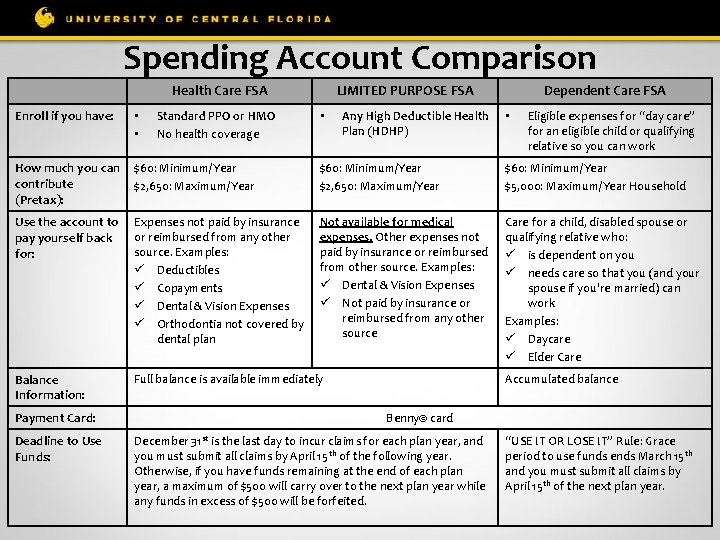
Spending Account Comparison Health Care FSA Enroll if you have: • • Standard PPO or HMO No health coverage LIMITED PURPOSE FSA • Any High Deductible Health Plan (HDHP) Dependent Care FSA • Eligible expenses for “day care” for an eligible child or qualifying relative so you can work How much you can $60: Minimum/Year contribute $2, 650: Maximum/Year (Pretax): $60: Minimum/Year $2, 650: Maximum/Year $60: Minimum/Year $5, 000: Maximum/Year Household Use the account to Expenses not paid by insurance pay yourself back or reimbursed from any other source. Examples: for: Deductibles Copayments Dental & Vision Expenses Orthodontia not covered by dental plan Not available for medical expenses. Other expenses not paid by insurance or reimbursed from other source. Examples: Dental & Vision Expenses Not paid by insurance or reimbursed from any other source Care for a child, disabled spouse or qualifying relative who: is dependent on you needs care so that you (and your spouse if you're married) can work Examples: Daycare Elder Care Balance Information: Payment Card: Deadline to Use Funds: Full balance is available immediately Accumulated balance Benny© card December 31 st is the last day to incur claims for each plan year, and you must submit all claims by April 15 th of the following year. Otherwise, if you have funds remaining at the end of each plan year, a maximum of $500 will carry over to the next plan year while any funds in excess of $500 will be forfeited. “USE IT OR LOSE IT” Rule: Grace period to use funds ends March 15 th and you must submit all claims by April 15 th of the next plan year.
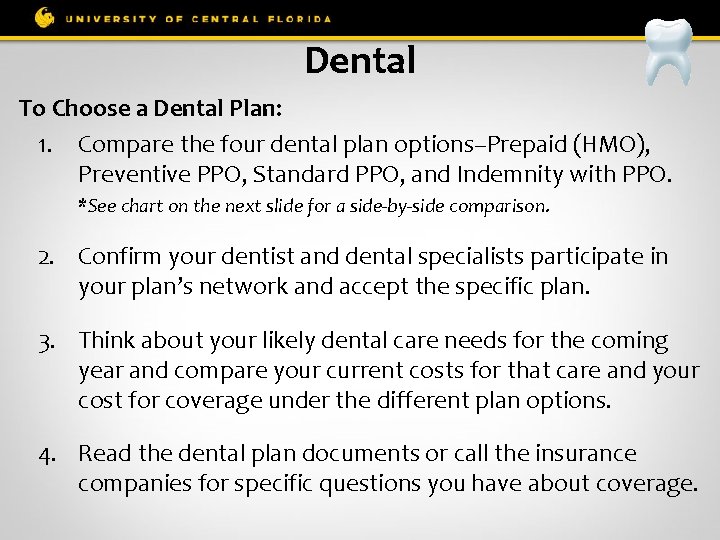
Dental To Choose a Dental Plan: 1. Compare the four dental plan options–Prepaid (HMO), Preventive PPO, Standard PPO, and Indemnity with PPO. *See chart on the next slide for a side-by-side comparison. 2. Confirm your dentist and dental specialists participate in your plan’s network and accept the specific plan. 3. Think about your likely dental care needs for the coming year and compare your current costs for that care and your cost for coverage under the different plan options. 4. Read the dental plan documents or call the insurance companies for specific questions you have about coverage.
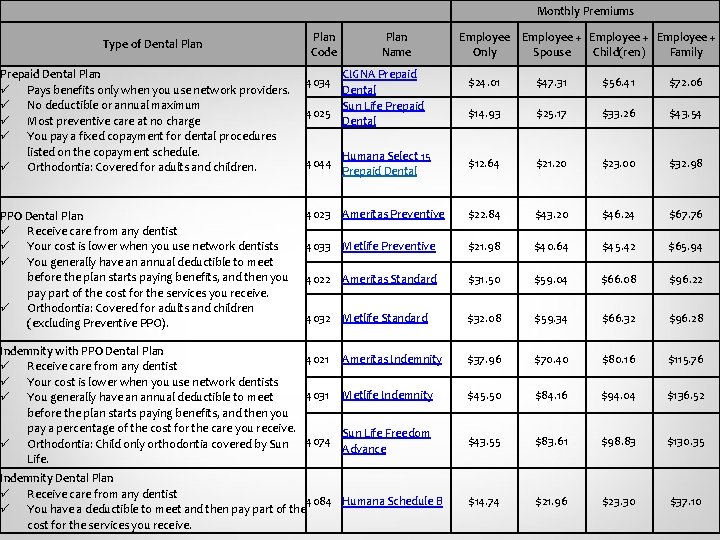
Monthly Premiums Type of Dental Plan Prepaid Dental Plan Pays benefits only when you use network providers. No deductible or annual maximum Most preventive care at no charge You pay a fixed copayment for dental procedures listed on the copayment schedule. Orthodontia: Covered for adults and children. PPO Dental Plan Receive care from any dentist Your cost is lower when you use network dentists You generally have an annual deductible to meet before the plan starts paying benefits, and then you pay part of the cost for the services you receive. Orthodontia: Covered for adults and children (excluding Preventive PPO). Plan Code Plan Name CIGNA Prepaid Dental Sun Life Prepaid 4025 Dental 4034 Employee + Only Spouse Child(ren) Family $24. 01 $47. 31 $56. 41 $72. 06 $14. 93 $25. 17 $33. 26 $43. 54 $12. 64 $21. 20 $23. 00 $32. 98 4023 Ameritas Preventive $22. 84 $43. 20 $46. 24 $67. 76 4033 Metlife Preventive $21. 98 $40. 64 $45. 42 $65. 94 4022 Ameritas Standard $31. 50 $59. 04 $66. 08 $96. 22 4032 Metlife Standard $32. 08 $59. 34 $66. 32 $96. 28 Ameritas Indemnity $37. 96 $70. 40 $80. 16 $115. 76 Metlife Indemnity $45. 50 $84. 16 $94. 04 $136. 52 Sun Life Freedom Advance $43. 55 $83. 61 $98. 83 $130. 35 $14. 74 $21. 96 $23. 30 $37. 10 4044 Indemnity with PPO Dental Plan 4021 Receive care from any dentist Your cost is lower when you use network dentists 4031 You generally have an annual deductible to meet before the plan starts paying benefits, and then you pay a percentage of the cost for the care you receive. Orthodontia: Child only orthodontia covered by Sun 4074 Life. Humana Select 15 Prepaid Dental Indemnity Dental Plan Receive care from any dentist 4084 Humana Schedule B You have a deductible to meet and then pay part of the cost for the services you receive.
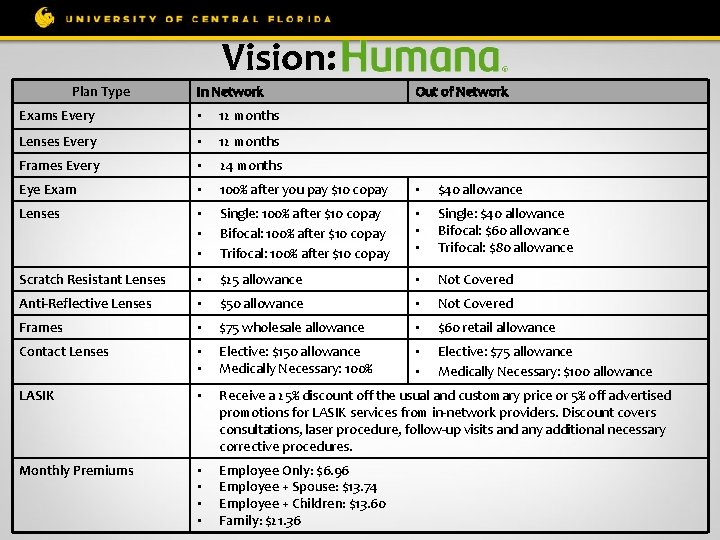
Vision: Plan Type In Network Out of Network Exams Every • 12 months Lenses Every • 12 months Frames Every • 24 months Eye Exam • 100% after you pay $10 copay • $40 allowance Lenses • • • Single: 100% after $10 copay Bifocal: 100% after $10 copay Trifocal: 100% after $10 copay • • • Single: $40 allowance Bifocal: $60 allowance Trifocal: $80 allowance Scratch Resistant Lenses • $25 allowance • Not Covered Anti-Reflective Lenses • $50 allowance • Not Covered Frames • $75 wholesale allowance • $60 retail allowance Contact Lenses • • Elective: $150 allowance Medically Necessary: 100% • • Elective: $75 allowance Medically Necessary: $100 allowance LASIK • Receive a 25% discount off the usual and customary price or 5% off advertised promotions for LASIK services from in-network providers. Discount covers consultations, laser procedure, follow-up visits and any additional necessary corrective procedures. Monthly Premiums • • Employee Only: $6. 96 Employee + Spouse: $13. 74 Employee + Children: $13. 60 Family: $21. 36
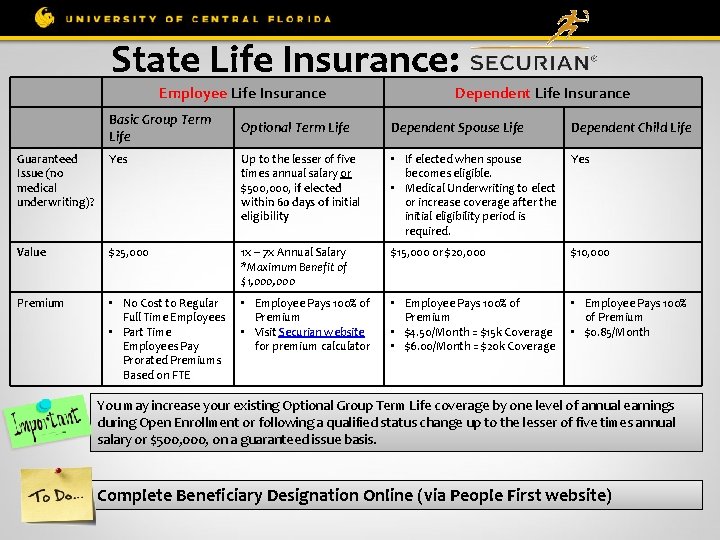
State Life Insurance: Employee Life Insurance Plan Type Basic Group Term Life Dependent Life Insurance Optional Term Life Dependent Spouse Life Dependent Child Life Guaranteed Issue (no medical underwriting)? Yes Up to the lesser of five times annual salary or $500, 000, if elected within 60 days of initial eligibility • If elected when spouse Yes becomes eligible. • Medical Underwriting to elect or increase coverage after the initial eligibility period is required. Value $25, 000 1 x – 7 x Annual Salary *Maximum Benefit of $1, 000 $15, 000 or $20, 000 $10, 000 Premium • No Cost to Regular Full Time Employees • Part Time Employees Pay Prorated Premiums Based on FTE • Employee Pays 100% of Premium • Visit Securian website for premium calculator • Employee Pays 100% of Premium • $4. 50/Month = $15 k Coverage • $6. 00/Month = $20 k Coverage • Employee Pays 100% of Premium • $0. 85/Month You may increase your existing Optional Group Term Life coverage by one level of annual earnings during Open Enrollment or following a qualified status change up to the lesser of five times annual salary or $500, 000, on a guaranteed issue basis. Complete Beneficiary Designation Online (via People First website)
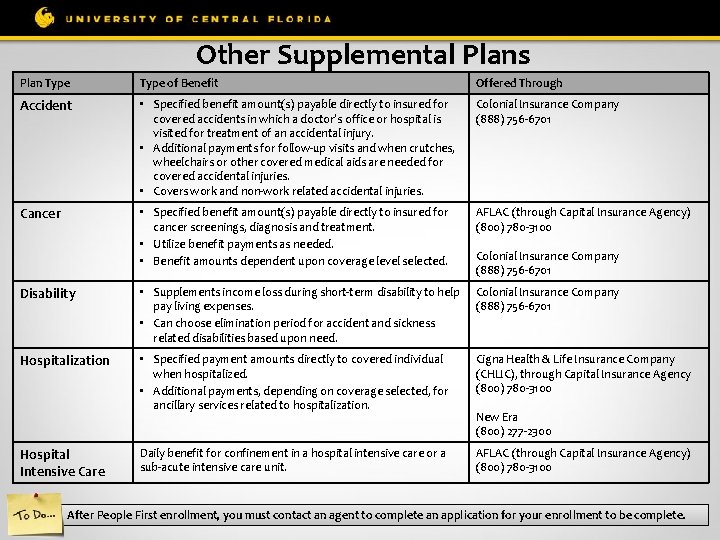
Other Supplemental Plans Plan Type of Benefit Offered Through Accident • Specified benefit amount(s) payable directly to insured for covered accidents in which a doctor’s office or hospital is visited for treatment of an accidental injury. • Additional payments for follow-up visits and when crutches, wheelchairs or other covered medical aids are needed for covered accidental injuries. • Covers work and non-work related accidental injuries. Colonial Insurance Company (888) 756 -6701 Cancer • Specified benefit amount(s) payable directly to insured for cancer screenings, diagnosis and treatment. • Utilize benefit payments as needed. • Benefit amounts dependent upon coverage level selected. AFLAC (through Capital Insurance Agency) (800) 780 -3100 Disability • Supplements income loss during short-term disability to help pay living expenses. • Can choose elimination period for accident and sickness related disabilities based upon need. Colonial Insurance Company (888) 756 -6701 Hospitalization • Specified payment amounts directly to covered individual when hospitalized. • Additional payments, depending on coverage selected, for ancillary services related to hospitalization. Cigna Health & Life Insurance Company (CHLIC), through Capital Insurance Agency (800) 780 -3100 Daily benefit for confinement in a hospital intensive care or a sub-acute intensive care unit. AFLAC (through Capital Insurance Agency) (800) 780 -3100 Hospital Intensive Care Colonial Insurance Company (888) 756 -6701 New Era (800) 277 -2300 After People First enrollment, you must contact an agent to complete an application for your enrollment to be complete.
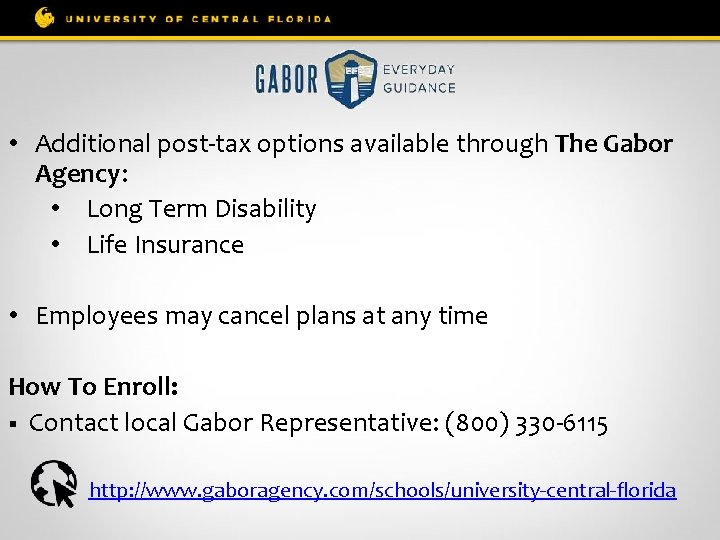
• Additional post-tax options available through The Gabor Agency: • Long Term Disability • Life Insurance • Employees may cancel plans at any time How To Enroll: § Contact local Gabor Representative: (800) 330 -6115 http: //www. gaboragency. com/schools/university-central-florida
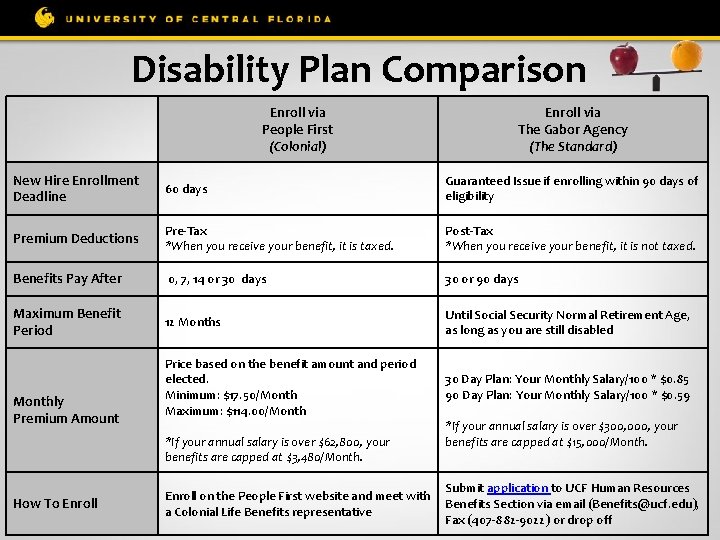
Disability Plan Comparison Enroll via People First (Colonial) Enroll via The Gabor Agency (The Standard) New Hire Enrollment Deadline 60 days Guaranteed Issue if enrolling within 90 days of eligibility Premium Deductions Pre-Tax *When you receive your benefit, it is taxed. Post-Tax *When you receive your benefit, it is not taxed. Benefits Pay After 0, 7, 14 or 30 days 30 or 90 days Maximum Benefit Period 12 Months Until Social Security Normal Retirement Age, as long as you are still disabled Price based on the benefit amount and period elected. Minimum: $17. 50/Month Maximum: $114. 00/Month 30 Day Plan: Your Monthly Salary/100 * $0. 85 90 Day Plan: Your Monthly Salary/100 * $0. 59 Monthly Premium Amount *If your annual salary is over $62, 800, your benefits are capped at $3, 480/Month. How To Enroll *If your annual salary is over $300, 000, your benefits are capped at $15, 000/Month. Submit application to UCF Human Resources Enroll on the People First website and meet with Benefits Section via email (Benefits@ucf. edu), a Colonial Life Benefits representative Fax (407 -882 -9022) or drop off
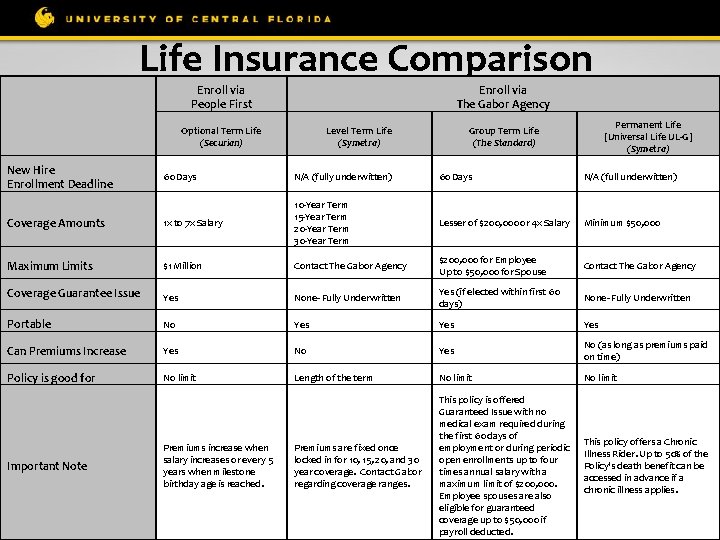
Life Insurance Comparison Enroll via People First Enroll via The Gabor Agency Optional Term Life (Securian) New Hire Enrollment Deadline Level Term Life (Symetra) Permanent Life [Universal Life UL-G] (Symetra) Group Term Life (The Standard) 60 Days N/A (fully underwitten) 60 Days N/A (full underwitten) Coverage Amounts 1 x to 7 x Salary 10 -Year Term 15 -Year Term 20 -Year Term 30 -Year Term Lesser of $200, 000 or 4 x Salary Minimum $50, 000 Maximum Limits $1 Million Contact The Gabor Agency $200, 000 for Employee Up to $50, 000 for Spouse Contact The Gabor Agency Coverage Guarantee Issue Yes None- Fully Underwritten Yes (if elected within first 60 days) None- Fully Underwritten Portable No Yes Can Premiums Increase Yes No (as long as premiums paid on time) Policy is good for No limit Length of the term No limit Premiums are fixed once locked in for 10, 15, 20, and 30 year coverage. Contact Gabor regarding coverage ranges. This policy is offered Guaranteed Issue with no medical exam required during the first 60 days of employment or during periodic open enrollments up to four times annual salary with a maximum limit of $200, 000. Employee spouses are also eligible for guaranteed coverage up to $50, 000 if payroll deducted. This policy offers a Chronic Illness Rider. Up to 50% of the Policy's death benefit can be accessed in advance if a chronic illness applies. Important Note Premiums increase when salary increases or every 5 years when milestone birthday age is reached.
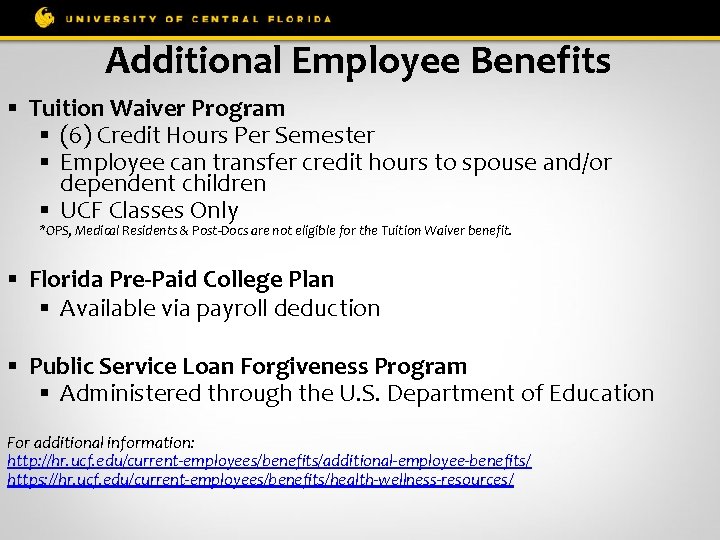
Additional Employee Benefits § Tuition Waiver Program § (6) Credit Hours Per Semester § Employee can transfer credit hours to spouse and/or dependent children § UCF Classes Only *OPS, Medical Residents & Post-Docs are not eligible for the Tuition Waiver benefit. § Florida Pre-Paid College Plan § Available via payroll deduction § Public Service Loan Forgiveness Program § Administered through the U. S. Department of Education For additional information: http: //hr. ucf. edu/current-employees/benefits/additional-employee-benefits/ https: //hr. ucf. edu/current-employees/benefits/health-wellness-resources/
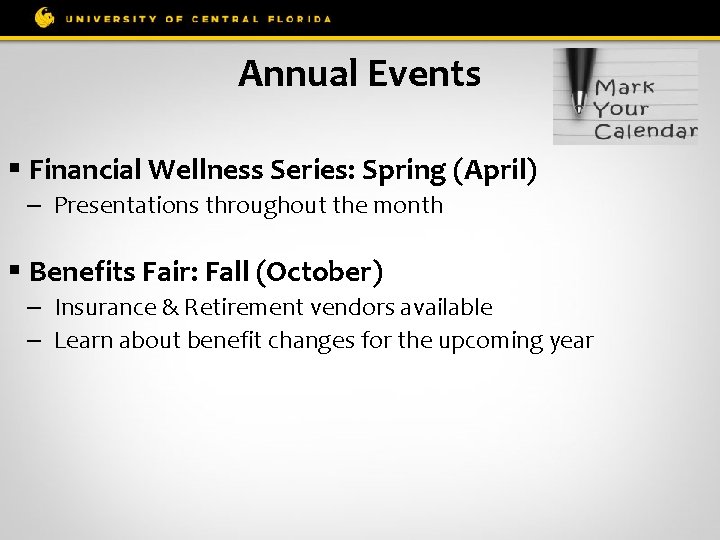
Annual Events § Financial Wellness Series: Spring (April) – Presentations throughout the month § Benefits Fair: Fall (October) – Insurance & Retirement vendors available – Learn about benefit changes for the upcoming year
Workers’ Compensation DO NOT SEE PERSONAL DOCTOR IF INJURED ON THE JOB! § These injuries are not covered by regular medical insurance § Supervisor and employee must report to Ameri. Sys ASAP (800 -455 -2079), whether or not medical treatment is desired § The call to Ameri. Sys and a “UCF Report of Accident/Near Miss” form must be completed Questions: Contact Human Resources Leave of Absence/Workers’ Compensation Section at loaandworkcomp@ucf. edu or 407 -823 -2771
Sick Leave Pool Eligibility § Employed with UCF for more than (1) year § Must have at least 64 hours of unused sick leave § Donate 16 hours to the Sick Leave Pool Open Enrollment Period § March & September Questions regarding the Sick Leave Pool should be referred to the Human Resources Leave of Absence & Workers Compensation Section (loaandworkcomp@ucf. edu).
FMLA (Family Medical Leave Act) Rights & Responsibilities § Employees who are out for a period greater than (10) days due to medical reasons must request a medical leave of absence. § Absences cannot be counted against employees for attendance or disciplinary purposes if the employee’s leave of absence is designated FML (Family Medical Leave). § To be entitled to FMLA leave, the employee must: § Be employed with the University for (1) year; and § Have worked 1250 hours in the 12 -month period prior to their leave. Questions regarding FMLA should be referred to the Human Resources Leave of Absence & Workers Compensation Section (loaandworkcomp@ucf. edu).
New Employee Orientation Benefits: Retirement (Part 2) UCF Human Resources Benefits Section (407) 823 -2771 Benefits@ucf. edu
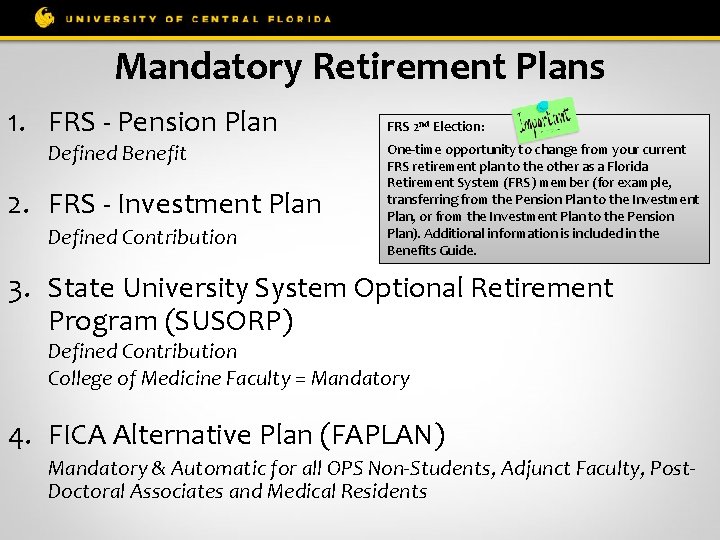
Mandatory Retirement Plans 1. FRS - Pension Plan FRS 2 nd Election: 2. FRS - Investment Plan One-time opportunity to change from your current FRS retirement plan to the other as a Florida Retirement System (FRS) member (for example, transferring from the Pension Plan to the Investment Plan, or from the Investment Plan to the Pension Plan). Additional information is included in the Benefits Guide. Defined Benefit Defined Contribution 3. State University System Optional Retirement Program (SUSORP) Defined Contribution College of Medicine Faculty = Mandatory 4. FICA Alternative Plan (FAPLAN) Mandatory & Automatic for all OPS Non-Students, Adjunct Faculty, Post. Doctoral Associates and Medical Residents
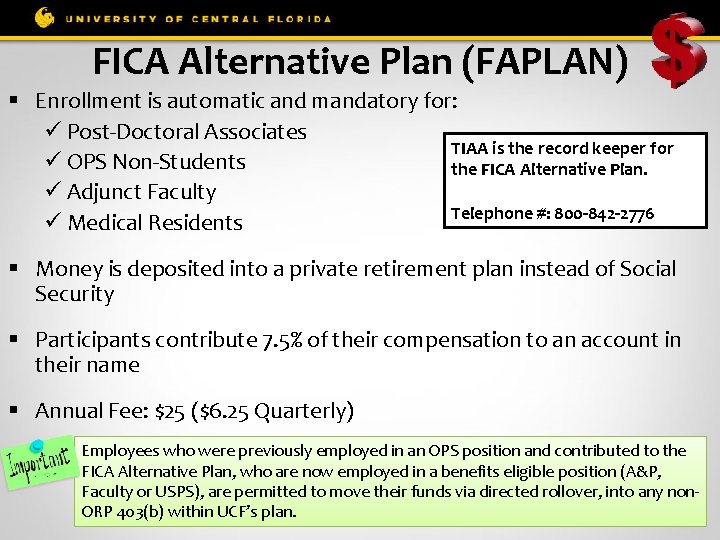
FICA Alternative Plan (FAPLAN) § Enrollment is automatic and mandatory for: Post-Doctoral Associates TIAA is the record keeper for OPS Non-Students the FICA Alternative Plan. Adjunct Faculty Telephone #: 800 -842 -2776 Medical Residents § Money is deposited into a private retirement plan instead of Social Security § Participants contribute 7. 5% of their compensation to an account in their name § Annual Fee: $25 ($6. 25 Quarterly) Employees who were previously employed in an OPS position and contributed to the FICA Alternative Plan, who are now employed in a benefits eligible position (A&P, Faculty or USPS), are permitted to move their funds via directed rollover, into any non. ORP 403(b) within UCF’s plan.
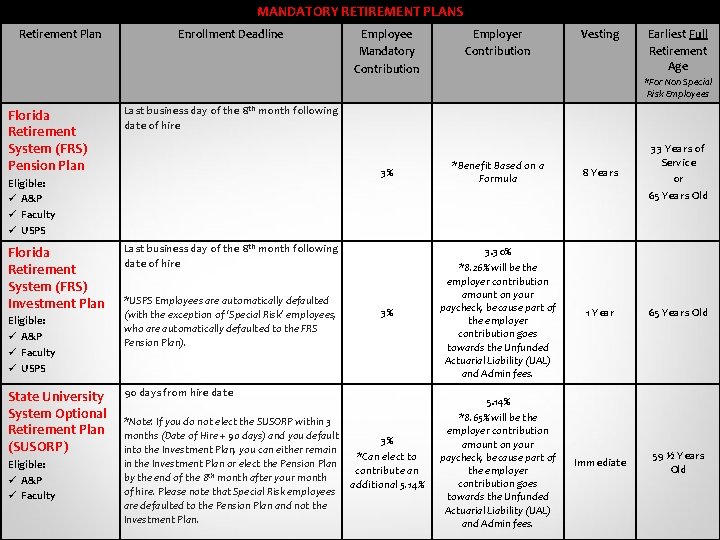
MANDATORY RETIREMENT PLANS Retirement Plan Florida Retirement System (FRS) Pension Plan Enrollment Deadline Eligible: A&P Faculty USPS Vesting Earliest Full Retirement Age *For Non Special Risk Employees 3% *Benefit Based on a Formula 8 Years 33 Years of Service or 65 Years Old 3% 3. 30% *8. 26% will be the employer contribution amount on your paycheck, because part of the employer contribution goes towards the Unfunded Actuarial Liability (UAL) and Admin fees. 1 Year 65 Years Old 5. 14% *8. 65% will be the employer contribution amount on your paycheck, because part of the employer contribution goes towards the Unfunded Actuarial Liability (UAL) and Admin fees. Immediate 59 ½ Years Old Last business day of the 8 th month following date of hire *USPS Employees are automatically defaulted (with the exception of ‘Special Risk’ employees, who are automatically defaulted to the FRS Pension Plan). State University 90 days from hire date System Optional *Note: If you do not elect the SUSORP within 3 Retirement Plan months (Date of Hire + 90 days) and you default (SUSORP) into the Investment Plan, you can either remain Eligible: A&P Faculty Employer Contribution Last business day of the 8 th month following date of hire Eligible: A&P Faculty USPS Florida Retirement System (FRS) Investment Plan Employee Mandatory Contribution 3% *Can elect to in the Investment Plan or elect the Pension Plan contribute an by the end of the 8 th month after your month additional 5. 14% of hire. Please note that Special Risk employees are defaulted to the Pension Plan and not the Investment Plan.
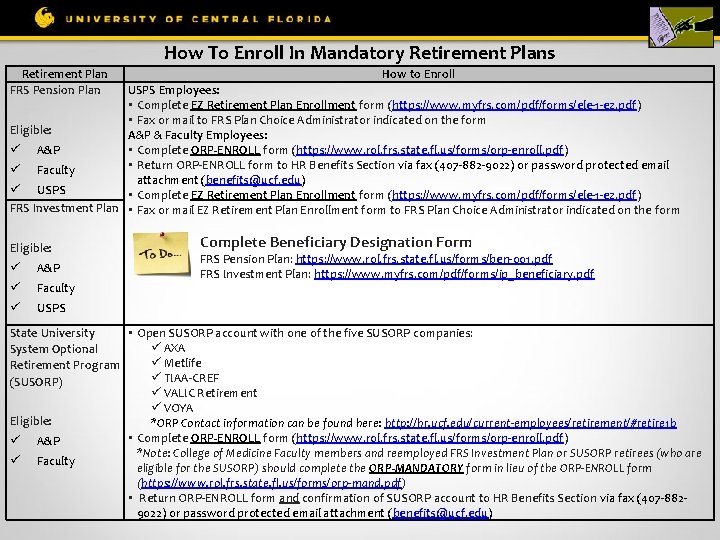
How To Enroll In Mandatory Retirement Plans Retirement Plan FRS Pension Plan How to Enroll USPS Employees: • Complete EZ Retirement Plan Enrollment form (https: //www. myfrs. com/pdf/forms/ele-1 -ez. pdf) • Fax or mail to FRS Plan Choice Administrator indicated on the form Eligible: A&P & Faculty Employees: • Complete ORP-ENROLL form (https: //www. rol. frs. state. fl. us/forms/orp-enroll. pdf) A&P • Return ORP-ENROLL form to HR Benefits Section via fax (407 -882 -9022) or password protected email Faculty attachment (benefits@ucf. edu) USPS • Complete EZ Retirement Plan Enrollment form (https: //www. myfrs. com/pdf/forms/ele-1 -ez. pdf) FRS Investment Plan • Fax or mail EZ Retirement Plan Enrollment form to FRS Plan Choice Administrator indicated on the form Eligible: A&P Faculty USPS Complete Beneficiary Designation Form FRS Pension Plan: https: //www. rol. frs. state. fl. us/forms/ben-001. pdf FRS Investment Plan: https: //www. myfrs. com/pdf/forms/ip_beneficiary. pdf • Open SUSORP account with one of the five SUSORP companies: State University AXA System Optional Metlife Retirement Program TIAA-CREF (SUSORP) VALIC Retirement VOYA Eligible: *ORP Contact information can be found here: http: //hr. ucf. edu/current-employees/retirement/#retire 1 b • Complete ORP-ENROLL form (https: //www. rol. frs. state. fl. us/forms/orp-enroll. pdf) A&P *Note: College of Medicine Faculty members and reemployed FRS Investment Plan or SUSORP retirees (who are Faculty eligible for the SUSORP) should complete the ORP-MANDATORY form in lieu of the ORP-ENROLL form (https: //www. rol. frs. state. fl. us/forms/orp-mand. pdf) • Return ORP-ENROLL form and confirmation of SUSORP account to HR Benefits Section via fax (407 -8829022) or password protected email attachment (benefits@ucf. edu)
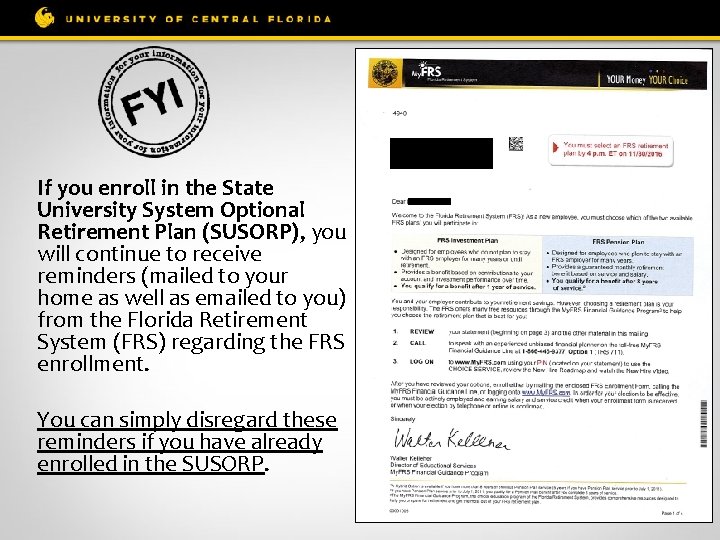
If you enroll in the State University System Optional Retirement Plan (SUSORP), you will continue to receive reminders (mailed to your home as well as emailed to you) from the Florida Retirement System (FRS) regarding the FRS enrollment. You can simply disregard these reminders if you have already enrolled in the SUSORP.
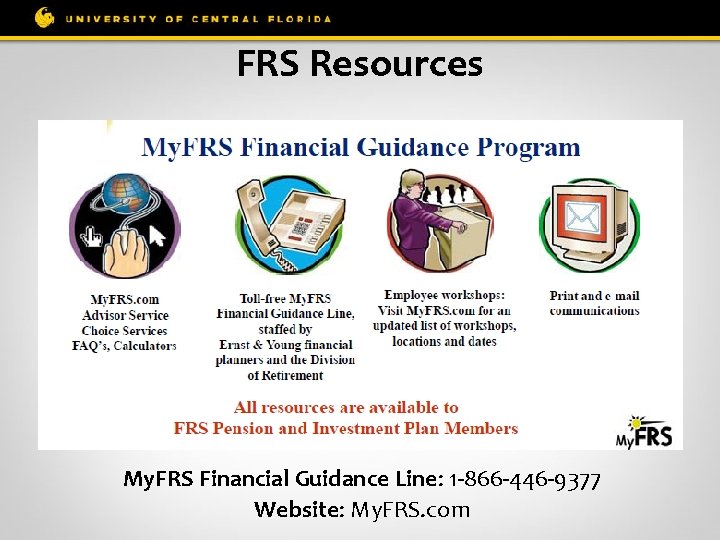
FRS Resources My. FRS Financial Guidance Line: 1 -866 -446 -9377 Website: My. FRS. com
Reemployed Retirees § If you are retired from the FRS Pension Plan (or DROP): § You are not eligible for renewed membership in any State of Florida retirement plan (FRS Pension, FRS Investment and/or ORP Plan). § If you are retired from the FRS Investment Plan or SUSORP Plan: § If you are a reemployed retiree returning to work in an ORP eligible position, you must enroll in the ORP plan. § If you are a reemployed retiree returning to work in a non-ORP eligible position, you must enroll in the FRS Investment Plan. Additional Reminders: § § § If you are retired from the FRS Pension, FRS Investment or SUSORP retirement plans, a minimum of (6) full calendar months is required before you can be rehired. If you come back before the (6) month minimum, you will be financially liable for repayment if in violation. Monthly benefit/distribution will be suspended during months 7 through 12, if reemployed.
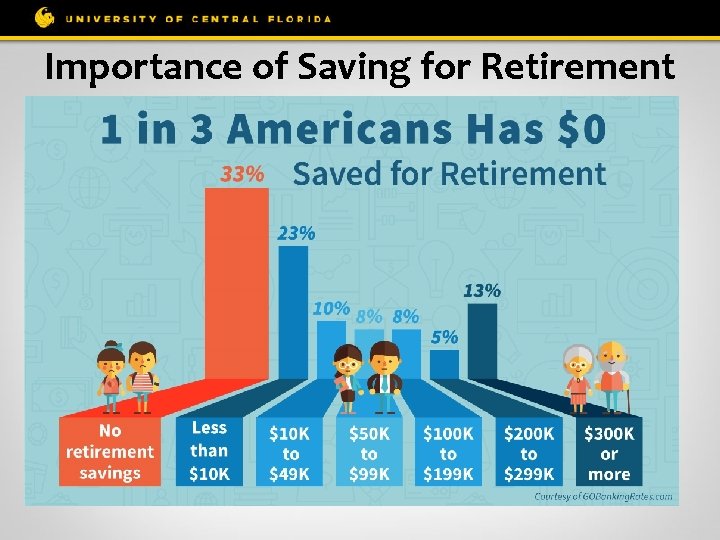
Importance of Saving for Retirement
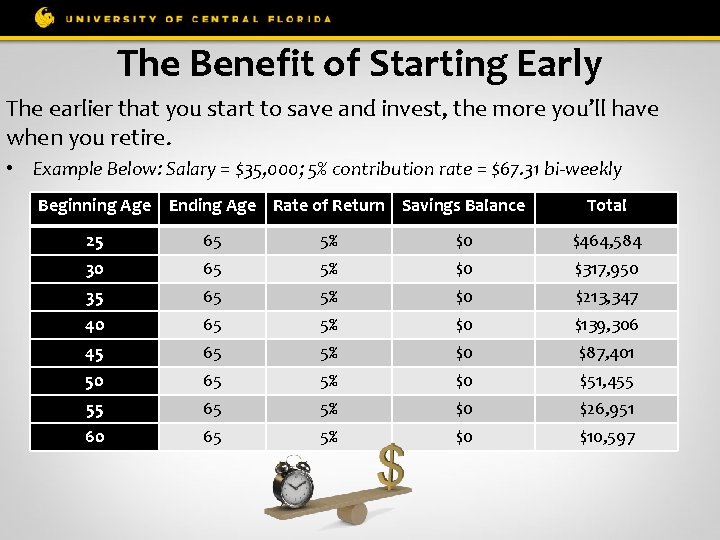
The Benefit of Starting Early The earlier that you start to save and invest, the more you’ll have when you retire. • Example Below: Salary = $35, 000; 5% contribution rate = $67. 31 bi-weekly Beginning Age Ending Age Rate of Return Savings Balance Total 25 65 5% $0 $464, 584 30 65 5% $0 $317, 950 35 65 5% $0 $213, 347 40 65 5% $0 $139, 306 45 65 5% $0 $87, 401 50 65 5% $0 $51, 455 55 65 5% $0 $26, 951 60 65 5% $0 $10, 597
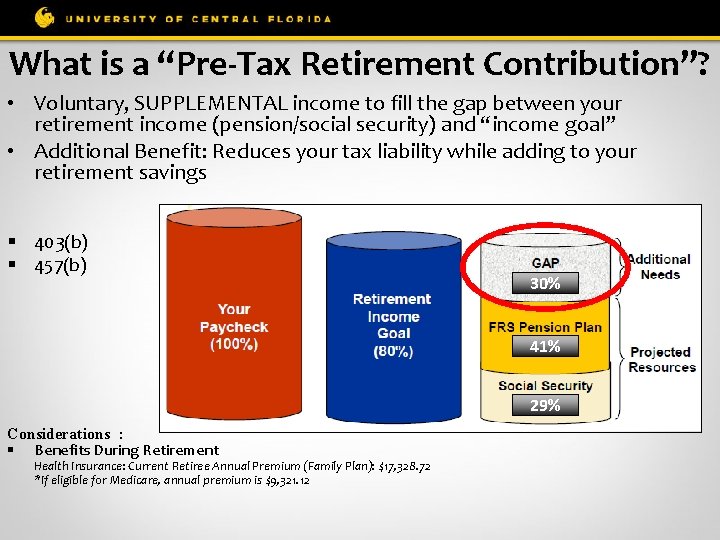
What is a “Pre-Tax Retirement Contribution”? • Voluntary, SUPPLEMENTAL income to fill the gap between your retirement income (pension/social security) and “income goal” • Additional Benefit: Reduces your tax liability while adding to your retirement savings § 403(b) § 457(b) 30% 41% 29% Considerations : § Benefits During Retirement Health Insurance: Current Retiree Annual Premium (Family Plan): $17, 328. 72 *If eligible for Medicare, annual premium is $9, 321. 12
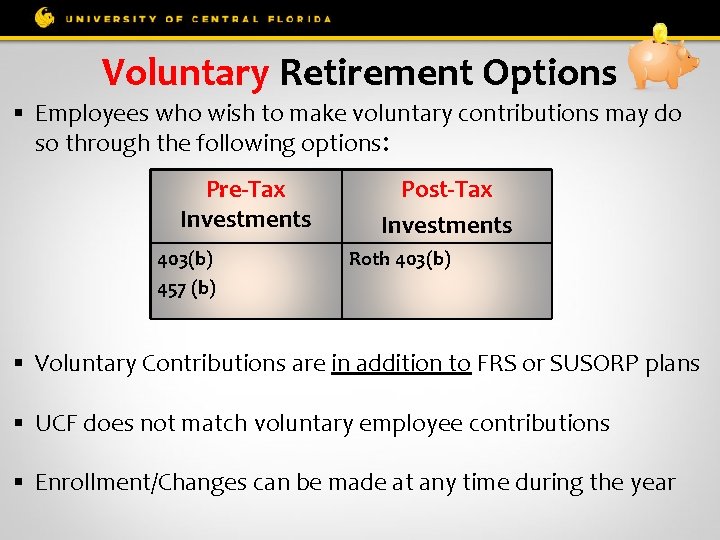
Voluntary Retirement Options § Employees who wish to make voluntary contributions may do so through the following options: Pre-Tax Investments 403(b) 457 (b) Post-Tax Investments Roth 403(b) § Voluntary Contributions are in addition to FRS or SUSORP plans § UCF does not match voluntary employee contributions § Enrollment/Changes can be made at any time during the year
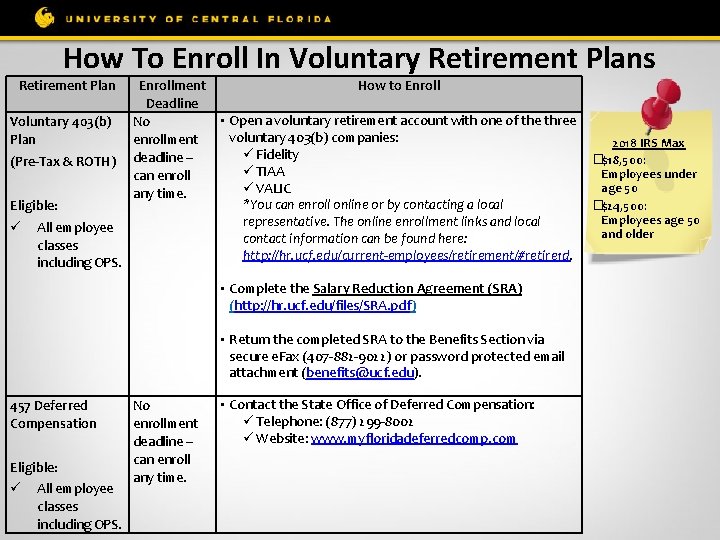
How To Enroll In Voluntary Retirement Plans Retirement Plan Enrollment How to Enroll Deadline • Open a voluntary retirement account with one of the three Voluntary 403(b) No voluntary 403(b) companies: Plan enrollment 2018 IRS Max Fidelity �$18, 500: (Pre-Tax & ROTH) deadline – TIAA Employees under can enroll age 50 VALIC any time. *You can enroll online or by contacting a local �$24, 500: Eligible: Employees age 50 representative. The online enrollment links and local All employee and older contact information can be found here: classes http: //hr. ucf. edu/current-employees/retirement/#retire 1 d. including OPS. • Complete the Salary Reduction Agreement (SRA) (http: //hr. ucf. edu/files/SRA. pdf) • Return the completed SRA to the Benefits Section via secure e. Fax (407 -882 -9022) or password protected email attachment (benefits@ucf. edu). 457 Deferred Compensation Eligible: All employee classes including OPS. No enrollment deadline – can enroll any time. • Contact the State Office of Deferred Compensation: Telephone: (877) 299 -8002 Website: www. myfloridadeferredcomp. com
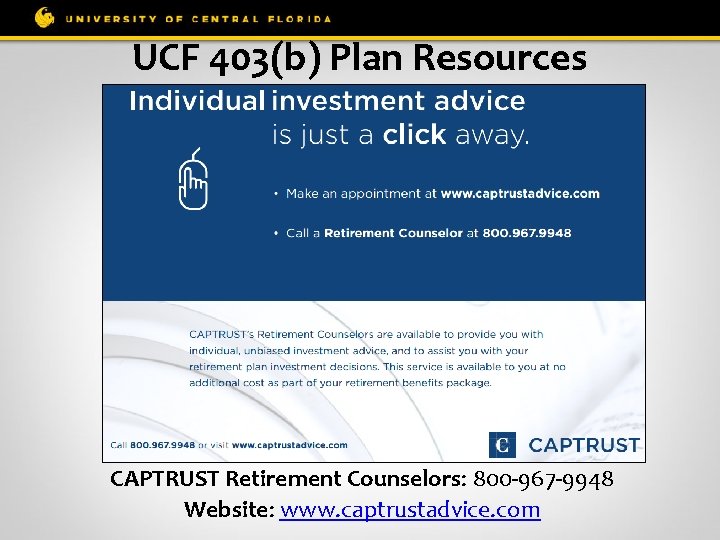
UCF 403(b) Plan Resources CAPTRUST Retirement Counselors: 800 -967 -9948 Website: www. captrustadvice. com
§ The UCF Human Resources Benefits section now offers an insurance and retirement enrollment lab to assist employees in completing their insurance and retirement enrollments. § During these one-on-one sessions, key features of the benefits plans can be compared and issues can be addressed, which need to be considered when making election decisions. Assistance With: § People First Sign-In & Enrollment Process § State Sponsored & Voluntary Retirement Plan Enrollment Process § The Gabor Agency Supplemental Plans Enrollment Process § The sessions are available by appointment only. To make an appointment, please call or email the UCF Benefits section: § Call: § Email: (407) 823 -2771 Benefits@ucf. edu
QUESTIONS
- Slides: 40